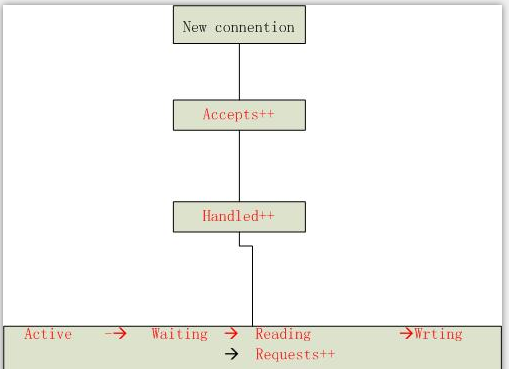
 注释:Accepts(接受)、Handled(已处理)、Requests(请求数)是一直在增加的计数器。Active(活跃)、Waiting(等待)、Reading(读)、Writing(写)随着请求量而增减
| 名称 | 描述 | 指标类型 |
| Accepts(接受) | NGINX 所接受的客户端连接数 | 资源: 功能 |
| Handled(已处理) | 成功的客户端连接数 | 资源: 功能 |
| Active(活跃) | 当前活跃的客户端连接数 | 资源: 功能 |
| Dropped(已丢弃,计算得出) | 丢弃的连接数(接受 - 已处理) | 工作:错误* |
| Requests(请求数) | 客户端请求数 | 工作:吞吐量 |
[root@iZ237lzm354Z scripts]# /usr/local/nginx/sbin/nginx -V
nginx version: nginx/1.4.7
built by gcc 4.8.2 20140120 (Red Hat 4.8.2-16) (GCC)
TLS SNI support enabled
configure arguments: --with-http_stub_status_module --with-http_ssl_module --with-pcre
--with-http_realip_module --with-http_image_filter_module
[root@iZ237lzm354Z scripts]#2,nginx_status开启的步骤:[root@iZ237lzm354Z scripts]# vim /usr/local/nginx/conf/nginx.conf
server {
listen 80 ;
server_name www.baidu.com;
rewrite ^/invitejoin/(.*)\.htm[l]?$ /register.shtml?$1 last;
index index.jsp index.html;
root /opt/home;
location = /nginx-status {
stub_status on;
access_log off;
allow 127.0.0.1;
allow 10.253.12.34;
####zabbix服务器端的IP地址一般为内网IP
}3,测试并启动nginx[root@iZ237lzm354Z scripts]# /usr/local/nginx/sbin/nginx -tnginx: the configuration file /usr/local/nginx/conf/nginx.conf syntax is oknginx: configuration file /usr/local/nginx/conf/nginx.conf test is successful[root@iZ237lzm354Z scripts]# /usr/local/nginx/sbin/nginx -s reload4,用curl来进行测试:[root@iZ237lzm354Z scripts]# curl www.baidu.com/nginx-status
Active connections: 979
server accepts handled requests
756072922 756072922 1136799890
Reading: 0 Writing: 4 Waiting: 975备注:Active connections –当前活跃的连接数量 [root@ittestserver1 opt]# vim /usr/local/zabbix/scripts/nginx-check_performance.sh
#!/bin/bash
##################################
# Zabbix monitoring script
#
# nginx:
# - anything available via nginx stub-status module
#
##################################
# Contact:
# vincent.viallet@gmail.com
# Zabbix requested parameter
ZBX_REQ_DATA="$1"
ZBX_REQ_DATA_URL="$2"
# Nginx defaults
NGINX_STATUS_DEFAULT_URL="www.baidu.com/nginx-status" #(这里写网站的域名)
WGET_BIN="/usr/bin/wget"
#
# Error handling:
# - need to be displayable in Zabbix (avoid NOT_SUPPORTED)
# - items need to be of type "float" (allow negative + float)
#
ERROR_NO_ACCESS_FILE="-0.9900"
ERROR_NO_ACCESS="-0.9901"
ERROR_WRONG_PARAM="-0.9902"
ERROR_DATA="-0.9903" # either can not connect / bad host / bad port
# Handle host and port if non-default
if [ ! -z "$ZBX_REQ_DATA_URL" ]; then
URL="$ZBX_REQ_DATA_URL"
else
URL="$NGINX_STATUS_DEFAULT_URL"
fi
# save the nginx stats in a variable for future parsing
NGINX_STATS=$($WGET_BIN -q $URL -O - 2> /dev/null)
# error during retrieve
if [ $? -ne 0 -o -z "$NGINX_STATS" ]; then
echo $ERROR_DATA
exit 1
fi
#
# Extract data from nginx stats
#
case $ZBX_REQ_DATA in
active_connections) echo "$NGINX_STATS" | head -1 | cut -f3 -d' ';;
accepted_connections) echo "$NGINX_STATS" | grep -Ev '[a-zA-Z]' | cut -f2 -d' ';;
handled_connections) echo "$NGINX_STATS" | grep -Ev '[a-zA-Z]' | cut -f3 -d' ';;
handled_requests) echo "$NGINX_STATS" | grep -Ev '[a-zA-Z]' | cut -f4 -d' ';;
reading) echo "$NGINX_STATS" | tail -1 | cut -f2 -d' ';;
writing) echo "$NGINX_STATS" | tail -1 | cut -f4 -d' ';;
waiting) echo "$NGINX_STATS" | tail -1 | cut -f6 -d' ';;
*) echo $ERROR_WRONG_PARAM; exit 1;;
esac
exit 0
[root@ittestserver1 opt]# chmod +x /usr/local/zabbix/scripts/nginx-check_performance.sh
-rw-r--r-x1 root root 1645 2月 4 14:26/usr/local/zabbix/scripts/nginx-check_performance.sh[root@ittestserver1 opt]# vim /usr/local/zabbix/etc/zabbix_agentd.conf
####### USER-DEFINED MONITORED PARAMETERS #######
### Option: UnsafeUserParameters
# Allow all characters to be passed in arguments to user-defined parameters.
# The following characters are not allowed:
# \ ' " ` * ? [ ] { } ~ $ ! & ; ( ) < > | # @
# Additionally, newline characters are not allowed.
# 0 - do not allow
# 1 - allow
#
# Mandatory: no
# Range: 0-1
# Default:
# UnsafeUserParameters=0
UnsafeUserParameters=1
### Option: UserParameter
# User-defined parameter to monitor. There can be several user-defined parameters.
# Format: UserParameter=<key>,<shell command>
# See 'zabbix_agentd' directory for examples.
#
# Mandatory: no
# Default:
# UserParameter=
UserParameter=nginx[*],/usr/local/zabbix/scripts/nginx-check_performance.sh "$1"[root@zabbix ~]# /etc/init.d/zabbix_agentd restart
Shutting down zabbix_agentd: [ OK ]
Starting zabbix_agentd: [ OK ]
[root@zabbix ~]#4,在zabbix服务端(server)进行测试。[root@zabbix ~]# zabbix_get -s 10.253.17.20 -p 10050 -k "nginx[reading]"
0
[root@zabbix ~]#
我需要在客户计算机上运行Ruby应用程序。通常需要几天才能完成(复制大备份文件)。问题是如果启用sleep,它会中断应用程序。否则,计算机将持续运行数周,直到我下次访问为止。有什么方法可以防止执行期间休眠并让Windows在执行后休眠吗?欢迎任何疯狂的想法;-) 最佳答案 Here建议使用SetThreadExecutionStateWinAPI函数,使应用程序能够通知系统它正在使用中,从而防止系统在应用程序运行时进入休眠状态或关闭显示。像这样的东西:require'Win32API'ES_AWAYMODE_REQUIRED=0x0
我的瘦服务器配置了nginx,我的ROR应用程序正在它们上运行。在我发布代码更新时运行thinrestart会给我的应用程序带来一些停机时间。我试图弄清楚如何优雅地重启正在运行的Thin实例,但找不到好的解决方案。有没有人能做到这一点? 最佳答案 #Restartjustthethinserverdescribedbythatconfigsudothin-C/etc/thin/mysite.ymlrestartNginx将继续运行并代理请求。如果您将Nginx设置为使用多个上游服务器,例如server{listen80;server
当我的预订模型通过rake任务在状态机上转换时,我试图找出如何跳过对ActiveRecord对象的特定实例的验证。我想在reservation.close时跳过所有验证!叫做。希望调用reservation.close!(:validate=>false)之类的东西。仅供引用,我们正在使用https://github.com/pluginaweek/state_machine用于状态机。这是我的预订模型的示例。classReservation["requested","negotiating","approved"])}state_machine:initial=>'requested
对于作为String#tr参数的单引号字符串文字中反斜杠的转义状态,我觉得有些神秘。你能解释一下下面三个例子之间的对比吗?我特别不明白第二个。为了避免复杂化,我在这里使用了'd',在双引号中转义时不会改变含义("\d"="d")。'\\'.tr('\\','x')#=>"x"'\\'.tr('\\d','x')#=>"\\"'\\'.tr('\\\d','x')#=>"x" 最佳答案 在tr中转义tr的第一个参数非常类似于正则表达式中的括号字符分组。您可以在表达式的开头使用^来否定匹配(替换任何不匹配的内容)并使用例如a-f来匹配一
我目前正在使用以下方法获取页面的源代码:Net::HTTP.get(URI.parse(page.url))我还想获取HTTP状态,而无需发出第二个请求。有没有办法用另一种方法做到这一点?我一直在查看文档,但似乎找不到我要找的东西。 最佳答案 在我看来,除非您需要一些真正的低级访问或控制,否则最好使用Ruby的内置Open::URI模块:require'open-uri'io=open('http://www.example.org/')#=>#body=io.read[0,50]#=>"["200","OK"]io.base_ur
这篇文章是继上一篇文章“Observability:从零开始创建Java微服务并监控它(一)”的续篇。在上一篇文章中,我们讲述了如何创建一个Javaweb应用,并使用Filebeat来收集应用所生成的日志。在今天的文章中,我来详述如何收集应用的指标,使用APM来监控应用并监督web服务的在线情况。源码可以在地址 https://github.com/liu-xiao-guo/java_observability 进行下载。摄入指标指标被视为可以随时更改的时间点值。当前请求的数量可以改变任何毫秒。你可能有1000个请求的峰值,然后一切都回到一个请求。这也意味着这些指标可能不准确,你还想提取最小/
我想为我的Task模型创建一个status属性,该属性将按以下顺序指示它在三部分进度中的位置:打开=>进行中=>完成。它的工作方式类似于亚马逊包裹的交付方式:已订购=>已发货=>已交付。我想知道设置此属性的最佳方法是什么。我可能是错的,但创建三个独立的bool属性似乎有点多余。实现此目标的最佳方法是什么? 最佳答案 Rails4有一个内置的enummacro.它使用单个整数列并映射到键列表。classOrderenumstatus:[:ordered,:shipped,:delivered]end状态映射如下:{ordered:0,
s=Socket.new(Socket::AF_INET,Socket::SOCK_STREAM,0)s.connect(Socket.pack_sockaddr_in('port','hostname'))ssl=OpenSSL::SSL::SSLSocket.new(s,sslcert)ssl.connect从这里开始,如果ssl连接和底层套接字仍然是ESTABLISHED,或者它是否在默认值7200之后进入CLOSE_WAIT,我想检查一个线程几秒钟甚至更糟的是在实际上不需要.write()或.read()的情况下关闭。是用select()、IO.select()还是其他方法完成
我想从rubyrake脚本运行一个可执行文件,比如foo.exe我希望将foo.exe的STDOUT和STDERR输出直接写入我正在运行rake任务的控制台.当进程完成时,我想将退出代码捕获到一个变量中。我如何实现这一目标?我一直在玩backticks、process.spawn、system但我无法获得我想要的所有行为,只有部分更新:我在Windows上,在标准命令提示符下,而不是cygwin 最佳答案 system获取您想要的STDOUT行为。它还返回true作为零退出代码,这可能很有用。$?填充了有关最后一次system调
A/ctohttp://wiki.nginx.org/CoreModule#usermaster进程曾经以root用户运行,是否可以以不同的用户运行nginxmaster进程? 最佳答案 只需以非root身份运行init脚本(即/etc/init.d/nginxstart),就可以用不同的用户运行nginxmaster进程。如果这真的是你想要做的,你将需要确保日志和pid目录(通常是/var/log/nginx&/var/run/nginx.pid)对该用户是可写的,并且您所有的listen调用都是针对大于1024的端口(因为绑定(
