目录
Windows Docker 安装 ElasticSearch_全栈编程网的博客-CSDN博客
这种方式是spring-data提取了共性的CRUD功能,根据不同的操作资源实现不同的操作,如果操作的是MySQL那么就有 spring-data-mysql 实现对MySQL的CRUD功能。
Spring-data-elasticsearch方式,通过创建一个Repository接口 继承 ElasticsearchRepository 接口方式获取操作ElasticSearch的CRUD功能。
        <dependency>
            <groupId>org.springframework.boot</groupId>
            <artifactId>spring-boot-starter-web</artifactId>
        </dependency>

        <dependency>
            <groupId>org.springframework.boot</groupId>
            <artifactId>spring-boot-starter-test</artifactId>
            <scope>test</scope>
        </dependency>

        <dependency>
            <groupId>org.springframework.boot</groupId>
            <artifactId>spring-boot-starter-data-elasticsearch</artifactId>
        </dependency>

        <dependency>
            <groupId>org.projectlombok</groupId>
            <artifactId>lombok</artifactId>
            <version>1.16.10</version>
        </dependency>

        <dependency>
            <groupId>com.alibaba</groupId>
            <artifactId>fastjson</artifactId>
            <version> 1.2.70</version>
</dependency>spring:
application:
name: demo
elasticsearch:
uris: http://localhost:9200
server:
port: 8081
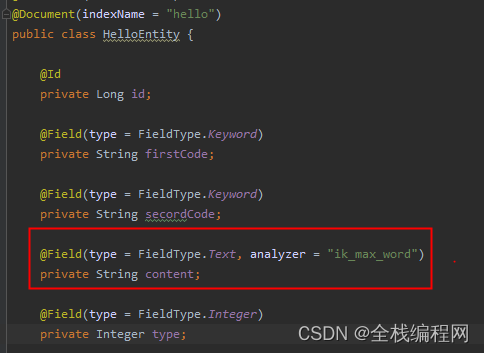
ElasticSearch 中有个索引 hello,这个实体类定义了索引的映射关系,每个属性都是索引对应mapping字段的设置,例如可以设置字段的类型,是否分词等信息,后面调用接口创建索引会根据这个类创建对应ES里面的索引hello
@Data
@NoArgsConstructor
@Accessors(chain = true)
@Document(indexName = "hello")
public class HelloEntity {

    @Id
    private Long id;

    @Field(type = FieldType.Keyword)
    private String firstCode;

    @Field(type = FieldType.Keyword)
    private String secordCode;

    @Field(type = FieldType.Text, analyzer = "ik_max_word")
    private String content;

    @Field(type = FieldType.Integer)
    private Integer type;

    public HelloEntity(Long id, String firstCode, String secordCode, String content, Integer type){
        this.id=id;
        this.firstCode=firstCode;
        this.secordCode=secordCode;
        this.content=content;
        this.type=type;
    }
}spring-data-elasticsearch 中 ElasticSearchRepository 实现了对ElasticSearch 的CRUD操作,只要定义个HelloDao接口集成这个接口,就继承了CRUD功能。
对于自定义的对ES的操作方法,类似于jpa语法定义方法,就可以实现对ES的操作,如代码中例子所示,具体语法可以去学习一下
import java.util.List;

import org.springframework.data.domain.Page;
import org.springframework.data.domain.PageRequest;
import org.springframework.data.elasticsearch.annotations.Highlight;
import org.springframework.data.elasticsearch.annotations.HighlightField;
import org.springframework.data.elasticsearch.core.SearchHit;
import org.springframework.data.elasticsearch.repository.ElasticsearchRepository;

import com.example.es.entity.HelloEntity;

public interface HelloDao extends ElasticsearchRepository<HelloEntity, Long> {
    /**
     * 自定义ID范围查询
     * @param begin
     * @param end
     * @param pageable
     * @return
     */
    Page<HelloEntity> findByIdBetween(int begin, int end, PageRequest pageable);

    /**
     * 自定义查询 ,高亮显示 firstCode
     * @param firstCode
     * @param secordCode
     * @return
     */
    @Highlight(fields = {
            @HighlightField(name = "firstCode"),
            @HighlightField(name = "secordCode")
    })
    List<SearchHit<HelloEntity>> findByFirstCodeOrSecordCode(String firstCode, String secordCode);

    /**
     * 模糊查询content
     * @param content
     * @return
     */
    @Highlight(fields = {
            @HighlightField(name = "content")
    })
    List<SearchHit<HelloEntity>> findByContent(String content);
}集成了新建索引、删除索引、CRUD数据、分页查询、模糊查询、高亮显示等接口,基本涵盖了平时对ES的操作功能。
@RestController
@RequestMapping("es")
public class ElasticSearchController {

    @Autowired
    private ElasticsearchRestTemplate elasticsearchRestTemplate;
    @Autowired
    private HelloDao helloDao;

    /**
     * 创建索引 hello
     * @return
     */
    @GetMapping("/createIndex")
    public String create() {
        boolean b = elasticsearchRestTemplate.indexOps(HelloEntity.class).create();
        if (b) {
            return "success";
        }
        return "fail";
    }

    /**
     * 创建索引 hello,并创建mapping
     * @return
     */
    @GetMapping("/createIndexWithMapping")
    public String createMapping() {
        boolean b = elasticsearchRestTemplate.indexOps(HelloEntity.class).createWithMapping();
        if (b) {
            return "success";
        }
        return "fail";
    }

    /**
     * 删除索引 hello
     * @return
     */
    @GetMapping("/deleteIndex")
    public String deleteIndex() {
        boolean b = elasticsearchRestTemplate.indexOps(HelloEntity.class).delete();
        if (b) {
            return "success";
        }
        return "fail";
    }

    /**
     * 往hello索引中插入数据
     * @param entity
     * @return
     */
    @PostMapping
    public String add(@RequestBody HelloEntity entity) {
        HelloEntity save = helloDao.save(entity);
        System.out.println(save);
        return "success";
    }

    /**
     * 修改hello索引中的数据,根据ID修改
     * @param entity
     * @return
     */
    @PutMapping
    public String update(@RequestBody HelloEntity entity) {
        HelloEntity save = helloDao.save(entity);
        return "success";
    }

    /**
     * 根据ID查询数据
     * @param id
     * @return
     */
    @GetMapping("/{id}")
    public String get(@PathVariable(value = "id") Long id) {
        Optional<HelloEntity> byId = helloDao.findById(id);
        boolean present = byId.isPresent();
        if (present) {
            return JSON.toJSONString(byId.get());
        }
        return null;
    }

    /**
     * 分页查询
     * @param pageDTO
     * @return
     */
    @GetMapping
    public String getAll(@RequestBody PageDTO pageDTO) {
        PageRequest pageable = PageRequest.of(pageDTO.getPage(), pageDTO.getSize());
        Page<HelloEntity> all = helloDao.findAll(pageable);
        return JSON.toJSONString(all);
    }

    /**
     * 删除
     * @param id
     * @return
     */
    @DeleteMapping("/{id}")
    public String delete(@PathVariable(value = "id") Long id) {
        helloDao.deleteById(id);
        return "success";
    }

    /**
     * 根据ID范围查询
     * @return
     */
    @GetMapping("/idBetween")
    public String idBetween(@RequestParam(value = "begin") int begin,
                         @RequestParam(value = "end") int end,
                         @RequestParam(value = "page") int page,
                         @RequestParam(value = "size") int size
    ) {
        PageRequest pageable = PageRequest.of(page, size);
        Page<HelloEntity> all = helloDao.findByIdBetween(begin, end, pageable);
        return JSON.toJSONString(all);
    }

    /**
     * 根据 firstCode
     * secordCode 查询
     * @return
     */
    @GetMapping("/findByFirstCodeOrSecordCode")
    public String query(@RequestParam(value = "firstCode", required = false) String firstCode,
                         @RequestParam(value = "secordCode", required = false) String secordCode
    ) {
        List<SearchHit<HelloEntity>> all = helloDao.findByFirstCodeOrSecordCode(firstCode, secordCode);
        return JSON.toJSONString(all);
    }

    /**
     * 模糊查询ik分词器分词的content字段
     * @return
     */
    @GetMapping("/findByContent")
    public String queryContent(@RequestParam(value = "content", required = false) String content
    ) {
        List<SearchHit<HelloEntity>> all = helloDao.findByContent(content);
        return JSON.toJSONString(all);
    }
}
DTO参数类
@Data
public class PageDTO {
    private Integer page = 0;
    private Integer size = 10;
}调用相关接口测试功能。
调用接口: localhost:8080/es/createIndexWithMapping
创建成功后,验证索引:localhost:9200/hello ,返回值如下
字段解释
| 字段 | type | analyzer |
| content | text | ik_max_word |
| firstCode | keyword |
content字段的type是text,分词器是ik,表示这个字段会被分词,例如这个字段值是“中华人民共和国”,你搜索content字段可以模糊输入 共和国 、中华 都可以被搜到。
firstCode字段的type是 keyword,表示这是一个单词,不会被分词,例如这个字段值是“中华人民共和国”,那你输入共和国搜这个字段是搜不到的,属于精确查询才可以搜到
{
    "hello":{
        "aliases":{

        },
        "mappings":{
            "properties":{
                "_class":{
                    "type":"keyword",
                    "index":false,
                    "doc_values":false
                },
                "content":{
                    "type":"text",
                    "analyzer":"ik_max_word"
                },
                "firstCode":{
                    "type":"keyword"
                },
                "id":{
                    "type":"long"
                },
                "secordCode":{
                    "type":"keyword"
                },
                "type":{
                    "type":"integer"
                }
            }
        },
        "settings":{
            "index":{
                "refresh_interval":"1s",
                "number_of_shards":"1",
                "provided_name":"hello",
                "creation_date":"1657701767667",
                "store":{
                    "type":"fs"
                },
                "number_of_replicas":"1",
                "uuid":"F6QnuExkSrKHcF_8NXcBtQ",
                "version":{
                    "created":"7040099"
                }
            }
        }
    }
}POST方式调用:http://localhost:8081/es
参数为:
{
  "id": 1,
  "firstCode": "小明",
  "secordCode": "xiaoming",
  "content": "中华人民共和国",
  "type": 1
}GET方式调用:http://localhost:8081/es/1
返回值:
{
    "content": "中华人民共和国",
    "firstCode": "小明",
    "id": 1,
    "secordCode": "xiaoming",
    "type": 1
}PUT方式调用:http://localhost:8081/es
{
  "id": 1,
  "firstCode": "小明小明小明",
  "secordCode": "xm",
  "content": "中华人民共和国",
  "type": 2
}
再次查询ID 为1的数据
{
    "content": "中华人民共和国",
    "firstCode": "小明小明小明",
    "id": 1,
    "secordCode": "xm",
    "type": 2
}DELETE方式调用:http://localhost:8081/es/1
GET方式调用:http://localhost:8081/es/findByContent?content=中华
返回结果:<em>标签包围的就是高亮显示
[
    {
        "content": {
            "content": "中华人民共和国",
            "id": 2
        },
        "highlightFields": {
            "content": [
                "<em>中华</em>人民共和国"
            ]
        },
        "id": "2",
        "index": "hello",
        "innerHits": {},
        "matchedQueries": [],
        "score": 0.13353139,
        "sortValues": []
    },
    {
        "content": {
            "content": "中华人民共和国",
            "firstCode": "小明小明小明",
            "id": 1,
            "secordCode": "xm",
            "type": 2
        },
        "highlightFields": {
            "content": [
                "<em>中华</em>人民共和国"
            ]
        },
        "id": "1",
        "index": "hello",
        "innerHits": {},
        "matchedQueries": [],
        "score": 0.13353139,
        "sortValues": []
    }
]通过Field注解里面 analyzer指定ik分词器
| ik分词类型 | 特点 |
| ik_max_word | 一般用这个,例如中华人民共和国,拆分的词可能重复,拆分的更细致。 |
| ik_smart | 拆分的词不会重复,拆分不是很细致 |
通过注解指定高亮显示的content
@Highlight(fields = {
@HighlightField(name = "content")
})
public interface HelloDao extends ElasticsearchRepository<HelloEntity, Long> {

    /**
     * 模糊查询content,高亮显示content
     * @param content
     * @return
     */
    @Highlight(fields = {
            @HighlightField(name = "content")
    })
    List<SearchHit<HelloEntity>> findByContent(String content);
}
我正在使用Ruby2.1.1和Rails4.1.0.rc1。当执行railsc时,它被锁定了。使用Ctrl-C停止,我得到以下错误日志:~/.rvm/gems/ruby-2.1.1/gems/spring-1.1.2/lib/spring/client/run.rb:47:in`gets':Interruptfrom~/.rvm/gems/ruby-2.1.1/gems/spring-1.1.2/lib/spring/client/run.rb:47:in`verify_server_version'from~/.rvm/gems/ruby-2.1.1/gems/spring-1.1.
“输出”是一个序列化的OpenStruct。定义标题try(:output).try(:data).try(:title)结束什么会更好?:) 最佳答案 或者只是这样:deftitleoutput.data.titlerescuenilend 关于ruby-on-rails-更好的替代方法try(:output).try(:data).try(:name)?,我们在StackOverflow上找到一个类似的问题: https://stackoverflow.c
转自:spring.profiles.active和spring.profiles.include的使用及区别说明下文笔者讲述spring.profiles.active和spring.profiles.include的区别简介说明,如下所示我们都知道,在日常开发中,开发|测试|生产环境都拥有不同的配置信息如:jdbc地址、ip、端口等此时为了避免每次都修改全部信息,我们则可以采用以上的属性处理此类异常spring.profiles.active属性例:配置文件,可使用以下方式定义application-${profile}.properties开发环境配置文件:application-dev
我们有一个目前在Rails2.3.12版和Ruby1.8.7版上运行的应用程序。我们想将我们的应用程序更新到Rails4.0和Ruby2.1.0。我们有大约200个模型和150个Controller。我想知道升级过程需要多大的努力。您还可以提供升级可以遵循的步骤。我们应该先升级Ruby然后再升级Rails还是相反? 最佳答案 您想要实现的目标将是史诗般的努力。我无法为您提供分步说明,因为不可能在一个答案中涵盖所有情况。我建议不要同时升级Ruby和Rails,而是分步升级。升级本身的复杂性是巨大的,但只要您的应用程序具有合理的测试覆盖
我无法运行Spring。这是错误日志。myid-no-MacBook-Pro:myid$spring/Users/myid/.rbenv/versions/1.9.3-p484/lib/ruby/gems/1.9.1/gems/spring-0.0.10/lib/spring/sid.rb:17:in`fiddle_func':uninitializedconstantSpring::SID::DL(NameError)from/Users/myid/.rbenv/versions/1.9.3-p484/lib/ruby/gems/1.9.1/gems/spring-0.0.10/li
不知何故,我似乎无法获得包含我的聚合的响应...使用curl它按预期工作:HBZUMB01$curl-XPOST"http://localhost:9200/contents/_search"-d'{"size":0,"aggs":{"sport_count":{"value_count":{"field":"dwid"}}}}'我收到回复:{"took":4,"timed_out":false,"_shards":{"total":5,"successful":5,"failed":0},"hits":{"total":90,"max_score":0.0,"hits":[]},"a
1.回顾.TransportServicepublicclassTransportServiceextendsAbstractLifecycleComponentTransportService:方法:1publicfinalTextendsTransportResponse>voidsendRequest(finalTransport.Connectionconnection,finalStringaction,finalTransportRequestrequest,finalTransportRequestOptionsoptions,TransportResponseHandlerT>
目录SpringBootStarter是什么?以前传统的做法使用SpringBootStarter之后starter的理念:starter的实现: 创建SpringBootStarter步骤在idea新建一个starter项目、直接执行下一步即可生成项目。 在xml中加入如下配置文件:创建proterties类来保存配置信息创建业务类:创建AutoConfiguration测试如下:SpringBootStarter是什么? SpringBootStarter是在SpringBoot组件中被提出来的一种概念、简化了很多烦琐的配置、通过引入各种SpringBootStarter包可以快速搭建出一
我正在为我正在处理的一些新ChefRecipe编写InSpec测试。我想利用Recipe使用的data_bags遍历数据包项。我不知道如何在我的InSpec测试中访问它们!这些Recipe使用了search、data_bag和data_bag_item方法。但是这些方法在我的InSpec测试中似乎不可用。我怀疑这些是ChefDSL特定的方法?data_bags的源代码受源代码控制,因此我可以在我的本地文件系统上访问它们的json。如何使用InSpec语法访问Chef_zero中的这些数据包?我在网上找到了几个示例,但我没有看到data_bags实际上是如何由chef_zero加载的,以
我有一个Rails应用程序,现在设置了ElasticSearch和Tiregem以在模型上进行搜索,我想知道我应该如何设置我的应用程序以对模型中的某些索引进行模糊字符串匹配。我将我的模型设置为索引标题、描述等内容,但我想对其中一些进行模糊字符串匹配,但我不确定在何处进行此操作。如果您想发表评论,我将在下面包含我的代码!谢谢!在Controller中:defsearch@resource=Resource.search(params[:q],:page=>(params[:page]||1),:per_page=>15,load:true)end在模型中:classResource'Us
