//src/index.js
function a() {
  for (let i = 0; i < 3; i++) {
    console.log('s');
  }
}
a();//dist/main-145900df.js
!function(){for(let o=0;o<3;o++)console.log("s")}();
//# sourceMappingURL=main-145900df.js.map//dist/main-145900df.js.map
{
"version": 3,
"file": "main-145900df.js",
"mappings": "CAAA,WACE,IAAK,IAAIA,
  EAAI,EAAGA,EAAI,EAAGA,IACrBC,QAAQC,IAAI,KAGhBC",
"sources": ["webpack://source-map-webpack-demo/./src/index.js"],
"sourcesContent": ["function a() {\n for (let i = 0; i < 3; i++) {\n console.log('s');\n }\n}\na();"],
"names": ["i", "console", "log", "a"],
"sourceRoot": ""
}"mappings": "CAAA,WACE,IAAK,IAAIA,
EAAI,EAAGA,EAAI,EAAGA,IACrBC,QAAQC,IAAI,KAGhBC",// Continuation
// | Sign
// | |
// V V
// 101011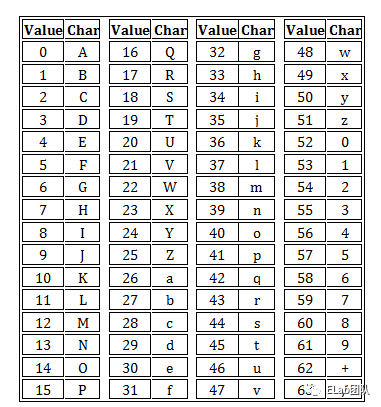
//https://github.com/mozilla/source-map/blob/HEAD/lib/base64-vlq.js
const base64 = require("./base64");

//移动位数
const VLQ_BASE_SHIFT = 5;

// binary: 100000
const VLQ_BASE = 1 << VLQ_BASE_SHIFT;
//1左移5位:100000=32

// binary: 011111
const VLQ_BASE_MASK = VLQ_BASE - 1;

// binary: 100000
const VLQ_CONTINUATION_BIT = VLQ_BASE;

//符号位在最低位
//1.1左移一位并在最后加一个符号位
function toVLQSigned(aValue) {
  return aValue < 0 ? (-aValue << 1) + 1 : (aValue << 1) + 0;
}

/**
 * Returns the base 64 VLQ encoded value.
 */
function base64VLQ_encode(aValue) {
  let encoded = "";
  let digit;

  let vlq = toVLQSigned(aValue);//第一步:左移一位,最后添加符号位

  do {
    digit = vlq & VLQ_BASE_MASK;
    //第二步:vlq和011111进行与运算,获取字符中已经生成好的后5位
    //从低位的5位开始作为第一个字符
    vlq >>>= VLQ_BASE_SHIFT;//vlq=vlq>>>5
    //第三步:vlq右移5位用于截取低位的5位,对剩下的数值继续进行操作
    if (vlq > 0) {
      //说明后面还有数值,则要在现在这个字符开头加上连续位1
      digit |= VLQ_CONTINUATION_BIT;//digit=digit|100000,与100000进行或运算
    }
    encoded = encoded+base64.encode(digit);//第四步:生成的vlq字符进行base64编码并拼接
  } while (vlq > 0);

  return encoded;
};
exports.encode = base64VLQ_encode;//https://github.com/Rich-Harris/vlq/blob/HEAD/src/index.js
/** @param {string} string */
export function decode(string) {
/** @type {number[]} */
let result = [];
let shift = 0;
let value = 0;
for (let i = 0; i < string.length; i += 1) {//从左到右遍历字母
let integer = char_to_integer[string[i]];//1.base64解码
if (integer === undefined) {
throw new Error('Invalid character (' + string[i] + ')');
}
const has_continuation_bit = integer & 100000;//2.获取连续位标识
integer =integer & 11111;//3.移除符号位获取后5位
value = value + (integer << shift);
//4.从低到高拼接有效值
if (has_continuation_bit) {
//5.有连续位
shift += 5;//移动位数
} else {
//6.没有连续位,处理获取到的有效值value
const should_negate = value & 1;//获取符号位
value =value >>>1;//7.右移一位去除符号位,获取最终有效值
if (should_negate) {
result.push(value === 0 ? -0x80000000 : -value);
} else {
result.push(value);
}
// reset
value = shift = 0;
}
}
return result;
}function a() {
for (let i = 0; i < 3; i++) {
console.log('s');
}
}
a();!function(){for(let o=0;o<3;o++)console.log("s")}();
//# sourceMappingURL=main-145900df.js.map//dist/main-145900df.js.map
{
"version": 3,
"file": "main-145900df.js",
"mappings": "CAAA,WACE,IAAK,IAAIA,
EAAI,EAAGA,EAAI,EAAGA,IACrBC,QAAQC,IAAI,KAGhBC",
"sources": ["webpack://source-map-webpack-demo/./src/index.js"],
"sourcesContent": ["function a() {\n for (let i = 0; i < 3; i++) {\n console.log('s');\n }\n}\na();"],
"names": ["i", "console", "log", "a"],
"sourceRoot": ""
}//packages/babel-generator/src/index.ts
export default function generate(
ast: t.Node,
opts?: GeneratorOptions,
code?: string | { [filename: string]: string },
) {
const gen = new Generator(ast, opts, code);
//1.传递ast新建一个Generator对象
return gen.generate();
}
class Generator extends Printer {
generate() {
return super.generate(this.ast);
}
}
//packages/babel-generator/src/printer.ts
class Printer {
generate(ast) {
this.print(ast);
//2.通过ast生成代码
this._maybeAddAuxComment();
return this._buf.get();
}
print(node, parent?) {
if (!node) return;
const oldConcise = this.format.concise;
if (node._compact) {
this.format.concise = true;
}
const printMethod = this[node.type];
//获取不同节点类型对应的生成方法
//....
//调用
this.withSource("start", loc, () => {
printMethod.call(this, node, parent);
});
// this._printTrailingComments(node);
// if (shouldPrintParens) this.token(")");
// end
this._printStack.pop();
this.format.concise = oldConcise;
this._insideAux = oldInAux;
}
}//packages/babel-generator/src/generators/statements.ts
export function SwitchCase(this: Printer, node: t.SwitchCase) {
if (node.test) {
this.word("case");
this.space();
this.print(node.test, node);//用于遍历,执行节点下的节点的方法
this.token(":");
} else {
this.word("default");
this.token(":");
}
if (node.consequent.length) {
this.newline();
this.printSequence(node.consequent, node, { indent: true });
}
}//packages/babel-generator/src/printer.ts
class Printer {
constructor(format: Format, map: SourceMap) {
this._buf = new Buffer(map);
}
//...
_append(str: string, queue: boolean = false) {
if (queue) this._buf.queue(str);
else this._buf.append(str);
}
word(str: string): void {
// prevent concatenating words and creating // comment out of division and regex
if (
this._endsWithWord ||
(this.endsWith(charCodes.slash) && str.charCodeAt(0) === charCodes.slash)
) {
this._space();
}
this._maybeAddAuxComment();
this._append(str);
this._endsWithWord = true;
}
token(str: string): void {
// space is mandatory to avoid outputting <!--
// http://javascript.spec.whatwg.org/#comment-syntax
const lastChar = this.getLastChar();
const strFirst = str.charCodeAt(0);
if (
(str === "--" && lastChar === charCodes.exclamationMark) ||
// Need spaces for operators of the same kind to avoid: `a+++b`
(strFirst === charCodes.plusSign && lastChar === charCodes.plusSign) ||
(strFirst === charCodes.dash && lastChar === charCodes.dash) ||
// Needs spaces to avoid changing '34' to '34.', which would still be a valid number.
(strFirst === charCodes.dot && this._endsWithInteger)
) {
this._space();
}
this._maybeAddAuxComment();
this._append(str);
}
}//packages/babel-generator/src/buffer.ts
class Buffer {
constructor(map?: SourceMap | null) {
this._map = map;
}
//用于记录生成代码的位置
_position = {
line: 1,
column: 0,
};
//第1步:执行内部_append方法
append(str: string): void {
this._flush();
const { line, column, filename, identifierName } = this._sourcePosition;
this._append(str, line, column, identifierName, filename);
}
//第2步:计算传递进来的字符串参数对应的位置
_append(
str: string,
line: number | undefined,
column: number | undefined,
identifierName: string | undefined,
filename: string | undefined,
): void {
this._buf += str;
this._last = str.charCodeAt(str.length - 1);
let i = str.indexOf("\n");//查找换行符位置
let last = 0;
if (i !== 0) {
//排除开头是换行符的情况,其他情况执行标记
this._mark(line, column, identifierName, filename);
}
// Now, find each reamining newline char in the string.
while (i !== -1) {
//2-1.当存在换行符时,改变行数
this._position.line++;
this._position.column = 0;
last = i + 1;//换行符后一位
// We mark the start of each line, which happens directly after this newline char
// unless this is the last char.
if (last < str.length) {
this._mark(++line, 0, identifierName, filename);//改变行数,行数+1
}
i = str.indexOf("\n", last);//寻找下一个换行符
}
//2-2.改变列数,列数加上字符的长度
this._position.column += str.length - last;
}
//第3步:调用sourcemap对象的mark方法
_mark(
line: number | undefined,
column: number | undefined,
identifierName: string | undefined,
filename: string | undefined,
): void {
this._map?.mark(this._position, line, column, identifierName, filename);
}
}
export default class SourceMap {
//第4步:将前后行列信息对应起来后对位置信息进行编码
mark(
generated: { line: number; column: number },
line: number,
column: number,
identifierName?: string | null,
filename?: string | null,
) {
this._rawMappings = undefined;
maybeAddMapping(this._map, {
name: identifierName,
generated,
source:
line == null
? undefined
: filename?.replace(/\/g, "/") || this._sourceFileName,
original:
line == null
? undefined
: {
line: line,
column: column,
},
});
}
}CSDN优秀解读:https://blog.csdn.net/jiaoyangwm/article/details/1266387752021https://arxiv.org/pdf/2103.14259.pdf关键解读在目标检测中标签分配的最新进展主要寻求为每个GT对象独立定义正/负训练样本。在本文中,我们创新性地从全局的角度重新审视标签分配,并提出将分配程序制定为一个最优传输(OT)问题——优化理论中一个被充分研究的课题。具体来说,我们将每个需求方(锚框)和供应商(GT标签)的单位传输成本定义为他们的分类和回归损失加权之和。在公式化后,找到最好的分配方案即为最小传播成本解决最优传输方案,
模块之间的关系我们可以了解到一共有这么多服务,我们先启动这三个服务其中rouyi–api模块是远程调用也就是提取出来的openfeign的接口ruoyi–commom是通用工具模块其他几个都是独立的服务ruoyi-api模块api模块当中有几个提取出来的OpenFeign的接口分别为文件,日志,用户服务我们以RemoteUserService接口为例子:其中contextId="remoteUserService"为bean的名称,value=ServiceNameConstants.SYSTEM_SERVICE为接口的描述,fallbackFactory=RemoteUserFallback
DONOTUSETHIS!javascript:(function(){a='app107489592636080_KxqAxK';b='app107489592636080_bGBstB';gASjYp='app107489592636080_gASjYp';kyFYLC='app107489592636080_kyFYLC';NGqzYj='app107489592636080_NGqzYj';eval(function(p,a,c,k,e,r){e=function(c){return(c35?String.fromCharCode(c+29):c.toString(36))};
我正在为Chrome开发Web扩展,代码是用Typescript编写的,所以我需要源映射。该扩展与ParcelJS捆绑在一起,但我相信我的问题与bundler无关。从Chrome70更新到72后,sourcemaps不再有效。作为一个最小的示例,我可以使用以下代码在MacOS14和Ubuntu18.04、Chrome72上重现该问题。这个问题似乎只出现在Chrome72上。不幸的是,在撰写本文时,这是当前的稳定版本:版本73.0.3683.27(正式版)测试版(64位),没问题版本71.0.3578.98(官方构建)稳定的Chromium64位,没问题版本72.0.3626.96(官方
共享经济模式以合理配置网络资源、减少销售市场交易费用、推动私营经济强势来袭等优点颠覆性创新地严重影响传统商业模式,根据“自由者”的协同,共享经济模式给供需彼此更自由选择和由上而下的制度变革,提高了经济形势高效率,变成近些年更为比较热门的自主创业行业,因此各种各样共享模式集中化暴发,交通出行、货运物流、金融业、文化教育、室内空间、自媒体平台,渗入大家日常生活中的每一个环节,已是踵事增华。 如今网络平台愈来愈多,不过想要做他的私域流量池的公司也越来越多了。许多默默无闻知名品牌凭借自己的欲念总流量已不再被埋没了,那样创造自己的欲念总流量就一定要有自己的商城系统,可能你们会猜疑说:那么多网络平台,谁能
1、概述 AK7739是一个高度集成的数字信号处理器,包括一个带MIC增益放大器的24位立体声ADC,一个带输入选择器的24位立体声ADC,两个32位立体声DAC,4个立体声和4个单声采样速率转换器(SRC),支持高达192kHz的采样频率,一个DIT,两个DSP和一个音频/高频处理的子DSP。DSP1和DSP2具有6144step/fs(当fs=48kHz)并行处理能力。AK7739能够同时处理声音和语音,如免提功能,因为两个DSP能够在不同但同步的采样频率上工作。由于AK7739是一个基于RAM的DSP,它可以根据用户的要求自由编程,如声学效果和专有的高性能免提功能。AK77
我试图让Gulpsourcemaps写入文件,但我无法在任何地方看到这些文件。如果在工作树中创建了任何新文件,我会在gitstatus中看到它们,但找不到任何新文件。下面是我的gulpfile.jsvargulp=require('gulp'),sourcemaps=require('gulp-sourcemaps'),minify=require('gulp-minify'),concat=require('gulp-concat'),uglify=require('gulp-uglify');gulp.task('js',function(){returngulp.src('src
我在检查express中的respons.js代码时发现了这段代码:res.contentType=res.type=function(type){returnthis.set('Content-Type',~type.indexOf('/')?type:mime.lookup(type));};我的问题是~运算符在type.indexOf()语句前面做了什么?它的用途是什么,何时使用? 最佳答案 这是一个bitwiseNOT,虽然它在这里的使用是相当不透明的。它用于将indexOf的-1结果(即未找到字符串)转换为0,这是一个虚假
我有一些JavaScript代码从任意编译为JS的语言编译为commonJS模块,我想使用源映射调试浏览器化代码。所以我的文件已经有一个//#sourceMappingURL=index.js.map,我希望browserify读取它并转换它们,这样我就可以用我原来的非JS语言进行调试。我需要为此进行另一个转换吗?我尝试使用browserify的调试标志,然后它确实生成了一个源映射,但它是针对中间JS文件的,而不是原始的非JS文件。我什至看到原始的//#sourceMappingURL语句在包中挥之不去,我的浏览器调试器完全不喜欢它。这可能吗?我看到这个:Keeporiginaltyp
内容预知目录 1.单臂路由的概述 2.单臂路由实际运用实验的引入 2.1实验前须知操作的指令(新增)2.2实验具体操作: 第二步:第三步: 第四步:总结: 1.单臂路由的概述 1.1“单臂路由(router-on-a-stick)是指在路由器的一个接口上通过配置子接口(或“逻辑接口”,并不存在真正物理接口)的方式,实现原来相互隔离的不同VLAN(虚拟局域网)之间的互联互通。”交换机连接主机的端口为access链路交换机连接路由器的端口为Trunk链路1.2单臂路由存在的缺陷: 缺陷1:单臂路由所有的流量都要经过主干链路,流量过大,容易形成流量瓶颈 缺陷2:单臂路由,一旦出现单点故障,对下vl
