欢迎===关注===点赞===评论,共同学习,共同进步!
你的点赞、关注、评论、是我创作的动力!
-------希望我的文章对你有所帮助--------
目录
4、出现no appropriate protocal 异常报错
5、出现java.lang.NoClassDefFoundError:javax/severlet/报错
最快的提升自己的编程水平以及对某个方向的理解和运用,必然是需要动手实践,在不断的Debug中自我折磨,然后放弃!!!(玩笑)
本篇文章只是进行基础的SSM框架(Sping+SpringMVC+Mybatis)的整合的教程,以及其中可能遇到的问题的简单解决办法!因为刚开始起手一个项目,自然需要一个过渡阶段,否则前期将会异常艰难。
废话不多说,开始吧!
全程干货不累赘,开始发车!!
Final Test Result:

1、系统:Windows10
2、IDE:Interilj ideal 2021.3
3、服务器:Tomacat-8(用高版本对应的Severlet-4.0会启动报错,注意!!)
4、数据库:MySQL5.7
5、浏览器:FireFox
6、JavaKit:JDK18
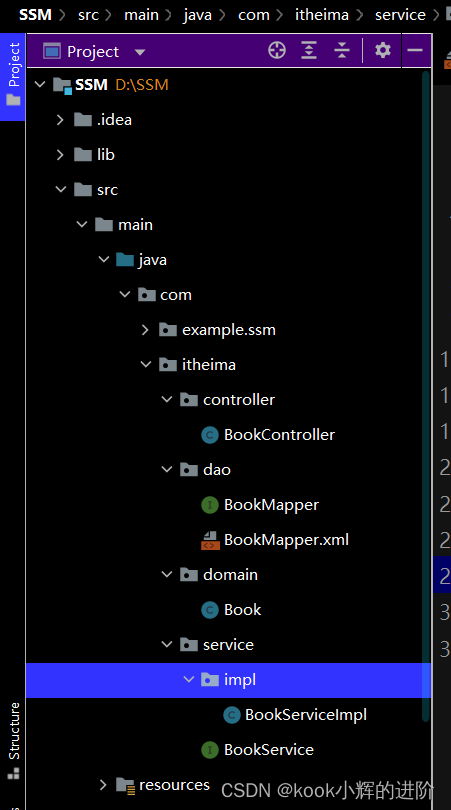

1、点击File,new,project

2、创建一个JavaEnterpri项目,选择对应JDK,命名为SSM,选择JavaEE8,然后Finish

1、创建SSM数据库和tb_book数据表
create database SSM;
create table tb_book(
id int(11) primary key,
name varchar(20) not null,
press varchar(20) not null,
author varchar(20) not null);
2、插入数据
insert into tb_book(id,name,press,author) values(1,"Moving Earth","人民出版社","刘慈欣");代码如下:(复制粘贴即可)
<?xml version="1.0" encoding="UTF-8"?>
<project xmlns="http://maven.apache.org/POM/4.0.0"
         xmlns:xsi="http://www.w3.org/2001/XMLSchema-instance"
         xsi:schemaLocation="http://maven.apache.org/POM/4.0.0 https://maven.apache.org/xsd/maven-4.0.0.xsd">
    <modelVersion>4.0.0</modelVersion>
    <groupId>com.example</groupId>
    <artifactId>SSM</artifactId>
    <version>1.0-SNAPSHOT</version>
    <name>SSM</name>
    <packaging>war</packaging>

    <properties>
        <project.build.sourceEncoding>UTF-8</project.build.sourceEncoding>
        <maven.compiler.target>1.8</maven.compiler.target>
        <maven.compiler.source>1.8</maven.compiler.source>
        <junit.version>5.8.1</junit.version>
    </properties>
    <dependencies>
        <dependency>
            <groupId>org.springframework</groupId>
            <artifactId>spring-context</artifactId>
            <version>5.2.8.RELEASE</version>
        </dependency>
        <!--Spring事务管理-->
        <dependency>
            <groupId>org.springframework</groupId>
            <artifactId>spring-tx</artifactId>
            <version>5.2.8.RELEASE</version>
        </dependency>
        <dependency>
            <groupId>org.springframework</groupId>
            <artifactId>spring-jdbc</artifactId>
            <version>5.2.8.RELEASE</version>
        </dependency>
        <dependency>
            <groupId>org.springframework</groupId>
            <artifactId>spring-test</artifactId>
            <version>5.2.8.RELEASE</version>
        </dependency>
        <!--Spring MVC的相关依赖-->
        <dependency>
            <groupId>org.springframework</groupId>
            <artifactId>spring-webmvc</artifactId>
            <version>5.2.8.RELEASE</version>
        </dependency>
        <!--MyBatis相关依赖-->
        <dependency>
            <groupId>org.mybatis</groupId>
            <artifactId>mybatis</artifactId>
            <version>3.5.2</version>
        </dependency>
        <!--MyBatis与Spring整合相关依赖-->
        <dependency>
            <groupId>org.mybatis</groupId>
            <artifactId>mybatis-spring</artifactId>
            <version>2.0.1</version>
        </dependency>
        <!--数据源-->
        <dependency>
            <groupId>com.alibaba</groupId>
            <artifactId>druid</artifactId>
            <version>1.1.20</version>
        </dependency>
        <dependency>
            <groupId>javax.servlet</groupId>
            <artifactId>javax.servlet-api</artifactId>
            <version>4.0.1</version>
        </dependency>
        <dependency>
            <groupId>org.apache.cxf</groupId>
            <artifactId>cxf-rt-frontend-jaxrs</artifactId>
            <version>3.4.5</version>
        </dependency>
        <dependency>
            <groupId>org.junit.jupiter</groupId>
            <artifactId>junit-jupiter-api</artifactId>
            <version>${junit.version}</version>
            <scope>test</scope>
        </dependency>
        <dependency>
            <groupId>org.junit.jupiter</groupId>
            <artifactId>junit-jupiter-engine</artifactId>
            <version>${junit.version}</version>
            <scope>test</scope>
        </dependency>
        <dependency>
            <groupId>javax.servlet.jsp</groupId>
            <artifactId>jsp-api</artifactId>
            <version>2.2</version>
            <scope>provided</scope>
        </dependency>
        <!-- 数据库驱动相关依赖-->
        <dependency>
            <groupId>mysql</groupId>
            <artifactId>mysql-connector-java</artifactId>
            <version>8.0.11</version>
        </dependency>
        <dependency>
            <groupId>junit</groupId>
            <artifactId>junit</artifactId>
            <version>4.13</version>
            <scope>test</scope>
        </dependency>
    </dependencies>

    <build>
        <finalName>SSM</finalName>
        <pluginManagement><!-- lock down plugins versions to avoid using Maven defaults (may be moved to parent pom) -->
            <plugins>
                <plugin>
                    <artifactId>maven-clean-plugin</artifactId>
                    <version>3.1.0</version>
                </plugin>
                <!-- see http://maven.apache.org/ref/current/maven-core/default-bindings.html#Plugin_bindings_for_war_packaging -->
                <plugin>
                    <artifactId>maven-resources-plugin</artifactId>
                    <version>3.0.2</version>
                </plugin>
                <plugin>
                    <artifactId>maven-compiler-plugin</artifactId>
                    <version>3.8.0</version>
                </plugin>
                <plugin>
                    <artifactId>maven-surefire-plugin</artifactId>
                    <version>2.22.1</version>
                </plugin>
                <plugin>
                    <artifactId>maven-war-plugin</artifactId>
                    <version>3.2.2</version>
                </plugin>
                <plugin>
                    <artifactId>maven-install-plugin</artifactId>
                    <version>2.5.2</version>
                </plugin>
                <plugin>
                    <artifactId>maven-deploy-plugin</artifactId>
                    <version>2.8.2</version>
                </plugin>
            </plugins>
        </pluginManagement>
        <plugins>
            <plugin>
                <groupId>org.apache.maven.plugins</groupId>
                <artifactId>maven-war-plugin</artifactId>
                <version>3.3.2</version>
            </plugin>
        </plugins>
        <!-- 如果不添加此节点mybatis的mapper.xml文件都会被漏掉。 -->
        <resources>
            <resource>
                <directory>src/main/java</directory>
                <includes>
                    <include>**/*.properties</include>
                    <include>**/*.xml</include>
                </includes>
                <filtering>false</filtering>
            </resource>
            <resource>
                <directory>src/main/resources</directory>
                <includes>
                    <include>**/*.properties</include>
                    <include>**/*.xml</include>
                </includes>
                <filtering>false</filtering>
            </resource>
        </resources>

    </build>


</project>src/main/java下创建com.itheima.domain包,创建Book实体类
1-1Book.java
package com.itheima.domain;
public class Book {
    private Integer id;
    private String name;
    private  String press;
    private  String author;
    public Integer getId()
    {
        return id;
    }
    public void setId(Integer id){
        this.id=id;
    }
    public void setName(String name) {
        this.name = name;
    }
    public String getName() {
        return name;
    }
    public void setAuthor(String author) {
        this.author = author;
    }
    public String getAuthor() {
        return author;
    }
    public void setPress(String press) {
        this.press = press;
    }
    public String getPress() {
        return press;
    }
}
src/main/java下创建com.itheima.dao包,创建BookMapper接口
1-2 BookMapper.java
package com.itheima.dao;
import com.itheima.domain.Book;
public interface BookMapper {
         public Book findBookById(Integer id);
}
同目录下创建其映射文件
1-3BookMapper.xml
<?xml version="1.0" encoding="utf-8" ?>
<!DOCTYPE mapper
        PUBLIC "-//mybatis.org//DTD Mapper 3.0//EN"
        "http://mybatis.org/dtd/mybatis-3-mapper.dtd">
<mapper namespace="com.itheima.dao.BookMapper">
    <!--根据id查询图书信息 -->
    <select id="findBookById" parameterType="int"
            resultType="com.itheima.domain.Book">
  		select * from tb_book where id = #{id}
  	</select>
</mapper>
src/main/java下创建com.itheima.service包,创建BookService接口
1-4 BookService.java
package com.itheima.service;
import com.itheima.domain.Book;
public interface BookService {
    Book findBookById(Integer id);
}
src/main/java下创建com.itheima.service.Impl包,创建实现类BookServiceImpl
1-5 BookServiceImpl.java
package com.itheima.service.impl;
import com.itheima.dao.BookMapper;
import com.itheima.domain.Book;
import com.itheima.service.BookService;
import org.springframework.beans.factory.annotation.Autowired;
import org.springframework.stereotype.Service;
@Service
public class BookServiceImpl implements BookService {
    @Autowired
    private BookMapper bookMapper;
    public Book findBookById (Integer id)
    {
        return bookMapper.findBookById(id);
    }
}
src/main/java下创建com.itheima.controller包,创建BookController处理器类
1-5 BookController.java
package com.itheima.controller;
import com.itheima.domain.Book;
import com.itheima.service.BookService;
import org.springframework.beans.factory.annotation.Autowired;
import org.springframework.stereotype.Controller;
import org.springframework.web.bind.annotation.RequestMapping;
import org.springframework.web.servlet.ModelAndView;
@Controller
public class BookController {
    @Autowired
    private BookService bookService;
    @RequestMapping("/book")
    public ModelAndView findBookById(Integer id)
    {
        Book book=bookService.findBookById(id);
        ModelAndView modelAndView=new ModelAndView();
        modelAndView.setViewName("book.jsp");
        modelAndView.addObject("book",book);
        return modelAndView;
    }
}
src/main/resources目录下创建application-service.xml配置文件
2-1 application-service.xml
<?xml version="1.0" encoding="UTF-8"?>
<beans xmlns="http://www.springframework.org/schema/beans"
  xmlns:xsi="http://www.w3.org/2001/XMLSchema-instance"
 xmlns:context="http://www.springframework.org/schema/context"
  xsi:schemaLocation="
 	       http://www.springframework.org/schema/beans
 	       http://www.springframework.org/schema/beans/spring-beans.xsd
           http://www.springframework.org/schema/context
	       http://www.springframework.org/schema/context/spring-context.xsd
    	">
 <context:component-scan base-package="com.itheima.service"/>
</beans>
src/main/resources目录下创建属性源文件jdbc.properties,用于配置MySQL数据库
2-2 jdbc.properties
jdbc.driverClassName=com.mysql.cj.jdbc.Driver
jdbc.url=jdbc:mysql://localhost:3306/ssm?useUnicode=true\
  &characterEncoding=utf-8&serverTimezone=Asia/Shanghai
jdbc.username=root
jdbc.password=123456
src/main/resources目录下创建application-dao.xml配置信息
2-3 application-dao.xml
<?xml version="1.0" encoding="UTF-8"?>
<beans xmlns="http://www.springframework.org/schema/beans"
    xmlns:xsi="http://www.w3.org/2001/XMLSchema-instance"
       xmlns:context="http://www.springframework.org/schema/context"
       xsi:schemaLocation="
 	       http://www.springframework.org/schema/beans
 	       http://www.springframework.org/schema/beans/spring-beans.xsd
 	       http://www.springframework.org/schema/context
 	       http://www.springframework.org/schema/context/spring-context.xsd
 	">
    <context:property-placeholder location="classpath:jdbc.properties"/>
    <bean id="dataSource" class="com.alibaba.druid.pool.DruidDataSource">
        <property name="driverClassName" value="${jdbc.driverClassName}"/>
        <property name="url" value="${jdbc.url}"/>
        <property name="username" value="${jdbc.username}"/>
        <property name="password" value="${jdbc.password}"/>
    </bean>
    <bean id="sqlSessionFactory"
          class="org.mybatis.spring.SqlSessionFactoryBean">
        <property name="dataSource" ref="dataSource"/>
    </bean>
    <bean class="org.mybatis.spring.mapper.MapperScannerConfigurer">
        <property name="basePackage" value="com.itheima.dao"/>
    </bean>
</beans>
src/test/java中创建BookServiceTest类
2-4BookServiceTest.java
import com.itheima.domain.Book;
import com.itheima.service.BookService;
import org.junit.Test;
import org.junit.runner.RunWith;
import org.springframework.beans.factory.annotation.Autowired;
import org.springframework.test.context.ContextConfiguration;
import org.springframework.test.context.junit4.SpringJUnit4ClassRunner;
@RunWith(SpringJUnit4ClassRunner.class)
@ContextConfiguration(locations = {"classpath:application-service.xml","classpath:application-dao.xml"})
public class BookServiceTest {
@Autowired
    private BookService bookService;
@Test
    public void findBookById()
{
    Book book=bookService.findBookById(2);
    System.out.println("id:"+book.getId());
    System.out.println("name:"+book.getName());
    System.out.println("author:"+book.getAuthor());
    System.out.println("press:"+book.getPress());
}
}
测试成功:

在项目webapp/WEB-INF的web.xml中输入以下代码
3-1 web.xml
<?xml version="1.0" encoding="UTF-8"?>
<web-app xmlns="http://xmlns.jcp.org/xml/ns/javaee"
         xmlns:xsi="http://www.w3.org/2001/XMLSchema-instance"
         xsi:schemaLocation="http://xmlns.jcp.org/xml/ns/javaee http://xmlns.jcp.org/xml/ns/javaee/web-app_4_0.xsd"
         version="4.0">
      <context-param>
        <param-name>contextConfigLocation</param-name>
        <param-value>classpath:application-*.xml</param-value>
      </context-param>
      <listener>
        <listener-class>
          org.springframework.web.context.ContextLoaderListener
        </listener-class>
      </listener>
      <servlet>
        <servlet-name>DispatcherServlet</servlet-name>
        <servlet-class>
          org.springframework.web.servlet.DispatcherServlet
        </servlet-class>
        <init-param>
          <param-name>contextConfigLocation</param-name>
          <param-value>classpath:spring-mvc.xml</param-value>
        </init-param>
        <load-on-startup>1</load-on-startup>
      </servlet>
      <servlet-mapping>
        <servlet-name>DispatcherServlet</servlet-name>
        <url-pattern>/</url-pattern>
      </servlet-mapping>
</web-app>src/main/resources目录下创建Spring-mvc.xml配置信息
3-2 spring-mvc.xml
<?xml version="1.0" encoding="UTF-8"?>
<beans xmlns="http://www.springframework.org/schema/beans"
       xmlns:context="http://www.springframework.org/schema/context"
       xmlns:mvc="http://www.springframework.org/schema/mvc"
       xmlns:xsi="http://www.w3.org/2001/XMLSchema-instance"
       xsi:schemaLocation="http://www.springframework.org/schema/beans
       	    http://www.springframework.org/schema/beans/spring-beans.xsd
       	    http://www.springframework.org/schema/mvc
       	    http://www.springframework.org/schema/mvc/spring-mvc.xsd
       	    http://www.springframework.org/schema/context
       	    http://www.springframework.org/schema/context/spring-context.xsd">
    <context:component-scan base-package="com.itheima.controller"/>
    <mvc:annotation-driven/>
</beans>
src/main/webapp下创建book.jsp文件
3-4 book.jsp
<%@ page contentType="text/html;charset=UTF-8" language="java" %>
<html>
<head>
    <title>图书信息查询</title>
</head>
<body>
<table border="1">
<tr>
    <th>图书id</th>
    <th>图书名称</th>
    <th>出版社</th>
    <th>作者</th>
</tr>
<tr>
    <td>${book.id}</td>
    <td>${book.name}</td>
    <td>${book.press}</td>
    <td>${book.author}</td>
</tr>
</table>
</body>
</html>
启动Tomcat8,在浏览器输入
http://localhost:8082/SSM_war_exploded/book?id=1其中8082为端口号,我的填的是8082,默认是8080,根据自己的配置改就行!
结果:

Settings->Editor->File Encodings->三个部分如图都改为GBK即可

修改数据库字符集 :
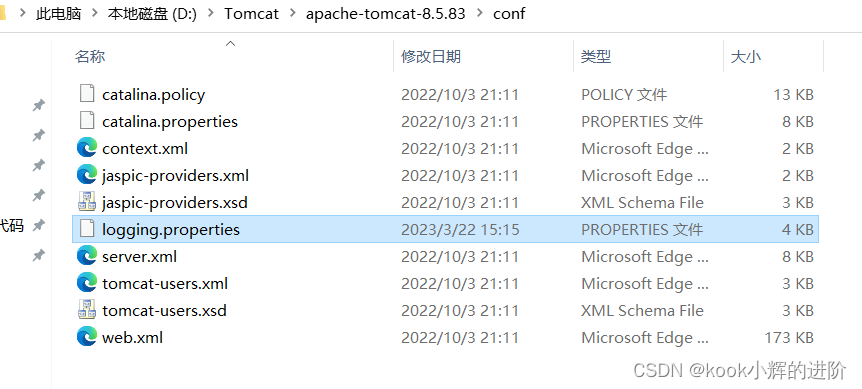
alter database SSM default convert to character set utf8;找到对应的Tomcat-8存储地址,在conf中找到
logging.properties文件,将全部GBk替换成UTF-8即可

找到对应位置jdk,把java.security中的
dk.tls.disabledAlgorithms=后的SSLv3,TLSv1,TLSv1.1删除,
如图大概在724行,删除后如图:


是由于Tomcat高版本不支持4.0版本的Sevrlet导致,更换低版本Tomcat即可
总体来说,当开始着手一个WEB项目时,总会由于各种原因导致各种BUG,需要花费大量的时间去排查和调试,才能一步步把最后的项目运行出来,因此需要考虑的方面有很多,重要的是必须看懂编译器报错的原因,从而分析出可行的解决办法。
只有不断的鞭策自己去实践和学习,积累Debug的能力和经验,才能慢慢获得进步!
发文不易,恳请大佬们高抬贵手!
点赞:随手点赞是种美德,是大佬们对于本人创作的认可!
评论:往来无白丁,是你我交流的的开始!
收藏:愿君多采撷,是大佬们对在下的赞赏!
如何在buildr项目中使用Ruby?我在很多不同的项目中使用过Ruby、JRuby、Java和Clojure。我目前正在使用我的标准Ruby开发一个模拟应用程序,我想尝试使用Clojure后端(我确实喜欢功能代码)以及JRubygui和测试套件。我还可以看到在未来的不同项目中使用Scala作为后端。我想我要为我的项目尝试一下buildr(http://buildr.apache.org/),但我注意到buildr似乎没有设置为在项目中使用JRuby代码本身!这看起来有点傻,因为该工具旨在统一通用的JVM语言并且是在ruby中构建的。除了将输出的jar包含在一个独特的、仅限ruby
我正在查看instance_variable_set的文档并看到给出的示例代码是这样做的:obj.instance_variable_set(:@instnc_var,"valuefortheinstancevariable")然后允许您在类的任何实例方法中以@instnc_var的形式访问该变量。我想知道为什么在@instnc_var之前需要一个冒号:。冒号有什么作用? 最佳答案 我的第一直觉是告诉你不要使用instance_variable_set除非你真的知道你用它做什么。它本质上是一种元编程工具或绕过实例变量可见性的黑客攻击
在我的应用程序中,我需要能够找到所有数字子字符串,然后扫描每个子字符串,找到第一个匹配范围(例如5到15之间)的子字符串,并将该实例替换为另一个字符串“X”。我的测试字符串s="1foo100bar10gee1"我的初始模式是1个或多个数字的任何字符串,例如,re=Regexp.new(/\d+/)matches=s.scan(re)给出["1","100","10","1"]如果我想用“X”替换第N个匹配项,并且只替换第N个匹配项,我该怎么做?例如,如果我想替换第三个匹配项“10”(匹配项[2]),我不能只说s[matches[2]]="X"因为它做了两次替换“1fooX0barXg
我在我的Rails项目中使用Pow和powifygem。现在我尝试升级我的ruby版本(从1.9.3到2.0.0,我使用RVM)当我切换ruby版本、安装所有gem依赖项时,我通过运行railss并访问localhost:3000确保该应用程序正常运行以前,我通过使用pow访问http://my_app.dev来浏览我的应用程序。升级后,由于错误Bundler::RubyVersionMismatch:YourRubyversionis1.9.3,butyourGemfilespecified2.0.0,此url不起作用我尝试过的:重新创建pow应用程序重启pow服务器更新战俘
我已经像这样安装了一个新的Rails项目:$railsnewsite它执行并到达:bundleinstall但是当它似乎尝试安装依赖项时我得到了这个错误Gem::Ext::BuildError:ERROR:Failedtobuildgemnativeextension./System/Library/Frameworks/Ruby.framework/Versions/2.0/usr/bin/rubyextconf.rbcheckingforlibkern/OSAtomic.h...yescreatingMakefilemake"DESTDIR="cleanmake"DESTDIR="
有没有办法在这个简单的get方法中添加超时选项?我正在使用法拉第3.3。Faraday.get(url)四处寻找,我只能先发起连接后应用超时选项,然后应用超时选项。或者有什么简单的方法?这就是我现在正在做的:conn=Faraday.newresponse=conn.getdo|req|req.urlurlreq.options.timeout=2#2secondsend 最佳答案 试试这个:conn=Faraday.newdo|conn|conn.options.timeout=20endresponse=conn.get(url
我有一个正在构建的应用程序,我需要一个模型来创建另一个模型的实例。我希望每辆车都有4个轮胎。汽车模型classCar轮胎模型classTire但是,在make_tires内部有一个错误,如果我为Tire尝试它,则没有用于创建或新建的activerecord方法。当我检查轮胎时,它没有这些方法。我该如何补救?错误是这样的:未定义的方法'create'forActiveRecord::AttributeMethods::Serialization::Tire::Module我测试了两个环境:测试和开发,它们都因相同的错误而失败。 最佳答案
我正在处理旧代码的一部分。beforedoallow_any_instance_of(SportRateManager).toreceive(:create).and_return(true)endRubocop错误如下:Avoidstubbingusing'allow_any_instance_of'我读到了RuboCop::RSpec:AnyInstance我试着像下面那样改变它。由此beforedoallow_any_instance_of(SportRateManager).toreceive(:create).and_return(true)end对此:let(:sport_
我想在Ruby中创建一个用于开发目的的极其简单的Web服务器(不,不想使用现成的解决方案)。代码如下:#!/usr/bin/rubyrequire'socket'server=TCPServer.new('127.0.0.1',8080)whileconnection=server.acceptheaders=[]length=0whileline=connection.getsheaders想法是从命令行运行这个脚本,提供另一个脚本,它将在其标准输入上获取请求,并在其标准输出上返回完整的响应。到目前为止一切顺利,但事实证明这真的很脆弱,因为它在第二个请求上中断并出现错误:/usr/b
假设我有这个范围:("aaaaa".."zzzzz")如何在不事先/每次生成整个项目的情况下从范围中获取第N个项目? 最佳答案 一种快速简便的方法:("aaaaa".."zzzzz").first(42).last#==>"aaabp"如果出于某种原因你不得不一遍又一遍地这样做,或者如果你需要避免为前N个元素构建中间数组,你可以这样写:moduleEnumerabledefskip(n)returnto_enum:skip,nunlessblock_given?each_with_indexdo|item,index|yieldit
