WS2812实物图如下所示:
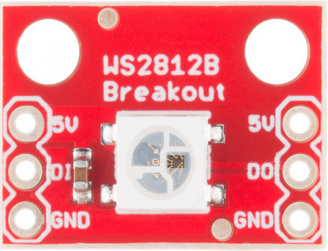
WS2812的特点如下:
WS2812智能外控集成LED 光源
主要特点:
- 控制电路与RGB芯片集成在一个5050封装的元器件中,构成一个完整的外控像素点。
- 内置信号整形电路,任何一个像素点收到信号后经过波形整形再输出,保证线路波形畸变不会累加。
- 内置上电复位和掉电复位电路。
- 每个像素点的三基色颜色可实现256级亮度显示,完成16777216种颜色的全真色彩显示,扫描频率不低于400Hz/s。
- 串行级联接口,能通过一根信号线完成数据的接收与解码。
- 任意两点传传输距离在不超过5米时无需增加任何电路。
- 当刷新速率30帧/秒时,低速模式级联数不小于512点,高速模式不小于1024点。
- 数据发送速度可达800Kbps。
- 光的颜色高度一致,性价比高。
其主要应用领域有LED全彩发光字灯串,全彩LED模组,LED像素屏,各种电子产品,电子设备跑马灯等。
WS2812最牛的地方除了内部包含了智能数字接口数据锁存信号整形放大驱动电路和高精度内部振荡器外,还采用了单线归零码的通讯方式:每个WS2812在上电复位以后,DIN端接收从控制器传输过来的数据,首先送过来的24bit数据被第一个WS2812提取后,送到其内部的数据锁存器,剩余的数据经过内部整形处理电路整形放大后通过DO端口开始转发输出给下一个级联的WS2812,每经过一个WS2812的传输,信号减少24bit。每个WS2812采用自动整形转发技术,使得该WS2812的级联个数不受信号传送的限制,仅仅受限信号传输速度要求。
采用这种通信方式的好处是大大节约了单片机管脚资源。例如做一个流水灯,如果采用传统的LED一般情况需要跟LED数量相同的单片机引脚(想想就心疼),但是使用WS2812就不一样了,一个单片机引脚就可以控制百级数量的灯带,而且还是全彩的,是不是感觉很神奇,很方便。由于WS2812采用单线的通信方式,其通过不同的脉冲长度来表示。
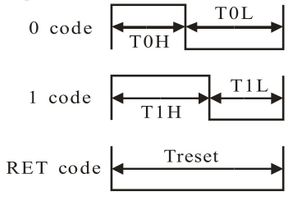
WS2812数据传输时间(TH+TL=1.25μs±600ns)
| 码型 | 说明 | 误差 |
|---|---|---|
| 0码 | 高电平T0H持续时间0.35μs,低电平T0L持续时间0.8μs | ±150ns |
| 1码 | 高电平T1H持续时间0.7μs,低电平T1L持续时间0.6μs | ±150ns |
| RES | 帧单位,低电平时间Trest在50μs以上 | - |
每个WS2812点亮需要24bit的控制数据。该24位二进制数据流中每8位代表一个颜色的像素值,三种颜色分别是绿色、红色和蓝色,即GRB像素流格式。通过对这三个基本色的像素值进行不同设置,得到不同的颜色。
数据传输方式(Data transmission method):

(注:其中D1 为MCU 端发送的数据,D2、D3、D4 为级联电路自动整形转发的数据。)
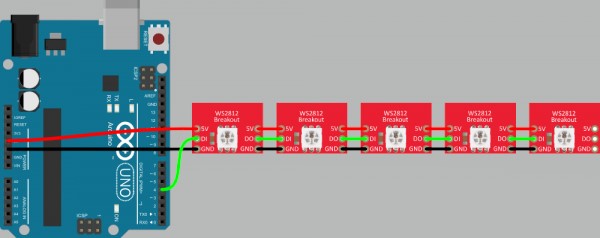
WS2812的级联以及与Arduino的一般连接方式如下图所示:
Arduino library for controlling single-wire-based LED pixels and strip such as the Adafruit 60 LED/meter Digital LED strip, the Adafruit FLORA RGB Smart Pixel, the Adafruit Breadboard-friendly RGB Smart Pixel, the Adafruit NeoPixel Stick, and the Adafruit NeoPixel Shield.
库文件下载地址: Adafruit_NeoPixel库
使用方法:
下载后,将文件夹重命名为“Adafruit_NeoPixel”,并安装在Arduino Libraries文件夹中。重启Arduino IDE,打开文件->Sketchbook->Library->Adafruit_NeoPixel->strandtest sketch。
在arduino应用开发中,对于WS2812等全彩LED灯带控制,这里我们采用Adafruit NeoPixel Library来实现(主要是因为目前我只知道这个库,其他库暂时还没有去深入了解,好尴尬 -_-```)。
在使Adafruit NeoPixel Library用配置WS2812的时候首先需要实例化一个Adafruit_NeoPixel类,例如:
/*
参数1    WS2812的数量
参数2    Arduino引脚号(WS2812 DI口与Arduino相连的引脚号)
参数3    像素类型标志,根据需要一起添加:
             NEO_KHZ800  800 KHz 比特流 (大部分的NeoPixel产品,如w/WS2812 LEDs)
             NEO_KHZ400  400 KHz (classic 'v1' (not v2) FLORA pixels, WS2811 drivers)
             NEO_GRB     GRB顺序的像素流方式(大部分NeoPixel产品)
             NEO_RGB     RGB顺序的像素流方式 (v1 FLORA pixels, not v2)
             NEO_RGBW    RGBW顺序的像素流方式 (NeoPixel RGBW products)
*/
Adafruit_NeoPixel pixels(NUMPIXELS, PIN, NEO_GRB + NEO_KHZ800);
实例化完成后需要通过Adafruit_NeoPixel类中的begin()方法完成类的初始化操作。例如:pixels.begin();。
下面简单介绍一下Adafruit_NeoPixel类中常用的一些方法。
void Adafruit_NeoPixel::clear(void) –用0填充整个像素条,即关闭所有WS2812灯珠。void Adafruit_NeoPixel::Color(uint8_t r, uint8_t g, uint8_t b)–设置RGB的值,从0,0,0到 255,255,255。返回的是32位压缩RGB值,然后可以将其分配给a变量,供以后使用或传递给setPixelColor()函数。void Adafruit_NeoPixel::setPixelColor(uint16_t n, uint32_t c)–使用32位“打包”RGB或RGBW值设置像素的颜色。n为像素索引,从0开始。c为32位的颜色值。void Adafruit_NeoPixel::fill(uint32_t c, uint16_t first, uint16_t count)–使用一种颜色填充新像素条的全部或部分。c为32位的颜色值。first为要填充的第一个像素的第一个索引,从0开始,如果未指定,则默认从0索引开始。count为要填充的像素数,为正值。当是0或未指定将填充到条形图的末尾。void Adafruit_NeoPixel::begin(void)–配置WS1280输入引脚(即对应单片机的引脚)void Adafruit_NeoPixel::show(void)–将RAM中的像素数据传输到新像素。(注:在大多数体系结构中,中断是暂时禁用的以便实现正确的新像素信号定时。这意味着Arduino millis()和micros()函数,它们需要中断时,会丢失一小段时间间隔函数被调用(大约每30微秒一RGB像素,每40微秒一RGBW像素)。)uint32_t Adafruit_NeoPixel::ColorHSV(uint16_t hue, uint8_t sat, uint8_t val)–将色调、饱和度和亮度转换为压缩的32位RGB颜色,可将该函数返回值传递给setPixelColor()或其他与rgb作为输入的函数。hue,色调,为一个无符号的16位值,从0到65535,表示一个完整色轮的回路;sat为饱和度,8位值,范围为0到255,默认值为255;val,亮度,8位值,0到255(最大或全亮度)。如果未指定,默认值为255。//用一种颜色一个接一个地填充条形像素。带材未先清除;原有像素都将被逐个覆盖。
void colorWipe(uint32_t color, int wait) {
for(int i=0; i<strip.numPixels(); i++) { //每次循环处理一个像素
strip.setPixelColor(i, color); // 设置像素值 (在RAM里)
strip.show();
delay(wait);
}
}
2.theaterChase():
void theaterChase(uint32_t color, int wait) {
  for(int a=0; a<10; a++) {  // 重复十次
    for(int b=0; b<3; b++) { //  b从0计数到2
      strip.clear();         //  将RAM中的像素值都设为0
      for(int c=b; c<strip.numPixels(); c += 3) {
        strip.setPixelColor(c, color);//将索引为c的像素的颜色值设为color
      }
      strip.show(); // Update strip with new contents
      delay(wait);  // Pause for a moment
    }
  }
}
3.rainbow():
// 彩虹沿整个带状循环
void rainbow(int wait) {
  for(long firstPixelHue = 0; firstPixelHue < 5*65536; firstPixelHue += 256) {
    for(int i=0; i<strip.numPixels(); i++) {
      int pixelHue = firstPixelHue + (i * 65536L / strip.numPixels());
      strip.setPixelColor(i, strip.gamma32(strip.ColorHSV(pixelHue)));
    }
    strip.show(); // 更新当前带内容
    delay(wait);  // 暂停wait毫秒
  }
}
4.theaterChaseRainbow():
void theaterChaseRainbow(int wait) {
  int firstPixelHue = 0;     // 第一个像素从红色开始(色调0)
  for(int a=0; a<30; a++) {  // 重复30次
    for(int b=0; b<3; b++) {
      strip.clear();         //   将RAM中的所有像素设置为0(关闭)
      for(int c=b; c<strip.numPixels(); c += 3) {
        int  hue   = firstPixelHue + c * 65536L / strip.numPixels();
        uint32_t color = strip.gamma32(strip.ColorHSV(hue));
        strip.setPixelColor(c, color);
      }
      strip.show();
      delay(wait);
      firstPixelHue += 65536 / 90;
    }
  }
}
Adafruit_NeoPixel库的部分示例
// A basic everyday NeoPixel strip test program.

// NEOPIXEL BEST PRACTICES for most reliable operation:
// - Add 1000 uF CAPACITOR between NeoPixel strip's + and - connections.
// - MINIMIZE WIRING LENGTH between microcontroller board and first pixel.
// - NeoPixel strip's DATA-IN should pass through a 300-500 OHM RESISTOR.
// - AVOID connecting NeoPixels on a LIVE CIRCUIT. If you must, ALWAYS
//   connect GROUND (-) first, then +, then data.
// - When using a 3.3V microcontroller with a 5V-powered NeoPixel strip,
//   a LOGIC-LEVEL CONVERTER on the data line is STRONGLY RECOMMENDED.
// (Skipping these may work OK on your workbench but can fail in the field)

#include <Adafruit_NeoPixel.h>
#ifdef __AVR__
 #include <avr/power.h> // Required for 16 MHz Adafruit Trinket
#endif

// Which pin on the Arduino is connected to the NeoPixels?
// On a Trinket or Gemma we suggest changing this to 1:
#define LED_PIN    6

// How many NeoPixels are attached to the Arduino?
#define LED_COUNT 60

// Declare our NeoPixel strip object:
Adafruit_NeoPixel strip(LED_COUNT, LED_PIN, NEO_GRB + NEO_KHZ800);
// Argument 1 = Number of pixels in NeoPixel strip
// Argument 2 = Arduino pin number (most are valid)
// Argument 3 = Pixel type flags, add together as needed:
//   NEO_KHZ800  800 KHz bitstream (most NeoPixel products w/WS2812 LEDs)
//   NEO_KHZ400  400 KHz (classic 'v1' (not v2) FLORA pixels, WS2811 drivers)
//   NEO_GRB     Pixels are wired for GRB bitstream (most NeoPixel products)
//   NEO_RGB     Pixels are wired for RGB bitstream (v1 FLORA pixels, not v2)
//   NEO_RGBW    Pixels are wired for RGBW bitstream (NeoPixel RGBW products)


// setup() function -- runs once at startup --------------------------------

void setup() {
  // These lines are specifically to support the Adafruit Trinket 5V 16 MHz.
  // Any other board, you can remove this part (but no harm leaving it):
#if defined(__AVR_ATtiny85__) && (F_CPU == 16000000)
  clock_prescale_set(clock_div_1);
#endif
  // END of Trinket-specific code.

  strip.begin();           // INITIALIZE NeoPixel strip object (REQUIRED)
  strip.show();            // Turn OFF all pixels ASAP
  strip.setBrightness(50); // Set BRIGHTNESS to about 1/5 (max = 255)
}


// loop() function -- runs repeatedly as long as board is on ---------------

void loop() {
  // Fill along the length of the strip in various colors...
  colorWipe(strip.Color(255,   0,   0), 50); // Red
  colorWipe(strip.Color(  0, 255,   0), 50); // Green
  colorWipe(strip.Color(  0,   0, 255), 50); // Blue

  // Do a theater marquee effect in various colors...
  theaterChase(strip.Color(127, 127, 127), 50); // White, half brightness
  theaterChase(strip.Color(127,   0,   0), 50); // Red, half brightness
  theaterChase(strip.Color(  0,   0, 127), 50); // Blue, half brightness

  rainbow(10);             // Flowing rainbow cycle along the whole strip
  theaterChaseRainbow(50); // Rainbow-enhanced theaterChase variant
}


// Some functions of our own for creating animated effects -----------------

// Fill strip pixels one after another with a color. Strip is NOT cleared
// first; anything there will be covered pixel by pixel. Pass in color
// (as a single 'packed' 32-bit value, which you can get by calling
// strip.Color(red, green, blue) as shown in the loop() function above),
// and a delay time (in milliseconds) between pixels.
void colorWipe(uint32_t color, int wait) {
  for(int i=0; i<strip.numPixels(); i++) { // For each pixel in strip...
    strip.setPixelColor(i, color);         //  Set pixel's color (in RAM)
    strip.show();                          //  Update strip to match
    delay(wait);                           //  Pause for a moment
  }
}

// Theater-marquee-style chasing lights. Pass in a color (32-bit value,
// a la strip.Color(r,g,b) as mentioned above), and a delay time (in ms)
// between frames.
void theaterChase(uint32_t color, int wait) {
  for(int a=0; a<10; a++) {  // Repeat 10 times...
    for(int b=0; b<3; b++) { //  'b' counts from 0 to 2...
      strip.clear();         //   Set all pixels in RAM to 0 (off)
      // 'c' counts up from 'b' to end of strip in steps of 3...
      for(int c=b; c<strip.numPixels(); c += 3) {
        strip.setPixelColor(c, color); // Set pixel 'c' to value 'color'
      }
      strip.show(); // Update strip with new contents
      delay(wait);  // Pause for a moment
    }
  }
}

// Rainbow cycle along whole strip. Pass delay time (in ms) between frames.
void rainbow(int wait) {
  // Hue of first pixel runs 5 complete loops through the color wheel.
  // Color wheel has a range of 65536 but it's OK if we roll over, so
  // just count from 0 to 5*65536. Adding 256 to firstPixelHue each time
  // means we'll make 5*65536/256 = 1280 passes through this outer loop:
  for(long firstPixelHue = 0; firstPixelHue < 5*65536; firstPixelHue += 256) {
    for(int i=0; i<strip.numPixels(); i++) { // For each pixel in strip...
      // Offset pixel hue by an amount to make one full revolution of the
      // color wheel (range of 65536) along the length of the strip
      // (strip.numPixels() steps):
      int pixelHue = firstPixelHue + (i * 65536L / strip.numPixels());
      // strip.ColorHSV() can take 1 or 3 arguments: a hue (0 to 65535) or
      // optionally add saturation and value (brightness) (each 0 to 255).
      // Here we're using just the single-argument hue variant. The result
      // is passed through strip.gamma32() to provide 'truer' colors
      // before assigning to each pixel:
      strip.setPixelColor(i, strip.gamma32(strip.ColorHSV(pixelHue)));
    }
    strip.show(); // Update strip with new contents
    delay(wait);  // Pause for a moment
  }
}

// Rainbow-enhanced theater marquee. Pass delay time (in ms) between frames.
void theaterChaseRainbow(int wait) {
  int firstPixelHue = 0;     // First pixel starts at red (hue 0)
  for(int a=0; a<30; a++) {  // Repeat 30 times...
    for(int b=0; b<3; b++) { //  'b' counts from 0 to 2...
      strip.clear();         //   Set all pixels in RAM to 0 (off)
      // 'c' counts up from 'b' to end of strip in increments of 3...
      for(int c=b; c<strip.numPixels(); c += 3) {
        // hue of pixel 'c' is offset by an amount to make one full
        // revolution of the color wheel (range 65536) along the length
        // of the strip (strip.numPixels() steps):
        int      hue   = firstPixelHue + c * 65536L / strip.numPixels();
        uint32_t color = strip.gamma32(strip.ColorHSV(hue)); // hue -> RGB
        strip.setPixelColor(c, color); // Set pixel 'c' to value 'color'
      }
      strip.show();                // Update strip with new contents
      delay(wait);                 // Pause for a moment
      firstPixelHue += 65536 / 90; // One cycle of color wheel over 90 frames
    }
  }
}
我正在学习如何使用Nokogiri,根据这段代码我遇到了一些问题:require'rubygems'require'mechanize'post_agent=WWW::Mechanize.newpost_page=post_agent.get('http://www.vbulletin.org/forum/showthread.php?t=230708')puts"\nabsolutepathwithtbodygivesnil"putspost_page.parser.xpath('/html/body/div/div/div/div/div/table/tbody/tr/td/div
我有一个Ruby程序,它使用rubyzip压缩XML文件的目录树。gem。我的问题是文件开始变得很重,我想提高压缩级别,因为压缩时间不是问题。我在rubyzipdocumentation中找不到一种为创建的ZIP文件指定压缩级别的方法。有人知道如何更改此设置吗?是否有另一个允许指定压缩级别的Ruby库? 最佳答案 这是我通过查看rubyzip内部创建的代码。level=Zlib::BEST_COMPRESSIONZip::ZipOutputStream.open(zip_file)do|zip|Dir.glob("**/*")d
类classAprivatedeffooputs:fooendpublicdefbarputs:barendprivatedefzimputs:zimendprotecteddefdibputs:dibendendA的实例a=A.new测试a.foorescueputs:faila.barrescueputs:faila.zimrescueputs:faila.dibrescueputs:faila.gazrescueputs:fail测试输出failbarfailfailfail.发送测试[:foo,:bar,:zim,:dib,:gaz].each{|m|a.send(m)resc
很好奇,就使用rubyonrails自动化单元测试而言,你们正在做什么?您是否创建了一个脚本来在cron中运行rake作业并将结果邮寄给您?git中的预提交Hook?只是手动调用?我完全理解测试,但想知道在错误发生之前捕获错误的最佳实践是什么。让我们理所当然地认为测试本身是完美无缺的,并且可以正常工作。下一步是什么以确保他们在正确的时间将可能有害的结果传达给您? 最佳答案 不确定您到底想听什么,但是有几个级别的自动代码库控制:在处理某项功能时,您可以使用类似autotest的内容获得关于哪些有效,哪些无效的即时反馈。要确保您的提
假设我做了一个模块如下:m=Module.newdoclassCendend三个问题:除了对m的引用之外,还有什么方法可以访问C和m中的其他内容?我可以在创建匿名模块后为其命名吗(就像我输入“module...”一样)?如何在使用完匿名模块后将其删除,使其定义的常量不再存在? 最佳答案 三个答案:是的,使用ObjectSpace.此代码使c引用你的类(class)C不引用m:c=nilObjectSpace.each_object{|obj|c=objif(Class===objandobj.name=~/::C$/)}当然这取决于
我正在尝试使用ruby和Savon来使用网络服务。测试服务为http://www.webservicex.net/WS/WSDetails.aspx?WSID=9&CATID=2require'rubygems'require'savon'client=Savon::Client.new"http://www.webservicex.net/stockquote.asmx?WSDL"client.get_quotedo|soap|soap.body={:symbol=>"AAPL"}end返回SOAP异常。检查soap信封,在我看来soap请求没有正确的命名空间。任何人都可以建议我
关闭。这个问题是opinion-based.它目前不接受答案。想要改进这个问题?更新问题,以便editingthispost可以用事实和引用来回答它.关闭4年前。Improvethisquestion我想在固定时间创建一系列低音和高音调的哔哔声。例如:在150毫秒时发出高音调的蜂鸣声在151毫秒时发出低音调的蜂鸣声200毫秒时发出低音调的蜂鸣声250毫秒的高音调蜂鸣声有没有办法在Ruby或Python中做到这一点?我真的不在乎输出编码是什么(.wav、.mp3、.ogg等等),但我确实想创建一个输出文件。
我在我的项目目录中完成了compasscreate.和compassinitrails。几个问题:我已将我的.sass文件放在public/stylesheets中。这是放置它们的正确位置吗?当我运行compasswatch时,它不会自动编译这些.sass文件。我必须手动指定文件:compasswatchpublic/stylesheets/myfile.sass等。如何让它自动运行?文件ie.css、print.css和screen.css已放在stylesheets/compiled。如何在编译后不让它们重新出现的情况下删除它们?我自己编译的.sass文件编译成compiled/t
我想将html转换为纯文本。不过,我不想只删除标签,我想智能地保留尽可能多的格式。为插入换行符标签,检测段落并格式化它们等。输入非常简单,通常是格式良好的html(不是整个文档,只是一堆内容,通常没有anchor或图像)。我可以将几个正则表达式放在一起,让我达到80%,但我认为可能有一些现有的解决方案更智能。 最佳答案 首先,不要尝试为此使用正则表达式。很有可能你会想出一个脆弱/脆弱的解决方案,它会随着HTML的变化而崩溃,或者很难管理和维护。您可以使用Nokogiri快速解析HTML并提取文本:require'nokogiri'h
我想为Heroku构建一个Rails3应用程序。他们使用Postgres作为他们的数据库,所以我通过MacPorts安装了postgres9.0。现在我需要一个postgresgem并且共识是出于性能原因你想要pggem。但是我对我得到的错误感到非常困惑当我尝试在rvm下通过geminstall安装pg时。我已经非常明确地指定了所有postgres目录的位置可以找到但仍然无法完成安装:$envARCHFLAGS='-archx86_64'geminstallpg--\--with-pg-config=/opt/local/var/db/postgresql90/defaultdb/po
