1. 代码测试工具 SonarQube:
官方网站:https://www.sonarqube.org/
SonarQube 是一个用于代码质量管理的开放平台,通过插件机制,SonarQube 可以集成不同的测试工具,代码分析工具,以及持续集成工具。与持续集成工具(例如 Hudson/Jenkins等)不同,SonarQube并不是简单的把不同的代码检查工具结果(例如FindBugs,PMD等)直接显示在web页面上,而是通过不同的插件针对这些结果进行再加工处理,通过量化的方式度量代码质量的变化,从而可以方便的对不同规模和种类的工程进行代码质量管理。在对其他工具的支持方面,Sonar不仅提供了对IDE的支持,可以在Eclipse和Interlij IDEA 这些工具里联机查看结果,同时Sonar还对大量的持续集成工具提供了接口支持,可以很方便的在持续集成中使用SnoarQube的插件还可以对java以外的其他编程语言提供支持,对国际化以及报告文档化也有良好的支持。
2. 安装sonarqube
在jenkins-master中安装sonarqube
[root@jenkins src]# ll
-rw-r--r-- 1 root root 143286376 Aug 22 16:56 sonarqube-6.5.zip
[root@jenkins src]# unzip sonarqube-6.5.zip
Archive:  sonarqube-6.5.zip
   creating: sonarqube-6.5/
   creating: sonarqube-6.5/bin/
   creating: sonarqube-6.5/bin/windows-x86-32/
  inflating: sonarqube-6.5/bin/windows-x86-32/wrapper.exe
   creating: sonarqube-6.5/bin/windows-x86-32/lib/
  inflating: sonarqube-6.5/bin/windows-x86-32/lib/wrapper.dll
   creating: sonarqube-6.5/bin/macosx-universal-64/
[root@jenkins src]# ln -s /app/src/sonarqube-6.5 /app/sonarqube
[root@jenkins src]# ll /app/
  tal 0
▽rwxrwxrwx 1 root root  21 Aug 21 17:49 jdk -> /app/src/jdk1.8.0_60/
lrwxrwxrwx 1 root root  22 Aug 22 17:02 sonarqube -> /app/src/sonarqube-6.5
drwxr-xr-x 4 root root 170 Aug 22 17:01 src
修改sonarqube配置文件
[root@jenkins conf]# vim /app/sonarqube/conf/sonar.properties
sonar.jdbc.username=sonar   #配置数据库用户名
sonar.jdbc.password=123456  #配置数据库密码
sonar.web.port=9000
sonar.web.host=0.0.0.0
3. 安装数据库(注意:只支持5.6以上)
#将数据库导入linux,执行mysql安装脚本(如果没有mysql用户必须先创建mysql用户)
[root@jenkins-slave tools]# ll
total 498272
-rw-r--r-- 1 root root       256 Aug 22 17:11 my.cnf
-rw-r--r-- 1 root root 328979165 Aug 22 17:05 mysql-5.6.42-linux-glibc2.12-x86_64.tar.gz
-rw-r--r-- 1 root root      1470 Aug 22 17:11 mysql-install.sh
[root@jenkins-slave tools]# sh mysql-install.sh
Loaded plugins: fastestmirror
Loading mirror speeds from cached hostfile
 * base: mirrors.aliyun.com
 * extras: mirrors.aliyun.com
 * updates: mirrors.aliyun.com
Package gcc-4.8.5-36.el7_6.2.x86_64 already installed and latest version
Package gcc-c++-4.8.5-36.el7_6.2.x86_64 already installed and latest version
Package wget-1.14-18.el7_6.1.x86_64 already installed and latest version
Package autoconf-2.69-11.el7.noarch already installed and latest version
Package net-tools-2.0-0.24.20131004git.el7.x86_64 already installed and latest version
Package lrzsz-0.12.20-36.el7.x86_64 already installed and latest version
Package iotop-0.6-4.el7.noarch already installed and latest version
Package lsof-4.87-6.el7.x86_64 already installed and latest version
Package iotop-0.6-4.el7.noarch already installed and latest version
Package 1:bash-completion-2.1-6.el7.noarch already installed and latest version
Resolving Dependencies
--> Running transaction check
---> Package vim-enhanced.x86_64 2:7.4.160-5.el7 will be updated
---> Package vim-enhanced.x86_64 2:7.4.160-6.el7_6 will be an update
--> Processing Dependency: vim-common = 2:7.4.160-6.el7_6 for package: 2:vim-enhanced-7.4.160-6.el7_6.x86_64
--> Running transaction check
---> Package vim-common.x86_64 2:7.4.160-5.el7 will be updated
---> Package vim-common.x86_64 2:7.4.160-6.el7_6 will be an update
--> Finished Dependency Resolution

Dependencies Resolved

===================================================================================================================================
 Package                         Arch                      Version                                Repository                  Size
===================================================================================================================================
Updating:
 vim-enhanced                    x86_64                    2:7.4.160-6.el7_6                      updates                    1.0 M
Updating for dependencies:
 vim-common                      x86_64                    2:7.4.160-6.el7_6                      updates                    5.9 M

WARNING: Default config file /etc/my.cnf exists on the system
This file will be read by default by the MySQL server
If you do not want to use this, either remove it, or use the
--defaults-file argument to mysqld_safe when starting the server

‘/usr/bin/mysql’ -> ‘/usr/local/mysql/bin/mysql’
‘/var/lib/mysql/mysql.sock’ -> ‘/data/mysql/mysql.sock’
Starting MySQL......... SUCCESS!
创建数据库
[root@jenkins-slave tools]# mysql
Welcome to the MySQL monitor.  Commands end with ; or \g.
Your MySQL connection id is 2
Server version: 5.6.42 MySQL Community Server (GPL)

Copyright (c) 2000, 2018, Oracle and/or its affiliates. All rights reserved.

Oracle is a registered trademark of Oracle Corporation and/or its
affiliates. Other names may be trademarks of their respective
owners.

Type 'help;' or '\h' for help. Type '\c' to clear the current input statement.

mysql>
mysql> CREATE DATABASE sonar CHARACTER SET utf8 COLLATE utf8_general_ci;
Query OK, 1 row affected (0.01 sec)
#创建并授权用户
mysql> grant all on sonar.* to sonar@"10.0.0.%" identified by "123456";
Query OK, 0 rows affected (0.01 sec)
授权完之后再jenkins-master中查看mysql是否能够登陆到10.0.0.177
[root@jenkins conf]# mysql -usonar -p123456 -h 10.0.0.177
Welcome to the MariaDB monitor.  Commands end with ; or \g.
Your MySQL connection id is 3
Server version: 5.6.42 MySQL Community Server (GPL)

Copyright (c) 2000, 2018, Oracle, MariaDB Corporation Ab and others.

Type 'help;' or '\h' for help. Type '\c' to clear the current input statement.

MySQL [(none)]>
MySQL [(none)]> exit
4. 启动sonarQube
[root@jenkins linux-x86-64]# /app/sonarqube/bin/linux-x86-64/sonar.sh  --help
Usage: /app/sonarqube/bin/linux-x86-64/sonar.sh { console | start | stop | restart | status | dump }
[root@jenkins linux-x86-64]# /app/sonarqube/bin/linux-x86-64/sonar.sh  start
Starting SonarQube...
Started SonarQube.
启动成功后可以登陆界面 10.0.0.175:9000 (master)
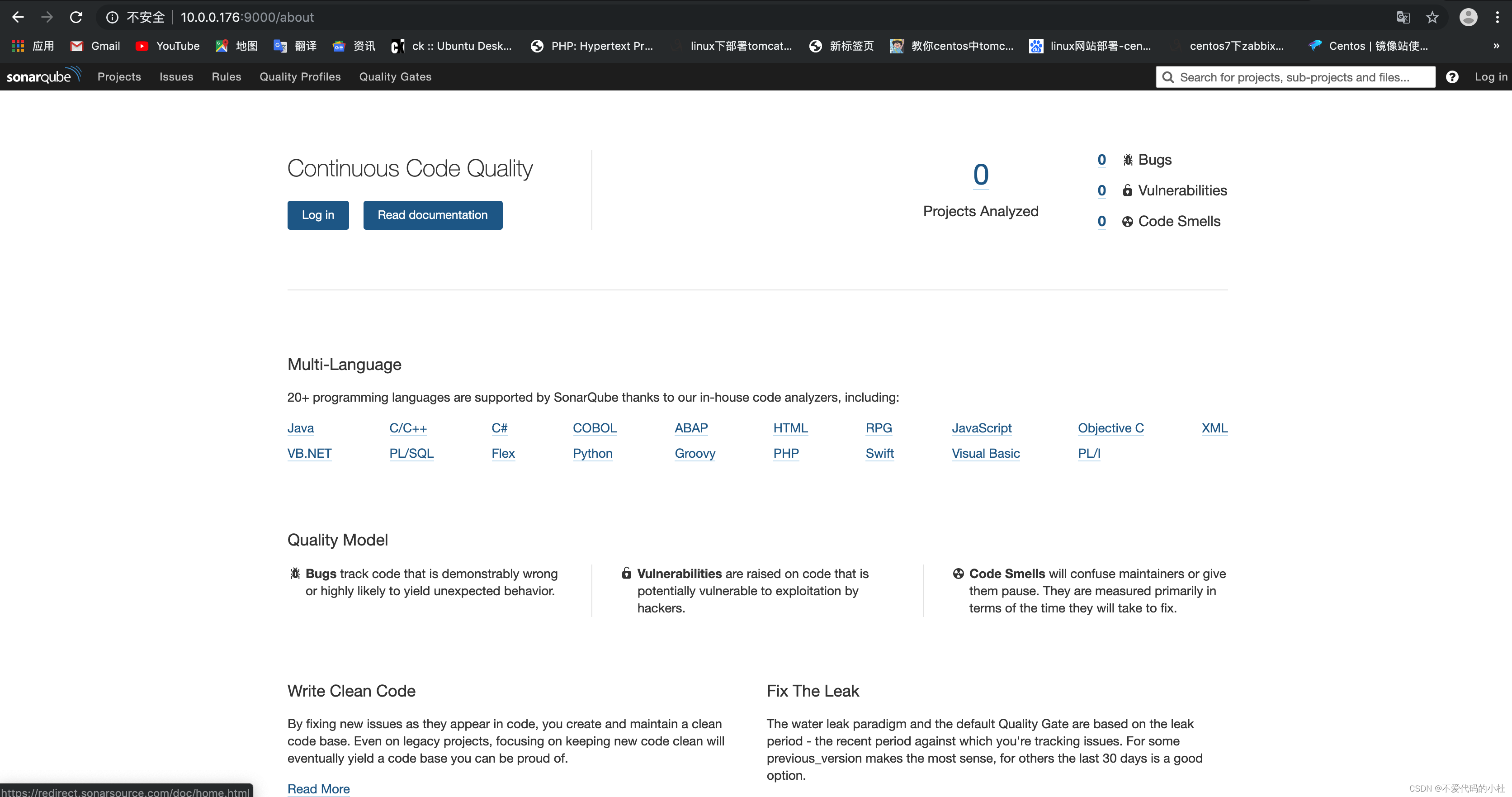
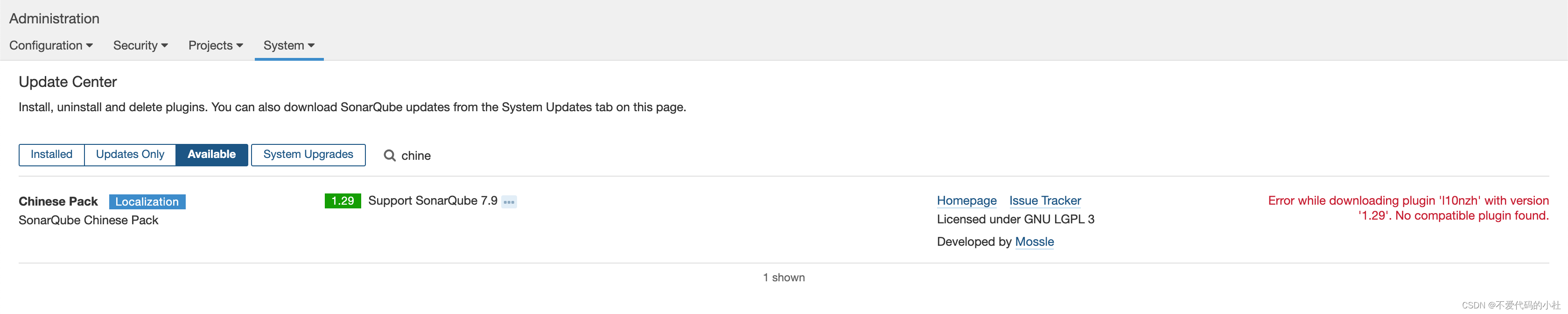
用户名和密码都是admin——admin
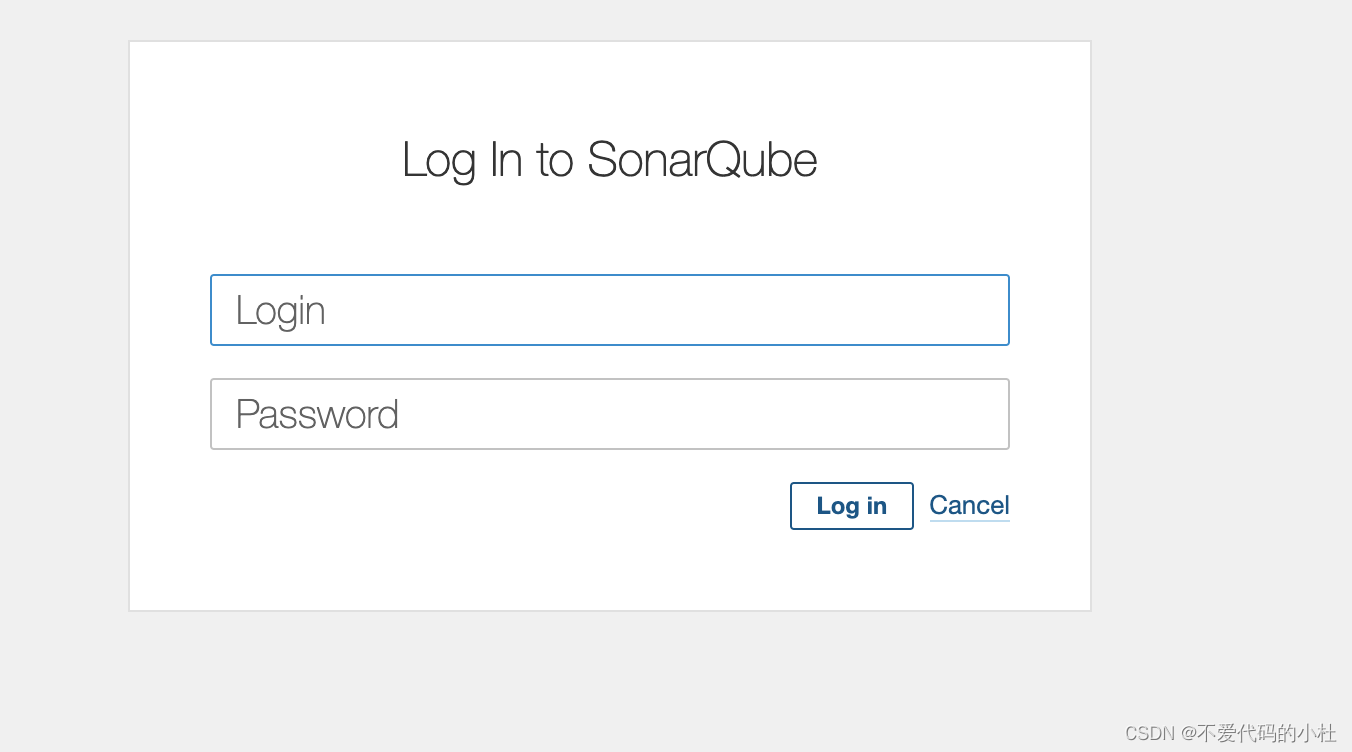
sonarQube也是基于插件的,所以需要安装插件
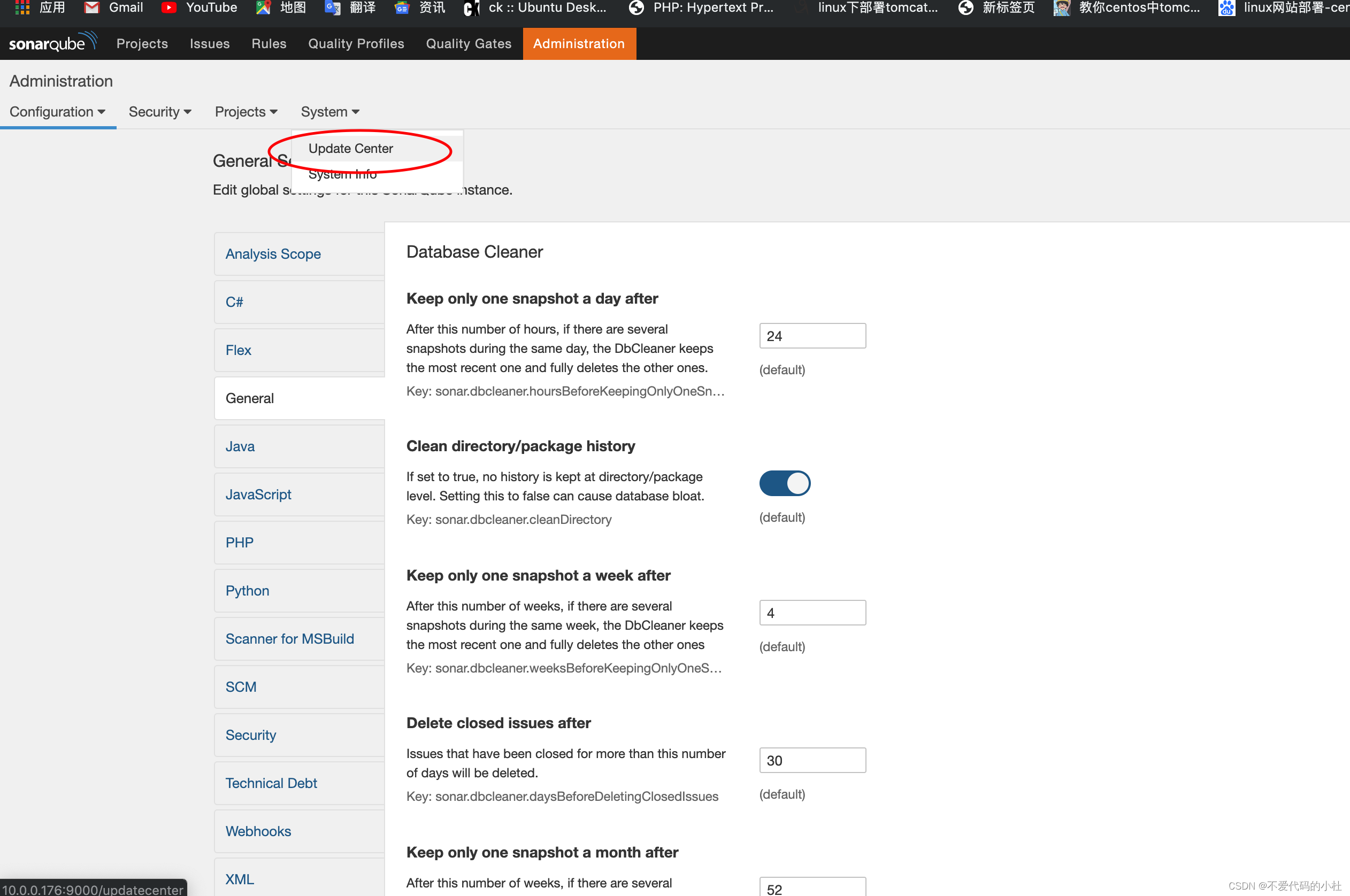
汉化包不兼容6.x版本
导入汉化包到 /app/sonarqube/extensions/plugins/
[root@jenkins sonarqube]# cd extensions/plugins/
[root@jenkins plugins]#
#这里面都是java插件包
[root@jenkins plugins]# ll
total 44832
-rw-r--r-- 1 root root      129 Aug  1  2017 README.txt
-rw-r--r-- 1 root root 11069007 Jul 31  2017 sonar-csharp-plugin-5.10.1.1411.jar
-rw-r--r-- 1 root root  1618672 Jul 31  2017 sonar-flex-plugin-2.3.jar
-rw-r--r-- 1 root root  4900103 Aug  1  2017 sonar-java-plugin-4.12.0.11033.jar
-rw-r--r-- 1 root root  3261889 Aug  1  2017 sonar-javascript-plugin-3.1.1.5128.jar
-rw-r--r-- 1 root root  3733262 Jul 31  2017 sonar-php-plugin-2.10.0.2087.jar
-rw-r--r-- 1 root root  4024311 Aug  1  2017 sonar-python-plugin-1.8.0.1496.jar
-rw-r--r-- 1 root root  3233128 Jul 31  2017 sonar-scm-git-plugin-1.2.jar
-rw-r--r-- 1 root root  6676141 Aug  1  2017 sonar-scm-svn-plugin-1.5.0.715.jar
-rw-r--r-- 1 root root  7368250 Aug  1  2017 sonar-xml-plugin-1.4.3.1027.jar
[root@jenkins plugins]# rz
rz waiting to receive.
Starting zmodem transfer.  Press Ctrl+C to cancel.
Transferring sonar-l10n-zh-plugin-1.11.jar...
  100%      35 KB      35 KB/sec    00:00:01       0 Errors
#上传进去之后重启sonarqube
重新进入网址已经是中文的了
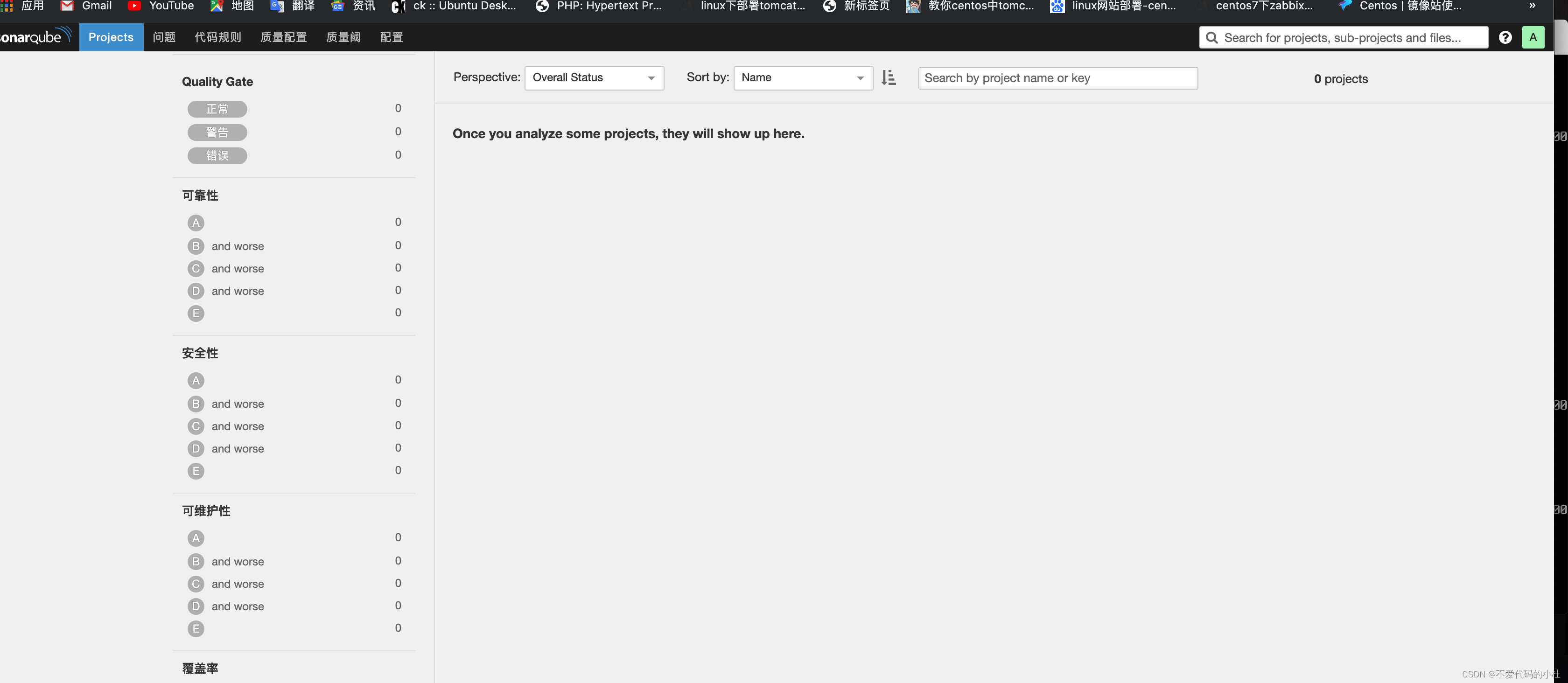
下载地址:https://docs.sonarqube.org/latest/analysis/scan/sonarscanner/
[root@jenkins src]# unzip sonar-scanner-2.6.1.zip
Archive:  sonar-scanner-2.6.1.zip
   creating: sonar-scanner-2.6.1/bin/
  inflating: sonar-scanner-2.6.1/bin/sonar-scanner
  inflating: sonar-scanner-2.6.1/bin/sonar-runner
   creating: sonar-scanner-2.6.1/conf/
  inflating: sonar-scanner-2.6.1/conf/sonar-scanner.properties
   creating: sonar-scanner-2.6.1/lib/
  inflating: sonar-scanner-2.6.1/lib/sonar-scanner-cli-2.6.1.jar
  inflating: sonar-scanner-2.6.1/bin/sonar-runner.bat
  inflating: sonar-scanner-2.6.1/bin/sonar-scanner.bat
修改配置文件(连接数据库的)
[root@jenkins bin]# vim /app/sonar-scanner/conf/sonar-scanner.properties
#Configure here general information about the environment, such as SonarQube DB details for example
#No information about specific project should appear here

#----- Default SonarQube server
sonar.host.url=http://localhost:9000

#----- Default source code encoding
sonar.sourceEncoding=UTF-8

#----- Global database settings (not used for SonarQube 5.2+)
sonar.jdbc.username=sonar
sonar.jdbc.password=123456

#----- PostgreSQL
#sonar.jdbc.url=jdbc:postgresql://localhost/sonar

#----- MySQL
sonar.jdbc.url=jdbc:mysql://10.0.0.177:3306/sonar?useUnicode=true&characterEncoding=utf8

#----- Oracle
#sonar.jdbc.url=jdbc:oracle:thin:@localhost/XE

#----- Microsoft SQLServer
#sonar.jdbc.url=jdbc:jtds:sqlserver://localhost/sonar;SelectMethod=Cursor
~
sonar-scanner 是不需要启动的,他是被调用的,需要在扫描的目录执行这个命令,代码在哪里路径就在哪执行
[root@jenkins bin]# /app/sonar-scanner/bin/sonar-scanner
然后上传各种语言的代码进行测试
#里面存放着各种语言的代码
[root@jenkins python-sonar-runner]# ll /app/src/sonar-examples-master
total 4
drwxr-xr-x 7 root root 130 Jul 25  2016 plugins
drwxr-xr-x 5 root root  85 Jul 25  2016 projects
-rw-r--r-- 1 root root 493 Jul 25  2016 README.md
可以进入到目录中进行查看,可以看到各种语言的代码,我们进入到python中对python代码进行质量测试
[root@jenkins languages]# cd /app/src/sonar-examples-master/projects/languages/
[root@jenkins languages]# ls
abap     cobol   css     generic-coverage  javascript      php    python                    swift  web
android  cpp     erlang  groovy            multi-language  pli    rpg                       vb6    xml
c        csharp  flex    java              objc            plsql  sonar-project.properties  vbnet
然后进入到python-sonar-runner中进行代码测试
[root@jenkins sonar-scanner]# cd /app/src/sonar-examples-master/projects/languages/python/python-sonar-runner
[root@jenkins python-sonar-runner]# ls
README.md  sonar-project.properties  src  validation.txt
[root@jenkins python-sonar-runner]# /app/sonar-scanner/bin/sonar-scanner
INFO: Scanner configuration file: /app/sonar-scanner/conf/sonar-scanner.properties
INFO: Project root configuration file: /app/src/sonar-examples-master/projects/languages/python/python-sonar-runner/sonar-project.properties
INFO: SonarQube Scanner 2.6.1
INFO: Java 1.8.0_121 Oracle Corporation (64-bit)
INFO: Linux 3.10.0-957.12.2.el7.x86_64 amd64
INFO: User cache: /root/.sonar/cache
INFO: Load global settings
INFO: Load global settings (done) | time=261ms
WARN: Property 'sonar.jdbc.url' is not supported any more. It will be ignored. There is no longer any DB connection to the SQ database.
WARN: Property 'sonar.jdbc.username' is not supported any more. It will be ignored. There is no longer any DB connection to the SQ database.
WARN: Property 'sonar.jdbc.password' is not supported any more. It will be ignored. There is no longer any DB connection to the SQ database.
INFO: User cache: /root/.sonar/cache
INFO: Load plugins index
INFO: Load plugins index (done) | time=116ms
INFO: Plugin [l10nzh] defines 'l10nen' as base plugin. This metadata can be removed from manifest of l10n plugins since version 5.2.
INFO: SonarQube server 6.5.0
INFO: Default locale: "en_US", source code encoding: "UTF-8"
INFO: Process project properties
INFO: Load project repositories
INFO: Load project repositories (done) | time=122ms
INFO: Load quality profiles
INFO: Load quality profiles (done) | time=246ms
INFO: Load active rules
INFO: Load active rules (done) | time=1754ms
INFO: Load metrics repository
INFO: Load metrics repository (done) | time=254ms
WARN: SCM provider autodetection failed. No SCM provider claims to support this project. Please use sonar.scm.provider to define SCM of your project.
INFO: Publish mode
INFO: Project key: org.sonarqube:python-simple-sonar-scanner
INFO: -------------  Scan Python :: Simple Project : SonarQube Scanner
INFO: Load server rules
INFO: Load server rules (done) | time=331ms
INFO: Language is forced to py
INFO: Base dir: /app/src/sonar-examples-master/projects/languages/python/python-sonar-runner
INFO: Working dir: /app/src/sonar-examples-master/projects/languages/python/python-sonar-runner/.sonar
INFO: Source paths: src
INFO: Source encoding: UTF-8, default locale: en_US
INFO: Index files
INFO: 9 files indexed
INFO: Quality profile for py: Sonar way
INFO: Sensor PythonXUnitSensor [python]
INFO: Sensor PythonXUnitSensor [python] (done) | time=11ms
INFO: Sensor Python Squid Sensor [python]
INFO: Python unit test coverage
INFO: Python integration test coverage
INFO: Python overall test coverage
INFO: Sensor Python Squid Sensor [python] (done) | time=614ms
INFO: Sensor SonarJavaXmlFileSensor [java]
INFO: Sensor SonarJavaXmlFileSensor [java] (done) | time=0ms
INFO: Sensor Analyzer for "php.ini" files [php]
INFO: Sensor Analyzer for "php.ini" files [php] (done) | time=10ms
INFO: Sensor Zero Coverage Sensor
INFO: Sensor Zero Coverage Sensor (done) | time=35ms
INFO: Sensor CPD Block Indexer
INFO: Sensor CPD Block Indexer (done) | time=61ms
INFO: No SCM system was detected. You can use the 'sonar.scm.provider' property to explicitly specify it.
INFO: 5 files had no CPD blocks
INFO: Calculating CPD for 4 files
INFO: CPD calculation finished
INFO: Analysis report generated in 112ms, dir size=54 KB
INFO: Analysis reports compressed in 27ms, zip size=27 KB
INFO: Analysis report uploaded in 1424ms
INFO: ANALYSIS SUCCESSFUL, you can browse http://localhost:9000/dashboard/index/org.sonarqube:python-simple-sonar-scanner
INFO: Note that you will be able to access the updated dashboard once the server has processed the submitted analysis report
INFO: More about the report processing at http://localhost:9000/api/ce/task?id=AWy72tmj-QGXbgTpuyz-
INFO: Task total time: 9.425 s
INFO: ------------------------------------------------------------------------
INFO: EXECUTION SUCCESS
INFO: ------------------------------------------------------------------------
INFO: Total time: 12.871s
INFO: Final Memory: 43M/107M
INFO: ------------------------------------------------------------------------
然后到sonar-qube网站中查看已经多了一个代码扫描结果
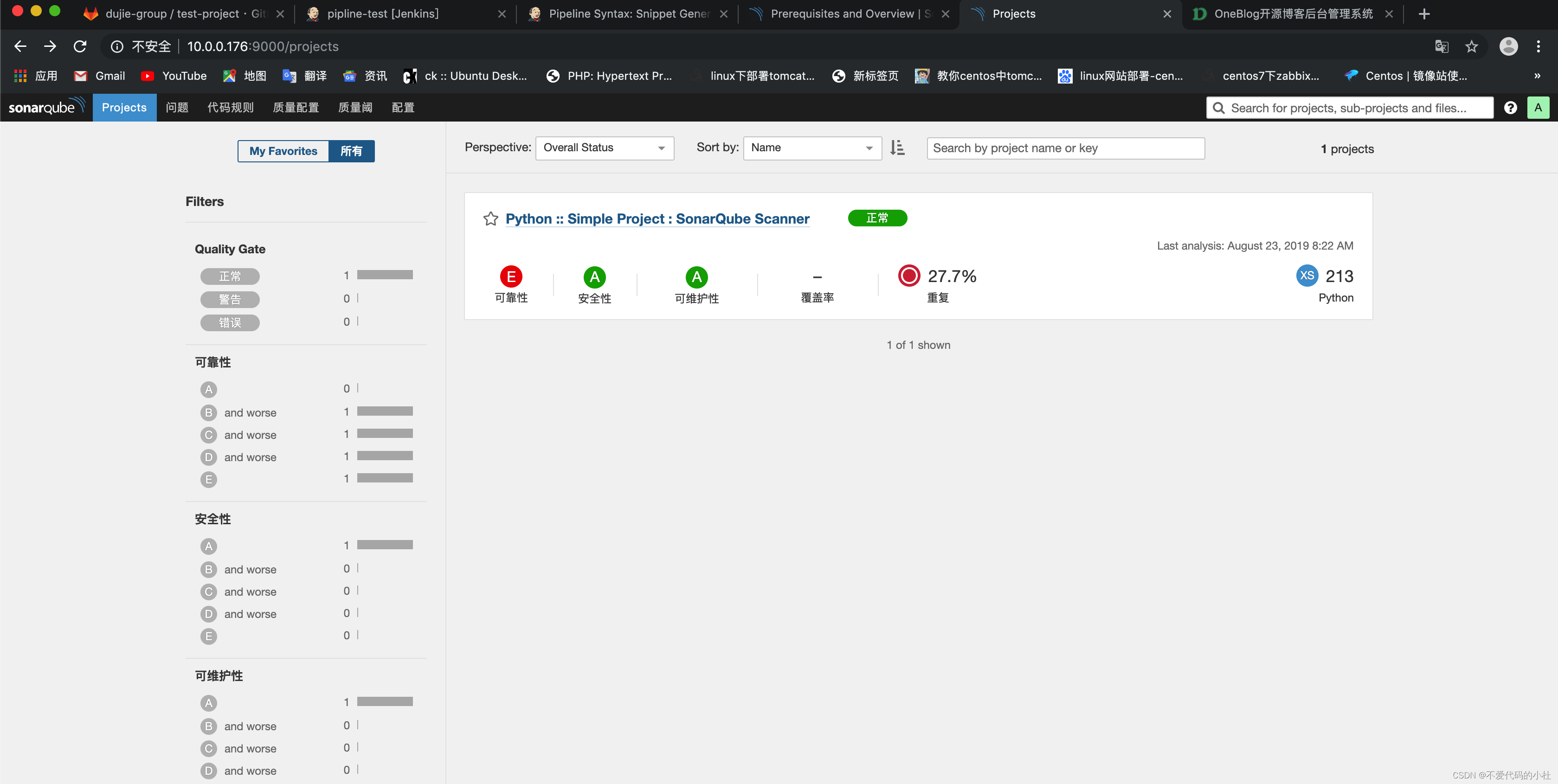
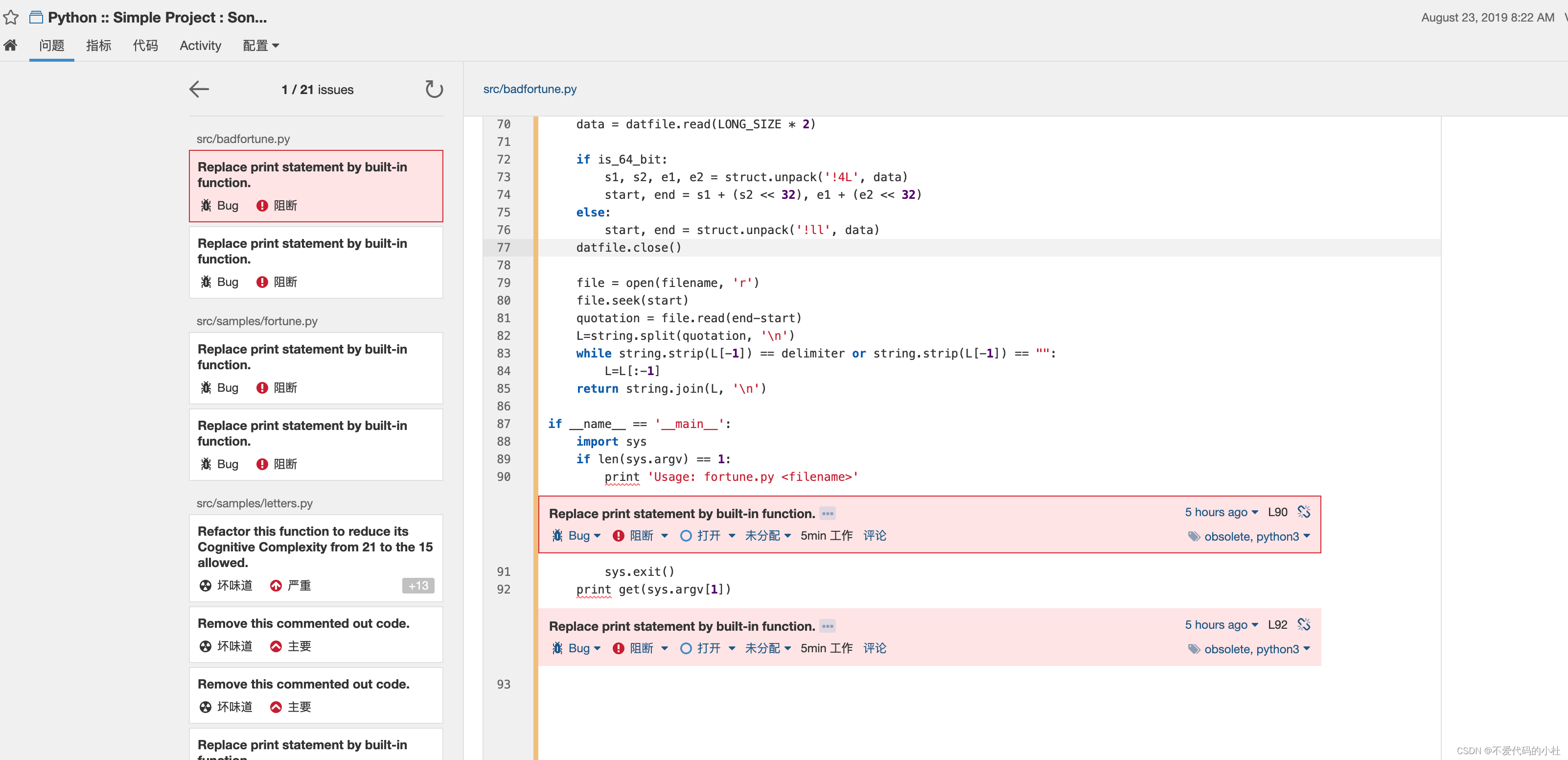
进入到里面可以看到报错代码的具体行数
我们可以自己写段代码进行测试
[root@jenkins python-test]# mkdir src
#手动创建一个python代码目录
[root@jenkins python-test]# pwd
/app/src/sonar-examples-master/projects/languages/python/python-test
#将python中别的配置文件cp一份
[root@jenkins python-test]# cp ../python-sonar-runner/sonar-project.properties .
[root@jenkins python-test]# ll
total 4
-rw-r--r-- 1 root root 338 Aug 23 15:02 sonar-project.properties
drwxr-xr-x 2 root root   6 Aug 23 15:01 src
#将src目录改名
[root@jenkins python-test]# mv src source
#修改配置文件
[root@jenkins python-test]# vim sonar-project.properties
# Required metadata
sonar.projectKey=python-test
sonar.projectName=python-test
sonar.projectVersion=1.0

▽ Comma-separated paths to directories with sources (required)
sonar.sources=source

# Language
sonar.language=py

# Encoding of the source files
sonar.sourceEncoding=UTF-8
进入代码目录中写一段正确的python代码
[root@jenkins python-test]# cd source/
[root@jenkins source]# vim test.py
#/usr/bin/env python
print "hello world"
#然后可以测试,可以看到代码是正确的
[root@jenkins source]# python test.py
hello world
然后修改一下python代码让代码出错然后进行测试,可以看到执行代码已经报错
[root@jenkins source]# vim test.py
#/usr/bin/env python
print "hello world"
print hello
[root@jenkins source]# python test.py
hello world
Traceback (most recent call last):
  File "test.py", line 3, in <module>
    print hello
NameError: name 'hello' is not defined
然后执行扫描的命令
[root@jenkins python-test]# /app/sonar-scanner/bin/sonar-scanner
INFO: Scanner configuration file: /app/sonar-scanner/conf/sonar-scanner.properties
INFO: Project root configuration file: /app/src/sonar-examples-master/projects/languages/python/python-test/sonar-project.properties
INFO: SonarQube Scanner 2.6.1
INFO: Java 1.8.0_121 Oracle Corporation (64-bit)
INFO: Linux 3.10.0-957.12.2.el7.x86_64 amd64
INFO: User cache: /root/.sonar/cache
INFO: Load global settings
INFO: Load global settings (done) | time=534ms
WARN: Property 'sonar.jdbc.url' is not supported any more. It will be ignored. There is no longer any DB connection to the SQ database.
WARN: Property 'sonar.jdbc.username' is not supported any more. It will be ignored. There is no longer any DB connection to the SQ database.
WARN: Property 'sonar.jdbc.password' is not supported any more. It will be ignored. There is no longer any DB connection to the SQ database.
INFO: User cache: /root/.sonar/cache
INFO: Load plugins index
INFO: Load plugins index (done) | time=202ms
INFO: Plugin [l10nzh] defines 'l10nen' as base plugin. This metadata can be removed from manifest of l10n plugins since version 5.2.
INFO: SonarQube server 6.5.0
INFO: Default locale: "en_US", source code encoding: "UTF-8"
INFO: Process project properties
INFO: Load project repositories
INFO: Load project repositories (done) | time=53ms
INFO: Load quality profiles
INFO: Load quality profiles (done) | time=127ms
INFO: Load active rules
INFO: Load active rules (done) | time=2179ms
INFO: Load metrics repository
INFO: Load metrics repository (done) | time=160ms
WARN: SCM provider autodetection failed. No SCM provider claims to support this project. Please use sonar.scm.provider to define SCM of your project.
INFO: Publish mode
INFO: Project key: python-test
INFO: -------------  Scan python-test
INFO: Load server rules
INFO: Load server rules (done) | time=118ms
INFO: Language is forced to py
INFO: Base dir: /app/src/sonar-examples-master/projects/languages/python/python-test
INFO: Working dir: /app/src/sonar-examples-master/projects/languages/python/python-test/.sonar
INFO: Source paths: source
INFO: Source encoding: UTF-8, default locale: en_US
INFO: Index files
INFO: 1 file indexed
INFO: Quality profile for py: Sonar way
INFO: Sensor PythonXUnitSensor [python]
INFO: Sensor PythonXUnitSensor [python] (done) | time=14ms
INFO: Sensor Python Squid Sensor [python]
INFO: Python unit test coverage
INFO: Python integration test coverage
INFO: Python overall test coverage
INFO: Sensor Python Squid Sensor [python] (done) | time=181ms
INFO: Sensor SonarJavaXmlFileSensor [java]
INFO: Sensor SonarJavaXmlFileSensor [java] (done) | time=0ms
INFO: Sensor Analyzer for "php.ini" files [php]
INFO: Sensor Analyzer for "php.ini" files [php] (done) | time=5ms
INFO: Sensor Zero Coverage Sensor
INFO: Sensor Zero Coverage Sensor (done) | time=15ms
INFO: Sensor CPD Block Indexer
INFO: Sensor CPD Block Indexer (done) | time=15ms
INFO: No SCM system was detected. You can use the 'sonar.scm.provider' property to explicitly specify it.
INFO: 1 file had no CPD blocks
INFO: Calculating CPD for 0 files
INFO: CPD calculation finished
INFO: Analysis report generated in 90ms, dir size=20 KB
INFO: Analysis reports compressed in 11ms, zip size=6 KB
INFO: Analysis report uploaded in 716ms
INFO: ANALYSIS SUCCESSFUL, you can browse http://localhost:9000/dashboard/index/python-test
INFO: Note that you will be able to access the updated dashboard once the server has processed the submitted analysis report
INFO: More about the report processing at http://localhost:9000/api/ce/task?id=AWy9UfSW-QGXbgTpuy0A
INFO: Task total time: 8.471 s
INFO: ------------------------------------------------------------------------
INFO: EXECUTION SUCCESS
INFO: ------------------------------------------------------------------------
INFO: Total time: 12.703s
INFO: Final Memory: 43M/106M
INFO: ------------------------------------------------------------------------
此时再去sonarqube网站上查看,已经多了2个问题了
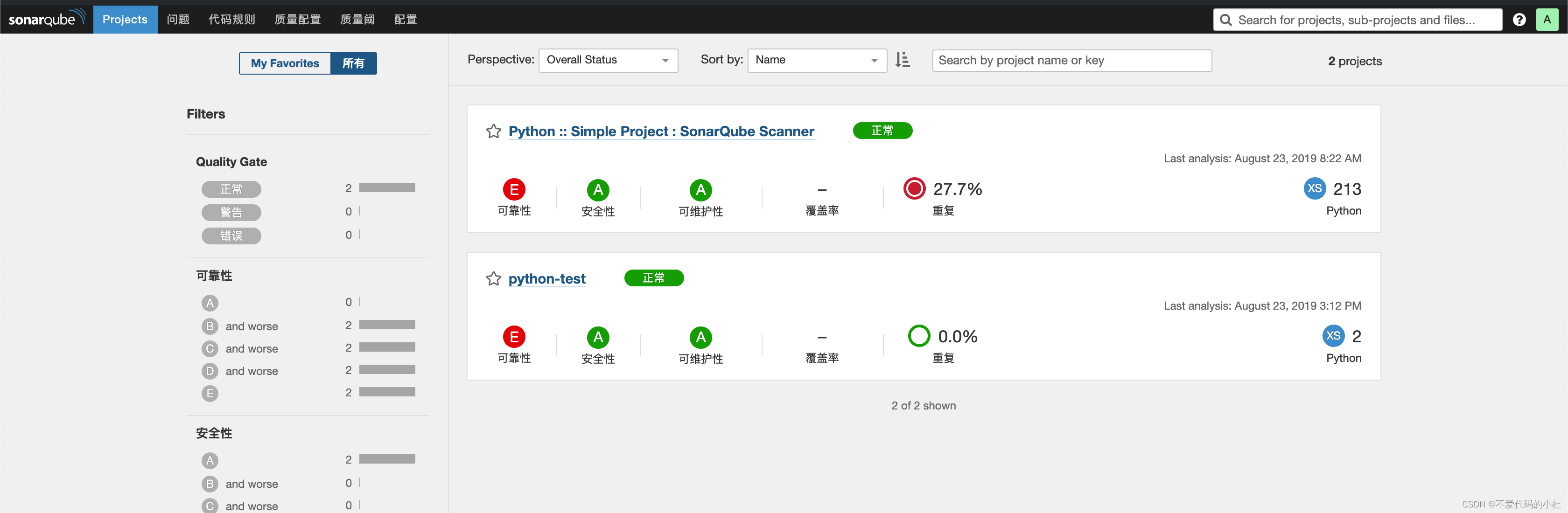
然后我们再把source中的python代码修改正确,然后再次测试看看情况
[root@jenkins python-test]# vim source/test.py
#/usr/bin/env python
print("hello world")

[root@jenkins python-test]# /app/sonar-scanner/bin/sonar-scanner
INFO: Scanner configuration file: /app/sonar-scanner/conf/sonar-scanner.properties
INFO: Project root configuration file: /app/src/sonar-examples-master/projects/languages/python/python-test/sonar-project.properties
INFO: SonarQube Scanner 2.6.1
INFO: Java 1.8.0_121 Oracle Corporation (64-bit)
INFO: Linux 3.10.0-957.12.2.el7.x86_64 amd64
INFO: User cache: /root/.sonar/cache
INFO: Load global settings
INFO: Load global settings (done) | time=142ms
WARN: Property 'sonar.jdbc.url' is not supported any more. It will be ignored. There is no longer any DB connection to the SQ database.
WARN: Property 'sonar.jdbc.username' is not supported any more. It will be ignored. There is no longer any DB connection to the SQ database.
WARN: Property 'sonar.jdbc.password' is not supported any more. It will be ignored. There is no longer any DB connection to the SQ database.
INFO: User cache: /root/.sonar/cache
INFO: Load plugins index
INFO: Load plugins index (done) | time=8ms
INFO: Plugin [l10nzh] defines 'l10nen' as base plugin. This metadata can be removed from manifest of l10n plugins since version 5.2.
INFO: SonarQube server 6.5.0
INFO: Default locale: "en_US", source code encoding: "UTF-8"
INFO: Process project properties
INFO: Load project repositories
INFO: Load project repositories (done) | time=230ms
INFO: Load quality profiles
INFO: Load quality profiles (done) | time=61ms
INFO: Load active rules
INFO: Load active rules (done) | time=862ms
INFO: Load metrics repository
INFO: Load metrics repository (done) | time=73ms
WARN: SCM provider autodetection failed. No SCM provider claims to support this project. Please use sonar.scm.provider to define SCM of your project.
INFO: Publish mode
INFO: Project key: python-test
INFO: -------------  Scan python-test
INFO: Load server rules
INFO: Load server rules (done) | time=83ms
INFO: Language is forced to py
INFO: Base dir: /app/src/sonar-examples-master/projects/languages/python/python-test
INFO: Working dir: /app/src/sonar-examples-master/projects/languages/python/python-test/.sonar
INFO: Source paths: source
INFO: Source encoding: UTF-8, default locale: en_US
INFO: Index files
INFO: 1 file indexed
INFO: Quality profile for py: Sonar way
INFO: Sensor PythonXUnitSensor [python]
INFO: Sensor PythonXUnitSensor [python] (done) | time=41ms
INFO: Sensor Python Squid Sensor [python]
INFO: Python unit test coverage
INFO: Python integration test coverage
INFO: Python overall test coverage
INFO: Sensor Python Squid Sensor [python] (done) | time=569ms
INFO: Sensor SonarJavaXmlFileSensor [java]
INFO: Sensor SonarJavaXmlFileSensor [java] (done) | time=0ms
INFO: Sensor Analyzer for "php.ini" files [php]
INFO: Sensor Analyzer for "php.ini" files [php] (done) | time=5ms
INFO: Sensor Zero Coverage Sensor
INFO: Sensor Zero Coverage Sensor (done) | time=17ms
INFO: Sensor CPD Block Indexer
INFO: Sensor CPD Block Indexer (done) | time=25ms
INFO: No SCM system was detected. You can use the 'sonar.scm.provider' property to explicitly specify it.
INFO: 1 file had no CPD blocks
INFO: Calculating CPD for 0 files
INFO: CPD calculation finished
INFO: Analysis report generated in 128ms, dir size=20 KB
INFO: Analysis reports compressed in 14ms, zip size=6 KB
INFO: Analysis report uploaded in 54ms
INFO: ANALYSIS SUCCESSFUL, you can browse http://localhost:9000/dashboard/index/python-test
INFO: Note that you will be able to access the updated dashboard once the server has processed the submitted analysis report
INFO: More about the report processing at http://localhost:9000/api/ce/task?id=AWy9VWr5-QGXbgTpuy0B
INFO: Task total time: 6.789 s
INFO: ------------------------------------------------------------------------
INFO: EXECUTION SUCCESS
INFO: ------------------------------------------------------------------------
INFO: Total time: 9.013s
INFO: Final Memory: 43M/106M
INFO: ------------------------------------------------------------------------
再去网址上查看,已经恢复正常


然后如何将代码扫描放到jenkins中,
代码扫描2中方式:
1,在代码里执行shell命令放进去扫描
2,在代码克隆完之后用jenkins触发,帮我们做扫描
1. 安装插件,配置jenkins关联到sonarQube
首先安装插件,在jenkins插件安装界面安装Sonar 插件SonarQube Plugin
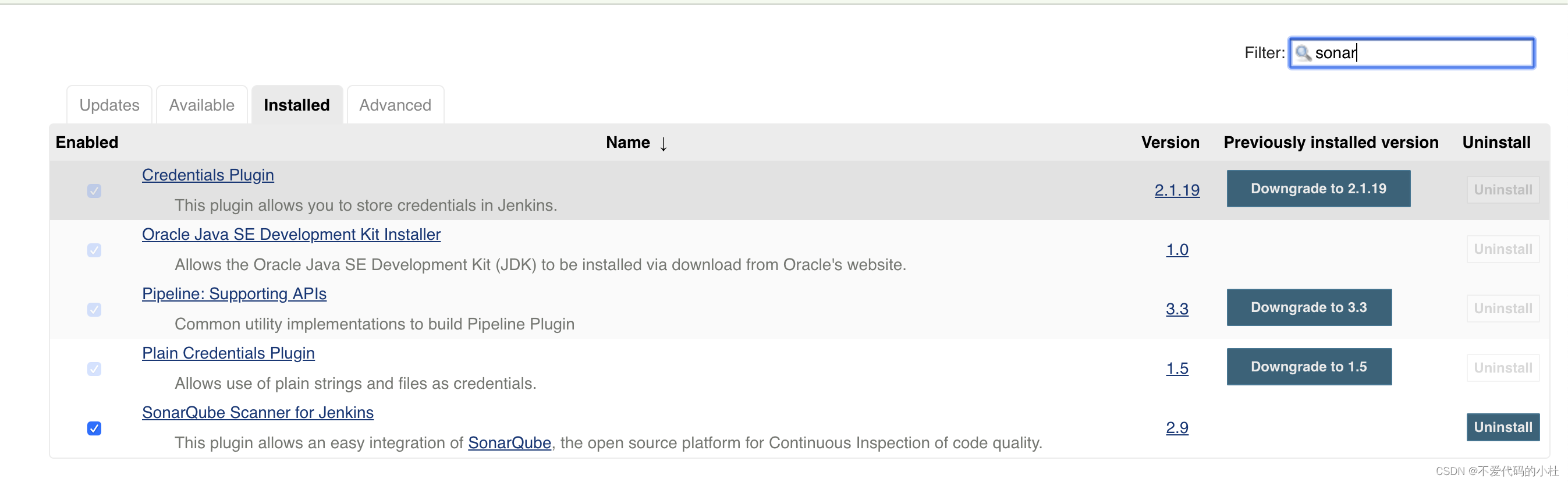
安装成功之后需要到系统配置中配置sonarQube
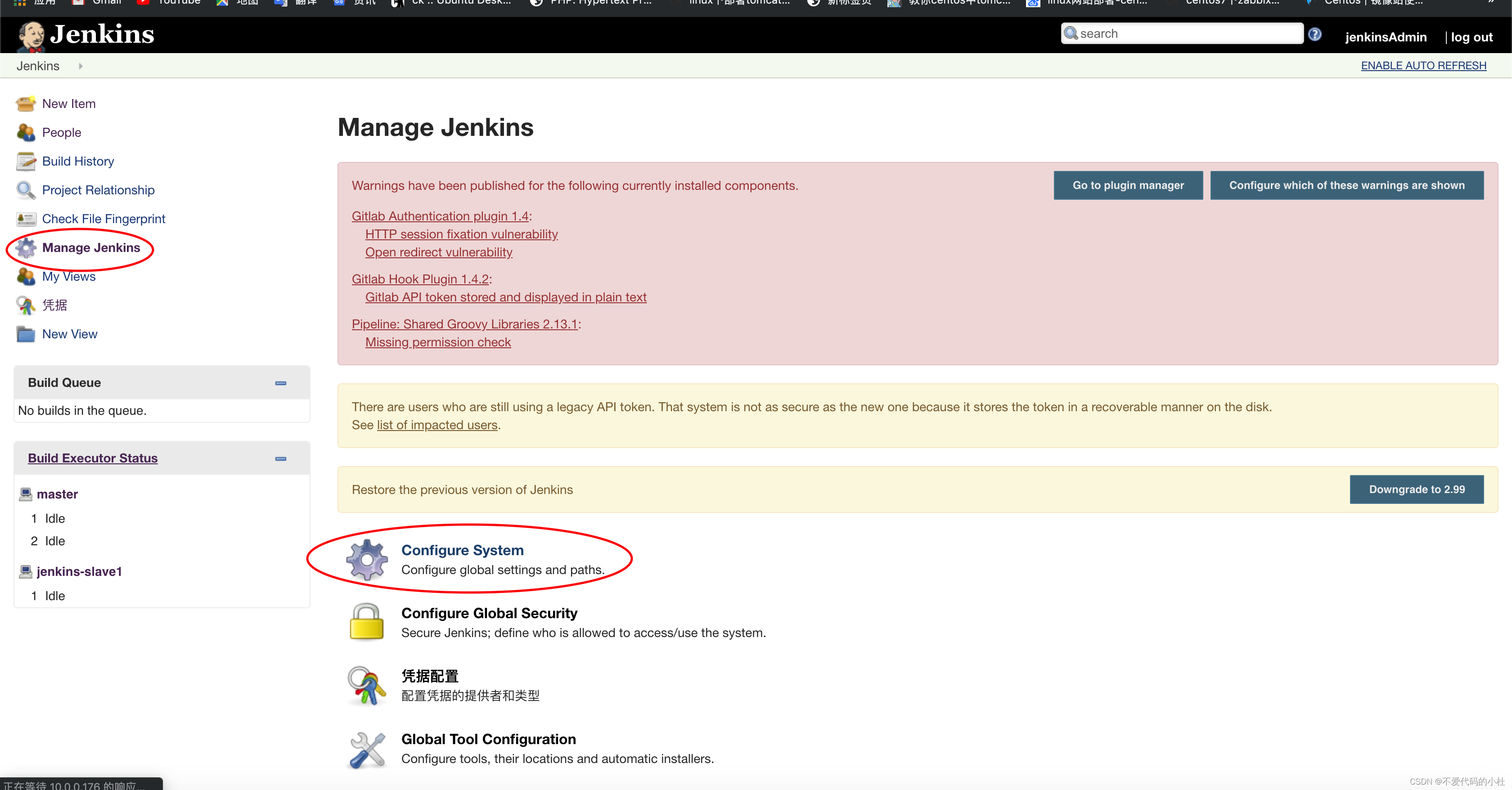

填写sonarQube名字,可以随意些,URL需要写sonarqube服务器,我这里jenkins和sonarqube在同一台机器,tonken不用设置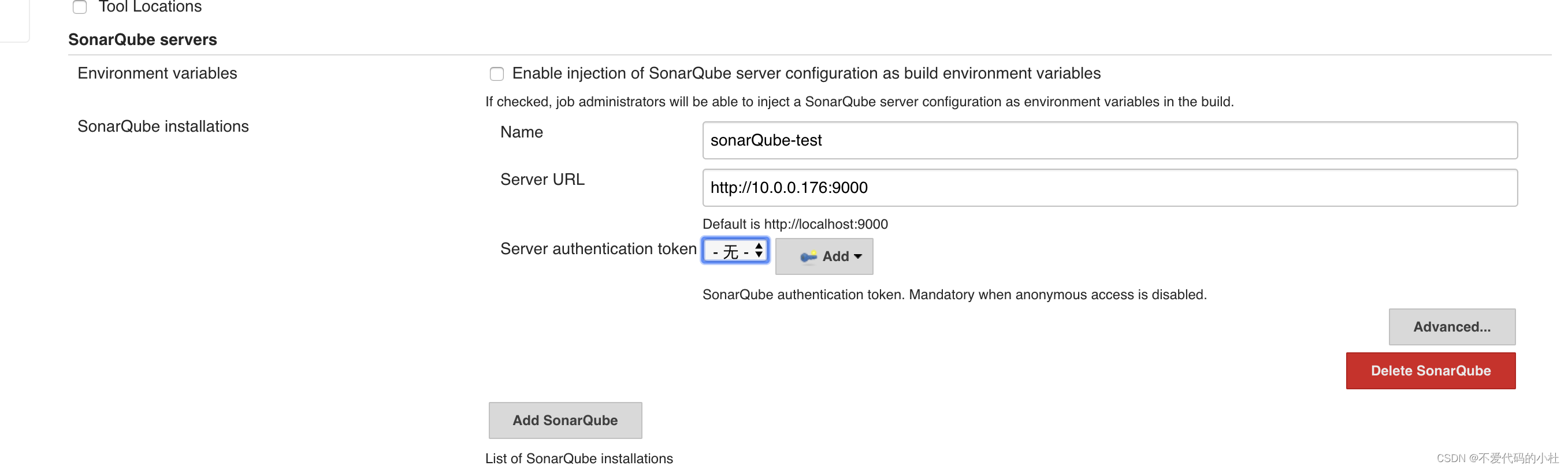
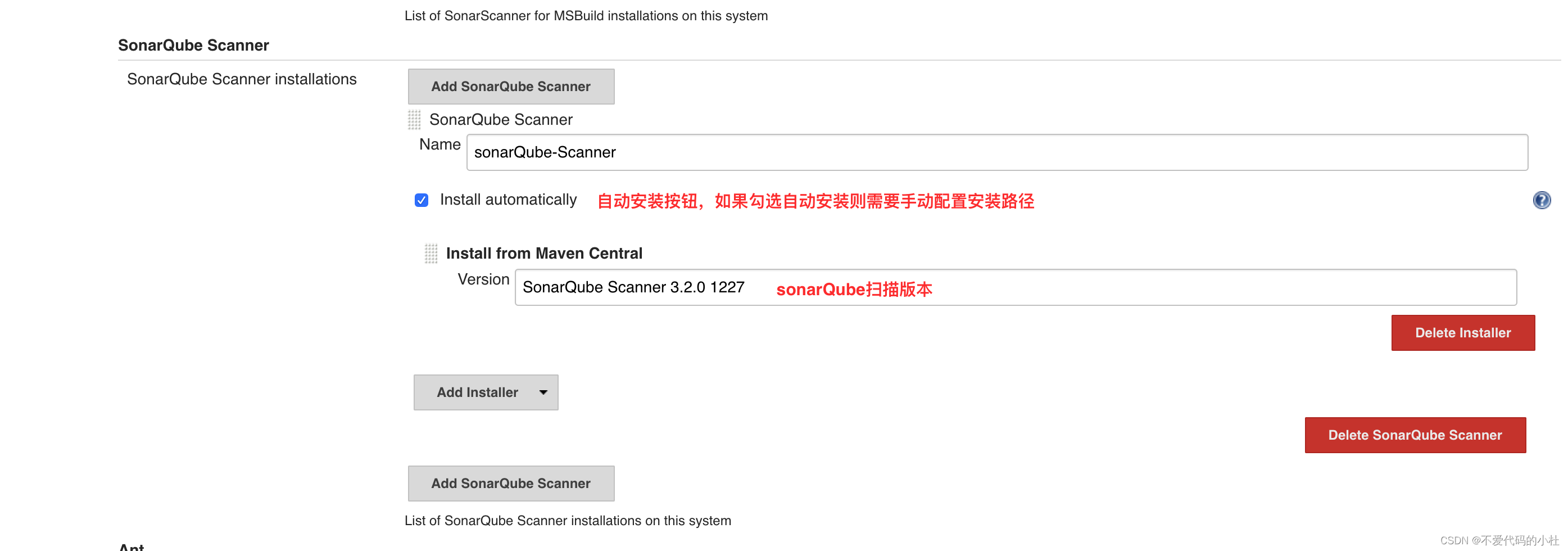
2. 让jeknins关联到sonarscanner
添加扫描器
系统管理Global Tool Configuration 全局工具配置
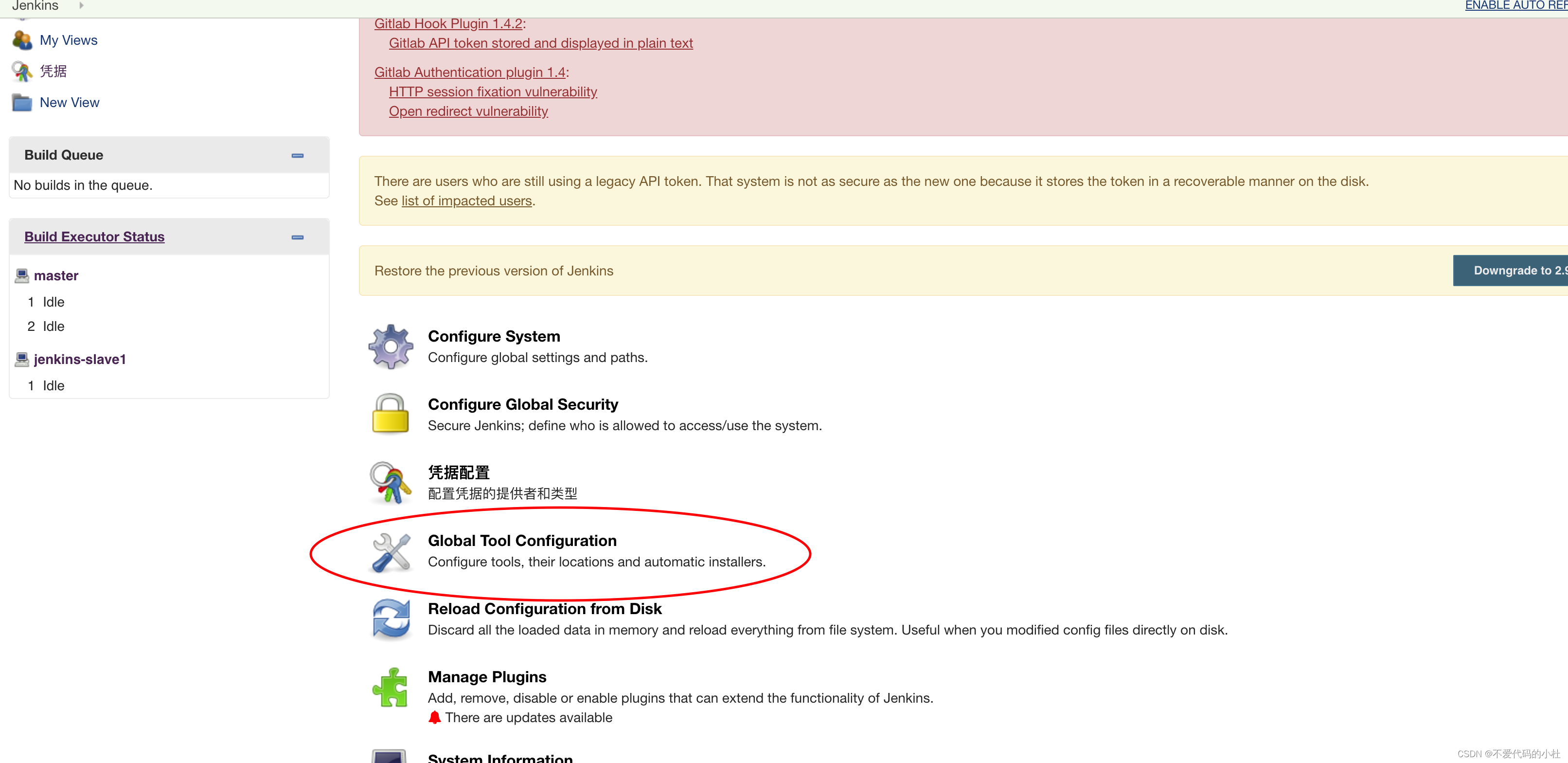
配置sonarQube Scanner 配置
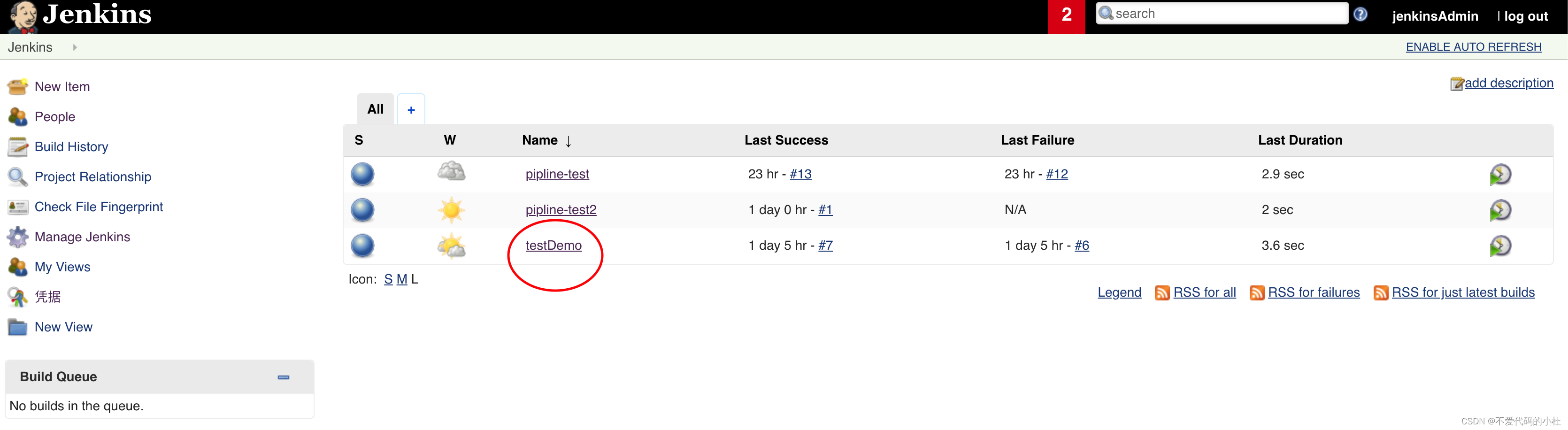
3. 配置扫描
选择自己的项目
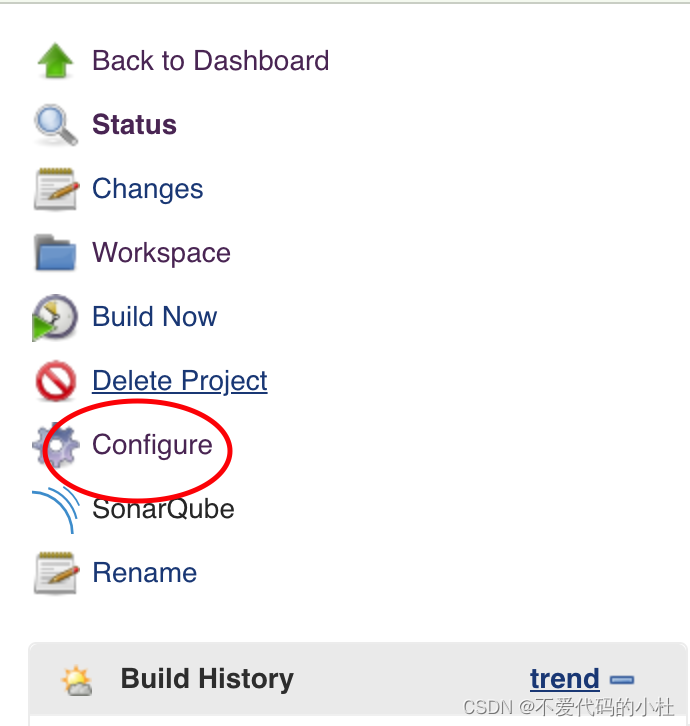
选择配置项目
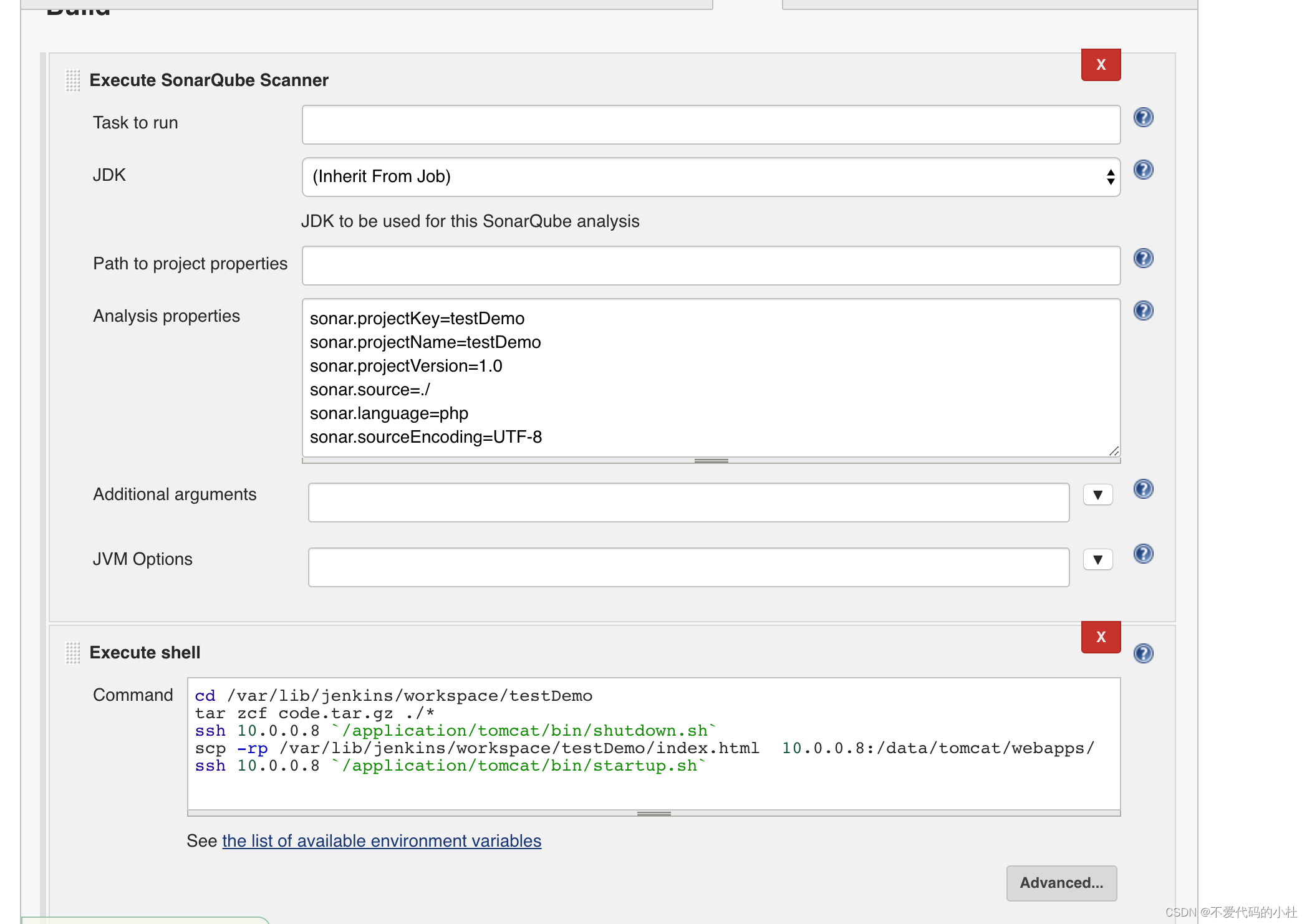
构建execute sonarqube sacnner
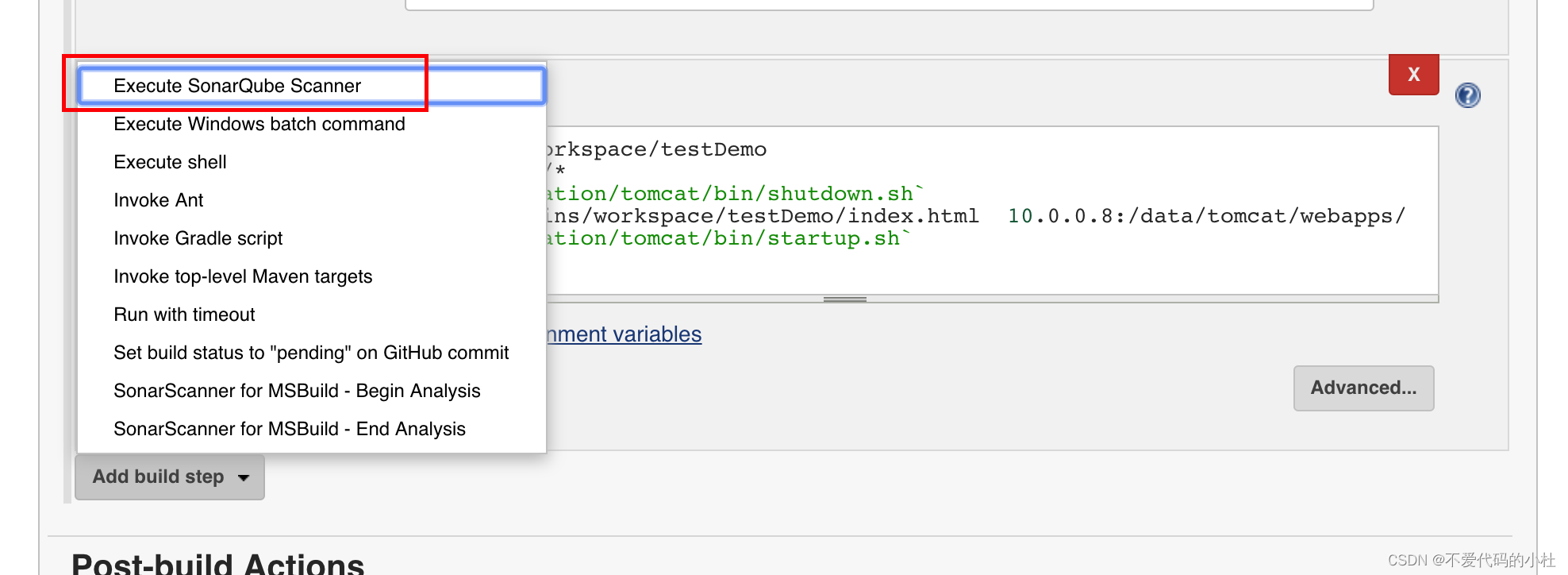
将配置文件的内容修改成如下格式,然后将Execute SonarQube Scanner 和Excute Shell调换位置,先扫描后执行命令,填写完成然后点击保存。
sonar.projectKey=testDemo
sonar.projectName=testDemo
sonar.projectVersion=1.0
sonar.source=./
sonar.language=php
sonar.sourceEncoding=UTF-8
如何在buildr项目中使用Ruby?我在很多不同的项目中使用过Ruby、JRuby、Java和Clojure。我目前正在使用我的标准Ruby开发一个模拟应用程序,我想尝试使用Clojure后端(我确实喜欢功能代码)以及JRubygui和测试套件。我还可以看到在未来的不同项目中使用Scala作为后端。我想我要为我的项目尝试一下buildr(http://buildr.apache.org/),但我注意到buildr似乎没有设置为在项目中使用JRuby代码本身!这看起来有点傻,因为该工具旨在统一通用的JVM语言并且是在ruby中构建的。除了将输出的jar包含在一个独特的、仅限ruby
在rails源中:https://github.com/rails/rails/blob/master/activesupport/lib/active_support/lazy_load_hooks.rb可以看到以下内容@load_hooks=Hash.new{|h,k|h[k]=[]}在IRB中,它只是初始化一个空哈希。和做有什么区别@load_hooks=Hash.new 最佳答案 查看rubydocumentationforHashnew→new_hashclicktotogglesourcenew(obj)→new_has
我的主要目标是能够完全理解我正在使用的库/gem。我尝试在Github上从头到尾阅读源代码,但这真的很难。我认为更有趣、更温和的踏脚石就是在使用时阅读每个库/gem方法的源代码。例如,我想知道RubyonRails中的redirect_to方法是如何工作的:如何查找redirect_to方法的源代码?我知道在pry中我可以执行类似show-methodmethod的操作,但我如何才能对Rails框架中的方法执行此操作?您对我如何更好地理解Gem及其API有什么建议吗?仅仅阅读源代码似乎真的很难,尤其是对于框架。谢谢! 最佳答案 Ru
我的假设是moduleAmoduleBendend和moduleA::Bend是一样的。我能够从thisblog找到解决方案,thisSOthread和andthisSOthread.为什么以及什么时候应该更喜欢紧凑语法A::B而不是另一个,因为它显然有一个缺点?我有一种直觉,它可能与性能有关,因为在更多命名空间中查找常量需要更多计算。但是我无法通过对普通类进行基准测试来验证这一点。 最佳答案 这两种写作方法经常被混淆。首先要说的是,据我所知,没有可衡量的性能差异。(在下面的书面示例中不断查找)最明显的区别,可能也是最著名的,是你的
几个月前,我读了一篇关于rubygem的博客文章,它可以通过阅读代码本身来确定编程语言。对于我的生活,我不记得博客或gem的名称。谷歌搜索“ruby编程语言猜测”及其变体也无济于事。有人碰巧知道相关gem的名称吗? 最佳答案 是这个吗:http://github.com/chrislo/sourceclassifier/tree/master 关于ruby-寻找通过阅读代码确定编程语言的rubygem?,我们在StackOverflow上找到一个类似的问题:
我目前正在使用以下方法获取页面的源代码:Net::HTTP.get(URI.parse(page.url))我还想获取HTTP状态,而无需发出第二个请求。有没有办法用另一种方法做到这一点?我一直在查看文档,但似乎找不到我要找的东西。 最佳答案 在我看来,除非您需要一些真正的低级访问或控制,否则最好使用Ruby的内置Open::URI模块:require'open-uri'io=open('http://www.example.org/')#=>#body=io.read[0,50]#=>"["200","OK"]io.base_ur
前言作为一名程序员,自己的本质工作就是做程序开发,那么程序开发的时候最直接的体现就是代码,检验一个程序员技术水平的一个核心环节就是开发时候的代码能力。众所周知,程序开发的水平提升是一个循序渐进的过程,每一位程序员都是从“菜鸟”变成“大神”的,所以程序员在程序开发过程中的代码能力也是根据平时开发中的业务实践来积累和提升的。提高代码能力核心要素程序员要想提高自身代码能力,尤其是新晋程序员的代码能力有很大的提升空间的时候,需要针对性的去提高自己的代码能力。提高代码能力其实有几个比较关键的点,只要把握住这些方面,就能很好的、快速的提高自己的一部分代码能力。1、多去阅读开源项目,如有机会可以亲自参与开源
嗨~大家好,这里是可莉!今天给大家带来的是7个C语言的经典基础代码~那一起往下看下去把【程序一】打印100到200之间的素数#includeintmain(){ inti; for(i=100;i 【程序二】输出乘法口诀表#includeintmain(){inti;for(i=1;i 【程序三】判断1000年---2000年之间的闰年#includeintmain(){intyear;for(year=1000;year 【程序四】给定两个整形变量的值,将两个值的内容进行交换。这里提供两种方法来进行交换,第一种为创建临时变量来进行交换,第二种是不创建临时变量而直接进行交换。1.创建临时变量来
文章目录git常用命令(简介,详细参数往下看)Git提交代码步骤gitpullgitstatusgitaddgitcommitgitpushgit代码冲突合并问题方法一:放弃本地代码方法二:合并代码常用命令以及详细参数gitadd将文件添加到仓库:gitdiff比较文件异同gitlog查看历史记录gitreset代码回滚版本库相关操作远程仓库相关操作分支相关操作创建分支查看分支:gitbranch合并分支:gitmerge删除分支:gitbranch-ddev查看分支合并图:gitlog–graph–pretty=oneline–abbrev-commit撤消某次提交git用户名密码相关配置g
打印1:defsum(i)i=i+[2]end$x=[1]sum($x)print$x打印12:defsum(i)i.push(2)end$x=[1]sum($x)print$x后者是修改全局变量$x。为什么它在第二个例子中被修改而不是在第一个例子中?类Array的任何方法(不仅是push)都会发生这种情况吗? 最佳答案 变量范围在这里无关紧要。在第一段代码中,您仅使用赋值运算符=为变量i赋值,而在第二段代码中,您正在修改$x(也称为i)使用破坏性方法push。赋值从不修改任何对象。它只是提供一个名称来引用一个对象。方法要么是破坏性
