Hadoop中将数据切分成块存在HDFS不同的DataNode中,如果想汇总,按照常规想法就是,移动数据到统计程序:先把数据读取到一个程序中,再进行汇总。
但是HDFS存的数据量非常大时,对汇总程序所在的服务器将产生巨大压力,并且网络IO也十分消耗资源。
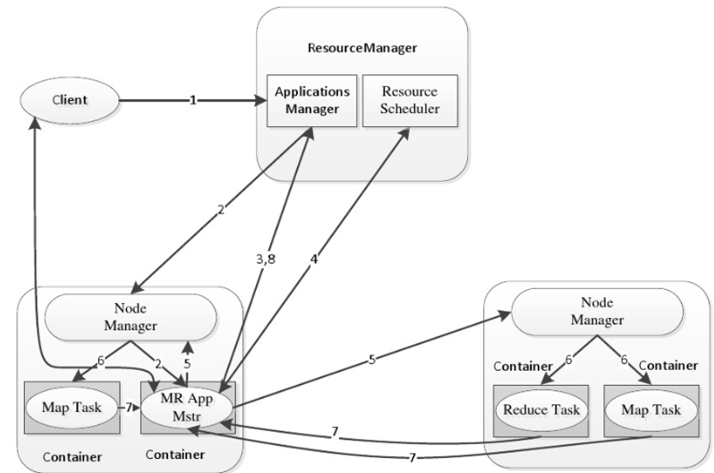
为了解决这种问题,MapReduce提出一种想法:将统计程序移动到DataNode,每台DataNode(就近)统计完再汇总,充分利用DataNode的计算资源。YARN的调度决定了MapReduce程序所在的Node。
下面这个图描述了具体的流程
Hadoop中可以通过Java来编写MapReduce,针对不熟悉Java的开发者,Hadoop提供了通过可执行程序或者脚本的方式创建MapReduce的Hadoop Streaming。
hadoop streaming通过用户编写的map函数中标准输入读取数据(一行一行地读取),按照map函数的处理逻辑处理后,将处理后的数据由标准输出进行输出到下一个阶段。
reduce函数也是按行读取数据,按照函数的处理逻辑处理完数据后,将它们通过标准输出写到hdfs的指定目录中。
不管使用的是何种编程语言,在map函数中,原始数据会被处理成<key,value>的形式,但是key与value之间必须通过\t分隔符分隔,分隔符左边的是key,分隔符右边的是value,如果没有使用\t分隔符,那么整行都会被当作key
首先,新增测试数据
vi mpdata

I love Beijing
I love China
Beijing is the capital of China
然后,将文件上传到hdfs
[root@localhost ~]# hadoop fs -put mrdata /chesterdata新建dotnet6的console项目mapper,修改Program.cs
using System;
using System.Text.RegularExpressions;

namespace mapper
{
    class Program
    {
        static void Main(string[] args)
        {
            string line;
            //Hadoop passes data to the mapper on STDIN
            while((line = Console.ReadLine()) != null)
            {
                // We only want words, so strip out punctuation, numbers, etc.
                var onlyText = Regex.Replace(line, @"\.|;|:|,|[0-9]|'", "");
                // Split at whitespace.
                var words = Regex.Matches(onlyText, @"[\w]+");
                // Loop over the words
                foreach(var word in words)
                {
                    //Emit tab-delimited key/value pairs.
                    //In this case, a word and a count of 1.
                    Console.WriteLine("{0}\t1",word);
                }
            }
        }
    }
}
发布mapper
cd /demo/dotnet/mapper/
dotnet publish  -c Release -r linux-x64 /p:PublishSingleFile=true
新建dotnet6的console项目reducer,修改Program.cs
using System;
using System.Collections.Generic;

namespace reducer
{
    class Program
    {
        static void Main(string[] args)
        {
            //Dictionary for holding a count of words
            Dictionary<string, int> words = new Dictionary<string, int>();

            string line;
            //Read from STDIN
            while ((line = Console.ReadLine()) != null)
            {
                // Data from Hadoop is tab-delimited key/value pairs
                var sArr = line.Split('\t');
                // Get the word
                string word = sArr[0];
                // Get the count
                int count = Convert.ToInt32(sArr[1]);

                //Do we already have a count for the word?
                if(words.ContainsKey(word))
                {
                    //If so, increment the count
                    words[word] += count;
                } else
                {
                    //Add the key to the collection
                    words.Add(word, count);
                }
            }
            //Finally, emit each word and count
            foreach (var word in words)
            {
                //Emit tab-delimited key/value pairs.
                //In this case, a word and a count of 1.
                Console.WriteLine("{0}\t{1}", word.Key, word.Value);
            }
        }
    }
}
发布reducer
/demo/dotnet/reducer
dotnet publish  -c Release -r linux-x64 /p:PublishSingleFile=true
执行mapepr reduce
hadoop jar /usr/local/hadoop323/hadoop-3.2.3/share/hadoop/tools/lib/hadoop-streaming-3.2.3.jar -input /chesterdata/mrdata -output /dotnetmroutput -mapper "./mapper" -reducer "./reducer" -file /demo/dotnet/mapper/bin/Release/net6.0/linux-x64/publish/mapper -f /demo/dotnet/reducer/bin/Release/net6.0/linux-x64/publish/reducer查看mapreduce结果
[root@localhost reducer]# hadoop fs -ls /dotnetmroutput

-rw-r--r--   1 root supergroup          0 2022-05-01 16:40 /dotnetmroutput/_SUCCESS
-rw-r--r--   1 root supergroup         55 2022-05-01 16:40 /dotnetmroutput/part-00000
查看part-00000内容
[root@localhost reducer]# hadoop fs -cat /dotnetmroutput/part-00000

Beijing 2
China   2
I       2
capital 1
is      1
love    2
of      1
the     1
可以看到dotnet模式的Hadoop Streaming已经执行成功。
# mapper.py
import sys
import re
p = re.compile(r'\w+')
for line in sys.stdin:
    words = line.strip().split(' ')
    for word in words:
        w = p.findall(word)
        if len(w) < 1:
            continue
        s = w[0].strip().lower()
        if s != "":
            print("%s\t%s" % (s, 1))
编写reducer
# reducer.py
import sys
res = dict()
for word_one in sys.stdin:
    word, one = word_one.strip().split('\t')
    if word in res.keys():
        res[word] = res[word] + 1
    else:
        res[word] = 1
print(res)
执行mapreduce
hadoop jar /usr/local/hadoop323/hadoop-3.2.3/share/hadoop/tools/lib/hadoop-streaming-3.2.3.jar -input /chesterdata/mrdata -output /mroutput -mapper "python3 mapper.py" -reducer "python3 reducer.py" -file /root/mapper.py -file /root/reducer.py
查看mapreduce结果
[root@localhost lib]# hadoop fs -ls /mroutput

-rw-r--r--   1 root supergroup          0 2022-05-01 05:00 /mroutput/_SUCCESS
-rw-r--r--   1 root supergroup         89 2022-05-01 05:00 /mroutput/part-00000
查看part-00000内容
[root@localhost lib]# hadoop fs -cat /mroutput/part-00000

{'beijing': 2, 'capital': 1, 'china': 2, 'i': 2, 'is': 1, 'love': 2, 'of': 1, 'the': 1}
可以看到python模式的Hadoop Streaming已经执行成功。
关闭。这个问题是opinion-based.它目前不接受答案。想要改进这个问题?更新问题,以便editingthispost可以用事实和引用来回答它.关闭4年前。Improvethisquestion我想在固定时间创建一系列低音和高音调的哔哔声。例如:在150毫秒时发出高音调的蜂鸣声在151毫秒时发出低音调的蜂鸣声200毫秒时发出低音调的蜂鸣声250毫秒的高音调蜂鸣声有没有办法在Ruby或Python中做到这一点?我真的不在乎输出编码是什么(.wav、.mp3、.ogg等等),但我确实想创建一个输出文件。
尝试通过RVM将RubyGems升级到版本1.8.10并出现此错误:$rvmrubygemslatestRemovingoldRubygemsfiles...Installingrubygems-1.8.10forruby-1.9.2-p180...ERROR:Errorrunning'GEM_PATH="/Users/foo/.rvm/gems/ruby-1.9.2-p180:/Users/foo/.rvm/gems/ruby-1.9.2-p180@global:/Users/foo/.rvm/gems/ruby-1.9.2-p180:/Users/foo/.rvm/gems/rub
我正在使用puppet为ruby程序提供一组常量。我需要提供一组主机名,我的程序将对其进行迭代。在我之前使用的bash脚本中,我只是将它作为一个puppet变量hosts=>"host1,host2"我将其提供给bash脚本作为HOSTS=显然这对ruby不太适用——我需要它的格式hosts=["host1","host2"]自从phosts和putsmy_array.inspect提供输出["host1","host2"]我希望使用其中之一。不幸的是,我终其一生都无法弄清楚如何让它发挥作用。我尝试了以下各项:我发现某处他们指出我需要在函数调用前放置“function_”……这
我正在编写一个gem,我必须在其中fork两个启动两个webrick服务器的进程。我想通过基类的类方法启动这个服务器,因为应该只有这两个服务器在运行,而不是多个。在运行时,我想调用这两个服务器上的一些方法来更改变量。我的问题是,我无法通过基类的类方法访问fork的实例变量。此外,我不能在我的基类中使用线程,因为在幕后我正在使用另一个不是线程安全的库。所以我必须将每个服务器派生到它自己的进程。我用类变量试过了,比如@@server。但是当我试图通过基类访问这个变量时,它是nil。我读到在Ruby中不可能在分支之间共享类变量,对吗?那么,还有其他解决办法吗?我考虑过使用单例,但我不确定这是
我的最终目标是安装当前版本的RubyonRails。我在OSXMountainLion上运行。到目前为止,这是我的过程:已安装的RVM$\curl-Lhttps://get.rvm.io|bash-sstable检查已知(我假设已批准)安装$rvmlistknown我看到当前的稳定版本可用[ruby-]2.0.0[-p247]输入命令安装$rvminstall2.0.0-p247注意:我也试过这些安装命令$rvminstallruby-2.0.0-p247$rvminstallruby=2.0.0-p247我很快就无处可去了。结果:$rvminstall2.0.0-p247Search
我在理解Enumerator.new方法的工作原理时遇到了一些困难。假设文档中的示例:fib=Enumerator.newdo|y|a=b=1loopdoy[1,1,2,3,5,8,13,21,34,55]循环中断条件在哪里,它如何知道循环应该迭代多少次(因为它没有任何明确的中断条件并且看起来像无限循环)? 最佳答案 Enumerator使用Fibers在内部。您的示例等效于:require'fiber'fiber=Fiber.newdoa=b=1loopdoFiber.yieldaa,b=b,a+bendend10.times.m
我有一个用户工厂。我希望默认情况下确认用户。但是鉴于unconfirmed特征,我不希望它们被确认。虽然我有一个基于实现细节而不是抽象的工作实现,但我想知道如何正确地做到这一点。factory:userdoafter(:create)do|user,evaluator|#unwantedimplementationdetailshereunlessFactoryGirl.factories[:user].defined_traits.map(&:name).include?(:unconfirmed)user.confirm!endendtrait:unconfirmeddoenden
几个月前,我读了一篇关于rubygem的博客文章,它可以通过阅读代码本身来确定编程语言。对于我的生活,我不记得博客或gem的名称。谷歌搜索“ruby编程语言猜测”及其变体也无济于事。有人碰巧知道相关gem的名称吗? 最佳答案 是这个吗:http://github.com/chrislo/sourceclassifier/tree/master 关于ruby-寻找通过阅读代码确定编程语言的rubygem?,我们在StackOverflow上找到一个类似的问题:
从MB升级到新的MBP后,Apple的迁移助手没有移动我的gem。我这次是通过macports安装rubygems,希望在下次升级时避免这种情况。有什么我应该注意的陷阱吗? 最佳答案 如果你想把你的gems安装在你的主目录中(在传输过程中应该复制过来,作为一个附带的好处,会让你以你自己的身份运行geminstall,而不是root),将gemhome:键设置为您在~/.gemrc中的主目录中的路径. 关于通过MacPorts的RubyGems是个好主意吗?,我们在StackOverf
当我执行>rvminstall1.9.2时一切顺利。然后我做>rvmuse1.9.2也很顺利。但是当涉及到ruby-v时..sam@sjones:~$rvminstall1.9.2/home/sam/.rvm/rubies/ruby-1.9.2-p136,thismaytakeawhiledependingonyourcpu(s)...ruby-1.9.2-p136-#fetchingruby-1.9.2-p136-#downloadingruby-1.9.2-p136,thismaytakeawhiledependingonyourconnection...%Total%Rece
