2022-09-02
今天接到一个生成pdf的任务,并且web端要能下载;在网上也找了许多的工具如:itext等,感觉挺复杂的没那么好用,然后想起了之前使用Freemarker来生成world文档,挺好用的,然后调查发现也能生成pdf,就是有一点区别如果Freemarker来生成world是使用world文档来当模板,而pdf相对于简单,直接使用html文件来制作模板,只不过最后要将文件后缀改成ftl的文件。
这个博主写的挺好的,可以直接去看这个博主的文章,我只是当笔记记录一下,参考的文章链接
代码如下:
<dependency>
    <groupId>org.freemarker</groupId>
    <artifactId>freemarker</artifactId>
    <version>2.3.29</version>
</dependency>

<dependency>
    <groupId>org.xhtmlrenderer</groupId>
    <artifactId>flying-saucer-pdf</artifactId>
    <version>9.1.18</version>
</dependency>public void exportPdf(HttpServletResponse response, Integer id, Integer type) throws Exception {
ByteArrayOutputStream baos = null;
OutputStream out = null;
FileOutputStream fileOutputStream = null;
try {
//获取提货单数据,根据提货单id
TakeOrder takeOrder = this.getTakeById(id);
//翻译提货单状态
String[] stateName = {"待备货","备货中","已备货","已出库","装车中","已装车","已进厂","已出厂"};
takeOrder.setStateName(takeOrder.getState() == null ? "" : stateName[takeOrder.getState() - 1]);
//翻译提货单提货状态
String[] orderStateName = {"待提货","已提货","作废"};
takeOrder.setOrderStateName(orderStateName[takeOrder.getOrderState() - 1]);
// 模板中的数据,实际运用从数据库中查询
Map<String,Object> data = new HashMap<>();
data.put("takeOrder", takeOrder);
data.put("fileName", type == 1 ? "备货联" : "承运联");
//因为我自己的需求有两套模板,所以我让模板名称动态化了,如果不用直接删除这个type参数,正常填文件名称就可以,记得带上后缀
baos = PDFTemplateUtil.createPDF(data, "modezs"+type+".ftl");
// 设置响应消息头,告诉浏览器当前响应是一个下载文件
response.setContentType( "application/x-msdownload");
// 告诉浏览器,当前响应数据要求用户干预保存到文件中,以及文件名是什么 如果文件名有中文,必须URL编码
String fileName = URLEncoder.encode("月度报告.pdf", "UTF-8");
response.setHeader( "Content-Disposition", "attachment;filename=" + fileName);
out = response.getOutputStream();
baos.writeTo(out);
baos.close();
//下载到本地位置
// fileOutputStream = new FileOutputStream("D:\\zscProject\\zsc.pdf");
//生成pdf完成记录行为记录
this.addActionLog(takeOrder.getTakeOrderNo(),1);
} catch (Exception e) {
e.printStackTrace();
throw new Exception("导出失败:" + e.getMessage());
} finally{
if(baos != null){
baos.close();
}
if(out != null){
out.close();
}
if (fileOutputStream != null){
fileOutputStream.close();
}
}
}ps:


可以直接拿来使用
public class PDFTemplateUtil {

	/**
	 * 通过模板导出pdf文件
	 * @param data 数据
	 * @param templateFileName 模板文件名
	 * @throws Exception
	 */
    public static ByteArrayOutputStream createPDF(Map<String,Object> data, String templateFileName) throws Exception {
        // 创建一个FreeMarker实例, 负责管理FreeMarker模板的Configuration实例
        Configuration cfg = new Configuration(Configuration.DEFAULT_INCOMPATIBLE_IMPROVEMENTS);
        // 指定FreeMarker模板文件的位置
        cfg.setClassForTemplateLoading(PDFTemplateUtil.class,"/templates");
        ITextRenderer renderer = new ITextRenderer();
        OutputStream out = new ByteArrayOutputStream();
        try {
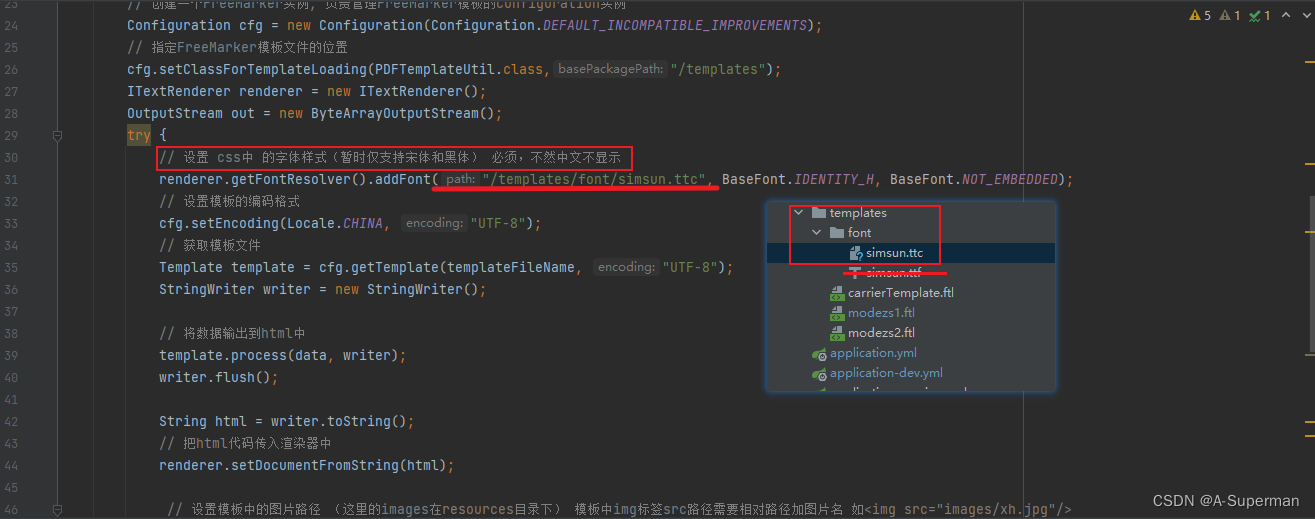
            // 设置 css中 的字体样式(暂时仅支持宋体和黑体) 必须,不然中文不显示
            renderer.getFontResolver().addFont("/templates/font/simsun.ttc", BaseFont.IDENTITY_H, BaseFont.NOT_EMBEDDED);
            // 设置模板的编码格式
            cfg.setEncoding(Locale.CHINA, "UTF-8");
            // 获取模板文件
            Template template = cfg.getTemplate(templateFileName, "UTF-8");
            StringWriter writer = new StringWriter();

            // 将数据输出到html中
            template.process(data, writer);
            writer.flush();

            String html = writer.toString();
            // 把html代码传入渲染器中
            renderer.setDocumentFromString(html);

             // 设置模板中的图片路径 (这里的images在resources目录下) 模板中img标签src路径需要相对路径加图片名 如<img src="images/xh.jpg"/>
//            URI images = PDFTemplateUtil.class.getClassLoader().getResource("images").toURI();
//            if (images != null) {
//                String url = images.toString();
//                renderer.getSharedContext().setBaseURL(url);
//            }
            renderer.layout();

            renderer.createPDF(out, false);
            renderer.finishPDF();
            out.flush();
            return (ByteArrayOutputStream)out;
        } finally {
        	if(out != null){
        		 out.close();
        	}
        }
    }
}
ps:
我导出pdf里面是含有图片的,但是我的图片是base64的字节码(建议使用这种方式),不是本地的方式填充数据的,如果只能使用本地的图片,将工具类中的这段代码解开,然后自己改进一下

<!DOCTYPE html>
<html>

<head>
	<meta charset="utf-8" />
	<title></title>
	<style>
		* {
			margin: 0;
			padding: 0;
			box-sizing: border-box;
		}

		body {
			font-family: SimSun;
			padding: 30px 20px 0;
		}

		section {
			display: block;
			/* margin: 20px 10px; */
		}

		.title {
			text-align: center;
			margin-bottom: 20px;
		}

		.preface p {
			line-height: 30px;
			display: inline-block;
		}

		.preface p.content {
			text-indent: 2em;
		}

		section>table {
			border-collapse: collapse;
			table-layout: fixed;
			width: 100%;
			font-size: 13px;
			/* margin: 20px 0px; */
			text-align: center;
			word-wrap: break-word;
		}

		section table td {
			padding: 5px 0px;
		}
		.topTitle section{
			width: 30%;
			font-size: 13px;
			display: inline-block;
			margin-top: 20px;
		}
		.topTitle{
		}
		.outTitle{
		}
		.outTitle section{
			font-size: 13px;
			display: inline-block;
		}
		.detail{
			margin-top: 20px;
		}
		.outTable{
			margin-bottom: 20px;
		}
		.box1{
		}
		.box2{
			width: 80%;
			display: inline-block;
		}
		.box3{
			display: inline-block;
			width: 18%;
			/* min-width: 180px; */
		}
		.box3 img{
			width: 100%;
		}
		.box3 p{
			font-size: 12px;
		}
	</style>
</head>

<body>
<h3>${(fileName)!''}</h3>
<div class="box1">
	<section class="title">
		<h2>XXXXXXXXXXXXXX有限公司</h2>
		<h2>提货单</h2>
	</section>
	<div class="box2">
		<!-- 标题 start -->
		<!-- 标题 end -->

		<!-- 前言 start -->
		<div class="topTitle">
			<section class="preface">
				<p>提货单号:</p>
				<p>${(takeOrder.takeOrderNo)!''}</p>
			</section>
			<section class="preface">
				<p>提货日期:</p>
				<p>${(takeOrder.takeDate)!''}</p>
			</section>
			<section class="preface">
				<p>提货状态:</p>
				<p>${(takeOrder.orderStateName)!''}</p>
			</section>
			<section class="preface">
				<p>状态:</p>
				<p>${(takeOrder.stateName)!''}</p>
			</section>
<#--			<section class="preface">-->
<#--				<p>承运商:</p>-->
<#--				<p>${(takeOrder.takeOrderNo)!''}</p>-->
<#--			</section>-->
<#--			<section class="preface">-->
<#--				<p>车辆:</p>-->
<#--				<p>${(takeOrder.takeOrderNo)!''}</p>-->
<#--			</section>-->
			<section class="preface">
				<p>司机:</p>
				<p>${(takeOrder.driver)!''}</p>
			</section>
			<section class="preface">
				<p>发运方式:</p>
				<p>${(takeOrder.shippingMethod)!''}</p>
			</section>
		</div>
	</div>
	<div class="box3">
		<img src="${(takeOrder.qrCode)!''}"></img>
		<p>凭此二维码进出厂区</p>

	</div>
</div>
<!-- 前言 end -->


<!-- 产品列表 start -->
<#if takeOrder.outOrderProducts ??>
<section class="detail">
	<table border="1" cellspacing="0" cellpadding="0">
		<tr>
			<td width="15%">品名编号</td>
			<td width="12%">品名</td>
			<td width="12%">规格型号</td>
			<td width="12%">销售型号</td>
			<td width="12%">包装规格</td>
			<td width="12%">批号</td>
			<td width="12%">数量</td>
			<td width="12%">单位</td>
			<td width="12%">仓库编号</td>
			<td width="12%">仓库名称</td>
		</tr>
		<#list takeOrder.outOrderProducts as ad>
			<tr>
				<td>${(ad.productCode)!''}</td>
				<td>${(ad.productName)!''}</td>
				<td>${(ad.typeNum)!''}</td>
				<td>${(ad.saleType)!''}</td>
				<td>${(ad.packSize)!''}</td>
				<td>${(ad.batchNumber)!''}</td>
				<td>${(ad.num)!''}</td>
				<td>${(ad.uint)!''}</td>
				<td>${(ad.stockNo)!''}</td>
				<td>${(ad.stockName)!''}</td>
			</tr>
		</#list>
	</table>
</section>
</#if>
<!-- 产品列表 end -->

<!-- 出库单 start -->
<#if takeOrder.outOrders ??>
<section class="detail">
	<h3>出库单信息:</h3>
	<#list takeOrder.outOrders as add>
	<div class="outTitle" >
		<section class="preface">
			<p>出库单号:</p>
			<p>${(add.outOrderNo)!''}</p>
		</section>
		<section class="preface">
			<p>发货单号:</p>
			<p>${(add.sendOrderNo)!''}</p>
		</section>
		<section class="preface">
			<p>出库日期:</p>
			<p>${(add.outDate)!''}</p>
		</section>
		<section class="preface">
			<p>装车号:</p>
			<p>${(add.loadingNumber)!''}</p>
		</section>
		<section class="preface">
			<p>客户名称:</p>
			<p>${(add.customerName)!''}</p>
		</section>
	</div>
	<!--出库的单产品列表-->
	<#if add.outOrderProducts ??>
	<table class="outTable" border="1" cellspacing="0" cellpadding="0">
		<tr>
			<td width="15%">品名编号</td>
			<td width="12%">品名</td>
			<td width="12%">规格型号</td>
			<td width="12%">客户销售型号</td>
			<td width="12%">包装规格</td>
			<td width="12%">批号</td>
			<td width="12%">数量</td>
			<td width="12%">内部备注</td>
			<td width="12%">备注</td>
		</tr>
		<#list add.outOrderProducts as ad>
			<tr>
				<td>${(ad.productCode)!''}</td>
				<td>${(ad.productName)!''}</td>
				<td>${(ad.typeNum)!''}</td>
				<td>${(ad.saleType)!''}</td>
				<td>${(ad.packSize)!''}</td>
				<td>${(ad.batchNumber)!''}</td>
				<td>${(ad.num)!''}</td>
				<td>${(ad.innerRemark)!''}</td>
				<td>${(ad.remark)!''}</td>
			</tr>
		</#list>
	</table>
	</#if>
	</#list>
</section>
</#if>
<!-- 出库单 end -->
</body>

</html>
ps:
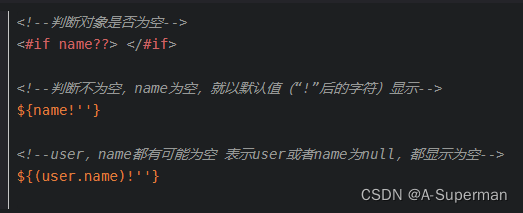
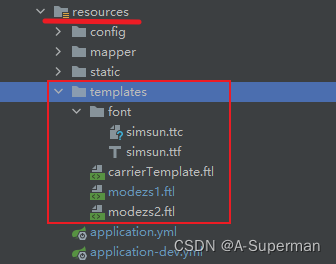
占位符可以看下图
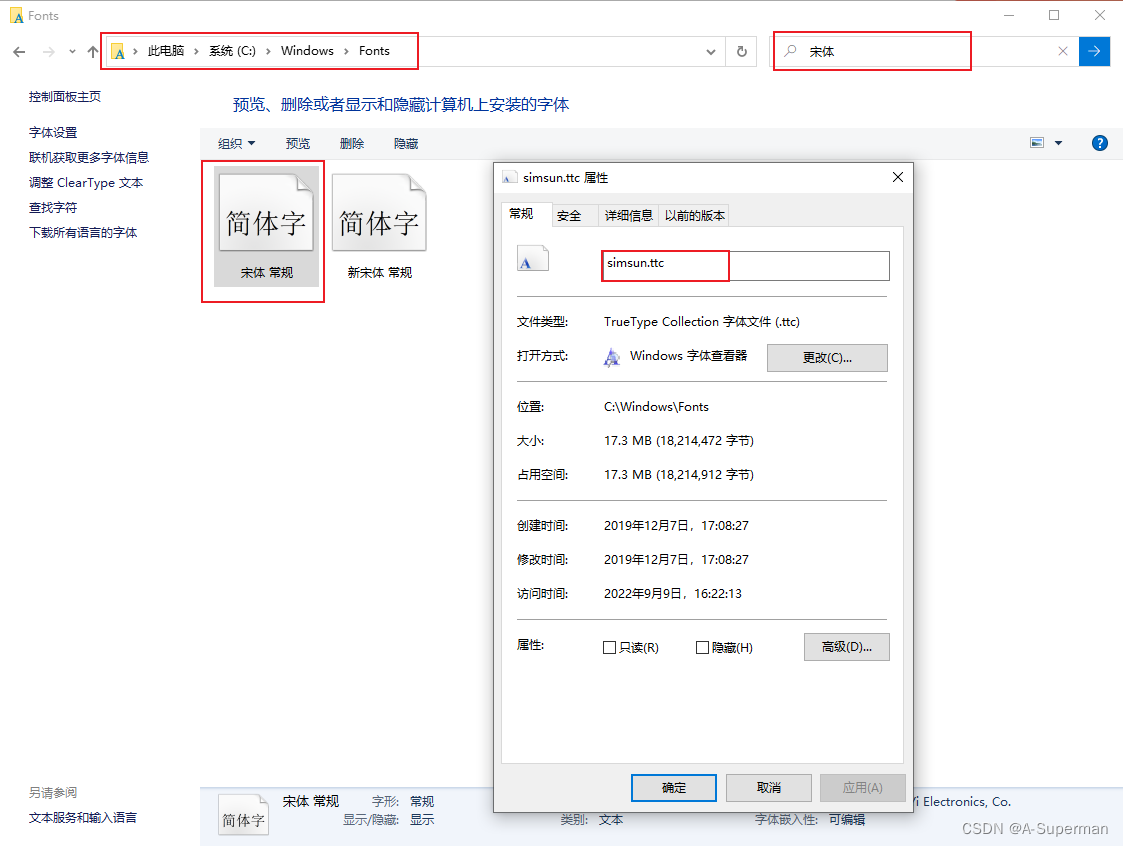
在windows10系统中的 C:\Windows\Fonts 这个路径中,进入后搜索宋体(ps:一定要搜索宋体,不要按照simsun这个名字去搜索,反正就是注意文件的后缀是.ttc的,而不是.ttf的)
export function exportPdf(parameter) {
  return request({
    url: 'XXXXXXXXXXXXXXX/export/pdf',
    method: 'get',
    params:parameter,
    responseType: 'arraybuffer',

  })
}exportPdf(type) {
this['loading'+type] = true
exportPdf({ id: this.pageList.id, type: type }).then((res) => {
if (!res) {
alert('数据为空')
return
}
const content = res
const blob = new Blob([content], { type: 'application/pdf' })
// const fileName = titName?titName: ''
let fileName = this.pageList.takeOrderNo
if ('download' in document.createElement('a')) {
// 非IE下载
const elink = document.createElement('a')
elink.download = fileName
elink.style.display = 'none'
elink.href = URL.createObjectURL(blob)
document.body.appendChild(elink)
elink.click()
URL.revokeObjectURL(elink.href) // 释放URL 对象
document.body.removeChild(elink)
this['loading'+type] = false
} else {
// IE10+下载
navigator.msSaveBlob(blob, fileName)
}
})
},
我正在学习如何使用Nokogiri,根据这段代码我遇到了一些问题:require'rubygems'require'mechanize'post_agent=WWW::Mechanize.newpost_page=post_agent.get('http://www.vbulletin.org/forum/showthread.php?t=230708')puts"\nabsolutepathwithtbodygivesnil"putspost_page.parser.xpath('/html/body/div/div/div/div/div/table/tbody/tr/td/div
我有一个Ruby程序,它使用rubyzip压缩XML文件的目录树。gem。我的问题是文件开始变得很重,我想提高压缩级别,因为压缩时间不是问题。我在rubyzipdocumentation中找不到一种为创建的ZIP文件指定压缩级别的方法。有人知道如何更改此设置吗?是否有另一个允许指定压缩级别的Ruby库? 最佳答案 这是我通过查看rubyzip内部创建的代码。level=Zlib::BEST_COMPRESSIONZip::ZipOutputStream.open(zip_file)do|zip|Dir.glob("**/*")d
类classAprivatedeffooputs:fooendpublicdefbarputs:barendprivatedefzimputs:zimendprotecteddefdibputs:dibendendA的实例a=A.new测试a.foorescueputs:faila.barrescueputs:faila.zimrescueputs:faila.dibrescueputs:faila.gazrescueputs:fail测试输出failbarfailfailfail.发送测试[:foo,:bar,:zim,:dib,:gaz].each{|m|a.send(m)resc
很好奇,就使用rubyonrails自动化单元测试而言,你们正在做什么?您是否创建了一个脚本来在cron中运行rake作业并将结果邮寄给您?git中的预提交Hook?只是手动调用?我完全理解测试,但想知道在错误发生之前捕获错误的最佳实践是什么。让我们理所当然地认为测试本身是完美无缺的,并且可以正常工作。下一步是什么以确保他们在正确的时间将可能有害的结果传达给您? 最佳答案 不确定您到底想听什么,但是有几个级别的自动代码库控制:在处理某项功能时,您可以使用类似autotest的内容获得关于哪些有效,哪些无效的即时反馈。要确保您的提
假设我做了一个模块如下:m=Module.newdoclassCendend三个问题:除了对m的引用之外,还有什么方法可以访问C和m中的其他内容?我可以在创建匿名模块后为其命名吗(就像我输入“module...”一样)?如何在使用完匿名模块后将其删除,使其定义的常量不再存在? 最佳答案 三个答案:是的,使用ObjectSpace.此代码使c引用你的类(class)C不引用m:c=nilObjectSpace.each_object{|obj|c=objif(Class===objandobj.name=~/::C$/)}当然这取决于
我试图在一个项目中使用rake,如果我把所有东西都放到Rakefile中,它会很大并且很难读取/找到东西,所以我试着将每个命名空间放在lib/rake中它自己的文件中,我添加了这个到我的rake文件的顶部:Dir['#{File.dirname(__FILE__)}/lib/rake/*.rake'].map{|f|requiref}它加载文件没问题,但没有任务。我现在只有一个.rake文件作为测试,名为“servers.rake”,它看起来像这样:namespace:serverdotask:testdoputs"test"endend所以当我运行rakeserver:testid时
我的目标是转换表单输入,例如“100兆字节”或“1GB”,并将其转换为我可以存储在数据库中的文件大小(以千字节为单位)。目前,我有这个:defquota_convert@regex=/([0-9]+)(.*)s/@sizes=%w{kilobytemegabytegigabyte}m=self.quota.match(@regex)if@sizes.include?m[2]eval("self.quota=#{m[1]}.#{m[2]}")endend这有效,但前提是输入是倍数(“gigabytes”,而不是“gigabyte”)并且由于使用了eval看起来疯狂不安全。所以,功能正常,
我正在尝试使用ruby和Savon来使用网络服务。测试服务为http://www.webservicex.net/WS/WSDetails.aspx?WSID=9&CATID=2require'rubygems'require'savon'client=Savon::Client.new"http://www.webservicex.net/stockquote.asmx?WSDL"client.get_quotedo|soap|soap.body={:symbol=>"AAPL"}end返回SOAP异常。检查soap信封,在我看来soap请求没有正确的命名空间。任何人都可以建议我
关闭。这个问题是opinion-based.它目前不接受答案。想要改进这个问题?更新问题,以便editingthispost可以用事实和引用来回答它.关闭4年前。Improvethisquestion我想在固定时间创建一系列低音和高音调的哔哔声。例如:在150毫秒时发出高音调的蜂鸣声在151毫秒时发出低音调的蜂鸣声200毫秒时发出低音调的蜂鸣声250毫秒的高音调蜂鸣声有没有办法在Ruby或Python中做到这一点?我真的不在乎输出编码是什么(.wav、.mp3、.ogg等等),但我确实想创建一个输出文件。
Rails2.3可以选择随时使用RouteSet#add_configuration_file添加更多路由。是否可以在Rails3项目中做同样的事情? 最佳答案 在config/application.rb中:config.paths.config.routes在Rails3.2(也可能是Rails3.1)中,使用:config.paths["config/routes"] 关于ruby-on-rails-Rails3中的多个路由文件,我们在StackOverflow上找到一个类似的问题
