Android ConstraintLayout 约束布局
Use ConstraintLayout to design your Android views
之前项目的一个布局,使用原有的几种常用布局会绘制很多层,而且适配效果并不好。但是采用约束布局就可以很好的解决这个问题。
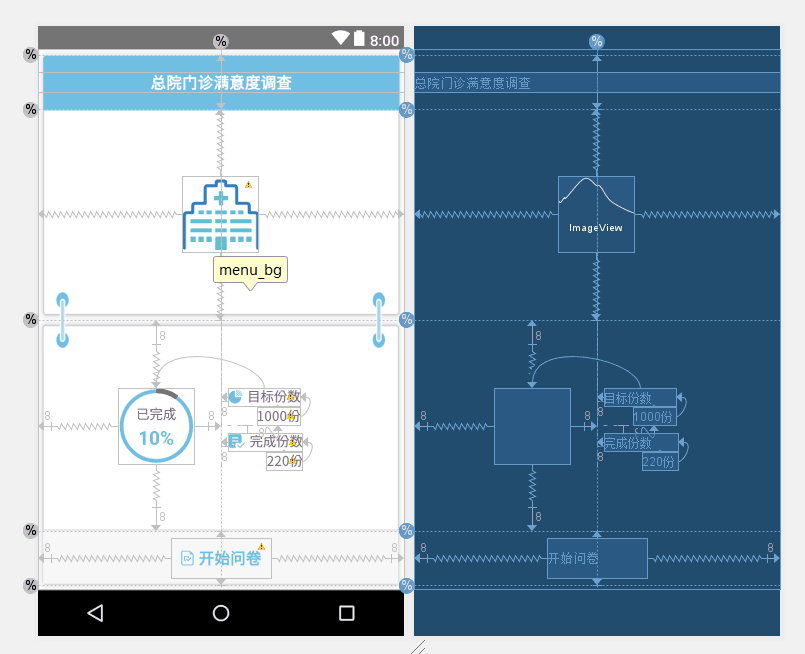
绘制的代码
<?xml version="1.0" encoding="utf-8"?>
<android.support.constraint.ConstraintLayout
    xmlns:android="http://schemas.android.com/apk/res/android"
    xmlns:app="http://schemas.android.com/apk/res-auto"
    xmlns:tools="http://schemas.android.com/tools"
    android:id="@+id/menu_bg"
    android:layout_width="match_parent"
    android:layout_height="match_parent"
    android:background="@mipmap/blue_bg"
    tools:layout_editor_absoluteY="25dp">

    <ImageView
        android:id="@+id/menu_logo"
        android:layout_width="80dp"
        android:layout_height="80dp"
        android:layout_centerInParent="true"
        android:src="@mipmap/pic_1"
        app:layout_constraintBottom_toTopOf="@+id/guideline9"
        app:layout_constraintEnd_toEndOf="parent"
        app:layout_constraintStart_toStartOf="parent"
        app:layout_constraintTop_toTopOf="@+id/guideline8"/>

    <TextView
        android:id="@+id/menu_title"
        android:layout_width="match_parent"
        android:layout_height="wrap_content"
        android:layout_above="@+id/menu_logo"
        android:gravity="center"
        android:text="@string/main_menu_0"
        android:textColor="@color/white"
        android:textSize="16sp"
        android:textStyle="bold"
        app:layout_constraintBottom_toTopOf="@+id/guideline8"
        app:layout_constraintTop_toTopOf="@+id/guideline11"
        tools:ignore="MissingConstraints"
        tools:layout_editor_absoluteX="0dp"/>

    <TextView
        android:id="@+id/menu_bottom"
        android:layout_width="wrap_content"
        android:layout_height="wrap_content"
        android:layout_marginBottom="8dp"
        android:layout_marginEnd="8dp"
        android:layout_marginStart="8dp"
        android:layout_marginTop="8dp"
        android:drawableLeft="@mipmap/icon_bule_3"
        android:drawablePadding="5dp"
        android:gravity="center"
        android:padding="10dp"
        android:text="@string/main_menu_start"
        android:textColor="@color/colorBlue"
        android:textSize="16sp"
        android:textStyle="bold"
        app:layout_constraintBottom_toTopOf="@+id/guideline12"
        app:layout_constraintEnd_toEndOf="parent"
        app:layout_constraintStart_toStartOf="parent"
        app:layout_constraintTop_toTopOf="@+id/guideline10"/>

    <com.cnbs.akhospital_cacsi.view.RoundProgressBar
        android:id="@+id/round_pb"
        android:layout_width="80dp"
        android:layout_height="80dp"
        android:layout_centerInParent="true"
        android:layout_marginBottom="8dp"
        android:layout_marginEnd="8dp"
        android:layout_marginStart="8dp"
        android:layout_marginTop="8dp"
        app:layout_constraintBottom_toTopOf="@+id/guideline10"
        app:layout_constraintEnd_toStartOf="@+id/guideline"
        app:layout_constraintHorizontal_bias="0.792"
        app:layout_constraintStart_toStartOf="parent"
        app:layout_constraintTop_toTopOf="@+id/guideline9"
        app:layout_constraintVertical_bias="0.503"
        app:rateTextColor="@color/colorBlue"
        app:rateTextSize="20sp"
        app:roundColor="@color/colorBlue"
        app:roundProgressColor="@color/base_color"
        app:roundWidth="5dp"
        app:titleText="@string/main_menu_pb_hint"
        app:titleTextColor="@color/base_color"
        app:titleTextSize="14sp"/>

    <TextView
        android:id="@+id/menu_plan_hint"
        android:layout_width="wrap_content"
        android:layout_height="wrap_content"
        android:layout_marginStart="8dp"
        android:drawableLeft="@mipmap/icon_bule_1"
        android:drawablePadding="5dp"
        android:text="@string/main_menu_plan"
        android:textColor="@color/base_color"
        android:textSize="14sp"
        app:layout_constraintStart_toStartOf="@+id/guideline"
        app:layout_constraintTop_toTopOf="@+id/round_pb"/>

    <TextView
        android:id="@+id/menu_plan_num"
        android:layout_width="wrap_content"
        android:layout_height="wrap_content"
        android:layout_marginTop="2dp"
        android:text="1000份"
        android:textColor="@color/base_color"
        android:textSize="14sp"
        app:layout_constraintEnd_toEndOf="@+id/menu_plan_hint"
        app:layout_constraintTop_toBottomOf="@+id/menu_plan_hint"
        tools:ignore="MissingConstraints"/>

    <TextView
        android:id="@+id/menu_does_hint"
        android:layout_width="wrap_content"
        android:layout_height="wrap_content"
        android:layout_marginStart="8dp"
        android:layout_marginTop="8dp"
        android:drawableLeft="@mipmap/icon_bule_2"
        android:drawablePadding="5dp"
        android:text="@string/main_menu_does"
        android:textColor="@color/base_color"
        android:textSize="14sp"
        app:layout_constraintStart_toStartOf="@+id/guideline"
        app:layout_constraintTop_toBottomOf="@+id/menu_plan_num"/>

    <TextView
        android:id="@+id/menu_does_num"
        android:layout_width="wrap_content"
        android:layout_height="wrap_content"
        android:layout_marginTop="2dp"
        android:text="220份"
        android:textColor="@color/base_color"
        android:textSize="14sp"
        app:layout_constraintEnd_toEndOf="@+id/menu_does_hint"
        app:layout_constraintTop_toBottomOf="@+id/menu_does_hint"/>

    <android.support.constraint.Guideline
        android:id="@+id/guideline"
        android:layout_width="wrap_content"
        android:layout_height="wrap_content"
        android:orientation="vertical"
        app:layout_constraintGuide_percent="0.5"/>

    <android.support.constraint.Guideline
        android:id="@+id/guideline8"
        android:layout_width="wrap_content"
        android:layout_height="wrap_content"
        android:orientation="horizontal"
        app:layout_constraintGuide_percent="0.11"/>

    <android.support.constraint.Guideline
        android:id="@+id/guideline9"
        android:layout_width="wrap_content"
        android:layout_height="wrap_content"
        android:orientation="horizontal"
        app:layout_constraintGuide_percent="0.5"/>

    <android.support.constraint.Guideline
        android:id="@+id/guideline10"
        android:layout_width="wrap_content"
        android:layout_height="wrap_content"
        android:orientation="horizontal"
        app:layout_constraintGuide_percent="0.89"/>

    <android.support.constraint.Guideline
        android:id="@+id/guideline11"
        android:layout_width="wrap_content"
        android:layout_height="wrap_content"
        android:orientation="horizontal"
        app:layout_constraintGuide_percent="0.01"/>

    <android.support.constraint.Guideline
        android:id="@+id/guideline12"
        android:layout_width="wrap_content"
        android:layout_height="wrap_content"
        android:orientation="horizontal"
        app:layout_constraintGuide_percent="0.99"/>


</android.support.constraint.ConstraintLayout>
compile 'com.android.support.constraint:constraint-layout:1.1.2'
<?xml version="1.0" encoding="utf-8"?>
<android.support.constraint.ConstraintLayout
    xmlns:android="http://schemas.android.com/apk/res/android"
    xmlns:app="http://schemas.android.com/apk/res-auto"
    android:layout_width="match_parent"
    android:layout_height="match_parent">

</android.support.constraint.ConstraintLayout>
在ConstraintLayout中,可以相对于一个其它的组件,而定位当前组件。约束一个组件的横轴和纵轴,相关的属性有:
属性的规则:(当前控件B)
layout_constraint *[source]* _to *[target]* Of = "A",
source 和 target 都表示某个方向;
= 后面接的就是 当前控件B 引做参考的控件A;
上面的属性规则表示的意思就是:
当前控件B 的 source 方向 相对于引用控件 A 的 target 方向,进行约束
app:layout_constraintBottom_toBottomOf="parent"
app:layout_constraintLeft_toLeftOf="parent"
app:layout_constraintRight_toRightOf="parent"
app:layout_constraintTop_toTopOf="parent"
上面定位的含义是:
当前控件的 Bottom ,相对于 parent 的Bottom进行约束;
当前控件的 Left ,相对于 parent 的Left进行约束;
当前控件的 Right ,相对于 parent 的Right进行约束;
当前控件的 Top ,相对于 parent 的Top进行约束;
所以,当前控件就相对parent 进行居中了
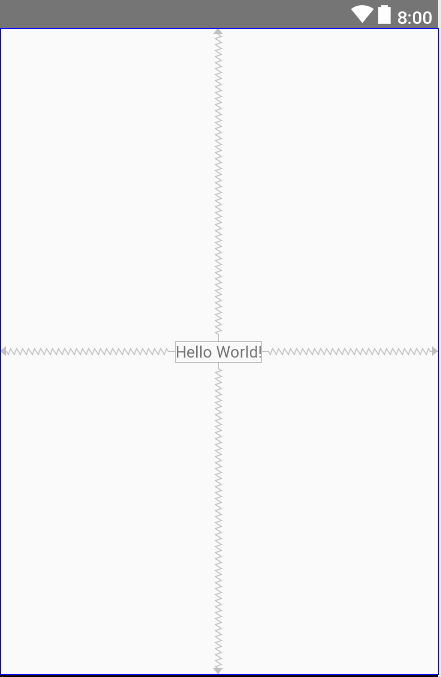

通过上面的解释,应该已经清楚了,‘’B 在 A 的右边“ ,就是B的左边相对与A 的右边进行约束,用代码表示就是:
B:app:layout_constraintLeft_toRightOf="A"
布局代码:
<?xml version="1.0" encoding="utf-8"?>
<android.support.constraint.ConstraintLayout
    xmlns:android="http://schemas.android.com/apk/res/android"
    xmlns:app="http://schemas.android.com/apk/res-auto"
    xmlns:tools="http://schemas.android.com/tools"
    android:layout_width="match_parent"
    android:layout_height="match_parent"
    tools:context=".MainActivity">

    <TextView
        android:id="@+id/btn_A"
        android:layout_width="wrap_content"
        android:layout_height="wrap_content"
        android:layout_margin="2dp"
        android:background="@color/colorBtnLight"
        android:padding="5dp"
        android:text="buttonA"/>

    <TextView
        android:id="@+id/btn_B"
        android:layout_width="wrap_content"
        android:layout_height="wrap_content"
        android:layout_margin="2dp"
        android:background="@color/colorBtn"
        android:padding="5dp"
        android:text="buttonB"
        app:layout_constraintLeft_toRightOf="@id/btn_A"/>

</android.support.constraint.ConstraintLayout>
约束代码只有一行就是,B的: app:layout_constraintLeft_toRightOf="@id/btn_A"
ok,左右约束就讲完了。
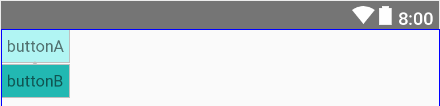
‘’B 在 A 的下边“ ,就是B的上边相对与A 的下边进行约束,用代码表示就是:
B:app:layout_constraintTop_toBottomOf=“A”
约束代码同样只有一行就是,B的: app:layout_constraintTop_toBottomOf="@id/btn_A""
ok,上下约束也讲完了。
layout_constraintLeft_toLeftOf
layout_constraintLeft_toRightOf
layout_constraintRight_toLeftOf
layout_constraintRight_toRightOf
layout_constraintTop_toTopOf
layout_constraintTop_toBottomOf
layout_constraintBottom_toTopOf
layout_constraintBottom_toBottomOf
layout_constraintBaseline_toBaselineOf
layout_constraintStart_toEndOf
layout_constraintStart_toStartOf
layout_constraintEnd_toStartOf
layout_constraintEnd_toEndOf
layout_goneMarginStart
layout_goneMarginEnd
layout_goneMarginLeft
layout_goneMarginTop
layout_goneMarginRight
layout_goneMarginBottom
android:layout_margin
当控件B ,View.visible 或者 View.invisible时,设置的数值 相对于控件B有效;
当控件B ,View.Gone时,设置的数值,就相对于控件A有效了。
layout_goneMargin
当控件B ,View.visible 或者 View.invisible时,设置的数值,看不出任何效果 ,即边距无效;
当控件B ,View.Gone时,设置的数值,就相对于控件A有效了
图示说明
横向定义了三个按钮:A 、B 、 C

C中设置android:layout_marginLeft="20dp"

B中设置android:visibility="gone"

C中设置app:layout_goneMarginLeft="20dp"

B中设置android:visibility="gone"

区别在于,goneMargin,只有当目标控件View.GONE时才会触发
使用
app:layout_constraintHorizontal_bias="0.1"
app:layout_constraintVertical_bias="0.8"
Horizontal_bias (横向偏移) 的取值范围[0.0, 1.0],方向从左向右
Vertical_bias (纵向偏移) 的取值范围[0.0, 1.0],方向从上向下
比如我们想让居中的那个按钮,移动到竖直方向居中,水平方向1/4的位置。我们就可以使用偏移率来实现。
    <TextView
        android:id="@+id/btn_A"
        android:layout_width="wrap_content"
        android:layout_height="wrap_content"
        android:layout_margin="2dp"
        android:background="@color/colorBtnLight"
        app:layout_constraintHorizontal_bias="0.25"
        app:layout_constraintBottom_toBottomOf="parent"
        app:layout_constraintLeft_toLeftOf="parent"
        app:layout_constraintRight_toRightOf="parent"
        app:layout_constraintTop_toTopOf="parent"
        android:padding="5dp"
        android:text="buttonA"/>
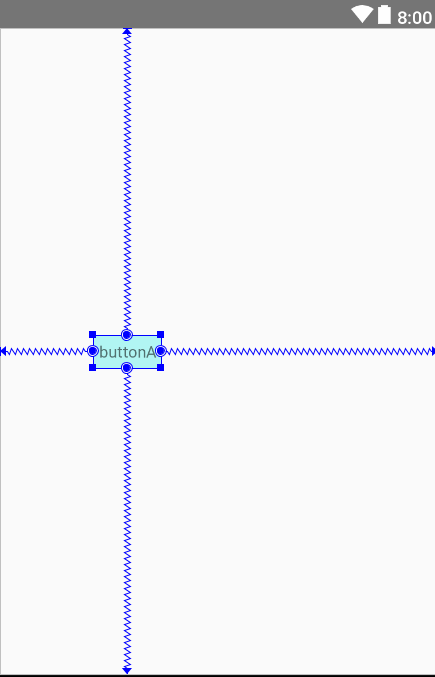
当一个组件的宽或高设置为WRAP_CONTENT时,可以为它们设置一个最小尺寸:
android:minWidth
android:minHeight
使用Guideline为相对组件时,以帮助定位组件。
Guideline主要属性有:
android:orientation    //方向
layout_constraintGuide_begin  //引导线距顶部或左边框的距离
layout_constraintGuide_end   //引导线距底部或右边框的距离
layout_constraintGuide_percent   //所占百分比
横线帮助纵向定位,纵线帮助横向定位。
是否可以为特定(或所有)项目使用多个布局?例如,我有几个项目,我想对其应用两种不同的布局。一个是绿色的,一个是蓝色的(但是)。我想将它们编译到我的输出目录中的两个不同文件夹中(例如v1和v2)。我一直在玩弄规则和编译block,但我不知道这是怎么回事。因为,每个项目在编译过程中只编译一次,我不能告诉nanoc第一次用layout1编译,第二次用layout2编译。我试过这样的东西,但它导致输出文件损坏。compile'*'doifitem.binary?#don’tfilterbinaryitemselsefilter:erblayout'layout1'layout'layout2'
文章目录前言约束硬约束的轨迹优化Corridor-BasedTrajectoryOptimizationBezierCurveOptimizationOtherOptions软约束的轨迹优化Distance-BasedTrajectoryOptimization优化方法前言可以看看我的这几篇Blog1,Blog2,Blog3。上次基于MinimumSnap的轨迹生成,有许多优点,比如:轨迹让机器人可以在某个时间点抵达某个航点。任何一个时刻,都能数学上求出期望的机器人的位置、速度、加速度、导数。MinimumSnap可以把问题转换为凸优化问题。缺点:MnimumSnap可以控制轨迹一定经过中间的
我想为网站的管理和公共(public)部分设置一对样式指南。每个都需要自己的布局,其中包含静态html和调用erbpartials的混合(因此静态页面不会削减它)。我不需要Controller来为这些页面提供服务,而且我不希望有效的仅开发内容使其余代码困惑。这让我想知道是否有一种方法可以直接呈现布局。免责声明:我明白这不是我应该经常/永远做的事情,而且我知道有很多争论可以解释为什么这是一个坏主意。我对这是否可能感兴趣。有没有办法让我直接从routes.rb渲染布局而不通过Controller? 最佳答案 出于某种奇怪的原因,我想暂时
这个问题在这里已经有了答案:differentlayoutforsign_inactionindevise(8个答案)关闭7年前。如何更改设计Controller中的布局?
在我的routes.rb文件中,我想使用rails3中的子域约束功能,但是我想从catchall路由中排除某些域。我不想在特定的子域中有特定的Controller。这样做的最佳做法是什么。#thissubdomainidontwantallofthecatchallroutesconstraints:subdomain=>"signup"doresources:usersend#hereIwanttocatchallbutexcludethe"signup"subdomainconstraints:subdomain=>/.+/doresources:carsresources:sta
我有一个表students,字段为ward_id,我必须创建一个名为guardian_users的表,字段为id,ward_id,email,guardian_id,hashed_password等现在我必须添加约束外键。学生中的任何更新/删除/编辑/插入应该对guardian_users具有相同的效果。我如何在Rails2.3.5中做到这一点?students表存在,但其他表还不存在。 最佳答案 您要么需要foreign_key_migrations插件或#execute方法。假设您使用插件:classCreateGuardi
我有request.env['http_host']在本地主机上工作,但在heroku的布局页面中引用时会导致错误。此请求在View中工作并显示正确的基本url,但是当我将代码移动到布局时它会导致错误。注意-我正在使用它来为html电子邮件中的图像构建绝对url。收到错误:ActionView::Template::Error(undefinedmethod`env'fornil:NilClass): 最佳答案 如果你想要没有端口的主机,只需使用:request.host编辑:糟糕,我刚刚注意到您正在使用View中的代码。我不知道它
我对RubyGUI设计做了很多研究,这似乎是Ruby倾向于落后的领域。我探索了MonkeyBars、wxRuby、fxRuby、Shoes等选项,只是想从Ruby社区获得一些意见。虽然它们绝对可用,但每一个的开发似乎都在下降。我在任何(减去fxRuby书)上都找不到大量有用的文档或用户基础。我只是想制作一个简单的GUI,所以我真的不想花费数百小时来学习更复杂的工具的复杂性或尝试使用甚至不再开发的东西(鞋子是应用程序的类型我正在寻找,但它有很多问题并且没有得到积极开发。)在所有选项中,你们会推荐哪个选项是最快的,并且仍然具有某种开发基础?谢谢! 最佳答案
我正在覆盖设计注册Controller的创建操作。我有两种注册表格,个人或公司,公司有一个名为company_form的字段设置为true以区分这两种表格。在表单验证后,我希望呈现正确的表单(以前无论我使用什么表单,它都会返回默认表单)。我遇到了一个问题,即只渲染了部分(很明显,因为我只渲染了部分),但我还需要渲染布局/应用程序文件。classRegistrationsControllerifresource.company_formrenderpartial:'shared/company_signup_form'elserenderpartial:'/shared/individu
我正在学习michaelharltrails教程,但出现此错误Missingtemplatelayouts/mailerwith{:locale=>[:en],:formats=>[:html],:variants=>[],:handlers=>[:raw,:erb,:html,:builder,:ruby,:coffee,:jbuilder]}.Searchedin:*"/home/ubuntu/workspace/app/views"预览账户激活时这是我的user_mailer.rbclassUserMailer错误突出显示了mailto:user.email,subject:"A
