前几天捣鼓了一下Ubuntu,正是想用一下我旧电脑上的N卡,可以用GPU来跑代码,体验一下多核的快乐。
还好我这破电脑也是支持Cuda的:
$ sudo lshw -C display
  *-display
       description: 3D controller
       product: GK208M [GeForce GT 740M]
       vendor: NVIDIA Corporation
       physical id: 0
       bus info: pci@0000:01:00.0
       version: a1
       width: 64 bits
       clock: 33MHz
       capabilities: pm msi pciexpress bus_master cap_list rom
       configuration: driver=nouveau latency=0
       resources: irq:35 memory:f0000000-f0ffffff memory:c0000000-cfffffff memory:d0000000-d1ffffff ioport:6000(size=128)
首先安装一下Cuda的开发工具,命令如下:
$ sudo apt install nvidia-cuda-toolkit
查看一下相关信息:
$ nvcc --version
nvcc: NVIDIA (R) Cuda compiler driver
Copyright (c) 2005-2021 NVIDIA Corporation
Built on Thu_Nov_18_09:45:30_PST_2021
Cuda compilation tools, release 11.5, V11.5.119
Build cuda_11.5.r11.5/compiler.30672275_0
通过Conda安装相关的依赖包:
conda install numba & conda install cudatoolkit
通过pip安装也可以,一样的。
简单测试了一下,发觉报错了:
$ /home/larry/anaconda3/bin/python /home/larry/code/pkslow-samples/python/src/main/python/cuda/test1.py
Traceback (most recent call last):
  File "/home/larry/anaconda3/lib/python3.9/site-packages/numba/cuda/cudadrv/driver.py", line 246, in ensure_initialized
    self.cuInit(0)
  File "/home/larry/anaconda3/lib/python3.9/site-packages/numba/cuda/cudadrv/driver.py", line 319, in safe_cuda_api_call
    self._check_ctypes_error(fname, retcode)
  File "/home/larry/anaconda3/lib/python3.9/site-packages/numba/cuda/cudadrv/driver.py", line 387, in _check_ctypes_error
    raise CudaAPIError(retcode, msg)
numba.cuda.cudadrv.driver.CudaAPIError: [100] Call to cuInit results in CUDA_ERROR_NO_DEVICE

During handling of the above exception, another exception occurred:

Traceback (most recent call last):
  File "/home/larry/code/pkslow-samples/python/src/main/python/cuda/test1.py", line 15, in <module>
    gpu_print[1, 2]()
  File "/home/larry/anaconda3/lib/python3.9/site-packages/numba/cuda/compiler.py", line 862, in __getitem__
    return self.configure(*args)
  File "/home/larry/anaconda3/lib/python3.9/site-packages/numba/cuda/compiler.py", line 857, in configure
    return _KernelConfiguration(self, griddim, blockdim, stream, sharedmem)
  File "/home/larry/anaconda3/lib/python3.9/site-packages/numba/cuda/compiler.py", line 718, in __init__
    ctx = get_context()
  File "/home/larry/anaconda3/lib/python3.9/site-packages/numba/cuda/cudadrv/devices.py", line 220, in get_context
    return _runtime.get_or_create_context(devnum)
  File "/home/larry/anaconda3/lib/python3.9/site-packages/numba/cuda/cudadrv/devices.py", line 138, in get_or_create_context
    return self._get_or_create_context_uncached(devnum)
  File "/home/larry/anaconda3/lib/python3.9/site-packages/numba/cuda/cudadrv/devices.py", line 153, in _get_or_create_context_uncached
    with driver.get_active_context() as ac:
  File "/home/larry/anaconda3/lib/python3.9/site-packages/numba/cuda/cudadrv/driver.py", line 487, in __enter__
    driver.cuCtxGetCurrent(byref(hctx))
  File "/home/larry/anaconda3/lib/python3.9/site-packages/numba/cuda/cudadrv/driver.py", line 284, in __getattr__
    self.ensure_initialized()
  File "/home/larry/anaconda3/lib/python3.9/site-packages/numba/cuda/cudadrv/driver.py", line 250, in ensure_initialized
    raise CudaSupportError(f"Error at driver init: {description}")
numba.cuda.cudadrv.error.CudaSupportError: Error at driver init: Call to cuInit results in CUDA_ERROR_NO_DEVICE (100)
网上搜了一下,发现是驱动问题。通过Ubuntu自带的工具安装显卡驱动:
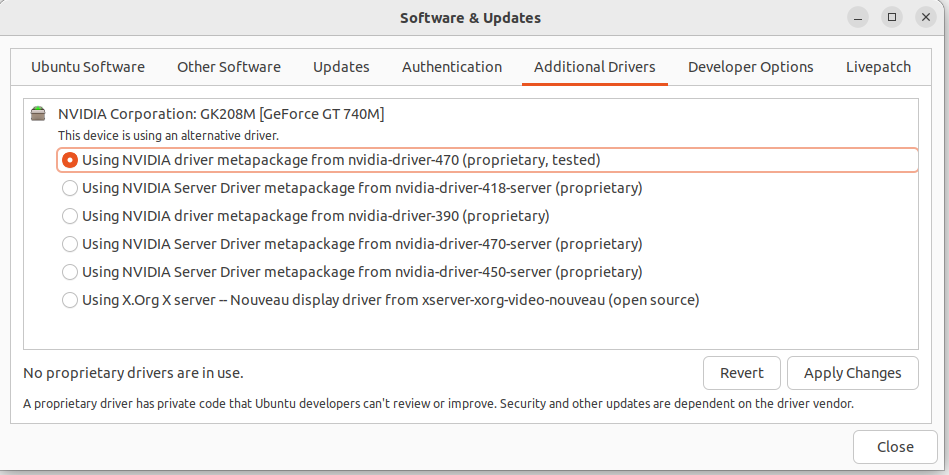
还是失败:
$ nvidia-smi
NVIDIA-SMI has failed because it couldn't communicate with the NVIDIA driver. Make sure that the latest NVIDIA driver is installed and running.
最后,通过命令行安装驱动,成功解决这个问题:
$ sudo apt install nvidia-driver-470
检查后发现正常了:
$ nvidia-smi
Wed Dec  7 22:13:49 2022
+-----------------------------------------------------------------------------+
| NVIDIA-SMI 470.161.03   Driver Version: 470.161.03   CUDA Version: 11.4     |
|-------------------------------+----------------------+----------------------+
| GPU  Name        Persistence-M| Bus-Id        Disp.A | Volatile Uncorr. ECC |
| Fan  Temp  Perf  Pwr:Usage/Cap|         Memory-Usage | GPU-Util  Compute M. |
|                               |                      |               MIG M. |
|===============================+======================+======================|
|   0  NVIDIA GeForce ...  Off  | 00000000:01:00.0 N/A |                  N/A |
| N/A   51C    P8    N/A /  N/A |      4MiB /  2004MiB |     N/A      Default |
|                               |                      |                  N/A |
+-------------------------------+----------------------+----------------------+

+-----------------------------------------------------------------------------+
| Processes:                                                                  |
|  GPU   GI   CI        PID   Type   Process name                  GPU Memory |
|        ID   ID                                                   Usage      |
|=============================================================================|
|  No running processes found                                                 |
+-----------------------------------------------------------------------------+
测试代码也可以跑了。
准备以下代码:
from numba import cuda
import os

def cpu_print():
    print('cpu print')


@cuda.jit
def gpu_print():
    dataIndex = cuda.threadIdx.x + cuda.blockIdx.x * cuda.blockDim.x
    print('gpu print ', cuda.threadIdx.x, cuda.blockIdx.x, cuda.blockDim.x, dataIndex)


if __name__ == '__main__':
    gpu_print[4, 4]()
    cuda.synchronize()
    cpu_print()
这个代码主要有两个函数,一个是用CPU执行,一个是用GPU执行,执行打印操作。关键在于@cuda.jit这个注解,让代码在GPU上执行。运行结果如下:
$ /home/larry/anaconda3/bin/python /home/larry/code/pkslow-samples/python/src/main/python/cuda/print_test.py
gpu print  0 3 4 12
gpu print  1 3 4 13
gpu print  2 3 4 14
gpu print  3 3 4 15
gpu print  0 2 4 8
gpu print  1 2 4 9
gpu print  2 2 4 10
gpu print  3 2 4 11
gpu print  0 1 4 4
gpu print  1 1 4 5
gpu print  2 1 4 6
gpu print  3 1 4 7
gpu print  0 0 4 0
gpu print  1 0 4 1
gpu print  2 0 4 2
gpu print  3 0 4 3
cpu print
可以看到GPU总共打印了16次,使用了不同的Thread来执行。这次每次打印的结果都可能不同,因为提交GPU是异步执行的,无法确保哪个单元先执行。同时也需要调用同步函数cuda.synchronize(),确保GPU执行完再继续往下跑。
我们通过这个函数来看GPU并行的力量:
from numba import jit, cuda
import numpy as np
# to measure exec time
from timeit import default_timer as timer


# normal function to run on cpu
def func(a):
    for i in range(10000000):
        a[i] += 1


# function optimized to run on gpu
@jit(target_backend='cuda')
def func2(a):
    for i in range(10000000):
        a[i] += 1


if __name__ == "__main__":
    n = 10000000
    a = np.ones(n, dtype=np.float64)

    start = timer()
    func(a)
    print("without GPU:", timer() - start)

    start = timer()
    func2(a)
    print("with GPU:", timer() - start)
结果如下:
$ /home/larry/anaconda3/bin/python /home/larry/code/pkslow-samples/python/src/main/python/cuda/time_test.py
without GPU: 3.7136273959999926
with GPU: 0.4040513340000871
可以看到使用CPU需要3.7秒,而GPU则只要0.4秒,还是能快不少的。当然这里不是说GPU一定比CPU快,具体要看任务的类型。
代码请看GitHub: https://github.com/LarryDpk/pkslow-samples
总的来说,我对ruby还比较陌生,我正在为我正在创建的对象编写一些rspec测试用例。许多测试用例都非常基础,我只是想确保正确填充和返回值。我想知道是否有办法使用循环结构来执行此操作。不必为我要测试的每个方法都设置一个assertEquals。例如:describeitem,"TestingtheItem"doit"willhaveanullvaluetostart"doitem=Item.new#HereIcoulddotheitem.name.shouldbe_nil#thenIcoulddoitem.category.shouldbe_nilendend但我想要一些方法来使用
关闭。这个问题是opinion-based.它目前不接受答案。想要改进这个问题?更新问题,以便editingthispost可以用事实和引用来回答它.关闭4年前。Improvethisquestion我想在固定时间创建一系列低音和高音调的哔哔声。例如:在150毫秒时发出高音调的蜂鸣声在151毫秒时发出低音调的蜂鸣声200毫秒时发出低音调的蜂鸣声250毫秒的高音调蜂鸣声有没有办法在Ruby或Python中做到这一点?我真的不在乎输出编码是什么(.wav、.mp3、.ogg等等),但我确实想创建一个输出文件。
如何在buildr项目中使用Ruby?我在很多不同的项目中使用过Ruby、JRuby、Java和Clojure。我目前正在使用我的标准Ruby开发一个模拟应用程序,我想尝试使用Clojure后端(我确实喜欢功能代码)以及JRubygui和测试套件。我还可以看到在未来的不同项目中使用Scala作为后端。我想我要为我的项目尝试一下buildr(http://buildr.apache.org/),但我注意到buildr似乎没有设置为在项目中使用JRuby代码本身!这看起来有点傻,因为该工具旨在统一通用的JVM语言并且是在ruby中构建的。除了将输出的jar包含在一个独特的、仅限ruby
在rails源中:https://github.com/rails/rails/blob/master/activesupport/lib/active_support/lazy_load_hooks.rb可以看到以下内容@load_hooks=Hash.new{|h,k|h[k]=[]}在IRB中,它只是初始化一个空哈希。和做有什么区别@load_hooks=Hash.new 最佳答案 查看rubydocumentationforHashnew→new_hashclicktotogglesourcenew(obj)→new_has
在选择我想要运行操作的频率时,唯一的选项是“每天”、“每小时”和“每10分钟”。谢谢!我想为我的Rails3.1应用程序运行调度程序。 最佳答案 这不是一个优雅的解决方案,但您可以安排它每天运行,并在实际开始工作之前检查日期是否为当月的第一天。 关于ruby-如何每月在Heroku运行一次Scheduler插件?,我们在StackOverflow上找到一个类似的问题: https://stackoverflow.com/questions/8692687/
exe应该在我打开页面时运行。异步进程需要运行。有什么方法可以在ruby中使用两个参数异步运行exe吗?我已经尝试过ruby命令-system()、exec()但它正在等待过程完成。我需要用参数启动exe,无需等待进程完成是否有任何rubygems会支持我的问题? 最佳答案 您可以使用Process.spawn和Process.wait2:pid=Process.spawn'your.exe','--option'#Later...pid,status=Process.wait2pid您的程序将作为解释器的子进程执行。除
我尝试运行2.x应用程序。我使用rvm并为此应用程序设置其他版本的ruby:$rvmuseree-1.8.7-head我尝试运行服务器,然后出现很多错误:$script/serverNOTE:Gem.source_indexisdeprecated,useSpecification.Itwillberemovedonorafter2011-11-01.Gem.source_indexcalledfrom/Users/serg/rails_projects_terminal/work_proj/spohelp/config/../vendor/rails/railties/lib/r
Sinatra新手;我正在运行一些rspec测试,但在日志中收到了一堆不需要的噪音。如何消除日志中过多的噪音?我仔细检查了环境是否设置为:test,这意味着记录器级别应设置为WARN而不是DEBUG。spec_helper:require"./app"require"sinatra"require"rspec"require"rack/test"require"database_cleaner"require"factory_girl"set:environment,:testFactoryGirl.definition_file_paths=%w{./factories./test/
我的主要目标是能够完全理解我正在使用的库/gem。我尝试在Github上从头到尾阅读源代码,但这真的很难。我认为更有趣、更温和的踏脚石就是在使用时阅读每个库/gem方法的源代码。例如,我想知道RubyonRails中的redirect_to方法是如何工作的:如何查找redirect_to方法的源代码?我知道在pry中我可以执行类似show-methodmethod的操作,但我如何才能对Rails框架中的方法执行此操作?您对我如何更好地理解Gem及其API有什么建议吗?仅仅阅读源代码似乎真的很难,尤其是对于框架。谢谢! 最佳答案 Ru
我的假设是moduleAmoduleBendend和moduleA::Bend是一样的。我能够从thisblog找到解决方案,thisSOthread和andthisSOthread.为什么以及什么时候应该更喜欢紧凑语法A::B而不是另一个,因为它显然有一个缺点?我有一种直觉,它可能与性能有关,因为在更多命名空间中查找常量需要更多计算。但是我无法通过对普通类进行基准测试来验证这一点。 最佳答案 这两种写作方法经常被混淆。首先要说的是,据我所知,没有可衡量的性能差异。(在下面的书面示例中不断查找)最明显的区别,可能也是最著名的,是你的
