上一章,我们完成基于Xamarin.Android的简单计算器
今天突发奇想,做一个科学计算器
支持标准四则运算、括号、小数点、三角函数、log、ln、倒数、阶乘、幂、算数平方根、百分数
开发环境:Win10+Android Studio 2022.1.1Electric Eel
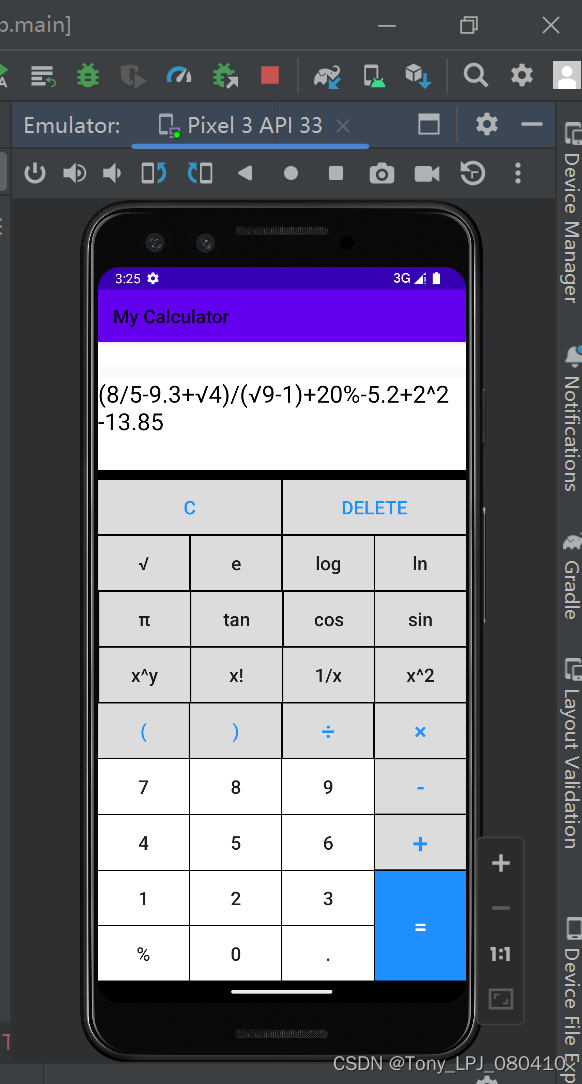
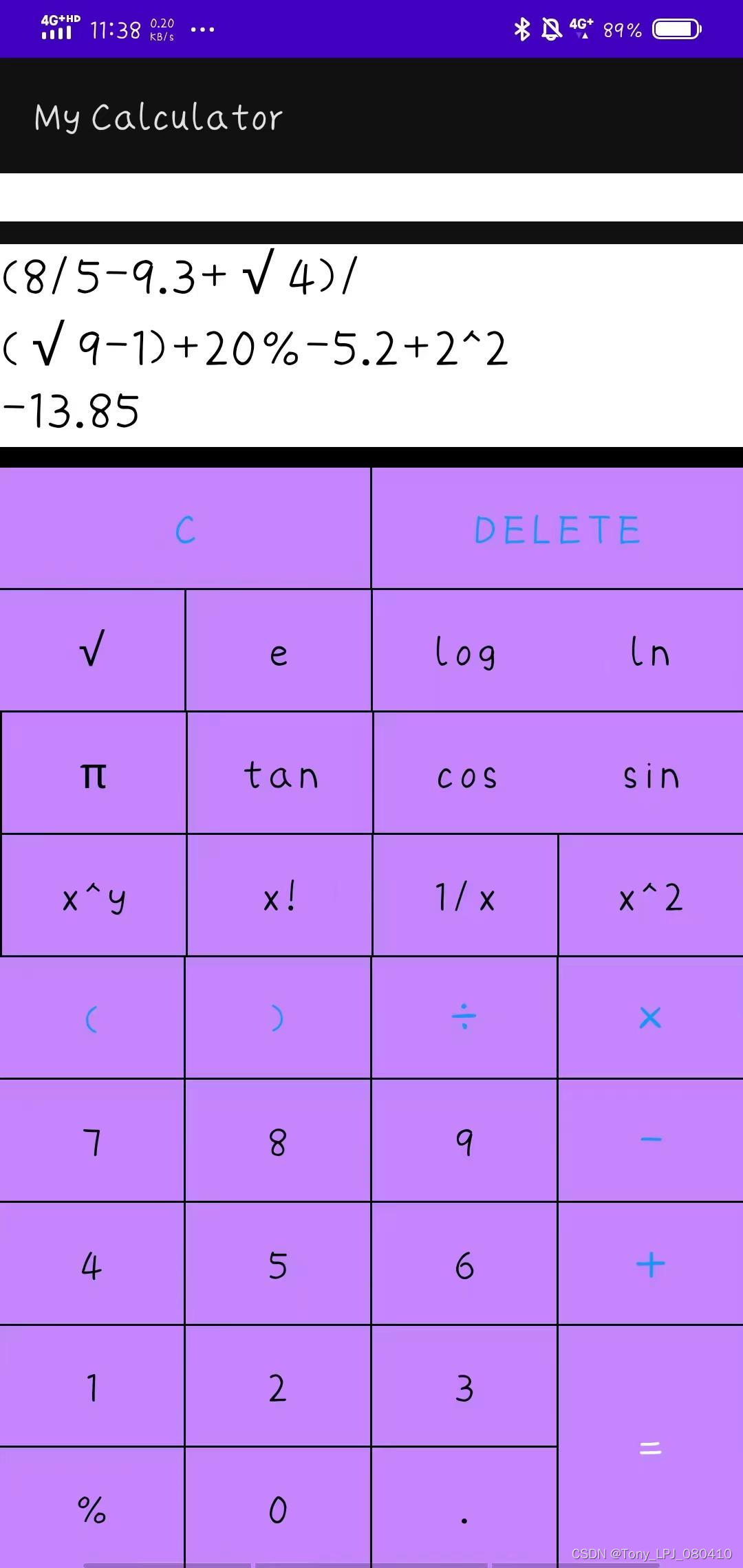
运行截图:见下
使用layout_weight代替gridlayout ->有利于按钮的摆放
颜色主题是Theme.AppCompat.Light,颜色可以根据系统的夜间/日间模式进行更改
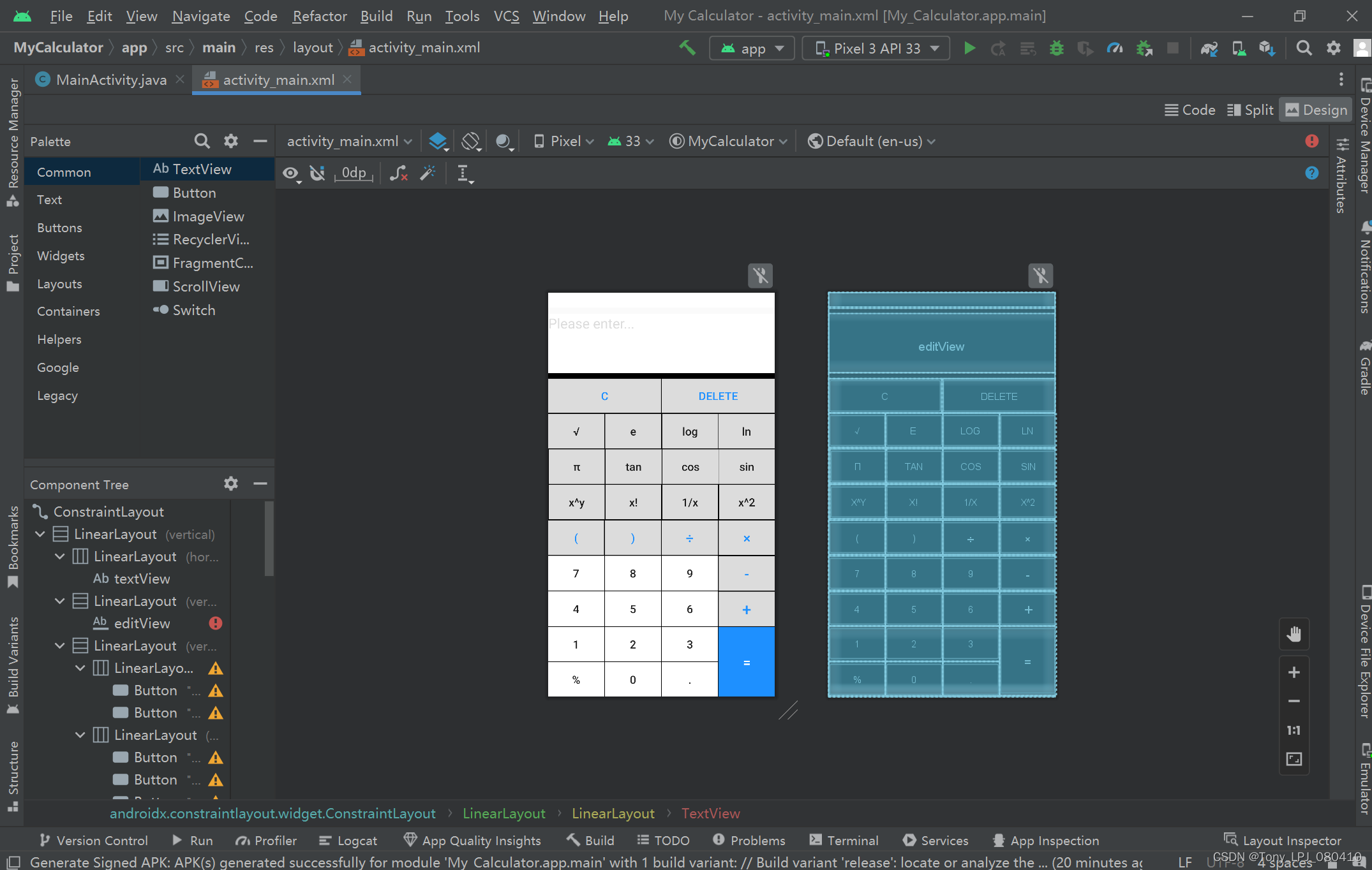
详见代码:
<?xml version="1.0" encoding="utf-8"?>
<androidx.constraintlayout.widget.ConstraintLayout xmlns:android="http://schemas.android.com/apk/res/android"
xmlns:app="http://schemas.android.com/apk/res-auto"
xmlns:tools="http://schemas.android.com/tools"
android:layout_width="match_parent"
android:layout_height="match_parent"
tools:context=".MainActivity">
<LinearLayout
android:layout_width="match_parent"
android:layout_height="match_parent"
tools:context=".MainActivity"
android:orientation="vertical">
<LinearLayout
android:layout_width="match_parent"
android:layout_height="wrap_content">
<TextView
android:id="@+id/textView"
android:layout_width="match_parent"
android:layout_height="match_parent"
android:textSize="20sp"
android:background="@color/white"
android:textColor="@android:color/holo_red_light" />
</LinearLayout>
<LinearLayout
android:layout_width="match_parent"
android:layout_height="0dp"
android:layout_weight="1"
android:layout_marginTop="1dp"
android:orientation="vertical">
<EditText
android:id="@+id/editView"
android:layout_marginTop="10dp"
android:background="@color/white"
android:editable="false"
android:hint="Please enter..."
android:textColorHint="@color/gray"
android:textColor="@color/black"
android:gravity="top|start"
android:textSize="25sp"
tools:ignore="Deprecated"
android:layout_height="match_parent"
android:layout_width="match_parent" />
</LinearLayout>
<LinearLayout
android:layout_width="match_parent"
android:layout_height="0dp"
android:layout_weight="5"
android:background="@color/black"
android:orientation="vertical">
<LinearLayout
android:layout_width="match_parent"
android:layout_height="0dp"
android:layout_marginTop="10dp"
android:layout_weight="1"
android:orientation="horizontal">
<Button
android:layout_width="0dp"
android:layout_height="match_parent"
android:layout_weight="1"
android:background="@drawable/button_style1"
android:onClick="empty"
android:text="c"
android:textColor="@color/blue"
android:textSize="20sp" />
<Button
android:layout_width="0dp"
android:layout_height="match_parent"
android:layout_marginLeft="1dp"
android:layout_weight="1"
android:background="@drawable/button_style1"
android:onClick="delete"
android:text="delete"
android:textColor="@color/blue"
android:textSize="20sp" />
</LinearLayout>
<LinearLayout
android:layout_width="match_parent"
android:layout_height="0dp"
android:layout_marginTop="1dp"
android:layout_weight="1"
android:orientation="horizontal">
<Button
android:layout_width="0dp"
android:layout_height="match_parent"
android:layout_weight="1"
android:background="@drawable/button_style1"
android:onClick="squareRoot"
android:text="√"
android:textAllCaps="false"
android:textSize="20sp" />
<Button
android:layout_width="0dp"
android:layout_height="match_parent"
android:layout_marginLeft="1dp"
android:layout_weight="1"
android:background="@drawable/button_style1"
android:onClick="eulerNumber"
android:text="e"
android:textAllCaps="false"
android:textSize="20sp" />
<Button
android:layout_width="0dp"
android:layout_height="match_parent"
android:layout_marginLeft="1dp"
android:layout_weight="1"
android:background="@drawable/button_style1"
android:onClick="log"
android:text="log"
android:textAllCaps="false"
android:textSize="20sp" />
<Button
android:layout_width="0dp"
android:layout_height="match_parent"
android:layout_weight="1"
android:background="@drawable/button_style1"
android:onClick="ln"
android:text="ln"
android:textAllCaps="false"
android:textSize="20sp" />
</LinearLayout>
<LinearLayout
android:layout_width="match_parent"
android:layout_height="0dp"
android:layout_marginTop="1dp"
android:layout_weight="1"
android:orientation="horizontal">
<Button
android:layout_width="0dp"
android:layout_height="match_parent"
android:layout_marginLeft="1dp"
android:layout_weight="1"
android:background="@drawable/button_style1"
android:onClick="pi"
android:text="π"
android:textAllCaps="false"
android:textSize="20sp" />
<Button
android:layout_width="0dp"
android:layout_height="match_parent"
android:layout_marginLeft="1dp"
android:layout_weight="1"
android:background="@drawable/button_style1"
android:onClick="tan"
android:text="tan"
android:textAllCaps="false"
android:textSize="20sp" />
<Button
android:layout_width="0dp"
android:layout_height="match_parent"
android:layout_marginLeft="1dp"
android:layout_weight="1"
android:background="@drawable/button_style1"
android:onClick="cos"
android:text="cos"
android:textAllCaps="false"
android:textSize="20sp" />
<Button
android:layout_width="0dp"
android:layout_height="match_parent"
android:layout_weight="1"
android:background="@drawable/button_style1"
android:onClick="sin"
android:text="sin"
android:textAllCaps="false"
android:textSize="20sp" />
</LinearLayout>
<LinearLayout
android:layout_width="match_parent"
android:layout_height="0dp"
android:layout_marginTop="1dp"
android:layout_weight="1"
android:orientation="horizontal">
<Button
android:layout_width="0dp"
android:layout_height="match_parent"
android:layout_marginLeft="1dp"
android:layout_weight="1"
android:background="@drawable/button_style1"
android:onClick="power"
android:text="x^y"
android:textAllCaps="false"
android:textSize="20sp" />
<Button
android:layout_width="0dp"
android:layout_height="match_parent"
android:layout_marginLeft="1dp"
android:layout_weight="1"
android:background="@drawable/button_style1"
android:onClick="factorial"
android:text="x!"
android:textAllCaps="false"
android:textSize="20sp" />
<Button
android:layout_width="0dp"
android:layout_height="match_parent"
android:layout_marginLeft="1dp"
android:layout_weight="1"
android:background="@drawable/button_style1"
android:onClick="reciprocal"
android:text="1/x"
android:textAllCaps="false"
android:textSize="20sp" />
<Button
android:layout_width="0dp"
android:layout_height="match_parent"
android:layout_marginLeft="1dp"
android:layout_weight="1"
android:background="@drawable/button_style1"
android:onClick="square"
android:text="x^2"
android:textAllCaps="false"
android:textSize="20sp" />
</LinearLayout>
<LinearLayout
android:layout_width="match_parent"
android:layout_height="0dp"
android:layout_marginTop="1dp"
android:layout_weight="1"
android:orientation="horizontal">
<Button
android:layout_width="0dp"
android:layout_height="match_parent"
android:layout_weight="1"
android:background="@drawable/button_style1"
android:onClick="clickButton"
android:text="("
android:textAllCaps="false"
android:textColor="@color/blue"
android:textSize="20sp" />
<Button
android:layout_width="0dp"
android:layout_height="match_parent"
android:layout_marginLeft="1dp"
android:layout_weight="1"
android:background="@drawable/button_style1"
android:onClick="clickButton"
android:text=")"
android:textAllCaps="false"
android:textColor="@color/blue"
android:textSize="20sp" />
<Button
android:layout_width="0dp"
android:layout_height="match_parent"
android:layout_marginLeft="1dp"
android:layout_weight="1"
android:background="@drawable/button_style1"
android:onClick="div"
android:text="÷"
android:textColor="@color/blue"
android:textSize="25sp" />
<Button
android:layout_width="0dp"
android:layout_height="match_parent"
android:layout_marginLeft="1dp"
android:layout_weight="1"
android:background="@drawable/button_style1"
android:onClick="mul"
android:text="×"
android:textColor="@color/blue"
android:textSize="25sp" />
</LinearLayout>
<LinearLayout
android:layout_width="match_parent"
android:layout_height="0dp"
android:layout_marginTop="1dp"
android:layout_weight="1"
android:onClick="clickButton"
android:orientation="horizontal">
<Button
android:layout_width="0dp"
android:layout_height="match_parent"
android:layout_weight="1"
android:background="@color/white"
android:onClick="clickButton"
android:text="7"
android:textSize="20sp" />
<Button
android:layout_width="0dp"
android:layout_height="match_parent"
android:layout_marginLeft="1dp"
android:layout_weight="1"
android:background="@color/white"
android:onClick="clickButton"
android:text="8"
android:textSize="20sp" />
<Button
android:layout_width="0dp"
android:layout_height="match_parent"
android:layout_marginLeft="1dp"
android:layout_weight="1"
android:background="@color/white"
android:onClick="clickButton"
android:text="9"
android:textSize="20sp" />
<Button
android:layout_width="0dp"
android:layout_height="match_parent"
android:layout_marginLeft="1dp"
android:layout_weight="1"
android:background="@drawable/button_style1"
android:onClick="clickButton"
android:text="-"
android:textColor="@color/blue"
android:textSize="25sp" />
</LinearLayout>
<LinearLayout
android:layout_width="match_parent"
android:layout_height="0dp"
android:layout_marginTop="1dp"
android:layout_weight="1"
android:orientation="horizontal">
<Button
android:layout_width="0dp"
android:layout_height="match_parent"
android:layout_weight="1"
android:background="@color/white"
android:onClick="clickButton"
android:text="4"
android:textSize="20sp" />
<Button
android:layout_width="0dp"
android:layout_height="match_parent"
android:layout_marginLeft="1dp"
android:layout_weight="1"
android:background="@color/white"
android:onClick="clickButton"
android:text="5"
android:textSize="20sp" />
<Button
android:layout_width="0dp"
android:layout_height="match_parent"
android:layout_marginLeft="1dp"
android:layout_weight="1"
android:background="@color/white"
android:onClick="clickButton"
android:text="6"
android:textSize="20sp" />
<Button
android:layout_width="0dp"
android:layout_height="match_parent"
android:layout_marginLeft="1dp"
android:layout_weight="1"
android:background="@drawable/button_style1"
android:onClick="clickButton"
android:text="+"
android:textColor="@color/blue"
android:textSize="30sp" />
</LinearLayout>
<LinearLayout
android:layout_width="match_parent"
android:layout_height="0dp"
android:layout_marginTop="1dp"
android:layout_weight="2"
android:orientation="horizontal">
<LinearLayout
android:layout_width="0dp"
android:layout_height="match_parent"
android:layout_weight="1"
android:orientation="vertical">
<Button
android:layout_width="match_parent"
android:layout_height="0dp"
android:layout_weight="1"
android:background="@color/white"
android:onClick="clickButton"
android:text="1"
android:textSize="20sp" />
<Button
android:layout_width="match_parent"
android:layout_height="0dp"
android:layout_marginTop="1dp"
android:layout_weight="1"
android:background="@color/white"
android:onClick="percentage"
android:text="%"
android:textSize="20sp" />
</LinearLayout>
<LinearLayout
android:layout_width="0dp"
android:layout_height="match_parent"
android:layout_marginLeft="1dp"
android:layout_weight="1"
android:orientation="vertical">
<Button
android:layout_width="match_parent"
android:layout_height="0dp"
android:layout_weight="1"
android:background="@color/white"
android:onClick="clickButton"
android:text="2"
android:textSize="20sp" />
<Button
android:layout_width="match_parent"
android:layout_height="0dp"
android:layout_marginTop="1dp"
android:layout_weight="1"
android:background="@color/white"
android:onClick="clickButton"
android:text="0"
android:textSize="20sp" />
</LinearLayout>
<LinearLayout
android:layout_width="0dp"
android:layout_height="match_parent"
android:layout_marginLeft="1dp"
android:layout_weight="1"
android:orientation="vertical">
<Button
android:layout_width="match_parent"
android:layout_height="0dp"
android:layout_weight="1"
android:background="@color/white"
android:onClick="clickButton"
android:text="3"
android:textSize="20sp" />
<Button
android:layout_width="match_parent"
android:layout_height="0dp"
android:layout_marginTop="1dp"
android:layout_weight="1"
android:background="@color/white"
android:onClick="clickButton"
android:text="."
android:textSize="20sp" />
</LinearLayout>
<LinearLayout
android:layout_width="0dp"
android:layout_height="match_parent"
android:layout_marginLeft="1dp"
android:layout_weight="1"
android:orientation="vertical">
<Button
android:layout_width="match_parent"
android:layout_height="match_parent"
android:background="@color/blue"
android:onClick="equal"
android:text="="
android:textColor="@color/white"
android:textSize="25sp" />
</LinearLayout>
</LinearLayout>
</LinearLayout>
</LinearLayout>
</androidx.constraintlayout.widget.ConstraintLayout>
1.先判断运算的优先级别,然后使用栈,转中缀表达式、后缀表达式进行计算
2.判断是否有输入错误:
(1)输入为空就按等于号
(2)当只有一位字符时,只能是“0123456789ep”中的一个
(3)当输入表达式时:
①第一个字符只能为"losctg(0123456789ep"中的一个
②“+-*/”后面只能是"0123456789losctg(ep"中的一个
③"."后面只能是“0123456789”中的一个
④"!"后面只能是“+-*/^)”中的一个
⑤"losctg"后面只能是“0123456789(ep”中的一个
⑦"123456789"后面只能是“0123456789+-*/.!^)”中的一个
⑧"("后面只能是“0123456789locstg()ep”中的一个
⑨")"后面只能是“+-*/!^)”中的一个
⑩最后一位字符只能是“0123456789!)ep”中的一个
11.不能有多个“.”
12."ep"后面只能是“+-*/^)”中的一个
(4)0"的判断操作
①当0的上一个字符不为"0123456789."时,后一位只能是“+-*/.!^)”中的一个
②如果0的上一位为“.”,则后一位只能是“0123456789+-*/.^)”中的一个
③如果0到上一个运算符之间没有“.”的话,整数位第一个只能是“123456789”,且后一位只能是“0123456789+-*/.!^)”中的一个。
④如果0到上一个运算符之间有一个“.”的话,则后一位只能是“0123456789+-*/.^)”中的一个
详见代码:
package com.tony.mycalculator;
import androidx.appcompat.app.AppCompatActivity;
import android.os.Bundle;
import android.view.View;
import android.widget.Button;
import android.widget.EditText;
import android.widget.TextView;
import java.util.ArrayList;
import java.util.List;
import java.util.Stack;
/*
author:Tony
date:Feb 3rd,2023
*/
/*
editText:输入框
text:错误提示框
str:参与运算的式子
indexYN:是否出错的标志
infixExpression:中缀表达式
suffixExpression:后缀表达式
*/
public class MainActivity extends AppCompatActivity {
private EditText editText;
private TextView text;
private final StringBuilder str = new StringBuilder();
private int indexYN = 0;
@Override
protected void onCreate(Bundle savedInstanceState) {
super.onCreate(savedInstanceState);
setContentView(R.layout.activity_main);
editText = (EditText) findViewById(R.id.editView);
text = (TextView) findViewById(R.id.textView);
}
//1234567890+-.()
public void clickButton(View view) {
Button button = (Button) view;
editText.append(button.getText());
str.append(button.getText());
}
//除
public void div(View view) {
editText.append("/");
str.append("/");
}
//乘
public void mul(View view) {
editText.append("*");
str.append("*");
}
//清空
public void empty(View view) {
editText.setText(null);
text.setText(null);
str.delete(0, str.length());
}
//删除
public void delete(View view) {
String nowText = editText.getText().toString();
if (nowText.length() != 0 && str.length() != 0) {
editText.setText(nowText.substring(0, nowText.length() - 1));
str.deleteCharAt(str.length() - 1);
}
text.setText(null);
}
//等于
public void equal(View view) {
indexYN = 0;
/*
System.out.println("str:\t" + str);
System.out.println("length:\t" + str.length());
*/
estimate();
if (indexYN == 0) {
List<String> infixExpression = turnIntoInfixExpression(str.toString());
System.out.println(infixExpression);
List<String> suffixExpression = turnIntoSuffixExpression(infixExpression);
System.out.println(suffixExpression);
editText.append("\n" + math(suffixExpression));
str.delete(0, str.length());
str.append(math(suffixExpression));
}
}
//倒数
public void reciprocal(View view) {
editText.append("1/");
str.append("1/");
}
//阶乘
public void factorial(View view) {
editText.append("!");
str.append("!");
}
//平方
public void square(View view) {
editText.append("^2");
str.append("^2");
}
//幂
public void power(View view) {
editText.append("^");
str.append("^");
}
//开方
public void squareRoot(View view) {
editText.append("√");
str.append("g");
}
//欧拉数e
public void eulerNumber(View view) {
editText.append("e");
str.append("e");
}
//百分数
public void percentage(View view) {
editText.append("%");
str.append("*0.01");
}
//圆周率
public void pi(View view) {
editText.append("π");
str.append("p");
}
//sin
public void sin(View view) {
editText.append("sin");
str.append("s");
}
//cos
public void cos(View view) {
editText.append("cos");
str.append("c");
}
//tan
public void tan(View view) {
editText.append("tan");
str.append("t");
}
//ln
public void ln(View view) {
editText.append("ln");
str.append("l");
}
//log
public void log(View view) {
editText.append("log");
str.append("o");
}
private List<String> turnIntoInfixExpression(String str) {
//把输入的字符串转换成中缀表达式。存入list中
int index = 0;
List<String> list = new ArrayList<>();
do {
char ch = str.charAt(index);
if ("+-*/^!logsct()".indexOf(str.charAt(index)) >= 0) {
//是操作符,直接添加至list中
index++;
list.add(ch + "");
} else if (str.charAt(index) == 'e' || str.charAt(index) == 'p') {
index++;
list.add(ch + "");
} else if ("0123456789".indexOf(str.charAt(index)) >= 0) {
//是数字,判断多位数的情况
StringBuilder str1 = new StringBuilder();
while (index < str.length()
&& "0123456789.".indexOf(str.charAt(index)) >= 0) {
str1.append(str.charAt(index));
index++;
}
list.add(str1.toString());
}
} while (index < str.length());
return list;
}
//中缀表达式转换称后缀表达式
public List<String> turnIntoSuffixExpression(List<String> list) {
Stack<String> fuZhan = new Stack<>();
List<String> list2 = new ArrayList<>();
if (!list.isEmpty()) {
for (int i = 0; i < list.size(); i++) {
if (isNumber(list.get(i))) {
list2.add(list.get(i));
} else if (list.get(i).charAt(0) == '(') {
fuZhan.push(list.get(i));
} else if (isOperator(list.get(i)) && list.get(i).charAt(0) != '(') {
if (fuZhan.isEmpty()) {
fuZhan.push(list.get(i));
} else {//符栈不为空
if (list.get(i).charAt(0) != ')') {
if (adv(fuZhan.peek()) <= adv(list.get(i))) {
//入栈
fuZhan.push(list.get(i));
} else {
//出栈
while (!fuZhan.isEmpty() && !"(".equals(fuZhan.peek())) {
if (adv(list.get(i)) <= adv(fuZhan.peek())) {
list2.add(fuZhan.pop());
}
}
if (fuZhan.isEmpty() || fuZhan.peek().charAt(0) == '(') {
fuZhan.push(list.get(i));
}
}
} else if (list.get(i).charAt(0) == ')') {
while (fuZhan.peek().charAt(0) != '(') {
list2.add(fuZhan.pop());
}
fuZhan.pop();
}
}
}
}
while (!fuZhan.isEmpty()) {
list2.add(fuZhan.pop());
}
} else {
editText.setText("");
}
return list2;
}
//判断是否为操作符
public static boolean isOperator(String op) {
return "0123456789.ep".indexOf(op.charAt(0)) == -1;
}
//判断是否为操作数
public static boolean isNumber(String num) {
return "0123456789ep".indexOf(num.charAt(0)) >= 0;
}
//判断操作符的优先级
public static int adv(String f) {
int result = 0;
switch (f) {
case "+":
case "-":
result = 1;
break;
case "*":
case "/":
result = 2;
break;
case "^":
result = 3;
break;
case "!":
case "g":
case "l":
case "o":
case "s":
case "c":
case "t":
result = 4;
break;
}
return result;
}
//通过后缀表达式进行计算
public double math(List<String> list2) {
Stack<String> stack = new Stack<>();
for (int i = 0; i < list2.size(); i++) {
if (isNumber(list2.get(i))) {
if (list2.get(i).charAt(0) == 'e') {
stack.push(String.valueOf(Math.E));
} else if (list2.get(i).charAt(0) == 'p') {
stack.push(String.valueOf(Math.PI));
} else {
stack.push(list2.get(i));
}
} else if (isOperator(list2.get(i))) {
double res = 0;
switch (list2.get(i)) {
case "+": {
double num2 = Double.parseDouble(stack.pop());
double num1 = Double.parseDouble(stack.pop());
res = num1 + num2;
break;
}
case "-": {
double num2 = Double.parseDouble(stack.pop());
double num1 = Double.parseDouble(stack.pop());
res = num1 - num2;
break;
}
case "*": {
double num2 = Double.parseDouble(stack.pop());
double num1 = Double.parseDouble(stack.pop());
res = num1 * num2;
break;
}
case "/": {
double num2 = Double.parseDouble(stack.pop());
double num1 = Double.parseDouble(stack.pop());
if (num2 != 0) {
res = num1 / num2;
} else {
text.setText("Can't be divided by 0!");
indexYN = 1;
}
break;
}
case "^": {
double num2 = Double.parseDouble(stack.pop());
double num1 = Double.parseDouble(stack.pop());
res = Math.pow(num1, num2);
break;
}
case "!": {
double num1 = Double.parseDouble(stack.pop());
if (num1 == 0 || num1 == 1) {
res = 1;
} else if (num1 == (int) num1 && num1 > 1) {
int d = 1;
for (int j = (int) num1; j > 0; j--) {
d *= j;
}
res = d;
} else {
text.setText("The factorial must be a natural number!");
indexYN = 1;
}
break;
}
case "g": {
double num1 = Double.parseDouble(stack.pop());
res = Math.sqrt(num1);
break;
}
case "l": {
double num1 = Double.parseDouble(stack.pop());
if (num1 > 0) {
res = Math.log(num1);
} else {
text.setText("The variable x in ln must be greater than 0!");
indexYN = 1;
}
break;
}
case "o": {
double num1 = Double.parseDouble(stack.pop());
if (num1 > 0) {
res = Math.log(num1) / Math.log(2);
} else {
text.setText("The variable x in function log must be greater than 0!");
indexYN = 1;
}
break;
}
case "s": {
double num1 = Double.parseDouble(stack.pop());
res = Math.sin(num1);
break;
}
case "c": {
double num1 = Double.parseDouble(stack.pop());
res = Math.cos(num1);
break;
}
case "t": {
double num1 = Double.parseDouble(stack.pop());
if (Math.cos(num1) != 0) {
res = Math.tan(num1);
} else {
text.setText("The variable in function tan can't be +-(π/2 + kπ)!");
indexYN = 1;
}
break;
}
}
stack.push("" + res);
}
}
if (indexYN == 0) {
if (!stack.isEmpty()) {
return Double.parseDouble(stack.pop());
} else {
return 0;
}
} else {
return -999999;
}
}
//判断输入是否错误
public void estimate() {
int i;
if (str.length() == 0) {
text.setText("Error!");
indexYN = 1;
}
if (str.length() == 1) {
//当只有一位字符时,只能是“0123456789ep”中的一个
if ("0123456789ep".indexOf(str.charAt(0)) == -1) {
text.setText("Error!");
indexYN = 1;
}
}
if (str.length() > 1) {
for (i = 0; i < str.length() - 1; i++) {
//1.第一个字符只能为"losctg(0123456789ep"中的一个
if ("losctg(0123456789ep".indexOf(str.charAt(0)) == -1) {
text.setText("Error!");
indexYN = 1;
}
//2.“+-*/”后面只能是"0123456789losctg(ep"中的一个
if ("+-*/".indexOf(str.charAt(i)) >= 0
&& "0123456789losctg(ep".indexOf(str.charAt(i + 1)) == -1) {
text.setText("Error!");
indexYN = 1;
}
//3."."后面只能是“0123456789”中的一个
if (str.charAt(i) == '.' && "0123456789".indexOf(str.charAt(i + 1)) == -1) {
text.setText("Error!");
indexYN = 1;
}
//4."!"后面只能是“+-*/^)”中的一个
if (str.charAt(i) == '!' && "+-*/^)".indexOf(str.charAt(i + 1)) == -1) {
text.setText("Error!");
indexYN = 1;
}
//5."losctg"后面只能是“0123456789(ep”中的一个
if ("losctg".indexOf(str.charAt(i)) >= 0 && "0123456789(ep".indexOf(str.charAt(i + 1)) == -1) {
text.setText("Error!");
indexYN = 1;
}
//6."0"的判断操作
if (str.charAt(0) == '0' && str.charAt(1) == '0') {
text.setText("Error!");
indexYN = 1;
}
if (i >= 1 && str.charAt(i) == '0') {
//&& str.charAt(0) == '0' && str.charAt(1) == '0'
int n = i;
int is = 0;
//1.当0的上一个字符不为"0123456789."时,后一位只能是“+-*/.!^)”中的一个
if ("0123456789.".indexOf(str.charAt(i - 1)) == -1 && "+-*/.!^)".indexOf(str.charAt(i + 1)) == -1) {
text.setText("Error!");
indexYN = 1;
}
//2.如果0的上一位为“.”,则后一位只能是“0123456789+-*/.^)”中的一个
if (str.charAt(i - 1) == '.' && "0123456789+-*/.^)".indexOf(str.charAt(i + 1)) == -1) {
text.setText("Error!");
indexYN = 1;
}
n -= 1;
while (n > 0) {
if ("(+-*/^glosct".indexOf(str.charAt(n)) >= 0) {
break;
}
if (str.charAt(n) == '.') {
is++;
}
n--;
}
//3.如果0到上一个运算符之间没有“.”的话,整数位第一个只能是“123456789”,
// 且后一位只能是“0123456789+-*/.!^)”中的一个。
if ((is == 0 && str.charAt(n) == '0') || "0123456789+-*/.!^)".indexOf(str.charAt(i + 1)) == -1) {
text.setText("Error!");
indexYN = 1;
}
//4.如果0到上一个运算符之间有一个“.”的话,则后一位只能是“0123456789+-*/.^)”中的一个
if (is == 1 && "0123456789+-*/.^)".indexOf(str.charAt(i + 1)) == -1) {
text.setText("Error!");
indexYN = 1;
}
if (is > 1) {
text.setText("Error!");
indexYN = 1;
}
}
//7."123456789"后面只能是“0123456789+-*/.!^)”中的一个
if ("123456789".indexOf(str.charAt(i)) >= 0 && "0123456789+-*/.!^)".indexOf(str.charAt(i + 1)) == -1) {
text.setText("Error!");
indexYN = 1;
}
//8."("后面只能是“0123456789locstg()ep”中的一个
if (str.charAt(i) == '(' && "0123456789locstg()ep".indexOf(str.charAt(i + 1)) == -1) {
text.setText("Error!");
indexYN = 1;
}
//9.")"后面只能是“+-*/!^)”中的一个
if (str.charAt(i) == ')' && "+-*/!^)".indexOf(str.charAt(i + 1)) == -1) {
text.setText("Error!");
indexYN = 1;
}
//10.最后一位字符只能是“0123456789!)ep”中的一个
if ("0123456789!)ep".indexOf(str.charAt(str.length() - 1)) == -1) {
text.setText("Error!");
indexYN = 1;
}
//11.不能有多个“.”
if (i > 2 && str.charAt(i) == '.') {
int n = i - 1;
int is = 0;
while (n > 0) {
if ("(+-*/^glosct".indexOf(str.charAt(n)) >= 0) {
break;
}
if (str.charAt(n) == '.') {
is++;
}
n--;
}
if (is > 0) {
text.setText("Error!");
indexYN = 1;
}
}
//12."ep"后面只能是“+-*/^)”中的一个
if ("ep".indexOf(str.charAt(i)) >= 0 && "+-*/^)".indexOf(str.charAt(i + 1)) == -1) {
text.setText("Error!");
indexYN = 1;
}
}
}
}
}日间模式:
夜间模式:
用到的资源:
button_style1.xml
<?xml version="1.0" encoding="utf-8"?>
<shape xmlns:android="http://schemas.android.com/apk/res/android">
    <solid android:color="@color/gray"/>
    <stroke android:width="0.3dp" android:color="#000000"/>
</shape>
colors.xml
<?xml version="1.0" encoding="utf-8"?>
<resources>
    <color name="purple_200">#FFBB86FC</color>
    <color name="purple_500">#FF6200EE</color>
    <color name="purple_700">#FF3700B3</color>
    <color name="teal_200">#FF03DAC5</color>
    <color name="teal_700">#FF018786</color>
    <color name="black">#FF000000</color>
    <color name="white">#FFFFFFFF</color>

    <!-- 灰色 -->
    <color name="gray">#dcdcdc</color>
    <!-- 浅灰色 -->
    <color name="grey">#F0F0F0</color>
    <color name="xian">#C1C1C1</color>
    <!-- 蓝色 -->
    <color name="blue">#1e90ff</color>
</resources>
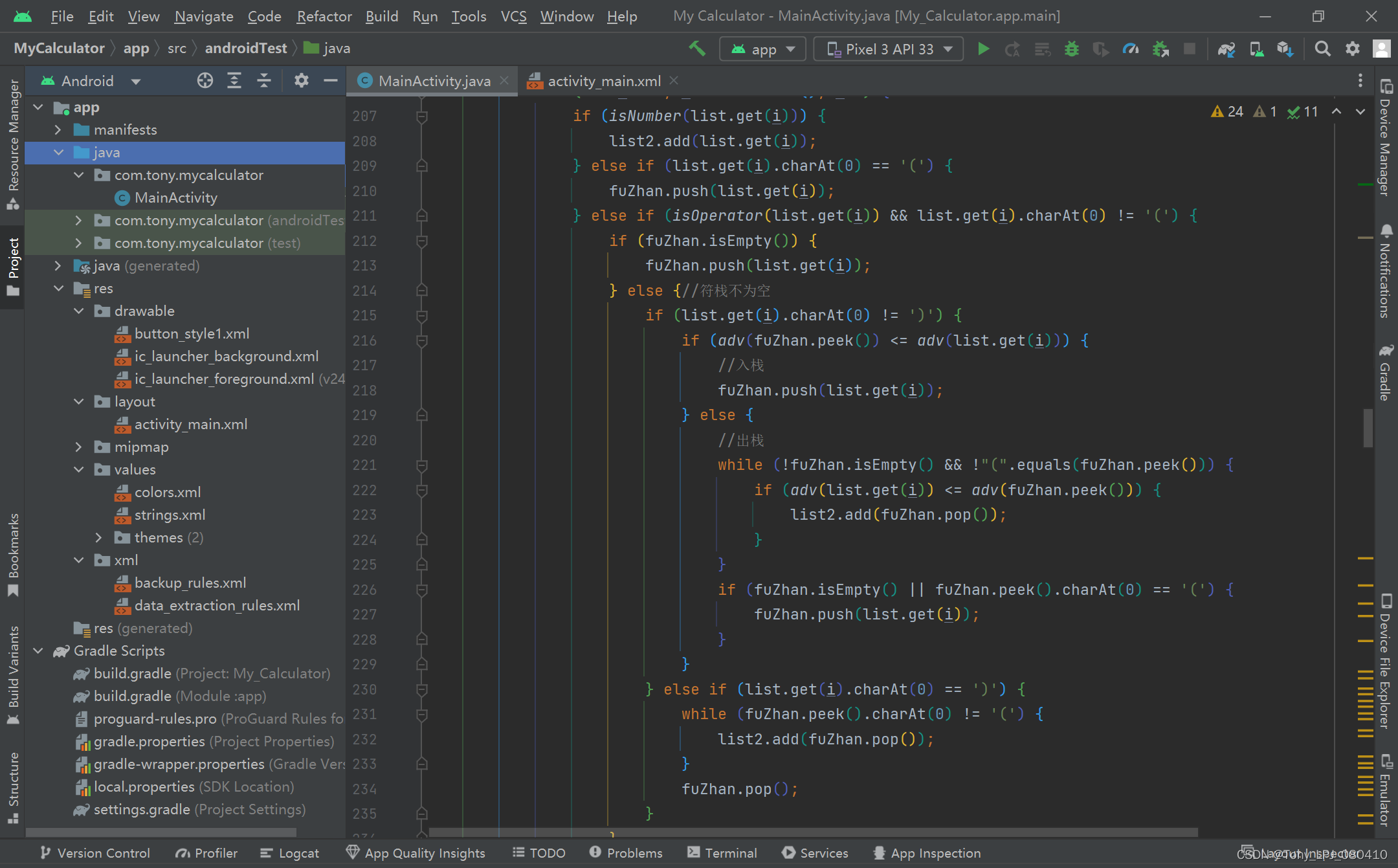
*附:项目结构↓
这个程序有一个不知解决方法的小问题:按钮摆放会错位 (+_+)?
即有时按钮的边框会消失 (╬▔皿▔)凸
不知为啥呀……
可能是AS版本问题 ??? 求各位大佬的解答
本人,萌新一个,大家点赞收藏关注哦^_^
初学安卓,还有许多不足之处,比如代码逻辑性不强、可读性不高,不太会写批注,页面布局也不太美观
欢迎大家评论指点😀
有何不懂请私信,一一解答!
本人李某,专注原创,转载请注明
这里是Ruby新手。完成一些练习后碰壁了。练习:计算一系列成绩的字母等级创建一个方法get_grade来接受测试分数数组。数组中的每个分数应介于0和100之间,其中100是最大分数。计算平均分并将字母等级作为字符串返回,即“A”、“B”、“C”、“D”、“E”或“F”。我一直返回错误:avg.rb:1:syntaxerror,unexpectedtLBRACK,expecting')'defget_grade([100,90,80])^avg.rb:1:syntaxerror,unexpected')',expecting$end这是我目前所拥有的。我想坚持使用下面的方法或.join,
项目介绍随着我国经济迅速发展,人们对手机的需求越来越大,各种手机软件也都在被广泛应用,但是对于手机进行数据信息管理,对于手机的各种软件也是备受用户的喜爱小学生兴趣延时班预约小程序的设计与开发被用户普遍使用,为方便用户能够可以随时进行小学生兴趣延时班预约小程序的设计与开发的数据信息管理,特开发了小程序的设计与开发的管理系统。小学生兴趣延时班预约小程序的设计与开发的开发利用现有的成熟技术参考,以源代码为模板,分析功能调整与小学生兴趣延时班预约小程序的设计与开发的实际需求相结合,讨论了小学生兴趣延时班预约小程序的设计与开发的使用。开发环境开发说明:前端使用微信微信小程序开发工具:后端使用ssm:VU
我对如何计算通过{%assignvar=0%}赋值的变量加一完全感到困惑。这应该是最简单的任务。到目前为止,这是我尝试过的:{%assignamount=0%}{%forvariantinproduct.variants%}{%assignamount=amount+1%}{%endfor%}Amount:{{amount}}结果总是0。也许我忽略了一些明显的东西。也许有更好的方法。我想要存档的只是获取运行的迭代次数。 最佳答案 因为{{incrementamount}}将输出您的变量值并且不会影响{%assign%}定义的变量,我
给定一个nxmbool数组:[[true,true,false],[false,true,true],[false,true,true]]有什么简单的方法可以返回“该列中有多少个true?”结果应该是[1,3,2] 最佳答案 使用转置得到一个数组,其中每个子数组代表一列,然后将每一列映射到其中的true数:arr.transpose.map{|subarr|subarr.count(true)}这是一个带有inject的版本,应该在1.8.6上运行,没有任何依赖:arr.transpose.map{|subarr|subarr.in
是否可以在所有delayed_job任务之前运行一个方法?基本上,我们试图确保每个运行delayed_job的服务器都有我们代码的最新实例,所以我们想运行一个方法来在每个作业运行之前检查它。(我们已经有了“check”方法并在别处使用它。问题只是关于如何从delayed_job中调用它。) 最佳答案 现在有一种官方方法可以通过插件来做到这一点。这篇博文通过示例清楚地描述了如何执行此操作http://www.salsify.com/blog/delayed-jobs-callbacks-and-hooks-in-rails(本文中描述
给定两个大小相等的数组,如何找到不考虑位置的匹配元素的数量?例如:[0,0,5]和[0,5,5]将返回2的匹配项,因为有一个0和一个5共同;[1,0,0,3]和[0,0,1,4]将返回3的匹配项,因为0有两场,1有一场;[1,2,2,3]和[1,2,3,4]将返回3的匹配项。我尝试了很多想法,但它们都变得相当粗糙和令人费解。我猜想有一些不错的Ruby习惯用法,或者可能是一个正则表达式,可以很好地回答这个解决方案。 最佳答案 您可以使用count完成它:a.count{|e|index=b.index(e)andb.delete_at
Ruby中如何“一般地”计算以下格式(有根、无根)的JSON对象的数量?一般来说,我的意思是元素可能不同(例如“标题”被称为其他东西)。没有根:{[{"title":"Post1","body":"Hello!"},{"title":"Post2","body":"Goodbye!"}]}根包裹:{"posts":[{"title":"Post1","body":"Hello!"},{"title":"Post2","body":"Goodbye!"}]} 最佳答案 首先,withoutroot代码不是有效的json格式。它将没有包
目标我正在尝试计算自给定日期以来周的距离,而无需跳过任何步骤。我更喜欢用普通的Ruby来做,但ActiveSupport无疑是一个可以接受的选择。我的代码我写了以下内容,这似乎可行,但对我来说似乎还有很长的路要走。require'date'DAYS_IN_WEEK=7.0defweeks_sincedate_stringdate=Date.parsedate_stringdays=Date.today-dateweeks=days/DAYS_IN_WEEKweeks.round2endweeks_since'2015-06-15'#=>32.57ActiveSupport的#weeks
我遇到了同样的问题here对于python,但对于ruby。我需要输出这样一个小数字:0.00001,而不是1e-5。有关我的特定问题的更多信息,我正在使用f.write("Mynumber:"+small_number.to_s+"\n")输出到一个文件对于我的问题,准确性不是什么大问题,所以只做一个if语句来检查是否small_number那么更通用的方法是什么? 最佳答案 f.printf"Mynumber:%.5f\n",small_number您可以将.5(小数点右侧5位数字)替换为您喜欢的任何特定格式大小,例如,%8
技术选型1,前端小程序原生MINA框架cssJavaScriptWxml2,管理后台云开发Cms内容管理系统web网页3,数据后台小程序云开发云函数云开发数据库(基于MongoDB)云存储4,人脸识别算法基于百度智能云实现人脸识别一,用户端效果图预览老规矩我们先来看效果图,如果效果图符合你的需求,就继续往下看,如果不符合你的需求,可以跳过。1-1,登录注册页可以看到登录页有注册入口,注册页如下我们的注册,需要管理员审核,审核通过后才可以正常登录使用小程序1-2,个人中心页登录成功以后,我们会进入个人中心页我们在个人中心页可以注册人脸,因为我们做人脸识别签到,需要先注册人脸才可以进行人脸比对,进
