
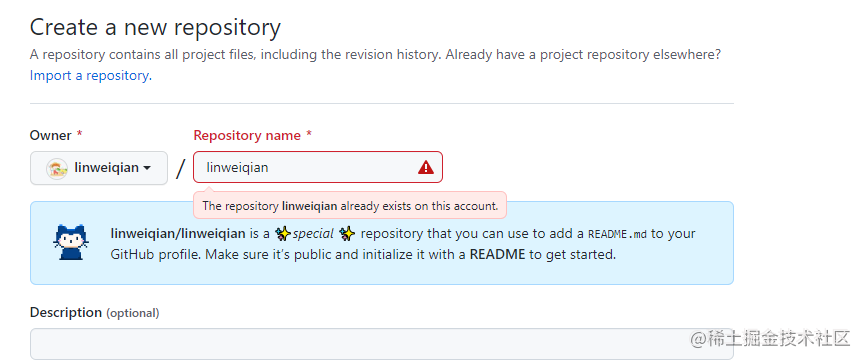
地址:https://github.com/linweiqian
下面展示仓库状态统计的设置,需要把
username修改成自己的GitHub名字。通过给url增加参数的形式,可以给svg设置theme,也可以采用默认的(白底);通过layout设置外观布局
在您的自述文件中获取动态生成的 GitHub 统计信息 --> 传送门
[外链图片转存失败,源站可能有防盗链机制,建议将图片保存下来直接上传(img-dJf2tYxG-1672669314908)(null)]



在您的自述文件中添加使用编程语言对比统计图 --> 传送门
[外链图片转存失败,源站可能有防盗链机制,建议将图片保存下来直接上传(img-Ylgv2i22-1672669314875)(null)]
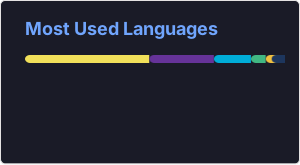
获得类似上图的 GitHub 数据统计,需要用到一个在线工具「Metrics」,打开网站之后,在左侧输入你的 GitHub ID,稍等一会,就会返回右侧所有和你相关的数据。
<div align="center"> <img src="https://metrics.lecoq.io/sun0225SUN?template=classic&config.timezone=Asia%2FShanghai"> </div>
添加奖杯信息–> 传送门

<div align="center"> <img src="https://github-profile-trophy.vercel.app/?username=sun0225SUN" /> </div>
为你的开源项目生成高质量小徽章图标,直接复制链接使用。 --> 传送门

<span > <img src="https://img.shields.io/badge/-HTML5-E34F26?style=flat-square&logo=html5&logoColor=white" /> <img src="https://img.shields.io/badge/-CSS3-1572B6?style=flat-square&logo=css3" /> <img src="https://img.shields.io/badge/-JavaScript-oringe?style=flat-square&logo=javascript" /> </span>
这个徽章会实时改变,记录此页面被访问的次数。–>传送门

<div align="center"> <img src="https://visitor-badge.glitch.me/badge?page_id=linweiqian" /> </div>
动态生成的活动图,用于显示您过去 31 天的 GitHub 活动。 --> 传送门
<div align="center"> <img src="https://activity-graph.herokuapp.com/graph?username=linweiqian&theme=xcode" /> </div>
在 README 中展示您连续提交代码的次数。 --> 传送门

<div align="center"> <img src="https://github-readme-streak-stats.herokuapp.com/?user=sun0225SUN" /> </div>
在 README 中展示你在一些流行的网站的数据。 --> 传送门
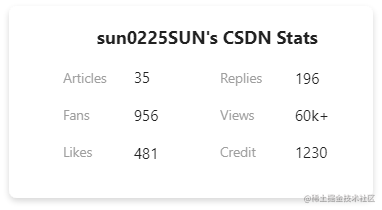
<div align="center"> <img src="https://stats.justsong.cn/api/csdn?id=weixin_50915462"> </div>
循环打字的效果,很炫酷,–> 传送门
<h1 align="center"> <img src="https://readme-typing-svg.herokuapp.com/?lines=console.log(%22Hello%2C%20World!%22);欢迎来到嚣张农民GitHub首页!¢er=true&size=27"></h1>
首先看配置内容:

引用了仓库本地的一个svg文件,此文件借助一个GitHub Actinos每天自动生成一次。

name: Generate Snake
on:
  schedule:
    - cron: "0 0 * * *"
  workflow_dispatch:
jobs:
  build:
    runs-on: ubuntu-latest
    steps:
      - name: Checkout
        uses: actions/checkout@v2.3.4
      - name: Generate Snake
        uses: Platane/snk@master
        id: snake-gif
        with:
          github_user_name: ${{ github.repository_owner }}
          gif_out_path: ./assets/github-contribution-grid-snake.gif
          svg_out_path: ./assets/github-contribution-grid-snake.svg
      - name: Push to GitHub
        uses: EndBug/add-and-commit@v7.2.1
        with:
          branch: master
          message: "Generate Contribution Snake"
此功能基于如下项目构建:
配置内容如下:

此功能基于如下项目构建:
GitHub Pinned 是一个能够将项目钉在个人主页的功能,效果如下:

但有一个问题,此功能只允许我们添加6个项目钉在这里。
通过如下配置,我们可以将更多自己想要钉住的项目钉在个人主页:
[](https://github.com/eryajf/ldapctl)
此功能基于如下项目构建:
https://profilinator.rishav.dev/
我使用Jekyll运行博客,并认为我会解决RedcarpetMarkdown解释器,因为它是developedandusedbyGitHub.好吧,我只是碰巧遇到了一个错误,去检查问题,然后foundthis.Maintainersays,"Asyouprobablyhavenoticed(harharharhar)Idon'thavetimetomaintainRedcarpetanymore.It'snotapriorityforme(IfindMarkdownthoroughlyboring)andit'snotapriorityforGitHub,becausewenolong
我们正在使用Vagrant进行部署,我们最终希望将此集群部署在Rackspace上。vagrant-rackspace插件是一个自然的选择,但它有一些错误,这些错误未包含在最新的0.1.1版本中(notablythatvagrantprovisiondoesn'twork)。我已经在我的personalfork中解决了这个问题通过合并其他人的工作来对存储库进行改造。是否可以从github安装vagrant插件?显而易见的事情没有奏效:[unix]$vagrantplugininstallvagrant-rackspace--plugin-sourcehttps://github.com
我有一个使用Jekyll托管在GitHub上的静态网站。问题是,我真的不需要master分支,因为存储库唯一包含的是网站。这样我就必须gitcheckoutgh-pages,然后gitmergemaster,然后gitpushorigingh-pages。有什么简单的方法可以摆脱gh-pages分支并直接从master推送? 最佳答案 Theproblemis,Idon'treallyneedthemasterbranch,astheonlythingtherepositorycontainsisthewebsite.Isthere
我每次打开终端时都会收到这个错误:警告:PATH设置为RVMruby但未设置GEM_HOME和/或GEM_PATH,请参阅:https://github.com/wayneeseguin/rvm/issues/3212这是在我最近安装zsh(oh-my-zsh)后开始发生的我不知道如何设置GEM_HOME和/或GEM_PATH的路径。 最佳答案 我也面临同样的问题,更改.zshrc中的以下行,exportPATH="/usr/local/heroku/bin:.........."到exportPATH="$PATH:/usr/
当我尝试创建一个github问题时,它给出消息未找到回复。以及如何发送身份验证header。因为创建问题需要用户登录或验证curl-XPOST-i-d'{"title":"my-new-repo","body":"mynewissuedescription"}'https://api.github.com/repos/barterli/barter.li/issuesHTTP/1.1404NotFoundServer:GitHub.comDate:Wed,19Feb201407:11:33GMTContent-Type:application/json;charset=utf-8Sta
我想通过github操作在gem上运行rspec(称之为priv_gem_a)。priv_gem_a依赖于私有(private)存储库中的另一个gem(称之为priv_gem_b)。但是,由于权限无效,我无法捆绑安装priv_gem_b。错误:Fetchinggemmetadatafromhttps://rubygems.org/..........Fetchinggit@github.com:myorg/priv_gem_bHostkeyverificationfailed.fatal:Couldnotreadfromremoterepository.Pleasemakesureyo
如果我只能找到正确的手册,我的Google-fu就会让我失望,因为这看起来很明显。我有一个由我们的托管服务提供商安装的Gitlab服务器Gitlab服务器有很多项目。对于其中一些项目,我希望Gitlab每次从本地客户端推送到Gitlab时自动推送到远程存储库(在本例中为Github)。像这样:客户端-->gitlab-->github任何标签和分支也应该被推送。AFAICT我有3个选择:用两个Remote配置本地客户端,同时推送到Gitlab和Github。我想避免这种情况,因为开发人员。在Gitlab服务器上的存储库中添加一个gitpost-receiveHook。这将是最灵活的(我
我在我的项目中使用过度使用gem(https://github.com/brigade/overcommit),当我使用GithubDesktopforosx时,我得到这些错误:ThisrepositorycontainshooksinstalledbyOvercommit,buttheovercommitgemisnotinstalled.Installitwithgeminstallovercommit.(1)gem已安装,它可以在终端中运行。我想这是因为我使用rvm而GithubDesktop不知道rvm。有人知道如何解决这个问题吗? 最佳答案
事实证明,由于securityconcerns,自定义ruby插件在GitHub页面上不起作用。.我正在尝试将插件(thisone)添加到我的Jekyll项目的_plugins文件夹中,但是当我将它部署到GitHub时,它会被忽略。问题:有没有办法解决这个问题?有没有人找到解决办法?注意:显然我可以在本地生成html文件并将它们提交到我的存储库。但这不是我想要的。 最佳答案 如果你想让Jekyll站点像在本地一样运行,比如让自定义插件正常工作,这里有一种非常方便的方式来构建和部署Jekyll站点到GithubPages。?AGi
我在bitbucket上创建了一个私有(private)git存储库并提交了代码。现在我想导出所有(提交、代码、历史记录)并将其导入github上的gitrepo。有没有办法做到这一点?谢谢 最佳答案 在本地检查所有内容到您的计算机和gitpull。创建一个github存储库将此存储库添加为您的第二个远程(“使用gitremote添加githubURL”)推送到第二个Remote 关于ruby-git:从bitbucket导出并导入github(带提交),我们在StackOverflow
