参考资料:
《Spring Microservices in Action》
《Spring Cloud Alibaba 微服务原理与实战》
《B站 尚硅谷 SpringCloud 框架开发教程 周阳》
《Nacos 官网》
Nacos 致力于解决微服务中的统一配置、服务注册与发现等问题。它提供了一组简单易用的特性集,帮助开发者快速实现动态服务发现、服务配置、服务元数据及流量管理;
${prefix}-${spring.profiles.active}.${file-extension};${spring.application.name}-${spring.profiles.active}.${spring.cloud.nacos.config.file-extension};
spring.application.name 的值,也可以通过配置项 spring.cloud.nacos.config.prefix 来配置;profile。当 spring.profiles.active 为空时,对应的连接符 - 也将不存在,dataId 的拼接格式变成 ${prefix}.${file-extension};spring.cloud.nacos.config.file-extension 来配置。目前只支持 properties 和 yaml 类型;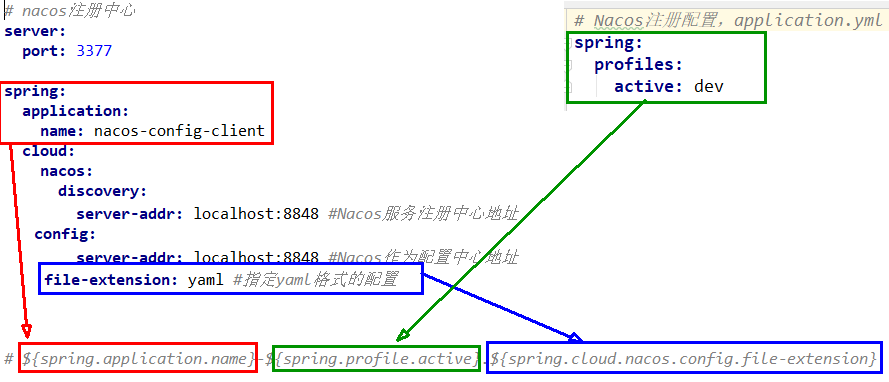
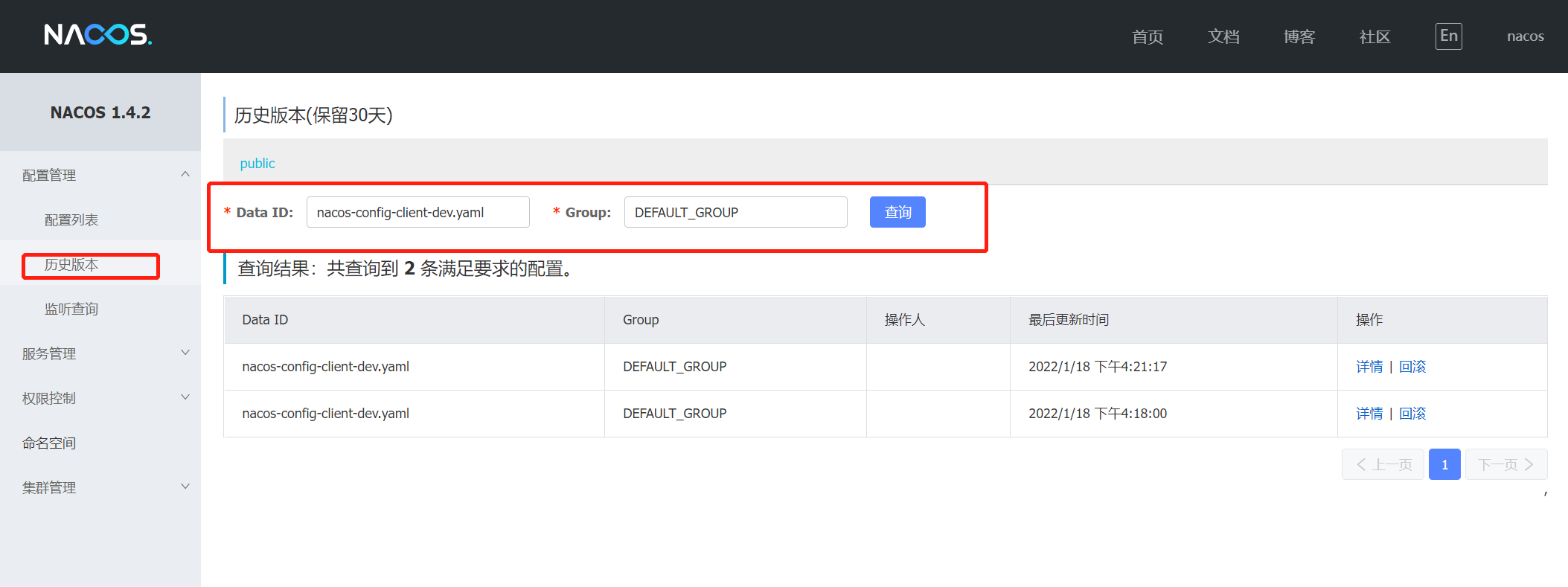
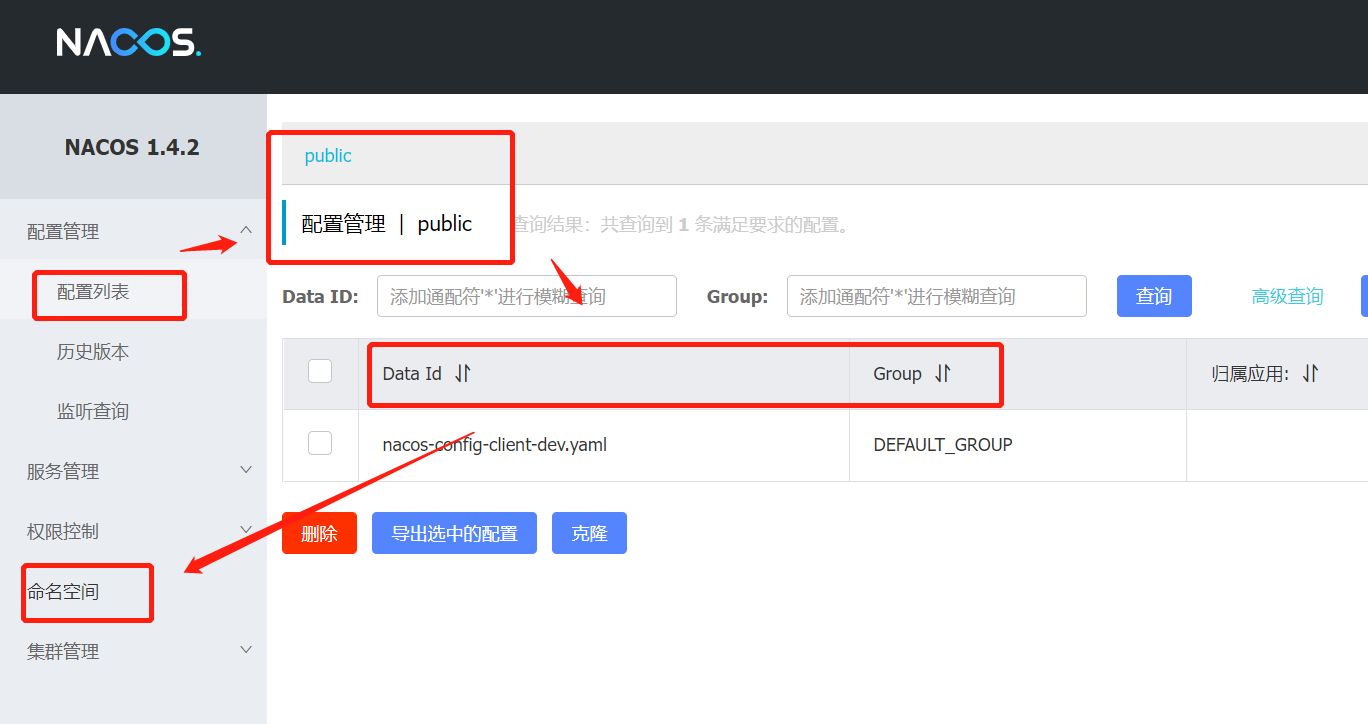
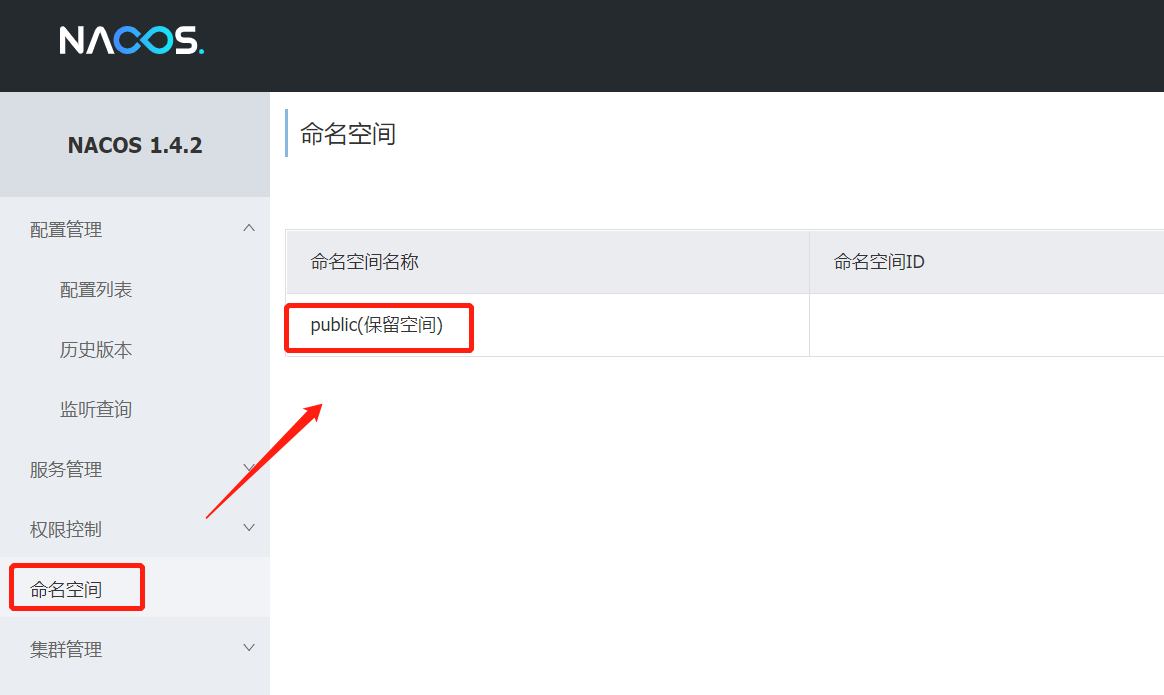

类似 Java 里面的 package 名和类名,最外层的 Namespace 是可以用于区分部署环境的,Group 和 Data ID 逻辑上区分两个目标对象;
默认情况下,Namespace=public,Group=DEFAULT_GROUP,Cluster=DEFAULT;
官方的建议是,通过 Namespace 来区分不同的环境,而 Group 可以专注在业务层面的数据分组;

| 对配置的操作 | SDK | Open API | 说明 |
|---|---|---|---|
| 发布配置 | public boolean publishConfig(String dataId, String group, String content) throws NacosException | POST: /nacos/v1/cs/configs | 将配置保存到 Nacos Config Server 中 |
| 删除配置 | public boolean removeConfig(String dataId, String group)throws NacosException | DELETE: /nacos/v1/cs/configs | 删除配置中心的指定配置 |
| 获取配置 | public string getConfig(String dataId, String group, long timeoutMs) throws NacosException | GET: /nacos/v1/cs/configs | 从 Nacos Config Server 中读取配置 |
| 监听配置 | public void addListener(String dataId, String group, Listener listener) | POST: /nacos/v1/cs/configs/listener | 订阅感兴趣的配置,当配置发生变化时可以收到一个事件 |
| 比较项 | Pull 机制 | Push 机制 |
|---|---|---|
| 说明 | 客户端从服务端主动拉取数据 | 服务端主动把数据推送到客户端 |
| 缺点 | 不能保证数据实时性;在服务端配置长时间不更新的情况下,客户端的定时任务会做一些无效的 Pull | 如果客户端的数量比较多,服务端需要耗费大量的内存资源来保存每个连接;需要心跳机制来维持每个连接状态 |

以 Data ID 方案为例,更多方案详情请见本篇第三点《3. Nacos 加载配置的三种方案》;
<!--nacos-config-->
<dependency>
    <groupId>com.alibaba.cloud</groupId>
    <artifactId>spring-cloud-starter-alibaba-nacos-config</artifactId>
</dependency>
# nacos配置
server:
  port: 18082

spring:
  application:
    name: nacos-config-client     #必须,构成 Nacos 配置管理 Data ID 字段的一部分
  cloud:
    nacos:
      discovery:
        server-addr: localhost:8848     #Nacos 服务注册中心地址
      config:
        server-addr: localhost:8848     #Nacos 作为配置中心地址
        file-extension: yaml     #指定 yaml 格式的配置

        # prefix: hhh     #Data ID 的前缀,如果不指定,就是 nacos-config-client-dev.yaml。指定后,是 hhh-dev.yaml
        # refresh: true      #是否动态刷新

        # group: DEFAULT_GROUP     #指定组
        # namespace: PUBLIC     #指定命名空间 ID
spring:
  profiles:
    active: dev # 表示开发环境
@RestController
@RefreshScope //使当前类下的配置支持 Nacos 的动态刷新功能
public class ConfigClientController{
    @Value("${config.info}")
    private String configInfo;

    @GetMapping("/config/info")
    public String getConfigInfo() {
        return configInfo;
    }
}
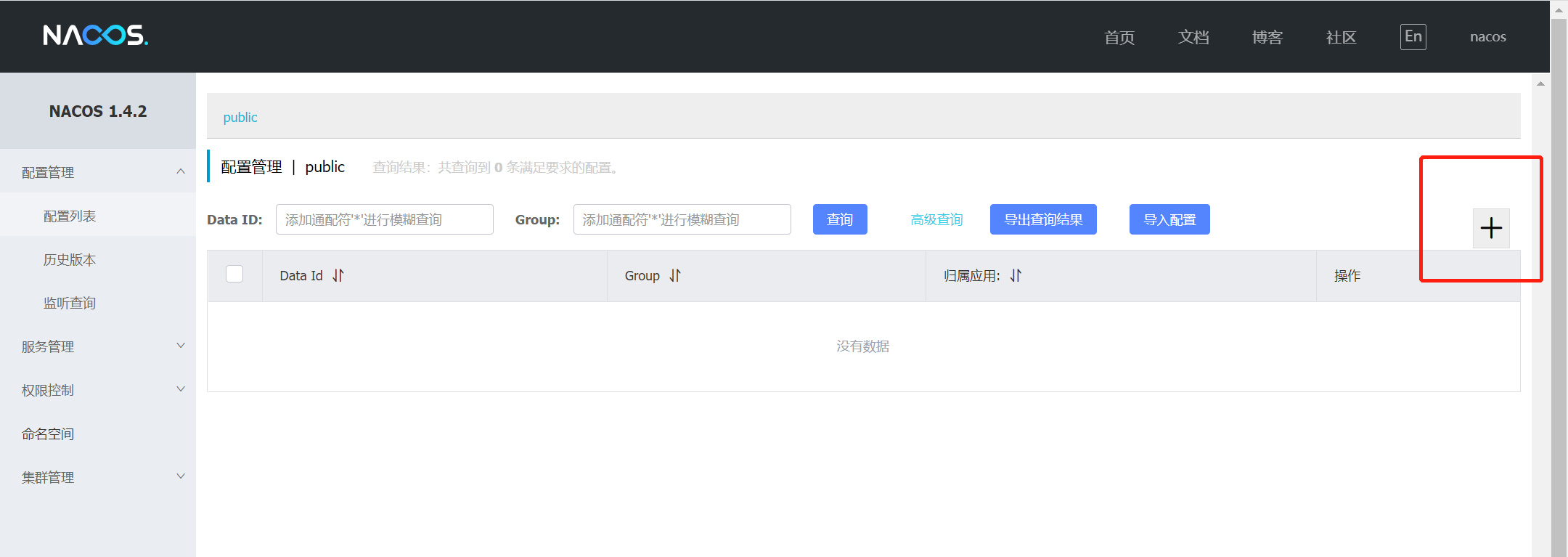
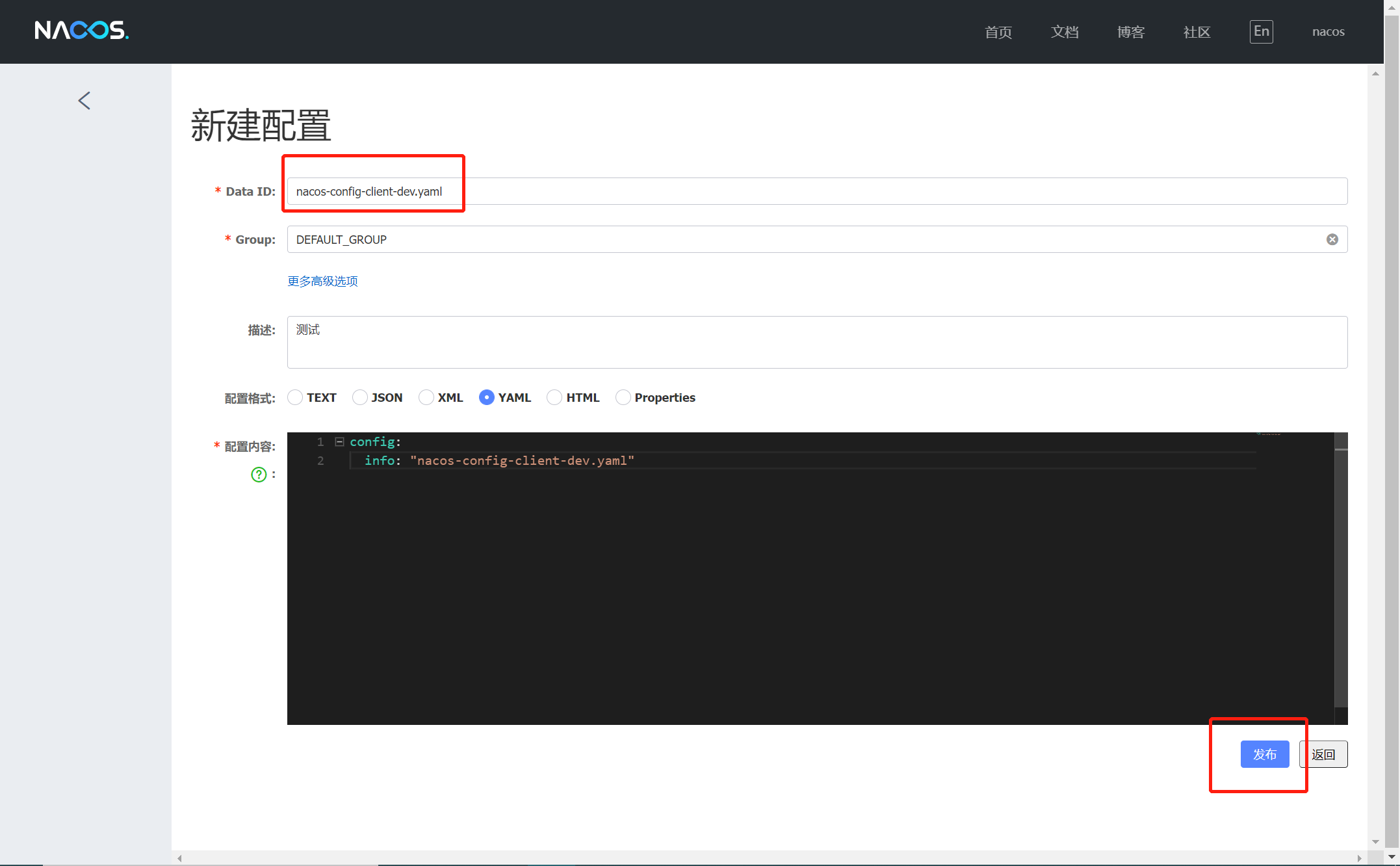
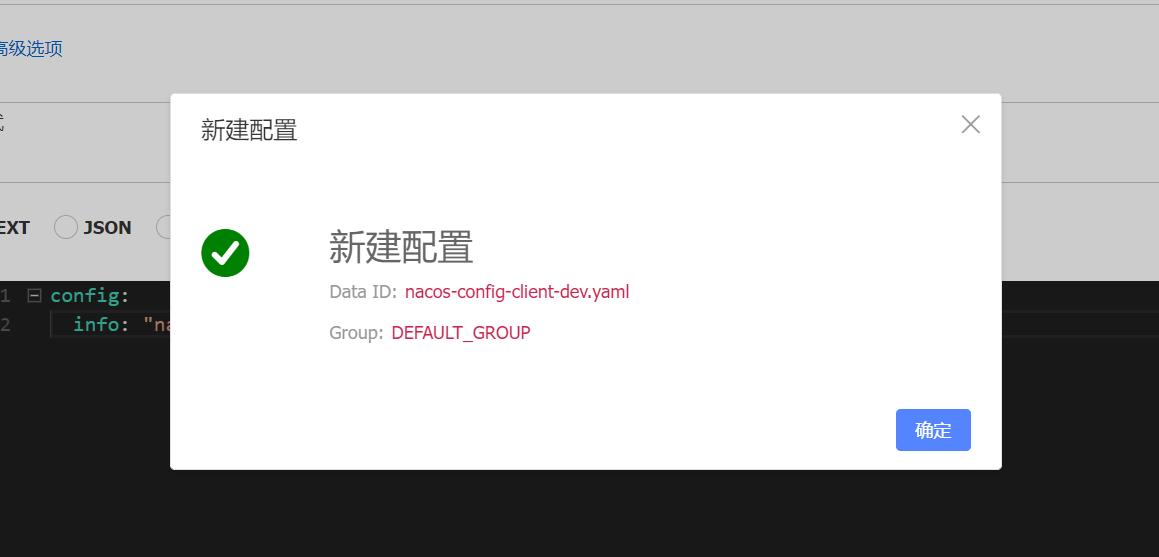
http://localhost:18082/config/info 获取配置信息;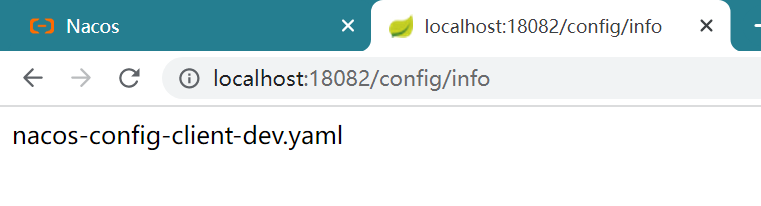
.yml 和 Nacos 服务器配置的 Data ID 匹配不上,将导致 ConfigClientController 类里的 ${config.info} 找不到,最终报 ConfigClientController 无法装配的错误,如下:org.springframework.beans.factory.BeanCreationException: Error creating bean with name 'scopedTarget.configClientController': Injection of autowired dependencies failed; nested exception is java.lang.IllegalArgumentException: Could not resolve placeholder 'config.info' in value "${config.info}"
at org.springframework.beans.factory.annotation.AutowiredAnnotationBeanPostProcessor.postProcessProperties(AutowiredAnnotationBeanPostProcessor.java:380) ~[spring-beans-5.1.8.RELEASE.jar:5.1.8.RELEASE]
at org.springframework.beans.factory.support.AbstractAutowireCapableBeanFactory.populateBean(AbstractAutowireCapableBeanFactory.java:1411) ~[spring-beans-5.1.8.RELEASE.jar:5.1.8.RELEASE]
at org.springframework.beans.factory.support.AbstractAutowireCapableBeanFactory.doCreateBean(AbstractAutowireCapableBeanFactory.java:592) ~[spring-beans-5.1.8.RELEASE.jar:5.1.8.RELEASE]
at org.springframework.beans.factory.support.AbstractAutowireCapableBeanFactory.createBean(AbstractAutowireCapableBeanFactory.java:515) ~[spring-beans-5.1.8.RELEASE.jar:5.1.8.RELEASE]
at org.springframework.beans.factory.support.AbstractBeanFactory.lambda$doGetBean$1(AbstractBeanFactory.java:356) ~[spring-beans-5.1.8.RELEASE.jar:5.1.8.RELEASE]
at org.springframework.cloud.context.scope.GenericScope$BeanLifecycleWrapper.getBean(GenericScope.java:389) ~[spring-cloud-context-2.1.2.RELEASE.jar:2.1.2.RELEASE]
at org.springframework.cloud.context.scope.GenericScope.get(GenericScope.java:186) ~[spring-cloud-context-2.1.2.RELEASE.jar:2.1.2.RELEASE]
at org.springframework.beans.factory.support.AbstractBeanFactory.doGetBean(AbstractBeanFactory.java:353) ~[spring-beans-5.1.8.RELEASE.jar:5.1.8.RELEASE]
at org.springframework.beans.factory.support.AbstractBeanFactory.getBean(AbstractBeanFactory.java:199) ~[spring-beans-5.1.8.RELEASE.jar:5.1.8.RELEASE]
at org.springframework.context.support.AbstractApplicationContext.getBean(AbstractApplicationContext.java:1105) ~[spring-context-5.1.8.RELEASE.jar:5.1.8.RELEASE]
at org.springframework.cloud.context.scope.refresh.RefreshScope.eagerlyInitialize(RefreshScope.java:134) ~[spring-cloud-context-2.1.2.RELEASE.jar:2.1.2.RELEASE]
at org.springframework.cloud.context.scope.refresh.RefreshScope.start(RefreshScope.java:125) ~[spring-cloud-context-2.1.2.RELEASE.jar:2.1.2.RELEASE]
at org.springframework.cloud.context.scope.refresh.RefreshScope.onApplicationEvent(RefreshScope.java:119) ~[spring-cloud-context-2.1.2.RELEASE.jar:2.1.2.RELEASE]
at org.springframework.cloud.context.scope.refresh.RefreshScope.onApplicationEvent(RefreshScope.java:73) ~[spring-cloud-context-2.1.2.RELEASE.jar:2.1.2.RELEASE]
at org.springframework.context.event.SimpleApplicationEventMulticaster.doInvokeListener(SimpleApplicationEventMulticaster.java:172) ~[spring-context-5.1.8.RELEASE.jar:5.1.8.RELEASE]
......
-Dspring.profiles.active=${profile}
spring.profile.active 中的配置,重启服务,可以看到配置已经切换成其他环境了:spring:
profiles:
active: prod

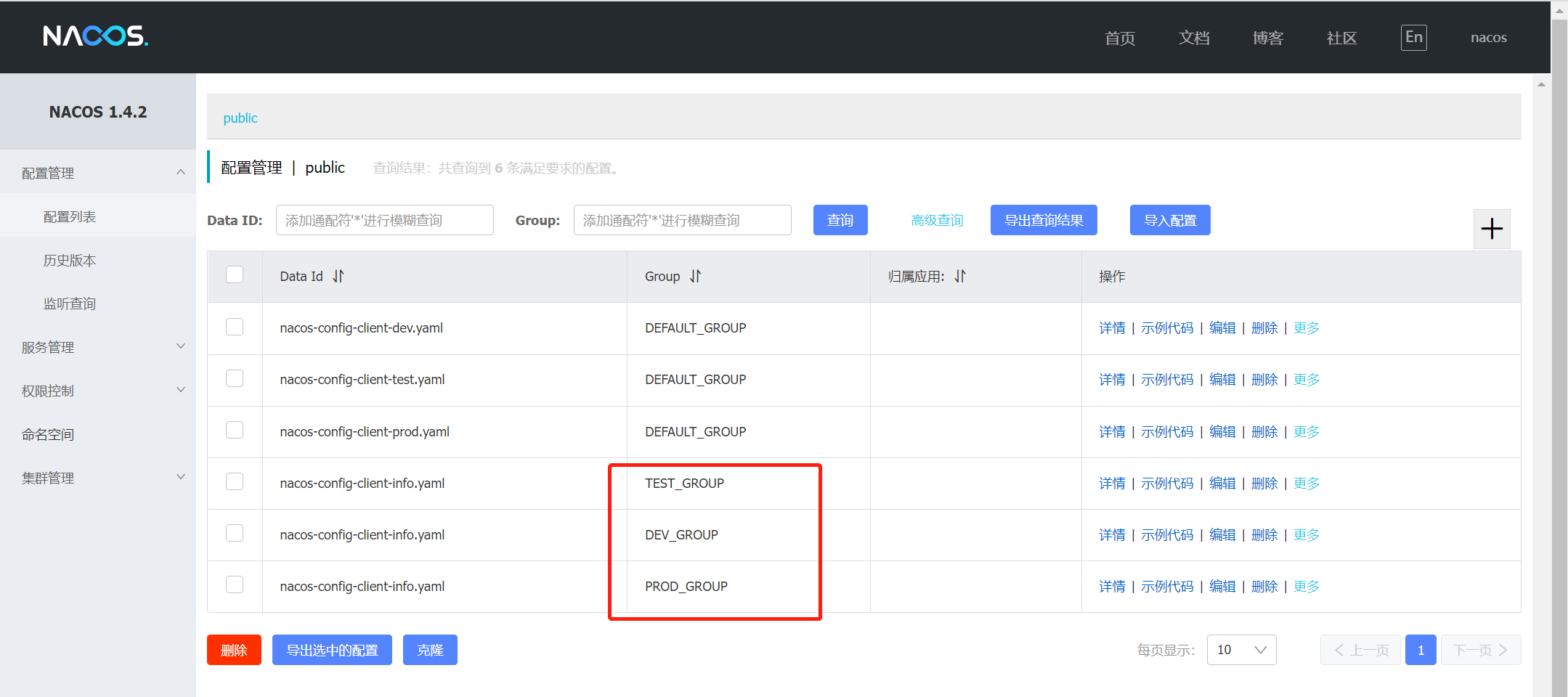
spring.profile.active 和 spring.cloud.nacos.config.group 中的配置,重启服务,可以看到配置已经切换成其他环境了:spring:
profiles:
active: info #修改
server:
  port: 18082
spring:
  application:
    name: nacos-config-client
  cloud:
    nacos:
      discovery:
        server-addr: localhost:8848
      config:
        server-addr: localhost:8848
        file-extension: yaml
        group: PROD_GROUP #新增


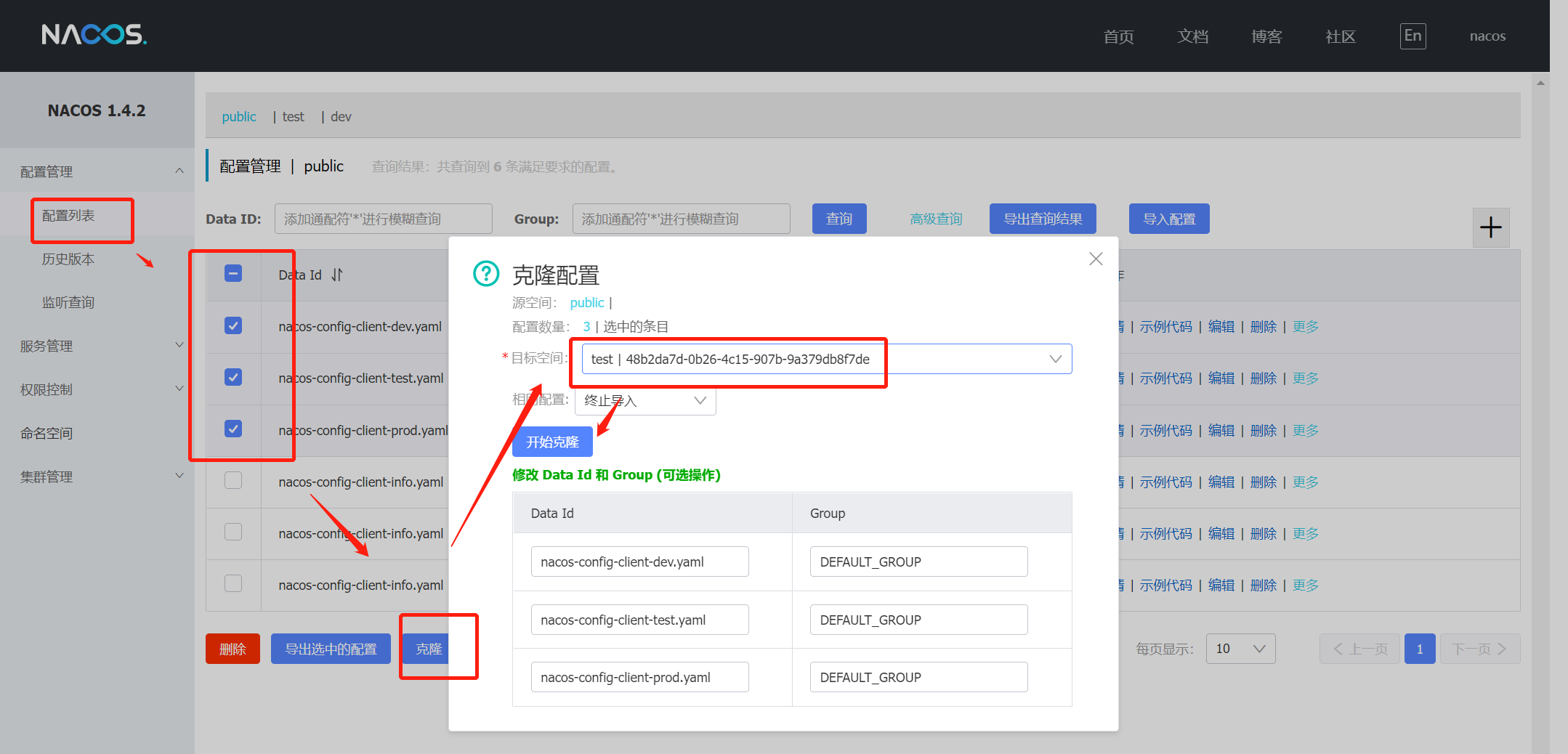
spring.profile.active 和 spring.cloud.nacos.config.group 中的配置,重启服务,可以看到配置已经切换成其他环境了:spring:
profiles:
active: dev #修改
server:
  port: 18082
spring:
  application:
    name: nacos-config-client
  cloud:
    nacos:
      discovery:
        server-addr: localhost:8848
      config:
        server-addr: localhost:8848
        file-extension: yaml
        group: DEFAULT_GROUP #新增
        namespace: 48b2da7d-0b26-4c15-907b-9a379db8f7de #新增,命名空间的 ID,在新建命名空间时会给出


我正在使用i18n从头开始构建一个多语言网络应用程序,虽然我自己可以处理一大堆yml文件,但我说的语言(非常)有限,最终我想寻求外部帮助帮助。我想知道这里是否有人在使用UI插件/gem(与django上的django-rosetta不同)来处理多个翻译器,其中一些翻译器不愿意或无法处理存储库中的100多个文件,处理语言数据。谢谢&问候,安德拉斯(如果您已经在rubyonrails-talk上遇到了这个问题,我们深表歉意) 最佳答案 有一个rails3branchofthetolkgem在github上。您可以通过在Gemfi
我主要使用Ruby来执行此操作,但到目前为止我的攻击计划如下:使用gemsrdf、rdf-rdfa和rdf-microdata或mida来解析给定任何URI的数据。我认为最好映射到像schema.org这样的统一模式,例如使用这个yaml文件,它试图描述数据词汇表和opengraph到schema.org之间的转换:#SchemaXtoschema.orgconversion#data-vocabularyDV:name:namestreet-address:streetAddressregion:addressRegionlocality:addressLocalityphoto:i
我有一个在Linux服务器上运行的ruby脚本。它不使用rails或任何东西。它基本上是一个命令行ruby脚本,可以像这样传递参数:./ruby_script.rbarg1arg2如何将参数抽象到配置文件(例如yaml文件或其他文件)中?您能否举例说明如何做到这一点?提前谢谢你。 最佳答案 首先,您可以运行一个写入YAML配置文件的独立脚本:require"yaml"File.write("path_to_yaml_file",[arg1,arg2].to_yaml)然后,在您的应用中阅读它:require"yaml"arg
我已经在Sinatra上创建了应用程序,它代表了一个简单的API。我想在生产和开发上进行部署。我想在部署时选择,是开发还是生产,一些方法的逻辑应该改变,这取决于部署类型。是否有任何想法,如何完成以及解决此问题的一些示例。例子:我有代码get'/api/test'doreturn"Itisdev"end但是在部署到生产环境之后我想在运行/api/test之后看到ItisPROD如何实现? 最佳答案 根据SinatraDocumentation:EnvironmentscanbesetthroughtheRACK_ENVenvironm
我安装了ruby版本管理器,并将RVM安装的ruby实现设置为默认值,这样'哪个ruby'显示'~/.rvm/ruby-1.8.6-p383/bin/ruby'但是当我在emacs中打开inf-ruby缓冲区时,它使用安装在/usr/bin中的ruby。有没有办法让emacs像shell一样尊重ruby的路径?谢谢! 最佳答案 我创建了一个emacs扩展来将rvm集成到emacs中。如果您有兴趣,可以在这里获取:http://github.com/senny/rvm.el
是否有简单的方法来更改默认ISO格式(yyyy-mm-dd)的ActiveAdmin日期过滤器显示格式? 最佳答案 您可以像这样为日期选择器提供额外的选项,而不是覆盖js:=f.input:my_date,as::datepicker,datepicker_options:{dateFormat:"mm/dd/yy"} 关于ruby-on-rails-事件管理员日期过滤器日期格式自定义,我们在StackOverflow上找到一个类似的问题: https://s
导读:随着叮咚买菜业务的发展,不同的业务场景对数据分析提出了不同的需求,他们希望引入一款实时OLAP数据库,构建一个灵活的多维实时查询和分析的平台,统一数据的接入和查询方案,解决各业务线对数据高效实时查询和精细化运营的需求。经过调研选型,最终引入ApacheDoris作为最终的OLAP分析引擎,Doris作为核心的OLAP引擎支持复杂地分析操作、提供多维的数据视图,在叮咚买菜数十个业务场景中广泛应用。作者|叮咚买菜资深数据工程师韩青叮咚买菜创立于2017年5月,是一家专注美好食物的创业公司。叮咚买菜专注吃的事业,为满足更多人“想吃什么”而努力,通过美好食材的供应、美好滋味的开发以及美食品牌的孵
之前在培训新生的时候,windows环境下配置opencv环境一直教的都是网上主流的vsstudio配置属性表,但是这个似乎对新生来说难度略高(虽然个人觉得完全是他们自己的问题),加之暑假之后对cmake实在是爱不释手,且这样配置确实十分简单(其实都不需要配置),故斗胆妄言vscode下配置CV之法。其实极为简单,图比较多所以很长。如果你看此文还配不好,你应该思考一下是不是自己的问题。闲话少说,直接开始。0.CMkae简介有的人到大二了都不知道cmake是什么,我不说是谁。CMake是一个开源免费并且跨平台的构建工具,可以用简单的语句来描述所有平台的编译过程。它能够根据当前所在平台输出对应的m
这篇文章是继上一篇文章“Observability:从零开始创建Java微服务并监控它(一)”的续篇。在上一篇文章中,我们讲述了如何创建一个Javaweb应用,并使用Filebeat来收集应用所生成的日志。在今天的文章中,我来详述如何收集应用的指标,使用APM来监控应用并监督web服务的在线情况。源码可以在地址 https://github.com/liu-xiao-guo/java_observability 进行下载。摄入指标指标被视为可以随时更改的时间点值。当前请求的数量可以改变任何毫秒。你可能有1000个请求的峰值,然后一切都回到一个请求。这也意味着这些指标可能不准确,你还想提取最小/
注意:本文主要掌握DCN自研无线产品的基本配置方法和注意事项,能够进行一般的项目实施、调试与运维AP基本配置命令AP登录用户名和密码均为:adminAP默认IP地址为:192.168.1.10AP默认情况下DHCP开启AP静态地址配置:setmanagementstatic-ip192.168.10.1AP开启/关闭DHCP功能:setmanagementdhcp-statusup/downAP设置默认网关:setstatic-ip-routegeteway192.168.10.254查看AP基本信息:getsystemgetmanagementgetmanaged-apgetrouteAP配
