lamp
有了前面学习的知识的铺垫,今天可以来学习下第一个常用的web架构了。
所谓lamp,其实就是由Linux+Apache+Mysql/MariaDB+Php/Perl/Python的一组动态网站或者服务器的开源软件,除Linux外其它各部件本身都是各自独立的程序,但是因为经常被放在一起使用,拥有了越来越高的兼容度,共同组成了一个强大的Web应用程序平台。
LAMP指的是Linux(操作系统)、Apache(HTTP服务器)、MySQL(也指MariaDB,数据库软件)和PHP(有时也是指Perl或Python)的第一个字母,一般用来建立web应用平台。
在说lamp架构平台的搭建前,我们先来了解下什么是CGI,什么是FastCGI,什么是......
web服务器的资源分为两种,静态资源和动态资源
那么web服务器如何执行程序并将结果返回给客户端呢?下面通过一张图来说明一下web服务器如何处理客户端的请求
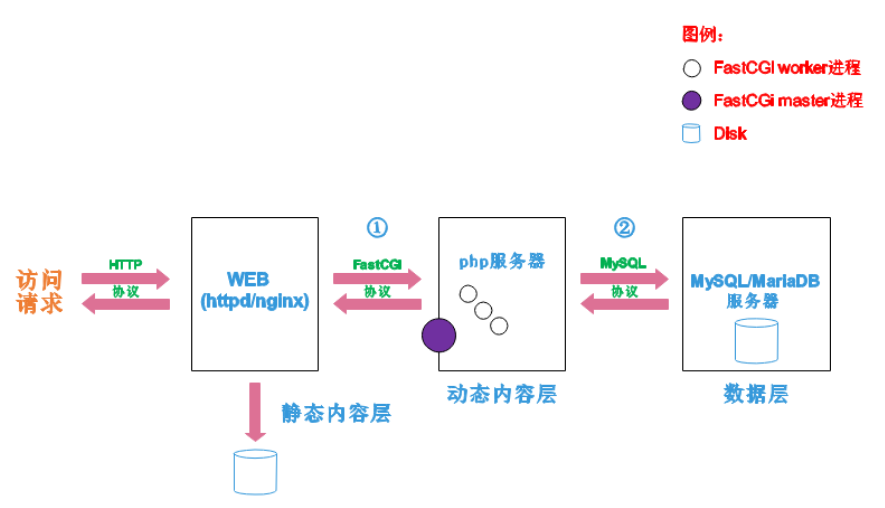
阶段①显示的是httpd服务器(即apache)和php服务器通过FastCGI协议进行通信,且php作为独立的服务进程运行
阶段②显示的是php程序和mysql数据库间通过mysql协议进行通信。php与mysql本没有什么联系,但是由Php语言写成的程序可以与mysql进行数据交互。同理perl和python写的程序也可以与mysql数据库进行交互
CGI(Common Gateway Interface,通用网关接口),CGI是外部应用程序(CGI程序)与WEB服务器之间的接口标准,是在CGI程序和Web服务器之间传递信息的过程。CGI规范允许Web服务器执行外部程序,并将它们的输出发送给Web浏览器,CGI将web的一组简单的静态超媒体文档变成一个完整的新的交互式媒体。
FastCGI(Fast Common Gateway Interface)是CGI的改良版,CGI是通过启用一个解释器进程来处理每个请求,耗时且耗资源,而FastCGI则是通过master-worker形式来处理每个请求,即启动一个master主进程,然后根据配置启动几个worker进程,当请求进来时,master会从worker进程中选择一个去处理请求,这样就避免了重复的生成和杀死进程带来的频繁cpu上下文切换而导致耗时
httpd与php结合的方式有以下三种:
较于CGI方式,FastCGI更为常用,很少有人使用CGI方式来加载动态资源
环境说明:
| 系统平台 | IP | 需要安装的服务 |
|---|---|---|
| centos7 redhat7 | 172.16.12.128 | httpd-2.4 mysql-5.7 php php-mysql |
lamp平台软件安装次序:
httpd --> mysql --> php
[root@mr ~]# cd /etc/yum.repos.d/
[root@mr yum.repos.d]# ls
CentOS-Stream-AppStream.repo  CentOS-Stream-Extras.repo            CentOS-Stream-PowerTools.repo
CentOS-Stream-BaseOS.repo     CentOS-Stream-HighAvailability.repo  CentOS-Stream-RealTime.repo
CentOS-Stream-Debuginfo.repo  CentOS-Stream-Media.repo
[root@mr yum.repos.d]# rm -rf *
[root@mr yum.repos.d]# ls
[root@mr yum.repos.d]# curl -o /etc/yum.repos.d/CentOS-Base.repo https://mirrors.aliyun.com/repo/Centos-vault-8.5.2111.repo
  % Total    % Received % Xferd  Average Speed   Time    Time     Time  Current
                                 Dload  Upload   Total   Spent    Left  Speed
100  2495  100  2495    0     0  15993      0 --:--:-- --:--:-- --:--:-- 16096
[root@mr yum.repos.d]# ls
CentOS-Base.repo
[root@mr yum.repos.d]# sed -i -e '/mirrors.cloud.aliyuncs.com/d' -e '/mirrors.aliyuncs.com/d' /etc/yum.repos.d/CentOS-Base.repo
[root@mr yum.repos.d]# yum install -y https://mirrors.aliyun.com/epel/epel-release-latest-8.noarch.rpm
CentOS-8.5.2111 - Base - mirrors.aliyun.com                              144 kB/s | 3.9 kB     00:00
CentOS-8.5.2111 - Extras - mirrors.aliyun.com                             69 kB/s | 1.5 kB     00:00
CentOS-8.5.2111 - AppStream - mirrors.aliyun.com                         176 kB/s | 4.3 kB     00:00
epel-release-latest-8.noarch.rpm                                         449 kB/s |  24 kB     00:00
Dependencies resolved.
=========================================================================================================
 Package                    Architecture         Version                Repository                  Size
=========================================================================================================
Installing:
 epel-release               noarch               8-16.el8               @commandline                24 k

Transaction Summary
=========================================================================================================
Install  1 Package

Total size: 24 k
Installed size: 34 k
Downloading Packages:
Running transaction check
Transaction check succeeded.
Running transaction test
Transaction test succeeded.
Running transaction
  Preparing        :                                                                                 1/1
  Installing       : epel-release-8-16.el8.noarch                                                    1/1
  Running scriptlet: epel-release-8-16.el8.noarch                                                    1/1
Many EPEL packages require the CodeReady Builder (CRB) repository.
It is recommended that you run /usr/bin/crb enable to enable the CRB repository.

  Verifying        : epel-release-8-16.el8.noarch                                                    1/1
Installed products updated.

Installed:
  epel-release-8-16.el8.noarch

Complete!
[root@mr yum.repos.d]#
[root@mr yum.repos.d]# sed -i 's|^#baseurl=https://download.example/pub|baseurl=https://mirrors.aliyun.com|' /etc/yum.repos.d/epel*
[root@mr yum.repos.d]# sed -i 's|^metalink|#metalink|' /etc/yum.repos.d/epel*
[root@mr yum.repos.d]# ls
CentOS-Base.repo  epel-modular.repo  epel.repo  epel-testing-modular.repo  epel-testing.repo
[root@mr yum.repos.d]# cd
[root@mr ~]# dnf clean all
37 files removed
[root@mr ~]#
[root@mr ~]# dnf makecache
CentOS-8.5.2111 - Base - mirrors.aliyun.com                               10 MB/s | 4.6 MB     00:00
CentOS-8.5.2111 - Extras - mirrors.aliyun.com                            104 kB/s |  10 kB     00:00
CentOS-8.5.2111 - AppStream - mirrors.aliyun.com                          11 MB/s | 8.4 MB     00:00
Extra Packages for Enterprise Linux Modular 8 - x86_64                   3.2 MB/s | 1.0 MB     00:00
Extra Packages for Enterprise Linux 8 - x86_64                            10 MB/s |  13 MB     00:01
Module yaml error: Unexpected key in data: static_context [line 9 col 3]
Module yaml error: Unexpected key in data: static_context [line 9 col 3]
Metadata cache created.
[root@mr ~]# dnf -y install
openssl-devel pcre-devel expat-devel libtool gcc gcc-c++ make vim wget
......
  perl-threads-shared-1.58-2.el8.x86_64
  pkgconf-1.4.2-1.el8.x86_64
  pkgconf-m4-1.4.2-1.el8.noarch
  pkgconf-pkg-config-1.4.2-1.el8.x86_64
  zlib-devel-1.2.11-17.el8.x86_64

Complete!
[root@mr ~]# [root@mr ~]# useradd -r -M -s /sbin/nologin apache
[root@mr ~]# wget https://downloads.apache.org/apr/apr-1.7.0.tar.gz
--2022-08-02 19:20:01--  https://downloads.apache.org/apr/apr-1.7.0.tar.gz
Resolving downloads.apache.org (downloads.apache.org)... 135.181.214.104, 88.99.95.219, 2a01:4f9:3a:2c57::2, ...
Connecting to downloads.apache.org (downloads.apache.org)|135.181.214.104|:443... connected.
HTTP request sent, awaiting response... 200 OK
Length: 1093896 (1.0M) [application/x-gzip]
Saving to: ‘apr-1.7.0.tar.gz’

apr-1.7.0.tar.gz           100%[=====================================>]   1.04M  15.8KB/s    in 54s

2022-08-02 19:20:56 (19.9 KB/s) - ‘apr-1.7.0.tar.gz’ saved [1093896/1093896]

[root@mr~]#https://downloads.apache.org/apr/apr-util-1.6.1.tar.gz
......
--2022-08-02 19:21:15--  https://downloads.apache.org/apr/apr-util-1.6.1.tar.gz
Resolving downloads.apache.org (downloads.apache.org)... 135.181.214.104, 88.99.95.219, 2a01:4f9:3a:2c57::2, ...
Connecting to downloads.apache.org (downloads.apache.org)|135.181.214.104|:443... connected.
HTTP request sent, awaiting response... 200 OK
Length: 554301 (541K) [application/x-gzip]
Saving to: ‘apr-util-1.6.1.tar.gz’

apr-util-1.6.1.tar.gz      100%[=====================================>] 541.31K  4.23KB/s    in 2m 13s

2022-08-02 19:23:29 (4.08 KB/s) - ‘apr-util-1.6.1.tar.gz’ saved [554301/554301]

[root@mr ~]# wget https://downloads.apache.org/httpd/httpd-2.4.54.tar.gz
--2022-08-02 19:25:49--  https://downloads.apache.org/httpd/httpd-2.4.54.tar.gz
Resolving downloads.apache.org (downloads.apache.org)... 88.99.95.219, 135.181.214.104, 2a01:4f9:3a:2c57::2, ...
Connecting to downloads.apache.org (downloads.apache.org)|88.99.95.219|:443... connected.
HTTP request sent, awaiting response... 200 OK
Length: 9743277 (9.3M) [application/x-gzip]
Saving to: ‘httpd-2.4.54.tar.gz’

httpd-2.4.54.tar.gz        100%[=====================================>]   9.29M  48.2KB/s    in 4m 57s

2022-08-02 19:30:47 (32.0 KB/s) - ‘httpd-2.4.54.tar.gz’ saved [9743277/9743277]
[root@mr ~]# ls
anaconda-ks.cfg  apr-1.7.0.tar.gz  apr-util-1.6.1.tar.gz  httpd-2.4.54.tar.gz
[root@mr ~]# tar xf apr-1.7.0.tar.gz
[root@mr ~]# tar xf apr-util-1.6.1.tar.gz
[root@mr ~]# ls
anaconda-ks.cfg  apr-1.7.0  apr-1.7.0.tar.gz  apr-util-1.6.1  apr-util-1.6.1.tar.gz  httpd-2.4.54.tar.gz
[root@mr ~]# cd apr-1.7.0
[root@mr apr-1.7.0]# ls
apr-config.in  atomic            config.layout  file_io     LICENSE       network_io     README.cmake  time
apr.dep        build             configure      helpers     locks         NOTICE         shmem         tools
apr.dsp        build.conf        configure.in   include     Makefile.in   NWGNUmakefile  strings       user
apr.dsw        buildconf         docs           libapr.dep  Makefile.win  passwd         support
apr.mak        build-outputs.mk  dso            libapr.dsp  memory        poll           tables
apr.pc.in      CHANGES           emacs-mode     libapr.mak  misc          random         test
apr.spec       CMakeLists.txt    encoding       libapr.rc   mmap          README         threadproc
[root@mr apr-1.7.0]# vim configure

  # $RM "$cfgfile"        //将此行加上注释,或者删除此行
 [root@mr apr-1.7.0]# ./configure --prefix=/usr/local/apr
 ......
config.status: creating build/apr_rules.mk
config.status: creating build/pkg/pkginfo
config.status: creating apr-1-config
config.status: creating apr.pc
config.status: creating test/Makefile
config.status: creating test/internal/Makefile
config.status: creating include/arch/unix/apr_private.h
config.status: executing libtool commands
config.status: executing default commands
[root@mr apr-1.7.0]# make
......
/unix -I/root/apr-1.7.0/include/arch/unix -I/root/apr-1.7.0/include -I/root/apr-1.7.0/include/private -I/root/apr-1.7.0/include/private  export_vars.c | sed -e 's/^\#[^!]*//' | sed -e '/^$/d' >> apr.exp
sed 's,^\(location=\).*$,\1installed,' < apr-1-config > apr-config.out
sed -e 's,^\(apr_build.*=\).*$,\1/usr/local/apr/build-1,' -e 's,^\(top_build.*=\).*$,\1/usr/local/apr/build-1,' < build/apr_rules.mk > build/apr_rules.out
make[1]: Leaving directory '/root/apr-1.7.0'
[root@mr apr-1.7.0]# make install
......
/usr/bin/install -c -m 755 apr-config.out /usr/local/apr/bin/apr-1-config
[root@mr apr-1.7.0]# cd ../apr-util-1.6.1
[root@mr apr-util-1.6.1]# ls
aprutil.dep     apu-config.in     CHANGES         dbd                include         LICENSE       NWGNUmakefile    strmatch
aprutil.dsp     buckets           CMakeLists.txt  dbm                ldap            Makefile.in   README           test
aprutil.dsw     build             config.layout   docs               libaprutil.dep  Makefile.win  README.cmake     uri
aprutil.mak     build.conf        configure       encoding           libaprutil.dsp  memcache      README.FREETDS   xlate
apr-util.pc.in  buildconf         configure.in    export_vars.sh.in  libaprutil.mak  misc          redis            xml
apr-util.spec   build-outputs.mk  crypto          hooks              libaprutil.rc   NOTICE        renames_pending
[root@mr apr-util-1.6.1]# ./configure --prefix=/usr/local/apr-util --with-apr=/usr/local/apr
checking build system type... x86_64-pc-linux-gnu
checking host system type... x86_64-pc-linux-gnu
checking target system type... x86_64-pc-linux-gnu
......
config.status: creating test/Makefile
config.status: creating include/private/apu_config.h
config.status: executing default commands
[root@mr apr-util-1.6.1]# make && make install
......
See any operating system documentation about shared libraries for
more information, such as the ld(1) and ld.so(8) manual pages.
----------------------------------------------------------------------
/usr/bin/install -c -m 644 aprutil.exp /usr/local/apr-util/lib
/usr/bin/install -c -m 755 apu-config.out /usr/local/apr-util/bin/apu-1-config
[root@mr apr-util-1.6.1]# cd
[root@mr ~]# ls /usr/local/
apr  apr-util  bin  etc  games  include  lib  lib64  libexec  sbin  share  src
[root@mr ~]#
[root@mr ~]# ls
anaconda-ks.cfg  apr-1.7.0  apr-1.7.0.tar.gz  apr-util-1.6.1  apr-util-1.6.1.tar.gz  httpd-2.4.54.tar.gz
[root@mr ~]# tar xf httpd-2.4.54.tar.gz
[root@mr ~]# cd httpd-2.4.54
[root@mr httpd-2.4.54]# ls
ABOUT_APACHE     BuildBin.dsp     docs         InstallBin.dsp  modules           ROADMAP
acinclude.m4     buildconf        emacs-style  LAYOUT          NOTICE            server
Apache-apr2.dsw  CHANGES          httpd.dep    libhttpd.dep    NWGNUmakefile     srclib
Apache.dsw       changes-entries  httpd.dsp    libhttpd.dsp    os                support
apache_probes.d  CMakeLists.txt   httpd.mak    libhttpd.mak    README            test
ap.d             config.layout    httpd.spec   LICENSE         README.CHANGES    VERSIONING
build            configure        include      Makefile.in     README.cmake
BuildAll.dsp     configure.in     INSTALL      Makefile.win    README.platforms
[root@mr httpd-2.4.54]# ./configure --prefix=/usr/local/apache \
> --enable-so \
> --enable-ssl \
> --enable-cgi \
> --enable-rewrite \
> --with-zlib \
> --with-pcre \
> --with-apr=/usr/local/apr \
> --with-apr-util=/usr/local/apr-util/ \
> --enable-modules=most \
> --enable-mpms-shared=all \
> --with-mpm=prefork
......
config.status: executing default commands
configure: summary of build options:

    Server Version: 2.4.54
    Install prefix: /usr/local/apache
    C compiler:     gcc
    CFLAGS:          -g -O2 -pthread
    CPPFLAGS:        -DLINUX -D_REENTRANT -D_GNU_SOURCE
    LDFLAGS:
    LIBS:
    C preprocessor: gcc -E

[root@mr httpd-2.4.54]# make && make install
......
Installing build system files
mkdir /usr/local/apache/build
Installing man pages and online manual
mkdir /usr/local/apache/man
mkdir /usr/local/apache/man/man1
mkdir /usr/local/apache/man/man8
mkdir /usr/local/apache/manual
make[1]: Leaving directory '/root/httpd-2.4.54'
[root@mr httpd-2.4.54]# cd
[root@mr ~]# ls
anaconda-ks.cfg  apr-1.7.0.tar.gz  apr-util-1.6.1.tar.gz  httpd-2.4.54.tar.gz
apr-1.7.0        apr-util-1.6.1    httpd-2.4.54
[root@mr ~]# echo 'export PATH=/usr/local/apache/bin:$PATH' > /etc/profile.d/httpd.sh
[root@mr ~]# cat /etc/profile.d/httpd.sh
export PATH=/usr/local/apache/bin:$PATH
[root@mr ~]# source /etc/profile.d/httpd.sh
[root@mr ~]# which httpd
/usr/local/apache/bin/httpd
[root@mr ~]# ls /usr/local/apache/
bin  build  cgi-bin  conf  error  htdocs  icons  include  logs  man  manual  modules
[root@mr ~]#  ln -s /usr/local/apache/include/ /usr/include/apache
[root@mr ~]# vim /etc/man_db.conf
MANDATORY_MANPATH                       /usr/man
MANDATORY_MANPATH                       /usr/share/man
MANDATORY_MANPATH                       /usr/local/share/man
MANDATORY_MANPATH                       /usr/local/apache/man(添加这一行)
[root@mr ~]# cd /usr/lib/systemd/system
[root@mr system]# ls
 auditd.service                           runlevel0.target
 autovt@.service                          runlevel1.target
 basic.target                             runlevel1.target.wants
 basic.target.wants                       runlevel2.target
......
rngd-wake-threshold.service              user-.slice.d
 rpcbind.target                           vgauthd.service
 rsyslog.service                          vmtoolsd.service
[root@mr system]# cp sshd.service httpd.service
[root@mr system]# vim httpd.service
[Unit]
Description=web server daemon
Documentation=man:httpd(5)
After=network.target sshd-keygen.target

[Service]
Type=forking
ExecStart=/usr/local/apache/bin/apachectl start
ExecReload=/bin/kill -HUP $MAINPID
ExecStop=/usr/local/apache/bin/apachectl stop

[Install]
WantedBy=multi-user.target
[root@mr system]# cd
[root@mr ~]# systemctl daemon-reload
[root@mr ~]# systemctl status httpd
● httpd.service - web server daemon
   Loaded: loaded (/usr/lib/systemd/system/httpd.service; disabled; vendor preset: disabled)
   Active: inactive (dead)
     Docs: man:httpd(5)
[root@mr ~]# systemctl start httpd
[root@mr ~]# ss -antl
State       Recv-Q      Send-Q           Local Address:Port           Peer Address:Port     Process
LISTEN      0           128                    0.0.0.0:22                  0.0.0.0:*
LISTEN      0           128                          *:80                        *:*
LISTEN      0           128                       [::]:22                     [::]:*
[root@mr ~]# systemctl enable httpd
Created symlink /etc/systemd/system/multi-user.target.wants/httpd.service → /usr/lib/systemd/system/httpd.service.
[root@mr ~]# systemctl status httpd
● httpd.service - web server daemon
   Loaded: loaded (/usr/lib/systemd/system/httpd.service; enabled; vendor preset: disabled)
   Active: active (running) since Tue 2022-08-02 20:12:20 CST; 53min ago
     Docs: man:httpd(5)
 Main PID: 48353 (httpd)
    Tasks: 6 (limit: 24717)
   Memory: 5.8M
   CGroup: /system.slice/httpd.service
           ├─48353 /usr/local/apache/bin/httpd -k start
           ├─48354 /usr/local/apache/bin/httpd -k start
           ├─48355 /usr/local/apache/bin/httpd -k start
           ├─48356 /usr/local/apache/bin/httpd -k start
           ├─48357 /usr/local/apache/bin/httpd -k start
           └─48358 /usr/local/apache/bin/httpd -k start

Aug 02 20:12:02 mr systemd[1]: Starting web server daemon...
Aug 02 20:12:20 mr apachectl[48350]: AH00558: httpd: Could not reliably determine the server's fully qua>
Aug 02 20:12:20 mr systemd[1]: Started web server daemon.
[root@mr ~]#
[root@mr ~]# dnf -y install ncurses-devel openssl-devel openssl cmake mariadb-devel
......
  mariadb-connector-c-devel-3.1.11-2.el8_3.x86_64
  mariadb-devel-3:10.3.28-1.module_el8.3.0+757+d382997d.x86_64
  ncurses-c++-libs-6.1-9.20180224.el8.x86_64
  ncurses-devel-6.1-9.20180224.el8.x86_64

Complete!
[root@mr ~]#
[root@mr ~]# useradd -r -M -s /sbin/nologin mysql
[root@mr ~]# wget https://downloads.mysql.com/archives/get/p/23/file/mysql-5.7.38-linux-glibc2.12-x86_64.tar.gz
......
HTTP request sent, awaiting response... 200 OK
Length: 674830866 (644M) [application/x-tar-gz]
Saving to: ‘mysql-5.7.38-linux-glibc2.12-x86_64.tar.gz’

mysql-5.7.38-linux-glibc2. 100%[=====================================>] 643.57M   659KB/s    in 9m 26s

2022-08-02 22:09:46 (1.14 MB/s) - ‘mysql-5.7.38-linux-glibc2.12-x86_64.tar.gz’ saved [674830866/674830866]

[root@mr ~]# ls
anaconda-ks.cfg  apr-1.7.0.tar.gz  apr-util-1.6.1.tar.gz  httpd-2.4.54.tar.gz
apr-1.7.0        apr-util-1.6.1    httpd-2.4.54           mysql-5.7.38-linux-glibc2.12-x86_64.tar.gz
[root@mr ~]# tar xf mysql-5.7.38-linux-glibc2.12-x86_64.tar.gz -C /usr/local/
[root@mr ~]# cd /usr/local/
[root@mr local]# ls
apache  apr-util  etc    include  lib64    mysql-5.7.38-linux-glibc2.12-x86_64  share
apr     bin       games  lib      libexec  sbin                                 src
[root@mr local]# mv mysql-5.7.38-linux-glibc2.12-x86_64 mysql
[root@mr local]# ls
apache  apr  apr-util  bin  etc  games  include  lib  lib64  libexec  mysql  sbin  share  src
[root@mr local]# chown -R mysql.mysql mysql
[root@mr local]# ll
total 0
drwxr-xr-x. 14 root  root  164 Aug  2 19:53 apache
drwxr-xr-x.  6 root  root   58 Aug  2 19:38 apr
drwxr-xr-x.  5 root  root   43 Aug  2 19:44 apr-util
drwxr-xr-x.  2 root  root    6 May 19  2020 bin
drwxr-xr-x.  2 root  root    6 May 19  2020 etc
drwxr-xr-x.  2 root  root    6 May 19  2020 games
drwxr-xr-x.  2 root  root    6 May 19  2020 include
drwxr-xr-x.  2 root  root    6 May 19  2020 lib
drwxr-xr-x.  3 root  root   17 Aug  1 15:49 lib64
drwxr-xr-x.  2 root  root    6 May 19  2020 libexec
drwxr-xr-x.  9 mysql mysql 129 Aug  2 22:11 mysql
drwxr-xr-x.  2 root  root    6 May 19  2020 sbin
drwxr-xr-x.  5 root  root   49 Aug  1 15:49 share
drwxr-xr-x.  2 root  root    6 May 19  2020 src
[root@mr local]# ls /usr/local/mysql/
bin  docs  include  lib  LICENSE  man  README  share  support-files
[root@mr local]# ln -s /usr/local/mysql/include /usr/include/mysql
[root@mr local]# echo '/usr/local/mysql/lib' > /etc/ld.so.conf.d/mysql.conf
[root@mr local]# vim /etc/man_db.conf
MANDATORY_MANPATH                       /usr/man
MANDATORY_MANPATH                       /usr/share/man
MANDATORY_MANPATH                       /usr/local/share/man
MANDATORY_MANPATH                       /usr/local/mysql/man
[root@mr local]# cd
[root@mr ~]# echo 'export PATH=/usr/local/mysql/bin:$PATH' > /etc/profile.d/mysql.sh
[root@mr ~]# source /etc/profile.d/mysql.sh
[root@mr ~]# which mysql
/usr/local/mysql/bin/mysql
[root@mr ~]#
[root@mr ~]# mysqld --initialize --user mysql --datadir /opt/data
2022-08-02T14:22:01.195167Z 0 [Warning] TIMESTAMP with implicit DEFAULT value is deprecated. Please use --explicit_defaults_for_timestamp server option (see documentation for more details).
2022-08-02T14:22:01.338468Z 0 [Warning] InnoDB: New log files created, LSN=45790
2022-08-02T14:22:01.364317Z 0 [Warning] InnoDB: Creating foreign key constraint system tables.
2022-08-02T14:22:01.423393Z 0 [Warning] No existing UUID has been found, so we assume that this is the first time that this server has been started. Generating a new UUID: 799aa4e2-126e-11ed-a53b-000c29f0dfce.
2022-08-02T14:22:01.424482Z 0 [Warning] Gtid table is not ready to be used. Table 'mysql.gtid_executed' cannot be opened.
2022-08-02T14:22:01.621913Z 0 [Warning] A deprecated TLS version TLSv1 is enabled. Please use TLSv1.2 or higher.
2022-08-02T14:22:01.621947Z 0 [Warning] A deprecated TLS version TLSv1.1 is enabled. Please use TLSv1.2 or higher.
2022-08-02T14:22:01.622320Z 0 [Warning] CA certificate ca.pem is self signed.
2022-08-02T14:22:01.648745Z 1 [Note] A temporary password is generated for root@localhost: <rC:S!uXs6yk
[root@mr ~]# echo '<rC:S!uXs6yk' > pass
[root@mr ~]# rpm -qa|grep mariadb
mariadb-connector-c-config-3.1.11-2.el8_3.noarch
mariadb-connector-c-3.1.11-2.el8_3.x86_64
mariadb-connector-c-devel-3.1.11-2.el8_3.x86_64
mariadb-devel-10.3.28-1.module_el8.3.0+757+d382997d.x86_64
[root@mr ~]# dnf -y remove mariadb*
Removed:
  mariadb-connector-c-3.1.11-2.el8_3.x86_64
  mariadb-connector-c-config-3.1.11-2.el8_3.noarch
  mariadb-connector-c-devel-3.1.11-2.el8_3.x86_64
  mariadb-devel-3:10.3.28-1.module_el8.3.0+757+d382997d.x86_64

Complete!
[root@mr ~]# rpm -qa|grep mariadb
[root@mr ~]# vim /etc/my.cnf
[mysqld]
basedir = /usr/local/mysql
datadir = /opt/data
socket = /tmp/mysql.sock
port = 3306
pid-file = /opt/data/mysql.pid
user = mysql
skip-name-resolve
[root@mr ~]# cd /usr/local/mysql/
[root@mr mysql]# ls
bin  docs  include  lib  LICENSE  man  README  share  support-files
[root@mr mysql]# cd support-files/
[root@mr support-files]# ls
magic  mysqld_multi.server  mysql-log-rotate  mysql.server
[root@mr support-files]# file mysql.server
mysql.server: POSIX shell script, ASCII text executable
[root@mr support-files]# cp mysql.server /etc/init.d/mysqld
[root@mr support-files]# vim /etc/init.d/mysqld
basedir=/usr/local/mysql
datadir=/opt/data
[root@mr support-files]# chmod +x /etc/init.d/mysqld
[root@mr support-files]# cd
[root@mr ~]# service mysqld start
Starting MySQL.Logging to '/opt/data/mr.err'.
 SUCCESS!
[root@mr ~]# ss -antl
State       Recv-Q      Send-Q           Local Address:Port           Peer Address:Port     Process
LISTEN      0           128                    0.0.0.0:22                  0.0.0.0:*
LISTEN      0           128                          *:80                        *:*
LISTEN      0           128                       [::]:22                     [::]:*
LISTEN      0           80                           *:3306                      *:*
[root@mr ~]# chkconfig --add mysqld
[root@mr ~]# chkconfig --list

Note: This output shows SysV services only and does not include native
      systemd services. SysV configuration data might be overridden by native
      systemd configuration.

      If you want to list systemd services use 'systemctl list-unit-files'.
      To see services enabled on particular target use
      'systemctl list-dependencies [target]'.

mysqld         	0:off	1:off	2:on	3:on	4:on	5:on	6:off
[root@mr ~]#
[root@mr ~]# systemctl disable --now firewalld
Removed /etc/systemd/system/multi-user.target.wants/firewalld.service.
Removed /etc/systemd/system/dbus-org.fedoraproject.FirewallD1.service.
[root@mr ~]# vim /etc/selinux/config
SELINUX=disabled
[root@mr ~]# reboot
[root@master ~]# ss -antl
State       Recv-Q      Send-Q           Local Address:Port           Peer Address:Port     Process
LISTEN      0           128                    0.0.0.0:22                  0.0.0.0:*
LISTEN      0           80                           *:3306                      *:*
LISTEN      0           128                          *:80                        *:*
LISTEN      0           128                       [::]:22                     [::]:*
[root@master ~]#
[root@master ~]# dnf provides libncurses.so.5
Last metadata expiration check: 2:52:43 ago on Tue 02 Aug 2022 07:55:40 PM CST.
Module yaml error: Unexpected key in data: static_context [line 9 col 3]
Module yaml error: Unexpected key in data: static_context [line 9 col 3]
ncurses-compat-libs-6.1-9.20180224.el8.i686 : Ncurses compatibility libraries
Repo        : base
Matched from:
Provide    : libncurses.so.5

[root@master ~]# dnf -y install ncurses-compat-libs
[root@master ~]# cat pass
<rC:S!uXs6yk
[root@master ~]# mysql -uroot -p'<rC:S!uXs6yk'
mysql: [Warning] Using a password on the command line interface can be insecure.
Welcome to the MySQL monitor.  Commands end with ; or \g.
Your MySQL connection id is 3
Server version: 5.7.38

Copyright (c) 2000, 2022, Oracle and/or its affiliates.

Oracle is a registered trademark of Oracle Corporation and/or its
affiliates. Other names may be trademarks of their respective
owners.

Type 'help;' or '\h' for help. Type '\c' to clear the current input statement.

mysql> set password = password('marui');
Query OK, 0 rows affected, 1 warning (0.01 sec)

mysql> exit
Bye
[root@master ~]# mysql -uroot -pmarui
mysql: [Warning] Using a password on the command line interface can be insecure.
Welcome to the MySQL monitor.  Commands end with ; or \g.
Your MySQL connection id is 4
Server version: 5.7.38 MySQL Community Server (GPL)

Copyright (c) 2000, 2022, Oracle and/or its affiliates.

Oracle is a registered trademark of Oracle Corporation and/or its
affiliates. Other names may be trademarks of their respective
owners.

Type 'help;' or '\h' for help. Type '\c' to clear the current input statement.

mysql> exit
Bye
[root@master ~]#
[root@master ~]# wget https://www.php.net/distributions/php-7.4.30.tar.xz
......
Saving to: ‘php-7.4.30.tar.xz’

php-7.4.30.tar.xz          100%[++++++++++++++++=====================>]   9.94M  16.1KB/s    in 5m 16s

2022-08-02 23:24:04 (18.5 KB/s) - ‘php-7.4.30.tar.xz’ saved [10419136/10419136]

[root@master ~]# sha256sum php-7.4.30.tar.xz
ea72a34f32c67e79ac2da7dfe96177f3c451c3eefae5810ba13312ed398ba70d  php-7.4.30.tar.xz
[root@master ~]#
[root@master ~]# dnf list all|grep php|grep mysql
Module yaml error: Unexpected key in data: static_context [line 9 col 3]
Module yaml error: Unexpected key in data: static_context [line 9 col 3]
php-mysqlnd.x86_64                                                7.2.24-1.module_el8.2.0+313+b04d0a66                   AppStream
[root@master ~]# dnf -y install libxml2 libxml2-devel openssl openssl-devel bzip2 bzip2-devel libcurl libcurl-devel libicu-devel libjpeg libjpeg-devel libpng libpng-devel openldap-devel  pcre-devel freetype freetype-devel gmp gmp-devel libmcrypt libmcrypt-devel readline readline-devel libxslt libxslt-devel mhash mhash-devel php-mysqlnd
.....
 mhash-0.9.9.9-20.el8.x86_64
  mhash-devel-0.9.9.9-20.el8.x86_64
  openldap-devel-2.4.46-18.el8.x86_64
  php-common-7.2.24-1.module_el8.2.0+313+b04d0a66.x86_64
  php-mysqlnd-7.2.24-1.module_el8.2.0+313+b04d0a66.x86_64
  php-pdo-7.2.24-1.module_el8.2.0+313+b04d0a66.x86_64
  readline-devel-7.0-10.el8.x86_64
  xz-devel-5.2.4-3.el8.x86_64
  zlib-1.2.11-17.el8.i686

Complete!
[root@master ~]# dnf -y install libsqlite3x-devel
Last metadata expiration check: 3:40:33 ago on Tue 02 Aug 2022 07:55:40 PM CST.
Module yaml error: Unexpected key in data: static_context [line 9 col 3]
Module yaml error: Unexpected key in data: static_context [line 9 col 3]
Dependencies resolved.
=============================================================================================================================
 Package                             Architecture             Version                           Repository              Size
=============================================================================================================================
Installing:
 libsqlite3x-devel                   x86_64                   20071018-26.el8                   epel                   143 k
Upgrading:
 sqlite-libs                         x86_64                   3.26.0-15.el8                     base                   581 k
Installing dependencies:
 libsqlite3x                         x86_64                   20071018-26.el8                   epel                    39 k
 sqlite                              x86_64                   3.26.0-15.el8                     base                   668 k
 sqlite-devel                        x86_64                   3.26.0-15.el8                     base                   165 k

Transaction Summary
=============================================================================================================================
Install  4 Packages
Upgrade  1 Package

Total download size: 1.6 M
Downloading Packages:
(1/5): sqlite-3.26.0-15.el8.x86_64.rpm                                                       7.1 MB/s | 668 kB     00:00
(2/5): sqlite-devel-3.26.0-15.el8.x86_64.rpm                                                 1.3 MB/s | 165 kB     00:00
(3/5): libsqlite3x-20071018-26.el8.x86_64.rpm                                                233 kB/s |  39 kB     00:00
(4/5): sqlite-libs-3.26.0-15.el8.x86_64.rpm                                                   12 MB/s | 581 kB     00:00
(5/5): libsqlite3x-devel-20071018-26.el8.x86_64.rpm                                          269 kB/s | 143 kB     00:00
-----------------------------------------------------------------------------------------------------------------------------
Total                                                                                        2.5 MB/s | 1.6 MB     00:00
Running transaction check
Transaction check succeeded.
Running transaction test
Transaction test succeeded.
Running transaction
  Preparing        :                                                                                                     1/1
  Upgrading        : sqlite-libs-3.26.0-15.el8.x86_64                                                                    1/6
  Installing       : sqlite-3.26.0-15.el8.x86_64                                                                         2/6
  Installing       : sqlite-devel-3.26.0-15.el8.x86_64                                                                   3/6
  Installing       : libsqlite3x-20071018-26.el8.x86_64                                                                  4/6
  Installing       : libsqlite3x-devel-20071018-26.el8.x86_64                                                            5/6
  Cleanup          : sqlite-libs-3.26.0-13.el8.x86_64                                                                    6/6
  Running scriptlet: sqlite-libs-3.26.0-13.el8.x86_64                                                                    6/6
  Verifying        : sqlite-3.26.0-15.el8.x86_64                                                                         1/6
  Verifying        : sqlite-devel-3.26.0-15.el8.x86_64                                                                   2/6
  Verifying        : libsqlite3x-20071018-26.el8.x86_64                                                                  3/6
  Verifying        : libsqlite3x-devel-20071018-26.el8.x86_64                                                            4/6
  Verifying        : sqlite-libs-3.26.0-15.el8.x86_64                                                                    5/6
  Verifying        : sqlite-libs-3.26.0-13.el8.x86_64                                                                    6/6
Installed products updated.

Upgraded:
  sqlite-libs-3.26.0-15.el8.x86_64

Installed:
  libsqlite3x-20071018-26.el8.x86_64       libsqlite3x-devel-20071018-26.el8.x86_64       sqlite-3.26.0-15.el8.x86_64
  sqlite-devel-3.26.0-15.el8.x86_64

Complete!
[root@master ~]# dnf -y install http://mirror.centos.org/centos/8-stream/PowerTools/x86_64/os/Packages/oniguruma-devel-6.8.2-2.el8.x86_64.rpm
......
 Verifying        : oniguruma-6.8.2-2.el8.x86_64                                                                        1/2
  Verifying        : oniguruma-devel-6.8.2-2.el8.x86_64                                                                  2/2
Installed products updated.

Installed:
  oniguruma-6.8.2-2.el8.x86_64                               oniguruma-devel-6.8.2-2.el8.x86_64

Complete!
[root@master ~]# ls
anaconda-ks.cfg   apr-util-1.6.1         httpd-2.4.54.tar.gz                         php-7.4.30.tar.xz
apr-1.7.0         apr-util-1.6.1.tar.gz  mysql-5.7.38-linux-glibc2.12-x86_64.tar.gz
apr-1.7.0.tar.gz  httpd-2.4.54           pass
[root@master ~]# dnf -y install libzip-devel
 Verifying        : libzip-devel-1.5.1-2.module_el8.2.0+313+b04d0a66.x86_64                         2/2
Installed products updated.

Installed:
  libzip-1.5.1-2.module_el8.2.0+313+b04d0a66.x86_64
  libzip-devel-1.5.1-2.module_el8.2.0+313+b04d0a66.x86_64

Complete!
[root@master ~]#

[root@master ~]# tar xf php-7.4.30.tar.xz
[root@master ~]# cd php-7.4.30
[root@master php-7.4.30]# ./configure --prefix=/usr/local/php7  \
> --with-config-file-path=/etc \
> --enable-fpm \
> --enable-inline-optimization \
> --disable-debug \
> --disable-rpath \
> --enable-shared \
> --enable-soap \
> --with-openssl \
> --enable-bcmath \
......
config.status: creating main/php_config.h
config.status: executing default commands

+--------------------------------------------------------------------+
| License:                                                           |
| This software is subject to the PHP License, available in this     |
| distribution in the file LICENSE. By continuing this installation  |
| process, you are bound by the terms of this license agreement.     |
| If you do not agree with the terms of this license, you must abort |
| the installation process at this point.                            |
+--------------------------------------------------------------------+

Thank you for using PHP.

[root@master php-7.4.30]# make
......
pharcommand.inc
invertedregexiterator.inc
directorytreeiterator.inc
directorygraphiterator.inc
phar.inc

Build complete.
Don't forget to run 'make test'.

[root@master php-7.4.30]# make install
Installing shared extensions:     /usr/local/php7/lib/php/extensions/no-debug-non-zts-20190902/
Installing PHP CLI binary:        /usr/local/php7/bin/
Installing PHP CLI man page:      /usr/local/php7/php/man/man1/
......
/root/php-7.4.30/build/shtool install -c ext/phar/phar.phar /usr/local/php7/bin/phar.phar
ln -s -f phar.phar /usr/local/php7/bin/phar
Installing PDO headers:           /usr/local/php7/include/php/ext/pdo/
[root@master php-7.4.30]# echo 'export PATH=/usr/local/php7/bin:$PATH' > /etc/profile.d/php7.sh
[root@master php-7.4.30]#  source /etc/profile.d/php7.sh
[root@master php-7.4.30]#  which php
/usr/local/php7/bin/php
[root@master php-7.4.30]# php -v
PHP 7.4.30 (cli) (built: Aug  3 2022 00:00:44) ( NTS )
Copyright (c) The PHP Group
Zend Engine v3.4.0, Copyright (c) Zend Technologies
[root@master php-7.4.30]# cp php.ini-production /etc/php.ini
cp: overwrite '/etc/php.ini'? y
[root@master php-7.4.30]# cd sapi/
[root@master sapi]# ls
apache2handler  cgi  cli  embed  fpm  litespeed  phpdbg
[root@master sapi]# cd fpm/
[root@master fpm]# ls
config.m4       init.d.php-fpm.in  php-fpm.8        php-fpm.service     tests
CREDITS         LICENSE            php-fpm.8.in     php-fpm.service.in  www.conf
fpm             Makefile.frag      php-fpm.conf     status.html         www.conf.in
init.d.php-fpm  php-fpm            php-fpm.conf.in  status.html.in
[root@master fpm]# file init.d.php-fpm
init.d.php-fpm: POSIX shell script, ASCII text executable
[root@master fpm]# cp init.d.php-fpm /etc/init.d/php-fpm
[root@master fpm]# chmod +x /etc/init.d/php-fpm
[root@master fpm]# cd
[root@master ~]# service php-fpm status
php-fpm is stopped
[root@master ~]# cd /usr/local/php7/
[root@master php7]# ls
bin  etc  include  lib  php  sbin  var
[root@master php7]# cd etc/
[root@master etc]# ls
pear.conf  php-fpm.conf.default  php-fpm.d
[root@master etc]# cp php-fpm.conf.default php-fpm.conf
[root@master etc]# ls
pear.conf  php-fpm.conf  php-fpm.conf.default  php-fpm.d
[root@master etc]# cd php-fpm.d/
[root@master php-fpm.d]# ls
www.conf.default
[root@master php-fpm.d]# cp www.conf.default www.conf
[root@master php-fpm.d]# ls
www.conf  www.conf.default
[root@master php-fpm.d]# service php-fpm start
Starting php-fpm  done
[root@master php-fpm.d]# ss -antl
State       Recv-Q      Send-Q           Local Address:Port           Peer Address:Port     Process
LISTEN      0           128                  127.0.0.1:9000                0.0.0.0:*
LISTEN      0           128                    0.0.0.0:22                  0.0.0.0:*
LISTEN      0           80                           *:3306                      *:*
LISTEN      0           128                          *:80                        *:*
LISTEN      0           128                       [::]:22                     [::]:*
[root@master php-fpm.d]#
[root@master php-fpm.d]# cd
[root@master ~]# chkconfig --add php-fpm
[root@master ~]# chkconfig --list

Note: This output shows SysV services only and does not include native
      systemd services. SysV configuration data might be overridden by native
      systemd configuration.

      If you want to list systemd services use 'systemctl list-unit-files'.
      To see services enabled on particular target use
      'systemctl list-dependencies [target]'.

mysqld         	0:off	1:off	2:on	3:on	4:on	5:on	6:off
php-fpm        	0:off	1:off	2:on	3:on	4:on	5:on	6:off
[root@master ~]#
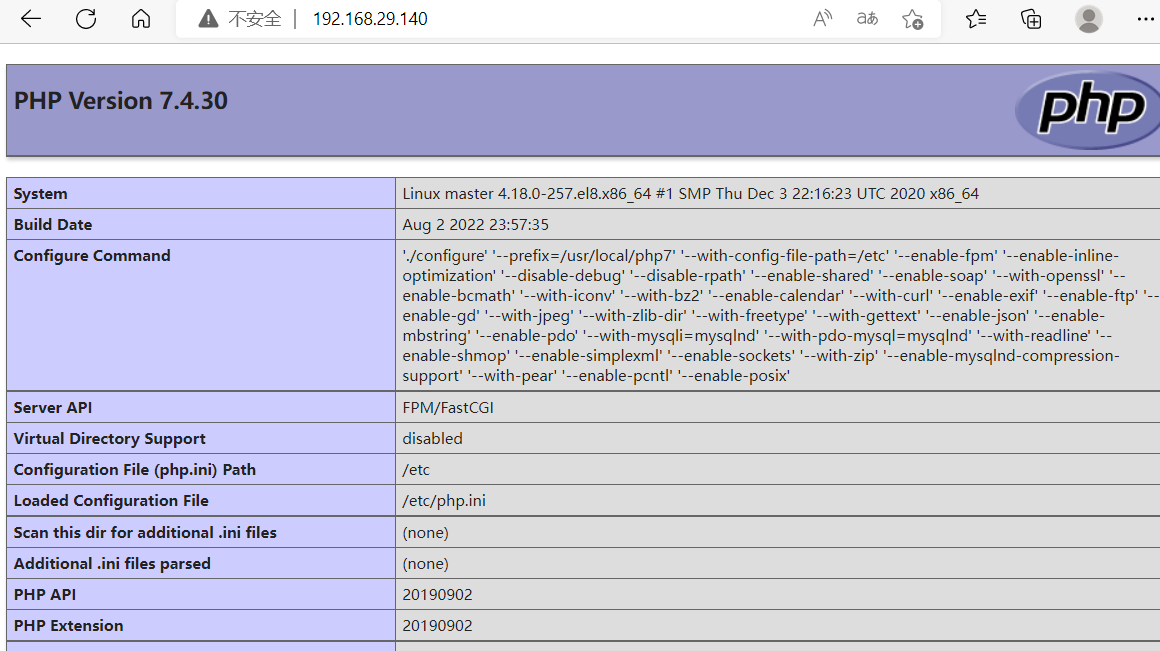
在apache httpd 2.4以后已经专门有一个模块针对FastCGI的实现,此模块为mod_proxy_fcgi.so,它其实是作为mod_proxy.so模块的扩展,因此,这两个模块都要加载,编辑httpd.conf文件,取消以下两行内容的注释:
[root@master ~]# ss -antl
State       Recv-Q      Send-Q           Local Address:Port           Peer Address:Port     Process
LISTEN      0           128                  127.0.0.1:9000                0.0.0.0:*
LISTEN      0           128                    0.0.0.0:22                  0.0.0.0:*
LISTEN      0           80                           *:3306                      *:*
LISTEN      0           128                          *:80                        *:*
LISTEN      0           128                       [::]:22                     [::]:*
[root@master ~]# cd /usr/local/apache/conf/
[root@master conf]# ls
extra  httpd.conf  magic  mime.types  original
[root@master conf]# vim httpd.conf
loadmodule proxy_module modules/mod_proxy.so
loadmodule proxy_fcgi_module modules/mod_proxy_fcgi.so(取消这两行注释)
在需要使用fcgi的虚拟主机中添加类似如下两行:ProxyRequests Off //关闭正向代理
ProxyPassMatch ^/(.*.php)$ fcgi://127.0.0.1:9000/PATH/TO/DOCUMENT_ROOT/$1
[root@master conf]# ls /usr/local/apache/
bin  build  cgi-bin  conf  error  htdocs  icons  include  logs  man  manual  modules
[root@master conf]# ls /usr/local/apache/htdocs/
index.html
[root@master conf]# mkdir -p /usr/local/apache/htdocs/runtime
[root@master conf]# vim /usr/local/apache/htdocs/runtime/index.php

<?php
   phpinfo();
?>
[root@master conf]# ll /usr/local/apache/htdocs/
total 4
-rw-r--r--. 1  504 games 45 Jun 12  2007 index.html
drwxr-xr-x  2 root root  23 Aug  4 08:46 runtime
[root@master conf]# ll /usr/local/apache/htdocs/runtime/
total 4
-rw-r--r-- 1 root root 23 Aug  4 08:46 index.php
[root@master conf]#  ls
extra  httpd.conf  magic  mime.types  original
[root@master conf]# cd extra/
[root@master extra]# ls
httpd-autoindex.conf  httpd-info.conf       httpd-mpm.conf                 httpd-userdir.conf
httpd-dav.conf        httpd-languages.conf  httpd-multilang-errordoc.conf  httpd-vhosts.conf
httpd-default.conf    httpd-manual.conf     httpd-ssl.conf                 proxy-html.conf
[root@master extra]#
[root@master extra]# vim httpd-vhosts.conf
<VirtualHost *:80>
    DocumentRoot "/usr/local/apache/htdocs/runtime"
    ServerName dummy-host.example.com
    ErrorLog "logs/runtime.example.com-error_log"
    CustomLog "logs/runtime.example.com-access_log" common
    ProxyRequests Off
    ProxyPassMatch ^/(.*\.php)$ fcgi://127.0.0.1:9000/usr/local/apache/htdocs/runtime/$1
    <Directory "/usr/local/apache/htdocs/runtime">
        Options none
        AllowOverride none
        Require all granted
    </Directory>
</VirtualHost>
[root@master extra]# ls
httpd-autoindex.conf  httpd-info.conf       httpd-mpm.conf                 httpd-userdir.conf
httpd-dav.conf        httpd-languages.conf  httpd-multilang-errordoc.conf  httpd-vhosts.conf
httpd-default.conf    httpd-manual.conf     httpd-ssl.conf                 proxy-html.conf
[root@master extra]# cd ..
[root@master conf]# ls
extra  httpd.conf  magic  mime.types  original
[root@master conf]# vim httpd.conf
AddType application/x-compress .Z
AddType application/x-gzip .gz .tgz
AddType application/x-httpd-php .php    #添加此行
AddType application/x-httpd-php-source .phps#添加此行
Include conf/extra/httpd-vhosts.conf(取消注释)
<IfModule dir_module>
    DirectoryIndex index.php index.html
</IfModule>(添加index.php)
[root@master conf]# systemctl restart httpd
[root@master conf]# systemctl status httpd
● httpd.service - web server daemon
   Loaded: loaded (/usr/lib/systemd/system/httpd.service; enabled; vendor preset: disabled)
   Active: active (running) since Thu 2022-08-04 09:07:27 CST; 29s ago
     Docs: man:httpd(5)
  Process: 142048 ExecStop=/usr/local/apache/bin/apachectl stop (code=exited, status=0/SUCCESS)
  Process: 142053 ExecStart=/usr/local/apache/bin/apachectl start (code=exited, status=0/SUCCESS)
 Main PID: 142057 (httpd)
    Tasks: 6 (limit: 24717)
   Memory: 5.9M
   CGroup: /system.slice/httpd.service
           ├─142057 /usr/local/apache/bin/httpd -k start
           ├─142058 /usr/local/apache/bin/httpd -k start
           ├─142059 /usr/local/apache/bin/httpd -k start
           ├─142060 /usr/local/apache/bin/httpd -k start
           ├─142061 /usr/local/apache/bin/httpd -k start
           └─142062 /usr/local/apache/bin/httpd -k start

Aug 04 09:07:12 master systemd[1]: Starting web server daemon...
Aug 04 09:07:27 master apachectl[142053]: AH00558: httpd: Could not reliably determine the server's full>
Aug 04 09:07:27 master systemd[1]: Started web server daemon.
lines 1-20/20 (END)
以上设置表示把以.php结尾的文件请求发送到php-fpm进程,php-fpm至少需要知道运行的目录和URI,所以这里直接在fcgi://127.0.0.1:9000后指明了这两个参数,其它参数的传递已经被mod_proxy_fcgi.so进行了封装,不需要手动指定。
注意:
这里写的/var/www/html/是yum源安装方式生成的网页存放目录,这里必须改成你编译安装指定的网页存放路径,禁止直接复制我这里的路径,这里的idfsoft.com是域名,你必须改成你所使用的域名,禁止直接复制此处的域名
这里的$1表示匹配所有以.php结尾的http请求
我正在使用PHP通过exec()调用FFMPEG命令。使用从另一个PHP脚本调用启动此命令的脚本proc_close(proc_open('php/phpdirectory/process.php&',array(),$foo));这很好用。ffmpeg命令被调用并“在后台”运行,留下第一个脚本返回给用户,在这种情况下继续上传文件。如果我使用多核机器怎么办?我将如何着手优化事物以便我可以为每个核心调用一个ffmpeg进程?或者多核机器进程是否会在内核之间拆分工作并更快地完成单个进程?有人吗? 最佳答案 FFMPEG进程的调度是由内核
我希望从源代码制作一个自包含的LAMPdistro软件包,至少包含以下内容:*php必须支持mysqli、ldap和GD*必须包含所有必需的.so(如GD需要的libpng)(自包含)我设法做了一个,但我一直在修补它的怪癖,所以我想从像XAMPP这样的广泛使用的开始,但我找不到构建它的源代码(一些shell脚本,它写了所有的配置选项、涉及的来源等)。我在哪里可以找到这样的脚本/信息?我需要这个,这样我的用户就可以轻松安装我的软件,他们不是LAMP管理员。我需要XAMPP包或类似包的配置选项。 最佳答案 这是我用来构建自己的灯组的配置
我正在运行Ubuntu。我的Apache2默认文件如下所示:ServerAdminwebmaster@localhostDocumentRoot/var/www/OptionsFollowSymLinksAllowOverrideNoneOptionsIndexesFollowSymLinksMultiViewsAllowOverrideNoneOrderallow,denyallowfromallScriptAlias/cgi-bin//usr/lib/cgi-bin/AllowOverrideNoneOptions+ExecCGI-MultiViews+SymLinksIfOwne
按照目前的情况,这个问题不适合我们的问答形式。我们希望答案得到事实、引用或专业知识的支持,但这个问题可能会引发辩论、争论、投票或扩展讨论。如果您觉得这个问题可以改进并可能重新打开,visitthehelpcenter指导。关闭9年前。我真的很感激一些简明的建议。我即将开始一个项目,我们将在其中维护大量属性(property)数据。我们打算使用RESTful接口(interface)构建应用程序,以便各种客户端可以连接。即web应用程序、iphone应用程序、第3方api等。我们真的希望应用程序/api快速、响应迅速、可靠。但是,实际上我们只有一定数量的内部技能,并且希望确保我们的思维过
我真的很喜欢StackExchange系列网站允许人们使用他们的OpenID或OAuth提供程序登录的方式,这些提供程序已开源为DotNetOpenAuth.这绝对很棒,但我无法在*AMP堆栈上使用它。有没有类似的东西可以在PHP、Perl、Python或Ruby中运行? 最佳答案 对于Perl,有Net::OAuth,而且看起来还有一个尚未发布的Catalyst::Controller::OAuth,但最后一个的状态是什么是未知的(除了OAuthcodepage表示他们正在“处理”它)。
我已经尝试了很多东西:red5、jquery网络摄像头、html5...但是这些解决方案都没有录制视频并准备好上传到服务器。有没有(html5、flash等等……更好的跨浏览器解决方案,最好的)上传视频(+音频!)并将结果上传到服务器(我猜是通过AJAX)?总结:jQueryWebcam(https://github.com/infusion/jQuery-webcam):它有flash视频,上传到服务器图像,而不是视频EricBidelman的解决方案(http://ericbidelman.tumblr.com/post/31486670538/creating-webm-vide
我有一个小型LAMP应用程序,我想转移到Amazon为此我需要AmazonEC2,对吗?我希望通过CDN传送我的静态资源。这是否意味着我需要Amazon的CloudFront和EC2?(或者EC2不知何故也是一个CDN?)我还想使用PHP加速器(可能是APC)、内存缓存等。我可以在亚马逊上使用吗?我还能使用MySQL吗?(我问这个是因为亚马逊似乎也有自己的RDBMS;不确定我是否被迫使用他们的) 最佳答案 IwillneedAmazonEC2forthis,right?是的。Iwantmystaticresourcesdeliver
我有一个lamp服务器,它的输出我认为也是使用header('location:xxxx');阻止页面重定向的原因它并不总是出现,但有时它只是输出我正在使用ob_start('ob_gzhandler');,我认为唯一可能导致此问题的原因是什么,有人可以帮忙吗?更新我有时使用Dreamweaver,我认为是编辑器导致的。当我尝试保存时它只显示Unicode选项:C(典型分解,然后是典型组合)KC(兼容性分解,然后是规范组合)KD(兼容性分解)D(规范分解)然后勾选“IncludeUnicodeSignature(BOM)即使我的问题是BOM,我也从不检查它
我的CodeIgniter项目使用url在我的XAMPP系统上成功运行,http://localhost/newsfeeds/users/allCategories/当我将这个项目移动到另一个系统时,在Ubuntu13.10上有LAMP服务器。要运行同一页面,我需要url,http://localhost/newsfeeds/index.php/users/allCategories/我需要index.php文件,否则它会显示页面不存在错误。我的htaccess文件是,RewriteEngineOnRewriteCond%{REQUEST_FILENAME}!-fRewriteCond
我有兴趣涉足CoffeeScript,但我不想每次要测试时都手动重新编译为Javascript。在服务器端或客户端处理LAMP堆栈时,是否有一种简单的方法将CoffeeScript动态转换为vanillaJavascript? 最佳答案 服务器端查看kohana-coffeescript,这使得从PHP的Kohana框架提供CoffeeScript变得容易。客户端参见IsthereawaytosendCoffeeScripttotheclient'sbrowserandhaveitcompiledtoJavaScript*there
