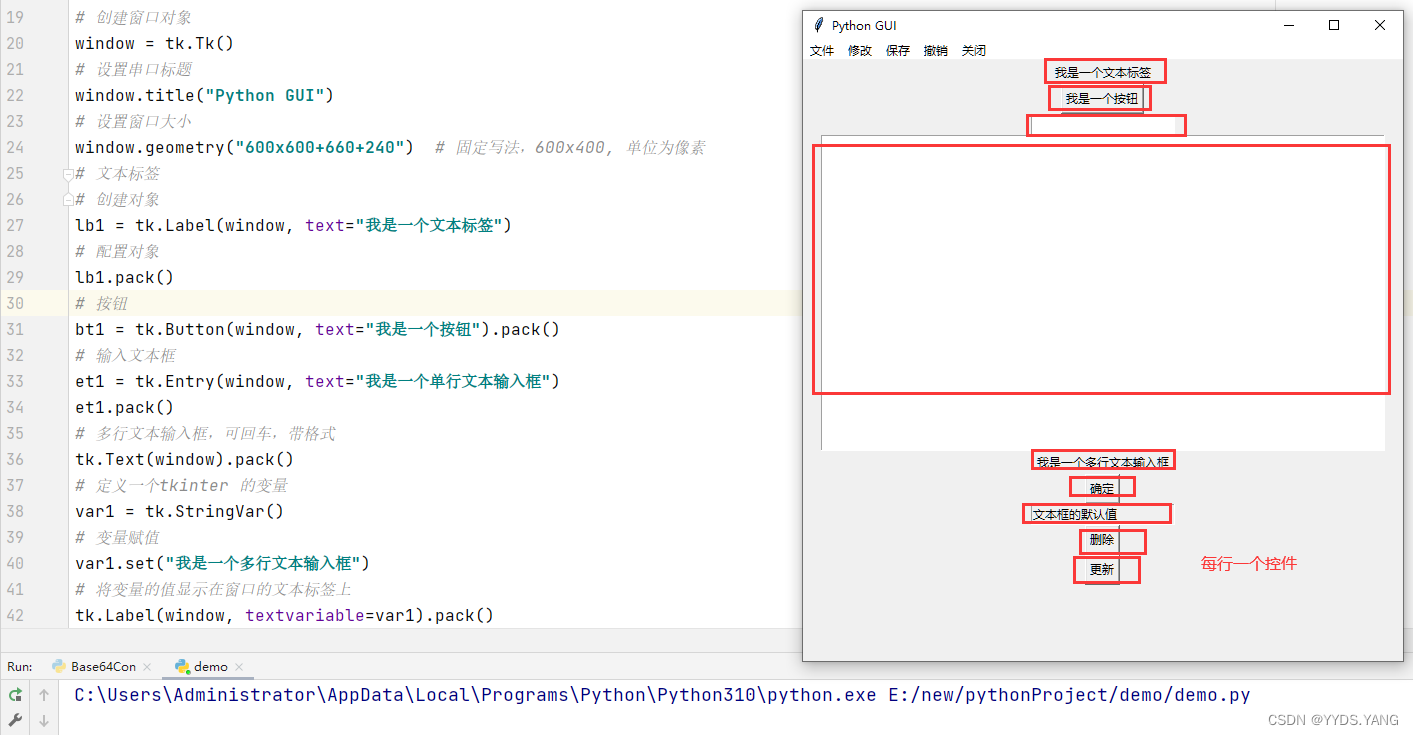
grid是python标准库提供的控件布局工具
# coding:utf-8
import tkinter as tk
import base64
import tkinter.messagebox as tm


def get_encode():
    get_var = te1.get("1.0", "end")
    en_str = base64.b64encode(get_var.encode("gbk"))
    en_result = en_str.decode("gbk")
    tt1.delete("1.0", "end")
    var2.set("加密结果为:")
    tt1.insert("insert", en_result)


def get_decode():
    get_var = bytes(te1.get("1.0", "end"), encoding="gbk")
    en_str = base64.b64decode(get_var)
    en_result = en_str.decode("gbk")
    tt1.delete("1.0", "end")
    var2.set("加密结果为:")
    tt1.insert("insert", en_result)


def menuCommand():
    tm.showinfo("", "功能暂未开放")


def add_menu(name):
    main_menu.add_command(label=f"{name}", command=menuCommand)


window = tk.Tk()
width = 1100
height = 650
window_width = int((window.winfo_screenwidth()-width)/2)
window_height = int((window.winfo_screenheight()-height)/2)
window.title("Base64转换工具")
window.geometry(f"{width}x{height}+{window_width}+{window_height}")
window.resizable(0, 0)
# window.iconbitmap(r"favicon.ico")

lb1 = tk.Label(window, text="欢迎使用Base64转换工具", font=("宋体", 14), width=110, height=2, relief="groove",
               anchor="center", bg="#FDF5E6")
lb2 = tk.Label(window, text="请在下面输入要加密或者解密的内容:", font=("宋体", 14), width=110, height=2, relief="groove",
               anchor="w")
te1 = tk.Text(window, width=100, height=10, bg="#FDF5E6", font=("宋体", 14, 'bold'))
bt1 = tk.Button(window, text="Base64加密", font=("宋体", 14), width=10, height=1, relief="raised",
                command=get_encode, anchor="e")
bt2 = tk.Button(window, text="Base64解密", font=("宋体", 14), width=10, height=1, relief="raised",
                command=get_decode, anchor="w")
bt3 = tk.Button(window, text="关闭", font=("宋体", 14), width=10, height=1,
                relief="raised", command=window.quit, anchor="w")
var2 = tk.StringVar()
var2.set("")
te2 = tk.Label(window, textvariable=var2, bg="#FDF5E6", font=("宋体", 14), width=110, height=2,
               relief="groove", anchor="w")
tt1 = tk.Text(window, width=100, height=10, bg="#FDF5E6", font=("宋体", 14, 'bold'))
lb3 = tk.Label(window, text="杨小朋制作出品。", bg="#FDF5E6", font=("宋体", 14), width=110, height=2,
               anchor="center")
lb4 = tk.Label(window, text="联系方式:2969868321@qq.com    ", bg="#FDF5E6", font=("宋体", 14), width=110, height=2,
               anchor="e")
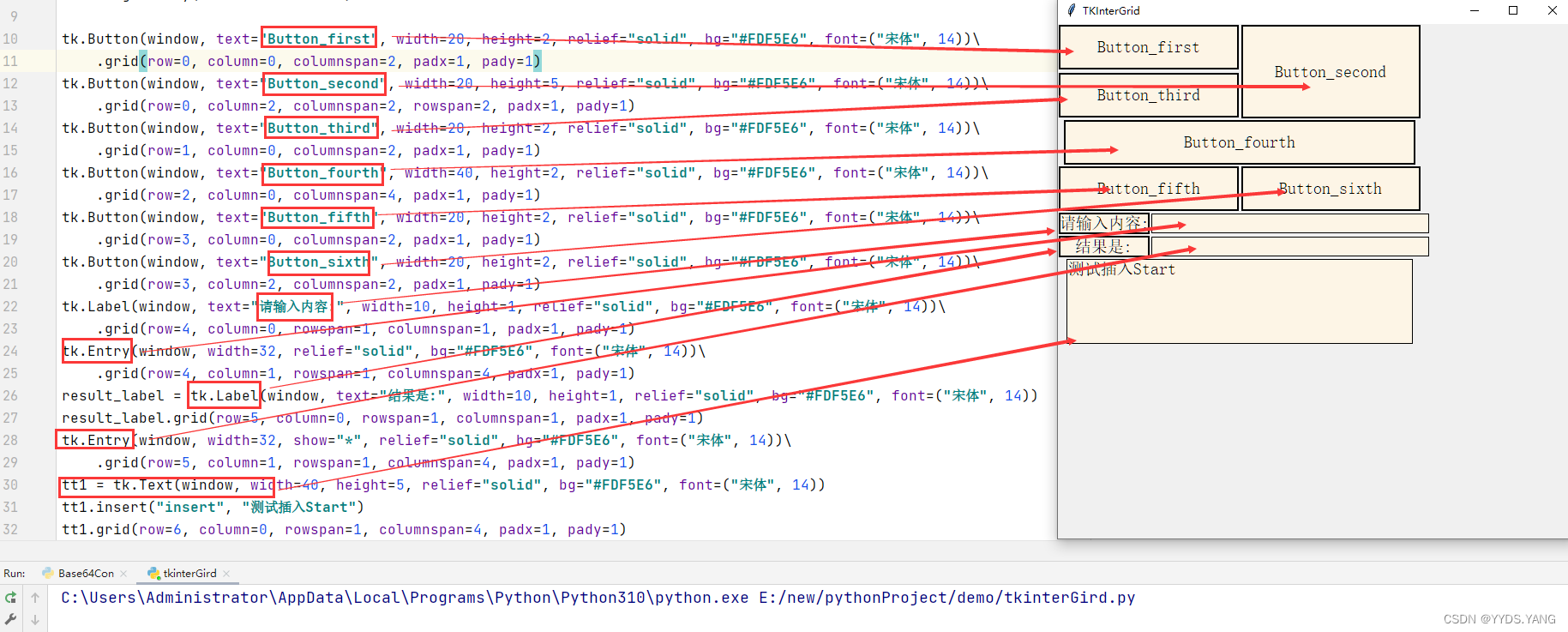
lb1.grid(row=0, column=0, columnspan=6)
lb2.grid(row=1, column=0, columnspan=6)
te1.grid(row=2, column=0, columnspan=6)
bt1.grid(row=3, column=2, columnspan=1)
bt2.grid(row=3, column=3, columnspan=1)
bt3.grid(row=3, column=4, columnspan=1)
te2.grid(row=4, column=0, columnspan=6)
tt1.grid(row=5, column=0, columnspan=6)
lb3.grid(row=6, column=0, columnspan=6)
lb4.grid(row=7, column=0, columnspan=6)
main_menu = tk.Menu()
add_menu("文件")
add_menu("修改")
add_menu("保存")
add_menu("撤销")
add_menu("关闭")
window.config(menu=main_menu)
window.mainloop()
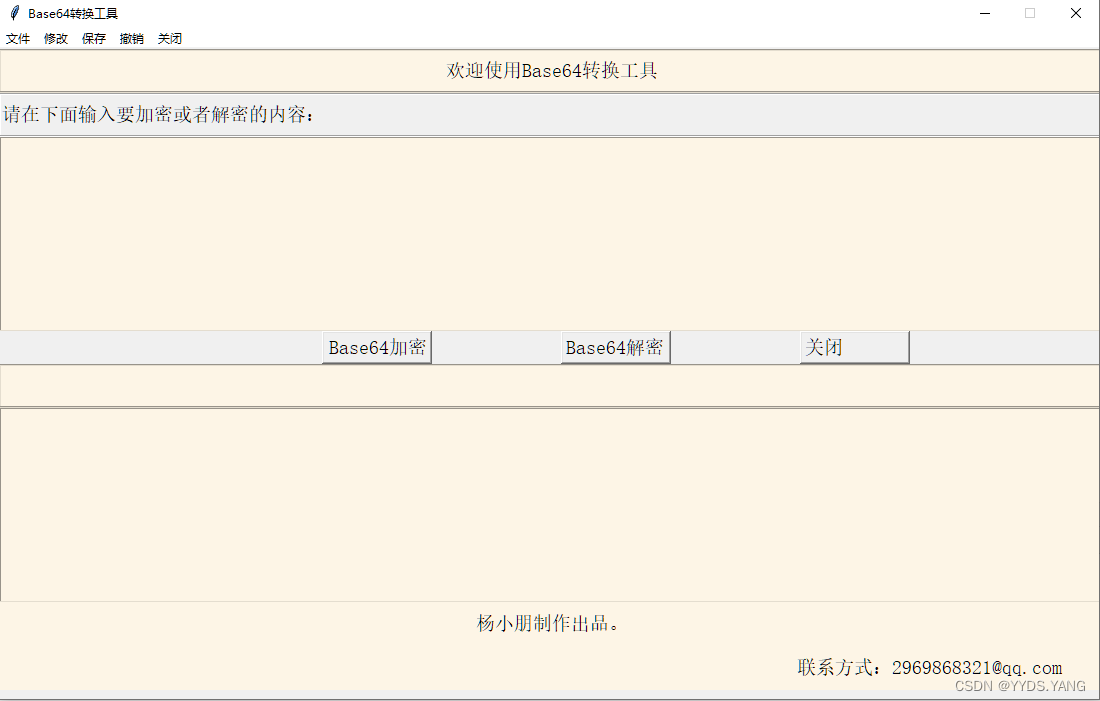
| 值 | 含义 |
|---|---|
| n | 上中 |
| ne | 右上 |
| e | 右中 |
| se | 右下 |
| s | 下中 |
| sw | 左下 |
| w | 左中 |
| nw | 左上 |
| center | 正中(默认值) |
# coding:utf-8
import tkinter as tk


window = tk.Tk()
width = 500
height = 240
window_width = (window.winfo_screenwidth()-width)//2
window_height = (window.winfo_screenheight()-height)//2
window.title("Base64转换工具")
window.geometry(f"{width}x{height}+{window_width}+{window_height}")
window.resizable(0, 0)
tk.Button(window, text="左上", font=("宋体", 14), width=15, height=3, relief="solid", anchor="nw").grid(row=0, column=0)
tk.Button(window, text="上中", font=("宋体", 14), width=15, height=3, relief="solid", anchor="n").grid(row=0, column=1)
tk.Button(window, text="右上", font=("宋体", 14), width=15, height=3, relief="solid", anchor="ne").grid(row=0, column=2)
tk.Button(window, text="左中", font=("宋体", 14), width=15, height=3, relief="solid", anchor="w").grid(row=1, column=0)
tk.Button(window, text="正中", font=("宋体", 14), width=15, height=3, relief="solid", anchor="center").grid(row=1, column=1)
tk.Button(window, text="右中", font=("宋体", 14), width=15, height=3, relief="solid", anchor="e").grid(row=1, column=2)
tk.Button(window, text="左下", font=("宋体", 14), width=15, height=3, relief="solid", anchor="s").grid(row=2, column=1)
tk.Button(window, text="下中", font=("宋体", 14), width=15, height=3, relief="solid", anchor="sw").grid(row=2, column=0)
tk.Button(window, text="右下", font=("宋体", 14), width=15, height=3, relief="solid", anchor="se").grid(row=2, column=2)
window.mainloop()
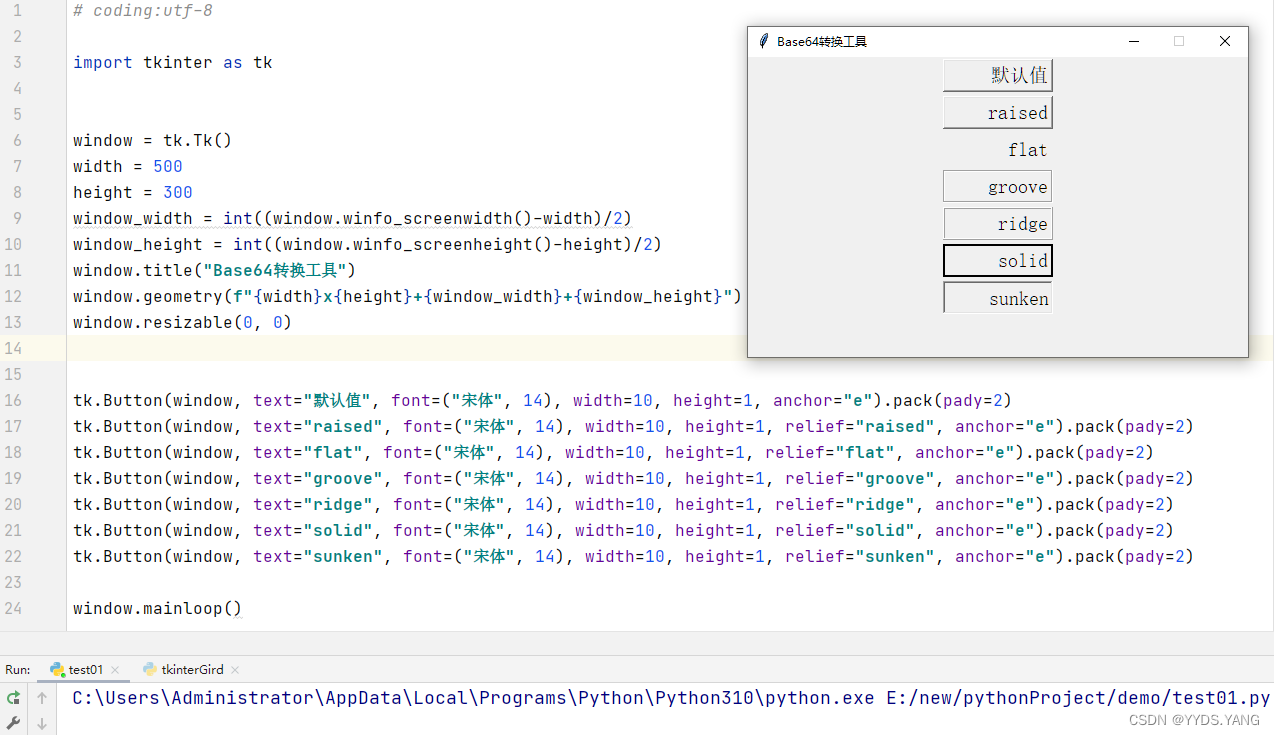
| 值 | 含义 |
|---|---|
| flat | 无边框 |
| groove | 凹槽 |
| raised | 凸起(默认值) |
| ridge | 隆起 |
| solid | 实现 |
| sunken | 凹陷 |
关闭。这个问题是opinion-based.它目前不接受答案。想要改进这个问题?更新问题,以便editingthispost可以用事实和引用来回答它.关闭4年前。Improvethisquestion我想在固定时间创建一系列低音和高音调的哔哔声。例如:在150毫秒时发出高音调的蜂鸣声在151毫秒时发出低音调的蜂鸣声200毫秒时发出低音调的蜂鸣声250毫秒的高音调蜂鸣声有没有办法在Ruby或Python中做到这一点?我真的不在乎输出编码是什么(.wav、.mp3、.ogg等等),但我确实想创建一个输出文件。
我即将开始一个将录制和编辑音频文件的项目,我正在寻找一个好的库(最好是Ruby,但会考虑Java或.NET以外的任何库)以进行实时可视化波形。有人知道我应该从哪里开始搜索吗? 最佳答案 要流入浏览器的数据量很大。Flash或Flex图表可能是唯一能提高内存效率的解决方案。Javascript图表往往会因大型数据集而崩溃。 关于ruby-Ruby中的波形可视化,我们在StackOverflow上找到一个类似的问题: https://stackoverflow.c
是否可以为特定(或所有)项目使用多个布局?例如,我有几个项目,我想对其应用两种不同的布局。一个是绿色的,一个是蓝色的(但是)。我想将它们编译到我的输出目录中的两个不同文件夹中(例如v1和v2)。我一直在玩弄规则和编译block,但我不知道这是怎么回事。因为,每个项目在编译过程中只编译一次,我不能告诉nanoc第一次用layout1编译,第二次用layout2编译。我试过这样的东西,但它导致输出文件损坏。compile'*'doifitem.binary?#don’tfilterbinaryitemselsefilter:erblayout'layout1'layout'layout2'
这个问题在这里已经有了答案:关闭10年前。PossibleDuplicate:Pythonconditionalassignmentoperator对于这样一个简单的问题表示歉意,但是谷歌搜索||=并不是很有帮助;)Python中是否有与Ruby和Perl中的||=语句等效的语句?例如:foo="hey"foo||="what"#assignfooifit'sundefined#fooisstill"hey"bar||="yeah"#baris"yeah"另外,类似这样的东西的通用术语是什么?条件分配是我的第一个猜测,但Wikipediapage跟我想的不太一样。
什么是ruby的rack或python的Java的wsgi?还有一个路由库。 最佳答案 来自Python标准PEP333:Bycontrast,althoughJavahasjustasmanywebapplicationframeworksavailable,Java's"servlet"APImakesitpossibleforapplicationswrittenwithanyJavawebapplicationframeworktoruninanywebserverthatsupportstheservletAPI.ht
华为OD机试题本篇题目:明明的随机数题目输入描述输出描述:示例1输入输出说明代码编写思路最近更新的博客华为od2023|什么是华为od,od薪资待遇,od机试题清单华为OD机试真题大全,用Python解华为机试题|机试宝典【华为OD机试】全流程解析+经验分享,题型分享,防作弊指南华为o
我想解析一个已经存在的.mid文件,改变它的乐器,例如从“acousticgrandpiano”到“violin”,然后将它保存回去或作为另一个.mid文件。根据我在文档中看到的内容,该乐器通过program_change或patch_change指令进行了更改,但我找不到任何在已经存在的MIDI文件中执行此操作的库.他们似乎都只支持从头开始创建的MIDI文件。 最佳答案 MIDIpackage会为您完成此操作,但具体方法取决于midi文件的原始内容。一个MIDI文件由一个或多个音轨组成,每个音轨是十六个channel中任何一个上的
本文主要介绍在使用Selenium进行自动化测试或者任务时,对于使用了iframe的页面,如何定位iframe中的元素文章目录场景描述解决方案具体代码场景描述当我们在使用Selenium进行自动化测试的时候,可能会遇到一些界面或者窗体是使用HTML的iframe标签进行承载的。对于iframe中的标签,如果直接查找是无法找到的,会抛出没有找到元素的异常。比如近在咫尺的例子就是,CSDN的登录窗体就是使用的iframe,大家可以尝试通过F12开发者模式查看到的tag_name,class_name,id或者xpath来定位中的页面元素,会抛出NoSuchElementException异常。解决
2022/8/4更新支持加入水印水印必须包含透明图像,并且水印图像大小要等于原图像的大小pythonconvert_image_to_video.py-f30-mwatermark.pngim_dirout.mkv2022/6/21更新让命令行参数更加易用新的命令行使用方法pythonconvert_image_to_video.py-f30im_dirout.mkvFFMPEG命令行转换一组JPG图像到视频时,是将这组图像视为MJPG流。我需要转换一组PNG图像到视频,FFMPEG就不认了。pyav内置了ffmpeg库,不需要系统带有ffmpeg工具因此我使用ffmpeg的python包装p
ValidPalindromeGivenastring,determineifitisapalindrome,consideringonlyalphanumericcharactersandignoringcases. [#125]Example:"Aman,aplan,acanal:Panama"isapalindrome."raceacar"isnotapalindrome.Haveyouconsiderthatthestringmightbeempty?Thisisagoodquestiontoaskduringaninterview.Forthepurposeofthisproblem
