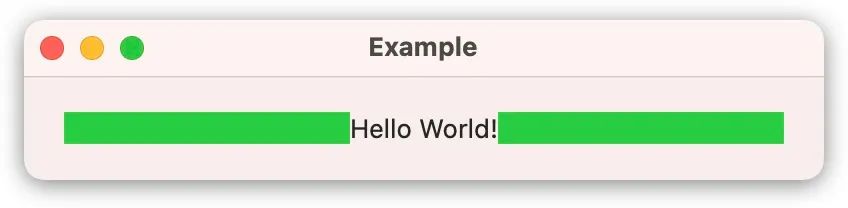
struct ContentView: View {
    var body: some View {
        HStack(spacing: 0) {

            Rectangle().fill(.green)

            Text("Hello World!")

            Rectangle().fill(.green)

        }
        .padding(20)
    }
}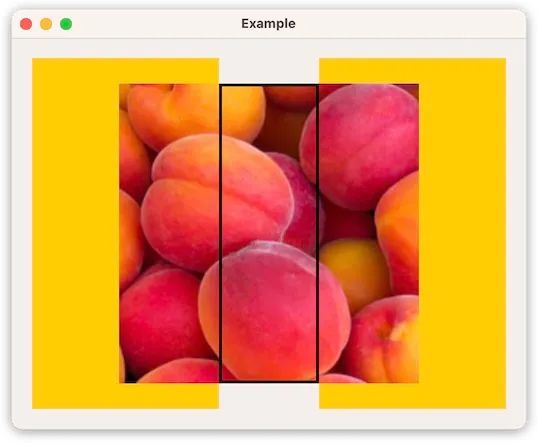
struct ContentView: View {
    var body: some View {
        HStack(spacing: 0) {

            Rectangle().fill(.yellow)

            Image("peach")
                .frame(width: 100)
                .border(.black, width: 3)
                .zIndex(1)

            Rectangle().fill(.yellow)

        }
        .padding(20)
    }
}ProposedViewSize.zero = ProposedViewSize(width: 0, height: 0)
ProposedViewSize.infinity = ProposedViewSize(width: .infinity, height: .infinity)
ProposedViewSize.unspecified = ProposedViewSize(width: nil, height: nil)func sizeThatFits(proposal: ProposedViewSize, subviews: Self.Subviews, cache: inout Self.Cache) -> CGSize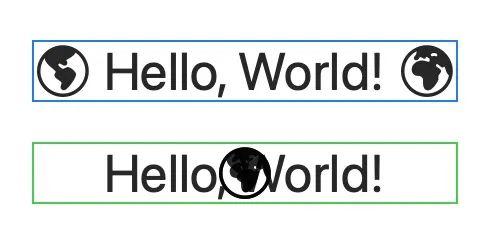
struct ContentView: View {
    var body: some View {
        VStack(spacing: 20) {

            HStack(spacing: 5)  {
                contents()
            }
            .border(.blue)

            SimpleHStack(spacing: 5) {
                contents()
            }
            .border(.blue)

        }
        .frame(maxWidth: .infinity, maxHeight: .infinity)
        .background(.white)
    }

    @ViewBuilder func contents() -> some View {
        Image(systemName: "globe.americas.fill")

        Text("Hello, World!")

        Image(systemName: "globe.europe.africa.fill")
    }

}

struct SimpleHStack: Layout {
    let spacing: CGFloat

    func sizeThatFits(proposal: ProposedViewSize, subviews: Subviews, cache: inout ()) -> CGSize {
        let idealViewSizes = subviews.map { $0.sizeThatFits(.unspecified) }

        let spacing = spacing * CGFloat(subviews.count - 1)
        let width = spacing + idealViewSizes.reduce(0) { $0 + $1.width }
        let height = idealViewSizes.reduce(0) { max($0, $1.height) }

        return CGSize(width: width, height: height)
    }

    func placeSubviews(in bounds: CGRect, proposal: ProposedViewSize, subviews: Subviews, cache: inout ())
    {
        // ...
    }
}func placeSubviews(in bounds: CGRect, proposal: ProposedViewSize, subviews: Self.Subviews, cache: inout Self.Cache)struct SimpleHStack: Layout {
// ...
func placeSubviews(in bounds: CGRect, proposal: ProposedViewSize, subviews: Subviews, cache: inout ())
{
var pt = CGPoint(x: bounds.minX, y: bounds.minY)
for v in subviews {
v.place(at: pt, anchor: .topLeading, proposal: .unspecified)
pt.x += v.sizeThatFits(.unspecified).width + spacing
}
}
}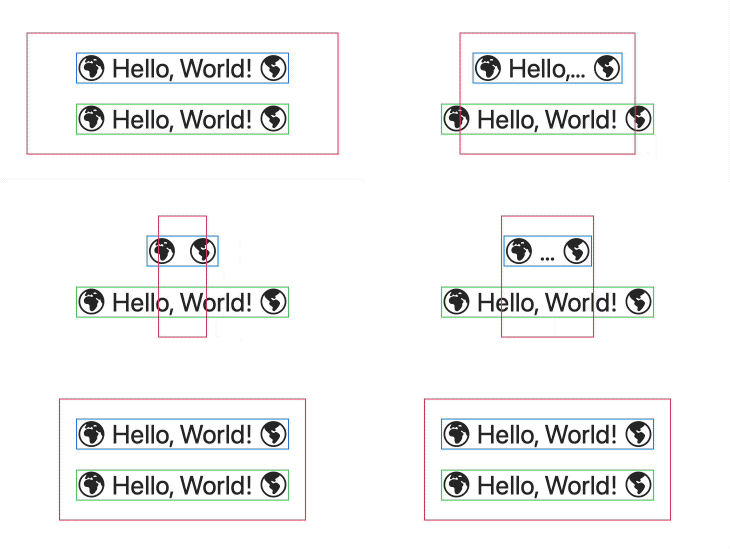 观察 SimpleHStack 是如何忽视提供的尺寸并且总是以理想尺寸绘制自己,该尺寸适合所有子视图的理想尺寸。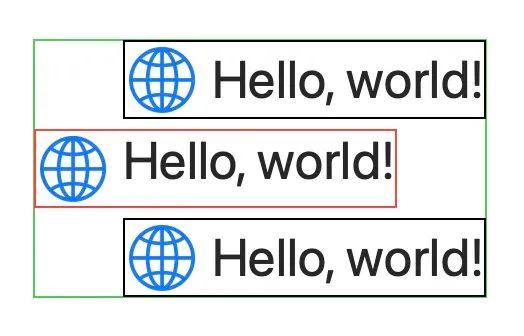
struct ContentView: View {
    var body: some View {
        VStack(alignment: .leading, spacing: 5) {
            HStack(spacing: 5) {
                contents()
            }
            .border(.black)

            SimpleHStack(spacing: 5) {
                contents()
            }
            .border(.red)

            HStack(spacing: 5) {
                contents()
            }
            .border(.black)

        }
        .background { Rectangle().stroke(.green) }
        .padding()
        .font(.largeTitle)

    }

    @ViewBuilder func contents() -> some View {
        Image(systemName: "globe")
            .imageScale(.large)
            .foregroundColor(.accentColor)
        Text("Hello, world!")
    }
}
struct SimpleHStack: Layout {
// ...
func explicitAlignment(of guide: HorizontalAlignment, in bounds: CGRect, proposal: ProposedViewSize, subviews: Subviews, cache: inout ()) -> CGFloat? {
if guide == .leading {
return subviews[0].sizeThatFits(proposal).width + spacing
} else {
return nil
}
}
}truct SimpleHStack: Layout {
// ...
func placeSubviews(in bounds: CGRect, proposal: ProposedViewSize, subviews: Subviews, cache: inout ())
{
var pt = CGPoint(x: bounds.minX, y: bounds.minY)
for v in subviews.sorted(by: { $0.priority > $1.priority }) {
v.place(at: pt, anchor: .topLeading, proposal: .unspecified)
pt.x += v.sizeThatFits(.unspecified).width + spacing
}
}
}
SimpleHStack(spacing: 5) {
    Circle().fill(.yellow)
         .frame(width: 30, height: 30)

    Circle().fill(.green)
        .frame(width: 30, height: 30)

    Circle().fill(.blue)
        .frame(width: 30, height: 30)
        .layoutPriority(1)
}struct PreferredPosition: LayoutValueKey {
static let defaultValue: CGFloat = 0.0
}SimpleHStack(spacing: 5) {
Circle().fill(.yellow)
.frame(width: 30, height: 30)
Circle().fill(.green)
.frame(width: 30, height: 30)
Circle().fill(.blue)
.frame(width: 30, height: 30)
.layoutValue(key: PreferredPosition.self, value: 1.0)
}struct SimpleHStack: Layout {
// ...
func placeSubviews(in bounds: CGRect, proposal: ProposedViewSize, subviews: Subviews, cache: inout ())
{
var pt = CGPoint(x: bounds.minX, y: bounds.minY)
let sortedViews = subviews.sorted { v1, v2 in
v1[PreferredPosition.self] > v2[PreferredPosition.self]
}
for v in sortedViews {
v.place(at: pt, anchor: .topLeading, proposal: .unspecified)
pt.x += v.sizeThatFits(.unspecified).width + spacing
}
}
}extension View {
func preferredPosition(_ order: CGFloat) -> some View {
self.layoutValue(key: PreferredPosition.self, value: order)
}
}
extension LayoutSubview {
var preferredPosition: CGFloat {
self[PreferredPosition.self]
}
}SimpleHStack(spacing: 5) {
Circle().fill(.yellow)
.frame(width: 30, height: 30)
Circle().fill(.green)
.frame(width: 30, height: 30)
Circle().fill(.blue)
.frame(width: 30, height: 30)
.preferredPosition(1)
}struct SimpleHStack: Layout {
// ...
func placeSubviews(in bounds: CGRect, proposal: ProposedViewSize, subviews: Subviews, cache: inout ())
{
var pt = CGPoint(x: bounds.minX, y: bounds.minY)
for v in subviews.sorted(by: { $0.preferredPosition > $1.preferredPosition }) {
v.place(at: pt, anchor: .topLeading, proposal: .unspecified)
pt.x += v.sizeThatFits(.unspecified).width + spacing
}
}
}struct SimpleHStack: Layout {
var spacing: CGFloat? = nil
func sizeThatFits(proposal: ProposedViewSize, subviews: Subviews, cache: inout ()) -> CGSize {
let idealViewSizes = subviews.map { $0.sizeThatFits(.unspecified) }
let accumulatedWidths = idealViewSizes.reduce(0) { $0 + $1.width }
let maxHeight = idealViewSizes.reduce(0) { max($0, $1.height) }
let spaces = computeSpaces(subviews: subviews)
let accumulatedSpaces = spaces.reduce(0) { $0 + $1 }
return CGSize(width: accumulatedSpaces + accumulatedWidths,
height: maxHeight)
}
func placeSubviews(in bounds: CGRect, proposal: ProposedViewSize, subviews: Subviews, cache: inout ())
{
var pt = CGPoint(x: bounds.minX, y: bounds.minY)
let spaces = computeSpaces(subviews: subviews)
for idx in subviews.indices {
subviews[idx].place(at: pt, anchor: .topLeading, proposal: .unspecified)
if idx < subviews.count - 1 {
pt.x += subviews[idx].sizeThatFits(.unspecified).width + spaces[idx]
}
}
}
func computeSpaces(subviews: LayoutSubviews) -> [CGFloat] {
if let spacing {
return Array<CGFloat>(repeating: spacing, count: subviews.count - 1)
} else {
return subviews.indices.map { idx in
guard idx < subviews.count - 1 else { return CGFloat(0) }
return subviews[idx].spacing.distance(to: subviews[idx+1].spacing, along: .horizontal)
}
}
}
}struct MyLayout: Layout {
static var layoutProperties: LayoutProperties {
var properties = LayoutProperties()
properties.stackOrientation = .vertical
return properties
}
// ...
}| stackOrientation | minimum | ideal | maximum |
| .horizontal | 8.0 × 0.0 | 8.0 × 0.0 | .infinity × 0.0 |
| .vertical | 0.0 × 8.0 | 0.0 × 8.0 | 0.0 × .infinity |
| .none or nil | 8.0 × 8.0 | 8.0 × 8.0 | .infinity × .infinity |
struct SimpleHStack: Layout {
    struct CacheData {
        var maxHeight: CGFloat
        var spaces: [CGFloat]
    }

    var spacing: CGFloat? = nil

    func makeCache(subviews: Subviews) -> CacheData {
        return CacheData(maxHeight: computeMaxHeight(subviews: subviews),
                         spaces: computeSpaces(subviews: subviews))
    }

    func updateCache(_ cache: inout CacheData, subviews: Subviews) {
        cache.maxHeight = computeMaxHeight(subviews: subviews)
        cache.spaces = computeSpaces(subviews: subviews)
    }

    func sizeThatFits(proposal: ProposedViewSize, subviews: Subviews, cache: inout CacheData) -> CGSize {
        let idealViewSizes = subviews.map { $0.sizeThatFits(.unspecified) }
        let accumulatedWidths = idealViewSizes.reduce(0) { $0 + $1.width }
        let accumulatedSpaces = cache.spaces.reduce(0) { $0 + $1 }

        return CGSize(width: accumulatedSpaces + accumulatedWidths,
                      height: cache.maxHeight)
    }

    func placeSubviews(in bounds: CGRect, proposal: ProposedViewSize, subviews: Subviews, cache: inout CacheData) {
        var pt = CGPoint(x: bounds.minX, y: bounds.minY)

        for idx in subviews.indices {
            subviews[idx].place(at: pt, anchor: .topLeading, proposal: .unspecified)

            if idx < subviews.count - 1 {
                pt.x += subviews[idx].sizeThatFits(.unspecified).width + cache.spaces[idx]
            }
        }
    }

    func computeSpaces(subviews: LayoutSubviews) -> [CGFloat] {
        if let spacing {
            return Array<CGFloat>(repeating: spacing, count: subviews.count - 1)
        } else {
            return subviews.indices.map { idx in
                guard idx < subviews.count - 1 else { return CGFloat(0) }

                return subviews[idx].spacing.distance(to: subviews[idx+1].spacing, along: .horizontal)
            }
        }
    }

    func computeMaxHeight(subviews: LayoutSubviews) -> CGFloat {
        return subviews.map { $0.sizeThatFits(.unspecified) }.reduce(0) { max($0, $1.height) }
    }
}makeCache called <<<<<<<<
sizeThatFits called
sizeThatFits called
sizeThatFits called
sizeThatFits called
placeSubiews called
placeSubiews called
updateCache called <<<<<<<<
sizeThatFits called
sizeThatFits called
sizeThatFits called
sizeThatFits called
placeSubiews called
placeSubiews called
sizeThatFits called
sizeThatFits called
placeSubiews called
sizeThatFits called
placeSubiews called
placeSubiews called
sizeThatFits called
placeSubiews called
placeSubiews called
sizeThatFits called
sizeThatFits called
sizeThatFits called
placeSubiews calledfunc callAsFunction<V>(@ViewBuilder _ content: () -> V) -> some View where V : ViewSimpleHStack(spacing: 10).callAsFunction({
Text("Hello World!")
})
// Thanks to SE-0253 we can abbreviate it by removing the .callAsFunction
SimpleHStack(spacing: 10)({
Text("Hello World!")
})
// And thanks to trailing closures, we end up with:
SimpleHStack(spacing: 10) {
Text("Hello World!")
}SimpleHStack().callAsFunction({
Text("Hello World!")
})
// Thanks to SE-0253 we can abbreviate it by removing the .callAsFunction
SimpleHStack()({
Text("Hello World!")
})
// And thanks to single trailing closures, we end up with:
SimpleHStack {
Text("Hello World!")
}
struct ContentView: View {
    @State var isVertical = false

    var body: some View {
        let layout = isVertical ? AnyLayout(VStackLayout(spacing: 5)) : AnyLayout(HStackLayout(spacing: 10))

        layout {
            Group {
                Image(systemName: "globe")

                Text("Hello World!")
            }
            .font(.largeTitle)
        }

        Button("Toggle Stack") {
            withAnimation(.easeInOut(duration: 1.0)) {
                isVertical.toggle()
            }
        }
    }
}我在我的项目目录中完成了compasscreate.和compassinitrails。几个问题:我已将我的.sass文件放在public/stylesheets中。这是放置它们的正确位置吗?当我运行compasswatch时,它不会自动编译这些.sass文件。我必须手动指定文件:compasswatchpublic/stylesheets/myfile.sass等。如何让它自动运行?文件ie.css、print.css和screen.css已放在stylesheets/compiled。如何在编译后不让它们重新出现的情况下删除它们?我自己编译的.sass文件编译成compiled/t
如果我使用ruby版本2.5.1和Rails版本2.3.18会怎样?我有基于rails2.3.18和ruby1.9.2p320构建的rails应用程序,我只想升级ruby的版本,而不是rails,这可能吗?我必须面对哪些挑战? 最佳答案 GitHub维护apublicfork它有针对旧Rails版本的分支,有各种变化,它们一直在运行。有一段时间,他们在较新的Ruby版本上运行较旧的Rails版本,而不是最初支持的版本,因此您可能会发现一些关于需要向后移植的有用提示。不过,他们现在已经有几年没有使用2.3了,所以充其量只能让更
是否可以为特定(或所有)项目使用多个布局?例如,我有几个项目,我想对其应用两种不同的布局。一个是绿色的,一个是蓝色的(但是)。我想将它们编译到我的输出目录中的两个不同文件夹中(例如v1和v2)。我一直在玩弄规则和编译block,但我不知道这是怎么回事。因为,每个项目在编译过程中只编译一次,我不能告诉nanoc第一次用layout1编译,第二次用layout2编译。我试过这样的东西,但它导致输出文件损坏。compile'*'doifitem.binary?#don’tfilterbinaryitemselsefilter:erblayout'layout1'layout'layout2'
最近在学习CAN,记录一下,也供大家参考交流。推荐几个我觉得很好的CAN学习,本文也是在看了他们的好文之后做的笔记首先是瑞萨的CAN入门,真的通透;秀!靠这篇我竟然2天理解了CAN协议!实战STM32F4CAN!原文链接:https://blog.csdn.net/XiaoXiaoPengBo/article/details/116206252CAN详解(小白教程)原文链接:https://blog.csdn.net/xwwwj/article/details/105372234一篇易懂的CAN通讯协议指南1一篇易懂的CAN通讯协议指南1-知乎(zhihu.com)视频推荐CAN总线个人知识总
我已经找到了几个使用datamapper的示例,并且能够让它们正常工作。不过,所有这些示例都是针对sqlite数据库的。我正在尝试将数据映射器与postgresql一起使用。我将datamapper中的调用从sqlite3更改为postgres,并且我已经安装了dm-postgres-adapter。但它仍然不起作用。我还需要做什么? 最佳答案 与SQLite不同,PostgreSQL不将数据库存储在单个文件中。在你拥有createdyourdatabase之后,尝试这样的事情:DataMapper.setup:default,{:
我经常将预配置的lambda插入可枚举的方法中,例如“map”、“select”等。但是“注入(inject)”的行为似乎有所不同。例如与mult4=lambda{|item|item*4}然后(5..10).map&mult4给我[20,24,28,32,36,40]但是,如果我制作一个2参数lambda用于像这样的注入(inject),multL=lambda{|product,n|product*n}我想说(5..10).inject(2)&multL因为“inject”有一个可选的单个初始值参数,但这给了我......irb(main):027:0>(5..10).inject
我需要使用ActiveMerchant库在我们的一个Rails应用程序中设置支付解决方案。尽管这个问题非常主观,但人们对主要网关(BrainTree、Authorize.net等)的体验如何?它必须:处理定期付款。有能力记入个人帐户。能够取消付款。有办法存储用户的付款详细信息(例如Authotize.netsCIM)。干杯 最佳答案 ActiveMerchant很棒,但在过去一年左右的时间里,我在使用它时发现了一些问题。首先,虽然某些网关可能会得到“支持”——但并非所有功能都包含在内。查看功能矩阵以确保完全支持您选择的网关-http
我有一个Rails应用程序,我正在尝试使用acts_as_list插件设置可排序列表。数据库中的位置字段正在更新,但是在呈现页面时,不考虑顺序。我想我是在寻求帮助。这是我的模型...classQuestionMembership:question_membershipsendclassQuestion:question_membershipsacts_as_listend还有给我列表的草率View代码...>true)%>拖放用于重新排序。数据库中QuestionMembership对象的位置值更新,页面实际上正确显示重新排序。问题是在页面重新加载时,它默认返回到它感觉的任何顺序。我认
尝试通过SSL连接到ImgurAPI时出现错误。这是代码和错误:API_URI=URI.parse('https://api.imgur.com')API_PUBLIC_KEY='Client-ID--'ENDPOINTS={:image=>'/3/image',:gallery=>'/3/gallery'}#Public:Uploadanimage##args-Theimagepathfortheimagetoupload#defupload(image_path)http=Net::HTTP.new(API_URI.host)http.use_ssl=truehttp.verify
一、什么是MQTT协议MessageQueuingTelemetryTransport:消息队列遥测传输协议。是一种基于客户端-服务端的发布/订阅模式。与HTTP一样,基于TCP/IP协议之上的通讯协议,提供有序、无损、双向连接,由IBM(蓝色巨人)发布。原理:(1)MQTT协议身份和消息格式有三种身份:发布者(Publish)、代理(Broker)(服务器)、订阅者(Subscribe)。其中,消息的发布者和订阅者都是客户端,消息代理是服务器,消息发布者可以同时是订阅者。MQTT传输的消息分为:主题(Topic)和负载(payload)两部分Topic,可以理解为消息的类型,订阅者订阅(Su
