目录
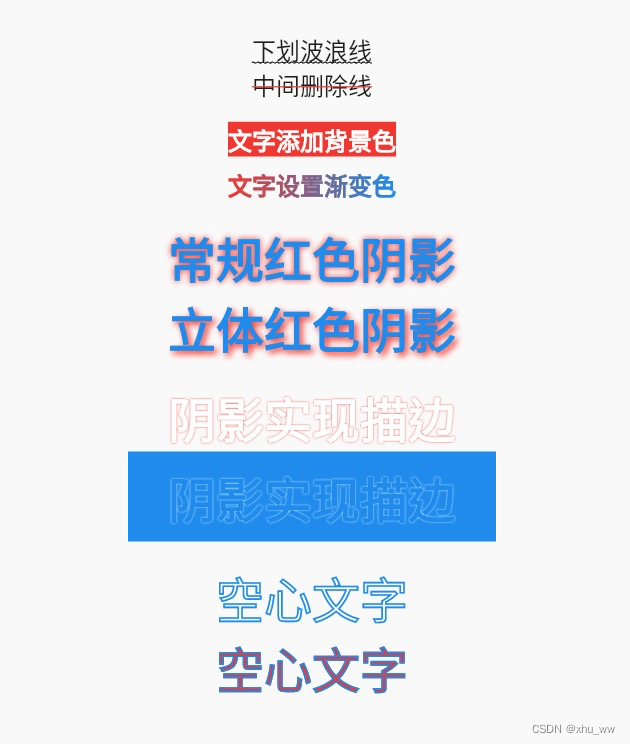
TextStyle 中有4个属性
decoration :TextDecoration可在文字上 中 下方添加直线decorationStyle :extDecorationStyle 可指定线条样式,如直线、虚线、波浪线、双实线、点线decorationThickness :设置线条的宽度decorationColor :设置线条的颜色下方波浪线
   Text(
    '下划波浪线',
    style: TextStyle(
      fontSize: 24,
      decoration: TextDecoration.underline,
      decorationStyle: TextDecorationStyle.wavy,
      decorationThickness: 1,
    ),
  ),
中间红色删除线
   Text(
    '中间删除线',
    style: TextStyle(
      fontSize: 24,
      decoration: TextDecoration.lineThrough,
      decorationStyle: TextDecorationStyle.solid,
      decorationColor: Colors.red
    ),
  ),

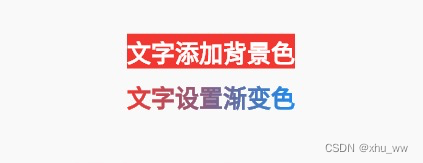
TextStyle 的backgroundColor可为文字添加背景色
   Text(
     '文字添加背景色',
     style: TextStyle(
       fontSize: 24,
       color: Colors.white,
       fontWeight: FontWeight.bold,
       backgroundColor: Colors.red,
     ),
   ),
借助ShaderMask可为文字添加渐变色效果
   ShaderMask(
     shaderCallback: (Rect bounds) {
       return const LinearGradient(
         colors: [Colors.red, Colors.blue],
       ).createShader(Offset.zero & bounds.size);
     },
     child: const Text(
       '文字设置渐变色',
       style: TextStyle(
         fontSize: 24,
         color: Colors.white,
         fontWeight: FontWeight.bold,
       ),
     ),
   ),
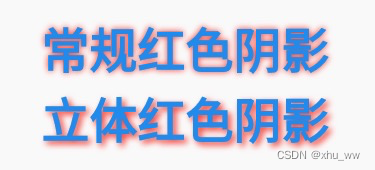
TextStyle 的shadows可为文字添加阴影效果
添加阴影可使用 Shadow 或者 BoxShadow,需要设置阴影的模糊半径 blurRadius
   Text(
     '常规红色阴影',
     style: TextStyle(
       fontSize: 48,
       color: Colors.blue,
       fontWeight: FontWeight.bold,
       shadows: [Shadow(color: Colors.red, blurRadius: 3)],
     ),
   ),
Shadow 可以设置偏移值 offset 使得文字阴影具有立体感
   Text(
     '立体红色阴影',
     style: TextStyle(
       fontSize: 48,
       color: Colors.blue,
       fontWeight: FontWeight.bold,
       shadows: [
         Shadow(color: Colors.red, blurRadius: 3, offset: Offset(3, 3))
       ],
     ),
   ),
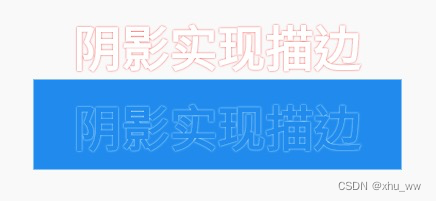
若将阴影的blurRadius值设置小一点,因阴影效果不明显,可以视为为文字添加了描边效果,虽效果不理想但有些情况下可适用。
   Text(
     '阴影实现描边',
     style: TextStyle(
       fontSize: 48,
       color: Colors.white,
       fontWeight: FontWeight.bold,
       shadows: [Shadow(color: Colors.red, blurRadius: 1)],
     ),
   ),
加上背景色做对比
   Container(
     color: Colors.blue,
     padding: const EdgeInsets.symmetric(horizontal: 40, vertical: 10),
     child: const Text(
       '阴影实现描边',
       style: TextStyle(
         fontSize: 48,
         color: Colors.blue,
         fontWeight: FontWeight.bold,
         shadows: [Shadow(color: Colors.white, blurRadius: 1)],
       ),
     ),
   ),
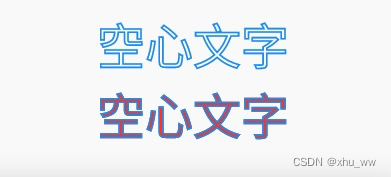
TextStyle 的foreground属性可自定义Text的前景画笔,修改画笔属性实现空心文字。
空心字体
   Text(
     '空心文字',
     style: TextStyle(
       fontSize: 48,
       fontWeight: FontWeight.bold,
       foreground: Paint()
         ..style = PaintingStyle.stroke
         ..strokeWidth = 0.1
         ..color = Colors.blue,
     ),
   ),
使用Stack叠加两个Text,实现文字空心部分为其它颜色
   Stack(
     children: [
       Text(
         '空心文字',
         style: TextStyle(
           fontSize: 48,
           color: Colors.red,
           fontWeight: FontWeight.bold,
         ),
       ),
       Text(
         '空心文字',
         style: TextStyle(
           fontSize: 48,
           fontWeight: FontWeight.bold,
           foreground: Paint()
             ..style = PaintingStyle.stroke
             ..strokeWidth = 0.1
             ..color = Colors.blue,
         ),
       ),
     ],
   ),
我有一个对象has_many应呈现为xml的子对象。这不是问题。我的问题是我创建了一个Hash包含此数据,就像解析器需要它一样。但是rails自动将整个文件包含在.........我需要摆脱type="array"和我该如何处理?我没有在文档中找到任何内容。 最佳答案 我遇到了同样的问题;这是我的XML:我在用这个:entries.to_xml将散列数据转换为XML,但这会将条目的数据包装到中所以我修改了:entries.to_xml(root:"Contacts")但这仍然将转换后的XML包装在“联系人”中,将我的XML代码修改为
查看Ruby的CSV库的文档,我非常确定这是可能且简单的。我只需要使用Ruby删除CSV文件的前三列,但我没有成功运行它。 最佳答案 csv_table=CSV.read(file_path_in,:headers=>true)csv_table.delete("header_name")csv_table.to_csv#=>ThenewCSVinstringformat检查CSV::Table文档:http://ruby-doc.org/stdlib-1.9.2/libdoc/csv/rdoc/CSV/Table.html
我有一大串格式化数据(例如JSON),我想使用Psychinruby同时保留格式转储到YAML。基本上,我希望JSON使用literalstyle出现在YAML中:---json:|{"page":1,"results":["item","another"],"total_pages":0}但是,当我使用YAML.dump时,它不使用文字样式。我得到这样的东西:---json:!"{\n\"page\":1,\n\"results\":[\n\"item\",\"another\"\n],\n\"total_pages\":0\n}\n"我如何告诉Psych以想要的样式转储标量?解
我发现ActiveRecord::Base.transaction在复杂方法中非常有效。我想知道是否可以在如下事务中从AWSS3上传/删除文件:S3Object.transactiondo#writeintofiles#raiseanexceptionend引发异常后,每个操作都应在S3上回滚。S3Object这可能吗?? 最佳答案 虽然S3API具有批量删除功能,但它不支持事务,因为每个删除操作都可以独立于其他操作成功/失败。该API不提供任何批量上传功能(通过PUT或POST),因此每个上传操作都是通过一个独立的API调用完成的
我有一个用户工厂。我希望默认情况下确认用户。但是鉴于unconfirmed特征,我不希望它们被确认。虽然我有一个基于实现细节而不是抽象的工作实现,但我想知道如何正确地做到这一点。factory:userdoafter(:create)do|user,evaluator|#unwantedimplementationdetailshereunlessFactoryGirl.factories[:user].defined_traits.map(&:name).include?(:unconfirmed)user.confirm!endendtrait:unconfirmeddoenden
对于作为String#tr参数的单引号字符串文字中反斜杠的转义状态,我觉得有些神秘。你能解释一下下面三个例子之间的对比吗?我特别不明白第二个。为了避免复杂化,我在这里使用了'd',在双引号中转义时不会改变含义("\d"="d")。'\\'.tr('\\','x')#=>"x"'\\'.tr('\\d','x')#=>"\\"'\\'.tr('\\\d','x')#=>"x" 最佳答案 在tr中转义tr的第一个参数非常类似于正则表达式中的括号字符分组。您可以在表达式的开头使用^来否定匹配(替换任何不匹配的内容)并使用例如a-f来匹配一
在Ruby中是否有Gem或安全删除文件的方法?我想避免系统上可能不存在的外部程序。“安全删除”指的是覆盖文件内容。 最佳答案 如果您使用的是*nix,一个很好的方法是使用exec/open3/open4调用shred:`shred-fxuz#{filename}`http://www.gnu.org/s/coreutils/manual/html_node/shred-invocation.html检查这个类似的帖子:Writingafileshredderinpythonorruby?
我正在尝试找到一种方法来规范化字符串以将其作为文件名传递。到目前为止我有这个:my_string.mb_chars.normalize(:kd).gsub(/[^\x00-\x7F]/n,'').downcase.gsub(/[^a-z]/,'_')但第一个问题:-字符。我猜这个方法还有更多问题。我不控制名称,名称字符串可以有重音符、空格和特殊字符。我想删除所有这些,用相应的字母('é'=>'e')替换重音符号,并将其余的替换为'_'字符。名字是这样的:“Prélèvements-常规”“健康证”...我希望它们像一个没有空格/特殊字符的文件名:“prelevements_routin
华为OD机试题本篇题目:明明的随机数题目输入描述输出描述:示例1输入输出说明代码编写思路最近更新的博客华为od2023|什么是华为od,od薪资待遇,od机试题清单华为OD机试真题大全,用Python解华为机试题|机试宝典【华为OD机试】全流程解析+经验分享,题型分享,防作弊指南华为o
C#实现简易绘图工具一.引言实验目的:通过制作窗体应用程序(C#画图软件),熟悉基本的窗体设计过程以及控件设计,事件处理等,熟悉使用C#的winform窗体进行绘图的基本步骤,对于面向对象编程有更加深刻的体会.Tutorial任务设计一个具有基本功能的画图软件**·包括简单的新建文件,保存,重新绘图等功能**·实现一些基本图形的绘制,包括铅笔和基本形状等,学习橡皮工具的创建**·设计一个合理舒适的UI界面**注明:你可能需要先了解一些关于winform窗体应用程序绘图的基本知识,以及关于GDI+类和结构的知识二.实验环境Windows系统下的visualstudio2017C#窗体应用程序三.
