在java开发中,经常遇到需要调用第三方提供的接口服务的需求,下面对实现http请求的方式进行浅入浅析并进行实例尝试。
在java开发中,实现访问第三方接口服务的常见方式:
1、HttpURLConnection
JDK原生提供的net包,无需其他jar包,实例如下
public class HttpUrlConnectionClientUtil {

    /**
     * Http get请求
     * @param httpUrl 连接
     * @return 响应数据
     */
    public static String doGet(String httpUrl){
        HttpURLConnection connection = null;
        InputStream is = null;
        BufferedReader br = null;
        StringBuffer result = new StringBuffer();
        try {
            //创建连接
            URL url = new URL(httpUrl);
            connection = (HttpURLConnection) url.openConnection();
            //设置请求方式
            connection.setRequestMethod("GET");
            //设置连接超时时间
            connection.setReadTimeout(15000);
            //开始连接
            connection.connect();
            //获取响应数据
            if (connection.getResponseCode() == 200) {
                //获取返回的数据
                is = connection.getInputStream();
                if (null != is) {
                    br = new BufferedReader(new InputStreamReader(is, "UTF-8"));
                    String temp = null;
                    while (null != (temp = br.readLine())) {
                        result.append(temp);
                    }
                }
            }
        } catch (IOException e) {
            e.printStackTrace();
        } finally {
            if (null != br) {
                try {
                    br.close();
                } catch (IOException e) {
                    e.printStackTrace();
                }
            }
            if (null != is) {
                try {
                    is.close();
                } catch (IOException e) {
                    e.printStackTrace();
                }
            }
            //关闭远程连接
            connection.disconnect();
        }
        return result.toString();
    }

    /**
     * Http post请求
     * @param httpUrl 连接
     * @param param 参数
     * @return
     */
    public static String doPost(String httpUrl, String param) {
        HttpURLConnection connection = null;
        OutputStream os = null;
        InputStream is = null;
        BufferedReader br = null;
        StringBuffer result = new StringBuffer();
        try {
            //创建连接对象
            URL url = new URL(httpUrl);
            //创建连接
            connection = (HttpURLConnection) url.openConnection();
            //设置请求方法
            connection.setRequestMethod("POST");
            //设置连接超时时间
            connection.setConnectTimeout(15000);
            //设置读取超时时间
            connection.setReadTimeout(15000);
            //DoOutput设置是否向httpUrlConnection输出,DoInput设置是否从httpUrlConnection读入,此外发送post请求必须设置这两个
            //设置是否可读取
            connection.setDoOutput(true);
            connection.setDoInput(true);
            //设置通用的请求属性
            connection.setRequestProperty("accept", "*/*");
            connection.setRequestProperty("connection", "Keep-Alive");
            connection.setRequestProperty("user-agent", "Mozilla/4.0 (compatible; MSIE 6.0; Windows NT 5.1; SV1)");
            connection.setRequestProperty("Content-Type", "application/json;charset=utf-8");

            //拼装参数
            if (null != param && !param.equals("")) {
                //设置参数
                os = connection.getOutputStream();
                //拼装参数
                os.write(param.getBytes("UTF-8"));
            }
            //读取响应
            if (connection.getResponseCode() == 200) {
                is = connection.getInputStream();
                if (null != is) {
                    br = new BufferedReader(new InputStreamReader(is, "UTF-8"));
                    String temp = null;
                    while (null != (temp = br.readLine())) {
                        result.append(temp);
                        result.append("\r\n");
                    }
                }
            }
        } catch (MalformedURLException e) {
            e.printStackTrace();
        } catch (IOException e) {
            e.printStackTrace();
        } finally {
            if(br!=null){
                try {
                    br.close();
                } catch (IOException e) {
                    e.printStackTrace();
                }
            }
            if(os!=null){
                try {
                    os.close();
                } catch (IOException e) {
                    e.printStackTrace();
                }
            }
            if(is!=null){
                try {
                    is.close();
                } catch (IOException e) {
                    e.printStackTrace();
                }
            }
            //关闭连接
            connection.disconnect();
        }
        return result.toString();
    }

    public static void main(String[] args) {
        String messageByGet = doGet("http://***");
        *** resultByGet = JSON.parseObject(messageByGet, ***.class);
        System.out.println(resultByGet);
        Map param = new HashMap<>();
        param.put("name","admin");
        String str = JSON.toJSONString(param);
        String messageByPost = doPost("http://***", str);
        *** resultByPost = JSON.parseObject(messageByPost, ***.class);
        System.out.println(resultByPost);
    }
}
结果类似如下

2、HttpClient
引入依赖
		<dependency>
            <groupId>commons-httpclient</groupId>
            <artifactId>commons-httpclient</artifactId>
            <version>3.1</version>
        </dependency>
public class HttpClientUtil {
    /**
     * httpClient的get请求方式
     * 使用GetMethod来访问一个URL对应的网页实现步骤:
     * 1.生成一个HttpClient对象并设置相应的参数;
     * 2.生成一个GetMethod对象并设置响应的参数;
     * 3.用HttpClient生成的对象来执行GetMethod生成的Get方法;
     * 4.处理响应状态码;
     * 5.若响应正常,处理HTTP响应内容;
     * 6.释放连接。
     * @param url
     * @param charset
     * @return
     */
    public static String doGet(String url, String charset) {
        //1.生成HttpClient对象并设置参数
        HttpClient httpClient = new HttpClient();
        //设置Http连接超时为5秒
        httpClient.getHttpConnectionManager().getParams().setConnectionTimeout(5000);
        //2.生成GetMethod对象并设置参数
        GetMethod getMethod = new GetMethod(url);
        //设置get请求超时为5秒
        getMethod.getParams().setParameter(HttpMethodParams.SO_TIMEOUT, 5000);
        //设置请求重试处理,用的是默认的重试处理:请求三次
        getMethod.getParams().setParameter(HttpMethodParams.RETRY_HANDLER, new DefaultHttpMethodRetryHandler());
        String response = "";
        //3.执行HTTP GET 请求
        try {
            int statusCode = httpClient.executeMethod(getMethod);
            //4.判断访问的状态码
            if (statusCode != HttpStatus.SC_OK) {
                System.err.println("请求出错:" + getMethod.getStatusLine());
            }
            //5.处理HTTP响应内容
            //HTTP响应头部信息,这里简单打印
            Header[] headers = getMethod.getResponseHeaders();
            for(Header h : headers) {
                System.out.println(h.getName() + "headers:" + h.getValue());
            }
            //读取HTTP响应内容,这里简单打印网页内容
            //读取为字节数组
            byte[] responseBody = getMethod.getResponseBody();
            response = new String(responseBody, charset);
            System.out.println("response:" + response);
            //读取为InputStream,在网页内容数据量大时候推荐使用
            //InputStream response = getMethod.getResponseBodyAsStream();
        } catch (HttpException e) {
            System.out.println("请检查输入的URL!");
            e.printStackTrace();
        } catch (IOException e) {
            //发生网络异常
            System.out.println("发生网络异常!");
        } finally {
            //6.释放连接
            getMethod.releaseConnection();
        }
        return response;
    }

    /**
     * post请求
     * @param url
     * @param json
     * @return
     */
    public static String doPost(String url, JSONObject json, String charset){
        HttpClient httpClient = new HttpClient();
        PostMethod postMethod = new PostMethod(url);
        postMethod.addRequestHeader("accept", "*/*");
        postMethod.addRequestHeader("connection", "Keep-Alive");
        //设置json格式传送
        postMethod.addRequestHeader("Content-Type", "application/json;charset=utf-8");
        //必须设置下面这个Header
        postMethod.addRequestHeader("User-Agent", "Mozilla/5.0 (Windows NT 10.0; Win64; x64) AppleWebKit/537.36 (KHTML, like Gecko) Chrome/58.0.3029.81 Safari/537.36");
        //添加请求参数
        //postMethod.addParameter("params", json.toJSONString());
        try {
            postMethod.setRequestEntity(new StringRequestEntity(json.toJSONString(), "application/json", "utf-8"));
        } catch (UnsupportedEncodingException e) {
            e.printStackTrace();
        }
        String response = "";
        try {
            int code = httpClient.executeMethod(postMethod);
            if (code == 200){
                byte[] responseBody = postMethod.getResponseBody();
                response = new String(responseBody, charset);
                System.out.println("response:" + response);
                // 返回值中文乱码
                //response = postMethod.getResponseBodyAsString();
            }
        } catch (IOException e) {
            e.printStackTrace();
        }
        return response;
    }

    public static void main(String[] args) {
        String messageByGet = doGet("http://***", "UTF-8");
        System.out.println(messageByGet);
        JSONObject jsonObject = new JSONObject();
        jsonObject.put("name","admin");
        String messageByPost = doPost("http://***", jsonObject, "UTF-8");
        System.out.println(messageByPost);
    }
}
结果类似如下

3、CloseableHttpClient
引入依赖
		<dependency>
            <groupId>org.apache.httpcomponents</groupId>
            <artifactId>httpclient</artifactId>
            <version>4.5.2</version>
        </dependency>
public class CloseableHttpClientUtil {

    private static String tokenString = "";
    private static String AUTH_TOKEN_EXPIRED = "AUTH_TOKEN_EXPIRED";
    private static CloseableHttpClient httpClient = null;

    /**
     * 以get方式调用第三方接口
     * @param url
     * @param token
     * @return
     */
    public static String doGet(String url, String token) {
        //创建HttpClient对象
        CloseableHttpClient httpClient = HttpClientBuilder.create().build();
        HttpGet httpGet = new HttpGet(url);
        if (null != tokenString && !tokenString.equals("")) {
            tokenString = getToken();
        }
        //api_gateway_auth_token自定义header头,用于token验证使用
        httpGet.addHeader("api_gateway_auth_token",tokenString);
        httpGet.addHeader("User-Agent", "Mozilla/5.0 (Windows NT 10.0; Win64; x64) AppleWebKit/537.36 (KHTML, like Gecko) Chrome/58.0.3029.81 Safari/537.36");
        try {
            HttpResponse response = httpClient.execute(httpGet);
            if (response.getStatusLine().getStatusCode() == HttpStatus.SC_OK) {
                //返回json格式
                String res = EntityUtils.toString(response.getEntity());
                return res;
            }
        } catch (IOException e) {
            e.printStackTrace();
        }
        return null;
    }

    /**
     * 以post方式调用第三方接口
     * @param url
     * @param json
     * @return
     */
    public static String doPost(String url, JSONObject json) {
        if (null == httpClient) {
            httpClient = HttpClientBuilder.create().build();
        }
        HttpPost httpPost = new HttpPost(url);
        if (null != tokenString && tokenString.equals("")) {
            tokenString = getToken();
        }
        //api_gateway_auth_token自定义header头,用于token验证使用
        httpPost.addHeader("api_gateway_auth_token", tokenString);
        httpPost.addHeader("User-Agent", "Mozilla/5.0 (Windows NT 10.0; Win64; x64) AppleWebKit/537.36 (KHTML, like Gecko) Chrome/58.0.3029.81 Safari/537.36");
        try {
            StringEntity stringEntity = new StringEntity(json.toString());
            stringEntity.setContentEncoding("UTF-8");
            //发送json数据需要设置contentType
            stringEntity.setContentType("application/json;charset=utf-8");
            //设置请求参数
            httpPost.setEntity(stringEntity);
            HttpResponse response = httpClient.execute(httpPost);
            if (response.getStatusLine().getStatusCode() == HttpStatus.SC_OK) {
                //返回json格式
                String res = EntityUtils.toString(response.getEntity());
                return res;
            }
        } catch (IOException e) {
            e.printStackTrace();
        } finally {
            if (httpClient != null){
                try {
                    httpClient.close();
                } catch (IOException e) {
                    e.printStackTrace();
                }
            }
        }
        return null;
    }

    public static void main(String[] args) {
        String messageByGet = doGet("http://***", "");
        System.out.println(messageByGet);
        JSONObject jsonObject = new JSONObject();
        jsonObject.put("name","admin");
        String response = doPost("http://***", jsonObject);
        System.out.println(response);
    }
}
结果类似如下

4、OkHttpClient
引入依赖
		<dependency>
            <groupId>com.squareup.okhttp3</groupId>
            <artifactId>okhttp</artifactId>
            <version>3.10.0</version>
        </dependency>
@Slf4j
public class OkHttpClientUtil {

    private volatile static OkHttpClient client;

    private static final MediaType JSON = MediaType.parse("application/json; charset=utf-8");

    private static final int MAX_IDLE_CONNECTION = 10;

    private static final long KEEP_ALIVE_DURATION = 60;

    private static final long CONNECT_TIMEOUT = 30;

    private static final long READ_TIMEOUT = 30;

    /**
     * 单例模式(双重检查模式) 获取类实例
     *
     * @return client
     */
    private static OkHttpClient getInstance() {
        if (client == null) {
            synchronized (OkHttpClient.class) {
                if (client == null) {
                    client = new OkHttpClient.Builder()
                            .connectTimeout(CONNECT_TIMEOUT, TimeUnit.SECONDS)
                            .readTimeout(READ_TIMEOUT, TimeUnit.SECONDS)
                            .connectionPool(new ConnectionPool(MAX_IDLE_CONNECTION, KEEP_ALIVE_DURATION,TimeUnit.MINUTES))
                            .build();
                }
            }
        }
        return client;
    }

    public static String syncPost(String url, String json) {
        RequestBody body = RequestBody.create(JSON, json);
        Request request = new Request.Builder()
                .url(url)
                .post(body)
                .build();
        try {
            Response response = OkHttpClientUtil.getInstance().newCall(request).execute();
            if (response.isSuccessful()) {
                String result = response.body().string();
                log.info("syncPost response = {}, responseBody= {}", response, result);
                return result;
            }
            String result = response.body().string();
            log.info("syncPost response = {}, responseBody= {}", response, result);
            throw new IOException("三方接口返回http状态码为" + response.code());
        } catch (Exception e) {
            log.error("syncPost() url:{} have a ecxeption {}", url, e);
            throw new RuntimeException("syncPost() have a ecxeption {}" + e.getMessage());
        }
    }

    public static String syncGet(String url, Map<String, Object> headParamsMap) {
        Request request;
        final Request.Builder builder = new Request.Builder().url(url);
        try {
            if (!CollectionUtils.isEmpty(headParamsMap)) {
                final Iterator<Map.Entry<String, Object>> iterator = headParamsMap.entrySet().iterator();
                while (iterator.hasNext()) {
                    final Map.Entry<String, Object> entry = iterator.next();
                    builder.addHeader(entry.getKey(), (String) entry.getValue());
                }
            }
            request = builder.build();
            Response response = OkHttpClientUtil.getInstance().newCall(request).execute();
            String result = response.body().string();
            log.info("syncGet response = {},responseBody= {}", response, result);
            if (!response.isSuccessful()) {
                throw new IOException("三方接口返回http状态码为" + response.code());
            }
            return result;
        } catch (Exception e) {
            log.error("remote interface url:{} have a ecxeption {}", url, e);
            throw new RuntimeException("三方接口返回异常");
        }
    }

    public static void main(String[] args) {
        String messageByGet = syncGet("http://***", null);
        System.out.println(messageByGet);
        JSONObject jsonObject = new JSONObject();
        jsonObject.put("pageNum", 1);
        jsonObject.put("pageSize", 10);
        jsonObject.put("name","admin");
        String messageByPost = syncPost("http://***", jsonObject.toJSONString());
        System.out.println(messageByPost);
    }

}
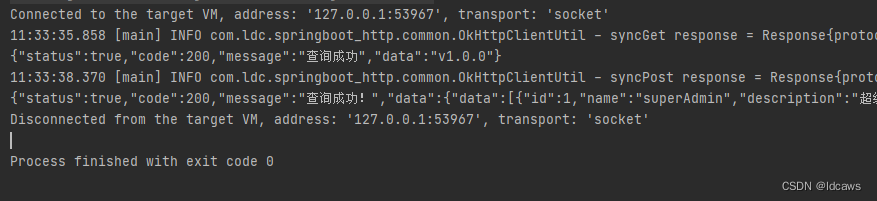
结果类似如下
5、RestTemplate
引入依赖
		<dependency>
            <groupId>org.springframework.boot</groupId>
            <artifactId>spring-boot-starter-web</artifactId>
        </dependency>
RestTemplate是Spring提供的用于访问Rest服务的客户端,RestTemplate提供了多种便捷访问远程Http服务的方法,能够大大提高客户端的编写效率。RestTemplate提供了常见的REST请求方案的模版,例如 GET 请求、POST 请求、PUT 请求、DELETE 请求以及一些通用的请求执行方法 exchange 以及 execute。
@Configuration
public class RestTemplateConfig {

    @Bean
    public RestTemplate restTemplate(ClientHttpRequestFactory factory){
        return new RestTemplate(factory);
    }

    @Bean
    public ClientHttpRequestFactory simpleClientHttpRequestFactory(){
        SimpleClientHttpRequestFactory factory = new SimpleClientHttpRequestFactory();
        factory.setConnectTimeout(15000);
        factory.setReadTimeout(5000);
        return factory;
    }
}
	@Autowired
    private RestTemplate restTemplate;

    private static final String getUrl = "http://***";

    private static final String postUrl = "http://***";

    @Test
    void get1() {
        ResponseEntity<ResponseData> responseEntity = restTemplate.getForEntity(getUrl, ResponseData.class);
        ResponseData responseData = responseEntity.getBody();
        System.out.println(responseData);
    }

    @Test
    void get2() {
        ResponseData responseData = restTemplate.getForObject(getUrl, ResponseData.class);
        System.out.println(responseData);
    }

    @Test
    void post1() {
        Map param = new HashMap<>();
        param.put("name","admin");
        ResponseEntity<String> responseEntity = restTemplate.postForEntity(postUrl, param, String.class);
        String body = responseEntity.getBody();
        System.out.println(body);
    }

    @Test
    void post2() {
        Map param = new HashMap<>();
        param.put("name","admin");
        String body = restTemplate.postForObject(postUrl, param, String.class);
        System.out.println(body);
    }

    @Test
    void exchange() {
        //header参数
        HttpHeaders headers = new HttpHeaders();
        String token = "1234567890";
        headers.add("Authorization", token);
        headers.setContentType(MediaType.APPLICATION_JSON);

        //放入body中的json参数
        JSONObject jsonObject = new JSONObject();
        jsonObject.put("pageNum", 1);
        jsonObject.put("pageSize", 10);
        jsonObject.put("name","admin");

        //组装
        HttpEntity<JSONObject> request = new HttpEntity<>(jsonObject, headers);

        ResponseEntity<String> responseEntity = restTemplate.exchange(postUrl, HttpMethod.POST, request, String.class);
        String body = responseEntity.getBody();
        System.out.println(body);
    }
若是普通java工程推荐使用OkHttpClient,若是spring工程推荐使用RestTemplate。
我怎样才能完成http://php.net/manual/en/function.call-user-func-array.php在ruby中?所以我可以这样做:classAppdeffoo(a,b)putsa+benddefbarargs=[1,2]App.send(:foo,args)#doesn'tworkApp.send(:foo,args[0],args[1])#doeswork,butdoesnotscaleendend 最佳答案 尝试分解数组App.send(:foo,*args)
我试图获取一个长度在1到10之间的字符串,并输出将字符串分解为大小为1、2或3的连续子字符串的所有可能方式。例如:输入:123456将整数分割成单个字符,然后继续查找组合。该代码将返回以下所有数组。[1,2,3,4,5,6][12,3,4,5,6][1,23,4,5,6][1,2,34,5,6][1,2,3,45,6][1,2,3,4,56][12,34,5,6][12,3,45,6][12,3,4,56][1,23,45,6][1,2,34,56][1,23,4,56][12,34,56][123,4,5,6][1,234,5,6][1,2,345,6][1,2,3,456][123
我主要使用Ruby来执行此操作,但到目前为止我的攻击计划如下:使用gemsrdf、rdf-rdfa和rdf-microdata或mida来解析给定任何URI的数据。我认为最好映射到像schema.org这样的统一模式,例如使用这个yaml文件,它试图描述数据词汇表和opengraph到schema.org之间的转换:#SchemaXtoschema.orgconversion#data-vocabularyDV:name:namestreet-address:streetAddressregion:addressRegionlocality:addressLocalityphoto:i
是的,我知道最好使用webmock,但我想知道如何在RSpec中模拟此方法:defmethod_to_testurl=URI.parseurireq=Net::HTTP::Post.newurl.pathres=Net::HTTP.start(url.host,url.port)do|http|http.requestreq,foo:1endresend这是RSpec:let(:uri){'http://example.com'}specify'HTTPcall'dohttp=mock:httpNet::HTTP.stub!(:start).and_yieldhttphttp.shou
在我的Controller中,我通过以下方式在我的index方法中支持HTML和JSON:respond_todo|format|format.htmlformat.json{renderjson:@user}end在浏览器中拉起它时,它会自然地以HTML呈现。但是,当我对/user资源进行内容类型为application/json的curl调用时(因为它是索引方法),我仍然将HTML作为响应。如何获取JSON作为响应?我还需要说明什么? 最佳答案 您应该将.json附加到请求的url,提供的格式在routes.rb的路径中定义。这
我真的很习惯使用Ruby编写以下代码:my_hash={}my_hash['test']=1Java中对应的数据结构是什么? 最佳答案 HashMapmap=newHashMap();map.put("test",1);我假设? 关于java-等价于Java中的RubyHash,我们在StackOverflow上找到一个类似的问题: https://stackoverflow.com/questions/22737685/
question的一些答案关于redirect_to让我想到了其他一些问题。基本上,我正在使用Rails2.1编写博客应用程序。我一直在尝试自己完成大部分工作(因为我对Rails有所了解),但在需要时会引用Internet上的教程和引用资料。我设法让一个简单的博客正常运行,然后我尝试添加评论。靠我自己,我设法让它进入了可以从script/console添加评论的阶段,但我无法让表单正常工作。我遵循的其中一个教程建议在帖子Controller中创建一个“评论”操作,以添加评论。我的问题是:这是“标准”方式吗?我的另一个问题的答案之一似乎暗示应该有一个CommentsController参
我需要在RubyonRails中实现无向图G=(V,E)并考虑构建一个Vertex和一个Edge模型,其中Vertex有_多条边。由于边恰好连接两个顶点,您将如何在Rails中执行此操作?您是否知道任何有助于实现此类图表的gem或库(对重新发明轮子不感兴趣;-))? 最佳答案 不知道有任何现有库在ActiveRecord之上提供图形逻辑。您可能必须实现自己的Vertex、EdgeActiveRecord支持的模型(请参阅Rails安装的rails/activerecord中的vertex.rb和edge.rb/test/fixtur
rails中是否有任何规定允许站点的所有AJAXPOST请求在没有authenticity_token的情况下通过?我有一个调用Controller方法的JqueryPOSTajax调用,但我没有在其中放置任何真实性代码,但调用成功。我的ApplicationController确实有'request_forgery_protection'并且我已经改变了config.action_controller.consider_all_requests_local在我的environments/development.rb中为false我还搜索了我的代码以确保我没有重载ajaxSend来发送
我正在尝试使用boilerpipe来自JRuby。我看过guide从JRuby调用Java,并成功地将它与另一个Java包一起使用,但无法弄清楚为什么同样的东西不能用于boilerpipe。我正在尝试基本上从JRuby中执行与此Java等效的操作:URLurl=newURL("http://www.example.com/some-location/index.html");Stringtext=ArticleExtractor.INSTANCE.getText(url);在JRuby中试过这个:require'java'url=java.net.URL.new("http://www
