使用Java语言Spring框架实现的收银台项目。用户完成注册登录后进入首页,可以进行购买商品和浏览商品订单的功能,收银员可以对商品进行上架,更新商品。双方都能够浏览到商品信息。
使用Java语言实现Web自动化测试,对各页面的元素进行查找确认是否存在,对页面中各功能按按钮进行测试。使用junit简化测试,直观显示哪些代码通过哪些不通过,显示不通过的原因。
Java、Maven、seleniumWeb自动工具、junit单元测试框架
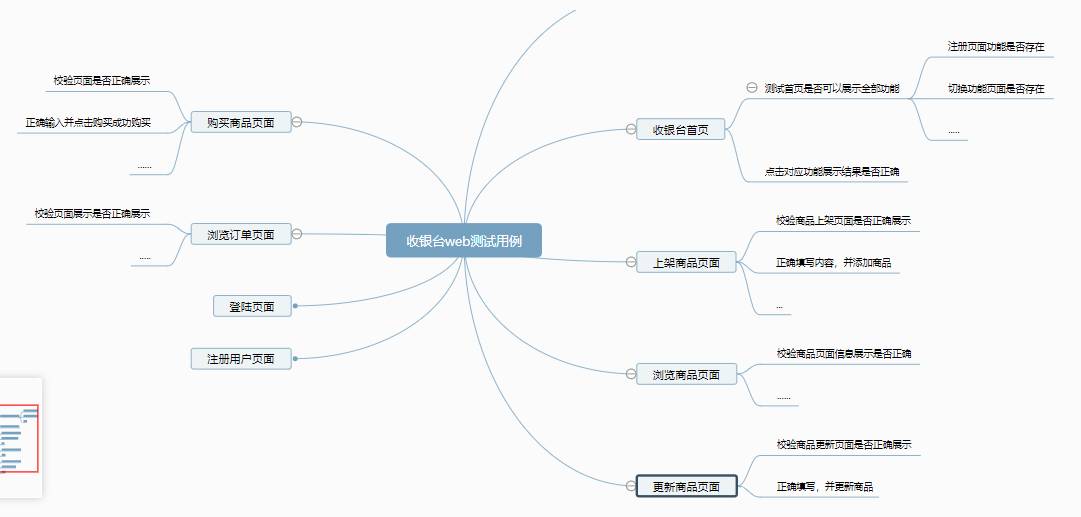
1)设计测试用例
我的学习交流群:769146372 群里有技术指导一起交流学习~
二)编写测试用例代码

对注册页面进行测试,首先检查注册页面元素是否正常展示,之后输入用户名和密码,点击注册按钮成功跳转到登录页面为注册成功
package com.webAutoTest.tests;

import com.webAutoTest.common.CommonDriver;
import org.junit.jupiter.api.*;
import org.openqa.selenium.By;
import org.openqa.selenium.chrome.ChromeDriver;

/**
 * @author hu
 * @date 2022/9/12 15:00
 */
@TestMethodOrder(MethodOrderer.OrderAnnotation.class)
public class RegisterTest {
    private static ChromeDriver driver = CommonDriver.getDriver();

    @BeforeAll
    public static void getUrl(){
        driver.get("http://127.0.0.1:8080/");
        driver.findElement(By.cssSelector("body > div.导航栏 > a:nth-child(2)")).click();
    }

    /**
     * 检查页面元素是否正确显示
     */
    @Test
    @Order(1)
    public void checkHTMLElement(){
        String registerText = driver.findElement(By.cssSelector("body > div.内容区域 > form > h2")).getText();
        String nameText = driver.findElement(By.cssSelector("body > div.内容区域 > form > div:nth-child(2) > input[type=text]")).getAttribute("placeholder");
        String passwordText = driver.findElement(By.cssSelector("body > div.内容区域 > form > div:nth-child(3) > input[type=text]")).getAttribute("placeholder");

        Assertions.assertEquals("注册",registerText);
        Assertions.assertEquals("用户名",nameText);
        Assertions.assertEquals("密码",passwordText);
    }

    /**
     * 检查页面能否注册成功
     * 成功跳转到登录页面
     */
    @Test
    @Order(2)
    public void checkRegister(){
        driver.findElement(By.cssSelector("body > div.内容区域 > form > div:nth-child(2) > input[type=text]")).sendKeys("xiaoliu");
        driver.findElement(By.cssSelector("body > div.内容区域 > form > div:nth-child(3) > input[type=text]")).sendKeys("123");
        driver.findElement(By.cssSelector("body > div.内容区域 > form > button")).click();

        //检查是否跳转成功
        String text = driver.findElement(By.cssSelector("body > div.内容区域 > form > h2")).getText();
        Assertions.assertEquals("登录",text);
    }
}
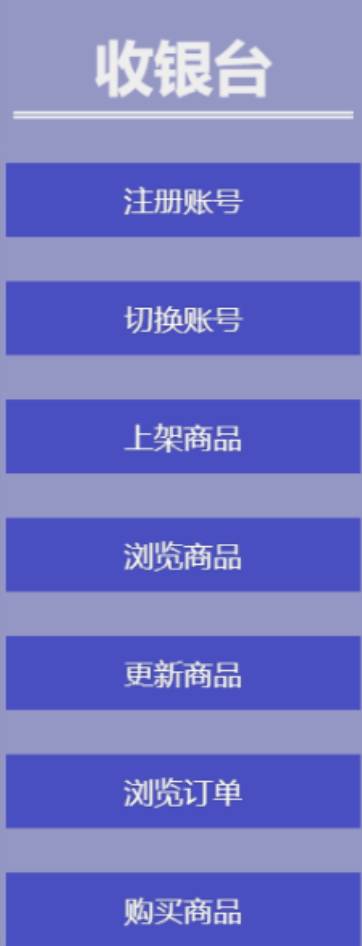
进入项目首页,对首页个元素进行检查,对各按钮功能进行检查,点击按钮是否跳转到相应页面
package com.webAutoTest.tests;

import com.webAutoTest.common.CommonDriver;
import org.junit.jupiter.api.*;
import org.openqa.selenium.By;
import org.openqa.selenium.chrome.ChromeDriver;

/**
 * @author hu
 * @date 2022/9/12 11:14
 */
@TestMethodOrder(MethodOrderer.OrderAnnotation.class)
public class FrontPageTest {

    private static ChromeDriver driver = CommonDriver.getDriver();

    /**
     * 跳转url
     */
    @BeforeAll
    private static void getUrl(){
//        driver.get("http://127.0.0.1:8080/login.html");
        driver.findElement(By.cssSelector("body > div.内容区域 > form > div:nth-child(2) > input[type=text]")).sendKeys("xiaohu");
        driver.findElement(By.cssSelector("body > div.内容区域 > form > div:nth-child(3) > input[type=text]")).sendKeys("123");
        driver.findElement(By.cssSelector("body > div.内容区域 > form > button")).click();
    }
    /**
     *校验首页功能是否正常展示
     */
    @Test
    @Order(1)
    public void checkFrontPage(){
        String registerText = driver.findElement(By.cssSelector("body > div.导航栏 > a:nth-child(2)")).getText();
        String updateRootText = driver.findElement(By.xpath("/html/body/div[1]/a[2]")).getText();
        String restProductText = driver.findElement(By.xpath("/html/body/div[1]/a[3]")).getText();
        String browseProductText = driver.findElement(By.xpath("/html/body/div[1]/a[4]")).getText();
        String updateProductText = driver.findElement(By.cssSelector("body > div.导航栏 > a:nth-child(6)")).getText();
        String browseOrderText = driver.findElement(By.cssSelector("body > div.导航栏 > a:nth-child(7)")).getText();
        String buyText = driver.findElement(By.cssSelector("body > div.导航栏 > a:nth-child(8)")).getText();

        Assertions.assertEquals("注册账号",registerText);
        Assertions.assertEquals("切换账号",updateRootText);
        Assertions.assertEquals("上架商品",restProductText);
        Assertions.assertEquals("浏览商品",browseProductText);
        Assertions.assertEquals("更新商品",updateProductText);
        Assertions.assertEquals("浏览订单",browseOrderText);
        Assertions.assertEquals("购买商品",buyText);
    }

    /**
     * 检查首页功能是否正确
     */
    @Test
    @Order(2)
    public void checkPageRight(){
        //注册账号
        driver.findElement(By.cssSelector("body > div.导航栏 > a:nth-child(4)")).click();
        //从上架商品页面元素对应的文本,校验文本是否符合预期
        String restProduct = driver.findElement(By.cssSelector("body > div.内容区域 > form > h2")).getText();
        Assertions.assertEquals("上架商品",restProduct);
    }
}
测试商品上架页面,检查页面元素是否正确展示,使用参数化对商品进行上架操作,检查上架功能是否正常
package com.webAutoTest.tests;

import com.webAutoTest.common.CommonDriver;
import com.webAutoTest.common.ParamsUtil;
import com.webAutoTest.model.Goods;
import org.junit.jupiter.api.*;
import org.junit.jupiter.params.ParameterizedTest;
import org.junit.jupiter.params.provider.Arguments;
import org.junit.jupiter.params.provider.MethodSource;
import org.openqa.selenium.By;
import org.openqa.selenium.WebElement;
import org.openqa.selenium.chrome.ChromeDriver;

import java.util.stream.Stream;


/**
 * @author hu
 * @date 2022/9/12 11:57
 */
public class RestProductTest {
    private static ChromeDriver driver = CommonDriver.getDriver();

    @BeforeAll
    public static void getUrl() throws InterruptedException {
//        driver.get("http://127.0.0.1:8080/login.html");
//        Thread.sleep(2);
//        driver.findElement(By.cssSelector("body > div.内容区域 > form > div:nth-child(2) > input[type=text]")).sendKeys("xiaohu");
//        driver.findElement(By.cssSelector("body > div.内容区域 > form > div:nth-child(3) > input[type=text]")).sendKeys("123");
//        Thread.sleep(2);
//        driver.findElement(By.cssSelector("body > div.内容区域 > form > button")).click();
        driver.findElement(By.cssSelector("body > div.导航栏 > a:nth-child(4)")).click();
    }

    @BeforeEach
    public void getUrlIn(){
        driver.findElement(By.cssSelector("body > div.导航栏 > a:nth-child(4)")).click();
    }

    /**
     * 校验商品页面是否正常展示
     */
    @Test
    public void checkRestProduct(){
        String restText = driver.findElement(By.cssSelector("body > div.内容区域 > form > button")).getText();
        String productNameText = driver.findElement(By.cssSelector("body > div.内容区域 > form > div:nth-child(2) > input[type=text]")).getAttribute("placeholder");
        String unitText = driver.findElement(By.cssSelector("body > div.内容区域 > form > div:nth-child(5) > input[type=text]")).getAttribute("placeholder");

        Assertions.assertEquals("添加",restText);
        Assertions.assertEquals("名称",productNameText);
        Assertions.assertEquals("单位",unitText);
    }

    /**
     * 添加商品之后会跳转到浏览商品页面
     */
    @ParameterizedTest
    @MethodSource
    public void addGoods(String goodsName,int count,String introduce,String unit,int price,int discount){
        driver.findElement(By.cssSelector("body > div.内容区域 > form > div:nth-child(2) > input[type=text]")).
                sendKeys(goodsName);
        driver.findElement(By.cssSelector("body > div.内容区域 > form > div:nth-child(3) > input[type=text]")).
                sendKeys(count+"");
        driver.findElement(By.cssSelector("body > div.内容区域 > form > div:nth-child(4) > input[type=text]")).
                sendKeys(introduce);
        driver.findElement(By.cssSelector("body > div.内容区域 > form > div:nth-child(5) > input[type=text]")).
                sendKeys(unit);
        driver.findElement(By.cssSelector("body > div.内容区域 > form > div:nth-child(6) > input[type=text]")).
                sendKeys(price+"");
        driver.findElement(By.cssSelector("body > div.内容区域 > form > div:nth-child(7) > input[type=text]")).
                sendKeys(discount+"");
        driver.findElement(By.cssSelector("body > div.内容区域 > form > button")).click();

        //是否跳转到浏览商品页面
         String element = driver.findElement(By.cssSelector("body > div.内容区域 > div.展示列表 > h2")).getText();
         Assertions.assertEquals("浏览商品",element);
    }

    public static Stream<Arguments> addGoods(){
        Goods goods = ParamsUtil.getGoodsName();
        Goods goods1 = ParamsUtil.getGoodsName();
        return Stream.of(Arguments.arguments(goods.getName(),goods.getCount(),goods.getIntroduce()
                        ,goods.getUnit(),goods.getPrice(),goods.getDiscount()),
        Arguments.arguments(goods1.getName(),goods1.getCount(),goods1.getIntroduce()
                        ,goods1.getUnit(),goods1.getPrice(),goods1.getDiscount()));
    }
}
测试商品浏览页面,检查页面元素是否存在,检查下架功能是否正常
package com.webAutoTest.tests;

import com.webAutoTest.common.CommonDriver;
import org.junit.jupiter.api.AfterAll;
import org.junit.jupiter.api.Assertions;
import org.junit.jupiter.api.BeforeAll;
import org.junit.jupiter.api.Test;
import org.openqa.selenium.By;
import org.openqa.selenium.chrome.ChromeDriver;

/**
 * @author hu
 * @date 2022/9/12 13:54
 */
public class BrowseProductTest {
    private static ChromeDriver driver = CommonDriver.getDriver();


    /**
     * 跳转到浏览商品页面
     */
    @BeforeAll
    public static void getUrl(){
/*        driver.get("http://127.0.0.1:8080/login.html");
        driver.findElement(By.cssSelector("body > div.内容区域 > form > div:nth-child(2) > input[type=text]")).sendKeys("xiaohu");
        driver.findElement(By.cssSelector("body > div.内容区域 > form > div:nth-child(3) > input[type=text]")).sendKeys("123");
        driver.findElement(By.cssSelector("body > div.内容区域 > form > button")).click();*/
        driver.findElement(By.cssSelector("body > div.导航栏 > a:nth-child(5)")).click();
    }

    /**
     * 浏览页面元素是否展示元素
     */
    @Test
    public void checkHTMLElement(){
         String countText = driver.findElement(By.cssSelector("body > div.内容区域 > div.展示列表 > table > thead > tr > th:nth-child(1)")).getText();
         String introduceText = driver.findElement(By.cssSelector("body > div.内容区域 > div.展示列表 > table > thead > tr > th:nth-child(3)")).getText();

        Assertions.assertEquals("编号",countText);
        Assertions.assertEquals("介绍",introduceText);
    }

    /**
     * 检查下架按钮是否能正常使用
     */
    @Test
    public void checkPull(){
//        driver.findElement(By.cssSelector("body > div.内容区域 > div.展示列表 > table > tbody > tr:nth-child(1) > td:nth-child(8) > a")).click();
    }

}
测试更新商品页面,检查页面元素正确显示,对更新功能进行测试
package com.webAutoTest.tests;

import com.webAutoTest.common.CommonDriver;
import org.junit.jupiter.api.*;
import org.openqa.selenium.By;
import org.openqa.selenium.chrome.ChromeDriver;

/**
 * @author hu
 * @date 2022/9/12 15:34
 */
@TestMethodOrder(MethodOrderer.OrderAnnotation.class)
public class UpdateTest {
    private static ChromeDriver driver = CommonDriver.getDriver();

    @BeforeAll
    public static void getUrl(){
        driver.findElement(By.cssSelector("body > div.导航栏 > a:nth-child(6)")).click();
    }

    /**
     * 检查页面元素是否正确显示
     */
    @Test
    @Order(1)
    public void checkHTMLElement(){
        String updateText = driver.findElement(By.cssSelector("body > div.内容区域 > form > h2")).getText();
        String idText = driver.findElement(By.cssSelector("body > div.内容区域 > form > div:nth-child(2) > input[type=text]")).getAttribute("placeholder");

        Assertions.assertEquals("更新商品",updateText);
        Assertions.assertEquals("商品 id",idText);
    }

    /**
     * 更新商品功能是否正常
     */
    @Test
    @Order(2)
    public void checkUpdateRight(){
        driver.findElement(By.cssSelector("body > div.导航栏 > a:nth-child(5)")).click();
        String idText = driver.findElement(By.cssSelector("body > div.内容区域 > div.展示列表 > table > tbody > tr:nth-child(1) > td:nth-child(1)")).getText();
        driver.findElement(By.cssSelector("body > div.导航栏 > a:nth-child(6)")).click();
        driver.findElement(By.cssSelector("body > div.内容区域 > form > div:nth-child(2) > input[type=text]")).sendKeys(idText);
        driver.findElement(By.cssSelector("body > div.内容区域 > form > div:nth-child(3) > input[type=text]")).sendKeys("西瓜");
        driver.findElement(By.cssSelector("body > div.内容区域 > form > div:nth-child(4) > input[type=text]")).sendKeys("50");
        driver.findElement(By.cssSelector("body > div.内容区域 > form > div:nth-child(5) > input[type=text]")).sendKeys("大西瓜");
        driver.findElement(By.cssSelector("body > div.内容区域 > form > div:nth-child(6) > input[type=text]")).sendKeys("斤");
        driver.findElement(By.cssSelector("body > div.内容区域 > form > div:nth-child(7) > input[type=text]")).sendKeys("2");
        driver.findElement(By.cssSelector("body > div.内容区域 > form > div:nth-child(8) > input[type=text]")).sendKeys("70");

        driver.findElement(By.cssSelector("body > div.内容区域 > form > button")).click();
        //更新成功跳转到浏览商品
        String browseText = driver.findElement(By.cssSelector("body > div.内容区域 > div.展示列表 > h2")).getText();
        Assertions.assertEquals("浏览商品",browseText);
    }
}
对购买商品页面进行测试,检查页面元素是否正常显示,购买功能是否正常,成功跳转到支付页面,失败回到购买页面
package com.webAutoTest.tests;

import com.webAutoTest.common.CommonDriver;
import org.junit.jupiter.api.*;
import org.junit.jupiter.params.ParameterizedTest;
import org.junit.jupiter.params.provider.MethodSource;
import org.openqa.selenium.By;
import org.openqa.selenium.chrome.ChromeDriver;

/**
 * @author hu
 * @date 2022/9/12 16:09
 */
@TestMethodOrder(MethodOrderer.OrderAnnotation.class)
public class BuyTest {
    private static ChromeDriver driver = CommonDriver.getDriver();

    @BeforeAll
    public static void getUrl(){
        driver.findElement(By.cssSelector("body > div.导航栏 > a:nth-child(8)")).click();
    }

    /**
     * 检查页面元素是否正确显示
     */
    @Test
    @Order(1)
    public void checkHTMLElement(){
        String text = driver.findElement(By.cssSelector("body > div.内容区域 > form > h2")).getText();

        Assertions.assertEquals("购买商品",text);
    }

    /**
     * 检查购买功能
     */
    @Test
    @Order(2)
    public void checkBuyRight(){
        driver.findElement(By.cssSelector("body > div.导航栏 > a:nth-child(5)")).click();
        String idText = driver.findElement(By.cssSelector("body > div.内容区域 > div.展示列表 > table > tbody > tr:nth-child(3) > td:nth-child(1)")).getText();

        driver.findElement(By.cssSelector("body > div.导航栏 > a:nth-child(8)")).click();
        driver.findElement(By.cssSelector("body > div.内容区域 > form > div > input[type=text]")).sendKeys(idText + "-" + 10);
        driver.findElement(By.cssSelector("body > div.内容区域 > form > button")).click();

        //购买成功跳转到支付页面

        String text = driver.findElement(By.cssSelector("body > div.内容区域 > div.展示区域 > a.btn.btn-confirm")).getText();
        Assertions.assertEquals("确认",text);
        //购买失败跳转到购买页面

    }
}
测试购买订单页面,检查页面元素是否正确展示,对支付功能进行测试,成功跳转到支付页面进行支付操作
package com.webAutoTest.tests;

import com.webAutoTest.common.CommonDriver;
import org.junit.jupiter.api.*;
import org.openqa.selenium.By;
import org.openqa.selenium.chrome.ChromeDriver;

/**
 * @author hu
 * @date 2022/9/12 16:01
 */
public class BrowseOrder {
    private static ChromeDriver driver = CommonDriver.getDriver();

    @BeforeAll
    public static void getUrl(){
        driver.findElement(By.cssSelector("body > div.导航栏 > a:nth-child(7)")).click();
    }

    /**
     * 检查页面元素是否正确显示
     */
    @Test
    public void checkHTMLElement(){
        String orderText = driver.findElement(By.cssSelector("body > div.内容区域 > div.展示列表 > h2")).getText();
        String informationText = driver.findElement(By.cssSelector("body > div.内容区域 > div.展示列表 > table > thead > tr > th:nth-child(1)")).getText();

        Assertions.assertEquals("浏览订单",orderText);
        Assertions.assertEquals("信息",informationText);
    }
}
测试支付页面,进入浏览订单页面,点击订单中的未支付,进入支付页面,对支付功能进行测试,支付成功跳转到浏览订单页面,取消支付清除此订单并跳转到浏览商品页面
package com.webAutoTest.tests;

import com.webAutoTest.common.CommonDriver;
import org.junit.jupiter.api.*;
import org.openqa.selenium.By;
import org.openqa.selenium.chrome.ChromeDriver;

/**
 * @author hu
 * @date 2022/9/12 17:06
 */
public class PayTest {
    private static ChromeDriver driver = CommonDriver.getDriver();

    @BeforeAll
    private static void getUrl() {
        driver.findElement(By.cssSelector("body > div.内容区域 > div.展示列表 > table > tbody > tr:nth-child(1) > td:nth-child(1) > p:nth-child(2) > a")).click();
        ;
    }

    /**
     * 对功能进行测试
     */
    @Test
    public void CheckHTMLElement() {
        //取消支付订单清除,跳转到商品浏览页面
        driver.findElement(By.cssSelector("body > div.内容区域 > div.展示区域 > a.btn.btn-confirm")).click();
        //检查是否跳转到商品浏览页面
        String browseProductText = driver.findElement(By.cssSelector("body > div.内容区域 > div.展示列表 > h2")).getText();
        Assertions.assertSame("浏览商品",browseProductText);
        //确认支付跳转到订单浏览页面
        driver.findElement(By.cssSelector("body > div.内容区域 > div.展示列表 > table > tbody > tr:nth-child(1) > td:nth-child(1) > p:nth-child(2) > a")).click();
        driver.findElement(By.cssSelector("body > div.内容区域 > div.展示区域 > a.btn.btn-confirm")).click();
        //检查是否跳转到订单浏览页面
        String browseOrderText = driver.findElement(By.cssSelector("body > div.内容区域 > div.展示列表 > h2")).getText();
        Assertions.assertEquals("浏览订单",browseOrderText);
    }
}
三)测试结果
过程中观察测试数据,线程等待,共通过测试用例7,耗时25s

测试用例全部通过
1.使用selenium4web自动化工具和Junit5单元测试框架,通过注解,提升测试效率。
2.使用单例模式,将ChromeDriver私有化,保证所有的测试都使用同一个实例对象,减少创建和销毁对象的时间,
3.使用测试套件,一次执行所有的测试用例。
4.使用隐式等待和强制等待,提升自动化测试用例的稳定性。
为什么使用强制等待,不使用显示等待:
5.使用屏幕截图,方便定位问题的出处。
现在我邀请大家加入自己建的软件测试学习社群:【 769146372 】,备注“博客园乐却思蜀”, 大家可以一起探讨交流软件测试,共同学习软件测试技术、面试等软件测试方方面面,还会有免费直播课,收获更多测试技巧,
我们一起进阶Python自动化测试/测试开发,走向高薪之路。
如果我的博客对你有帮助、如果你喜欢我的博客内容,请 “点赞” “评论” “收藏” 一 键三连哦!
很好奇,就使用rubyonrails自动化单元测试而言,你们正在做什么?您是否创建了一个脚本来在cron中运行rake作业并将结果邮寄给您?git中的预提交Hook?只是手动调用?我完全理解测试,但想知道在错误发生之前捕获错误的最佳实践是什么。让我们理所当然地认为测试本身是完美无缺的,并且可以正常工作。下一步是什么以确保他们在正确的时间将可能有害的结果传达给您? 最佳答案 不确定您到底想听什么,但是有几个级别的自动代码库控制:在处理某项功能时,您可以使用类似autotest的内容获得关于哪些有效,哪些无效的即时反馈。要确保您的提
如何在buildr项目中使用Ruby?我在很多不同的项目中使用过Ruby、JRuby、Java和Clojure。我目前正在使用我的标准Ruby开发一个模拟应用程序,我想尝试使用Clojure后端(我确实喜欢功能代码)以及JRubygui和测试套件。我还可以看到在未来的不同项目中使用Scala作为后端。我想我要为我的项目尝试一下buildr(http://buildr.apache.org/),但我注意到buildr似乎没有设置为在项目中使用JRuby代码本身!这看起来有点傻,因为该工具旨在统一通用的JVM语言并且是在ruby中构建的。除了将输出的jar包含在一个独特的、仅限ruby
我正在编写一个包含C扩展的gem。通常当我写一个gem时,我会遵循TDD的过程,我会写一个失败的规范,然后处理代码直到它通过,等等......在“ext/mygem/mygem.c”中我的C扩展和在gemspec的“扩展”中配置的有效extconf.rb,如何运行我的规范并仍然加载我的C扩展?当我更改C代码时,我需要采取哪些步骤来重新编译代码?这可能是个愚蠢的问题,但是从我的gem的开发源代码树中输入“bundleinstall”不会构建任何native扩展。当我手动运行rubyext/mygem/extconf.rb时,我确实得到了一个Makefile(在整个项目的根目录中),然后当
我有一个围绕一些对象的包装类,我想将这些对象用作散列中的键。包装对象和解包装对象应映射到相同的键。一个简单的例子是这样的:classAattr_reader:xdefinitialize(inner)@inner=innerenddefx;@inner.x;enddef==(other)@inner.x==other.xendenda=A.new(o)#oisjustanyobjectthatallowso.xb=A.new(o)h={a=>5}ph[a]#5ph[b]#nil,shouldbe5ph[o]#nil,shouldbe5我试过==、===、eq?并散列所有无济于事。
我有一些Ruby代码,如下所示:Something.createdo|x|x.foo=barend我想编写一个测试,它使用double代替block参数x,这样我就可以调用:x_double.should_receive(:foo).with("whatever").这可能吗? 最佳答案 specify'something'dox=doublex.should_receive(:foo=).with("whatever")Something.should_receive(:create).and_yield(x)#callthere
我在我的Rails项目中使用Pow和powifygem。现在我尝试升级我的ruby版本(从1.9.3到2.0.0,我使用RVM)当我切换ruby版本、安装所有gem依赖项时,我通过运行railss并访问localhost:3000确保该应用程序正常运行以前,我通过使用pow访问http://my_app.dev来浏览我的应用程序。升级后,由于错误Bundler::RubyVersionMismatch:YourRubyversionis1.9.3,butyourGemfilespecified2.0.0,此url不起作用我尝试过的:重新创建pow应用程序重启pow服务器更新战俘
Sinatra新手;我正在运行一些rspec测试,但在日志中收到了一堆不需要的噪音。如何消除日志中过多的噪音?我仔细检查了环境是否设置为:test,这意味着记录器级别应设置为WARN而不是DEBUG。spec_helper:require"./app"require"sinatra"require"rspec"require"rack/test"require"database_cleaner"require"factory_girl"set:environment,:testFactoryGirl.definition_file_paths=%w{./factories./test/
我已经像这样安装了一个新的Rails项目:$railsnewsite它执行并到达:bundleinstall但是当它似乎尝试安装依赖项时我得到了这个错误Gem::Ext::BuildError:ERROR:Failedtobuildgemnativeextension./System/Library/Frameworks/Ruby.framework/Versions/2.0/usr/bin/rubyextconf.rbcheckingforlibkern/OSAtomic.h...yescreatingMakefilemake"DESTDIR="cleanmake"DESTDIR="
我遵循MichaelHartl的“RubyonRails教程:学习Web开发”,并创建了检查用户名和电子邮件长度有效性的测试(名称最多50个字符,电子邮件最多255个字符)。test/helpers/application_helper_test.rb的内容是:require'test_helper'classApplicationHelperTest在运行bundleexecraketest时,所有测试都通过了,但我看到以下消息在最后被标记为错误:ERROR["test_full_title_helper",ApplicationHelperTest,1.820016791]test
我收到这个错误:RuntimeError(自动加载常量Apps时检测到循环依赖当我使用多线程时。下面是我的代码。为什么会这样?我尝试多线程的原因是因为我正在编写一个HTML抓取应用程序。对Nokogiri::HTML(open())的调用是一个同步阻塞调用,需要1秒才能返回,我有100,000多个页面要访问,所以我试图运行多个线程来解决这个问题。有更好的方法吗?classToolsController0)app.website=array.join(',')putsapp.websiteelseapp.website="NONE"endapp.saveapps=Apps.order("
