 声音测量最常用的物理量是声压,但描述声压的大小通常用声压级(Sound Pressure Level,SPL)。人耳可听的声压范围为2×10^-5Pa到20Pa,对应的声压级范围为0~120dB,因此,引入声压级的概念易于描述线性变化很大的声压。
声压级计算公式:
$$
L_p=20*lg(\cfrac{p }{p_0})
$$
式中,
Lp:声压级(单位:分贝);
p:声压(单位:帕);
p0:基准声压,在空气中 p0=2×10的-5次方(帕),即20微帕 。
声音测量最常用的物理量是声压,但描述声压的大小通常用声压级(Sound Pressure Level,SPL)。人耳可听的声压范围为2×10^-5Pa到20Pa,对应的声压级范围为0~120dB,因此,引入声压级的概念易于描述线性变化很大的声压。
声压级计算公式:
$$
L_p=20*lg(\cfrac{p }{p_0})
$$
式中,
Lp:声压级(单位:分贝);
p:声压(单位:帕);
p0:基准声压,在空气中 p0=2×10的-5次方(帕),即20微帕 。
 其中,pref表示1000Hz处人耳可听的最小声压幅值20μPa。上式中声压级计算所用的声压p一定是声压的均方根值(RMS),或者是声压的均方值(如果采用10倍的对数形式)。


 其中W为测量的声功率,W0=10^-12W为基准声功率。声功率是一个绝对量,只与声源有关,与其他无关,因此,它是声源的一个物理属性。

#***********************************************************************
#   Purpose:   绘制时域和频域波形图(单一信号)
#   Author:    爱看书的小沐
#   Date:      2022-02-21
#   Languages: Python
#   Platform:  Python 3.9.7 win64
# ***********************************************************************
# _*_ coding: utf-8 _*_
from matplotlib import pyplot as plt
import numpy as np

# 中文显示工具函数
def set_params():
    plt.rcParams['font.sans-serif'] = ['FangSong']
    plt.rcParams['axes.unicode_minus'] = False
    fig = plt.figure(figsize=(12, 4))
    fig.canvas.manager.window.wm_geometry('+300+300')

def show_results(x, y, sampling=5):
    n = len(x)
    interval = sampling / n

    # 绘制原始信号的波形图
    ax1 = plt.subplot(2, 1, 1)
    t = np.arange(0, sampling, interval)
    plt.plot(t, x, 'green')
    plt.xlabel('时间(s)'), plt.ylabel('振幅')
    plt.title('(a)原始正弦信号:时域波形图')
    plt.tight_layout()

    # 绘制变换后的波形图
    ax2 = plt.subplot(2, 1, 2)
    frequency = np.arange(n / 2) / (n * interval)
    nfft = abs(y[range(int(n / 2))] / n)
    plt.plot(frequency, nfft, 'red')
    plt.xlabel('频率(Hz)'), plt.ylabel('频谱')
    plt.title(label="(b)傅里叶变换:频域波形图")
    plt.tight_layout()

    # 以动画的方式在上面两幅波形图中同时绘制关键点
    t1 = t[::20]
    val1 = x[::20]
    t2 = frequency[::10]
    val2 = nfft[::10]
    for i in range(0, len(t1)):
        ax1.scatter(t1[i],val1[i], c='b',marker='*')
        ax2.scatter(t2[i],val2[i], c='b',marker='*')
        plt.pause(0.1)

    # 绘制结果图
    plt.show()

if __name__ == "__main__":
    # 生成频率为1,速度为2*pi的正弦波
    time = np.arange(0, 10, .005)
    x = np.sin(2 * np.pi * 1 * time)
    y = np.fft.fft(x)
    set_params()
    show_results(x, y)

#***********************************************************************
#   Purpose:   绘制时域和频域波形图(两个信号同时叠加)
#   Author:    爱看书的小沐
#   Date:      2022-02-21
#   Languages: Python
#   Platform:  Python 3.9.7 win64
# ***********************************************************************
# _*_ coding: utf-8 _*_
import numpy as np
import matplotlib.pyplot as plt

def set_params():
    plt.rcParams['font.sans-serif'] = ['FangSong']
    plt.rcParams['axes.unicode_minus'] = False
    fig = plt.figure(figsize=(12, 4))
    fig.canvas.manager.window.wm_geometry('+300+300')

def show_resut():
    sampling_rate = 2000    # 采样率
    fft_size = 1000         # FFT取样长度
    t = np.arange(0, 1, 1.0 / sampling_rate)

    # 两个正弦波叠加,100HZ和50HZ
    x=0.6*np.sin(2*np.pi*100*t)+0.6*np.sin(2*np.pi*50*t)
    xs = x[:fft_size]
    xf = np.fft.rfft(xs) / fft_size  # 返回fft_size/2+1 个频率
    freqs = np.linspace(0, sampling_rate, fft_size//2+1 )  # 表示频率
    xfp = 20 * np.log10(np.clip(np.abs(xf), 1e-20, 1e100))

    # 绘制原始信号的波形图
    ax1 = plt.subplot(211)
    tt = t[:fft_size]
    plt.plot(tt, xs)
    plt.xlabel(u"时间(s)")
    plt.ylabel(u'振幅')
    plt.title(u"100Hz和50Hz的叠加波形的时域图")
    plt.tight_layout()

    # 绘制变换后的波形图
    ax2 = plt.subplot(212)
    plt.plot(freqs, xfp)
    plt.xlabel(u"频率(Hz)")
    plt.ylabel(u'振幅')
    plt.title(u"100Hz和50Hz的叠加波形的频域图")
    plt.tight_layout()

    # 以动画的方式在上面两幅波形图中同时绘制关键点
    t1 = tt[::10]
    val1 = x[::10]
    t2 = freqs[::5]
    val2 = xfp[::5]

    print(len(t1), len(t2))
    for i in range(0, len(t1)):
        ax1.scatter(t1[i],val1[i], c='r',marker='*')
        ax2.scatter(t2[i],val2[i], c='r',marker='*')
        plt.pause(0.1)

    # 绘制结果图
    # plt.subplots_adjust(hspace=0.8)
    plt.show()

set_params()
show_resut()


fs = 10e3;
t = 0:1/fs:2;
x1 = vco(sawtooth(2*pi*t,0.5),[0.1 0.4]*fs,fs);
spectrogram(x1,kaiser(256,5),220,512,fs,'yaxis')

view(-45,65)
colormap bone
<center class="half">
<img src="https://img-blog.csdnimg.cn/aed5b3deca8d47c08dfc0366096eafaf.png?x-oss-process=image/watermark,type_d3F5LXplbmhlaQ,shadow_50,text_Q1NETiBA54ix55yL5Lmm55qE5bCP5rKQ,size_15,color_FFFFFF,t_70,g_se,x_16" width="350"/>
<img src="https://img-blog.csdnimg.cn/ebcc019b7d4045ae8f017fa21171c947.png?x-oss-process=image/watermark,type_d3F5LXplbmhlaQ,shadow_50,text_Q1NETiBA54ix55yL5Lmm55qE5bCP5rKQ,size_15,color_FFFFFF,t_70,g_se,x_16" width="350"/>
</center>
#***********************************************************************
#   Purpose:   绘制2d时频图(基于chirp信号)
#   Author:    爱看书的小沐
#   Date:      2022-02-21
#   Languages: Python
#   Platform:  Python 3.9.7 win64
# ***********************************************************************
from scipy.signal import chirp, spectrogram
import matplotlib.pyplot as plt
import matplotlib.animation as animation
import numpy as np

# define vars
fig = plt.figure(figsize=(12, 4))
fs = 150
T = 4
t = np.arange(0, int(T*fs)) / fs
w = chirp(t, f0=20, f1=10, t1=T, method='linear')

def plot_spectrogram(title, w, fs):
    ff, tt, Sxx = spectrogram(w, fs=fs, nperseg=64, nfft=256)
    plt.pcolormesh(tt, ff[:145], Sxx[:145], cmap='gray_r', shading='gouraud')
    plt.title(title)
    plt.xlabel('t (sec)')
    plt.ylabel('Frequency (Hz)')
    plt.grid()

# plot 1
ax1 = plt.subplot(211)
plot_spectrogram(f'spectrogram: Linear Chirp, f(0)=20, f({T})=10', w, fs)
plt.tight_layout()

# plot 2
ax2 = plt.subplot(212, sharex=ax1)
plt.plot(t, w, color='blue')
plt.title(f"plot: Linear Chirp, f(0)=20, f({T})=10")
plt.xlabel('t (sec)')
plt.ylabel('Amplitude')
plt.tight_layout()

# plot 2 by animation
def update_points(num):
    point_ani.set_data(t[num], w[num])
    if num % 5 == 0:
        point_ani.set_marker("*")
        point_ani.set_markersize(8)
    else:
        point_ani.set_marker("o")
        point_ani.set_markersize(4)

    text_pt.set_position((t[num], w[num]))
    text_pt.set_text("x=%.3f, y=%.3f" % (t[num], w[num]))
    return point_ani, text_pt,

point_ani, = plt.plot(t[0], w[0], "ro")
plt.grid(ls="--")
text_pt = plt.text(4, 0.8, '', fontsize=10)
ani = animation.FuncAnimation(fig, update_points, np.arange(0, 100), interval=300, blit=True)
ani.save('test.gif', writer='Pillow', fps=10)

# show results
plt.show()

#***********************************************************************
#   Purpose:   绘制3d时频图(基于chirp信号)
#   Author:    爱看书的小沐
#   Date:      2022-02-21
#   Languages: Python
#   Platform:  Python 3.9.7 win64
# ***********************************************************************
import numpy as np
import pandas as pd
import numpy as np
from scipy import signal
import matplotlib.pyplot as plt
from mpl_toolkits.mplot3d import Axes3D
from matplotlib import cm
from matplotlib.collections import PolyCollection
from matplotlib import mlab
import matplotlib.pyplot as plt
import numpy as np

from matplotlib import animation

# Fixing random state for reproducibility
np.random.seed(666)

title = ('2 Vrms sine wave with modulated frequency around 3kHz, '
         'corrupted by white noise of exponentially decreasing '
         'magnitude sampled at 10 kHz.')

# Define vars
# fs = 10e3
fs = 100
# N = 1e5
N = 1e4
amp = 2 * np.sqrt(2)
noise_power = 0.01 * fs / 2
t = np.arange(N) / float(fs)
mod = 500*np.cos(2*np.pi*0.25*t)
carrier = amp * np.sin(2*np.pi*3e3*t + mod)
noise = np.random.normal(scale=np.sqrt(noise_power), size=t.shape)
noise *= np.exp(-t/5)
y = carrier + noise

# Define plot 2d
def specgram2d(y, srate=44100, ax=None, title=None):
  if not ax:
    ax = plt.axes()
  ax.set_title(title, loc='center', wrap=True, fontdict={'weight':'normal','size': 8})
  spec, freqs, t, im = ax.specgram(y, Fs=fs, scale='dB', vmax=0)
  ax.set_xlabel('time (s)')
  ax.set_ylabel('frequencies (Hz)')
  cbar = plt.colorbar(im, ax=ax)
  cbar.set_label('Amplitude (dB)')
  cbar.minorticks_on()
  return spec, freqs, t, im

# Define plot 3d
def specgram3d(y, srate=44100, ax=None, title=None):
  if not ax:
    ax = plt.axes(projection='3d')
  ax.set_title(title, loc='center', wrap=True)
  spec, freqs, t = mlab.specgram(y, Fs=srate)
  X, Y, Z = t[None, :], freqs[:, None],  20.0 * np.log10(spec)
  ax.plot_surface(X, Y, Z, cmap='viridis')
  ax.set_xlabel('time (s)')
  ax.set_ylabel('frequencies (Hz)')
  ax.set_zlabel('amplitude (dB)')
  ax.set_zlim(-80, 0)
  return X, Y, Z

# Call plot 2d
fig = plt.figure(figsize=(12, 4))
ax1 = plt.subplot(121)
specgram2d(y, srate=fs, title=title, ax = ax1)
plt.tight_layout()

# Call plot 3d
ax2 = plt.subplot(122, projection= "3d")
specgram3d(y, srate=fs, title="", ax = ax2)
plt.tight_layout()

# Animate plot 3d
def animate(i):
    ax2.view_init(azim=i)
rot_animation = animation.FuncAnimation(fig, animate, frames=np.arange(0,360+2,2), interval=100)
rot_animation.save('test.gif', writer='pillow')

plt.show()
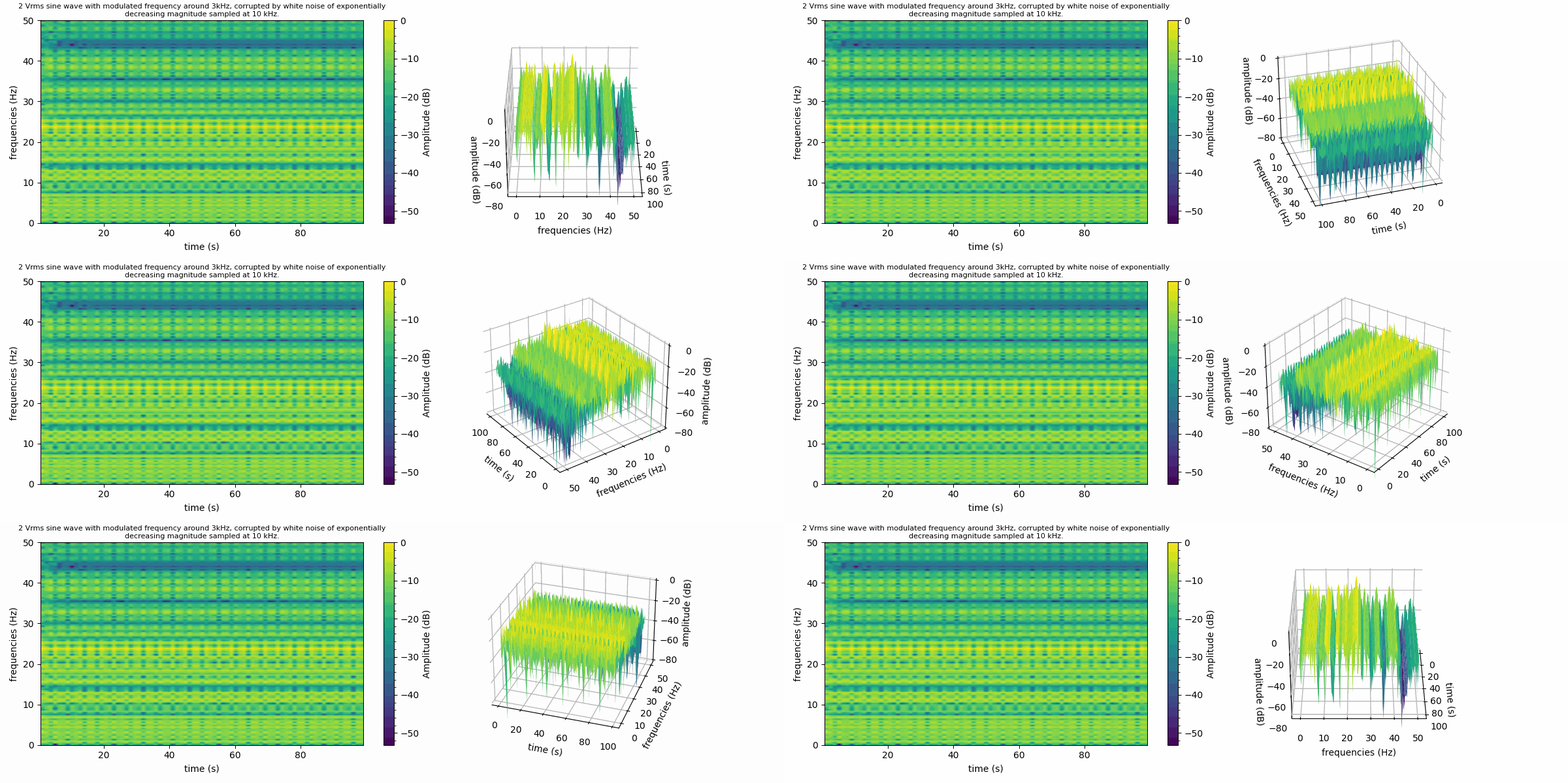
#***********************************************************************
#   Purpose:   绘制wav声音文件时频图
#   Author:    爱看书的小沐
#   Date:      2022-02-21
#   Languages: Python
#   Platform:  Python 3.9.7 win64
# ***********************************************************************

import matplotlib.pyplot as plt
import numpy as np
from scipy.io import wavfile
from matplotlib import animation

fig = plt.figure(figsize=(12, 6))
fig.canvas.manager.window.wm_geometry('+150+150')

#################################################################################
# Read the wav file (mono)
samplingFrequency, signalData = wavfile.read('d:\wind.wav')
print(samplingFrequency, len(signalData))

# Plot the signal read from wav file
ax221 = plt.subplot(221)
plt.title('Spectrogram of a wav file with single-channel music')
plt.plot(signalData)
plt.xlabel('Sample')
plt.ylabel('Amplitude')
plt.grid(ls="--")
plt.tight_layout()

point_221, = plt.plot(signalData, "bo")
text_221 = plt.text(4, 0.8, '', fontsize=10)

plt.subplot(222)
plt.specgram(signalData,Fs=samplingFrequency)
plt.xlabel('Time')
plt.ylabel('Frequency')
plt.tight_layout()

#################################################################################
# Define the list of frequencies
frequencies         = np.arange(5,105,5)

# Sampling Frequency
samplingFrequency   = 400

# Create two ndarrays
s1 = np.empty([0])  # For samples
s2 = np.empty([0])  # For signal

# Start Value of the sample
start   = 1

# Stop Value of the sample
stop    = samplingFrequency+1

for frequency in frequencies:
    sub1 = np.arange(start, stop, 1)

    # Signal - Sine wave with varying frequency + Noise
    sub2 = np.sin(2*np.pi*sub1*frequency*1/samplingFrequency)+np.random.randn(len(sub1))
    s1      = np.append(s1, sub1)
    s2      = np.append(s2, sub2)
    start   = stop+1
    stop    = start+samplingFrequency

# Plot the signal
plt.subplot(223, sharex=ax221)
plt.title('Spectrogram of signal in frequency domain')
plt.plot(s1,s2)
plt.grid(ls="--")
plt.xlabel('Sample')
plt.ylabel('Amplitude')
plt.tight_layout()

point_223, = plt.plot(s1[0], s2[0], "ro" )
text_223 = plt.text(4, 0.8, '', fontsize=10)

# Plot the spectrogram
plt.subplot(224)
powerSpectrum, freqenciesFound, time, imageAxis = plt.specgram(s2, Fs=samplingFrequency)
plt.xlabel('Time')
plt.ylabel('Frequency')
plt.tight_layout()

#################################################################################
# Animate
def update_points(num):
    point_221.set_data(num, signalData[num])
    point_223.set_data(s1[num], s2[num])

    if num % 10 == 0:
        point_221.set_marker("*")
        point_221.set_markersize(8)
        point_223.set_marker("*")
        point_223.set_markersize(8)
    else:
        point_221.set_marker("o")
        point_221.set_markersize(6)
        point_223.set_marker("o")
        point_223.set_markersize(6)

    text_221.set_position((num, signalData[num]))
    text_221.set_text("x=%d, y=%.3f" % (num, signalData[num]))
    text_223.set_position((s1[num], s2[num]))
    text_223.set_text("x=%.3f, y=%.3f" % (s1[num], s2[num]))
    return point_223, text_223,point_221, text_221,

ani = animation.FuncAnimation(fig, update_points, np.arange(0, len(s1)), interval=100, blit=True)
# ani.save('test2.gif', writer='Pillow', fps=10)

plt.show()


如果您觉得该方法或代码有一点点用处,可以给作者点个赞,或打赏杯咖啡;╮( ̄▽ ̄)╭
如果您感觉方法或代码不咋地//(ㄒoㄒ)//,就在评论处留言,作者继续改进;o_O???
如果您需要相关功能的代码定制化开发,可以留言私信作者;(✿◡‿◡)
感谢各位大佬童鞋们的支持!( ´ ▽´ )ノ ( ´ ▽´)っ!!!
关闭。这个问题是opinion-based.它目前不接受答案。想要改进这个问题?更新问题,以便editingthispost可以用事实和引用来回答它.关闭4年前。Improvethisquestion我想在固定时间创建一系列低音和高音调的哔哔声。例如:在150毫秒时发出高音调的蜂鸣声在151毫秒时发出低音调的蜂鸣声200毫秒时发出低音调的蜂鸣声250毫秒的高音调蜂鸣声有没有办法在Ruby或Python中做到这一点?我真的不在乎输出编码是什么(.wav、.mp3、.ogg等等),但我确实想创建一个输出文件。
我正在编写一个包含C扩展的gem。通常当我写一个gem时,我会遵循TDD的过程,我会写一个失败的规范,然后处理代码直到它通过,等等......在“ext/mygem/mygem.c”中我的C扩展和在gemspec的“扩展”中配置的有效extconf.rb,如何运行我的规范并仍然加载我的C扩展?当我更改C代码时,我需要采取哪些步骤来重新编译代码?这可能是个愚蠢的问题,但是从我的gem的开发源代码树中输入“bundleinstall”不会构建任何native扩展。当我手动运行rubyext/mygem/extconf.rb时,我确实得到了一个Makefile(在整个项目的根目录中),然后当
我已经在Sinatra上创建了应用程序,它代表了一个简单的API。我想在生产和开发上进行部署。我想在部署时选择,是开发还是生产,一些方法的逻辑应该改变,这取决于部署类型。是否有任何想法,如何完成以及解决此问题的一些示例。例子:我有代码get'/api/test'doreturn"Itisdev"end但是在部署到生产环境之后我想在运行/api/test之后看到ItisPROD如何实现? 最佳答案 根据SinatraDocumentation:EnvironmentscanbesetthroughtheRACK_ENVenvironm
我们的git存储库中目前有一个Gemfile。但是,有一个gem我只在我的环境中本地使用(我的团队不使用它)。为了使用它,我必须将它添加到我们的Gemfile中,但每次我checkout到我们的master/dev主分支时,由于与跟踪的gemfile冲突,我必须删除它。我想要的是类似Gemfile.local的东西,它将继承从Gemfile导入的gems,但也允许在那里导入新的gems以供使用只有我的机器。此文件将在.gitignore中被忽略。这可能吗? 最佳答案 设置BUNDLE_GEMFILE环境变量:BUNDLE_GEMFI
这似乎非常适得其反,因为太多的gem会在window上破裂。我一直在处理很多mysql和ruby-mysqlgem问题(gem本身发生段错误,一个名为UnixSocket的类显然在Windows机器上不能正常工作,等等)。我只是在浪费时间吗?我应该转向不同的脚本语言吗? 最佳答案 我在Windows上使用Ruby的经验很少,但是当我开始使用Ruby时,我是在Windows上,我的总体印象是它不是Windows原生系统。因此,在主要使用Windows多年之后,开始使用Ruby促使我切换回原来的系统Unix,这次是Linux。Rub
我正在玩HTML5视频并且在ERB中有以下片段:mp4视频从在我的开发环境中运行的服务器很好地流式传输到chrome。然而firefox显示带有海报图像的视频播放器,但带有一个大X。问题似乎是mongrel不确定ogv扩展的mime类型,并且只返回text/plain,如curl所示:$curl-Ihttp://0.0.0.0:3000/pr6.ogvHTTP/1.1200OKConnection:closeDate:Mon,19Apr201012:33:50GMTLast-Modified:Sun,18Apr201012:46:07GMTContent-Type:text/plain
这个问题在这里已经有了答案:关闭10年前。PossibleDuplicate:Pythonconditionalassignmentoperator对于这样一个简单的问题表示歉意,但是谷歌搜索||=并不是很有帮助;)Python中是否有与Ruby和Perl中的||=语句等效的语句?例如:foo="hey"foo||="what"#assignfooifit'sundefined#fooisstill"hey"bar||="yeah"#baris"yeah"另外,类似这样的东西的通用术语是什么?条件分配是我的第一个猜测,但Wikipediapage跟我想的不太一样。
什么是ruby的rack或python的Java的wsgi?还有一个路由库。 最佳答案 来自Python标准PEP333:Bycontrast,althoughJavahasjustasmanywebapplicationframeworksavailable,Java's"servlet"APImakesitpossibleforapplicationswrittenwithanyJavawebapplicationframeworktoruninanywebserverthatsupportstheservletAPI.ht
无论您是想搭建桌面端、WEB端或者移动端APP应用,HOOPSPlatform组件都可以为您提供弹性的3D集成架构,同时,由工业领域3D技术专家组成的HOOPS技术团队也能为您提供技术支持服务。如果您的客户期望有一种在多个平台(桌面/WEB/APP,而且某些客户端是“瘦”客户端)快速、方便地将数据接入到3D应用系统的解决方案,并且当访问数据时,在各个平台上的性能和用户体验保持一致,HOOPSPlatform将帮助您完成。利用HOOPSPlatform,您可以开发在任何环境下的3D基础应用架构。HOOPSPlatform可以帮您打造3D创新型产品,HOOPSSDK包含的技术有:快速且准确的CAD
华为OD机试题本篇题目:明明的随机数题目输入描述输出描述:示例1输入输出说明代码编写思路最近更新的博客华为od2023|什么是华为od,od薪资待遇,od机试题清单华为OD机试真题大全,用Python解华为机试题|机试宝典【华为OD机试】全流程解析+经验分享,题型分享,防作弊指南华为o
