如果业务逻辑比较简单的话,一条主管道就够了,确实用不到分支管道。不过当业务逻辑比较复杂的时候,有时候我们可能希望根据情况的不同使用特殊的一组中间件来处理 HttpContext。这种情况下如果只用一条管道,处理起来会非常麻烦和混乱。此时就可以使用 Map/MapWhen/UseWhen 建立一个分支管道,当条件符合我们的设定时,由这个分支管道来处理 HttpContext。使用 Map/MapWhen/UseWhen 添加分支管道是很容易的,只要提供合适跳转到分支管道的判断逻辑,以及分支管道的构建方法就可以了。

废话不多说,我们直接通过一个Demo来看一下如何对中间件管道进行分支,如下:
using Microsoft.AspNetCore.Builder;
using Microsoft.AspNetCore.Hosting;
using Microsoft.Extensions.Configuration;
using Microsoft.Extensions.DependencyInjection;
using Microsoft.Extensions.Hosting;
using System;
using System.Collections.Generic;
using System.Linq;
using System.Threading.Tasks;

using NETCoreMiddleware.Middlewares;

namespace NETCoreMiddleware
{
    public class Startup
    {
        public Startup(IConfiguration configuration)
        {
            Configuration = configuration;
        }

        public IConfiguration Configuration { get; }

        //服务注册(往容器中添加服务)
        // This method gets called by the runtime. Use this method to add services to the container.
        public void ConfigureServices(IServiceCollection services)
        {
            services.AddControllersWithViews();
        }

        /// <summary>
        /// 配置Http请求处理管道
        /// Http请求管道模型---就是Http请求被处理的步骤
        /// 所谓管道,就是拿着HttpContext,经过多个步骤的加工,生成Response,这就是管道
        /// </summary>
        /// <param name="app"></param>
        /// <param name="env"></param>
        // This method gets called by the runtime. Use this method to configure the HTTP request pipeline.
        public void Configure(IApplicationBuilder app, IWebHostEnvironment env)
        {
            #region 环境参数

            if (env.IsDevelopment())
            {
                app.UseDeveloperExceptionPage();
            }
            else
            {
                app.UseExceptionHandler("/Home/Error");
            }

            #endregion 环境参数

            //静态文件中间件
            app.UseStaticFiles();

            #region 创建管道分支

            //Map管道分支
            app.Map("/map1", HandleMapTest1);
            app.Map("/map2", HandleMapTest2);

            //MapWhen管道分支
            app.MapWhen(context => context.Request.Query.ContainsKey("mapwhen"), HandleBranch);

            //UseWhen管道分支
            //UseWhen 与 MapWhen 不同的是,如果这个分支不发生短路或包含终端中间件,则会重新加入主管道
            app.UseWhen(context => context.Request.Query.ContainsKey("usewhen"), HandleBranchAndRejoin);

            #endregion 创建管道分支

            #region Use中间件

            //中间件1
            app.Use(next =>
            {
                Console.WriteLine("middleware 1");
                return async context =>
                {
                    await Task.Run(() =>
                    {
                        Console.WriteLine("");
                        Console.WriteLine("===================================Middleware===================================");
                        Console.WriteLine($"This is middleware 1 Start");
                    });
                    await next.Invoke(context);
                    await Task.Run(() =>
                    {
                        Console.WriteLine($"This is middleware 1 End");
                        Console.WriteLine("===================================Middleware===================================");
                    });
                };
            });

            //中间件2
            app.Use(next =>
            {
                Console.WriteLine("middleware 2");
                return async context =>
                {
                    await Task.Run(() => Console.WriteLine($"This is middleware 2 Start"));
                    await next.Invoke(context); //可通过不调用 next 参数使请求管道短路
                    await Task.Run(() => Console.WriteLine($"This is middleware 2 End"));
                };
            });

            //中间件3
            app.Use(next =>
            {
                Console.WriteLine("middleware 3");
                return async context =>
                {
                    await Task.Run(() => Console.WriteLine($"This is middleware 3 Start"));
                    await next.Invoke(context);
                    await Task.Run(() => Console.WriteLine($"This is middleware 3 End"));
                };
            });

            //中间件4
            //Use方法的另外一个重载
            app.Use(async (context, next) =>
            {
                await Task.Run(() => Console.WriteLine($"This is middleware 4 Start"));
                await next();
                await Task.Run(() => Console.WriteLine($"This is middleware 4 End"));
            });

            #endregion Use中间件

            #region UseMiddleware中间件

            app.UseMiddleware<CustomMiddleware>();

            #endregion UseMiddleware中间件

            #region 终端中间件

            //app.Use(_ => handler);
            app.Run(async context =>
            {
                await Task.Run(() => Console.WriteLine($"This is Run"));
            });

            #endregion 终端中间件

            #region 最终把请求交给MVC

            app.UseRouting();
            app.UseAuthorization();
            app.UseEndpoints(endpoints =>
            {
                endpoints.MapControllerRoute(
                    name: "areas",
                    pattern: "{area:exists}/{controller=Home}/{action=Index}/{id?}");

                endpoints.MapControllerRoute(
                    name: "default",
                    pattern: "{controller=Home}/{action=Index}/{id?}");
            });

            #endregion 最终把请求交给MVC
        }

        #region 创建管道分支

        /// <summary>
        /// Map管道分支1
        /// </summary>
        /// <param name="app"></param>
        static void HandleMapTest1(IApplicationBuilder app)
        {
            //中间件
            app.Use(next =>
            {
                Console.WriteLine("HandleMapTest1");
                return async context =>
                {
                    await Task.Run(() =>
                    {
                        Console.WriteLine("");
                        Console.WriteLine($"This is HandleMapTest1 Start");
                    });
                    await next.Invoke(context); //可通过不调用 next 参数使请求管道短路
                    await Task.Run(() => Console.WriteLine($"This is HandleMapTest1 End"));
                };
            });
        }

        /// <summary>
        /// Map管道分支2
        /// </summary>
        /// <param name="app"></param>
        static void HandleMapTest2(IApplicationBuilder app)
        {
            //中间件
            app.Use(next =>
            {
                Console.WriteLine("HandleMapTest2");
                return async context =>
                {
                    await Task.Run(() =>
                    {
                        Console.WriteLine("");
                        Console.WriteLine($"This is HandleMapTest2 Start");
                    });
                    await next.Invoke(context); //可通过不调用 next 参数使请求管道短路
                    await Task.Run(() => Console.WriteLine($"This is HandleMapTest2 End"));
                };
            });
        }

        /// <summary>
        /// MapWhen管道分支
        /// </summary>
        /// <param name="app"></param>
        static void HandleBranch(IApplicationBuilder app)
        {
            //中间件
            app.Use(next =>
            {
                Console.WriteLine("HandleBranch");
                return async context =>
                {
                    await Task.Run(() =>
                    {
                        Console.WriteLine("");
                        Console.WriteLine($"This is HandleBranch Start");
                    });
                    await next.Invoke(context); //可通过不调用 next 参数使请求管道短路
                    await Task.Run(() => Console.WriteLine($"This is HandleBranch End"));
                };
            });
        }

        /// <summary>
        /// UseWhen管道分支
        /// </summary>
        /// <param name="app"></param>
        static void HandleBranchAndRejoin(IApplicationBuilder app)
        {
            //中间件
            app.Use(next =>
            {
                Console.WriteLine("HandleBranchAndRejoin");
                return async context =>
                {
                    await Task.Run(() =>
                    {
                        Console.WriteLine("");
                        Console.WriteLine($"This is HandleBranchAndRejoin Start");
                    });
                    await next.Invoke(context); //可通过不调用 next 参数使请求管道短路
                    await Task.Run(() => Console.WriteLine($"This is HandleBranchAndRejoin End"));
                };
            });
        }

        #endregion 创建管道分支
    }
}
下面我们使用命令行(CLI)方式启动我们的网站,如下所示:

启动成功后,我们来访问一下 “http://localhost:5000/map1/” ,控制台输出结果如下所示:

访问 “http://localhost:5000/map2/” ,控制台输出结果如下所示:

访问 “http://localhost:5000/home/?mapwhen=1” ,控制台输出结果如下所示:

访问 “http://localhost:5000/home/?usewhen=1” ,控制台输出结果如下所示:

Map 扩展用作约定来创建管道分支。 Map 基于给定请求路径的匹配项来创建请求管道分支。 如果请求路径以给定路径开头,则执行分支。
MapWhen 基于给定谓词的结果创建请求管道分支。 Func<HttpContext, bool> 类型的任何谓词均可用于将请求映射到管道的新分支。
UseWhen 也基于给定谓词的结果创建请求管道分支。 与 MapWhen 不同的是,如果这个分支不发生短路或包含终端中间件,则会重新加入主管道。
下面我们结合ASP.NET Core源码来分析下其实现原理:
我们将光标移动到 Map 处按 F12 转到定义,如下所示:


可以发现它是位于 MapExtensions 扩展类中的,我们找到 MapExtensions 类的源码,如下所示:
// Copyright (c) .NET Foundation. All rights reserved.
// Licensed under the Apache License, Version 2.0. See License.txt in the project root for license information.

using System;
using Microsoft.AspNetCore.Http;
using Microsoft.AspNetCore.Builder.Extensions;

namespace Microsoft.AspNetCore.Builder
{
    /// <summary>
    /// Extension methods for the <see cref="MapMiddleware"/>.
    /// </summary>
    public static class MapExtensions
    {
        /// <summary>
        /// Branches the request pipeline based on matches of the given request path. If the request path starts with
        /// the given path, the branch is executed.
        /// </summary>
        /// <param name="app">The <see cref="IApplicationBuilder"/> instance.</param>
        /// <param name="pathMatch">The request path to match.</param>
        /// <param name="configuration">The branch to take for positive path matches.</param>
        /// <returns>The <see cref="IApplicationBuilder"/> instance.</returns>
        public static IApplicationBuilder Map(this IApplicationBuilder app, PathString pathMatch, Action<IApplicationBuilder> configuration)
        {
            if (app == null)
            {
                throw new ArgumentNullException(nameof(app));
            }

            if (configuration == null)
            {
                throw new ArgumentNullException(nameof(configuration));
            }

            if (pathMatch.HasValue && pathMatch.Value.EndsWith("/", StringComparison.Ordinal))
            {
                throw new ArgumentException("The path must not end with a '/'", nameof(pathMatch));
            }

            // create branch
            var branchBuilder = app.New();
            configuration(branchBuilder);
            var branch = branchBuilder.Build();

            var options = new MapOptions
            {
                Branch = branch,
                PathMatch = pathMatch,
            };
            return app.Use(next => new MapMiddleware(next, options).Invoke);
        }
    }
}
其中 ApplicationBuilder 类的源码,如下所示:
// Copyright (c) .NET Foundation. All rights reserved.
// Licensed under the Apache License, Version 2.0. See License.txt in the project root for license information.

using System;
using System.Collections.Generic;
using System.Linq;
using System.Threading.Tasks;
using Microsoft.AspNetCore.Http;
using Microsoft.AspNetCore.Http.Features;
using Microsoft.Extensions.Internal;

namespace Microsoft.AspNetCore.Builder
{
    public class ApplicationBuilder : IApplicationBuilder
    {
        private const string ServerFeaturesKey = "server.Features";
        private const string ApplicationServicesKey = "application.Services";

        private readonly IList<Func<RequestDelegate, RequestDelegate>> _components = new List<Func<RequestDelegate, RequestDelegate>>();

        public ApplicationBuilder(IServiceProvider serviceProvider)
        {
            Properties = new Dictionary<string, object>(StringComparer.Ordinal);
            ApplicationServices = serviceProvider;
        }

        public ApplicationBuilder(IServiceProvider serviceProvider, object server)
            : this(serviceProvider)
        {
            SetProperty(ServerFeaturesKey, server);
        }

        private ApplicationBuilder(ApplicationBuilder builder)
        {
            Properties = new CopyOnWriteDictionary<string, object>(builder.Properties, StringComparer.Ordinal);
        }

        public IServiceProvider ApplicationServices
        {
            get
            {
                return GetProperty<IServiceProvider>(ApplicationServicesKey);
            }
            set
            {
                SetProperty<IServiceProvider>(ApplicationServicesKey, value);
            }
        }

        public IFeatureCollection ServerFeatures
        {
            get
            {
                return GetProperty<IFeatureCollection>(ServerFeaturesKey);
            }
        }

        public IDictionary<string, object> Properties { get; }

        private T GetProperty<T>(string key)
        {
            object value;
            return Properties.TryGetValue(key, out value) ? (T)value : default(T);
        }

        private void SetProperty<T>(string key, T value)
        {
            Properties[key] = value;
        }

        public IApplicationBuilder Use(Func<RequestDelegate, RequestDelegate> middleware)
        {
            _components.Add(middleware);
            return this;
        }

        public IApplicationBuilder New()
        {
            return new ApplicationBuilder(this);
        }

        public RequestDelegate Build()
        {
            RequestDelegate app = context =>
            {
                // If we reach the end of the pipeline, but we have an endpoint, then something unexpected has happened.
                // This could happen if user code sets an endpoint, but they forgot to add the UseEndpoint middleware.
                var endpoint = context.GetEndpoint();
                var endpointRequestDelegate = endpoint?.RequestDelegate;
                if (endpointRequestDelegate != null)
                {
                    var message =
                        $"The request reached the end of the pipeline without executing the endpoint: '{endpoint.DisplayName}'. " +
                        $"Please register the EndpointMiddleware using '{nameof(IApplicationBuilder)}.UseEndpoints(...)' if using " +
                        $"routing.";
                    throw new InvalidOperationException(message);
                }

                context.Response.StatusCode = 404;
                return Task.CompletedTask;
            };

            foreach (var component in _components.Reverse())
            {
                app = component(app);
            }

            return app;
        }
    }
}其中 MapMiddleware 类的源码,如下所示:
// Copyright (c) .NET Foundation. All rights reserved.
// Licensed under the Apache License, Version 2.0. See License.txt in the project root for license information.

using System;
using System.Threading.Tasks;
using Microsoft.AspNetCore.Http;

namespace Microsoft.AspNetCore.Builder.Extensions
{
    /// <summary>
    /// Represents a middleware that maps a request path to a sub-request pipeline.
    /// </summary>
    public class MapMiddleware
    {
        private readonly RequestDelegate _next;
        private readonly MapOptions _options;

        /// <summary>
        /// Creates a new instance of <see cref="MapMiddleware"/>.
        /// </summary>
        /// <param name="next">The delegate representing the next middleware in the request pipeline.</param>
        /// <param name="options">The middleware options.</param>
        public MapMiddleware(RequestDelegate next, MapOptions options)
        {
            if (next == null)
            {
                throw new ArgumentNullException(nameof(next));
            }

            if (options == null)
            {
                throw new ArgumentNullException(nameof(options));
            }

            _next = next;
            _options = options;
        }

        /// <summary>
        /// Executes the middleware.
        /// </summary>
        /// <param name="context">The <see cref="HttpContext"/> for the current request.</param>
        /// <returns>A task that represents the execution of this middleware.</returns>
        public async Task Invoke(HttpContext context)
        {
            if (context == null)
            {
                throw new ArgumentNullException(nameof(context));
            }

            PathString matchedPath;
            PathString remainingPath;

            if (context.Request.Path.StartsWithSegments(_options.PathMatch, out matchedPath, out remainingPath))
            {
                // Update the path
                var path = context.Request.Path;
                var pathBase = context.Request.PathBase;
                context.Request.PathBase = pathBase.Add(matchedPath);
                context.Request.Path = remainingPath;

                try
                {
                    await _options.Branch(context);
                }
                finally
                {
                    context.Request.PathBase = pathBase;
                    context.Request.Path = path;
                }
            }
            else
            {
                await _next(context);
            }
        }
    }
}
在前两篇文章中我们已经介绍过,中间件的注册和管道的构建都是通过 ApplicationBuilder 进行的。因此要构建一个分支管道,需要一个新的 ApplicationBuilder ,并用它来注册中间件,构建管道。为了在分支管道中也能够共享我们在当前 ApplicationBuilder 中注册的服务(或者说共享依赖注入容器,当然共享的并不止这些),在创建新的 ApplicationBuilder 时并不是直接 new 一个全新的,而是调用当前 ApplicationBuilder 的 New 方法在当前的基础上创建新的,共享了当前 ApplicationBuilder 的 Properties(其中包含了依赖注入容器)。
在使用 Map 注册中间件时我们会传入一个 Action<IApplicationBuilder> 参数,它的作用就是当我们创建了新的 ApplicationBuilder 后,使用这个方法对其进行各种设置,最重要的就是在新的 ApplicationBuilder 上注册分支管道的中间件。配置完成后调用分支 ApplicationBuilder 的 Build 方法构建管道,并把第一个中间件保存下来作为分支管道的入口。
在使用 Map 注册中间件时传入了一个 PathString 参数,PathString 对象我们可以简单地认为是 string 。它用于记录 HttpContext.HttpRequest.Path 中要匹配的区段(Segment)。这个字符串参数结尾不能是“/”。如果匹配成功则进入分支管道,匹配失则败继续当前管道。
新构建的管道和用于匹配的字符串保存为 MapOptions 对象,保存了 Map 规则和分支管道的入口。之后构建 MapMiddleware 对象,并把它的 Invoke 方法包装为 RequestDelegate ,使用当前 ApplicationBuilder 的 Use 方法注册中间件。
我们将光标移动到 MapWhen 处按 F12 转到定义,如下所示:


可以发现它是位于 MapWhenExtensions 扩展类中的,我们找到 MapWhenExtensions 类的源码,如下所示:
// Copyright (c) .NET Foundation. All rights reserved.
// Licensed under the Apache License, Version 2.0. See License.txt in the project root for license information.

using System;
using Microsoft.AspNetCore.Http;
using Microsoft.AspNetCore.Builder.Extensions;


namespace Microsoft.AspNetCore.Builder
{
    using Predicate = Func<HttpContext, bool>;

    /// <summary>
    /// Extension methods for the <see cref="MapWhenMiddleware"/>.
    /// </summary>
    public static class MapWhenExtensions
    {
        /// <summary>
        /// Branches the request pipeline based on the result of the given predicate.
        /// </summary>
        /// <param name="app"></param>
        /// <param name="predicate">Invoked with the request environment to determine if the branch should be taken</param>
        /// <param name="configuration">Configures a branch to take</param>
        /// <returns></returns>
        public static IApplicationBuilder MapWhen(this IApplicationBuilder app, Predicate predicate, Action<IApplicationBuilder> configuration)
        {
            if (app == null)
            {
                throw new ArgumentNullException(nameof(app));
            }

            if (predicate == null)
            {
                throw new ArgumentNullException(nameof(predicate));
            }

            if (configuration == null)
            {
                throw new ArgumentNullException(nameof(configuration));
            }

            // create branch
            var branchBuilder = app.New();
            configuration(branchBuilder);
            var branch = branchBuilder.Build();

            // put middleware in pipeline
            var options = new MapWhenOptions
            {
                Predicate = predicate,
                Branch = branch,
            };
            return app.Use(next => new MapWhenMiddleware(next, options).Invoke);
        }
    }
}
其中 MapWhenMiddleware 类的源码,如下所示:
// Copyright (c) .NET Foundation. All rights reserved.
// Licensed under the Apache License, Version 2.0. See License.txt in the project root for license information.

using System;
using System.Threading.Tasks;
using Microsoft.AspNetCore.Http;

namespace Microsoft.AspNetCore.Builder.Extensions
{
    /// <summary>
    /// Represents a middleware that runs a sub-request pipeline when a given predicate is matched.
    /// </summary>
    public class MapWhenMiddleware
    {
        private readonly RequestDelegate _next;
        private readonly MapWhenOptions _options;

        /// <summary>
        /// Creates a new instance of <see cref="MapWhenMiddleware"/>.
        /// </summary>
        /// <param name="next">The delegate representing the next middleware in the request pipeline.</param>
        /// <param name="options">The middleware options.</param>
        public MapWhenMiddleware(RequestDelegate next, MapWhenOptions options)
        {
            if (next == null)
            {
                throw new ArgumentNullException(nameof(next));
            }

            if (options == null)
            {
                throw new ArgumentNullException(nameof(options));
            }

            _next = next;
            _options = options;
        }

        /// <summary>
        /// Executes the middleware.
        /// </summary>
        /// <param name="context">The <see cref="HttpContext"/> for the current request.</param>
        /// <returns>A task that represents the execution of this middleware.</returns>
        public async Task Invoke(HttpContext context)
        {
            if (context == null)
            {
                throw new ArgumentNullException(nameof(context));
            }

            if (_options.Predicate(context))
            {
                await _options.Branch(context);
            }
            else
            {
                await _next(context);
            }
        }
    }
}
Map 主要通过 URL 中的 Path 来判断是否需要进入分支管道,但有时候我们很可能会有别的需求,例如我想对所有 Method 为 DELETE 的请求用特殊管道处理,这时候就需要用 MapWhen 了。MapWhen 是一种通用的 Map,可以由使用者来决定什么时候进入分支管道什么时候不进入。可以说 Map 是 MapWhen 的一种情况,因为这种情况太常见了,所以官方实现了一个。这样看来 MapWhen 就很简单了,在 Map 中我们传入参数 PathString 来进行 HttpRequest.Path 的匹配,而在 MapWhen 中我们传入 Func<HttpContext, bool> 参数,由我们自行指定,当返回 true 时进入分支管道,返回 false 则继续当前管道。
我们将光标移动到 UseWhen 处按 F12 转到定义,如下所示:

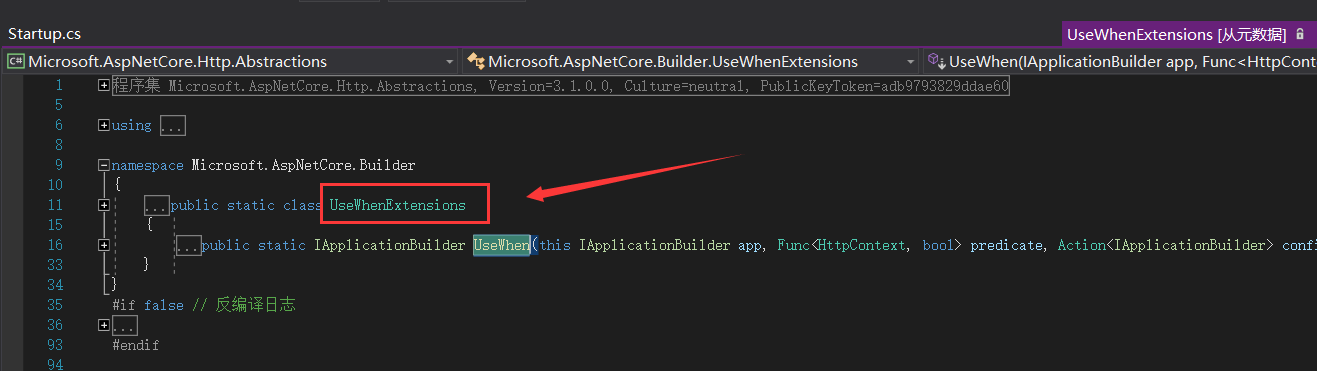
可以发现它是位于 UseWhenExtensions 扩展类中的,我们找到 UseWhenExtensions 类的源码,如下所示:
// Copyright (c) .NET Foundation. All rights reserved.
// Licensed under the Apache License, Version 2.0. See License.txt in the project root for license information.

using System;
using Microsoft.AspNetCore.Http;

namespace Microsoft.AspNetCore.Builder
{
    using Predicate = Func<HttpContext, bool>;

    /// <summary>
    /// Extension methods for <see cref="IApplicationBuilder"/>.
    /// </summary>
    public static class UseWhenExtensions
    {
        /// <summary>
        /// Conditionally creates a branch in the request pipeline that is rejoined to the main pipeline.
        /// </summary>
        /// <param name="app"></param>
        /// <param name="predicate">Invoked with the request environment to determine if the branch should be taken</param>
        /// <param name="configuration">Configures a branch to take</param>
        /// <returns></returns>
        public static IApplicationBuilder UseWhen(this IApplicationBuilder app, Predicate predicate, Action<IApplicationBuilder> configuration)
        {
            if (app == null)
            {
                throw new ArgumentNullException(nameof(app));
            }

            if (predicate == null)
            {
                throw new ArgumentNullException(nameof(predicate));
            }

            if (configuration == null)
            {
                throw new ArgumentNullException(nameof(configuration));
            }

            // Create and configure the branch builder right away; otherwise,
            // we would end up running our branch after all the components
            // that were subsequently added to the main builder.
            var branchBuilder = app.New();
            configuration(branchBuilder);

            return app.Use(main =>
            {
                // This is called only when the main application builder
                // is built, not per request.
                branchBuilder.Run(main);
                var branch = branchBuilder.Build();

                return context =>
                {
                    if (predicate(context))
                    {
                        return branch(context);
                    }
                    else
                    {
                        return main(context);
                    }
                };
            });
        }
    }
}
UseWhen 也基于给定谓词的结果创建请求管道分支。 与 MapWhen 不同的是,如果这个分支不发生短路或包含终端中间件,则会重新加入主管道。
仔细阅读上面的源码后我们会发现,其实 Map/MapWhen/UseWhen 均为 app.Use(...) 的封装,主要是为了熟悉的人方便而已。
本文部分内容参考博文:https://www.cnblogs.com/durow/p/5752055.html
更多关于ASP.NET Core 中间件的相关知识可参考微软官方文档: https://docs.microsoft.com/zh-cn/aspnet/core/fundamentals/middleware/?view=aspnetcore-6.0
至此本文就全部介绍完了,如果觉得对您有所启发请记得点个赞哦!!!
Demo源码:
链接:https://pan.baidu.com/s/18I66dBmKZUpfPCNn85HI2g
提取码:2xcj此文由博主精心撰写转载请保留此原文链接:https://www.cnblogs.com/xyh9039/p/16492284.html
版权声明:如有雷同纯属巧合,如有侵权请及时联系本人修改,谢谢!!!
我正在学习如何使用Nokogiri,根据这段代码我遇到了一些问题:require'rubygems'require'mechanize'post_agent=WWW::Mechanize.newpost_page=post_agent.get('http://www.vbulletin.org/forum/showthread.php?t=230708')puts"\nabsolutepathwithtbodygivesnil"putspost_page.parser.xpath('/html/body/div/div/div/div/div/table/tbody/tr/td/div
我有一个Ruby程序,它使用rubyzip压缩XML文件的目录树。gem。我的问题是文件开始变得很重,我想提高压缩级别,因为压缩时间不是问题。我在rubyzipdocumentation中找不到一种为创建的ZIP文件指定压缩级别的方法。有人知道如何更改此设置吗?是否有另一个允许指定压缩级别的Ruby库? 最佳答案 这是我通过查看rubyzip内部创建的代码。level=Zlib::BEST_COMPRESSIONZip::ZipOutputStream.open(zip_file)do|zip|Dir.glob("**/*")d
类classAprivatedeffooputs:fooendpublicdefbarputs:barendprivatedefzimputs:zimendprotecteddefdibputs:dibendendA的实例a=A.new测试a.foorescueputs:faila.barrescueputs:faila.zimrescueputs:faila.dibrescueputs:faila.gazrescueputs:fail测试输出failbarfailfailfail.发送测试[:foo,:bar,:zim,:dib,:gaz].each{|m|a.send(m)resc
很好奇,就使用rubyonrails自动化单元测试而言,你们正在做什么?您是否创建了一个脚本来在cron中运行rake作业并将结果邮寄给您?git中的预提交Hook?只是手动调用?我完全理解测试,但想知道在错误发生之前捕获错误的最佳实践是什么。让我们理所当然地认为测试本身是完美无缺的,并且可以正常工作。下一步是什么以确保他们在正确的时间将可能有害的结果传达给您? 最佳答案 不确定您到底想听什么,但是有几个级别的自动代码库控制:在处理某项功能时,您可以使用类似autotest的内容获得关于哪些有效,哪些无效的即时反馈。要确保您的提
假设我做了一个模块如下:m=Module.newdoclassCendend三个问题:除了对m的引用之外,还有什么方法可以访问C和m中的其他内容?我可以在创建匿名模块后为其命名吗(就像我输入“module...”一样)?如何在使用完匿名模块后将其删除,使其定义的常量不再存在? 最佳答案 三个答案:是的,使用ObjectSpace.此代码使c引用你的类(class)C不引用m:c=nilObjectSpace.each_object{|obj|c=objif(Class===objandobj.name=~/::C$/)}当然这取决于
我正在尝试使用ruby和Savon来使用网络服务。测试服务为http://www.webservicex.net/WS/WSDetails.aspx?WSID=9&CATID=2require'rubygems'require'savon'client=Savon::Client.new"http://www.webservicex.net/stockquote.asmx?WSDL"client.get_quotedo|soap|soap.body={:symbol=>"AAPL"}end返回SOAP异常。检查soap信封,在我看来soap请求没有正确的命名空间。任何人都可以建议我
关闭。这个问题是opinion-based.它目前不接受答案。想要改进这个问题?更新问题,以便editingthispost可以用事实和引用来回答它.关闭4年前。Improvethisquestion我想在固定时间创建一系列低音和高音调的哔哔声。例如:在150毫秒时发出高音调的蜂鸣声在151毫秒时发出低音调的蜂鸣声200毫秒时发出低音调的蜂鸣声250毫秒的高音调蜂鸣声有没有办法在Ruby或Python中做到这一点?我真的不在乎输出编码是什么(.wav、.mp3、.ogg等等),但我确实想创建一个输出文件。
我在我的项目目录中完成了compasscreate.和compassinitrails。几个问题:我已将我的.sass文件放在public/stylesheets中。这是放置它们的正确位置吗?当我运行compasswatch时,它不会自动编译这些.sass文件。我必须手动指定文件:compasswatchpublic/stylesheets/myfile.sass等。如何让它自动运行?文件ie.css、print.css和screen.css已放在stylesheets/compiled。如何在编译后不让它们重新出现的情况下删除它们?我自己编译的.sass文件编译成compiled/t
我想将html转换为纯文本。不过,我不想只删除标签,我想智能地保留尽可能多的格式。为插入换行符标签,检测段落并格式化它们等。输入非常简单,通常是格式良好的html(不是整个文档,只是一堆内容,通常没有anchor或图像)。我可以将几个正则表达式放在一起,让我达到80%,但我认为可能有一些现有的解决方案更智能。 最佳答案 首先,不要尝试为此使用正则表达式。很有可能你会想出一个脆弱/脆弱的解决方案,它会随着HTML的变化而崩溃,或者很难管理和维护。您可以使用Nokogiri快速解析HTML并提取文本:require'nokogiri'h
我想为Heroku构建一个Rails3应用程序。他们使用Postgres作为他们的数据库,所以我通过MacPorts安装了postgres9.0。现在我需要一个postgresgem并且共识是出于性能原因你想要pggem。但是我对我得到的错误感到非常困惑当我尝试在rvm下通过geminstall安装pg时。我已经非常明确地指定了所有postgres目录的位置可以找到但仍然无法完成安装:$envARCHFLAGS='-archx86_64'geminstallpg--\--with-pg-config=/opt/local/var/db/postgresql90/defaultdb/po
