emptyDir临时卷
有些应用程序需要额外的存储,但并不关心数据在重启后仍然可用。
例如,缓存服务经常受限于内存大小,将不常用的数据转移到比内存慢、但对总体性能的影响很小的存储中。
再例如,有些应用程序需要以文件形式注入的只读数据,比如配置数据或密钥。
临时卷就是为此类用例设计的。因为卷会遵从 Pod 的生命周期,与 Pod 一起创建和删除, 所以停止和重新启动 Pod 时,不会受持久卷在何处可用的限制。
下面我们就通过一个临时卷,让一个pod中的两个容器实现文件共享。
apiVersion: v1
kind: Pod
metadata:
 name: emptydirpod
 namespace: chesterns
spec:
 containers:
 - name: writeinfo
   image: centos
   command: ["bash","-c","for i in {1..100};do echo $i >> /data/hello;sleep 1;done"]
   volumeMounts:
   - name: data
     mountPath: /data
 - name: readinfo
   image: centos
   command: ["bash","-c","tail -f /data/hello"]
   volumeMounts:
   - name: data
     mountPath: /data
 volumes:
 - name: data
   emptyDir: {}
验证
kubectl exec emptydirpod -c readinfo -n chesterns -- cat /data/hello挂载Node文件系统(Pod所在节点)上文件或者目录到Pod中的容器。通常用在Pod中容器需要访问宿主机文件的场景下。
下面通过一个yaml来实现hostPath卷
apiVersion: v1
kind: Pod
metadata:
 name: hostpathpod
 namespace: chesterns
spec:
 containers:
 - name: busybox
   image: busybox
   args:
    - /bin/sh
    - -c
    - sleep 36000
   volumeMounts:
   - name: data
     mountPath: /data
 volumes:
 - name: data
   hostPath:
    path: /tmp
    type: Directory
验证
kubectl  apply -f hostpath.yaml
kubectl exec hostpathpod -n chesterns -- ls /datals /tmpNFS是一个主流的文件共享服务器。可以实现分布式系统中的文件统一管理。
yum install nfs-utils -y #每个Node上都要安装nfs-utils包master上开启nfs-server
#master
vi /etc/exports
/tmp/chesternfs *(rw,fsid=0,no_root_squash)

mkdir -p /tmp/chesternfs
systemctl start nfs
systemctl enable nfs
定义一个deployment,使用我们刚搭建的nfssever来挂载文件
apiVersion: apps/v1
kind: Deployment
metadata:
 name: nfsdeployment
 namespace: chesterns
spec:
 selector:
  matchLabels:
   app: nginx
 replicas: 3
 template:
  metadata:
   labels:
    app: nginx
  spec:
   containers:
   - name: nginx
     image: nginx
     volumeMounts:
     - name: wwwroot
       mountPath: /usr/share/nginx/html
     ports:
     - containerPort: 80
   volumes:
   - name: wwwroot
     nfs:
      server: 192.168.43.111
      path: /tmp/chesternfs
通过新建一个a.html来验证是不是挂载进了容器
vi /tmp/chesternfs/index.html/a.html
kubectl get pod -n chesterns
kubectl exec  nfsdeployment-f846bc9c4-s2598  -n chesterns -- ls /usr/share/nginx/html
curl 10.244.36.122/a.html我们可以将PV看作可用的存储资源,PVC则是对存储资源的需求,PV与PVC是为了方便我们对存储资源进行系统的管理而诞生的,有了pv和pvc我们就可以对我们所有的存储资源进行合理的分配。
pv的创建又分为静态模式与动态模式。
静态模式
集群管理员手工创建许多PV,在定义PV时需要将后端存储的特性进行设置。
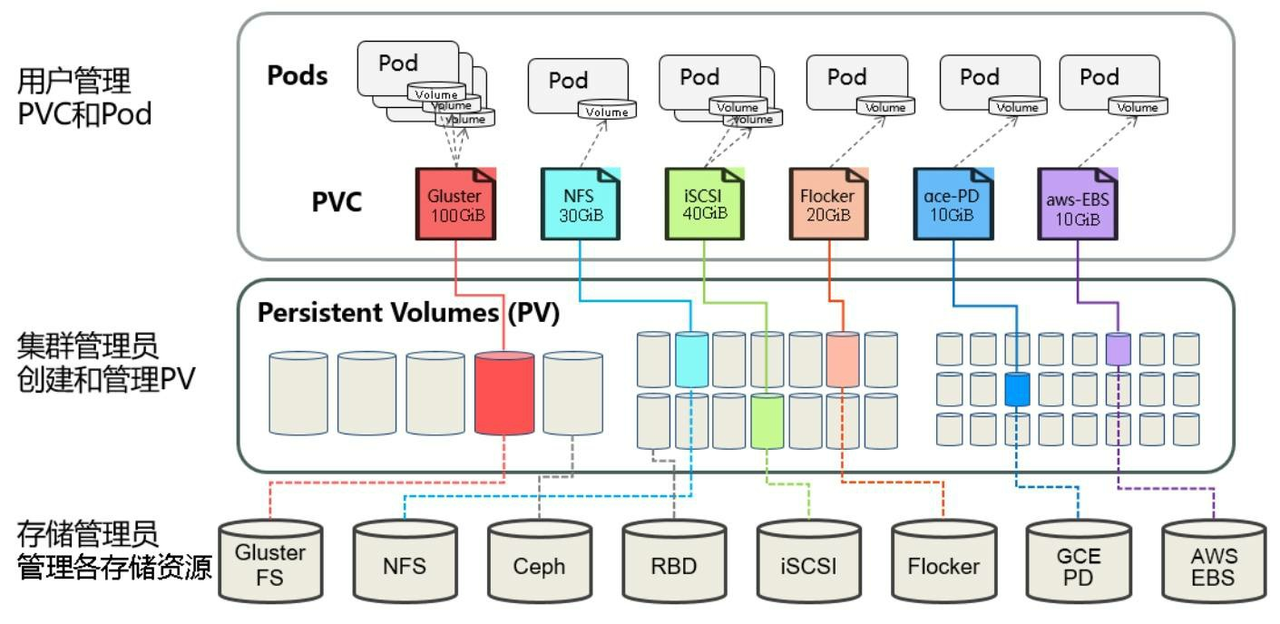
定义PV,声明需要5g空间
apiVersion: v1
kind: PersistentVolume
metadata:
 name: chesterpv
 namespace: chesterns
spec:
 capacity:
  storage: 5Gi
 accessModes:
 - ReadWriteMany
 nfs:
  path: /tmp/chesternfs
  server: 192.168.43.111
AccessModes(访问模式):
ReadWriteOnce(RWO):读写权限,但是只能被单个节点挂载
ReadOnlyMany(ROX):只读权限,可以被多个节点挂载
ReadWriteMany(RWX):读写权限,可以被多个节点挂载
RECLAIM POLICY(回收策略):
通过pv的persistentVolumeReclaimPolicy字段设置
Retain(保留):保留数据,需要管理员手工清理数据
Recycle(回收):清除 PV 中的数据,等同执行 rm -rf /tmp/chesternfs/*
Delete(删除):与 PV 相连的后端存储同时删除
应用pv
kubectl apply -f pv.yaml
kubectl describe pv chesterpv -n chesterns
PVSTATUS(状态):
Available(可用):表示可用状态,还未被任何 PVC 绑定
Bound(已绑定):表示 PV 已经被 PVC 绑定
Released(已释放):PVC 被删除,但是资源还未被集群重新声明
Failed(失败):表示该 PV 的自动回收失败
下面我们定义pvc,设置一样的存储空间,绑定刚刚建好的pv
apiVersion: v1
kind: PersistentVolumeClaim
metadata:
 name: chesterpvc
 namespace: chesterns
spec:
 accessModes:
 - ReadWriteMany
 resources:
  requests:
   storage: 5Gi
应用pvc
kubectl apply -f pvc.yaml
kubectl describe pvc chesterpvc -n chesterns
kubectl describe pv chesterpv -n chesterns
使用PVC,我们定义一个pod,指定挂载用的pvc
apiVersion: v1
kind: Pod
metadata:
 name: chesterpvcpod
 namespace: chesterns
spec:
 containers:
 - name: nginx
   image: nginx:latest
   ports:
   - containerPort: 80
   volumeMounts:
   - name: www
     mountPath: /usr/share/nginx/html
 volumes:
 - name: www
   persistentVolumeClaim:
    claimName: chesterpvc
通过以下命令应用,并验证
kubectl apply -f pvcpod.yaml
kubectl describe pod chesterpvcpod -n chesterns
kubectl describe pvc chesterpvc -n chesterns
kubectl describe pv chesterpv -n chesterns

curl 10.244.36.123/a.html动态模式可以解放集群管理员,集群管理员无须手工创建PV,而是通过StorageClass的设置对后端存储进行描述,标记为某种类型。此时要求PVC对存储的类型进行声明,系统将自动完成PV的创建及与PVC的绑定。PVC可以声明Class为"",说明该PVC禁止使用动态模式。
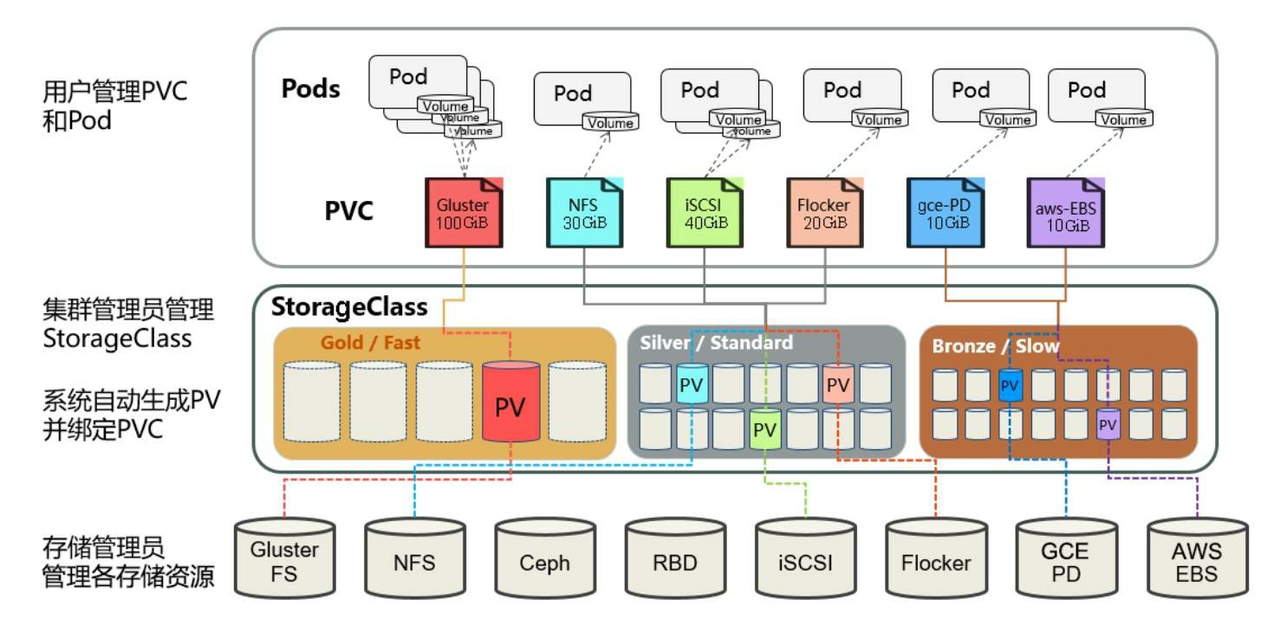
K8s需要安装插件支持NFS动态供给。
项目地址:https://github.com/kubernetes-sigs/nfs-subdir-external-provisioner/tree/master/deploy
下载并安装,需要修改其中的namespace为我们自己的chesterns
kubectl apply -f nfs-rbac.yaml # 授权访问apiserver
kubectl apply -f nfs-deployment.yaml # 部署插件,需修改里面NFS服务器地址与共享目录
kubectl apply -f nfs-class.yaml # 创建存储类
下面我们定义pvc绑定我们刚建的storageclass,并且新建一个pod使用我们新建的这个pvc
apiVersion: v1
kind: PersistentVolumeClaim
metadata:
 name: chesterscpvc
 namespace: chesterns
spec:
 storageClassName: "nfs-client"
 accessModes:
 - ReadWriteMany
 resources:
  requests:
   storage: 1Gi
---
apiVersion: v1
kind: Pod
metadata:
 name: chesterpvcscpod
 namespace: chesterns
spec:
 containers:
 - name: chesterpvcscpod
   image: nginx
   volumeMounts:
   - name: nfs-pvc
     mountPath: "/usr/share/nginx/html"
 volumes:
 - name: nfs-pvc
   persistentVolumeClaim:
    claimName: chesterscpvc
验证
kubectl exec chesterpvcscpod  -n chesterns -- touch /usr/share/nginx/html/aa
ll /tmp/chesternfs/
ConfigMap 是一种配置资源,用来将非机密性的数据保存到etcd键值对中。使用时,Pods可以将其用作环境变量、命令行参数或者存储卷中的配置文件。
下面就来实现一个简单的ConfigMap使用案例
定义ConfigMap
apiVersion: v1
kind: ConfigMap
metadata:
  name: game-demo
  namespace: chesterns
data:
  # 类属性键;每一个键都映射到一个简单的值
  player_initial_lives: "3"
  ui_properties_file_name: "user-interface.properties"

  # 类文件键
  game.properties: |
    enemy.types=aliens,monsters
    player.maximum-lives=5
  user-interface.properties: |
    color.good=purple
    color.bad=yellow
    allow.textmode=true
通过kubectl apply应用后,开始在pod中使用
apiVersion: v1
kind: Pod
metadata:
  name: configmap-demo-pod
  namespace: chesterns
spec:
  containers:
    - name: demo
      image: alpine
      command: ["sleep", "3600"]
      env:
        # 定义环境变量
        - name: PLAYER_INITIAL_LIVES # 请注意这里和 ConfigMap 中的键名是不一样的
          valueFrom:
            configMapKeyRef:
              name: game-demo           # 这个值来自 ConfigMap
              key: player_initial_lives # 需要取值的键
        - name: UI_PROPERTIES_FILE_NAME
          valueFrom:
            configMapKeyRef:
              name: game-demo
              key: ui_properties_file_name
      volumeMounts:
      - name: config
        mountPath: "/config"
        readOnly: true
  volumes:
    # 你可以在 Pod 级别设置卷,然后将其挂载到 Pod 内的容器中
    - name: config
      configMap:
        # 提供你想要挂载的 ConfigMap 的名字
        name: game-demo
        # 来自 ConfigMap 的一组键,将被创建为文件
        items:
        - key: "game.properties"
          path: "game.properties"
        - key: "user-interface.properties"
          path: "user-interface.properties"
验证
kubectl apply -f configmap.yaml
kubectl apply -f configmappod.yaml
Secret 类似于ConfigMap但专门用于保存机密数据。下面定义一个secret
apiVersion: v1
data:
  username: YWRtaW4=
  password: MWYyZDFlMmU2N2Rm
kind: Secret
metadata:
  name: mysecret
  namespace: chesterns
应用secret
kubectl apply -f secret.yaml
kubectl get secret -n chesterns
在Pod中使用Secret
apiVersion: v1
kind: Pod
metadata:
  name: mypod
  namespace: chesterns
spec:
  containers:
  - name: mypod
    image: redis
    volumeMounts:
    - name: foo
      mountPath: "/etc/foo"
      readOnly: true
  volumes:
  - name: foo
    secret:
      secretName: mysecret
验证
kubectl apply -f secretpod.yaml
kubectl get pod -n chesternskubectl exec mypod -n chesterns -- ls /etc/foo我主要使用Ruby来执行此操作,但到目前为止我的攻击计划如下:使用gemsrdf、rdf-rdfa和rdf-microdata或mida来解析给定任何URI的数据。我认为最好映射到像schema.org这样的统一模式,例如使用这个yaml文件,它试图描述数据词汇表和opengraph到schema.org之间的转换:#SchemaXtoschema.orgconversion#data-vocabularyDV:name:namestreet-address:streetAddressregion:addressRegionlocality:addressLocalityphoto:i
有没有办法在这个简单的get方法中添加超时选项?我正在使用法拉第3.3。Faraday.get(url)四处寻找,我只能先发起连接后应用超时选项,然后应用超时选项。或者有什么简单的方法?这就是我现在正在做的:conn=Faraday.newresponse=conn.getdo|req|req.urlurlreq.options.timeout=2#2secondsend 最佳答案 试试这个:conn=Faraday.newdo|conn|conn.options.timeout=20endresponse=conn.get(url
我想在Ruby中创建一个用于开发目的的极其简单的Web服务器(不,不想使用现成的解决方案)。代码如下:#!/usr/bin/rubyrequire'socket'server=TCPServer.new('127.0.0.1',8080)whileconnection=server.acceptheaders=[]length=0whileline=connection.getsheaders想法是从命令行运行这个脚本,提供另一个脚本,它将在其标准输入上获取请求,并在其标准输出上返回完整的响应。到目前为止一切顺利,但事实证明这真的很脆弱,因为它在第二个请求上中断并出现错误:/usr/b
我意识到这可能是一个非常基本的问题,但我现在已经花了几天时间回过头来解决这个问题,但出于某种原因,Google就是没有帮助我。(我认为部分问题在于我是一个初学者,我不知道该问什么......)我也看过O'Reilly的RubyCookbook和RailsAPI,但我仍然停留在这个问题上.我找到了一些关于多态关系的信息,但它似乎不是我需要的(尽管如果我错了请告诉我)。我正在尝试调整MichaelHartl'stutorial创建一个包含用户、文章和评论的博客应用程序(不使用脚手架)。我希望评论既属于用户又属于文章。我的主要问题是:我不知道如何将当前文章的ID放入评论Controller。
我的工作要求我为某些测试自动生成电子邮件。我一直在四处寻找,但未能找到可以快速实现的合理解决方案。它需要在outlook而不是其他邮件服务器中,因为我们有一些奇怪的身份验证规则,我们需要保存草稿而不是仅仅发送邮件的选项。显然win32ole可以做到这一点,但我找不到任何相当简单的例子。 最佳答案 假设存储了Outlook凭据并且您设置为自动登录到Outlook,WIN32OLE可以很好地完成此操作:require'win32ole'outlook=WIN32OLE.new('Outlook.Application')message=
我正在编写一个简单的静态Rack应用程序。查看下面的config.ru代码:useRack::Static,:urls=>["/elements","/img","/pages","/users","/css","/js"],:root=>"archive"map'/'dorunProc.new{|env|[200,{'Content-Type'=>'text/html','Cache-Control'=>'public,max-age=6400'},File.open('archive/splash.html',File::RDONLY)]}endmap'/pages/search.
//1.验证返回状态码是否是200pm.test("Statuscodeis200",function(){pm.response.to.have.status(200);});//2.验证返回body内是否含有某个值pm.test("Bodymatchesstring",function(){pm.expect(pm.response.text()).to.include("string_you_want_to_search");});//3.验证某个返回值是否是100pm.test("Yourtestname",function(){varjsonData=pm.response.json
在前面两节的例子中,主界面窗口的尺寸和标签控件显示的矩形区域等,都是用C++代码编写的。窗口和控件的尺寸都是预估的,控件如果多起来,那就不好估计每个控件合适的位置和大小了。用C++代码编写图形界面的问题就是不直观,因此Qt项目开发了专门的可视化图形界面编辑器——QtDesigner(Qt设计师)。通过QtDesigner就可以很方便地创建图形界面文件*.ui,然后将ui文件应用到源代码里面,做到“所见即所得”,大大方便了图形界面的设计。本节就演示一下QtDesigner的简单使用,学习拖拽控件和设置控件属性,并将ui文件应用到Qt程序代码里。使用QtDesigner设计界面在开始菜单中找到「Q
我去了这个website查看Rails5.0.0和Rails5.1.1之间的区别为什么5.1.1不再包含:config/initializers/session_store.rb?谢谢 最佳答案 这是删除它的提交:Setupdefaultsessionstoreinternally,nolongerthroughanapplicationinitializer总而言之,新应用没有该初始化器,session存储默认设置为cookie存储。即与在该初始值设定项的生成版本中指定的值相同。 关于
给定一个nxmbool数组:[[true,true,false],[false,true,true],[false,true,true]]有什么简单的方法可以返回“该列中有多少个true?”结果应该是[1,3,2] 最佳答案 使用转置得到一个数组,其中每个子数组代表一列,然后将每一列映射到其中的true数:arr.transpose.map{|subarr|subarr.count(true)}这是一个带有inject的版本,应该在1.8.6上运行,没有任何依赖:arr.transpose.map{|subarr|subarr.in
