前置知识:https://editor.csdn.net/md/?articleId=125883056
创建maven项目
导入kafka客户端依赖:
<dependencies>
    <!--导入kafka客户端依赖-->
    <dependency>
        <groupId>org.apache.kafka</groupId>
        <artifactId>kafka-clients</artifactId>
        <version>2.4.1</version>
    </dependency>
</dependencies>
entity:
public class Order {
    private long id;

    private int count;

    public long getId() {
        return id;
    }

    public void setId(long id) {
        this.id = id;
    }

    public int getCount() {
        return count;
    }

    public void setCount(int count) {
        this.count = count;
    }
}
producer:
//消息发送方
public class MyProducer {
    //主题名称
    private final static String TOPIC_NAME = "my-replicated-topic";

    public static void main(String[] args) throws ExecutionException, InterruptedException {
        //1. 设置参数
        Properties props = new Properties();
        //指定服务器配置【ip:端口】
        props.put(ProducerConfig.BOOTSTRAP_SERVERS_CONFIG,
                "192.168.145.13:9092, 192.168.145.13:9093, 192.168.145.13:9094");

        //把发送的key从字符串序列化为字节数组
        props.put(ProducerConfig.KEY_SERIALIZER_CLASS_CONFIG,
                StringSerializer.class.getName());
        //把发送消息的value从字符串序列化为字节数组
        props.put(ProducerConfig.VALUE_SERIALIZER_CLASS_CONFIG,
                StringSerializer.class.getName());

        //2. 创建生产消息的客户端,传入参数
        Producer<String, String> producer = new KafkaProducer<String, String>(props);
        //3. 创建消息;key:作用是决定了往哪个分区上发,value:具体要发送的消息内容
        ProducerRecord<String, String> producerRecord = new ProducerRecord<>(
                TOPIC_NAME,"myKeyValue", "helloKafka");
        //4. 发送消息,得到消息发送的元数据并输出
        RecordMetadata metadata = producer.send(producerRecord).get();
        System.out.println("同步方式发送消息结果:" + "topic-" + metadata.topic() + "|partition-"
        + metadata.partition() + "|offset-" + metadata.offset());
    }
}
上面配置的服务器地址为远程之前创建好的kafka集群,
如有不了解的,参考:https://editor.csdn.net/md/?articleId=125883056
发送结果:
同步方式发送消息结果:topic-my-replicated-topic|partition-1|offset-3
//3. 创建消息;key:作用是决定了往哪个分区上发,value:具体要发送的消息内容
//        ProducerRecord<String, String> producerRecord = new ProducerRecord<>(
//                TOPIC_NAME,"myKeyValue", "helloKafka");

//指定partition分区为0
ProducerRecord<String, String> producerRecord = new ProducerRecord<>(
        TOPIC_NAME,0,"myKeyValue", "helloKafka");

//4. 同步发送消息,得到消息发送的元数据并输出
RecordMetadata metadata = producer.send(producerRecord).get();
System.out.println("同步方式发送消息结果:" + "topic-" + metadata.topic() + "|partition-"
+ metadata.partition() + "|offset-" + metadata.offset());
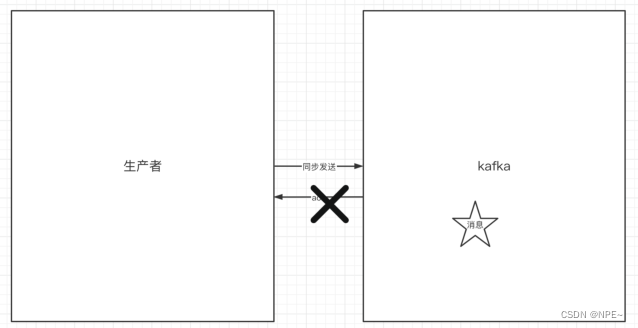
如果生产者发送消息没有收到ack,生产者会阻塞,阻塞到3s的时间,如果还没有收到消息,会进行重试。重试的次数为3次。
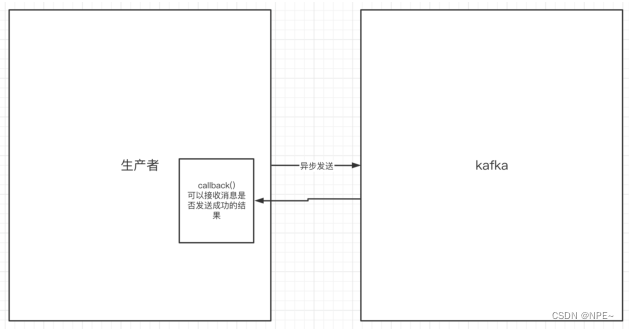
异步发送,生产者发送完消息后就可以执行之后的业务,broker在收到消息后异步调用生产者提供的callback回调方法。
...
  //5. 异步发送消息
  producer.send(producerRecord, new Callback() {
      @Override
      public void onCompletion(RecordMetadata metadata, Exception exception) {
          if(exception != null){
              System.out.println("发送消息失败:" + exception.getStackTrace());
          }
          if(metadata != null){
              System.out.println("异步方式发送消息结果:" + "topic-"+
                      metadata.topic() + "|partition-"+
                      metadata.partition() + "|offset-" + metadata.offset());
          }
      }
  });
  Thread.sleep(100000000L);//为了方便观察打印结果
...
结果:
异步方式发送消息结果:topic-my-replicated-topic|partition-0|offset-2
同步是发送消息完成之后,需要等待对方响应之后才能继续干其他的;异步则是,发送完消息之后,就可以继续往下执行业务逻辑。
上述代码的Callback()为回调方法,如果发送成功,会返回metadata,同时exception为null;反之。
在同步发送的前提下,生产者在获得集群返回的ack之前那会一直阻塞。那么集群什么时候返回ack呢?此时ack有3个配置:

/*
发送失败会重试,默认重试时间间隔100ms,重试能保证消息发送的可靠性,但是也可能造成消息重复发送,比如:网络抖动,
所以需要在接收者那边做好消息接收的幂等性处理
 */
//重试次数设置
props.put(ProducerConfig.RETRIES_CONFIG, 3);
//重试间隔设置
props.put(ProducerConfig.RETRY_BACKOFF_MS_CONFIG, 300);
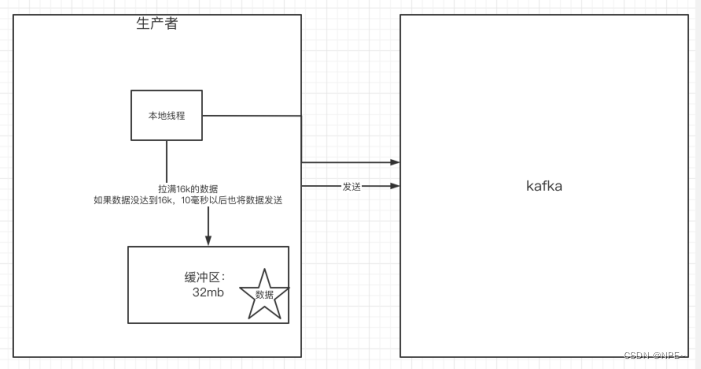
props.put(ProducerConfig.BUFFER_MEMORY_CONFIG, 33554432);
props.put(ProducerConfig.BATCH_SIZE_CONFIG, 16384);
props.put(ProducerConfig.LINGER_MS_CONFIG, 10);
首先在linux上搭建kafka集群,并创建对应主题与分区
./kafka-topics.sh --create --zookeeper localhost:2181 --replication-factor 3 --partitions 2 --topic my-replicated-topic
public class MySimpleConsumer {


    private final static String TOPIC_NAME = "my-replicated-topic";
    private final static String CONSUMER_GROUP_NAME = "testGroup";

    public static void main(String[] args) {
        //设置配置
        Properties props = new Properties();
        props.put(ConsumerConfig.BOOTSTRAP_SERVERS_CONFIG,
                "192.168.145.13:9092, 192.168.145.13:9093, 192.168.145.13:9094");
        //消费分组名、key序列化、value序列化
        props.put(ConsumerConfig.GROUP_ID_CONFIG, CONSUMER_GROUP_NAME);
        props.put(ConsumerConfig.KEY_DESERIALIZER_CLASS_CONFIG, StringDeserializer.class.getName());
        props.put(ConsumerConfig.VALUE_DESERIALIZER_CLASS_CONFIG, StringDeserializer.class.getName());
        //1. 创建一个消费者客户端(设置配置文件)
        KafkaConsumer<String, String> consumer = new KafkaConsumer<String, String>(props);
        //2. 消费者订阅主题列表
        consumer.subscribe(Arrays.asList(TOPIC_NAME));

        while (true) {
            //3. poll() API是拉取消息的长轮询
            ConsumerRecords<String, String> records =
                    consumer.poll(Duration.ofMillis(1000));
            for (ConsumerRecord<String, String> record : records) {
                //4. 打印消息
                System.out.printf("收到消息:partition = %d, offset = %d, key = %s, value = %s%n",
                        record.partition(), record.offset(), record.key(), record.value());
            }
        }
    }
}
通过上面创建的producer发送消息,查看控制台
收到消息:partition = 0, offset = 6, key = myKeyValue, value = helloKafka
提交的内容
消费者无论是自动提交还是手动提交,都需要把所属的消费者组+消费的某个主题+消费的某个分区+消费的偏移量,这样的信息提交到集群的_consumer_offsets主题里面。
自动提交
消费者poll消息下来以后就会自动提交到offset
 //是否自动提交offset,默认:true
 props.put(ConsumerConfig.ENABLE_AUTO_COMMIT_CONFIG, "true");
 //自动提交offset的间隔时间
 props.put(ConsumerConfig.AUTO_COMMIT_INTERVAL_MS_CONFIG, "1000");
注意:自动提交会丢消息。因为消费者在消费前提交offset,有可能提交完后还没有来得及消费消息,消费者就挂了。
props.put(ConsumerConfig.ENABLE_AUTO_COMMIT_CONFIG, "false");
手动提交分为了两种:
while(true){
    /*
    poll() API是拉取消息的长轮询
     */
    ConsumerRecords<String, String> records = consumer.poll(Duration.ofMillis(1000));
    for(ConsumerRecord<String, String> record : records){
        System.out.printf("收到消息:partition = %d, offset = %d, key = %s, value = %s%n",
                record.partition(), record.offset(), record.key(), record.value());
    }
    //所有消息已经消费完
    if(records.count() > 0){//有消息
        //手动同步提交offset,当前线程会阻塞,直到offset提交成功
        //一般使用同步提交,因为提交之后一般也没有什么逻辑代码了
        consumer.commitSync(); //=========阻塞==== 提交成功
    }
}
while(true){
    /*
    poll() API是拉取消息的长轮询
     */
    ConsumerRecords<String, String> records = consumer.poll(Duration.ofMillis(1000));
    for(ConsumerRecord<String, String> record : records){
        System.out.printf("收到消息:partition = %d, offset = %d, key = %s, value = %s%n",
                record.partition(), record.offset(), record.key(), record.value());
    }
    //所有消息已经消费完
    if(records.count() > 0){//有消息
        //手动异步提交offset,当前线程提交offset不会阻塞,可以继续处理后面的程序逻辑
        consumer.commitAsync(new OffsetCommitCallback() {
            @Override
            public void onComplete(Map<TopicPartition, OffsetAndMetadata> offsets, Exception e) {
                if(e != null){
                    System.err.println("Commit failed for " + offsets);
                    System.err.println("Commit failed exception: " + e.getStackTrace());
                }
            }
        });
    }
}
 //一次poll最大拉取消息的条数,可以根据消费速度的快慢来设置
 props.put(ConsumerConfig.MAX_POLL_RECORDS_CONFIG, 500);
 while(true){
     /*
     poll() API是拉取消息的长轮询
      */
     //设置长轮询时间是1000ms
     ConsumerRecords<String, String> records = consumer.poll(Duration.ofMillis(1000));
     for(ConsumerRecord<String, String> record : records){
         System.out.printf("收到消息:partition = %d, offset = %d, key = %s, value = %s%n",
                 record.partition(), record.offset(), record.key(), record.value());
     }
}
意味着:
如果一次poll到500条,直接执行for循环;
如果这一次没有poll到500条,且时间在1s内,要么长轮询继续poll,要么到500条,要么到1s;
如果多次poll都没达到500条,且1s时间到了,那么直接执行for循环
如果两次poll的间隔超过30s,集群会认为该消费者的消费能力过弱,该消费者被提出消费组,触发rebalance机制,rebalance机制会造成性能开销。可以通过设置这个参数,让一次poll的消息条数少一点。
//一次poll最大拉取消息的条数,可以根据消费速度的快慢来设置
props.put(ConsumerConfig.MAX_POLL_RECORDS_CONFIG, 500);
//如果两次poll的时间超出了30s的时间间隔,kafka会认为其消费能力过弱,将其提出消费组。将分区分配给其他消费者。-rebalance
props.put(ConsumerConfig.MAX_POLL_INTERVAL_MS_CONFIG, 30 * 1000);
消费者每隔1s向kafka集群发送心跳,集群发现如果有超过10s没有续约的消费者,将被踢出消费组,触发该消费组的rebalance机制,将该分区交给其他消费组里的其他消费者进行消费。
//consumer给broker发送⼼跳的间隔时间
props.put(ConsumerConfig.HEARTBEAT_INTERVAL_MS_CONFIG, 1000);
//kafka如果超过10秒没有收到消费者的⼼跳,则会把消费者踢出消费组,
//进⾏rebalance,把分区分配给其他消费者。
props.put(ConsumerConfig.SESSION_TIMEOUT_MS_CONFIG, 10 * 1000)
//TOPIC_NAME主题下的0号分区
consumer.assign(Arrays.asList(new TopicPartition(TOPIC_NAME, 0)));
consumer.assign(Arrays.asList(new TopicPartition(TOPIC_NAME, 0)));
consumer.seekToBeginning(Arrays.asList(new TopicPartition(TOPIC_NAME, 0)));
consumer.assign(Arrays.asList(new TopicPartition(TOPIC_NAME, 0)));
consumer.seek(new TopicPartition(TOPIC_NAME, 0), 10);//offset=10
 List<PartitionInfo> topicPartitions = consumer.partitionsFor(TOPIC_NAME);
 //从1⼩时前开始消费
 long fetchDataTime = new Date().getTime() - 1000 * 60 * 60;
 Map<TopicPartition, Long> map = new HashMap<>();
 for (PartitionInfo par : topicPartitions) {
     map.put(new TopicPartition(TOPIC_NAME, par.partition()),
             fetchDataTime);
 }
 Map<TopicPartition, OffsetAndTimestamp> parMap =
         consumer.offsetsForTimes(map);
 for (Map.Entry<TopicPartition, OffsetAndTimestamp> entry :
         parMap.entrySet()) {
     TopicPartition key = entry.getKey();
     OffsetAndTimestamp value = entry.getValue();
     if (key == null || value == null) continue;
     Long offset = value.offset();
     System.out.println("partition-" + key.partition() +
             "|offset-" + offset);
     System.out.println();
     //根据消费⾥的timestamp确定offset
     if (value != null) {
         consumer.assign(Arrays.asList(key));
         consumer.seek(key, offset);
     }
 }
新消费组的消费者在启动以后,默认会从当前分区的最后一条消息的offset+1开始消费(消费新消息)。可以通过以下的设置,让新的消费者第一次从头开始消费。之后开始消费新消息(最后消费位置的偏移量+1)
props.put(ConsumerConfig.AUTO_OFFSET_RESET_CONFIG, "earliest");
尝试通过RVM将RubyGems升级到版本1.8.10并出现此错误:$rvmrubygemslatestRemovingoldRubygemsfiles...Installingrubygems-1.8.10forruby-1.9.2-p180...ERROR:Errorrunning'GEM_PATH="/Users/foo/.rvm/gems/ruby-1.9.2-p180:/Users/foo/.rvm/gems/ruby-1.9.2-p180@global:/Users/foo/.rvm/gems/ruby-1.9.2-p180:/Users/foo/.rvm/gems/rub
我正在使用puppet为ruby程序提供一组常量。我需要提供一组主机名,我的程序将对其进行迭代。在我之前使用的bash脚本中,我只是将它作为一个puppet变量hosts=>"host1,host2"我将其提供给bash脚本作为HOSTS=显然这对ruby不太适用——我需要它的格式hosts=["host1","host2"]自从phosts和putsmy_array.inspect提供输出["host1","host2"]我希望使用其中之一。不幸的是,我终其一生都无法弄清楚如何让它发挥作用。我尝试了以下各项:我发现某处他们指出我需要在函数调用前放置“function_”……这
我正在编写一个gem,我必须在其中fork两个启动两个webrick服务器的进程。我想通过基类的类方法启动这个服务器,因为应该只有这两个服务器在运行,而不是多个。在运行时,我想调用这两个服务器上的一些方法来更改变量。我的问题是,我无法通过基类的类方法访问fork的实例变量。此外,我不能在我的基类中使用线程,因为在幕后我正在使用另一个不是线程安全的库。所以我必须将每个服务器派生到它自己的进程。我用类变量试过了,比如@@server。但是当我试图通过基类访问这个变量时,它是nil。我读到在Ruby中不可能在分支之间共享类变量,对吗?那么,还有其他解决办法吗?我考虑过使用单例,但我不确定这是
我的最终目标是安装当前版本的RubyonRails。我在OSXMountainLion上运行。到目前为止,这是我的过程:已安装的RVM$\curl-Lhttps://get.rvm.io|bash-sstable检查已知(我假设已批准)安装$rvmlistknown我看到当前的稳定版本可用[ruby-]2.0.0[-p247]输入命令安装$rvminstall2.0.0-p247注意:我也试过这些安装命令$rvminstallruby-2.0.0-p247$rvminstallruby=2.0.0-p247我很快就无处可去了。结果:$rvminstall2.0.0-p247Search
我真的很习惯使用Ruby编写以下代码:my_hash={}my_hash['test']=1Java中对应的数据结构是什么? 最佳答案 HashMapmap=newHashMap();map.put("test",1);我假设? 关于java-等价于Java中的RubyHash,我们在StackOverflow上找到一个类似的问题: https://stackoverflow.com/questions/22737685/
我在理解Enumerator.new方法的工作原理时遇到了一些困难。假设文档中的示例:fib=Enumerator.newdo|y|a=b=1loopdoy[1,1,2,3,5,8,13,21,34,55]循环中断条件在哪里,它如何知道循环应该迭代多少次(因为它没有任何明确的中断条件并且看起来像无限循环)? 最佳答案 Enumerator使用Fibers在内部。您的示例等效于:require'fiber'fiber=Fiber.newdoa=b=1loopdoFiber.yieldaa,b=b,a+bendend10.times.m
几个月前,我读了一篇关于rubygem的博客文章,它可以通过阅读代码本身来确定编程语言。对于我的生活,我不记得博客或gem的名称。谷歌搜索“ruby编程语言猜测”及其变体也无济于事。有人碰巧知道相关gem的名称吗? 最佳答案 是这个吗:http://github.com/chrislo/sourceclassifier/tree/master 关于ruby-寻找通过阅读代码确定编程语言的rubygem?,我们在StackOverflow上找到一个类似的问题:
从MB升级到新的MBP后,Apple的迁移助手没有移动我的gem。我这次是通过macports安装rubygems,希望在下次升级时避免这种情况。有什么我应该注意的陷阱吗? 最佳答案 如果你想把你的gems安装在你的主目录中(在传输过程中应该复制过来,作为一个附带的好处,会让你以你自己的身份运行geminstall,而不是root),将gemhome:键设置为您在~/.gemrc中的主目录中的路径. 关于通过MacPorts的RubyGems是个好主意吗?,我们在StackOverf
当我执行>rvminstall1.9.2时一切顺利。然后我做>rvmuse1.9.2也很顺利。但是当涉及到ruby-v时..sam@sjones:~$rvminstall1.9.2/home/sam/.rvm/rubies/ruby-1.9.2-p136,thismaytakeawhiledependingonyourcpu(s)...ruby-1.9.2-p136-#fetchingruby-1.9.2-p136-#downloadingruby-1.9.2-p136,thismaytakeawhiledependingonyourconnection...%Total%Rece
我正在尝试使用boilerpipe来自JRuby。我看过guide从JRuby调用Java,并成功地将它与另一个Java包一起使用,但无法弄清楚为什么同样的东西不能用于boilerpipe。我正在尝试基本上从JRuby中执行与此Java等效的操作:URLurl=newURL("http://www.example.com/some-location/index.html");Stringtext=ArticleExtractor.INSTANCE.getText(url);在JRuby中试过这个:require'java'url=java.net.URL.new("http://www
