最近正在研究Android的蓝牙BLE开发学习,以下是自己做的个人总结
首先得说明什么是低功耗蓝牙BLE,BLE的全称为Bluetooth low energy(或称Blooth LE,BLE),从英文全称便可以知晓其是一种低功耗的蓝牙技术,是蓝牙技术联盟设计和销售的一种个人局域网技术,旨在用于医疗保健、运动健身、信标、安防、家庭娱乐等领域的新兴应用。相较经典蓝牙,低功耗蓝牙旨在保持同等通信范围的同时显著降低功耗和成本。而正因为其低功耗的优点,可以让Android APP可以具有与低功耗要求的BLE设备通信,如近距离传感器、心脏速率监视器、健身设备等
在正式开发前,要对基本的蓝牙的术语和概念要有个大致的认识,因为我本人学习的也不长,就是个简单的总结先:
Generic Attribute Profile:简称为GATT,现在的低功耗BLE的连接都是建立在GATT协议之上实现的,蓝牙技术联盟规定了许多低功耗设备的配置文件,配置文件是设备如何在特定的应用程序在工作的规格,而一个设备中可以有多个配置文件。
Generic Access Profile:Profile可以视为一种规范,一个标准的通信协议,它存在于从机中,蓝牙技术联盟规定了一些标准的profile,例如防丢器 ,心率计等。每个profile中会包含多个service,每个service代表从机的一种能力。
Service:服务,在BLE从机中,可以有多个服务,例如:电量信息服务,而Service中又有多个Characteristic特征值,而每个具体的特征值才是BLE通信的重点,例如在1电量信息服务中,当前的电量为80%,所以会通过电量的特征值存在从机的profile里,这样主机就可以通过这个特征值来读取80%这个数据
Characteristic:特征值,ble主从机通信都是通过特征值实现的,类似于标签key,可以通过这个key值来获取信息和数据
UUID:统一识别码,服务和特征值都需要一个唯一的UUID来标识整理,而每个从机都会有一个叫做profile的东西存在,不管是上面的自定义的simpleprofile,还是标准的防丢器profile,他们都是由一些列service组成,然后每个service又包含了多个characteristic,主机和从机之间的通信,均是通过characteristic来实现。
讲完了大概的概念之后便是基本的操作了,以下内容会结合代码和流程图进行展示
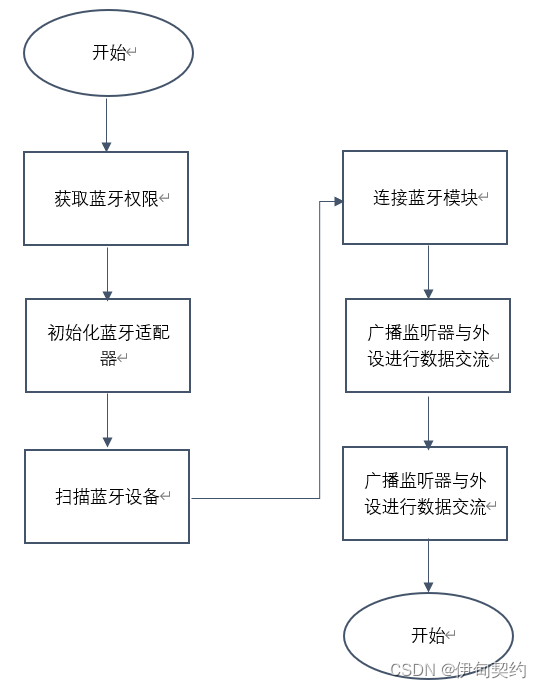
想要使用BLE开发,就得先获得蓝牙必要的权限,需要先在AndroidManifest.xml中设置权限
<uses-permission android:name="android.permission.BLUETOOTH"/>
<uses-permission android:name="android.permission.BLUETOOTH_ADMIN"/>
如果想声明你的app只为具有BLE的设备提供,在manifest文件中包括:
<uses-feature android:name="android.hardware.bluetooth_le" android:required="true"/>
除此之外,如果是Android 6.0以上的手机仅仅是添加以上的蓝牙权限是不足的,这样会造成无法扫描到其他设备,因而还需要添加位置权限:
<uses-permission android:name="android.permission.ACCESS_COARSE_LOCATION" />
    <uses-permission android:name="android.permission.ACCESS_FINE_LOCATION" />
    <uses-feature android:name="android.hardware.location.gps" />
required=true只能是让支持BLE的Android设备上安装运行,不支持的则不行,如果想在Java实现上述功能,可以通过下述代码:
// 手机硬件支持蓝牙
if(!getPackageManager().hasSystemFeature(PackageManager.FEATURE_BLUETOOTH_LE)) {
    Toast.makeText(this, R.string.ble_not_supported, Toast.LENGTH_SHORT).show();
    finish();
}
所有的蓝牙活动都需要蓝牙适配器,BluetoothAdapter代表设备本身的蓝牙适配器。整个系统只有一个蓝牙适配器,而且app需要蓝牙适配器与系统交互。下面的代码片段显示了如何得到适配器。
注意该方法使用getSystemService()返回BluetoothManager,然后将其用于获取适配器的一个实例。Android 4.3(API 18)引入BluetoothManager
final BluetoothManager bluetoothManager =(BluetoothManager) getSystemService(Context.BLUETOOTH_SERVICE);
if (Build.VERSION.SDK_INT>=Build.VERSION_CODES.LOLLIPOP)
    mBluetoothAdapter = BluetoothAdapter.getDefaultAdapter();
else
    mBluetoothAdapter = bluetoothManager.getAdapter();
if (Build.VERSION.SDK_INT >= Build.VERSION_CODES.LOLLIPOP)
    mBluetoothLeScanner = mBluetoothAdapter.getBluetoothLeScanner();
要操作蓝牙,必须先在设备中开启蓝牙。如果当前未启用蓝牙,则可以通过触发一个Intent调用系统显示一个对话框来要求用户启用蓝牙权限
// 打开蓝牙权限
if (mBluetoothAdapter == null || !mBluetoothAdapter.isEnabled()) {
    Intent enableBtIntent = new Intent(
        BluetoothAdapter.ACTION_REQUEST_ENABLE);
    startActivityForResult(enableBtIntent, REQUEST_ENABLE_BT);
}
/**
  * @Description: TODO<自定义适配器Adapter,作为listview的适配器>
  */
private class LeDeviceListAdapter extends BaseAdapter {
    private ArrayList<BluetoothMessage> mLeDevices;

    private LayoutInflater mInflator;

    public LeDeviceListAdapter()
    {
        super();
        //rssis = new ArrayList<Integer>();
        mLeDevices = new ArrayList<BluetoothMessage>();
        mInflator = getLayoutInflater();
     }
    public void addDevice(BluetoothMessage device)
    {
        for (BluetoothMessage mLeDevice : mLeDevices) {

            if(mLeDevice.getDevice().getAddress().equals(device.getDevice().getAddress())){
                return;
            }
        }
        mLeDevices.add(device);
        //rssis.add(rssi);
    }
    public BluetoothMessage getDevice(int position)
    {
    	return mLeDevices.get(position);
    }
    public void clear()
    {
        mLeDevices.clear();
        //rssis.clear();
    }
    @Override
    public int getCount()
    {
    	return mLeDevices.size();
    }
	@Override
    public Object getItem(int i)
    {
        return mLeDevices.get(i);
    }
    @Override
    public long getItemId(int i)
    {
        return i;
    }

    /**
      * 重写getview
      *
      * **/
   @Override
    public View getView(int i, View view, ViewGroup viewGroup)
    {
        // General ListView optimization code.
        // 加载listview每一项的视图
        BluetoothMessage bluetoothMessage = mLeDevices.get(i);
        return view;
    }
}
如果要发现BLE设备,使用startLeScan()方法进行扫描,扫描的话就要传入true执行scanLeDvice(true)方法,然后蓝牙适配器就调用startLeScan()方法进行扫描,LeScanCallback是扫描回调,也就是返回扫描结果。
private void scanLeDevice(final boolean enable) {
    if (mBluetoothAdapter == null){
        if (Build.VERSION.SDK_INT >= Build.VERSION_CODES.LOLLIPOP)
            mBluetoothAdapter = BluetoothAdapter.getDefaultAdapter();
        else {
            BluetoothManager bluetoothManager = (BluetoothManager) getSystemService(Context.BLUETOOTH_SERVICE);
            mBluetoothAdapter = bluetoothManager.getAdapter();
        }
  	}
    if (mBluetoothLeScanner == null){
        if (Build.VERSION.SDK_INT >= Build.VERSION_CODES.LOLLIPOP)
            mBluetoothLeScanner = mBluetoothAdapter.getBluetoothLeScanner();
        }
    if (enable) {
        // Stops scanning after a pre-defined scan period.
        mHandler.postDelayed(new Runnable()
        {
            @Override
            public void run()
            {
                mScanning = false;
                scan_flag = true;
                scan_btn.setText("扫描设备");
                Log.i("SCAN", "stop.....................");
                if (Build.VERSION.SDK_INT >= Build.VERSION_CODES.LOLLIPOP)
                    mBluetoothLeScanner.stopScan(mScanCallback);
                else
                    mBluetoothAdapter.stopLeScan(mLeScanCallback);
             }
         }, SCAN_PERIOD);
         /* 开始扫描蓝牙设备,带mLeScanCallback 回调函数 */
            Log.i("SCAN", "begin.....................");
            mScanning = true;
            scan_flag = false;
            scan_btn.setText("停止扫描");
            if (Build.VERSION.SDK_INT >= Build.VERSION_CODES.LOLLIPOP)
                mBluetoothLeScanner.startScan(mScanCallback);
            else
                mBluetoothAdapter.startLeScan(mLeScanCallback);
     } else {
            Log.i("Stop", "stoping................");
            mScanning = false;
            if (Build.VERSION.SDK_INT >= Build.VERSION_CODES.LOLLIPOP)
                mBluetoothLeScanner.stopScan(mScanCallback);
            else
                mBluetoothAdapter.stopLeScan(mLeScanCallback);
            scan_flag = true;
      }
}
在这里回家上面的扫描方法的扫描结果回调,也就是传回来。其中在onLeScan方法是重点,蓝牙扫描成功后的结果会返回此方法中,然后就可以处理BluetoothDevice拿到设备信息,最后展示到前面初始化的ListView列表中:
// 这个是官方demo的源码
// 是扫描的Callback的回调,其中的onLeScan方法,蓝牙扫描成功之后会将结果会返回此方法中
// 然后就可以处理BluetoothDevice拿到设备信息 最后展示到前面初始化的listview列表中
private BluetoothAdapter.LeScanCallback mLeScanCallback = new BluetoothAdapter.LeScanCallback()
{
    @Override
    public void onLeScan(final BluetoothDevice device, final int rssi, byte[] scanRecord)
    {
        // TODO Auto-generated method stub
	    runOnUiThread(new Runnable()
        {
            @Override
            public void run()
            {
                // 讲扫描到设备的信息输出到listview的适配器
                BluetoothMessage bluetoothMessage = new BluetoothMessage(device);
                mleDeviceListAdapter.addDevice(bluetoothMessage);
                mleDeviceListAdapter.notifyDataSetChanged();
             }
         });
    }
};
至此已经完成初始化配置、一些设备的判断逻辑和扫描操作了,如果能成功地扫描到设备并展示到界面上的话,下一步如果用户点击了列表,将进行蓝牙连接和相关的读写操作!
创建了一个BluetoothLeService服务类并继承了Service,用来完成蓝牙设备的初始化、连接、断开连接、读取特征值、写入特征值、设置特征值变化通知以及获取已连接蓝牙的所有服务等操作
首先,我们得进行第一步,在onCreate()方法中,执行bindService开启一个服务
这里因为是项目需要,使用了一个虚拟按钮来进行初始化的连接
//蓝牙service,负责后台的蓝牙服务
private static BluetoothLeService mBluetoothLeService;
Intent gattServiceIntent;
/**
     * --------------------------------------------onCreate方法-----------------------------------------------------
     */
@Override
public void onCreate(Bundle savedInstanceState)
{
    ...
        /* 启动蓝牙service */
        gattServiceIntent = new Intent(this, BluetoothLeService.class);
    //模拟按键点击事件触发蓝牙连接
    rev_tv.post(new Runnable() {
        @Override
        public void run() {
            scan_btn.performClick();
        }
    });

    //监听scan_btn
    scan_btn.setOnClickListener(new View.OnClickListener(){
        @Override
        public void onClick(View v){
            if (scan_flag)
            {
                mleDeviceListAdapter = new LeDeviceListAdapter();
                //lv.setAdapter(mleDeviceListAdapter);
                scanLeDevice(true);
            } else {
                scanLeDevice(false);
                scan_btn.setText("扫描设备");
            }
            if (mScanning) {
                /* 停止扫描设备 */
                if (Build.VERSION.SDK_INT >= Build.VERSION_CODES.LOLLIPOP)
                    mBluetoothLeScanner.stopScan(mScanCallback);
                else
                    mBluetoothAdapter.stopLeScan(mLeScanCallback);
                mScanning = false;
            }
            bindService(gattServiceIntent, mServiceConnection, BIND_AUTO_CREATE);
        }
    });
    ...
}
开启服务成功后,便会一样进行服务回调,当服务回调已经成功连接时,便会获取一个BlueToohtLeService的实例,接着就执行蓝牙连接操作:
/* BluetoothLeService绑定的回调函数 */
// 获取BluetoothLeService的实例,进行蓝牙连接操作
// 以下都是Android官方的demo源码
private final ServiceConnection mServiceConnection = new ServiceConnection()
{

    @Override
    public void onServiceConnected(ComponentName componentName,
                                   IBinder service)
    {
        mBluetoothLeService = ((BluetoothLeService.LocalBinder) service)
            .getService();
        if (!mBluetoothLeService.initialize())
        {
            //Log.e(TAG, "Unable to initialize Bluetooth");
            finish();
        }
        mBluetoothLeService.connect(mDeviceAddress);
    }
    @Override
    public void onServiceDisconnected(ComponentName componentName)
    {
        mBluetoothLeService = null;
    }
};
这个时候,需要单独创建一个BlueToothService类,因为BlueToohtLeService类既然是服务类,那它父类肯定是继承于Service
public class BluetoothLeService extends Service {
	...
}
这里的BlueToothService类是BindService服务,用于绑定一个服务。这样当bindService(intent,conn,flags)后,就会绑定一个服务。这样做可以获得这个服务对象本身,而用StartService(intent)的方法只能启动服务。
BindService方法的一般过程:
// bindService区别于startService,用于绑定服务,可以获得这个服务对象本身
public class LocalBinder extends Binder {
    public BluetoothLeService getService()
    {
        return BluetoothLeService.this;
    }
}
// onBind()是使用bindService开启的服务才会有回调的一个方法
// onBind()方法给MainActivity返回了BluetoothLeService实例
// 用于方便MainActivity后续的连接和读写操作
@Override
public IBinder onBind(Intent intent)
{
    return mBinder;
}
当服务调用unbindService时,服务的生命周期将会进入onUnbind()方法,接着执行了关闭蓝牙的方法
@Override
public boolean onUnbind(Intent intent)
{
    close();
    return super.onUnbind(intent);
}

private final IBinder mBinder = new LocalBinder();
这个方法是BlueToohtLeService服务类创建之后在MainActivity通过拿到BlueToohtLeService实例调用的,也是官方的源码
/* service 中蓝牙初始化 */
public boolean initialize()
{
    // For API level 18 and above, get a reference to BluetoothAdapter
    // through
    // BluetoothManager.
    if (mBluetoothManager == null)
    {   //获取系统的蓝牙管理器
        //使用 getSystemService(java.lang.String)与 BLUETOOTH_SERVICE创建一个 BluetoothManager
        // 然后调用 getAdapter()以获得 BluetoothAdapter
        mBluetoothManager = (BluetoothManager) getSystemService(Context.BLUETOOTH_SERVICE);
        if (mBluetoothManager == null)
        {
            Log.e(TAG, "Unable to initialize BluetoothManager.");
            return false;
        }
    }

    //BluetoothManager 的变量调用 getAdapter()以获得 BluetoothAdapter 进而对整体蓝牙进行管理
    mBluetoothAdapter = mBluetoothManager.getAdapter();
    if (mBluetoothAdapter == null)
    {
        Log.e(TAG, "Unable to obtain a BluetoothAdapter.");
        return false;
    }

    return true;
}
connect()和connectGatt都是连接BLE设备的方法,但二者用法不同
connectGatt是BluetoothDevice类下的方法,功能是向BLE设备发起连接,然后得到一个BluetoothGatt类型的返回值,利用这个返回值可以进行下一步操作。
connect是BluetoothGatt类下的方法,功能是重新连接。如果BLE设备和APP已经连接过,但是因为设备超出了蓝牙的连接范围而断掉,那么当设备重新回到连接范围内时,可以通过connect()重新连接
// 连接远程蓝牙
    public boolean connect(final String address)
    {
        // 适配器为空或者地址为空就会提示
        if (mBluetoothAdapter == null || address == null)
        {
            Log.w(TAG,
                    "BluetoothAdapter not initialized or unspecified address.");
            return false;
        }

        // Previously connected device. Try to reconnect.
        if (mBluetoothDeviceAddress != null
                && address.equals(mBluetoothDeviceAddress)
                && mBluetoothGatt != null)
        {
            Log.d(TAG,
                    "Trying to use an existing mBluetoothGatt for connection.");
            //mBluetoothGatt.connect()表示连接回远程设备
            //在连接断开后,此方法的功能在于“重新连接到远程设备”
            //如果设备曾经连接过,但目前不在范围内
            //则一旦设备回到范围内,则可以通过connect重新连接。
            if (mBluetoothGatt.connect())//连接蓝牙,其实就是调用BluetoothGatt的连接方法
            {
                mConnectionState = STATE_CONNECTING;
                return true;
            } else
            {
                return false;
            }
        }
        /* 获取远端的蓝牙设备 */
        //mBluetoothAdapter.getRemoteDevice
        //蓝牙适配器通过调用getRemoteDevice()方法获取给定的蓝牙硬件地址的BluetoothDevice对象
        //有效的蓝牙地址必须是6个字节,即使没有找到设备,也得返回有效的6个字节,当然,估计就是6个0
        final BluetoothDevice device = mBluetoothAdapter
                .getRemoteDevice(address);
        if (device == null)
        {
            Log.w(TAG, "Device not found.  Unable to connect.");
            return false;
        }
        // We want to directly connect to the device, so we are setting the
        // autoConnect
        // parameter to false.
        /* 调用device中的connectGatt连接到远程设备 */
        //connectGatt是BluetoothDevice类下的方法
        //功能是向BLE设备发起连接,然后得到一个BluetoothGatt类型的返回值,利用这个返回值可以进行下一步操作
        //connectGatt方法往往是和BluetoothGatt类的connect方法一起使用
        //两个方法的运行逻辑是:
        //先使用connectGatt方法发起连接,连接状态的改变会回调callback对象中的onConnectionStateChange
        // (需要自己定义一个BluetoothGattCallBack对象并重写onConnectionStateChange)
        // 并返回一个BluetoothGatt对象,这时BluetoothGatt已经实例化,下一次连接可以调用connect重新连接。
        mBluetoothGatt = device.connectGatt(this, false, mGattCallback);
        Log.d(TAG, "Trying to create a new connection.");
        mBluetoothDeviceAddress = address;
        mConnectionState = STATE_CONNECTING;
        System.out.println("device.getBondState==" + device.getBondState());
        return true;
    }
取消连接
/**
     * @Title: disconnect
     * @Description: TODO(取消蓝牙连接)
     * @return void
     * @throws
     */
public void disconnect()
{
    if (mBluetoothAdapter == null || mBluetoothGatt == null)
    {
        Log.w(TAG, "BluetoothAdapter not initialized");
        return;
    }
    mBluetoothGatt.disconnect();

}
这个回调十分重要,主要对BluetoothGatt的蓝牙连接、断开、读、写、特征值变化等的回调监听,然后我们可以将这些回调信息通过广播机制传播回给广播监听器
/* 连接远程设备的回调函数 */
// BluetoothGattCallback是一个抽象类,目的是用于实现 BluetoothGatt的回调
// 用于将结果传递给用户,例如连接状态等,以及任何进一步对GATT客户端的操作
// 因为BluetoothGattCallback是一个抽象类,因此需要对里面的方法进行重写
private final BluetoothGattCallback mGattCallback = new BluetoothGattCallback()
{
    // 连接状态变化时回调,用来检测蓝牙是否连接成功与否,成功失败两种情况的操作在这里设置
    @Override
    public void onConnectionStateChange(BluetoothGatt gatt, int status,
                                        int newState)
    {
        String intentAction;
        if (newState == BluetoothProfile.STATE_CONNECTED)//连接成功
        {   // 连接成功后的操作
            intentAction = ACTION_GATT_CONNECTED;   // 连接外设成功(GATT服务端)
            mConnectionState = STATE_CONNECTED;     // 设备连接完毕
            /* 通过广播更新连接状态 */
            broadcastUpdate(intentAction);          // 广播更新,查看是否有数据更新
            Log.i(TAG, "Connected to GATT server.");
            // Attempts to discover services after successful connection.
            Log.i(TAG, "Attempting to start service discovery:"
                  + mBluetoothGatt.discoverServices());

        } else if (newState == BluetoothProfile.STATE_DISCONNECTED)//连接失败
        {   //连接失败后的操作
            intentAction = ACTION_GATT_DISCONNECTED;// 连接外设失败(GATT服务端)
            mConnectionState = STATE_DISCONNECTED;  // 设备无法连接
            Log.i(TAG, "Disconnected from GATT server.");
            broadcastUpdate(intentAction);
        }
    }
    /*
         * 重写onServicesDiscovered,发现蓝牙服务 会在蓝牙连接的时候调用
         *
         * */
    @Override
    public void onServicesDiscovered(BluetoothGatt gatt, int status)
    {   // GATT_SUCCESS表示GATT操作完成
        if (status == BluetoothGatt.GATT_SUCCESS)//发现蓝牙服务成功
        {
            broadcastUpdate(ACTION_GATT_SERVICES_DISCOVERED);
            Log.i(TAG, "--onServicesDiscovered called--");
        } else
        {
            Log.w(TAG, "onServicesDiscovered received: " + status);
            System.out.println("onServicesDiscovered received: " + status);
        }
    }
    /*
         * 特征值的读写
         * */
    @Override
    public void onCharacteristicRead(BluetoothGatt gatt,
                                     BluetoothGattCharacteristic characteristic, int status)
    {
        if (status == BluetoothGatt.GATT_SUCCESS)
        {
            Log.i(TAG, "--onCharacteristicRead called--");
            //从特征值读取数据
            // characteristic是特征值,而特征值是用16bit或者128bit,16bit是官方认证过的,128bit是可以自定义的
            // 这里的两步操作第一步获得二进制的特征值,第二步将其变成字符串
            byte[] sucString = characteristic.getValue();
            String string = new String(sucString);
            //将数据通过广播到Ble_Activity
            //broadcastUpdate(ACTION_DATA_AVAILABLE, characteristic);
        }

    }
    /*
         * 特征值的改变
         * */
    @Override
    public void onCharacteristicChanged(BluetoothGatt gatt,
                                        BluetoothGattCharacteristic characteristic)
    {
        System.out.println("++++++++++++++++");
        broadcastUpdate(ACTION_DATA_AVAILABLE, characteristic);
        // ACTION_DATA_AVAILABLE: 接受来自设备的数据,可以通过读或通知操作获得
    }
    /*
         * 特征值的写
         * */
    @Override
    public void onCharacteristicWrite(BluetoothGatt gatt,
                                      BluetoothGattCharacteristic characteristic, int status) {

        super.onCharacteristicWrite(gatt, characteristic, status);
        if (status == BluetoothGatt.GATT_SUCCESS) {//发送完成
            mSendState = true;
            Log.d("AppRun"+getClass().getSimpleName(),"发送完成");
        }
    }
    /*
         * 读描述值
         * */
    @Override
    public void onDescriptorRead(BluetoothGatt gatt,
                                 BluetoothGattDescriptor descriptor, int status)
    {
        // TODO Auto-generated method stub
        // super.onDescriptorRead(gatt, descriptor, status);
        Log.w(TAG, "----onDescriptorRead status: " + status);
        byte[] desc = descriptor.getValue();
        if (desc != null)
        {
            Log.w(TAG, "----onDescriptorRead value: " + new String(desc));
        }

    }
    /*
         * 写描述值
         * */
    @Override
    public void onDescriptorWrite(BluetoothGatt gatt,
                                  BluetoothGattDescriptor descriptor, int status)
    {
        // TODO Auto-generated method stub
        // super.onDescriptorWrite(gatt, descriptor, status);
        Log.w(TAG, "--onDescriptorWrite--: " + status);
    }
    /*
         * 读写蓝牙信号值
         * */
    // Rssi是蓝牙的接受信号强度
    @Override
    public void onReadRemoteRssi(BluetoothGatt gatt, int rssi, int status)
    {
        // TODO Auto-generated method stub
        // super.onReadRemoteRssi(gatt, rssi, status);
        Log.w(TAG, "--onReadRemoteRssi--: " + status);
        broadcastUpdate(ACTION_DATA_AVAILABLE, rssi);
    }

    @Override
    public void onReliableWriteCompleted(BluetoothGatt gatt, int status)
    {
        // TODO Auto-generated method stub
        // super.onReliableWriteCompleted(gatt, status);
        Log.w(TAG, "--onReliableWriteCompleted--: " + status);
    }

};
为了让手机APP接收蓝牙设备发送的数据,必须要设置这个setCharacteristicNotification()方法,这个十分重要。否则,手机APP将无法接受蓝牙设备的数据
MainActivity代码
mBluetoothGatt.setCharacteristicNotification(characteristic, enabled);
BluetoothLeService类的代码
/**
     * @Title: setCharacteristicNotification
     * @Description: TODO(设置特征值通变化通知)
     * @param @param characteristic(特征值)
     * @param @param enabled (使能)
     * @return void
     * @throws
     */
public void setCharacteristicNotification(
    BluetoothGattCharacteristic characteristic, boolean enabled)
{
    if (mBluetoothAdapter == null || mBluetoothGatt == null)
    {
        Log.w(TAG, "BluetoothAdapter not initialized");
        return;
    }
    mBluetoothGatt.setCharacteristicNotification(characteristic, enabled);

    BluetoothGattDescriptor clientConfig = characteristic
        .getDescriptor(UUID
                       .fromString("00002902-0000-1000-8000-00805f9b34fb"));
    // 其中UUID.fromString("00002902-0000-1000-8000-00805f9b34fb"是HC-08蓝牙设备的监听UUID
    if (enabled)
    {
        clientConfig
            .setValue(BluetoothGattDescriptor.ENABLE_NOTIFICATION_VALUE);
    } else
    {
        clientConfig
            .setValue(BluetoothGattDescriptor.DISABLE_NOTIFICATION_VALUE);
    }
    mBluetoothGatt.writeDescriptor(clientConfig);
}
开启对特征值的读
MainActivity代码
mBluetoothGatt.readCharacteristic(characteristic);
BluetoothLeService类的代码
/**
     * @Title: readCharacteristic
     * @Description: TODO(读取特征值)
     * @param @param characteristic(要读的特征值)
     * @return void    返回类型
     * @throws
     */
public void readCharacteristic(BluetoothGattCharacteristic characteristic)
{
    if (mBluetoothAdapter == null || mBluetoothGatt == null)
    {
        Log.w(TAG, "BluetoothAdapter not initialized");
        return;
    }
    mBluetoothGatt.readCharacteristic(characteristic);

}
在蓝牙设备连接成功后自动读一次特征值,如果读成功,将返回BluetoothLeService类中的OnDataAvailableListener接口,并进入如下的方法
public void onCharacteristicRead(BluetoothGatt gatt,
                                 BluetoothGattCharacteristic characteristic, int status);
开启对特征值的写,也就是向蓝牙外设写入数据
MainActivity代码
mBluetoothLeService.writeCharacteristic(gattCharacteristic);
BluetoothLeService类的代码
// 写入特征值
public void writeCharacteristic(byte[] bytes)
{
    if (mBluetoothAdapter == null || mBluetoothGatt == null) {
        Log.w(TAG, "BluetoothAdapter not initialized");
        return;
    }
    mList.add(bytes);
    //mBluetoothGatt.writeCharacteristic(characteristic);
}
这是完成手机APP向蓝牙设备写数据的操作
/**
     * @Title: getSupportedGattServices
     * @Description: TODO(得到蓝牙的所有服务)
     * @param @return    无
     * @return List<BluetoothGattService>
     * @throws
     */
public List<BluetoothGattService> getSupportedGattServices()
{
    if (mBluetoothGatt == null)
        return null;
    return mBluetoothGatt.getServices();

}
返回已经连接蓝牙设备的所有服务
该方法返回的是已连接的蓝牙设备的信号值(RSSI),而RSSI值是蓝牙的信号值,离得越远信号越小,反之亦然
// 读取RSSi
public void readRssi()
{
    if (mBluetoothAdapter == null || mBluetoothGatt == null)
    {
        Log.w(TAG, "BluetoothAdapter not initialized");
        return;
    }
    mBluetoothGatt.readRemoteRssi();
}
该方法返回的是已连接的蓝牙设备的信号值(RSSI)
通过广播的形式将数据发出去,在MainActivity中通过设置过滤器接收对应的广播
//广播意图
private void broadcastUpdate(final String action, int rssi)
{
    final Intent intent = new Intent(action);
    intent.putExtra(EXTRA_DATA, String.valueOf(rssi));
    sendBroadcast(intent);
}
//广播意图
private void broadcastUpdate(final String action)
{
    final Intent intent = new Intent(action);
    sendBroadcast(intent);
}

/* 广播远程发送过来的数据 */
public void broadcastUpdate(final String action,
                            final BluetoothGattCharacteristic characteristic)
{
    final Intent intent = new Intent(action);
    //从特征值获取数据
    final byte[] data = characteristic.getValue();
    MainActivity.revDataForCharacteristic =data;
    if (data != null && data.length > 0)
    {
        final StringBuilder stringBuilder = new StringBuilder(data.length);
        for (byte byteChar : data)
        {
            stringBuilder.append(String.format("%02X ", byteChar));

            Log.i(TAG, "***broadcastUpdate: byteChar = " + byteChar);

        }
        Log.e("AppRunTime","测试一");
        intent.putExtra("BLE_BYTE_DATA", data);
        intent.putExtra(EXTRA_DATA, new String(data));
        System.out.println("broadcastUpdate for  read data:"
                           + new String(data));
    }
    sendBroadcast(intent);
}
广播的目的:
扫描者只有在收到广播数据后,才能去与广播者建立连接。广播是周期性的将广播数据从广播通道上发送出去
意图过滤器:
IntentFilter翻译成中文就是“意图过滤器”,主要用来过滤隐式意图。当用户进行一项操作的时候,Android系统会根据配置的 “意图过滤器” 来寻找可以响应该操作的组件,服务。这里的意图过滤器就是让用户对服务端也就是硬件外设进行操作
在官方Demo中,便用了广播来作为activity和service之间的数据传递;MainActivity开启了前面的服务之后,就在MainActivity中注册了这个mGattUpdateReceiver广播,以下代码是MainActivity中的
// 取消注册广播和IntentFilter
@Override
protected void onDestroy()
{
    super.onDestroy();
    //解除广播接收器
    unregisterReceiver(mGattUpdateReceiver);
    mBluetoothLeService = null;
}

// Activity出来时候,绑定广播接收器,监听蓝牙连接服务传过来的事件
// 在官方demo中,广播接收器也叫广播监听器,用广播实现activity和service的数据传递
// 在MainActivity执行了bindService,开启了蓝牙服务
// 而在这里,就通过registerReceiver注册了mGattUpdateReceiver广播和IntentFilter
@Override
protected void onResume()
{
    super.onResume();
    //绑定广播接收器
    registerReceiver(mGattUpdateReceiver, makeGattUpdateIntentFilter());
    if (mBluetoothLeService != null)
    {
        //根据蓝牙地址,建立连接
        final boolean result = mBluetoothLeService.connect(mDeviceAddress);
    }
}
/* 意图过滤器 */
private static IntentFilter makeGattUpdateIntentFilter()
{
    final IntentFilter intentFilter = new IntentFilter();
    intentFilter.addAction(BluetoothLeService.ACTION_GATT_CONNECTED);
    intentFilter.addAction(BluetoothLeService.ACTION_GATT_DISCONNECTED);
    intentFilter
        .addAction(BluetoothLeService.ACTION_GATT_SERVICES_DISCOVERED);
    intentFilter.addAction(BluetoothLeService.ACTION_DATA_AVAILABLE);
    return intentFilter;
}
上述代码利用registerReceiver()和unregisterReceiver()方法完成注册和取消注册广播,下面的代码是设置广播接收和过滤器
广播回调监听,便是MainActivity接收从Service发送过来的信息,上面说到的上文有说到BluetoothService类的方法BluetoothGattCallback,就是从这里发送广播的
/**
     * 广播接收器,负责接收BluetoothLeService类发送的数据
     */
// 下面是对前面注册的广播的回调监听,作用是接受从Service发送回来的信息
// 从BluetoothGattCallback中发送广播,这里接受信息
private final BroadcastReceiver mGattUpdateReceiver = new BroadcastReceiver()
{
    @Override
    public void onReceive(Context context, Intent intent)
    {
        final String action = intent.getAction();
        if (BluetoothLeService.ACTION_GATT_CONNECTED.equals(action))//Gatt连接成功
        {
            mConnected = true;
            //status = "connected";
            //更新连接状态
            //updateConnectionState(status);
            System.out.println("BroadcastReceiver :" + "device connected");

        } else if (BluetoothLeService.ACTION_GATT_DISCONNECTED//Gatt连接失败
                   .equals(action))
        {
            mConnected = false;
            //status = "disconnected";
            //更新连接状态
            //updateConnectionState(status);
            System.out.println("BroadcastReceiver :"
                               + "device disconnected");

        } else if (BluetoothLeService.ACTION_GATT_SERVICES_DISCOVERED//发现GATT服务器
                   .equals(action))
        {
            // Show all the supported services and characteristics on the
            // user interface.
            //获取设备的所有蓝牙服务
            //这里留意一下:当连接成功后,首先service那边会发现服务特征值,通过广播传输回来,然后执行下面的方法
            displayGattServices(mBluetoothLeService
                                .getSupportedGattServices());
            System.out.println("BroadcastReceiver :"
                               + "device SERVICES_DISCOVERED");
        } else if (BluetoothLeService.ACTION_DATA_AVAILABLE.equals(action))//有效数据
        {
            //处理发送过来的数据
            try {
                if (intent.getExtras().getString(
                    BluetoothLeService.EXTRA_DATA)!=null) {
                    displayData(intent.getExtras().getString(
                        BluetoothLeService.EXTRA_DATA), intent);
                    System.out.println("BroadcastReceiver onData:"
                                       + intent.getStringExtra(BluetoothLeService.EXTRA_DATA));
                }
            }catch (Exception e){
                e.printStackTrace();
            }
        }
    }
};
在接收广播的代码中,displayGattServices()是进一步的完成发现服务,而displayData()则是进一步的完成数据接收处理
private static BluetoothGattCharacteristic target_chara = null;
//蓝牙service,负责后台的蓝牙服务
private static BluetoothLeService mBluetoothLeService;
private Handler mhandler = new Handler();
/**
     * @Title: displayGattServices
     * @Description: TODO(处理蓝牙服务)
     * @param
     * @return void
     * @throws
     */
// 处理数据的输入和获取
private void displayGattServices(List<BluetoothGattService> gattServices)
{

    if (gattServices == null)
        return;
    String uuid = null;
    String unknownServiceString = "unknown_service";
    String unknownCharaString = "unknown_characteristic";

    // 服务数据,可扩展下拉列表的第一级数据
    ArrayList<HashMap<String, String>> gattServiceData = new ArrayList<HashMap<String, String>>();

    // 特征数据(隶属于某一级服务下面的特征值集合)
    ArrayList<ArrayList<HashMap<String, String>>> gattCharacteristicData = new ArrayList<ArrayList<HashMap<String, String>>>();

    // 部分层次,所有特征值集合
    mGattCharacteristics = new ArrayList<ArrayList<BluetoothGattCharacteristic>>();

    // Loops through available GATT Services.
    for (BluetoothGattService gattService : gattServices)
    {

        // 获取服务列表
        HashMap<String, String> currentServiceData = new HashMap<String, String>();
        uuid = gattService.getUuid().toString();

        // 查表,根据该uuid获取对应的服务名称。SampleGattAttributes这个表需要自定义。

        gattServiceData.add(currentServiceData);

        System.out.println("Service uuid:" + uuid);

        ArrayList<HashMap<String, String>> gattCharacteristicGroupData = new ArrayList<HashMap<String, String>>();

        // 从当前循环所指向的服务中读取特征值列表
        List<BluetoothGattCharacteristic> gattCharacteristics = gattService
            .getCharacteristics();

        ArrayList<BluetoothGattCharacteristic> charas = new ArrayList<BluetoothGattCharacteristic>();

        // Loops through available Characteristics.
        // 对于当前循环所指向的服务中的每一个特征值
        for (final BluetoothGattCharacteristic gattCharacteristic : gattCharacteristics)
        {
            charas.add(gattCharacteristic);
            HashMap<String, String> currentCharaData = new HashMap<String, String>();
            uuid = gattCharacteristic.getUuid().toString();

            if (gattCharacteristic.getUuid().toString()
                .equals(HEART_RATE_MEASUREMENT))
            {
                // 测试读取当前Characteristic数据,会触发mOnDataAvailable.onCharacteristicRead()
                mhandler.postDelayed(new Runnable()
                                     {

                                         @Override
                                         public void run()
                                         {
                                             // TODO Auto-generated method stub
                                             mBluetoothLeService
                                                 .readCharacteristic(gattCharacteristic);
                                         }
                                     }, 200);

                // 接受Characteristic被写的通知,收到蓝牙模块的数据后会触发mOnDataAvailable.onCharacteristicWrite()
                mBluetoothLeService.setCharacteristicNotification(
                    gattCharacteristic, true);
                target_chara = gattCharacteristic;
                // 设置数据内容
                // 往蓝牙模块写入数据
                // mBluetoothLeService.writeCharacteristic(gattCharacteristic);
            }
            List<BluetoothGattDescriptor> descriptors = gattCharacteristic
                .getDescriptors();
            for (BluetoothGattDescriptor descriptor : descriptors)
            {
                System.out.println("---descriptor UUID:"
                                   + descriptor.getUuid());
                // 获取特征值的描述
                mBluetoothLeService.getCharacteristicDescriptor(descriptor);
                // mBluetoothLeService.setCharacteristicNotification(gattCharacteristic,
                // true);
            }

            gattCharacteristicGroupData.add(currentCharaData);
        }
        // 按先后顺序,分层次放入特征值集合中,只有特征值
        mGattCharacteristics.add(charas);
        // 构件第二级扩展列表(服务下面的特征值)
        gattCharacteristicData.add(gattCharacteristicGroupData);

    }

}
下面的代码完成数据的接收,将其显示到scrollview中
/**
     * @Title: displayData
     * @Description: TODO(接收到的数据在scrollview上显示)
     * @param @param rev_string(接受的数据)
     * @return void
     * @throws
     */
private void displayData(String rev_string, Intent intent)
{
    try {
        byte[] data = intent.getByteArrayExtra("BLE_BYTE_DATA");
        if(data==null)
            System.out.println("data is null!!!!!!");
        if (receptionHex)
            rev_string = bytesToHexString(data);
        else
            rev_string = new String(data, 0, data.length, "GB2312");//GB2312编码
    } catch (UnsupportedEncodingException e) {
        // TODO Auto-generated catch block
        e.printStackTrace();
    }
    bluedata = rev_string;
    //更新UI
    runOnUiThread(new Runnable()
                  {
                      @Override
                      public void run()
                      {
                          //                rev_tv.setText(bluedata);
                          if(bluedata.length() == RFID )
                          {
                              rfid = bluedata;
                              rev_tv.setText(rfid);

                          }
                          else if(bluedata.length() == DISTANCE )
                          {
                              Log.d("data","*"+bluedata+"*");
                              int a = bluedata.charAt(1) - '0';
                              int b = bluedata.charAt(4) - '0';
                              int c = bluedata.charAt(7) - '0';
                              distance = a * 100 + b * 10 + c;
                              if(distance>100 && distance < 500 )takephoto = false;
                              rev_tv.setText(new Integer(distance).toString());
                          }
                      }
                  });

}
下面的代码是在BluetoothLeService类中,用于给外设的蓝牙模块写入数据的方法
// 发送数据
public void startSend(final BluetoothGattCharacteristic characteristic){
    if (mBluetoothAdapter == null || mBluetoothGatt == null) {
        Log.w(TAG, "BluetoothAdapter not initialized");
        return;
    }
    Log.d("AppRun"+getClass().getSimpleName(),"添加完成,开始发送");
    if (mList.size() != 0){
        new Thread(new Runnable() {
            @Override
            public void run() {


                for (int i = 0;i<mList.size();) {
                    try {
                        if (mSendState) {
                            Thread.sleep(5);
                            characteristic.setValue(mList.get(i));
                            mSendState = false;
                            mBluetoothGatt.writeCharacteristic(characteristic);
                            ++i;
                        } else {
                            Log.d("AppRun"+getClass().getSimpleName(),"等待中..");
                            Thread.sleep(20);
                        }
                    }catch (Exception e){
                        e.printStackTrace();
                    }
                }
                Log.d("AppRun"+getClass().getSimpleName(),"发送完毕..");
                mList.clear();
            }
        }).start();
    }
}
下面是将数据进行分包,因为每次蓝牙传输数据只能是20个字节,如果一个数据超过20个字节,必须要分成n个存放20字节的包
/**
     * 将数据分包
     *
     * **/
public int[] dataSeparate(int len)
{
    int[] lens = new int[2];
    lens[0]=len/20;
    lens[1]=len%20;
    return lens;
}

/**
     * 将16进制字符串转换为byte[]
     */
public static byte[] hexString2ByteArray(String bs) {
    if (bs == null) {
        return null;
    }
    int bsLength = bs.length();
    if (bsLength % 2 != 0) {
        bs = "0"+bs;
        bsLength = bs.length();
    }
    byte[] cs = new byte[bsLength / 2];
    String st;
    for (int i = 0; i < bsLength; i = i + 2) {
        st = bs.substring(i, i + 2);
        cs[i / 2] = (byte) Integer.parseInt(st, 16);
    }
    return cs;
}

//byte数组转String
public static String bytesToHexString(byte[] bArray) {
    StringBuffer sb = new StringBuffer(bArray.length);
    String sTemp;
    for (int i = 0; i < bArray.length; i++) {
        sTemp = Integer.toHexString(0xFF & bArray[i]);
        if (sTemp.length() < 2)
            sb.append(0);
        sb.append(sTemp.toUpperCase());
    }
    int length = sb.length();
    if (length == 1||length == 0){
        return sb.toString();
    }
    if (length%2==1){
        sb.insert(length-1," ");
        length= length-1;
    }
    for (int i = length;i>0;i=i-2){
        sb.insert(i," ");
    }
    return sb.toString();
}
我正在编写一个包含C扩展的gem。通常当我写一个gem时,我会遵循TDD的过程,我会写一个失败的规范,然后处理代码直到它通过,等等......在“ext/mygem/mygem.c”中我的C扩展和在gemspec的“扩展”中配置的有效extconf.rb,如何运行我的规范并仍然加载我的C扩展?当我更改C代码时,我需要采取哪些步骤来重新编译代码?这可能是个愚蠢的问题,但是从我的gem的开发源代码树中输入“bundleinstall”不会构建任何native扩展。当我手动运行rubyext/mygem/extconf.rb时,我确实得到了一个Makefile(在整个项目的根目录中),然后当
我已经在Sinatra上创建了应用程序,它代表了一个简单的API。我想在生产和开发上进行部署。我想在部署时选择,是开发还是生产,一些方法的逻辑应该改变,这取决于部署类型。是否有任何想法,如何完成以及解决此问题的一些示例。例子:我有代码get'/api/test'doreturn"Itisdev"end但是在部署到生产环境之后我想在运行/api/test之后看到ItisPROD如何实现? 最佳答案 根据SinatraDocumentation:EnvironmentscanbesetthroughtheRACK_ENVenvironm
我们的git存储库中目前有一个Gemfile。但是,有一个gem我只在我的环境中本地使用(我的团队不使用它)。为了使用它,我必须将它添加到我们的Gemfile中,但每次我checkout到我们的master/dev主分支时,由于与跟踪的gemfile冲突,我必须删除它。我想要的是类似Gemfile.local的东西,它将继承从Gemfile导入的gems,但也允许在那里导入新的gems以供使用只有我的机器。此文件将在.gitignore中被忽略。这可能吗? 最佳答案 设置BUNDLE_GEMFILE环境变量:BUNDLE_GEMFI
这似乎非常适得其反,因为太多的gem会在window上破裂。我一直在处理很多mysql和ruby-mysqlgem问题(gem本身发生段错误,一个名为UnixSocket的类显然在Windows机器上不能正常工作,等等)。我只是在浪费时间吗?我应该转向不同的脚本语言吗? 最佳答案 我在Windows上使用Ruby的经验很少,但是当我开始使用Ruby时,我是在Windows上,我的总体印象是它不是Windows原生系统。因此,在主要使用Windows多年之后,开始使用Ruby促使我切换回原来的系统Unix,这次是Linux。Rub
我正在玩HTML5视频并且在ERB中有以下片段:mp4视频从在我的开发环境中运行的服务器很好地流式传输到chrome。然而firefox显示带有海报图像的视频播放器,但带有一个大X。问题似乎是mongrel不确定ogv扩展的mime类型,并且只返回text/plain,如curl所示:$curl-Ihttp://0.0.0.0:3000/pr6.ogvHTTP/1.1200OKConnection:closeDate:Mon,19Apr201012:33:50GMTLast-Modified:Sun,18Apr201012:46:07GMTContent-Type:text/plain
无论您是想搭建桌面端、WEB端或者移动端APP应用,HOOPSPlatform组件都可以为您提供弹性的3D集成架构,同时,由工业领域3D技术专家组成的HOOPS技术团队也能为您提供技术支持服务。如果您的客户期望有一种在多个平台(桌面/WEB/APP,而且某些客户端是“瘦”客户端)快速、方便地将数据接入到3D应用系统的解决方案,并且当访问数据时,在各个平台上的性能和用户体验保持一致,HOOPSPlatform将帮助您完成。利用HOOPSPlatform,您可以开发在任何环境下的3D基础应用架构。HOOPSPlatform可以帮您打造3D创新型产品,HOOPSSDK包含的技术有:快速且准确的CAD
在应用开发中,有时候我们需要获取系统的设备信息,用于数据上报和行为分析。那在鸿蒙系统中,我们应该怎么去获取设备的系统信息呢,比如说获取手机的系统版本号、手机的制造商、手机型号等数据。1、获取方式这里分为两种情况,一种是设备信息的获取,一种是系统信息的获取。1.1、获取设备信息获取设备信息,鸿蒙的SDK包为我们提供了DeviceInfo类,通过该类的一些静态方法,可以获取设备信息,DeviceInfo类的包路径为:ohos.system.DeviceInfo.具体的方法如下:ModifierandTypeMethodDescriptionstatic StringgetAbiList()Obt
@作者:SYFStrive @博客首页:HomePage📜:微信小程序📌:个人社区(欢迎大佬们加入)👉:社区链接🔗📌:觉得文章不错可以点点关注👉:专栏连接🔗💃:感谢支持,学累了可以先看小段由小胖给大家带来的街舞👉微信小程序(🔥)目录自定义组件-behaviors 1、什么是behaviors 2、behaviors的工作方式 3、创建behavior 4、导入并使用behavior 5、behavior中所有可用的节点 6、同名字段的覆盖和组合规则总结最后自定义组件-behaviors 1、什么是behaviorsbehaviors是小程序中,用于实现
最近因为项目需要,需要将Android手机系统自带的某个系统软件反编译并更改里面某个资源,并重新打包,签名生成新的自定义的apk,下面我来介绍一下我的实现过程。APK修改,分为以下几步:反编译解包,修改,重打包,修改签名等步骤。安卓apk修改准备工作1.系统配置好JavaJDK环境变量2.需要root权限的手机(针对系统自带apk,其他软件免root)3.Auto-Sign签名工具4.apktool工具安卓apk修改开始反编译本文拿Android系统里面的Settings.apk做demo,具体如何将apk获取出来在此就不过多介绍了,直接进入主题:按键win+R输入cmd,打开命令窗口,并将路
了解Rails缓存如何工作的人可以真正帮助我。这是嵌套在Rails::Initializer.runblock中的代码:config.after_initializedoSomeClass.const_set'SOME_CONST','SOME_VAL'end现在,如果我运行script/server并发出请求,一切都很好。然而,在我的Rails应用程序的第二个请求中,一切都因单元化常量错误而变得糟糕。在生产模式下,我可以成功发出第二个请求,这意味着常量仍然存在。我已通过将以上内容更改为以下内容来解决问题:config.after_initializedorequire'some_cl
