在某个资产平台,在不了解需求的情况下,我突然接到了一个任务,让我做某个页面窗口的即时通讯,想到了用websocket技术,我从来没用过,被迫接受了这个任务,我带着浓烈的兴趣,就去研究了一下,网上资料那么多,我们必须找到适合自己的方案,我们开发的时候一定要基于现有框架的基础上去做扩展,不然会引发很多问题,比如:运行不稳定、项目无法启动等,废话不多说,直接上代码
WebSocket是一种在单个TCP连接上进行全双工通信的协议。WebSocket通信协议于2011年被IETF定为标准RFC 6455,并由RFC7936补充规范。WebSocket API也被W3C定为标准。
WebSocket使得客户端和服务器之间的数据交换变得更加简单,允许服务端主动向客户端推送数据。在WebSocket API中,浏览器和服务器只需要完成一次握手,两者之间就直接可以创建持久性的连接,并进行双向数据传输。
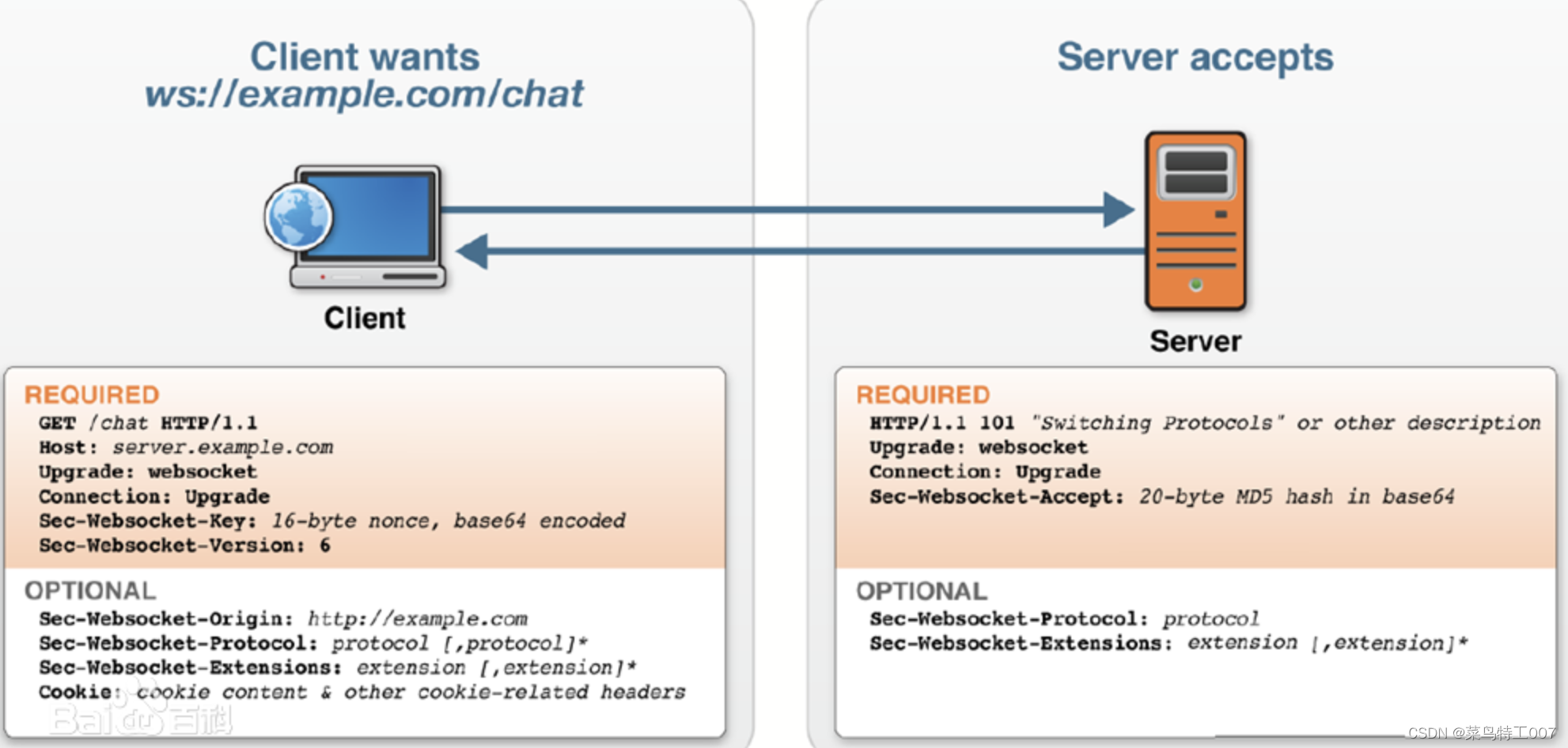
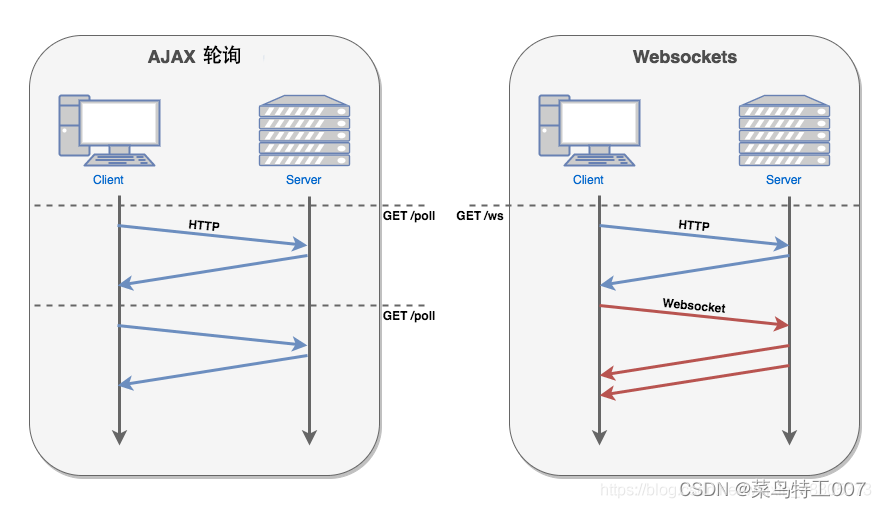
PS:基于websocket的特点,我们打算放弃Ajax轮询,因为当客户端过多的时候,会导致消息收发有延迟、服务器压力增大。

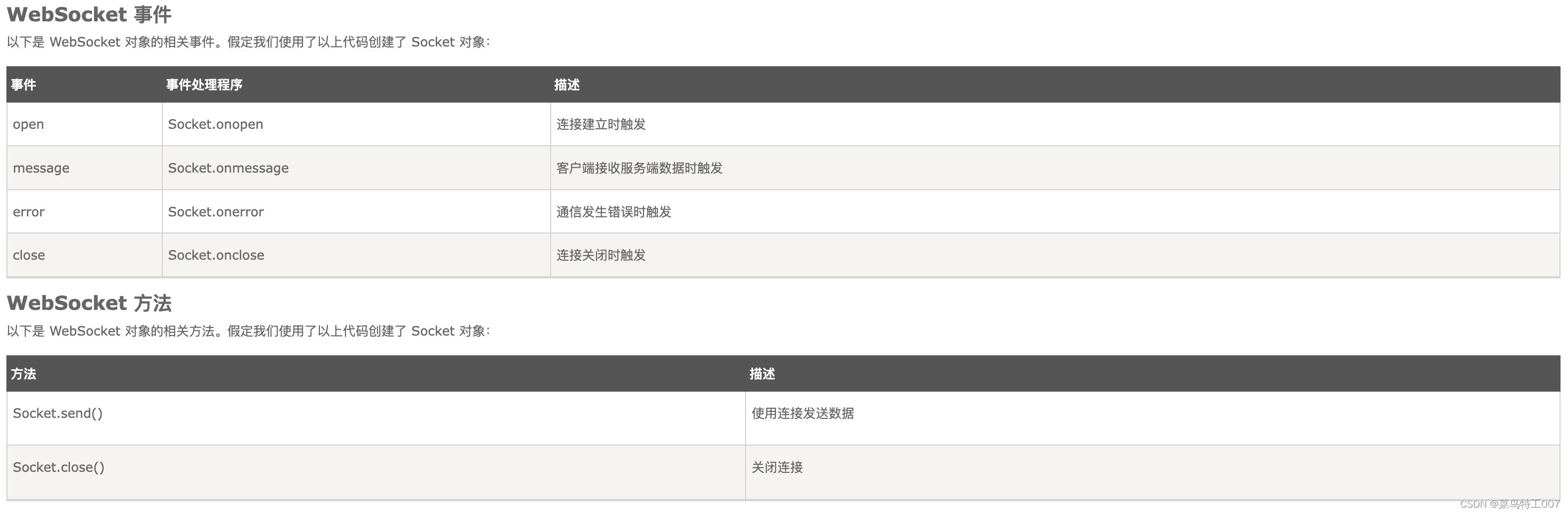
首先,我们既然要发送消息,客户端和客户端是无法建立连接的,我们可以这样做,我们搭建服务端,所有的客户端都在服务端注册会话,我们把消息发送给服务端,然后由服务端转发给其他客户端,这样就可以和其他用户通讯了。
package unicom.assetMarket.websocket.config;

import org.springframework.context.annotation.Configuration;
import org.springframework.web.socket.config.annotation.EnableWebSocket;
import org.springframework.web.socket.config.annotation.WebSocketConfigurer;
import org.springframework.web.socket.config.annotation.WebSocketHandlerRegistry;
import unicom.assetMarket.websocket.handler.MyMessageHandler;
import unicom.assetMarket.websocket.interceptor.WebSocketInterceptor;

/**
 * @Author 庞国庆
 * @Date 2023/02/15/15:36
 * @Description
 */
@Configuration
@EnableWebSocket
public class WebSocketConfig implements WebSocketConfigurer {

    @Override
    public void registerWebSocketHandlers(WebSocketHandlerRegistry webSocketHandlerRegistry) {
        webSocketHandlerRegistry.addHandler(new MyMessageHandler(), "/accept")
            .addInterceptors(new WebSocketInterceptor())
            //允许跨域
            .setAllowedOrigins("*");
        webSocketHandlerRegistry.addHandler(new MyMessageHandler(),"/http/accept")
            .addInterceptors(new WebSocketInterceptor())
            .setAllowedOrigins("*").withSockJS();
    }

}
package unicom.assetMarket.websocket.interceptor;

import lombok.extern.slf4j.Slf4j;
import org.springframework.http.server.ServerHttpRequest;
import org.springframework.http.server.ServerHttpResponse;
import org.springframework.http.server.ServletServerHttpRequest;
import org.springframework.web.socket.WebSocketHandler;
import org.springframework.web.socket.server.support.HttpSessionHandshakeInterceptor;
import java.util.Map;

/**
 * @Author 庞国庆
 * @Date 2023/02/15/15:52
 * @Description
 */
@Slf4j
public class WebSocketInterceptor  extends HttpSessionHandshakeInterceptor {

	/**
	* 建立连接前
	*/
    @Override
    public boolean beforeHandshake(ServerHttpRequest request, ServerHttpResponse response, WebSocketHandler wsHandler, Map<String, Object> attributes) throws Exception {
        if (request instanceof ServletServerHttpRequest) {
            ServletServerHttpRequest request1 = (ServletServerHttpRequest) request;
            String userId = request1.getServletRequest().getParameter("userId");
            attributes.put("currentUser", userId);
            log.info("用户{}正在尝试与服务端建立链接········", userId);
        }
        return super.beforeHandshake(request, response, wsHandler, attributes);
    }

    @Override
    public void afterHandshake(ServerHttpRequest request, ServerHttpResponse response, WebSocketHandler wsHandler, Exception ex) {
        super.afterHandshake(request, response, wsHandler, ex);
    }
}
package unicom.assetMarket.websocket.handler;

import com.alibaba.fastjson.JSONObject;
import lombok.extern.slf4j.Slf4j;
import org.apache.commons.lang.StringUtils;
import org.springframework.beans.factory.annotation.Autowired;
import org.springframework.stereotype.Component;
import org.springframework.web.socket.*;
import org.springframework.web.socket.handler.TextWebSocketHandler;
import unicom.assetMarket.assetChat.service.CamsMarketChatMessageService;

import java.util.Map;
import java.util.concurrent.ConcurrentHashMap;

/**
 * @Author 庞国庆
 * @Date 2023/02/15/15:52
 * @Description
 */
@Slf4j
@Component
public class MyMessageHandler extends TextWebSocketHandler {

	//存储所有客户端的会话信息(线程安全)
    private final static Map<String, WebSocketSession> sessions = new ConcurrentHashMap<>();

    @Autowired(required = false)
    private CamsMarketChatMessageService service;

	/**
	* 握手成功
	*/
    @Override
    public void afterConnectionEstablished(WebSocketSession webSocketSession) throws Exception {
        String userId = this.getUserId(webSocketSession);
        if (StringUtils.isNotBlank(userId)) {
            sessions.put(userId, webSocketSession);
            log.info("用户{}已经建立链接", userId);
        }
    }
	/**
	* 接收到消息时
	*/
    @Override
    public void handleMessage(WebSocketSession webSocketSession, WebSocketMessage<?> webSocketMessage) throws Exception {
        String message = webSocketMessage.toString();
        String userId = this.getUserId(webSocketSession);
        log.info("服务器收到用户{}发送的消息:{}", userId, message);
        //webSocketSession.sendMessage(webSocketMessage);
        if (StringUtils.isNotBlank(message)) {
            //保存用户发送的消息数据
            service.saveData(message);
            //发送消息给指定用户
            doMessage(message);
        }
    }
	/**
	* 消息传输异常时
	*/
    @Override
    public void handleTransportError(WebSocketSession webSocketSession, Throwable throwable) throws Exception {
        WebSocketMessage message = new TextMessage("发送异常:" + throwable.getMessage());
        //webSocketSession.sendMessage(message);
    }

	/**
	* 客户端关闭会话,断开连接时
	*/
    @Override
    public void afterConnectionClosed(WebSocketSession webSocketSession, CloseStatus closeStatus) throws Exception {
        String userId = this.getUserId(webSocketSession);
        if (StringUtils.isNotBlank(userId)) {
            sessions.remove(userId);
            log.info("用户{}已经关闭会话", userId);
        } else {
            log.error("没有找到用户{}的会话", userId);
        }
    }

    @Override
    public boolean supportsPartialMessages() {
        return false;
    }

    /**
     * 根据会话查找已经注册的用户id
     *
     * @param session
     * @return
     */
    private String getUserId(WebSocketSession session) {
        String userId = (String) session.getAttributes().get("currentUser");
        return userId;
    }

    /**
     * 发送消息给指定用户
     *
     * @param userId
     * @param contents
     */
    public void sendMessageUser(String userId, String contents) throws Exception {
        WebSocketSession session = sessions.get(userId);
        if (session != null && session.isOpen()) {
            WebSocketMessage message = new TextMessage(contents);
            session.sendMessage(message);
        }
    }

    /**
     * 接收用户消息,转发给指定用户
     * @param msg
     * @throws Exception
     */
    public void doMessage(String msg) throws Exception {
        JSONObject jsonObject = JSONObject.parseObject(msg);
        String sendStaffId = jsonObject.getString("sendStaffId");
        String reciveStaffId = jsonObject.getString("reciveStaffId");
        String message = jsonObject.getString("message");
        //替换敏感字(该行代码是其他功能模块需要,其他小伙伴们开发时此方法可删除)
        message = service.replaceSomething(message);
        this.sendMessageUser(reciveStaffId,message);
    }

}
<%@ page language="java" pageEncoding="UTF-8" %>
<%@ include file="/WEB-INF/jsp/common/common.jsp" %>
<%@ page contentType="text/html;charset=UTF-8" language="java" %>

<html>
<head>
    <title>聊天窗口</title>
</head>
<body style="background: #f0f3fa">
<div class="dividerBox dividerBox-spinner dividerBox-blue rightBox-blue">
    <div class="right-container-header">
        <div class="dividerBox-title"><span>${name}</span></div>
    </div>
    <div class="dividerBox-body rightBox-body">
        <div class="row">
            <div class="col-md-4 col-sm-4 padding-r-0">
                <div class="form-group">
                    <div class="col-md-9 col-sm-8">
                        <div class="data-parent">
                            <input type="text" class="form-control input-sm" id="message" maxlength="200" />
                            <button type="button" class="btn btn-primary btn-sm" onclick="sendMessage()">
                                发 送
                            </button>
                        </div>
                    </div>
                </div>
            </div>
        </div>
    </div>
</div>
<div class="tableWrapper rightBox-table">
    <div class="table-content">
        <ul id="talkcontent">

        </ul>
    </div>
</div>
<!-- 消息发送者id-->
<input type="hidden" id="sendStaffId" value="${sendStaffId}"/>
<!-- 消息接收者id-->
<input type="hidden" id="reciveStaffId" value="${reciveStaffId}" />
<script src="${prcs}/js/unicom/assetMarket/assetChat/talk.js?time=<%=new Date().getTime() %>"></script>
</body>
$(function() {
    connectWebSocket();
});

/**
 * 和服务器建立链接
 */
function connectWebSocket() {
    let userId = $("#sendStaffId").val();
    let host = window.location.host;
    if ('WebSocket' in window) {
        if (userId) {
            websocketClient = new WebSocket( "ws://"+host+"/frm/websocket/accept?userId=" + userId);
            connecting();
        }
    }
}
/**
* 事件监听
*/
function connecting() {
    websocketClient.onopen = function (event) {
        console.log("连接成功");
    }
    websocketClient.onmessage = function (event) {
        appendContent(false,event.data);
    }
    websocketClient.onerror = function (event) {
        console.log("连接失败");
    }
    websocketClient.onclose = function (event) {
        console.log("与服务器断开连接,状态码:" + event.code + ",原因:" + event.reason);
    }
}

/**
 * 发送消息
 */
function sendMessage() {
    if (websocketClient) {
        let message = $("#message").val();
        if(message) {
            let sendMsg = concatMsg(message);
            sendMsg = JSON.stringify(sendMsg)
            websocketClient.send(sendMsg);
            appendContent(true,message);
        }
    } else {
        console.log("发送失败");
    }
}

/**
 * 在消息框内追加消息
 * @param flag
 */
function appendContent(flag,data){
    if(flag){
        $("#talkcontent").append("<li style='float: right'>" + data + "</li><br/>");
    }else{
        $("#talkcontent").append("<li style='float: left'>" + data + "</li><br/>");
    }
}
/**
 * 组装消息
 * 服务端解析后转发给指定的客户端
 */
function concatMsg(message) {
    //发送人
    let sendStaffId = $("#sendStaffId").val();
    //接收人
    let reciveStaffId = $("#reciveStaffId").val();
    let json = '{"sendStaffId": "' + sendStaffId + '","reciveStaffId": "' + reciveStaffId + '","message": "' + message + '"}';
    return JSON.parse(json);
}
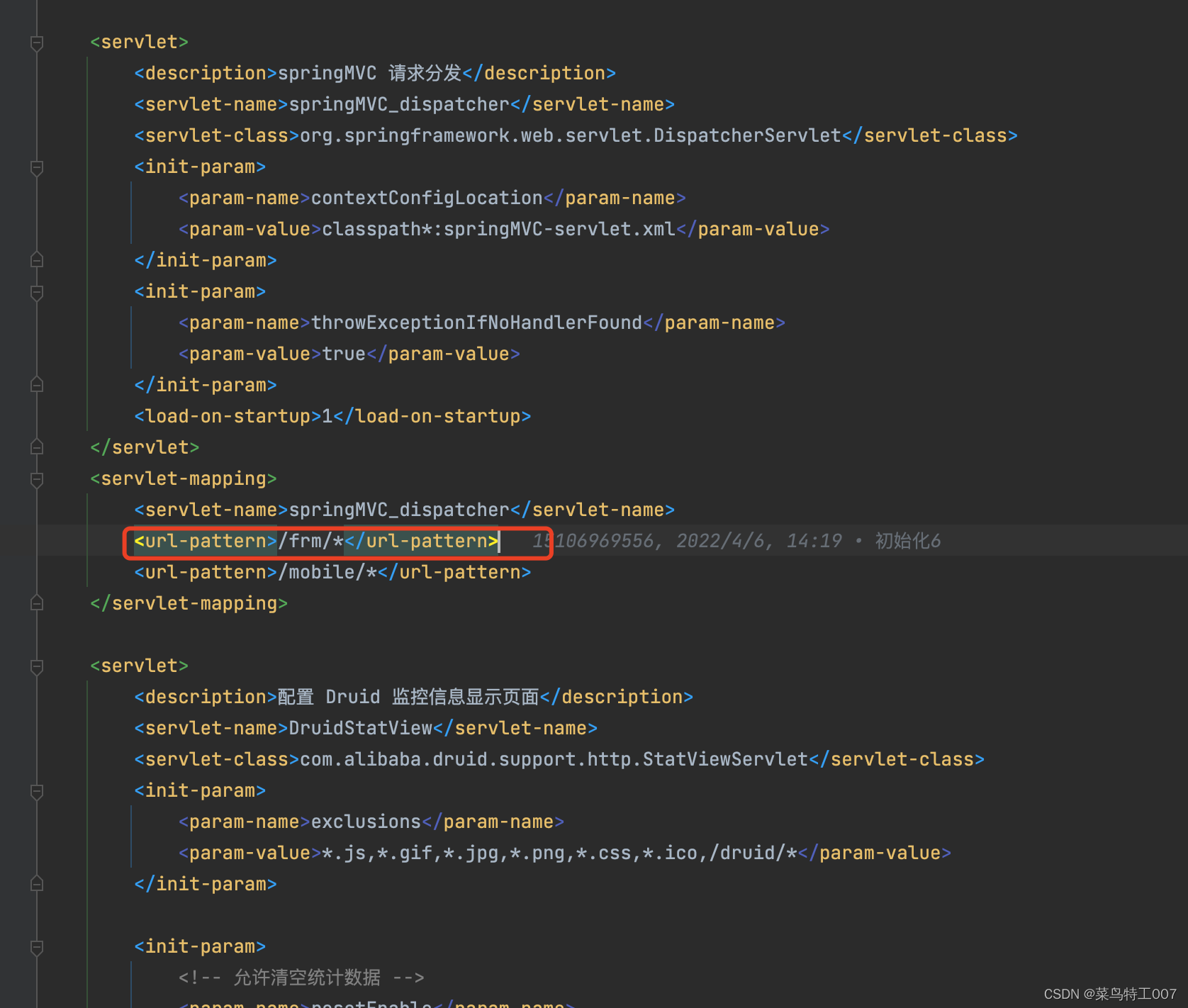
PS:这里我遇到了1个坑,就是在连接服务端的时候老是连接不上,我们在配置的代码中指定的匹配URL为 /accept,但是我发现就是连不上,后来找了很多资料,原来是忘了加个url,这个url就是我们在web.xml中配置的DispatcherServlet的拦截url,如下:
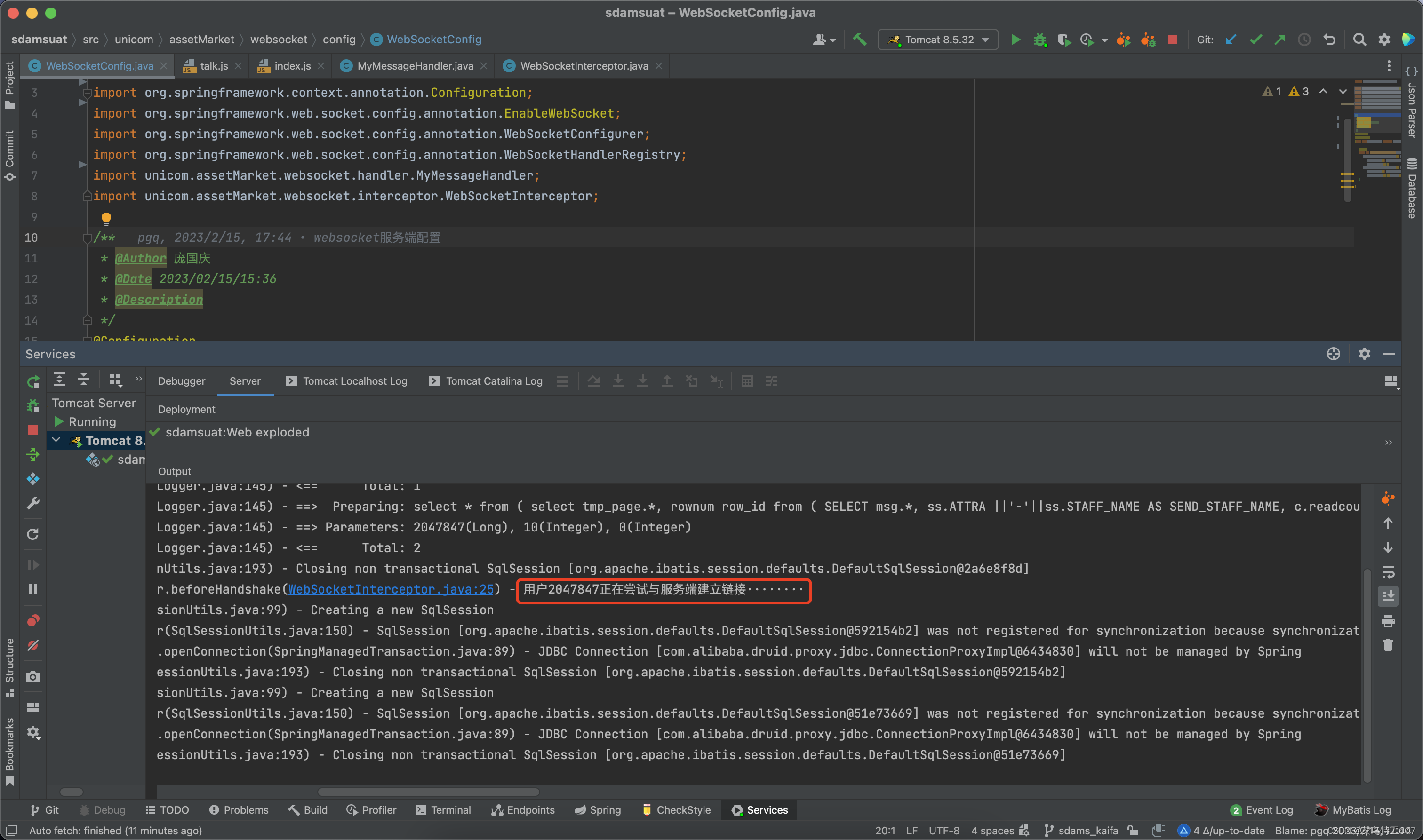
运行效果如下:
PS:项目框架中配置的过滤器、拦截器都有可能把webscoket建立连接的请求作处理,尤其是权限验证的过滤器,所以记得要对websocket的请求加白名单。

PS:有啥问题,欢迎大家留言,我非常乐意帮助大家解决问题。
我正在编写一个方法,它将在一个类中定义一个实例方法;类似于attr_accessor:classFoocustom_method(:foo)end我通过将custom_method函数添加到Module模块并使用define_method定义方法来实现它,效果很好。但我无法弄清楚如何考虑类(class)的可见性属性。例如,在下面的类中classFoocustom_method(:foo)privatecustom_method(:bar)end第一个生成的方法(foo)必须是公共(public)的,第二个(bar)必须是私有(private)的。我怎么做?或者,如何找到调用我的cust
我有一个super简单的脚本,它几乎包含了FayeWebSocketGitHub页面上用于处理关闭连接的内容:ws=Faye::WebSocket::Client.new(url,nil,:headers=>headers)ws.on:opendo|event|p[:open]#sendpingcommand#sendtestcommand#ws.send({command:'test'}.to_json)endws.on:messagedo|event|#hereistheentrypointfordatacomingfromtheserver.pJSON.parse(event.d
使用散列定义的访问器方法动态创建对象的最简单方法是什么?例如,如果我有一个散列:{foo:"Foo",bar:"Bar"}我想要一个具有访问器方法foo、foo=、bar和bar=的对象,其初始值分别为"Foo"和"Bar"。我可以想到这样做:moduleObjectWithAccessordefself.newh;Struct.new(*h.keys).new(*h.values)endendo=ObjectWithAccessor.new(foo:"Foo",bar:"Bar")o.foo#=>"Foo"但是,我不需要它们的多个实例具有相同的特定键集,而是希望每次都使用可能不同的键
我需要动态创建一个Ruby类,即动态地从ActiveRecord::Base派生。我暂时使用eval:eval%Q{class::#{klass}是否有一种等效的、至少同样简洁的方法可以在不使用eval的情况下执行此操作? 最佳答案 您可以使用Class类,其中的类是实例。困惑了吗?;)cls=Class.new(ActiveRecord::Base)doself.table_name=table_nameendcls.new 关于ruby-无需eval即时创建Ruby类,我们在Stac
IntrductionLibwebsocketsisasimple-to-use,MIT-license,pureClibraryprovidingclientandserverforhttp/1,http/2,websockets,MQTTandotherprotocolsinasecurity-minded,lightweight,configurable,scalableandflexibleway.It’seasytobuildandcross-buildviacmakeandissuitablefortasksfromembeddedRTOSthroughmasscloudservi
我正在使用devise登录omniauth,authid。当用户登录时,我得到user_info:name:RiccardoTacconilast_name:Tacconiemail:email@gmail.comfirst_name:Riccardouid:https://www.google.com/accounts/o8/id?id=xxxxxxxxxprovider:google_apps我找到了一个插件:http://stakeventures.com/articles/2009/10/06/portable-contacts-in-ruby获取Google通讯录。我只需要使
如何让Emacs自动重新缩进Ruby代码?例如,在Emacs中,defhelloputs"hello"en输入“d”后,我希望它变成这样,defhelloputs"hello"end这是Vim中的默认设置,但我如何在Emacs中实现它? 最佳答案 ruby-electric已经是旧闻了。Emacs24有一个名为electric-indent-mode的内置次要模式,它会在一些字符后自动插入换行符,你当然可以将RETURN键重新映射到newline-and-indent(默认只映射到缩进)。在Emacs24中,您可以使用electri
我有带有gemwebsocket-rails0.7的Rails3.2应用程序。在开发机上,一切正常在生产环境中,我使用Nginx/1.6作为代理服务器,Unicorn作为http服务器。Thin用于独立模式(在https://github.com/websocket-rails/websocket-rails/wiki/Standalone-Server-Mode之后)。nginx配置:location/websocket{proxy_passhttp://localhost:3001/websocket;proxy_http_version1.1;proxy_set_headerUp
目录一、什么是Websocket二、WebSocket部分header介绍三、HTTPVSWebSocket四、什么时候使用WebSockets五、关于SockJS和STOMP一、什么是Websocket根据RFC6455标准,Websocket协议提供了一种标准化的方式在客户端和服务端之间通过TCP连接建立全双工、双向通信渠道。它是一种不同于HTTP的TCP协议,但是被设计为在HTTP基础上运行。Websocket交互始于HTTP请求,该请求会通过HTTPUpgrade请求头去升级请求,进而切换到Websocket协议。请求报文如下:GET/spring-websocket-portfoli
我已经写了一些csv文件并压缩它,使用这个代码:arr=(0...2**16).to_aFile.open('file.bz2','wb')do|f|writer=Bzip2::Writer.newfCSV(writer)do|csv|(2**16).times{csv我想阅读这个csvbzip2ed文件(用bzip2压缩的csv文件)。这些未压缩的文件如下所示:1,24,125,28,71,3...所以我尝试了这段代码:Bzip2::Reader.open(filename)do|bzip2|CSV.foreach(bzip2)do|row|putsrow.inspectendend
