报错消息
示例图:
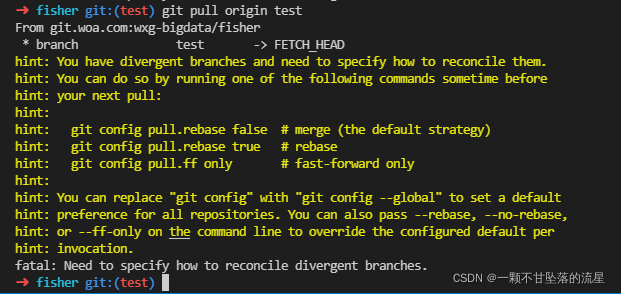
示例代码:
➜ fisher git:(test) git pull origin test
From git.woa.com:wxg-bigdata/fisher
* branch test -> FETCH_HEAD
hint: You have divergent branches and need to specify how to reconcile them.
hint: You can do so by running one of the following commands sometime before
hint: your next pull:
hint:
hint: git config pull.rebase false # merge (the default strategy)
hint: git config pull.rebase true # rebase
hint: git config pull.ff only # fast-forward only
hint:
hint: You can replace "git config" with "git config --global" to set a default
hint: preference for all repositories. You can also pass --rebase, --no-rebase,
hint: or --ff-only on the command line to override the configured default per
hint: invocation.
fatal: Need to specify how to reconcile divergent branches.
翻译:
➜fisher git:(test) git pull origin test
从git.woa.com: wxg-bigdata /费舍尔
*分支测试->FETCH_HEAD
提示:您有不同的分支,需要指定如何协调它们。
提示:您可以通过在之前某个时间运行以下命令之一来做到这一点
提示:你的下一招:
提示:
提示:git config pull.rebase false # 合并(默认策略)
提示:git config pull.rebase true # Rebase
提示:git config pull.ff only # 仅快进
提示:
提示:可以将“git config”替换为“git config——global”来设置默认值
提示:首选所有存储库。你也可以传递——rebase,——no-rebase,
提示:或命令行上的——ff-only,以覆盖配置的默认per
提示:调用。
fatal:需要指定如何协调不同的分支。
解决方法
分析:这是由于你拉取pull分支前,进行过merge合并更新分支操作,而其他人在你之前已经push过一个版本,导致版本不一致
第一种解决方法:比较简单
执行git config pull.rebase false
默认将pull下来的代码与现有改动的代码进行合并
但是可能会造成代码冲突,需要处理下这个问题,代码冲突如果2个人都改了同一个文件,需要联系之前push的同学,看看这块代码怎么保存
第二种解决方法:回退到合并之前的代码,在进行pull拉取最新代码
注意:这种解决方法仅适用于2个分支之间的合并(git merge)操作,比如你是将dev开发分支合并到test分支之前没pull,那这时候test分支需要回退到未合并前的版本。
test上合并上去的代码将会丢失,等你test分支能成功pull后,需要重新合并(merge)开发分支dev上的代码合并到test上。所以记得保留dev开发分支这个版本的代码再把test回退到上一个版本,等pull成功,再重新在test分支上合并dev分支代码
查看最近3次提交的历史版本
➜ fisher git:(test) git log -3 # 查看最近3次提交的历史版本
commit da20b931f4e04a61f0f9b4e4726a2e907e566fc9 (HEAD -> test)
Merge: 33df706e 6018c237
Author: 流星
Date: Wed Jan 19 09:58:40 2022 +0800
Merge branch 'feture/tapd#870810123' into test
commit 6018c237278f5265e78314049d6642e493ebdb5e (feture/tapd#870810123)
Author: 流星
Date: Wed Jan 19 09:57:50 2022 +0800
feat: 发布版本'feture/tapd#870810123'
commit 33df706e780d10af6435bda1fee85430604eebfc
Merge: 1d06cd1f 7589979d
Author: 流星
Date: Tue Jan 18 16:11:21 2022 +0800
Merge branch 'feature/date#0118' into test
根据历史版本记录,选择commit地址,回退到自己合并之前的版本
➜ fisher git:(test) git reset --hard 33df706e780d10af6435bda1fee85430604eebfc
HEAD is now at 33df706e Merge branch 'feature/date#0118' into test
1
2
再进行pull更新分支
➜ fisher git:(test) git pull origin test
1
最后再重新合并代码
➜ fisher git:(test) git merge dev
1
记得养成一个良好git发布流程的习惯
# 分支合并发布流程:
git add . # 将所有新增、修改或删除的文件添加到暂存区
git commit -m "版本发布" # 将暂存区的文件发版
git status # 查看是否还有文件没有发布上去
git checkout test # 切换到要合并的分支
git pull # 在test 分支上拉取最新代码,避免冲突
git merge dev # 在test 分支上合并 dev 分支上的代码
git push # 上传test分支代码
深度学习部署:Windows安装pycocotools报错解决方法1.pycocotools库的简介2.pycocotools安装的坑3.解决办法更多Ai资讯:公主号AiCharm本系列是作者在跑一些深度学习实例时,遇到的各种各样的问题及解决办法,希望能够帮助到大家。ERROR:Commanderroredoutwithexitstatus1:'D:\Anaconda3\python.exe'-u-c'importsys,setuptools,tokenize;sys.argv[0]='"'"'C:\\Users\\46653\\AppData\\Local\\Temp\\pip-instal
文章目录git常用命令(简介,详细参数往下看)Git提交代码步骤gitpullgitstatusgitaddgitcommitgitpushgit代码冲突合并问题方法一:放弃本地代码方法二:合并代码常用命令以及详细参数gitadd将文件添加到仓库:gitdiff比较文件异同gitlog查看历史记录gitreset代码回滚版本库相关操作远程仓库相关操作分支相关操作创建分支查看分支:gitbranch合并分支:gitmerge删除分支:gitbranch-ddev查看分支合并图:gitlog–graph–pretty=oneline–abbrev-commit撤消某次提交git用户名密码相关配置g
关于如何使用git设置类似Dropbox的服务,您有什么建议吗?您认为git是解决此问题的合适工具吗?我在考虑使用git+rush解决方案,你觉得怎么样? 最佳答案 检查这个开源项目:https://github.com/hbons/SparkleShare来自项目的自述文件:Howdoesitwork?SparkleSharecreatesaspecialfolderonyourcomputer.Youcanaddremotelyhostedfolders(or"projects")tothisfolder.Theseprojec
我编写了一个非常简单的“部署”脚本,作为我的裸git存储库中的post-updateHook运行。变量如下livedomain=~/mydomain.comstagingdomain=~/stage.mydomain.comgitrepolocation=~/git.mydomain.com/thisrepo.git(bare)core=~/git.mydomain.com/thisrepo.gitcore==addedremoteintoeachlive&stagegitslive和stage都初始化了gitrepos(非裸),我已经将我的裸仓库作为远程添加到它们中的每一个(名为co
我正在安装gitlabhq,并且在Gemfile中有对某些资源的“git://...”的引用。但是,我在公司防火墙后面,所以我必须使用http://。我可以手动编辑Gemfile,但我想知道是否有另一种方法告诉bundler使用http://作为git存储库? 最佳答案 您可以通过运行gitconfig--globalurl."https://".insteadOfgit://或通过将以下内容添加到~/.gitconfig:[url"https://"]insteadOf=git://
Activeadmingem已添加到我的rails项目中,但每次我尝试安装railsgactive_admin:install时,我都会收到类似的错误git://github.com/activeadmin/activeadmin.git(atmaster)isnotyetcheckedout.Runbundleinstallfirst.我肯定在运行“railsgactive_admin:install”之前运行了bundle。运行“bundleshow”后,我看到我已将“*activeadmin(1.0.0.pre3f916d6)”添加到我的项目中,但不断收到此错误消息。我的gem文
我有一个使用Jekyll托管在GitHub上的静态网站。问题是,我真的不需要master分支,因为存储库唯一包含的是网站。这样我就必须gitcheckoutgh-pages,然后gitmergemaster,然后gitpushorigingh-pages。有什么简单的方法可以摆脱gh-pages分支并直接从master推送? 最佳答案 Theproblemis,Idon'treallyneedthemasterbranch,astheonlythingtherepositorycontainsisthewebsite.Isthere
我正在尝试在我的SnowLeopard10.6.8上安装RVM,方法是:\curl-Lhttps://get.rvm.io|bash-sstable--ruby我得到这个错误:InstallingRubyfromsourceto:/Users/Villa/.rvm/rubies/ruby-2.0.0-p0,thismaytakeawhiledependingonyourcpu(s)...ruby-2.0.0-p0-#downloadingruby-2.0.0-p0,thismaytakeawhiledependingonyourconnection...ruby-2.0.0-p0-#e
我有一个简单的类,它在初始化时接受一到八个参数。它将访问器设置为这些访问器以供以后使用。Rubocop正试图以ABC太高为由逮捕我,但我不确定我所做的是否真的有任何问题。在这种情况下,我只是在初始化时禁用检查吗?classFooattr_accessor:one,:two,:three,:fourattr_accessor:five,:six,:seven,:eightdefinitialize(p={})@one=p[:one]ifp[:one].present?#...@eight=p[:eight]ifp[:eight].present?endend关于减小大小,我唯一的想法是做
我在bitbucket上创建了一个私有(private)git存储库并提交了代码。现在我想导出所有(提交、代码、历史记录)并将其导入github上的gitrepo。有没有办法做到这一点?谢谢 最佳答案 在本地检查所有内容到您的计算机和gitpull。创建一个github存储库将此存储库添加为您的第二个远程(“使用gitremote添加githubURL”)推送到第二个Remote 关于ruby-git:从bitbucket导出并导入github(带提交),我们在StackOverflow
