文章目录
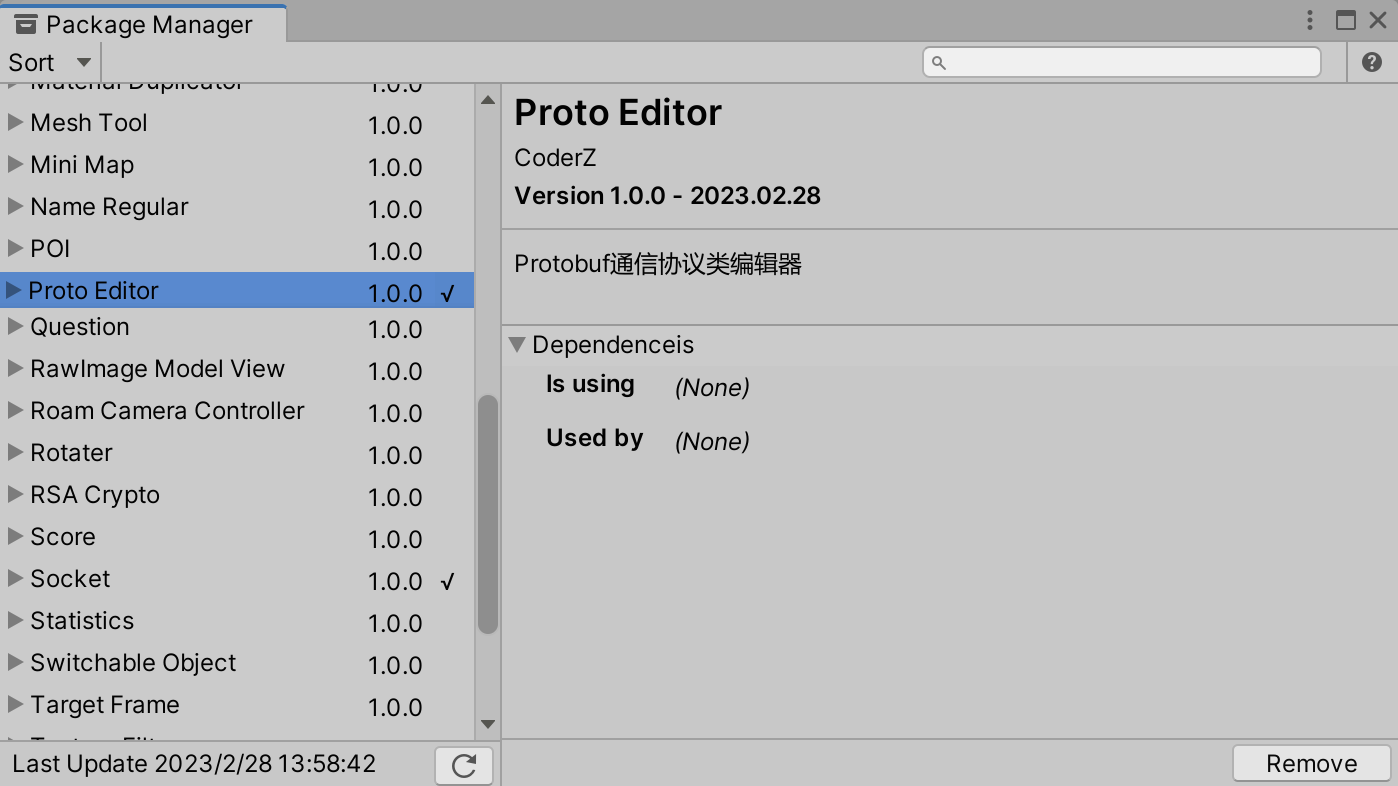
在Socket网络编程中,假如使用Protobuf作为网络通信协议,需要了解Protobuf语法规则、编写.proto文件并通过编译指令将.proto文件转化为.cs脚本文件,本文介绍如何在Unity中实现一个编辑器工具来使开发人员不再需要关注这些语法规则、编译指令,以及更便捷的编辑和修改.proto文件内容。工具已上传至SKFramework框架Package Manager中:
在介绍工具之前先简单介绍protobuf的语法规则,以便更好的理解工具的作用,下面是一个proto文件的示例:
message AvatarProperty
{
    required string userId = 1;
    required float posX = 2;
    required float posY = 3;
    required float posZ = 4;
    required float rotX = 5;
    required float rotY = 6;
    required float rotZ = 7;
    required float speed = 8;
}
message来声明,后面是类的命名| .proto Type | C# Type | Notes |
|---|---|---|
| double | double | |
| float | float | |
| int32 | int | Uses variable-length encoding. Inefficient for encoding negative numbers – if your field is likely to have negative values, use sint32 instead. |
| int64 | long | Uses variable-length encoding. Inefficient for encoding negative numbers – if your field is likely to have negative values, use sint64 instead. |
| uint32 | uint | Uses variable-length encoding. |
| uint64 | ulong | Uses variable-length encoding. |
| sint32 | int | Uses variable-length encoding. Signed int value. These more efficiently encode negative numbers than regular int32s. |
| sint64 | long | Uses variable-length encoding. Signed int value. These more efficiently encode negative numbers than regular int64s. |
| fixed32 | uint | Always four bytes. More efficient than uint32 if values are often greater than 228. |
| fixed64 | ulong | Always eight bytes. More efficient than uint64 if values are often greater than 256. |
| sfixed32 | int | Always four bytes. |
| sfixed64 | long | Always eight bytes. |
| bool | bool | |
| string | string | A string must always contain UTF-8 encoded or 7-bit ASCII text, and cannot be longer than 232. |
| bytes | ByteString | May contain any arbitrary sequence of bytes no longer than 232. |
每个字段都有唯一的标识号,这些标识符是用来在消息的二进制格式中识别各个字段的。[1,15]之内的标识号在编码的时候会占用一个字节。[16,2047]之内的标识号则占用2个字节。所以应该为那些频繁出现的消息元素保留[1,15]之内的标识号。注:要为将来有可能添加的、频繁出现的标识号预留一些标识号,不可以使用其中的[19000-19999]标识号,Protobuf协议实现中对这些进行了预留。
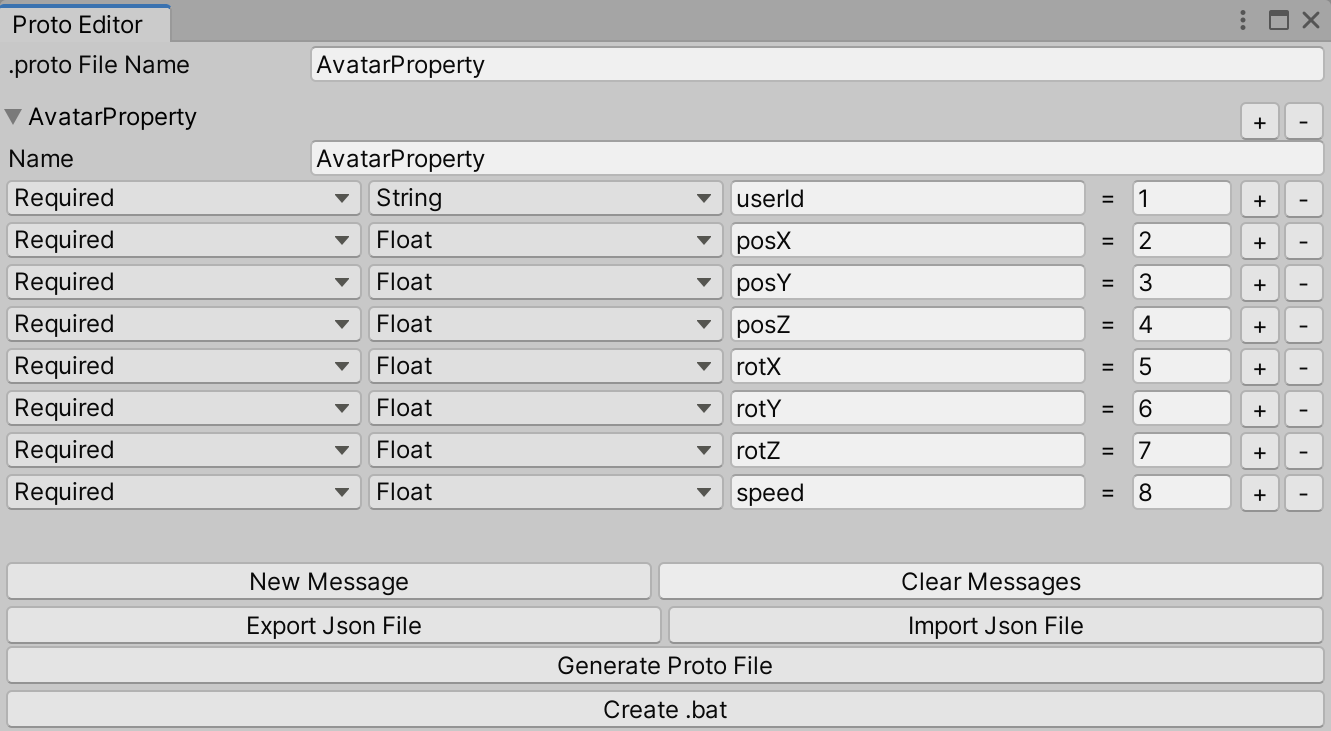
如图所示,工具包含以下功能:
New、Clear Message:增加、删除message类;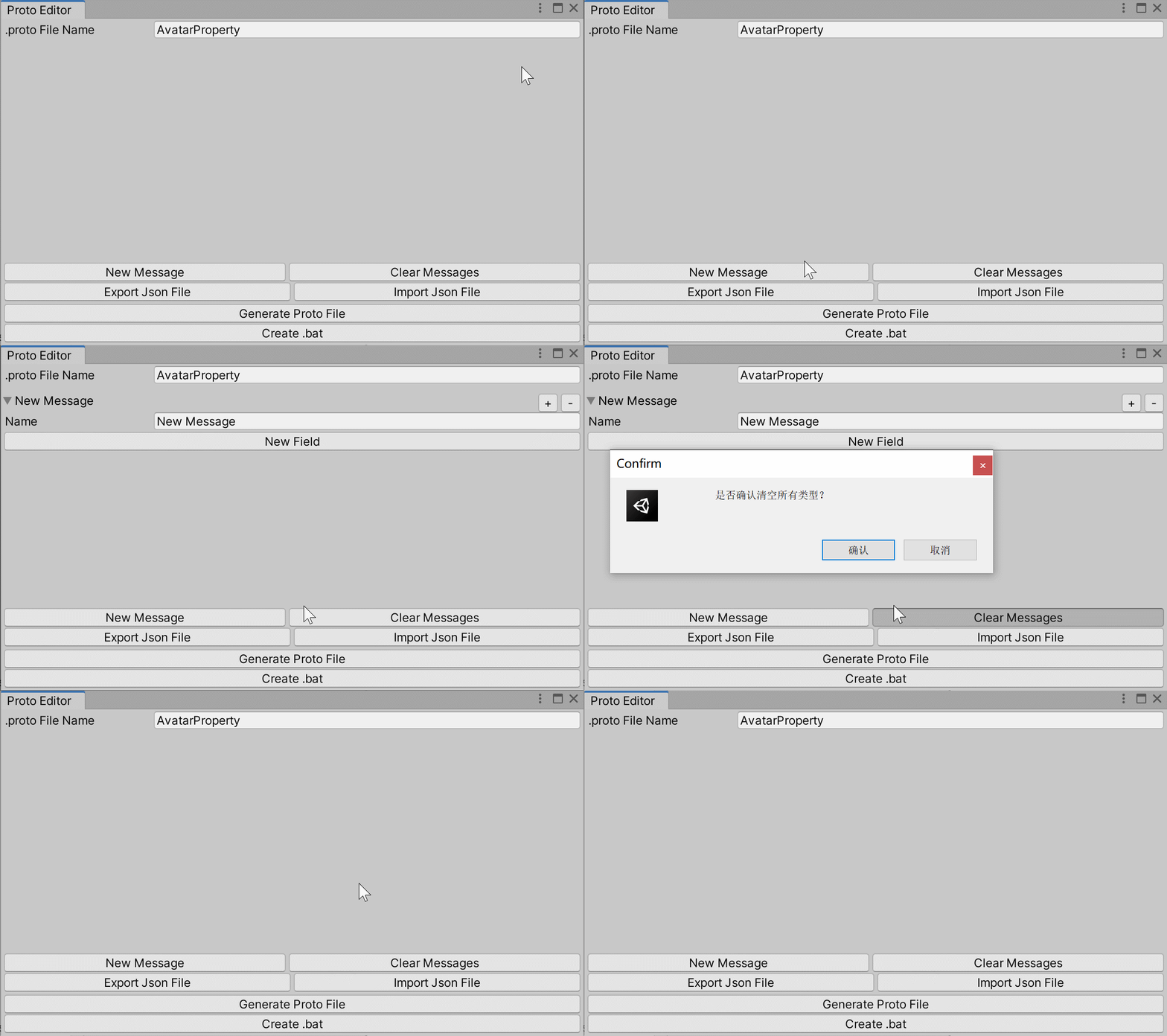
fields字段(修饰符、类型、命名、分配标识号);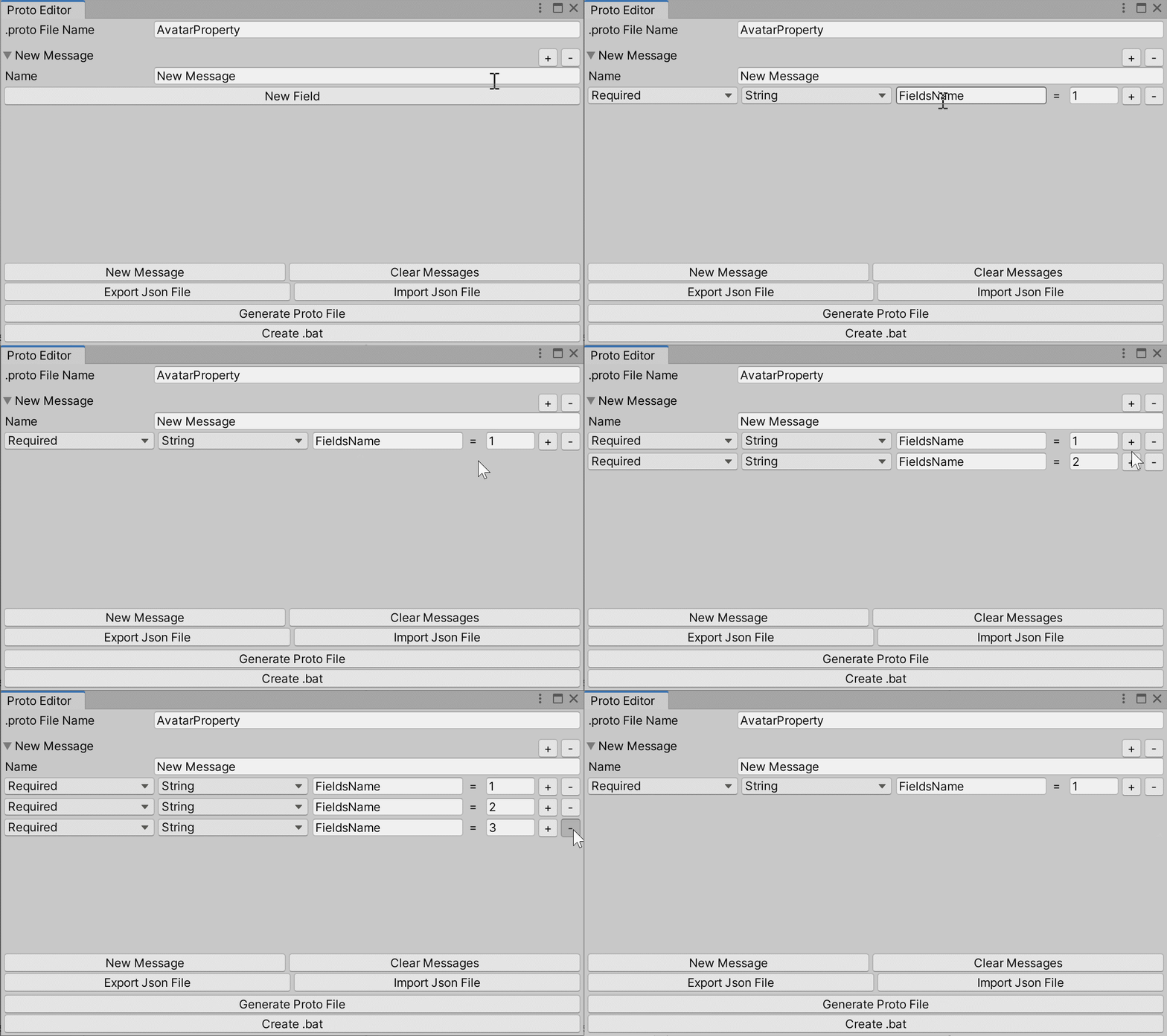
Import、Export Json File:导入、导出json文件(假如要修改一个已有的通信协议类,导入之前导出的Json文件再次编辑即可);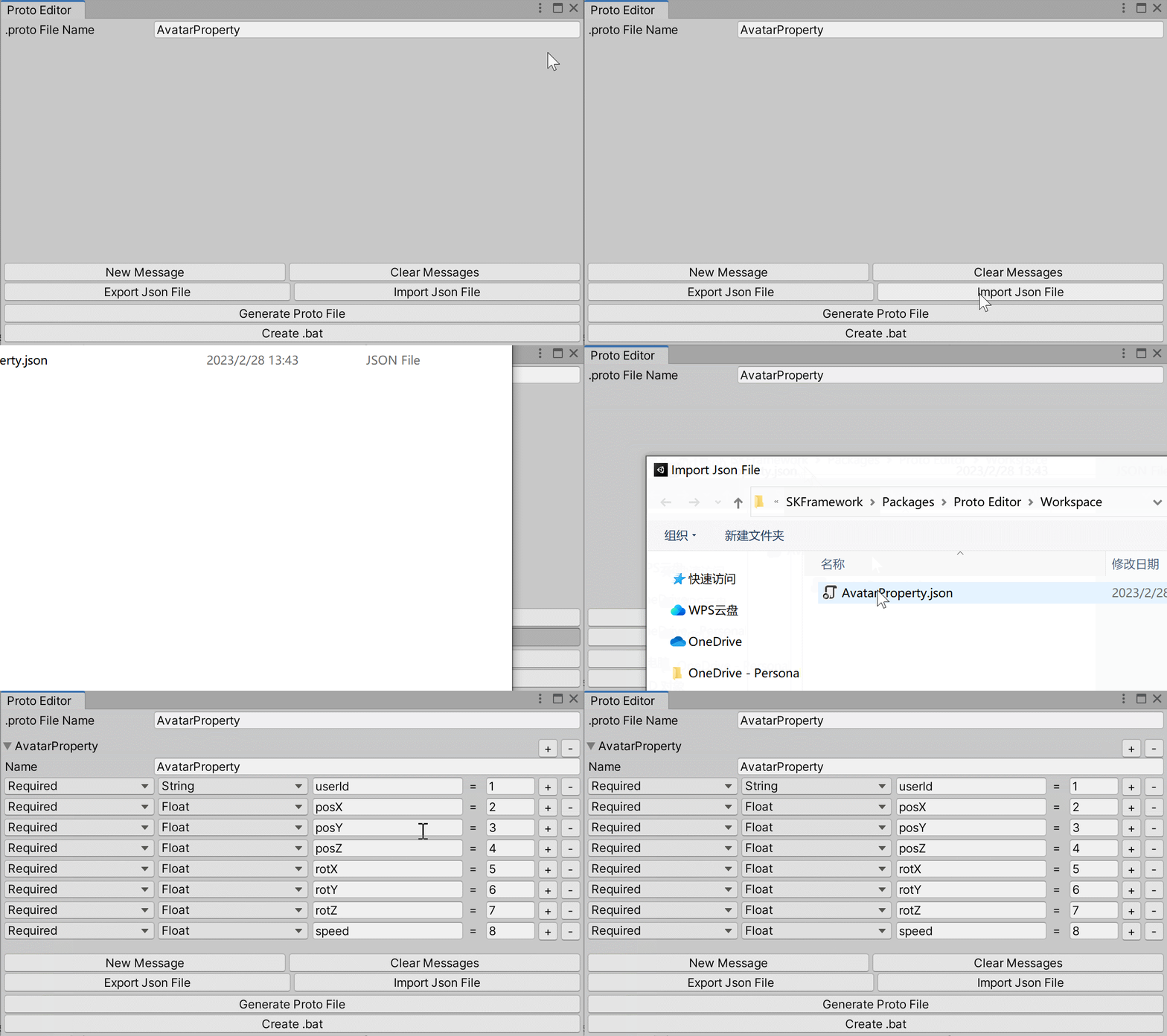
Generate Proto File:生成.proto文件;Create .bat:生成.bat文件(不再需要手动编辑编译指令)。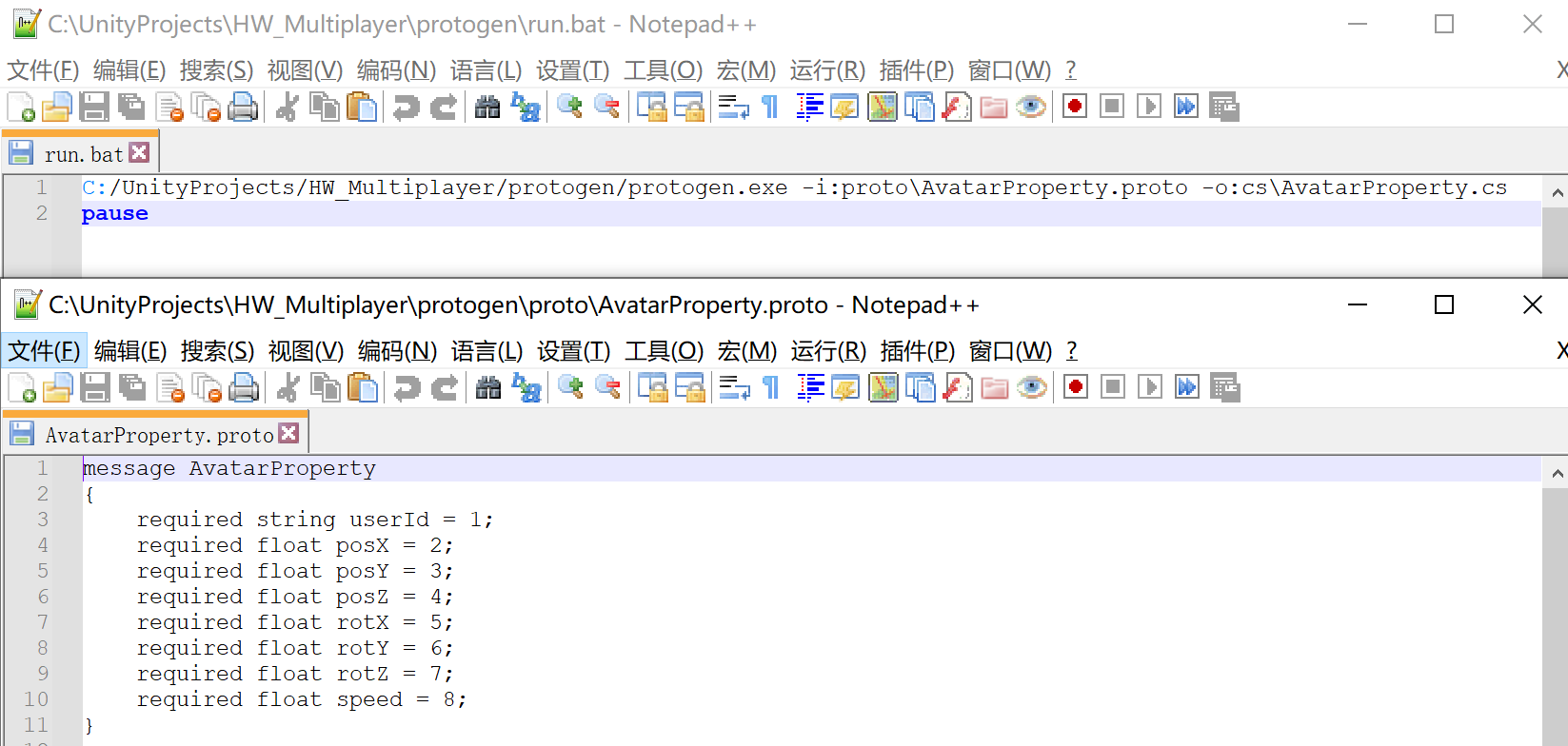
Editor Window编辑器窗口类;Menu Item添加打开窗口的菜单;public class ProtoEditor : EditorWindow
{
[MenuItem("Multiplayer/Proto Editor")]
public static void Open()
{
GetWindow<ProtoEditor>("Proto Editor").Show();
}
}
/// <summary>
/// 类
/// </summary>
public class Message
{
    /// <summary>
    /// 类名
    /// </summary>
    public string name = "New Message";
    /// <summary>
    /// 所有字段
    /// </summary>
    public List<Fields> fieldsList = new List<Fields>(0);
}
/// <summary>
/// 字段
/// </summary>
public class Fields
{
    public ModifierType modifier;
    public FieldsType type;
    public string typeName;
    public string name;
    public int flag;
}
Modifer Type:修饰符类型/// <summary>
/// 修饰符类型
/// </summary>
public enum ModifierType
{
/// <summary>
/// 必需字段
/// </summary>
Required,
/// <summary>
/// 可选字段
/// </summary>
Optional,
/// <summary>
/// 可重复字段
/// </summary>
Repeated
}
Fields Type:字段类型这里只定义了我常用的几种类型,Custom用于自定义类型:
/// <summary>
/// 字段类型
/// </summary>
public enum FieldsType
{
    Double,
    Float,
    Int,
    Long,
    Bool,
    String,
    Custom,
}
//存储所有类
private List<Message> messages = new List<Message>();
//字段存储折叠状态
private readonly Dictionary<Message, bool> foldoutDic = new Dictionary<Message, bool>();
//滚动视图
scroll = GUILayout.BeginScrollView(scroll);
for (int i = 0; i < messages.Count; i++)
{
    var message = messages[i];

    GUILayout.BeginHorizontal();
    foldoutDic[message] = EditorGUILayout.Foldout(foldoutDic[message], message.name, true);
    //插入新类
    if (GUILayout.Button("+", GUILayout.Width(20f)))
    {
        Message insertMessage = new Message();
        messages.Insert(i + 1, insertMessage);
        foldoutDic.Add(insertMessage, true);
        Repaint();
        return;
    }
    //删除该类
    if (GUILayout.Button("-", GUILayout.Width(20f)))
    {
        messages.Remove(message);
        foldoutDic.Remove(message);
        Repaint();
        return;
    }
    GUILayout.EndHorizontal();
}
GUILayout.EndScrollView();
GUILayout.BeginHorizontal();
//创建新的类
if (GUILayout.Button("New Message"))
{
    Message message = new Message();
    messages.Add(message);
    foldoutDic.Add(message, true);
}
//清空所有类
if (GUILayout.Button("Clear Messages"))
{
    //确认弹窗
    if (EditorUtility.DisplayDialog("Confirm", "是否确认清空所有类型?", "确认", "取消"))
    {
        //清空
        messages.Clear();
        foldoutDic.Clear();
        //重新绘制
        Repaint();
    }
}
GUILayout.EndHorizontal();
//如果折叠栏为打开状态 绘制具体字段内容
if (foldoutDic[message])
{
    //编辑类名
    message.name = EditorGUILayout.TextField("Name", message.name);
    //字段数量为0 提供按钮创建
    if (message.fieldsList.Count == 0)
    {
        if (GUILayout.Button("New Field"))
        {
            message.fieldsList.Add(new Fields(1));
        }
    }
    else
    {
        for (int j = 0; j < message.fieldsList.Count; j++)
        {
            var item = message.fieldsList[j];
            GUILayout.BeginHorizontal();
            //修饰符类型
            item.modifier = (ModifierType)EditorGUILayout.EnumPopup(item.modifier);
            //字段类型
            item.type = (FieldsType)EditorGUILayout.EnumPopup(item.type);
            if (item.type == FieldsType.Custom)
            {
                item.typeName = GUILayout.TextField(item.typeName);
            }
            //编辑字段名
            item.name = EditorGUILayout.TextField(item.name);
            GUILayout.Label("=", GUILayout.Width(15f));
            //分配标识号
            item.flag = EditorGUILayout.IntField(item.flag, GUILayout.Width(50f));
            //插入新字段
            if (GUILayout.Button("+", GUILayout.Width(20f)))
            {
                message.fieldsList.Insert(j + 1, new Fields(message.fieldsList.Count + 1));
                Repaint();
                return;
            }
            //删除该字段
            if (GUILayout.Button("-", GUILayout.Width(20f)))
            {
                message.fieldsList.Remove(item);
                Repaint();
                return;
            }
            GUILayout.EndHorizontal();
        }
    }
}
proto file name:文件名编辑是否输入为空;message name:类名编辑是否输入为空;为Message、Fields类添加有效性判断函数:
/// <summary>
/// 类
/// </summary>
public class Message
{
    /// <summary>
    /// 类名
    /// </summary>
    public string name = "New Message";
    /// <summary>
    /// 所有字段
    /// </summary>
    public List<Fields> fieldsList = new List<Fields>(0);

    public bool IsValid()
    {
        bool flag = !string.IsNullOrEmpty(name);
        for (int i = 0; i < fieldsList.Count; i++)
        {
            flag &= fieldsList[i].IsValid();
            if (!flag) return false;
            for (int j = 0; j < fieldsList.Count; j++)
            {
                if (i != j)
                {
                    flag &= fieldsList[i].flag != fieldsList[j].flag;
                }
                if (!flag) return false;
            }
        }
        return flag;
    }
}
/// <summary>
/// 字段
/// </summary>
public class Fields
{
    public ModifierType modifier;
    public FieldsType type;
    public string typeName;
    public string name;
    public int flag;

    public Fields() { }

    public Fields(int flag)
    {
        modifier = ModifierType.Required;
        type = FieldsType.String;
        name = "FieldsName";
        typeName = "FieldsType";
        this.flag = flag;
    }

    public bool IsValid()
    {
        return type != FieldsType.Custom || (type == FieldsType.Custom && !string.IsNullOrEmpty(typeName));
    }
}
//编辑的内容是否有效
private bool ContentIsValid()
{
    bool flag = !string.IsNullOrEmpty(fileName);
    flag &= messages.Count > 0;
    for (int i = 0; i < messages.Count; i++)
    {
        flag &= messages[i].IsValid();
        if (!flag) break;
    }
    return flag;
}
GUILayout.BeginHorizontal();
//导出Json
if (GUILayout.Button("Export Json File"))
{
    if (!ContentIsValid())
    {
        EditorUtility.DisplayDialog("Error", "请按以下内容逐项检查:\r\n1.proto File Name是否为空\r\n2.message类名是否为空\r\n" +
            "3.字段类型为自定义时 是否填写了类型名称\r\n4.标识号是否唯一", "ok");
    }
    else
    {
        //文件夹路径
        string dirPath = Application.dataPath + workspacePath;
        //文件夹不存在则创建
        if (!Directory.Exists(dirPath))
            Directory.CreateDirectory(dirPath);
        //json文件路径
        string filePath = dirPath + "/" + fileName + ".json";
        if (EditorUtility.DisplayDialog("Confirm", "是否保存当前编辑内容到" + filePath, "确认", "取消"))
        {
            //序列化
            string json = JsonMapper.ToJson(messages);
            //写入
            File.WriteAllText(filePath, json);
            //刷新
            AssetDatabase.Refresh();
        }
    }
}
//导入Json
if (GUILayout.Button("Import Json File"))
{
    //选择json文件路径
    string filePath = EditorUtility.OpenFilePanel("Import Json File", Application.dataPath + workspacePath, "json");
    //判断路径有效性
    if (File.Exists(filePath))
    {
        //读取json内容
        string json = File.ReadAllText(filePath);
        //清空
        messages.Clear();
        foldoutDic.Clear();
        //反序列化
        messages = JsonMapper.ToObject<List<Message>>(json);
        //填充字典
        for (int i = 0; i < messages.Count; i++)
        {
            foldoutDic.Add(messages[i], true);
        }
        //文件名称
        FileInfo fileInfo = new FileInfo(filePath);
        fileName = fileInfo.Name.Replace(".json", "");
        //重新绘制
        Repaint();
        return;
    }
}
GUILayout.EndHorizontal();
主要是字符串拼接工作:
//生成proto文件
if (GUILayout.Button("Generate Proto File"))
{
    if (!ContentIsValid())
    {
        EditorUtility.DisplayDialog("Error", "请按以下内容逐项检查:\r\n1.proto File Name是否为空\r\n2.message类名是否为空\r\n" +
            "3.字段类型为自定义时 是否填写了类型名称\r\n4.标识号是否唯一", "ok");
    }
    else
    {
        string protoFilePath = EditorUtility.SaveFilePanel("Generate Proto File", Application.dataPath, fileName, "proto");
        if (!string.IsNullOrEmpty(protoFilePath))
        {
            StringBuilder protoContent = new StringBuilder();
            for (int i = 0; i < messages.Count; i++)
            {
                var message = messages[i];
                StringBuilder sb = new StringBuilder();
                sb.Append("message " + message.name + "\r\n" + "{\r\n");
                for (int n = 0; n < message.fieldsList.Count; n++)
                {
                    var field = message.fieldsList[n];
                    //缩进
                    sb.Append("    ");
                    //修饰符
                    sb.Append(field.modifier.ToString().ToLower());
                    //空格
                    sb.Append(" ");
                    //如果是自定义类型 拼接typeName
                    switch (field.type)
                    {
                        case FieldsType.Int: sb.Append("int32"); break;
                        case FieldsType.Long: sb.Append("int64"); break;
                        case FieldsType.Custom: sb.Append(field.typeName); break;
                        default: sb.Append(field.type.ToString().ToLower()); break;
                    }
                    //空格
                    sb.Append(" ");
                    //字段名
                    sb.Append(field.name);
                    //等号
                    sb.Append(" = ");
                    //标识号
                    sb.Append(field.flag);
                    //分号及换行符
                    sb.Append(";\r\n");
                }
                sb.Append("}\r\n");
                protoContent.Append(sb.ToString());
            }
            //写入文件
            File.WriteAllText(protoFilePath, protoContent.ToString());
            //刷新(假设路径在工程内 可以避免手动刷新才看到)
            AssetDatabase.Refresh();
            //打开该文件夹
            FileInfo fileInfo = new FileInfo(protoFilePath);
            Process.Start(fileInfo.Directory.FullName);
        }
    }
}
OpenFolderPanel打开protogen.exe文件所在的文件夹,.bat文件需要生成在该文件夹下: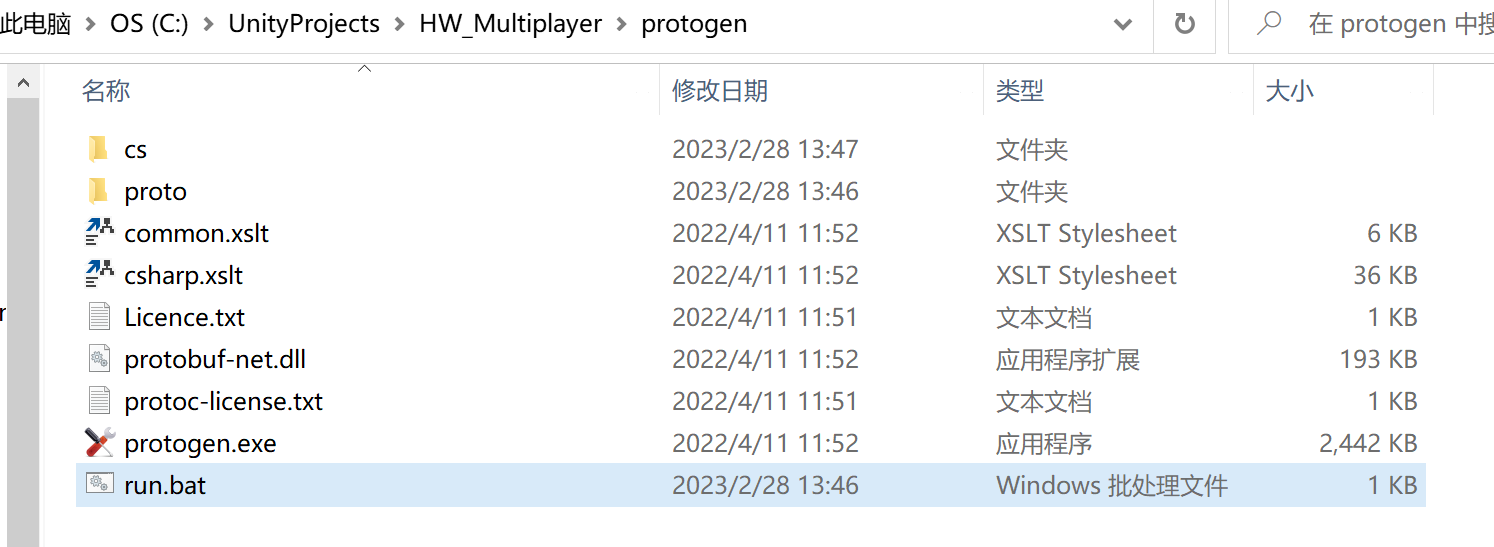
.proto文件的名称,拼接编译指令://创建.bat文件
if (GUILayout.Button("Create .bat"))
{
//选择路径(protogen.exe所在的文件夹路径)
string rootPath = EditorUtility.OpenFolderPanel("Create .bat file(protogen.exe所在的文件夹)", Application.dataPath, string.Empty);
//取消
if (string.IsNullOrEmpty(rootPath)) return;
//protogen.exe文件路径
string protogenPath = rootPath + "/protogen.exe";
//不是protogen.exe所在的文件夹路径
if (!File.Exists(protogenPath))
{
EditorUtility.DisplayDialog("Error", "请选择protogen.exe所在的文件夹路径", "ok");
}
else
{
string protoPath = rootPath + "/proto";
DirectoryInfo di = new DirectoryInfo(protoPath);
//获取所有.proto文件信息
FileInfo[] protos = di.GetFiles("*.proto");
//使用StringBuilder拼接字符串
StringBuilder sb = new StringBuilder();
//遍历
for (int i = 0; i < protos.Length; i++)
{
string proto = protos[i].Name;
//拼接编译指令
sb.Append(rootPath + @"/protogen.exe -i:proto\" + proto + @" -o:cs\" + proto.Replace(".proto", ".cs") + "\r\n");
}
sb.Append("pause");
//生成".bat文件"
string batPath = $"{rootPath}/run.bat";
File.WriteAllText(batPath, sb.ToString());
//打开该文件夹
Process.Start(rootPath);
}
}
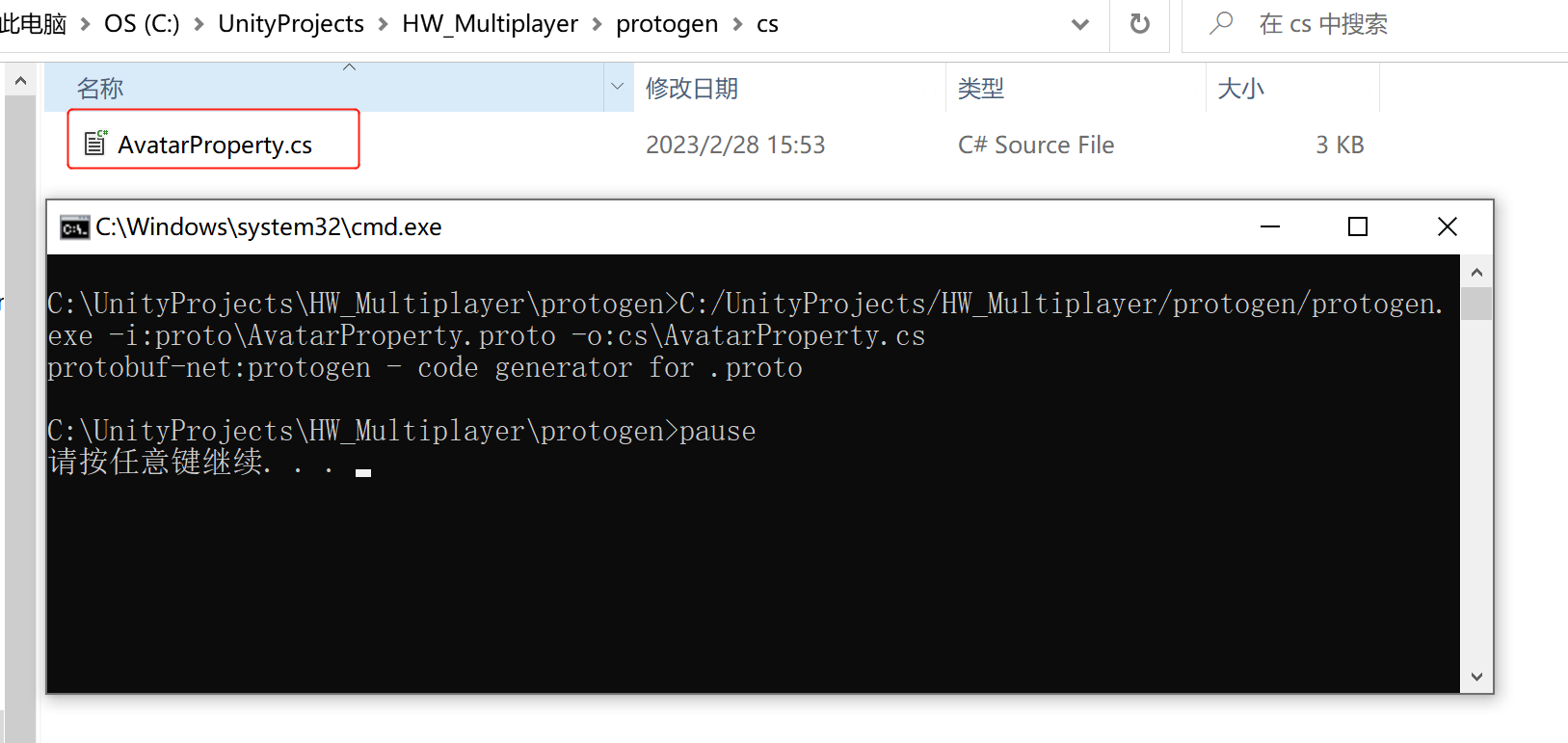
最终运行.bat文件,就可以将.proto文件转化为.cs脚本文件:
出于纯粹的兴趣,我很好奇如何按顺序创建PI,而不是在过程结果之后生成数字,而是让数字在过程本身生成时显示。如果是这种情况,那么数字可以自行产生,我可以对以前看到的数字实现垃圾收集,从而创建一个无限系列。结果只是在Pi系列之后每秒生成一个数字。这是我通过互联网筛选的结果:这是流行的计算机友好算法,类机器算法:defarccot(x,unity)xpow=unity/xn=1sign=1sum=0loopdoterm=xpow/nbreakifterm==0sum+=sign*(xpow/n)xpow/=x*xn+=2sign=-signendsumenddefcalc_pi(digits
我怎样才能完成http://php.net/manual/en/function.call-user-func-array.php在ruby中?所以我可以这样做:classAppdeffoo(a,b)putsa+benddefbarargs=[1,2]App.send(:foo,args)#doesn'tworkApp.send(:foo,args[0],args[1])#doeswork,butdoesnotscaleendend 最佳答案 尝试分解数组App.send(:foo,*args)
如何在buildr项目中使用Ruby?我在很多不同的项目中使用过Ruby、JRuby、Java和Clojure。我目前正在使用我的标准Ruby开发一个模拟应用程序,我想尝试使用Clojure后端(我确实喜欢功能代码)以及JRubygui和测试套件。我还可以看到在未来的不同项目中使用Scala作为后端。我想我要为我的项目尝试一下buildr(http://buildr.apache.org/),但我注意到buildr似乎没有设置为在项目中使用JRuby代码本身!这看起来有点傻,因为该工具旨在统一通用的JVM语言并且是在ruby中构建的。除了将输出的jar包含在一个独特的、仅限ruby
我正在使用的第三方API的文档状态:"[O]urAPIonlyacceptspaddedBase64encodedstrings."什么是“填充的Base64编码字符串”以及如何在Ruby中生成它们。下面的代码是我第一次尝试创建转换为Base64的JSON格式数据。xa=Base64.encode64(a.to_json) 最佳答案 他们说的padding其实就是Base64本身的一部分。它是末尾的“=”和“==”。Base64将3个字节的数据包编码为4个编码字符。所以如果你的输入数据有长度n和n%3=1=>"=="末尾用于填充n%
使用带有Rails插件的vim,您可以创建一个迁移文件,然后一次性打开该文件吗?textmate也可以这样吗? 最佳答案 你可以使用rails.vim然后做类似的事情::Rgeneratemigratonadd_foo_to_bar插件将打开迁移生成的文件,这正是您想要的。我不能代表textmate。 关于ruby-使用VimRails,您可以创建一个新的迁移文件并一次性打开它吗?,我们在StackOverflow上找到一个类似的问题: https://sta
我需要从一个View访问多个模型。以前,我的links_controller仅用于提供以不同方式排序的链接资源。现在我想包括一个部分(我假设)显示按分数排序的顶级用户(@users=User.all.sort_by(&:score))我知道我可以将此代码插入每个链接操作并从View访问它,但这似乎不是“ruby方式”,我将需要在不久的将来访问更多模型。这可能会变得很脏,是否有针对这种情况的任何技术?注意事项:我认为我的应用程序正朝着单一格式和动态页面内容的方向发展,本质上是一个典型的网络应用程序。我知道before_filter但考虑到我希望应用程序进入的方向,这似乎很麻烦。最终从任何
我想要做的是有2个不同的Controller,client和test_client。客户端Controller已经构建,我想创建一个test_clientController,我可以使用它来玩弄客户端的UI并根据需要进行调整。我主要是想绕过我在客户端中内置的验证及其对加载数据的管理Controller的依赖。所以我希望test_clientController加载示例数据集,然后呈现客户端Controller的索引View,以便我可以调整客户端UI。就是这样。我在test_clients索引方法中试过这个:classTestClientdefindexrender:template=>
exe应该在我打开页面时运行。异步进程需要运行。有什么方法可以在ruby中使用两个参数异步运行exe吗?我已经尝试过ruby命令-system()、exec()但它正在等待过程完成。我需要用参数启动exe,无需等待进程完成是否有任何rubygems会支持我的问题? 最佳答案 您可以使用Process.spawn和Process.wait2:pid=Process.spawn'your.exe','--option'#Later...pid,status=Process.wait2pid您的程序将作为解释器的子进程执行。除
我构建了两个需要相互通信和发送文件的Rails应用程序。例如,一个Rails应用程序会发送请求以查看其他应用程序数据库中的表。然后另一个应用程序将呈现该表的json并将其发回。我还希望一个应用程序将存储在其公共(public)目录中的文本文件发送到另一个应用程序的公共(public)目录。我从来没有做过这样的事情,所以我什至不知道从哪里开始。任何帮助,将不胜感激。谢谢! 最佳答案 无论Rails是什么,几乎所有Web应用程序都有您的要求,大多数现代Web应用程序都需要相互通信。但是有一个小小的理解需要你坚持下去,网站不应直接访问彼此
鉴于我有以下迁移:Sequel.migrationdoupdoalter_table:usersdoadd_column:is_admin,:default=>falseend#SequelrunsaDESCRIBEtablestatement,whenthemodelisloaded.#Atthispoint,itdoesnotknowthatusershaveais_adminflag.#Soitfails.@user=User.find(:email=>"admin@fancy-startup.example")@user.is_admin=true@user.save!ende
