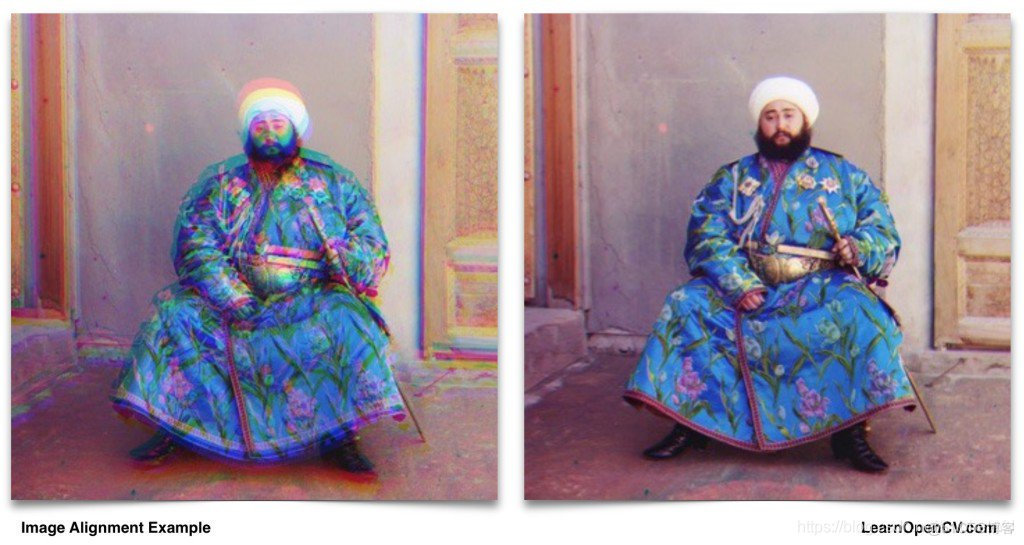
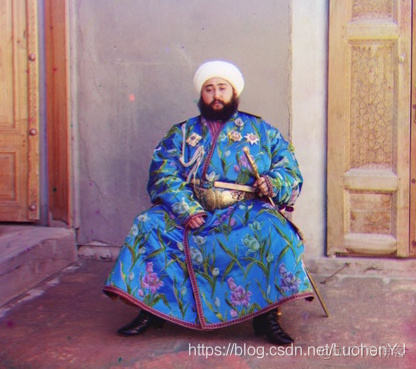
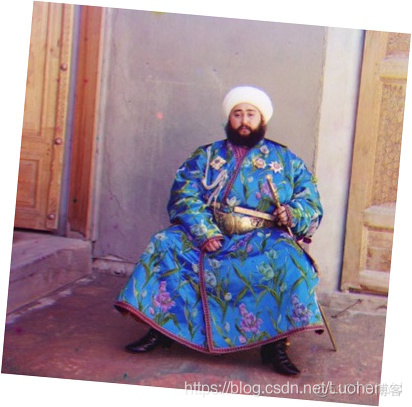
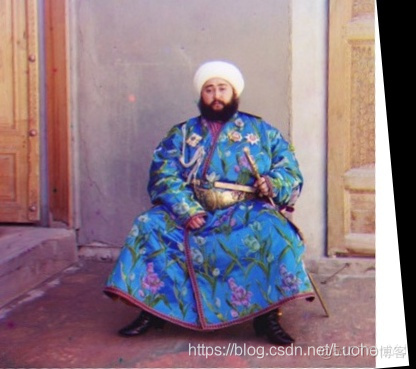
 上面左边的图像是由Prokudin-Gorskii拍摄的历史系列照片中的一部分。这张照片是由一位俄罗斯摄影师在20世纪初使用早期的彩色相机拍摄的。由于相机的机械性质,图像的颜色通道未对准。右侧的图像是同一图像的一个版本,其中的通道使用OpenCV3中提供的函数进行对齐。
在这篇文章中,我们了解彩色的摄影历史,同时了解该过程中的图像对齐。本文所有代码图像见:
上面左边的图像是由Prokudin-Gorskii拍摄的历史系列照片中的一部分。这张照片是由一位俄罗斯摄影师在20世纪初使用早期的彩色相机拍摄的。由于相机的机械性质,图像的颜色通道未对准。右侧的图像是同一图像的一个版本,其中的通道使用OpenCV3中提供的函数进行对齐。
在这篇文章中,我们了解彩色的摄影历史,同时了解该过程中的图像对齐。本文所有代码图像见:
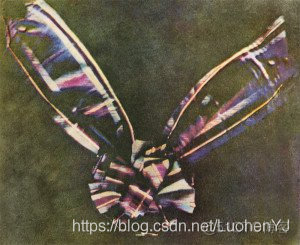 到20世纪初,照相材料的灵敏度已经大大提高,并且在20世纪的前十年,一些不同的实用相机可用于彩色摄影。也许这些相机中最受欢迎的是Autochrome。Autochrome详细见:
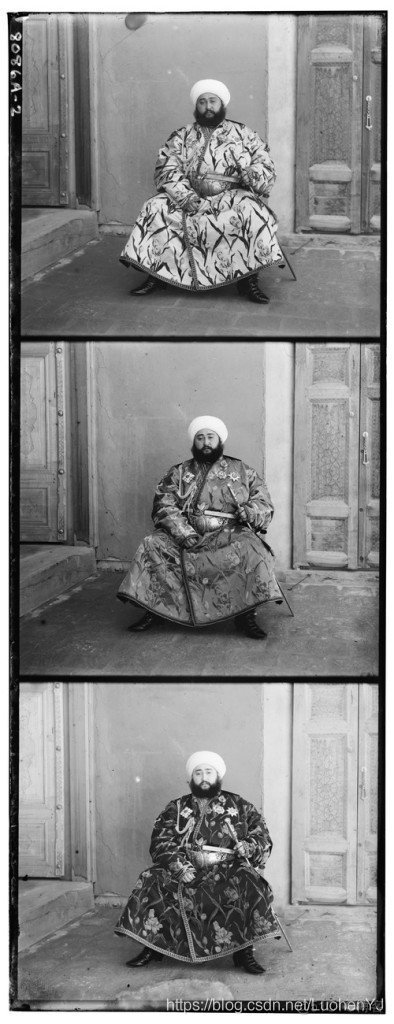
其竞争相机系统是由Adolf Miethe设计的,最后由Wilhelm Bermpohl打造,因此称之为“Professor Dr. Miethe’s Dreifarben-Camera. ”在德国,单词“Dreifarben”也称之为“三原色”,这款相机也被称之为“Miethe-Bermpohl”,它是由一张长的玻璃板和三个不同的滤镜构成的,因此它能同时捕获三张照片。通过这种技术拍摄的图像见:
在Sergey Prokudin-Gorskii手中,Miethe-Bermpohl相机(或其变体)将在俄罗斯历史上获得一个特殊的位置。1909年,在沙皇尼古拉二世的资助下,Prokudin-Gorskii开始了长达十年的俄罗斯彩色征途!他拍了超过10,000张彩色照片。他的照片中最引人注目的是Leo Tolstoy(列夫 托尔斯泰)唯一已知的彩色照片。
对我们来说幸运的是,美国国会图书馆于1948年购买了大量的Prokudin-Gorskii的照片。他们现在处于公开状态,我们有机会重建俄罗斯的历史!这些照片见:
从这些黑白图像生成彩色图像并非易事(如下图所示)。Miethe-Bermpohl相机是一种机械设备,可以在2-6秒的时间内拍摄这三张照片。因此,三个通道经常是错位的,并且天真地将它们堆叠起来导致非常不令人满意的结果(本文第一张图)。
到20世纪初,照相材料的灵敏度已经大大提高,并且在20世纪的前十年,一些不同的实用相机可用于彩色摄影。也许这些相机中最受欢迎的是Autochrome。Autochrome详细见:
其竞争相机系统是由Adolf Miethe设计的,最后由Wilhelm Bermpohl打造,因此称之为“Professor Dr. Miethe’s Dreifarben-Camera. ”在德国,单词“Dreifarben”也称之为“三原色”,这款相机也被称之为“Miethe-Bermpohl”,它是由一张长的玻璃板和三个不同的滤镜构成的,因此它能同时捕获三张照片。通过这种技术拍摄的图像见:
在Sergey Prokudin-Gorskii手中,Miethe-Bermpohl相机(或其变体)将在俄罗斯历史上获得一个特殊的位置。1909年,在沙皇尼古拉二世的资助下,Prokudin-Gorskii开始了长达十年的俄罗斯彩色征途!他拍了超过10,000张彩色照片。他的照片中最引人注目的是Leo Tolstoy(列夫 托尔斯泰)唯一已知的彩色照片。
对我们来说幸运的是,美国国会图书馆于1948年购买了大量的Prokudin-Gorskii的照片。他们现在处于公开状态,我们有机会重建俄罗斯的历史!这些照片见:
从这些黑白图像生成彩色图像并非易事(如下图所示)。Miethe-Bermpohl相机是一种机械设备,可以在2-6秒的时间内拍摄这三张照片。因此,三个通道经常是错位的,并且天真地将它们堆叠起来导致非常不令人满意的结果(本文第一张图)。
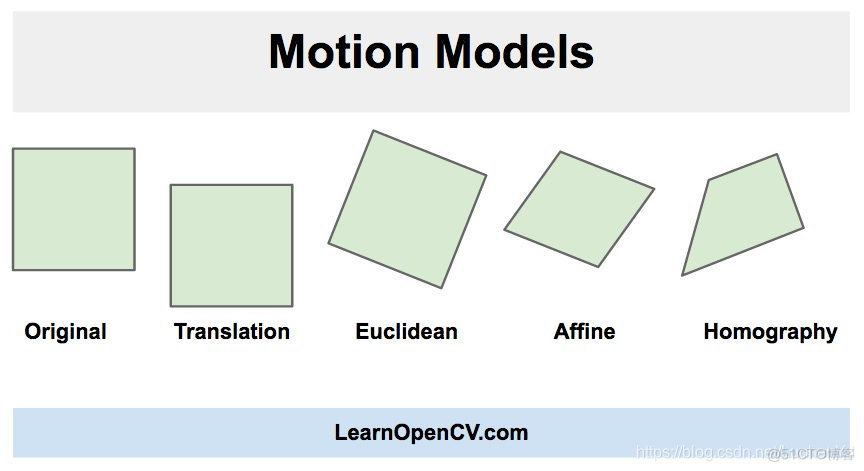 表示这些模型的OpenCV常量具有前缀MOTION_。
(1)平移(MOTION_TRANSLATION):上图Original图像对坐标点(x,y)变换以获得TRANSLATION图像。我们只需要估算两个参数x和y。
(2)欧几里德(MOTION_EUCLIDEAN):上图EUCLIDEAN图像是Original图像的旋转和移位版本。所以有三个参数x,y和角度。您将注意到当一个正方形经历欧几里德变换时,尺寸不会改变,平行线保持平行,并且在转换后直角保持不变。
(3)仿射(MOTION_AFFINE):仿射变换是旋转,平移(移位),缩放和剪切的组合。该变换有六个参数。当正方形经历仿射变换时,平行线保持平行,但是以直角相交的线不再保持正交。
(4)Homography(MOTION_HOMOGRAPHY):上述所有变换都是2D变换。它们不考虑3D效果。另一方面,单应性变换可以解释一些3D效果(但不是全部)。该变换有8个参数。使用Homography转换时的正方形可以更改为任何四边形。
在OpenCV中,仿射变换存储在2×3大小的矩阵中。翻译和欧几里德变换是仿射变换的特例。在平移中,旋转,比例和剪切参数为零,而在欧几里德变换中,比例和剪切参数为零。因此,平移和欧几里德变换也存储在2×3矩阵中。一旦估计了这个矩阵(我们将在下一节中看到),就可以使用函数warpAffine使图像对齐。另一方面,Homography存储在3×3矩阵中。一旦估计了Homography,就可以使用warpPerspective使图像对齐。
表示这些模型的OpenCV常量具有前缀MOTION_。
(1)平移(MOTION_TRANSLATION):上图Original图像对坐标点(x,y)变换以获得TRANSLATION图像。我们只需要估算两个参数x和y。
(2)欧几里德(MOTION_EUCLIDEAN):上图EUCLIDEAN图像是Original图像的旋转和移位版本。所以有三个参数x,y和角度。您将注意到当一个正方形经历欧几里德变换时,尺寸不会改变,平行线保持平行,并且在转换后直角保持不变。
(3)仿射(MOTION_AFFINE):仿射变换是旋转,平移(移位),缩放和剪切的组合。该变换有六个参数。当正方形经历仿射变换时,平行线保持平行,但是以直角相交的线不再保持正交。
(4)Homography(MOTION_HOMOGRAPHY):上述所有变换都是2D变换。它们不考虑3D效果。另一方面,单应性变换可以解释一些3D效果(但不是全部)。该变换有8个参数。使用Homography转换时的正方形可以更改为任何四边形。
在OpenCV中,仿射变换存储在2×3大小的矩阵中。翻译和欧几里德变换是仿射变换的特例。在平移中,旋转,比例和剪切参数为零,而在欧几里德变换中,比例和剪切参数为零。因此,平移和欧几里德变换也存储在2×3矩阵中。一旦估计了这个矩阵(我们将在下一节中看到),就可以使用函数warpAffine使图像对齐。另一方面,Homography存储在3×3矩阵中。一旦估计了Homography,就可以使用warpPerspective使图像对齐。
#include "pch.h"
#include "opencv2/opencv.hpp"

using namespace cv;
using namespace std;

int main()
{
    // Read the images to be aligned 读取仿射图像
    //im1参考图像,im2要处理的图像
    Mat im1 = imread("image/image1.jpg");
    Mat im2 = imread("image/image2.jpg");

    // Convert images to gray scale 转换为灰度图像
    Mat im1_gray, im2_gray;
    cvtColor(im1, im1_gray, CV_BGR2GRAY);
    cvtColor(im2, im2_gray, CV_BGR2GRAY);

    // Define the motion model 定义运动模型
    const int warp_mode = MOTION_EUCLIDEAN;

    // Set a 2x3 or 3x3 warp matrix depending on the motion model. 变换矩阵
    Mat warp_matrix;

    // Initialize the matrix to identity
    if (warp_mode == MOTION_HOMOGRAPHY)
    {
        warp_matrix = Mat::eye(3, 3, CV_32F);
    }
    else
    {
        warp_matrix = Mat::eye(2, 3, CV_32F);
    }

    // Specify the number of iterations. 算法迭代次数
    int number_of_iterations = 5000;

    // Specify the threshold of the increment
    // in the correlation coefficient between two iterations 设定阈值
    double termination_eps = 1e-10;

    // Define termination criteria 定义终止条件
    TermCriteria criteria(TermCriteria::COUNT + TermCriteria::EPS, number_of_iterations, termination_eps);

    // Run the ECC algorithm. The results are stored in warp_matrix. ECC算法
    findTransformECC
    (
        im1_gray,
        im2_gray,
        warp_matrix,
        warp_mode,
        criteria
    );

    // Storage for warped image.
    Mat im2_aligned;

    if (warp_mode != MOTION_HOMOGRAPHY)
    {
        // Use warpAffine for Translation, Euclidean and Affine
        warpAffine(im2, im2_aligned, warp_matrix, im1.size(), INTER_LINEAR + WARP_INVERSE_MAP);
    }
    else
    {
        // Use warpPerspective for Homography
        warpPerspective(im2, im2_aligned, warp_matrix, im1.size(), INTER_LINEAR + WARP_INVERSE_MAP);
    }

    // Show final result
    imshow("Image 1", im1);
    imshow("Image 2", im2);
    imshow("Image 2 Aligned", im2_aligned);
    waitKey(0);

    return 0;
}
import cv2
import numpy as np

if __name__ == '__main__':

    # Read the images to be aligned
    im1 =  cv2.imread("image/image1.jpg");
    im2 =  cv2.imread("image/image2.jpg");

    # Convert images to grayscale
    im1_gray = cv2.cvtColor(im1,cv2.COLOR_BGR2GRAY)
    im2_gray = cv2.cvtColor(im2,cv2.COLOR_BGR2GRAY)

    # Find size of image1
    sz = im1.shape

    # Define the motion model
    warp_mode = cv2.MOTION_TRANSLATION

    # Define 2x3 or 3x3 matrices and initialize the matrix to identity
    if warp_mode == cv2.MOTION_HOMOGRAPHY :
        warp_matrix = np.eye(3, 3, dtype=np.float32)
    else :
        warp_matrix = np.eye(2, 3, dtype=np.float32)

    # Specify the number of iterations.
    number_of_iterations = 5000;

    # Specify the threshold of the increment
    # in the correlation coefficient between two iterations
    termination_eps = 1e-10;

    # Define termination criteria
    criteria = (cv2.TERM_CRITERIA_EPS | cv2.TERM_CRITERIA_COUNT, number_of_iterations,  termination_eps)

    # Run the ECC algorithm. The results are stored in warp_matrix.
    (cc, warp_matrix) = cv2.findTransformECC (im1_gray,im2_gray,warp_matrix, warp_mode, criteria)

    if warp_mode == cv2.MOTION_HOMOGRAPHY :
        # Use warpPerspective for Homography
        im2_aligned = cv2.warpPerspective (im2, warp_matrix, (sz[1],sz[0]), flags=cv2.INTER_LINEAR + cv2.WARP_INVERSE_MAP)
    else :
        # Use warpAffine for Translation, Euclidean and Affine
        im2_aligned = cv2.warpAffine(im2, warp_matrix, (sz[1],sz[0]), flags=cv2.INTER_LINEAR + cv2.WARP_INVERSE_MAP);

    # Show final results
    cv2.imshow("Image 1", im1)
    cv2.imshow("Image 2", im2)
    cv2.imshow("Aligned Image 2", im2_aligned)
    cv2.waitKey(0)
#include "pch.h"
#include "opencv2/opencv.hpp"

using namespace cv;
using namespace std;

/**
 * @brief Get the Gradient object 计算梯度
 *
 * @param src_gray 输入灰度图
 * @return Mat
 */
Mat GetGradient(Mat src_gray)
{
    Mat grad_x, grad_y;
    Mat abs_grad_x, abs_grad_y;

    int scale = 1;
    int delta = 0;
    int ddepth = CV_32FC1;
    ;

    // Calculate the x and y gradients using Sobel operator
    //计算sobel算子
    Sobel(src_gray, grad_x, ddepth, 1, 0, 3, scale, delta, BORDER_DEFAULT);
    //使用线性变换转换输入数组元素成8位无符号整型
    convertScaleAbs(grad_x, abs_grad_x);

    Sobel(src_gray, grad_y, ddepth, 0, 1, 3, scale, delta, BORDER_DEFAULT);
    convertScaleAbs(grad_y, abs_grad_y);

    // Combine the two gradients
    Mat grad;
    //合并算子
    addWeighted(abs_grad_x, 0.5, abs_grad_y, 0.5, 0, grad);

    return grad;
}

int main()
{
    // Read 8-bit color image.
    // This is an image in which the three channels are
    // concatenated vertically.
    //输入一个灰度图
    Mat im = imread("image/bridge.jpg", IMREAD_GRAYSCALE);

    // Find the width and height of the color image 获取图像宽高
    Size sz = im.size();
    int height = sz.height / 3;
    int width = sz.width;

    // Extract the three channels from the gray scale image 通道分离
    vector<Mat> channels;
    channels.push_back(im(Rect(0, 0, width, height)));
    channels.push_back(im(Rect(0, height, width, height)));
    channels.push_back(im(Rect(0, 2 * height, width, height)));

    // Merge the three channels into one color image 通道合并,将图像合并成一张图
    Mat im_color;
    merge(channels, im_color);

    // Set space for aligned image 设置对齐图像
    vector<Mat> aligned_channels;
    aligned_channels.push_back(Mat(height, width, CV_8UC1));
    aligned_channels.push_back(Mat(height, width, CV_8UC1));

    // The blue and green channels will be aligned to the red channel.
    // So copy the red channel
    aligned_channels.push_back(channels[2].clone());

    // Define motion model 确定运动模型
    const int warp_mode = MOTION_AFFINE;

    // Set space for warp matrix 变换矩阵
    Mat warp_matrix;

    // Set the warp matrix to identity.
    if (warp_mode == MOTION_HOMOGRAPHY)
    {
        warp_matrix = Mat::eye(3, 3, CV_32F);
    }
    else
    {
        warp_matrix = Mat::eye(2, 3, CV_32F);
    }
    // Set the stopping criteria for the algorithm. 设置迭代次数和阈值
    int number_of_iterations = 5000;
    double termination_eps = 1e-10;

    TermCriteria criteria(TermCriteria::COUNT + TermCriteria::EPS,
        number_of_iterations, termination_eps);

    // Warp the blue and green channels to the red channel
    for (int i = 0; i < 2; i++)
    {
        double cc = findTransformECC
        (
            GetGradient(channels[2]),
            GetGradient(channels[i]),
            warp_matrix,
            warp_mode,
            criteria);

        cout << "warp_matrix : " << warp_matrix << endl;
        cout << "CC " << cc << endl;
        if (cc == -1)
        {
            cerr << "The execution was interrupted. The correlation value is going to be minimized." << endl;
            cerr << "Check the warp initialization and/or the size of images." << endl
                << flush;
        }

        if (warp_mode == MOTION_HOMOGRAPHY)
        {
            // Use Perspective warp when the transformation is a Homography
            warpPerspective(channels[i], aligned_channels[i], warp_matrix, aligned_channels[0].size(), INTER_LINEAR + WARP_INVERSE_MAP);
        }
        else
        {
            // Use Affine warp when the transformation is not a Homography
            warpAffine(channels[i], aligned_channels[i], warp_matrix, aligned_channels[0].size(), INTER_LINEAR + WARP_INVERSE_MAP);
        }
    }

    // Merge the three channels 合并通道
    Mat im_aligned;
    merge(aligned_channels, im_aligned);

    // Show final output
    imshow("Color Image", im_color);
    imshow("Aligned Image", im_aligned);
    waitKey(0);
    return 0;
}
import cv2
import numpy as np

def get_gradient(im) :
    # Calculate the x and y gradients using Sobel operator
    grad_x = cv2.Sobel(im,cv2.CV_32F,1,0,ksize=3)
    grad_y = cv2.Sobel(im,cv2.CV_32F,0,1,ksize=3)
    # Combine the two gradients
    grad = cv2.addWeighted(np.absolute(grad_x), 0.5, np.absolute(grad_y), 0.5, 0)
    return grad

if __name__ == '__main__':

    # Read 8-bit color image.
    # This is an image in which the three channels are
    # concatenated vertically.

    im =  cv2.imread("image/girls.jpg", cv2.IMREAD_GRAYSCALE);

    # Find the width and height of the color image
    sz = im.shape
    print(sz)
    height = int(sz[0] / 3);
    width = sz[1]

    # Extract the three channels from the gray scale image
    # and merge the three channels into one color image
    im_color = np.zeros((height,width,3), dtype=np.uint8 )
    for i in range(0,3) :
        im_color[:,:,i] = im[ i * height:(i+1) * height,:]

    # Allocate space for aligned image
    im_aligned = np.zeros((height,width,3), dtype=np.uint8 )

    # The blue and green channels will be aligned to the red channel.
    # So copy the red channel
    im_aligned[:,:,2] = im_color[:,:,2]

    # Define motion model
    warp_mode = cv2.MOTION_HOMOGRAPHY

    # Set the warp matrix to identity.
    if warp_mode == cv2.MOTION_HOMOGRAPHY :
            warp_matrix = np.eye(3, 3, dtype=np.float32)
    else :
            warp_matrix = np.eye(2, 3, dtype=np.float32)

    # Set the stopping criteria for the algorithm.
    criteria = (cv2.TERM_CRITERIA_EPS | cv2.TERM_CRITERIA_COUNT, 50,  1e-10)

    # Warp the blue and green channels to the red channel
    for i in range(0,2) :
        (cc, warp_matrix) = cv2.findTransformECC (get_gradient(im_color[:,:,2]), get_gradient(im_color[:,:,i]),warp_matrix, warp_mode, criteria)

        if warp_mode == cv2.MOTION_HOMOGRAPHY :
            # Use Perspective warp when the transformation is a Homography
            im_aligned[:,:,i] = cv2.warpPerspective (im_color[:,:,i], warp_matrix, (width,height), flags=cv2.INTER_LINEAR + cv2.WARP_INVERSE_MAP)
        else :
            # Use Affine warp when the transformation is not a Homography
            im_aligned[:,:,i] = cv2.warpAffine(im_color[:,:,i], warp_matrix, (width, height), flags=cv2.INTER_LINEAR + cv2.WARP_INVERSE_MAP);
        print(warp_matrix)

    # Show final output
    cv2.imshow("Color Image", im_color)
    cv2.imshow("Aligned Image", im_aligned)
    cv2.waitKey(0)
我正在学习如何使用Nokogiri,根据这段代码我遇到了一些问题:require'rubygems'require'mechanize'post_agent=WWW::Mechanize.newpost_page=post_agent.get('http://www.vbulletin.org/forum/showthread.php?t=230708')puts"\nabsolutepathwithtbodygivesnil"putspost_page.parser.xpath('/html/body/div/div/div/div/div/table/tbody/tr/td/div
我有一个Ruby程序,它使用rubyzip压缩XML文件的目录树。gem。我的问题是文件开始变得很重,我想提高压缩级别,因为压缩时间不是问题。我在rubyzipdocumentation中找不到一种为创建的ZIP文件指定压缩级别的方法。有人知道如何更改此设置吗?是否有另一个允许指定压缩级别的Ruby库? 最佳答案 这是我通过查看rubyzip内部创建的代码。level=Zlib::BEST_COMPRESSIONZip::ZipOutputStream.open(zip_file)do|zip|Dir.glob("**/*")d
类classAprivatedeffooputs:fooendpublicdefbarputs:barendprivatedefzimputs:zimendprotecteddefdibputs:dibendendA的实例a=A.new测试a.foorescueputs:faila.barrescueputs:faila.zimrescueputs:faila.dibrescueputs:faila.gazrescueputs:fail测试输出failbarfailfailfail.发送测试[:foo,:bar,:zim,:dib,:gaz].each{|m|a.send(m)resc
很好奇,就使用rubyonrails自动化单元测试而言,你们正在做什么?您是否创建了一个脚本来在cron中运行rake作业并将结果邮寄给您?git中的预提交Hook?只是手动调用?我完全理解测试,但想知道在错误发生之前捕获错误的最佳实践是什么。让我们理所当然地认为测试本身是完美无缺的,并且可以正常工作。下一步是什么以确保他们在正确的时间将可能有害的结果传达给您? 最佳答案 不确定您到底想听什么,但是有几个级别的自动代码库控制:在处理某项功能时,您可以使用类似autotest的内容获得关于哪些有效,哪些无效的即时反馈。要确保您的提
假设我做了一个模块如下:m=Module.newdoclassCendend三个问题:除了对m的引用之外,还有什么方法可以访问C和m中的其他内容?我可以在创建匿名模块后为其命名吗(就像我输入“module...”一样)?如何在使用完匿名模块后将其删除,使其定义的常量不再存在? 最佳答案 三个答案:是的,使用ObjectSpace.此代码使c引用你的类(class)C不引用m:c=nilObjectSpace.each_object{|obj|c=objif(Class===objandobj.name=~/::C$/)}当然这取决于
我正在尝试使用ruby和Savon来使用网络服务。测试服务为http://www.webservicex.net/WS/WSDetails.aspx?WSID=9&CATID=2require'rubygems'require'savon'client=Savon::Client.new"http://www.webservicex.net/stockquote.asmx?WSDL"client.get_quotedo|soap|soap.body={:symbol=>"AAPL"}end返回SOAP异常。检查soap信封,在我看来soap请求没有正确的命名空间。任何人都可以建议我
关闭。这个问题是opinion-based.它目前不接受答案。想要改进这个问题?更新问题,以便editingthispost可以用事实和引用来回答它.关闭4年前。Improvethisquestion我想在固定时间创建一系列低音和高音调的哔哔声。例如:在150毫秒时发出高音调的蜂鸣声在151毫秒时发出低音调的蜂鸣声200毫秒时发出低音调的蜂鸣声250毫秒的高音调蜂鸣声有没有办法在Ruby或Python中做到这一点?我真的不在乎输出编码是什么(.wav、.mp3、.ogg等等),但我确实想创建一个输出文件。
我在我的项目目录中完成了compasscreate.和compassinitrails。几个问题:我已将我的.sass文件放在public/stylesheets中。这是放置它们的正确位置吗?当我运行compasswatch时,它不会自动编译这些.sass文件。我必须手动指定文件:compasswatchpublic/stylesheets/myfile.sass等。如何让它自动运行?文件ie.css、print.css和screen.css已放在stylesheets/compiled。如何在编译后不让它们重新出现的情况下删除它们?我自己编译的.sass文件编译成compiled/t
我想将html转换为纯文本。不过,我不想只删除标签,我想智能地保留尽可能多的格式。为插入换行符标签,检测段落并格式化它们等。输入非常简单,通常是格式良好的html(不是整个文档,只是一堆内容,通常没有anchor或图像)。我可以将几个正则表达式放在一起,让我达到80%,但我认为可能有一些现有的解决方案更智能。 最佳答案 首先,不要尝试为此使用正则表达式。很有可能你会想出一个脆弱/脆弱的解决方案,它会随着HTML的变化而崩溃,或者很难管理和维护。您可以使用Nokogiri快速解析HTML并提取文本:require'nokogiri'h
我想为Heroku构建一个Rails3应用程序。他们使用Postgres作为他们的数据库,所以我通过MacPorts安装了postgres9.0。现在我需要一个postgresgem并且共识是出于性能原因你想要pggem。但是我对我得到的错误感到非常困惑当我尝试在rvm下通过geminstall安装pg时。我已经非常明确地指定了所有postgres目录的位置可以找到但仍然无法完成安装:$envARCHFLAGS='-archx86_64'geminstallpg--\--with-pg-config=/opt/local/var/db/postgresql90/defaultdb/po
