文章目录
问题点
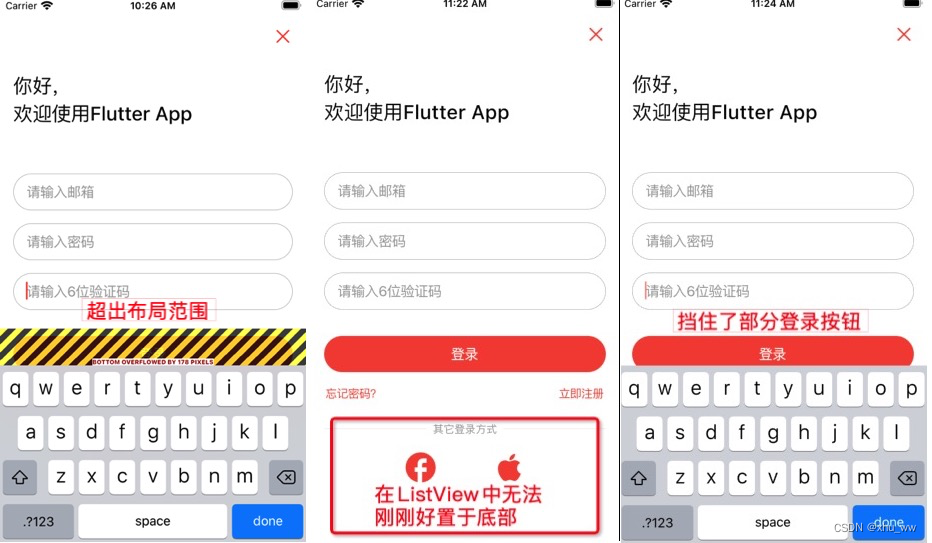
最终效果图
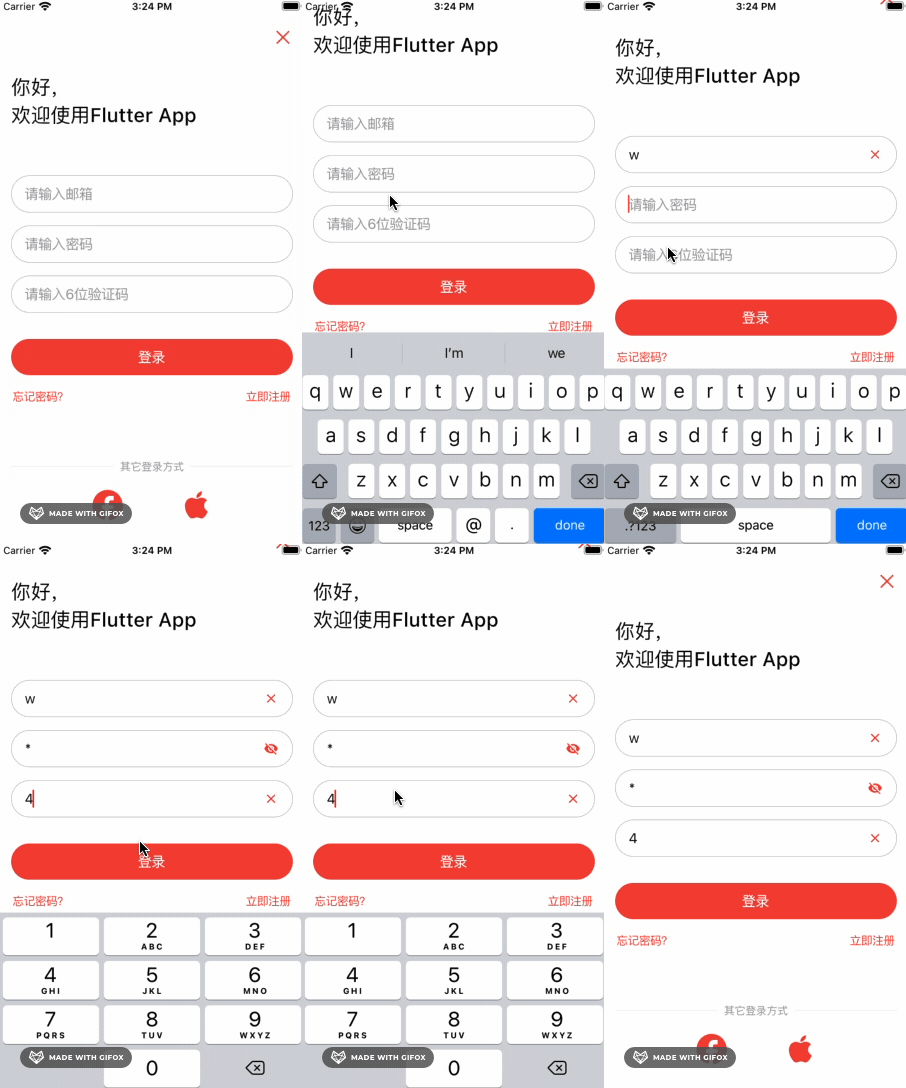
问题点: 当前使用的是Column布局,弹窗软键盘后页面超出范围。
A RenderFlex overflowed by 0.533 pixels on the bottom.

解决方式
在
Scaffold或者CupertinoPageScaffold中设置resizeToAvoidBottomInset为false
  @override
  Widget build(BuildContext context) {
    return Scaffold(
      backgroundColor: Colors.white,
      resizeToAvoidBottomInset:false,
      body: ...,
    );
  }
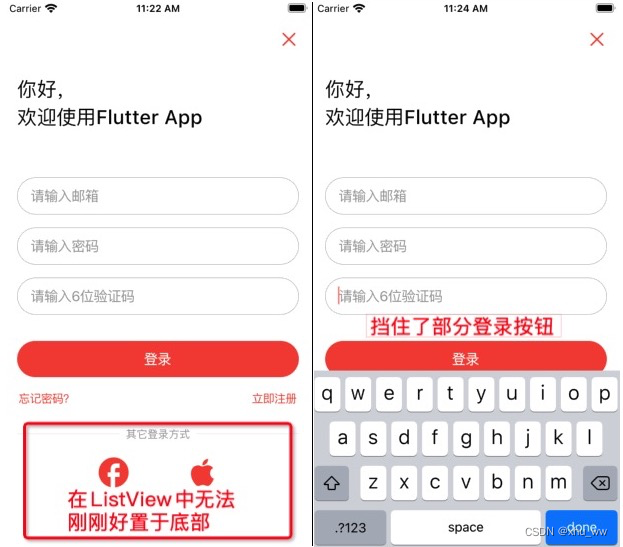
不修改resizeToAvoidBottomInset属性的话,可以使用ListView、SingleChildScrollView、CustomScrollView等布局构建页面。
在此登录页面布局中使用上述2种方式都会存在问题。
简要代码
class _LoginPageState extends State<LoginPage> with WidgetsBindingObserver {

  // 软键盘高度
  double _keyboardHeight = 0;

  // 可控制ListView滑动
  final _scrollController = ScrollController();

  // 用于获取目标Widget的位置坐标
  final _targetWidgetKey = GlobalKey();

  @override
  void initState() {
    super.initState();
    // 添加监听,didChangeMetrics
    WidgetsBinding.instance.addObserver(this);
  }

  @override
  void dispose() {
    WidgetsBinding.instance.removeObserver(this);
    super.dispose();
  }

  // 当应用程序的尺寸发生变化时会调用
  @override
  void didChangeMetrics() {
    // 获取页面高度
    var pageHeight = MediaQuery.of(context).size.height;
    if (pageHeight <= 0) {
      return;
    }

    // 软键盘顶部  px
    final keyboardTopPixels =
        window.physicalSize.height - window.viewInsets.bottom;
    // 转换为 dp
    final keyboardTopPoints = keyboardTopPixels / window.devicePixelRatio;
    // 软键盘高度
    final keyboardHeight = pageHeight - keyboardTopPoints;

    setState(() {
      _keyboardHeight = keyboardHeight;
    });

    if (keyboardHeight <= 0) {
      return;
    }
    // 获取目标位置的坐标
    RenderBox? renderBox =
        _targetWidgetKey.currentContext?.findRenderObject() as RenderBox?;
    if (renderBox == null) {
      return;
    }
    // 转换为全局坐标
    final bottomOffset =
        renderBox.localToGlobal(Offset(0, renderBox.size.height));
    final targetDy = bottomOffset.dy;
    // 获取要滚动的距离
    // 即被软键盘挡住的那段距离 加上 _scrollController.offset 已经滑动过的距离
    final offsetY =
        keyboardHeight - (pageHeight - targetDy) + _scrollController.offset;
    // 滑动到指定位置
    if (offsetY > 0) {
      _scrollController.animateTo(
        offsetY,
        duration: kTabScrollDuration,
        curve: Curves.ease,
      );
    }
  }

  @override
  Widget build(BuildContext context) {
    return Scaffold(
      backgroundColor: Colors.white,
      // 避免底部布局被软键盘顶上来
      resizeToAvoidBottomInset: false,
      body: GestureDetector(
        behavior: HitTestBehavior.opaque,
        // 点击空白位置关闭软键盘
        onTap: () => FocusManager.instance.primaryFocus?.unfocus(),
        child: Column(
          children: [
            Expanded(
              child: ListView(
                controller: _scrollController,
                children: [
                  ...
                  // 一系列输入框Widget
                  ...
                  // 弹出的软键盘位于此Widget之下
                  Row(
                    key: _targetWidgetKey,
                    mainAxisAlignment: MainAxisAlignment.spaceBetween,
                    children: [
                     ...
                    ],
                  ),
                  // 动态变换高度,保证ListView可滑动
                  SizedBox(height: _keyboardHeight)
                ],
              ),
            ),
            /// 底部的布局
            Row(
              children: const [
              ...
              ],
            ),
          ],
        ),
      ),
    );
  }
}
效果图
带删除和眼睛按钮的输入框控件
import 'package:flutter/cupertino.dart';
import 'package:flutter/material.dart';

class UserTextField extends StatefulWidget {
  final TextEditingController controller;
  final TextInputType? keyboardType;
  final String? placeholder;
  final bool usedInPassword;
  final Widget? suffixWidget;
  final int? maxLength;

  const UserTextField({
    Key? key,
    required this.controller,
    this.keyboardType,
    this.placeholder,
    this.usedInPassword = false,
    this.suffixWidget,
    this.maxLength,
  }) : super(key: key);

  @override
  State<StatefulWidget> createState() => _UserTextFieldState();
}

class _UserTextFieldState extends State<UserTextField> {
  var _showClearIcon = false;
  var _showEyeIcon = false;
  late bool _obscurePassword;

  @override
  void initState() {
    super.initState();
    _obscurePassword = widget.usedInPassword;

    widget.controller.addListener(() {
      var isNotEmpty = widget.controller.text.isNotEmpty;
      setState(() {
        _showEyeIcon = isNotEmpty;
        _showClearIcon = isNotEmpty;
      });
    });
  }

  @override
  Widget build(BuildContext context) {
    return CupertinoTextField(
      controller: widget.controller,
      keyboardType: widget.keyboardType,
      onChanged: (_) {},
      placeholder: widget.placeholder,
      style: const TextStyle(color: Colors.black),
      placeholderStyle: const TextStyle(color: Colors.grey),
      maxLength: widget.maxLength,
      padding: const EdgeInsets.symmetric(horizontal: 16, vertical: 10),
      decoration: BoxDecoration(
        color: Colors.white,
        border: Border.all(color: Colors.grey, width: 0.5),
        borderRadius: BorderRadius.circular(26),
      ),
      obscureText: _obscurePassword,
      obscuringCharacter: "*",
      suffix: widget.suffixWidget ??
          (widget.usedInPassword ? _buildPasswordEyeIcon() : _buildClearIcon()),
    );
  }

  Widget _buildClearIcon() {
    return _showClearIcon
        ? CupertinoButton(
            padding: const EdgeInsets.fromLTRB(0, 0, 8, 0),
            child: const Icon(Icons.clear, size: 18),
            onPressed: () => widget.controller.clear(),
          )
        : const SizedBox(width: 8.0);
  }

  Widget _buildPasswordEyeIcon() {
    return _showEyeIcon
        ? CupertinoButton(
            padding: const EdgeInsets.fromLTRB(0, 0, 8, 0),
            child: Icon(
              _obscurePassword ? Icons.visibility_off : Icons.visibility,
              size: 18,
            ),
            onPressed: () {
              setState(() => _obscurePassword = !_obscurePassword);
            },
          )
        : const SizedBox(width: 8.0);
  }
}
登录页面
import 'dart:ui';

import 'package:flutter/cupertino.dart';
import 'package:flutter/material.dart';
import 'user_text_field.dart';

void main() => runApp(const MyApp());

class MyApp extends StatelessWidget {
  const MyApp({Key? key}) : super(key: key);

  @override
  Widget build(BuildContext context) {
    return const CupertinoApp(
      theme: CupertinoThemeData(
        primaryColor: Colors.red,
        scaffoldBackgroundColor: Colors.white,
      ),
      debugShowCheckedModeBanner: false,
      home: LoginPage(),
    );
  }
}

class LoginPage extends StatefulWidget {
  const LoginPage({Key? key}) : super(key: key);

  @override
  State<StatefulWidget> createState() => _LoginPageState();
}

class _LoginPageState extends State<LoginPage> with WidgetsBindingObserver {
  final _emailController = TextEditingController();
  final _passwordController = TextEditingController();
  final _codeController = TextEditingController();

  // 软键盘高度
  double _keyboardHeight = 0;

  // 可控制ListView滑动
  final _scrollController = ScrollController();

  // 用于获取目标Widget的位置坐标
  final _targetWidgetKey = GlobalKey();

  @override
  void initState() {
    super.initState();
    // 添加监听,didChangeMetrics
    WidgetsBinding.instance.addObserver(this);
  }

  @override
  void dispose() {
    WidgetsBinding.instance.removeObserver(this);
    super.dispose();
  }

  // 当应用程序的尺寸发生变化时会调用
  @override
  void didChangeMetrics() {
    // 获取页面高度
    var pageHeight = MediaQuery.of(context).size.height;
    if (pageHeight <= 0) {
      return;
    }

    // 软键盘顶部  px
    final keyboardTopPixels =
        window.physicalSize.height - window.viewInsets.bottom;
    // 转换为 dp
    final keyboardTopPoints = keyboardTopPixels / window.devicePixelRatio;
    // 软键盘高度
    final keyboardHeight = pageHeight - keyboardTopPoints;

    setState(() {
      _keyboardHeight = keyboardHeight;
    });
    if (keyboardHeight <= 0) {
      return;
    }
    // 获取目标位置的坐标
    RenderBox? renderBox =
        _targetWidgetKey.currentContext?.findRenderObject() as RenderBox?;
    if (renderBox == null) {
      return;
    }
    // 转换为全局坐标
    final bottomOffset =
        renderBox.localToGlobal(Offset(0, renderBox.size.height));
    final targetDy = bottomOffset.dy;
    // 获取要滚动的距离
    // 即被软键盘挡住的那段距离 加上 _scrollController.offset 已经滑动过的距离
    final offsetY =
        keyboardHeight - (pageHeight - targetDy) + _scrollController.offset;
    // 滑动到指定位置
    if (offsetY > 0) {
      _scrollController.animateTo(
        offsetY,
        duration: kTabScrollDuration,
        curve: Curves.ease,
      );
    }
  }

  @override
  Widget build(BuildContext context) {
    return Scaffold(
      backgroundColor: Colors.white,
      resizeToAvoidBottomInset: false,
      body: GestureDetector(
        behavior: HitTestBehavior.opaque,
        onTap: () => FocusManager.instance.primaryFocus?.unfocus(),
        child: Column(
          children: [
            Expanded(
              child: ListView(
                controller: _scrollController,
                children: [
                  SafeArea(
                    child: Align(
                      alignment: Alignment.centerRight,
                      child: CupertinoButton(
                        onPressed: () {},
                        child: const Icon(CupertinoIcons.clear, size: 24),
                      ),
                    ),
                  ),
                  const Padding(
                    padding: EdgeInsets.fromLTRB(16, 16, 16, 16),
                    child: Text(
                      '你好,\n欢迎使用Flutter App',
                      style: TextStyle(
                        fontSize: 24,
                        color: Colors.black,
                        fontWeight: FontWeight.w500,
                      ),
                    ),
                  ),
                  const SizedBox(height: 40),
                  Padding(
                    padding: const EdgeInsets.symmetric(horizontal: 16),
                    child: UserTextField(
                      controller: _emailController,
                      keyboardType: TextInputType.emailAddress,
                      placeholder: '请输入邮箱',
                    ),
                  ),
                  const SizedBox(height: 16.0),
                  Padding(
                    padding: const EdgeInsets.symmetric(horizontal: 16),
                    child: UserTextField(
                      controller: _passwordController,
                      keyboardType: TextInputType.visiblePassword,
                      usedInPassword: true,
                      placeholder: '请输入密码',
                    ),
                  ),
                  const SizedBox(height: 16.0),
                  Padding(
                    padding: const EdgeInsets.symmetric(horizontal: 16),
                    child: UserTextField(
                      controller: _codeController,
                      keyboardType: TextInputType.number,
                      placeholder: '请输入6位验证码',
                    ),
                  ),
                  const SizedBox(height: 16.0),
                  CupertinoButton(
                    padding: const EdgeInsets.all(16),
                    child: Container(
                      height: 44,
                      width: double.infinity,
                      alignment: Alignment.center,
                      decoration: const BoxDecoration(
                        color: Colors.red,
                        borderRadius: BorderRadius.all(Radius.circular(22)),
                      ),
                      child: const Text(
                        '登录',
                        style: TextStyle(color: Colors.white),
                      ),
                    ),
                    onPressed: () {},
                  ),
                  Row(
                    key: _targetWidgetKey,
                    mainAxisAlignment: MainAxisAlignment.spaceBetween,
                    children: [
                      CupertinoButton(
                        minSize: 24,
                        alignment: Alignment.topCenter,
                        padding: const EdgeInsets.symmetric(
                            horizontal: 18, vertical: 0),
                        onPressed: () {},
                        child: const Text(
                          '忘记密码?',
                          style: TextStyle(fontSize: 14),
                        ),
                      ),
                      CupertinoButton(
                        minSize: 24,
                        alignment: Alignment.topCenter,
                        padding: const EdgeInsets.symmetric(
                            horizontal: 18, vertical: 0),
                        onPressed: () {},
                        child:
                            const Text('立即注册', style: TextStyle(fontSize: 14)),
                      ),
                    ],
                  ),
                  SizedBox(height: _keyboardHeight)
                ],
              ),
            ),
            Row(
              children: const [
                SizedBox(width: 16),
                Expanded(child: Divider()),
                SizedBox(width: 8),
                Text(
                  '其它登录方式',
                  style: TextStyle(fontSize: 13, color: Colors.grey),
                ),
                SizedBox(width: 8),
                Expanded(child: Divider()),
                SizedBox(width: 16),
              ],
            ),
            Row(
              crossAxisAlignment: CrossAxisAlignment.center,
              mainAxisAlignment: MainAxisAlignment.center,
              children: [
                CupertinoButton(
                  onPressed: () {},
                  child: const Icon(Icons.facebook, size: 44),
                ),
                const SizedBox(width: 32),
                CupertinoButton(
                  onPressed: () {},
                  child: const Icon(Icons.apple, size: 44),
                ),
              ],
            ),
            const SizedBox(height: 12),
          ],
        ),
      ),
    );
  }
}
我是Google云的新手,我正在尝试对其进行首次部署。我的第一个部署是RubyonRails项目。我基本上是在关注thisguideinthegoogleclouddocumentation.唯一的区别是我使用的是我自己的项目,而不是他们提供的“helloworld”项目。这是我的app.yaml文件runtime:customvm:trueentrypoint:bundleexecrackup-p8080-Eproductionconfig.ruresources:cpu:0.5memory_gb:1.3disk_size_gb:10当我转到我的项目目录并运行gcloudprevie
当我在我的Rails应用程序根目录中运行rakedoc:app时,API文档是使用/doc/README_FOR_APP作为主页生成的。我想向该文件添加.rdoc扩展名,以便它在GitHub上正确呈现。更好的是,我想将它移动到应用程序根目录(/README.rdoc)。有没有办法通过修改包含的rake/rdoctask任务在我的Rakefile中执行此操作?是否有某个地方可以查找可以修改的主页文件的名称?还是我必须编写一个新的Rake任务?额外的问题:Rails应用程序的两个单独文件/README和/doc/README_FOR_APP背后的逻辑是什么?为什么不只有一个?
相信很多人在录制视频的时候都会遇到各种各样的问题,比如录制的视频没有声音。屏幕录制为什么没声音?今天小编就和大家分享一下如何录制音画同步视频的具体操作方法。如果你有录制的视频没有声音,你可以试试这个方法。 一、检查是否打开电脑系统声音相信很多小伙伴在录制视频后会发现录制的视频没有声音,屏幕录制为什么没声音?如果当时没有打开音频录制,则录制好的视频是没有声音的。因此,建议在录制前进行检查。屏幕上没有声音,很可能是因为你的电脑系统的声音被禁止了。您只需打开电脑系统的声音,即可录制音频和图画同步视频。操作方法:步骤1:点击电脑屏幕右下侧的“小喇叭”图案,在上方的选项中,选择“声音”。 步骤2:在“声
首先回顾一下拉格朗日定理的内容:函数f(x)是在闭区间[a,b]上连续、开区间(a,b)上可导的函数,那么至少存在一个,使得:通过这个表达式我们可以知道,f(x)是函数的主体,a和b可以看作是主体函数f(x)中所取的两个值。那么可以有, 也就意味着我们可以用来替换 这种替换可以用在求某些多项式差的极限中。方法: 外层函数f(x)是一致的,并且h(x)和g(x)是等价无穷小。此时,利用拉格朗日定理,将原式替换为 ,再进行求解,往往会省去复合函数求极限的很多麻烦。使用要注意:1.要先找到主体函数f(x),即外层函数必须相同。2.f(x)找到后,复合部分是等价无穷小。3.要满足作差的形式。如果是加
我正在使用Postgres.app在OSX(10.8.3)上。我已经修改了我的PATH,以便应用程序的bin文件夹位于所有其他文件夹之前。Rammy:~phrogz$whichpg_config/Applications/Postgres.app/Contents/MacOS/bin/pg_config我已经安装了rvm并且可以毫无错误地安装pggem,但是当我需要它时我得到一个错误:Rammy:~phrogz$gem-v1.8.25Rammy:~phrogz$geminstallpgFetching:pg-0.15.1.gem(100%)Buildingnativeextension
深度学习部署:Windows安装pycocotools报错解决方法1.pycocotools库的简介2.pycocotools安装的坑3.解决办法更多Ai资讯:公主号AiCharm本系列是作者在跑一些深度学习实例时,遇到的各种各样的问题及解决办法,希望能够帮助到大家。ERROR:Commanderroredoutwithexitstatus1:'D:\Anaconda3\python.exe'-u-c'importsys,setuptools,tokenize;sys.argv[0]='"'"'C:\\Users\\46653\\AppData\\Local\\Temp\\pip-instal
require'mechanize'agent=Mechanize.newlogin=agent.get('http://www.schoolnet.ch/DE/HomeDE.htm')agent.clicklogin.link_withtext:/Login/然后我得到Mechanize::UnsupportedSchemeError。 最佳答案 Mechanize不支持javascript但您可以将搜索字段添加到表单并为其分配搜索词并使用mechanize提交表单form=page.forms.firstform.add_fie
我希望用户从一个模型的三个选项中选择一个。即我有一个模型视频,可以被评为正面/负面/未知目前我有三列bool值(pos/neg/unknown)。这是处理这种情况的最佳方式吗?为此,表单应该是什么样的?目前我有类似的东西但显然它允许多项选择,而我试图将它限制为只有一个..怎么办? 最佳答案 如果要使用字符串列,让我们说rating。然后在你的表单中:#...#...它只允许一个选择编辑完全相同但使用radio_button_tag: 关于ruby-on-rails-Rails单选按钮-模
我有可变数量的表格和可变数量的行,我想让它们一个接一个地显示,但如果表格不适合当前页面,请将其放在下一页,然后继续。我已将表格放入事务中,以便我可以回滚然后打印它(如果高度适合当前页面),但我如何获得表格高度?我现在有这段代码pdf.transactiondopdf.table@data,:font_size=>12,:border_style=>:grid,:horizontal_padding=>10,:vertical_padding=>3,:border_width=>2,:position=>:left,:row_colors=>["FFFFFF","DDDDDD"]pdf.
原始问题Letd(n)bedefinedasthesumofproperdivisorsofn(numberslessthannwhichdivideevenlyinton).Ifd(a)=bandd(b)=a,whereab,thenaandbareanamicablepairandeachofaandbarecalledamicablenumbers.Forexample,theproperdivisorsof220are1,2,4,5,10,11,20,22,44,55and110;therefored(220)=284.Theproperdivisorsof284are1,2,
