MQTT(EMQX) - Linux CentOS Docker 安装
MQTT (Message Queue Telemetry Transport) 是一个轻量级传输协议,它被设计用于轻量级的发布/订阅式消息传输,MQTT协议针对低带宽网络,低计算能力的设备,做了特殊的优化。是一种简单、稳定、开放、轻量级易于实现的消息协议,在物联网的应用下的信息采集,工业控制,智能家居等方面具有广泛的适用性。
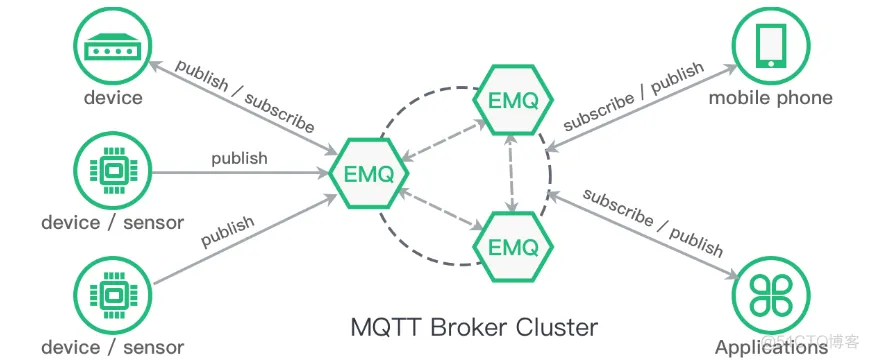

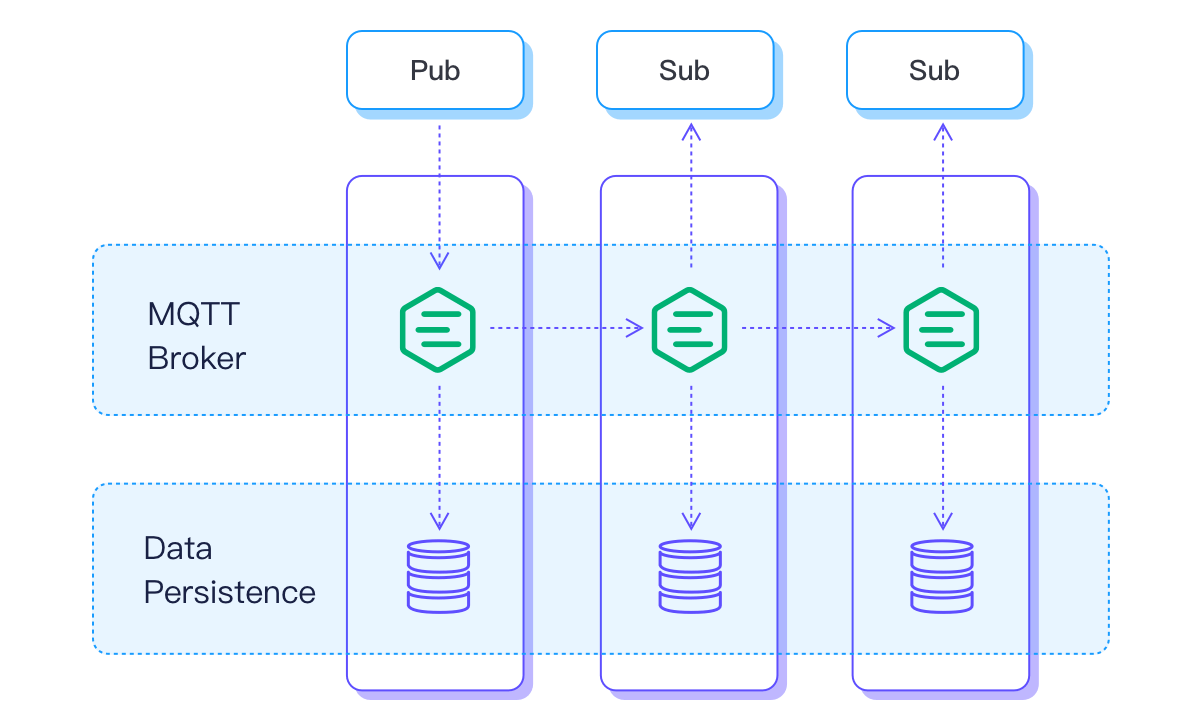
MQTT是为了物联网场景设计的基于TCP的Pub/Sub协议,有许多为物联网优化的特性,比如适应不同网络的QoS、层级主题、遗言等等。
WebSocket是为了HTML5应用方便与服务器双向通讯而设计的协议,HTTP握手然后转TCP协议,用于取代之前的Server Push、Comet、长轮询等老旧实现。
两者之所有有交集,是因为一个应用场景:如何通过HTML5应用来作为MQTT的客户端,以便接受设备消息或者向设备发送信息,那么MQTT over WebSocket自然成了最合理的途径了。
Java、C#、Python、C/C++、Objective-C、Node.js、Javascript、Ruby、Golang、PHP
遥感数据、汽车、智能家居、智慧城市、医疗医护
即时通讯:MQ 可以通过订阅主题,轻松实现 1对1、1对多的通讯。
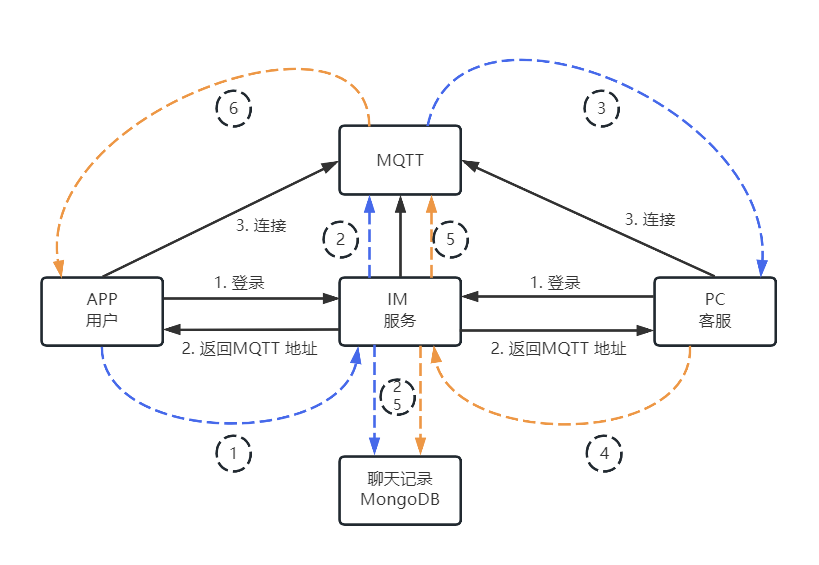
1、4. 发送者 向IM 服务发送消息
2、5. IM 服务,将消息持久化,并发给 MQTT
3、6. 消费者 从MQTT订阅到消息
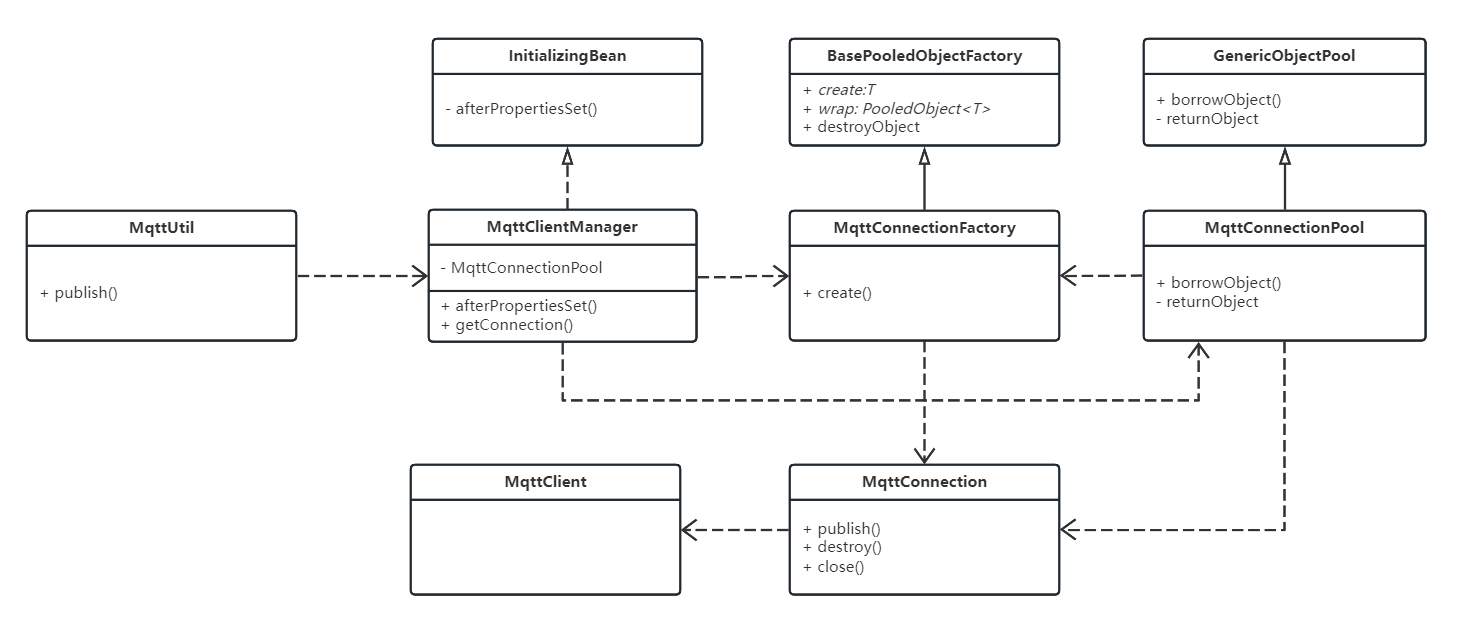
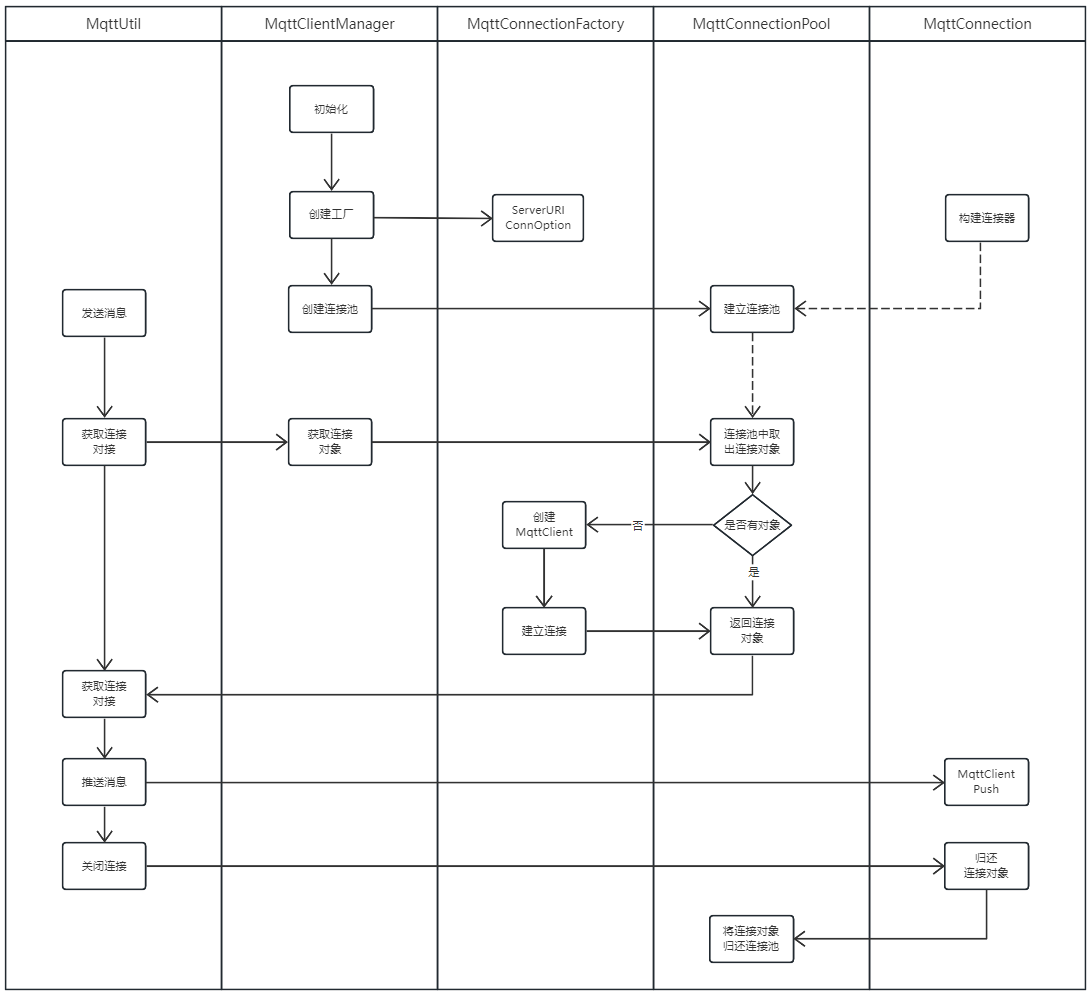
主要用到 InitializingBean、BasePooledObjectFactory、GenericObjectPool、GenericObjectPoolConfig
InitializingBean:实例化工厂、连接池,参考:Java SpringBoot Bean InitializingBean
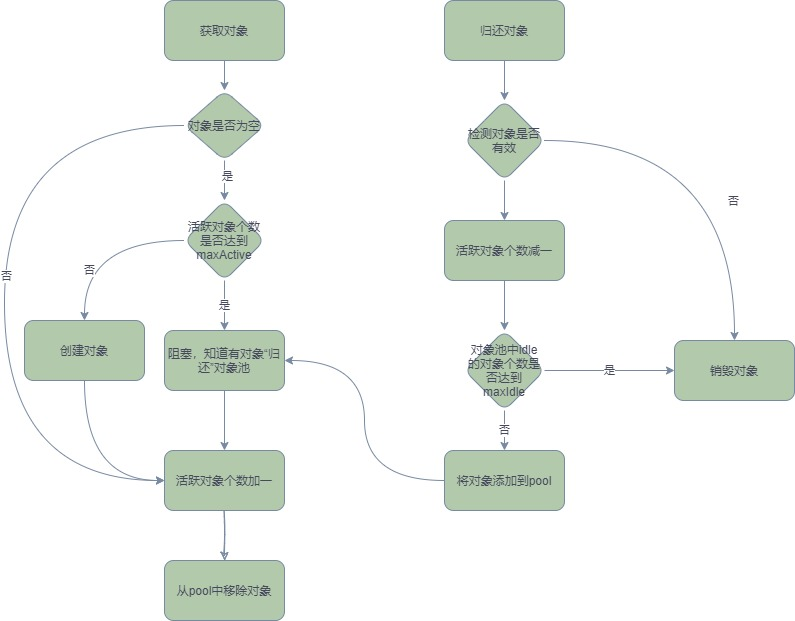
GenericObjectPool:获取连接对象,如果池中没有,通过工厂创建 参考:Java GenericObjectPool 对象池化技术--SpringBoot sftp 连接池工具类
BasePooledObjectFactory::创建 MqttClient 连接 参考:Java BasePooledObjectFactory 对象池化技术
GenericObjectPoolConfig:GenericObjectPoolConfig是封装GenericObject池配置的简单“结构”,此类不是线程安全的;它仅用于提供创建池时使用的属性。大多数情况,可以使用GenericObjectPoolConfig提供的默认参数就可以满足日常的需求。
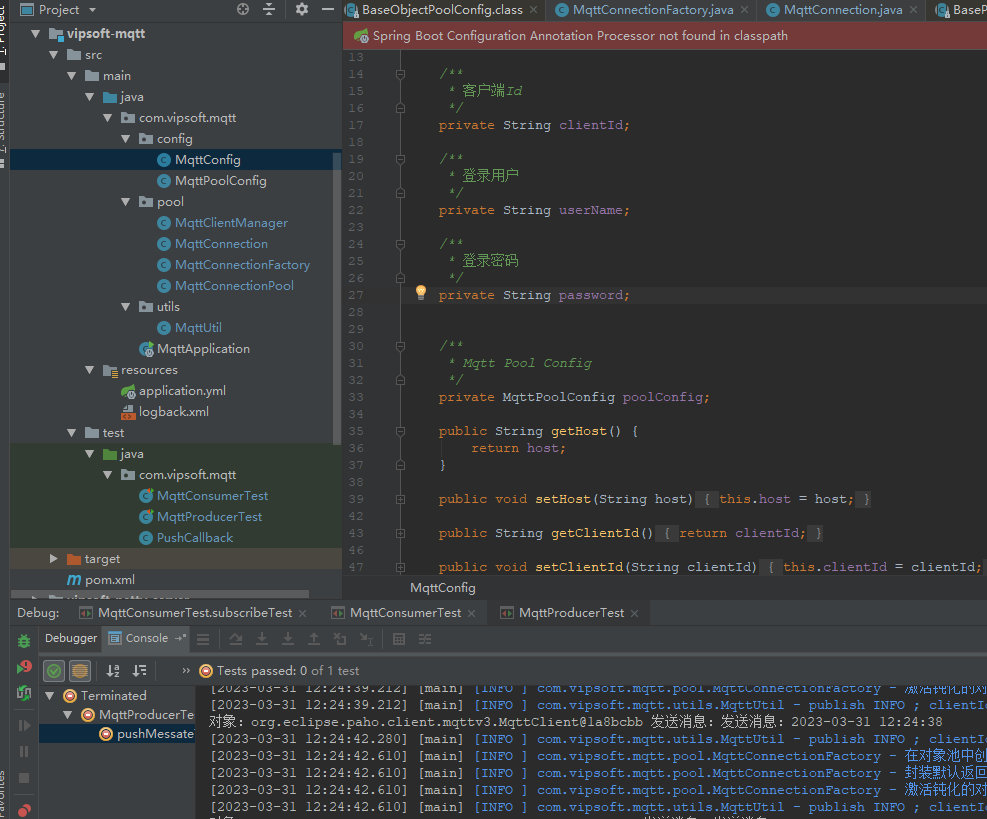
username(用户名)和password(密码)。这里的用户名和密码是用于客户端连接服务端时进行认证需要的。
有些MQTT服务端需要客户端在连接时提供用户名和密码。只有客户端正确提供了用户名和密码后,才能连接服务端。否则服务端将会拒绝客户端连接,那么客户端也就无法发布和订阅消息了。 当然,那些没有开启用户密码认证的服务端无需客户端提供用户名和密码认证信息。
<?xml version="1.0" encoding="UTF-8"?>
<project xmlns="http://maven.apache.org/POM/4.0.0"
         xmlns:xsi="http://www.w3.org/2001/XMLSchema-instance"
         xsi:schemaLocation="http://maven.apache.org/POM/4.0.0 http://maven.apache.org/xsd/maven-4.0.0.xsd">
    <parent>
        <artifactId>vipsoft-parent</artifactId>
        <groupId>com.vipsoft.boot</groupId>
        <version>1.0-SNAPSHOT</version>
    </parent>
    <modelVersion>4.0.0</modelVersion>

    <artifactId>vipsoft-mqtt</artifactId>
    <version>1.0-SNAPSHOT</version>


    <dependencies>


        <dependency>
            <groupId>org.apache.commons</groupId>
            <artifactId>commons-pool2</artifactId>
            <version>2.7.0</version>
        </dependency>

        <dependency>
            <groupId>org.eclipse.paho</groupId>
            <artifactId>org.eclipse.paho.client.mqttv3</artifactId>
            <version>1.2.5</version>
        </dependency>

        <dependency>
            <groupId>cn.hutool</groupId>
            <artifactId>hutool-all</artifactId>
            <version>5.3.6</version>
        </dependency>

        <dependency>
            <groupId>org.springframework.boot</groupId>
            <artifactId>spring-boot-starter-web</artifactId>
        </dependency>
        <dependency>
            <groupId>org.springframework.boot</groupId>
            <artifactId>spring-boot-starter-actuator</artifactId>
        </dependency>
        <dependency>
            <groupId>org.springframework.boot</groupId>
            <artifactId>spring-boot-starter-test</artifactId>
            <scope>test</scope>
            <exclusions>
                <exclusion>
                    <groupId>org.junit.vintage</groupId>
                    <artifactId>junit-vintage-engine</artifactId>
                </exclusion>
            </exclusions>
        </dependency>

    </dependencies>

    <build>
        <plugins>
            <plugin>
                <groupId>org.springframework.boot</groupId>
                <artifactId>spring-boot-maven-plugin</artifactId>
            </plugin>
        </plugins>
    </build>
</project>
application.yml
server:
  port: 8088
  application:
    name: MQTT Demo

mqtt:
  host: tcp://172.16.0.88:1883
  clientId: VipSoft_MQTT
  poolConfig:
    customSet: false
    minIdle: 8
    maxIdle: 20
    maxTotal: 20
    lifo: false
MqttConfig
用户名和密码除了有以上功能外,有些公用MQTT服务端也利用此信息来识别客户端属于哪一个用户,从而对客户端进行管理。比如用户可以拥有私人主题,这些主题只有该用户可以发布和订阅。对于私人主题,服务端就可以利用客户端连接时的用户名和密码来判断该客户端是否有发布订阅该用户私人主题的权限。
package com.vipsoft.mqtt.config;

import org.springframework.boot.context.properties.ConfigurationProperties;

@ConfigurationProperties(prefix = "mqtt")
public class MqttConfig {
    /**
     * MQTT host 地址
     */
    private String host;

    /**
     * 客户端Id
     */
    private String clientId;

    /**
     * 登录用户(可选)
     */
    private String userName;

    /**
     * 登录密码(可选)
     */
    private String password;

    /**
     * Mqtt Pool Config
     */
    private MqttPoolConfig poolConfig;

    public String getHost() {
        return host;
    }

    public void setHost(String host) {
        this.host = host;
    }

    public String getClientId() {
        return clientId;
    }

    public void setClientId(String clientId) {
        this.clientId = clientId;
    }

    public String getUserName() {
        return userName;
    }

    public void setUserName(String userName) {
        this.userName = userName;
    }

    public String getPassword() {
        return password;
    }

    public void setPassword(String password) {
        this.password = password;
    }

    public MqttPoolConfig getPoolConfig() {
        return poolConfig;
    }

    public void setPoolConfig(MqttPoolConfig poolConfig) {
        this.poolConfig = poolConfig;
    }

}
MqttPoolConfig
package com.vipsoft.mqtt.config;

public class MqttPoolConfig {

    /**
     * 是否启用自定义配置
     */
    private boolean customSet;
    /**
     * 最小的空闲连接数
     */
    private int minIdle;
    /**
     * 最大的空闲连接数
     */
    private int maxIdle;
    /**
     * 最大连接数
     */
    private int maxTotal;

    public boolean isCustomSet() {
        return customSet;
    }

    public void setCustomSet(boolean customSet) {
        this.customSet = customSet;
    }

    public int getMinIdle() {
        return minIdle;
    }

    public void setMinIdle(int minIdle) {
        this.minIdle = minIdle;
    }

    public int getMaxIdle() {
        return maxIdle;
    }

    public void setMaxIdle(int maxIdle) {
        this.maxIdle = maxIdle;
    }

    public int getMaxTotal() {
        return maxTotal;
    }

    public void setMaxTotal(int maxTotal) {
        this.maxTotal = maxTotal;
    }
}
MqttClientManager
package com.vipsoft.mqtt.pool;

import cn.hutool.core.util.StrUtil;
import com.vipsoft.mqtt.config.MqttConfig;
import com.vipsoft.mqtt.config.MqttPoolConfig;
import org.apache.commons.pool2.impl.GenericObjectPoolConfig;
import org.eclipse.paho.client.mqttv3.MqttConnectOptions;
import org.slf4j.Logger;
import org.slf4j.LoggerFactory;
import org.springframework.beans.factory.InitializingBean;
import org.springframework.stereotype.Service;


/**
 * 对类的创建之前进行初始化的操作,在afterPropertiesSet()中完成。
 */
@Service
public class MqttClientManager implements InitializingBean {
    private static Logger logger = LoggerFactory.getLogger(MqttClientManager.class);

    /**
     * mqtt连接配置
     */
    private final MqttConfig mqttConfig;

    private MqttConnectionPool<MqttConnection> mqttPool;

    public MqttClientManager(MqttConfig mqttConfig) {
        this.mqttConfig = mqttConfig;
    }

    /**
     * 创建连接池
     */
    @Override
    public void afterPropertiesSet() {
        try {
            // 连接池配置
            GenericObjectPoolConfig poolConfig = new GenericObjectPoolConfig();
            this.initPoolConfig(poolConfig);

            // mqtt连接配置
            MqttConnectOptions connOpts = new MqttConnectOptions();
            connOpts.setUserName(this.mqttConfig.getUserName());
            if (StrUtil.isNotEmpty(mqttConfig.getPassword())) {
                connOpts.setPassword(this.mqttConfig.getPassword().toCharArray());
            }

            // 创建工厂对象
            MqttConnectionFactory connectionFactory = new MqttConnectionFactory(mqttConfig.getHost(), connOpts);

            // 创建连接池
            mqttPool = new MqttConnectionPool<>(connectionFactory, poolConfig);

        } catch (Exception e) {
            logger.error(e.getMessage(), e);
        }
    }

    private void initPoolConfig(GenericObjectPoolConfig poolConfig) {

        MqttPoolConfig mqttConnectionPoolConfig = this.mqttConfig.getPoolConfig();

        if (mqttConnectionPoolConfig.isCustomSet()) {

            // 设置连接池配置信息
            poolConfig.setMinIdle(mqttConnectionPoolConfig.getMinIdle());
            poolConfig.setMaxIdle(mqttConnectionPoolConfig.getMaxIdle());
            poolConfig.setMaxTotal(mqttConnectionPoolConfig.getMaxTotal());
            // TODO 补全

        }
    }

    /**
     * 根据key找到对应连接
     */
    public MqttConnection getConnection() throws Exception {
        return this.mqttPool.borrowObject();
    }

}
MqttConnection
package com.vipsoft.mqtt.pool;

import org.apache.commons.pool2.impl.GenericObjectPool;
import org.eclipse.paho.client.mqttv3.MqttClient;
import org.eclipse.paho.client.mqttv3.MqttMessage;
import org.slf4j.Logger;
import org.slf4j.LoggerFactory;

public class MqttConnection {

    private Logger logger = LoggerFactory.getLogger(this.getClass());

    private MqttClient mqttClient;

    public MqttConnection(MqttClient mqttClient) {
        this.mqttClient = mqttClient;
    }

    /**
     * 隶属于的连接池
     */
    private GenericObjectPool<MqttConnection> belongedPool;


    /**
     * 推送方法消息
     */
    public void publish(String topic, String message) throws Exception {
        MqttMessage mqttMessage = new MqttMessage();
        mqttMessage.setPayload(message.getBytes());
        mqttClient.publish(topic, mqttMessage);
        System.out.println("对象:" + mqttClient + " " + "发送消息:" + message);
    }


    /**
     * 销毁连接
     */
    public void destroy() {
        try {
            if (this.mqttClient.isConnected()) {
                this.mqttClient.disconnect();
            }
            this.mqttClient.close();
        } catch (Exception e) {
            logger.error("MqttConnection destroy ERROR ; errorMsg={}", e.getMessage(), e, e);
        }
    }

    /**
     * 换回连接池
     */
    public void close() {
        if (belongedPool != null) {
            this.belongedPool.returnObject(this);
        }
    }


    public MqttClient getMqttClient() {
        return mqttClient;
    }

    public void setMqttClient(MqttClient mqttClient) {
        this.mqttClient = mqttClient;
    }

    public GenericObjectPool<MqttConnection> getBelongedPool() {
        return belongedPool;
    }

    public void setBelongedPool(GenericObjectPool<MqttConnection> belongedPool) {
        this.belongedPool = belongedPool;
    }
}
MqttConnectionFactory
package com.vipsoft.mqtt.pool;

import cn.hutool.core.date.DateUtil;
import cn.hutool.core.util.StrUtil;
import cn.hutool.system.HostInfo;
import org.apache.commons.pool2.BasePooledObjectFactory;
import org.apache.commons.pool2.PooledObject;
import org.apache.commons.pool2.impl.DefaultPooledObject;
import org.eclipse.paho.client.mqttv3.MqttClient;
import org.eclipse.paho.client.mqttv3.MqttConnectOptions;
import org.slf4j.Logger;
import org.slf4j.LoggerFactory;

import java.util.concurrent.atomic.AtomicInteger;

public class MqttConnectionFactory extends BasePooledObjectFactory<MqttConnection> {

    private static final Logger logger = LoggerFactory.getLogger(MqttConnectionFactory.class);


    // AtomicInteger是一个提供原子操作的Integer类,通过线程安全的方式操作加减
    private AtomicInteger counter = new AtomicInteger();

    /**
     * 连接地址
     */
    private String serverURI;
    /**
     * 当前服务IP
     */
    private String localHostIP;


    /**
     * mqtt连接配置
     */
    private MqttConnectOptions mqttConnectConfig;


    /**
     * 根据mqtt连接 配置创建工厂
     */
    public MqttConnectionFactory(String serverURI, MqttConnectOptions mqttConnectConfig) {
        this.serverURI = serverURI;
        this.mqttConnectConfig = mqttConnectConfig;
    }

    /**
     * 在对象池中创建对象
     *
     * @return
     * @throws Exception
     */
    @Override
    public MqttConnection create() throws Exception {
        // 实现线程安全避免在高并发的场景下出现clientId重复导致无法创建连接的情况
        int count = this.counter.addAndGet(1);

        // 根据ip+编号,生成唯一clientId
        String clientId = this.getLosthostIp() + "_" + DateUtil.thisMillsecond();

        // 创建MQTT连接对象
        MqttClient mqttClient = new MqttClient(serverURI, clientId);

        // 建立连接
        mqttClient.connect(mqttConnectConfig);

        // 构建mqttConnection对象
        MqttConnection mqttConnection = new MqttConnection(mqttClient);
        logger.info("在对象池中创建对象 {}", clientId);
        return mqttConnection;
    }

    /**
     * common-pool2 中创建了 DefaultPooledObject 对象对对象池中对象进行的包装。
     * 将我们自定义的对象放置到这个包装中,工具会统计对象的状态、创建时间、更新时间、返回时间、出借时间、使用时间等等信息进行统计
     *
     * @param mqttConnection
     * @return
     */
    @Override
    public PooledObject<MqttConnection> wrap(MqttConnection mqttConnection) {
        logger.info("封装默认返回类型 {}", mqttConnection.toString());
        return new DefaultPooledObject<>(mqttConnection);
    }

    /**
     * 销毁对象
     *
     * @param p 对象池
     * @throws Exception 异常
     */
    @Override
    public void destroyObject(PooledObject<MqttConnection> p) throws Exception {
        if (p == null) {
            return;
        }
        MqttConnection mqttConnection = p.getObject();
        logger.info("销毁对象 {}", p.getObject().getMqttClient());
        mqttConnection.destroy();
    }

    /**
     * 校验对象是否可用
     *
     * @param p 对象池
     * @return 对象是否可用结果,boolean
     */
    @Override
    public boolean validateObject(PooledObject<MqttConnection> p) {
        MqttConnection mqttConnection = p.getObject();
        boolean result = mqttConnection.getMqttClient().isConnected();
        logger.debug("validateObject serverURI {},client_id {},result {}", mqttConnection.getMqttClient().getServerURI(),
                mqttConnection.getMqttClient().getClientId(), result);
        return result;
    }

    /**
     * 激活钝化的对象系列操作
     *
     * @param p 对象池
     * @throws Exception 异常信息
     */
    @Override
    public void activateObject(PooledObject<MqttConnection> p) throws Exception {
        logger.info("激活钝化的对象 {}", p.getObject().getMqttClient());
    }

    /**
     * 钝化未使用的对象
     *
     * @param p 对象池
     * @throws Exception 异常信息
     */
    @Override
    public void passivateObject(PooledObject<MqttConnection> p) throws Exception {
        logger.info("钝化未使用的对象 {}", p.getObject().getMqttClient());
    }


    /**
     * 获取当前服务真实IP
     */
    private String getLosthostIp() {
        if (StrUtil.isNotBlank(this.localHostIP)) {
            return this.localHostIP;
        }
        HostInfo hostInfo = new HostInfo();
        this.localHostIP = hostInfo.getAddress();
        return this.localHostIP;
    }

}
MqttConnectionPool
package com.vipsoft.mqtt.pool;

import org.apache.commons.pool2.impl.GenericObjectPool;
import org.apache.commons.pool2.impl.GenericObjectPoolConfig;

public class MqttConnectionPool<T> extends GenericObjectPool<MqttConnection> {

    public MqttConnectionPool(MqttConnectionFactory factory, GenericObjectPoolConfig config) {
        super(factory, config);
    }

    /**
     * 从对象池获得一个对象
     */
    @Override
    public MqttConnection borrowObject() throws Exception {
        MqttConnection conn = super.borrowObject();
        // 设置所属连接池
        if (conn.getBelongedPool() == null) {
            conn.setBelongedPool(this);
        }
        return conn;
    }

    /**
     * 归还一个连接对象
     * @param conn
     */
    @Override
    public void returnObject(MqttConnection conn) {
        if (conn!=null) {
            super.returnObject(conn);
        }
    }
}
MqttClientManager
package com.vipsoft.mqtt.utils;

import com.vipsoft.mqtt.pool.MqttClientManager;
import com.vipsoft.mqtt.pool.MqttConnection;
import org.slf4j.Logger;
import org.slf4j.LoggerFactory;
import org.springframework.beans.factory.annotation.Autowired;
import org.springframework.stereotype.Service;


@Service
public class MqttUtil {

    private final Logger logger = LoggerFactory.getLogger(this.getClass());

    @Autowired
    MqttClientManager mqttManager;

    public void publish(String clientId, String message) {
        logger.info("publish INFO ; clientId={}, message={}", clientId, message);
        MqttConnection connection = null;
        try {
            connection = mqttManager.getConnection();
            logger.info("publish INFO ; clientId={},targetUrl={}", clientId, connection.getMqttClient().getServerURI());
            connection.publish(clientId, message);
        } catch (Exception e) {
            logger.error("publish ERROR ; clientId={},message={}", clientId, message, e, e);
        } finally {
            if (null != connection) {
                connection.close();
            }
        }
    }


}
PushCallback
package com.vipsoft.mqtt;

import cn.hutool.core.date.DateUtil;
import org.eclipse.paho.client.mqttv3.IMqttDeliveryToken;
import org.eclipse.paho.client.mqttv3.MqttCallback;
import org.eclipse.paho.client.mqttv3.MqttMessage;
import org.slf4j.Logger;
import org.slf4j.LoggerFactory;

public class PushCallback implements MqttCallback {
    private final Logger logger = LoggerFactory.getLogger(this.getClass());

    @Override
    public void connectionLost(Throwable cause) {
        // 连接丢失后进行重连
        System.out.println("连接断开,可以做重连");
        logger.info("掉线时间:{}", DateUtil.now());
    }

    @Override
    public void deliveryComplete(IMqttDeliveryToken token) {
        System.out.println("deliveryComplete---------" + token.isComplete());
    }

    @Override
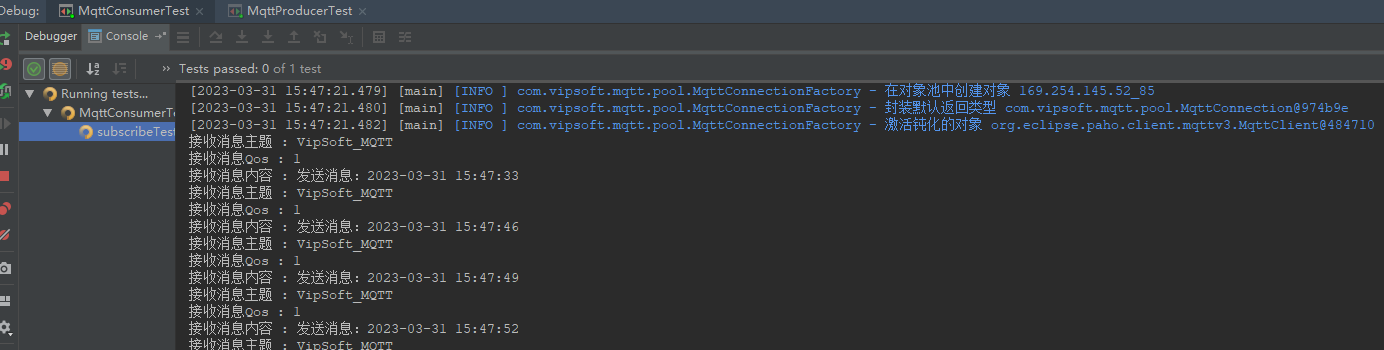
    public void messageArrived(String topic, MqttMessage message) throws Exception {
        System.out.println("接收消息主题 : " + topic);
        System.out.println("接收消息Qos : " + message.getQos());
        System.out.println("接收消息内容 : " + new String(message.getPayload()));
    }
}
MqttProducerTest
package com.vipsoft.mqtt;

import cn.hutool.core.date.DateUtil;
import com.vipsoft.mqtt.utils.MqttUtil;
import org.junit.jupiter.api.Test;
import org.springframework.beans.factory.annotation.Autowired;
import org.springframework.boot.test.context.SpringBootTest;

import java.util.concurrent.CountDownLatch;

@SpringBootTest
public class MqttProducerTest {

    @Autowired
    MqttUtil mqttUtil;

    @Test
    void pushMessateTest() throws Exception {
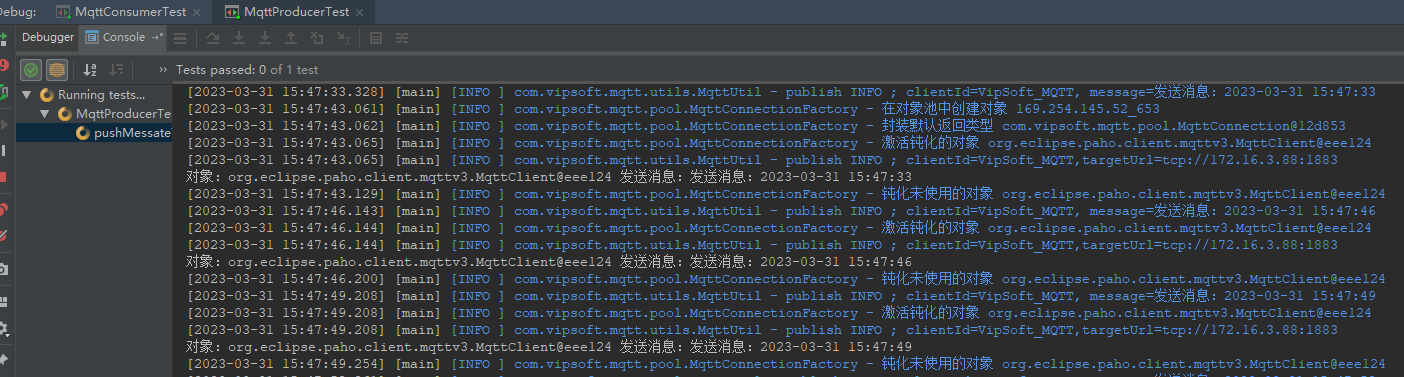
        for (int i = 0; i < 50; i++) {
            String topic = "VipSoft_MQTT";
            mqttUtil.publish(topic, "发送消息:" + DateUtil.now());
            Thread.sleep(3000);
        }
        new CountDownLatch(1).await();
    }
}
MqttConsumerTest
package com.vipsoft.mqtt;

import com.vipsoft.mqtt.pool.MqttClientManager;
import org.eclipse.paho.client.mqttv3.MqttClient;
import org.junit.jupiter.api.Test;
import org.springframework.beans.factory.annotation.Autowired;
import org.springframework.boot.test.context.SpringBootTest;


@SpringBootTest
public class MqttConsumerTest {


    @Autowired
    MqttClientManager mqttManager;

    @Test
    void subscribeTest() throws Exception {
        String topic = "VipSoft_MQTT";
        MqttClient mqttClient = mqttManager.getConnection().getMqttClient();
        //这里的setCallback需要新建一个Callback类并实现 MqttCallback 这个类
        mqttClient.setCallback(new PushCallback());
        while (true) {
            mqttClient.subscribe(topic);
            Thread.sleep(1000);
        }
    }
}
更多文章参考:
小程序mqtt实现聊天功能
Gitee 源码地址:https://gitee.com/VipSoft/VipBoot/
如何在buildr项目中使用Ruby?我在很多不同的项目中使用过Ruby、JRuby、Java和Clojure。我目前正在使用我的标准Ruby开发一个模拟应用程序,我想尝试使用Clojure后端(我确实喜欢功能代码)以及JRubygui和测试套件。我还可以看到在未来的不同项目中使用Scala作为后端。我想我要为我的项目尝试一下buildr(http://buildr.apache.org/),但我注意到buildr似乎没有设置为在项目中使用JRuby代码本身!这看起来有点傻,因为该工具旨在统一通用的JVM语言并且是在ruby中构建的。除了将输出的jar包含在一个独特的、仅限ruby
在rails源中:https://github.com/rails/rails/blob/master/activesupport/lib/active_support/lazy_load_hooks.rb可以看到以下内容@load_hooks=Hash.new{|h,k|h[k]=[]}在IRB中,它只是初始化一个空哈希。和做有什么区别@load_hooks=Hash.new 最佳答案 查看rubydocumentationforHashnew→new_hashclicktotogglesourcenew(obj)→new_has
我的主要目标是能够完全理解我正在使用的库/gem。我尝试在Github上从头到尾阅读源代码,但这真的很难。我认为更有趣、更温和的踏脚石就是在使用时阅读每个库/gem方法的源代码。例如,我想知道RubyonRails中的redirect_to方法是如何工作的:如何查找redirect_to方法的源代码?我知道在pry中我可以执行类似show-methodmethod的操作,但我如何才能对Rails框架中的方法执行此操作?您对我如何更好地理解Gem及其API有什么建议吗?仅仅阅读源代码似乎真的很难,尤其是对于框架。谢谢! 最佳答案 Ru
我的假设是moduleAmoduleBendend和moduleA::Bend是一样的。我能够从thisblog找到解决方案,thisSOthread和andthisSOthread.为什么以及什么时候应该更喜欢紧凑语法A::B而不是另一个,因为它显然有一个缺点?我有一种直觉,它可能与性能有关,因为在更多命名空间中查找常量需要更多计算。但是我无法通过对普通类进行基准测试来验证这一点。 最佳答案 这两种写作方法经常被混淆。首先要说的是,据我所知,没有可衡量的性能差异。(在下面的书面示例中不断查找)最明显的区别,可能也是最著名的,是你的
几个月前,我读了一篇关于rubygem的博客文章,它可以通过阅读代码本身来确定编程语言。对于我的生活,我不记得博客或gem的名称。谷歌搜索“ruby编程语言猜测”及其变体也无济于事。有人碰巧知道相关gem的名称吗? 最佳答案 是这个吗:http://github.com/chrislo/sourceclassifier/tree/master 关于ruby-寻找通过阅读代码确定编程语言的rubygem?,我们在StackOverflow上找到一个类似的问题:
我目前正在使用以下方法获取页面的源代码:Net::HTTP.get(URI.parse(page.url))我还想获取HTTP状态,而无需发出第二个请求。有没有办法用另一种方法做到这一点?我一直在查看文档,但似乎找不到我要找的东西。 最佳答案 在我看来,除非您需要一些真正的低级访问或控制,否则最好使用Ruby的内置Open::URI模块:require'open-uri'io=open('http://www.example.org/')#=>#body=io.read[0,50]#=>"["200","OK"]io.base_ur
前言作为一名程序员,自己的本质工作就是做程序开发,那么程序开发的时候最直接的体现就是代码,检验一个程序员技术水平的一个核心环节就是开发时候的代码能力。众所周知,程序开发的水平提升是一个循序渐进的过程,每一位程序员都是从“菜鸟”变成“大神”的,所以程序员在程序开发过程中的代码能力也是根据平时开发中的业务实践来积累和提升的。提高代码能力核心要素程序员要想提高自身代码能力,尤其是新晋程序员的代码能力有很大的提升空间的时候,需要针对性的去提高自己的代码能力。提高代码能力其实有几个比较关键的点,只要把握住这些方面,就能很好的、快速的提高自己的一部分代码能力。1、多去阅读开源项目,如有机会可以亲自参与开源
嗨~大家好,这里是可莉!今天给大家带来的是7个C语言的经典基础代码~那一起往下看下去把【程序一】打印100到200之间的素数#includeintmain(){ inti; for(i=100;i 【程序二】输出乘法口诀表#includeintmain(){inti;for(i=1;i 【程序三】判断1000年---2000年之间的闰年#includeintmain(){intyear;for(year=1000;year 【程序四】给定两个整形变量的值,将两个值的内容进行交换。这里提供两种方法来进行交换,第一种为创建临时变量来进行交换,第二种是不创建临时变量而直接进行交换。1.创建临时变量来
文章目录git常用命令(简介,详细参数往下看)Git提交代码步骤gitpullgitstatusgitaddgitcommitgitpushgit代码冲突合并问题方法一:放弃本地代码方法二:合并代码常用命令以及详细参数gitadd将文件添加到仓库:gitdiff比较文件异同gitlog查看历史记录gitreset代码回滚版本库相关操作远程仓库相关操作分支相关操作创建分支查看分支:gitbranch合并分支:gitmerge删除分支:gitbranch-ddev查看分支合并图:gitlog–graph–pretty=oneline–abbrev-commit撤消某次提交git用户名密码相关配置g
打印1:defsum(i)i=i+[2]end$x=[1]sum($x)print$x打印12:defsum(i)i.push(2)end$x=[1]sum($x)print$x后者是修改全局变量$x。为什么它在第二个例子中被修改而不是在第一个例子中?类Array的任何方法(不仅是push)都会发生这种情况吗? 最佳答案 变量范围在这里无关紧要。在第一段代码中,您仅使用赋值运算符=为变量i赋值,而在第二段代码中,您正在修改$x(也称为i)使用破坏性方法push。赋值从不修改任何对象。它只是提供一个名称来引用一个对象。方法要么是破坏性
