select b.key_,b.lastvalue,from_unixtime(b.lastclock) from hosts a,
 items b where a.hostid=b.hostid and a.host='xxxxxx' and
 b.lastclock < (unix_timestamp() - 1200) limit 10;
比如这里看agent.ping:观察监控图,发现在18点20分之后数据丢失: 2.分析zabbix agent端的日志发现在18点24粉左右出现下面的日志,没有看到正常的获取值和发送值的情况,只有大量的update_cpustats状态,同时发现有一行kill command 失败的日志:
27589:20141021:182442.143 In zbx_popen() command:'sudo hadoop_stats.sh nodemanager StopContainerAvgTime'
27589:20141021:182442.143 End of zbx_popen():5
48430:20141021:182442.143 zbx_popen(): executing script
27585:20141021:182442.284 In update_cpustats()
27585:20141021:182442.285 End of update_cpustats()
27585:20141021:182443.285 In update_cpustats()
27585:20141021:182443.286 End of update_cpustats()
27585:20141021:182444.286 In update_cpustats()
27585:20141021:182444.287 End of update_cpustats()
27585:20141021:182445.287 In update_cpustats()
27585:20141021:182445.287 End of update_cpustats()
27585:20141021:182446.288 In update_cpustats()
27585:20141021:182446.288 End of update_cpustats()
..........
27585:20141021:182508.305 In update_cpustats()
27585:20141021:182508.305 End of update_cpustats()
27585:20141021:182509.306 In update_cpustats()
27585:20141021:182509.306 End of update_cpustats()
27585:20141021:182510.306 In update_cpustats()
27585:20141021:182510.307 End of update_cpustats()
27585:20141021:182511.307 In update_cpustats()
27585:20141021:182511.308 End of update_cpustats()
27589:20141021:182512.154 failed to kill [sudo hadoop_stats.sh nodemanager StopContainerAvgTime]: [1] Operation not permitted
27589:20141021:182512.155 In zbx_waitpid()
27585:20141021:182512.308 In update_cpustats()
27585:20141021:182512.309 End of update_cpustats()
27585:20141021:182513.309 In update_cpustats()
27585:20141021:182513.309 End of update_cpustats()对比正常的日志:27589:20141021:180054.376 In zbx_popen() command:'sudo hadoop_stats.sh nodemanager StopContainerAvgTime'
27589:20141021:180054.377 End of zbx_popen():5
18798:20141021:180054.377 zbx_popen(): executing script
27589:20141021:180054.384 In zbx_waitpid()
27589:20141021:180054.384 zbx_waitpid() exited, status:1
27589:20141021:180054.384 End of zbx_waitpid():18798
27589:20141021:180054.384 Run remote command [sudo hadoop_stats.sh nodemanager StopContainerAvgTime] Result [2] [-1]...
27589:20141021:180054.384 For key [hadoop_stats[nodemanager,StopContainerAvgTime]] received value [-1]
27589:20141021:180054.384 In process_value() key:'gd6g203s80-hadoop-datanode.idc.vipshop.com:hadoop_stats[nodemanager,StopContainerAvgTime]' value:'-1'
27589:20141021:180054.384 In send_buffer() host:'10.200.100.28' port:10051 values:37/50
27589:20141021:180054.384 Will not send now. Now 1413885654 lastsent 1413885654 < 1
27589:20141021:180054.385 End of send_buffer():SUCCEED
27589:20141021:180054.385 buffer: new element 37
27589:20141021:180054.385 End of process_value():SUCCEED可以看到正常情况下脚本会有返回值,而出问题的时候,脚本是没有返回值的,并且由于是使用sudo 运行脚本,导致以普通用户启动的zabbix在超时时没有办法杀掉这个command(Operation not permitted 错误)3.假设这里启动zabbix agent的普通用户为apps用户,我们看下这个脚本目前的状态ps -ef|grep hadoop_stats.sh
root 34494 31429 0 12:54 pts/0 00:00:00 grep 48430
root 48430 27589 0 Oct21 ? 00:00:00 sudo hadoop_stats.sh nodemanager StopContainerAvgTime
root 48431 48430 0 Oct21 ? 00:00:00 [hadoop_stats.sh] <defunct>可以看到,这里产生了一个僵尸进程(关于僵尸进程可以参考:http://en.wikipedia.org/wiki/Zombie_process)僵尸进程是由于子进程运行完毕之后,发送SIGCHLD到父进程,而父进程没有正常处理这个信号导致。You have killed the process, but a dead process doesn't disappear from the process table
until its parent process performs a task called "reaping" (essentially calling wait(3)
for that process to read its exit status). Dead processes that haven't been reaped are
called "zombie processes."
The parent process id you see for 31756 is process id 1, which always belongs to init.
That process should reap its zombie processes periodically, but if it can't, they will
remain zombies in the process table until you reboot.正常的进程情况下,我们使用strace attach到父进程,然后杀掉子进程后可以看到如下信息:Process 3036 attached - interrupt to quit
select(6, [5], [], NULL, NULL
) = ? ERESTARTNOHAND (To be restarted)
--- SIGCHLD (Child exited) @ 0 (0) ---
rt_sigreturn(0x11) = -1 EINTR (Interrupted system call)
wait4(3037, [{WIFSIGNALED(s) && WTERMSIG(s) == SIGTERM}], WNOHANG|WSTOPPED, NULL) = 3037
exit_group(143) = ?
Process 3036 detached产生僵尸进程之后,可以通过杀掉父进程把僵尸进程变成孤儿进程(父进程为init进程)但是这里因为是用sudo启动的脚本,导致启动用户都是root,apps用户就没有权限杀掉启动的命令,进而导致子进程一直是僵尸进程的状态存在4.来看一下zabbix agent端启动的相关进程情况ps -ef|grep zabbix
apps 27583 1 0 Sep09 ? 00:00:00 /apps/svr/zabbix/sbin/zabbix_agentd -c /apps/conf/zabbix_agentd.conf
apps 27585 27583 0 Sep09 ? 00:33:25 /apps/svr/zabbix/sbin/zabbix_agentd -c /apps/conf/zabbix_agentd.conf
apps 27586 27583 0 Sep09 ? 00:00:14 /apps/svr/zabbix/sbin/zabbix_agentd -c /apps/conf/zabbix_agentd.conf
apps 27587 27583 0 Sep09 ? 00:00:14 /apps/svr/zabbix/sbin/zabbix_agentd -c /apps/conf/zabbix_agentd.conf
apps 27588 27583 0 Sep09 ? 00:00:14 /apps/svr/zabbix/sbin/zabbix_agentd -c /apps/conf/zabbix_agentd.conf
apps 27589 27583 0 Sep09 ? 02:28:12 /apps/svr/zabbix/sbin/zabbix_agentd -c /apps/conf/zabbix_agentd.conf
root 34207 31429 0 12:54 pts/0 00:00:00 grep zabbix
root 48430 27589 0 Oct21 ? 00:00:00 sudo /apps/sh/zabbix_scripts/hadoop/hadoop_stats.sh nodemanager StopContainerAvgTime通过strace我们发现27589的进程一直在等待48430的进程strace -p 27589
Process 27589 attached - interrupt to quit
wait4(48430, ^C <unfinished ...>
Process 27589 detached而48430的进程即为僵尸进程的父进程,通过strace attach上去,可以看到在等待#5的fdstrace -p 48430
Process 48430 attached - interrupt to quit
select(6, [5], [], NULL, NULL^C <unfinished ...>
Process 48430 detached通过lsof可以看到#5的fd其实是一个socketlsof -p 48430
COMMAND PID USER FD TYPE DEVICE SIZE/OFF NODE NAME
sudo 48430 root cwd DIR 8,2 4096 2 /
sudo 48430 root rtd DIR 8,2 4096 2 /
sudo 48430 root txt REG 8,2 212904 1578739 /usr/bin/sudo
sudo 48430 root mem REG 8,2 65928 1441822 /lib64/libnss_files-2.12.so
sudo 48430 root mem REG 8,2 99158704 1573509 /usr/lib/locale/locale-archive
sudo 48430 root mem REG 8,2 91096 1441832 /lib64/libz.so.1.2.3
sudo 48430 root mem REG 8,2 141576 1442145 /lib64/libpthread-2.12.so
sudo 48430 root mem REG 8,2 386040 1442172 /lib64/libfreebl3.so
sudo 48430 root mem REG 8,2 108728 1575924 /usr/lib64/libsasl2.so.2.0.23
sudo 48430 root mem REG 8,2 243064 1441896 /lib64/libnspr4.so
sudo 48430 root mem REG 8,2 21256 1442186 /lib64/libplc4.so
sudo 48430 root mem REG 8,2 17096 1442187 /lib64/libplds4.so
sudo 48430 root mem REG 8,2 128368 1577789 /usr/lib64/libnssutil3.so
sudo 48430 root mem REG 8,2 1290648 1582418 /usr/lib64/libnss3.so
sudo 48430 root mem REG 8,2 188072 1575925 /usr/lib64/libsmime3.so
sudo 48430 root mem REG 8,2 220200 1587191 /usr/lib64/libssl3.so
sudo 48430 root mem REG 8,2 113952 1442182 /lib64/libresolv-2.12.so
sudo 48430 root mem REG 8,2 43392 1442173 /lib64/libcrypt-2.12.so
sudo 48430 root mem REG 8,2 63304 1442180 /lib64/liblber-2.4.so.2.5.6
sudo 48430 root mem REG 8,2 1979000 1442169 /lib64/libc-2.12.so
sudo 48430 root mem REG 8,2 308912 1442181 /lib64/libldap-2.4.so.2.5.6
sudo 48430 root mem REG 8,2 22536 1442171 /lib64/libdl-2.12.so
sudo 48430 root mem REG 8,2 58480 1442174 /lib64/libpam.so.0.82.2
sudo 48430 root mem REG 8,2 17520 1441884 /lib64/libutil-2.12.so
sudo 48430 root mem REG 8,2 124624 1441798 /lib64/libselinux.so.1
sudo 48430 root mem REG 8,2 99112 1442170 /lib64/libaudit.so.1.0.0
sudo 48430 root mem REG 8,2 156872 1442168 /lib64/ld-2.12.so
sudo 48430 root 0r CHR 1,3 0t0 3916 /dev/null
sudo 48430 root 1w FIFO 0,8 0t0 1429910151 pipe
sudo 48430 root 2w REG 8,3 376639626 524292 /apps/logs/zabbix/zabbix_agentd.log
sudo 48430 root 3u sock 0,6 0t0 1429910161 can't identify protocol
sudo 48430 root 4r REG 8,2 764 2240617 /etc/group
sudo 48430 root 5u unix 0xffff880179ee4680 0t0 1429910162 socket这里通过查看/proc/pid/fd下的文件描述符的状态,发现这个fd其实是已经关闭的。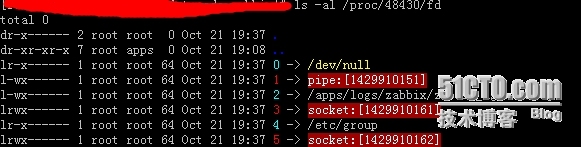 这里就有可能是子进程已经运行完成,而父进程没有正确处理子进程的返回信息导致父进程一直认为子进程还在运行,最终产生了僵尸进程。这其实是sudo的一个bug,相关的bug id :http://www.gratisoft.us/bugzilla/show_bug.cgi?id=447
If the parent process gets re-scheduled after the “if” was executed, and at this very
time the child process finishes and SIGCHLD is sent to the parent process, sudo gets
in trouble. The SIGCHLD handler accounts in the variable “recvsig[]” that the signal
was received, and then the parent process calls select(). This select will never be
interrupted, as the author had it in mind. In 99% of the cases, the parent process
will enter in the select() blocking state before the child process ended.
The child would then send SIGCHLD, which will be accounted in the handler procedure,
and will also interrupt select() which will return -1 in “nready”, and “errno”
will be set to EINTR.问题出在sudo的代码sudo/file/tip/src/exec.c,小于 1.7.5或1.8.0 之前的版本都有问题,当子进程恰好在select()这个系统调用前退出的时候,句柄已经被退出,所以sudo会卡在select这里Avoid a potential race condition if SIGCHLD is received immediately before we call select().网上有人遇到了同样地问题:http://blog.famzah.net/2010/11/01/sudo-hangs-and-leaves-the-executed-program-as-zombie/我想为Heroku构建一个Rails3应用程序。他们使用Postgres作为他们的数据库,所以我通过MacPorts安装了postgres9.0。现在我需要一个postgresgem并且共识是出于性能原因你想要pggem。但是我对我得到的错误感到非常困惑当我尝试在rvm下通过geminstall安装pg时。我已经非常明确地指定了所有postgres目录的位置可以找到但仍然无法完成安装:$envARCHFLAGS='-archx86_64'geminstallpg--\--with-pg-config=/opt/local/var/db/postgresql90/defaultdb/po
尝试通过RVM将RubyGems升级到版本1.8.10并出现此错误:$rvmrubygemslatestRemovingoldRubygemsfiles...Installingrubygems-1.8.10forruby-1.9.2-p180...ERROR:Errorrunning'GEM_PATH="/Users/foo/.rvm/gems/ruby-1.9.2-p180:/Users/foo/.rvm/gems/ruby-1.9.2-p180@global:/Users/foo/.rvm/gems/ruby-1.9.2-p180:/Users/foo/.rvm/gems/rub
我的最终目标是安装当前版本的RubyonRails。我在OSXMountainLion上运行。到目前为止,这是我的过程:已安装的RVM$\curl-Lhttps://get.rvm.io|bash-sstable检查已知(我假设已批准)安装$rvmlistknown我看到当前的稳定版本可用[ruby-]2.0.0[-p247]输入命令安装$rvminstall2.0.0-p247注意:我也试过这些安装命令$rvminstallruby-2.0.0-p247$rvminstallruby=2.0.0-p247我很快就无处可去了。结果:$rvminstall2.0.0-p247Search
由于fast-stemmer的问题,我很难安装我想要的任何rubygem。我把我得到的错误放在下面。Buildingnativeextensions.Thiscouldtakeawhile...ERROR:Errorinstallingfast-stemmer:ERROR:Failedtobuildgemnativeextension./System/Library/Frameworks/Ruby.framework/Versions/2.0/usr/bin/rubyextconf.rbcreatingMakefilemake"DESTDIR="cleanmake"DESTDIR=
当我尝试安装Ruby时遇到此错误。我试过查看this和this但无济于事➜~brewinstallrubyWarning:YouareusingOSX10.12.Wedonotprovidesupportforthispre-releaseversion.Youmayencounterbuildfailuresorotherbreakages.Pleasecreatepull-requestsinsteadoffilingissues.==>Installingdependenciesforruby:readline,libyaml,makedepend==>Installingrub
我正在尝试使用boilerpipe来自JRuby。我看过guide从JRuby调用Java,并成功地将它与另一个Java包一起使用,但无法弄清楚为什么同样的东西不能用于boilerpipe。我正在尝试基本上从JRuby中执行与此Java等效的操作:URLurl=newURL("http://www.example.com/some-location/index.html");Stringtext=ArticleExtractor.INSTANCE.getText(url);在JRuby中试过这个:require'java'url=java.net.URL.new("http://www
我意识到这可能是一个非常基本的问题,但我现在已经花了几天时间回过头来解决这个问题,但出于某种原因,Google就是没有帮助我。(我认为部分问题在于我是一个初学者,我不知道该问什么......)我也看过O'Reilly的RubyCookbook和RailsAPI,但我仍然停留在这个问题上.我找到了一些关于多态关系的信息,但它似乎不是我需要的(尽管如果我错了请告诉我)。我正在尝试调整MichaelHartl'stutorial创建一个包含用户、文章和评论的博客应用程序(不使用脚手架)。我希望评论既属于用户又属于文章。我的主要问题是:我不知道如何将当前文章的ID放入评论Controller。
首先回顾一下拉格朗日定理的内容:函数f(x)是在闭区间[a,b]上连续、开区间(a,b)上可导的函数,那么至少存在一个,使得:通过这个表达式我们可以知道,f(x)是函数的主体,a和b可以看作是主体函数f(x)中所取的两个值。那么可以有, 也就意味着我们可以用来替换 这种替换可以用在求某些多项式差的极限中。方法: 外层函数f(x)是一致的,并且h(x)和g(x)是等价无穷小。此时,利用拉格朗日定理,将原式替换为 ,再进行求解,往往会省去复合函数求极限的很多麻烦。使用要注意:1.要先找到主体函数f(x),即外层函数必须相同。2.f(x)找到后,复合部分是等价无穷小。3.要满足作差的形式。如果是加
SPI接收数据左移一位问题目录SPI接收数据左移一位问题一、问题描述二、问题分析三、探究原理四、经验总结最近在工作在学习调试SPI的过程中遇到一个问题——接收数据整体向左移了一位(1bit)。SPI数据收发是数据交换,因此接收数据时从第二个字节开始才是有效数据,也就是数据整体向右移一个字节(1byte)。请教前辈之后也没有得到解决,通过在网上查阅前人经验终于解决问题,所以写一个避坑经验总结。实际背景:MCU与一款芯片使用spi通信,MCU作为主机,芯片作为从机。这款芯片采用的是它规定的六线SPI,多了两根线:RDY和INT,这样从机就可以主动请求主机给主机发送数据了。一、问题描述根据从机芯片手
文章目录git常用命令(简介,详细参数往下看)Git提交代码步骤gitpullgitstatusgitaddgitcommitgitpushgit代码冲突合并问题方法一:放弃本地代码方法二:合并代码常用命令以及详细参数gitadd将文件添加到仓库:gitdiff比较文件异同gitlog查看历史记录gitreset代码回滚版本库相关操作远程仓库相关操作分支相关操作创建分支查看分支:gitbranch合并分支:gitmerge删除分支:gitbranch-ddev查看分支合并图:gitlog–graph–pretty=oneline–abbrev-commit撤消某次提交git用户名密码相关配置g
