文章目录
大概在去年的时候发现生产环境使用eureka经常会发现服务假死eureka没有给踢掉的情况,然后就衍生了要不就换个注册中心试试,然后就了解到了nacos,正好他还融合了配置中心,但是后来碍于切换时怕生产环境不稳定,丢数据等问题就一直没有换,但后续的项目的注册中心都换成了nacos,这篇文章我就来模拟一下如何将eureka平滑切换成nacos
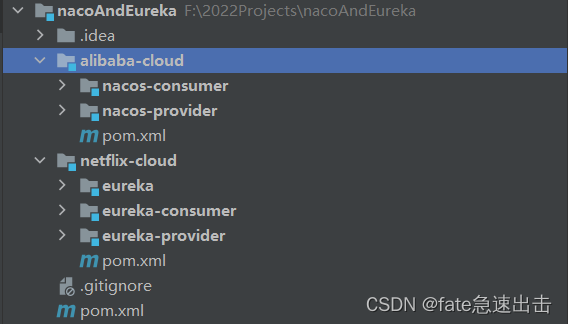
这里我在父工程里边又单独创建了一层父工程,我分别在alibaba-cloud 、netflix-cloud 中模拟新旧微服务
<?xml version="1.0" encoding="UTF-8"?>
<project xmlns="http://maven.apache.org/POM/4.0.0"
         xmlns:xsi="http://www.w3.org/2001/XMLSchema-instance"
         xsi:schemaLocation="http://maven.apache.org/POM/4.0.0 http://maven.apache.org/xsd/maven-4.0.0.xsd">
    <modelVersion>4.0.0</modelVersion>

    <groupId>top.fate</groupId>
    <artifactId>nacoAndEureka</artifactId>
    <packaging>pom</packaging>
    <version>1.0.0</version>
    <modules>
        <module>netflix-cloud</module>
        <module>alibaba-cloud</module>
    </modules>
</project>
netflix-cloud pom如下 ,因为这里是模拟旧服务,所以都采用旧版本
<?xml version="1.0" encoding="UTF-8"?>
<project xmlns="http://maven.apache.org/POM/4.0.0"
         xmlns:xsi="http://www.w3.org/2001/XMLSchema-instance"
         xsi:schemaLocation="http://maven.apache.org/POM/4.0.0 http://maven.apache.org/xsd/maven-4.0.0.xsd">
    <parent>
        <artifactId>nacoAndEureka</artifactId>
        <groupId>top.fate</groupId>
        <version>1.0.0</version>
    </parent>
    <modelVersion>4.0.0</modelVersion>

    <artifactId>netflix-cloud</artifactId>
    <packaging>pom</packaging>
    <modules>
        <module>eureka</module>
        <module>eureka-provider</module>
        <module>eureka-consumer</module>
    </modules>

    <properties>
        <spring.boot.version>2.1.2.RELEASE</spring.boot.version>
        <spring.cloud.version>Greenwich.SR5</spring.cloud.version>
    </properties>

    <dependencyManagement>
        <dependencies>
            <!-- springBoot -->
            <dependency>
                <groupId>org.springframework.boot</groupId>
                <artifactId>spring-boot-dependencies</artifactId>
                <version>${spring.boot.version}</version>
                <type>pom</type>
                <scope>import</scope>
            </dependency>
            <!-- springCloud -->
            <dependency>
                <groupId>org.springframework.cloud</groupId>
                <artifactId>spring-cloud-dependencies</artifactId>
                <version>${spring.cloud.version}</version>
                <type>pom</type>
                <scope>import</scope>
            </dependency>
        </dependencies>
    </dependencyManagement>

</project>
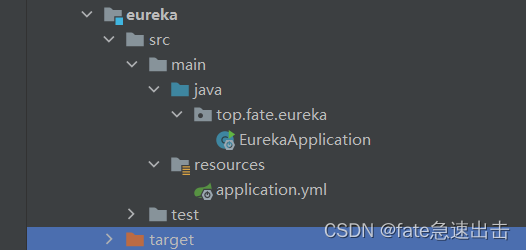
<?xml version="1.0" encoding="UTF-8"?>
<project xmlns="http://maven.apache.org/POM/4.0.0"
         xmlns:xsi="http://www.w3.org/2001/XMLSchema-instance"
         xsi:schemaLocation="http://maven.apache.org/POM/4.0.0 http://maven.apache.org/xsd/maven-4.0.0.xsd">
    <parent>
        <artifactId>netflix-cloud</artifactId>
        <groupId>top.fate</groupId>
        <version>1.0.0</version>
    </parent>
    <modelVersion>4.0.0</modelVersion>

    <artifactId>eureka</artifactId>

    <dependencies>
        <dependency>
            <groupId>org.springframework.cloud</groupId>
            <artifactId>spring-cloud-starter-netflix-eureka-server</artifactId>
        </dependency>
    </dependencies>
</project>
package top.fate.eureka;

import org.springframework.boot.SpringApplication;
import org.springframework.boot.autoconfigure.SpringBootApplication;
import org.springframework.cloud.netflix.eureka.server.EnableEurekaServer;

@EnableEurekaServer
@SpringBootApplication
public class EurekaApplication {

	public static void main(String[] args) {
		SpringApplication.run(EurekaApplication.class, args);
	}
}
server:
  port: 8761
spring:
  application:
    name: eureka-service
eureka:
  instance:
    # 设置该服务注册中心的hostname
    hostname: 127.0.0.1
  client:
    # 我们创建的是服务注册中心,而不是普通的应用,这个应用会向注册中心注册它自己
    #,设置为false就是禁止自己向自己注册的这个种行为
    register-with-eureka: false
    # 不去检索其他的服务,因为注册中心本身的职责就是维护服务实例
    fetch-registry: false
    # 制定服务注册中心的位置
    service-url.defaultZone: http://${eureka.instance.hostname}:${server.port}/eureka/
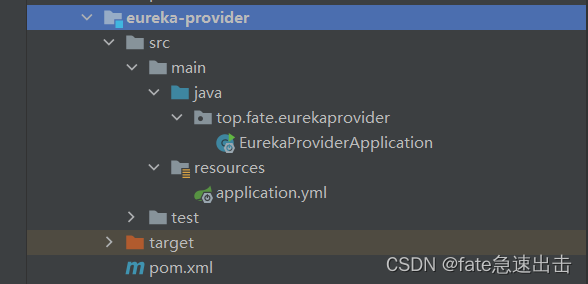
<?xml version="1.0" encoding="UTF-8"?>
<project xmlns="http://maven.apache.org/POM/4.0.0"
         xmlns:xsi="http://www.w3.org/2001/XMLSchema-instance"
         xsi:schemaLocation="http://maven.apache.org/POM/4.0.0 http://maven.apache.org/xsd/maven-4.0.0.xsd">
    <parent>
        <artifactId>netflix-cloud</artifactId>
        <groupId>top.fate</groupId>
        <version>1.0.0</version>
    </parent>
    <modelVersion>4.0.0</modelVersion>

    <artifactId>eureka-provider</artifactId>

    <properties>
        <maven.compiler.source>8</maven.compiler.source>
        <maven.compiler.target>8</maven.compiler.target>
    </properties>

    <dependencies>
        <dependency>
            <groupId>org.springframework.boot</groupId>
            <artifactId>spring-boot-starter-web</artifactId>
        </dependency>
        <dependency>
            <groupId>org.springframework.cloud</groupId>
            <artifactId>spring-cloud-starter-netflix-eureka-client</artifactId>
        </dependency>
    </dependencies>

</project>
package top.fate.eurekaprovider;

import org.springframework.boot.SpringApplication;
import org.springframework.boot.autoconfigure.SpringBootApplication;
import org.springframework.cloud.netflix.eureka.EnableEurekaClient;
import org.springframework.web.bind.annotation.GetMapping;
import org.springframework.web.bind.annotation.RestController;

/**
 * @auther:Wangxl
 * @Emile:18335844494@163.com
 * @Time:2022/6/16 14:23
 */
@SpringBootApplication
@EnableEurekaClient
@RestController
public class EurekaProviderApplication {
    public static void main(String[] args) {
        SpringApplication.run(EurekaProviderApplication.class, args);
    }

    @GetMapping("/info")
    public String info(){
        return "this is eureka-service";
    }
}
server:
  port: 8081
spring:
  application:
    name: provider
eureka:
  client:
    service-url:
      defaultZone: "http://localhost:8761/eureka"
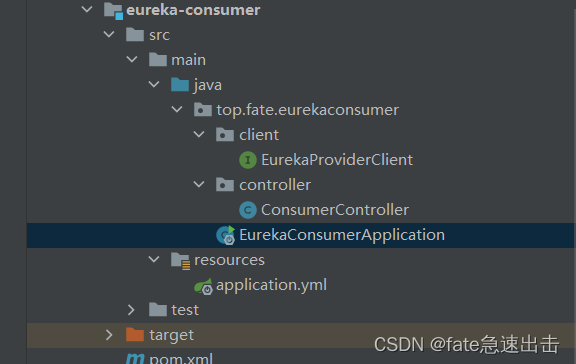
<?xml version="1.0" encoding="UTF-8"?>
<project xmlns="http://maven.apache.org/POM/4.0.0"
         xmlns:xsi="http://www.w3.org/2001/XMLSchema-instance"
         xsi:schemaLocation="http://maven.apache.org/POM/4.0.0 http://maven.apache.org/xsd/maven-4.0.0.xsd">
    <parent>
        <artifactId>netflix-cloud</artifactId>
        <groupId>top.fate</groupId>
        <version>1.0.0</version>
    </parent>
    <modelVersion>4.0.0</modelVersion>

    <artifactId>eureka-consumer</artifactId>

    <dependencies>
        <dependency>
            <groupId>org.springframework.boot</groupId>
            <artifactId>spring-boot-starter-web</artifactId>
        </dependency>
        <dependency>
            <groupId>org.springframework.cloud</groupId>
            <artifactId>spring-cloud-starter-netflix-eureka-client</artifactId>
        </dependency>
        <dependency>
            <groupId>io.github.openfeign</groupId>
            <artifactId>feign-httpclient</artifactId>
        </dependency>
        <dependency>
            <groupId>org.springframework.cloud</groupId>
            <artifactId>spring-cloud-starter-openfeign</artifactId>
        </dependency>
    </dependencies>
</project>
package top.fate.eurekaconsumer;

import org.springframework.boot.SpringApplication;
import org.springframework.boot.autoconfigure.SpringBootApplication;
import org.springframework.cloud.netflix.eureka.EnableEurekaClient;
import org.springframework.cloud.openfeign.EnableFeignClients;
import top.fate.eurekaconsumer.client.EurekaProviderClient;

/**
 * @auther:Wangxl
 * @Emile:18335844494@163.com
 * @Time:2022/6/16 14:43
 */
@SpringBootApplication
@EnableEurekaClient
@EnableFeignClients(clients = EurekaProviderClient.class)
public class EurekaConsumerApplication {
    public static void main(String[] args) {
        SpringApplication.run(EurekaConsumerApplication.class, args);
    }
}
package top.fate.eurekaconsumer.client;

import org.springframework.cloud.openfeign.FeignClient;
import org.springframework.web.bind.annotation.GetMapping;

/**
 * @auther:Wangxl
 * @Emile:18335844494@163.com
 * @Time:2022/6/16 14:48
 */
@FeignClient(value = "provider")
public interface EurekaProviderClient {

    @GetMapping("info")
    String info();
}
package top.fate.eurekaconsumer.controller;

import org.springframework.beans.factory.annotation.Autowired;
import org.springframework.web.bind.annotation.GetMapping;
import org.springframework.web.bind.annotation.RestController;
import top.fate.eurekaconsumer.client.EurekaProviderClient;

import javax.annotation.Resource;

/**
 * @auther:Wangxl
 * @Emile:18335844494@163.com
 * @Time:2022/6/16 14:48
 */
@RestController
public class ConsumerController {

    @Resource
    private EurekaProviderClient eurekaProviderClient;

    @GetMapping("getProvider")
    public String getProvider(){
        return eurekaProviderClient.info();
    }

}
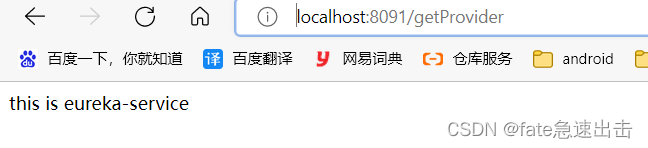
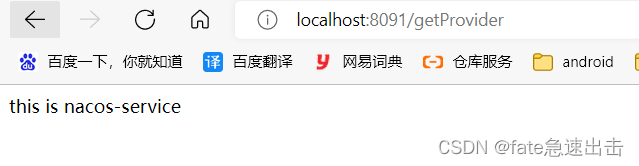
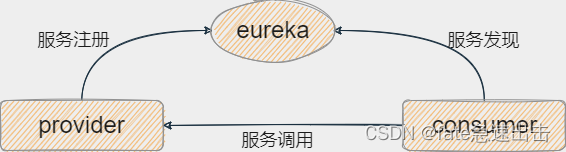
这里我三个服务都启动正常,直接访问8091consumer测试 ,如下图所示consumer 可以访问provider
alibaba-cloud pom如下,采用最新版技术栈
<?xml version="1.0" encoding="UTF-8"?>
<project xmlns="http://maven.apache.org/POM/4.0.0"
         xmlns:xsi="http://www.w3.org/2001/XMLSchema-instance"
         xsi:schemaLocation="http://maven.apache.org/POM/4.0.0 http://maven.apache.org/xsd/maven-4.0.0.xsd">
    <parent>
        <artifactId>nacoAndEureka</artifactId>
        <groupId>top.fate</groupId>
        <version>1.0.0</version>
    </parent>
    <modelVersion>4.0.0</modelVersion>

    <artifactId>alibaba-cloud</artifactId>
    <packaging>pom</packaging>
    <modules>
        <module>nacos-consumer</module>
        <module>nacos-provider</module>
    </modules>

    <properties>
        <spring.boot.version>2.6.3</spring.boot.version>
        <spring.cloud.version>2021.0.1</spring.cloud.version>
        <spring.cloud.alibaba.version>2021.0.1.0</spring.cloud.alibaba.version>
    </properties>

    <dependencyManagement>
        <dependencies>
            <!-- springBoot -->
            <dependency>
                <groupId>org.springframework.boot</groupId>
                <artifactId>spring-boot-dependencies</artifactId>
                <version>${spring.boot.version}</version>
                <type>pom</type>
                <scope>import</scope>
            </dependency>
            <!-- springCloud -->
            <dependency>
                <groupId>org.springframework.cloud</groupId>
                <artifactId>spring-cloud-dependencies</artifactId>
                <version>${spring.cloud.version}</version>
                <type>pom</type>
                <scope>import</scope>
            </dependency>
            <!-- spring-cloud-alibaba -->
            <dependency>
                <groupId>com.alibaba.cloud</groupId>
                <artifactId>spring-cloud-alibaba-dependencies</artifactId>
                <version>${spring.cloud.alibaba.version}</version>
            </dependency>
        </dependencies>
    </dependencyManagement>
</project>
可以参考SpringCloudAlibaba篇(二)整合Nacos注册配置中心 这篇文章我就不重复操作了
<?xml version="1.0" encoding="UTF-8"?>
<project xmlns="http://maven.apache.org/POM/4.0.0"
         xmlns:xsi="http://www.w3.org/2001/XMLSchema-instance"
         xsi:schemaLocation="http://maven.apache.org/POM/4.0.0 http://maven.apache.org/xsd/maven-4.0.0.xsd">
    <parent>
        <artifactId>alibaba-cloud</artifactId>
        <groupId>top.fate</groupId>
        <version>1.0.0</version>
    </parent>
    <modelVersion>4.0.0</modelVersion>

    <artifactId>nacos-provider</artifactId>

    <dependencies>
        <dependency>
            <groupId>org.springframework.boot</groupId>
            <artifactId>spring-boot-starter-web</artifactId>
        </dependency>
        <dependency>
            <groupId>com.alibaba.cloud</groupId>
            <artifactId>spring-cloud-starter-alibaba-nacos-discovery</artifactId>
            <version>2021.0.1.0</version>
        </dependency>
        <dependency>
            <groupId>org.springframework.cloud</groupId>
            <artifactId>spring-cloud-starter-netflix-eureka-client</artifactId>
        </dependency>
    </dependencies>
</project>
package top.fate.nacosprovider;

import org.springframework.boot.SpringApplication;
import org.springframework.boot.autoconfigure.SpringBootApplication;
import org.springframework.boot.context.properties.EnableConfigurationProperties;
import org.springframework.cloud.client.serviceregistry.AutoServiceRegistrationProperties;
import org.springframework.web.bind.annotation.GetMapping;
import org.springframework.web.bind.annotation.RestController;

/**
 * @auther:Wangxl
 * @Emile:18335844494@163.com
 * @Time:2022/6/16 16:55
 */
@SpringBootApplication
@RestController
@EnableConfigurationProperties(AutoServiceRegistrationProperties.class)
public class NacosProviderApplication {

    public static void main(String[] args) {
        SpringApplication.run(NacosProviderApplication.class, args);
    }

    @GetMapping("/info")
    public String info() {
        return "this is nacos-service";
    }
}
spring.autoconfigure.exclude=org.springframework.cloud.client.serviceregistry.AutoServiceRegistrationAutoConfiguration
url:
  nacos: localhost:8848
server:
  port: 8082
spring:
  application:
    name: provider
  profiles:
    active: dev
  cloud:
    nacos:
      discovery:
        #集群环境隔离
        cluster-name: shanghai
        #命名空间
        namespace: ${spring.profiles.active}
        #持久化实例 ture为临时实例 false为持久化实例  临时实例发生异常直接剔除, 而持久化实例等待恢复
        ephemeral: true
        #注册中心地址
        server-addr: ${url.nacos}
eureka:
  client:
    service-url:
      defaultZone: "http://localhost:8761/eureka"
<?xml version="1.0" encoding="UTF-8"?>
<project xmlns="http://maven.apache.org/POM/4.0.0"
         xmlns:xsi="http://www.w3.org/2001/XMLSchema-instance"
         xsi:schemaLocation="http://maven.apache.org/POM/4.0.0 http://maven.apache.org/xsd/maven-4.0.0.xsd">
    <parent>
        <artifactId>alibaba-cloud</artifactId>
        <groupId>top.fate</groupId>
        <version>1.0.0</version>
    </parent>
    <modelVersion>4.0.0</modelVersion>

    <artifactId>nacos-consumer</artifactId>

    <dependencies>
        <dependency>
            <groupId>org.springframework.boot</groupId>
            <artifactId>spring-boot-starter-web</artifactId>
        </dependency>
        <dependency>
            <groupId>com.alibaba.cloud</groupId>
            <artifactId>spring-cloud-starter-alibaba-nacos-discovery</artifactId>
            <version>2021.0.1.0</version>
        </dependency>
        <dependency>
            <groupId>org.springframework.cloud</groupId>
            <artifactId>spring-cloud-starter-netflix-eureka-client</artifactId>
        </dependency>
        <dependency>
            <groupId>io.github.openfeign</groupId>
            <artifactId>feign-httpclient</artifactId>
        </dependency>
        <dependency>
            <groupId>org.springframework.cloud</groupId>
            <artifactId>spring-cloud-starter-openfeign</artifactId>
        </dependency>
    </dependencies>
</project>
package top.fate.nacosconsumer;

import org.springframework.boot.SpringApplication;
import org.springframework.boot.autoconfigure.SpringBootApplication;
import org.springframework.boot.context.properties.EnableConfigurationProperties;
import org.springframework.cloud.client.serviceregistry.AutoServiceRegistrationProperties;
import org.springframework.cloud.openfeign.EnableFeignClients;
import top.fate.nacosconsumer.client.EurekaProviderClient;
import top.fate.nacosconsumer.client.NacosProviderClient;
import top.fate.nacosconsumer.client.ProviderClient;

/**
 * @auther:Wangxl
 * @Emile:18335844494@163.com
 * @Time:2022/6/16 16:39
 */
@SpringBootApplication
@EnableFeignClients(clients = {EurekaProviderClient.class, NacosProviderClient.class, ProviderClient.class})
@EnableConfigurationProperties(AutoServiceRegistrationProperties.class)
public class NacosConsumerApplication {

    public static void main(String[] args) {
        SpringApplication.run(NacosConsumerApplication.class, args);
    }
}
package top.fate.nacosconsumer.client;

import org.springframework.cloud.openfeign.FeignClient;
import org.springframework.web.bind.annotation.GetMapping;

/**
 * @auther:Wangxl
 * @Emile:18335844494@163.com
 * @Time:2022/6/16 18:24
 */
@FeignClient(value = "provider")
public interface ProviderClient {

    @GetMapping("info")
    String info();
}
package top.fate.nacosconsumer.controller;

import org.springframework.web.bind.annotation.GetMapping;
import org.springframework.web.bind.annotation.RestController;
import top.fate.nacosconsumer.client.ProviderClient;

import javax.annotation.Resource;

/**
 * @auther:Wangxl
 * @Emile:18335844494@163.com
 * @Time:2022/6/16 14:48
 */
@RestController
public class ConsumerController {

    @Resource
    private ProviderClient providerClient;

    @GetMapping("getProvider")
    public String getProvider(){
        return providerClient.info();
    }
}
spring.autoconfigure.exclude=org.springframework.cloud.client.serviceregistry.AutoServiceRegistrationAutoConfiguration
url:
  nacos: localhost:8848
server:
  port: 8092
spring:
  application:
    name: nacos-consumer
  profiles:
    active: dev
  cloud:
    nacos:
      discovery:
        #集群环境隔离
        cluster-name: shanghai
        #命名空间
        namespace: ${spring.profiles.active}
        #持久化实例 ture为临时实例 false为持久化实例  临时实例发生异常直接剔除, 而持久化实例等待恢复
        ephemeral: true
        #注册中心地址
        server-addr: ${url.nacos}
eureka:
  client:
    service-url:
      defaultZone: "http://localhost:8761/eureka"
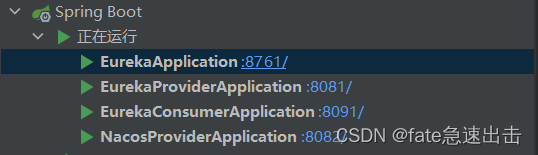
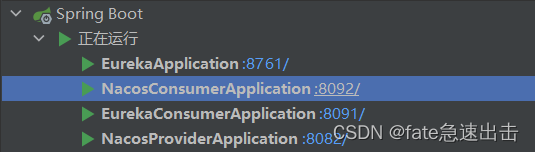
先启动nacosProviderApplication
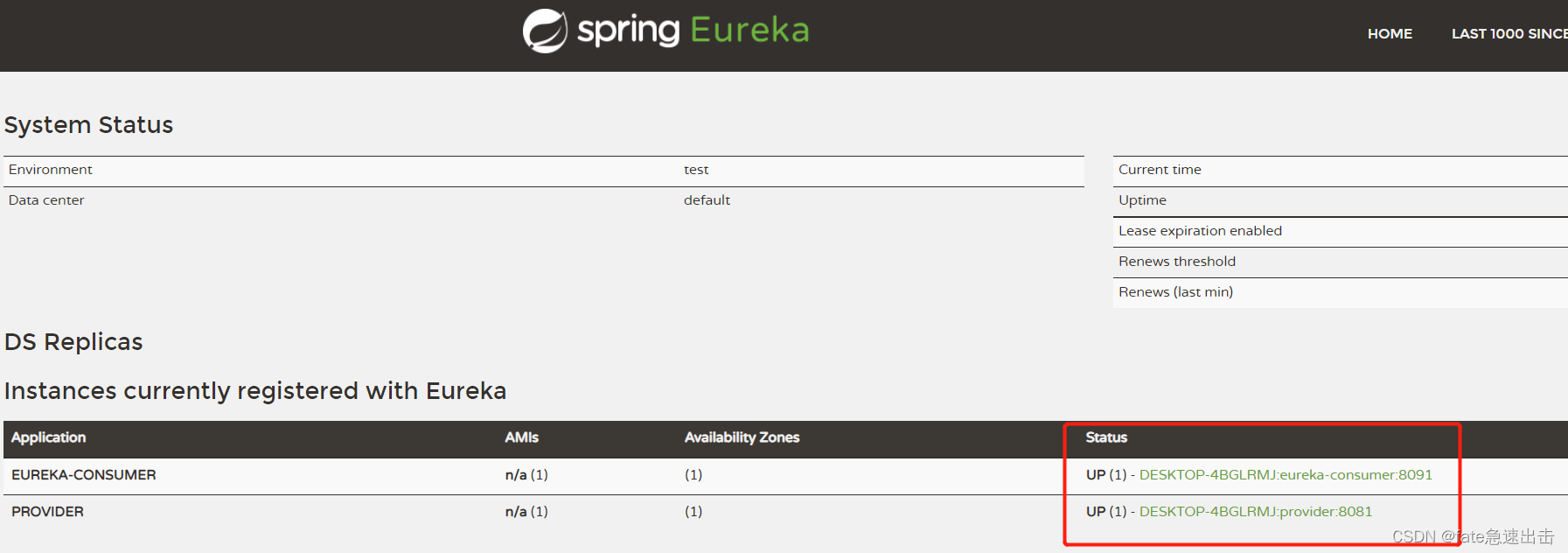
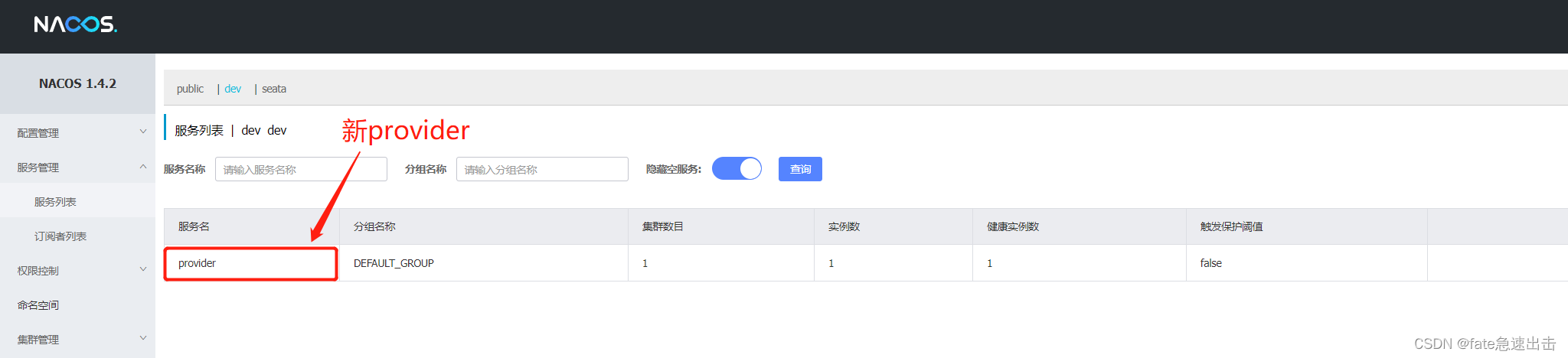
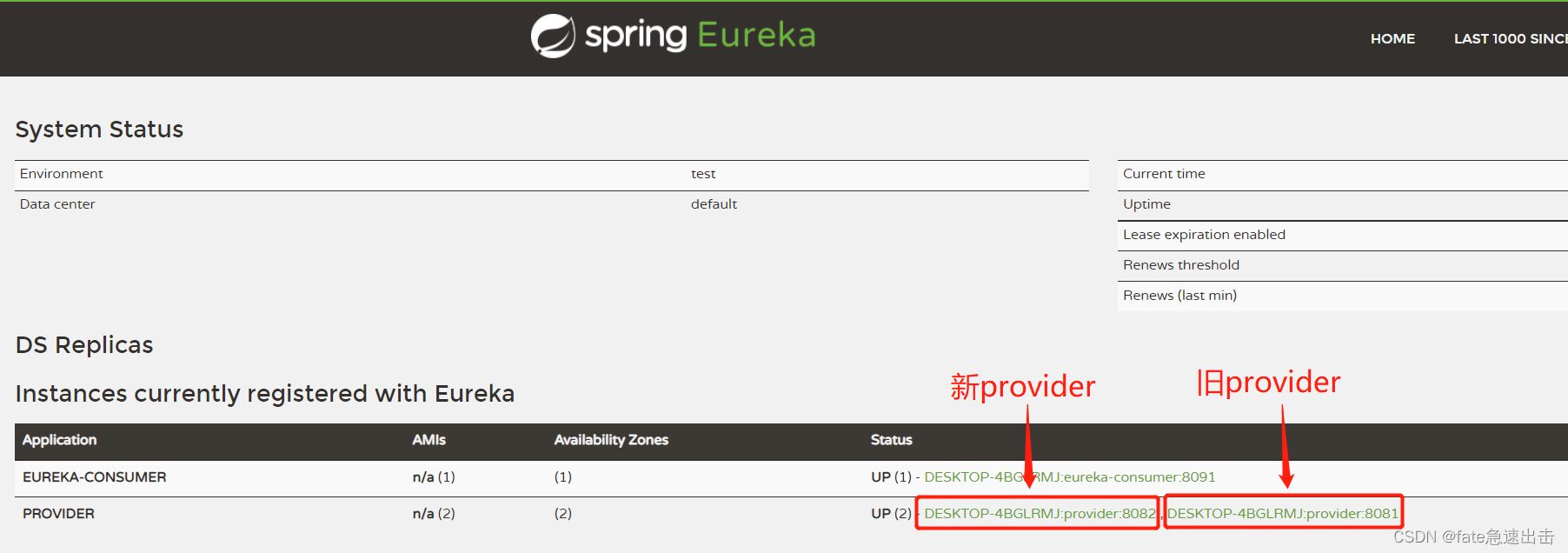
如下图所示,我们已经实现了双注册,nacos和eureka中都注册了服务
nacos
eureka
这里我访问8091的旧版Netflix客户端也就是
eureka-consumer,看一下调用的是8081 eureka 还是8082 nacos , 这里我反复调用了十几次,返回结果为
- this is nacos-service
- this is eureka-service
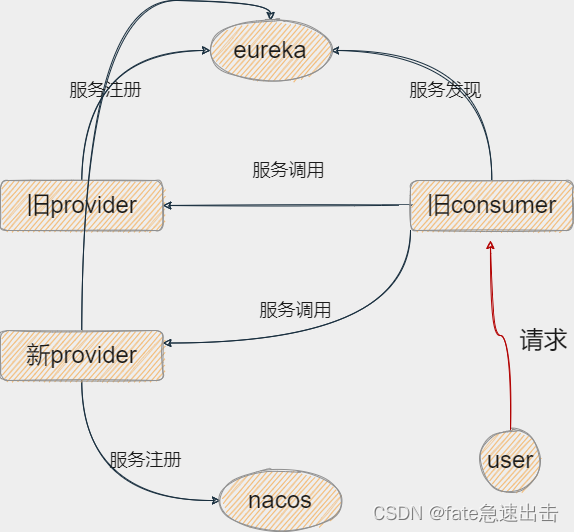
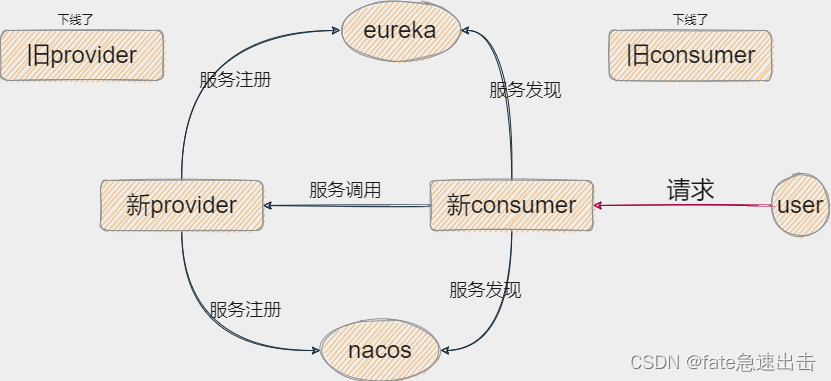
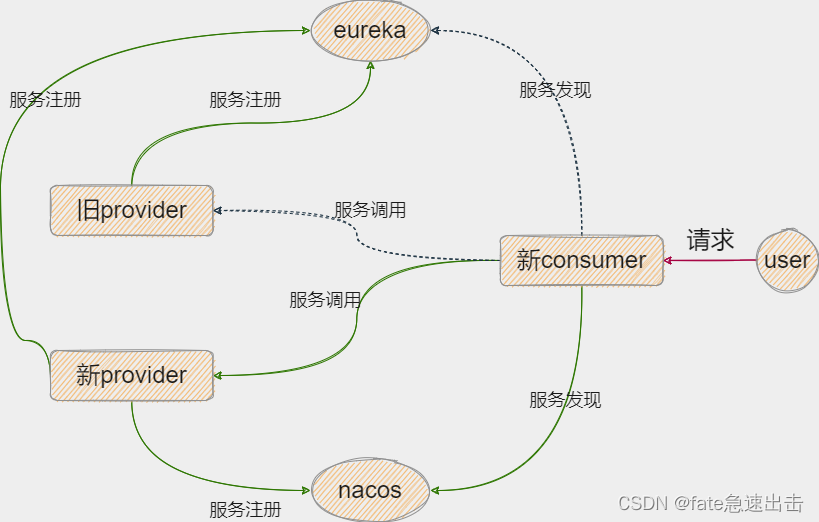
因为此时我们的8091客户端只有eurekaClient,然后我们的provider在eureka注册中心有两个实例,所以就触发了负载均衡,这里我们用的默认轮询模式,当前流程如下图
现在我们就可以陆续开始平滑
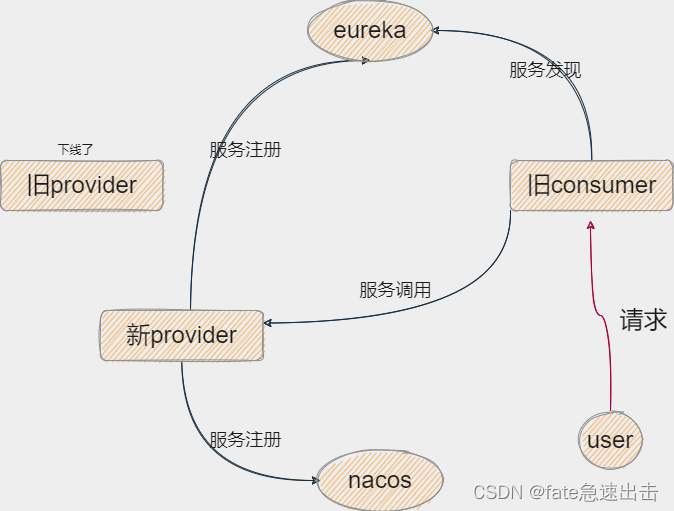
切换注册中心了,旧provider可以关掉了,关掉旧provider之后此时的流程就如下图所示了
此时我们再访问
旧consumer只会返回 this is nacos-service,因为旧的provider已经下线了 ,新provider当前已经切换完成!
启动nacoConsumerApplication
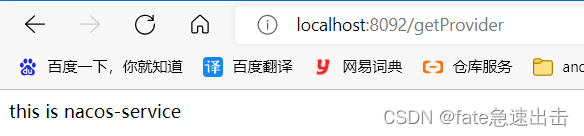
访问8092验证是否能正常访问,继续访问getProvider接口,如下图所示访问正常,然后我们就可以下线旧consumer服务了
现在我们有个疑惑,现在有两个注册中心,服务发现是走的eureka还是nacos呢
为此,我做了个实验,我分别启动了旧provider、新provider、新consumer
此时双注册中心的服务
- eureka
- provider8081、provider8082
- consumer8092
- nacos
- provider8082
- consumer8092
现在我通过
consumer8092客户端去请求,得到的结果只有 this is nacos-service ,因此判断注册中心默认走的是nacos.
因为走nacos只会返回this is nacos-service, nacos只有一个实例。
如果走eureka的话会轮询返回this is nacos-service、this is eureka-service,eureka有两个实例。
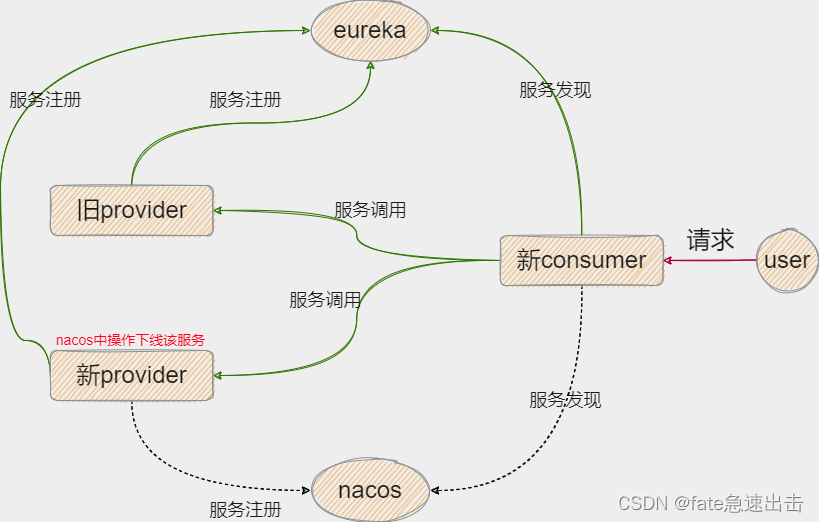
此时的流程图虚线代表该线路空闲
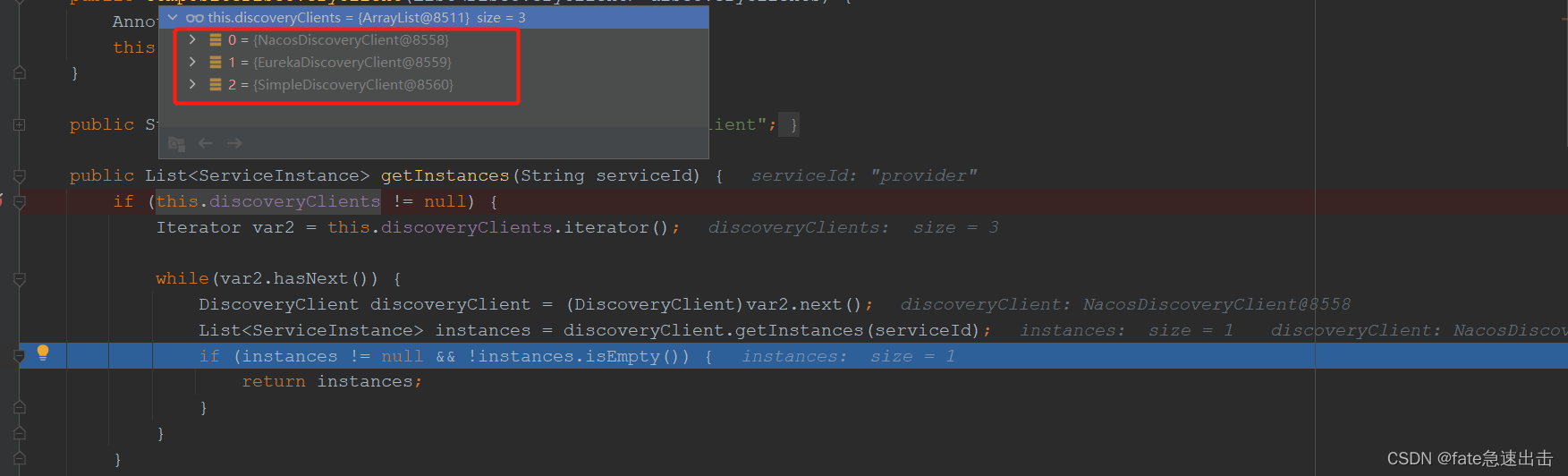
这里我找了下源码CompositeDiscoveryClient,调用的时候打了断点,发现系统创建了
三个discoveryClient,nacos排在第一个,如果可用的话直接就返回了 ,所以可以理解为默认走的是nacos
这里我想到了nacos有个服务下线功能,如果我将nacos中的服务下线之后应该就会去走eureka了吧
等待几秒过后,通过consumer8092客户端去请求,得到了我想要的结果
分别轮询返回了this is nacos-service、this is eureka-service,证明已经走eureka了
此时流程图虚线代表该线路空闲
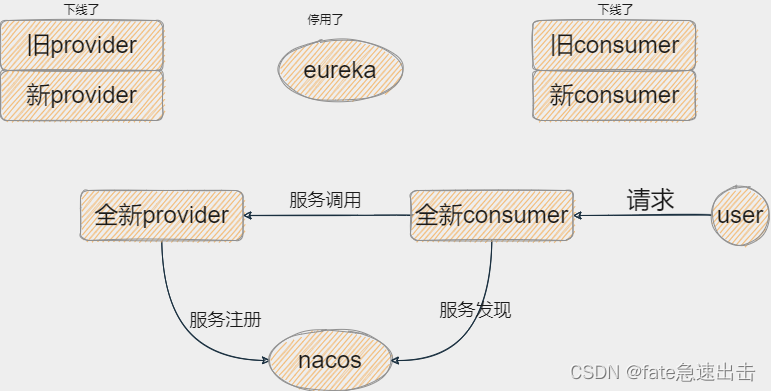
此时我们生产上边是 新consumer、新provider、eureka、nacos,既然我们要切换到nacos,那eureka就也要停掉了,我们可以在
下一版的服务中去掉 eureka的依赖和配置,只留下nacos,将这一个新版本部署上去之后就可以停掉eureka了
如下图所示
如果直接引入eureka-client和nacos-client 会报错,如下
Field autoServiceRegistration in org.springframework.cloud.client.serviceregistry.AutoServiceRegistrationAutoConfiguration required a single bean, but 2 were found:
	- nacosAutoServiceRegistration: defined by method 'nacosAutoServiceRegistration' in class path resource [com/alibaba/cloud/nacos/registry/NacosServiceRegistryAutoConfiguration.class]
	- eurekaAutoServiceRegistration: defined by method 'eurekaAutoServiceRegistration' in class path resource [org/springframework/cloud/netflix/eureka/EurekaClientAutoConfiguration.class]
spring.autoconfigure.exclude=org.springframework.cloud.client.serviceregistry.AutoServiceRegistrationAutoConfiguration
@EnableConfigurationProperties(AutoServiceRegistrationProperties.class)
原创不易,请点个赞再走吧!感谢
我在app/helpers/sessions_helper.rb中有一个帮助程序文件,其中包含一个方法my_preference,它返回当前登录用户的首选项。我想在集成测试中访问该方法。例如,这样我就可以在测试中使用getuser_path(my_preference)。在其他帖子中,我读到这可以通过在测试文件中包含requiresessions_helper来实现,但我仍然收到错误NameError:undefinedlocalvariableormethod'my_preference'.我做错了什么?require'test_helper'require'sessions_hel
导读:随着叮咚买菜业务的发展,不同的业务场景对数据分析提出了不同的需求,他们希望引入一款实时OLAP数据库,构建一个灵活的多维实时查询和分析的平台,统一数据的接入和查询方案,解决各业务线对数据高效实时查询和精细化运营的需求。经过调研选型,最终引入ApacheDoris作为最终的OLAP分析引擎,Doris作为核心的OLAP引擎支持复杂地分析操作、提供多维的数据视图,在叮咚买菜数十个业务场景中广泛应用。作者|叮咚买菜资深数据工程师韩青叮咚买菜创立于2017年5月,是一家专注美好食物的创业公司。叮咚买菜专注吃的事业,为满足更多人“想吃什么”而努力,通过美好食材的供应、美好滋味的开发以及美食品牌的孵
相信很多人在录制视频的时候都会遇到各种各样的问题,比如录制的视频没有声音。屏幕录制为什么没声音?今天小编就和大家分享一下如何录制音画同步视频的具体操作方法。如果你有录制的视频没有声音,你可以试试这个方法。 一、检查是否打开电脑系统声音相信很多小伙伴在录制视频后会发现录制的视频没有声音,屏幕录制为什么没声音?如果当时没有打开音频录制,则录制好的视频是没有声音的。因此,建议在录制前进行检查。屏幕上没有声音,很可能是因为你的电脑系统的声音被禁止了。您只需打开电脑系统的声音,即可录制音频和图画同步视频。操作方法:步骤1:点击电脑屏幕右下侧的“小喇叭”图案,在上方的选项中,选择“声音”。 步骤2:在“声
首先回顾一下拉格朗日定理的内容:函数f(x)是在闭区间[a,b]上连续、开区间(a,b)上可导的函数,那么至少存在一个,使得:通过这个表达式我们可以知道,f(x)是函数的主体,a和b可以看作是主体函数f(x)中所取的两个值。那么可以有, 也就意味着我们可以用来替换 这种替换可以用在求某些多项式差的极限中。方法: 外层函数f(x)是一致的,并且h(x)和g(x)是等价无穷小。此时,利用拉格朗日定理,将原式替换为 ,再进行求解,往往会省去复合函数求极限的很多麻烦。使用要注意:1.要先找到主体函数f(x),即外层函数必须相同。2.f(x)找到后,复合部分是等价无穷小。3.要满足作差的形式。如果是加
C#实现简易绘图工具一.引言实验目的:通过制作窗体应用程序(C#画图软件),熟悉基本的窗体设计过程以及控件设计,事件处理等,熟悉使用C#的winform窗体进行绘图的基本步骤,对于面向对象编程有更加深刻的体会.Tutorial任务设计一个具有基本功能的画图软件**·包括简单的新建文件,保存,重新绘图等功能**·实现一些基本图形的绘制,包括铅笔和基本形状等,学习橡皮工具的创建**·设计一个合理舒适的UI界面**注明:你可能需要先了解一些关于winform窗体应用程序绘图的基本知识,以及关于GDI+类和结构的知识二.实验环境Windows系统下的visualstudio2017C#窗体应用程序三.
深度学习部署:Windows安装pycocotools报错解决方法1.pycocotools库的简介2.pycocotools安装的坑3.解决办法更多Ai资讯:公主号AiCharm本系列是作者在跑一些深度学习实例时,遇到的各种各样的问题及解决办法,希望能够帮助到大家。ERROR:Commanderroredoutwithexitstatus1:'D:\Anaconda3\python.exe'-u-c'importsys,setuptools,tokenize;sys.argv[0]='"'"'C:\\Users\\46653\\AppData\\Local\\Temp\\pip-instal
需求:要创建虚拟机,就需要给他提供一个虚拟的磁盘,我们就在/opt目录下创建一个10G大小的raw格式的虚拟磁盘CentOS-7-x86_64.raw命令格式:qemu-imgcreate-f磁盘格式磁盘名称磁盘大小qemu-imgcreate-f磁盘格式-o?1.创建磁盘qemu-imgcreate-fraw/opt/CentOS-7-x86_64.raw10G执行效果#ls/opt/CentOS-7-x86_64.raw2.安装虚拟机使用virt-install命令,基于我们提供的系统镜像和虚拟磁盘来创建一个虚拟机,另外在创建虚拟机之前,提前打开vnc客户端,在创建虚拟机的时候,通过vnc
作为新的阿里云用户,您可以50免费试用多种优惠,价值高达1,700美元(或8,500美元)。这将让您了解和体验阿里云平台上提供的一系列产品和服务。如果您以个人身份注册免费试用,您将获得价值1,700美元的优惠。但是,如果您是注册公司,您可以选择企业免费试用,提交基本信息通过企业实名注册验证,即可开始价值$8,500的免费试用!本教程介绍了如何设置您的帐户并使用您的免费试用版。关于免费试用在我们开始此试用之前,您还必须遵守以下条款和条件才能访问您的免费试用:只有在一年内创建的账户才有资格获得阿里云免费试用。通过此免费试用优惠,用户可以免费试用免费试用活动页面上列出的每种产品一次。如果您有多个帐
我在我的项目中有一个用户和一个管理员角色。我使用Devise创建了身份验证。在我的管理员角色中,我没有任何确认。在我的用户模型中,我有以下内容:devise:database_authenticatable,:confirmable,:recoverable,:rememberable,:trackable,:validatable,:timeoutable,:registerable#Setupaccessible(orprotected)attributesforyourmodelattr_accessible:email,:username,:prename,:surname,:
原始问题Letd(n)bedefinedasthesumofproperdivisorsofn(numberslessthannwhichdivideevenlyinton).Ifd(a)=bandd(b)=a,whereab,thenaandbareanamicablepairandeachofaandbarecalledamicablenumbers.Forexample,theproperdivisorsof220are1,2,4,5,10,11,20,22,44,55and110;therefored(220)=284.Theproperdivisorsof284are1,2,