我把组件上传到npm了,具体使用方法请看:https://gitee.com/zengyanfang/tablelist-way/blob/master/README.md#%E5%8F%82%E6%95%B0
前言:在工作中有各种各样的对话框,最多就是填写信息这些的,一般这样的内容都是el-input输入框,el-select选择框等等之内的,这时我们就可以封装成一个组件,想要什么内容就传一个json配置,像其他组件那样,这样可以极大的简化开发,不至于每次都要去写el-input这些细微根节的东西,那问题来了
问题:就是布局,元素少还好,要是多的话,比如有几个输入框,几个选择框,又有几个多选框等等,那就是一排排的排下来难看死了,
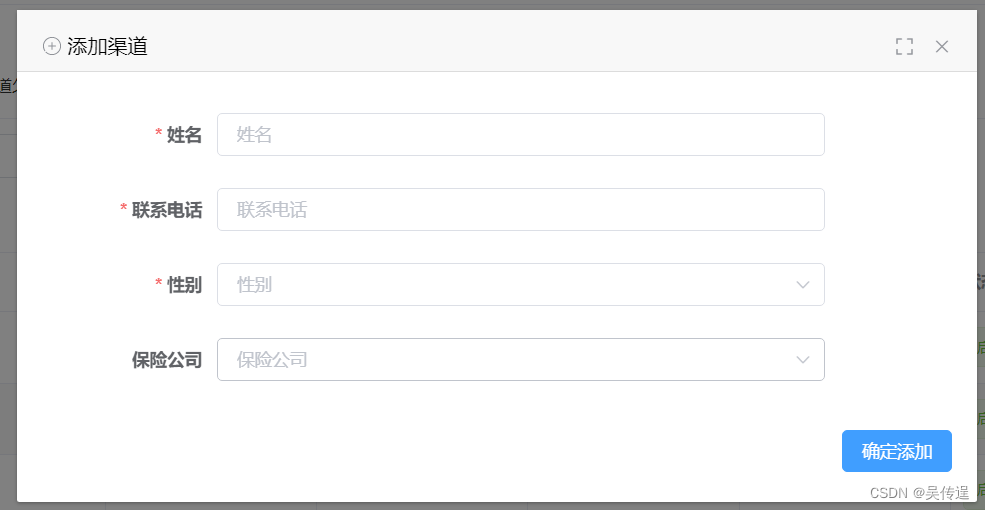
解决:我自己琢磨了好久,改进了好多遍,终于是搞出来一个这样的,判断当元素也就是输入框选择框这些加起来大于4个的话就改为一行两个,如图
当四个的时候
当大于四个的时候
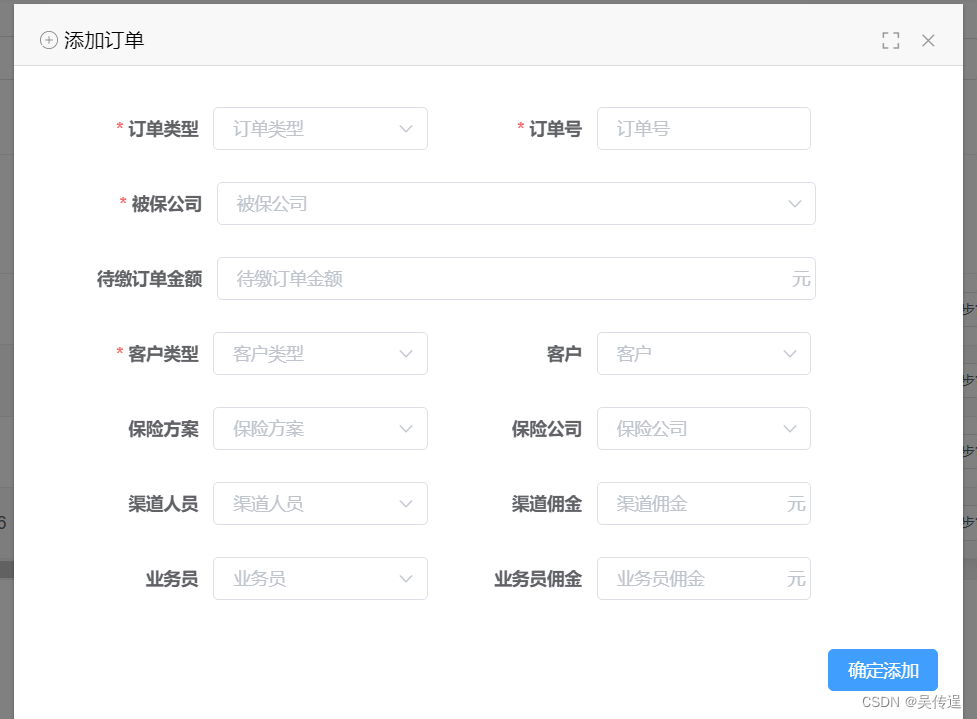
虽然我觉得这样也没有多好看,但比一行一个的好看多了,没办法,封装组件就是这样,细节很难各个把控到位
有些东西就是那么长,比如这个待缴费金额,光字就五个,如果它所在行搞成两个的话,就太狭小了,所以我除了组件灵活布局外,参数还可以配置是否独占一行,所以当自己可以设置独占一行的时候问题就来了,没有外界的干扰下,我组件布局的逻辑是,元素大于4个时就添加一个class到根元素上,设置下面元素的宽度为50%,display为inline-block,再判断元素个数是否为奇数,为基数最后一个就独占一行,但是我给某个元素设置了独占一行的属性,那它的判断就不准确了,所以最后一个就不会独占一行了,而且设置的独占一行的元素在中间的话还会影响上面的元素,因为如果设置的独占一行的元素是偶数时说明它上面还有一个宽度为50%的元素,所以这个时候又要判断,总之至少要三种判断,话不多说,贴代码
组件代码
<template>
  <div _wid="wdialog">
    <el-dialog :fullscreen="fullscreen || fullscreen1" :class="{mobile:fullscreen,noMobile:!fullscreen}"
      :visible.sync="openSenior1">
      <template slot="title">
        <slot name="title">
        </slot>
        <template v-if="!fullscreen">
          <i v-show="!fullscreen1" class="el-icon-full-screen full" @click="fullscreen1=true"></i>
          <svg-icon icon-class="qxpp" v-show="fullscreen1" class="qxqp full" @click="fullscreen1=false"></svg-icon>
        </template>
      </template>
      <el-form v-if="options1" :validate-on-rule-change="false" :model="content"
        :class="[options1.length<=4?'senior1':'senior2']" :rules="rules" ref="formSenior">
        <el-form-item v-for="(item,index) in options1" :class="{w100:item.yes}" :label="item.label" :prop="item.name">
          <repeat :content="content" v-model="content[item.name]" :item="item"></repeat>
        </el-form-item>
        <el-form-item label="" class="footer">
          <el-button type="primary" @click="submit1('formSenior')">{{confrimLabel}}</el-button>
        </el-form-item>
      </el-form>
      <slot></slot>
    </el-dialog>
  </div>
</template>

<script>
  import repeat from "@/components/topOperation/components/repeat.vue"
  import {
    deepClone,
    judgeType
  } from "@/utils/deepClone.js"
  export default {
    name: "dialogA",
    props: {
      options: {
        type: Array
      },
      rules: {
        type: Object
      },
      openSenior: {
        type: Boolean,
        default: false
      },
      submit: {
        type: Function
      },
      confrimLabel: {
        type: String
      },
      contentP: {
        type: Object,
        default: function() {
          return {}
        }
      },
    },
    model: {
      prop: "openSenior", //用来接收 父组件 传给子组件的值
      event: "openSenior-event" //用来触发的事件
    },
    watch: {
      openSenior: {
        handler() {
          this.openSenior1 = this.openSenior
        },
        immediate: true
      },
      openSenior1: {
        handler() {
          this.$emit("openSenior-event", this.openSenior1);
        },
        immediate: true
      },
      contentP: {
        handler() {
          this.content = this.contentP
        },
        immediate: true,
        deep: true
      },
      options: {
        handler() {
          let o = deepClone(this.options);
          let len = 0;
          let oo = []
          for (var k in o) {
            if (o[k].options1 && judgeType(o[k].options1) == "string") {
              o[k].options1 = JSON.parse(o[k].options1)
            }
            if (o[k].options2 && judgeType(o[k].options2) == "string") {
              o[k].options2 = JSON.parse(o[k].options2)
            }
          }
          for(let k in oo){
            if ((k < oo.length - 1 && (parseInt(k) + 1) % 2 != 0 && (oo[parseInt(k) + 1].leGes || oo[parseInt(k) + 1].wyb ||
                oo[parseInt(k) + 1].type == 5 || oo[parseInt(k) + 1].type == 10 || oo[parseInt(k) + 1].type == 3)) || oo[k]
              .leGes || oo[k].wyb || oo[k].type == 5 || oo[k].type == 10 || oo[k].type == 3) {
              oo[k].yes = true
            } else {
              len++;
              if (k == oo.length - 1 && len % 2 != 0) {
                oo[k].yes = true
              }
            }
          }
          this.options1 = oo;
        },
        deep: true,
        immediate: true,
      }
    },
    data() {
      return {
        content: {},
        openSenior1: false,
        options1: [],
        fullscreen1: false,
      }
    },
    computed: {
      fullscreen() {
        if (this.$store.state.app.device == 'mobile') {
          return true;
        } else {
          return false;
        }
      },
    },
    created() {},
    components: {
      repeat
    }
  }
</script>

<style lang="scss">
  .full {
    float: right;
    margin-right: 30px;
    cursor: pointer;
    color: #909399;
    font-family: element-icons !important;
    speak: none;
    font-style: normal;
    font-weight: 400;
    font-variant: normal;
    text-transform: none;
    line-height: 1;
    vertical-align: baseline;
    display: inline-block;
    -webkit-font-smoothing: antialiased;
    margin-top: 1px;

    &:hover {
      color: #409EFF;
    }
  }

  div[_wid="wdialog"] {

    .ax {
      .el-form-item__content {
        width: 75% !important;
      }
    }

    .el-upload {
      width: 100%;

      .el-upload-dragger {
        width: 100%;

        .el-upload__text {
          padding: 20px;
        }
      }
    }

    .noMobile {
      .w100 {
        width: 100% !important;

        .el-form-item__content {
          width: 75% !important;

          .el-select {
            width: 100% !important;
          }

          .el-input {
            width: 100% !important;
          }
        }
      }

      .senior1 {
        width: 100%;

        .el-form-item {
          width: 100%;

          .el-input {
            width: 100% !important;
          }

          .el-form-item__content {
            width: 75%;
          }

        }
      }

      .el-select {
        width: 100%;
      }

      .senior2 {
        .w100 {
          .el-form-item__label {
            width: 16% !important;
          }
        }

        .el-form-item {
          width: 45%;

          .el-form-item__content {
            width: 62%;

            .el-input {
              width: 100%;
            }
          }
        }

        .el-form-item__label {
          width: 36%;
        }
      }

      .el-dialog__body {
        .el-form {
          padding: 0 30px;
        }
      }
    }

    .el-dialog__body {
      .el-form-item {
        padding: 10px;
      }

      .el-form-item__label {
        width: 100px;
      }
    }

    .footer {
      clear: both;
      float: none !important;
      display: block;
      text-align: right;
      width: 100% !important;
      position: absolute;
      bottom: 0;
      left: 0;

      .el-form-item__content {
        float: none !important;
        width: 100% !important;
      }

      padding: 20px !important;
    }

    .el-form-item__error {
      bottom: 100%;
      top: unset;
    }

    $tinput:35px;

    .el-input {
      width: 120px;

      .el-input__suffix {
        cursor: pointer;

        .el-input__icon {
          line-height: $tinput;
        }
      }

      .el-input__inner {
        height: $tinput;
        line-height: $tinput;
      }
    }

    .el-button {
      padding: 9px 15px;
    }

    .el-form {
      display: inline-block;

      .el-form-item {
        float: left;
        margin-right: 10px;
        margin-bottom: 0;

        .el-form-item__content {
          float: left;
        }

        .el-select__caret {
          line-height: 40px;
        }
      }
    }

    .el-date-editor {
      width: 100%;

      .el-range-input {
        width: 100%;
      }
    }
  }
</style>
写的有点乱,如果觉得可以删的话就自己删几个,因为这是我项目里面的,还穿插一些跟其他组件联动的代码,简单解释一下
这个是对话框组件,里面的
repeat:统一输入框,选择框等等组件,传item里面有个type确定类型
options:参数json数组,里面描述的就是多少个输入框,选择框这些,然后每个对象还有专门的配置
rules:校验,我这个对话框直接是填写信息,提交信息一起搞定了
openSenior:这个东西是控制对话框的打开和关闭,openSenior1是组件里面的,少个1的都是父组件传过来的,因为vue子组件不能修改父组件传过来的,所以子组件里面需要改的变量都要在data里面定义然后使其=父组件传过来的
content:数据,填写的数据存放的对象,提交就是把这个对象提交过去
fullscreen1:控制全屏
fullscreen:是否是手机上打开的,是手机上的话铺满屏幕
deepClone:克隆一个新对象
judgeType:校验类型
里面最核心的就是这段代码
for(let k in oo){
            if ((k < oo.length - 1 && (parseInt(k) + 1) % 2 != 0 && (oo[parseInt(k) + 1].leGes || oo[parseInt(k) + 1].wyb ||
                oo[parseInt(k) + 1].type == 5 || oo[parseInt(k) + 1].type == 10 || oo[parseInt(k) + 1].type == 3)) || oo[k]
              .leGes || oo[k].wyb || oo[k].type == 5 || oo[k].type == 10 || oo[k].type == 3) {
              oo[k].yes = true
            } else {
              len++;
              if (k == oo.length - 1 && len % 2 != 0) {
                oo[k].yes = true
              }
            }
          }
这段代码看起来很沉重,是因为我没改,哈哈,因为我想您可能用得着
这段代码就是控制元素是否独占一行的逻辑判断
deepClone.js
export function judgeType(obj) {
  // tostring会返回对应不同的标签的构造函数
  const toString = Object.prototype.toString;
  const map = {
    '[object Boolean]': 'boolean',
    '[object Number]': 'number',
    '[object String]': 'string',
    '[object Function]': 'function',
    '[object Array]': 'array',
    '[object Date]': 'date',
    '[object RegExp]': 'regExp',
    '[object Undefined]': 'undefined',
    '[object Null]': 'null',
    '[object Object]': 'object',
  };
  if (obj instanceof Element) {
    return 'element';
  }
  return map[toString.call(obj)];
}

export function deepClone(data) {
  const type = judgeType(data);
  let obj;
  if (type === 'array') {
    obj = [];
  } else if (type === 'object') {
    obj = {};
  } else {
    // 不再具有下一层次
    return data;
  }
  if (type === 'array') {
    // eslint-disable-next-line
    for (let i = 0, len = data.length; i < len; i++) {
      obj.push(deepClone(data[i]));
    }
  } else if (type === 'object') {
    // 对原型上的方法也拷贝了....
    // eslint-disable-next-line
    for (const key in data) {
      obj[key] = deepClone(data[key]);
    }
  }
  return obj;
}
repeat.vue
<template>
      <el-input :style="{width: item.width}" :placeholder="item.placeholder" v-model="valueTemp" clearable>
      </el-input>
    </template>
    <template v-if="item.type == 1">
      <el-select filterable :disabled="item.disabled" :style="{width: item.width}" clearable v-change:[valueTemp]="item.change" v-model="valueTemp"
        :placeholder="item.placeholder">
        <el-option v-for="item in item.options1" :key="item.value" :label="item.label" :value="item.value">
        </el-option>
      </el-select>
    </template>
    </template>
  </div>
</template>

<script>

  export default {
    name: "repeat",

    directives: {
      change: {
        // 指令的定义
        update: function(el, binding) {
          if (binding.value.change) {
            binding.value(binding.arg)
          }
        }
      }
    },
    props: {
      value: "",
      sign: "",
      item: {
        type: Object
      },
    },
    model: {
      prop: 'value',
      event: 'change'
    },
    data() {
      return {
        valueTemp: "",
      }
    },
    watch: {
      valueTemp(val) {
        this.$emit('change', val)
      },
      value: {
        handler(val) {
          this.valueTemp = val
        },
        immediate: true
      },
    },
  }
</script>

<style lang="scss">
  .w100 {
    width: 100%;

    .el-form-item__content {
      width: 45%;
    }
  }

  div[_wid="repeat"] {
    .el-radio {
      margin-right: 15px;
    }

    .xs {
      .el-input {
        width: 42% !important;
      }
    }

    .leGes {
      div[_wid='numberInput'] {
        display: inline-block;
        margin: 1px;
        .el-input{
          width: 100%;
          height: 33px;
          line-height: 33px;
          input{
            height: 33px;
            line-height: 33px;
          }
        }
      }
      .el-input__inner1{
        position: absolute;
        top: 0;
        left: 0;
        height: 35px;
      }
      box-sizing: border-box;
      display: inline-block;
      width: 220px;
      border-radius: 4px;
      line-height: 35px;
      .el-select {
        width: 20% !important;

        .el-input {
          width: 100% !important;
          line-height: 35px;
          input {
            border: none;
            text-align: center;
          }
        }

        .el-input__suffix {
          display: none;

        }
      }

      .el-date-editor {
        margin: 1px;
        .el-input__prefix {
          display: none;
        }
        .el-input__suffix {
          display: none;

        }
        height: 33px;
        line-height: 33px;
        input {
          cursor: pointer;
          padding: 0;
          padding-left: 20px;
          padding-right: 20px;
          height: 33px;
          line-height: 33px;
        }
      }

      .el-input {
        .el-input__prefix {
        }
        .el-input__suffix{
          top: 1px;
        }
        input {
          border: none;
        }
      }
    }

    .close {
      text-align: center;
      cursor: pointer;
      position: absolute;
      right: 20px;
      color: #C0C4CC;
      top: 1px;
    }
    .hover{
      border-color: #C0C4CC;
    }
  }

  .leGesDrop {
    margin: 0;
  }
</style>
里面就实现了type=0 输入框和type=1的选择框,我自己的是有10个类型了,但涉及太多,所以就放了这两个
使用
<template>
<div>
<dialogA confrimLabel="确定搜索"  :options="options" v-model="openSenior">
      <template slot="title">
        <svg-icon icon-class="sx" />高级筛选
      </template>
</dialogA>
<span @click="openSenior=true">打开高级筛选框</span>
<div>
</template>

<script>
export default{
    data(){
        return{
            options:  [{
              name: "name",
              label: "名称",
              placeholder: "名称",
              type: 0, //类型 0 输入框 1 选择框
              width: "120px",
              }, {
              name: "status",
              label: "状态",
              placeholder: "状态",
              type: 1, //类型 0 输入框 1 选择框
              width: "120px",
              options1: [{
                value: 0,
                label: "未通过"
              }, {
                value: 1,
                label: "通过"
              }],

            }],
            openSenior: false
      }
    }
}
</script>
这是简单示例
options 其他配置:
wyb:当前元素独占一行
change:选择框值改变触发,可以传多个值,在
v-change:[valueTemp]="{change:item.change,sign:sign}"
里设置,valueTemp是当前绑定的参数,item.change是配置的函数,sign就是你想传的其他参数,在自定义指令里面这样写就行
directives: {
      change: {
        // 指令的定义
        update: function(el, binding) {
          if (binding.value.change) {
            binding.value.change(binding.arg,binding.value.sign)
          }
        }
      }
    },
这就有关自定义指令的学习了,也简单,想了解的可以去官网看看
好了,也没啥好说的了,最核心的就是那段判断是否独占一行的代码,另外自行扩展
我正在使用i18n从头开始构建一个多语言网络应用程序,虽然我自己可以处理一大堆yml文件,但我说的语言(非常)有限,最终我想寻求外部帮助帮助。我想知道这里是否有人在使用UI插件/gem(与django上的django-rosetta不同)来处理多个翻译器,其中一些翻译器不愿意或无法处理存储库中的100多个文件,处理语言数据。谢谢&问候,安德拉斯(如果您已经在rubyonrails-talk上遇到了这个问题,我们深表歉意) 最佳答案 有一个rails3branchofthetolkgem在github上。您可以通过在Gemfi
使用带有Rails插件的vim,您可以创建一个迁移文件,然后一次性打开该文件吗?textmate也可以这样吗? 最佳答案 你可以使用rails.vim然后做类似的事情::Rgeneratemigratonadd_foo_to_bar插件将打开迁移生成的文件,这正是您想要的。我不能代表textmate。 关于ruby-使用VimRails,您可以创建一个新的迁移文件并一次性打开它吗?,我们在StackOverflow上找到一个类似的问题: https://sta
我需要从一个View访问多个模型。以前,我的links_controller仅用于提供以不同方式排序的链接资源。现在我想包括一个部分(我假设)显示按分数排序的顶级用户(@users=User.all.sort_by(&:score))我知道我可以将此代码插入每个链接操作并从View访问它,但这似乎不是“ruby方式”,我将需要在不久的将来访问更多模型。这可能会变得很脏,是否有针对这种情况的任何技术?注意事项:我认为我的应用程序正朝着单一格式和动态页面内容的方向发展,本质上是一个典型的网络应用程序。我知道before_filter但考虑到我希望应用程序进入的方向,这似乎很麻烦。最终从任何
我想要做的是有2个不同的Controller,client和test_client。客户端Controller已经构建,我想创建一个test_clientController,我可以使用它来玩弄客户端的UI并根据需要进行调整。我主要是想绕过我在客户端中内置的验证及其对加载数据的管理Controller的依赖。所以我希望test_clientController加载示例数据集,然后呈现客户端Controller的索引View,以便我可以调整客户端UI。就是这样。我在test_clients索引方法中试过这个:classTestClientdefindexrender:template=>
如果您尝试在Ruby中的nil对象上调用方法,则会出现NoMethodError异常并显示消息:"undefinedmethod‘...’fornil:NilClass"然而,有一个tryRails中的方法,如果它被发送到一个nil对象,它只返回nil:require'rubygems'require'active_support/all'nil.try(:nonexisting_method)#noNoMethodErrorexceptionanymore那么try如何在内部工作以防止该异常? 最佳答案 像Ruby中的所有其他对象
关闭。这个问题需要detailsorclarity.它目前不接受答案。想改进这个问题吗?通过editingthispost添加细节并澄清问题.关闭8年前。Improvethisquestion为什么SecureRandom.uuid创建一个唯一的字符串?SecureRandom.uuid#=>"35cb4e30-54e1-49f9-b5ce-4134799eb2c0"SecureRandom.uuid方法创建的字符串从不重复?
我有一个用户工厂。我希望默认情况下确认用户。但是鉴于unconfirmed特征,我不希望它们被确认。虽然我有一个基于实现细节而不是抽象的工作实现,但我想知道如何正确地做到这一点。factory:userdoafter(:create)do|user,evaluator|#unwantedimplementationdetailshereunlessFactoryGirl.factories[:user].defined_traits.map(&:name).include?(:unconfirmed)user.confirm!endendtrait:unconfirmeddoenden
我有一个正在构建的应用程序,我需要一个模型来创建另一个模型的实例。我希望每辆车都有4个轮胎。汽车模型classCar轮胎模型classTire但是,在make_tires内部有一个错误,如果我为Tire尝试它,则没有用于创建或新建的activerecord方法。当我检查轮胎时,它没有这些方法。我该如何补救?错误是这样的:未定义的方法'create'forActiveRecord::AttributeMethods::Serialization::Tire::Module我测试了两个环境:测试和开发,它们都因相同的错误而失败。 最佳答案
我想在Ruby中创建一个用于开发目的的极其简单的Web服务器(不,不想使用现成的解决方案)。代码如下:#!/usr/bin/rubyrequire'socket'server=TCPServer.new('127.0.0.1',8080)whileconnection=server.acceptheaders=[]length=0whileline=connection.getsheaders想法是从命令行运行这个脚本,提供另一个脚本,它将在其标准输入上获取请求,并在其标准输出上返回完整的响应。到目前为止一切顺利,但事实证明这真的很脆弱,因为它在第二个请求上中断并出现错误:/usr/b
我想让一个yaml对象引用另一个,如下所示:intro:"Hello,dearuser."registration:$introThanksforregistering!new_message:$introYouhaveanewmessage!上面的语法只是它如何工作的一个例子(这也是它在thiscpanmodule中的工作方式。)我正在使用标准的rubyyaml解析器。这可能吗? 最佳答案 一些yaml对象确实引用了其他对象:irb>require'yaml'#=>trueirb>str="hello"#=>"hello"ir
