环境
SSM框架:配置文件的最好方式:看官网文档
如何获得Mybatis?
<!-- https://mvnrepository.com/artifact/org.mybatis/mybatis -->
<dependency>
    <groupId>org.mybatis</groupId>
    <artifactId>mybatis</artifactId>
    <version>3.5.2</version>
</dependency>
数据持久化
为什么需要持久化?
复习学习过的层:Dao,Service,Controller
持久层的工作
思路:搭建环境-->导入MyBatis-->编写代码-->测试
搭建数据库
 -- 创建数据库
 create database `mybatis`;

 use mybatis;

 -- 创建表
 create table `user`(
	`id` int(20) not null,
	`name` varchar(30) default null,
	`pwd` varchar(30) default null,
	primary key(`id`)
 )engine=InnoDB default charset=utf8mb4;

 -- 插入数据
 insert into `user`(`id`,`name`,`pwd`) values
(1,'千树','123'),
(2,'张三','123'),
(3,'李飞','123');
mybatis官方文档:文档地址
新建普通maven项目作为父项目,导入sql驱动,mybatis,junit组件
<!--导入依赖-->
<dependencies>
    <!--mysql驱动-->
    <dependency>
        <groupId>mysql</groupId>
        <artifactId>mysql-connector-java</artifactId>
        <version>5.1.46</version>
    </dependency>
    <!--Mybatis-->
    <dependency>
        <groupId>org.mybatis</groupId>
        <artifactId>mybatis</artifactId>
        <version>3.5.2</version>
    </dependency>

    <!--junit-->
    <dependency>
        <groupId>junit</groupId>
        <artifactId>junit</artifactId>
        <version>4.12</version>
    </dependency>
</dependencies>
新建新组件作为子级项目,普通maven的module
添加配置文件:
在src->main->resources目录下新建mybatis-config.xml文件,把官方的配置代码复制粘贴(不能在配置文件中写中文注释)
<?xml version="1.0" encoding="UTF-8" ?>
<!DOCTYPE configuration
  PUBLIC "-//mybatis.org//DTD Config 3.0//EN"
  "http://mybatis.org/dtd/mybatis-3-config.dtd">
<configuration>
  <environments default="development">
    <environment id="development">
      <transactionManager type="JDBC"/>
      <dataSource type="POOLED">
        <property name="driver" value="${driver}"/>//数据库驱动,不同驱动可连接不同数据库服务器
        <property name="url" value="${url}"/>//连接数据库的目录
        <property name="username" value="${username}"/>//数据库名字,默认root
        <property name="password" value="${password}"/>//数据库密码,自己的数据库密码,一般为root
      </dataSource>
    </environment>
  </environments>
</configuration>
配置文件的作用就是连接数据库
//SqlSessionFactory --生产--> SqlSession
public class MybatisUtils {
	private static SqlSessionFactory sqlSessionFactory; //提升作用域

	//获取工厂,固定代码
	static {
		try {
			String resource="mybatis-config.xml";
			InputStream inputStream = Resources.getResourceAsStream(resource);
			sqlSessionFactory = new SqlSessionFactoryBuilder().build(inputStream);
		} catch (IOException e) {
			e.printStackTrace();
		}
	}

	//获取sqlSession
	//SqlSession完全包含了面向对象数据库执行SQL命令所需的方法
	public static SqlSession getSqlSession(){ return sqlSessionFactory.openSession();}
}
实体类
public class User {
	private int id;
	private String name;
	private String pwd;

	public User() { }

	public User(int id, String name, String pwd) {
		this.id = id;
		this.name = name;
		this.pwd = pwd;
	}

	public int getId() {
		return id;
	}

	public void setId(int id) {
		this.id = id;
	}

	public String getName() {
		return name;
	}

	public void setName(String name) {
		this.name = name;
	}

	public String getPwd() {
		return pwd;
	}

	public void setPwd(String pwd) {
		this.pwd = pwd;
	}

	@Override
	public String toString() {
		return "User{" +
				"id=" + id +
				", name='" + name + '\'' +
				", pwd='" + pwd + '\'' +
				'}';
	}
}
Dao接口
public interface UserDao {
	List<User> getUserList();
}
接口实现类改为以xxxMapper.xml的配置文件
注意事项:配置文件中不要写中文注释,如果非要写,解决方法见后面的异常解决方案
<?xml version="1.0" encoding="utf-8" ?>
<!DOCTYPE mapper
		PUBLIC "-//mybatis.org//DTD Mapper 3.0//EN"
		"http://mybatis.org/dtd/mybatis-3-mapper.dtd">

<!--namespace:命名空间,绑定mapper/Dao接口-->
<mapper namespace="com.qian.dao.UserDao">
<!--id:接口的方法,resultType:接口的返回值类型-->
	<select id="getUserList" resultType="com.qian.pojo.User">
		select * from mybatis.user where id = #{id}
	</select>
</mapper>
测试类
public class UserDaoTest {
	@Test
	public void test(){
		//获取SqlSession对象
		SqlSession sqlSession = MybatisUtils.getSqlSession();
		//获取mapper
		UserDao mapper = sqlSession.getMapper(UserDao.class);
		List<User> list = mapper.getUserList();

		for (User u:list){
			System.out.println(u);
		}

		//不推荐使用
/*
	这种方式能够正常工作,对使用旧版本 MyBatis 的用户来说也比较熟悉。但现在有了一种更简洁的方式——使用和指定语句的参数和返回值相匹配的接口(比如 BlogMapper.class),现在你的代码不仅更清晰,更加类型安全,还不用担心可能出错的字符串字面值以及强制类型转换。
*/
//        List<User> list = sqlSession.selectList("com.qian.dao.UserDao.getUserList");
//        for (User user : list) {
//            System.out.println(user);
//        }

		//关闭SqlSession
		sqlSession.close();
	}
}
异常1:org.apache.ibatis.binding.BindingException: Type interface com.qian.dao.UserDao is not known to the MapperRegistry.
解决方法:每一个Mapper.xml文件都需要在src->main->resources目录下新建mybatis-config.xml的核心配置文件中 注册
xml <mappers> <mapper resource="com/qian/dao/UserMapper.xml"> </mappers>
异常2:
Error building SqlSession.
The error may exist in com/qian/dao/UserMapper.xml
Cause: org.apache.ibatis.builder.BuilderException: Error parsing SQL Mapper Configuration.
Cause: java.io.IOException: Could not find resource com/qian/dao/UserMapper.xml
解决方法:
xml <!-- 在maven中,约定大于配置,在pom中添加此文件可以解决 --> <build> <resources> <resource> <directory>src/main/resources</directory> <includes> <include>**/*.properties</include> <include>**/*.xml</include> </includes> <filtering>true</filtering> </resource> <resource> <directory>src/main/java</directory> <includes> <include>**/*.properties</include> <include>**/*.xml</include> </includes> <filtering>true</filtering> </resource> </resources> </build>
异常3:
Error building SqlSession.
The error may exist in com/qian/dao/UserMapper.xml
Cause: org.apache.ibatis.builder.BuilderException: Error parsing SQL Mapper Configuration.
Cause: org.apache.ibatis.builder.BuilderException: Error creating document instance. Cause: org.xml.sax.SAXParseException; lineNumber: 6;
解决方法:
xml <?xml version="1.0" encoding="UTF-8" ?> <!-- 把mybatis-config.xml与mybatis-config.xml文件的encoding修改成下面的 --> <?xml version="1.0" encoding="UTF8" ?>
另一种解决方法:删除掉xxxMapper.xml文件中所有的中文注释
异常4:
Cause: com.mysql.jdbc.exceptions.jdbc4.CommunicationsException: Communications link failure
解决方法:
useSSL=true改为false(true也可以,需要在mysql中启用SSL)
xml <property name="url" value="jdbc:mysql://localhost:3306/mybatis?useSSL=false&useUnicode=true&characterEncoding=UTF8&serverTimezone=GMT%2B8"/>
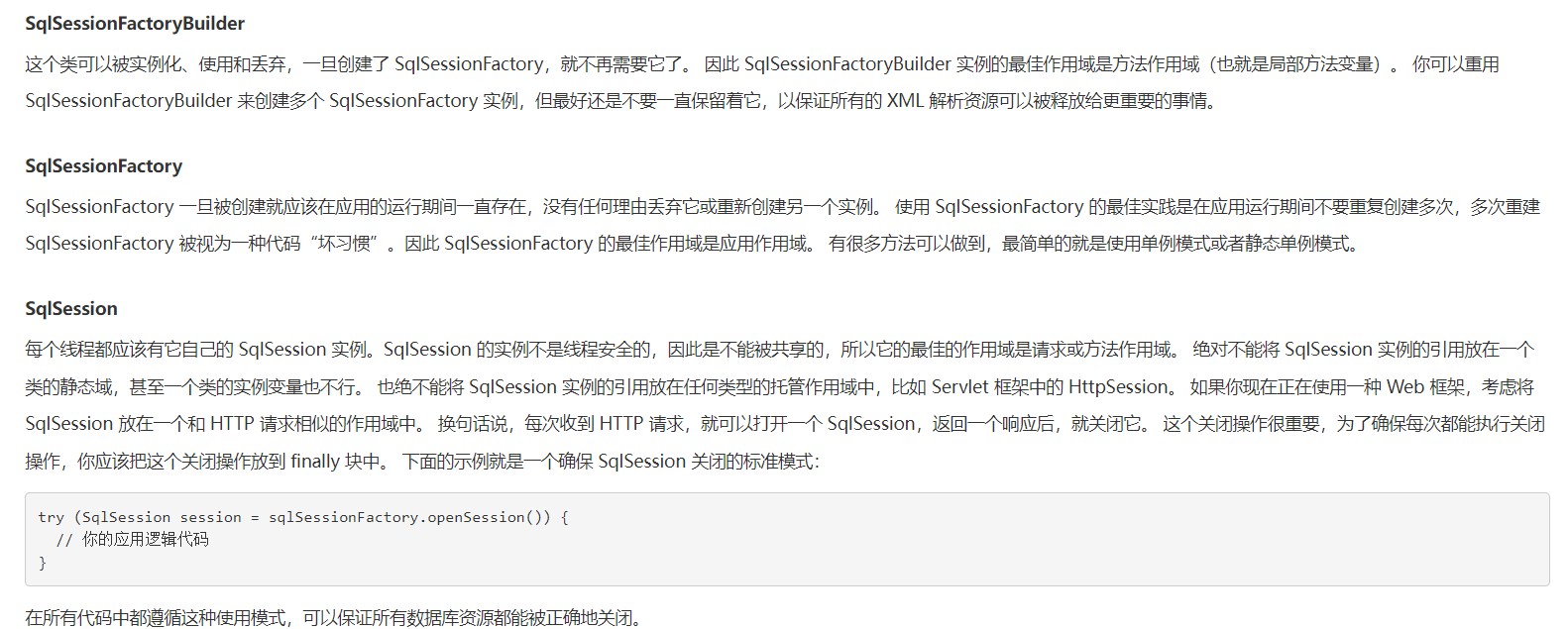
public class UserDaoTest {
    @Test
    public void test(){
        //获取SqlSession对象
        SqlSession sqlSession = MybatisUtils.getSqlSession();
        try{
            //获取mapper

            UserDao mapper = sqlSession.getMapper(UserDao.class);
            List<User> list = mapper.getUserList();

            for (User u:list){
                System.out.println(u);
            }

            //不推荐使用
//        List<User> list = sqlSession.selectList("com.qian.dao.UserDao.getUserList");
//        for (User user : list) {
//            System.out.println(user);
//        }
        }finally {
            //关闭SqlSession
            sqlSession.close();
        }
    }
}
public interface UserMapper {
    //查询全部用户
    List<User> getUserList();

    //根据id查询用户
    User getUserById(int id);

    //增加新的用户
    boolean insertNewUser(User u);

    //删除用户
    boolean deleteUserById(int id);
    boolean deleteUserByName(String name);

    //修改用户
    boolean updateUserById(User u);
}
<?xml version="1.0" encoding="utf8" ?>
<!DOCTYPE mapper
        PUBLIC "-//mybatis.org//DTD Mapper 3.0//EN"
        "http://mybatis.org/dtd/mybatis-3-mapper.dtd">

<!--namespace:命名空间,绑定mapper/Dao接口-->
<!--id:接口的方法,resultType:接口的返回值类型-->
<mapper namespace="com.qian.dao.UserMapper">
    <select id="getUserList" resultType="com.qian.pojo.User">
        select * from mybatis.user
    </select>

    <select id="getUserById" parameterType="int" resultType="com.qian.pojo.User">
        select * from mybatis.user where id=#{id}
    </select>

    <!-- 对象中的属性,可以直接取出来用 -->
    <insert id="insertNewUser" parameterType="com.qian.pojo.User">
        insert into mybatis.user (id, name, pwd) VALUES (#{id},#{name},#{pwd})
    </insert>

    <delete id="deleteUserById" parameterType="int">
        delete from mybatis.user where id=#{id}
    </delete>
    <delete id="deleteUserByName" parameterType="String">
        delete from mybatis.user where name=#{name}
    </delete>

    <update id="updateUserById" parameterType="com.qian.pojo.User">
        update mybatis.user set name=#{name},pwd=#{pwd} where id=#{id}
    </update>
</mapper>
注意:增删改要提交事务!!!
public class UserDaoTest {
    @Test
    public void test(){
        //获取SqlSession对象
        SqlSession sqlSession = MybatisUtils.getSqlSession();
        try{
            //获取mapper

            UserMapper mapper = sqlSession.getMapper(UserMapper.class);

//            查询全表
//            List<User> list = mapper.getUserList();
//            for (User u:list){
//                System.out.println(u);
//            }

            //根据id查询
//            User user = mapper.getUserById(1);
//            System.out.println(user);

            //插入新用户,注意:更新,插入,删除都需要提交事务
//            User user1 = new User(4,"李四","25615");
//            boolean isInserted = mapper.insertNewUser(user1);
//            sqlSession.commit();

            //代码优化
//            if (mapper.insertNewUser(new User(4,"李四","25615"))) sqlSession.commit();

            //删除用户
//            if (mapper.deleteUserById(4))sqlSession.commit();
             if (mapper.deleteUserByName("李四"))sqlSession.commit();

             //修改用户
            if (mapper.updateUserById(new User(4,"王五","6849816")))sqlSession.commit();

        }finally {
            //关闭SqlSession
            sqlSession.close();
        }
    }
}
User getUser(Map<String,Object> map);

boolean addUser(Map<String,Object> map);
<select id="getUser" parameterType="map" resultType="com.qian.pojo.User">
    select * from mybatis.user where id=#{userId}
</select>

<insert id="addUser" parameterType="map">
    insert into mybatis.user (id, name, pwd) VALUES (#{userId},#{userName},#{password})
</insert>
@Test
public void test(){
    //获取SqlSession对象
    SqlSession sqlSession = MybatisUtils.getSqlSession();
    UserMapper mapper = sqlSession.getMapper(UserMapper.class);

	Map<String, Object> map = new HashMap<String, Object>();
	map.put("userId",5);
	User user = mapper.getUser(map);
	System.out.println(user);

	map.put("userId",5);
	map.put("userName","孙悟空");
	map.put("password","565464");
	if (mapper.addUser(map)) sqlSession.commit();

	sqlSession.close();
}
java执行的时候,传递通配符% %
UserMapper.java
//模糊查询
List<User> getUsersLike(String value);
UserMapper.xml
<select id="getUsersLike" resultType="com.qian.pojo.User">
    select * from mybatis.user where name like #{value};
</select>
Test.java
@Test
public void getUsersLike(){
    UserMapper mapper = getUserMapper();
    List<User> userList = mapper.getUsersLike("%千%");
    System.out.println(userList);
}

public UserMapper getUserMapper(){
    return MybatisUtils.getSqlSession().getMapper(UserMapper.class);
}
在sql中使用拼接符
<select id="getUsersLike" resultType="com.qian.pojo.User">
    select * from mybatis.user where name like "%"#{value}"%"
</select>
configuration(配置)
properties(属性)
settings(设置)
typeAliases(类型别名)
environments(环境配置)
	environment(环境变量)
		transactionManager(事务管理器)
		dataSource(数据源)你
mappers(映射器)
MyBatis 可以配置成适应多种环境,尽管可以配置多个环境,但每个 SqlSessionFactory 实例只能选择一种环境。
MyBatis默认事务连接器就是JDBC,连接池POOLED
这些属性可以在外部进行配置,并可以进行动态替换。你既可以在典型的 Java 属性文件中配置这些属性,也可以在 properties 元素的子元素中设置。
配置db.properties
driver=com.mysql.jdbc.Driver
url=jdbc:mysql://localhost:3306/mybatis?useSSL=false&;useUnicode=true&;
characterEncoding=UTF8&;serverTimezone=GMT%2B8&;autoConnect=true
username=root
password=root
在核心配置文件中引入
注意:在xml中,所有的标签都可以规定顺序
(properties?,settings?,typeAliases?,typeHandlers?,objectFactory?,objectWrapperFactory?,reflectorFactory?,plugins?,environments?,databaseIdProvider?,mappers?)".
核心文件配置
<configuration>
	<properties resource="db.properties"/>

	<environments default="development">
		<environment id="development">
			<transactionManager type="JDBC"></transactionManager>
			<dataSource type="POOLED">
				<property name="driver" value="${driver}"/>
				<property name="url" value="${url}"/>
				<property name="username" value="${username}"/>
				<property name="password" value="${password}"/>
			</dataSource>
		</environment>
</configuration>
总结
错误提示

类型别名可为 Java 类型设置一个缩写名字。 它仅用于 XML 配置,意在降低冗余的全限定类名书写。
<typeAliases>
    <typeAlias type="com.yu.pojo.User" alias="user"></typeAlias>

	<!-- 另一种方式:直接扫描一个包目录下的 -->
	<package name="com.yu.pojo"/>
</typeAliases>
这是 MyBatis 中极为重要的调整设置,它们会改变 MyBatis 的运行时行为。


MapperRegistry:注册绑定我们的Mapper文件
几种绑定方式
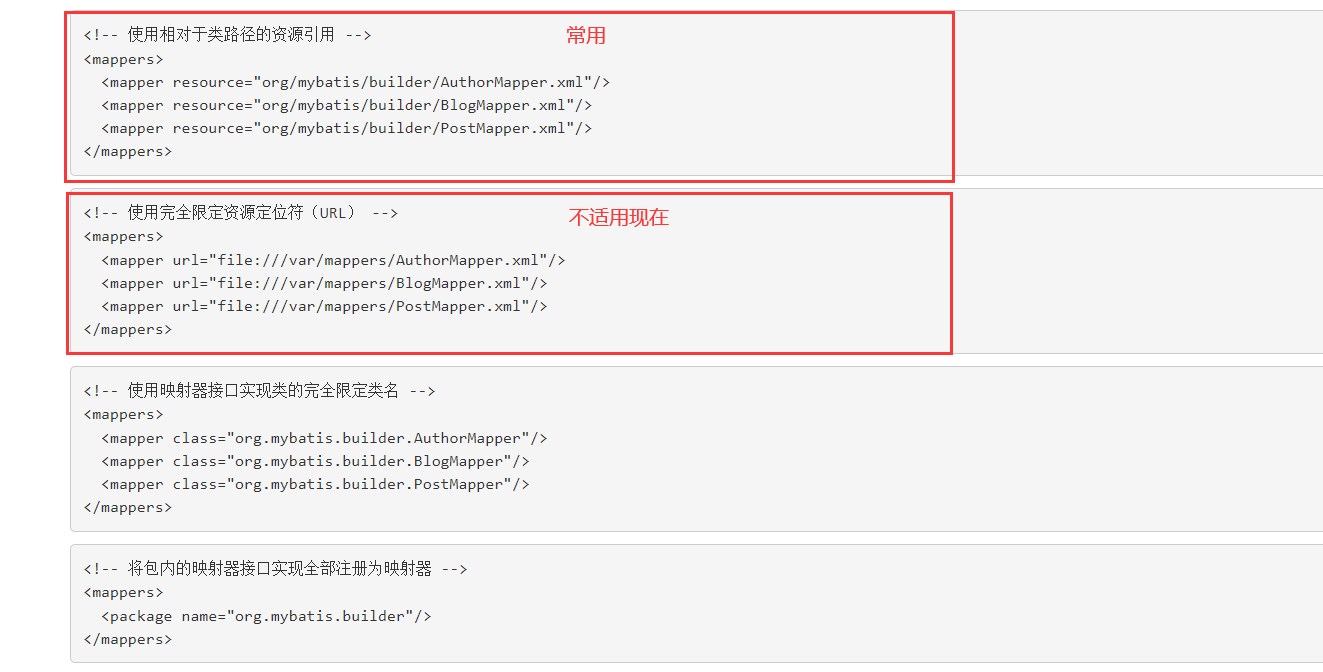
class与扫描包(packaaage)绑定的注意点

理解我们之前讨论过的不同作用域和生命周期类别是至关重要的,因为错误的使用会导致非常严重的并发问题。
SqlSessionFactoryBuilder:
SqlSessionFactory:
SqlSession:
复制原文件到对应目录下,修改属性(ctrl+r)pwd->password

使用测试类测试

UserMapper.xml
<mapper namespace="com.yu.dao.UserMapper">
	<select id="getUserById" parameterType="int" resultType="user">
		select * from mybatis.user where id=#{id}
		<!--
			这句代码的本质:select id,name,pwd from ...
			类型处理器找不到对应字段的属性,无法赋值
		 -->
	</select>
</mapper>
起别名
select id,name,pwd as password from mybatis.user where id=#{id}
使用resultMap
resultMap:结果集映射
<resultMap id="UserMap" type="user">
/*<result column="id" property="id"/>
    <result column="name" property="name"/> */
    <result column="pwd" property="password"/>
</resultMap>
<select id="getUserById" parameterType="int" resultMap="UserMap">
    select * from mybatis.user where id=#{id}
</select>
ResultMap 的设计思想是,对简单的语句做到零配置,对于复杂一点的语句,只需要描述语句之间的关系就行了。
ResultMap 的优秀之处——你完全可以不用显式地配置它们。 虽然上面的例子不用显式配置 ResultMap。 但为了讲解,我们来看看如果在刚刚的示例中,显式使用外部的 resultMap 会怎样,这也是解决列名不匹配的另外一种方式。
如果数据库操作出现异常,需要通过日志获取sql语句,方便纠错。
logImpl:指定 MyBatis 所用日志的具体实现,未指定时将自动查找。
在mybatis-config.xml中配置设置
STDOUT_LOGGING 标准日志输出
<configuration>
	<properties resource="db.properties"/>

	<settings>
		<setting name="logImpl" value="STDOUT_LOGGING"/>
	</settings>
	... ...
<configuration>
STDOUT_LOGGING
Logging initialized using 'class org.apache.ibatis.logging.stdout.StdOutImpl' adapter.
/*
	...
*/
Created connection 471579726.
Setting autocommit to false on JDBC Connection [com.mysql.jdbc.JDBC4Connection@1c1bbc4e]
==>  Preparing: select * from mybatis.user where id=?
==> Parameters: 1(Integer)
<==    Columns: id, name, pwd
<==        Row: 1, 千树, 123
<==      Total: 1
User{id=1, name='千树', password='123'}
Resetting autocommit to true on JDBC Connection [com.mysql.jdbc.JDBC4Connection@1c1bbc4e]
Closing JDBC Connection [com.mysql.jdbc.JDBC4Connection@1c1bbc4e]
Returned connection 471579726 to pool.
从上面的输出可以看出,mybatis本质上是封装了JDBC
LOG4J
......
Caused by: org.apache.ibatis.exceptions.PersistenceException:
### Error building SqlSession.
### The error may exist in SQL Mapper Configuration
### Cause: org.apache.ibatis.builder.BuilderException: Error parsing SQL Mapper Configuration. Cause: org.apache.ibatis.logging.LogException: Error setting Log implementation.
......
Caused by: org.apache.ibatis.builder.BuilderException: Error parsing SQL Mapper Configuration. Cause: org.apache.ibatis.logging.LogException: Error setting Log implementation.  Cause: java.lang.NoClassDefFoundError: org/apache/log4j/Priority
...
使用另一个标准就会报错,说明需要配置另外的东西
解决方法:配置maven导入log4j
pom.xml
<!-- https://mvnrepository.com/artifact/log4j/log4j -->
<dependency>
    <groupId>log4j</groupId>
    <artifactId>log4j</artifactId>
    <version>1.2.17</version>
</dependency>
然后输出为正常输出了:
log4j:WARN No appenders could be found for logger (org.apache.ibatis.logging.LogFactory).
log4j:WARN Please initialize the log4j system properly.
log4j:WARN See http://logging.apache.org/log4j/1.2/faq.html#noconfig for more info.
User{id=1, name='千树', password='123'}
log4j简介
Log4j是一个由Java编写可靠、灵活的日志框架,是Apache旗下的一个开源项目;现如今,Log4j已经被移植到了C、C++、Python等语言中,服务更多的Developer;
使用Log4j,我们更加方便的记录了日志信息,它不但能控制日志输出的目的地,也能控制日志输出的内容格式;通过定义不同的日志级别,可以更加精确的控制日志的生成过程,从而达到我们应用的需求;这一切,都得益于一个灵活的配置文件,并不需要我们更改代码
log4j.properties
#newhappy  log4j.properties start
log4j.rootLogger=DEBUG,console,file

#控制台输出 console appender
log4j.appender.console=org.apache.log4j.ConsoleAppender
log4j.appender.console.Target=System.out
log4j.appender.console.threshold=DEBUG
log4j.appender.console.layout=org.apache.log4j.PatternLayout
log4j.appender.console.layout.ConversionPattern=[%c]-%m%n

#文件输出 rolling file appender
log4j.appender.file=org.apache.log4j.RollingFileAppender
log4j.appender.file.File=./log/yu.log
log4j.appender.file.MaxFileSize=10mB
log4j.appender.file.MaxBackupIndex=2
log4j.appender.file.layout=org.apache.log4j.PatternLayout
log4j.appender.file.layout.ConversionPattern=%d{mmm d,yyyy hh:mm:ss a} : %p [%t] %m%n
log4j.appender.file.threshold=DEBUG

#日志输出级别 logger
log4j.logger.org.mybatis=DEBUG
log4j.logger.java.sql=DEBUG
log4j.logger.java.sql.Statement=DEBUG
log4j.logger.java.sql.ResultSet=DEBUG
log4j.logger.java.sql.PreparedStatement=DEBUG

#newhappy log4j.properties end
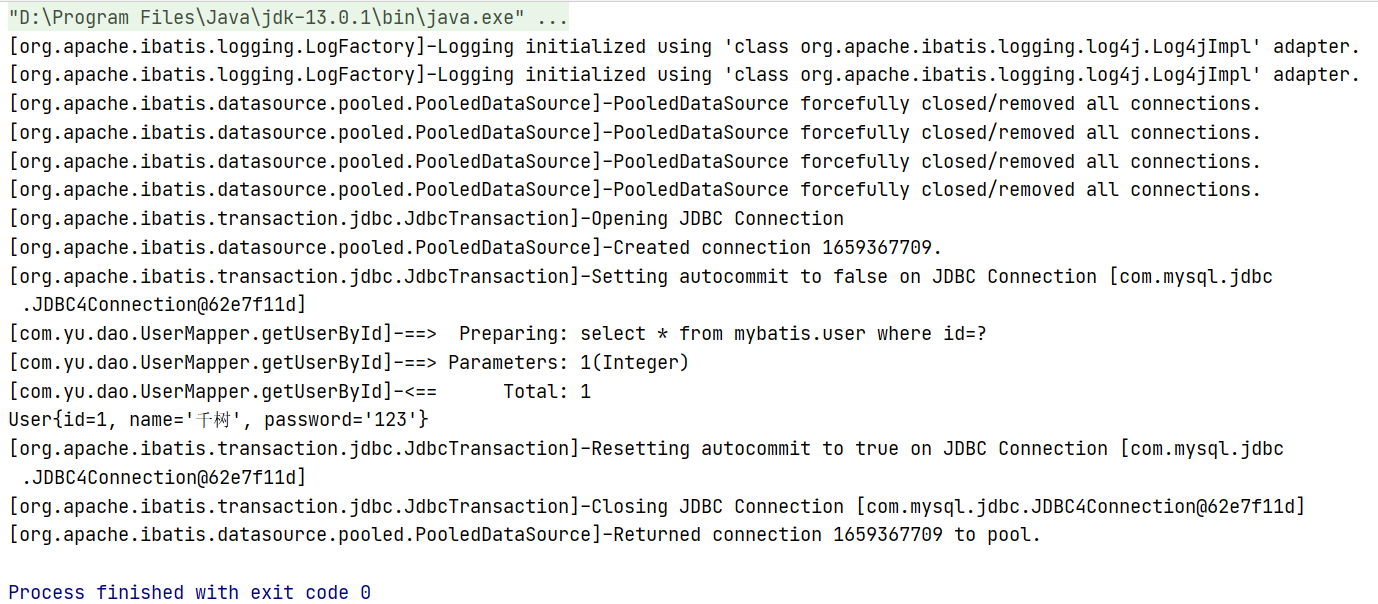
最终测试输出
简单的使用
public class UserDaoTest {
	static Logger logger = Logger.getLogger(UserDaoTest.class);

	@Test
	public void loggerTest(){
		logger.info("info:进入了TestLog4j");
		logger.debug("debug:调试");
		logger.error("error:错误");
		logger.fatal("fatal:致命错误");
	}

}
为什么要分页?
答:减少数据处理量
语法
-- 语法:select * from xxx limit startIndex,pageSize
select * from user limit 3;
mybatis的sql语句如果有多个参数,需要用map封装
接口 UserMapper.java
List<User> selectLimit(Map<String,Integer> map);
Mapper.xml
<select id="selectLimit" parameterType="map" resultMap="UserMap">
    select * from mybatis.user limit #{startIndex},#{pageSize}
</select>
测试
public class UserDaoTest {
	@Test
	public void limitTest(){
		SqlSession sqlSession = MybatisUtils.getSqlSession();
		UserMapper mapper = sqlSession.getMapper(UserMapper.class);
		Map<String, Integer> map = new HashMap<String, Integer>();
		map.put("startIndex",0);
		map.put("pageSize",2);

		List<User> list=mapper.selectLimit(map);

		for (User u:
			 list) {
			System.out.println(u);
		}
		sqlSession.close();
	}
}
这种方法不推荐使用,因为官方不推荐
List<User> selectRowBounds();
<select id="selectRowBounds" resultMap="UserMap">
    select * from mybatis.user
</select>
@Test
public void selectRowBounds(){
    SqlSession sqlSession = MybatisUtils.getSqlSession();

    RowBounds rowBounds = new RowBounds(0,2);
    List<User> list = sqlSession.selectList("com.yu.dao.UserMapper.selectRowBounds"
    ,null,rowBounds);
    for (User user : list) {
        System.out.println(user);
    }
    sqlSession.close();
}
MyBatis分页插件 PageHelper
注解的本质是使用反射,底层是代理模式(见设计模式)
使用注解来映射简单语句会使代码显得更加简洁,但对于稍微复杂一点的语句,Java 注解不仅力不从心,还会让你本就复杂的 SQL 语句更加混乱不堪。 因此,如果你需要做一些很复杂的操作,最好用 XML 来映射语句。
@Select("select * from mybatis.user")
List<User> selectAll();
<mappers>
    <mapper class="com.yu.dao.UserMapper"/>
</mappers>
@Test
public void selectAll(){
    SqlSession sqlSession = MybatisUtils.getSqlSession();
    //底层主要应用反射
    UserMapper mapper = sqlSession.getMapper(UserMapper.class);
    List<User> list=mapper.selectAll();
    for (User user : list) {
        System.out.println(user);
    }
    sqlSession.close();
}
设置自动提交
public static SqlSession getSqlSession(){ return sqlSessionFactory.openSession(true); }
Mapper
//多个参数情况下,有两种解决方式,一个map封装,另一种是注解Param
@Select("select * from mybatis.user where id=#{id}")
User selectUserById(@Param("id") int id);

@Select("select * from mybatis.user")
List<User> selectAll();

@Insert("insert into mybatis.user() values(#{id},#{name},#{password}) ")
boolean insertUser(User u);

@Update("update user set name=#{name},pwd=#{password} where id = #{id}")
boolean updateUser(User u);

@Delete("delete from mybatis.user where id=#{id}")
boolean deleteUser(@Param("id") int id);
Test
@Test
public void selectAll(){
	SqlSession sqlSession = MybatisUtils.getSqlSession();
	//底层主要应用反射
	UserMapper mapper = sqlSession.getMapper(UserMapper.class);
  //        List<User> list=mapper.selectAll();
  //        for (User user : list) {
  //            System.out.println(user);
  //        }
  /**
  		User u=mapper.selectUserById(1);
  		System.out.println(u);
   */
  //        boolean isInserted=mapper.insertUser(new User(4,"图拉真","dgsdgs"));
  //       if (mapper.updateUser(new User(6,"寒江雪",null)))
	if (mapper.deleteUser(6))
	for (User user : mapper.selectAll()) {
		System.out.println(user);
	}
	sqlSession.close();
}
Lombok是一个可以通过简单的注解形式来帮助我们简化消除一些必须有但显得很臃肿的Java代码的工具,通过使用对应的注解,可以在编译源码的时候生成对应的方法。
<dependency>
	<groupId>org.projectlombok</groupId>
	<artifactId>lombok</artifactId>
	<version>1.18.10</version>
</dependency>
@Getter and @Setter
@FieldNameConstants
@ToString
@EqualsAndHashCode
@AllArgsConstructor, @RequiredArgsConstructor and @NoArgsConstructor
@Log, @Log4j, @Log4j2, @Slf4j, @XSlf4j, @CommonsLog, @JBossLog, @Flogger, @CustomLog
@Data
@Builder
@SuperBuilder
@Singular
@Delegate
@Value
@Accessors
@Wither
@With
@SneakyThrows
@val
@var
experimental @var
@UtilityClass
Lombok config system
Code inspections
Refactoring actions (lombok and delombok)
@Data支持: 无参构造,getter&setter,toString,hashCode,equals
@AllArgsConstructor: 有参构造
@NoArgsConstructor: 无参构造
多个学生对应一个老师
学生关联老师,多对一
老师管理集合,一对多
Sql建表
create table `teacher`(
`id` int not null,
`name` varchar(30) default null,
primary key(`id`)
) engine=InnoDB default charset=utf8;

insert into teacher values (1,'王老师');

create table `student`(
`id` int not null,
`name` varchar(30) default null,
`tid` int not null,
primary key(`id`),
key `FK_tid` (`tid`),
constraint `FK_tid` foreign key(`tid`) references `teacher`(`id`)
) engine=InnoDB default charset=utf8;
@Data
@AllArgsConstructor
@NoArgsConstructor
public class Student {
	private int id;
	private String name;
	private Teacher teacher;
}
@Data
@AllArgsConstructor
@NoArgsConstructor
public class Teacher {
	private int id;
	private String name;
}
List<Student> selectAll();
<!--
	查询思路:
		1.查询所有学生
		2.根据查询出的学生的tid查询老师,子查询
 -->
<resultMap id="student_teacher" type="Student">
<!-- property是实体类的属性 column是数据库的字段 -->
    <result property="id" column="id"/>
    <result property="name" column="name"/>
	<!--
		复杂的属性,需要单独处理,对象:association 集合collection
	 -->
    <association property="teacher" column="tid" javaType="Teacher" select="getTeacher"/>
</resultMap>
<select id="selectAll" resultMap="student_teacher">
    select * from mybatis.student
</select>
<select id="getTeacher" resultType="Teacher">
    select * from mybatis.teacher where id=#{tid}
</select>
 @Test
public void selectAll(){
    SqlSession sqlSession = MybatisUtils.getSqlSession();
    StudentMapper mapper = sqlSession.getMapper(StudentMapper.class);
    List<Student> studentList = mapper.selectAll();
    for (Student s:
         studentList) {
        System.out.println(s);
    }

    sqlSession.close();
}
List<Student> selectAll2();
<select id="selectAll2" resultMap="S_T">
    select s.id sid,s.name sname,t.name tname
    from mybatis.student s,mybatis.teacher t
    where s.tid=t.id
</select>

<resultMap id="S_T" type="Student">
    <result property="id" column="sid"/>
    <result property="name" column="sname"/>
    <association property="teacher" javaType="Teacher">
        <result property="name" column="tname"/>
    </association>
</resultMap>
//测试代码
@Data
@AllArgsConstructor
@NoArgsConstructor
public class Teacher {
	private int id;
	private String name;

	//老师拥有多个学生
	private List<Student> students;
}
@Data
@AllArgsConstructor
@NoArgsConstructor
public class Student {
    private int id;
    private String name;
    private int tid;
}
public interface TeacherMapper {
	List<Teacher> selectAll();

	//获取指定老师下的所有学生
	Teacher getTeacher(@Param("tid")int id);

	Teacher getTeacher2(@Param("tid")int id);
	List<Student> getStudents(@Param("tid")int id);
}
 <select id="selectAll" resultType="Teacher">
    select * from mybatis.teacher
</select>
<select id="getTeacher" resultMap="S_T">
    select t.id tid, t.name tname,s.name sname
    from mybatis.teacher t,mybatis.student s
    where s.tid=tid and tid=#{tid}
</select>
<resultMap id="S_T" type="Teacher">
    <result property="id" column="tid"/>
    <result property="name" column="tname"/>
	<!-- 集合中的泛型信息,我们使用ofType -->
    <collection property="students" ofType="Student">
        <result property="name" column="sname"/>
        <result property="tid" column="tid"/>
    </collection>
</resultMap>

<select id="getTeacher2" resultMap="student_teacher">
    select * from mybatis.teacher where id=#{tid}
</select>
<resultMap id="student_teacher" type="Teacher">
    <result property="id" column="id"/>
    <result property="name" column="name"/>
    <collection property="students" column="id" ofType="Student" select="getStudents"/>
</resultMap>
<select id="getStudents" resultType="Student">
    select * from mybatis.student where tid=#{tid}
</select>
//测试
注意点:
什么是动态SQL?
动态SQL是指根据不同的条件生成不同的SQL语句
如果你之前用过 JSTL 或任何基于类 XML 语言的文本处理器,你对动态 SQL 元素可能会感觉似曾相识。在 MyBatis 之前的版本中,需要花时间了解大量的元素。借助功能强大的基于 OGNL 的表达式,MyBatis 3 替换了之前的大部分元素,大大精简了元素种类,现在要学习的元素种类比原来的一半还要少。
create table blog(
id varchar(50) not null comment '博客id',
title varchar(100) not null comment '博客标题',
author varchar(30) not null comment '博客作者',
ctreate_time datetime not null comment '创建时间',
views int not null comment '浏览量'
)engine=InnoDB default charset=utf8;
创建基础工程
import java.util.Date;

@Data
@AllArgsConstructor
@NoArgsConstructor
public class Blog {
	private String id;
	private String title;
	private String author;
	private Date createTime;
	private int views;
}
public interface BlogMapper {}
<?xml version="1.0" encoding="UTF-8" ?>
<!DOCTYPE mapper
		PUBLIC "-//mybatis.org//DTD Mapper 3.0//EN"
		"http://mybatis.org/dtd/mybatis-3-mapper.dtd">
<mapper namespace="com.yu.dao.BlogMapper">

</mapper>
<!--
	有两种解决方法:
		1.如果不是按规范转换,在xxxMapper.xml用ResultMap,上面已经介绍过
		2.如果是规范命名,在mybatis-config.xml文件中<settings>-><setting>->id="mapUnderscoreToCamelCase" value="true",它的作用是驼峰命名转换
 -->
 <settings>
    <setting name="logImpl" value="STDOUT_LOGGING"/>
    <setting name="mapUnderscoreToCamelCase" value="true"/>
</settings>
<select id="findActiveBlogWithTitleLike"
	 resultType="Blog">
  SELECT * FROM BLOG
  WHERE state = ‘ACTIVE’
  <if test="title != null">
	AND title like #{title}
  </if>
</select>
//查询博客
List<Blog> queryBlogIf(Map<String,Object> map);
<select id="queryBlogIf" parameterType="map" resultType="Blog">
    select * from mybatis.blog where 1=1
    <if test="title!=null">
        and title = #{title}
    </if>
    <if test="author!=null">
        and author = #{author}
    </if>
</select>
@Test
public void queryBlogIf(){
    SqlSession sqlSession = MybatisUtils.getSqlSession();
    BlogMapper mapper = sqlSession.getMapper(BlogMapper.class);
    Map<String,Object> map=new HashMap<String,Object>();
    mapper.queryBlogIf(map);
    System.out.println("==================");
    map.put("title",(String)"MyBatis如此简单");
    mapper.queryBlogIf(map);
    System.out.println("==================");
    map.put("author",(String)"狂神说");
    mapper.queryBlogIf(map);
    System.out.println("==================");
    sqlSession.close();
}
有时候,我们不想使用所有的条件,而只是想从多个条件中选择一个使用。针对这种情况,MyBatis 提供了 choose 元素,它有点像 Java 中的 switch 语句。
还是上面的例子,但是策略变为:传入了 “title” 就按 “title” 查找,传入了 “author” 就按 “author” 查找的情形。若两者都没有传入,就返回标记为 featured 的 BLOG(这可能是管理员认为,与其返回大量的无意义随机 Blog,还不如返回一些由管理员挑选的 Blog)。
<select id="findActiveBlogLike"
	 resultType="Blog">
  SELECT * FROM BLOG WHERE state = ‘ACTIVE’
  <choose>
	<when test="title != null">
	  AND title like #{title}
	</when>
	<when test="author != null and author.name != null">
	  AND author_name like #{author.name}
	</when>
	<otherwise>
	  AND featured = 1
	</otherwise>
  </choose>
</select>
代码演示
List<Blog> queryBlogChoose(Map<String,Object> map);
<select id="queryBlogChoose" parameterType="map" resultType="Blog">
    select * from mybatis.blog
    <where>
        <choose>
            <when test="title!=null">
                title=#{title}
            </when>
            <when test="author!=null">
                and author=#{author}
            </when>
            <otherwise>
                and views=#{views}
            </otherwise>
        </choose>
    </where>
</select>
@Test
public void queryBlogChoose(){
    SqlSession sqlSession = MybatisUtils.getSqlSession();
    BlogMapper mapper = sqlSession.getMapper(BlogMapper.class);
    Map<String,Object> map=new HashMap<String,Object>();
    map.put("views",(int)9999);
    map.put("title",(String)"MyBatis如此简单");
    mapper.queryBlogChoose(map);
    System.out.println("=============");

    sqlSession.close();
}
前面几个例子已经合宜地解决了一个臭名昭著的动态 SQL 问题。现在回到之前的 “if” 示例,这次我们将 “state = ‘ACTIVE’” 设置成动态条件,看看会发生什么。
<select id="findActiveBlogLike"
     resultType="Blog">
  SELECT * FROM BLOG
  WHERE
  <if test="state != null">
    state = #{state}
  </if>
  <if test="title != null">
    AND title like #{title}
  </if>
  <if test="author != null and author.name != null">
    AND author_name like #{author.name}
  </if>
</select>
如果没有匹配的条件会怎么样?最终这条 SQL 会变成这样:
SELECT * FROM BLOG
WHERE
这会导致查询失败。如果匹配的只是第二个条件又会怎样?这条 SQL 会是这样:
SELECT * FROM BLOG
WHERE
AND title like ‘someTitle’
这个查询也会失败。这个问题不能简单地用条件元素来解决。这个问题是如此的难以解决,以至于解决过的人不会再想碰到这种问题。
MyBatis 有一个简单且适合大多数场景的解决办法。而在其他场景中,可以对其进行自定义以符合需求。而这,只需要一处简单的改动:
<select id="findActiveBlogLike"
	 resultType="Blog">
  SELECT * FROM BLOG
  <where>
	<if test="state != null">
		 state = #{state}
	</if>
	<if test="title != null">
		AND title like #{title}
	</if>
	<if test="author != null and author.name != null">
		AND author_name like #{author.name}
	</if>
  </where>
</select>
where 元素只会在子元素返回任何内容的情况下才插入 “WHERE” 子句。而且,若子句的开头为 “AND” 或 “OR”,where 元素也会将它们去除。
如果 where 元素与你期望的不太一样,你也可以通过自定义 trim 元素来定制 where 元素的功能。比如,和 where 元素等价的自定义 trim 元素为:
<trim prefix="WHERE" prefixOverrides="AND |OR ">
  ...
</trim>
prefixOverrides 属性会忽略通过管道符分隔的文本序列(注意此例中的空格是必要的)。上述例子会移除所有 prefixOverrides 属性中指定的内容,并且插入 prefix 属性中指定的内容。
用于动态更新语句的类似解决方案叫做 set。set 元素可以用于动态包含需要更新的列,忽略其它不更新的列。比如:
<update id="updateAuthorIfNecessary">
  update Author
	<set>
	  <if test="username != null">username=#{username},</if>
	  <if test="password != null">password=#{password},</if>
	  <if test="email != null">email=#{email},</if>
	  <if test="bio != null">bio=#{bio}</if>
	</set>
  where id=#{id}
</update>
如果 where 元素与你期望的不太一样,你也可以通过自定义 trim 元素来定制 where 元素的功能。比如,和 where 元素等价的自定义 trim 元素为:
<update id="updateAuthorIfNecessary">
  update Author
    <set>
      <if test="username != null">username=#{username},</if>
      <if test="password != null">password=#{password},</if>
      <if test="email != null">email=#{email},</if>
      <if test="bio != null">bio=#{bio}</if>
    </set>
  where id=#{id}
</update>
这个例子中,set 元素会动态地在行首插入 SET 关键字,并会删掉额外的逗号(这些逗号是在使用条件语句给列赋值时引入的)。
来看看与 set 元素等价的自定义 trim 元素吧:
<trim prefix="SET" suffixOverrides=",">
  ...
</trim>
代码演示
//更新博客
boolean updateBlog(Map<String,Object> map);
<update id="updateBlog" parameterType="map">
    update mybatis.blog
    <set>
        <if test="title!=null">title=#{title},</if>
        <if test="author!=null">author=#{author}</if>
    </set>
    where id=#{id}
</update>
@Test
public void updateBlog(){
    SqlSession sqlSession = MybatisUtils.getSqlSession();
    BlogMapper mapper = sqlSession.getMapper(BlogMapper.class);
    Map<String,Object> map=new HashMap<String,Object>();
    map.put("id",(String)"b0400cbd76ed4c89a5ffde5ccc0bbb33");
    //map.put("title",(String)"新版Mybatis");
    map.put("author",(String)"狂神说");
    boolean b = mapper.updateBlog(map);
    sqlSession.close();
}
所谓动态sql,本质还是SQL语句,只是我们可以在SQL层面,执行逻辑代码
<sql id="if-title-author">
    <if test="title!=null">
        title = #{title}
    </if>
    <if test="author!=null">
        and author = #{author}
    </if>
</sql>
<select id="queryBlogIf" parameterType="map" resultType="Blog">
    select * from mybatis.blog
    <where>
        <include refid="if-title-author"></include>
    <!--
	<if test="title!=null">
        title = #{title}
    </if>
    <if test="author!=null">
        and author = #{author}
    </if>
	-->
    </where>
</select>
动态 SQL 的另一个常见使用场景是对集合进行遍历(尤其是在构建 IN 条件语句的时候)。比如:
<select id="selectPostIn" resultType="domain.blog.Post">
  SELECT *
  FROM POST P
  WHERE ID in
  <foreach item="item" index="index" collection="list"
	  open="(" separator="," close=")">
		#{item}
  </foreach>
</select>
foreach 元素的功能非常强大,它允许你指定一个集合,声明可以在元素体内使用的集合项(item)和索引(index)变量。它也允许你指定开头与结尾的字符串以及集合项迭代之间的分隔符。这个元素也不会错误地添加多余的分隔符,看它多智能!
提示 你可以将任何可迭代对象(如 List、Set 等)、Map 对象或者数组对象作为集合参数传递给 foreach。当使用可迭代对象或者数组时,index 是当前迭代的序号,item 的值是本次迭代获取到的元素。当使用 Map 对象(或者 Map.Entry 对象的集合)时,index 是键,item 是值。
至此,我们已经完成了与 XML 配置及映射文件相关的讨论。下一章将详细探讨 Java API,以便你能充分利用已经创建的映射配置。
foreach的作用,就是为了替代下面这种复杂的语句
-- 查询id=1,2,3的用户
select * from  user where 1=1 and
<foreach item="id" collection="ids"
	open="(" separator="or" close=")">
	#{id}
</foreach>

(id=1 or id=2 or id=3)
代码演示(改一下数据库id)
List<Blog> queryBlogForeach(Map<String,Object> map);
<select id="queryBlogForeach" parameterType="map" resultType="Blog">
    select * from mybatis.blog
    <where>
        <foreach collection="ids" item="id" open="(" close=")" separator="or">
            id=#{id}
        </foreach>
    </where>
</select>
 @Test
  public void queryBlogForeach(){
      SqlSession sqlSession = MybatisUtils.getSqlSession();
      BlogMapper mapper = sqlSession.getMapper(BlogMapper.class);
      Map<String,Object> map=new HashMap<String,Object>();
      List<Integer> ids = new ArrayList<Integer>();
//        ids.add(1);
      ids.add(2);
      ids.add(3);
      map.put("ids",(List)ids);
      List<Blog> blogs = mapper.queryBlogForeach(map);

      sqlSession.close();
}
动态SQL就是在拼接SQL语句,我们只要保证SQL的正确性,按照SQL的格式去排列组合
为什么要使用缓存
每次查询都要连接数据库,比较耗资源,我们把查询到的数据暂存到内存里面,下次查询的时候,从内存读取, 这个地方就叫缓存。
什么样的数据适用于缓存?
经常查询且不经常改变的数据
测试步骤
代码演示
User getUserById(int id);
<select id="getUserById" parameterType="int" resultType="User">
    select * from mybatis.user where id=#{id}
</select>
@Test
public void getUserById(){
    SqlSession sqlSession = MybatisUtils.getSqlSession();
    UserMapper mapper = sqlSession.getMapper(UserMapper.class);
    User u=mapper.getUserById(1);
    System.out.println(u);
    System.out.println("=============");
    User user=mapper.getUserById(1);
    System.out.println(user);
    System.out.println(u==user);
    sqlSession.close();
}

缓存失效的情况
MyBatis 内置了一个强大的事务性查询缓存机制,它可以非常方便地配置和定制。 为了使它更加强大而且易于配置,我们对 MyBatis 3 中的缓存实现进行了许多改进。
默认情况下,只启用了本地的会话缓存,它仅仅对一个会话中的数据进行缓存。 要启用全局的二级缓存,只需要在你的 SQL 映射文件中添加一行:
<cache/>
基本上就是这样。这个简单语句的效果如下:
映射语句文件中的所有 select 语句的结果将会被缓存。
映射语句文件中的所有 insert、update 和 delete 语句会刷新缓存。
缓存会使用最近最少使用算法(LRU, Least Recently Used)算法来清除不需要的缓存。
缓存不会定时进行刷新(也就是说,没有刷新间隔)。
缓存会保存列表或对象(无论查询方法返回哪种)的 1024 个引用。
缓存会被视为读/写缓存,这意味着获取到的对象并不是共享的,可以安全地被调用者修改,而不干扰其他调用者或线程所做的潜在修改。
提示 缓存只作用于 cache 标签所在的映射文件中的语句。如果你混合使用 Java API 和 XML 映射文件,在共用接口中的语句将不会被默认缓存。你需要使用 @CacheNamespaceRef 注解指定缓存作用域。
这些属性可以通过 cache 元素的属性来修改。比如:
<cache
  eviction="FIFO"
  flushInterval="60000"
  size="512"
  readOnly="true"/>
这个更高级的配置创建了一个 FIFO 缓存,每隔 60 秒刷新,最多可以存储结果对象或列表的 512 个引用,而且返回的对象被认为是只读的,因此对它们进行修改可能会在不同线程中的调用者产生冲突。
使用二级缓存
<!-- 虽然默认开启,但是写上可以让看代码的人明白 -->
<setting name="cacheEnabled" value="true"/>
<cache
  eviction="FIFO"
  flushInterval="60000"
  size="512"
  readOnly="true"/>
@Test
public void getUserById2(){
    SqlSession sqlSession = MybatisUtils.getSqlSession();
    SqlSession sqlSession2 = MybatisUtils.getSqlSession();
    UserMapper mapper = sqlSession.getMapper(UserMapper.class);
    UserMapper mapper2 = sqlSession2.getMapper(UserMapper.class);
    User u=mapper.getUserById(1);
    System.out.println(u);
    sqlSession.close();

    System.out.println("============");
    User user = mapper2.getUserById(1);
    System.out.println(user==u);
    sqlSession2.close();
}

问题
小结

简介
EhCache 是一个纯Java的进程内缓存框架,具有快速、精干等特点,是Hibernate中默认CacheProvider。Ehcache是一种广泛使用的开源Java分布式缓存。主要面向通用缓存,Java EE和轻量级容器。
使用
<!-- https://mvnrepository.com/artifact/org.mybatis.caches/mybatis-ehcache -->
<dependency>
    <groupId>org.mybatis.caches</groupId>
    <artifactId>mybatis-ehcache</artifactId>
    <version>1.2.2</version>
</dependency>
<?xml version="1.0" encoding="UTF-8"?>
<ehcache xmlns:xsi="http://www.w3.org/2001/XMLSchema-instance"
         xsi:noNamespaceSchemaLocation="http://ehcache.org/ehcache.xsd">

  <!-- 磁盘缓存位置 -->
  <diskStore path="java.io.tmpdir/ehcache"/>

  <!-- 默认缓存 -->
  <defaultCache
          maxEntriesLocalHeap="10000"
          eternal="false"
          timeToIdleSeconds="120"
          timeToLiveSeconds="120"
          maxEntriesLocalDisk="10000000"
          diskExpiryThreadIntervalSeconds="120"
          memoryStoreEvictionPolicy="LRU">
    <persistence strategy="localTempSwap"/>
  </defaultCache>

  <!-- helloworld缓存 -->
  <cache name="HelloWorldCache"
         maxElementsInMemory="1000"
         eternal="false"
         timeToIdleSeconds="5"
         timeToLiveSeconds="5"
         overflowToDisk="false"
         memoryStoreEvictionPolicy="LRU"/>
</ehcache>
<cache type="org.mybatis.caches.ehcache.EhcacheCache"/>
自定义缓存
只要实现了org.apache.ibatis.cache.Cache接口,就能定义自己的缓存,但是实现比较复杂,只需要会使用就行,ehcache是继承了AbstractEhcacheCache,该类已经实现了Cache接口。
public class MyCache implements Cache {
	@Override
	public String getId() {
		return null;
	}

	@Override
	public void putObject(Object key, Object value) {

	}

	@Override
	public Object getObject(Object key) {
		return null;
	}

	@Override
	public Object removeObject(Object key) {
		return null;
	}

	@Override
	public void clear() {

	}

	@Override
	public int getSize() {
		return 0;
	}
}
实际开发中使用的缓存
目录前言滤波电路科普主要分类实际情况单位的概念常用评价参数函数型滤波器简单分析滤波电路构成低通滤波器RC低通滤波器RL低通滤波器高通滤波器RC高通滤波器RL高通滤波器部分摘自《LC滤波器设计与制作》,侵权删。前言最近需要学习放大电路和滤波电路,但是由于只在之前做音乐频谱分析仪的时候简单了解过一点点运放,所以也是相当从零开始学习了。滤波电路科普主要分类滤波器:主要是从不同频率的成分中提取出特定频率的信号。有源滤波器:由RC元件与运算放大器组成的滤波器。可滤除某一次或多次谐波,最普通易于采用的无源滤波器结构是将电感与电容串联,可对主要次谐波(3、5、7)构成低阻抗旁路。无源滤波器:无源滤波器,又称
@作者:SYFStrive @博客首页:HomePage📜:微信小程序📌:个人社区(欢迎大佬们加入)👉:社区链接🔗📌:觉得文章不错可以点点关注👉:专栏连接🔗💃:感谢支持,学累了可以先看小段由小胖给大家带来的街舞👉微信小程序(🔥)目录自定义组件-behaviors 1、什么是behaviors 2、behaviors的工作方式 3、创建behavior 4、导入并使用behavior 5、behavior中所有可用的节点 6、同名字段的覆盖和组合规则总结最后自定义组件-behaviors 1、什么是behaviorsbehaviors是小程序中,用于实现
遍历文件夹我们通常是使用递归进行操作,这种方式比较简单,也比较容易理解。本文为大家介绍另一种不使用递归的方式,由于没有使用递归,只用到了循环和集合,所以效率更高一些!一、使用递归遍历文件夹整体思路1、使用File封装初始目录,2、打印这个目录3、获取这个目录下所有的子文件和子目录的数组。4、遍历这个数组,取出每个File对象4-1、如果File是否是一个文件,打印4-2、否则就是一个目录,递归调用代码实现publicclassSearchFile{publicstaticvoidmain(String[]args){//初始目录Filedir=newFile("d:/Dev");Datebeg
ES一、简介1、ElasticStackES技术栈:ElasticSearch:存数据+搜索;QL;Kibana:Web可视化平台,分析。LogStash:日志收集,Log4j:产生日志;log.info(xxx)。。。。使用场景:metrics:指标监控…2、基本概念Index(索引)动词:保存(插入)名词:类似MySQL数据库,给数据Type(类型)已废弃,以前类似MySQL的表现在用索引对数据分类Document(文档)真正要保存的一个JSON数据{name:"tcx"}二、入门实战{"name":"DESKTOP-1TSVGKG","cluster_name":"elasticsear
文章目录1.任务背景2.任务目标3.相关知识点4.任务实操4.1安装配置JDK4.2启动FISCOBCOS4.3下载解压WeBASE-Front4.4拷贝sdk证书文件4.5启动节点4.6访问节点4.7检查运行状态5.任务总结1.任务背景FISCOBCOS其实是有控制台管理工具,用来对区块链系统进行各种管理操作。但是对于初学者来说,还是可视化界面更友好,本节就来介绍WeBASE管理平台,这是一款微众银行开源的自研区块链中间件平台,可以降低区块链使用的门槛,大幅提高区块链应用的开发效率。微众银行是腾讯牵头设立的民营银行,在国内民营银行里还是比较出名的。微众银行参与FISCOBCOS生态建设,一定
TCL脚本语言简介•TCL(ToolCommandLanguage)是一种解释执行的脚本语言(ScriptingLanguage),它提供了通用的编程能力:支持变量、过程和控制结构;同时TCL还拥有一个功能强大的固有的核心命令集。TCL经常被用于快速原型开发,脚本编程,GUI和测试等方面。•实际上包含了两个部分:一个语言和一个库。首先,Tcl是一种简单的脚本语言,主要使用于发布命令给一些互交程序如文本编辑器、调试器和shell。由于TCL的解释器是用C\C++语言的过程库实现的,因此在某种意义上我们又可以把TCL看作C库,这个库中有丰富的用于扩展TCL命令的C\C++过程和函数,所以,Tcl是
文章目录一、项目场景二、基本模块原理与调试方法分析——信源部分:三、信号处理部分和显示部分:四、基本的通信链路搭建:四、特殊模块:interpretedMATLABfunction:五、总结和坑点提醒一、项目场景 最近一个任务是使用simulink搭建一个MIMO串扰消除的链路,并用实际收到的数据进行测试,在搭建的过程中也遇到了不少的问题(当然这比vivado里面的debug好不知道多少倍)。准备趁着这个机会,先以一个很基本的通信链路对simulink基础和相关的debug方法进行总结。 在本篇中,主要记录simulink的基本原理和基本的SISO通信传输链路(QPSK方式),计划在下篇记
目录一、ESP32简单介绍二、ESP32Wi-Fi模块介绍三、ESP32Wi-Fi编程模型四、ESP32Wi-Fi事件处理流程 五、ESP32Wi-Fi开发环境六、ESP32Wi-Fi具体代码七、ESP32Wi-Fi代码解读6.1主程序app_main7.2自定义代码wifi_init_sta()八、ESP32Wi-Fi连接验证8.1测试方法8.2服务器模拟工具sscom58.3测试代码8.4测试结果前言为了开发一款亚马逊物联网产品,开始入手ESP32模块。为了能够记录自己的学习过程,特记录如下操作过程。一、ESP32简单介绍ESP32是一套Wi-Fi(2.4GHz)和蓝牙(4.2)双模解决方
按照目前的情况,这个问题不适合我们的问答形式。我们希望答案得到事实、引用或专业知识的支持,但这个问题可能会引发辩论、争论、投票或扩展讨论。如果您觉得这个问题可以改进并可能重新打开,visitthehelpcenter指导。关闭10年前。我使用PHP的时间太长了,对它感到厌倦了。我也想学习一门新语言。我一直在使用Ruby并且喜欢它。我必须在Rails和Sinatra之间做出选择,那么您会推荐哪一个?Sinatra真的不能用来构建复杂的应用程序,它只能用于简单的应用程序吗?
📝学技术、更要掌握学习的方法,一起学习,让进步发生👩🏻作者:一只IT攻城狮。💐学习建议:1、养成习惯,学习java的任何一个技术,都可以先去官网先看看,更准确、更专业。💐学习建议:2、然后记住每个技术最关键的特性(通常一句话或者几个字),从主线入手,由浅入深学习。❤️《SpringCloud入门实战系列》解锁SpringCloud主流组件入门应用及关键特性。带你了解SpringCloud主流组件,是如何一战解决微服务诸多难题的。项目demo:源码地址👉🏻SpringCloud入门实战系列不迷路👈🏻:SpringCloud入门实战(一)什么是SpringCloud?SpringCloud入门实战
