目录
用户视图进入系统视图
<Huawei>system-view
Enter system view, return user view with Ctrl+Z.
[Huawei]
退出系统视图
[Huawei]quit
<Huawei>
?可以显示当前页面可执行的所有命令
<Huawei>?
User view commands:
arp-ping ARP-ping
autosave <Group> autosave command group
backup Backup information
cd Change current directory
clear <Group> clear command group
clock Specify the system clock
cls Clear screen
compare Compare configuration file
copy Copy from one file to another
debugging <Group> debugging command group
delete Delete a file
dialer Dialer
dir List files on a filesystem
display Display information
factory-configuration Factory configuration
fixdisk Try to restory disk
format Format file system
free Release a user terminal interface
ftp Establish an FTP connection
help Description of the interactive help system
hwtacacs-user HWTACACS user
license <Group> license command group
lldp Link Layer Discovery Protocol
---- More ----
tab可自动补全命令
<Huawei>sys
<Huawei>system-view

<Huawei>system-view
Enter system view, return user view with Ctrl+Z.
[Huawei]sysname R1
[R1]
设备管理方式有两种
本地管理,和远程管理
本地管理又分为aaa和password这两种登录方式
password
<Huawei>system-view
Enter system view, return user view with Ctrl+Z.
[Huawei]sysname R1
进入console口
[R1]user-interface console 0
开启password
[R1-ui-console0]authentication-mode password
Please configure the login password (maximum length 16):huawei123
[R1]quit
<R1>q
Configuration console exit, please press any key to log on
Login authentication
Password:
aaa登录
aaa登录的方式需要为设备配置账号密码
可以为不同的账号分配不同的等级,不同的等级也对应这不同的权限
0级权限-游客级
1级权限-监控级
2级权限-配置级
[Huawei]sys R1
[R1]user-int con 0
[R1-ui-console0]au
[R1-ui-console0]authentication-mode aaa 创建aaa视图
[R1-ui-console0]q
[R1]aaa
[R1-aaa]local-user user1 password cipher huawei123 创建用户
Info: Add a new user.
[R1-aaa]local-user user2 password cipher huawei456
Info: Add a new user.
[R1-aaa]local-user user3 password cipher huawei789
Info: Add a new user.
[R1-aaa]local-user user1 privilege level 0 为其赋权
[R1-aaa]local-user user1 privilege level 1
[R1-aaa]local-user user1 privilege level 2
[R1-aaa]

R1配置
The device is running!
<Huawei>sys
Enter system view, return user view with Ctrl+Z.
[Huawei]sys R1
[R1]interface GigabitEthernet 0/0/0 进入需要配置的接口视图
[R1-GigabitEthernet0/0/0]ip add
[R1-GigabitEthernet0/0/0]ip address 12.1.1.1 24 配置ip地址与子网掩码
Nov 22 2022 09:19:13-08:00 R1 %%01IFNET/4/LINK_STATE(l)[0]:The line protocol IP
on the interface GigabitEthernet0/0/0 has entered the UP state.
[R1-GigabitEthernet0/0/0]q
[R1]dis
[R1]display ip interface brief 查看ip信息
*down: administratively down
^down: standby
(l): loopback
(s): spoofing
The number of interface that is UP in Physical is 2
The number of interface that is DOWN in Physical is 2
The number of interface that is UP in Protocol is 2
The number of interface that is DOWN in Protocol is 2
Interface IP Address/Mask Physical Protocol
GigabitEthernet0/0/0 12.1.1.1/24 up up
GigabitEthernet0/0/1 unassigned down down
GigabitEthernet0/0/2 unassigned down down
NULL0 unassigned up up(s)
[R1]q
<R1>
R2配置
The device is running!
<Huawei>SYS
Enter system view, return user view with Ctrl+Z.
[Huawei]SYS R2
[R2]int g0/0/0
[R2-GigabitEthernet0/0/0]ip add 12.1.1.2 24
Nov 22 2022 09:20:31-08:00 R2 %%01IFNET/4/LINK_STATE(l)[0]:The line protocol IP
on the interface GigabitEthernet0/0/0 has entered the UP state.
[R2-GigabitEthernet0/0/0]q
[R2]dis ip in b
*down: administratively down
^down: standby
(l): loopback
(s): spoofing
The number of interface that is UP in Physical is 2
The number of interface that is DOWN in Physical is 2
The number of interface that is UP in Protocol is 2
The number of interface that is DOWN in Protocol is 2
Interface IP Address/Mask Physical Protocol
GigabitEthernet0/0/0 12.1.1.2/24 up up
GigabitEthernet0/0/1 unassigned down down
GigabitEthernet0/0/2 unassigned down down
NULL0 unassigned up up(s)
[R2]ping 12.1.1.1 使用ping命令测试设备连通性
PING 12.1.1.1: 56 data bytes, press CTRL_C to break
Reply from 12.1.1.1: bytes=56 Sequence=1 ttl=255 time=90 ms
Reply from 12.1.1.1: bytes=56 Sequence=2 ttl=255 time=20 ms
Reply from 12.1.1.1: bytes=56 Sequence=3 ttl=255 time=10 ms
Reply from 12.1.1.1: bytes=56 Sequence=4 ttl=255 time=10 ms
Reply from 12.1.1.1: bytes=56 Sequence=5 ttl=255 time=10 ms
--- 12.1.1.1 ping statistics ---
5 packet(s) transmitted
5 packet(s) received
0.00% packet loss
round-trip min/avg/max = 10/28/90 ms
[R2]
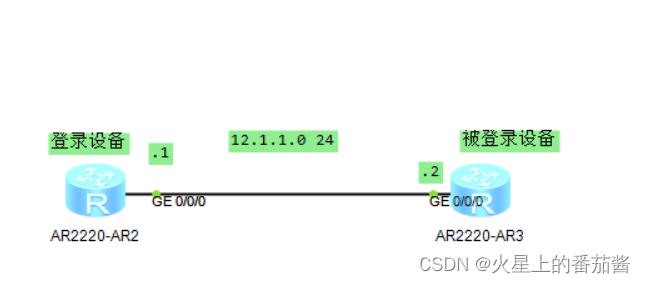
vty线路可允许多人同时访问登录,而console线路只能允许一人听同时登录访问。
telnet登录
R1配置
[R1]int g0/0/0
[R1-GigabitEthernet0/0/0]ip add 12.1.1.1 24
[R1-GigabitEthernet0/0/0]
Nov 22 2022 09:31:42-08:00 R1 %%01IFNET/4/LINK_STATE(l)[1]:The line protocol IP
on the interface GigabitEthernet0/0/0 has entered the UP state.
[R1-GigabitEthernet0/0/0]q
[R1]dis ip in b
*down: administratively down
^down: standby
(l): loopback
(s): spoofing
The number of interface that is UP in Physical is 2
The number of interface that is DOWN in Physical is 2
The number of interface that is UP in Protocol is 2
The number of interface that is DOWN in Protocol is 2
Interface IP Address/Mask Physical Protocol
GigabitEthernet0/0/0 12.1.1.1/24 up up
GigabitEthernet0/0/1 unassigned down down
GigabitEthernet0/0/2 unassigned down down
NULL0 unassigned up up(s)
[R1]q
R2配置
The device is running!
<Huawei>sys
Enter system view, return user view with Ctrl+Z.
[Huawei]sys R2
[R2]dis ip in b
*down: administratively down
^down: standby
(l): loopback
(s): spoofing
The number of interface that is UP in Physical is 2
The number of interface that is DOWN in Physical is 2
The number of interface that is UP in Protocol is 1
The number of interface that is DOWN in Protocol is 3
Interface IP Address/Mask Physical Protocol
GigabitEthernet0/0/0 unassigned up down
GigabitEthernet0/0/1 unassigned down down
GigabitEthernet0/0/2 unassigned down down
NULL0 unassigned up up(s)
[R2]int g0/0/0
[R2-GigabitEthernet0/0/0]ip add 12.1.1.2 24
Nov 22 2022 09:32:25-08:00 R2 %%01IFNET/4/LINK_STATE(l)[0]:The line protocol IP
on the interface GigabitEthernet0/0/0 has entered the UP state.
[R2-GigabitEthernet0/0/0]q
[R2]dis ip in b
*down: administratively down
^down: standby
(l): loopback
(s): spoofing
The number of interface that is UP in Physical is 2
The number of interface that is DOWN in Physical is 2
The number of interface that is UP in Protocol is 2
The number of interface that is DOWN in Protocol is 2
Interface IP Address/Mask Physical Protocol
GigabitEthernet0/0/0 12.1.1.2/24 up up
GigabitEthernet0/0/1 unassigned down down
GigabitEthernet0/0/2 unassigned down down
NULL0 unassigned up up(s)
[R2]user-interface vty ?
INTEGER<0-4,16-20> The first user terminal interface to be configured
[R2]user-interface vty 0 4
[R2-ui-vty0-4]auth
[R2-ui-vty0-4]authentication-mode aaa 创建用户
[R2-ui-vty0-4]q
[R2]local
[R2]aaa
[R2-aaa]local-user user-r1 password cipher huawei123 创建用户
Info: Add a new user.
[R2-aaa]local-user user-r1 privilege level 2 赋权
[R2-aaa]local-user user-r1 service-type ?
8021x 802.1x user
bind Bind authentication user
ftp FTP user
http Http user
ppp PPP user
ssh SSH user
sslvpn Sslvpn user
telnet Telnet user
terminal Terminal user
web Web authentication user
x25-pad X25-pad user
[R2-aaa]local-user user-r1 service-type te
[R2-aaa]local-user user-r1 service-type terminal
[R2-aaa]local-user user-r1 service-type telnet 本地用户user-r1 服务类型telnet
[R2-aaa]q
[R2]
ssh登录
R2配置
配置ip
[R2]dis ip in b
*down: administratively down
^down: standby
(l): loopback
(s): spoofing
The number of interface that is UP in Physical is 2
The number of interface that is DOWN in Physical is 2
The number of interface that is UP in Protocol is 2
The number of interface that is DOWN in Protocol is 2
Interface IP Address/Mask Physical Protocol
GigabitEthernet0/0/0 12.1.1.2/24 up up
GigabitEthernet0/0/1 unassigned down down
GigabitEthernet0/0/2 unassigned down down
NULL0 unassigned up up(s)
[R2]stelnet server enable 开启ssh协议
Info: Succeeded in starting the STELNET server.
[R2]rsa local-key-pair create 创建加密报文的密匙对
The key name will be: Host
% RSA keys defined for Host already exist.
Confirm to replace them? (y/n)[n]:y
The range of public key size is (512 ~ 2048).
NOTES: If the key modulus is greater than 512,
It will take a few minutes.
Input the bits in the modulus[default = 512]:1024
Generating keys...
.........................++++++
............................................................++++++
.....++++++++
.......++++++++
[R2-aaa]local-user caixukun password cipher jntm
Info: Add a new user.
[R2-aaa]local-user caixukun password
[R2-aaa]local-user caixukun privilege l
[R2-aaa]local-user caixukun privilege level 2
[R2-aaa]local-user caixukun service-type ssh
[R2-aaa]q
[R2]user-in v
[R2]user-in vty 0 4
[R2-ui-vty0-4]auth
[R2-ui-vty0-4]authentication-mode aaa
[R2-ui-vty0-4]pr
[R2-ui-vty0-4]protocol in ssh 开启vty线路的ssh访问功能
[R2]ssh user caixukun authentication-type all 定义ssh用户的认证模式
Authentication type setted, and will be in effect next time
[R2]
Nov 22 2022 09:54:26-08:00 R2 %%01SSH/4/SSH_FAIL(l)[1]:Failed to log in through
SSH. (Ip=12.1.1.1, UserName=caixukun, Times=16777216).
[R2]
R1配置
配置ip
[R1]stelnet 12.1.1.2 登录
Please input the username:caixukun
Trying 12.1.1.2 ...
Press CTRL+K to abort
Connected to 12.1.1.2 ...
The server is not authenticated. Continue to access it? (y/n)[n]:y
Nov 22 2022 09:54:24-08:00 R1 %%01SSH/4/CONTINUE_KEYEXCHANGE(l)[1]:The server ha
d not been authenticated in the process of exchanging keys. When deciding whethe
r to continue, the user chose Y.
[R1]
Save the server's public key? (y/n)[n]:y
The server's public key will be saved with the name 12.1.1.2. Please wait...
Nov 22 2022 09:54:26-08:00 R1 %%01SSH/4/SAVE_PUBLICKEY(l)[2]:When deciding wheth
er to save the server's public key 12.1.1.2, the user chose Y.
[R1]
Enter password:
<R2>
<R2>
<R2>sys
Enter system view, return user view with Ctrl+Z.
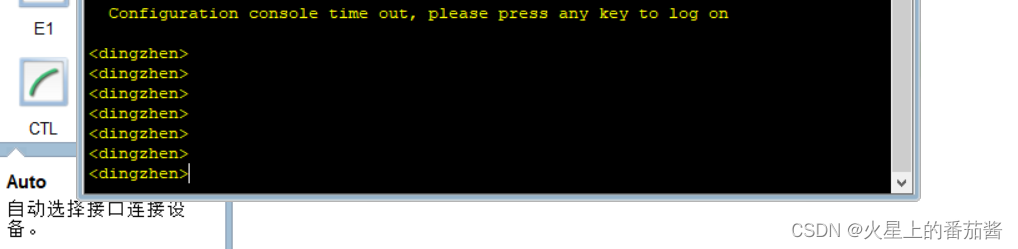
[R2]sys dingzhne 修改R2用户名
[dingzhne]sys dingzhen
[dingzhen]
查看
<Huawei>dir 查看系统文件
Directory of flash:/
Idx Attr Size(Byte) Date Time(LMT) FileName
0 drw- - Oct 17 2022 08:42:53 dhcp
1 -rw- 121,802 May 26 2014 09:20:58 portalpage.zip
2 -rw- 2,263 Oct 17 2022 08:42:47 statemach.efs
3 -rw- 828,482 May 26 2014 09:20:58 sslvpn.zip
1,090,732 KB total (784,464 KB free)
<Huawei>display current-configuration 查看运行配置文件
[V200R003C00]
#
snmp-agent local-engineid 800007DB03000000000000
snmp-agent
#
clock timezone China-Standard-Time minus 08:00:00
#
portal local-server load portalpage.zip
#
drop illegal-mac alarm
#
set cpu-usage threshold 80 restore 75
#
aaa
authentication-scheme default
authorization-scheme default
accounting-scheme default
domain default
domain default_admin
local-user admin password cipher %$%$K8m.Nt84DZ}e#<0`8bmE3Uw}%$%$
local-user admin service-type http
#
firewall zone Local
priority 15
#
interface GigabitEthernet0/0/0
#
interface GigabitEthernet0/0/1
#
interface GigabitEthernet0/0/2
#
interface NULL0
#
user-interface con 0
authentication-mode password
user-interface vty 0 4
user-interface vty 16 20
#
wlan ac
#
return
<Huawei>
<Huawei>save 保存运行配置文件
The current configuration will be written to the device.
Are you sure to continue? (y/n)[n]:y
It will take several minutes to save configuration file, please wait.......
Configuration file had been saved successfully
Note: The configuration file will take effect after being activated
<Huawei>dis sav
<Huawei>dis saved-configuration 查看启动配置文件
[V200R003C00]
#
snmp-agent local-engineid 800007DB03000000000000
snmp-agent
#
clock timezone China-Standard-Time minus 08:00:00
#
portal local-server load portalpage.zip
#
drop illegal-mac alarm
#
set cpu-usage threshold 80 restore 75
#
aaa
authentication-scheme default
authorization-scheme default
accounting-scheme default
domain default
domain default_admin
local-user admin password cipher %$%$K8m.Nt84DZ}e#<0`8bmE3Uw}%$%$
local-user admin service-type http
#
firewall zone Local
priority 15
#
interface GigabitEthernet0/0/0
#
interface GigabitEthernet0/0/1
#
interface GigabitEthernet0/0/2
#
interface NULL0
#
user-interface con 0
authentication-mode password
user-interface vty 0 4
user-interface vty 16 20
#
wlan ac
#
return
<Huawei>
方式:
ftp文件传输协议
TFTP,简单文件传输协议
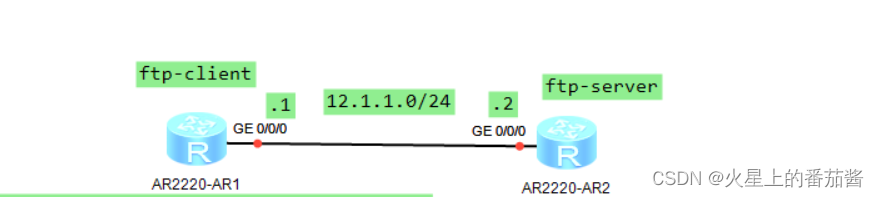
R2配置
配置ip
[R2]ftp se
[R2]ftp server en
[R2]ftp server enable
Info: Succeeded in starting the FTP server
[R2]aaa
[R2-aaa]local-user caixukun password c
[R2-aaa]local-user caixukun password cipher jntm
Info: Add a new user.
[R2-aaa]local-user caixukun privilege level 3 三级权限管理级权限,可以管理文件系统
[R2-aaa]local-user caixukun service-type ftp
[R2-aaa]local-user caixukun ftp-directory flash:
[R2-aaa]q
[R2]dir
^
Error: Unrecognized command found at '^' position.
[R2]q
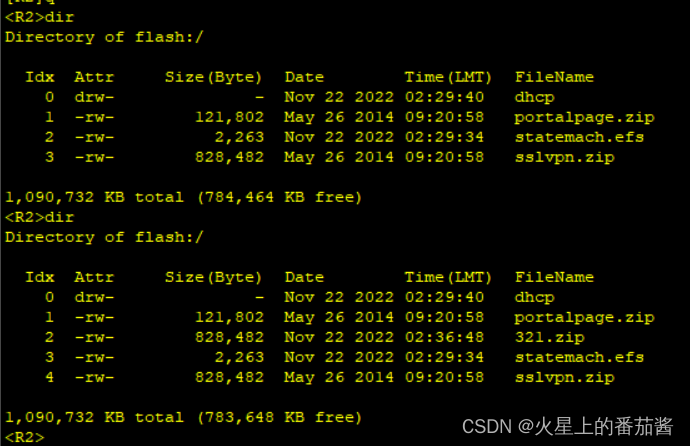
<R2>dir 查看系统文件
Directory of flash:/
Idx Attr Size(Byte) Date Time(LMT) FileName
0 drw- - Nov 22 2022 02:29:40 dhcp
1 -rw- 121,802 May 26 2014 09:20:58 portalpage.zip
2 -rw- 2,263 Nov 22 2022 02:29:34 statemach.efs
3 -rw- 828,482 May 26 2014 09:20:58 sslvpn.zip
1,090,732 KB total (784,464 KB free)
R1配置
配置ip
<R1>ftp 12.1.1.2
Trying 12.1.1.2 ...
Press CTRL+K to abort
Connected to 12.1.1.2.
220 FTP service ready.
User(12.1.1.2:(none)):caixukun
331 Password required for caixukun.
Enter password:
230 User logged in.
[R1-ftp]get statemach.efs 123.efs 下载文件
200 Port command okay.
150 Opening ASCII mode data connection for statemach.efs.
226 Transfer complete.
FTP: 2263 byte(s) received in 0.220 second(s) 10.28Kbyte(s)/sec.
[R1-ftp]q
221 Server closing.
<R1>dir
Directory of flash:/
Idx Attr Size(Byte) Date Time(LMT) FileName
0 drw- - Nov 22 2022 02:29:45 dhcp
1 -rw- 121,802 May 26 2014 09:20:58 portalpage.zip
2 -rw- 2,263 Nov 22 2022 02:35:43 123.efs
3 -rw- 2,263 Nov 22 2022 02:29:39 statemach.efs
4 -rw- 828,482 May 26 2014 09:20:58 sslvpn.zip
1,090,732 KB total (784,456 KB free)
<R1>ftp 12.1.1.2
Trying 12.1.1.2 ...
Press CTRL+K to abort
Connected to 12.1.1.2.
220 FTP service ready.
User(12.1.1.2:(none)):caixukun
331 Password required for caixukun.
Enter password:
230 User logged in.
[R1-ftp]put sslvpn.zip 321.zip 上传文件
200 Port command okay.
150 Opening ASCII mode data connection for 321.zip.
1% 3% 5% 7% 9%11%13%15%17%19%21%23%25%27%29%31%33%35%37%39%
41%43%45%47%49%51%53%55%57%59%61%63%65%67%69%71%73%75%77%79%
81%83%85%87%88%90%92%94%96%98%
100%
226 Transfer complete.
FTP: 828482 byte(s) sent in 2.910 second(s) 284.70Kbyte(s)/sec.
[R1-ftp]
来到R2查看系统文件
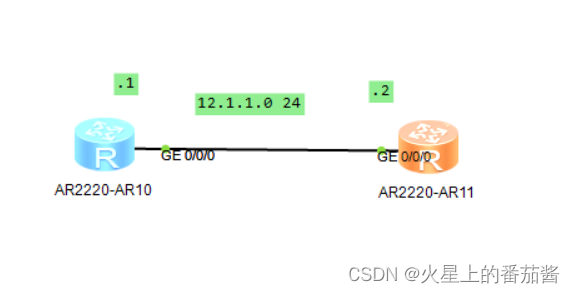
R1 R2 配置接口ip
[R1]dis ip in b
*down: administratively down
^down: standby
(l): loopback
(s): spoofing
The number of interface that is UP in Physical is 2
The number of interface that is DOWN in Physical is 2
The number of interface that is UP in Protocol is 2
The number of interface that is DOWN in Protocol is 2
Interface IP Address/Mask Physical Protocol
GigabitEthernet0/0/0 12.1.1.1/24 up up
GigabitEthernet0/0/1 unassigned down down
GigabitEthernet0/0/2 unassigned down down
NULL0 unassigned up up(s)
[R1]display ip routing-table 查看路由表
Route Flags: R - relay, D - download to fib
------------------------------------------------------------------------------
Routing Tables: Public
Destinations : 7 Routes : 7
Destination/Mask Proto Pre Cost Flags NextHop Interface
12.1.1.0/24 Direct 0 0 D 12.1.1.1 GigabitEthernet
0/0/0
12.1.1.1/32 Direct 0 0 D 127.0.0.1 GigabitEthernet
0/0/0
12.1.1.255/32 Direct 0 0 D 127.0.0.1 GigabitEthernet
0/0/0
127.0.0.0/8 Direct 0 0 D 127.0.0.1 InLoopBack0
127.0.0.1/32 Direct 0 0 D 127.0.0.1 InLoopBack0
127.255.255.255/32 Direct 0 0 D 127.0.0.1 InLoopBack0
255.255.255.255/32 Direct 0 0 D 127.0.0.1 InLoopBack0
[R1]
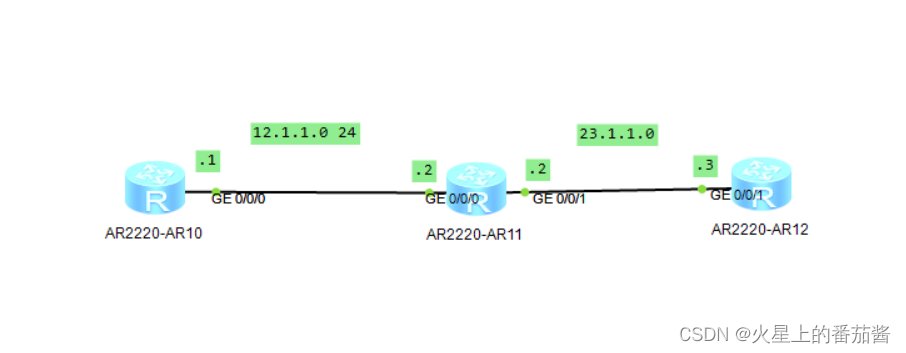
配置好R1 R2 R3 的接口ip
去R1 ping R3
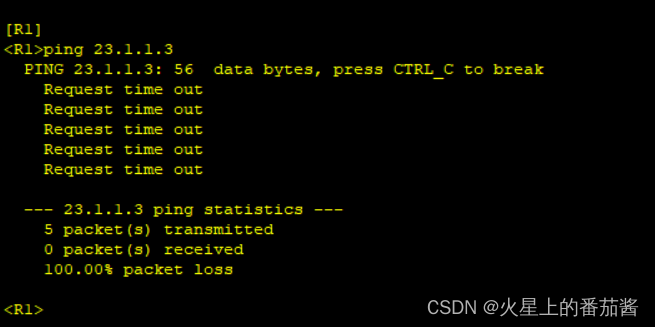
ping不通,一眼丁真
[R1]ip route-static 23.1.1.0 24 g0/0/0 12.1.1.2
[R1]
目的网段,与其子网掩码
出接口
吓一跳地址
[R3]ip route-static 12.1.1.0 24 g0/0/1 23.1.1.2
[R3]
有来有往
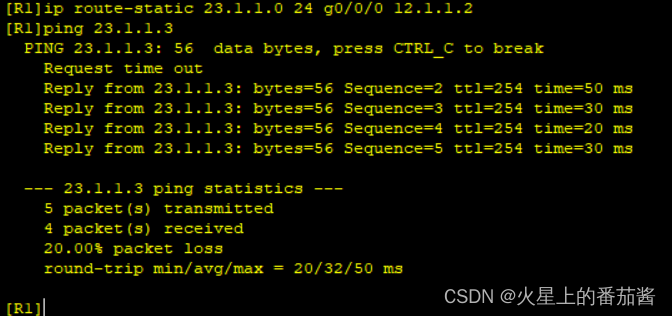

芝士雪豹
1.什么是静态路由?
静态路由是由管理员手工添加的路由条目。
通过静态路由添加的都是非直连网段。
2.静态路由有什么特点?
第一静态路由器的添加和删除都需要手工完成;
第二静态路由无法适应网络的动态变更。
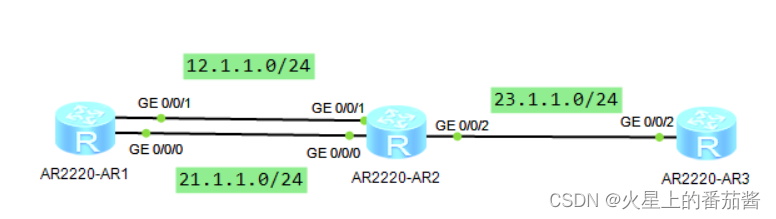
R1 配置接口ip
[R1]ip route-static 23.1.1.0 24 g0/0/1 12.1.1.2
[R1]ip route-static 23.1.1.0 24 g0/0/0 21.1.1.2
[R1]dis ip routing-table
Route Flags: R - relay, D - download to fib
------------------------------------------------------------------------------
Routing Tables: Public
Destinations : 11 Routes : 12
Destination/Mask Proto Pre Cost Flags NextHop Interface
12.1.1.0/24 Direct 0 0 D 12.1.1.1 GigabitEthernet
0/0/1
12.1.1.1/32 Direct 0 0 D 127.0.0.1 GigabitEthernet
0/0/1
12.1.1.255/32 Direct 0 0 D 127.0.0.1 GigabitEthernet
0/0/1
21.1.1.0/24 Direct 0 0 D 21.1.1.1 GigabitEthernet
0/0/0
21.1.1.1/32 Direct 0 0 D 127.0.0.1 GigabitEthernet
0/0/0
21.1.1.255/32 Direct 0 0 D 127.0.0.1 GigabitEthernet
0/0/0
23.1.1.0/24 Static 60 0 D 12.1.1.2 GigabitEthernet
0/0/1
Static 60 0 D 21.1.1.2 GigabitEthernet
0/0/0
127.0.0.0/8 Direct 0 0 D 127.0.0.1 InLoopBack0
127.0.0.1/32 Direct 0 0 D 127.0.0.1 InLoopBack0
127.255.255.255/32 Direct 0 0 D 127.0.0.1 InLoopBack0
255.255.255.255/32 Direct 0 0 D 127.0.0.1 InLoopBack0
[R1]
R2配置接口ip
R3配置接口ip
1.什么是等价路由?
所谓等价路由就是路由器通过路由选举规则比较不出优劣的路由。
2.什么场景下可以使用等价路由?
当网络设备有多条去往目标网段的路径,并且这些路径的带宽一致或带宽差异不大时,可以使用等价路由。
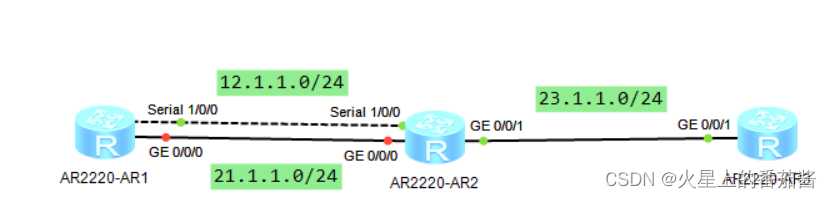
R1 R2 R3配置接口ip
[R1]ip route-static 23.1.1.0 24 s1/0/0 12.1.1.2 preference 61
[R1]ip route-static 23.1.1.0 24 g0/0/0 21.1.1.2
[R1]dis ip ro
Route Flags: R - relay, D - download to fib
------------------------------------------------------------------------------
Routing Tables: Public
Destinations : 12 Routes : 12
Destination/Mask Proto Pre Cost Flags NextHop Interface
12.1.1.0/24 Direct 0 0 D 12.1.1.1 Serial1/0/0
12.1.1.1/32 Direct 0 0 D 127.0.0.1 Serial1/0/0
12.1.1.2/32 Direct 0 0 D 12.1.1.2 Serial1/0/0
12.1.1.255/32 Direct 0 0 D 127.0.0.1 Serial1/0/0
21.1.1.0/24 Direct 0 0 D 21.1.1.1 GigabitEthernet
0/0/0
21.1.1.1/32 Direct 0 0 D 127.0.0.1 GigabitEthernet
0/0/0
21.1.1.255/32 Direct 0 0 D 127.0.0.1 GigabitEthernet
0/0/0
23.1.1.0/24 Static 60 0 D 21.1.1.2 GigabitEthernet
0/0/0
127.0.0.0/8 Direct 0 0 D 127.0.0.1 InLoopBack0
127.0.0.1/32 Direct 0 0 D 127.0.0.1 InLoopBack0
127.255.255.255/32 Direct 0 0 D 127.0.0.1 InLoopBack0
255.255.255.255/32 Direct 0 0 D 127.0.0.1 InLoopBack0
[R1]int g0/0/0
[R1-GigabitEthernet0/0/0]shutdown 模拟线路故障
Oct 19 2022 10:48:38-08:00 R1 %%01IFPDT/4/IF_STATE(l)[9]:Interface GigabitEthern
et0/0/0 has turned into DOWN state.
[R1-GigabitEthernet0/0/0]
[R1-GigabitEthernet0/0/0]
Oct 19 2022 10:48:38-08:00 R1 %%01IFNET/4/LINK_STATE(l)[10]:The line protocol IP
on the interface GigabitEthernet0/0/0 has entered the DOWN state.
[R1-GigabitEthernet0/0/0]q
[R1]dis ip ro
Route Flags: R - relay, D - download to fib
------------------------------------------------------------------------------
Routing Tables: Public
Destinations : 9 Routes : 9
Destination/Mask Proto Pre Cost Flags NextHop Interface
12.1.1.0/24 Direct 0 0 D 12.1.1.1 Serial1/0/0
12.1.1.1/32 Direct 0 0 D 127.0.0.1 Serial1/0/0
12.1.1.2/32 Direct 0 0 D 12.1.1.2 Serial1/0/0
12.1.1.255/32 Direct 0 0 D 127.0.0.1 Serial1/0/0
23.1.1.0/24 Static 61 0 D 12.1.1.2 Serial1/0/0
127.0.0.0/8 Direct 0 0 D 127.0.0.1 InLoopBack0
127.0.0.1/32 Direct 0 0 D 127.0.0.1 InLoopBack0
127.255.255.255/32 Direct 0 0 D 127.0.0.1 InLoopBack0
255.255.255.255/32 Direct 0 0 D 127.0.0.1 InLoopBack0
[R1]
1.什么是浮动静态路由?
当多条链路带宽差异特别大的时候,我们让高带宽链路成为主链路,低带宽成为备份链路。这就是浮动静态路由。
2.如何让高带宽链路成为主链路?
根据路由的选举规则调整路由的优劣,让高带宽链路更优。
我们可以将高带宽链路的优先级改低,或将低带宽链路的优先级改高。
3.路由的选举规则是什么?
第一步比较掩码长度,越长越优
第二步比较路由优先级,越小越优
第三步比较路由开销值,越小越优
4.路由选举过程中比较的参数代表什么?
掩码长度:掩码越长表示网段越精确,所以掩码越长越优
路由优先级:不同的路由协议拥有不同的优先级,优先级表示通过这种方式学到的路由的可靠程度,越小越优
路由开销值:开销值描述从路由器本地到达目标网段的距离有多远
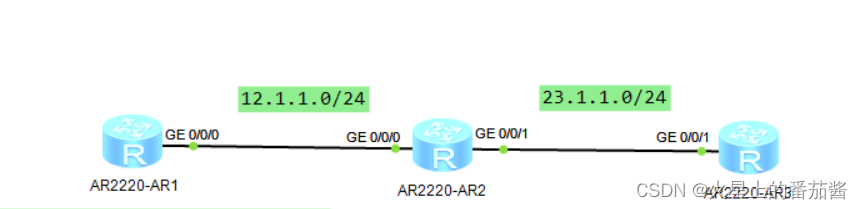
R1 R2 R3分别配置接口IP
2.配置缺省静态路由:
[R1]ip route-static 0.0.0.0 0 g0/0/0 12.1.1.2
1.什么是缺省静态路由?
缺省静态路由是前缀全0,掩码也全0的路由,即:0.0.0.0/0,这种路由可以代表所有网段。
2.什么时候使用缺省静态路由?
一般在园区网的出口路由器上配置缺省静态路由,以实现对公网内所有网段的访问。
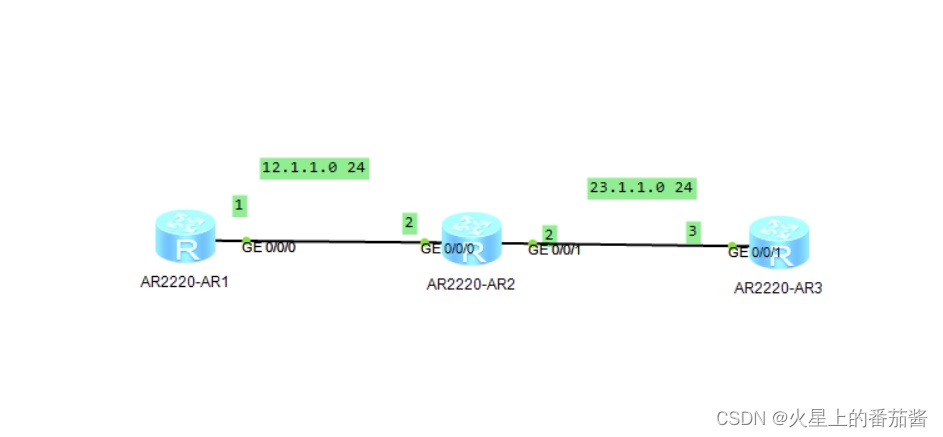
配置R1 R2 R3 ip
此时查看R1路由表
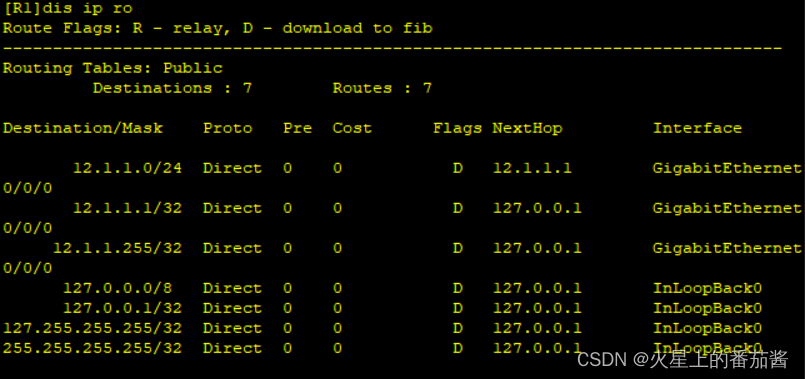
[R1]rip 100
[R1-rip-100]net 12.0.0.0
[R2]rip 100
[R2-rip-100]net 12.0.0.0
[R2-rip-100]net 23.0.0.0
[R3]rip 100
[R3-rip-100]net 23.0.0.0
配置完后R1路由表
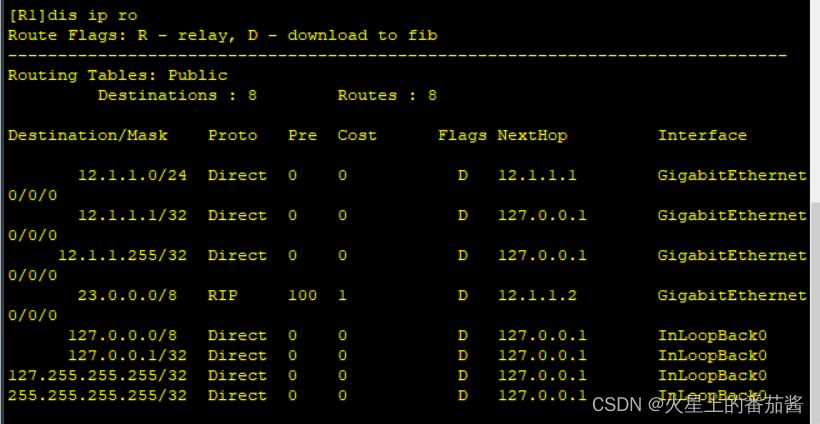
1.RIP协议如何工作?
在路由器上开启RIP协议,并将路由器的直连网段宣告进RIP后,RIP会将这些直连网段信息封装成RIP协议报文,
发送给邻居路由器。这样邻居路由器间就可以相互学习对方的网段信息,实现网络的互通。
2.如何配置基本的RIP网络?
第一步开启RIP协议,第二步将路由器的直连网段宣告进RIP协议。
3.RIP如何计算开销值?
RIP是基于跳数来计算的开销值。所谓跳数即是跨越网段的数量。
RIP路由的最大网络跳数为15,如果一条RIP路由的跳数到达16,路由器则认为该路由不可达。
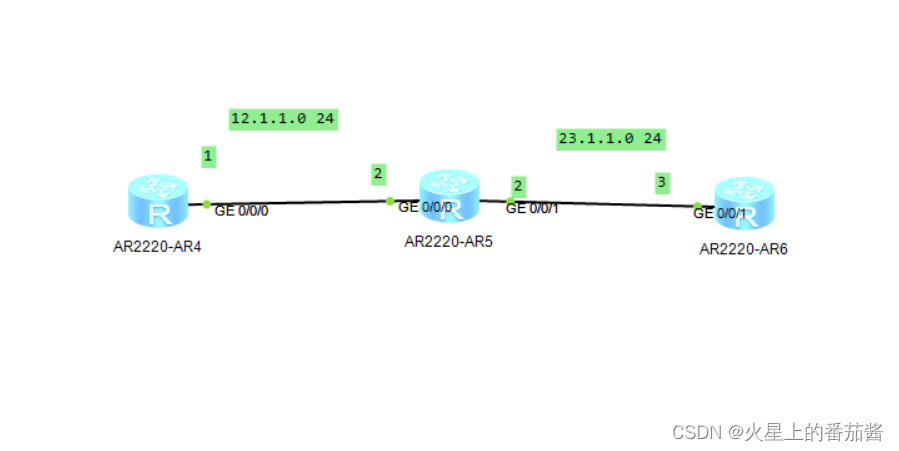
配置IP
配置RIP
[R1]dis rip
Public VPN-instance
RIP process : 100
RIP version : 1
Preference : 100
Checkzero : Enabled
Default-cost : 0
Summary : Enabled
Host-route : Enabled
Maximum number of balanced paths : 8
Update time : 30 sec Age time : 180 sec
Garbage-collect time : 120 sec
Graceful restart : Disabled
BFD : Disabled
Silent-interfaces : None
Default-route : Disabled
Verify-source : Enabled
Networks :
12.0.0.0
Configured peers : None
Number of routes in database : 3
Number of interfaces enabled : 1
Triggered updates sent : 0
Number of route changes : 1
Number of replies to queries : 1
Number of routes in ADV DB : 2
Total count for 1 process :
Number of routes in database : 3
Number of interfaces enabled : 1
Number of routes sendable in a periodic update : 3
Number of routes sent in last periodic update : 1
[R1]
[R1]
[R1]
[R1]
[R1]rip 100
[R1-rip-100]timers rip 10 60 40
[R1-rip-100]q
[R1]dis rip
Public VPN-instance
RIP process : 100
RIP version : 1
Preference : 100
Checkzero : Enabled
Default-cost : 0
Summary : Enabled
Host-route : Enabled
Maximum number of balanced paths : 8
Update time : 10 sec Age time : 60 sec
Garbage-collect time : 40 sec
Graceful restart : Disabled
BFD : Disabled
Silent-interfaces : None
Default-route : Disabled
Verify-source : Enabled
Networks :
12.0.0.0
Configured peers : None
Number of routes in database : 3
Number of interfaces enabled : 1
Triggered updates sent : 0
Number of route changes : 1
Number of replies to queries : 1
Number of routes in ADV DB : 2
Total count for 1 process :
Number of routes in database : 3
Number of interfaces enabled : 1
Number of routes sendable in a periodic update : 3
Number of routes sent in last periodic update : 0
[R1]
1.RIP有哪些定时器?
三种:更新定时器、老化定时器、垃圾回收定时器
2.RIP的定时器有哪些作用?
更新定时器(30s):运行RIP的路由器会以30s为周期,向邻居发送RIP路由。
老化定时器(180s):当路由器在180s内没有收到一条RIP路由的更新,那么路由器会认为这条RIP路由已经失效。
垃圾回收定时器(120s):当路由器被设置为失效后,不会被立即删除,需要再等待120s才会被彻底删除。
3.为什么RIP需要周期性的发送路由?
因为RIP基于UDP发送协议报文,而UDP没有确认机制,所以路由器将路由发送出去以后不能得知邻居是否收到了RIP路由。
为了保障路由的可靠更新,只有让路由器周期性的发送RIP路由,这样从概率上来说能够保证邻居路由器一定可以学习到RIP路由。
4.如何修改RIP的定时器?
进入RIP协议对定时器做修改。在修改定时器的时候只需要保证本地的路由老化时间比邻居的路由更新时间长就可以了。
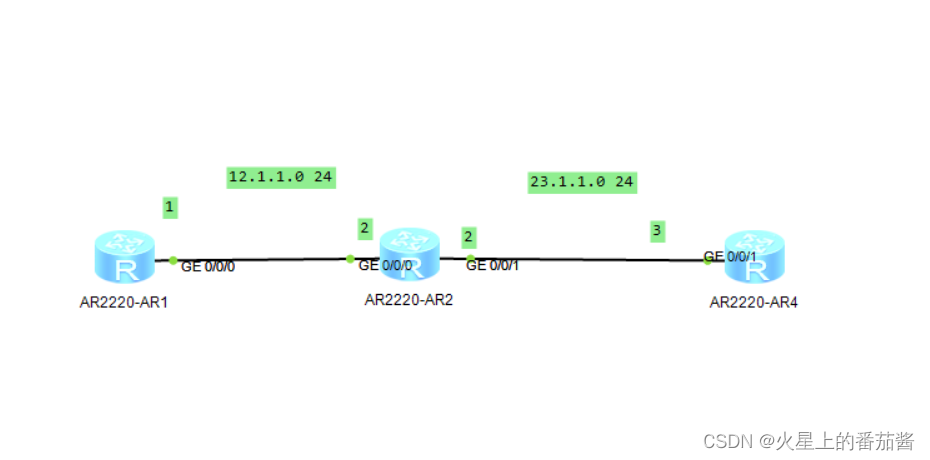
R1 R2 R3配置接口ip
R1 R2 配置RIP
把R2连接R3的接口配置为静默接口
[R2]rip 100
[R2-rip-100]si
[R2-rip-100]silent-interface g0/0/1
[R2-rip-100]q
1.什么是RIP的静默接口?
当路由器的接口被设置为RIP的静默接口后,这个接口将不会再向外发送RIP的组播或广播报文。
2.什么时候使用RIP的静默接口?
当路由器对端设备没有开启RIP的时候,我们就可以将本地连接对端设备的接口设置为RIP的静默接口。
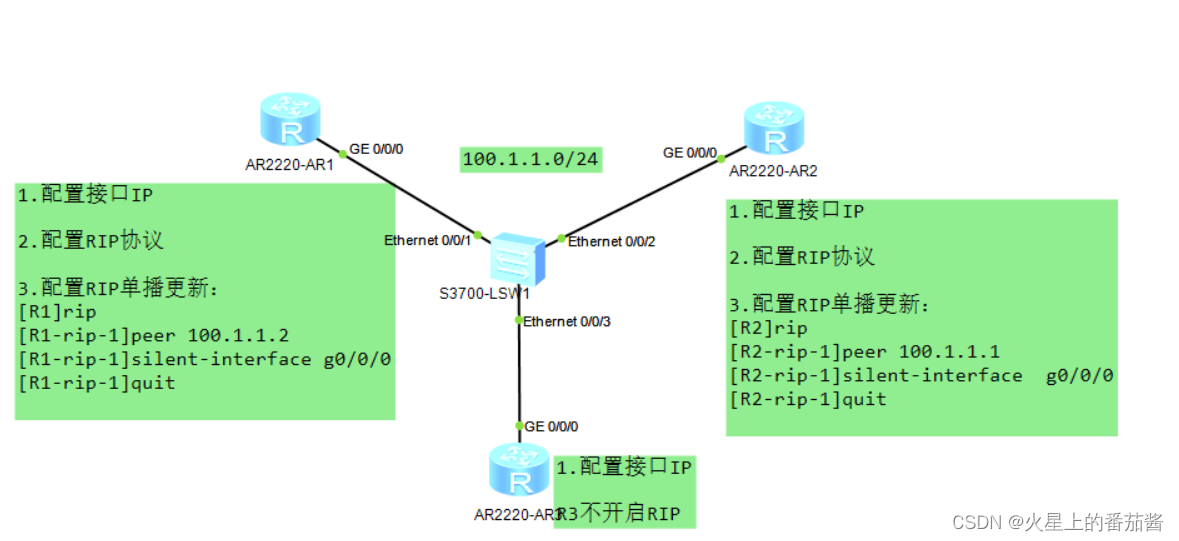
1.什么是RIP的单播更新?
单播更新是指让邻居路由器间通过单播报文交互RIP路由信息。
2.什么时候使用RIP单播更新?
当网络内有路由器没有启用RIP的时候,我们就可以让启用了RIP的路由器使用单播更新,单独交互RIP路由信息,
这样就不会影响没有开启RIP协议的路由器了。
3.开启RIP单播更新时需要注意什么?
开启了RIP的单播更新功能后,RIP的组播或广播更新功能并没有关闭,所以还需要使用静默接口设置,关闭接口
的组播和广播更新功能,这样就只有单播更新功能留下来了。
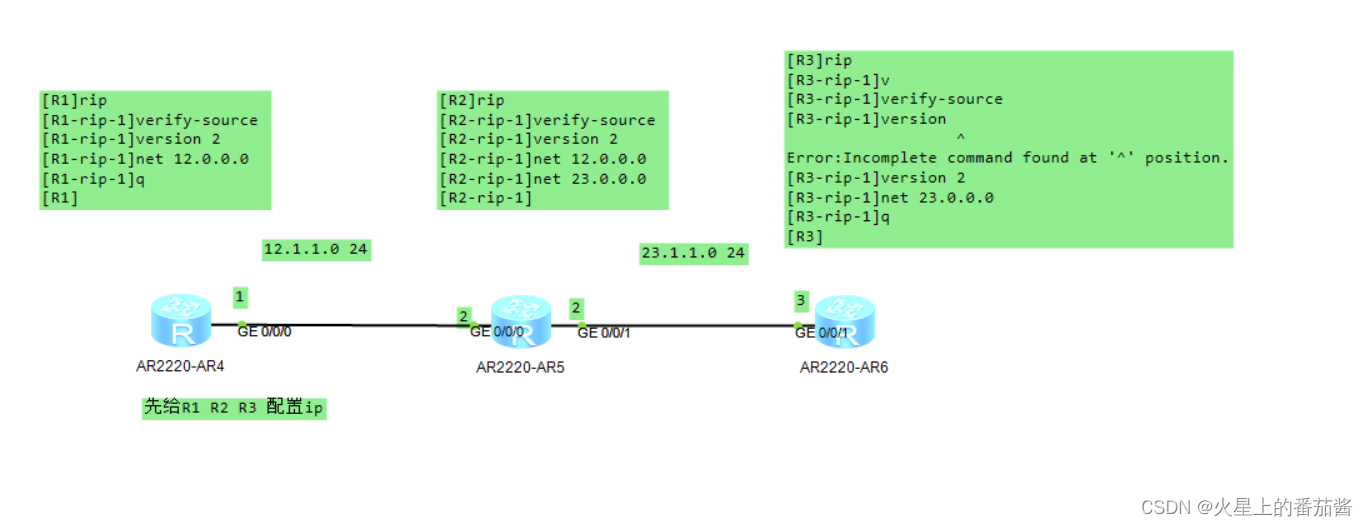
[R1]dis ip ro
Route Flags: R - relay, D - download to fib
------------------------------------------------------------------------------
Routing Tables: Public
Destinations : 8 Routes : 8
Destination/Mask Proto Pre Cost Flags NextHop Interface
12.1.1.0/24 Direct 0 0 D 12.1.1.1 GigabitEthernet
0/0/0
12.1.1.1/32 Direct 0 0 D 127.0.0.1 GigabitEthernet
0/0/0
12.1.1.255/32 Direct 0 0 D 127.0.0.1 GigabitEthernet
0/0/0
23.1.1.0/24 RIP 100 1 D 12.1.1.2 GigabitEthernet 自动汇总关闭
0/0/0
127.0.0.0/8 Direct 0 0 D 127.0.0.1 InLoopBack0
127.0.0.1/32 Direct 0 0 D 127.0.0.1 InLoopBack0
127.255.255.255/32 Direct 0 0 D 127.0.0.1 InLoopBack0
255.255.255.255/32 Direct 0 0 D 127.0.0.1 InLoopBack0
[R1]
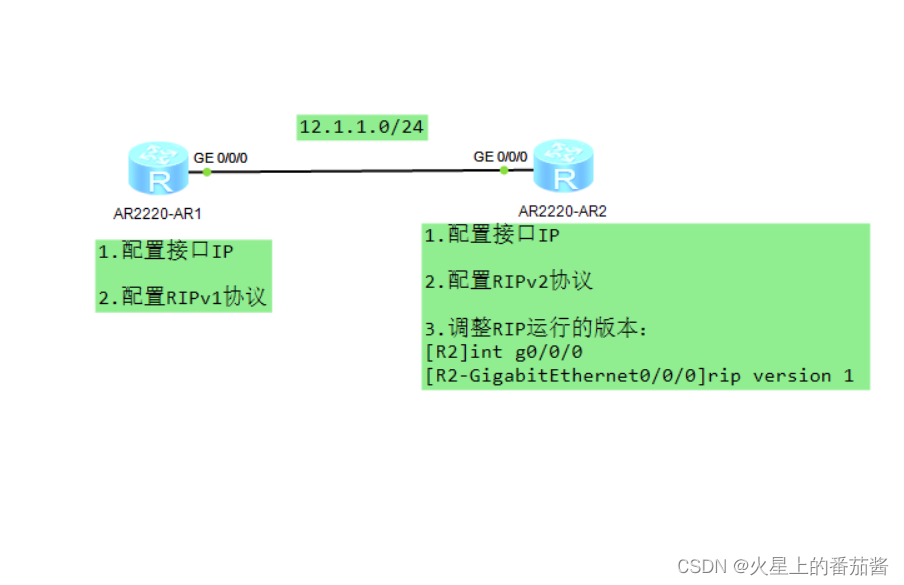
1.什么是自动汇总?
当子网路由传递到主类网段边界的时候,路由器会将子网路由汇总为主类网段再发送出去。
2.RIPv1和RIPv2对于自动汇总有什么区别?
RIPv1和RIPv2都有自动汇总机制,RIPv1无法关闭自动汇总,RIPv2可以关闭自动汇总,并且
对于华为设备而言当我们启用RIPv2的时候自动汇总机制已经被默认关闭。
所以我们才会看到通过RIPv1学到的23.0.0.0/8路由和通过RIPv2学到的23.1.1.0/24路由。
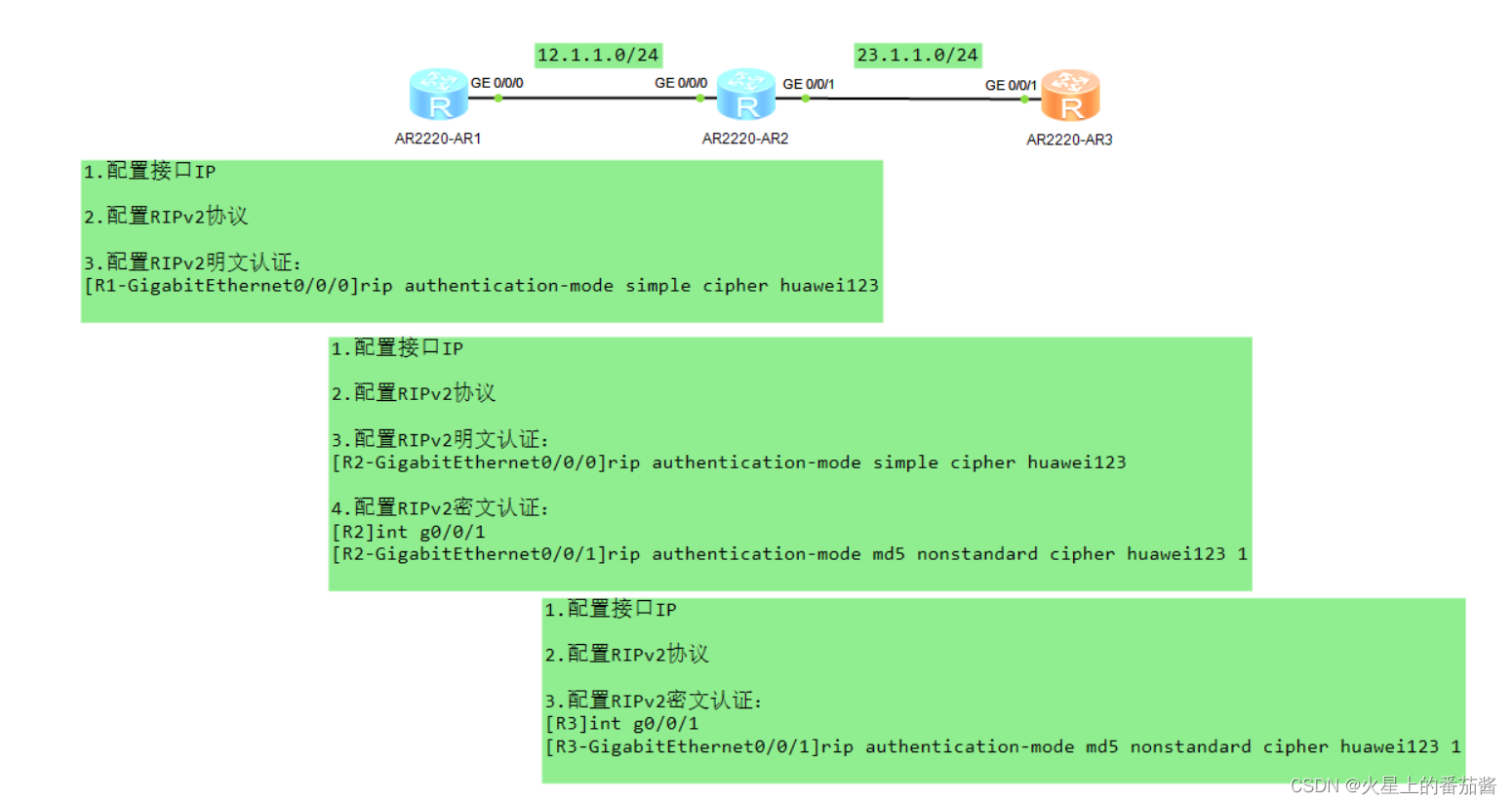
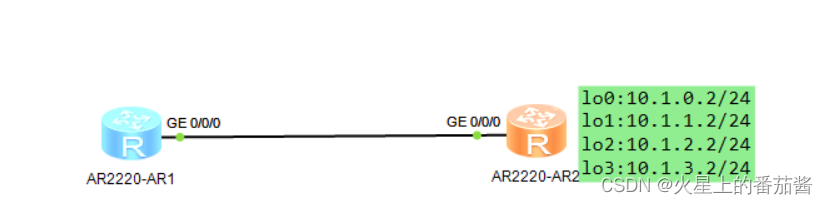
R1 R2配置接口ip RIPV2认证
[R2]int lo0
[R2-LoopBack0]ip add 10.1.0.2 24
[R2-LoopBack0]q
[R2]int lo1
[R2-LoopBack1]ip add 10.1.1.2 24
[R2-LoopBack1]int lo2
[R2-LoopBack2]ip add 10.1.2.2 24
[R2-LoopBack2]int l03
[R2-LoopBack3]ip add 10.1.3.2 24
[R2-LoopBack3]q
[R2]rip
[R2-rip-1]verify-source
[R2-rip-1]version 2
[R2-rip-1]net 12.0.0.0
[R2-rip-1]net 10.0.0.0
[R2-rip-1]q
[R2]int g0/0/0
[R2-GigabitEthernet0/0/0]rip summary-address 10.1.0.0 255.255.252.0
[R2-GigabitEthernet0/0/0]q
[R2]
1.为什么要配置手工汇总?
第一可以减少网络中路由条目的数量;
第二可以可以增强网络的稳定性,因为汇总路由中包含的
部分明细路由失效是不会影响汇总路由的,只有汇总路由
中包含的所有明细路由失效,汇总路由才会消失。
2.RIPv2手工汇总如何配置?
进入接口实现RIPv2手工汇总,RIPv1无法实现手工汇总
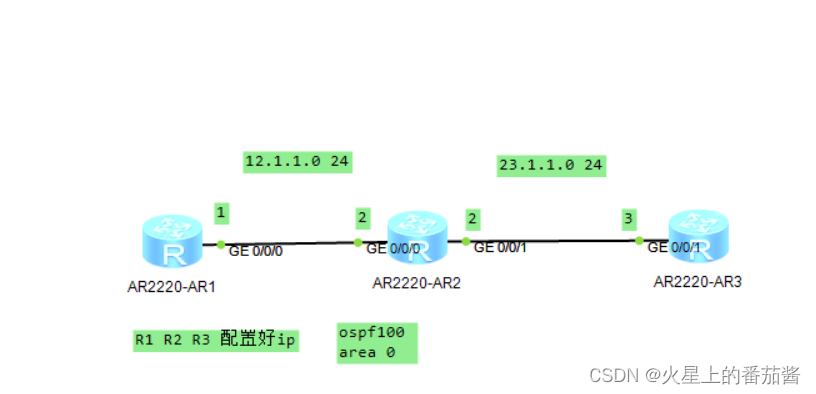
[R1]ospf 100
[R1-ospf-100]area 0
[R1-ospf-100-area-0.0.0.0]network 12.1.1.0 0.0.0.255
[R1-ospf-100-area-0.0.0.0]q
[R1]display ospf peer 查看ospf邻居
OSPF Process 100 with Router ID 12.1.1.1
Neighbors
Area 0.0.0.0 interface 12.1.1.1(GigabitEthernet0/0/0)'s neighbors
Router ID: 12.1.1.2 Address: 12.1.1.2
State: Full Mode:Nbr is Master Priority: 1
DR: 12.1.1.2 BDR: 12.1.1.1 MTU: 0
Dead timer due in 35 sec
Retrans timer interval: 5
Neighbor is up for 00:06:38
Authentication Sequence: [ 0 ]
[R1]
[R2]ospf 100
[R2-ospf-100]area 0
[R2-ospf-100-area-0.0.0.0]network 12.1.1.0 0.0.0.255
[R2-ospf-100-area-0.0.0.0]network 23.1.1.0 0.0.0.255
[R2-ospf-100-area-0.0.0.0]quit
[R3]ospf 100
[R3-ospf-100]area 0
[R3-ospf-100-area-0.0.0.0]network 23.1.1.0 0.0.0.255
[R3-ospf-100-area-0.0.0.0]quit
继续上一个实验,来到R1
[R1]dis ospf p
OSPF Process 100 with Router ID 12.1.1.1
Neighbors
Area 0.0.0.0 interface 12.1.1.1(GigabitEthernet0/0/0)'s neighbors
Router ID: 12.1.1.2 Address: 12.1.1.2
State: Full Mode:Nbr is Master Priority: 1
DR: 12.1.1.2 BDR: 12.1.1.1 MTU: 0
Dead timer due in 36 sec
Retrans timer interval: 5
Neighbor is up for 00:14:54
Authentication Sequence: [ 0 ]
[R1]ospf 100 router-id 1.1.1.1
Info: The configuration succeeded. You need to restart the OSPF process to valid
ate the new router ID.
[R1-ospf-100]q
[R1]q
[R1]display ospf peer
OSPF Process 100 with Router ID 1.1.1.1
Neighbors
Area 0.0.0.0 interface 12.1.1.1(GigabitEthernet0/0/0)'s neighbors
Router ID: 12.1.1.2 Address: 12.1.1.2
State: Full Mode:Nbr is Master Priority: 1
DR: 12.1.1.2 BDR: None MTU: 0
Dead timer due in 28 sec
Retrans timer interval: 5
Neighbor is up for 00:00:08
Authentication Sequence: [ 0 ]
[R1]
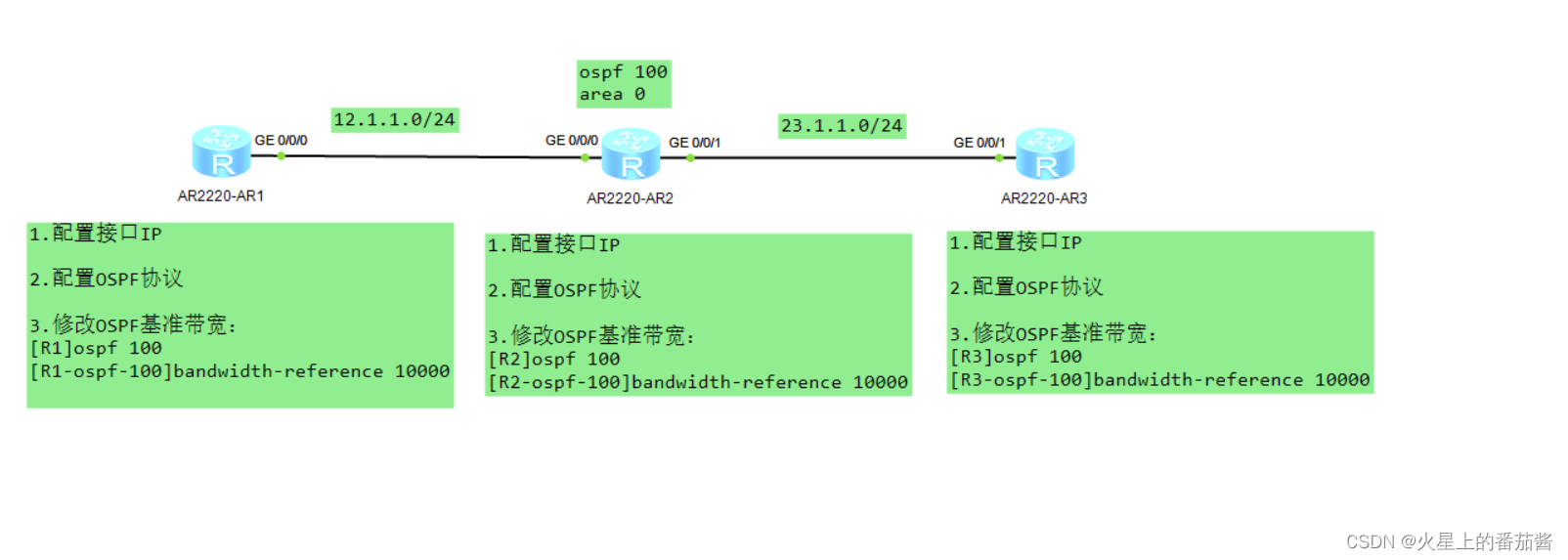
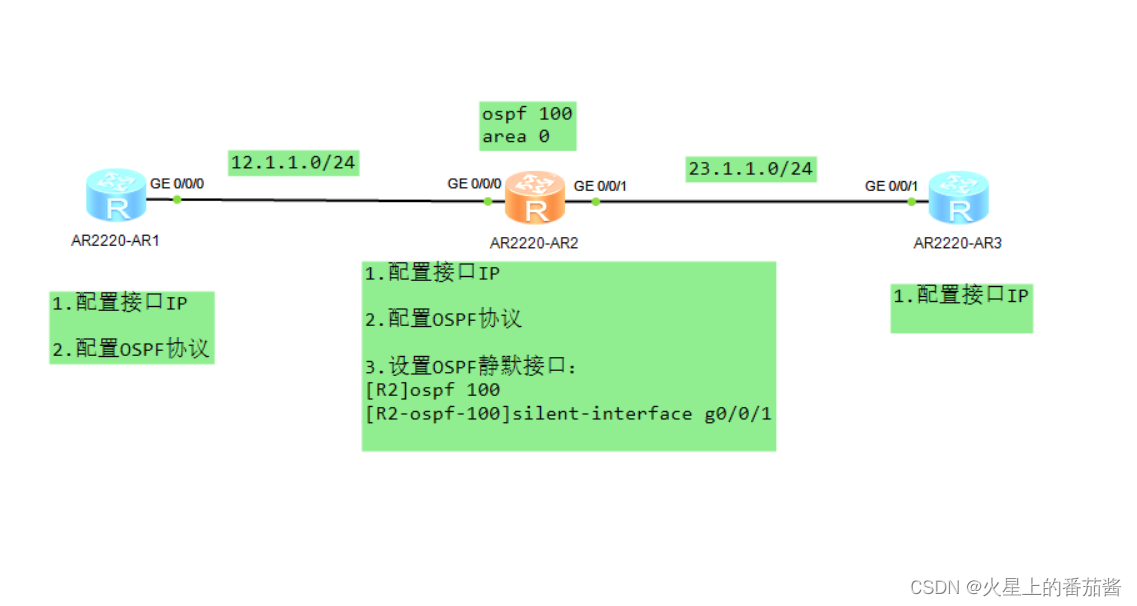
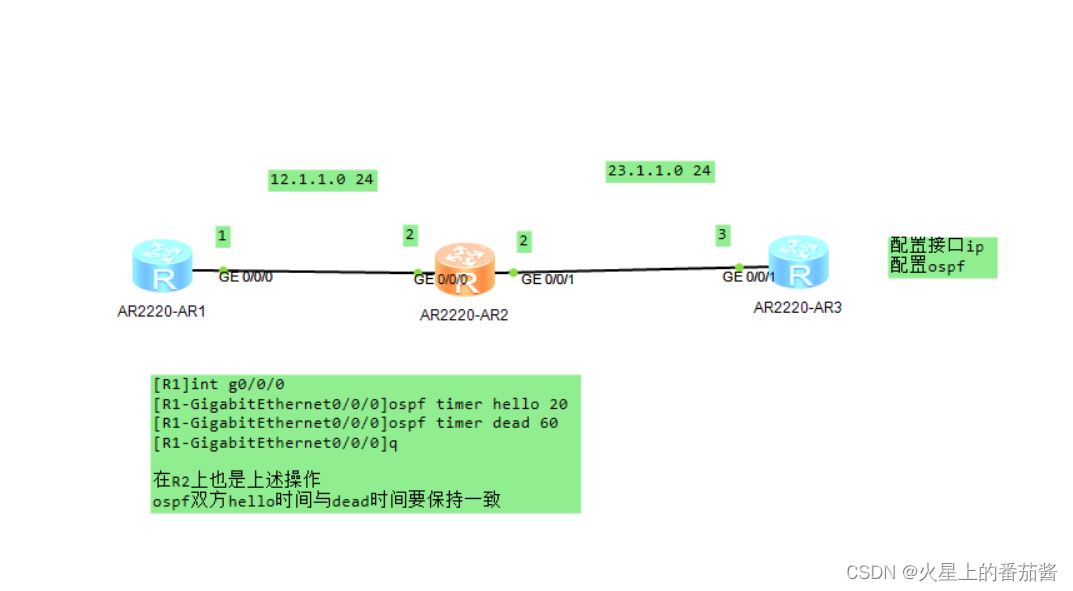
19,ospf修改DR/BDR角色
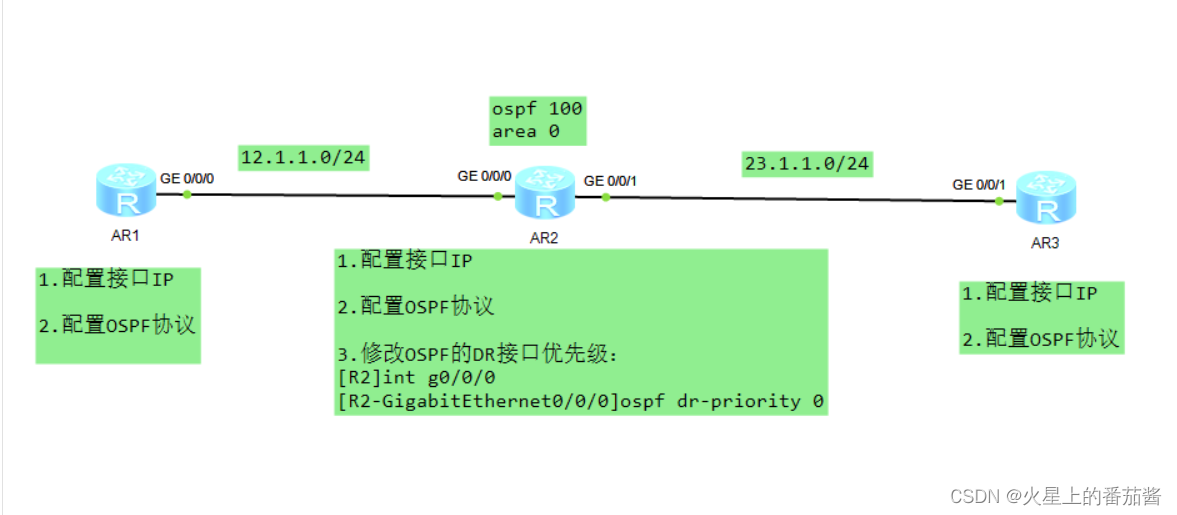
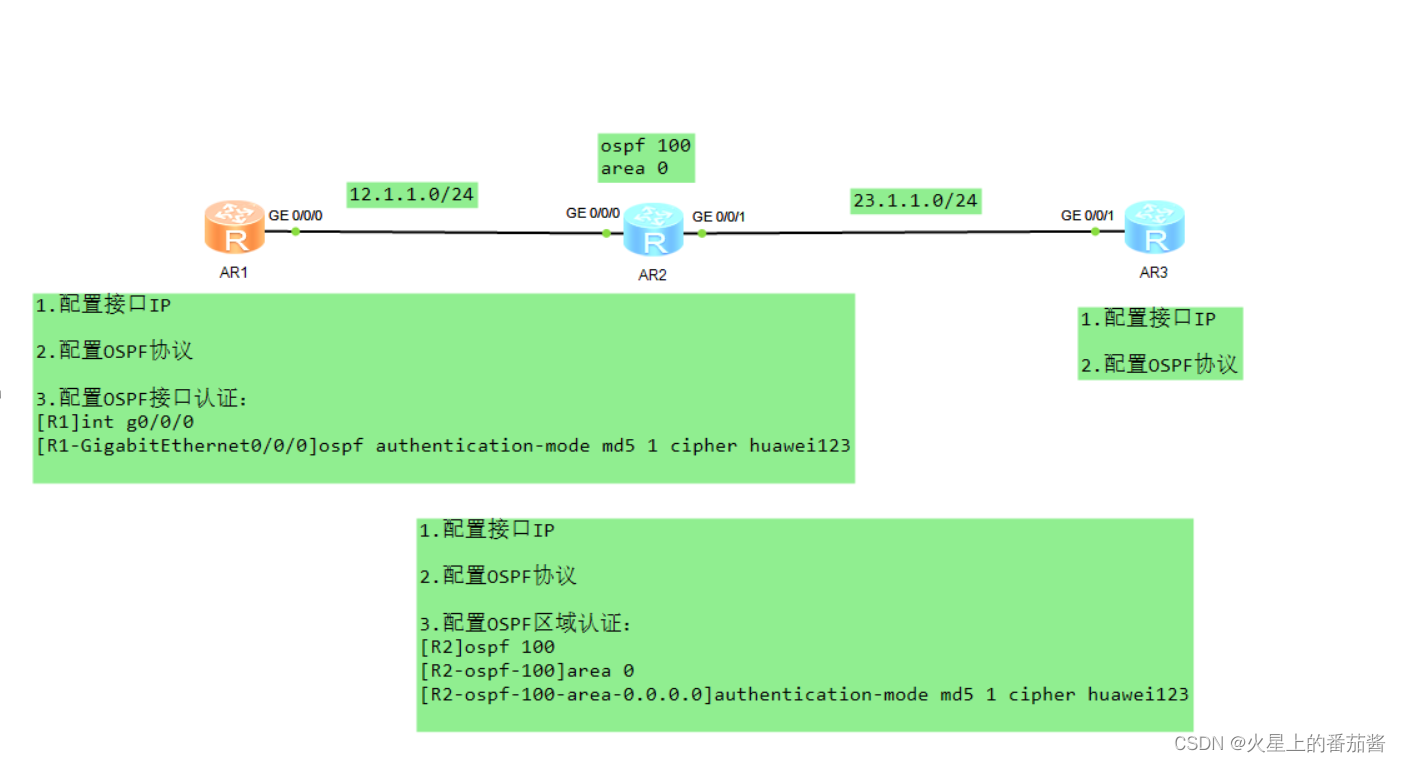
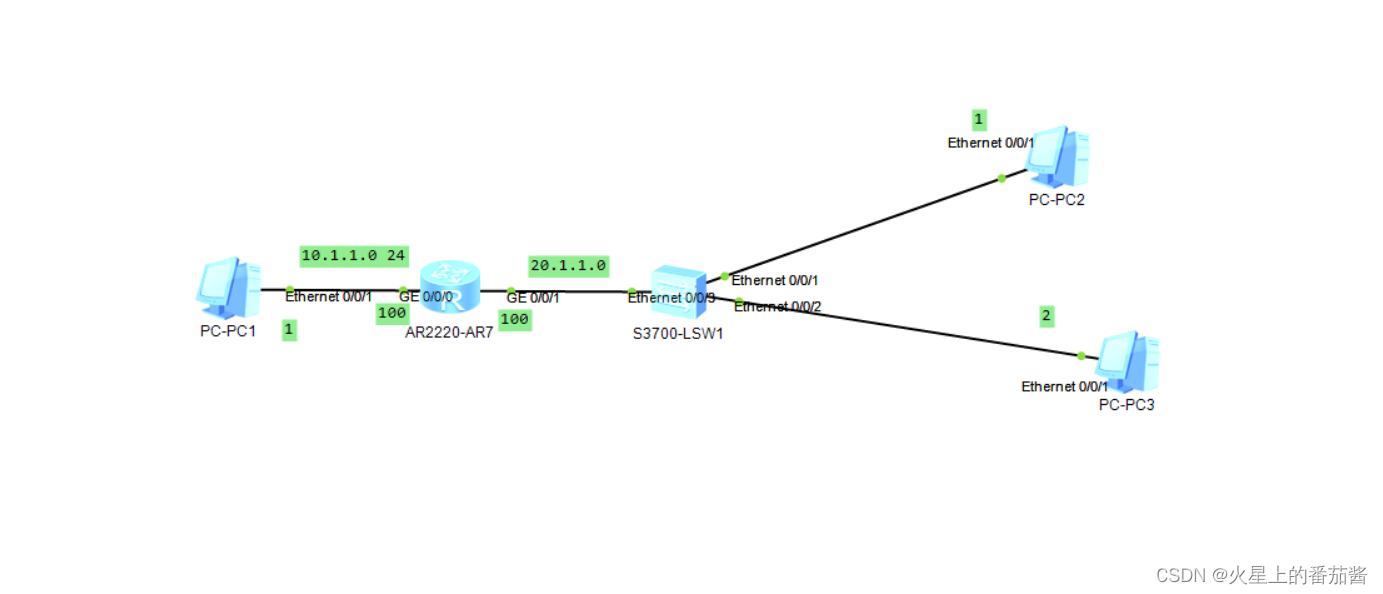
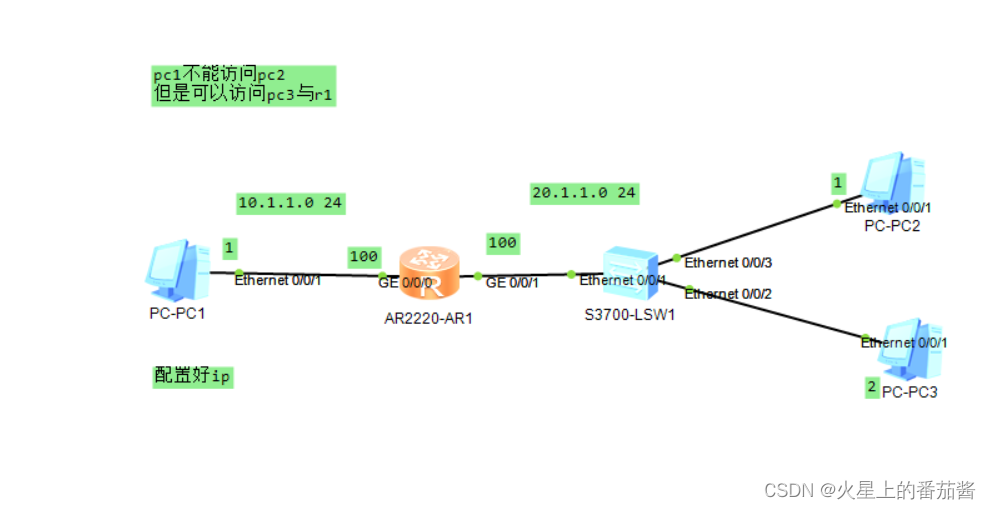
配置好ip
用pc1 ping pc2 pc3
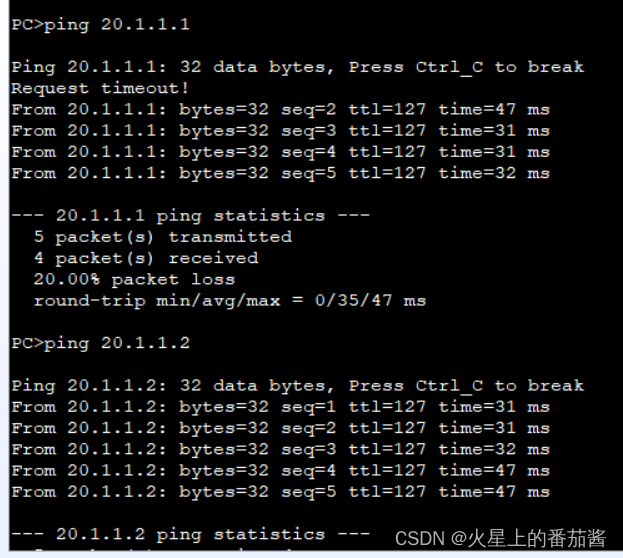
让他无法访问pc2pc3 但可以访问R1
[R1]acl 2000
[R1-acl-basic-2000]rule deny source 10.1.1.0 0 配置基本ACL
[R1-acl-basic-2000]q
[R1]int g0/0/1
[R1-GigabitEthernet0/0/1]traffic-filter outbound acl 2000 调用ACL
[R1-GigabitEthernet0/0/1]q
[R1]
不通了
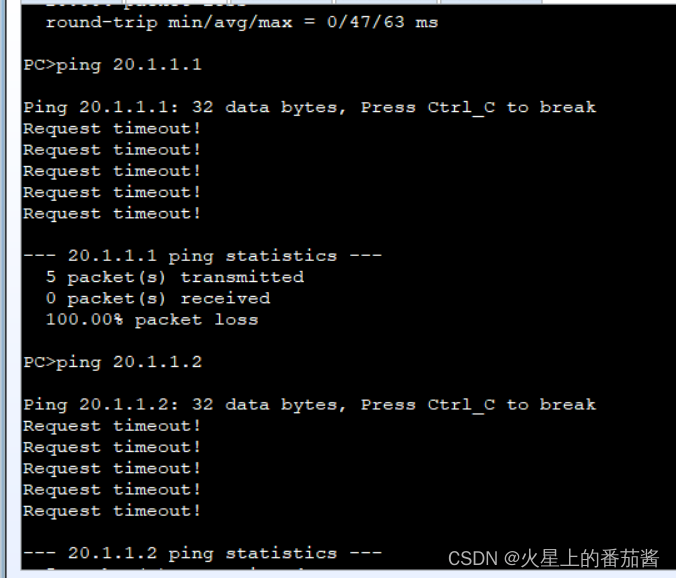
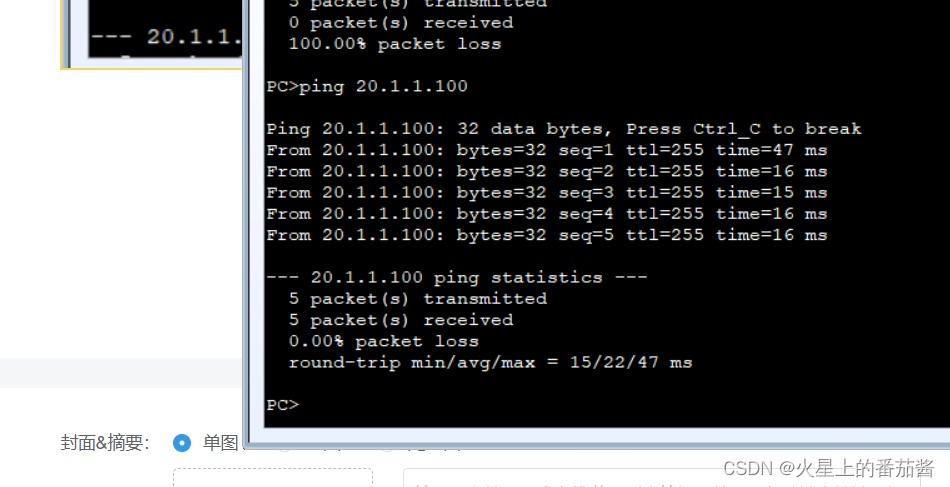
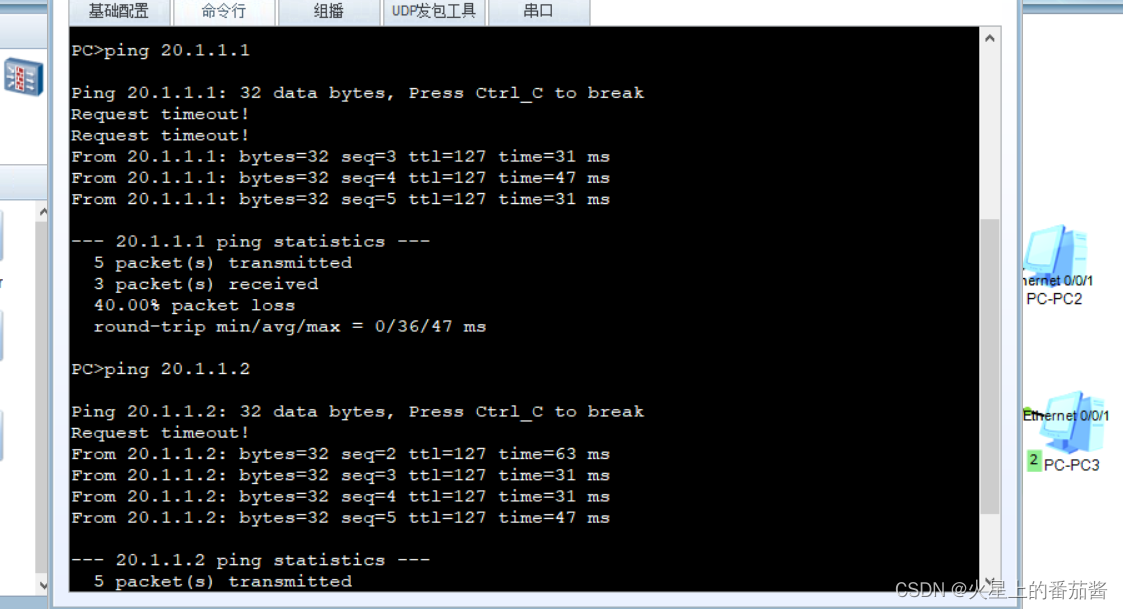
ping一下
[R1]acl ?
INTEGER<2000-2999> Basic access-list(add to current using rules) INTEGER<2000-2999>基本访问列表(添加到当前使用规则)
INTEGER<3000-3999> Advanced access-list(add to current using rules) INTEGER<3000-3999>高级访问列表(添加到当前使用规则)
INTEGER<4000-4999> Specify a L2 acl group
ipv6 ACL IPv6
name Specify a named ACL
number Specify a numbered ACL
[R1]acl 3000
[R1-acl-adv-3000]rule deny ip source 10.1.1.1 0 destination 20.1.1.1 0 配置拓展ACL
[R1-acl-adv-3000]q
[R1]int g0/0/1
[R1-GigabitEthernet0/0/1]traffic-filter inbound acl 3000 在接口调用
[R1-GigabitEthernet0/0/1]q
[R1]
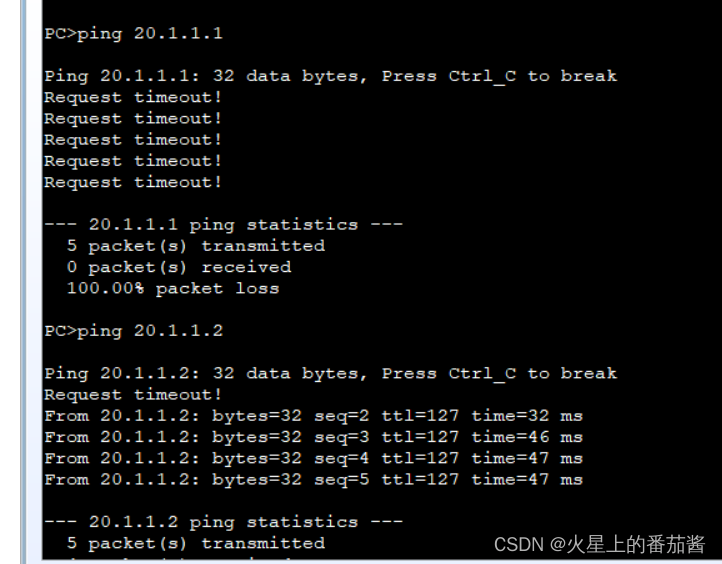
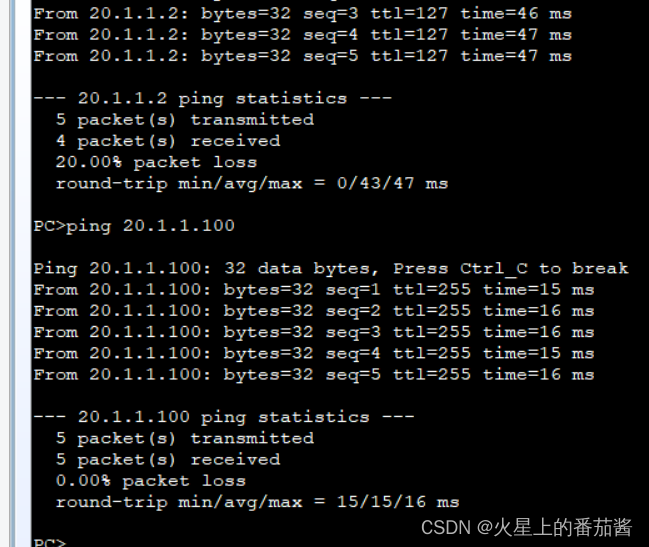
功能实现
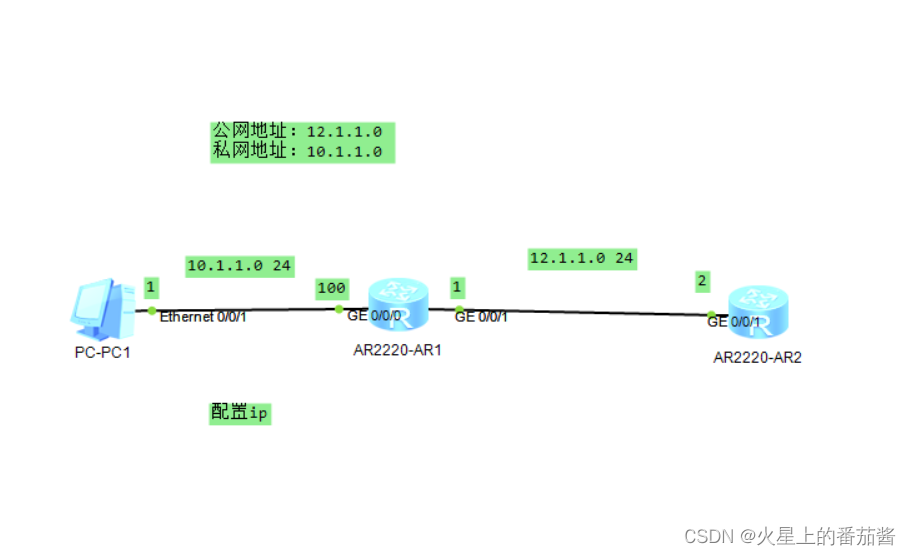
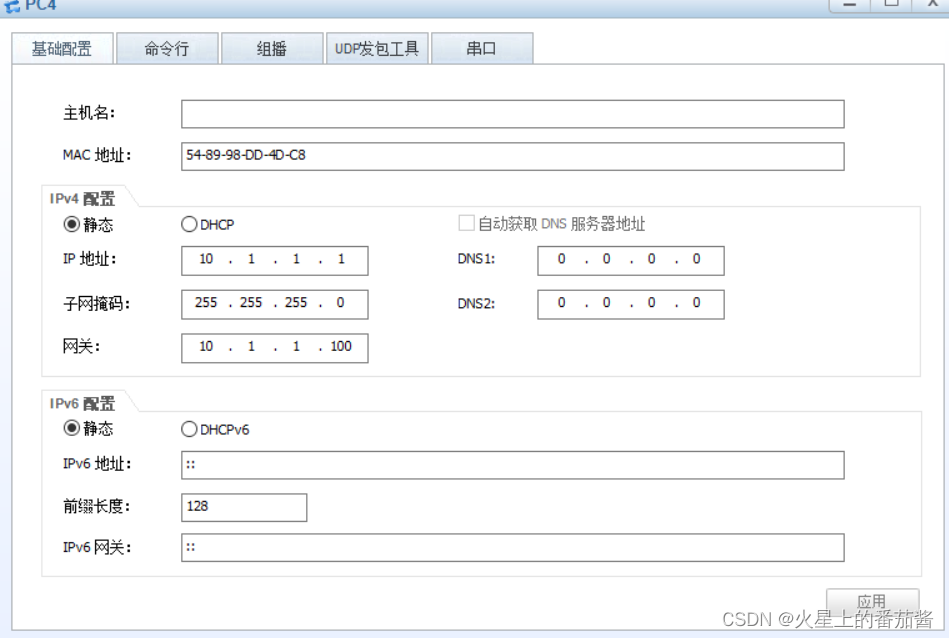
[R1]
[R1]int g0/0/0
[R1-GigabitEthernet0/0/0]int g0/0/1
[R1-GigabitEthernet0/0/1]nat static enable nat静态启用
[R1-GigabitEthernet0/0/1]nat static global 12.1.1.12 inside 10.1.1.1
[R1-GigabitEthernet0/0/1]
[R1-GigabitEthernet0/0/1]q
[R1]
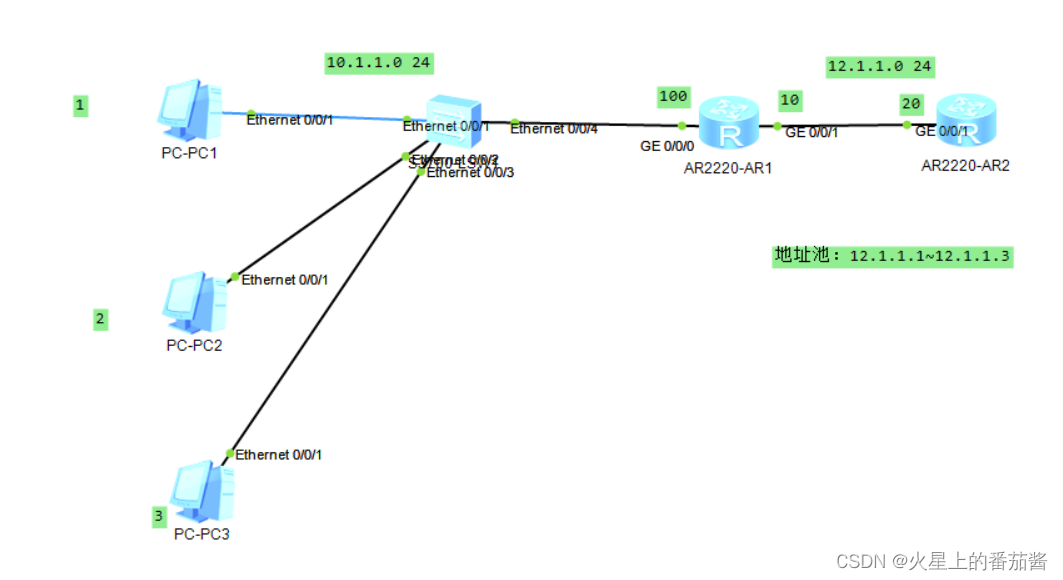
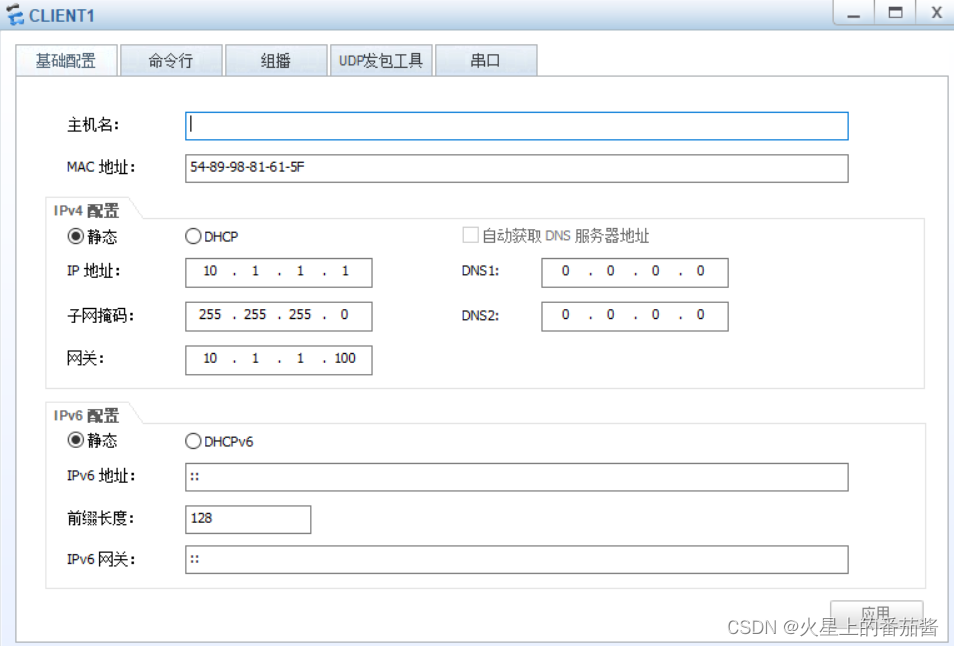
[R1]nat address-group 0 12.1.1.1 12.1.1.3
[R1]acl 2000
[R1-acl-basic-2000]rule permit source 10.1.1.1 0.0.0.0
[R1-acl-basic-2000]rule permit source 10.1.1.2 0.0.0.0
[R1-acl-basic-2000]rule permit source 10.1.1.3 0.0.0.0
[R1-acl-basic-2000]quit
[R1]int g0/0/1
[R1-GigabitEthernet0/0/1]nat outbound 2000 address-group 0 no-pat
[R1-GigabitEthernet0/0/1]quit
1.动态NAT如何工作
动态NAT任然是一对一的地址转换,但是私网和公网的对应关系不固定。
2.如何配置动态NAT
第一步定义公网地址范围;
第二步定义私网地址范围;
第三部把公网地址池和私网地址池关联在一起
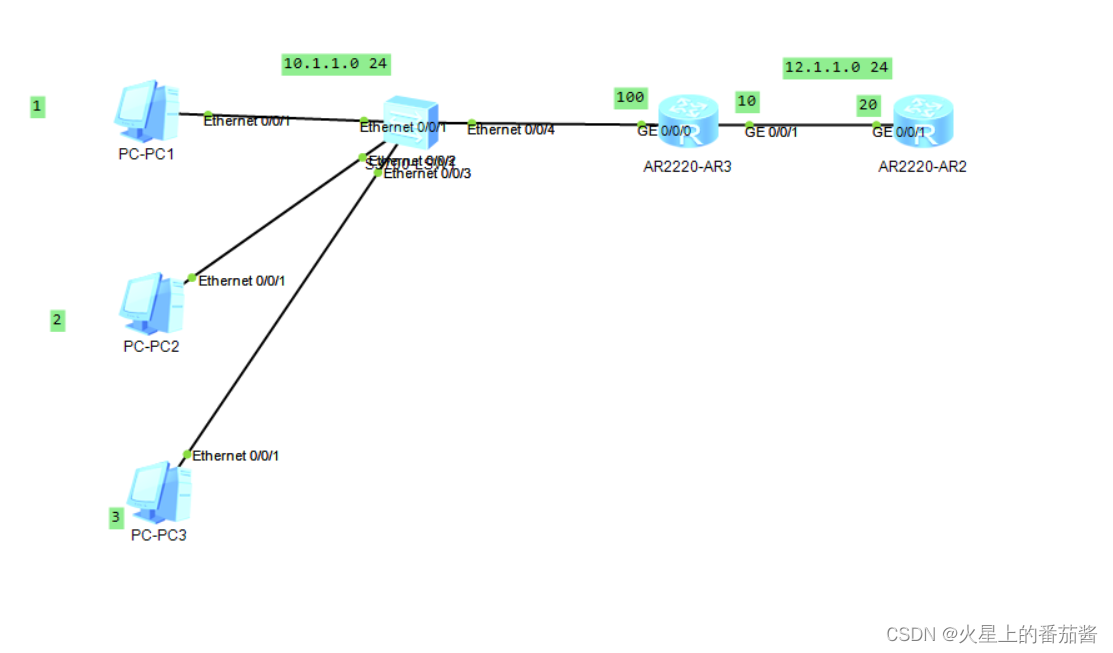
配置NAPT:
[R1]nat address-group 0 12.1.1.1 12.1.1.1
[R1]acl 2000
[R1-acl-basic-2000]rule permit source 10.1.1.1 0.0.0.0
[R1-acl-basic-2000]rule permit source 10.1.1.2 0.0.0.0
[R1-acl-basic-2000]rule permit source 10.1.1.3 0.0.0.0
[R1-acl-basic-2000]quit
[R1]int g0/0/1
[R1-GigabitEthernet0/0/1]nat outbound 2000 address-group 0
[R1-GigabitEthernet0/0/1]quit
总结:
1.NAPT如何工作
NAPT实现多对一的地址转换,将多个私网IP转换为同一个公网IP。
在做地址转换时NAPT不仅记录IP地址的转换关系,还要记录端口
号的对应关系,这样才能区分不同的私网IP。
2.NAPT如何配置
NAPT的配置方式和动态NAT类似,只是在最后调用公网和私网地址池时
不加no-pat参数即可。
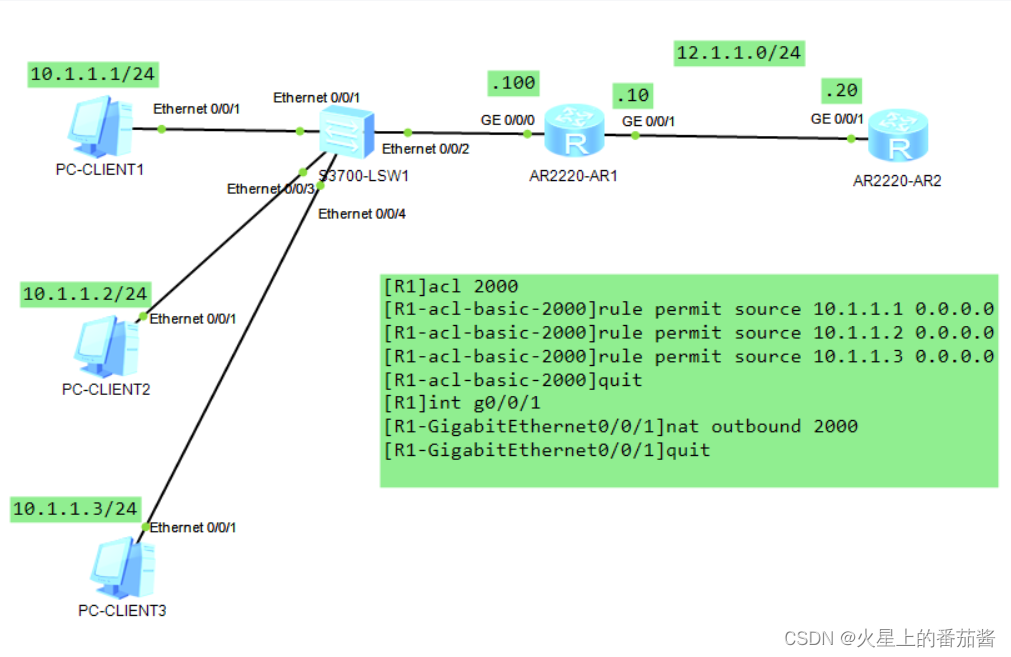
注:最为常用,最能节省ip
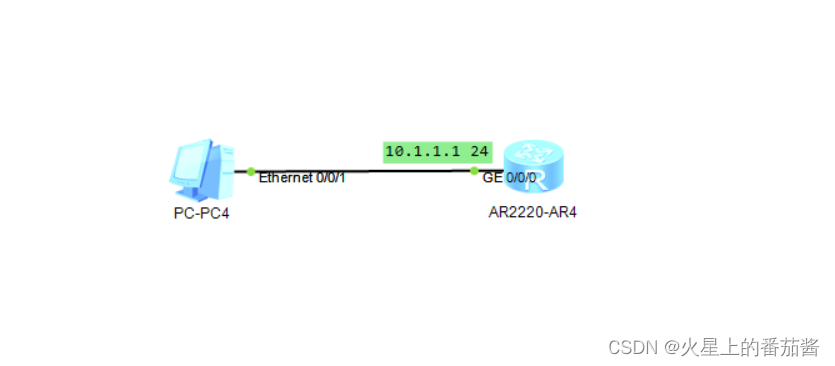
[R1]dhcp en
[R1]dhcp enable
Info: The operation may take a few seconds. Please wait for a moment.done.
[R1]ip pool dhcp1
Info: It's successful to create an IP address pool.
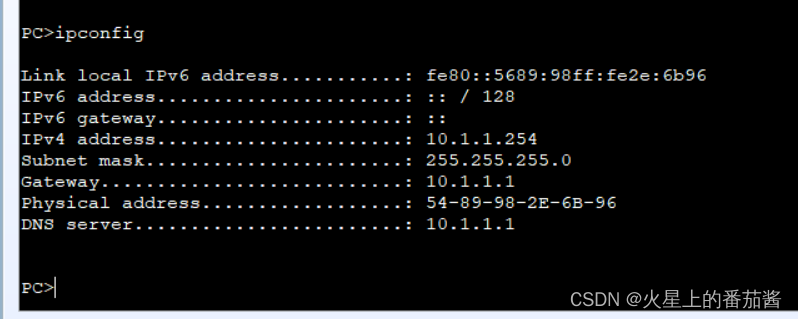
[R1-ip-pool-dhcp1]net 10.1.1.0 mask 255.255.255.0 dhcp地址池
[R1-ip-pool-dhcp1]ga
[R1-ip-pool-dhcp1]gateway-list 10.1.1.1 网关
[R1-ip-pool-dhcp1]dns-l
[R1-ip-pool-dhcp1]dns-list 10.1.1.1 dns
[R1-ip-pool-dhcp1]lease day 2 租赁日期
[R1-ip-pool-dhcp1]q
[R1]int g0/0/0
[R1-GigabitEthernet0/0/0]dhcp select global 应用dhcp
[R1-GigabitEthernet0/0/0]
[R1-GigabitEthernet0/0/0]q
[R1]
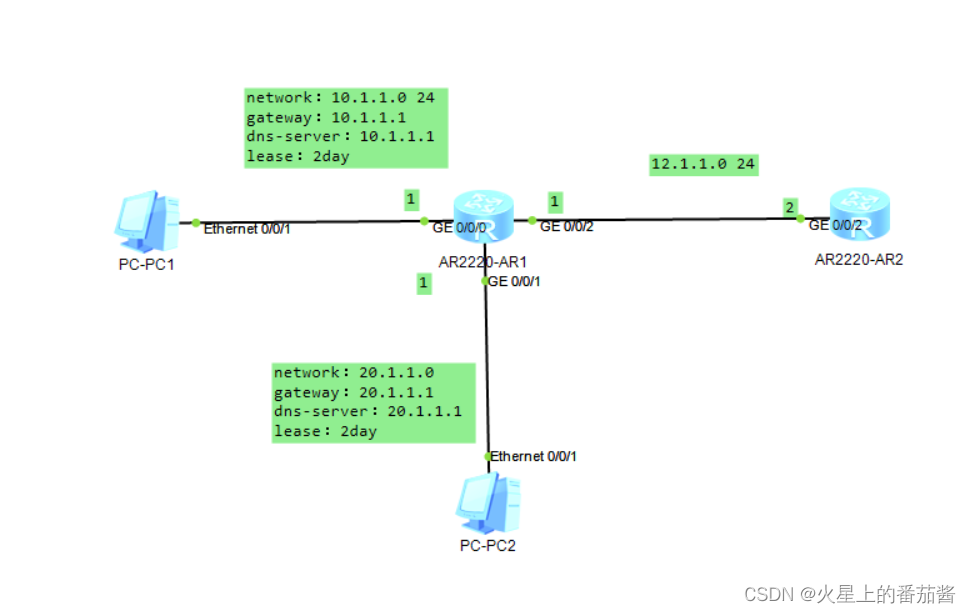
先配置好ip
[R1]dhcp enable
Info: The operation may take a few seconds. Please wait for a moment.done.
[R1]int g0/0/0
[R1-GigabitEthernet0/0/0]dhcp select relay 开启dhcp中继
[R1-GigabitEthernet0/0/0]dhcp relay server-ip 12.1.1.2 dhcp中继服务器ip是12.1.1.2
[R1-GigabitEthernet0/0/0]q
[R1]int g0/0/1
[R1-GigabitEthernet0/0/1]dhcp select relay
[R1-GigabitEthernet0/0/1]dhcp relay server-ip 12.1.1.2
[R1-GigabitEthernet0/0/1]q
[R1]
[R2]dhcp enable
Info: The operation may take a few seconds. Please wait for a moment.done.
[R2]ip poo
[R2]ip pool dhcp1
Info: It's successful to create an IP address pool.
[R2-ip-pool-dhcp1]net 10.1.1.0 mask 255.255.255.0
[R2-ip-pool-dhcp1]gateway-list 10.1.1.1
[R2-ip-pool-dhcp1]dns 10.1.1.1
[R2-ip-pool-dhcp1]dns
[R2-ip-pool-dhcp1]lease day 2
[R2-ip-pool-dhcp1]q
[R2]ip poo
[R2]ip pool dhcp2
Info: It's successful to create an IP address pool.
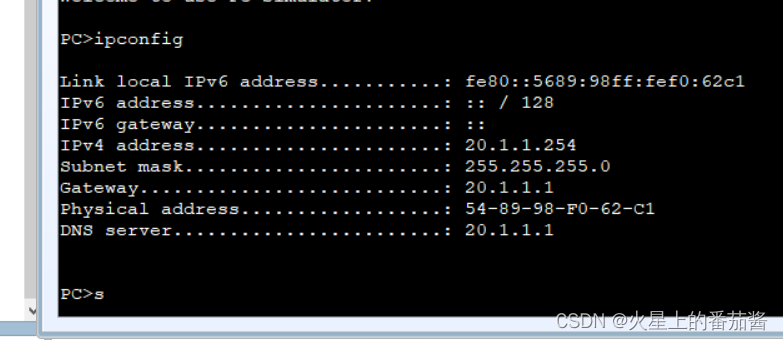
[R2-ip-pool-dhcp2]net 20.1.1.0 mask 255.255.255.0
[R2-ip-pool-dhcp2]gat
[R2-ip-pool-dhcp2]gateway-list 20.1.1.1
[R2-ip-pool-dhcp2]dns 20.1.1.1
[R2-ip-pool-dhcp2]lease day 2
[R2-ip-pool-dhcp2]q
[R2]int g0/0/2
[R2-GigabitEthernet0/0/2]dhcp s
[R2-GigabitEthernet0/0/2]dhcp select ?
global Local server
interface Interface server pool
relay DHCP relay
[R2-GigabitEthernet0/0/2]dhcp se
[R2-GigabitEthernet0/0/2]dhcp select ?
global Local serve
interface Interface server pool
relay DHCP relay
[R2-GigabitEthernet0/0/2]dhcp select global
[R2-GigabitEthernet0/0/2]q
[R2]ip route-static 10.1.1.0 24 g0/0/2 12.1.1.1
[R2]ip route-static 20.1.1.0 24 g0/0/2 12.1.1.1
[R2]
链路聚合是将多条物理链路逻辑的捆绑成一条链路的技术
通过这种方式可以提高网络带宽,并成本降低。
分为两种:手工负载分担,LACP方式
手工负载分担方式:负载后所有链路都处于活跃状态,没有备份链路
LACP:可以选择活跃链路和备份链路
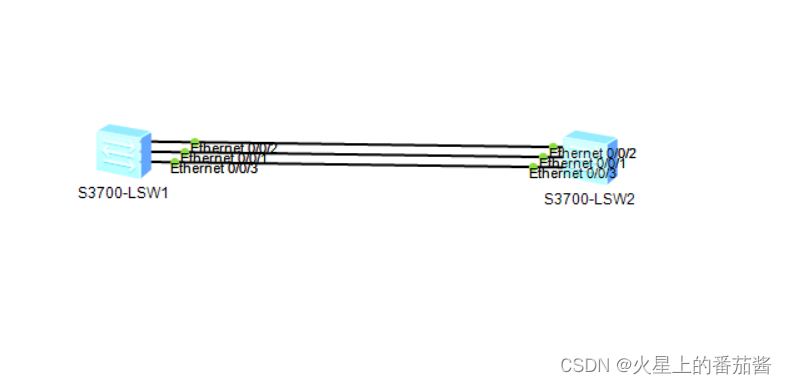
[SW1]int Eth-Trunk 12
[SW1-Eth-Trunk12]trunkport Ethernet 0/0/1 to 0/0/3
Info: This operation may take a few seconds. Please wait for a moment...done.
[SW1-Eth-Trunk12]
Nov 25 2022 10:42:07-08:00 SW1 %%01IFNET/4/IF_STATE(l)[54]:Interface Eth-Trunk12
has turned into UP state.
[SW1-Eth-Trunk12]
Nov 25 2022 10:42:12-08:00 SW1 DS/4/DATASYNC_CFGCHANGE:OID 1.3.6.1.4.1.2011.5.25
.191.3.1 configurations have been changed. The current change number is 5, the c
hange loop count is 0, and the maximum number of records is 4095.
[SW1-Eth-Trunk12]q
[SW1]dis
[SW1]display int
[SW1]display interface b
[SW1]display interface brief
PHY: Physical
*down: administratively down
(l): loopback
(s): spoofing
(b): BFD down
(e): ETHOAM down
(dl): DLDP down
(d): Dampening Suppressed
InUti/OutUti: input utility/output utility
Interface PHY Protocol InUti OutUti inErrors outErrors
Eth-Trunk12 up up 0% 0% 0 0
Ethernet0/0/1 up up 0% 0% 0 0
Ethernet0/0/2 up up 0% 0% 0 0
Ethernet0/0/3 up up 0% 0% 0 0
Ethernet0/0/4 down down 0% 0% 0 0
Ethernet0/0/5 down down 0% 0% 0 0
Ethernet0/0/6 down down 0% 0% 0 0
Ethernet0/0/7 down down 0% 0% 0 0
Ethernet0/0/8 down down 0% 0% 0 0
Ethernet0/0/9 down down 0% 0% 0 0
Ethernet0/0/10 down down 0% 0% 0 0
Ethernet0/0/11 down down 0% 0% 0 0
Ethernet0/0/12 down down 0% 0% 0 0
Ethernet0/0/13 down down 0% 0% 0 0
Ethernet0/0/14 down down 0% 0% 0 0
Ethernet0/0/15 down down 0% 0% 0 0
Ethernet0/0/16 down down 0% 0% 0 0
Ethernet0/0/17 down down 0% 0% 0 0
Ethernet0/0/18 down down 0% 0% 0 0
Ethernet0/0/19 down down 0% 0% 0 0
Ethernet0/0/20 down down 0% 0% 0 0
Ethernet0/0/21 down down 0% 0% 0 0
Ethernet0/0/22 down down 0% 0% 0 0
GigabitEthernet0/0/1 down down 0% 0% 0 0
GigabitEthernet0/0/2 down down 0% 0% 0 0
MEth0/0/1 down down 0% 0% 0 0
NULL0 up up(s) 0% 0% 0 0
Vlanif1 up down -- -- 0 0
[SW1]
[SW2]int Eth-Trunk 12
[SW2-Eth-Trunk12]t
[SW2-Eth-Trunk12]trunkport e
[SW2-Eth-Trunk12]trunkport Ethernet 0/0/1 to 0/0/3
Info: This operation may take a few seconds. Please wait for a moment...done.
[SW2-Eth-Trunk12]
Nov 25 2022 10:42:43-08:00 SW2 %%01IFNET/4/IF_STATE(l)[54]:Interface Eth-Trunk12
has turned into UP state.
[SW2-Eth-Trunk12]
Nov 25 2022 10:42:51-08:00 SW2 DS/4/DATASYNC_CFGCHANGE:OID 1.3.6.1.4.1.2011.5.25
.191.3.1 configurations have been changed. The current change number is 5, the c
hange loop count is 0, and the maximum number of records is 4095.q
[SW2]
配置eth-trunk注意事项
成员接口最多八个
接口在加入eth-trunk前不能配置业务
成员接口必须为华为缺省接口类型
eth-trunk不能嵌套
接口的带宽必须一致
eth-trunk对端必须也是eth-trunk
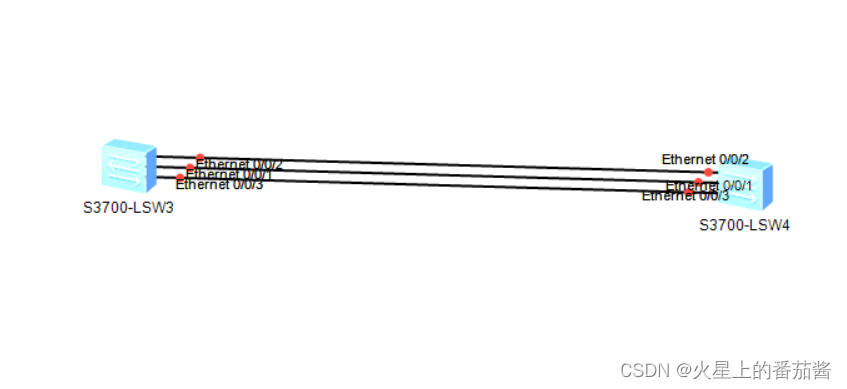
SW1
1.配置LACP方式eth-trunk:
[SW1]int Eth-Trunk 12
[SW1-Eth-Trunk12]mode lacp-static
[SW1-Eth-Trunk12]trunkport Ethernet 0/0/1 to 0/0/3
[SW1-Eth-Trunk12]quit
[SW1]lacp priority 100 设置LACP的主设备
[SW1]int Ethernet 0/0/1
[SW1-Ethernet0/0/1]lacp priority 100 设置LACP接口优先级
[SW1]int Ethernet 0/0/2
[SW1-Ethernet0/0/2]lacp priority 100
[SW1]int Eth-Trunk 12
[SW1-Eth-Trunk12]max active-linknumber 2 设置最大活动链路数量
[SW1-Eth-Trunk12]lacp preempt enable 开启LACP抢占功能
SW2
1.配置LACP方式eth-trunk:
[SW2]int Eth-Trunk 12
[SW2-Eth-Trunk12]mode lacp-static
[SW2-Eth-Trunk12]trunkport Ethernet 0/0/1 to 0/0/3
[SW2-Eth-Trunk12]quit
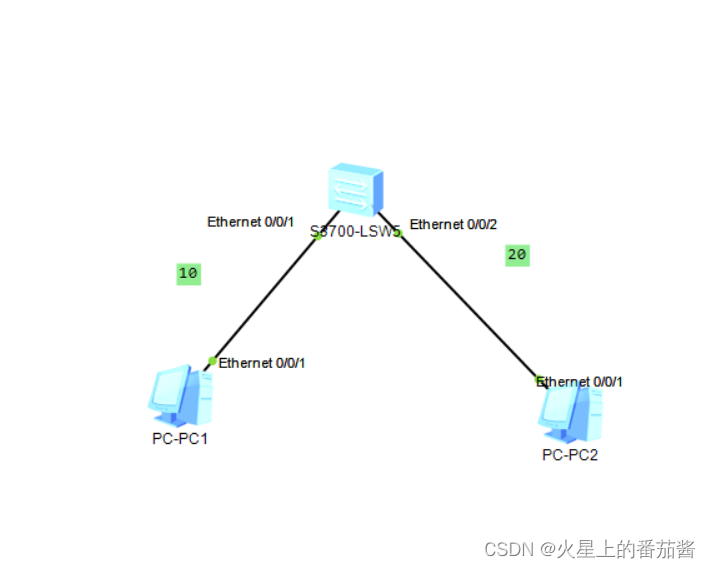
[SW1]int e0/0/1
[SW1-Ethernet0/0/1]port link-type access
[SW1-Ethernet0/0/1]p
[SW1-Ethernet0/0/1]port
Nov 25 2022 11:51:34-08:00 SW1 DS/4/DATASYNC_CFGCHANGE:OID 1.3.6.1.4.1.2011.5.25
.191.3.1 configurations have been changed. The current change number is 6, the c
hange loop count is 0, and the maximum number of records is 4095.de
[SW1-Ethernet0/0/1]port default vlan 10
[SW1-Ethernet0/0/1]q
[SW1]int g0/0/2
[SW1-GigabitEthernet0/0/2]
Nov 25 2022 11:51:44-08:00 SW1 DS/4/DATASYNC_CFGCHANGE:OID 1.3.6.1.4.1.2011.5.25
.191.3.1 configurations have been changed. The current change number is 7, the c
hange loop count is 0, and the maximum number of records is 4095.int e0/0/2
[SW1-Ethernet0/0/2]oi
[SW1-Ethernet0/0/2]po
[SW1-Ethernet0/0/2]port li
[SW1-Ethernet0/0/2]port link-t
[SW1-Ethernet0/0/2]port link-type a
[SW1-Ethernet0/0/2]port link-type access
[SW1-Ethernet0/0/2]port default
Nov 25 2022 11:52:04-08:00 SW1 DS/4/DATASYNC_CFGCHANGE:OID 1.3.6.1.4.1.2011.5.25
.191.3.1 configurations have been changed. The current change number is 8, the c
hange loop count is 0, and the maximum number of records is 4095.v
[SW1-Ethernet0/0/2]port default vlan 20
[SW1-Ethernet0/0/2]
Nov 25 2022 11:52:09-08:00 SW1 %%01IFNET/4/IF_STATE(l)[0]:Interface Vlanif1 has
turned into DOWN state.
[SW1-Ethernet0/0/2]
[SW1-Ethernet0/0/2]q
[SW1]
Nov 25 2022 11:52:14-08:00 SW1 DS/4/DATASYNC_CFGCHANGE:OID 1.3.6.1.4.1.2011.5.25
.191.3.1 configurations have been changed. The current change number is 9, the c
hange loop count is 0, and the maximum number of records is 4095.t
^
Error:Ambiguous command found at '^' position.
[SW1]
[SW1]
[SW1]dis vlan su
static vlan:
Total 3 static vlan.
1 10 20
dynamic vlan:
Total 0 dynamic vlan.
reserved vlan:
Total 0 reserved vlan.
[SW1]dis policy-based-route
[SW1]dis port
[SW1]dis port vlan a
T=TAG U=UNTAG
-------------------------------------------------------------------------------
Port Link Type PVID VLAN List
-------------------------------------------------------------------------------
Eth0/0/1 access 10 U: 10
Eth0/0/2 access 20 U: 20
Eth0/0/3 hybrid 1 U: 1
Eth0/0/4 hybrid 1 U: 1
Eth0/0/5 hybrid 1 U: 1
Eth0/0/6 hybrid 1 U: 1
Eth0/0/7 hybrid 1 U: 1
Eth0/0/8 hybrid 1 U: 1
Eth0/0/9 hybrid 1 U: 1
Eth0/0/10 hybrid 1 U: 1
Eth0/0/11 hybrid 1 U: 1
Eth0/0/12 hybrid 1 U: 1
Eth0/0/13 hybrid 1 U: 1
Eth0/0/14 hybrid 1 U: 1
Eth0/0/15 hybrid 1 U: 1
Eth0/0/16 hybrid 1 U: 1
Eth0/0/17 hybrid 1 U: 1
Eth0/0/18 hybrid 1 U: 1
Eth0/0/19 hybrid 1 U: 1
Eth0/0/20 hybrid 1 U: 1
Eth0/0/21 hybrid 1 U: 1
Eth0/0/22 hybrid 1 U: 1
GE0/0/1 hybrid 1 U: 1
GE0/0/2 hybrid 1 U: 1
[SW1]
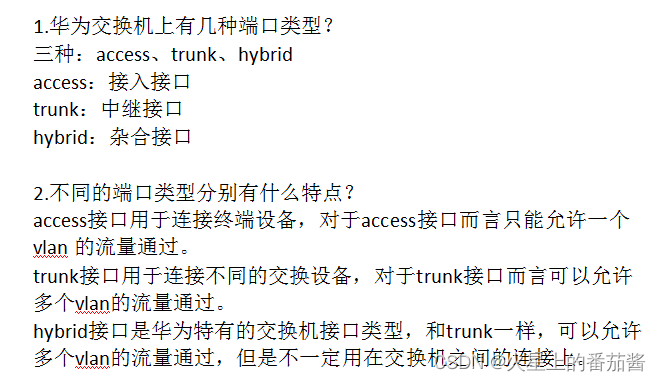
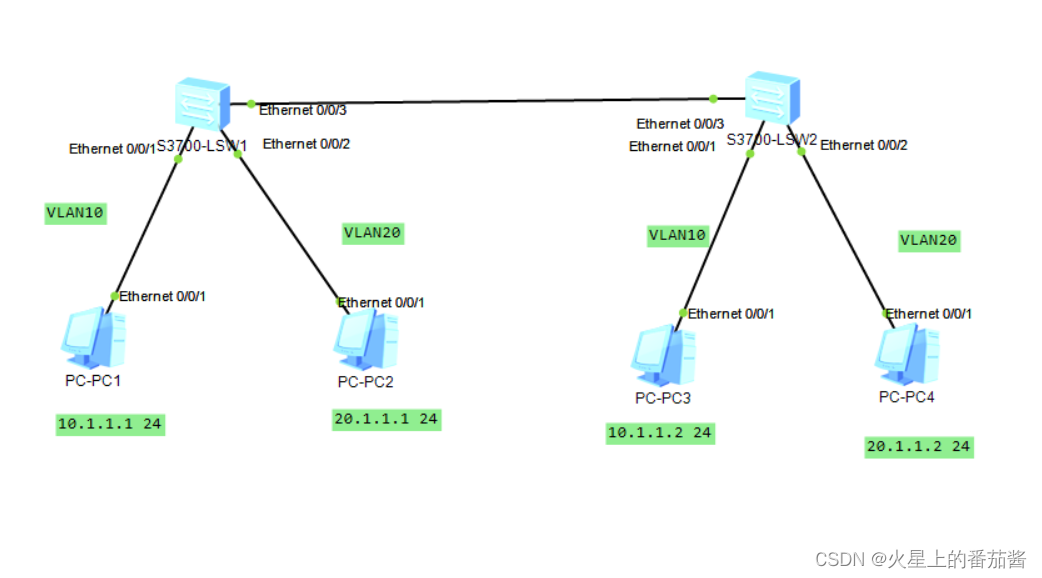
创建VLAN10 20
[SW1]int e0/0/3
[SW1-Ethernet0/0/3]port link-type trunk
[SW1-Ethernet0/0/3]port trunk allow-pass vlan all
[SW1-Ethernet0/0/3]q
[SW1]dis port vlan active
T=TAG U=UNTAG
-------------------------------------------------------------------------------
Port Link Type PVID VLAN List
-------------------------------------------------------------------------------
Eth0/0/1 hybrid 1 U: 1
Eth0/0/2 hybrid 1 U: 1
Eth0/0/3 trunk 1 U: 1
T: 10 20
Eth0/0/4 hybrid 1 U: 1
Eth0/0/5 hybrid 1 U: 1
Eth0/0/6 hybrid 1 U: 1
Eth0/0/7 hybrid 1 U: 1
Eth0/0/8 hybrid 1 U: 1
Eth0/0/9 hybrid 1 U: 1
Eth0/0/10 hybrid 1 U: 1
Eth0/0/11 hybrid 1 U: 1
Eth0/0/12 hybrid 1 U: 1
Eth0/0/13 hybrid 1 U: 1
Eth0/0/14 hybrid 1 U: 1
Eth0/0/15 hybrid 1 U: 1
Eth0/0/16 hybrid 1 U: 1
Eth0/0/17 hybrid 1 U: 1
Eth0/0/18 hybrid 1 U: 1
Eth0/0/19 hybrid 1 U: 1
Eth0/0/20 hybrid 1 U: 1
Eth0/0/21 hybrid 1 U: 1
Eth0/0/22 hybrid 1 U: 1
GE0/0/1 hybrid 1 U: 1
GE0/0/2 hybrid 1 U: 1
[SW1]
创建VLAN10 20
[SW2]int e0/0/3
[SW2-Ethernet0/0/3]port link-type trunk 端口属性为trunk
[SW2-Ethernet0/0/3]port trunk allow-pass vlan all 端口允许通过所有VLAN
[SW2-Ethernet0/0/3]
Nov 25 2022 14:24:38-08:00 SW2 DS/4/DATASYNC_CFGCHANGE:OID 1.3.6.1.4.1.2011.5.25
.191.3.1 configurations have been changed. The current change number is 7, the c
hange loop count is 0, and the maximum number of records is 4095.q
[SW2]dis port vlan active
T=TAG U=UNTAG
-------------------------------------------------------------------------------
Port Link Type PVID VLAN List
-------------------------------------------------------------------------------
Eth0/0/1 hybrid 1 U: 1
Eth0/0/2 hybrid 1 U: 1
Eth0/0/3 trunk 1 U: 1
T: 10 20
Eth0/0/4 hybrid 1 U: 1
Eth0/0/5 hybrid 1 U: 1
Eth0/0/6 hybrid 1 U: 1
Eth0/0/7 hybrid 1 U: 1
Eth0/0/8 hybrid 1 U: 1
Eth0/0/9 hybrid 1 U: 1
Eth0/0/10 hybrid 1 U: 1
Eth0/0/11 hybrid 1 U: 1
Eth0/0/12 hybrid 1 U: 1
Eth0/0/13 hybrid 1 U: 1
Eth0/0/14 hybrid 1 U: 1
Eth0/0/15 hybrid 1 U: 1
Eth0/0/16 hybrid 1 U: 1
Eth0/0/17 hybrid 1 U: 1
Eth0/0/18 hybrid 1 U: 1
Eth0/0/19 hybrid 1 U: 1
Eth0/0/20 hybrid 1 U: 1
Eth0/0/21 hybrid 1 U: 1
Eth0/0/22 hybrid 1 U: 1
GE0/0/1 hybrid 1 U: 1
GE0/0/2 hybrid 1 U: 1
[SW2]
[SW2]
1.trunk链路为什么可以区分不同vlan的流量?
因为在trunk链路上交换机会启用802.1q协议,而802.1q协议导致交换机将报文从
trunk链路发送出去之前会将报文对应的vlan-id封装进报文中。这样对端交换机在
接收到报文后可以通过802.1q封装的vlan-id判断报文属于哪个vlan。
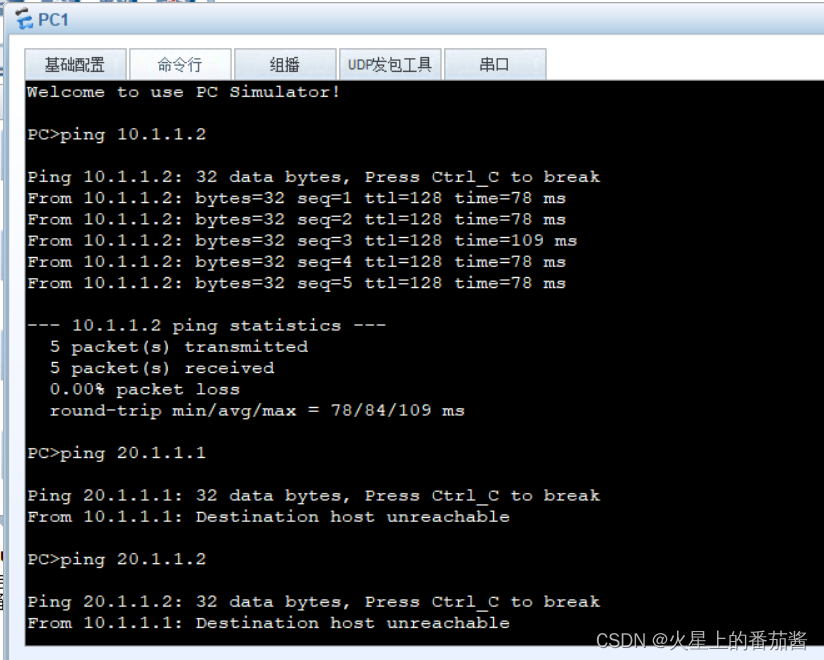
1.hybrid接口与trunk有什么不同?
hybrid接口可以运行多个vlan的流量通过,但是不同的是hybrid接口可以
自己定义带标记通过的vlan和不带标记通过的vlan。
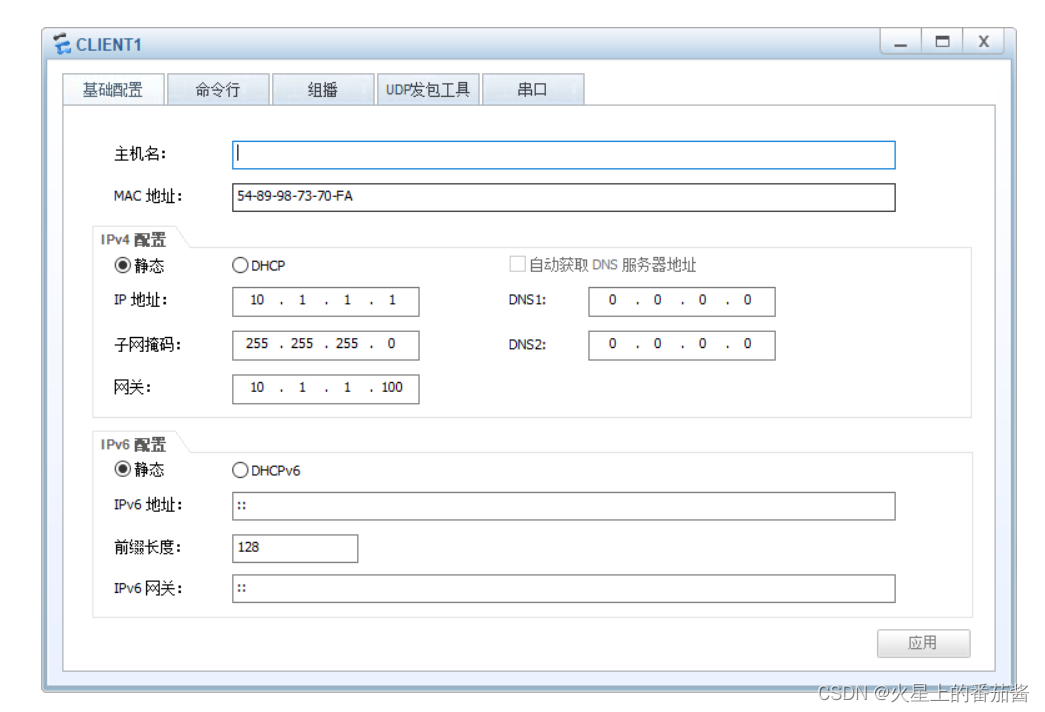
pc1
pc2
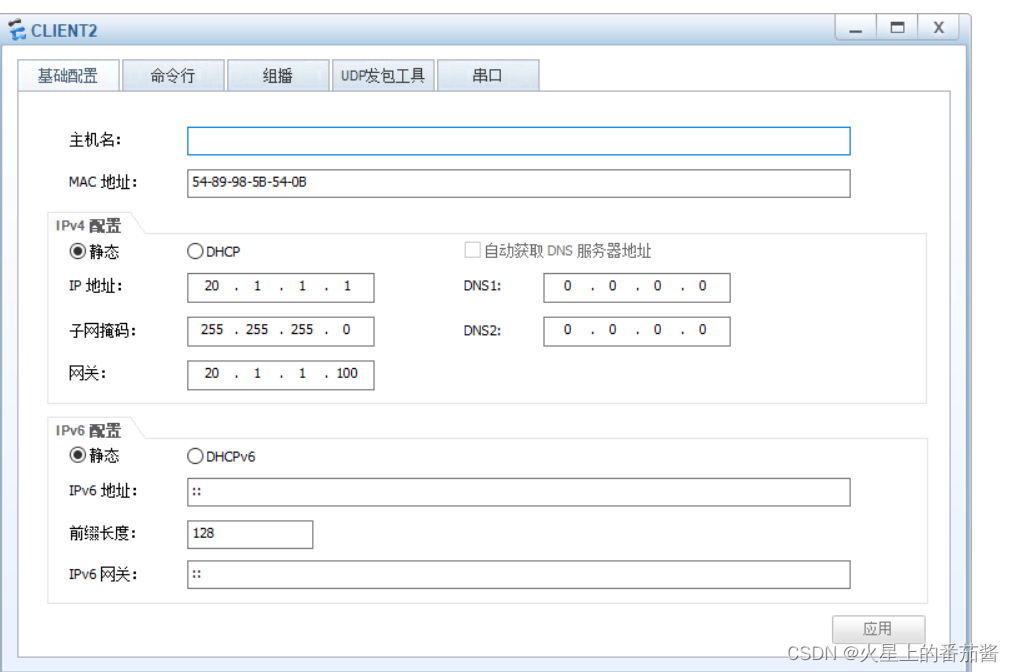
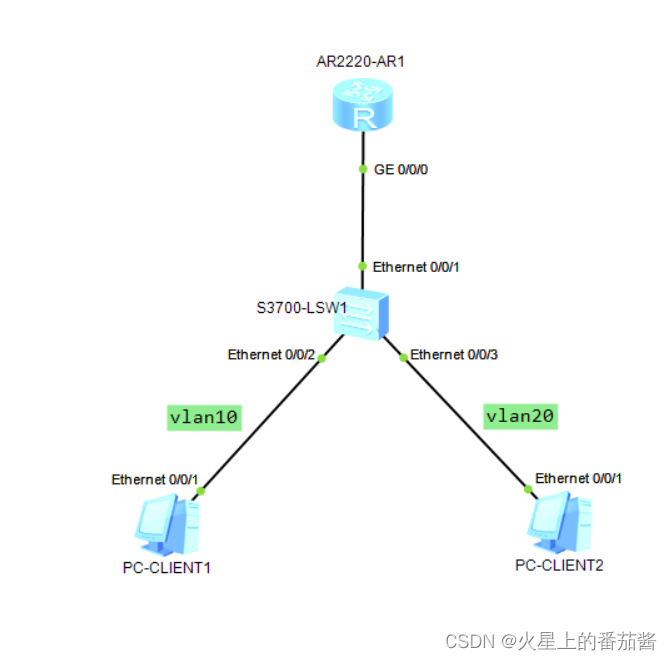
1.R1配置单臂路由:
[R1]int GigabitEthernet 0/0/0.10
[R1-GigabitEthernet0/0/0.10]dot1q termination vid 10
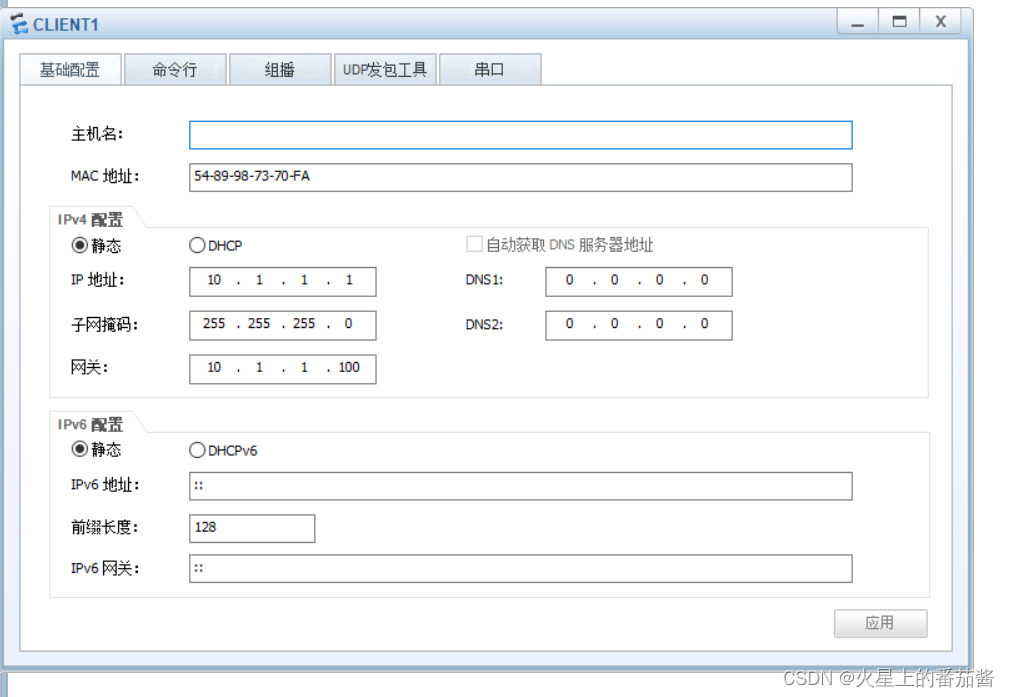
[R1-GigabitEthernet0/0/0.10]ip address 10.1.1.100 24
[R1-GigabitEthernet0/0/0.10]arp broadcast enable
[R1-GigabitEthernet0/0/0.10]quit
[R1]int GigabitEthernet 0/0/0.20
[R1-GigabitEthernet0/0/0.20]dot1q termination vid 20
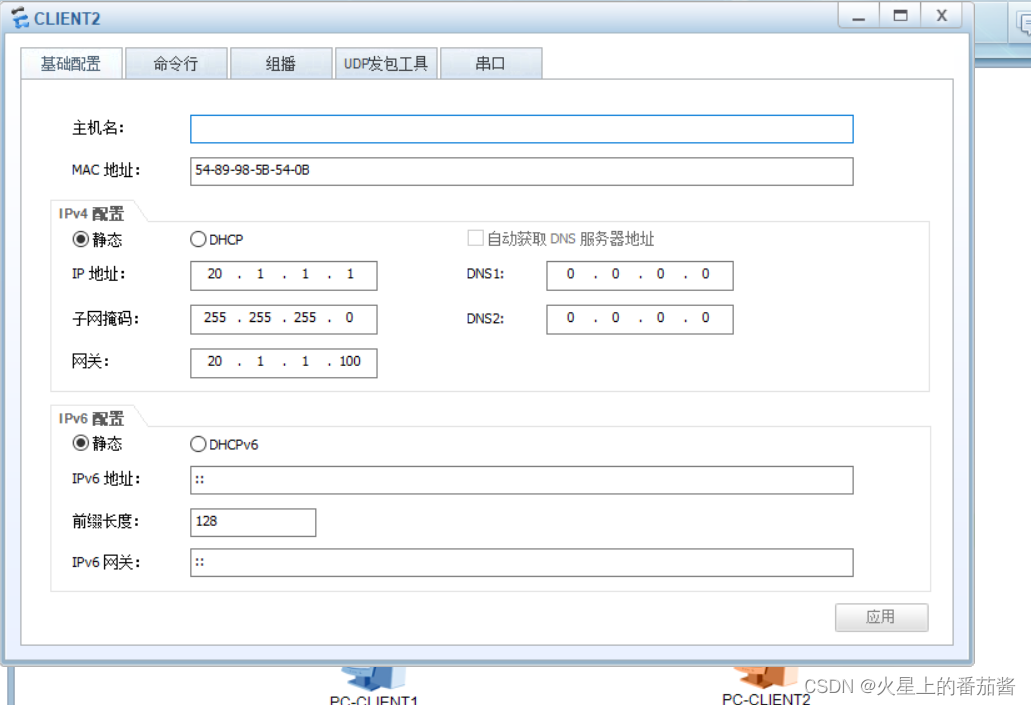
[R1-GigabitEthernet0/0/0.20]ip address 20.1.1.100 24
[R1-GigabitEthernet0/0/0.20]arp broadcast enable
[R1-GigabitEthernet0/0/0.20]quit
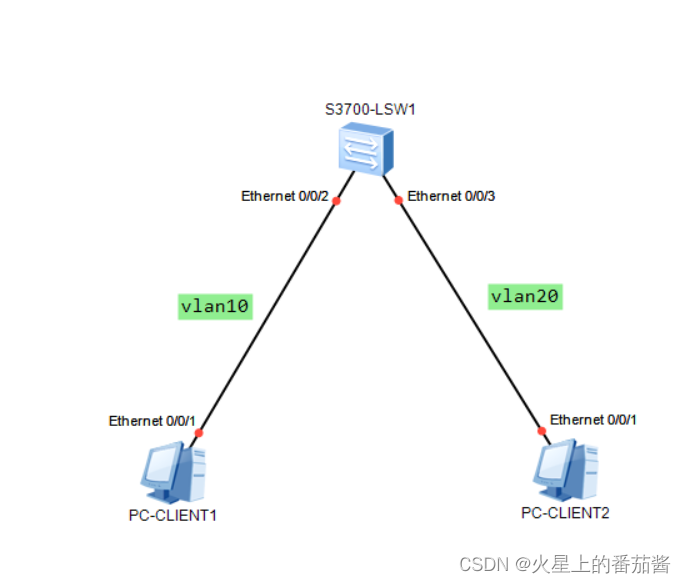
1.SW1创建vlan10、vlan20
2.SW1将接口划入对应vlan
3.SW1将连接路由器的接口配为trunk:
[SW1]int Ethernet0/0/1
[SW1-Ethernet0/0/1]port link-type trunk
[SW1-Ethernet0/0/1]port trunk allow-pass vlan all
[SW1-Ethernet0/0/1]quit
pc1
pc2
1.创建vlan10、vlan20
2.将接口划入对应vlan
3.配置三层交换:
[SW1]interface Vlanif 10
[SW1-Vlanif10]ip address 10.1.1.100 24
[SW1-Vlanif10]quit
[SW1]interface Vlanif 20
[SW1-Vlanif20]ip address 20.1.1.100 24
[SW1-Vlanif20]quit
这玩意还用吗。
就这样吧,小黑子们。

华为OD机试题本篇题目:明明的随机数题目输入描述输出描述:示例1输入输出说明代码编写思路最近更新的博客华为od2023|什么是华为od,od薪资待遇,od机试题清单华为OD机试真题大全,用Python解华为机试题|机试宝典【华为OD机试】全流程解析+经验分享,题型分享,防作弊指南华为o
system-view进入系统视图quit退到系统视图sysname交换机命名vlan20创建vlan(进入vlan20)displayvlan显示vlanundovlan20删除vlan20displayvlan20显示vlan里的端口20Interfacee1/0/24进入端口24portlink-typeaccessvlan20把当前端口放入vlan20undoporte1/0/10删除当前VLAN端口10displaycurrent-configuration显示当前配置02配置交换机支持TELNETinterfacevlan1进入VLAN1ipaddress192.168.3.100
1.postman介绍Postman一款非常流行的API调试工具。其实,开发人员用的更多。因为测试人员做接口测试会有更多选择,例如Jmeter、soapUI等。不过,对于开发过程中去调试接口,Postman确实足够的简单方便,而且功能强大。2.下载安装官网地址:https://www.postman.com/下载完成后双击安装吧,安装过程极其简单,无需任何操作3.使用教程这里以百度为例,工具使用简单,填写URL地址即可发送请求,在下方查看响应结果和响应状态码常用方法都有支持请求方法:getpostputdeleteGet、Post、Put与Delete的作用get:请求方法一般是用于数据查询,
Ⅰ软件测试基础一、软件测试基础理论1、软件测试的必要性所有的产品或者服务上线都需要测试2、测试的发展过程3、什么是软件测试找bug,发现缺陷4、测试的定义使用人工或自动的手段来运行或者测试某个系统的过程。目的在于检测它是否满足规定的需求。弄清预期结果和实际结果的差别。5、测试的目的以最小的人力、物力和时间找出软件中潜在的错误和缺陷6、测试的原则28原则:20%的主要功能要重点测(eg:支付宝的支付功能,其他功能都是次要的)80%的错误存在于20%的代码中7、测试标准8、测试的基本要求功能测试性能测试安全性测试兼容性测试易用性测试外观界面测试可靠性测试二、质量模型衡量一个优秀软件的维度①功能性功
ES一、简介1、ElasticStackES技术栈:ElasticSearch:存数据+搜索;QL;Kibana:Web可视化平台,分析。LogStash:日志收集,Log4j:产生日志;log.info(xxx)。。。。使用场景:metrics:指标监控…2、基本概念Index(索引)动词:保存(插入)名词:类似MySQL数据库,给数据Type(类型)已废弃,以前类似MySQL的表现在用索引对数据分类Document(文档)真正要保存的一个JSON数据{name:"tcx"}二、入门实战{"name":"DESKTOP-1TSVGKG","cluster_name":"elasticsear
(本文是网络的宏观的概念铺垫)目录计算机网络背景网络发展认识"协议"网络协议初识协议分层OSI七层模型TCP/IP五层(或四层)模型报头以太网碰撞路由器IP地址和MAC地址IP地址与MAC地址总结IP地址MAC地址计算机网络背景网络发展 是最开始先有的计算机,计算机后来因为多项技术的水平升高,逐渐的计算机变的小型化、高效化。后来因为计算机其本身的计算能力比较的快速:独立模式:计算机之间相互独立。 如:有三个人,每个人做的不同的事物,但是是需要协作的完成。 而这三个人所做的事是需要进行协作的,然而刚开始因为每一台计算机之间都是互相独立的。所以前面的人处理完了就需要将数据
所有题目均有五种语言实现。C实现目录、C++实现目录、Python实现目录、Java实现目录、JavaScript实现目录题目n行m列的矩阵,每个位置上有一个元素你可以上下左右行走,代价是前后两个位置元素值差的绝对值.另外,你最多可以使用一次传送阵(只能从一个数跳到另外一个相同的数)求从走上角走到右下角最少需要多少时间。输入描述:第一行两个整数n,m,分别代表矩阵的行和列。后面n行,每行m个整数,分别代表矩阵中的元素。输出描述:一个整数,表示最少需要多少时间。
西安华为OD面试体验开始投简历技术面试进展工作进展开始投简历去年一整年一直在考研和工作之间纠结,感觉自己的状态好像当时的疫情一样差劲。之前刚毕业的时候投了个大厂的简历,结果一面写算法的时候太拉跨了,虽然知道时dfs但是代码熟练度不够,放在平时给足时间自己可以调试通过,但是熟练度不够那面试当时就写不出来被刷了。说真的算法学到后期我感觉最重要的是熟练度和背板子(对于我这种普通玩家来说),面试题如果一上来短时间内想不出思路就完蛋了。然后由于当时找的工作不是很理想就又想考研了。但是考研是有风险的,我自我感觉自己可能冲不上那个学校,而找工作一个没成可以继续找嘛。本着抱着试试看的态度在boss上投了简历,
第一步,先创建一个回环端口,不要用自己的网卡,很不稳定,会断的。①先找到“设备管理器”,点击②进入设备管理器点击“操作”,然后再点击“添加过时硬盘”,记得点击“操作”前先随便在空白处点击一下,不然点击“点击操作”会出现第二张图的内容。 ③点击“下一页”④点击“手动”,然后再点击下一页。 ⑤点击“网络适配器”,点击下一页 ⑥点击“Microsoft”,然后点击“环回适配器”。 创建完成后,在下图中会有一个“环回适配器”, 第二步,ensp和真机进行桥接①打开ensp,并且配置一个“云”②先添加一个内网接口,点击添加③选择“绑定信息”中的以太网2,点击“增加”,添加外网。如果找不到你的环回网卡
一、RIPV2协议简介 RIP(RoutingInformationProtocol)路由协议是一种相对古老,在小型以及同介质网络中得到了广泛应用的一种路由协议。RIP采用距离向量算法,是一种距离向量协议。RIP-1是有类别路由协议(ClassfulRoutingProtocol),它只支持以广播方式发布协议报文。RIP-1的协议报文无法携带掩码信息,它只能识别A、B、C类这样的自然网段的路由,因此RIP-1不支持非连续子网(DiscontiguousSubnet)。RIP-2是一种无类别路由协议(ClasslessRoutingProtocol),支持路由标记,在路由策略中可根据路由标记对
