用于构建用户界面的JavaScript库。
facebook开源、组件化、声明式编码、React Native移动端开发、虚拟DOM+Diffing算法
官网:https://react.docschina.org/
React定义的一种类似于XML的JS扩展语法:JS + XML
它最终产生的结果不是字符串,也不是HTML/XML标签,而是一个JS对象
语法规则:
标签中混入JS表达式要用{}
表达式:一个表达式会返回一个值,而代码块不一定有值返回
样式的类名指定不要用class属性名,用className
内联样式,要用style={{key: value}}的形式去写
只能有一个根标签
标签必须闭合
JSX标签转换规则
模块:向外提供特定功能的js程序,一般是一个js文件
组件:实现局部功能效果的代码和资源的集合
React Developer Tools 浏览器插件
函数式组件
<body>
    <div id="ctx"></div>
    <script src="https://cdn.staticfile.org/react/16.4.0/umd/react.development.js"></script>
    <script src="https://cdn.staticfile.org/react-dom/16.4.0/umd/react-dom.development.js"></script>
    <script src="https://cdn.staticfile.org/babel-standalone/6.26.0/babel.min.js"></script>
    <script type="text/babel">
        // 1. 创建函数式组件
        function Demo () {
            console.log(this) // 此处的this是undefined,因为babel编译后开启了严格模式
            return <h2>用函数定义的组件</h2>
        }

        // 2. 渲染组件到页面
        ReactDOM.render(<Demo/>, document.getElementById('ctx'))
        /*
            渲染步骤:
            1. React解析组件标签,找到了了Demo组件
            2. 发现组件是使用函数定义的。随后调用该函数,将返回的虚拟DOM转为真实DOM,随后呈现在页面上
        */
    </script>
</body>
类式组件
<body>
    <div id="ctx"></div>
    <script src="https://cdn.staticfile.org/react/16.4.0/umd/react.development.js"></script>
    <script src="https://cdn.staticfile.org/react-dom/16.4.0/umd/react-dom.development.js"></script>
    <script src="https://cdn.staticfile.org/babel-standalone/6.26.0/babel.min.js"></script>
    <script type="text/babel">
        // 1. 创建类式组件
        class MyComponent extends React.Component {
            render () {
                console.log(this)
                return <h2>用类定义的组件,适用于复杂组件的定义</h2>
            }
        }
        ReactDOM.render(<MyComponent/>, document.getElementById('ctx'))
        /*
            渲染步骤:
            1. React解析组件标签,找到了了 MyComponent 组件
            2. 发现组件是使用类定义的。随后new出该类的实例,并通过该实例调用原型上的render方法,将返回的虚拟DOM转为真实DOM,随后呈现在页面上
        */
    </script>
</body>
<body>
    <div id="ctx"></div>
    <script src="https://cdn.staticfile.org/react/16.4.0/umd/react.development.js"></script>
    <script src="https://cdn.staticfile.org/react-dom/16.4.0/umd/react-dom.development.js"></script>
    <script src="https://cdn.staticfile.org/babel-standalone/6.26.0/babel.min.js"></script>
    <script type="text/babel">
        class Weather extends React.Component {
            state = {
                isHot: false
            }
            render () {
                const {isHot} = this.state
                return <h2 onClick={this.changeWeather}>天气:{isHot ? '热' : '凉' },风速:{isHot ? '一级' : '二级' }</h2>
            }
            // 自定义方法,要用赋值语句+箭头函数(箭头函数没有自己的this)
            changeWeather = () => {
                this.state.isHot = !this.state.isHot
                this.setState(this.state)
            }
        }
        ReactDOM.render(<Weather/>, document.getElementById('ctx'))
    </script>
</body>
<body>
    <div id="ctx"></div>
    <script src="https://cdn.staticfile.org/react/16.4.0/umd/react.development.js"></script>
    <script src="https://cdn.staticfile.org/react-dom/16.4.0/umd/react-dom.development.js"></script>
    <script src="https://cdn.staticfile.org/babel-standalone/6.26.0/babel.min.js"></script>
    <!-- 引入prop-types,用于对组件标签进行限制 -->
    <script src="../js/prop-types.js" type="text/javascript"></script>
    <script type="text/babel">
        class Person extends React.Component {

            // 构造器是否接收props,是否传递给super?问题取决于:是否希望在构造器中通过this访问props
            constructor(props) {
                super(props)
                console.log('c', this.props)
            }

            // 对标签属性进行类型、必要性的限制
            static propTypes = {
                name: PropTypes.string.isRequired
            }

            // 指定默认值
            static defaultProps = {
                sex: '未知'
            }

            render () {
                const {name, age, sex} = this.props
                return (
                    <ul>
                        <li>姓名:{name}</li>
                        <li>性别:{sex}</li>
                        <li>年龄:{age}</li>
                    </ul>
                )
            }
        }


        const p = {name: '逾期', age: 18, sex: '女'}
        ReactDOM.render(<Person {...p}/>, document.getElementById('ctx'))
    </script>
</body>
<body>
    <div id="ctx"></div>
    <script src="https://cdn.staticfile.org/react/16.4.0/umd/react.development.js"></script>
    <script src="https://cdn.staticfile.org/react-dom/16.4.0/umd/react-dom.development.js"></script>
    <script src="https://cdn.staticfile.org/babel-standalone/6.26.0/babel.min.js"></script>
    <!-- 引入prop-types,用于对组件标签进行限制 -->
    <script src="../js/prop-types.js" type="text/javascript"></script>
    <script type="text/babel">

        function Person (props) {
            const {name, sex, age} = props
            return (
                    <ul>
                        <li>姓名:{name}</li>
                        <li>性别:{sex}</li>
                        <li>年龄:{age}</li>
                    </ul>
                )
        }

        // 对标签属性进行类型、必要性的限制
        Person.propTypes = {
            name: PropTypes.string.isRequired
        }

        // 指定默认值
        Person.defaultProps = {
            sex: '未知'
        }

        const p = {name: '逾期', age: 18, sex: '女'}
        ReactDOM.render(<Person {...p}/>, document.getElementById('ctx'))
    </script>
</body>
组件内的标签可以定义ref属性来标识自己
<body>
    <div id="ctx"></div>
    <script src="https://cdn.staticfile.org/react/16.4.0/umd/react.development.js"></script>
    <script src="https://cdn.staticfile.org/react-dom/16.4.0/umd/react-dom.development.js"></script>
    <script src="https://cdn.staticfile.org/babel-standalone/6.26.0/babel.min.js"></script>
    <!-- 引入prop-types,用于对组件标签进行限制 -->
    <script src="../js/prop-types.js" type="text/javascript"></script>
    <script type="text/babel">
        class Demo extends React.Component {
            showData = () => {
                const {input1} = this.refs
                alert(input1.value)
            }
            showData2 = () => {
                const {input2} = this.refs
                alert(input2.value)
            }
            render() {
                return (
                    <div>
                        <input ref="input1" type="text" placeholder="点击按钮提示数据"/>
                        <button onClick={this.showData}>点我提示左侧数据</button>
                        <input ref="input2" onBlur={this.showData2} type="text" placeholder="失去焦点提示数据"/>
                    </div>
                )
            }
        }
        ReactDOM.render(<Demo/>, document.getElementById('ctx'))
    </script>
</body>
<body>
    <div id="ctx"></div>
    <script src="https://cdn.staticfile.org/react/16.4.0/umd/react.development.js"></script>
    <script src="https://cdn.staticfile.org/react-dom/16.4.0/umd/react-dom.development.js"></script>
    <script src="https://cdn.staticfile.org/babel-standalone/6.26.0/babel.min.js"></script>
    <!-- 引入prop-types,用于对组件标签进行限制 -->
    <script src="../js/prop-types.js" type="text/javascript"></script>
    <script type="text/babel">
        class Demo extends React.Component {
            showData = () => {
                const {input1} = this
                alert(input1.value)
            }
            showData2 = () => {
                const {input2} = this
                alert(input2.value)
            }
            render() {
                return (
                    <div>
                        <input ref={c => this.input1 = c} type="text" placeholder="点击按钮提示数据"/>
                        <button onClick={this.showData}>点我提示左侧数据</button>
                        <input onBlur={this.showData2} ref={c => this.input2 = c} type="text" placeholder="失去焦点提示数据"/>
                    </div>
                )
            }
        }
        ReactDOM.render(<Demo/>, document.getElementById('ctx'))
    </script>
</body>
<body>
    <div id="ctx"></div>
    <script src="https://cdn.staticfile.org/react/16.4.0/umd/react.development.js"></script>
    <script src="https://cdn.staticfile.org/react-dom/16.4.0/umd/react-dom.development.js"></script>
    <script src="https://cdn.staticfile.org/babel-standalone/6.26.0/babel.min.js"></script>
    <!-- 引入prop-types,用于对组件标签进行限制 -->
    <script src="../js/prop-types.js" type="text/javascript"></script>
    <script type="text/babel">
        class Demo extends React.Component {
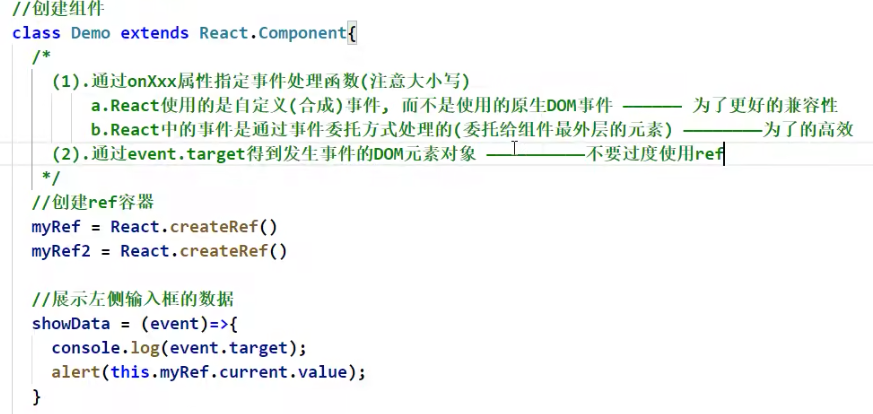
            myRef = React.createRef()
            showData = () => {
                console.log(this.myRef)
                alert(this.myRef.current.value)
            }
            render() {
                return (
                    <div>
                        <input ref={this.myRef} type="text" placeholder="点击按钮提示数据"/>
                        <button onClick={this.showData}>点我提示左侧数据</button>
                    </div>
                )
            }
        }
        ReactDOM.render(<Demo/>, document.getElementById('ctx'))
    </script>
</body>
<body>
    <div id="ctx"></div>
    <script src="https://cdn.staticfile.org/react/16.4.0/umd/react.development.js"></script>
    <script src="https://cdn.staticfile.org/react-dom/16.4.0/umd/react-dom.development.js"></script>
    <script src="https://cdn.staticfile.org/babel-standalone/6.26.0/babel.min.js"></script>
    <!-- 引入prop-types,用于对组件标签进行限制 -->
    <script src="../js/prop-types.js" type="text/javascript"></script>
    <script type="text/babel">
        class Demo extends React.Component {
            state = {
                username: '',
                password: ''
            }
            saveUsername = (e) => {
                this.setState({username: e.target.value})
            }
            savePassword = (e) => {
                this.setState({password: e.target.value})
            }
            handleSubmit = (e) => {
                e.preventDefault() // 阻止form表单提交事件
                const {username, password} = this.state
                alert(`username: ${username.value}, password: ${password.value}`)
            }
            render() {
                return (
                    <form onSubmit={this.handleSubmit}>
                        用户名:<input onChange={this.saveUsername} type="text" name="username"/>
                        密  码:<input onChange={this.savePassword} type="text" placeholder="password"/>
                        <button>login</button>
                    </form>
                )
            }
        }
        ReactDOM.render(<Demo/>, document.getElementById('ctx'))
    </script>
</body>
<body>
    <div id="ctx"></div>
    <script src="https://cdn.staticfile.org/react/16.4.0/umd/react.development.js"></script>
    <script src="https://cdn.staticfile.org/react-dom/16.4.0/umd/react-dom.development.js"></script>
    <script src="https://cdn.staticfile.org/babel-standalone/6.26.0/babel.min.js"></script>
    <!-- 引入prop-types,用于对组件标签进行限制 -->
    <script src="../js/prop-types.js" type="text/javascript"></script>
    <script type="text/babel">
        class Demo extends React.Component {
            handleSubmit = (e) => {
                e.preventDefault() // 阻止form表单提交事件
                const {username, password} = this
                alert(`username: ${username.value}, password: ${password.value}`)
            }
            render() {
                return (
                    <form onSubmit={this.handleSubmit}>
                        用户名:<input ref={c => this.username = c} type="text" name="username"/>
                        密  码:<input ref={c => this.password = c} type="text" placeholder="password"/>
                        <button>login</button>
                    </form>
                )
            }
        }
        ReactDOM.render(<Demo/>, document.getElementById('ctx'))
    </script>
</body>
<body>
    <div id="ctx"></div>
    <script src="https://cdn.staticfile.org/react/16.4.0/umd/react.development.js"></script>
    <script src="https://cdn.staticfile.org/react-dom/16.4.0/umd/react-dom.development.js"></script>
    <script src="https://cdn.staticfile.org/babel-standalone/6.26.0/babel.min.js"></script>
    <!-- 引入prop-types,用于对组件标签进行限制 -->
    <script src="../js/prop-types.js" type="text/javascript"></script>
    <script type="text/babel">
        class Demo extends React.Component {
            state = {
                username: '',
                password: ''
            }
        		/**
             * 高阶函数:如果一个函数符合下面两个规范中的任一,那该函数就是高阶函数
             * 1. 若A函数接收的参数是一个函数,那么A就可以称之为高阶函数
             * 2. 若A函数调用的返回值依然是一个函数,那么A就可以称之为高阶函数
             * 函数的柯里化:通过函数调用继续返回函数的方式,实现多次接收参数,最后统一处理的函数编码形式
             */
            saveFormData = (dataType) => {
                return (e) => {
                    return this.setState({[dataType]: e.target.value})
                }
            }
            handleSubmit = (e) => {
                e.preventDefault() // 阻止form表单提交事件
                const {username, password} = this.state
                alert(`username: ${username.value}, password: ${password.value}`)
            }
            render() {
                return (
                    <form onSubmit={this.handleSubmit}>
                        用户名:<input onChange={this.saveFormData('username')} type="text" name="username"/>
                        密  码:<input onChange={this.saveFormData('password')} type="text" placeholder="password"/>
                        <button>login</button>
                    </form>
                )
            }
        }
        ReactDOM.render(<Demo/>, document.getElementById('ctx'))
    </script>
</body>
<body>
    <div id="ctx"></div>
    <script src="https://cdn.staticfile.org/react/16.4.0/umd/react.development.js"></script>
    <script src="https://cdn.staticfile.org/react-dom/16.4.0/umd/react-dom.development.js"></script>
    <script src="https://cdn.staticfile.org/babel-standalone/6.26.0/babel.min.js"></script>
    <!-- 引入prop-types,用于对组件标签进行限制 -->
    <script src="../js/prop-types.js" type="text/javascript"></script>
    <script type="text/babel">
        class Count extends React.Component {

            constructor(props) {
                console.log('Count-constructor')
                super(props)
                this.state = {
                    count: 0
                }
            }
            add = () => {
                const {count} = this.state
                this.setState({
                    count: count+1
                })
            }
            death = () => {
                ReactDOM.unmountComponentAtNode(document.getElementById('ctx'))
            }
            force = () => {
                this.forceUpdate()
            }
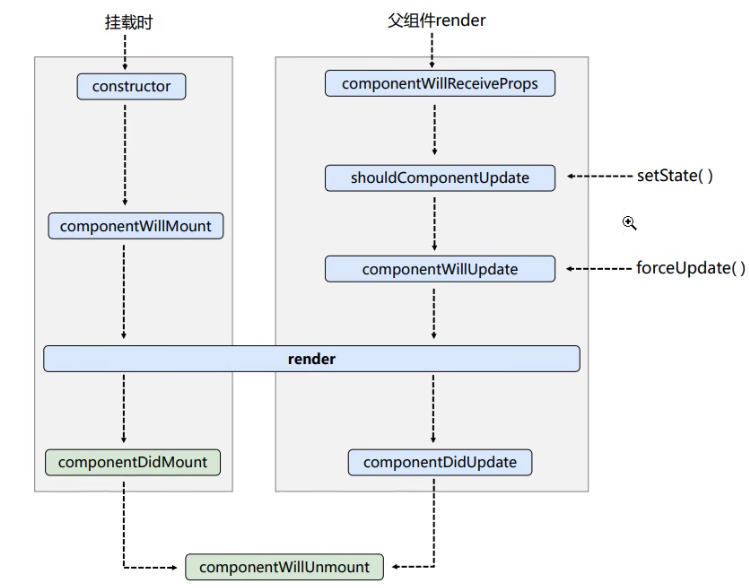
            componentWillMount() {
                console.log('Count-componentWillMount')
            }
            componentDidMount() {
                console.log('Count-componentDidMount')
            }
            shouldComponentUpdate() {
                console.log('Count-shouldComponentUpdate')
                return false
            }
            componentWillUpdate() {
                console.log('Count-componentWillUpdate')
            }
            componentDidUpdate() {
                console.log('Count-componentDidUpdate')
            }
            componentWillUnmount() {
                console.log('Count-componentWillUnmount')
            }

            render() {
                console.log('Count-render')
                const {count} = this.state
                return (
                    <div>
                        <h2>当前求和为: {count}</h2>
                        <button onClick={this.add}>点我+1</button>
                        <button onClick={this.death}>卸载组件</button>
                        <button onClick={this.force}>强制更新</button>
                    </div>
                )
            }
        }

        // 父组件A
        class A extends React.Component {
            state = {
                carName: '奔驰'
            }
            changeCar = () => {
                this.setState({carName: '奥迪'})
            }
            render() {
                return (
                    <div>
                        <div>A component</div>
                        <button onClick={this.changeCar}>换车</button>
                        <B carName={this.state.carName}/>
                    </div>
                )
            }
        }
        // 子组件B
        class B extends React.Component {
            // 第一次渲染不会调用这个钩子
            componentWillReceiveProps(props) {
                console.log('B-componentWillReceiveProps', props)
            }
            render() {
                return (
                    <div>
                        <div>B component: carName={this.props.carName}</div>
                    </div>
                )
            }
        }
        // ReactDOM.render(<Count/>, document.getElementById('ctx'))
        ReactDOM.render(<A/>, document.getElementById('ctx'))
    </script>
</body>
<body>
    <div id="ctx"></div>
    <script src="../newjs/react.development.js"></script>
    <script src="../newjs/react-dom.development.js"></script>
    <script src="../js/babel.min.js"></script>
    <!-- 引入prop-types,用于对组件标签进行限制 -->
    <script src="../js/prop-types.js" type="text/javascript"></script>
    <script type="text/babel">
        class Count extends React.Component {

            constructor(props) {
                console.log('Count-constructor')
                super(props)
                this.state = {
                    count: 0
                }
            }
            add = () => {
                const {count} = this.state
                this.setState({
                    count: count+1
                })
            }
            death = () => {
                ReactDOM.unmountComponentAtNode(document.getElementById('ctx'))
            }
            force = () => {
                this.forceUpdate()
            }
            // 在更新之前获取快照,方法返回值将会作为参数传递给componentDidUpdate钩子
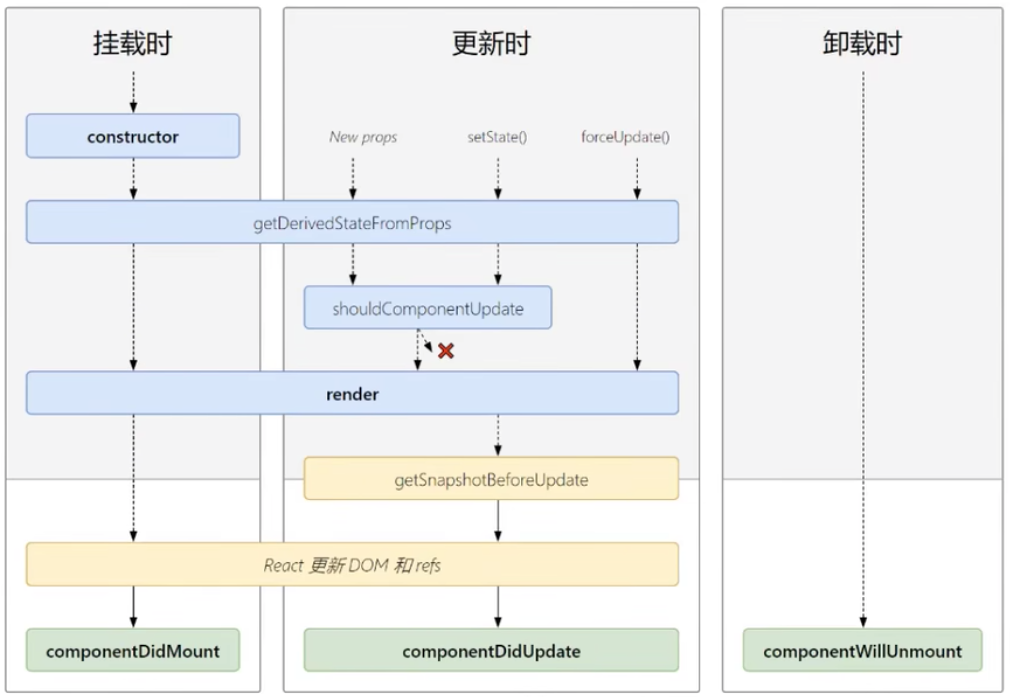
            getSnapshotBeforeUpdate () {
                console.log('getSnapshotBeforeUpdate')
                return 'liergou'
            }
            // getDerivedStateFromProps方法的返回值会作为state的值
            static getDerivedStateFromProps (props, state) {
                console.log('getDeriverdStateFromProps', props, state)
                return null
            }
            componentDidMount() {
                console.log('Count-componentDidMount')
            }
            shouldComponentUpdate() {
                console.log('Count-shouldComponentUpdate')
                return true
            }
            componentDidUpdate(preProps, preState, snapshotValue) {
                console.log('Count-componentDidUpdate', preProps, preState, snapshotValue)
            }
            componentWillUnmount() {
                console.log('Count-componentWillUnmount')
            }

            render() {
                console.log('Count-render')
                const {count} = this.state
                return (
                    <div>
                        <h2>当前求和为: {count}</h2>
                        <button onClick={this.add}>点我+1</button>
                        <button onClick={this.death}>卸载组件</button>
                        <button onClick={this.force}>强制更新</button>
                    </div>
                )
            }
        }
        ReactDOM.render(<Count age={88}/>, document.getElementById('ctx'))
    </script>
</body>
1.postman介绍Postman一款非常流行的API调试工具。其实,开发人员用的更多。因为测试人员做接口测试会有更多选择,例如Jmeter、soapUI等。不过,对于开发过程中去调试接口,Postman确实足够的简单方便,而且功能强大。2.下载安装官网地址:https://www.postman.com/下载完成后双击安装吧,安装过程极其简单,无需任何操作3.使用教程这里以百度为例,工具使用简单,填写URL地址即可发送请求,在下方查看响应结果和响应状态码常用方法都有支持请求方法:getpostputdeleteGet、Post、Put与Delete的作用get:请求方法一般是用于数据查询,
Ⅰ软件测试基础一、软件测试基础理论1、软件测试的必要性所有的产品或者服务上线都需要测试2、测试的发展过程3、什么是软件测试找bug,发现缺陷4、测试的定义使用人工或自动的手段来运行或者测试某个系统的过程。目的在于检测它是否满足规定的需求。弄清预期结果和实际结果的差别。5、测试的目的以最小的人力、物力和时间找出软件中潜在的错误和缺陷6、测试的原则28原则:20%的主要功能要重点测(eg:支付宝的支付功能,其他功能都是次要的)80%的错误存在于20%的代码中7、测试标准8、测试的基本要求功能测试性能测试安全性测试兼容性测试易用性测试外观界面测试可靠性测试二、质量模型衡量一个优秀软件的维度①功能性功
ES一、简介1、ElasticStackES技术栈:ElasticSearch:存数据+搜索;QL;Kibana:Web可视化平台,分析。LogStash:日志收集,Log4j:产生日志;log.info(xxx)。。。。使用场景:metrics:指标监控…2、基本概念Index(索引)动词:保存(插入)名词:类似MySQL数据库,给数据Type(类型)已废弃,以前类似MySQL的表现在用索引对数据分类Document(文档)真正要保存的一个JSON数据{name:"tcx"}二、入门实战{"name":"DESKTOP-1TSVGKG","cluster_name":"elasticsear
我有一个将某些事件写入队列的Rails3应用。现在我想在服务器上创建一个服务,每x秒轮询一次队列,并按计划执行其他任务。除了创建ruby脚本并通过cron作业运行它之外,还有其他稳定的替代方案吗? 最佳答案 尽管启动基于Rails的持久任务是一种选择,但您可能希望查看更有序的系统,例如delayed_job或Starling管理您的工作量。我建议不要在cron中运行某些东西,因为启动整个Rails堆栈的开销可能很大。每隔几秒运行一次它是不切实际的,因为Rails上的启动时间通常为5-15秒,具体取决于您的硬件。不过,每天这样做几
(本文是网络的宏观的概念铺垫)目录计算机网络背景网络发展认识"协议"网络协议初识协议分层OSI七层模型TCP/IP五层(或四层)模型报头以太网碰撞路由器IP地址和MAC地址IP地址与MAC地址总结IP地址MAC地址计算机网络背景网络发展 是最开始先有的计算机,计算机后来因为多项技术的水平升高,逐渐的计算机变的小型化、高效化。后来因为计算机其本身的计算能力比较的快速:独立模式:计算机之间相互独立。 如:有三个人,每个人做的不同的事物,但是是需要协作的完成。 而这三个人所做的事是需要进行协作的,然而刚开始因为每一台计算机之间都是互相独立的。所以前面的人处理完了就需要将数据
是否可以在单个事件机器中运行多个服务器?我的意思是,多个服务可以由一个客户端连接同时使用。例如,登录服务器对用户进行身份验证,然后用户可以同时使用聊天室和简单的游戏,例如带有单个客户端套接字的跳棋?或者我是否需要为每个服务使用多个事件机器react器? 最佳答案 我试过了,它正在工作:#!/usr/bin/envrubyrequire'eventmachine'moduleEchoServerdefpost_initputs"--someoneconnectedtotheechoserver!"enddefreceive_datad
文章目录概念索引相关操作创建索引更新副本查看索引删除索引索引的打开与关闭收缩索引索引别名查询索引别名文档相关操作新建文档查询文档更新文档删除文档映射相关操作查询文档映射创建静态映射创建索引并添加映射概念es中有三个概念要清楚,分别为索引、映射和文档(不用死记硬背,大概有个印象就可以)索引可理解为MySQL数据库;映射可理解为MySQL的表结构;文档可理解为MySQL表中的每行数据静态映射和动态映射上面已经介绍了,映射可理解为MySQL的表结构,在MySQL中,向表中插入数据是需要先创建表结构的;但在es中不必这样,可以直接插入文档,es可以根据插入的文档(数据),动态的创建映射(表结构),这就
目录1关系运算符2运算符优先级3关系表达式的书写代码实例:下面是面试中可能遇到的问题:1关系运算符C++中有6个关系运算符,用于比较两个值的大小关系,它们分别是:运算符描述==等于!=不等于小于>大于小于等于>=大于等于这些运算符返回一个布尔值,即true或false。例如,当x等于y时,x==y的结果为true,否则结果为false。2运算符优先级在C++中,关系运算符的优先级高于赋值运算符,但低于算术运算符。以下是关系运算符的优先级,从高到低排列:运算符描述>,,>=,关系运算符==,!=相等性运算符&&逻辑与`如果在表达式中有多个运算符,则按照优先级顺序依次进行运算。3关系表达式的书写在
一.计算机组成原理 这本书利用组合逻辑、同步时序逻辑电路设计的相关知识,从逻辑门开始逐步构建运算器、存储器、数据通路和控制器,最终集成为完整的CU原型系统,使读者从设计者的角度理解计算机部件构成及运行的基本原理,掌握软硬件协同的概念。 全书共9章,主要内容包括计算机系统概述、数据信息的表示、运算方法与运算器、存储系统、指令系统、中央处理器、指令流水线、总线系统、输入输出系统。1.计算机系统概述1.1计算机发展历程 计算机是一种能够按照事先存储的程序,自动、高速、准确地对相关信息进行处理的电子设备。1946年2月,世界上第一台电子数字计算机ENIAC(ElectronicNum
其实现在基础的资料和视频到处都是,就是看你有没有认真的去找学习资源了,去哪里学习都是要看你个人靠谱不靠谱,再好的教程和老师,你自己学习不进去也是白搭在正式选择之前,大可以在各种学习网站里面找找学习资源先自己学习一下为什么选择学软件测试?同学们理由众多!大概分这几类:①不受开发语言、行业产品变化限制;②入门更简单,对零基础、女生都友好;③软件项目都需要测试人员,职业生涯稳;④学习周期短,但薪资并不低。要想“肩扛”一条线?需掌握三大技能:技能1:掌握测试流程,熟悉系统框架能提前与开发人员一起制定测试计划,通过测试左移,推动代码评审,代码审计,单元测试,自动化冒烟测试,来保证研发阶段的质量。技能2:
