python最好用3.10版本!!!
python最好用3.10版本!!!
python最好用3.10版本!!!
Mac升级Python版本
brew install python@3.10
Mac电脑从stable-diffusion-webui代码库clone后,按照提示运行
bash <(wget -qO- https://raw.githubusercontent.com/AUTOMATIC1111/stable-diffusion-webui/master/webui.sh) 报错
Installing gfpgan
Traceback (most recent call last):
RuntimeError: Couldn’t install gfpgan.
error: subprocess-exited-with-error
ERROR: Could not find a version that satisfies the requirement cython (from versions: none)
ERROR: No matching distribution found for cython
error: metadata-generation-failed
Python 3.10.10 (main, Feb 16 2023, 02:58:25) [Clang 14.0.0 (clang-1400.0.29.202)]
Commit hash: a9fed7c364061ae6efb37f797b6b522cb3cf7aa2
Installing gfpgan
Traceback (most recent call last):
  File "/Users/xxx/IdeaProjects/stable-diffusion-webui/launch.py", line 380, in <module>
    prepare_environment()
  File "/Users/xxx/IdeaProjects/stable-diffusion-webui/launch.py", line 290, in prepare_environment
    run_pip(f"install {gfpgan_package}", "gfpgan")
  File "/Users/xxx/IdeaProjects/stable-diffusion-webui/launch.py", line 145, in run_pip
    return run(f'"{python}" -m pip {args} --prefer-binary{index_url_line}', desc=f"Installing {desc}", errdesc=f"Couldn't install {desc}")
  File "/Users/xxx/IdeaProjects/stable-diffusion-webui/launch.py", line 113, in run
    raise RuntimeError(message)
RuntimeError: Couldn't install gfpgan.
Command: "/usr/local/opt/python@3.10/bin/python3.10" -m pip install git+https://github.com/TencentARC/GFPGAN.git@8d2447a2d918f8eba5a4a01463fd48e45126a379 --prefer-binary
Error code: 1
stdout: Looking in indexes: http://mirrors.aliyun.com/pypi/simple/
Collecting git+https://github.com/TencentARC/GFPGAN.git@8d2447a2d918f8eba5a4a01463fd48e45126a379
  Cloning https://github.com/TencentARC/GFPGAN.git (to revision 8d2447a2d918f8eba5a4a01463fd48e45126a379) to /private/var/folders/_m/tjc3x6fd5s5_f6cs_dqt4hx00000gn/T/pip-req-build-2jwucle4
  Resolved https://github.com/TencentARC/GFPGAN.git to commit 8d2447a2d918f8eba5a4a01463fd48e45126a379
  Preparing metadata (setup.py): started
  Preparing metadata (setup.py): finished with status 'error'

stderr:   Running command git clone --filter=blob:none --quiet https://github.com/TencentARC/GFPGAN.git /private/var/folders/_m/tjc3x6fd5s5_f6cs_dqt4hx00000gn/T/pip-req-build-2jwucle4
  Running command git rev-parse -q --verify 'sha^8d2447a2d918f8eba5a4a01463fd48e45126a379'
  Running command git fetch -q https://github.com/TencentARC/GFPGAN.git 8d2447a2d918f8eba5a4a01463fd48e45126a379
  Running command git checkout -q 8d2447a2d918f8eba5a4a01463fd48e45126a379
  error: subprocess-exited-with-error

  × python setup.py egg_info did not run successfully.
  │ exit code: 1
  ╰─> [40 lines of output]
      /usr/local/lib/python3.10/site-packages/setuptools/installer.py:27: SetuptoolsDeprecationWarning: setuptools.installer is deprecated. Requirements should be satisfied by a PEP 517 installer.
        warnings.warn(
      WARNING: The repository located at mirrors.aliyun.com is not a trusted or secure host and is being ignored. If this repository is available via HTTPS we recommend you use HTTPS instead, otherwise you may silence this warning and allow it anyway with '--trusted-host mirrors.aliyun.com'.
      ERROR: Could not find a version that satisfies the requirement cython (from versions: none)
      ERROR: No matching distribution found for cython
      Traceback (most recent call last):
        File "/usr/local/lib/python3.10/site-packages/setuptools/installer.py", line 82, in fetch_build_egg
          subprocess.check_call(cmd)
        File "/usr/local/Cellar/python@3.10/3.10.10_1/Frameworks/Python.framework/Versions/3.10/lib/python3.10/subprocess.py", line 369, in check_call
          raise CalledProcessError(retcode, cmd)
      subprocess.CalledProcessError: Command '['/usr/local/opt/python@3.10/bin/python3.10', '-m', 'pip', '--disable-pip-version-check', 'wheel', '--no-deps', '-w', '/var/folders/_m/tjc3x6fd5s5_f6cs_dqt4hx00000gn/T/tmpq8tsd1vj', '--quiet', 'cython']' returned non-zero exit status 1.

      The above exception was the direct cause of the following exception:

      Traceback (most recent call last):
        File "<string>", line 2, in <module>
        File "<pip-setuptools-caller>", line 34, in <module>
        File "/private/var/folders/_m/tjc3x6fd5s5_f6cs_dqt4hx00000gn/T/pip-req-build-2jwucle4/setup.py", line 84, in <module>
          setup(
        File "/usr/local/lib/python3.10/site-packages/setuptools/__init__.py", line 107, in setup
          _install_setup_requires(attrs)
        File "/usr/local/lib/python3.10/site-packages/setuptools/__init__.py", line 80, in _install_setup_requires
          _fetch_build_eggs(dist)
        File "/usr/local/lib/python3.10/site-packages/setuptools/__init__.py", line 85, in _fetch_build_eggs
          dist.fetch_build_eggs(dist.setup_requires)
        File "/usr/local/lib/python3.10/site-packages/setuptools/dist.py", line 879, in fetch_build_eggs
          resolved_dists = pkg_resources.working_set.resolve(
        File "/usr/local/lib/python3.10/site-packages/pkg_resources/__init__.py", line 815, in resolve
          dist = self._resolve_dist(
        File "/usr/local/lib/python3.10/site-packages/pkg_resources/__init__.py", line 851, in _resolve_dist
          dist = best[req.key] = env.best_match(
        File "/usr/local/lib/python3.10/site-packages/pkg_resources/__init__.py", line 1123, in best_match
          return self.obtain(req, installer)
        File "/usr/local/lib/python3.10/site-packages/pkg_resources/__init__.py", line 1135, in obtain
          return installer(requirement)
        File "/usr/local/lib/python3.10/site-packages/setuptools/dist.py", line 949, in fetch_build_egg
          return fetch_build_egg(self, req)
        File "/usr/local/lib/python3.10/site-packages/setuptools/installer.py", line 84, in fetch_build_egg
          raise DistutilsError(str(e)) from e
      distutils.errors.DistutilsError: Command '['/usr/local/opt/python@3.10/bin/python3.10', '-m', 'pip', '--disable-pip-version-check', 'wheel', '--no-deps', '-w', '/var/folders/_m/tjc3x6fd5s5_f6cs_dqt4hx00000gn/T/tmpq8tsd1vj', '--quiet', 'cython']' returned non-zero exit status 1.
      [end of output]

  note: This error originates from a subprocess, and is likely not a problem with pip.
error: metadata-generation-failed

× Encountered error while generating package metadata.
╰─> See above for output.

note: This is an issue with the package mentioned above, not pip.
hint: See above for details.

[notice] A new release of pip is available: 23.0 -> 23.0.1
[notice] To update, run: python3.10 -m pip install --upgrade pip
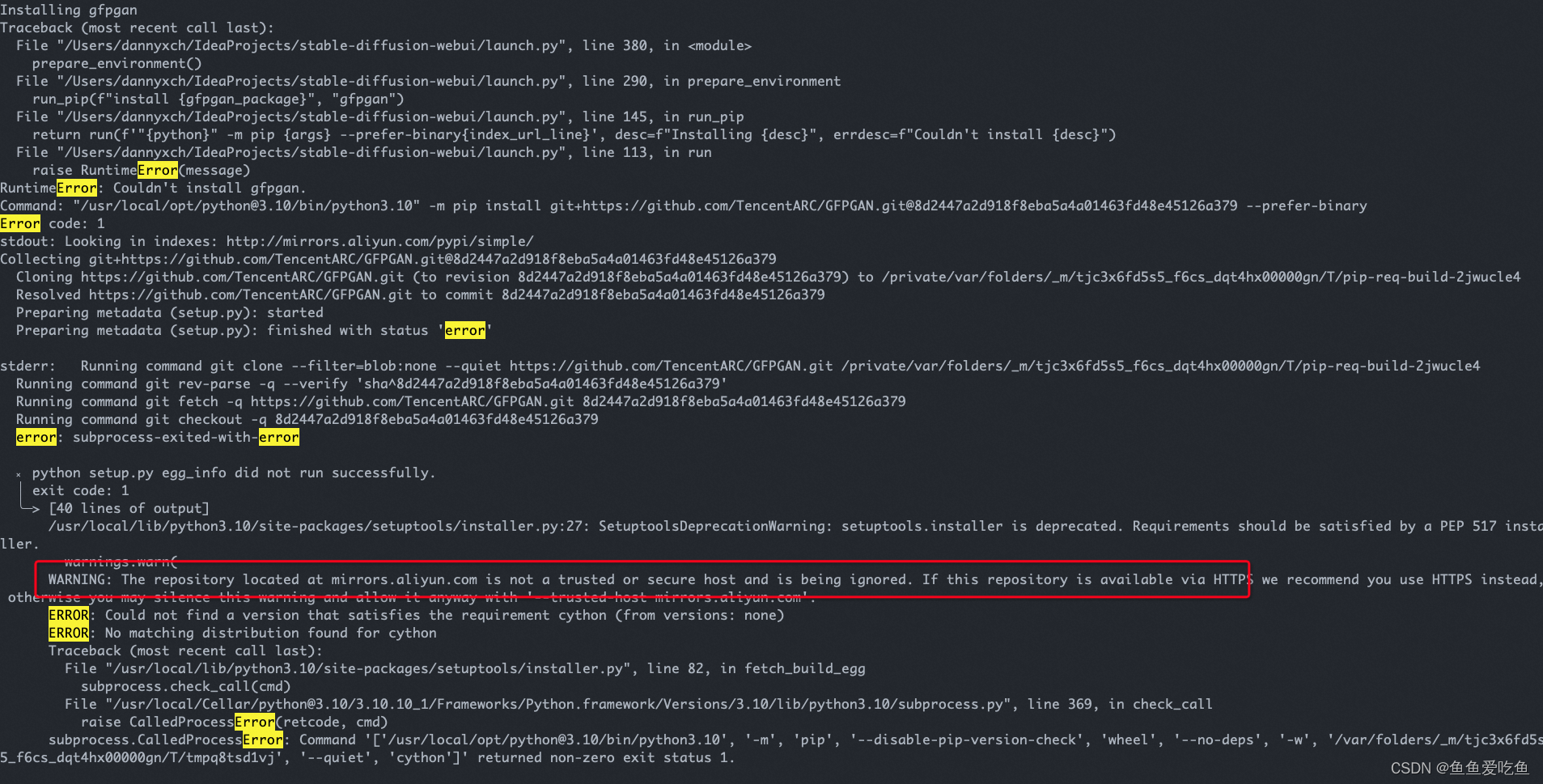
注意看标红的部分,提示阿里云的镜像不是受信任的,把它改成受信任的即可。执行下面的命令
pip config set global.trusted-host mirrors.aliyun.com
PS:如何设置阿里云镜像?执行下面的命令
pip config set global.index-url <http://mirrors.aliyun.com/pypi/simple/>
我想为Heroku构建一个Rails3应用程序。他们使用Postgres作为他们的数据库,所以我通过MacPorts安装了postgres9.0。现在我需要一个postgresgem并且共识是出于性能原因你想要pggem。但是我对我得到的错误感到非常困惑当我尝试在rvm下通过geminstall安装pg时。我已经非常明确地指定了所有postgres目录的位置可以找到但仍然无法完成安装:$envARCHFLAGS='-archx86_64'geminstallpg--\--with-pg-config=/opt/local/var/db/postgresql90/defaultdb/po
我打算为ruby脚本创建一个安装程序,但我希望能够确保机器安装了RVM。有没有一种方法可以完全离线安装RVM并且不引人注目(通过不引人注目,就像创建一个可以做所有事情的脚本而不是要求用户向他们的bash_profile或bashrc添加一些东西)我不是要脚本本身,只是一个关于如何走这条路的快速指针(如果可能的话)。我们还研究了这个很有帮助的问题:RVM-isthereawayforsimpleofflineinstall?但有点误导,因为答案只向我们展示了如何离线在RVM中安装ruby。我们需要能够离线安装RVM本身,并查看脚本https://raw.github.com/wayn
我有一个奇怪的问题:我在rvm上安装了rubyonrails。一切正常,我可以创建项目。但是在我输入“railsnew”时重新启动后,我有“程序'rails'当前未安装。”。SystemUbuntu12.04ruby-v"1.9.3p194"gemlistactionmailer(3.2.5)actionpack(3.2.5)activemodel(3.2.5)activerecord(3.2.5)activeresource(3.2.5)activesupport(3.2.5)arel(3.0.2)builder(3.0.0)bundler(1.1.4)coffee-rails(
我刚刚为fedora安装了emacs。我想用emacs编写ruby。为ruby提供代码提示、代码完成类型功能所需的工具、扩展是什么? 最佳答案 ruby-mode已经包含在Emacs23之后的版本中。不过,它也可以通过ELPA获得。您可能感兴趣的其他一些事情是集成RVM、feature-mode(Cucumber)、rspec-mode、ruby-electric、inf-ruby、rinari(用于Rails)等。这是我当前用于Ruby开发的Emacs配置:https://github.com/citizen428/emacs
在MRIRuby中我可以这样做:deftransferinternal_server=self.init_serverpid=forkdointernal_server.runend#Maketheserverprocessrunindependently.Process.detach(pid)internal_client=self.init_client#Dootherstuffwithconnectingtointernal_server...internal_client.post('somedata')ensure#KillserverProcess.kill('KILL',
我正在尝试在我的centos服务器上安装therubyracer,但遇到了麻烦。$geminstalltherubyracerBuildingnativeextensions.Thiscouldtakeawhile...ERROR:Errorinstallingtherubyracer:ERROR:Failedtobuildgemnativeextension./usr/local/rvm/rubies/ruby-1.9.3-p125/bin/rubyextconf.rbcheckingformain()in-lpthread...yescheckingforv8.h...no***e
我的最终目标是安装当前版本的RubyonRails。我在OSXMountainLion上运行。到目前为止,这是我的过程:已安装的RVM$\curl-Lhttps://get.rvm.io|bash-sstable检查已知(我假设已批准)安装$rvmlistknown我看到当前的稳定版本可用[ruby-]2.0.0[-p247]输入命令安装$rvminstall2.0.0-p247注意:我也试过这些安装命令$rvminstallruby-2.0.0-p247$rvminstallruby=2.0.0-p247我很快就无处可去了。结果:$rvminstall2.0.0-p247Search
我实际上是在尝试使用RVM在我的OSX10.7.5上更新ruby,并在输入以下命令后:rvminstallruby我得到了以下回复:Searchingforbinaryrubies,thismighttakesometime.Checkingrequirementsforosx.Installingrequirementsforosx.Updatingsystem.......Errorrunning'requirements_osx_brew_update_systemruby-2.0.0-p247',pleaseread/Users/username/.rvm/log/138121
由于fast-stemmer的问题,我很难安装我想要的任何rubygem。我把我得到的错误放在下面。Buildingnativeextensions.Thiscouldtakeawhile...ERROR:Errorinstallingfast-stemmer:ERROR:Failedtobuildgemnativeextension./System/Library/Frameworks/Ruby.framework/Versions/2.0/usr/bin/rubyextconf.rbcreatingMakefilemake"DESTDIR="cleanmake"DESTDIR=
当我尝试安装Ruby时遇到此错误。我试过查看this和this但无济于事➜~brewinstallrubyWarning:YouareusingOSX10.12.Wedonotprovidesupportforthispre-releaseversion.Youmayencounterbuildfailuresorotherbreakages.Pleasecreatepull-requestsinsteadoffilingissues.==>Installingdependenciesforruby:readline,libyaml,makedepend==>Installingrub
