@作者 : SYFStrive
@博客首页 : HomePage
📌:个人社区(欢迎大佬们加入) 👉:社区链接🔗
📌:觉得文章不错可以点点关注 👉:专栏连接🔗
💃:程序员每天坚持锻炼💪
👉 飞机大战专栏(🔥)
目录
单例模式是1种设计模式:👉(Design pattern)代表了最佳的实践,通常被有经验的面向对象的软件开发人员所采用。设计模式是软件开发人员在软件开发过程中面临的一般问题的解决方案。这些解决方案是众多软件开发人员经过相当长的一段时间的试验和错误总结出来的。
单例使用说明:“单例模式是指在内存中只会创建一次对象的设计模式,并且确保一个类只有实例,而且会自行实例化,并向整个系统提供这个实例。
using UnityEngine;

//摘要:Base class for everything attached to GameObjects.
//Component中文说明:所有能挂载到游戏对象上的类型基类
public class Singleton<T> : MonoBehaviour where T :Component
{
    public static T Instance { get; private set; }

    protected virtual void Awake()
    {
        Instance = this as T;
    }
}
实现:子弹生成是就开始移动
using System.Collections;
using System.Collections.Generic;
using UnityEngine;

public class Projectile : MonoBehaviour
{
    //子弹的移动速度
    [SerializeField] float moveSpeed;
    //子弹的移动方向
    [SerializeField] protected Vector3 moveDirection;
    //子弹移动的Obj
    protected GameObject targer;

    protected virtual void OnEnable()
    {
        StartCoroutine(ProjectileMoveIE());
    }

    IEnumerator ProjectileMoveIE()
    {
        while (true)
        {
            //子弹移动
            transform.position += moveSpeed * moveDirection * Time.deltaTime;
            yield return null;
        }
    }
}
实现:储存人物的血量参数(继承这个脚本的简直爽歪歪)……
代码如 👇
using System;
using System.Collections;
using System.Collections.Generic;
using System.Security.Principal;
using UnityEngine;

public class Characters : MonoBehaviour
{
    [Header("---Header---")]
    //最大生命值
    [SerializeField] protected float maxHp;

    //当前生命值
    protected float currentHp;

    //死亡时生成特效
    [SerializeField] GameObject dieSpecialEffects;

    protected virtual void OnEnable()
    {
        currentHp = maxHp;
    }

    /// <summary>
    /// 玩家受伤
    /// </summary>
    /// <param name="injuredValue">伤害值</param>
    protected virtual void Injured(float injuredValue)
    {
        currentHp -= injuredValue;

        if (currentHp <= 0)
            Die();
    }

    /// <summary>
    /// 玩家死亡
    /// </summary>
    public void Die()
    {
        //血量归0
        currentHp=0;

        //调用对象池
        PoolManager.Release(dieSpecialEffects,transform.position);

		隐藏该对象
        this.gameObject.SetActive(false);
    }

    /// <summary>
    /// 恢复生命值
    /// </summary>
    protected virtual void RecoverHP(float value)
    {
        currentHp = Mathf.Clamp(currentHp + value, 0, maxHp);
    }


    /// <summary>
    /// 自动恢复生命值携程
    /// </summary>
    /// <param name="waitForSeconds">恢复的间隔</param>
    /// <param name="value">恢复值</param>
    /// <returns></returns>
    protected virtual IEnumerator SelfRecoverHpIE(WaitForSeconds waitForSeconds,float value)
    {
        while (currentHp < maxHp)
        {
            yield return waitForSeconds;

            RecoverHP(currentHp * value);
        }
    }

    /// <summary>
    /// 持续受伤
    /// </summary>
    /// <param name="waitForSeconds">受伤的间隔</param>
    /// <param name="value">受伤值</param>
    /// <returns></returns>
    protected virtual IEnumerator SelfInjuredIE(WaitForSeconds waitForSeconds, float value)
    {
        while (currentHp >= 0f)
        {
            yield return waitForSeconds;

            Die(currentHp * value);
        }
    }
}
说明:这里已经添加了这个项目所有的对象池
using System.Collections.Generic;
using UnityEngine;

public class PoolManager : MonoBehaviour
{
  //储存不同类准备的对象池
  [SerializeField] Pool[] playerPoolProjectile; //玩家子弹
  [SerializeField] Pool[] enemyPoolProjectile; //敌人子弹
  [SerializeField] Pool[] poolVFX; //特效
  [SerializeField] Pool[] randomCreateEnemy; //随机敌人
  [SerializeField] Pool[] createProp; 敌人掉落的道具

  //使用字典来存储不同的装备
  public static Dictionary<GameObject, Pool> dictionary;

  private void Awake()
  {
    //实例化字典
    dictionary = new Dictionary<GameObject, Pool>();

    //初始化对象池
    InitializeObj(playerPoolProjectile);
    InitializeObj(enemyPoolProjectile);
    InitializeObj(poolVFX);
    InitializeObj(randomCreateEnemy);
    InitializeObj(createProp);
  }


  #region 测试函数
	#if UNITY_EDITOR
	  //停止游戏时执行
	  private void OnDestroy()
	  {
	    CheckPoolSize(playerPoolProjectile);
	    CheckPoolSize(enemyPoolProjectile);
	    CheckPoolSize(poolVFX);
	    CheckPoolSize(randomCreateEnemy);
	    CheckPoolSize(createProp);
	  }
	#endif
  #endregion

  #region 测试需要对象池的容量
	  private void CheckPoolSize(Pool[] pools)
	  {
	    foreach (Pool pool in pools)
	    {
	      if (pool.sumSize > pool.initializeSize)
	      {
	        Debug.LogWarning(string.Format("Pool:{0}初始大小为{1},需要的大小为{2}",
	            pool.prefabeObjProperty.name,
	            pool.initializeSize,
	            pool.sumSize));
	      }
	    }
	  }
  #endregion

  /// <summary>
  /// 初始化子弹
  /// </summary>
  private void InitializeObj(Pool[] pools)
  {
    foreach (var pool in pools)
    {
      #region //条件编译操作 只有在Unity引起运行
		#if UNITY_EDITOR
		      if (dictionary.ContainsKey(pool.prefabeObjProperty))
		      {
		        Debug.Log("字典有相同的名字!"+pool.prefabeObjProperty.name);
		        continue;
		      }
		#endif
      #endregion

      //添加到字典
      dictionary.Add(pool.prefabeObjProperty, pool);
      //给创建的Obj命名
      Transform poolPatent = new GameObject("对象池Poll" + pool.prefabeObjProperty.name).transform;
      //设置父位置
      poolPatent.parent = transform;
      //初始化对象池
      pool.Initialize(poolPatent);
    }
  }

  #region  释放子弹&&重载
  /// <summary>
  /// 释放子弹
  /// </summary>
  /// <param name="prefabe">指定游戏的预制体</param>
  /// <returns></returns>
  public static GameObject Release(GameObject prefabe)
  {
    #region 条件编译操作 只有在Unity引起运行
		#if UNITY_EDITOR
		    if (!dictionary.ContainsKey(prefabe))
		    {
		      Debug.Log("找不到对应的Key");
		      return null;
		    }
		#endif
    #endregion

    return dictionary[prefabe].PrepareQuene();
  }

  /// <summary>
  /// 释放子弹
  /// </summary>
  /// <param name="prefabe">指定游戏的预制体</param>
  /// <param name="position">指定游戏的位置</param>
  /// <returns></returns>
  public static GameObject Release(GameObject prefabe, Vector3 position)
  {
    #region 条件编译操作 只有在Unity引起运行
		#if UNITY_EDITOR
		    if (!dictionary.ContainsKey(prefabe))
		    {
		      Debug.Log("找不到对应的Key");
		      return null;
		    }
		#endif
    #endregion
    return dictionary[prefabe].PrepareQuene(position);
  }


  /// <summary>
  /// 释放子弹
  /// </summary>
  /// <param name="prefabe">指定游戏的预制体</param>
  /// <param name="position">指定游戏的位置</param>
  /// <param name="quaternion">指定游戏的旋转位置</param>
  /// <returns></returns>
  public static GameObject Release(GameObject prefabe, Vector3 position, Quaternion quaternion)
  {
    #region 条件编译操作 只有在Unity引起运行
		#if UNITY_EDITOR

		    if (!dictionary.ContainsKey(prefabe))
		    {
		      Debug.Log("找不到对应的Key");
		      return null;
		    }
		#endif
    #endregion

    return dictionary[prefabe].PrepareQuene(position, quaternion);
  }


  /// <summary>
  /// 释放子弹
  /// </summary>
  /// <param name="prefabe">指定游戏的预制体</param>
  /// <param name="position">指定游戏的位置</param>
  /// <param name="quaternion">指定游戏的旋转位置</param>
  /// <param name="localscale">指定游戏的旋转缩放</param>
  /// <returns></returns>
  public static GameObject Release(GameObject prefabe, Vector3 position, Quaternion quaternion, Vector3 localscale)
  {
    #region 条件编译操作 只有在Unity引起运行
		#if UNITY_EDITOR

		    if (!dictionary.ContainsKey(prefabe))
		    {
		      Debug.Log("找不到对应的Key");
		      return null;
		    }
		#endif
    #endregion

    return dictionary[prefabe].PrepareQuene(position, quaternion, localscale);
  }
  #endregion
}
代码如 👇
public class Player : Characters{
   //恢复血量的时间
   [SerializeField] float selfRecoverTime;
   //恢复血量的百分比
   [SerializeField,Range(0,1)] float selfRecoverPercentum;
   //是否要使用自动恢复生命功能
   [SerializeField] bool isSTSelfRecover;
    //生命自动恢复的间隔协程
    WaitForSeconds selfRecoverTimeIE;
    //停止携程的第三种方法
    private Coroutine relfRecoverCoroutine;

    private void Start()
    {
        //生命自动恢复的间隔
        selfRecoverTimeIE = new WaitForSeconds(selfRecoverTime);
        //测试
        Injured(50f);
    }

	#region 生命系统
		protected override void Injured(float injuredValue)
	{
	    Debug.Log("被攻击血量减少:"+ injuredValue);

	    base.Injured(injuredValue);

	    if (gameObject.activeSelf)
	    {
	         if (isSTSelfRecover)
	        {
	            if (relfRecoverCoroutine != null)
	                StopCoroutine(relfRecoverCoroutine);
	            relfRecoverCoroutine=StartCoroutine(SelfRecoverHpIE(selfRecoverTimeIE, selfRecoverPercentum));
	        }
	    }
	}
	#endregion

   //测试代码
   //protected override void RecoverHP(float value)
   //{
   //    Debug.Log("---血量开始恢复---");
   //    base.RecoverHP(value);
   //    Debug.Log(string.Format("当前的血量为{0}", (int)currentHp));
   //}
}
自动恢复系统效果如 👇
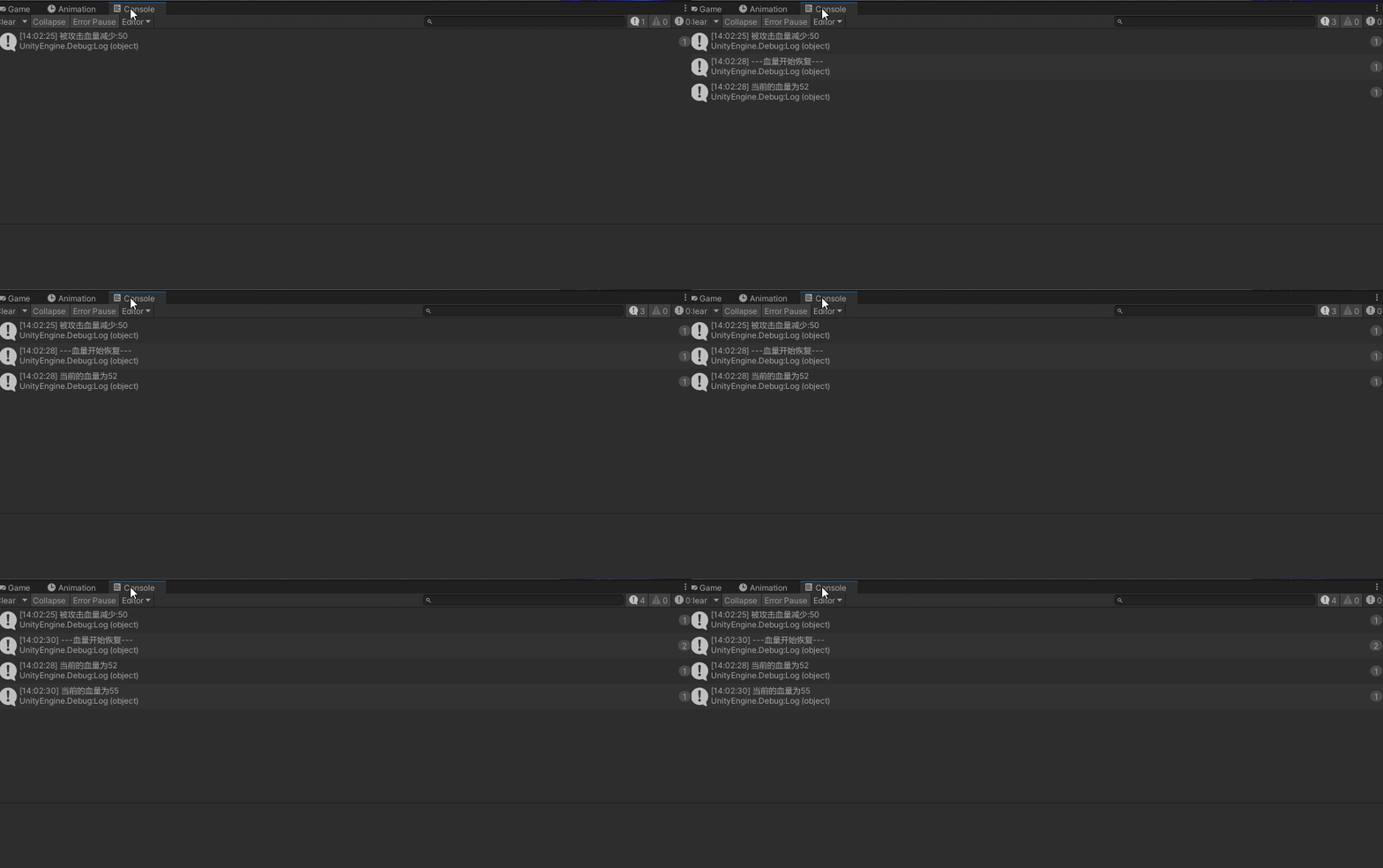
说明:在子弹移动时首先改变子弹移动的方向 👉 实现子弹移动的方向
EnemyProjectileNavAI 脚本如 👇
using System.Collections;
using System.Collections.Generic;
using UnityEngine;

public class EnemyProjectileNavAI : Projectile
{
    private void Awake()
    {
        targer = GameObject.Find("Player").gameObject;
    }
    protected override void OnEnable()
    {
        StartCoroutine(nameof(NavProjectileIE));
        base.OnEnable();
    }

	//AI子弹协程
    IEnumerator NavProjectileIE()
    {
        yield return null;

        if (!targer.activeSelf)
            //获取发射的方向
            moveDirection = (targer.transform.position - transform.position).normalized;
    }
}

实习:子弹碰到飞机产生碰撞实现受伤……
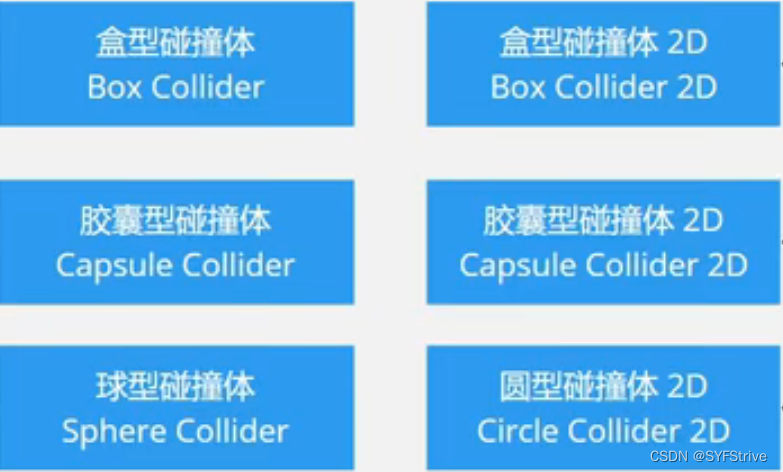
实现物理碰撞的条件如 👇
3D及2D常用的碰撞体如 👇
//玩家攻击力
[SerializeField] float damage;
//特效预制体
[SerializeField] GameObject hitVFX;

private void OnCollisionEnter2D(Collision2D collision)
{
    //返回true或false
    if(collision.collider.TryGetComponent<Characters>(out Characters characters))
    {
    	//玩家受伤
        characters.Injured(damage);
		//从对象池取出特效预制体
        PoolManager.Release(hitVFX,collision.GetContact(0).point, Quaternion.LookRotation(collision.GetContact(0).normal));
		//隐藏该对象
        gameObject.SetActive(false);
    }
}
PoolManager 代码如 👇
public class PoolManager : MonoBehaviour
{
    [SerializeField] Pool[] poolVFX;

    private void OnEnable()
    {
        //初始化对象池
        InitializeObj(poolVFX);
    }

    #region 测试函数
		#if UNITY_EDITOR
		    //停止游戏时执行
		    private void OnDestroy()
		    {
		        CheckPoolSize(playerPoolProjectile);
		        CheckPoolSize(enemyPoolProjectile);
		        CheckPoolSize(poolVFX);
		    }
		#endif
    #endregion
}
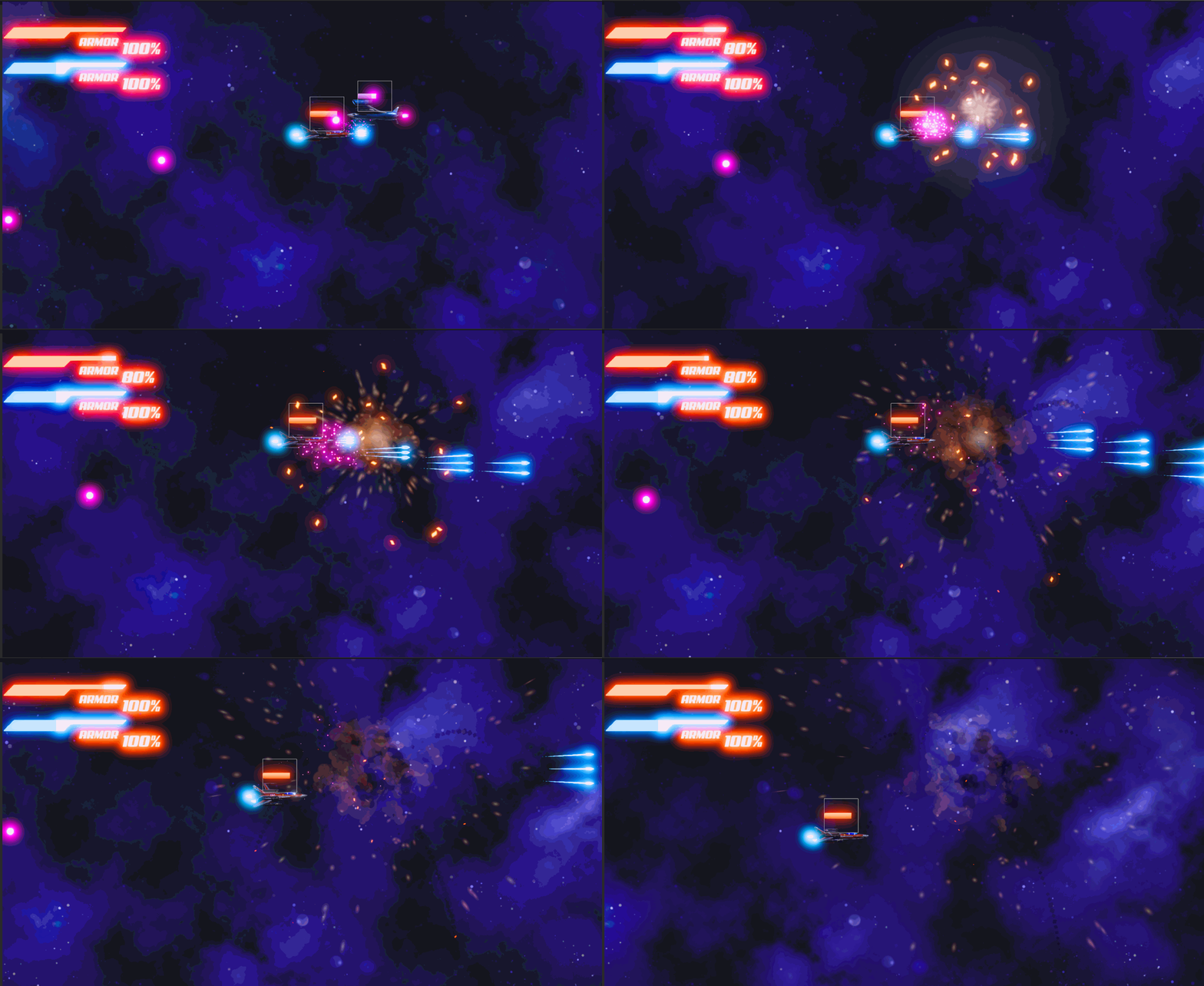
效果如 👇

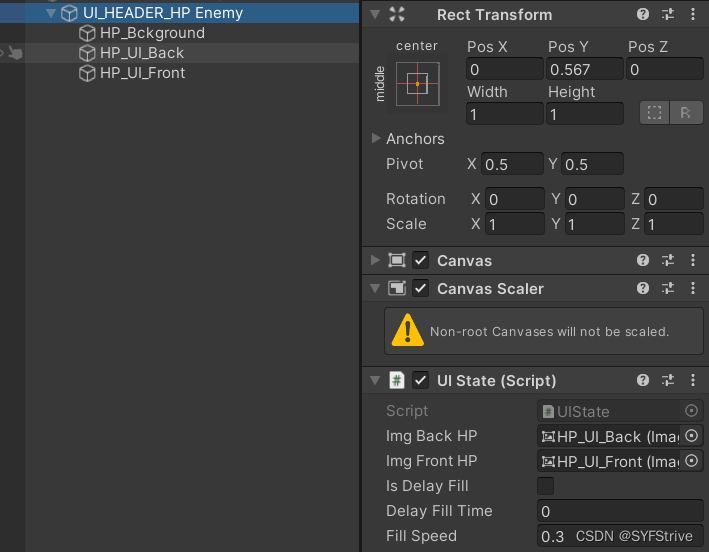

功能实现:代码框架 👉 初始化血条 👉 更新血条 👉 缓慢更新填充
using System.Collections;
using System.Collections.Generic;
using UnityEngine;
using UnityEngine.UI;

public class UIState : MonoBehaviour
{
  //血条的前后填充图片
  [SerializeField] Image imgBackHP;
  [SerializeField] Image imgFrontHP;

  //当前填充值 与 目标填充值
  private float initializeFillAmount;
  private float currentFillAmount;
  protected float targetFillAmount;

  //是否延迟 与 延迟的时间
  [SerializeField] bool isDelayFill;
  [SerializeField] float delayFillTime;

  //缓慢填充的速度 与 填充的携程
  private float t;
  [SerializeField] float fillSpeed;
  private WaitForSeconds waitForSeconds;

  //第三种停止携程的方法
  private Coroutine coroutine;

  private void Awake()
  {
    //判断是否有画布有就获取
    if (TryGetComponent<Canvas>(out Canvas canvas))
    {
      canvas.worldCamera = Camera.main;
    }
  }
  private void OnEnable()
  {
    //初始化延迟时间
    waitForSeconds = new WaitForSeconds(delayFillTime);
  }

  private void OnDisable()
  {
    //关闭所有携程
    StopAllCoroutines();
  }
}
  /// <summary>
  /// 初始化血量UI
  /// </summary>
  /// <param name="currentValue">当前的血量</param>
  /// <param name="maxValue">最大血量</param>
  public virtual void Initialize(float currentValue, float maxValue)
  {
    currentFillAmount = currentValue / maxValue;
    targetFillAmount = currentFillAmount;
    imgBackHP.fillAmount = currentFillAmount;
    imgFrontHP.fillAmount = currentFillAmount;
  }
  /// <summary>
  /// 更新血量UI
  /// </summary>
  /// <param name="currentValue">当前的血量</param>
  /// <param name="maxValue">最大血量</param>
  public void UpdateUIState(float currentValue, float maxValue)
  {
    //目标血量值
    targetFillAmount = currentValue / maxValue;

    //停止之前的携程
    if (coroutine != null)
      StopCoroutine(coroutine);

    // PseudoCode伪代码(思路清晰)
    //如果值是增加的那么后的血条先增加 ?? 然后前在逐渐填充
    if (currentFillAmount > targetFillAmount)
    {
      //同步UI
      imgFrontHP.fillAmount = targetFillAmount;

      //如果场景中的UI为空、血量小于0 直接返回
      if (imgBackHP == null || imgFrontHP == null || currentValue <= 0)
      {
        StopCoroutine(coroutine);
        return;
      }

      coroutine = StartCoroutine(BufferedFillIE(imgBackHP));

      return;
    }

    //如果值是减少那么前面的先减少 ?? 后面的逐渐填充
    if (currentFillAmount < targetFillAmount)
    {
      imgBackHP.fillAmount = targetFillAmount;

      //如果场景中的UI为空、血量小于0 直接返回
      if (imgBackHP == null || imgFrontHP == null || currentValue<=0) StopCoroutine(coroutine);

      coroutine = StartCoroutine(BufferedFillIE(imgFrontHP));
    }
  }
  /// <summary>
  /// 缓慢更新填充
  /// </summary>
  /// <param name="image">判断缓慢填充的Img</param>
  /// <returns></returns>
  protected virtual IEnumerator BufferedFillIE(Image image)
  {
    //是否要开启延迟填充
    if (isDelayFill)
      yield return waitForSeconds;

    t = 0;

    //初始化UI值
    initializeFillAmount = currentFillAmount;

    while (t < 1f)
    {
      t += Time.deltaTime * fillSpeed;

      //使用插值进行填充
      currentFillAmount = Mathf.Lerp(initializeFillAmount, targetFillAmount, t);

      //同步UI值
      image.fillAmount = currentFillAmount;

      yield return null;
    }
  }
功能:实现1个隐藏和1个显示的函数 👉 受伤时更新UI血量值 👉 自动恢复生命值时也应该更新UI血量值
Characters添加代码如 👇
using System;
using System.Collections;
using System.Collections.Generic;
using UnityEngine;

public class Characters : MonoBehaviour
{
  [Header("---Header---")]
  //最大生命值
  [SerializeField] protected float maxHp;

  //当前生命值
  protected float currentHp;

  //死亡时生成特效
  [SerializeField] GameObject dieSpecialEffects;

  //声音管理
  [SerializeField] AudioData[] destroyDodegeData;

  [Header("---UI_HP---")]
  //获取UI管理脚本
  [SerializeField] UIState uIState;
  //是否显示机架上的UI血条
  [SerializeField] bool isShowHPUI;

  protected virtual void OnEnable()
  {
    currentHp = maxHp;

    //判断显示或者是隐藏HPUI
    if (isShowHPUI)
      showHPUI();
    else
      hideHPUI();
  }

  #region 玩家受伤 及 死亡

	  /// <summary>
	  /// 玩家受伤
	  /// </summary>
	  /// <param name="injuredValue">伤害值</param>
	  public virtual void Injured(float injuredValue)
	  {
	    if (currentHp <= 0f) return;

	    currentHp -= injuredValue;

	    //实时更新HPUI
	    if (isShowHPUI)
	    {
	      uIState.UpdateUIState(currentHp, maxHp);
	    }

	    if (currentHp <= 0)
	      Die();
	  }

	  /// <summary>
	  /// 玩家死亡
	  /// </summary>
	  public virtual void Die()
	  {
	    //播放声音
	    AudioManager.Instance.RandomPitchPlaySFX(destroyDodegeData);

	    //血量归0
	    currentHp = 0;

	    //调用对象池
	    PoolManager.Release(dieSpecialEffects, transform.position);

	    this.gameObject.SetActive(false);
	  }
  #endregion

  #region 持续恢复 及 持续受伤

	  /// <summary>
	  /// 恢复生命值
	  /// </summary>
	  public virtual void RecoverHP(float value)
	  {
	    currentHp = Mathf.Clamp(currentHp + value, 0, maxHp);
	  }

	  /// <summary>
	  /// 自动恢复生命值携程
	  /// </summary>
	  /// <param name="waitForSeconds">恢复的间隔</param>
	  /// <param name="value">恢复的百分比值</param>
	  /// <returns></returns>
	  protected virtual IEnumerator SelfRecoverHpIE(WaitForSeconds waitForSeconds, float value)
	  {
	    while (currentHp <= maxHp)
	    {
	      yield return waitForSeconds;

	      //实时更新HPUI
	      if (isShowHPUI)
	      {
	        uIState.UpdateUIState(currentHp, maxHp);
	      }

	      //恢复血量
	      RecoverHP(currentHp * value);
	    }
	  }

	  /// <summary>
	  /// 持续受伤
	  /// </summary>
	  /// <param name="waitForSeconds">受伤的间隔</param>
	  /// <param name="value">受伤值</param>
	  /// <returns></returns>
	  protected virtual IEnumerator SelfInjuredIE(WaitForSeconds waitForSeconds, float value)
	  {
	    while (currentHp >= 0f)
	    {
	      yield return waitForSeconds;

	      //恢复血量
	      RecoverHP(currentHp * value);
	    }
	  }
  #endregion

  #region 显示血条及隐藏血条
	  private void showHPUI()
	  {
	    uIState.gameObject.SetActive(true);
	    uIState.Initialize(currentHp, maxHp);
	  }

	  private void hideHPUI()
	  {
	    uIState.gameObject.SetActive(false);
	  }
  #endregion
}
功能实现:重写血条系统 👉 在初始化或者受伤时更新系统
using System.Collections;
using System.Collections.Generic;
using UnityEngine;
using UnityEngine.UI;

public class PlayerWorldHUD : UIState
{
  //UI文本
  [SerializeField] protected Text PlayerUI;

  protected virtual void SetPercentText()
  {
    //返回偶数如:传入10.6 → 返回10
    PlayerUI.text = Mathf.RoundToInt(targetFillAmount * 100f) + "%";
  }

  public override void Initialize(float currentValue, float maxValue)
  {
    base.Initialize(currentValue, maxValue);
    SetPercentText();
  }

  protected override IEnumerator BufferedFillIE(Image image)
  {
    SetPercentText();
    return base.BufferedFillIE(image);
  }
}
本文到这里就结束了,大佬们的支持是我持续更新的最大动力,希望这篇文章能帮到大家💪
下篇文章再见ヾ( ̄▽ ̄)ByeBye
我正在学习如何使用Nokogiri,根据这段代码我遇到了一些问题:require'rubygems'require'mechanize'post_agent=WWW::Mechanize.newpost_page=post_agent.get('http://www.vbulletin.org/forum/showthread.php?t=230708')puts"\nabsolutepathwithtbodygivesnil"putspost_page.parser.xpath('/html/body/div/div/div/div/div/table/tbody/tr/td/div
我有一个Ruby程序,它使用rubyzip压缩XML文件的目录树。gem。我的问题是文件开始变得很重,我想提高压缩级别,因为压缩时间不是问题。我在rubyzipdocumentation中找不到一种为创建的ZIP文件指定压缩级别的方法。有人知道如何更改此设置吗?是否有另一个允许指定压缩级别的Ruby库? 最佳答案 这是我通过查看rubyzip内部创建的代码。level=Zlib::BEST_COMPRESSIONZip::ZipOutputStream.open(zip_file)do|zip|Dir.glob("**/*")d
类classAprivatedeffooputs:fooendpublicdefbarputs:barendprivatedefzimputs:zimendprotecteddefdibputs:dibendendA的实例a=A.new测试a.foorescueputs:faila.barrescueputs:faila.zimrescueputs:faila.dibrescueputs:faila.gazrescueputs:fail测试输出failbarfailfailfail.发送测试[:foo,:bar,:zim,:dib,:gaz].each{|m|a.send(m)resc
很好奇,就使用rubyonrails自动化单元测试而言,你们正在做什么?您是否创建了一个脚本来在cron中运行rake作业并将结果邮寄给您?git中的预提交Hook?只是手动调用?我完全理解测试,但想知道在错误发生之前捕获错误的最佳实践是什么。让我们理所当然地认为测试本身是完美无缺的,并且可以正常工作。下一步是什么以确保他们在正确的时间将可能有害的结果传达给您? 最佳答案 不确定您到底想听什么,但是有几个级别的自动代码库控制:在处理某项功能时,您可以使用类似autotest的内容获得关于哪些有效,哪些无效的即时反馈。要确保您的提
假设我做了一个模块如下:m=Module.newdoclassCendend三个问题:除了对m的引用之外,还有什么方法可以访问C和m中的其他内容?我可以在创建匿名模块后为其命名吗(就像我输入“module...”一样)?如何在使用完匿名模块后将其删除,使其定义的常量不再存在? 最佳答案 三个答案:是的,使用ObjectSpace.此代码使c引用你的类(class)C不引用m:c=nilObjectSpace.each_object{|obj|c=objif(Class===objandobj.name=~/::C$/)}当然这取决于
我正在尝试使用ruby和Savon来使用网络服务。测试服务为http://www.webservicex.net/WS/WSDetails.aspx?WSID=9&CATID=2require'rubygems'require'savon'client=Savon::Client.new"http://www.webservicex.net/stockquote.asmx?WSDL"client.get_quotedo|soap|soap.body={:symbol=>"AAPL"}end返回SOAP异常。检查soap信封,在我看来soap请求没有正确的命名空间。任何人都可以建议我
关闭。这个问题是opinion-based.它目前不接受答案。想要改进这个问题?更新问题,以便editingthispost可以用事实和引用来回答它.关闭4年前。Improvethisquestion我想在固定时间创建一系列低音和高音调的哔哔声。例如:在150毫秒时发出高音调的蜂鸣声在151毫秒时发出低音调的蜂鸣声200毫秒时发出低音调的蜂鸣声250毫秒的高音调蜂鸣声有没有办法在Ruby或Python中做到这一点?我真的不在乎输出编码是什么(.wav、.mp3、.ogg等等),但我确实想创建一个输出文件。
我在我的项目目录中完成了compasscreate.和compassinitrails。几个问题:我已将我的.sass文件放在public/stylesheets中。这是放置它们的正确位置吗?当我运行compasswatch时,它不会自动编译这些.sass文件。我必须手动指定文件:compasswatchpublic/stylesheets/myfile.sass等。如何让它自动运行?文件ie.css、print.css和screen.css已放在stylesheets/compiled。如何在编译后不让它们重新出现的情况下删除它们?我自己编译的.sass文件编译成compiled/t
我想将html转换为纯文本。不过,我不想只删除标签,我想智能地保留尽可能多的格式。为插入换行符标签,检测段落并格式化它们等。输入非常简单,通常是格式良好的html(不是整个文档,只是一堆内容,通常没有anchor或图像)。我可以将几个正则表达式放在一起,让我达到80%,但我认为可能有一些现有的解决方案更智能。 最佳答案 首先,不要尝试为此使用正则表达式。很有可能你会想出一个脆弱/脆弱的解决方案,它会随着HTML的变化而崩溃,或者很难管理和维护。您可以使用Nokogiri快速解析HTML并提取文本:require'nokogiri'h
我想为Heroku构建一个Rails3应用程序。他们使用Postgres作为他们的数据库,所以我通过MacPorts安装了postgres9.0。现在我需要一个postgresgem并且共识是出于性能原因你想要pggem。但是我对我得到的错误感到非常困惑当我尝试在rvm下通过geminstall安装pg时。我已经非常明确地指定了所有postgres目录的位置可以找到但仍然无法完成安装:$envARCHFLAGS='-archx86_64'geminstallpg--\--with-pg-config=/opt/local/var/db/postgresql90/defaultdb/po