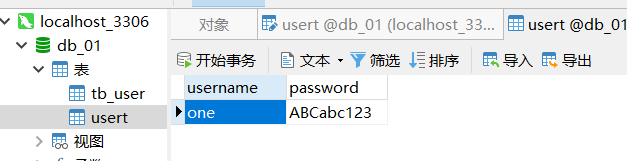
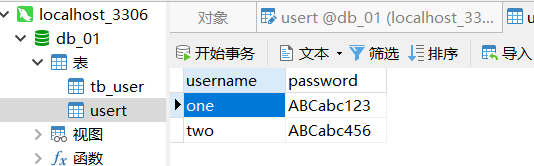
一.数据库db_01 表usert 字段username,password
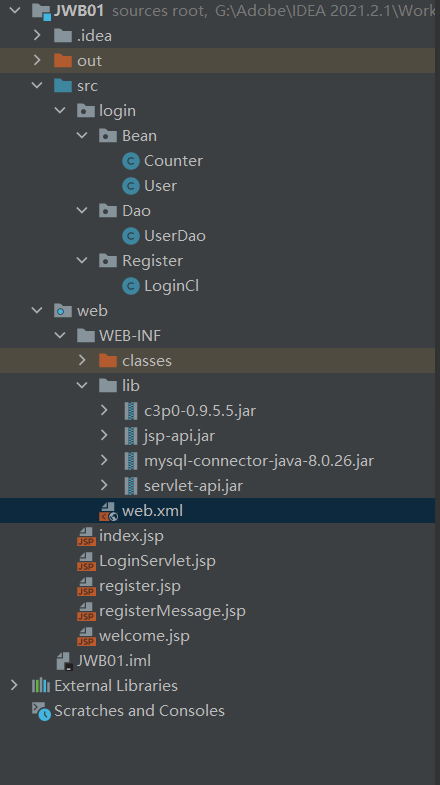
二. 目录
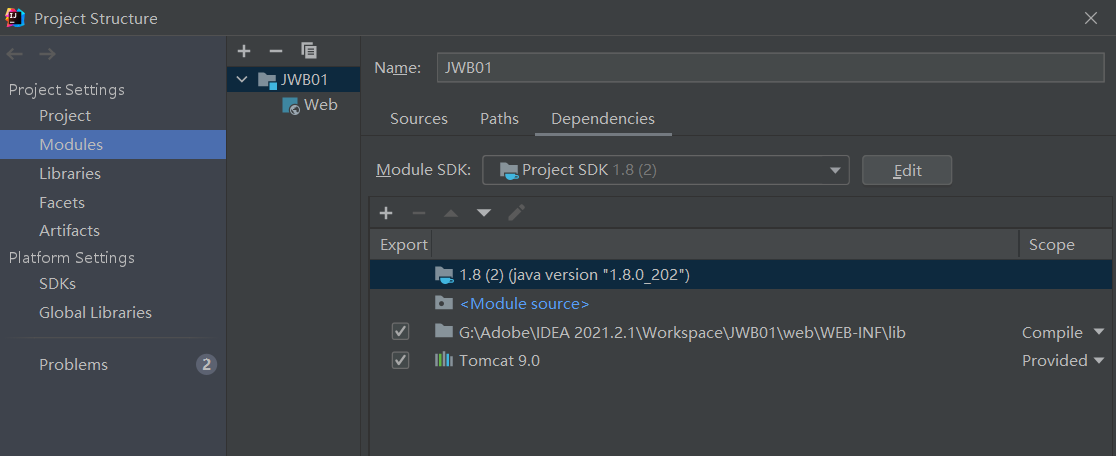
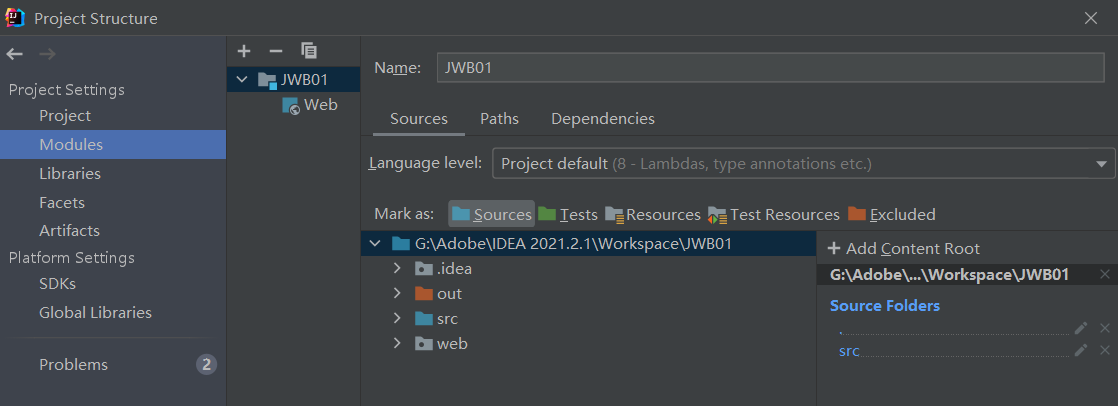
三. 配置信息
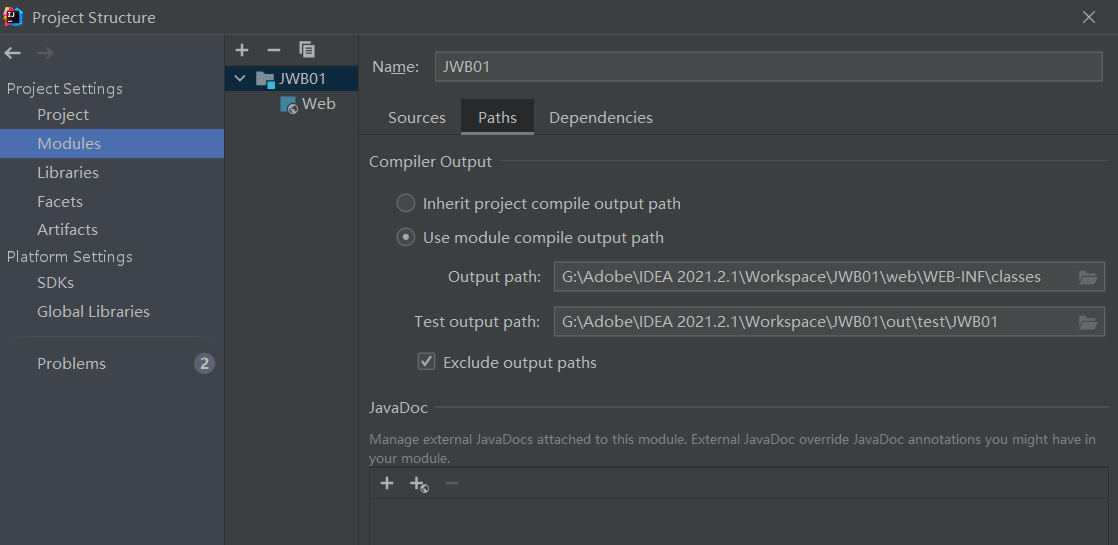
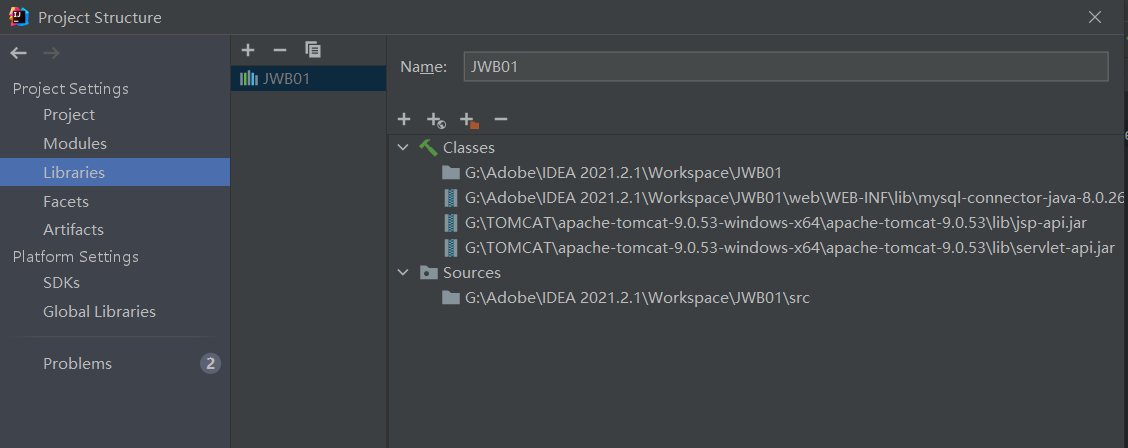
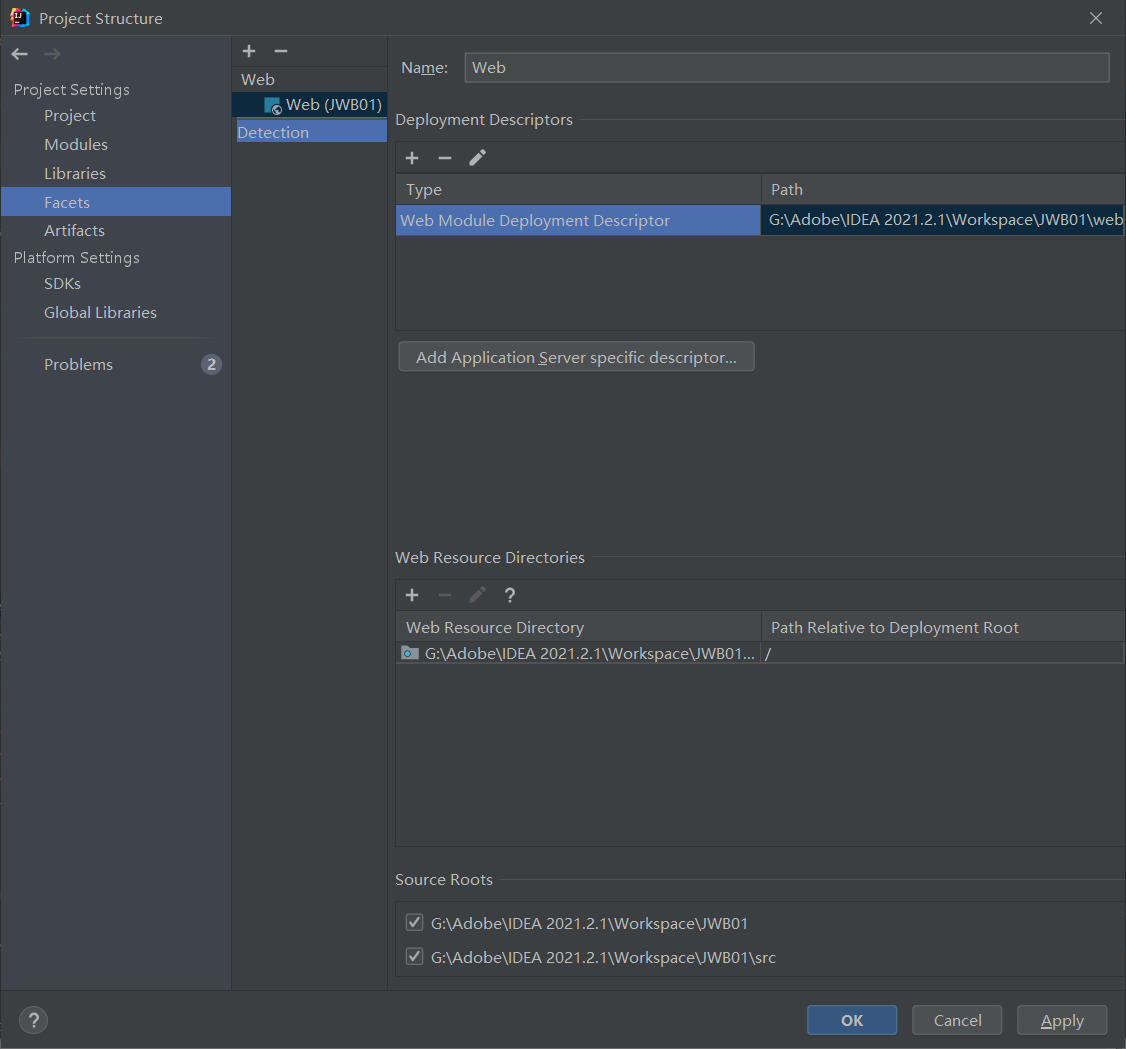
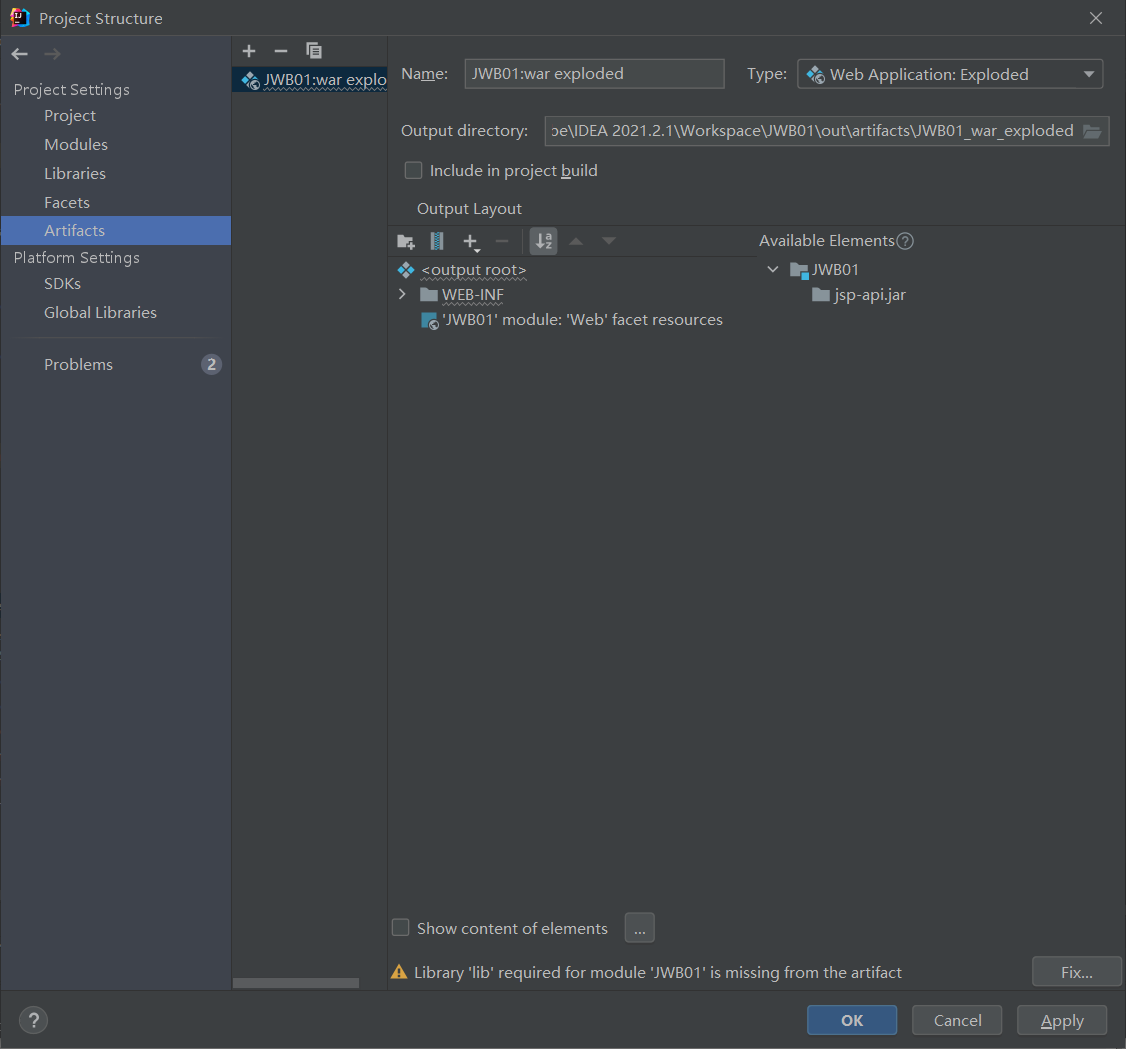
四. 代码
index.jsp
<script type="text/javascript">
  function refresh() {
  src="index.jsp?id="+Math.random();
  }
</script>
<%@ page contentType="charset=UTF-8" language="java"
         import ="java.awt.*"
         import ="java.awt.image.BufferedImage"
         import="java.util.*"
         import="javax.imageio.ImageIO"
         pageEncoding="gb2312"
%>

<%
  response.setHeader("Cache-Control","no-cache");
//在内存中创建图像
  int width=60,height=20;
  BufferedImage image=new BufferedImage(width,height,BufferedImage.TYPE_INT_RGB);
  //获取画笔
  Graphics g=image.getGraphics();
  //设置背景色
  g.setColor(new Color(200,200,200));
  g.fillRect(0,0,width,height);
  //取随机产生的验证码(4位数字)
  Random rnd=new Random();
  int randNum=rnd.nextInt(8999)+1000;
  String randStr=String.valueOf(randNum);
  //将验证码存入session
  session.setAttribute("randStr",randStr);
  //将验证码显示到图像中
  g.setColor(Color.black);
  g.setFont(new Font("", Font.PLAIN,20));
  g.drawString(randStr,10,17);
  //随机产生100个干扰点,使图像中的验证码不易被其他程序探测到
  for (int i = 0; i < 100; i++) {
    int x=rnd.nextInt(width);
    int y=rnd.nextInt(height);
    g.drawOval(x,y,1,1);
  }
  //输出图像到页面
  ImageIO.write(image,"JPEG",response.getOutputStream());
  out.clear();
  out=pageContext.pushBody();

%>
LoginServlet.jsp
<%@ page import="java.net.URLEncoder" %>
<%@ page contentType="text/html;charset=UTF-8" pageEncoding="utf-8" language="java" %>
<html>
<head>
    <title>LoginServlet</title>
</head>
<body>
<script type="text/javascript">
    function validate() {
        if(login.username1.value===""){
            alert("账号不能为空");
            return;
        }
        if(login.passwd.value===""){
            alert("密码不能为空");
            return;
        }
        if(login.code.value===""){
            alert("请输入正确的验证码");
            return;
        }
        login.submit();
    }
    function refresh() {
        login.imgValidate.src="index.jsp?id="+Math.random();
    }
</script>

<form name="login" action="/LoginCl" method="post">
    用户名:<input type="text" name="username1"><br>
    密码:<input type="password" name="passwd"><br>
    <input type="checkbox" name="keep" >两周内免登陆<br>
    验证码:<input type="text" name="code" size=10>
    <%--点击图片可进行验证码刷新--%>
    <img name="imgValidate" src = "index.jsp" onclick="refresh()" ><br>

    <input type="button" value="登录"  onclick="validate()">
    <%
        String username = null;
        String password = null;
        Cookie[] cookies = request.getCookies();
        for (int i = 0; i < cookies.length; i++) {
            if ("username".equals(cookies[i].getName())) {
                username = cookies[i].getValue();
            } else if ("password".equals(cookies[i].getName())) {
                password = cookies[i].getValue();
            }
        }
        if (username != null && password != null) {
            response.sendRedirect("welcome.jsp?uname=" +URLEncoder.encode(username,"utf-8")+ "&password=" + password);
        }
    %>
</form>

<form action="register.jsp" method="post">
    <input  type="submit" value="注册">
</form>

</body>
</html>
register.jsp
<%@ page language="java" pageEncoding="gb2312" %>
<html>
<head>
    <title>register</title>
</head>
<body>
<h1>欢迎您进行注册</h1>
<script language="JavaScript" type="text/javascript">
    function checkPassword() {
        var ps=/^[A-Za-z0-9]{6,20}$/;
        if (!ps.exec(register.password1.value)) {
            alert("密码必须同时包含大小写字母和数字且长度应该在6-20之间");
            return;
        }
        register.submit();
    }
</script>
<form name="register" action="registerMessage.jsp" method="post">
    请输入账号:<input type="text" name="name"><br>
    请输入密码:
    <input type="password" name="password1">(要求:必须包含大小写英文和数字无非法字符,长度大于6位小于20位)<br>
    请选择性别:<input name="sex" type="radio" value="男" checked>男
    <input name="sex" type="radio" value="女" >女<br>
    请选择家乡:<select name="home" >
    <option value="北京">北京</option>
    <option value="上海">上海</option>
    <option value="江西">江西</option>
</select>
    <br>
    请选择您的爱好:<input name="fav" type="checkbox" value="唱歌">唱歌
    <input name="fav" type="checkbox" value="跳舞">跳舞
    <input name="fav" type="checkbox" value="打球">打球
    <input name="fav" type="checkbox" value="玩游戏">玩游戏<br>
    <input type="button" value="注册" onclick="checkPassword()">
</form>
</body>
</html>
registerMessage.jsp
<%@ page import="java.sql.*" %>
<%@ page import="login.Dao.UserDao" %>
<%@ page language="java"  pageEncoding="gb2312" %>
<html>
<head>
    <title>message</title>
</head>
<body>
<h2>信息注册成功!该用户注册信息如下:</h2>
<%
    request.setCharacterEncoding("gb2312");
    String name=request.getParameter("name");
    String  password=request.getParameter("password1");
    String sex = request.getParameter("sex");
    String home = request.getParameter("home");
    out.println("账号:"+name);
    out.println("密码:"+password);
    out.println("性别:"+sex);
    out.println("家乡:"+home);
    out.println("兴趣爱好:");
    String[] fav = request.getParameterValues("fav");
    for (int i = 0; i < fav.length; i++) {
        out.print(fav[i]+" ");
    }
    try {
        UserDao userDao=new UserDao();
        userDao.insertUser(name,password);
        out.println("<br> <a href=LoginServlet.jsp>信息注册成功,点击此处进行登录</a>");
    } catch (SQLException e) {
        e.printStackTrace();
    }
%>
</body>
</html>
Bean层:
Counter.java
package login.Bean;

public class Counter {
    private int count=1;
    public Counter(){}
    public int getCount() {
        return count++;
    }

    public void setCount(int count) {
        this.count = count;
    }

}
user.java
package login.Bean;

public class User {
    private String name;
    private String pd;
    public User(){}
    public String getPd() {
        return pd;
    }
    public void setPd(String pd) {
        this.pd = pd;
    }
    public String getName() {
        return name;
    }
    public void setName(String name) {
        this.name = name;
    }
}
Dao层:
UserDao.java
package login.Dao;

import java.sql.*;
import java.util.ArrayList;

public class UserDao {
    public boolean SearchUser(String u,String p) throws SQLException {
        PreparedStatement preparedStatement = null;
        ResultSet rs =null;
        Connection con = null;
        //启动mysql驱动器
        try {
            Class.forName("com.mysql.cj.jdbc.Driver");
            con = DriverManager.getConnection("jdbc:mysql://localhost:3306/db_01?useUnicode=true&characterEncoding=utf-8", "root", "root");
            String sql = "select * from usert where username=? and password=?";
            preparedStatement = con.prepareStatement(sql);
            preparedStatement.setString(1, u);
            preparedStatement.setString(2, p);
            rs = preparedStatement.executeQuery();
            if(rs.next()){
                return true;
            }
            else {
                return false;
            }

        } catch (ClassNotFoundException e) {
            e.printStackTrace();
        } catch (SQLException e) {
            e.printStackTrace();
        }
        finally {
            if(rs!=null) {
                rs.close();
            }
            if(preparedStatement!=null) {
                preparedStatement.close();
            }
            if(con!=null){
                System.out.println("数据库连接成功!");
                con.close();
            }
        }
        return false;
    }

    public void insertUser(String u,String p) throws SQLException {
        ArrayList users=new ArrayList();
        PreparedStatement preparedStatement = null;
        Connection con = null;
        //启动mysql驱动器
        try {
            Class.forName("com.mysql.cj.jdbc.Driver");
            con = DriverManager.getConnection("jdbc:mysql://localhost:3306/db_01?useUnicode=true&characterEncoding=utf-8", "root", "root");
            preparedStatement = con.prepareStatement("insert into usert values(?,?)");
            preparedStatement.setString(1,u);
            preparedStatement.setString(2,p);
            preparedStatement.executeUpdate();
        } catch (ClassNotFoundException e) {
            e.printStackTrace();
        } catch (SQLException e) {
            e.printStackTrace();
        }
        finally {
            if(con!=null) {
                con.close();
            }
            if(preparedStatement!=null) {
                preparedStatement.close();
            }
        }
    }

}
Register层:
LoginCl.java (servlet)
import javax.servlet.*;
import javax.servlet.http.*;
import javax.servlet.annotation.*;
import java.io.IOException;
import java.net.URLEncoder;
import java.sql.SQLException;

@WebServlet(name = "LoginCl", value = "/LoginCl")
public class LoginCl extends HttpServlet {
    @Override
    protected void doGet(HttpServletRequest request, HttpServletResponse response) throws ServletException, IOException {
        //中文乱码解决方法
        response.setContentType("text/html;charset=utf-8");
        request.setCharacterEncoding("utf-8");
        //防止非法登录    得到session
        HttpSession httpSession = request.getSession(true);
        //修改session的存在时间为20s
        httpSession.setMaxInactiveInterval(20);
        httpSession.setAttribute("pass", "ok");
        //获取用户名的账号和密码
        String u = null;
        //针对jsp 其username为username1
        u = request.getParameter("username1");
        String p = null;
        p = request.getParameter("passwd");
        //得到提交的验证码
        String code = request.getParameter("code");
        //获取session验证码
        HttpSession session = request.getSession();
        String randStr = (String) session.getAttribute("randStr");
        //获取到
        if (code.equals(randStr)) {
            //访问数据库
            UserDao userDao=new UserDao();
            try {
                if (!userDao.SearchUser(u,p)) {
                    response.getWriter().println("<a href=LoginServlet.jsp>抱歉:账号或密码错误,请注意核实信息重新输入</a>");
                    return;
                } else {
                    String keep = request.getParameter("keep");
                    if (keep != null) {
                        //创建cookie
                        Cookie cookie1 = new Cookie("username", u);
                        Cookie cookie2 = new Cookie("password", p);
                        //设置关联路径
                        cookie1.setPath(request.getContextPath());
                        cookie2.setPath(request.getContextPath());
                        //设置cookie的消亡时间  两周
                        cookie1.setMaxAge(2 * 7 * 24 * 60 * 60);
                        cookie1.setMaxAge(2 * 7 * 24 * 60 * 60);
                        //把cookie信息写给浏览器
                        response.addCookie(cookie1);
                        response.addCookie(cookie2);
                    }
                    response.sendRedirect("welcome.jsp?uname=" + URLEncoder.encode(u, "utf-8") + "&password=" + p);
                }
            } catch (SQLException e) {
                e.printStackTrace();
            }
        }

    }

    @Override
    protected void doPost(HttpServletRequest request, HttpServletResponse response) throws ServletException, IOException {
        this.doGet(request,response);
    }
}
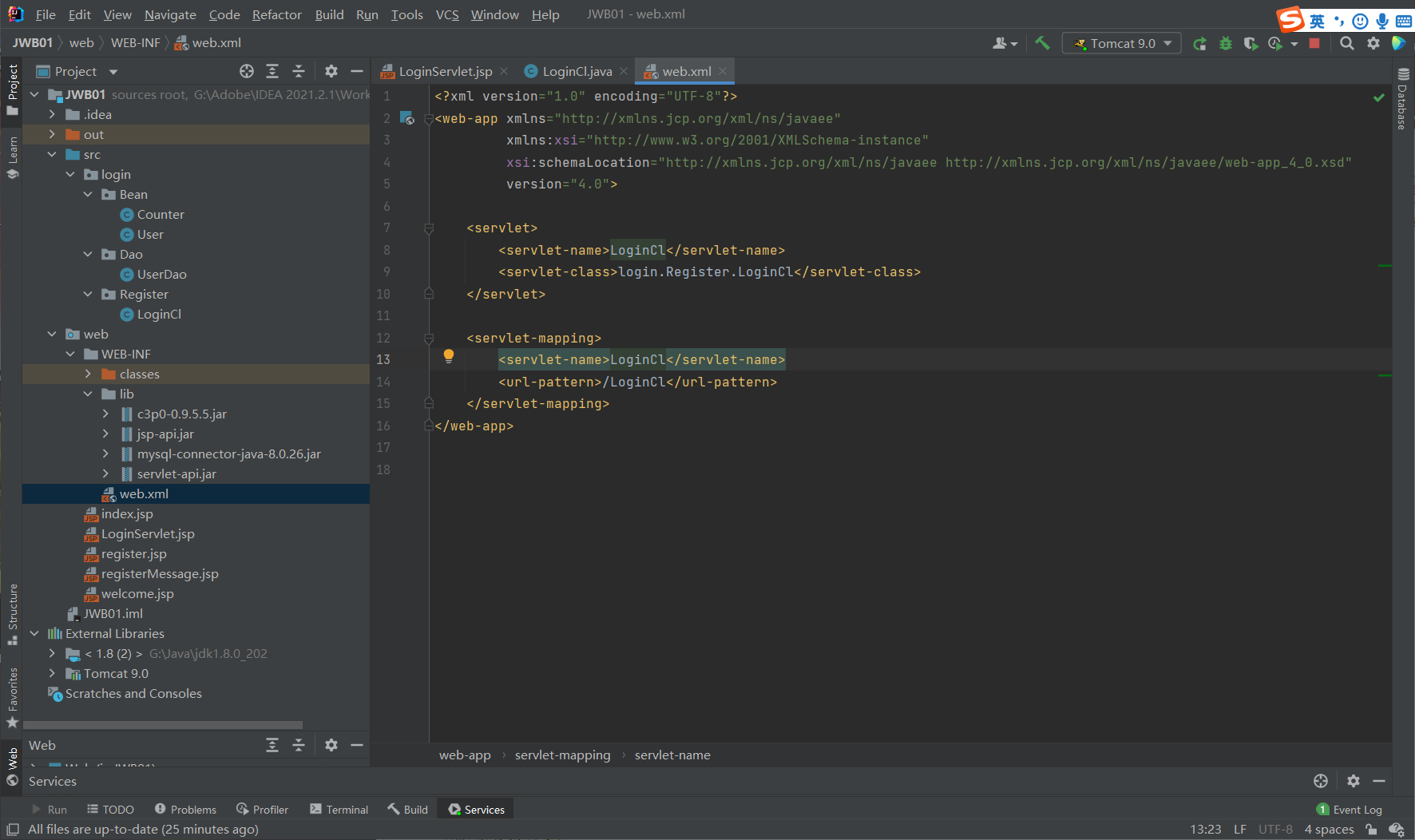
web.xml
welcom.jsp
<%@ page import="java.util.Date" %>
<%@ page contentType="text/html;charset=gb2312" pageEncoding="gb2312" language="java" import="login.Bean.*"
%>
<%@ page import="java.net.URLDecoder" %>
<html>
<head>
    <title>welcome</title>
</head>
<body>
<%
    request.setCharacterEncoding("gb2312");
    HttpSession httpSession=request.getSession(true);
    String val=(String)httpSession.getAttribute("pass");
    if(val==null){
        response.sendRedirect("LoginServlet.jsp");
    }
    int counter=0;
    application.setAttribute("COUNTER",new Integer(counter));
%>
<jsp:useBean id="mycount" class="login.Bean.Counter" scope="session"/>
<jsp:useBean id="user" class="login.Bean.User" scope="session">
    <jsp:setProperty name="user"  property="name" param="uname"/>
    <jsp:setProperty name="user" property="pd" param="password"/>
</jsp:useBean>
<h1>主界面</h1>
<%--welcome name =<%=u%>  password =<%=p%><br>--%>
<%--welcome name :<jsp:getProperty name="user" property="name" />--%>
welcome name :
<%
    out.println(URLDecoder.decode(user.getName(),"utf-8"));
%>
password:<jsp:getProperty  name="user" property="pd" /><br>

<%--welcome name :<%out.println(session.getAttribute("username"));%>
password:<%out.println(session.getAttribute("password"));%><br>--%>
<%--这是你第:<%=counter%>次访问本网站!<br>--%>
这是你第:<jsp:getProperty name="mycount" property="count"/>
次访问本网站!<br>
<a href='LoginServlet.jsp'>返回重新登录</a><br>
<%
    Cookie[] cookies = request.getCookies();
    if(cookies!=null) {
        for (int i = 0; i < cookies.length; i++) {
            if (cookies[i].getName().equals("lastAccessTime")) {
                out.println("您上次访问的时间是:");
                Long lastAccessTime = Long.parseLong(cookies[i].getValue());
                Date date = new Date(lastAccessTime);
                out.println(date.toLocaleString());
            }
        }
    }


    //用户访问过后重新设置用户的访问时间,存储在cookie中,然后发送到客户端浏览器
    Cookie cookie=new Cookie("lastAccessTime",System.currentTimeMillis()+"");
    //设置cookie的有效期为5min
    cookie.setMaxAge(300);
    //将cookie对象添加到response对象中,这样服务器在输出response对象中的内容时
    // 就会把cookie也输入到客户端浏览器
    response.addCookie(cookie);
%>
</body>
</html>
五. 效果
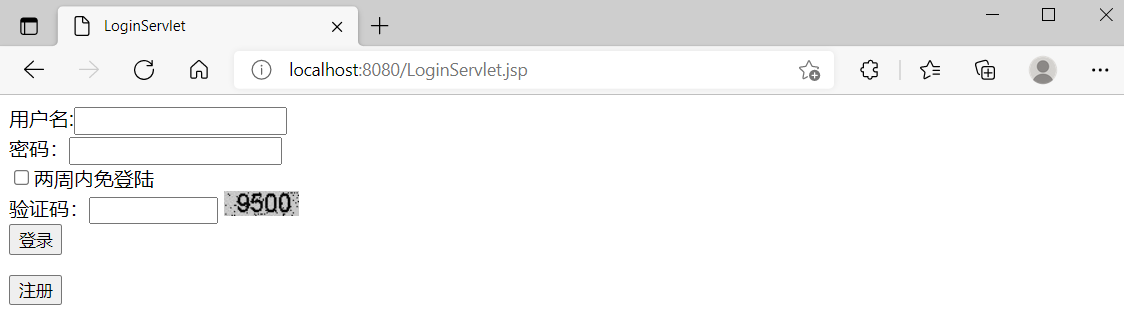
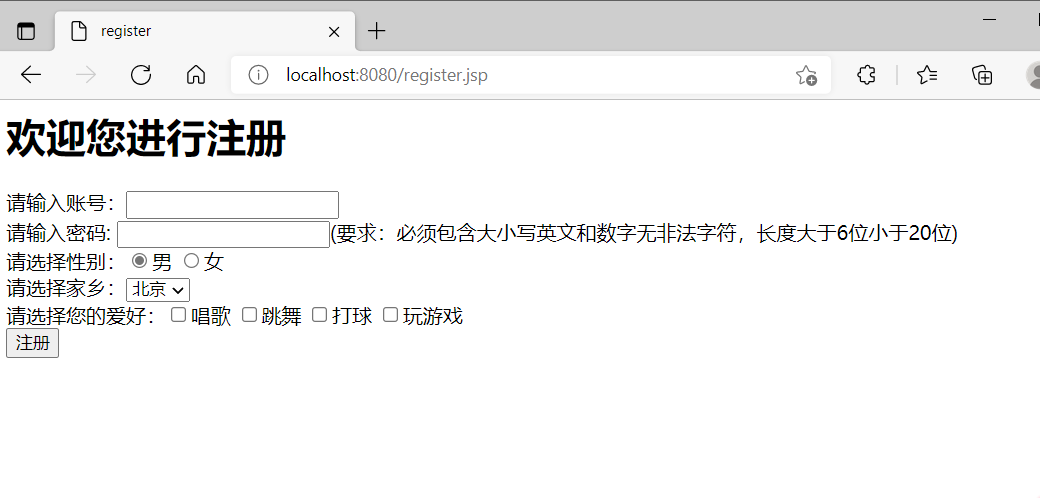
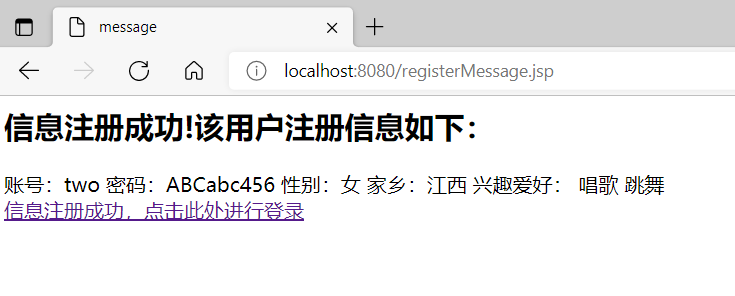
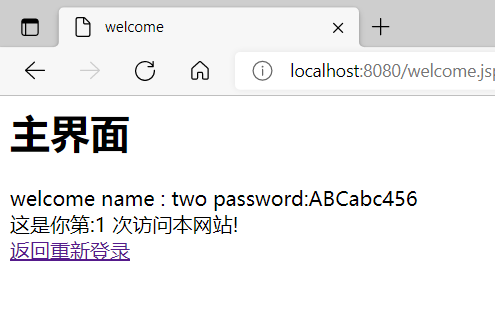
输入登录信息之后:
数据库信息:
给定这段代码defcreate@upgrades=User.update_all(["role=?","upgraded"],:id=>params[:upgrade])redirect_toadmin_upgrades_path,:notice=>"Successfullyupgradeduser."end我如何在该操作中实际验证它们是否已保存或未重定向到适当的页面和消息? 最佳答案 在Rails3中,update_all不返回任何有意义的信息,除了已更新的记录数(这可能取决于您的DBMS是否返回该信息)。http://ar.ru
我想安装一个带有一些身份验证的私有(private)Rubygem服务器。我希望能够使用公共(public)Ubuntu服务器托管内部gem。我读到了http://docs.rubygems.org/read/chapter/18.但是那个没有身份验证-如我所见。然后我读到了https://github.com/cwninja/geminabox.但是当我使用基本身份验证(他们在他们的Wiki中有)时,它会提示从我的服务器获取源。所以。如何制作带有身份验证的私有(private)Rubygem服务器?这是不可能的吗?谢谢。编辑:Geminabox问题。我尝试“捆绑”以安装新的gem..
我希望我的UserPrice模型的属性在它们为空或不验证数值时默认为0。这些属性是tax_rate、shipping_cost和price。classCreateUserPrices8,:scale=>2t.decimal:tax_rate,:precision=>8,:scale=>2t.decimal:shipping_cost,:precision=>8,:scale=>2endendend起初,我将所有3列的:default=>0放在表格中,但我不想要这样,因为它已经填充了字段,我想使用占位符。这是我的UserPrice模型:classUserPrice回答before_val
我有一个表单,其中有很多字段取自数组(而不是模型或对象)。我如何验证这些字段的存在?solve_problem_pathdo|f|%>... 最佳答案 创建一个简单的类来包装请求参数并使用ActiveModel::Validations。#definedsomewhere,atthesimplest:require'ostruct'classSolvetrue#youcouldevencheckthesolutionwithavalidatorvalidatedoerrors.add(:base,"WRONG!!!")unlesss
我正在使用Sequel构建一个愿望list系统。我有一个wishlists和itemstable和一个items_wishlists连接表(该名称是续集选择的名称)。items_wishlists表还有一个用于facebookid的额外列(因此我可以存储opengraph操作),这是一个NOTNULL列。我还有Wishlist和Item具有续集many_to_many关联的模型已建立。Wishlist类也有:selectmany_to_many关联的选项设置为select:[:items.*,:items_wishlists__facebook_action_id].有没有一种方法可以
我有一些非常大的模型,我必须将它们迁移到最新版本的Rails。这些模型有相当多的验证(User有大约50个验证)。是否可以将所有这些验证移动到另一个文件中?说app/models/validations/user_validations.rb。如果可以,有人可以提供示例吗? 最佳答案 您可以为此使用关注点:#app/models/validations/user_validations.rbrequire'active_support/concern'moduleUserValidationsextendActiveSupport:
当我的预订模型通过rake任务在状态机上转换时,我试图找出如何跳过对ActiveRecord对象的特定实例的验证。我想在reservation.close时跳过所有验证!叫做。希望调用reservation.close!(:validate=>false)之类的东西。仅供引用,我们正在使用https://github.com/pluginaweek/state_machine用于状态机。这是我的预订模型的示例。classReservation["requested","negotiating","approved"])}state_machine:initial=>'requested
我有一个服务模型/表及其注册表。在表单中,我几乎拥有服务的所有字段,但我想在验证服务对象之前自动设置其中一些值。示例:--服务Controller#创建Action:defcreate@service=Service.new@service_form=ServiceFormObject.new(@service)@service_form.validate(params[:service_form_object])and@service_form.saverespond_with(@service_form,location:admin_services_path)end在验证@ser
我使用的是Firefox版本36.0.1和Selenium-Webdrivergem版本2.45.0。我能够创建Firefox实例,但无法使用脚本继续进行进一步的操作无法在60秒内获得稳定的Firefox连接(127.0.0.1:7055)错误。有人能帮帮我吗? 最佳答案 我遇到了同样的问题。降级到firefoxv33后一切正常。您可以找到旧版本here 关于ruby-无法在60秒内获得稳定的Firefox连接(127.0.0.1:7055),我们在StackOverflow上找到一个类
这里有一个很好的答案解释了如何在Ruby中下载文件而不将其加载到内存中:https://stackoverflow.com/a/29743394/4852737require'open-uri'download=open('http://example.com/image.png')IO.copy_stream(download,'~/image.png')我如何验证下载文件的IO.copy_stream调用是否真的成功——这意味着下载的文件与我打算下载的文件完全相同,而不是下载一半的损坏文件?documentation说IO.copy_stream返回它复制的字节数,但是当我还没有下
