如果我们需要一次性往数据库表中插入多条记录,可以从以下三个方面进行优化。
insert into tb_test values(1,'tom');

insert into tb_test values(2,'cat');

insert into tb_test values(3,'jerry');

.....
批量插入数据
Insert into tb_test values(1,'Tom'),(2,'Cat'),(3,'Jerry');
手动控制事务
start transaction;

insert into tb_test values(1,'Tom'),(2,'Cat'),(3,'Jerry');

insert into tb_test values(4,'Tom'),(5,'Cat'),(6,'Jerry');

insert into tb_test values(7,'Tom'),(8,'Cat'),(9,'Jerry');

commit;
主键顺序插入,性能要高于乱序插入。
主键乱序插入 : 8 1 9 21 88 2 4 15 89 5 7 3
主键顺序插入 : 1 2 3 4 5 7 8 9 15 21 88 89
如果一次性需要插入大批量数据(比如: 几百万的记录),使用insert语句插入性能较低,此时可以使用MySQL数据库提供的load指令进行插入。操作如下:
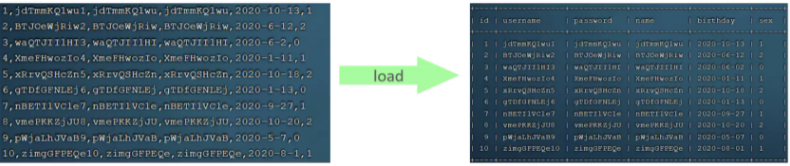
可以执行如下指令,将数据脚本文件中的数据加载到表结构中:
-- 客户端连接服务端时,加上参数 -–local-infile
mysql –-local-infile -u root -p

-- 设置全局参数local_infile为1,开启从本地加载文件导入数据的开关
set global local_infile = 1;

-- 执行load指令将准备好的数据,加载到表结构中
load data local infile '/root/sql1.log' into table tb_user fields terminated by ',' lines terminated by '\n' ;
主键顺序插入性能高于乱序插入
实例演示:
CREATE TABLE `tb_user` (
	`id` INT(11) NOT NULL AUTO_INCREMENT,
	`username` VARCHAR(50) NOT NULL,
	`password` VARCHAR(50) NOT NULL,
	`name` VARCHAR(20) NOT NULL,
	`birthday` DATE DEFAULT NULL,
	`sex` CHAR(1) DEFAULT NULL,
	PRIMARY KEY (`id`),
	UNIQUE KEY `unique_user_username` (`username`)
) ENGINE=INNODB DEFAULT CHARSET=utf8 ;
-- 客户端连接服务端时,加上参数 -–local-infile
mysql –-local-infile -u root -p

-- 设置全局参数local_infile为1,开启从本地加载文件导入数据的开关
set global local_infile = 1;
load data local infile '/root/load_user_100w_sort.sql' into table tb_user fields terminated by ',' lines terminated by '\n' ;
mysql> load data local infile '/root/load_user_100w_sort.sql' into table tb_user fields terminated by ',' lines terminated by '\n' ;
Query OK, 1000000 rows affected (15.47 sec)
Records: 1000000  Deleted: 0  Skipped: 0  Warnings: 0

mysql> select count(*) from tb_user;
+----------+
| count(*) |
+----------+
|  1000000 |
+----------+
1 row in set (0.31 sec)
我们看到,插入100w的记录,15.47s就完成了,性能很好。
在load时,主键顺序插入性能高于乱序插入
主键顺序插入的性能是要高于乱序插入的。我们来介绍一下具体的原因,然后再分析一下主键又该如何设计。
在InnoDB存储引擎中,表数据都是根据主键顺序组织存放的,这种存储方式的表称为索引组织表(index organized table IOT)。
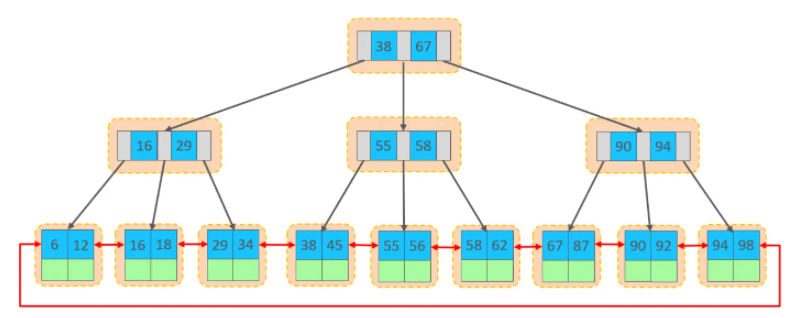
行数据,都是存储在聚集索引的叶子节点上的。而我们之前也讲解过InnoDB的逻辑结构图:
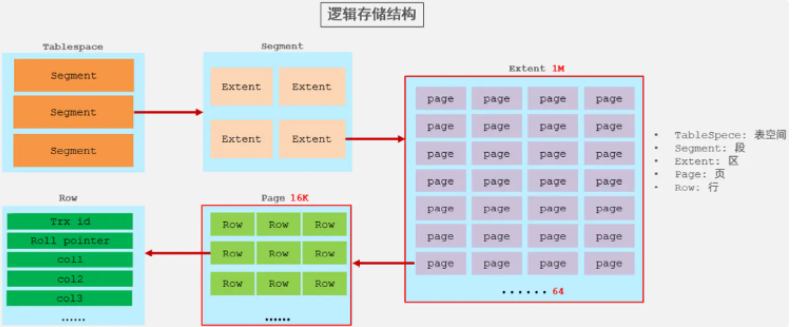
在InnoDB引擎中,数据行是记录在逻辑结构 page 页中的,而每一个页的大小是固定的,默认16K。那也就意味着, 一个页中所存储的行也是有限的,如果插入的数据行row在该页存储不小,将会存储到下一个页中,页与页之间会通过指针连接。
页可以为空,也可以填充一半,也可以填充100%。每个页包含了2-N行数据(如果一行数据过大,会行溢出),根据主键排列。
主键顺序插入效果
从磁盘中申请页, 主键顺序插入
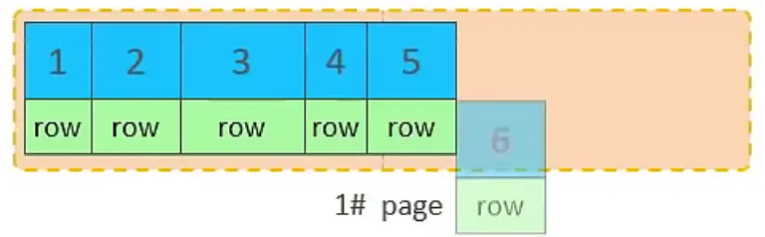
第一个页没有满,继续往第一页插入
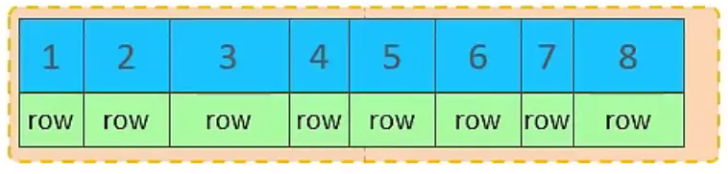
当第一个也写满之后,再写入第二个页,页与页之间会通过指针连接


主键乱序插入效果

此时再插入id为50的记录,我们来看看会发生什么现象
会再次开启一个页,写入新的页中吗?
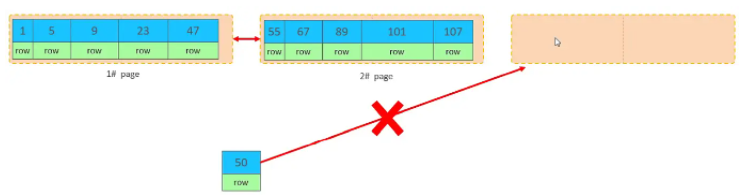
不会。因为,索引结构的叶子节点是有顺序的。按照顺序,应该存储在47之后。
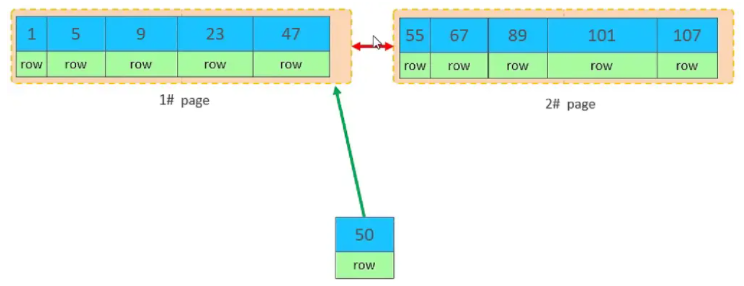
但是47所在的1#页,已经写满了,存储不了50对应的数据了。 那么此时会开辟一个新的页 3#。

但是并不会直接将50存入3#页,而是会将1#页后一半的数据,移动到3#页,然后在3#页,插入50。
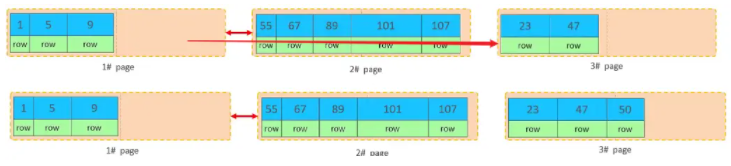
移动数据,并插入id为50的数据之后,那么此时,这三个页之间的数据顺序是有问题的。 1#的下一个 页,应该是3#, 3#的下一个页是2#。 所以,此时,需要重新设置链表指针。

上述的这种现象,称之为 "页分裂",是比较耗费性能的操作。
页合并

当我们对已有数据进行删除时,具体的效果如下:
当删除一行记录时,实际上记录并没有被物理删除,只是记录被标记(flaged)为删除并且它的空间变得允许被其他记录声明使用。


MERGE_THRESHOLD(默认为页的50%),InnoDB会开始寻找最靠近的页(前 或后)看看是否可以将两个页合并以优化空间使用。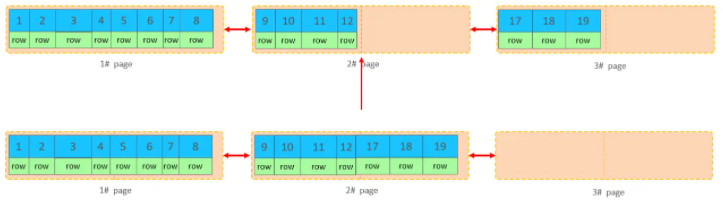

知识小贴士:
MERGE_THRESHOLD:合并页的阈值,可以自己设置,在创建表或者创建索引时指定。
AUTO_INCREMENT自增主键。UUID做主键或者是其他自然主键,如身份证号。避免对主键的修改。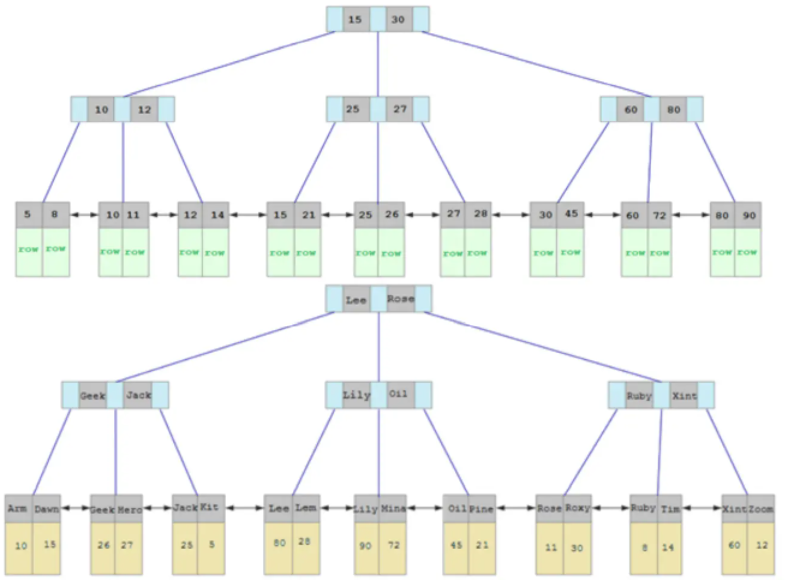
MySQL的排序,有两种方式:
Using filesort : 通过表的索引或全表扫描,读取满足条件的数据行,然后在排序缓冲区sort buffer中完成排序操作,所有不是通过索引直接返回排序结果的排序都叫 FileSort 排序。
Using index : 通过有序索引顺序扫描直接返回有序数据,这种情况即为 using index,不需要额外排序,操作效率高。
对于以上的两种排序方式,Using index的性能高,而Using filesort的性能低,我们在优化排序操作时,尽量要优化为 Using index。
接下来,我们来做一个测试:
把之前测试时,为tb_user表所建立的部分索引直接删除掉
drop index idx_user_phone on tb_user;
drop index idx_user_phone_name on tb_user;
drop index idx_user_name on tb_user;
mysql> show index from tb_user;
+---------+------------+----------------------+--------------+-------------+-----------+-------------+----------+--------+------+------------+---------+---------------+---------+------------+
| Table   | Non_unique | Key_name             | Seq_in_index | Column_name | Collation | Cardinality | Sub_part | Packed | Null | Index_type | Comment | Index_comment | Visible | Expression |
+---------+------------+----------------------+--------------+-------------+-----------+-------------+----------+--------+------+------------+---------+---------------+---------+------------+
| tb_user |          0 | PRIMARY              |            1 | id          | A         |          23 |     NULL |   NULL |      | BTREE      |         |               | YES     | NULL       |
| tb_user |          0 | idx_user_phone       |            1 | phone       | A         |          24 |     NULL |   NULL |      | BTREE      |         |               | YES     | NULL       |
| tb_user |          0 | idx_user_phone_name  |            1 | phone       | A         |      935064 |     NULL |   NULL |      | BTREE      |         |               | YES     | NULL       |
| tb_user |          0 | idx_user_phone_name  |            2 | name        | A         |      951995 |     NULL |   NULL |      | BTREE      |         |               | YES     | NULL       |
| tb_user |          1 | idx_user_name        |            1 | name        | A         |          24 |     NULL |   NULL |      | BTREE      |         |               | YES     | NULL       |
| tb_user |          1 | idx_user_pro_age_sta |            1 | profession  | A         |          16 |     NULL |   NULL | YES  | BTREE      |         |               | YES     | NULL       |
| tb_user |          1 | idx_user_pro_age_sta |            2 | age         | A         |          22 |     NULL |   NULL | YES  | BTREE      |         |               | YES     | NULL       |
| tb_user |          1 | idx_user_pro_age_sta |            3 | status      | A         |          24 |     NULL |   NULL | YES  | BTREE      |         |               | YES     | NULL       |
| tb_user |          1 | idx_user_pro         |            1 | profession  | A         |          16 |     NULL |   NULL | YES  | BTREE      |         |               | YES     | NULL       |
| tb_user |          1 | idx_email_5          |            1 | email       | A         |          23 |        5 |   NULL | YES  | BTREE      |         |               | YES     | NULL       |
+---------+------------+----------------------+--------------+-------------+-----------+-------------+----------+--------+------+------------+---------+---------------+---------+------------+
10 rows in set (0.00 sec)

mysql> drop index idx_user_phone on tb_user;
Query OK, 0 rows affected (0.02 sec)
Records: 0  Duplicates: 0  Warnings: 0

mysql> drop index idx_user_phone_name on tb_user;
Query OK, 0 rows affected (0.00 sec)
Records: 0  Duplicates: 0  Warnings: 0

mysql> drop index idx_user_name on tb_user;
Query OK, 0 rows affected (0.01 sec)
Records: 0  Duplicates: 0  Warnings: 0
explain select id,age,phone from tb_user order by age;
mysql> explain select id,age,phone from tb_user order by age;
+----+-------------+---------+------------+------+---------------+------+---------+------+--------+----------+----------------+
| id | select_type | table   | partitions | type | possible_keys | key  | key_len | ref  | rows   | filtered | Extra          |
+----+-------------+---------+------------+------+---------------+------+---------+------+--------+----------+----------------+
|  1 | SIMPLE      | tb_user | NULL       | ALL  | NULL          | NULL | NULL    | NULL | 971649 |   100.00 | Using filesort |
+----+-------------+---------+------------+------+---------------+------+---------+------+--------+----------+----------------+
1 row in set, 1 warning (0.00 sec)
explain select id,age,phone from tb_user order by age, phone ;
mysql> explain select id,age,phone from tb_user order by age, phone;
+----+-------------+---------+------------+------+---------------+------+---------+------+--------+----------+----------------+
| id | select_type | table   | partitions | type | possible_keys | key  | key_len | ref  | rows   | filtered | Extra          |
+----+-------------+---------+------------+------+---------------+------+---------+------+--------+----------+----------------+
|  1 | SIMPLE      | tb_user | NULL       | ALL  | NULL          | NULL | NULL    | NULL | 971649 |   100.00 | Using filesort |
+----+-------------+---------+------------+------+---------------+------+---------+------+--------+----------+----------------+
1 row in set, 1 warning (0.00 sec)
由于 age, phone 都没有索引,所以此时再排序时,出现Using filesort, 排序性能较低。
-- 创建索引
create index idx_user_age_phone_aa on tb_user(age,phone);
explain select id,age,phone from tb_user order by age;
mysql> explain select id,age,phone from tb_user order by age;
+----+-------------+---------+------------+-------+---------------+-----------------------+---------+------+--------+----------+-------------+
| id | select_type | table   | partitions | type  | possible_keys | key                   | key_len | ref  | rows   | filtered | Extra       |
+----+-------------+---------+------------+-------+---------------+-----------------------+---------+------+--------+----------+-------------+
|  1 | SIMPLE      | tb_user | NULL       | index | NULL          | idx_user_age_phone_aa | 48      | NULL | 971649 |   100.00 | Using index |
+----+-------------+---------+------------+-------+---------------+-----------------------+---------+------+--------+----------+-------------+
1 row in set, 1 warning (0.00 sec)
建立索引之后,再次进行排序查询,就由原来的Using filesort, 变为了 Using index,性能就是比较高的了。
explain select id,age,phone from tb_user order by age desc , phone desc;
mysql> explain select id,age,phone from tb_user order by age desc , phone desc ;
+----+-------------+---------+------------+-------+---------------+-----------------------+---------+------+--------+----------+----------------------------------+
| id | select_type | table   | partitions | type  | possible_keys | key                   | key_len | ref  | rows   | filtered | Extra                            |
+----+-------------+---------+------------+-------+---------------+-----------------------+---------+------+--------+----------+----------------------------------+
|  1 | SIMPLE      | tb_user | NULL       | index | NULL          | idx_user_age_phone_aa | 48      | NULL | 971649 |   100.00 | Backward index scan; Using index |
+----+-------------+---------+------------+-------+---------------+-----------------------+---------+------+--------+----------+----------------------------------+
1 row in set, 1 warning (0.00 sec)
也出现 Using index, 但是此时Extra中出现了 Backward index scan,这个代表反向扫描索引,因为在MySQL中我们创建的索引,默认索引的叶子节点是从小到大排序的,而此时我们查询排序时,是从大到小,所以,在扫描时,就是反向扫描,就会出现 Backward index scan。 在MySQL8版本中,支持降序索引,我们也可以创建降序索引。
explain select id,age,phone from tb_user order by phone , age;
mysql> explain select id,age,phone from tb_user order by phone , age;
+----+-------------+---------+------------+-------+---------------+-----------------------+---------+------+--------+----------+-----------------------------+
| id | select_type | table   | partitions | type  | possible_keys | key                   | key_len | ref  | rows   | filtered | Extra                       |
+----+-------------+---------+------------+-------+---------------+-----------------------+---------+------+--------+----------+-----------------------------+
|  1 | SIMPLE      | tb_user | NULL       | index | NULL          | idx_user_age_phone_aa | 48      | NULL | 971649 |   100.00 | Using index; Using filesor |
+----+-------------+---------+------------+-------+---------------+-----------------------+---------+------+--------+----------+-----------------------------+
1 row in set, 1 warning (0.00 sec)
排序时,也需要满足最左前缀法则,否则也会出现 filesort。因为在创建索引的时候, age是第一个字段,phone是第二个字段,所以排序时,也就该按照这个顺序来,否则就会出现 Usingfilesort。
explain select id,age,phone from tb_user order by age asc , phone desc;
mysql> explain select id,age,phone from tb_user order by age asc , phone desc;
+----+-------------+---------+------------+-------+---------------+-----------------------+---------+------+--------+----------+-----------------------------+
| id | select_type | table   | partitions | type  | possible_keys | key                   | key_len | ref  | rows   | filtered | Extra                       |
+----+-------------+---------+------------+-------+---------------+-----------------------+---------+------+--------+----------+-----------------------------+
|  1 | SIMPLE      | tb_user | NULL       | index | NULL          | idx_user_age_phone_aa | 48      | NULL | 971649 |   100.00 | Using index; Using filesort |
+----+-------------+---------+------------+-------+---------------+-----------------------+---------+------+--------+----------+-----------------------------+
1 row in set, 1 warning (0.00 sec)
因为创建索引时,如果未指定顺序,默认都是按照升序排序的,而查询时,一个升序,一个降序,此时就会出现Using filesort。

为了解决上述的问题,我们可以创建一个索引,这个联合索引中 age 升序排序,phone 倒序排序。
create index idx_phone_age_ad on tb_user(age asc,phone desc);

explain select id,age,phone from tb_user order by age asc,phone desc;
mysql> explain select id,age,phone from tb_user order by age asc,phone desc;
+----+-------------+---------+------------+-------+---------------+------------------+---------+------+--------+----------+-------------+
| id | select_type | table   | partitions | type  | possible_keys | key              | key_len | ref  | rows   | filtered | Extra       |
+----+-------------+---------+------------+-------+---------------+------------------+---------+------+--------+----------+-------------+
|  1 | SIMPLE      | tb_user | NULL       | index | NULL          | idx_phone_age_ad | 48      | NULL | 971649 |   100.00 | Using index |
+----+-------------+---------+------------+-------+---------------+------------------+---------+------+--------+----------+-------------+
1 row in set, 1 warning (0.01 sec)
升序/降序联合索引结构图示:

由上述的测试,我们得出order by优化原则:
sort_buffer_size(默认256k)。分组操作,我们主要来看看索引对于分组操作的影响。
首先我们先将 tb_user 表的索引全部删除掉 。
drop index idx_user_pro_age_sta on tb_user;
drop index idx_email_5 on tb_user;
drop index idx_user_age_phone_aa on tb_user;
drop index idx_user_age_phone_ad on tb_user;
mysql> show index from tb_user;
+---------+------------+----------+--------------+-------------+-----------+-------------+----------+--------+------+------------+---------+---------------+---------+------------+
| Table   | Non_unique | Key_name | Seq_in_index | Column_name | Collation | Cardinality | Sub_part | Packed | Null | Index_type | Comment | Index_comment | Visible | Expression |
+---------+------------+----------+--------------+-------------+-----------+-------------+----------+--------+------+------------+---------+---------------+---------+------------+
| tb_user |          0 | PRIMARY  |            1 | id          | A         |          23 |     NULL |   NULL |      | BTREE      |         |               | YES     | NULL       |
+---------+------------+----------+--------------+-------------+-----------+-------------+----------+--------+------+------------+---------+---------------+---------+------------+
1 row in set (0.00 sec)
接下来,在没有索引的情况下,执行如下SQL,查询执行计划:
explain select profession , count(*) from tb_user group by profession;
mysql> explain select profession , count(*) from tb_user group by profession ;
+----+-------------+---------+------------+------+---------------+------+---------+------+--------+----------+-----------------+
| id | select_type | table   | partitions | type | possible_keys | key  | key_len | ref  | rows   | filtered | Extra           |
+----+-------------+---------+------------+------+---------------+------+---------+------+--------+----------+-----------------+
|  1 | SIMPLE      | tb_user | NULL       | ALL  | NULL          | NULL | NULL    | NULL | 971649 |   100.00 | Using temporary |
+----+-------------+---------+------------+------+---------------+------+---------+------+--------+----------+-----------------+
1 row in set, 1 warning (0.00 sec)
然后,我们在针对于 profession , age, status 创建一个联合索引。
create index idx_pro_age_sta on tb_user(profession,age,status);
紧接着,再执行前面相同的SQL查看执行计划。
mysql> explain select profession , count(*) from tb_user group by profession;
+----+-------------+---------+------------+-------+-----------------+-----------------+---------+------+--------+----------+-------------+
| id | select_type | table   | partitions | type  | possible_keys   | key             | key_len | ref  | rows   | filtered | Extra       |
+----+-------------+---------+------------+-------+-----------------+-----------------+---------+------+--------+----------+-------------+
|  1 | SIMPLE      | tb_user | NULL       | index | idx_pro_age_sta | idx_pro_age_sta | 54      | NULL | 971649 |   100.00 | Using index |
+----+-------------+---------+------------+-------+-----------------+-----------------+---------+------+--------+----------+-------------+
1 row in set, 1 warning (0.00 sec)
再执行如下的分组查询SQL,查看执行计划:
mysql> explain select profession , count(*) from tb_user group by profession,age;
+----+-------------+---------+------------+-------+-----------------+-----------------+---------+------+--------+----------+-------------+
| id | select_type | table   | partitions | type  | possible_keys   | key             | key_len | ref  | rows   | filtered | Extra       |
+----+-------------+---------+------------+-------+-----------------+-----------------+---------+------+--------+----------+-------------+
|  1 | SIMPLE      | tb_user | NULL       | index | idx_pro_age_sta | idx_pro_age_sta | 54      | NULL | 971649 |   100.00 | Using index |
+----+-------------+---------+------------+-------+-----------------+-----------------+---------+------+--------+----------+-------------+
1 row in set, 1 warning (0.00 sec)

mysql> explain select age , count(*) from tb_user group by age;
+----+-------------+---------+------------+-------+-----------------+-----------------+---------+------+--------+----------+------------------------------+
| id | select_type | table   | partitions | type  | possible_keys   | key             | key_len | ref  | rows   | filtered | Extra                        |
+----+-------------+---------+------------+-------+-----------------+-----------------+---------+------+--------+----------+------------------------------+
|  1 | SIMPLE      | tb_user | NULL       | index | idx_pro_age_sta | idx_pro_age_sta | 54      | NULL | 971649 |   100.00 | Using index; Using temporary |
+----+-------------+---------+------------+-------+-----------------+-----------------+---------+------+--------+----------+------------------------------+
1 row in set, 1 warning (0.00 sec)
我们发现,如果仅仅根据age分组,就会出现 Using temporary ;而如果是 根据profession,age两个字段同时分组,则不会出现 Using temporary。原因是因为对于分组操作,在联合索引中,也是符合最左前缀法则的。
所以,在分组操作中,我们需要通过以下两点进行优化,以提升性能:
在数据量比较大时,如果进行limit分页查询,在查询时,越往后,分页查询效率越低。
我们一起来看看执行limit分页查询耗时对比:
mysql> select * from tb_user limit 0,10;
10 rows in set (0.00 sec)

mysql> select * from tb_user limit 100,10;
10 rows in set (0.00 sec)

mysql> select * from tb_user limit 1000,10;
10 rows in set (0.00 sec)

mysql> select * from tb_user limit 50000,10;
10 rows in set (0.01 sec)

mysql> select * from tb_user limit 500000,10;
10 rows in set (0.16 sec)

mysql> select * from tb_user limit 900000,10;
10 rows in set (0.28 sec)
通过测试我们会看到,越往后,分页查询效率越低,这就是分页查询的问题所在。
因为,当在进行分页查询时,如果执行 limit 2000000,10 ,此时需要MySQL排序前2000010 记录,仅仅返回 2000000 - 2000010 的记录,其他记录丢弃,查询排序的代价非常大 。
优化思路: 一般分页查询时,通过创建 覆盖索引 能够比较好地提高性能,可以通过覆盖索引加子查询形式进行优化。
explain select u.* from tb_user u,(select id from tb_user order by id limit 900000,10) a where u.id = a.id;
mysql> explain select u.* from tb_user u,(select id from tb_user order by id limit 900000,10) a where u.id = a.id;
+----+-------------+------------+------------+--------+---------------+---------+---------+------+--------+----------+-------------+
| id | select_type | table      | partitions | type   | possible_keys | key     | key_len | ref  | rows   | filtered | Extra       |
+----+-------------+------------+------------+--------+---------------+---------+---------+------+--------+----------+-------------+
|  1 | PRIMARY     | <derived2> | NULL       | ALL    | NULL          | NULL    | NULL    | NULL | 900010 |   100.00 | NULL        |
|  1 | PRIMARY     | u          | NULL       | eq_ref | PRIMARY       | PRIMARY | 4       | a.id |      1 |   100.00 | NULL        |
|  2 | DERIVED     | tb_user    | NULL       | index  | NULL          | PRIMARY | 4       | NULL | 900010 |   100.00 | Using index |
+----+-------------+------------+------------+--------+---------------+---------+---------+------+--------+----------+-------------+
3 rows in set, 1 warning (0.00 sec)
select count(*) from tb_user;
在之前的测试中,我们发现,如果数据量很大,在执行count操作时,是非常耗时的。
如果说要大幅度提升InnoDB表的count效率,主要的优化思路:自己计数(可以借助于redis这样的数据库进行,但是如果是带条件的count又比较麻烦了)。
count() 是一个聚合函数,对于返回的结果集,一行行地判断,如果 count 函数的参数不是NULL,累计值就加 1,否则不加,最后返回累计值。
用法:count(*)、count(主键)、count(字段)、count(数字)
| count 用法 | 含义 |
|---|---|
| count(主键) | InnoDB 引擎会遍历整张表,把每一行的 主键id 值都取出来,返回给服务层。服务层拿到主键后,直接按行进行累加(主键不可能为null) |
| count(字段) | 没有not null 约束 : InnoDB 引擎会遍历整张表把每一行的字段值都取出来,返回给服务层,服务层判断是否为null,不为null,计数累加。有not null 约束:InnoDB 引擎会遍历整张表把每一行的字段值都取出来,返回给服务层,直接按行进行累加。 |
| count(数字) | InnoDB 引擎遍历整张表,但不取值。服务层对于返回的每一行,放一个数字“1”进去,直接按行进行累加。 |
| count(*) | InnoDB引擎并不会把全部字段取出来,而是专门做了优化,不取值,服务层直接按行进行累加。 |
按照效率排序的话,count(字段) < count(主键 id) < count(1) ≈ count(),所以尽量使用 count()。
我们主要需要注意一下update语句执行时的注意事项。
update course set name = 'javaEE' where id = 1 ;
当我们在执行删除的SQL语句时,会锁定id为1这一行的数据,然后事务提交之后,行锁释放。
但是当我们在执行如下SQL时。
update course set name = 'SpringBoot' where name = 'PHP' ;
当我们开启多个事务,在执行上述的SQL时,我们发现行锁升级为了表锁。 导致该update语句的性能大大降低。
InnoDB的行锁是针对索引加的锁,不是针对记录加的锁 ,并且该索引不能失效,否则会从行锁升级为表锁 。也就是说我这边事务没有提交的话,其他关于这个表的update都不会执行成功,导致该update语句的性能大大降低。
本文由
传智教育博学谷狂野架构师教研团队发布。如果本文对您有帮助,欢迎
关注和点赞;如果您有任何建议也可留言评论或私信,您的支持是我坚持创作的动力。转载请注明出处!
这个问题在这里已经有了答案:Arraysmisbehaving(1个回答)关闭6年前。是否应该这样,即我误解了,还是错误?a=Array.new(3,Array.new(3))a[1].fill('g')=>[["g","g","g"],["g","g","g"],["g","g","g"]]它不应该导致:=>[[nil,nil,nil],["g","g","g"],[nil,nil,nil]]
目录第1题连续问题分析:解法:第2题分组问题分析:解法:第3题间隔连续问题分析:解法:第4题打折日期交叉问题分析:解法:第5题同时在线问题分析:解法:第1题连续问题如下数据为蚂蚁森林中用户领取的减少碳排放量iddtlowcarbon10012021-12-1212310022021-12-124510012021-12-134310012021-12-134510012021-12-132310022021-12-144510012021-12-1423010022021-12-154510012021-12-1523.......找出连续3天及以上减少碳排放量在100以上的用户分析:遇到这类
我正在尝试查询我的Rails数据库(Postgres)中的购买表,我想查询时间范围。例如,我想知道在所有日期的下午2点到3点之间进行了多少次购买。此表中有一个created_at列,但我不知道如何在不搜索特定日期的情况下完成此操作。我试过:Purchases.where("created_atBETWEEN?and?",Time.now-1.hour,Time.now)但这最终只会搜索今天与那些时间的日期。 最佳答案 您需要使用PostgreSQL'sdate_part/extractfunction从created_at中提取小时
我在OSX上(如果重要的话)。如果我使用RVM安装Ruby,它会默认将Bundler安装到@globalgemset假设我想要一个不同版本的bundler。我假设我需要做的就是执行geminstallbundler--version但是,这会将bundler安装到默认gemset并且RVM不会为其设置路径。因此,如果我键入bundler,它仍会启动一个与Ruby一起安装到@global中的bundler两个问题:如何将bundler安装到@globalgemset。将bundler安装到@globalgemset中的模式是否正确,或者我遗漏了什么 最佳答案
在ruby.h中,有很多函数宏是这样定义的:staticinlineint#ifdefined(HAVE_PROTOTYPES)rb_type(VALUEobj)#elserb_type(obj)VALUEobj;#endif{if(FIXNUM_P(obj))returnT_FIXNUM;if(obj==Qnil)returnT_NIL;if(obj==Qfalse)returnT_FALSE;if(obj==Qtrue)returnT_TRUE;if(obj==Qundef)returnT_UNDEF;if(SYMBOL_P(obj))returnT_SYMBOL;returnBU
我是一名决定学习Ruby和RubyonRails的ASP.NETMVC开发人员。我已经有所了解并在RoR上创建了一个网站。在ASP.NETMVC上开发,我一直使用三层架构:数据层、业务层和UI(或表示)层。尝试在RubyonRails应用程序中使用这种方法,我发现没有关于它的信息(或者也许我只是找不到它?)。也许有人可以建议我如何在RubyonRails上创建或使用三层架构?附言我使用ruby1.9.3和RubyonRails3.2.3。 最佳答案 我建议在制作RoR应用程序时遵循RubyonRails(RoR)风格。Rails
我找到了这样的东西:Rails:Howtolistdatabasetables/objectsusingtheRailsconsole?这一行没问题:ActiveRecord::Base.connection.tables并返回所有表但是ActiveRecord::Base.connection.table_structure("users")产生错误:ActiveRecord::Base.connection.table_structure("projects")我认为table_structure不是Postgres方法。如何列出Postgres数据库的Rails控制台中表中的所有
fruit=["apple","red","banana","yellow"]=>["apple","red","banana","yellow"]Hash[*fruit]=>{"apple"=>"red","banana"=>"yellow"}为什么splat会导致数组被如此整齐地解析为Hash?或者更准确地说,Hash如何“知道”“apple”是键,“red”是其对应的值?仅仅是因为它们在水果数组中的位置是连续的吗?这里使用splat有关系吗?否则哈希不能直接从数组中定义自己吗? 最佳答案 作为documentation状态:H
Ruby中防止SQL注入(inject)的好方法是什么? 最佳答案 直接使用ruby?使用准备好的语句:require'mysql'db=Mysql.new('localhost','user','password','database')statement=db.prepare"SELECT*FROMtableWHEREfield=?"statement.execute'value'statement.fetchstatement.close 关于ruby-防止SQL注入(inject
我正在编写一个Rails应用程序,它将监视某些特定数据库的数据质量。为了做到这一点,我需要能够对这些数据库执行直接SQL查询——这当然与用于驱动Rails应用程序模型的数据库不同。简而言之,这意味着我无法使用通过ActiveRecord基础连接的技巧。我需要连接的数据库在设计时是未知的(即:我不能将它们的详细信息放在database.yaml中)。相反,我有一个模型“database_details”,用户将使用它来输入应用程序将在运行时执行查询的数据库的详细信息。因此与这些数据库的连接实际上是动态的,细节仅在运行时解析。 最佳答案
