目录
认证与授权解耦
授权:据系统提前设置好的规则,给用户分配可以访问某一个资源的权限,用户根据自己所具有权限,去执行相应操作。
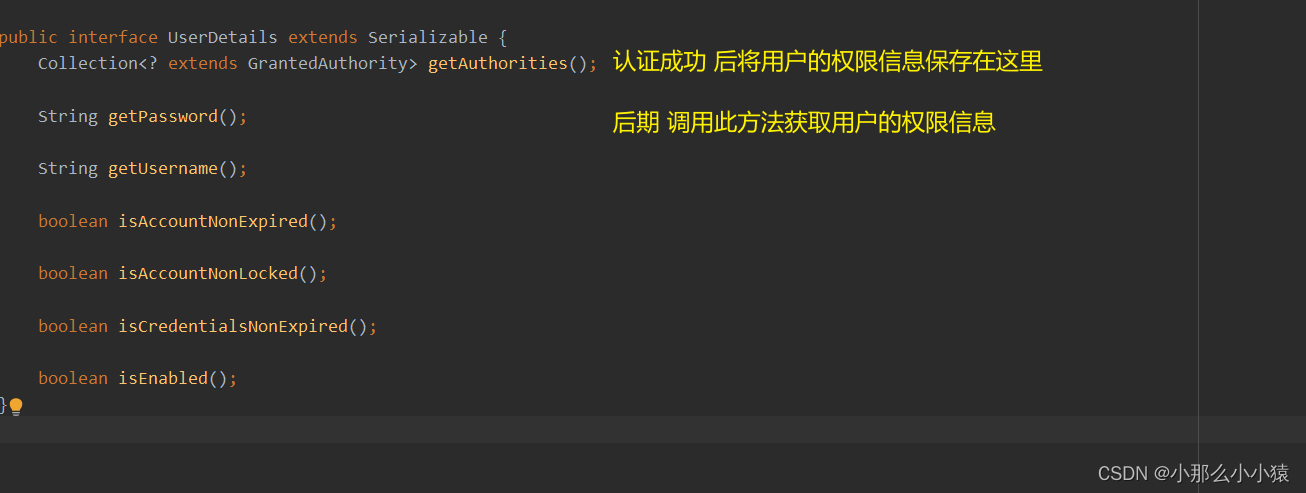
GrantedAuthority 应该如何理解呢? 是角色还是权限?
权限是具体一些操作,角色是一些权限的集合
基于角色权限设计就是: 用户<=>角色<=>资源 三者关系 返回就是用户的角色
基于资源权限设计就是: 用户<=>权限<=>资源 三者关系 返回就是用户的权限
基于角色和资源权限设计就是: 用户<=>角色<=>权限<=>资源 返回统称为用户的权限
从代码层面角色和权限没有太大不同都是权限,特别是在 Spring Security 中,角色和权限处理方式基本上都是一样的。唯一区别 SpringSecurity 在很多时候会自动给角色添加一个ROLE_前缀,而权限则不会自动添加。
springSecurity对实现对权限控制的两种方式,这两种方式可一起使用
请求访问url 还没有到达方法之前,被过滤器拦截,判断用户对url的权限。即针对url设置哪些权限可以访问
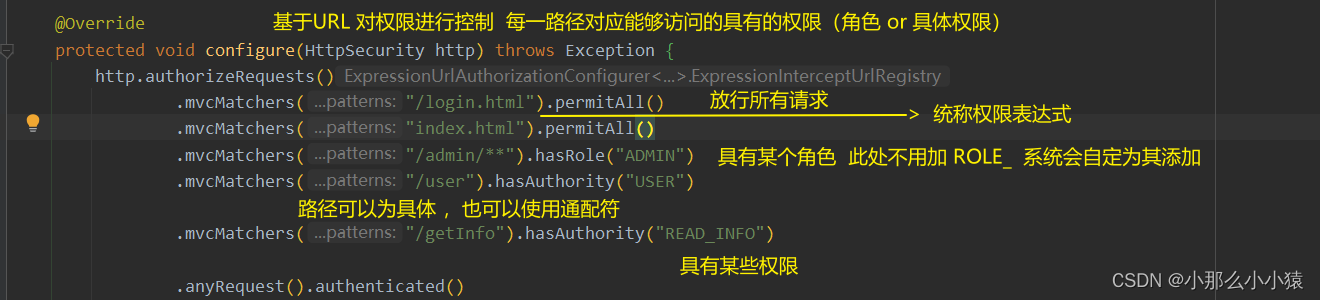
权限表达式
| 方法 | 说明 |
|---|---|
| hasAuthority(String authority) | 当前用户是否具备指定权限 |
| hasAnyAuthority(String… authorities) | 当前用户是否具备指定权限中任意一个 |
| hasRole(String role) | 当前用户是否具备指定角色 |
| hasAnyRole(String… roles); | 当前用户是否具备指定角色中任意一个 |
| permitAll(); | 放行所有请求/调用 |
| denyAll(); | 拒绝所有请求/调用 |
| isAnonymous(); | 当前用户是否是一个匿名用户 |
| isAuthenticated(); | 当前用户是否已经认证成功 |
| isRememberMe(); | 当前用户是否通过 Remember-Me 自动登录 |
| isFullyAuthenticated(); | 当前用户是否既不是匿名用户又不是通过 Remember-Me 自动登录的 |
| hasPermission(Object targetId, Object permission); | 当前用户是否具备指定目标的指定权限信息 |
| hasPermission(Object targetId, String targetType, Object permission); | 当前用户是否具备指定目标的指定权限信息 |
mvcMatchers、antMatchers、regexMatchers、anyRequest
参数可写入

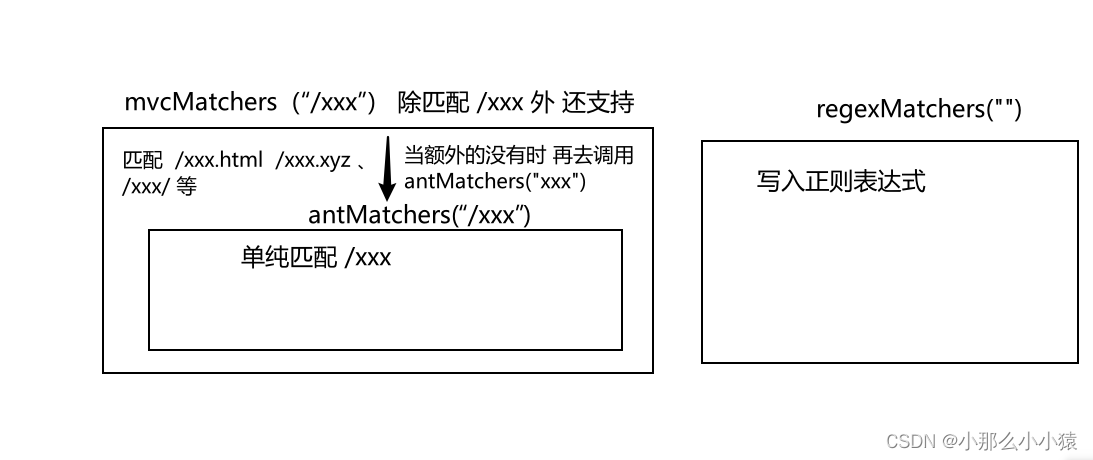
anyRequest() 匹配剩余所有请求
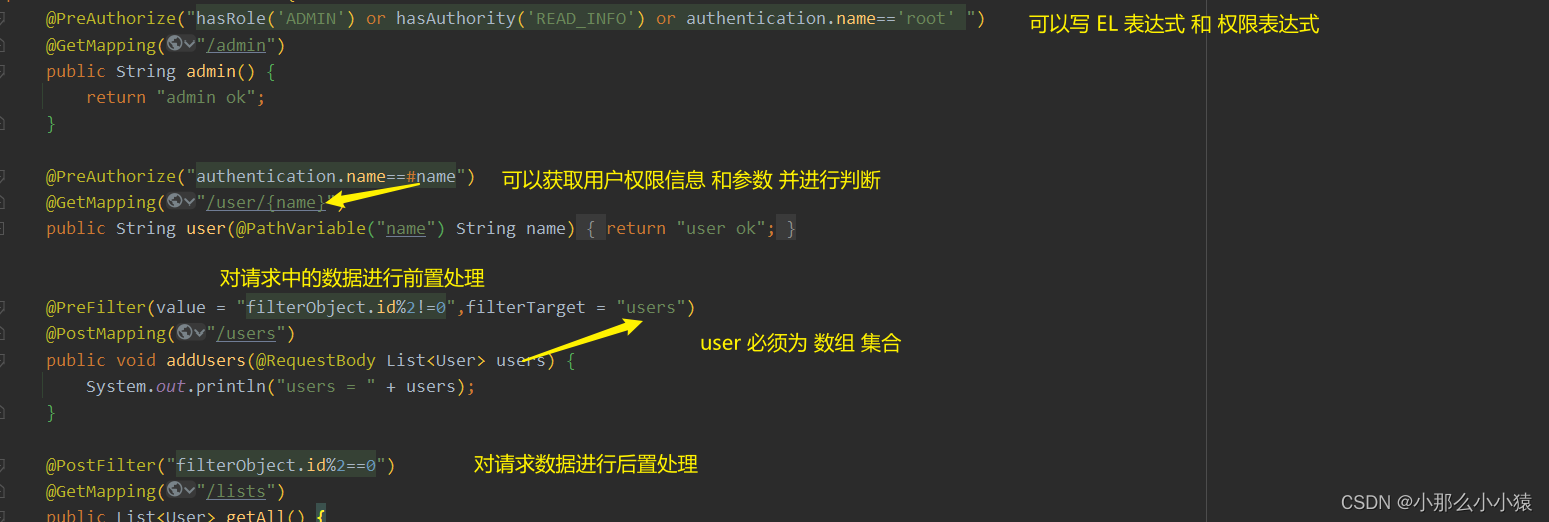
用户通过url 已经到达方法时,方法通过Aop的方式在调用之前进行拦截判断权限
相比于 上一种方法功能更强大 ,利用AOP特性,提供前置处理和后置处理,前置权限校验和后置权限校验
使用方式:
@EnableGlobalMethodSecurity 开启可使用的注解方法Spring Security 提供的四个权限注解 特点:支持权限表达式,el表达式 功能强大 @PreAuthorize:在目标方法执行之前进行权限校验。
@PreFiter:在目前标方法执行之前对方法参数进行过滤。
@PostAuthorize: 在目前标方法执行之后进行权限校验。
@PostFiter: 在目标方法执行之后对方法的返回结果进行过滤。
例如:
@Secured:访问目标方法必须具各相应的角色。
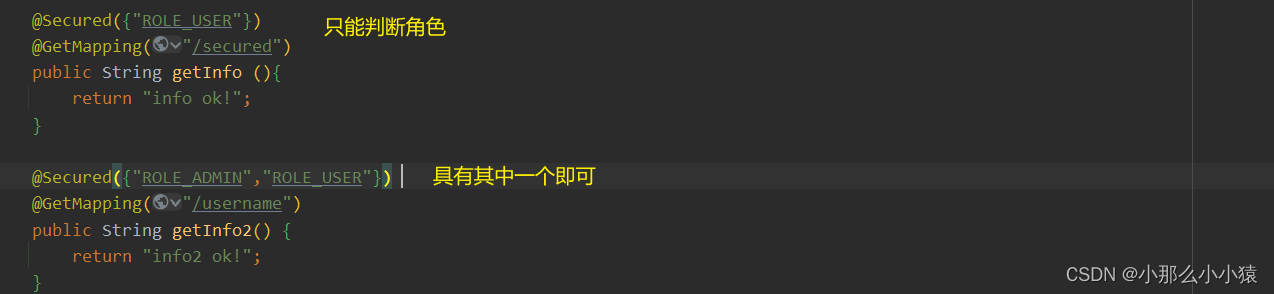
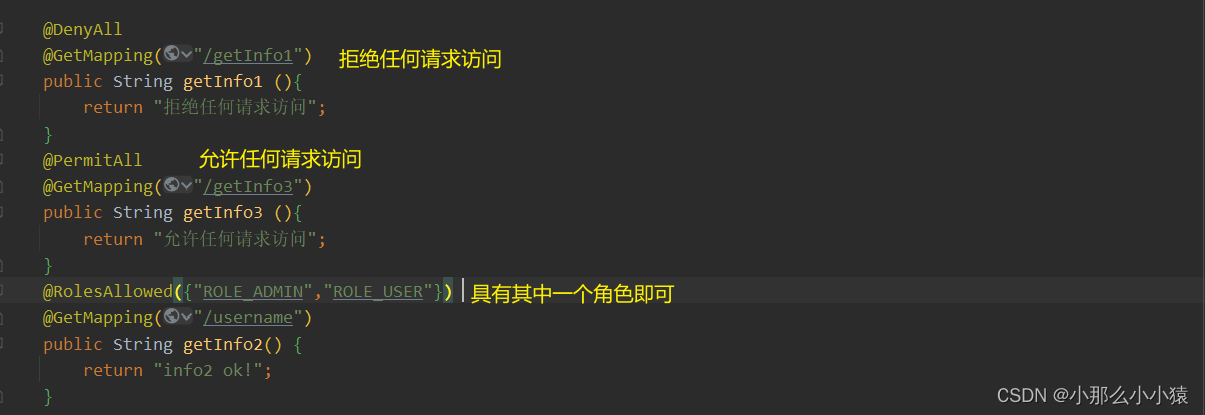
@DenyAll:拒绝所有访问。
@PermitAll:允许所有访问。
@RolesAllowed:访问目标方法必须具备相应的角色。
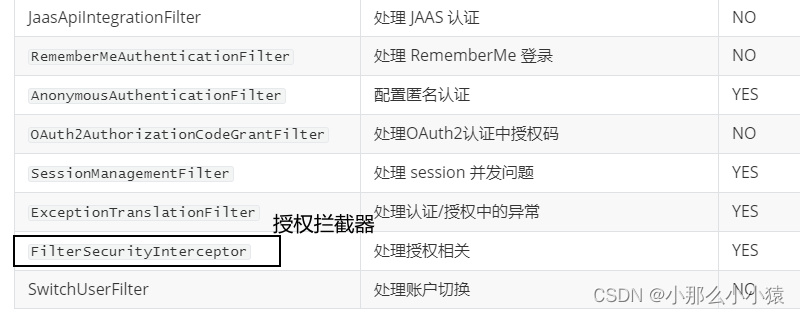
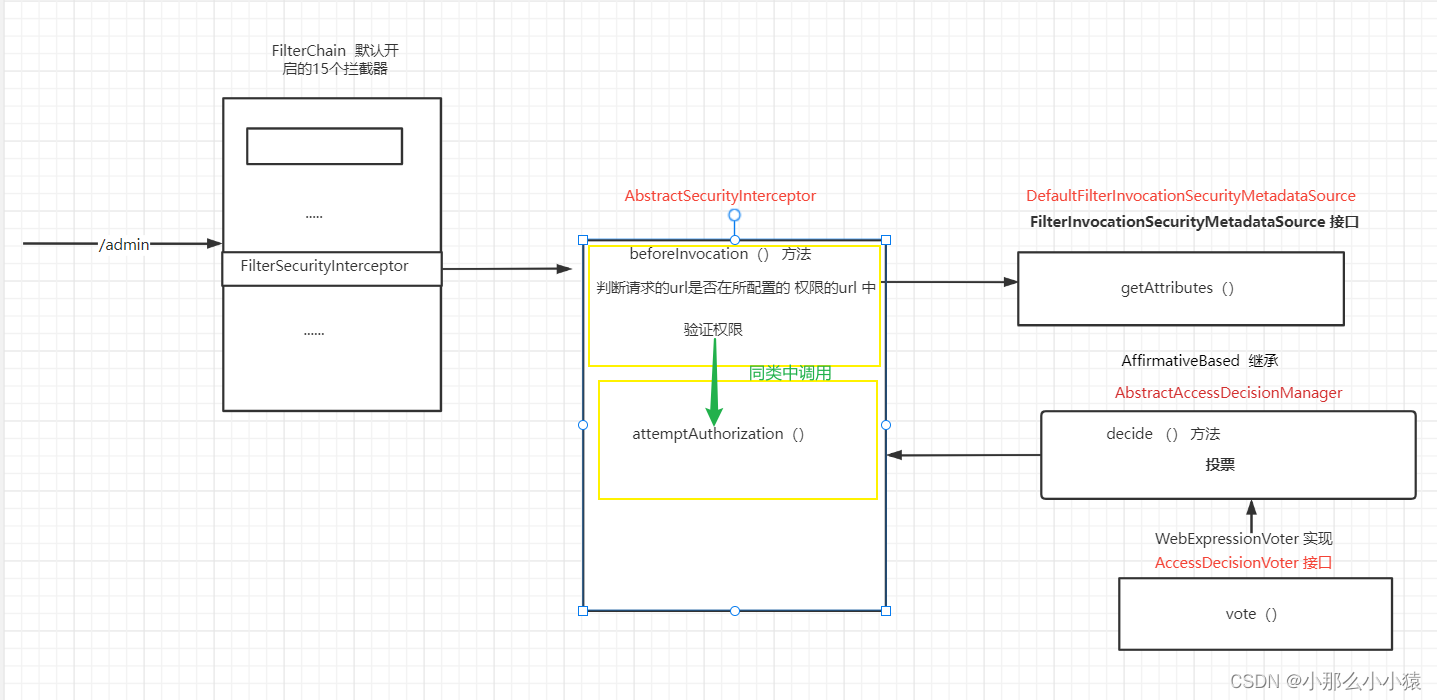
授权流程:
只针对 url授权,因为在拦截器层面
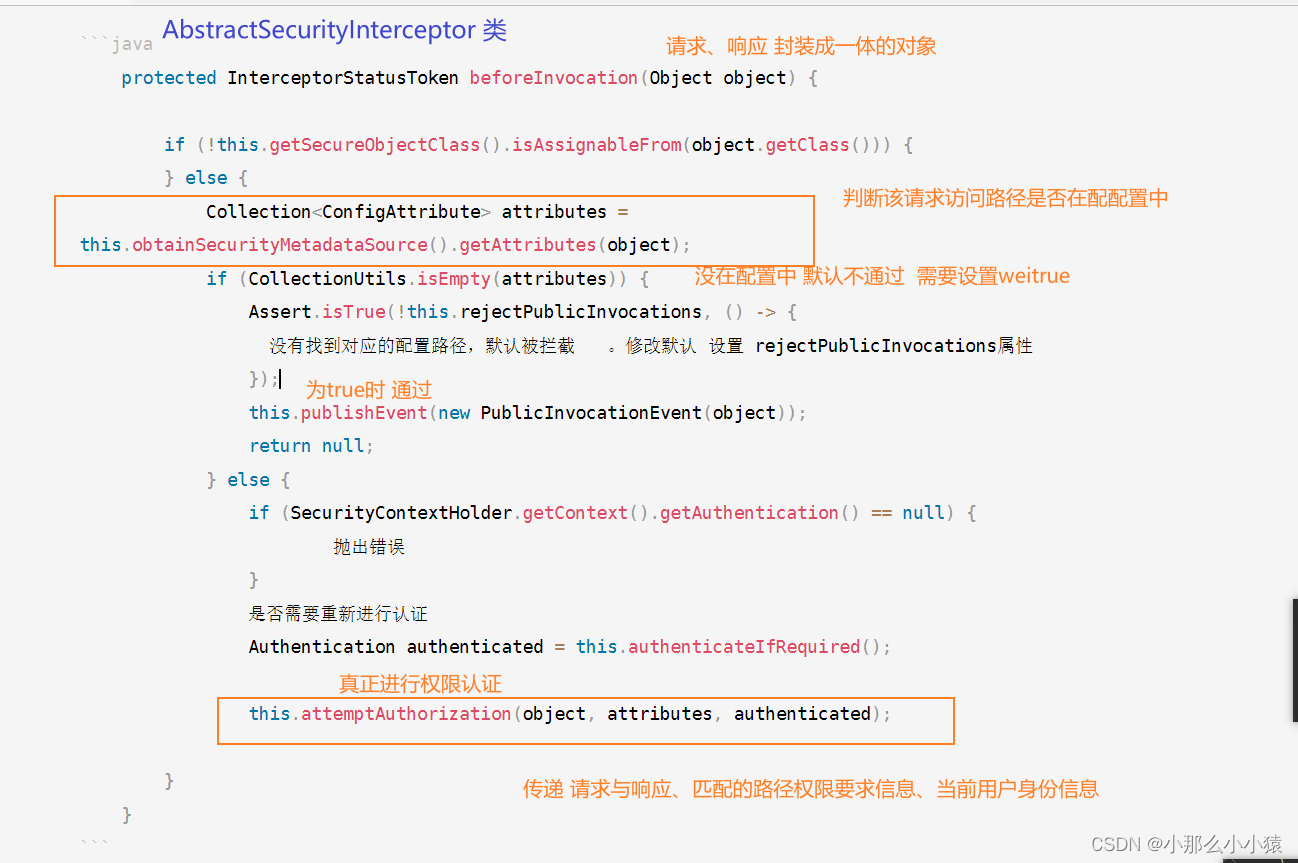
获取请求所要访问路径在security配置中的权限信息。若实现动态配置(路径的权限配置在数据库中)要重写这个方法。这个方法默认是 臊面这里

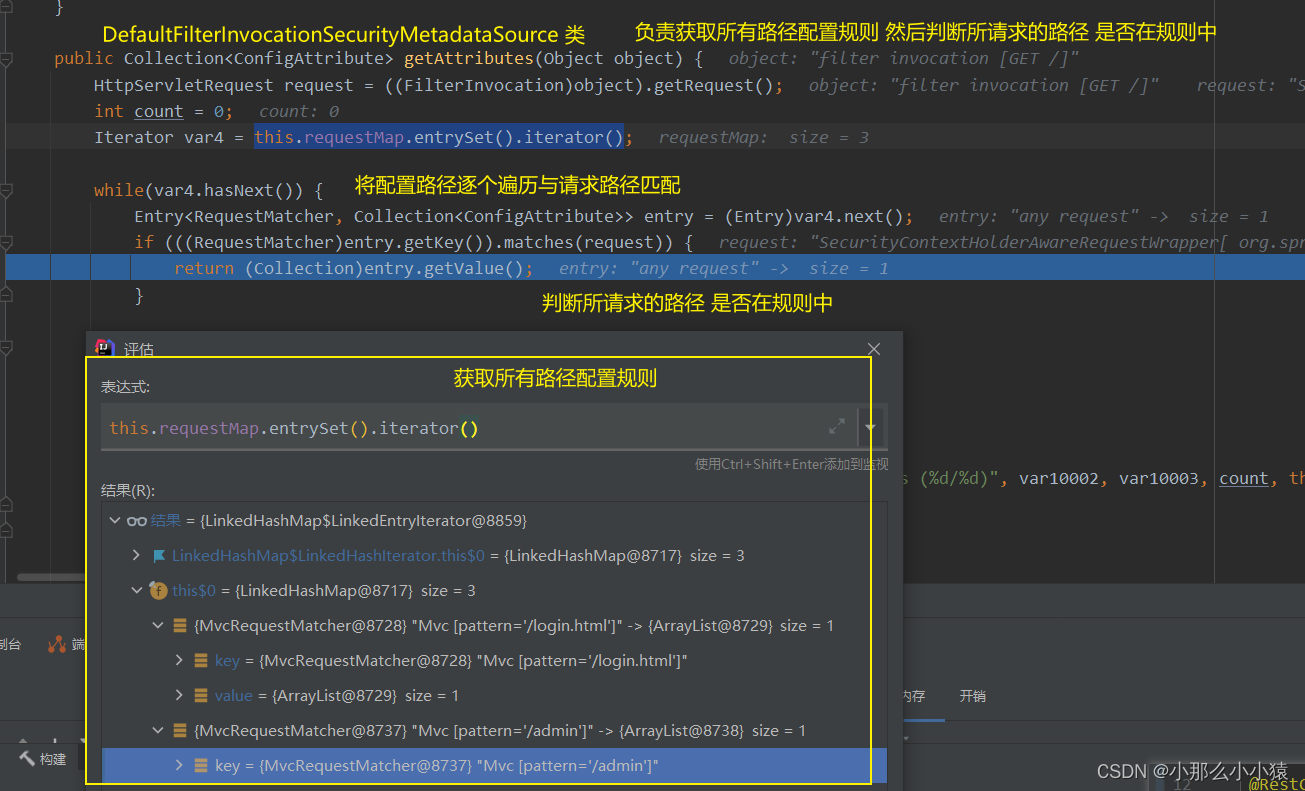
权限认证流程 投票过程无需改动,可视为透明
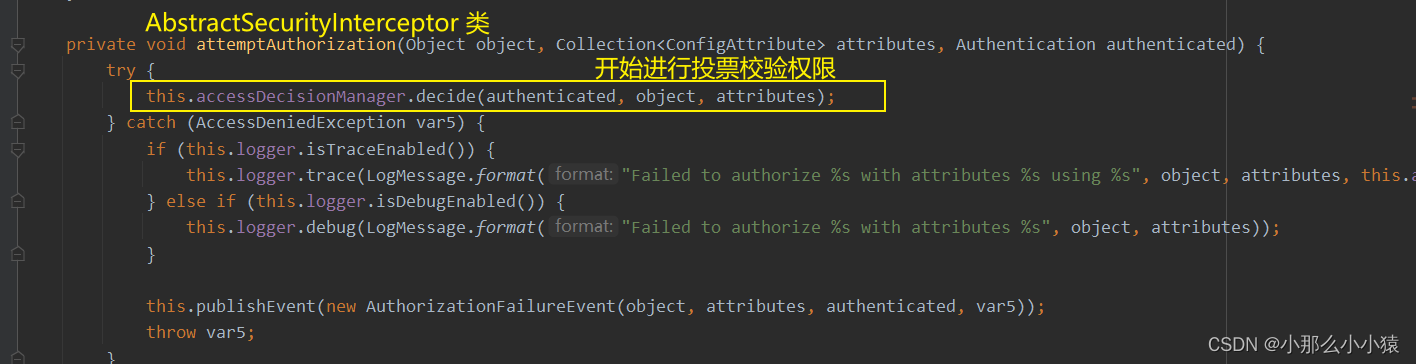
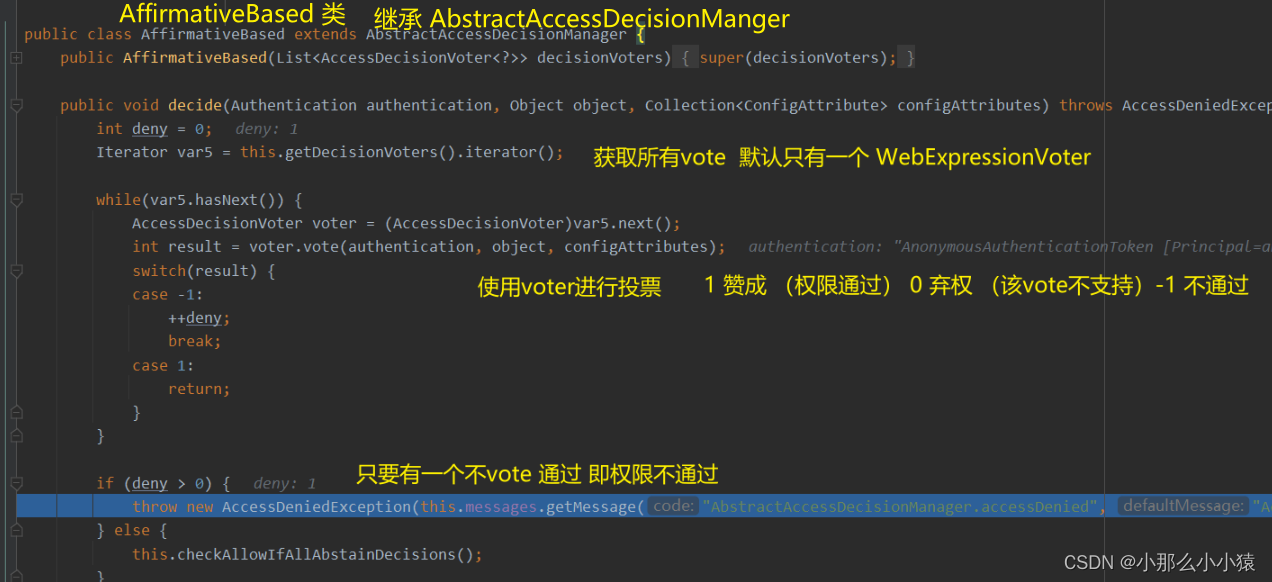
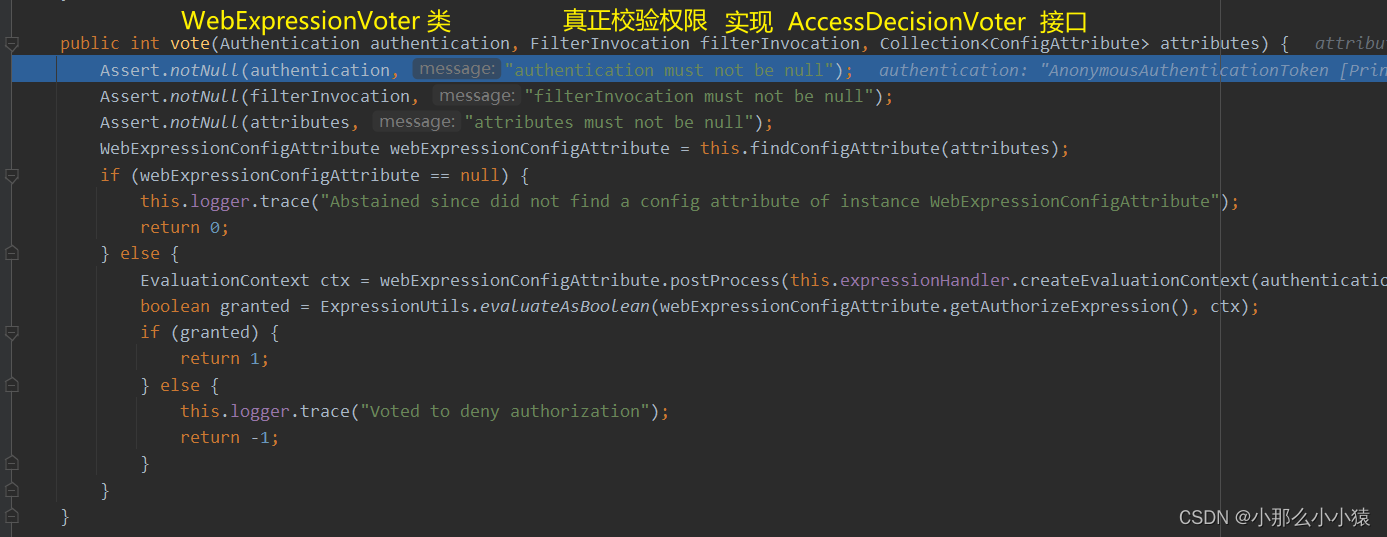
整体流程图
将url配置保存在数据库
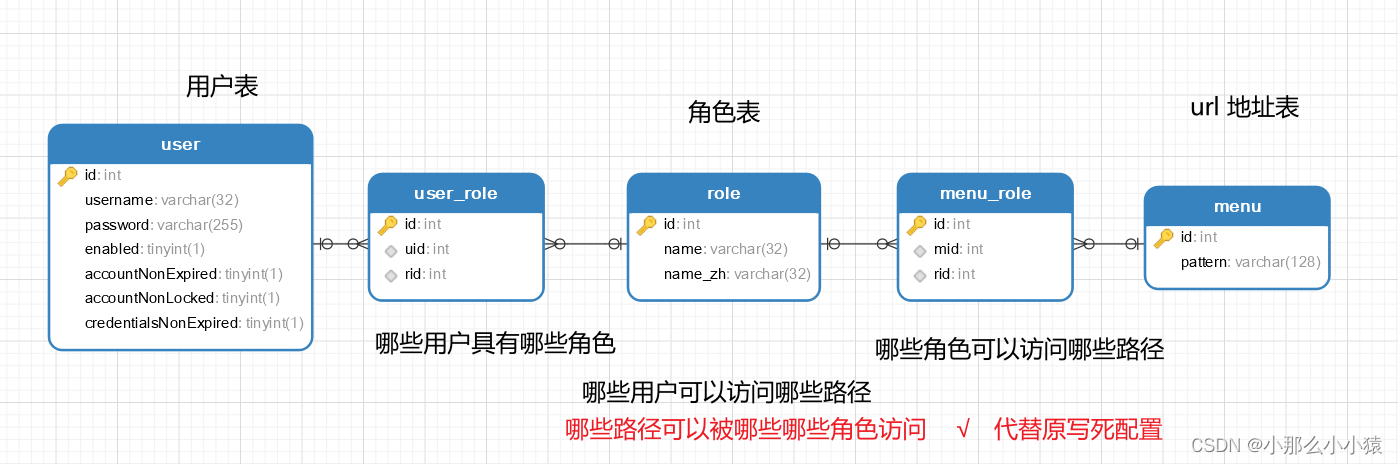
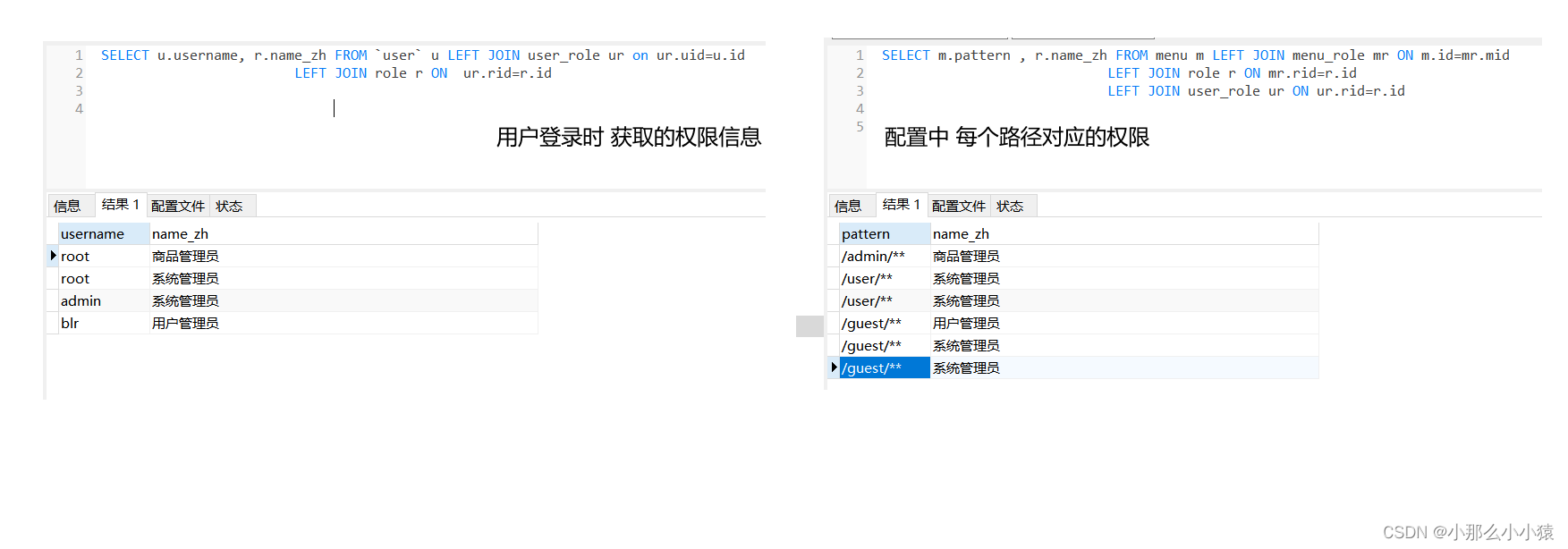
配置流程
pojo
public class Menu {
    private Integer id;
    private String pattern;
    private List<Role> roles;

    public List<Role> getRoles() {
        return roles;
    }

    public void setRoles(List<Role> roles) {
        this.roles = roles;
    }

    public Integer getId() {
        return id;
    }

    public void setId(Integer id) {
        this.id = id;
    }

    public String getPattern() {
        return pattern;
    }

    public void setPattern(String pattern) {
        this.pattern = pattern;
    }
}
@Mapper
public interface MenuMapper {
    List<Menu> getAllMenu();
}
MenuMapper.xml
<mapper namespace="xxx">
    <resultMap id="MenuResultMap" type="Menu">
        <id property="id" column="id"/>
        <result property="pattern" column="pattern"></result>
        <collection property="roles" ofType="com.blr.entity.Role">
            <id column="rid" property="id"/>
            <result column="rname" property="name"/>
            <result column="rnameZh" property="nameZh"/>
        </collection>
    </resultMap>

    <select id="getAllMenu" resultMap="MenuResultMap">
        select m.*, r.id as rid, r.name as rname, r.nameZh as rnameZh
        from menu m
                 left join menu_role mr on m.`id` = mr.`mid`
                 left join role r on r.`id` = mr.`rid`
    </select>
</mapper>
service层
@Service
public class MenuService {
    private final MenuMapper menuMapper;

    @Autowired
    public MenuService(MenuMapper menuMapper) {
        this.menuMapper = menuMapper;
    }

    public List<Menu> getAllMenu() {
        return menuMapper.getAllMenu();
    }
}
@Component
public class CustomSecurityMetadataSource implements FilterInvocationSecurityMetadataSource {
    private final MenuService menuService;

    @Autowired
    public CustomSecurityMetadataSource(MenuService menuService) {
        this.menuService = menuService;
    }

    AntPathMatcher antPathMatcher = new AntPathMatcher();

    @Override
    public Collection<ConfigAttribute> getAttributes(Object object) throws IllegalArgumentException {
        String requestURI = ((FilterInvocation) object).getRequest().getRequestURI();
        List<Menu> allMenu = menuService.getAllMenu();
        for (Menu menu : allMenu) {
            if (antPathMatcher.match(menu.getPattern(), requestURI)) {
                String[] roles = menu.getRoles().stream().map(r -> r.getName()).toArray(String[]::new);
                return SecurityConfig.createList(roles);
            }
        }
        return null;
    }

    @Override
    public Collection<ConfigAttribute> getAllConfigAttributes() {
        return null;
    }

    @Override
    public boolean supports(Class<?> clazz) {
        return FilterInvocation.class.isAssignableFrom(clazz);
    }
}
 private final CustomSecurityMetadataSource customSecurityMetadataSource;
    @Autowired
    public SecurityConfig(CustomSecurityMetadataSource customSecurityMetadataSource, UserService userService) {
        this.customSecurityMetadataSource = customSecurityMetadataSource;
    }
  @Override
    protected void configure(HttpSecurity http) throws Exception {
        ApplicationContext applicationContext = http.getSharedObject(ApplicationContext.class);
        http.apply(new UrlAuthorizationConfigurer<>(applicationContext))
                .withObjectPostProcessor(new ObjectPostProcessor<FilterSecurityInterceptor>() {
                    @Override
                    public <O extends FilterSecurityInterceptor> O postProcess(O object) {
                        object.setSecurityMetadataSource(customSecurityMetadataSource);
                        object.setRejectPublicInvocations(true); // true代表不在请求配置中的 认证通过即可  false则相反 不在请求配置中的 全部没有权限
                        return object;
                    }
                });
        http.formLogin()
                .and()
                .csrf().disable();
    }
会话即session
登录成功后 ,服务器端存在创建此用户的session,并给客户端返回cookie,cookie中防止该seesion的ID
当用户每次请求时携带cookie,服务器端找到cookie中sessionId去内存中找到对应的session,确认用户身份
默认session有效期30min。
在springSecurity中将session的获取委托给 SecurityContextHolder
同一用户由于使用不同设备登录,无法携带相同的sessionID ,只能创建重新一个。因此,形成一个用户在服务器端有多个session
对一个用户可同时拥有session数目管理 可使得 用户可以同时使用多少个客户端登录 即会话并发管理
默认没有任何限制
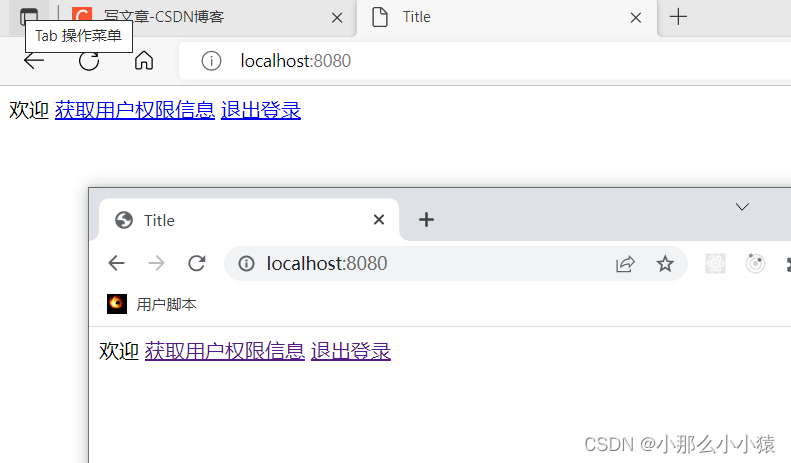
设置同时登录数为1
 可选加入
可选加入
security底层是由Map维护的 , HtpSesionEvenPublisher 实现了 FttpSessionListener 接口,可以监听到 HtpSession 的创建和销毀事件,并将 Fltp Session 的创建/销毁事件发布出去,这样,当有 HttpSession 销毀时,Spring Security 就可以感知到该事件了。
 @Bean
    public HttpSessionEventPublisher httpSessionEventPublisher() {
        return new HttpSessionEventPublisher();
    }
效果:
只能同时登录一个用户,出现互挤现象
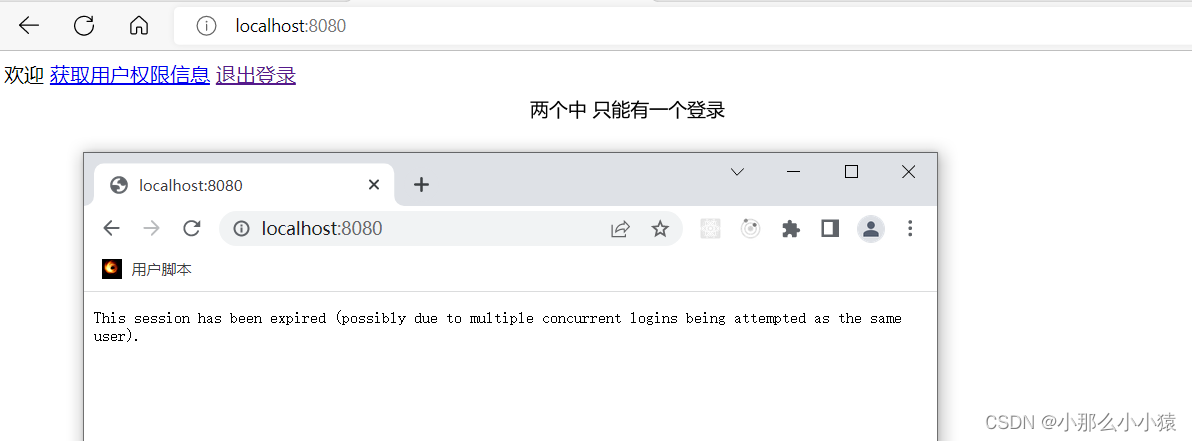
传统web开发 页面跳转方式

前后端分离 返回对应json方式
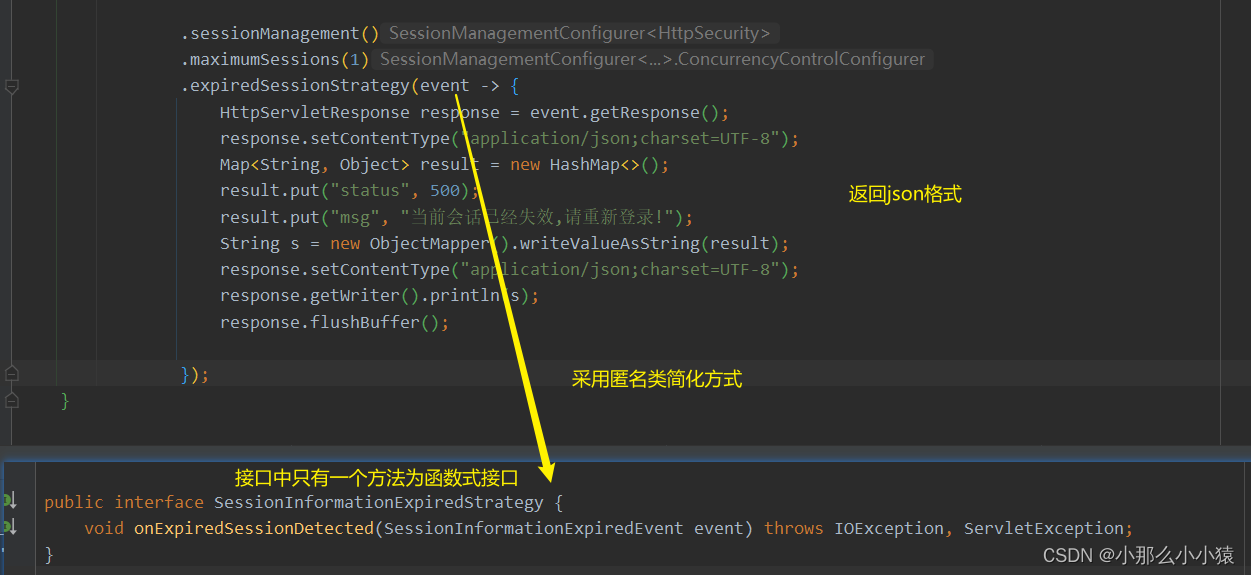
 .expiredSessionStrategy(event -> {
              HttpServletResponse response = event.getResponse();
              response.setContentType("application/json;charset=UTF-8");
              Map<String, Object> result = new HashMap<>();
              result.put("status", 500);
              result.put("msg", "当前会话已经失效,请重新登录!");
              String s = new ObjectMapper().writeValueAsString(result);
              response.setContentType("application/json;charset=UTF-8");
              response.getWriter().println(s);
              response.flushBuffer();

                });
当一个用户登录时,该账号就不会在其他设备登陆 (设备锁)。
后端只能有一个session。
默认方式:同一用户 在A登录后,在B登录 。在map中查找该用户的session,并替换成最新的session放入
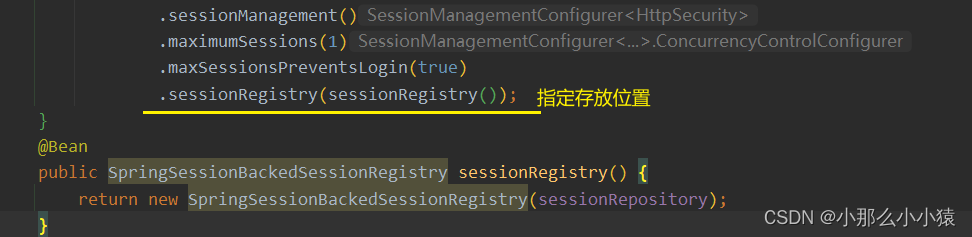
禁止再次登录:同一用户 在A登录后,在B登录 。在map中查找该用户的session,如果有,则禁止该请求登录
可防止挤下线现象

会话底层是用一个map维护,如果在分布式应用,每个应用都有各自的map,map不一致, 导致无法查找到该用户session
解决思路
将会话的维护都放在公共地方,每个单体应用共同维护同一个
例:使用redis
<dependency>
  <groupId>org.springframework.boot</groupId>
  <artifactId>spring-boot-starter-data-redis</artifactId>
</dependency>
<dependency>
  <groupId>org.springframework.session</groupId>
  <artifactId>spring-session-data-redis</artifactId>
</dependency>
 private final FindByIndexNameSessionRepository sessionRepository;

    @Autowired
    public SecurityConfig(FindByIndexNameSessionRepository sessionRepository) {
        this.sessionRepository = sessionRepository;
    }

    @Bean
    public SpringSessionBackedSessionRegistry sessionRegistry() {
        return new SpringSessionBackedSessionRegistry(sessionRepository);
    }
同时,删除监听使用map的方法
 @Bean
    public HttpSessionEventPublisher httpSessionEventPublisher() {
        return new HttpSessionEventPublisher();
    }
根据session的拦截器SessionManagementFilter
 private void doFilter(HttpServletRequest request, HttpServletResponse response, FilterChain chain) throws IOException, ServletException {
        if (request.getAttribute("__spring_security_session_mgmt_filter_applied") != null) {
            chain.doFilter(request, response);
        } else {
            request.setAttribute("__spring_security_session_mgmt_filter_applied", Boolean.TRUE);
            if (!this.securityContextRepository.containsContext(request)) {
                Authentication authentication = SecurityContextHolder.getContext().getAuthentication();
                if (authentication != null && !this.trustResolver.isAnonymous(authentication)) {
                    try {
                        this.sessionAuthenticationStrategy.onAuthentication(authentication, request, response);
                    } catch (SessionAuthenticationException var6) {
                        SecurityContextHolder.clearContext();
                        this.failureHandler.onAuthenticationFailure(request, response, var6);
                        return;
                    }

                    this.securityContextRepository.saveContext(SecurityContextHolder.getContext(), request, response);
                } else if (request.getRequestedSessionId() != null && !request.isRequestedSessionIdValid()) {
                    if (this.logger.isDebugEnabled()) {
                        this.logger.debug(LogMessage.format("Request requested invalid session id %s", request.getRequestedSessionId()));
                    }

                    if (this.invalidSessionStrategy != null) {
                        this.invalidSessionStrategy.onInvalidSessionDetected(request, response);
                        return;
                    }
                }
            }

            chain.doFilter(request, response);
        }
    }
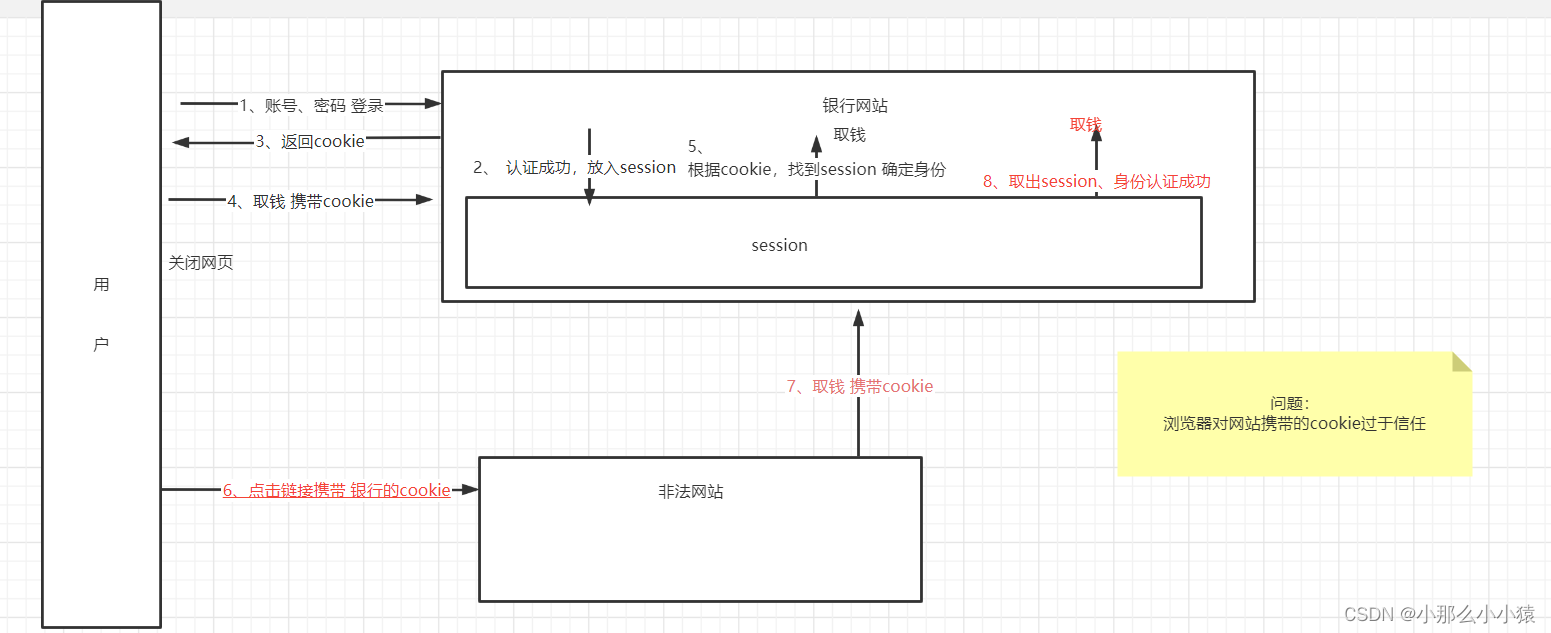
当用户成功登录A网站,A网站会给客户端返回cookie,并保存一段时间session。当用户关闭了A网站,此时若A网站服务器仍保留其session,当用户使用同一浏览器访问B非法网站时,B网站非法发送请求模拟该用户行为携带A网站cookie对A网站发出恶意请求,用户仍不知情
CSRF:利用了服务器端对用户端的信任,对正确cookie的请求没有防备。核心词: 利用 因为自己无法操作
CSRF的特点
搭建模拟攻击环境:
bank网站:
  <dependency>
            <groupId>org.springframework.boot</groupId>
            <artifactId>spring-boot-starter-web</artifactId>
        </dependency>
        <dependency>
            <groupId>org.springframework.boot</groupId>
            <artifactId>spring-boot-starter-security</artifactId>
        </dependency>

 @PostMapping("/withdraw")
    public String withdraw(String name,String money) {
        return name+"执行一次转账"+money+"操作";
    }
3, 配置springSecuity 并将csrf保护关闭
@Configuration
public class MyWebConfigure extends WebSecurityConfigurerAdapter {
    @Bean
    public UserDetailsService userDetailsServiceBean() throws Exception {
        InMemoryUserDetailsManager inMemoryUserDetailsManager = new InMemoryUserDetailsManager();
        inMemoryUserDetailsManager.createUser(User.withUsername("root").password("{noop}123").roles("admin").build());
        return inMemoryUserDetailsManager;
    }

    @Override
    protected void configure(AuthenticationManagerBuilder auth) throws Exception {
        auth.userDetailsService(userDetailsServiceBean());
    }

    @Override
    protected void configure(HttpSecurity http) throws Exception {
        http.authorizeRequests().
                anyRequest().authenticated()
                .and()
                .formLogin()
                .and()
                .csrf().disable();
    }
}
恶意网站
<form action="http://localhost:8080/withdraw" method="post">
    <input name="name" type="hidden" value="zs"/>
    <input name="money" type="hidden" value="10000">
    <input type="submit" value="点我">
</form>
测试 结果
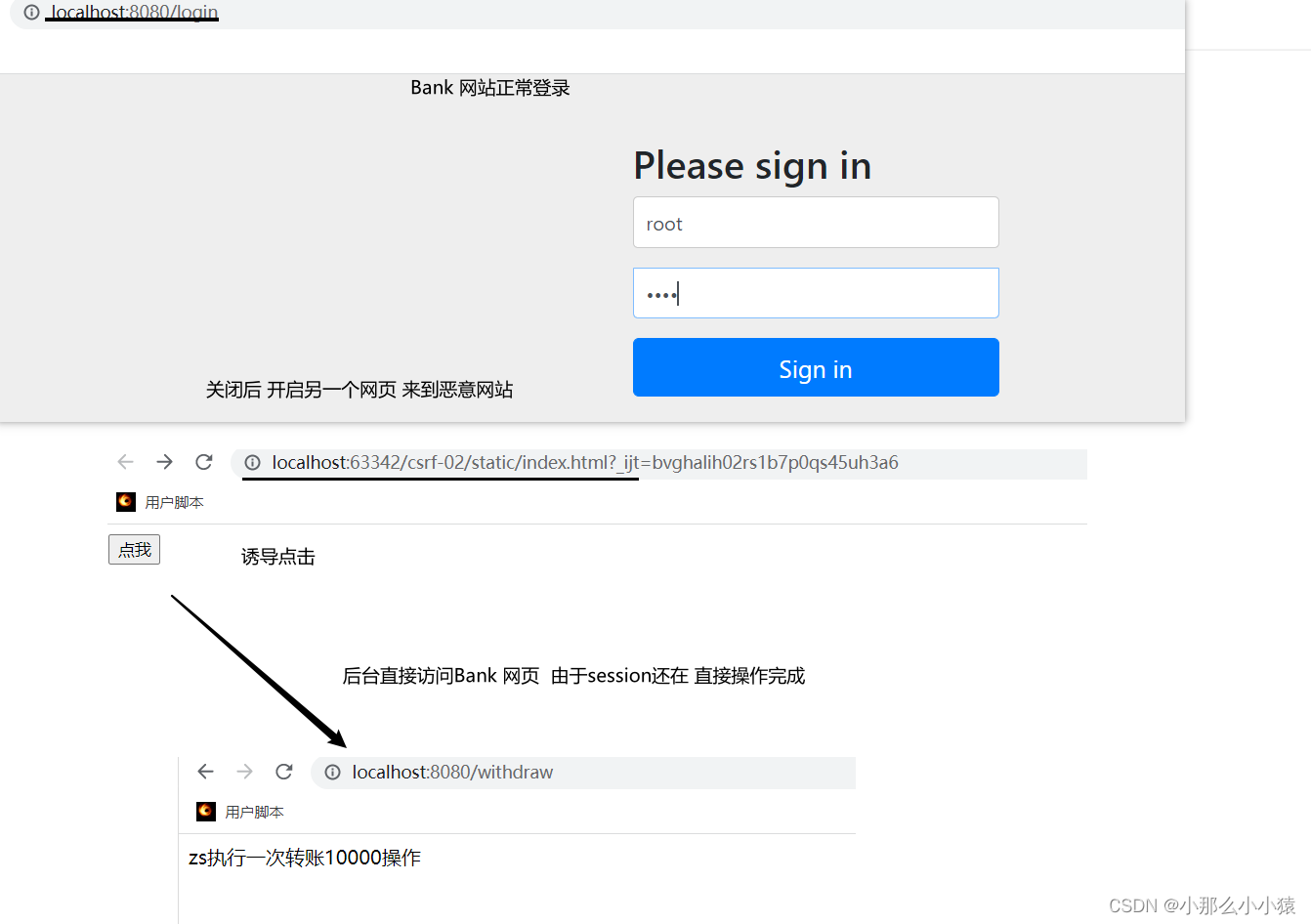
由于恶意网站模拟用户发送的请求与真实请求没有差别,服务端无法判断 造成漏洞。但恶意请求特点:不是从正常页面发出的
主流的解决方式:令牌同步模式 核心目的:请求在合法页面发出才有效 ,将请求与页面绑定;利用csrf只能冒用cookies信息而不能获取特点
流程: 每次敏感请求,服务端生成令牌隐藏在用户页面的表单中,用户提交数据时,服务端校验自己留存的令牌是否由于用户传递的一致。确保请求来自此页面
使用方式
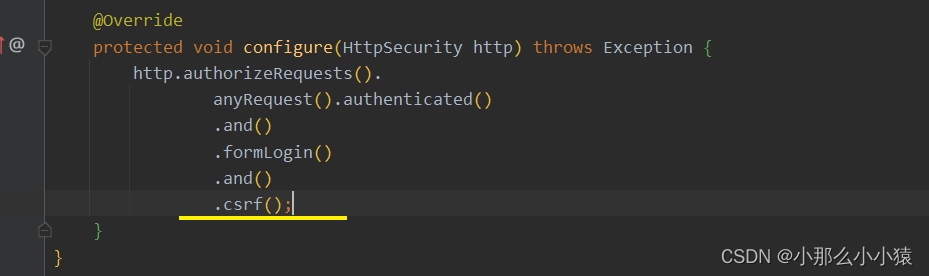
springSecurity默认开启CSRF保护
手动声明
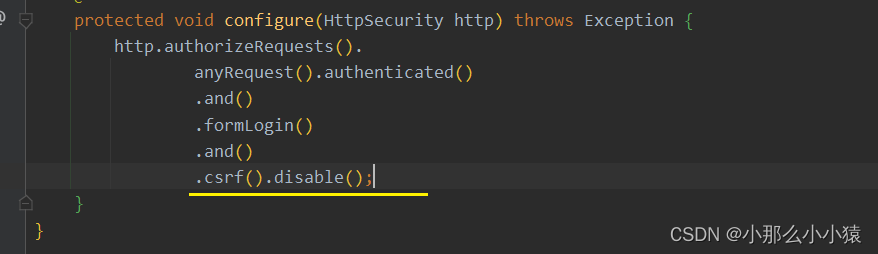
手动关闭
随着页面的刷新,令牌也随之刷新 ,将请求与页面紧紧绑定
测试:
<form th:action="@{/withdraw}" method="post">
    <input name="name" >
    <input name="money">
    <input type="submit" value="取款">
</form>
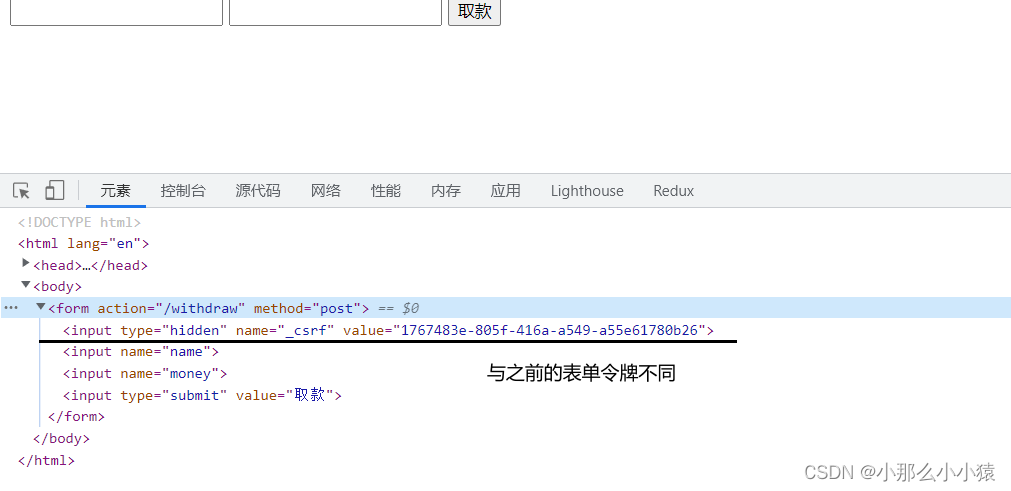
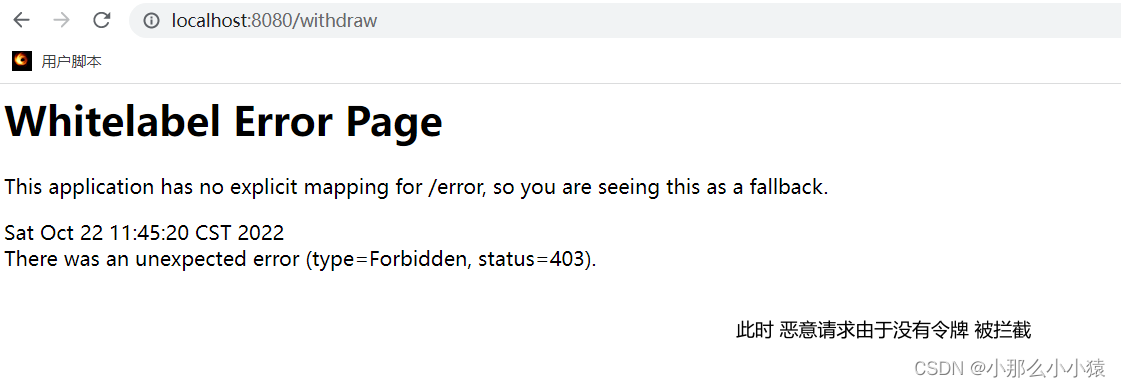
恶意网站只会获取cookie ,在后台发送恶意请求。由于bank的操作需要用户浏览的页面中的令牌以确保是在指定页面操作,恶意网站没有用户名、密码 无法获取用户每次操作页面的令牌(springSecurity会识别页面表单自动插入),只有cookie,所以无效
手动在页面添加同步令牌
<input type="hidden" th:name="${_csrf.parameterName}" th:value="${_csrf.token}"/>
由于前后端以json形式进行传递数据,数据获方式不同,导致默认令牌方式无效
前后端分离原理:
将令牌放入cookies中 ,请求时要将请求头(key为 “X-XSRF-TOKEN”)或者请求参数中(key为 "_csrf ")在携带令牌。 服务端不保留数据 ,只负责比较cookies中的令牌是否与请求参数中或 请求头中是否一致
Bank前端系统负责每次请求时,自动将cookies中取出令牌 动态拼接在请求中的header。 恶意网站诱导用户发送请求,但不是Bank页面,没有经过前端系统, 所以无法进行拼接 ,验证失败。也可以使得请求只能在前台发送
要是恶意网站中将请求中携带cookies查看并修改请求header怎么办?恶意网站无法获取其他网站cookies, 只能利用
两种方式区别
传统web开发需要每次页面刷新 后端负责生成输出在页面,并负责校验
前后端分离:后端生成一次 每次请求,前端负责拼接hearder 打上标识,后端负责校验
疑问:
能否登录成功后,前端可自行进行生成随机数一份放存在cookies中,一份放在默认axios中,每次请求前放入header;后端只负责校验?
使用方式

2. 获取令牌后,将其拼接在Header 或 请求参数中 (由于前后端分离,放在 header中 )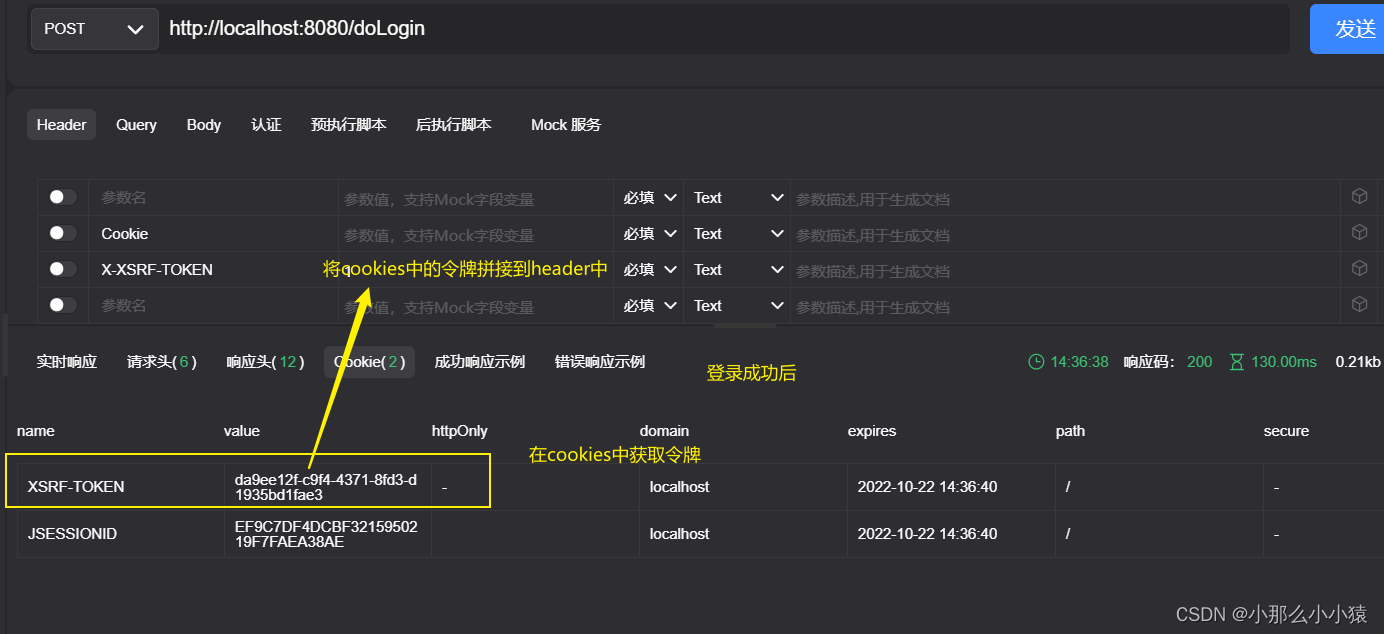
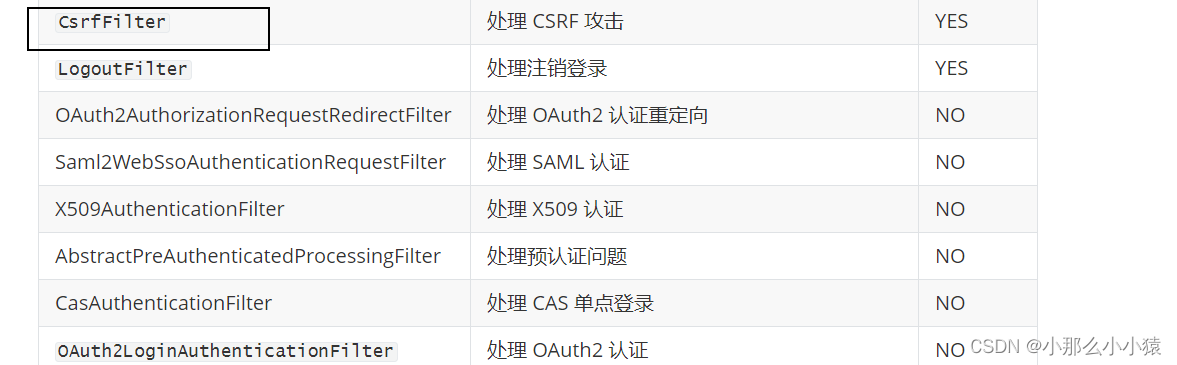
找到对应过滤器
 protected void doFilterInternal(HttpServletRequest request, HttpServletResponse response, FilterChain filterChain) {
        request.setAttribute(HttpServletResponse.class.getName(), response);
        CsrfToken csrfToken = this.tokenRepository.loadToken(request);
        boolean missingToken = csrfToken == null;
        if (missingToken) {
            csrfToken = this.tokenRepository.generateToken(request);
            this.tokenRepository.saveToken(csrfToken, request, response);
        }

        request.setAttribute(CsrfToken.class.getName(),csrfToken);request.setAttribute(csrfToken.getParameterName(), csrfToken);
        if (!this.requireCsrfProtectionMatcher.matches(request)) {
           这些请求不需要验证 直接放行
            filterChain.doFilter(request, response);
        } else {
            String actualToken = request.getHeader(csrfToken.getHeaderName());
            if (actualToken == null) {
                actualToken = request.getParameter(csrfToken.getParameterName());
            }
            if (!equalsConstantTime(csrfToken.getToken(), actualToken)) {
                header中 或请求参数中的值与cookies中不同
                this.accessDeniedHandler.handle(request, response, (AccessDeniedException)exception);
            } else {
                filterChain.doFilter(request, response);
            }
        }
    }
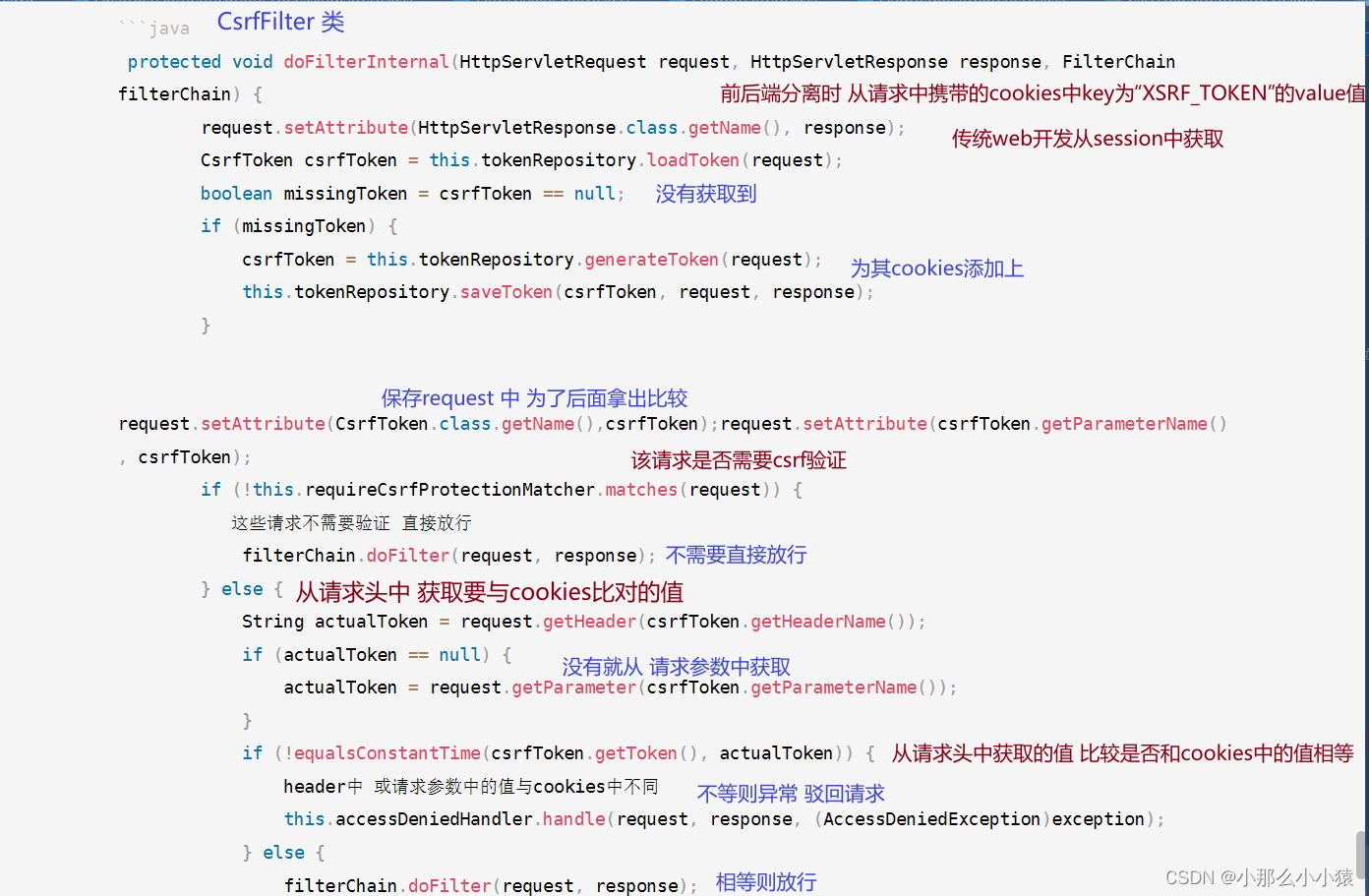
CsrfToken csrfToken = this.tokenRepository.loadToken(request);
前后端分离cookies中获取
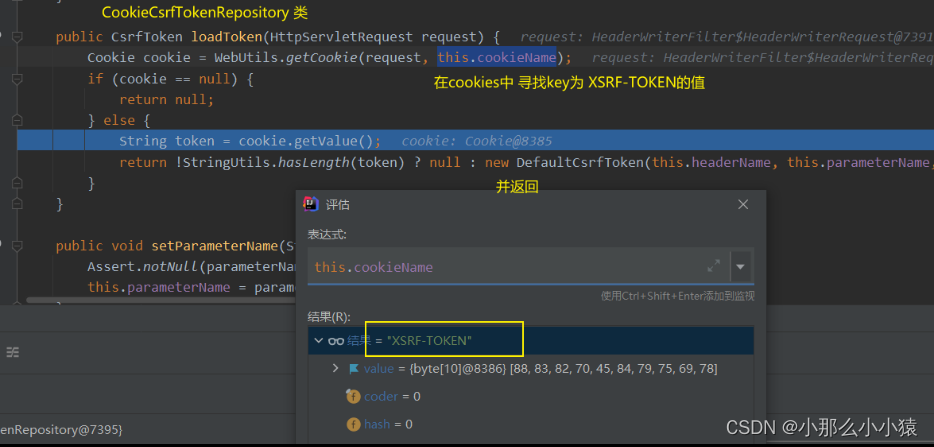
传统web开发从session中获取

if (!this.requireCsrfProtectionMatcher.matches(request))
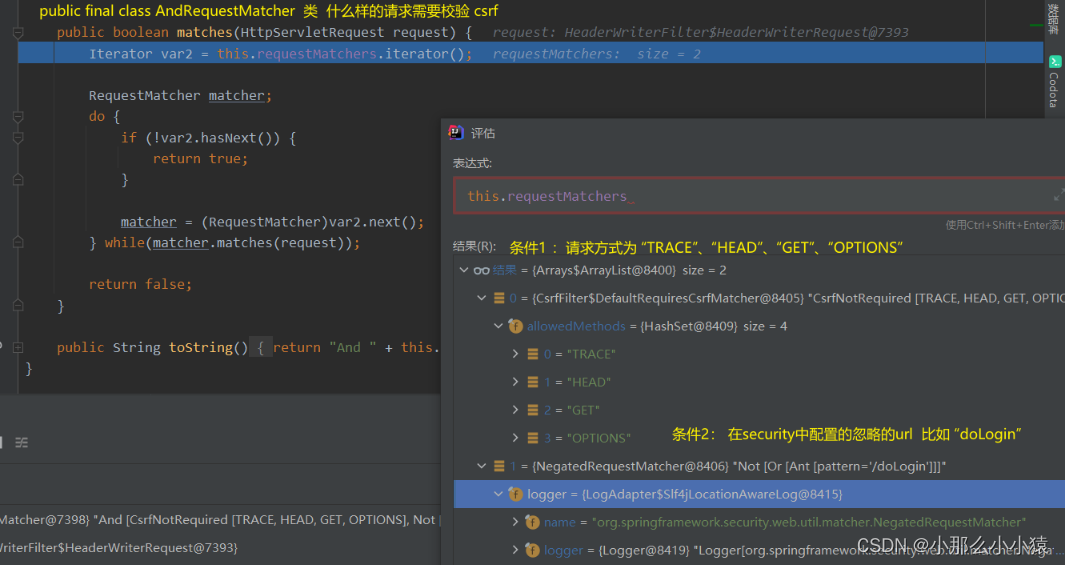
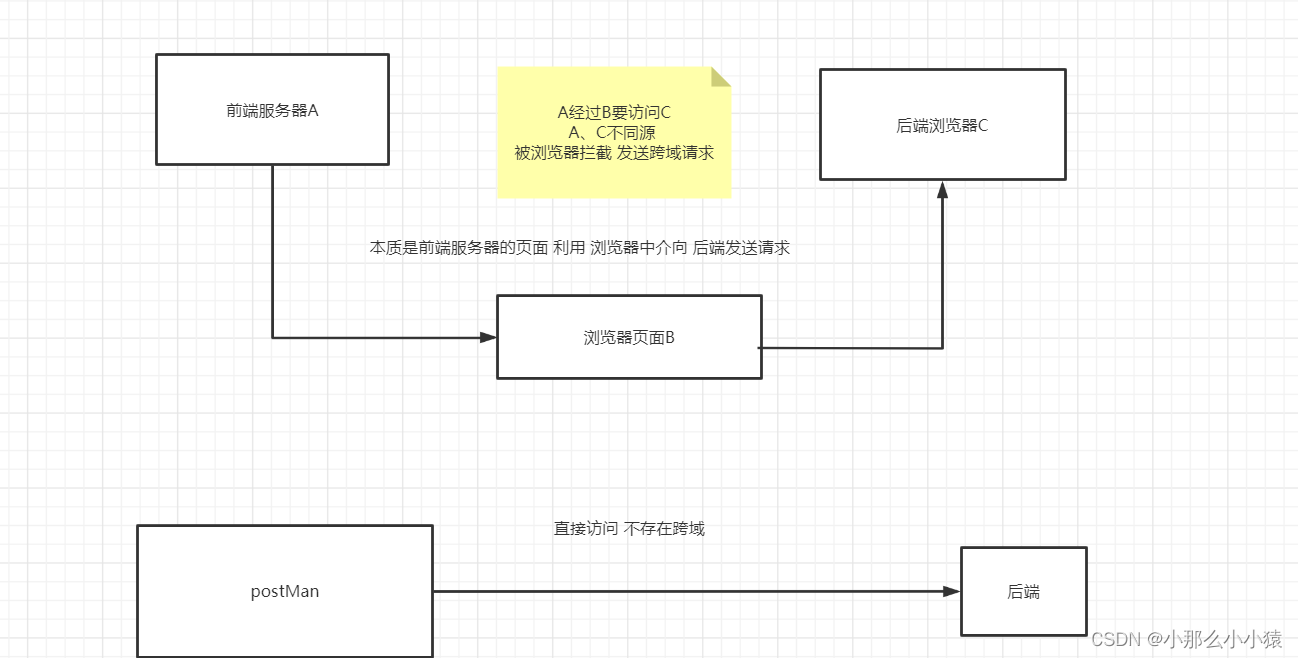
域=协议+ip+端口
有其中任意不同的两者之间的访问即跨域 ,是浏览器同源策略限制的!(运行在浏览器的js请求被浏览器拦截,而postMan不会 ,因为只是简单的访问一个资源,并不存在资源的相互访问,所有没有同源限制)
CORS解决不同域之间的访问方法:
增加一组HTTP 请求头字段,浏览器(提前检查前端请求方式)和服务器之间通过这个字段进行跨域交流
请求分为GET请求和其他请求,浏览器发送非get请求必须要发起两次请求 第一次预检获取 第二次请求
简单请求(Get请求) HTTP 字段
浏览器发送:
Host: localhost:8080            要进行访问的地址
Origin: http://localhost:8081   本次请求来自 协议://主机:端口
Referer:http://localhost:8081/index.html
服务端接收后 回应
Access-Control-Allow-Origin:http://localhost: 8081 允许 此域 访问
客户端发现自己在 Access-Control-Allow-Origin 字段声明的域中,能够正常发送get请求,就不再对前端的跨域请求进行限制
非简单请求
客户端发送 第一次预检请求
OPTIONS /put HTTP/1.1
Host: localhost:8080
Connection: keep-alive
Accept: */*
Access-Control-Request-Method:PUT
Origin: http://localhost: 8081
Referer:http://localhost:8081/index.html
服务器端发送
HTTP/1.1 200
Access-Control-Allow-Origin:http://localhost: 8081
Access-Control-Request-Methods: PUT  允许的方法
Access-Control-Max-Age: 3600   此次申请的有效期
第一次预检请求通过后,发送真正跨域请求
方式一: 添加注解
@CrossOrigin 注解来标记支持跨域。
当添加在 Controller 上时,表示 Controller 中的所有接口都支持跨域 ;可以添加在方法上,表示只有此方法支持
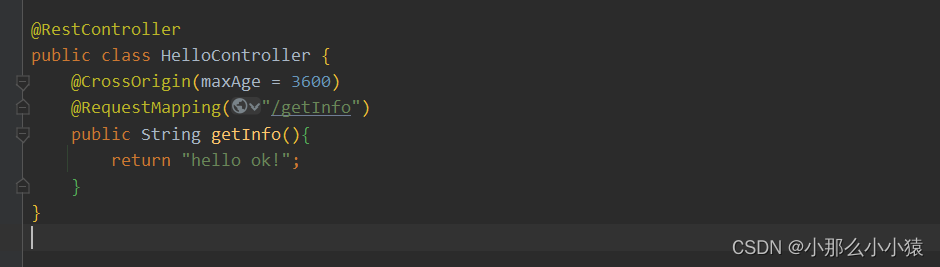
可选参数:
*表示允许所有域*表示所有字段。1800 秒。* 表示允许所有方法。方式二: 配置mvc
@Configuration
public class WebMvcConfig implements WebMvcConfigurer {
    @Override
    public void addCorsMappings(CorsRegistry registry) {
        registry.addMapping("/**") //处理的请求地址
                .allowedMethods ("*")
                .allowedHeaders ("*")
                .allowCredentials (false)
                .maxAge (3600) ;
    }
}
方式三: 设置过滤器
@Configuration
public class WebMvcConfig {
    @Bean
    FilterRegistrationBean<CorsFilter> corsFilter() {
        FilterRegistrationBean<CorsFilter> registrationBean = new FilterRegistrationBean<>();
        CorsConfiguration corsConfiguration = new CorsConfiguration();
        corsConfiguration.setAllowedHeaders(Arrays.asList("*"));
        corsConfiguration.setAllowedMethods(Arrays.asList("*"));
        corsConfiguration.setAllowedOrigins(Arrays.asList("*"));
        corsConfiguration.setMaxAge(3600L);
        UrlBasedCorsConfigurationSource source = new UrlBasedCorsConfigurationSource();
        source.registerCorsConfiguration("/**", corsConfiguration);
        registrationBean.setFilter(new CorsFilter(source));
        registrationBean.setOrder(1); // 设置启动顺序
        return registrationBean;
    }
}
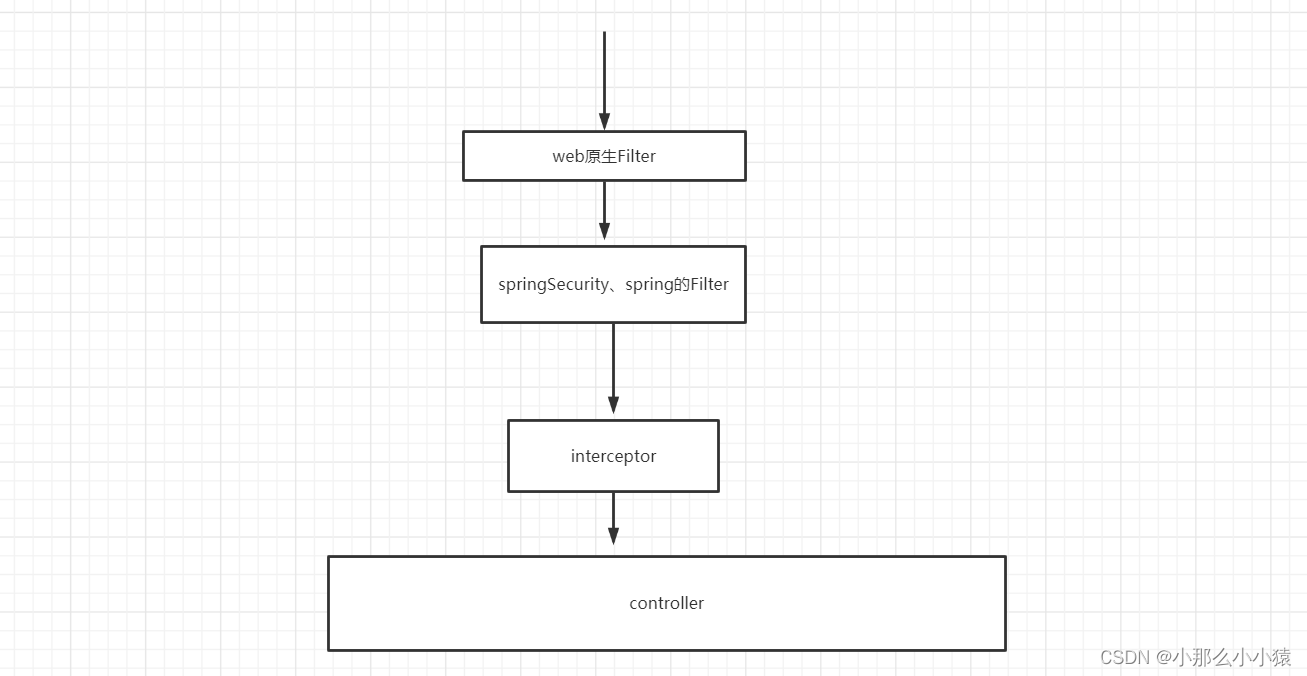
使用springsecurity后 springsecurity的过滤器拦截在spring外 。请求还没有到达spring处理,就已经被spiringSecurity跨域拦截器拦截住,使得原spring处理无效
以上springBoot的跨域方式中 ,只有方式三 提升拦截顺序赶在springSecurity之前可能有效 ,方式一、方式二都在springSecurity拦截器之后。
springSecurity跨域方式
在security配置类中
1.
  CorsConfigurationSource configurationSource() {
        CorsConfiguration corsConfiguration = new CorsConfiguration();
        corsConfiguration.setAllowedHeaders(Arrays.asList("*"));
        corsConfiguration.setAllowedMethods(Arrays.asList("*"));
        corsConfiguration.setAllowedOrigins(Arrays.asList("*"));
        corsConfiguration.setMaxAge(3600L);
        UrlBasedCorsConfigurationSource source = new UrlBasedCorsConfigurationSource();
        source.registerCorsConfiguration("/**", corsConfiguration);
        return source;
    }

我正在学习如何使用Nokogiri,根据这段代码我遇到了一些问题:require'rubygems'require'mechanize'post_agent=WWW::Mechanize.newpost_page=post_agent.get('http://www.vbulletin.org/forum/showthread.php?t=230708')puts"\nabsolutepathwithtbodygivesnil"putspost_page.parser.xpath('/html/body/div/div/div/div/div/table/tbody/tr/td/div
我有一个Ruby程序,它使用rubyzip压缩XML文件的目录树。gem。我的问题是文件开始变得很重,我想提高压缩级别,因为压缩时间不是问题。我在rubyzipdocumentation中找不到一种为创建的ZIP文件指定压缩级别的方法。有人知道如何更改此设置吗?是否有另一个允许指定压缩级别的Ruby库? 最佳答案 这是我通过查看rubyzip内部创建的代码。level=Zlib::BEST_COMPRESSIONZip::ZipOutputStream.open(zip_file)do|zip|Dir.glob("**/*")d
类classAprivatedeffooputs:fooendpublicdefbarputs:barendprivatedefzimputs:zimendprotecteddefdibputs:dibendendA的实例a=A.new测试a.foorescueputs:faila.barrescueputs:faila.zimrescueputs:faila.dibrescueputs:faila.gazrescueputs:fail测试输出failbarfailfailfail.发送测试[:foo,:bar,:zim,:dib,:gaz].each{|m|a.send(m)resc
很好奇,就使用rubyonrails自动化单元测试而言,你们正在做什么?您是否创建了一个脚本来在cron中运行rake作业并将结果邮寄给您?git中的预提交Hook?只是手动调用?我完全理解测试,但想知道在错误发生之前捕获错误的最佳实践是什么。让我们理所当然地认为测试本身是完美无缺的,并且可以正常工作。下一步是什么以确保他们在正确的时间将可能有害的结果传达给您? 最佳答案 不确定您到底想听什么,但是有几个级别的自动代码库控制:在处理某项功能时,您可以使用类似autotest的内容获得关于哪些有效,哪些无效的即时反馈。要确保您的提
假设我做了一个模块如下:m=Module.newdoclassCendend三个问题:除了对m的引用之外,还有什么方法可以访问C和m中的其他内容?我可以在创建匿名模块后为其命名吗(就像我输入“module...”一样)?如何在使用完匿名模块后将其删除,使其定义的常量不再存在? 最佳答案 三个答案:是的,使用ObjectSpace.此代码使c引用你的类(class)C不引用m:c=nilObjectSpace.each_object{|obj|c=objif(Class===objandobj.name=~/::C$/)}当然这取决于
我正在尝试使用ruby和Savon来使用网络服务。测试服务为http://www.webservicex.net/WS/WSDetails.aspx?WSID=9&CATID=2require'rubygems'require'savon'client=Savon::Client.new"http://www.webservicex.net/stockquote.asmx?WSDL"client.get_quotedo|soap|soap.body={:symbol=>"AAPL"}end返回SOAP异常。检查soap信封,在我看来soap请求没有正确的命名空间。任何人都可以建议我
关闭。这个问题是opinion-based.它目前不接受答案。想要改进这个问题?更新问题,以便editingthispost可以用事实和引用来回答它.关闭4年前。Improvethisquestion我想在固定时间创建一系列低音和高音调的哔哔声。例如:在150毫秒时发出高音调的蜂鸣声在151毫秒时发出低音调的蜂鸣声200毫秒时发出低音调的蜂鸣声250毫秒的高音调蜂鸣声有没有办法在Ruby或Python中做到这一点?我真的不在乎输出编码是什么(.wav、.mp3、.ogg等等),但我确实想创建一个输出文件。
我在我的项目目录中完成了compasscreate.和compassinitrails。几个问题:我已将我的.sass文件放在public/stylesheets中。这是放置它们的正确位置吗?当我运行compasswatch时,它不会自动编译这些.sass文件。我必须手动指定文件:compasswatchpublic/stylesheets/myfile.sass等。如何让它自动运行?文件ie.css、print.css和screen.css已放在stylesheets/compiled。如何在编译后不让它们重新出现的情况下删除它们?我自己编译的.sass文件编译成compiled/t
我想将html转换为纯文本。不过,我不想只删除标签,我想智能地保留尽可能多的格式。为插入换行符标签,检测段落并格式化它们等。输入非常简单,通常是格式良好的html(不是整个文档,只是一堆内容,通常没有anchor或图像)。我可以将几个正则表达式放在一起,让我达到80%,但我认为可能有一些现有的解决方案更智能。 最佳答案 首先,不要尝试为此使用正则表达式。很有可能你会想出一个脆弱/脆弱的解决方案,它会随着HTML的变化而崩溃,或者很难管理和维护。您可以使用Nokogiri快速解析HTML并提取文本:require'nokogiri'h
我想为Heroku构建一个Rails3应用程序。他们使用Postgres作为他们的数据库,所以我通过MacPorts安装了postgres9.0。现在我需要一个postgresgem并且共识是出于性能原因你想要pggem。但是我对我得到的错误感到非常困惑当我尝试在rvm下通过geminstall安装pg时。我已经非常明确地指定了所有postgres目录的位置可以找到但仍然无法完成安装:$envARCHFLAGS='-archx86_64'geminstallpg--\--with-pg-config=/opt/local/var/db/postgresql90/defaultdb/po
