REST是软件架构的规范体系结构,它将资源的状态以适合客户端的形式从服务器端发送到客户端(或相反方向)。在REST中,通过URL进行资源定位,用HTTP动作GET、POST、DELETE、PUSH等)描述操作,完成功能。
道循RESTful风格,可以使开发的接口通用,以便调用者理解接口的作用。基于REST构建的 API 就是 RESTful ( REST 风格)API.
各大机构提供的API基本都是RESTful风格的。这样可以统一规范,减少沟通、学习和开发 的成本。
Restful是典型的基于HTTP的协议。HTTP连接最显著的特点是:客户端发送的每次请求都需要服务器回送响应;在请求结束后,主动释放连接:
从建立连接到关闭连接的过程称为“一次连接”,前后的请求没有必然的联系,所以是无状态的
可缓存(cachable):服务器必须让客户知道请求是否可以被缓存。
RESTful风格使用同一个URL,通过约定不同的HTTP方法来实施不同的业务。 普通网页的CRUD和RESTful风格的CRUD的区别,见下表。

可以看出,RESTful风格的CRUD比传统的CRUD简单明了,它通过HTTP方法来区分增加、修改、删除和查询。
在SpringBoot中,如果要返回JSON数据,则只需要在控制器中用@RestController注解。 如果提交HTTP方法,则只需要使用注解@RequestMapping来实现,它有以下两个属性。
为了不重复编码,尽量在类上使用@RequestMapping("")来指定上一级URL
使用RESTful风格操作数据的方法见以下代码。
@RequestMapping(value = "/",method = RequestMethod.GET)
public List<User> getUserList(){
    List<User> userList = new ArrayList<User>(userRepository.findAll());
    return userList;
}@RequestMapping(value = "/",method = RequestMethod.POST)
public String add(User user){
userRepository.save(user);
return "success";
}@RequestMapping(value = "/{id}",method = RequestMethod.DELETE)
public String delete(@PathVariable("id")Long id){
userRepository.deleteById(id);
return "success";
}@RequestMapping(value = "/{id}",method = RequestMethod.PUT)
public String update(User user){
userRepository.save(user);
return "success";
}@RequestMapping(value = "/{id}",method = RequestMethod.GET)
public User findUser(@PathVariable("id")Integer id){
Optional<User> user = userRepository.findById(id.longValue());
return user.get();
}对于RESTful风格的增加、删除、修改和查询,可以编写测试单元,也可以用Postman测试, 分别用GET、POST、PUT、DELETE方法提交测试。虽然这样实现了 RESTful风格,但还有一 个问题——返回的数据并不统一,在实际生产环境中还需要进行改进,所以需要设计统一的RESTful 风格的数据接口。
近年来,随着移动互联网的发展,各种类型的客户端层岀不穷。如果不统一数据接口,则会造成冗余编码,增加成本。RESTful风格的API正适合通过一套统一的接口为PC、手机APP等设备提供数据服务。
随着业务需求的变更、功能的迭代,API的更改是不可避免的。当一个API修改时,就会出现很多问题,比如,可能会在API中新增参数、修改返回的数据类型。这就要考虑根据原先版本API 编写的客户端如何保留或顺利过渡。所以,需要进行版本控制。
REST不提供版本控制指南,常用的方法可以分为3种。
通过URL是最直接的方法,尽管它违背了 URI应该引用唯一资源的原则。当版本更新时,还可以保障客户端不会受到影响,如下面使用不同URL来确定不同版本。
二级目录的方式:
二级域名的方式:
还可以包括日期、项目名称或其他标识符。这些标识符对于开发API的团队来说足够有意义, 并旦随着版本的变化也足够灵活。
自定义头(例如,Accept-version)允许在版本之间保留URL。
客户端在请求资源之前,必须要指定特定头,然后API接口负责确定要发送哪个版本的资源
如果记录数量很务,则服务器不可能一次都将它们返回给用户。API应该提供参数,实现分页返回結果。下面是一些常用的参数
在RESTful中,HTTP的方法有以下几种。
HTTP的返回状态一般有以下几种。
为了保障前后端的数据交互的顺畅,建议规范数据的返回,并采用固定的数据格式封装。如,
异常信息:
{
    "code":"10001",
    "msg":"异常信息",
    "data":null
}
{
"code":200,
"msg":"成功",
"data":{
"id":1,
"name":"buretuzi",
"age":2
}
}枚举是一种特殊的数据类型,它是一种"类类型",比类型多了一些特殊的约束。创建枚举类型要使用“enum”,表示所创建的类型都是java.lang.Enum(抽象类)的子类。见以下代码:
package com.itheima.exception;

public enum ExceptionMsg {
    SUCCESS("200","操作成功"),
    FAILED("999999","操作失败");
    private ExceptionMsg(String code,String msg){
        this.code = code;
        this.msg = msg;
    }
    private String code;
    private String msg;
}实现返回的对象实体,返回Code和Message (信息),见以下代码:
package com.itheima.domain;

public class Response {
    private String rspCode="200";
    private String rspMsg="操作成功";
}这里把返回的结果逬行封装,以显示数据,见以下代码:
package com.itheima.dao;

import com.itheima.domain.Response;

public class ReponseData extends Response {
    private Object data;
    public ReponseData(Object data) {
        this.data = data;
    }
} package com.itheima.handler;
import com.itheima.exception.BusinessException;
import org.slf4j.Logger;
import org.slf4j.LoggerFactory;
import org.springframework.http.HttpStatus;
import org.springframework.http.converter.HttpMessageNotReadableException;
import org.springframework.validation.BindException;
import org.springframework.validation.BindingResult;
import org.springframework.validation.FieldError;
import org.springframework.web.HttpMediaTypeNotSupportedException;
import org.springframework.web.HttpRequestMethodNotSupportedException;
import org.springframework.web.bind.MethodArgumentNotValidException;
import org.springframework.web.bind.MissingServletRequestParameterException;
import org.springframework.web.bind.annotation.ExceptionHandler;
import org.springframework.web.bind.annotation.ResponseBody;
import org.springframework.web.bind.annotation.ResponseStatus;
import org.springframework.web.bind.annotation.RestControllerAdvice;
import javax.validation.ConstraintViolation;
import javax.validation.ConstraintViolationException;
import javax.validation.ValidationException;
import java.util.HashMap;
import java.util.Map;
import java.util.Set;
@RestControllerAdvice
public class GlobalExceptionHandler {
private static final Logger logger = LoggerFactory.getLogger(GlobalExceptionHandler.class);
@ResponseStatus(HttpStatus.BAD_REQUEST)
@ExceptionHandler(MissingServletRequestParameterException.class)
public Map<String, Object> handleMissingServletRequestParameterException(MissingServletRequestParameterException e){
logger.error("缺少请求参数");
Map<String, Object> map = new HashMap<String, Object>();
map.put("code",400);
map.put("message",e.getMessage());
//如果发生异常,则进行日志记录、写入数据库或其他处理,此处省略
return map;
}
@ResponseStatus(HttpStatus.BAD_REQUEST)
@ExceptionHandler(HttpMessageNotReadableException.class)
public Map<String, Object> handleHttpMessageNotReadableException(HttpMessageNotReadableException e){
logger.error("缺少请求参数");
Map<String, Object> map = new HashMap<String, Object>();
map.put("code",400);
map.put("message",e.getMessage());
//如果发生异常,则进行日志记录、写入数据库或其他处理,此处省略
return map;
}
@ResponseStatus(HttpStatus.BAD_REQUEST)
@ExceptionHandler(MethodArgumentNotValidException.class)
public Map<String, Object> handleMethodArgumentNotValidException(MethodArgumentNotValidException e){
logger.error("参数验证失败",e);
BindingResult result = e.getBindingResult();
FieldError error = result.getFieldError();
String field = error.getField();
String code = error.getDefaultMessage();
String message = String.format("%s: %s",field,code);
Map<String, Object> map = new HashMap<String, Object>();
map.put("code",code);
map.put("message",message);
//如果发生异常,则进行日志记录、写入数据库或其他处理,此处省略
return map;
}
@ResponseStatus(HttpStatus.BAD_REQUEST)
@ExceptionHandler(BindException.class)
public Map<String, Object> handleBindException(BindException e){
logger.error("缺少请求参数",e);
Map<String, Object> map = new HashMap<String, Object>();
BindingResult result = e.getBindingResult();
FieldError error = result.getFieldError();
String field = error.getField();
String code = error.getDefaultMessage();
String message = String.format("%s: %s",field,code);
map.put("code",code);
map.put("message",message);
//如果发生异常,则进行日志记录、写入数据库或其他处理,此处省略
return map;
}
@ResponseStatus(HttpStatus.BAD_REQUEST)
@ExceptionHandler(ConstraintViolationException.class)
public Map<String, Object> handleConstraintViolationException(ConstraintViolationException e){
logger.error("缺少请求参数",e);
Set<ConstraintViolation<?>> violations = e.getConstraintViolations();
ConstraintViolation<?> violation = violations.iterator().next();
String message = violation.getMessage();
Map<String, Object> map = new HashMap<String, Object>();
map.put("code",400);
map.put("message",message);
//如果发生异常,则进行日志记录、写入数据库或其他处理,此处省略
return map;
}
@ResponseStatus(HttpStatus.BAD_REQUEST)
@ExceptionHandler(ValidationException.class)
public Map<String, Object> handleValidationException(ValidationException e){
logger.error("参数验证失败",e);
Map<String, Object> map = new HashMap<String, Object>();
map.put("code",400);
map.put("message",e.getMessage());
//如果发生异常,则进行日志记录、写入数据库或其他处理,此处省略
return map;
}
@ResponseStatus(HttpStatus.METHOD_NOT_ALLOWED)
@ExceptionHandler(HttpRequestMethodNotSupportedException.class)
public Map<String, Object> handleHttpRequestMethodNotSupportedException(HttpRequestMethodNotSupportedException e){
logger.error("不支持当前请求方法",e);
Map<String, Object> map = new HashMap<String, Object>();
map.put("code",400);
map.put("message",e.getMessage());
//如果发生异常,则进行日志记录、写入数据库或其他处理,此处省略
return map;
}
@ResponseStatus(HttpStatus.UNSUPPORTED_MEDIA_TYPE)
@ExceptionHandler(HttpMediaTypeNotSupportedException.class)
public Map<String, Object> handleHttpMediaTypeNotSupportedException(HttpMediaTypeNotSupportedException e){
logger.error("不支持当前媒体类型",e);
Map<String, Object> map = new HashMap<String, Object>();
map.put("code",415);
map.put("message",e.getMessage());
//如果发生异常,则进行日志记录、写入数据库或其他处理,此处省略
return map;
}
@ResponseBody
@ExceptionHandler(BusinessException.class)
public Map<String, Object> businessExceptionHandler(BusinessException e){
logger.error("自定义业务失败",e);
Map<String, Object> map = new HashMap<String, Object>();
map.put("code",e.getCode());
map.put("message",e.getMessage());
//如果发生异常,则进行日志记录、写入数据库或其他处理,此处省略
return map;
}
@ExceptionHandler(value = Exception.class)
public Map<String, Object> defaultErrorHandler(Exception e){
logger.error("自定义业务失败",e);
Map<String, Object> map = new HashMap<String, Object>();
map.put("code",500);
map.put("message",e.getMessage());
//如果发生异常,则进行日志记录、写入数据库或其他处理,此处省略
return map;
}
}package com.itheima.controller;
import com.itheima.exception.BusinessException;
import org.springframework.web.bind.annotation.RequestMapping;
import org.springframework.web.bind.annotation.RequestParam;
import org.springframework.web.bind.annotation.RestController;
@RestController
public class TestController {
@RequestMapping("BusinessException")
public String testBusinessExceptionStatus(@RequestParam("i") int i){
if (i == 0){
throw new BusinessException(600,"这是自定义异常");
}
return "success";
}
}运行项目,访问http://localhost:8080/BusinessException?i=0,在网页中返回如下 JSON 格式的数据:

package com.itheima.controller;
import com.itheima.dao.ReponseData;
import com.itheima.dao.UserRepository;
import com.itheima.domain.Response;
import com.itheima.domain.User;
import com.itheima.exception.ExceptionMsg;
import org.springframework.beans.factory.annotation.Autowired;
import org.springframework.web.bind.annotation.*;
import java.util.*;

@RestController
@RequestMapping("/user")
public class UserController {
    protected Response result(ExceptionMsg msg){
        return new Response();
    }
    protected Response result(){
        return new Response();
    }
    @Autowired
    private UserRepository userRepository;

    @RequestMapping(value = "",method = RequestMethod.GET)
    public ReponseData getUserList(){
        List<User> list = new ArrayList<>(userRepository.findAll());
        return new ReponseData(ExceptionMsg.SUCCESS,list);
    }

    @RequestMapping(value = "",method = RequestMethod.POST)
    public ReponseData add(User user) {
        userRepository.save(user);
        List<User> list = new ArrayList<>(userRepository.findAll());
        return new ReponseData(ExceptionMsg.SUCCESS,user);
    }

    @RequestMapping(value = "/{id}",method = RequestMethod.DELETE)
    public Response delete(@PathVariable("id") Long id) {
        userRepository.deleteById(id);
        return result(ExceptionMsg.SUCCESS);
    }

    @RequestMapping(value = "/{id}",method = RequestMethod.PUT)
    public ReponseData update(User user) {
        userRepository.save(user);
        return new ReponseData(ExceptionMsg.SUCCESS,user);
    }

    @RequestMapping(value = "/{id}",method = RequestMethod.GET)
    public ReponseData findUser(@PathVariable("id") int id) {
        Optional<User> user = userRepository.findById((long) id);
        if (user.get()!=null) {
            return new ReponseData(ExceptionMsg.SUCCESS,user);
        }
        return new ReponseData(ExceptionMsg.FAILED,user);
    }
}在项目开发中,一般都是前后端分离开发的,需要由前后端工程师共同定义接口:编写接口文档,之后大家都根据这个接口文档进行开发、维护。为了便于编写和维护稳定,可以使用Swagger来编写API接口文档,以提升团队的沟通效率。
<dependency>
    <groupId>io.springfox</groupId>
    <artifactId>springfox-swagger2</artifactId>
    <version>2.7.0</version>
</dependency>
<dependency>
    <groupId>io.springfox</groupId>
    <artifactId>springfox-swagger-ui</artifactId>
    <version>2.7.0</version>
</dependency>package com.itheima.config;
import org.springframework.context.annotation.Bean;
import org.springframework.context.annotation.Configuration;
import springfox.documentation.builders.ApiInfoBuilder;
import springfox.documentation.builders.PathSelectors;
import springfox.documentation.builders.RequestHandlerSelectors;
import springfox.documentation.service.ApiInfo;
import springfox.documentation.spi.DocumentationType;
import springfox.documentation.spring.web.plugins.Docket;
import springfox.documentation.swagger2.annotations.EnableSwagger2;
/**
* Swagger配置类
* 在与Spring Boot集成时,放在与Application.java同级的目录下
* 通过注解@Configuration让Spring来加载该类配置
* 再通过注解@EnableSwagger2来启用Swagger2
*/
@Configuration
@EnableSwagger2
public class Swagger2 {
/**
* 创建API应用
* apiInfo增加API相关信息
* 通过select()函数返回一个ApiSelectorBuilder实例,用来控制哪些接口暴露给Swagger来展现
* 本例采用指定扫描的包路径来定义指定要建立API的目录
*/
@Bean
public Docket createRestApi(){
return new Docket(DocumentationType.SWAGGER_2)
.apiInfo(apiInfo())
.select()
.apis(RequestHandlerSelectors.basePackage(""))
.paths(PathSelectors.any())
.build();
}
/**
* 创建该API的基本信息(这些基本信息会展现在文档页面中)
* 访问地址:http:/项目实际地址/swagger-ui.html
*/
private ApiInfo apiInfo(){
return new ApiInfoBuilder()
.title("RESTful APIs")
.description("RESTful APIs")
.termsOfServiceUrl("http://localhost:8080/")
.contact("long")
.version("1.0")
.build();
}
}代码解释如下。
在完成上述配置后,即生成了文档,但是这样生成的文档主要针对请求本身,而描述自动根据方法等命名产生,对用户并不友好。所以,通常需要自己增加一些说明以丰富文档内容。可以通过以下注解来增加说明。
@ApiOperation(value = "删除用户",notes = "根据URL的id来指定删除对象")
@ApiImplicitParam(name = "id",value = "文章ID",required = true,dataType = "Long")
public String del(@PathVariable("id") Long id) {
    userRepository.deleteById(id);
    return "SUCCESS";
}
完成上述代码后,启动项目,访问http://localhost:8080/swagger-ui.html就能看到所展示的RESTful API的页面,可以通过单击具体的API测试请求,来查看代码中配置的信息,以及参数的描述信息。
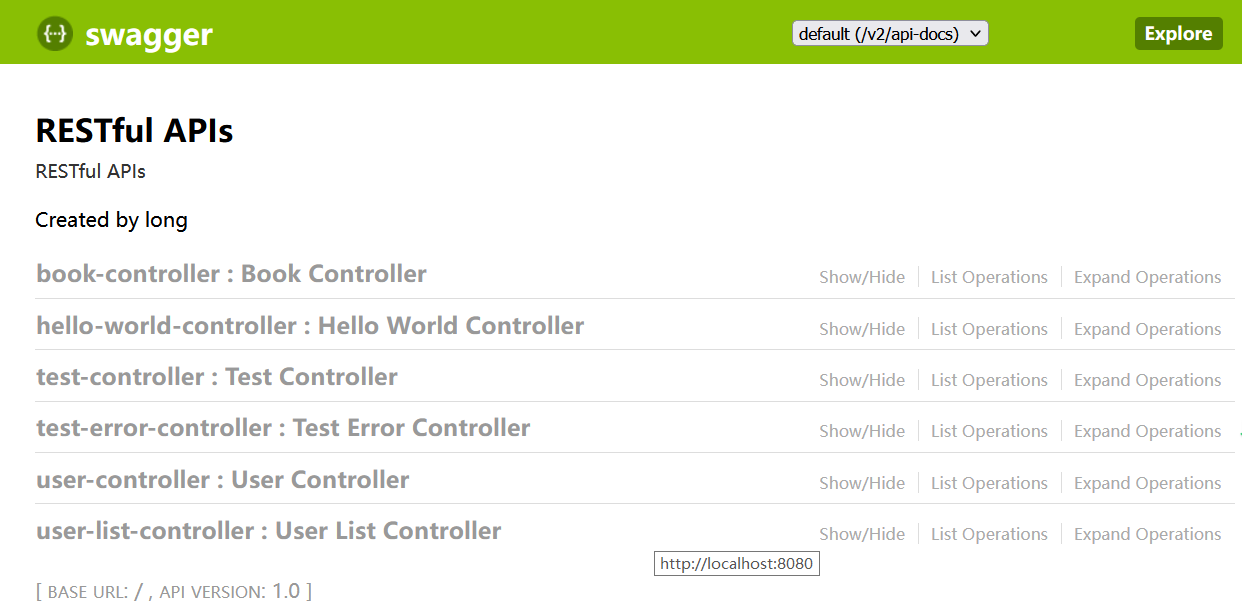
在Java应用程序中访问RESTful服务,可以使用Apache的HttpClient来实现。不过此方法使用起来太烦琐。Spring提供了一种简单便捷的模板类一RestTemplate来进行操作。RestTemplate是Spring提供的用于访问REST服务的客户端,它提供了多种便捷访问远程HTTP 服务的方法,能够大大提高客户端的编写效率。
RestTemplate用于同步Client端的核心类,简化与HTTP服务的通信。在默认情况下, RestTemplate默认依赖JDK的HTTP连接工具。也可以通过setRequestFactory属性切换到不同的 HTTP 源,比如 Apache HttpComponents, Netty 和 OkHttp。
RestTemplate简化了提交表单数据的难度,并附帯自动转换为JSON格式数据的功能。该类的入口主要是根据HTTP的6种方法制定的,见下表。
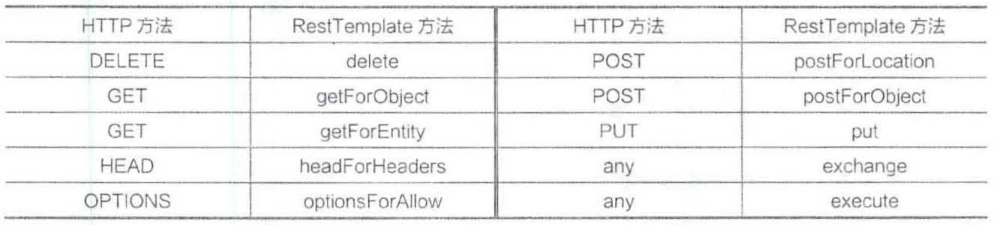
此外,exchange和excute也可以使用上述方法。
RestTemplate 默认使用 HttpMessageConverter 将 HTTP 消息转换成 POJO,或从 POJO 转换成HTTP消息,默认情况下会注册MIME类型的转换器,但也可以通过setMessageConverters 注册其他类型的转换器。
package com.intehel.domain;

import lombok.AllArgsConstructor;
import lombok.Data;

@Data
@AllArgsConstructor
@NoArgsConstructor
public class User {
    private long id;
    private String name;
}
package com.intehel.controller;

import com.intehel.domain.User;
import org.springframework.web.bind.annotation.RequestMapping;
import org.springframework.web.bind.annotation.RequestMethod;
import org.springframework.web.bind.annotation.RestController;

@RestController
public class TestController {
    @RequestMapping(value = "/getParameter", method = RequestMethod.GET)
    public User getParameter(User user){
        return user;
    }
    @RequestMapping(value = "/getuser1", method = RequestMethod.GET)
    public User user1(){
        return new User(1,"buretuzi");
    }
    @RequestMapping(value = "/postuser", method = RequestMethod.POST)
    public User postUser(User user){
        System.out.println("name:"+user.getName());
        System.out.println("id:"+user.getId());
        return user;
    }
}package com.intehel;
import org.junit.Test;
import org.springframework.boot.web.client.RestTemplateBuilder;
import org.springframework.http.ResponseEntity;
import org.springframework.web.client.RestTemplate;
public class test {
@Test
public void nparameters(){
RestTemplateBuilder restTemplateBuilder = new RestTemplateBuilder();
RestTemplate client = restTemplateBuilder.build();
ResponseEntity<String> responseEntity = client.getForEntity("http://localhost:8080/getuser1",String.class);
System.out.println(responseEntity.getBody());
}
}控制台打印结果:
11:01:35.973 [main] DEBUG org.springframework.web.client.RestTemplate - HTTP GET http://localhost:8080/getuser1 11:01:35.991 [main] DEBUG org.springframework.web.client.RestTemplate - Accept=[text/plain, application/json, application/*+json, */*] 11:01:36.073 [main] DEBUG org.springframework.web.client.RestTemplate - Response 200 OK 11:01:36.073 [main] DEBUG org.springframework.web.client.RestTemplate - Reading to [java.lang.String] as "application/json" {"id":1,"name":"buretuzi"}
在调用服务提供者提供的接口时,有时需要传递参数,有以下两种不同的方式。
①用一个数字做占位符。最后是一个可变长度的参数,用来替换前面的占位符。使用方法见以下代码:
@Test
public void withparameters(){
    RestTemplateBuilder restTemplateBuilder = new RestTemplateBuilder();
    RestTemplate client = restTemplateBuilder.build();
    ResponseEntity<String> responseEntity = client.getForEntity("http://localhost:8080/getParameter?name={1}&id={2}",String.class,"buretuzi",2);
    System.out.println(responseEntity.getBody());
}
打印结果:
11:06:20.893 [main] DEBUG org.springframework.web.client.RestTemplate - HTTP GET http://localhost:8080/getParameter?name=buretuzi&id=2 11:06:20.893 [main] DEBUG org.springframework.web.client.RestTemplate - Accept=[text/plain, application/json, application/*+json, */*] 11:06:20.908 [main] DEBUG org.springframework.web.client.RestTemplate - Response 200 OK 11:06:20.908 [main] DEBUG org.springframework.web.client.RestTemplate - Reading to [java.lang.String] as "application/json" {"id":2,"name":"buretuzi"}
② 使用name={name}这种形式。最后一个参数是一个map, map的key即为前边占位符的名字,map的value为参数值。使用方法见以下代码:
@Test
public void withparameters2(){
    RestTemplateBuilder restTemplateBuilder = new RestTemplateBuilder();
    RestTemplate client = restTemplateBuilder.build();
    Map<String,String> map = new HashMap<String,String>();
    map.put("name", "buretuzi");
    ResponseEntity<String> responseEntity = client.getForEntity("http://localhost:8080/getParameter?name={name}&id=3",String.class,map);
    System.out.println(responseEntity.getBody());
}
打印结果:
11:19:28.842 [main] DEBUG org.springframework.web.client.RestTemplate - HTTP GET http://localhost:8080/getParameter?name=buretuzi&id=3 11:19:28.848 [main] DEBUG org.springframework.web.client.RestTemplate - Accept=[text/plain, application/json, application/*+json, */*] 11:19:28.880 [main] DEBUG org.springframework.web.client.RestTemplate - Response 200 OK 11:19:28.880 [main] DEBUG org.springframework.web.client.RestTemplate - Reading to [java.lang.String] as "application/json" {"id":3,"name":"buretuzi"}
@Test
public void restUser(){
    RestTemplateBuilder restTemplateBuilder = new RestTemplateBuilder();
    RestTemplate client = restTemplateBuilder.build();
    ResponseEntity<User> responseEntity = client.getForEntity("http://localhost:8080/getuser1",User.class);
    System.out.println(responseEntity.getBody().getId());
    System.out.println(responseEntity.getBody().getName());
}
打印结果:
1 buretuzi
getForObject函数是对getForEntity函数的进一步封装。如果你只关注返回的消息体的内容, 对其他信息都不关注,则可以使用getForObject,见以下代码:
@Test
public void getForObject(){
    RestTemplateBuilder restTemplateBuilder = new RestTemplateBuilder();
    RestTemplate client = restTemplateBuilder.build();
    User user = client.getForObject("http://localhost:8080/getuser1",User.class);
    System.out.println(user.getName());
}在 RestTemplate 中,POST 请求可以通过 postForEntity、postForObject、postForLocation、exchange四种方法来发起。
postForLocation也用于提交资源。在提交成功之后,会返回新资源的URI。它的参数和前面两种方法的参数基本一致,只不过该方法的返回值为URI,表示新资源的位置
使用exchange方法可以指定调用方式,使用方法如下:
ResponseEntity<String> response=tempIate.exchang(newUrl, HttpMethod.DELETE, request, String.class);
@Test
public void postForEntity(){
    RestTemplateBuilder restTemplateBuilder = new RestTemplateBuilder();
    RestTemplate client = restTemplateBuilder.build();
    MultiValueMap<String,Object> paramMap = new LinkedMultiValueMap<String,Object>();
    paramMap.add("name","buretuzi");
    paramMap.add("id",4);
    ResponseEntity<User> responseEntity = client.postForEntity("http://localhost:8080/postuser",paramMap,User.class);
    System.out.println(responseEntity.getBody().getName());
}
代码解释如下。
运行测试单元,控制台输出如下结果:
11:39:07.001 [main] DEBUG org.springframework.web.client.RestTemplate - HTTP POST http://localhost:8080/postuser 11:39:07.032 [main] DEBUG org.springframework.web.client.RestTemplate - Accept=[application/json, application/*+json] 11:39:07.032 [main] DEBUG org.springframework.web.client.RestTemplate - Writing [{name=[buretuzi], id=[4]}] with org.springframework.http.converter.support.AllEncompassingFormHttpMessageConverter 11:39:07.482 [main] DEBUG org.springframework.web.client.RestTemplate - Response 200 OK 11:39:07.482 [main] DEBUG org.springframework.web.client.RestTemplate - Reading to [com.intehel.domain.User] buretuzi
postForObject和getForObject相对应,只关注返回的消息体,见以下代码:
@Test
public void postForObject(){
    RestTemplateBuilder restTemplateBuilder = new RestTemplateBuilder();
    RestTemplate client = restTemplateBuilder.build();
    MultiValueMap<String,Object> paramMap = new LinkedMultiValueMap<String,Object>();
    paramMap.add("name","buretuzi");
    paramMap.add("id",4);
    String response = client.postForObject("http://localhost:8080/postuser",paramMap,String.class);
    System.out.println(response);
}
运行测试单元,控制台输岀如下结果:
11:44:46.470 [main] DEBUG org.springframework.web.client.RestTemplate - HTTP POST http://localhost:8080/postuser 11:44:46.470 [main] DEBUG org.springframework.web.client.RestTemplate - Accept=[text/plain, application/json, application/*+json, */*] 11:44:46.486 [main] DEBUG org.springframework.web.client.RestTemplate - Writing [{name=[buretuzi], id=[4]}] with org.springframework.http.converter.support.AllEncompassingFormHttpMessageConverter 11:44:46.918 [main] DEBUG org.springframework.web.client.RestTemplate - Response 200 OK 11:44:46.918 [main] DEBUG org.springframework.web.client.RestTemplate - Reading to [java.lang.String] as "application/json" {"id":4,"name":"buretuzi"}
@Test
public void postForExchange(){
    MultiValueMap<String,Object> paramMap = new LinkedMultiValueMap<String,Object>();
    paramMap.add("name","buretuzi");
    paramMap.add("id",4);
    RestTemplateBuilder restTemplateBuilder = new RestTemplateBuilder();
    RestTemplate client = restTemplateBuilder.build();
    HttpHeaders headers = new HttpHeaders();
    HttpEntity<MultiValueMap<String,Object>> httpEntity = new HttpEntity<MultiValueMap<String,Object>>(paramMap,headers);
    ResponseEntity<String> response = client.exchange("http://localhost:8080/postuser", HttpMethod.POST, httpEntity,String.class,paramMap);
    System.out.println(response.getBody());
}
运行测试单元,控制台输岀如下结果:
11:59:12.988 [main] DEBUG org.springframework.web.client.RestTemplate - HTTP POST http://localhost:8080/postuser 11:59:13.004 [main] DEBUG org.springframework.web.client.RestTemplate - Accept=[text/plain, application/json, application/*+json, */*] 11:59:13.004 [main] DEBUG org.springframework.web.client.RestTemplate - Writing [{name=[buretuzi], id=[4]}] with org.springframework.http.converter.support.AllEncompassingFormHttpMessageConverter 11:59:13.436 [main] DEBUG org.springframework.web.client.RestTemplate - Response 200 OK 11:59:13.436 [main] DEBUG org.springframework.web.client.RestTemplate - Reading to [java.lang.String] as "application/json" {"id":4,"name":"buretuzi"}
它用于提交数据,并获取返回的URI。一般登录、注册都是POST请求,操作完成之后,跳转到某个页面,这种场景就可以使用postForLocation所以,先要添加处理登录的API,见以下代码:
package com.intehel.controller;

import com.intehel.domain.User;
import org.springframework.stereotype.Controller;
import org.springframework.web.bind.annotation.*;
import javax.servlet.http.HttpServletRequest;

@Controller
public class TestController {
    @RequestMapping(path = "success",method = RequestMethod.POST)
    @ResponseBody
    public String loginSuccess(String name){
        return "welcome"+name;
    }
    @RequestMapping(path = "post",method = RequestMethod.POST)
    public String post(HttpServletRequest request,
                       @RequestParam(value = "name",required = false)String name,
                       @RequestParam(value = "password",required = false)String password,
                       @RequestParam(value = "id",required = false)Integer id){
        return "redirect:/success?name="+name+"&id="+id;
    }
}
然后使用postForLocation请求,用法见以下代码:
@Test
public void postForLocation(){
    RestTemplateBuilder restTemplateBuilder = new RestTemplateBuilder();
    MultiValueMap<String,Object> paramMap = new LinkedMultiValueMap<String,Object>();
    paramMap.add("name","buretuzi");
    paramMap.add("id",4);
    RestTemplate client = restTemplateBuilder.build();
    URI response = client.postForLocation("http://localhost:8080/post",paramMap);
    System.out.println(response);
}
运行测试单元,控制台输出如下结果:
13:59:06.415 [main] DEBUG org.springframework.web.client.RestTemplate - HTTP POST http://localhost:8080/post
13:59:06.415 [main] DEBUG org.springframework.web.client.RestTemplate - Writing [{name=[buretuzi], id=[4]}] with org.springframework.http.converter.support.AllEncompassingFormHttpMessageConverter
13:59:06.951 [main] DEBUG org.springframework.web.client.RestTemplate - Response 302 FOUND
http://localhost:8080/success?name=buretuzi&id=4
在RestTemplate中,发送“修改”请求和前面介绍的postForEntity方法的参数基本一致, 只是修改请求没有返回值,用法如下:
@Test
public void put(){
    RestTemplateBuilder restTemplateBuilder = new RestTemplateBuilder();
    RestTemplate client = restTemplateBuilder.build();
    User user = new User();
    user.setName("buretuzi");
    client.put("http://localhost:8080/{1}",user,4);
}删除请求,可以通过调用DELETE方法来实现,用法见以下代码:
@Test
public void delete(){
    RestTemplateBuilder restTemplateBuilder = new RestTemplateBuilder();
    RestTemplate client = restTemplateBuilder.build();
    client.delete("http://localhost:8080/{1}",4);
}
最后的“4”用来替換前面的占位符{1}。
我的假设是moduleAmoduleBendend和moduleA::Bend是一样的。我能够从thisblog找到解决方案,thisSOthread和andthisSOthread.为什么以及什么时候应该更喜欢紧凑语法A::B而不是另一个,因为它显然有一个缺点?我有一种直觉,它可能与性能有关,因为在更多命名空间中查找常量需要更多计算。但是我无法通过对普通类进行基准测试来验证这一点。 最佳答案 这两种写作方法经常被混淆。首先要说的是,据我所知,没有可衡量的性能差异。(在下面的书面示例中不断查找)最明显的区别,可能也是最著名的,是你的
1.postman介绍Postman一款非常流行的API调试工具。其实,开发人员用的更多。因为测试人员做接口测试会有更多选择,例如Jmeter、soapUI等。不过,对于开发过程中去调试接口,Postman确实足够的简单方便,而且功能强大。2.下载安装官网地址:https://www.postman.com/下载完成后双击安装吧,安装过程极其简单,无需任何操作3.使用教程这里以百度为例,工具使用简单,填写URL地址即可发送请求,在下方查看响应结果和响应状态码常用方法都有支持请求方法:getpostputdeleteGet、Post、Put与Delete的作用get:请求方法一般是用于数据查询,
查看Ruby代码,它具有以下proc_arity:staticVALUEproc_arity(VALUEself){intarity=rb_proc_arity(self);returnINT2FIX(arity);}更多的是C编码风格问题,但为什么staticVALUE在单独的一行而不是像这样的:staticVALUEproc_arity(VALUEself) 最佳答案 它来自UNIX世界,因为它有助于轻松grep函数的定义:$grep-n'^proc_arity'*.c或使用vim:/^proc_arity
我是一名决定学习Ruby和RubyonRails的ASP.NETMVC开发人员。我已经有所了解并在RoR上创建了一个网站。在ASP.NETMVC上开发,我一直使用三层架构:数据层、业务层和UI(或表示)层。尝试在RubyonRails应用程序中使用这种方法,我发现没有关于它的信息(或者也许我只是找不到它?)。也许有人可以建议我如何在RubyonRails上创建或使用三层架构?附言我使用ruby1.9.3和RubyonRails3.2.3。 最佳答案 我建议在制作RoR应用程序时遵循RubyonRails(RoR)风格。Rails
这是我发现自己偶尔想做的事情。假设我有一个参数列表。在Lisp中,我可以像这样`(imaginary-function,@args)为了调用将数组从一个元素转换为正确数量的参数的函数。Ruby中是否有类似的功能?或者我只是在这里使用了一个完全错误的成语? 最佳答案 是的!它被称为splat运算符。a=[1,44]p(*a) 关于Ruby:如何将数组拼接成Lisp风格的列表?,我们在StackOverflow上找到一个类似的问题: https://stackov
我是RESTful的新手。但是,我想在我的Rails应用程序中使用它。当我将它添加到我的routes.rbmap.resources:notes时,我得到了创建这些方法的路由:索引创建新编辑展示更新摧毁我想知道编辑/更新和创建/新建之间有什么区别?对于这些方法对如何变化以及每个方法对的作用,是否有任何标准定义? 最佳答案 标准定义如下:index-GET-所有(或部分)记录的Viewshow-GET-单个记录的View新-GET-发布以创建的表单创建-POST-创建新记录edit-GET-用于编辑单个记录的表单更新-PUT-更新记录
我已经安装了最新版本的compass、sass和susy。但我仍然收到此错误:Unabletoactivatesusy-2.1.1,becausesass-3.2.17conflictswithsass(~>3.3.0)有人知道这个Ruby是如何工作的吗?这是我安装的gem的列表:***LOCALGEMS***CFPropertyList(2.2.0)chunky_png(1.3.0)compass(0.12.4)compass-core(1.0.0.alpha.19)compass-import-once(1.0.4)compass-rails(1.1.3)fssm(0.2.10)l
我在下面定义了api端点:paramsdorequires:ids,type:Array,desc:'Arrayofgroupids'end我无法从Swagger生成的UI传递数组。如果我输入[1,2,3,4]或ids%5b%5d=1&ids%5b%5d=2&ids%5b%5d=3然后两者都无效.如果我使用数组调用spec中的api,它就可以工作。我的客户想尝试Swagger的整个api,所以我想要一个适用于SwaggerUI的解决方案。 最佳答案 我对所有情况的解决方案:paramsdorequires:ids,type:Arra
我尝试用Ruby设计一个基于Web的应用程序。我开发了一个简单的核心应用程序,在没有框架和数据库的情况下在六边形架构中实现DCI范例。核心六边形中有小六边形和网络,数据库,日志等适配器。每个六边形都在没有数据库和框架的情况下自行运行。在这种方法中,我如何提供与数据库模型和实体类的关系作为独立于数据库的关系。我想在将来将框架从Rails更改为Sinatra或数据库。事实上,我如何在这个核心Hexagon中实现完全隔离的rails和mongodb的数据库适配器或框架适配器。有什么想法吗? 最佳答案 ROM呢?(Ruby对象映射器)。还有
我很难给出正确的答案,所以我会在这里征求我的问题。我正在研究RESTFulAPI。自然地,我有多种资源,其中一些由父子关系组成,一些是独立资源。我有点困难的地方是弄清楚如何让那些将根据我的API构建客户端的人更容易。情况是这样的。假设我有一个“街道”资源。每条街道都有多个住宅。SoStreet:has_manytoHomes和Homes:belongs_toStreet。如果用户想要在特定的home资源上请求HTTPGET,以下应该可行:http://mymap/streets/5/homes/10这允许用户获取ID为10的房屋的信息。直截了当。我的问题是,我授予用户访问权限是否违反了
