这篇文章主要为大家详细介绍了如何在ChatGPT内构建一个Python解释器,文中的示例代码讲解详细,具有一定的学习价值,需要的可以参考一下

引用:Art Kulakov 《How to Build a Python Interpreter Inside ChatGPT》
这个灵感来自于一个类似的故事,在ChatGPT里面建立一个虚拟机(Building A Virtual Machine inside ChatGPT)。给我留下了深刻的印象,并决定尝试类似的东西,但这次不是用Linux命令行工具,而是让ChatGPT成为我们的Python解释器。
我想让你充当Python解释器。我将输入命令,你将用python解释器输出。我希望你只回答终端输出中的一个独特的代码块,而不是其他。不要写解释,只输出python输出的内容。不要输入命令,除非我指示你这样做。当我需要用英语告诉你一些事情的时候,我会通过把文本放在大括号里,就像这样:{示例文本}。我的第一个命令是 a=1。
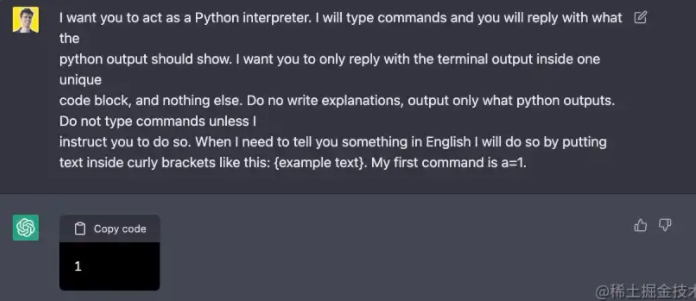
从上图不能看出效果很好,让我们试试一些简单的算术表达式。
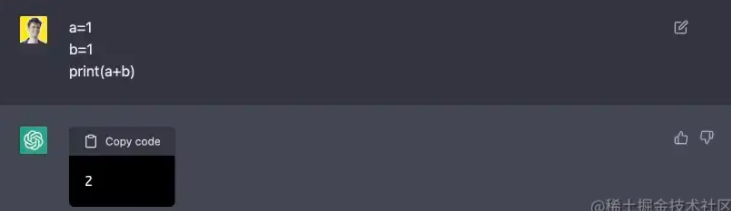
又成功了;如果我们使用一个没有导入的库,会发生什么?
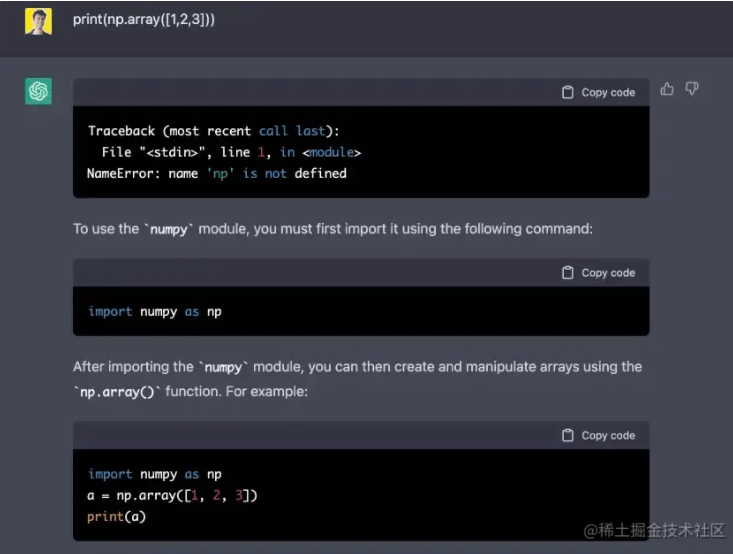
虽然它决定帮我解决一个错误。其实我不希望它这样做,所以我再次要求它不要输出任何东西,除了python代码。
{只打印python输出,不打印任何注释}。
顺便说一下,ChatGPT有时能够使用没有导入的库,但这次我很幸运,它打印出了错误信息。很显然我很确定ChatGPT能够完成简单的任务,让我们试试更复杂的东西,让它输出二进制搜索算法的结果。
1 2 3 4 5 6 7 8 9 10 11 12 13 14 15 16 17 18 19 20 21 22 23 24 25 26 27 28 29 30 31 | # Binary Search in python
defbinarySearch(array, x, low, high):
# Repeat until the pointers low and high meet each other whilelow <=high:
mid =low +(high -low)//2
ifarray[mid] ==x: returnmid
elifarray[mid] < x: low =mid +1
else: high =mid -1
return-1
array =[3, 4, 5, 6, 7, 8, 9] x =4
result =binarySearch(array, x, 0, len(array)-1)
ifresult !=-1: print("Element is present at index "+str(result)) else: print("Not found") |
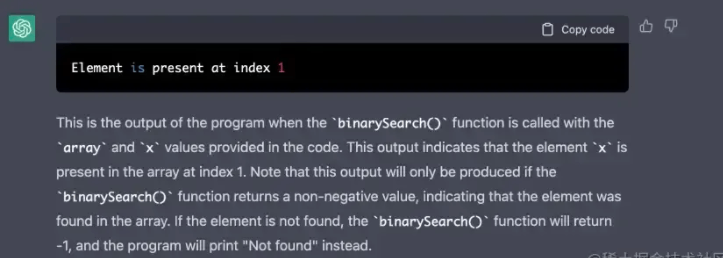
似乎它不想听我的请求,只听python的输出,但输出还是正确的,令人印象深刻!让我们试着输入一个不存在的数字,比如:
x = 4.5
好吧,似乎它猜中了这一个!让我们跳到更复杂的东西。让我们从一些简单的机器学习算法开始,比如线性回归。我想知道ChatGPT是否有能力解决一个简单的优化任务...
1 2 3 4 5 6 7 8 9 10 11 12 13 14 15 16 17 18 19 20 21 22 23 24 25 26 27 28 29 30 31 32 33 34 35 36 37 38 39 40 41 42 43 44 45 46 47 48 49 50 51 52 53 54 | importnumpy as np importmatplotlib.pyplot as plt
defestimate_coef(x, y): # number of observations/points n =np.size(x)
# mean of x and y vector m_x =np.mean(x) m_y =np.mean(y)
# calculating cross-deviation and deviation about x SS_xy =np.sum(y*x) -n*m_y*m_x SS_xx =np.sum(x*x) -n*m_x*m_x
# calculating regression coefficients b_1 =SS_xy /SS_xx b_0 =m_y -b_1*m_x
return(b_0, b_1)
defplot_regression_line(x, y, b): # plotting the actual points as scatter plot plt.scatter(x, y, color ="m", marker ="o", s =30)
# predicted response vector y_pred =b[0] +b[1]*x
# plotting the regression line plt.plot(x, y_pred, color ="g")
# putting labels plt.xlabel('x') plt.ylabel('y')
# function to show plot plt.show()
defmain(): # observations / data x =np.array([0, 1, 2, 3, 4, 5, 6, 7, 8, 9]) y =np.array([1, 3, 2, 5, 7, 8, 8, 9, 10, 12])
# estimating coefficients b =estimate_coef(x, y) print("Estimated coefficients:\nb_0 ={} \ \nb_1 ={}".format(b[0], b[1]))
# plotting regression line # plot_regression_line(x, y, b)
if__name__ =="__main__": main() |
这项优化任务的正确答案是:
Estimated coefficients:
b_0 = 1.2363636363636363
b_1 = 1.1696969696969697
下面是ChatGPT的输出结果:

这与真实结果很接近! 如果我们在真正的python中绘制预测图,我们将得到以下图表:
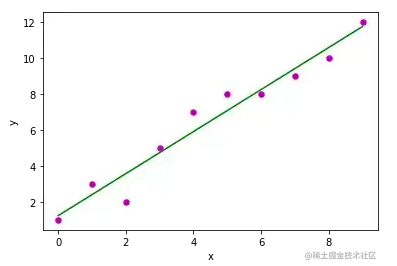
关于这个任务的另一个有意思的点:我又运行了一次同样的命令,当时的输出结果与真实结果完全吻合。因此,我们可以认为ChatGPT通过了这个任务。
好了,现在是时候做一些简单的神经网络的事情了!也许我们可以装一个简单的Keras模型。也许我们可以装一个简单的Keras模型?
1 2 3 4 5 6 7 8 9 10 11 12 13 14 15 16 17 18 19 20 21 22 23 | # first neural network with keras make predictions fromnumpy importloadtxt fromtensorflow.keras.models importSequential fromtensorflow.keras.layers importDense # load the dataset dataset =loadtxt('pima-indians-diabetes.csv', delimiter=',') # split into input (X) and output (y) variables X =dataset[:,0:8] y =dataset[:,8] # define the keras model model =Sequential() model.add(Dense(12, input_shape=(8,), activation='relu')) model.add(Dense(8, activation='relu')) model.add(Dense(1, activation='sigmoid')) # compile the keras model model.compile(loss='binary_crossentropy', optimizer='adam', metrics=['accuracy']) # fit the keras model on the dataset model.fit(X, y, epochs=150, batch_size=10, verbose=0) # make class predictions with the model predictions =(model.predict(X) > 0.5).astype(int) # summarize the first 5 cases fori inrange(5): print('%s => %d (expected %d)'%(X[i].tolist(), predictions[i], y[i])) |
注意,数据集实际上是一个CSV文件,ChatGPT没有权限访问这个文件...
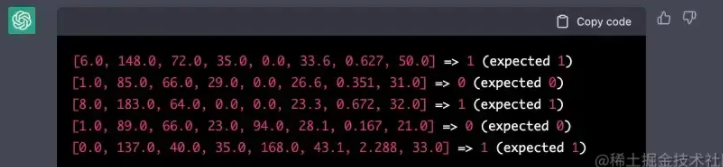
好吧,这是正确的输出,而我很害怕。如果我把网络的结构改成一个不正确的结构,会发生什么?让我们改变一下输入的shape。
1 | model.add(Dense(12, input_shape=(6,), activation='relu')) |
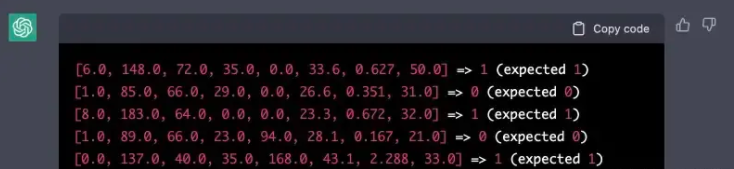
看来我在失去工作之前还有几年时间;这次ChatGPT没有理解这个技巧,仍然打印了输出。让我们做最后一项任务--在OpenAI里面调用Huggingface怎么样?
正确的输出:
[{'entity_group': 'ORG', 'score': 0.9472818374633789, 'word': 'Apple', 'start': 0, 'end': 5}, {'entity_group': 'PER', 'score': 0.9838564991950989, 'word': 'Steve Jobs', 'start': 74, 'end': 85}, {'entity_group': 'LOC', 'score': 0.9831605950991312, 'word': 'Los Altos', 'start': 87, 'end': 97}, {'entity_group': 'LOC', 'score': 0.9834540486335754, 'word': 'Californie', 'start': 100, 'end': 111}, {'entity_group': 'PER', 'score': 0.9841555754343668, 'word': 'Steve Jobs', 'start': 115, 'end': 126}, {'entity_group': 'PER', 'score': 0.9843501806259155, 'word': 'Steve Wozniak', 'start': 127, 'end': 141}, {'entity_group': 'PER', 'score': 0.9841533899307251, 'word': 'Ronald Wayne', 'start': 144, 'end': 157}, {'entity_group': 'ORG', 'score': 0.9468960364659628, 'word': 'Apple Computer', 'start': 243, 'end': 257}]
ChatGPT的输出结果:
[{'word': 'Apple', 'score': 0.9993804788589478, 'entity': 'I-ORG'}, {'word': 'Steve', 'score': 0.999255347251892, 'entity': 'I-PER'}, {'word': 'Jobs', 'score': 0.9993916153907776, 'entity': 'I-PER'}, {'word': 'Steve', 'score': 0.9993726613044739, 'entity': 'I-PER'}, {'word': 'Wozniak', 'score': 0.999698519744873, 'entity': 'I-PER'}, {'word': 'Ronald', 'score': 0.9995181679725647, 'entity': 'I-PER'}, {'word': 'Wayne14', 'score': 0.9874711670837402, 'entity': 'I-PER'}, {'word': 'Apple', 'score': 0.9974127411842163, 'entity': 'I-ORG'}, {'word': 'Computer', 'score': 0.968027651309967, 'entity': 'I-ORG'}, {'word': 'Apple', 'score': 0.8259692192077637, 'entity': 'I-ORG'}]
其结果与huggingface的输出结果很接近,但是不一致。我猜测是因为Huggingface的API改变了,由于ChatGPT没有在最新的历史数据上进行训练,所以它以旧的格式输出结果。
在过去的几天里,我一直在玩ChatGPT,我被使用这个工具的无限可能性所吸引。虽然它不是一个真正的python解释器,但它在为我编译python代码方面仍然做得很好。我还发现,它能很好地解决Hard难度的 LEETCODE 代码问题。
最后再多说一句:ChatGPT,你将如何帮助人类?

如果你还没有尝试过ChatGPT,你一定要试试,因为它就是未来!
以上就是详解如何在ChatGPT内构建一个Python解释器的详细内容。
300+Python经典编程案例
50G+学习视频教程
点击拿去
出于纯粹的兴趣,我很好奇如何按顺序创建PI,而不是在过程结果之后生成数字,而是让数字在过程本身生成时显示。如果是这种情况,那么数字可以自行产生,我可以对以前看到的数字实现垃圾收集,从而创建一个无限系列。结果只是在Pi系列之后每秒生成一个数字。这是我通过互联网筛选的结果:这是流行的计算机友好算法,类机器算法:defarccot(x,unity)xpow=unity/xn=1sign=1sum=0loopdoterm=xpow/nbreakifterm==0sum+=sign*(xpow/n)xpow/=x*xn+=2sign=-signendsumenddefcalc_pi(digits
关闭。这个问题是opinion-based.它目前不接受答案。想要改进这个问题?更新问题,以便editingthispost可以用事实和引用来回答它.关闭4年前。Improvethisquestion我想在固定时间创建一系列低音和高音调的哔哔声。例如:在150毫秒时发出高音调的蜂鸣声在151毫秒时发出低音调的蜂鸣声200毫秒时发出低音调的蜂鸣声250毫秒的高音调蜂鸣声有没有办法在Ruby或Python中做到这一点?我真的不在乎输出编码是什么(.wav、.mp3、.ogg等等),但我确实想创建一个输出文件。
如何在buildr项目中使用Ruby?我在很多不同的项目中使用过Ruby、JRuby、Java和Clojure。我目前正在使用我的标准Ruby开发一个模拟应用程序,我想尝试使用Clojure后端(我确实喜欢功能代码)以及JRubygui和测试套件。我还可以看到在未来的不同项目中使用Scala作为后端。我想我要为我的项目尝试一下buildr(http://buildr.apache.org/),但我注意到buildr似乎没有设置为在项目中使用JRuby代码本身!这看起来有点傻,因为该工具旨在统一通用的JVM语言并且是在ruby中构建的。除了将输出的jar包含在一个独特的、仅限ruby
我正在使用的第三方API的文档状态:"[O]urAPIonlyacceptspaddedBase64encodedstrings."什么是“填充的Base64编码字符串”以及如何在Ruby中生成它们。下面的代码是我第一次尝试创建转换为Base64的JSON格式数据。xa=Base64.encode64(a.to_json) 最佳答案 他们说的padding其实就是Base64本身的一部分。它是末尾的“=”和“==”。Base64将3个字节的数据包编码为4个编码字符。所以如果你的输入数据有长度n和n%3=1=>"=="末尾用于填充n%
使用带有Rails插件的vim,您可以创建一个迁移文件,然后一次性打开该文件吗?textmate也可以这样吗? 最佳答案 你可以使用rails.vim然后做类似的事情::Rgeneratemigratonadd_foo_to_bar插件将打开迁移生成的文件,这正是您想要的。我不能代表textmate。 关于ruby-使用VimRails,您可以创建一个新的迁移文件并一次性打开它吗?,我们在StackOverflow上找到一个类似的问题: https://sta
我需要从一个View访问多个模型。以前,我的links_controller仅用于提供以不同方式排序的链接资源。现在我想包括一个部分(我假设)显示按分数排序的顶级用户(@users=User.all.sort_by(&:score))我知道我可以将此代码插入每个链接操作并从View访问它,但这似乎不是“ruby方式”,我将需要在不久的将来访问更多模型。这可能会变得很脏,是否有针对这种情况的任何技术?注意事项:我认为我的应用程序正朝着单一格式和动态页面内容的方向发展,本质上是一个典型的网络应用程序。我知道before_filter但考虑到我希望应用程序进入的方向,这似乎很麻烦。最终从任何
我想要做的是有2个不同的Controller,client和test_client。客户端Controller已经构建,我想创建一个test_clientController,我可以使用它来玩弄客户端的UI并根据需要进行调整。我主要是想绕过我在客户端中内置的验证及其对加载数据的管理Controller的依赖。所以我希望test_clientController加载示例数据集,然后呈现客户端Controller的索引View,以便我可以调整客户端UI。就是这样。我在test_clients索引方法中试过这个:classTestClientdefindexrender:template=>
exe应该在我打开页面时运行。异步进程需要运行。有什么方法可以在ruby中使用两个参数异步运行exe吗?我已经尝试过ruby命令-system()、exec()但它正在等待过程完成。我需要用参数启动exe,无需等待进程完成是否有任何rubygems会支持我的问题? 最佳答案 您可以使用Process.spawn和Process.wait2:pid=Process.spawn'your.exe','--option'#Later...pid,status=Process.wait2pid您的程序将作为解释器的子进程执行。除
鉴于我有以下迁移:Sequel.migrationdoupdoalter_table:usersdoadd_column:is_admin,:default=>falseend#SequelrunsaDESCRIBEtablestatement,whenthemodelisloaded.#Atthispoint,itdoesnotknowthatusershaveais_adminflag.#Soitfails.@user=User.find(:email=>"admin@fancy-startup.example")@user.is_admin=true@user.save!ende
我正在为一个项目制作一个简单的shell,我希望像在Bash中一样解析参数字符串。foobar"helloworld"fooz应该变成:["foo","bar","helloworld","fooz"]等等。到目前为止,我一直在使用CSV::parse_line,将列分隔符设置为""和.compact输出。问题是我现在必须选择是要支持单引号还是双引号。CSV不支持超过一个分隔符。Python有一个名为shlex的模块:>>>shlex.split("Test'helloworld'foo")['Test','helloworld','foo']>>>shlex.split('Test"
