参考资料:
《Spring Microservices in Action》
《Spring Cloud Alibaba 微服务原理与实战》
《B站 尚硅谷 SpringCloud 框架开发教程 周阳》
《Sentinel GitHub 官网》
《Sentinel 官网》
调用链路是 Sentinel 的工作主流程,由各个 Slot 槽组成,将不同的 Slot 槽按照顺序串在一起,从而将不同的功能(限流、降级、系统保护)组合在一起;
本篇《2. 获取 ProcessorSlot 链》将从源码级讲解如何获取调用链路,接着会以遍历链表的方式处理每一个 Slot 槽,其中就有:FlowSlot、StatisticSlot、DegradeSlot 等。分别对应本篇《3. 流控槽实施流控逻辑》、《4. 统计槽实施指标数据统计》和《5. 熔断槽实施服务熔断》;

/* 规则拦截所有的请求;@Configuration
@EnableConfigurationProperties(SentinelProperties.class)
public class SentinelWebAutoConfiguration {
//省略其他代码
@Bean
@ConditionalOnProperty(name = "spring.cloud.sentinel.filter.enabled", matchIfMissing = true)
public FilterRegistrationBean sentinelFilter() {
FilterRegistrationBean<Filter> registration = new FilterRegistrationBean<>();
SentinelProperties.Filter filterConfig = properties.getFilter();
if (filterConfig.getUrlPatterns() == null || filterConfig.getUrlPatterns().isEmpty()) {
List<String> defaultPatterns = new ArrayList<>();
//默认情况下通过 /* 规则拦截所有的请求
defaultPatterns.add("/*");
filterConfig.setUrlPatterns(defaultPatterns);
}
registration.addUrlPatterns(filterConfig.getUrlPatterns().toArray(new String[0]));
//【点进去】注册 CommonFilter
Filter filter = new CommonFilter();
registration.setFilter(filter);
registration.setOrder(filterConfig.getOrder());
registration.addInitParameter("HTTP_METHOD_SPECIFY", String.valueOf(properties.getHttpMethodSpecify()));
log.info("[Sentinel Starter] register Sentinel CommonFilter with urlPatterns: {}.", filterConfig.getUrlPatterns());
return registration;
}
}
public class CommonFilter implements Filter {

    //省略部分代码

    public void doFilter(ServletRequest request, ServletResponse response, FilterChain chain) throws IOException, ServletException {
        HttpServletRequest sRequest = (HttpServletRequest)request;
        Entry urlEntry = null;
        try {
            //解析请求 URL
            String target = FilterUtil.filterTarget(sRequest);
            //URL 清洗
            UrlCleaner urlCleaner = WebCallbackManager.getUrlCleaner();
            if (urlCleaner != null) {
                //如果存在,则说明配置过 URL 清洗策略,替换配置的 targer
                target = urlCleaner.clean(target);
            }
            if (!StringUtil.isEmpty(target)) {
                String origin = this.parseOrigin(sRequest);
                ContextUtil.enter("sentinel_web_servlet_context", origin);
                if (this.httpMethodSpecify) {
                    String pathWithHttpMethod = sRequest.getMethod().toUpperCase() + ":" + target;
                    //使用 SphU.entry() 方法对 URL 添加限流埋点
                    urlEntry = SphU.entry(pathWithHttpMethod, 1, EntryType.IN);
                } else {
                    urlEntry = SphU.entry(target, 1, EntryType.IN);
                }
            }
            //执行过滤
            chain.doFilter(request, response);
        } catch (BlockException var14) {
            HttpServletResponse sResponse = (HttpServletResponse)response;
            WebCallbackManager.getUrlBlockHandler().blocked(sRequest, sResponse, var14);
        } catch (ServletException | RuntimeException | IOException var15) {
            Tracer.traceEntry(var15, urlEntry);
            throw var15;
        } finally {
            if (urlEntry != null) {
                urlEntry.exit();
            }
            ContextUtil.exit();
        }
    }
}
| 模块名 | 说明 |
|---|---|
| sentinel-adapter | 负责针对主流开源框架进行限流适配,如:Dubbo、gRPC、Zuul 等; |
| sentinel-core | Sentinel 核心库,提供限流、熔断等实现; |
| sentinel-dashboard | 控制台模块,提供可视化监控和管理; |
| sentinel-demo | 官方案例; |
| sentinel-extension | 实现不同组件的数据源扩展,如:Nacos、ZooKeeper、Apollo 等; |
| sentinel-transport | 通信协议处理模块; |
SphU.entry() 方法,我们给方法打上断点,DeBug 进入,然后登录 Sentinel 控制台;
CtSph.entryWithPriority() 方法里,其主要逻辑与源码如下:
private Entry entryWithPriority(ResourceWrapper resourceWrapper, int count, boolean prioritized, Object... args) throws BlockException {
    Context context = ContextUtil.getContext();
    if (context instanceof NullContext) {
        //上下文量已经超过阈值 -> 只初始化条目,不进行规则检查
        return new CtEntry(resourceWrapper, null, context);
    }

    if (context == null) {
        //没有指定上下文 -> 使用默认上下文 context
        context = InternalContextUtil.internalEnter(Constants.CONTEXT_DEFAULT_NAME);
    }

     if (!Constants.ON) {
        //全局开关关闭 -> 没有规则检查
        return new CtEntry(resourceWrapper, null, context);
    }
    //【断点步入 2.2.1】通过 lookProcessChain 方法获取 ProcessorSlot 链
    ProcessorSlot<Object> chain = lookProcessChain(resourceWrapper);


    if (chain == null) {
        //表示资源量超过 Constants.MAX_SLOT_CHAIN_SIZE 常量 -> 不会进行规则检查
        return new CtEntry(resourceWrapper, null, context);
    }

    Entry e = new CtEntry(resourceWrapper, chain, context);
    try {
        //【断点步入 3./4./5.】执行 ProcessorSlot 对 ProcessorSlot 链中的 Slot 槽遍历操作(遍历链表的方式)
        chain.entry(context, resourceWrapper, null, count, prioritized, args);
    } catch (BlockException e1) {
        e.exit(count, args);
        throw e1;
    } catch (Throwable e1) {
        //这种情况不应该发生,除非 Sentinel 内部存在错误
        RecordLog.info("Sentinel unexpected exception", e1);
    }
    return e;
}
CtSph.lookProcessChain() 方法;ProcessorSlot<Object> lookProcessChain(ResourceWrapper resourceWrapper) {
//从缓存中获取 slot 调用链
ProcessorSlotChain chain = chainMap.get(resourceWrapper);
if (chain == null) {
synchronized (LOCK) {
chain = chainMap.get(resourceWrapper);
if (chain == null) {
// Entry size limit.
if (chainMap.size() >= Constants.MAX_SLOT_CHAIN_SIZE) {
return null;
}
//【断点步入】构造 Slot 链(责任链模式)
chain = SlotChainProvider.newSlotChain();
Map<ResourceWrapper, ProcessorSlotChain> newMap = new HashMap<ResourceWrapper, ProcessorSlotChain>(
chainMap.size() + 1);
newMap.putAll(chainMap);
newMap.put(resourceWrapper, chain);
chainMap = newMap;
}
}
}
return chain;
}
DefaultSlotChainBuilder.build() 方法构造 DefaultProcessorSlotChain;@Override
public ProcessorSlotChain build() {
ProcessorSlotChain chain = new DefaultProcessorSlotChain();
List<ProcessorSlot> sortedSlotList = SpiLoader.of(ProcessorSlot.class).loadInstanceListSorted();
for (ProcessorSlot slot : sortedSlotList) {
if (!(slot instanceof AbstractLinkedProcessorSlot)) {
RecordLog.warn("The ProcessorSlot(" + slot.getClass().getCanonicalName() + ") is not an instance of AbstractLinkedProcessorSlot, can't be added into ProcessorSlotChain");
continue;
}
chain.addLast((AbstractLinkedProcessorSlot<?>) slot);
}
return chain;
}
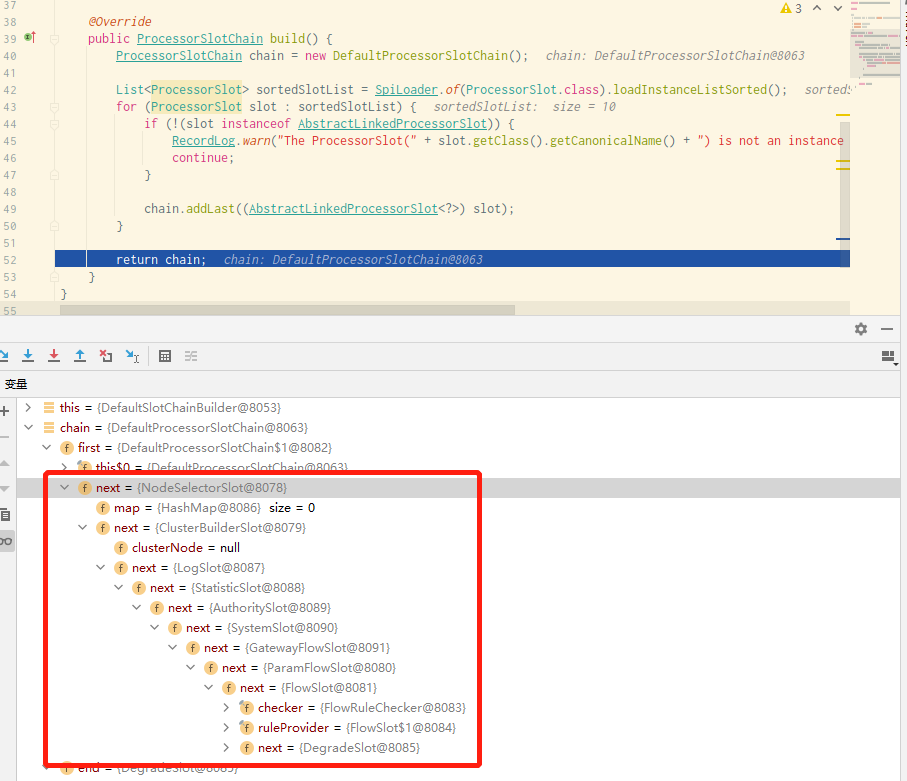
ProcessorSlot.entry();ProcessorSlot.entry() 方法,它会遍历每个 Slot 插槽,并对其进行操作,其中会经过 FlowSlot.entry() 方法(需要提前给该方法打上断点),方法的逻辑跟源码如下:@Override
public void entry(Context context, ResourceWrapper resourceWrapper, DefaultNode node, int count, boolean prioritized, Object... args) throws Throwable {
//【断点步入】检查流量规则
checkFlow(resourceWrapper, context, node, count, prioritized);
//调用下一个 Slot
fireEntry(context, resourceWrapper, node, count, prioritized, args);
}
FlowSlot.checkFlow() 方法,最终调用 FlowRuleChecker.checkFlow() 方法,方法的逻辑和源码如下:
public void checkFlow(Function<String, Collection<FlowRule>> ruleProvider, ResourceWrapper resource,
                      Context context, DefaultNode node, int count, boolean prioritized) throws BlockException {
    if (ruleProvider == null || resource == null) {
        return;
    }
    //【断点步入 3.1】获取流控规则
    Collection<FlowRule> rules = ruleProvider.apply(resource.getName());
    if (rules != null) {
        //遍历所有流控规则 FlowRule
        for (FlowRule rule : rules) {
            //【点进去 3.2】校验每条规则
            if (!canPassCheck(rule, context, node, count, prioritized)) {
                throw new FlowException(rule.getLimitApp(), rule);
            }
        }
    }
}
FlowSlot.ruleProvider.apply() 方法,获取到 Sentinel 控制台上的流控规则;private final Function<String, Collection<FlowRule>> ruleProvider = new Function<String, Collection<FlowRule>>() {
@Override
public Collection<FlowRule> apply(String resource) {
// Flow rule map should not be null.
Map<String, List<FlowRule>> flowRules = FlowRuleManager.getFlowRuleMap();
return flowRules.get(resource);
}
};
FlowRuleChecker.canPassCheck() 方法,分集群和单机模式校验每条规则;public boolean canPassCheck(/*@NonNull*/ FlowRule rule, Context context, DefaultNode node, int acquireCount, boolean prioritized) {
String limitApp = rule.getLimitApp();
if (limitApp == null) {
return true;
}
//集群模式
if (rule.isClusterMode()) {
return passClusterCheck(rule, context, node, acquireCount, prioritized);
}
//【点进去】单机模式
return passLocalCheck(rule, context, node, acquireCount, prioritized);
}
FlowRuleChecker.passLocalCheck() 方法,其主要逻辑和源码如下:
private static boolean passLocalCheck(FlowRule rule, Context context, DefaultNode node, int acquireCount, boolean prioritized) {
    //【点进去 3.2.1】获取 Node
    Node selectedNode = selectNodeByRequesterAndStrategy(rule, context, node);
    if (selectedNode == null) {
        return true;
    }
    //【点进去 3.2.2】获取流控的处理策略
    return rule.getRater().canPass(selectedNode, acquireCount, prioritized);
}
FlowRuleChecker.selectNodeByRequesterAndStrategy() 方法,其根据 FlowRule 中配置的 Strategy 和 limitApp 属性,返回不同处理策略的 Node;static Node selectNodeByRequesterAndStrategy(/*@NonNull*/ FlowRule rule, Context context, DefaultNode node) {
//limitApp 不能为空
String limitApp = rule.getLimitApp();
int strategy = rule.getStrategy();
String origin = context.getOrigin();
//场景1:限流规则设置了具体应用,如果当前流量就是通过该应用的,则命中场景1
if (limitApp.equals(origin) && filterOrigin(origin)) {
if (strategy == RuleConstant.STRATEGY_DIRECT) {
// Matches limit origin, return origin statistic node.
return context.getOriginNode();
}
return selectReferenceNode(rule, context, node);
} else if (RuleConstant.LIMIT_APP_DEFAULT.equals(limitApp)) {
//场景2:限流规则未指定任何具体应,默认为default,则当前流量直接命中场景2
if (strategy == RuleConstant.STRATEGY_DIRECT) {
// Return the cluster node.
return node.getClusterNode();
}
return selectReferenceNode(rule, context, node);
} else if (RuleConstant.LIMIT_APP_OTHER.equals(limitApp) && FlowRuleManager.isOtherOrigin(origin, rule.getResource())) {
//场景3:限流规则设置的是other,当前流量未命中前两种场景
if (strategy == RuleConstant.STRATEGY_DIRECT) {
return context.getOriginNode();
}
return selectReferenceNode(rule, context, node);
}
return null;
}
FlowRule.getRater().canPass() 方法,首先通过 FlowRule.getRater() 获得流控行为 TrafficShapingController,这是一个接口,有四种实现类,如下图所示:
TrafficShapingController.canPass() 方法,执行流控行为;StatisticSlot.entry() 方法里的语句打上断点,运行到光标处;StatisticSlot.entry() 方法的核心是使用 Node 统计“增加线程数”和“请求通过数”;@Override
public void entry(Context context, ResourceWrapper resourceWrapper, DefaultNode node, int count, boolean prioritized, Object... args) throws Throwable {
try {
//先执行后续 Slot 检查,再统计数据(即先调用后续所有 Slot)
fireEntry(context, resourceWrapper, node, count, prioritized, args);
//【断点步入】使用 Node 统计“增加线程数”和“请求通过数”
node.increaseThreadNum();
node.addPassRequest(count);
//如果存在来源节点,则对来源节点增加线程数和请求通过数
if (context.getCurEntry().getOriginNode() != null) {
context.getCurEntry().getOriginNode().increaseThreadNum();
context.getCurEntry().getOriginNode().addPassRequest(count);
}
//如果是入口流量,则对全局节点增加线程数和请求通过数
if (resourceWrapper.getEntryType() == EntryType.IN) {
Constants.ENTRY_NODE.increaseThreadNum();
Constants.ENTRY_NODE.addPassRequest(count);
}
//执行事件通知和回调函数
for (ProcessorSlotEntryCallback<DefaultNode> handler : StatisticSlotCallbackRegistry.getEntryCallbacks()) {
handler.onPass(context, resourceWrapper, node, count, args);
}
//处理优先级等待异常
} catch (PriorityWaitException ex) {
node.increaseThreadNum();
//如果有来源节点,则对来源节点增加线程数
if (context.getCurEntry().getOriginNode() != null) {
context.getCurEntry().getOriginNode().increaseThreadNum();
}
//如果是入口流量,对全局节点增加线程数
if (resourceWrapper.getEntryType() == EntryType.IN) {
Constants.ENTRY_NODE.increaseThreadNum();
}
//执行事件通知和回调函数
for (ProcessorSlotEntryCallback<DefaultNode> handler : StatisticSlotCallbackRegistry.getEntryCallbacks()) {
handler.onPass(context, resourceWrapper, node, count, args);
}
//处理限流、熔断等异常
} catch (BlockException e) {
//省略
throw e;
//处理业务异常
} catch (Throwable e) {
context.getCurEntry().setError(e);
throw e;
}
}
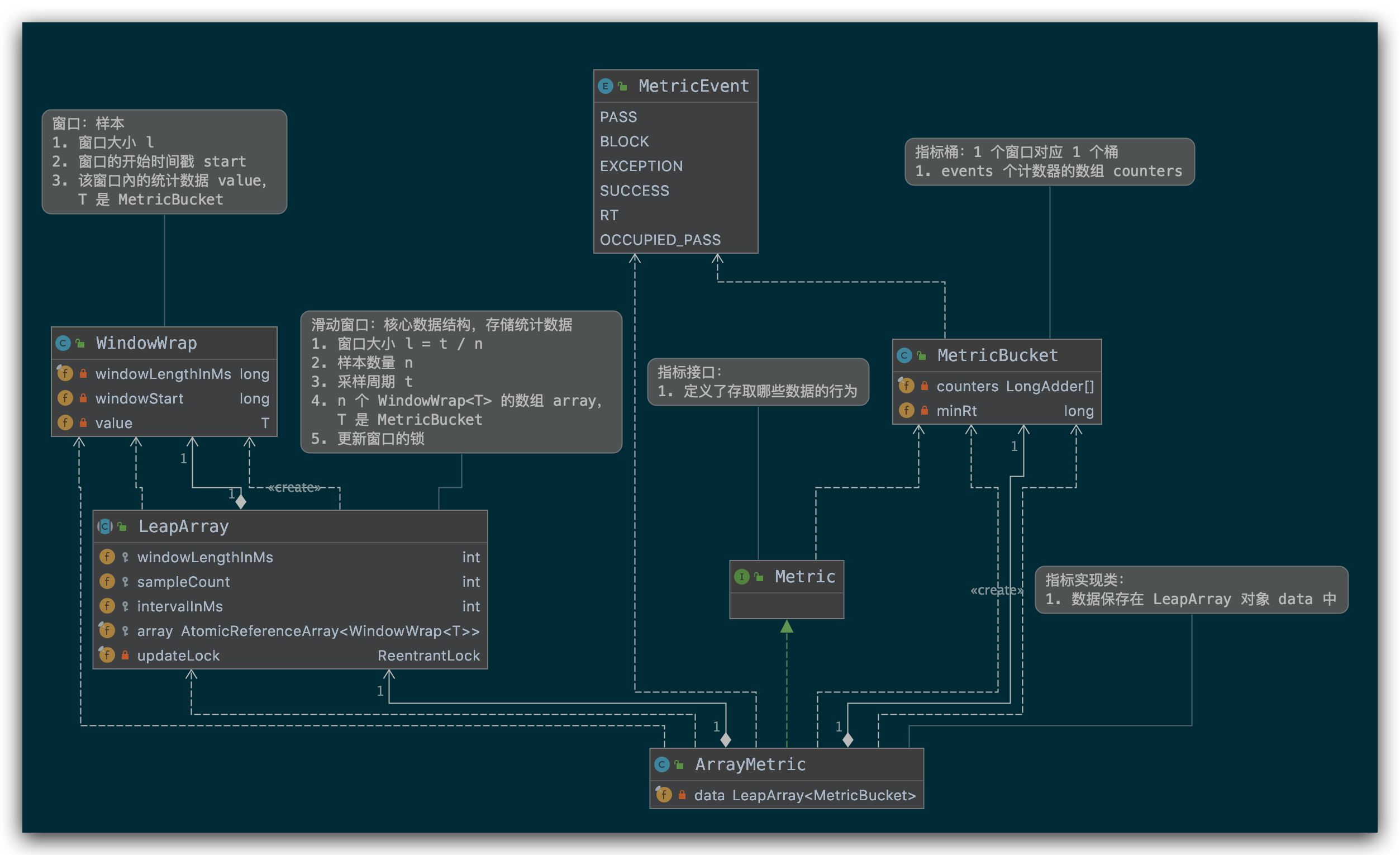
DefaultNode.increaseThreadNum() 方法,最终调用的是 StatisticNode.increaseThreadNum(),而统计也是依靠 StatisticNode 维护的,这里放上 StatisticNode 的统计核心与源码:
public class StatisticNode implements Node {

    //省略其他代码

    //【断点步入】最近 1s 滑动窗口计数器(默认 1s)
    private transient volatile Metric rollingCounterInSecond = new ArrayMetric(SampleCountProperty.SAMPLE_COUNT,
        IntervalProperty.INTERVAL);

    //最近 1min 滑动窗口计数器(默认 1min)
    private transient Metric rollingCounterInMinute = new ArrayMetric(60, 60 * 1000, false);

    //增加 “请求通过数”
    @Override
    public void addPassRequest(int count) {
        rollingCounterInSecond.addPass(count);
        rollingCounterInMinute.addPass(count);
    }
    //增加 RT 和成功数
    @Override
    public void addRtAndSuccess(long rt, int successCount) {
        rollingCounterInSecond.addSuccess(successCount);
        rollingCounterInSecond.addRT(rt);
        rollingCounterInMinute.addSuccess(successCount);
        rollingCounterInMinute.addRT(rt);
    }

    //增加“线程数”
    @Override
    public void increaseThreadNum() {
        curThreadNum.increment();
    }
}
public class ArrayMetric implements Metric {

    //省略其他代码

    //【点进去 4.2.2】数据存储
    private final LeapArray<MetricBucket> data;

    //最近 1s 滑动计数器用的是 OccupiableBucketLeapArray
    public ArrayMetric(int sampleCount, int intervalInMs) {
        this.data = new OccupiableBucketLeapArray(sampleCount, intervalInMs);
    }

    //最近 1min 滑动计数器用的是 BucketLeapArray
    public ArrayMetric(int sampleCount, int intervalInMs, boolean enableOccupy) {
        if (enableOccupy) {
            this.data = new OccupiableBucketLeapArray(sampleCount, intervalInMs);
        } else {
            this.data = new BucketLeapArray(sampleCount, intervalInMs);
        }
    }

    //增加成功数
    @Override
    public void addSuccess(int count) {
        WindowWrap<MetricBucket> wrap = data.currentWindow();
        wrap.value().addSuccess(count);
    }

    //增加通过数
    @Override
    public void addPass(int count) {
        WindowWrap<MetricBucket> wrap = data.currentWindow();
        wrap.value().addPass(count);
    }

    //增加 RT
    @Override
    public void addRT(long rt) {
        WindowWrap<MetricBucket> wrap = data.currentWindow();
        wrap.value().addRT(rt);
    }
}
public abstract class LeapArray<T> {

    //省略其他代码

    //单个窗口的长度(1个窗口多长时间)
    protected int windowLengthInMs;
    //采样窗口个数
    protected int sampleCount;
    //全部窗口的长度(全部窗口多长时间)
    protected int intervalInMs;
    private double intervalInSecond;
    //窗口数组:存储所有窗口(支持原子读取和写入)
    protected final AtomicReferenceArray<WindowWrap<T>> array;
    //更新窗口数据时用的锁
    private final ReentrantLock updateLock = new ReentrantLock();

    public LeapArray(int sampleCount, int intervalInMs) {
        //计算单个窗口的长度
        this.windowLengthInMs = intervalInMs / sampleCount;
        this.intervalInMs = intervalInMs;
        this.intervalInSecond = intervalInMs / 1000.0;
        this.sampleCount = sampleCount;
        this.array = new AtomicReferenceArray<>(sampleCount);
    }
    //【点进去 4.2.3】获取当前窗口
    public WindowWrap<T> currentWindow() {
        //这里参数是当前时间
        return currentWindow(TimeUtil.currentTimeMillis());
    }
    //获取指定时间的窗口
    public WindowWrap<T> currentWindow(long timeMillis) {
        if (timeMillis < 0) {
            return null;
        }
        // 计算数组下标
        int idx = calculateTimeIdx(timeMillis);
        //计算当前请求对应的窗口开始时间
        long windowStart = calculateWindowStart(timeMillis);

        /*
         * 从 array 中获取窗口。有 3 种情况:
         * (1) array 中窗口不在,创建一个 CAS 并写入 array;
         * (2) array 中窗口开始时间 = 当前窗口开始时间,直接返回;
         * (3) array 中窗口开始时间 < 当前窗口开始时间,表示 o1d 窗口已过期,重置窗口数据并返回;
         */
        while (true) {
            // 取窗口
            WindowWrap<T> old = array.get(idx);
            //(1)窗口不在
            if (old == null) {
                //创建一个窗口
                WindowWrap<T> window = new WindowWrap<T>(windowLengthInMs, windowStart, newEmptyBucket(timeMillis));
                //CAS将窗口写进 array 中并返回(CAS 操作确保只初始化一次)
                if (array.compareAndSet(idx, null, window)) {
                    return window;
                } else {
                    //并发写失败,释放 CPU 资源,避免有线程长时间占用 CPU,一般下次来的时候 array 中有数据了会命中第2种情况;
                    Thread.yield();
                }
            //(2)array 中窗口开始时间 = 当前窗口开始时间
            } else if (windowStart == old.windowStart()) {
                //直接返回
                return old;
            //(3)array 中窗口开始时间 < 当前窗口开始时间
            } else if (windowStart > old.windowStart()) {
                //尝试获取更新锁
                if (updateLock.tryLock()) {
                    try {
                        //拿到锁的线程才重置窗口
                        return resetWindowTo(old, windowStart);
                    } finally {
                        //释放锁
                        updateLock.unlock();
                    }
                } else {
                    //并发加锁失败,释放 CPU 资源,避免有线程长时间占用 CPU,一般下次来的时候因为 old 对象时间更新了会命中第 2 种情况;
                    Thread.yield();
                }
            //理论上不会出现
            } else if (windowStart < old.windowStart()) {
                // 正常情况不会进入该分支(机器时钟回拨等异常情况)
                return new WindowWrap<T>(windowLengthInMs, windowStart, newEmptyBucket(timeMillis));
            }
        }
    }
    //计算索引
    private int calculateTimeIdx(/*@Valid*/ long timeMillis) {
        //timeId 降低时间精度
        long timeId = timeMillis / windowLengthInMs;
        //计算当前索引,这样我们就可以将时间戳映射到 leap 数组
        return (int)(timeId % array.length());
    }
    //计算窗口开始时间
    protected long calculateWindowStart(/*@Valid*/ long timeMillis) {
        return timeMillis - timeMillis % windowLengthInMs;
    }
}
public class WindowWrap<T> {
    //窗口长度,与 LeapArray 的 windowLengthInMs 一致
    private final long windowLengthInMs;
    //窗口开始时间,其值是 windowLengthInMs 的整数倍
    private long windowStart;
    //窗口的数据,支持 MetricBucket 类型,存储统计数据
    private T value;

    //省略其他代码
}
public class MetricBucket {
    /**
     * 存储指标的计数器;
     * LongAdder 是线程安全的计数器
     * counters[0]  PASS 通过数;
     * counters[1]  BLOCK 拒绝数;
     * counters[2]  EXCEPTION 异常数;
     * counters[3]  SUCCESS 成功数;
     * counters[4]  RT 响应时长;
     * counters[5]  OCCUPIED_PASS 预分配通过数;
     **/
    private final LongAdder[] counters;

    //最小 RT,默认值是 5000ms
    private volatile long minRt;

    //构造中初始化
    public MetricBucket() {
        MetricEvent[] events = MetricEvent.values();
        this.counters = new LongAdder[events.length];
        for (MetricEvent event : events) {
            counters[event.ordinal()] = new LongAdder();
        }
        initMinRt();
    }

    //覆盖指标
    public MetricBucket reset(MetricBucket bucket) {
        for (MetricEvent event : MetricEvent.values()) {
            counters[event.ordinal()].reset();
            counters[event.ordinal()].add(bucket.get(event));
        }
        initMinRt();
        return this;
    }

    private void initMinRt() {
        this.minRt = SentinelConfig.statisticMaxRt();
    }

    //重置指标为0
    public MetricBucket reset() {
        for (MetricEvent event : MetricEvent.values()) {
            counters[event.ordinal()].reset();
        }
        initMinRt();
        return this;
    }
    //获取指标,从 counters 中返回
    public long get(MetricEvent event) {
        return counters[event.ordinal()].sum();
    }
    //添加指标
    public MetricBucket add(MetricEvent event, long n) {
        counters[event.ordinal()].add(n);
        return this;
    }

    public long pass() {
        return get(MetricEvent.PASS);
    }

    public long block() {
        return get(MetricEvent.BLOCK);
    }

    public void addPass(int n) {
        add(MetricEvent.PASS, n);
    }

    public void addBlock(int n) {
        add(MetricEvent.BLOCK, n);
    }

    //省略其他代码
}


DegradeSlot.entry() 方法里的语句打上断点,运行到光标处;@Override
public void entry(Context context, ResourceWrapper resourceWrapper, DefaultNode node, int count, boolean prioritized, Object... args) throws Throwable {
//【断点步入】熔断检查
performChecking(context, resourceWrapper);
//调用下一个 Slot
fireEntry(context, resourceWrapper, node, count, prioritized, args);
}
DegradeSlot.performChecking() 方法,其逻辑与源码如下:
void performChecking(Context context, ResourceWrapper r) throws BlockException {
    //根据 resourceName 获取断路器
    List<CircuitBreaker> circuitBreakers = DegradeRuleManager.getCircuitBreakers(r.getName());
    if (circuitBreakers == null || circuitBreakers.isEmpty()) {
        return;
    }
    //循环判断每个断路器
    for (CircuitBreaker cb : circuitBreakers) {
        //【点进去】尝试通过断路器
        if (!cb.tryPass(context)) {
            throw new DegradeException(cb.getRule().getLimitApp(), cb.getRule());
        }
    }
}
AbstractCircuitBreaker.tryPass() 方法,当请求超时并且处于探测恢复(半开状态,HALF-OPEN 状态)失败时继续断路功能;@Override
public boolean tryPass(Context context) {
//当前断路器状态为关闭
if (currentState.get() == State.CLOSED) {
return true;
}
if (currentState.get() == State.OPEN) {
//【点进去】对于半开状态,我们尝试通过
return retryTimeoutArrived() && fromOpenToHalfOpen(context);
}
return false;
}
AbstractCircuitBreaker.fromOpenToHalfOpen() 方法,实现状态的变更;protected boolean fromOpenToHalfOpen(Context context) {
//尝试将状态从 OPEN 设置为 HALF_OPEN
if (currentState.compareAndSet(State.OPEN, State.HALF_OPEN)) {
//状态变化通知
notifyObservers(State.OPEN, State.HALF_OPEN, null);
Entry entry = context.getCurEntry();
//在 entry 添加一个 exitHandler entry.exit() 时会调用
entry.whenTerminate(new BiConsumer<Context, Entry>() {
@Override
public void accept(Context context, Entry entry) {
//如果有发生异常,重新将状态设置为OPEN 请求不同通过
if (entry.getBlockError() != null) {
currentState.compareAndSet(State.HALF_OPEN, State.OPEN);
notifyObservers(State.HALF_OPEN, State.OPEN, 1.0d);
}
}
});
//此时状态已设置为HALF_OPEN正常通行
return true;
}
//熔断
return false;
}
DegradeSlot.exit() 方法来改变状态;DegradeSlot.exit();@Override
public void exit(Context context, ResourceWrapper r, int count, Object... args) {
Entry curEntry = context.getCurEntry();
//无阻塞异常
if (curEntry.getBlockError() != null) {
fireExit(context, r, count, args);
return;
}
//通过资源名获取断路器
List<CircuitBreaker> circuitBreakers = DegradeRuleManager.getCircuitBreakers(r.getName());
//没有配置断路器,则直接放行
if (circuitBreakers == null || circuitBreakers.isEmpty()) {
fireExit(context, r, count, args);
return;
}
if (curEntry.getBlockError() == null) {
for (CircuitBreaker circuitBreaker : circuitBreakers) {
//【点进去】在请求完成时
circuitBreaker.onRequestComplete(context);
}
}
fireExit(context, r, count, args);
}
ExceptionCircuitBreaker.onRequestComplete() 方法,其主要逻辑与源码如下:
@Override
public void onRequestComplete(Context context) {
    Entry entry = context.getCurEntry();
    if (entry == null) {
        return;
    }
    Throwable error = entry.getError();
    //简单错误计数器
    SimpleErrorCounter counter = stat.currentWindow().value();
    if (error != null) {
        //异常请求数加 1
        counter.getErrorCount().add(1);
    }
    //总请求数加 1
    counter.getTotalCount().add(1);
    //【点进去】超过阈值时变更状态
    handleStateChangeWhenThresholdExceeded(error);
}
ExceptionCircuitBreaker.handleStateChangeWhenThresholdExceeded() 方法,变更状态;private void handleStateChangeWhenThresholdExceeded(Throwable error) {
//全开则直接放行
if (currentState.get() == State.OPEN) {
return;
}
//半开状态
if (currentState.get() == State.HALF_OPEN) {
//检查请求
if (error == null) {
//发生异常,将状态从半开 HALF_OPEN 转为关闭 CLOSE
fromHalfOpenToClose();
} else {
//无异常,解开半开状态
fromHalfOpenToOpen(1.0d);
}
return;
}
//计算是否超过阈值
List<SimpleErrorCounter> counters = stat.values();
long errCount = 0;
long totalCount = 0;
for (SimpleErrorCounter counter : counters) {
errCount += counter.errorCount.sum();
totalCount += counter.totalCount.sum();
}
if (totalCount < minRequestAmount) {
return;
}
double curCount = errCount;
if (strategy == DEGRADE_GRADE_EXCEPTION_RATIO) {
//熔断策略为:异常比例
curCount = errCount * 1.0d / totalCount;
}
if (curCount > threshold) {
transformToOpen(curCount);
}
}
FlowSlot.entry():遍历到 FlowSlot 槽,限流规则;
StatisticSlot.entry:遍历到 StatisticSlot 槽,统计数据;
DegradeSlot.entry():遍历到 DegradeSlot 槽,服务熔断;
DegradeSlot.exit():请求失败(超时),启动熔断;

这篇文章是继上一篇文章“Observability:从零开始创建Java微服务并监控它(一)”的续篇。在上一篇文章中,我们讲述了如何创建一个Javaweb应用,并使用Filebeat来收集应用所生成的日志。在今天的文章中,我来详述如何收集应用的指标,使用APM来监控应用并监督web服务的在线情况。源码可以在地址 https://github.com/liu-xiao-guo/java_observability 进行下载。摄入指标指标被视为可以随时更改的时间点值。当前请求的数量可以改变任何毫秒。你可能有1000个请求的峰值,然后一切都回到一个请求。这也意味着这些指标可能不准确,你还想提取最小/
我是一名决定学习Ruby和RubyonRails的ASP.NETMVC开发人员。我已经有所了解并在RoR上创建了一个网站。在ASP.NETMVC上开发,我一直使用三层架构:数据层、业务层和UI(或表示)层。尝试在RubyonRails应用程序中使用这种方法,我发现没有关于它的信息(或者也许我只是找不到它?)。也许有人可以建议我如何在RubyonRails上创建或使用三层架构?附言我使用ruby1.9.3和RubyonRails3.2.3。 最佳答案 我建议在制作RoR应用程序时遵循RubyonRails(RoR)风格。Rails
目录0专栏介绍1平面2R机器人概述2运动学建模2.1正运动学模型2.2逆运动学模型2.3机器人运动学仿真3动力学建模3.1计算动能3.2势能计算与动力学方程3.3动力学仿真0专栏介绍?附C++/Python/Matlab全套代码?课程设计、毕业设计、创新竞赛必备!详细介绍全局规划(图搜索、采样法、智能算法等);局部规划(DWA、APF等);曲线优化(贝塞尔曲线、B样条曲线等)。?详情:图解自动驾驶中的运动规划(MotionPlanning),附几十种规划算法1平面2R机器人概述如图1所示为本文的研究本体——平面2R机器人。对参数进行如下定义:机器人广义坐标
网站的日志分析,是seo优化不可忽视的一门功课,但网站越大,每天产生的日志就越大,大站一天都可以产生几个G的网站日志,如果光靠肉眼去分析,那可能看到猴年马月都看不完,因此借助网站日志分析工具去分析网站日志,那将会使网站日志分析工作变得更简单。下面推荐两款网站日志分析软件。第一款:逆火网站日志分析器逆火网站日志分析器是一款功能全面的网站服务器日志分析软件。通过分析网站的日志文件,不仅能够精准的知道网站的访问量、网站的访问来源,网站的广告点击,访客的地区统计,搜索引擎关键字查询等,还能够一次性分析多个网站的日志文件,让你轻松管理网站。逆火网站日志分析器下载地址:https://pan.baidu.
一、机器人介绍 此处是基于MATLABRVC工具箱,对ABB-IRB-1200型号的微型机械臂进行正逆向运动学分析,并利Simulink工具实现对机械臂进行具有动力学参数的末端轨迹规划仿真,最后根据机械模型设计Simulink-Adams联合仿真。 图1.ABBIRB 1200尺寸参数示意图ABBIRB 1200提供的两种型号广泛适用于各作业,且两者间零部件通用,两种型号的工作范围分别为700 mm 和 900 mm,大有效负载分别为 7 kg 和5 kg。 IRB 1200 能够在狭小空间内能发挥其工作范围与性能优势,具有全新的设计、小型化的体积、高效的性能、易于集成、便捷的接
目录一.大致如下常见问题:(1)找不到程序所依赖的Qt库version`Qt_5'notfound(requiredby(2)CouldnotLoadtheQtplatformplugin"xcb"in""eventhoughitwasfound(3)打包到在不同的linux系统下,或者打包到高版本的相同系统下,运行程序时,直接提示段错误即segmentationfault,或者Illegalinstruction(coredumped)非法指令(4)ldd应用程序或者库,查看运行所依赖的库时,直接报段错误二.问题逐个分析,得出解决方法:(1)找不到程序所依赖的Qt库version`Qt_5'
我想使用ruby-prof和JMeter分析Rails应用程序。我对分析特定Controller/操作/或模型方法的建议方法不感兴趣,我想分析完整堆栈,从上到下。所以我运行这样的东西:RAILS_ENV=productionruby-prof-fprof.outscript/server>/dev/null然后我在上面运行我的JMeter测试计划。然而,问题是使用CTRL+C或SIGKILL中断它也会在ruby-prof可以写入任何输出之前杀死它。如何在不中断ruby-prof的情况下停止mongrel服务器? 最佳答案
我尝试用Ruby设计一个基于Web的应用程序。我开发了一个简单的核心应用程序,在没有框架和数据库的情况下在六边形架构中实现DCI范例。核心六边形中有小六边形和网络,数据库,日志等适配器。每个六边形都在没有数据库和框架的情况下自行运行。在这种方法中,我如何提供与数据库模型和实体类的关系作为独立于数据库的关系。我想在将来将框架从Rails更改为Sinatra或数据库。事实上,我如何在这个核心Hexagon中实现完全隔离的rails和mongodb的数据库适配器或框架适配器。有什么想法吗? 最佳答案 ROM呢?(Ruby对象映射器)。还有
我编写了一个Sinatra应用程序(网站),我想收集网站代码的代码覆盖率信息。我是Ruby的新手,但Google告诉我rcov是一个很好的代码覆盖工具。不幸的是,我在网上可以找到的所有信息只显示了如何获取有关测试用例的代码覆盖率信息-我想要有关我的站点本身的代码覆盖率信息。我想要分析的特定站点文件位于“sdk”和“sdk/vendor”目录中,因此我通常使用“rubysite.rb”运行我的站点的地方我改为尝试以下操作:rcov-Isdk-Isdk/vendorsite.rb它显示了Sinatra启动文本,但随后立即退出,而不是像我的Sinatra应用程序通常那样等待网络请求。有人能告
我有一个Rails应用程序,用户可以在其中设置他们的域并在其中发布内容。我需要收集公共(public)流量统计信息,例如网页浏览量等。此功能的一个很好的例子是我作为客户可以看到的flickr使用统计信息。问题是收集使用信息的最佳方式是什么。应该通过解析日志文件来完成还是应该在运行时收集并存储在数据库中?是否有任何工具或Rails插件已经提供了此功能?此解决方案应该可以很好地扩展,即使每月有数千个域和数百万次网页浏览。 最佳答案 GoogleAnalytics可能是您最好的选择... 关于
