最近在做有关网络流的项目,需要替换数据集,使用自己的网络流数据集,但发现网上的并不是那么全面,因此在这里综合了几个博客并加了自己的思路做了个小总结。
pcap文件是常用的数据报存储格式,可以理解为就是一种文件格式,只不过里面的数据是按照特定格式存储的,所以我们想要解析里面的数据,也必须按照一定的格式。普通的记事本打开pcap文件显示的是乱码,用安装了HEX-Editor插件的Notepad++打开,能够以16进制数据的格式显示,用wireshark这种抓包工具就可以正常打开这种文件,愉快地查看里面的网络数据报了,同时wireshark也可以生成这种格式的文件。当然这些工具只是我经常使用的,还有很多其它能够查看pcap文件的工具。
首先,该数据集是通过解析Pcap包来进行每一条包的分离与解析,提取出每一个包的十六进制传输层头与负载部分,将其分别放入模型中进行训练。
在Pcap包的文件头中有以下描述:
struct pcap_file_header {
    bpf_u_int32 magic;
    u_short version_major;
    u_short version_minor;
    bpf_int32 thiszone;    /* gmt to local correction */
    bpf_u_int32 sigfigs;    /* accuracy of timestamps */
    bpf_u_int32 snaplen;    /* max length saved portion of each pkt */
    bpf_u_int32 linktype;    /* data link type (LINKTYPE_*) */
};
而在这个文件头后面即是全部数据包,为了描述每一个数据包的信息,都会有一个描述头,头的描述如下:
struct pcap_pkthdr {
    struct timeval ts;    /* time stamp */
    bpf_u_int32 caplen;    /* length of portion present 由于tcpdump可以设置-s参数指定抓取的长度,这个字段表示实际抓取的数据包长度 */
    bpf_u_int32 len;    /* length this packet (off wire) 这个字段表示数据包的自然长度 */
};
在本科课设中进行了wireshark的学习,因此从拿到这个任务的时候,首先想到该工具,从wireshark中打开包可以看到
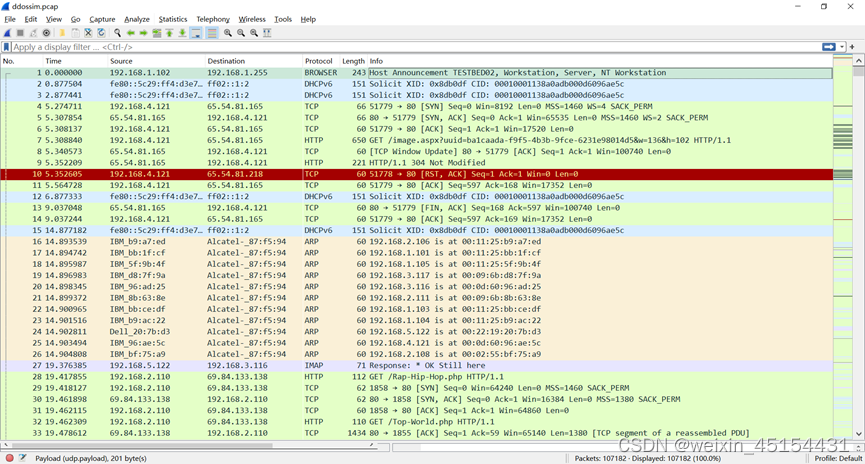
双击点开第一条流,可以看到
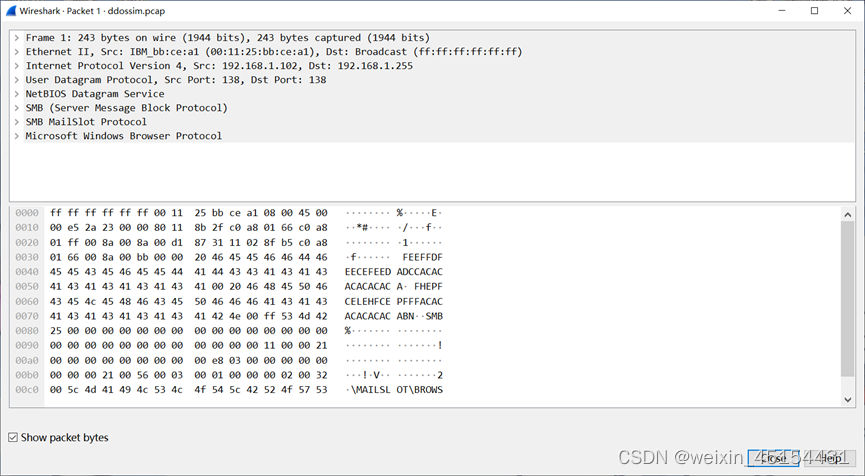
其中包含这条流的很多信息
该文章中通过代码,读取pcap文件的内容,并且分析出pcap文件头,每一包数据的pcap头,每一包的数据内容(暂时不包括数据包的协议解析)
源码也放在这里:
#coding=utf-8

#读取pcap文件,解析相应的信息,为了在记事本中显示的方便,把二进制的信息

import struct

fpcap = open('ddossim.pcap','rb')

ftxt = open('result.txt','w')

string_data = fpcap.read()

#pcap文件包头解析

pcap_header = {}

pcap_header['magic_number'] = string_data[0:4]

pcap_header['version_major'] = string_data[4:6]

pcap_header['version_minor'] = string_data[6:8]

pcap_header['thiszone'] = string_data[8:12]

pcap_header['sigfigs'] = string_data[12:16]

pcap_header['snaplen'] = string_data[16:20]

pcap_header['linktype'] = string_data[20:24]

#把pacp文件头信息写入result.txt

ftxt.write("Pcap文件的包头内容如下: \n")

for key in ['magic_number','version_major','version_minor','thiszone','sigfigs','snaplen','linktype']:

    ftxt.write(key+ " : " + repr(pcap_header[key])+'\n')

#pcap文件的数据包解析

step = 0

packet_num = 0

packet_data = []

pcap_packet_header = {}

i = 24

while(i):

    #数据包头各个字段

    pcap_packet_header['GMTtime'] = string_data[i:i+4]

    pcap_packet_header['MicroTime'] = string_data[i+4:i+8]

    pcap_packet_header['caplen'] = string_data[i+8:i+12]

    pcap_packet_header['len'] = string_data[i+12:i+16]

    #求出此包的包长len

    packet_len = struct.unpack('I',pcap_packet_header['len'])[0]

    #写入此包数据

    packet_data.append(string_data[i+16:i+16+packet_len])

    i = i+ packet_len+16

    packet_num+=1

#把pacp文件里的数据包信息写入result.txt

for i in range(packet_num):

    #先写每一包的包头

    ftxt.write("这是第"+str(i)+"包数据的包头和数据:"+'\n')

    for key in ['GMTtime','MicroTime','caplen','len']:

        ftxt.write(key+' : '+repr(pcap_packet_header[key])+'\n')

    #再写数据部分

    ftxt.write('此包的数据内容'+repr(packet_data[i])+'\n')

ftxt.write('一共有'+str(packet_num)+"包数据"+'\n')

ftxt.close()

fpcap.close()
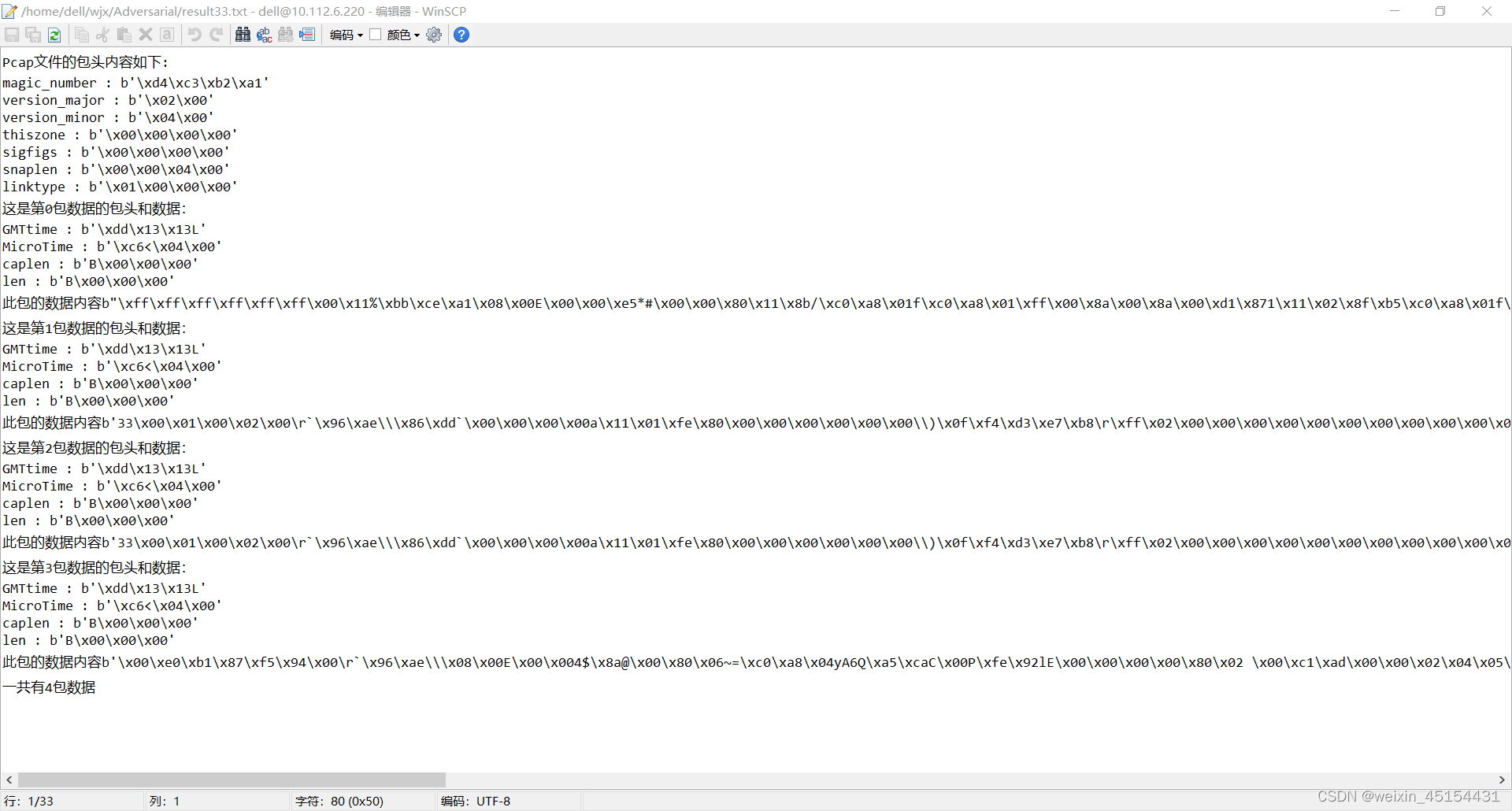
但取出的是每条流的全部十六进制,并非单独取出了每一条数据头与负载部分,并且它会混合使用十六进制和ascii(如随机括号和括号所示),而观察Wireshark打开该包后的Packet bytes,可以看到有的是将左边的十六进制转化成为ascii码加入读取的数据中。
b"\\xff\\xff\\xff\\xff\\xff\\xff\\x00\\x11%\\xbb\\xce\\xa1\\x08\\x00E\\x00\\x00\\xe5*#\\x00\\x00\\x80\\x11\\x8b/\\xc0\\xa8\\x01f\\xc0\\xa8\\x01\\xff\\x00\\x8a\
\x00\\x8a\\x00\\xd1\\x871\\x11\\x02\\x8f\\xb5\\xc0\\xa8\\x01f\\x00\\x8a\\x00\\xbb\\x00\\x00 FEEFFDFEECEFEEDADCCACACACACACACA\\x00 FHEPFCELEHFCEPFFFACACACACACACAB
N\\x00\\xffSMB%\\x00\\x00\\x00\\x00\\x00\\x00\\x00\\x00\\x00\\x00\\x00\\x00\\x00\\x00\\x00\\x00\\x00\\x00\\x00\\x00\\x00\\x00\\x00\\x00\\x00\\x00\\x00\\x11\\x00\
\x00!\\x00\\x00\\x00\\x00\\x00\\x00\\x00\\x00\\x00\\xe8\\x03\\x00\\x00\\x00\\x00\\x00\\x00\\x00\\x00!\\x00V\\x00\\x03\\x00\\x01\\x00\\x00\\x00\\x02\\x002\\x00\\\
\MAILSLOT\\\\BROWSE\\x00\\x01\\x00\\x80\\xfc\\n\\x00TESTBED02\\x00\\x9c\'\\xb8\\x05\\x02\\x00\\x05\\x01\\x03\\x10\\x00\\x00\\x0f\\x01U\\xaa\\x00"
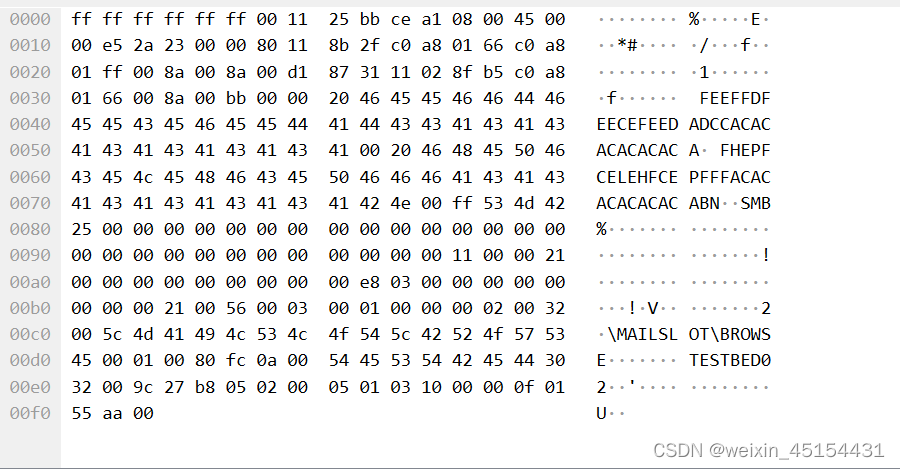
之后我们采用转化手段,将右边出现的ascii码转化为左边的十六进制码,从而得到完整的十六进制数据
packet_data.append(binascii.hexlify(string_data[i+16:i+16+packet_len]))
但由于并为将传输层头与负载分开,而是全部提取,该方法并不完全适用于制作数据集
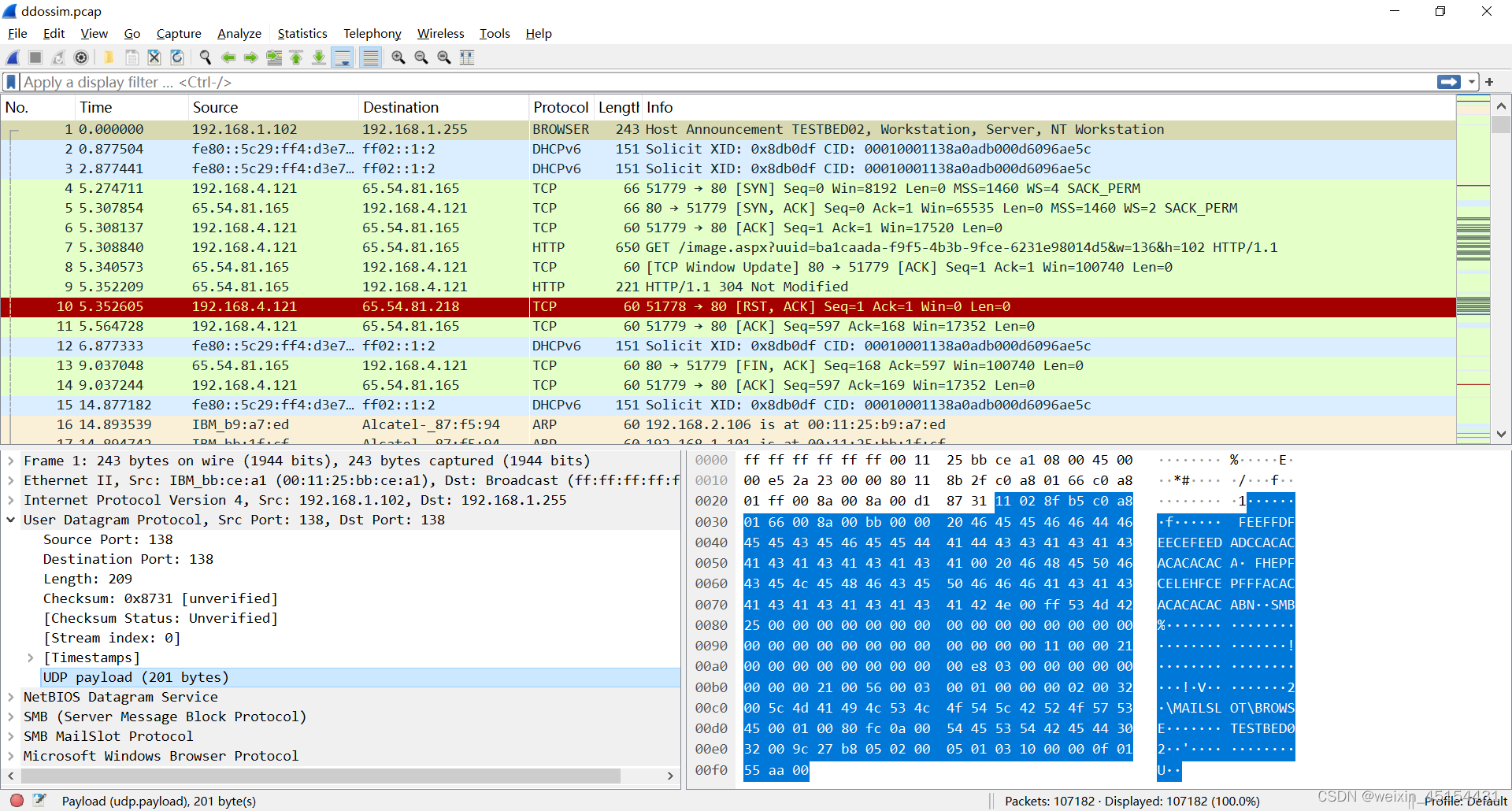
上图我们选中了第一条数据的 UDP payload,可以看到第一条数据的负载部分,我们就是希望能够分离负载部分。
而此时寻找新的读取方式,找到了python中的scapy库,下载方式为pip install scapy
import scapy
from scapy.all import *
from scapy.utils import PcapReader
packets=rdpcap("./test.pcap")
for data in packets:
  if 'UDP' in data:
    s = repr(data)
    print(s)
    print(data['UDP'].sport)
    break
输出结果为:

可以使用 data['UDP']打印出UDP端口,也可以通过 data['UDP'].sport 单独打印udp的源端口
TCP也如此,由于在数据集制作中只需要UDP与TCP协议的流量数据,因此通过代码将UDP与TCP从Pcap包中分离

通过对Wireshark中的分析,可以得到UDP与TCP的Payload长度在 data['UDP'].len 与 data['IP'].len 得到
最终代码如下:
#coding=utf-8
import scapy
from scapy.all import *
from scapy.utils import PcapReader
import binascii
import struct
import binascii
import numpy as np
fpcap = open("ddossim.pcap",'rb')
string_data = fpcap.read()
packets=rdpcap("ddossim.pcap")

#pcap文件包头解析
pcap_header ={}
pcap_header['magic_number'] = string_data[0:4]
pcap_header['version_major'] = string_data[4:6]
pcap_header['version_minor'] = string_data[6:8]
pcap_header['thiszone'] = string_data[8:12]
pcap_header['sigfigs'] = string_data[12:16]
pcap_header['snaplen'] = string_data[16:20]
pcap_header['linktype'] = string_data[20:24]

#pcap文件的数据包解析
step = 0
packet_num = 0
packet_data = []
pcap_packet_header = []
i =24
packet_num_w=0
packet_content=[]

for data in packets:
    packet_num_w+=1
    if 'UDP' in data:
        payload_len=data['UDP'].len-8
    elif 'TCP' in data and data['IP'].len>40:
        payload_len=data['IP'].len-40
    else:
        i = i+ struct.unpack('I',string_data[i+12:i+16])[0]+16
        continue

    packet_header=binascii.hexlify(string_data[i:i+16])
    pcap_packet_header.append(packet_header)
    #求出此包的包长len
    pcap_packet_header_len = string_data[i+12:i+16]
    packet_len = struct.unpack('I',pcap_packet_header_len)[0]
    #写入此包数据
    pcap_packet_payload=binascii.hexlify(string_data[i+16:i+16+packet_len])
    packet_data.append(pcap_packet_payload)
    payload = str(pcap_packet_payload[-payload_len*2:])[2:-1]
    header = str(packet_data[0]).replace(payload[2:-1],"")[2:-1]

    header_256 = []
    payload_256 = []

    for header_len_each in range(packet_len-int(payload_len)):
        header_256_each=int(header[header_len_each*2:header_len_each*2+2],16)
        header_256.append(header_256_each)
    for payload_len_each in range(int(payload_len)):
        payload_256_each=int(payload[payload_len_each*2:payload_len_each*2+2],16)
        payload_256.append(payload_256_each)

    header_256 = np.array(header_256)
    payload_256 = np.array(payload_256)

    packet_content.append(header_256)
    packet_content.append(payload_256)

    i = i+ packet_len+16
    packet_num+=1

    if packet_num==30:
        break

packet_content=np.array(packet_content).reshape(int(len(packet_content)/2),2)

# import pdb;pdb.set_trace()

fpcap.close()
但在此过程中发现还有很多问题需要解决,例如对Pcap包基本结构不太清晰。
我有一个字符串input="maybe(thisis|thatwas)some((nice|ugly)(day|night)|(strange(weather|time)))"Ruby中解析该字符串的最佳方法是什么?我的意思是脚本应该能够像这样构建句子:maybethisissomeuglynightmaybethatwassomenicenightmaybethiswassomestrangetime等等,你明白了......我应该一个字符一个字符地读取字符串并构建一个带有堆栈的状态机来存储括号值以供以后计算,还是有更好的方法?也许为此目的准备了一个开箱即用的库?
我主要使用Ruby来执行此操作,但到目前为止我的攻击计划如下:使用gemsrdf、rdf-rdfa和rdf-microdata或mida来解析给定任何URI的数据。我认为最好映射到像schema.org这样的统一模式,例如使用这个yaml文件,它试图描述数据词汇表和opengraph到schema.org之间的转换:#SchemaXtoschema.orgconversion#data-vocabularyDV:name:namestreet-address:streetAddressregion:addressRegionlocality:addressLocalityphoto:i
我正在使用ruby1.9解析以下带有MacRoman字符的csv文件#encoding:ISO-8859-1#csv_parse.csvName,main-dialogue"Marceu","Giveittohimóhe,hiswife."我做了以下解析。require'csv'input_string=File.read("../csv_parse.rb").force_encoding("ISO-8859-1").encode("UTF-8")#=>"Name,main-dialogue\r\n\"Marceu\",\"Giveittohim\x97he,hiswife.\"\
有时我需要处理键/值数据。我不喜欢使用数组,因为它们在大小上没有限制(很容易不小心添加超过2个项目,而且您最终需要稍后验证大小)。此外,0和1的索引变成了魔数(MagicNumber),并且在传达含义方面做得很差(“当我说0时,我的意思是head...”)。散列也不合适,因为可能会不小心添加额外的条目。我写了下面的类来解决这个问题:classPairattr_accessor:head,:taildefinitialize(h,t)@head,@tail=h,tendend它工作得很好并且解决了问题,但我很想知道:Ruby标准库是否已经带有这样一个类? 最佳
简而言之错误:NOTE:Gem::SourceIndex#add_specisdeprecated,useSpecification.add_spec.Itwillberemovedonorafter2011-11-01.Gem::SourceIndex#add_speccalledfrom/opt/local/lib/ruby/site_ruby/1.8/rubygems/source_index.rb:91./opt/local/lib/ruby/gems/1.8/gems/rails-2.3.8/lib/rails/gem_dependency.rb:275:in`==':und
我正在尝试使用Curbgem执行以下POST以解析云curl-XPOST\-H"X-Parse-Application-Id:PARSE_APP_ID"\-H"X-Parse-REST-API-Key:PARSE_API_KEY"\-H"Content-Type:image/jpeg"\--data-binary'@myPicture.jpg'\https://api.parse.com/1/files/pic.jpg用这个:curl=Curl::Easy.new("https://api.parse.com/1/files/lion.jpg")curl.multipart_form_
无论您是想搭建桌面端、WEB端或者移动端APP应用,HOOPSPlatform组件都可以为您提供弹性的3D集成架构,同时,由工业领域3D技术专家组成的HOOPS技术团队也能为您提供技术支持服务。如果您的客户期望有一种在多个平台(桌面/WEB/APP,而且某些客户端是“瘦”客户端)快速、方便地将数据接入到3D应用系统的解决方案,并且当访问数据时,在各个平台上的性能和用户体验保持一致,HOOPSPlatform将帮助您完成。利用HOOPSPlatform,您可以开发在任何环境下的3D基础应用架构。HOOPSPlatform可以帮您打造3D创新型产品,HOOPSSDK包含的技术有:快速且准确的CAD
本教程将在Unity3D中混合Optitrack与数据手套的数据流,在人体运动的基础上,添加双手手指部分的运动。双手手背的角度仍由Optitrack提供,数据手套提供双手手指的角度。 01 客户端软件分别安装MotiveBody与MotionVenus并校准人体与数据手套。MotiveBodyMotionVenus数据手套使用、校准流程参照:https://gitee.com/foheart_1/foheart-h1-data-summary.git02 数据转发打开MotiveBody软件的Streaming,开始向Unity3D广播数据;MotionVenus中设置->选项选择Unit
文章目录一、概述简介原理模块二、配置Mysql使用版本环境要求1.操作系统2.mysql要求三、配置canal-server离线下载在线下载上传解压修改配置单机配置集群配置分库分表配置1.修改全局配置2.实例配置垂直分库水平分库3.修改group-instance.xml4.启动监听四、配置canal-adapter1修改启动配置2配置映射文件3启动ES数据同步查询所有订阅同步数据同步开关启动4.验证五、配置canal-admin一、概述简介canal是Alibaba旗下的一款开源项目,Java开发。基于数据库增量日志解析,提供增量数据订阅&消费。Git地址:https://github.co
Unity自动旋转动画1.开门需要门把手先动,门再动2.关门需要门先动,门把手再动3.中途播放过程中不可以再次进行操作觉得太复杂?查看我的文章开关门简易进阶版效果:如果这个门可以直接打开的话,就不需要放置"门把手"如果门把手还有钥匙需要旋转,那就可以把钥匙放在门把手的"门把手",理论上是可以无限套娃的可调整参数有:角度,反向,轴向,速度运行时点击Test进行测试自己写的代码比较垃圾,命名与结构比较拉,高手轻点喷,新手有类似的需求可以拿去做参考上代码usingSystem.Collections;usingSystem.Collections.Generic;usingUnityEngine;u
