1.开门需要门把手先动,门再动
2.关门需要门先动,门把手再动
3.中途播放过程中不可以再次进行操作
觉得太复杂?查看我的文章开关门简易进阶版
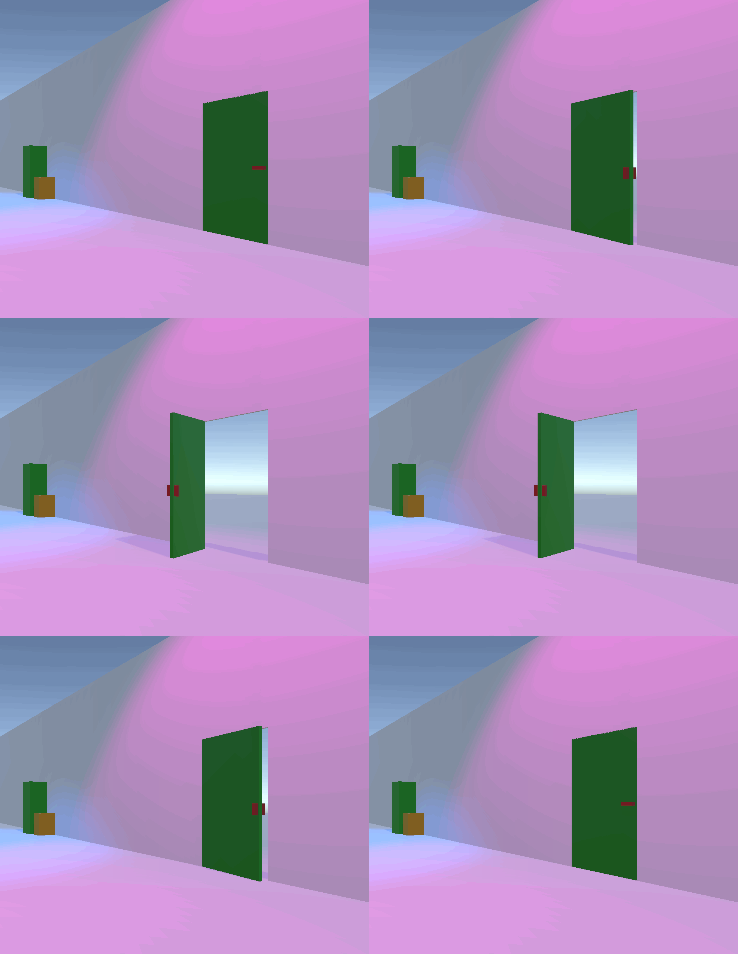
如果这个门可以直接打开的话,就不需要放置"门把手"
如果门把手还有钥匙需要旋转,那就可以把钥匙放在门把手的"门把手",理论上是可以无限套娃的
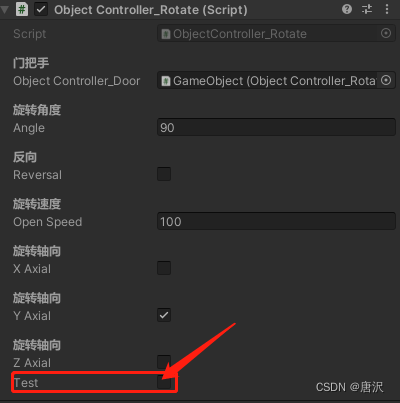
可调整参数有:角度,反向,轴向,速度
运行时点击Test进行测试
自己写的代码比较垃圾,命名与结构比较拉,高手轻点喷,新手有类似的需求可以拿去做参考
using System.Collections;
using System.Collections.Generic;
using UnityEngine;
using System;

public class ObjectController_Rotate : MonoBehaviour
{
    [Header("门把手")]
    public ObjectController_Rotate objectController_Door;
    [Header("旋转角度")]
    public float angle = 90f;
    [Header("反向")]
    public bool reversal = false;
    [Header("旋转速度")]
    public float openSpeed = 100;
    [Header("旋转轴向")]
    public bool xAxial, yAxial, zAxial;

    float menAngle = 0;
    public Action PlayAction;
    public Action EndAction = null;

    [HideInInspector]
    public bool state = false;

    /// <summary>
    /// 是否可操作
    /// </summary>
    [HideInInspector]
    public bool ActivateControl = true;
    Vector3 angleStart = Vector3.zero;
    Vector3 angleEnd = Vector3.zero;
    protected void Start()
    {
        angleStart = transform.eulerAngles;
        Vector3 vector = Vector3.zero;
        if (xAxial)
            vector.x = angle;
        if (yAxial)
            vector.y = angle;
        if (zAxial)
            vector.z = angle;
        angleEnd = transform.eulerAngles + vector;
    }
    public bool test = false;
    private void Update()
    {
        if (test)
        {
            Control();
            test = false;
        }
    }
    public void Control()
    {
        if (IsControl())
        {
            if (objectController_Door)
            {
                if (objectController_Door.state == false)
                {
                    objectController_Door.PlayAction = PlayOpenDoor;
                    objectController_Door.Control();
                    ActivateControl = false;
                }
                else
                {
                    objectController_Door.PlayAction = null;
                    PlayOpenDoor();
                }
            }
            else
            {
                PlayOpenDoor();
            }
        }
    }
    void ActivateDoor()
    {
        ActivateControl = true;
        if (EndAction != null)
            EndAction();
    }

    public bool IsControl()
    {
        if (ActivateControl == false)
            return false;
        return true;
    }
    void PlayOpenDoor()
    {
        Open = true;
    }
    bool open = false;
    public bool Open
    {
        get => open;
        set
        {
            if (value)
            {
                ActivateControl = false;
            }
            else
            {
                ActivateControl = true; ;
            }
            open = value;
        }
    }
    private void LateUpdate()
    {
        if (Open == true)
        {
            int i = 1;
            if (reversal)
                i = -1;
            Vector3 vector = Vector3.zero;
            if (xAxial)
                vector.x = openSpeed * Time.deltaTime;
            if (yAxial)
                vector.y = openSpeed * Time.deltaTime;
            if (zAxial)
                vector.z = openSpeed * Time.deltaTime;
            if (state == false)
            {
                transform.Rotate(vector * i);
            }
            else
            {
                transform.Rotate(vector * -1 * i);
            }

            menAngle += openSpeed * Time.deltaTime;
            if (menAngle > angle)
            {

                if (state == false)
                {
                    if (reversal)
                    {
                        vector = Vector3.zero;
                        if (xAxial)
                            vector.x = angle;
                        if (yAxial)
                            vector.y = angle;
                        if (zAxial)
                            vector.z = angle;
                        transform.eulerAngles = angleEnd - vector * 2;
                    }
                    else
                        transform.eulerAngles = angleEnd;
                    state = true;
                    Open = false;
                }
                else
                {
                    transform.eulerAngles = angleStart;
                    state = false;
                    Open = false;
                    if (objectController_Door)
                    {
                        if (objectController_Door.state)
                        {
                            objectController_Door.Control();
                            ActivateControl = false;
                            if (objectController_Door.EndAction == null)
                                objectController_Door.EndAction = ActivateDoor;
                        }
                    }
                    else
                    {
                        ActivateDoor();
                    }
                }
                menAngle = 0;
                OnPutCallBack();
            }
        }
    }
    public void OnPutCallBack()
    {
        if (PlayAction != null)
            PlayAction();
    }
}
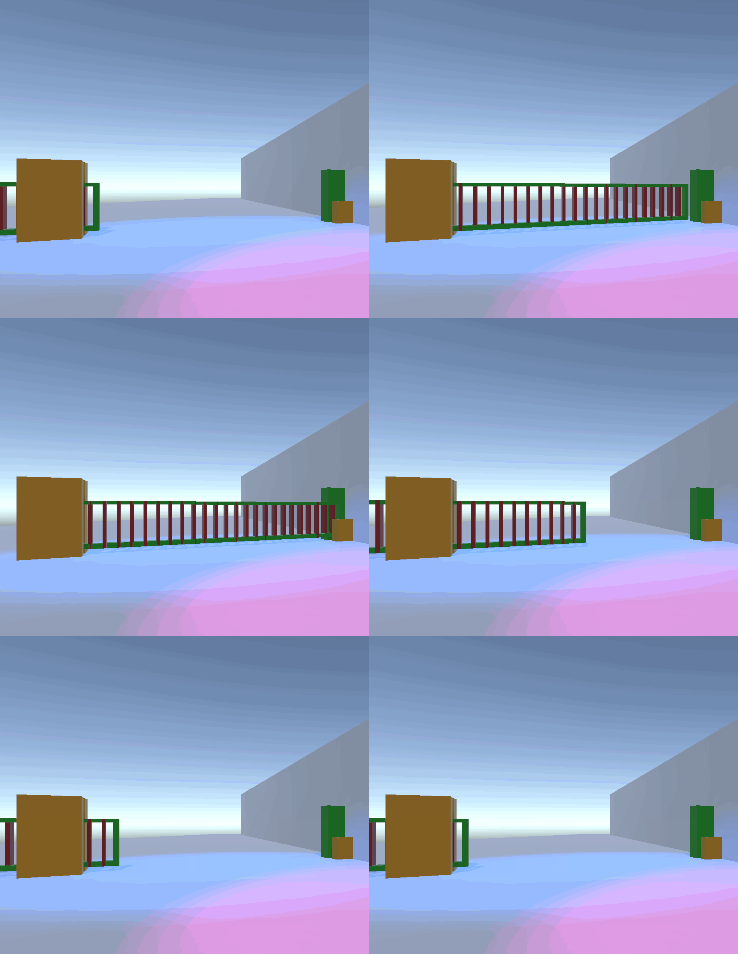
移动途中不可进行操作
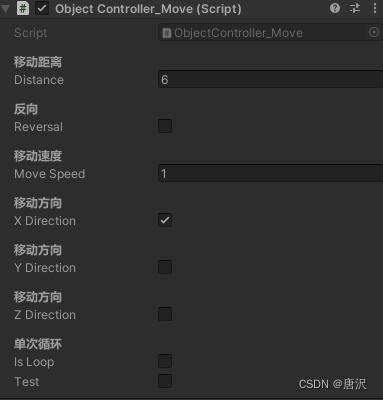
可调整参数有:距离,反向,方向,速度,单次循环
搞!
using System.Collections;
using System.Collections.Generic;
using UnityEngine;

public class ObjectController_Move : MonoBehaviour
{
    [Header("移动距离")]
    public float distance = 0.5f;
    [Header("反向")]
    public bool reversal = false;
    [Header("移动速度")]
    public float moveSpeed = 1;
    [Header("移动方向")]
    public bool xDirection, yDirection, zDirection;
    [Header("单次循环")]
    public bool isLoop = false;
    Vector3 Direction = Vector3.zero;
    Vector3 StartPos = Vector3.zero;
    /// <summary>
    /// 当前的状态
    /// </summary>
    [HideInInspector]
    public bool state = false;
    /// <summary>
    /// 是否可操作
    /// </summary>
    [HideInInspector]
    public bool ActivateControl = true;
    protected void Start()
    {
        StartPos = transform.position;
        int i = 1;
        if (reversal)
            i = -1;
        if (xDirection)
            Direction = transform.right* distance;
        if (yDirection)
            Direction = transform.up * distance;
        if (zDirection)
            Direction = transform.forward * distance;
        Direction *= i;
        Direction += transform.position;
    }
    public bool test = false;
    private void Update()
    {
        if (test)
        {
            Control();
            test = false;
        }
    }
    bool Move = false;
    public void Control()
    {
        if (IsControl())
        {
            Move = true;
            ActivateControl = false;
        }
    }
    public bool IsControl()
    {
        if (ActivateControl)
        {
            return true;
        }
        return false;
    }
    private void LateUpdate()
    {
        if (Move)
        {
            if (state)
            {
                if (StartMove(StartPos))
                {
                    state = false;
                }
            }
            else
            {
                if (StartMove(Direction))
                {
                    state = true;
                    if (isLoop)
                        Move = true;
                }
            }

        }
    }
    bool StartMove(Vector3 EndPos)
    {
        transform.position = Vector3.Lerp(transform.position, EndPos, moveSpeed * Time.deltaTime);
        if (Vector3.Distance(transform.position, EndPos) < 0.05f)
        {
            transform.position = EndPos;
            Move = false;
            ActivateControl = true;
            return true;
        }
        return false;
    }
}
本教程将在Unity3D中混合Optitrack与数据手套的数据流,在人体运动的基础上,添加双手手指部分的运动。双手手背的角度仍由Optitrack提供,数据手套提供双手手指的角度。 01 客户端软件分别安装MotiveBody与MotionVenus并校准人体与数据手套。MotiveBodyMotionVenus数据手套使用、校准流程参照:https://gitee.com/foheart_1/foheart-h1-data-summary.git02 数据转发打开MotiveBody软件的Streaming,开始向Unity3D广播数据;MotionVenus中设置->选项选择Unit
Unity自动旋转动画1.开门需要门把手先动,门再动2.关门需要门先动,门把手再动3.中途播放过程中不可以再次进行操作觉得太复杂?查看我的文章开关门简易进阶版效果:如果这个门可以直接打开的话,就不需要放置"门把手"如果门把手还有钥匙需要旋转,那就可以把钥匙放在门把手的"门把手",理论上是可以无限套娃的可调整参数有:角度,反向,轴向,速度运行时点击Test进行测试自己写的代码比较垃圾,命名与结构比较拉,高手轻点喷,新手有类似的需求可以拿去做参考上代码usingSystem.Collections;usingSystem.Collections.Generic;usingUnityEngine;u
动漫制作技巧是很多新人想了解的问题,今天小编就来解答与大家分享一下动漫制作流程,为了帮助有兴趣的同学理解,大多数人会选择动漫培训机构,那么今天小编就带大家来看看动漫制作要掌握哪些技巧?一、动漫作品首先完成草图设计和原型制作。设计草图要有目的、有对象、有步骤、要形象、要简单、符合实际。设计图要一致性,以保证制作的顺利进行。二、原型制作是根据设计图纸和制作材料,可以是手绘也可以是3d软件创建。在此步骤中,要注意的问题是色彩和平面布局。三、动漫制作制作完成后,加工成型。完成不同的表现形式后,就要对设计稿进行加工处理,使加工的难易度降低,并得到一些基本准确的概念,以便于后续的大样、准确的尺寸制定。四、
动画/*INITIALIZEANANIMATION 初始化一个动画*-----------------------*/lv_anim_ta;lv_anim_init(&a);/*MANDATORYSETTINGS 必选设置*------------------*//*Setthe"animator"function 设置“动画”功能*/lv_anim_set_exec_cb(&a,(lv_anim_exec_xcb_t)lv_obj_set_x);/*Setthe"animator"function*/lv_anim_set_var(&a,obj);/*Lengthoftheanim
我有一个关于多维数组的初学者ruby问题。我想按年份和月份对条目进行排序。所以我想创建一个包含年->月->月条目的多维数组所以数组应该是这样的:2009->08->Entry1->Entry209->Entry32007->10->Entry5现在我有:@years=[]@entries.eachdo|entry|timeobj=Time.parse(entry.created_at.to_s)year=timeobj.strftime("%Y").to_imonth=timeobj.strftime("%m").to_itmparr=[]tmparrentry}@years.pu
问题总结我想尝试使用Ruby来完成我在Python中所做的事情。在Python中它有r"""syntaxtosupportrawstrings,这很好,因为它允许将原始字符串与代码内联,并以更自然的方式连接它们,而无需特殊缩进。在Ruby中,当使用原始字符串时,必须使用其次是EOT在单独的行中,这会破坏代码布局。你可能会问,为什么不使用Ruby的%q{}?嗯,因为%q{}与Python的r"""相比有局限性因为它不会转义多个\\\并且只处理单个\.我正在动态生成Latex代码并写入一个文件,该文件稍后用pdflatex编译。Latex代码包含类似\\\的内容在许多地方。如果我使用Rub
我正在使用Ruby1.8。似乎downcase不会改变非拉丁字符。例如:"Δ".downcase返回“Δ”我知道在Ruby1.9.1及更高版本中,我可以使用UnicodeUtils(fromhere)。我试过了,它工作正常。返回上一个示例的"δ"。是否有适用于1.8Ruby的等效(或任何)解决方案? 最佳答案 nash@nash:~$ruby-vruby1.8.7(2011-02-18patchlevel334)[i686-linux]gem安装unicode(https://rubygems.org/gems/unicode)re
我正在使用Ruby制作一个命令行工具。它将在屏幕上打印大量文本。目前,我正在使用shell管道(may_app|more)来执行此操作。但我认为最好有一个默认的寻呼机。就像你在执行gitlog时看到的一样。可以使用git--nopagerlog禁用寻呼机。我已经完成了大量的谷歌工作并找到了一颗gem:hirb,但似乎有点矫枉过正。经过多次尝试,我目前正在使用shellwrapper来这样做:#!/bin/bash#xray.rbisthecorescript#doingthemainlogicandwill#outputmanyrowsoftexton#screenXRAY=$HOME
我想知道如何在shell中创建“全屏”窗口的外观,如在vim、emacs等中。是否可以在Ruby中以编程方式执行此操作?这对平台的依赖程度如何?编辑:我不是在寻找如何让我的shell进入全屏模式。我正在寻找一种方法来隐藏以前输入的命令并用应用程序“填充”shell屏幕。它适用于安装程序。 最佳答案 您可能正在寻找的是ncurses或S-Lang支持提供你的全TUI经验。Ruby的gem环境提供了几个可能值得探索的gem:$gemlist--remote|grep-icursescursesx(003)ffi-ncurses(0.4.
我想制作一个gem,当其他人尝试将它与MRI一起使用时,它将使用C代码,而当他们从JRuby中使用它时,它将使用Java代码。nokogiri和pumagems就是这样做的,我看过他们的代码,但没有看到他们是如何实现的。 最佳答案 这是通过使用rvm(或其他类似工具在rubies之间切换)和rake-compiler为您针对的不同平台交叉编译gem来完成的。.gemspec文件必须指定每个平台所需的文件;这是通过检查gem正在编译的平台来完成的:Gem::Specification.newdo|gem|#...ifRUBY_PLAT
