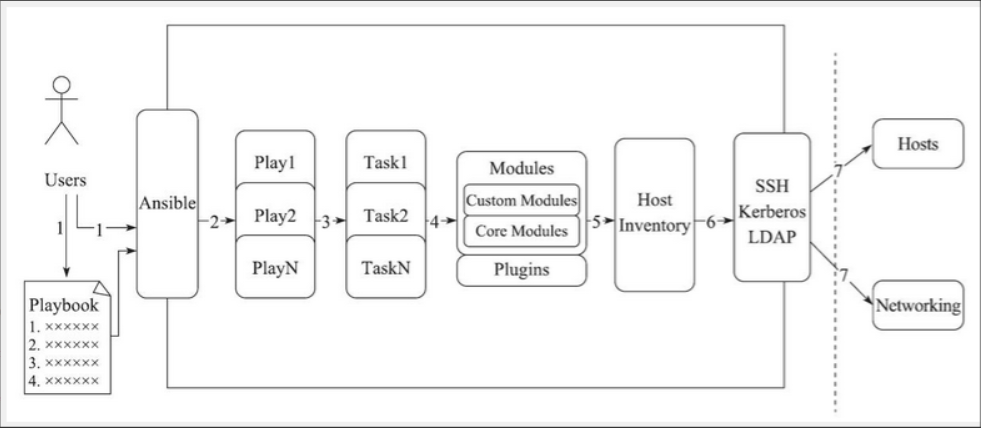
Hosts:运行指定任务的目标主机
remoute_user:在远程主机上执行任务的用户;
sudo_user:
tasks:任务列表

tasks的具体格式:

tasks:
  - name: TASK_NAME
    module: arguments
    notify: HANDLER_NAME
    handlers:
  - name: HANDLER_NAME
    module: arguments

##模块,模块参数:
格式如下:
    (1)action: module arguments
     (2) module: arguments
注意:shell和command模块后直接加命令,而不是key=value类的参数列表


handlers:任务,在特定条件下触发;接受到其他任务的通知时被触发;---
- hosts: web
remote_user: root
tasks:
- name: install nginx ##安装模块,需要在被控主机里加上nginx的源
yum: name=nginx state=present
- name: copy nginx.conf ##复制nginx的配置文件过去,需要在本机的/tmp目录下编辑nginx.conf
copy: src=/tmp/nginx.conf dest=/etc/nginx/nginx.conf backup=yes
notify: reload #当nginx.conf发生改变时,通知给相应的handlers
tags: reloadnginx #打标签
- name: start nginx service #服务启动模块
service: name=nginx state=started
tags: startnginx #打标签
handlers:
- name: reload
service: name=nginx state=restartedansible web -m setup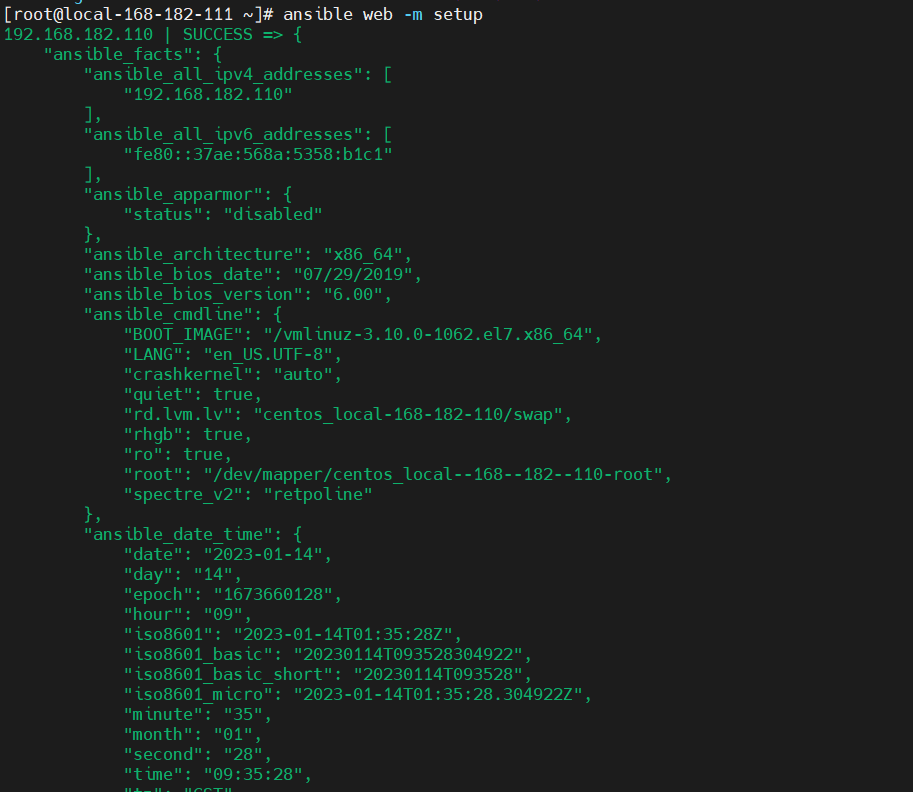 常用的几个参数:
ansible_all_ipv4_addresses # ipv4的所有地址
ansible_all_ipv6_addresses # ipv6的所有地址
ansible_date_time # 获取到控制节点时间
ansible_default_ipv4 # 默认的ipv4地址
ansible_distribution # 系统
ansible_distribution_major_version # 系统的大版本
ansible_distribution_version # 系统的版本号
ansible_domain #系统所在的域
ansible_env #系统的环境变量
ansible_hostname #系统的主机名
ansible_fqdn #系统的全名
ansible_machine #系统的架构
ansible_memory_mb #系统的内存信息
ansible_os_family # 系统的家族
ansible_pkg_mgr # 系统的包管理工具
ansible_processor_cores #系统的cpu的核数(每颗)
ansible_processor_count #系统cpu的颗数
ansible_processor_vcpus #系统cpu的总个数=cpu的颗数*CPU的核数
ansible_python # 系统上的pythonansible web -m setup -a 'filter=*processor*'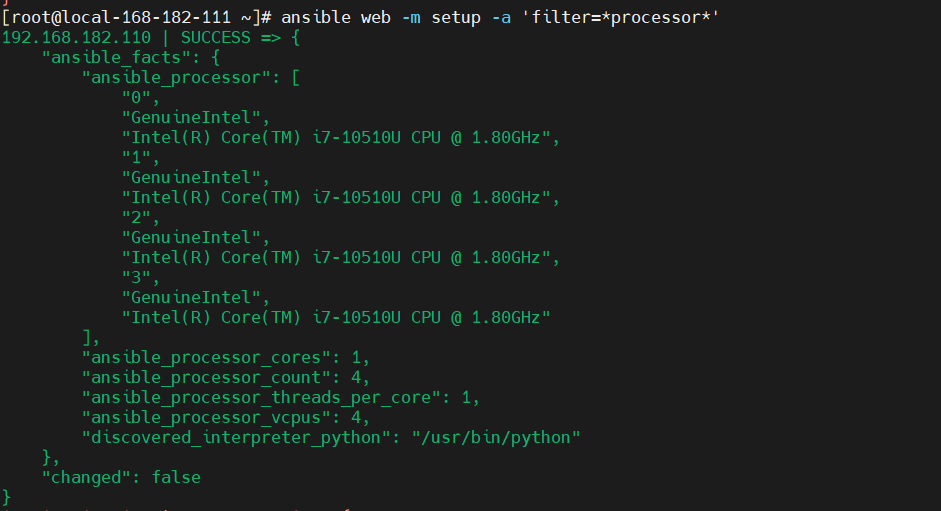
ansible-playbook命令行中的 -e VARS,--extra-vars VARS,这样就可以直接把自定义的变量传入---
- hosts: web
remote_user: root
tasks:
- name: install {{ rpmname }}
yum: name={{ rpmname }} state=present
- name: copy {{ rpmname }}.conf
copy: src=/tmp/{{ rpmname }}.conf dest=/etc/{{ rpmname }}/{{ rpmname }}.conf backup=yes
notify: reload
tags: reload{{ rpmname }}
- name: start {{ rpmname }} service
service: name={{ rpmname }} state=started
tags: start{{ rpmname }}
handlers:
- name: reload
service: name={{ rpmname }} state=restartedansible-playbook nginx.yml -e rpmname=keepalived
ansible-playbook nginx.yml --extra-vars rpmname=keepalived##在playbook中定义变量如下:
vars:
- var1: value1
- var2: value2---
- hosts: web
remote_user: root
vars:
- rpmname: keepalived
tasks:
- name: install {{ rpmname }}
yum: name={{ rpmname }} state=present
- name: copy {{ rpmname }}.conf
copy: src=/tmp/{{ rpmname }}.conf dest=/etc/{{ rpmname }}/{{ rpmname }}.conf backup=yes
notify: reload
tags: reload{{ rpmname }}
- name: start {{ rpmname }} service
service: name={{ rpmname }} state=started
tags: start{{ rpmname }}
handlers:
- name: reload
service: name={{ rpmname }} state=restarted#向不同的主机传递不同的变量
IP/HOSTNAME varaiable=value var2=value2
#向组中的主机传递相同的变量
[groupname:vars]
variable=value- hosts: web
remote_user: root#代表用root用户执行,默认是root,可以省略
tasks:
- name: createfile
copy: content="test3" dest=/opt/p1.yml
when: a=='3'
- name: createfile
copy: content="test4" dest=/opt/p1.yml
when: a=='4'如果a"3",就将“test3”,写入到web组下被管控机的/opt/p1.yml中,执行
如果a"4",就将“test4”,写入到web组下被管控机的/opt/p1.yml中。
# 语法校验
ansible-playbook  --syntax-check p1.yml

#执行
ansible-playbook -e 'a="3"' p1.yml- hosts: web
tasks:
- name: installnginx
yum: name=nginx
- name: copyfile
copy: src=/etc/nginx/nginx.conf dest=/etc/nginx/nginx.conf
tags: copyfile
- name: start
service: name=nginx static=restarted# 语法校验
ansible-playbook --syntax-check p2.yml
#执行
ansible-playbook -t copyfile p2.yml - hosts: web
tasks:
- name: createruser
user: name={{ item }}
with_items:
- shy1
- shy2
- shy3
- name: creategroup
group: name={{ item }}
with_items:
- group1
- group2
- group3 #语法校验
ansible-playbook --syntax-check p3.yml
#执行
ansible-playbook p3.yml - hosts: web
tasks:
- name: creategroup
group: name={{item}}
with_items:
- group3
- group4
- group5
- name: createuser
user: name={{item.user}} group={{item.group}}
with_items:
- {'user': shy3,'group': group3}
- {'user': shy4,'group': group4}
- {'user': shy5,'group': group5}#语法校验
ansible-playbook --syntax-check p4.yml
#执行
ansible-playbook p4.yml 字符串:使用单引号或双引号;
数字:整数,浮点数;
列表:[item1, item2, ...]
元组:(item1, item2, ...)
字典:{key1:value1, key2:value2, ...}
布尔型:true/false
算术运算:
+, -, *, /, //, %, **
比较操作:
==, !=, >, >=, <, <=
逻辑运算:
and, or, notuser nginx; #设置nginx服务的系统使用用户
worker_processes {{ ansible_processor_vcpus }}; #工作进程数
error_log /var/log/nginx/error.log warn; #nginx的错误日志
pid /var/run/nginx.pid; #nginx启动时候的pid
events {
worker_connections 1024; #每个进程允许的最大连接数
}
http { #http请求配置,一个http可以包含多个server
#定义 Content-Type
include /etc/nginx/mime.types;
default_type application/octet-stream;
#日志格式 此处main与access_log中的main对应
#$remote_addr:客户端地址
#$remote_user:http客户端请求nginx认证的用户名,默认不开启认证模块,不会记录
#$timelocal:nginx的时间
#$request:请求method + 路由 + http协议版本
#status:http reponse 状态码
#body_bytes_sent:response body的大小
#$http_referer:referer头信息参数,表示上级页面
#$http_user_agent:user-agent头信息参数,客户端信息
#$http_x_forwarded_for:x-forwarded-for头信息参数
log_format main '$http_user_agent' '$remote_addr - $remote_user [$time_local] "$request" '
'$status $body_bytes_sent "$http_referer" '
'"$http_user_agent" "$http_x_forwarded_for"';
#访问日志,后面的main表示使用log_format中的main格式记录到access.log中
access_log /var/log/nginx/access.log main;
#nginx的一大优势,高效率文件传输
sendfile on;
#tcp_nopush on;
#客户端与服务端的超时时间,单位秒
keepalive_timeout 65;
#gzip on;
server { #http服务,一个server可以配置多个location
listen {{ nginxport }}; #服务监听端口
server_name localhost; #主机名、域名
#charset koi8-r;
#access_log /var/log/nginx/host.access.log main;
location / {
root /usr/share/nginx/html; #页面存放目录
index index.html index.htm; #默认页面
}
#error_page 404 /404.html;
# 将500 502 503 504的错误页面重定向到 /50x.html
error_page 500 502 503 504 /50x.html;
location = /50x.html { #匹配error_page指定的页面路径
root /usr/share/nginx/html; #页面存放的目录
}
# proxy the PHP scripts to Apache listening on 127.0.0.1:80
#
#location ~ \.php$ {
# proxy_pass http://127.0.0.1;
#}
# pass the PHP scripts to FastCGI server listening on 127.0.0.1:9000
#
#location ~ \.php$ {
# root html;
# fastcgi_pass 127.0.0.1:9000;
# fastcgi_index index.php;
# fastcgi_param SCRIPT_FILENAME /scripts$fastcgi_script_name;
# include fastcgi_params;
#}
# deny access to .htaccess files, if Apache's document root
# concurs with nginx's one
#
#location ~ /\.ht {
# deny all;
#}
}
include /etc/nginx/conf.d/*.conf;
}---
- hosts: web
remote_user: root
vars:
- rpmname: nginx
- nginxport: 8088
tasks:
- name: install {{ rpmname }}
yum: name={{ rpmname }} state=present
- name: copy {{ rpmname }}.conf
copy: src=/tmp/{{ rpmname }}.conf dest=/etc/{{ rpmname }}/{{ rpmname }}.conf backup=yes
notify: reload
tags: reload{{ rpmname }}
- name: start {{ rpmname }} service
service: name={{ rpmname }} state=started
tags: start{{ rpmname }}
handlers:
- name: reload
service: name={{ rpmname }} state=restarted##使用reloadnginx标签,重新加载剧本notify:触发
handlers:触发的动作- hosts: web
tasks:
- name: installredis
yum: name=redis
- name: copyfile
template: src=redis.conf dest=/etc/redis.conf
tags: copyfile
notify: restart
- name: start
service: name=redis state=started
handlers:
- name: restart
service: name=redisansible-playbook -t copyfile p6.ymlmkdir -pv ./{nginx,mysql,httpd}/{files,templates,vars,tasks,handlers,meta,default}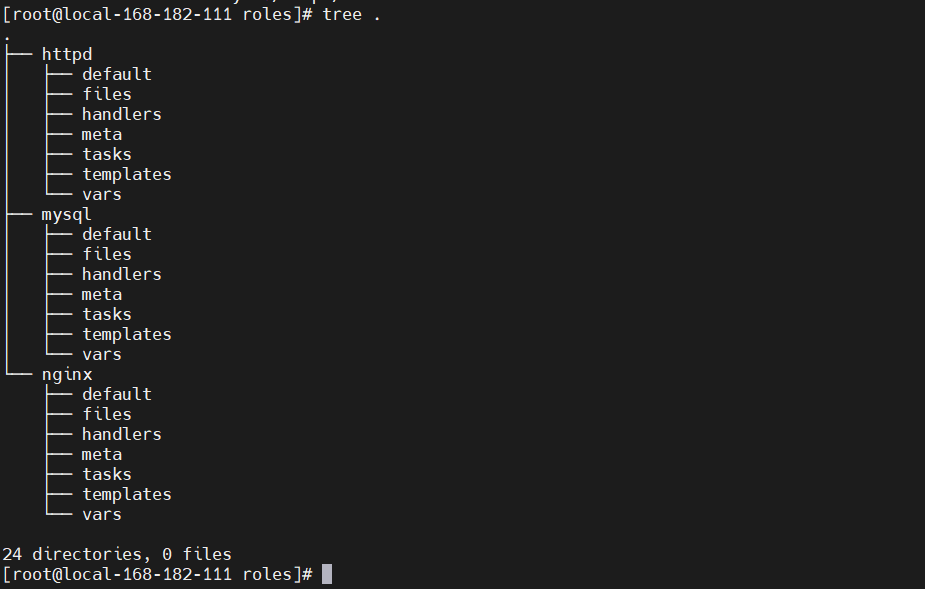
mkdir -pv ./{nginx,mysql,httpd}/{files,templates,vars,tasks,handlers,meta,default}# 下载地址:http://nginx.org/packages/centos/7/x86_64/RPMS/
wget http://nginx.org/packages/centos/7/x86_64/RPMS/nginx-1.18.0-1.el7.ngx.x86_64.rpm -O nginx/files/nginx-1.18.0-1.el7.ngx.x86_64.rpm- name: cp
copy: src=nginx-1.18.0-1.el7.ngx.x86_64.rpm dest=/tmp/nginx-1.18.0-1.el7.ngx.x86_64.rpm
- name: install
yum: name=/tmp/nginx-1.18.0-1.el7.ngx.x86_64.rpm state=latest
- name: conf
template: src=nginx.conf.j2 dest=/etc/nginx/nginx.conf
tags: nginxconf
notify: new conf to reload
- name: start service
service: name=nginx state=started enabled=trueuser nginx; #设置nginx服务的系统使用用户
worker_processes {{ ansible_processor_vcpus }}; #工作进程数
error_log /var/log/nginx/error.log warn; #nginx的错误日志
pid /var/run/nginx.pid; #nginx启动时候的pid
events {
worker_connections 1024; #每个进程允许的最大连接数
}
http { #http请求配置,一个http可以包含多个server
#定义 Content-Type
include /etc/nginx/mime.types;
default_type application/octet-stream;
#日志格式 此处main与access_log中的main对应
#$remote_addr:客户端地址
#$remote_user:http客户端请求nginx认证的用户名,默认不开启认证模块,不会记录
#$timelocal:nginx的时间
#$request:请求method + 路由 + http协议版本
#status:http reponse 状态码
#body_bytes_sent:response body的大小
#$http_referer:referer头信息参数,表示上级页面
#$http_user_agent:user-agent头信息参数,客户端信息
#$http_x_forwarded_for:x-forwarded-for头信息参数
log_format main '$http_user_agent' '$remote_addr - $remote_user [$time_local] "$request" '
'$status $body_bytes_sent "$http_referer" '
'"$http_user_agent" "$http_x_forwarded_for"';
#访问日志,后面的main表示使用log_format中的main格式记录到access.log中
access_log /var/log/nginx/access.log main;
#nginx的一大优势,高效率文件传输
sendfile on;
#tcp_nopush on;
#客户端与服务端的超时时间,单位秒
keepalive_timeout 65;
#gzip on;
server { #http服务,一个server可以配置多个location
listen {{ nginxport }}; #服务监听端口
server_name localhost; #主机名、域名
#charset koi8-r;
#access_log /var/log/nginx/host.access.log main;
location / {
root /usr/share/nginx/html; #页面存放目录
index index.html index.htm; #默认页面
}
#error_page 404 /404.html;
# 将500 502 503 504的错误页面重定向到 /50x.html
error_page 500 502 503 504 /50x.html;
location = /50x.html { #匹配error_page指定的页面路径
root /usr/share/nginx/html; #页面存放的目录
}
# proxy the PHP scripts to Apache listening on 127.0.0.1:80
#
#location ~ \.php$ {
# proxy_pass http://127.0.0.1;
#}
# pass the PHP scripts to FastCGI server listening on 127.0.0.1:9000
#
#location ~ \.php$ {
# root html;
# fastcgi_pass 127.0.0.1:9000;
# fastcgi_index index.php;
# fastcgi_param SCRIPT_FILENAME /scripts$fastcgi_script_name;
# include fastcgi_params;
#}
# deny access to .htaccess files, if Apache's document root
# concurs with nginx's one
#
#location ~ /\.ht {
# deny all;
#}
}
include /etc/nginx/conf.d/*.conf;
}nginxport: 9999- name: new conf to reload
service: name=nginx state=restarted- hosts: web
remote_user: root
roles:
- nginx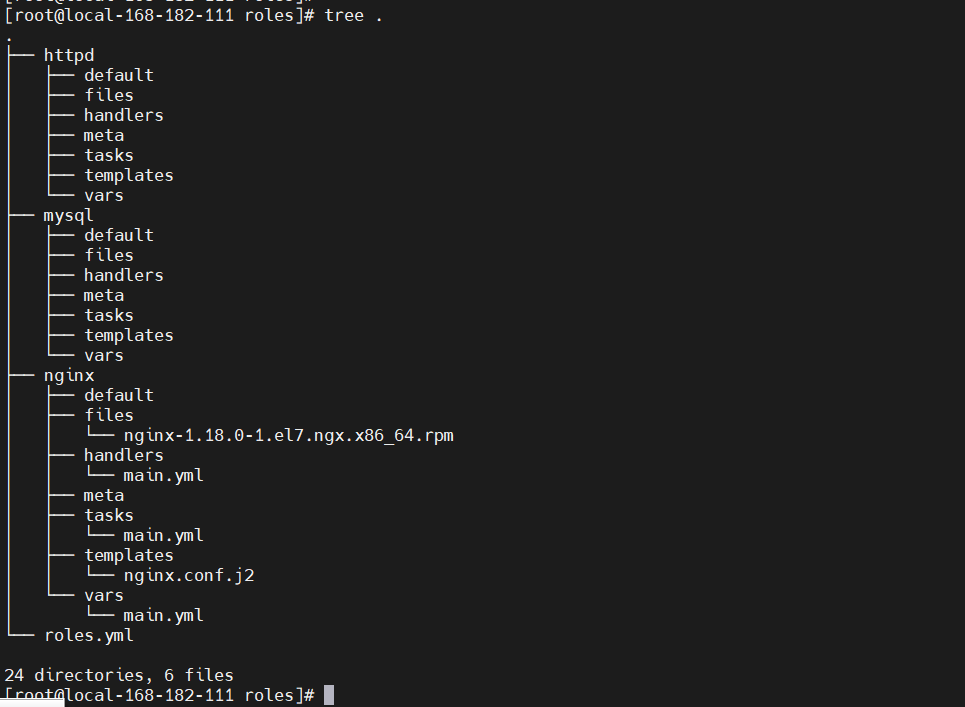 执行
执行ansible-playbook roles.yml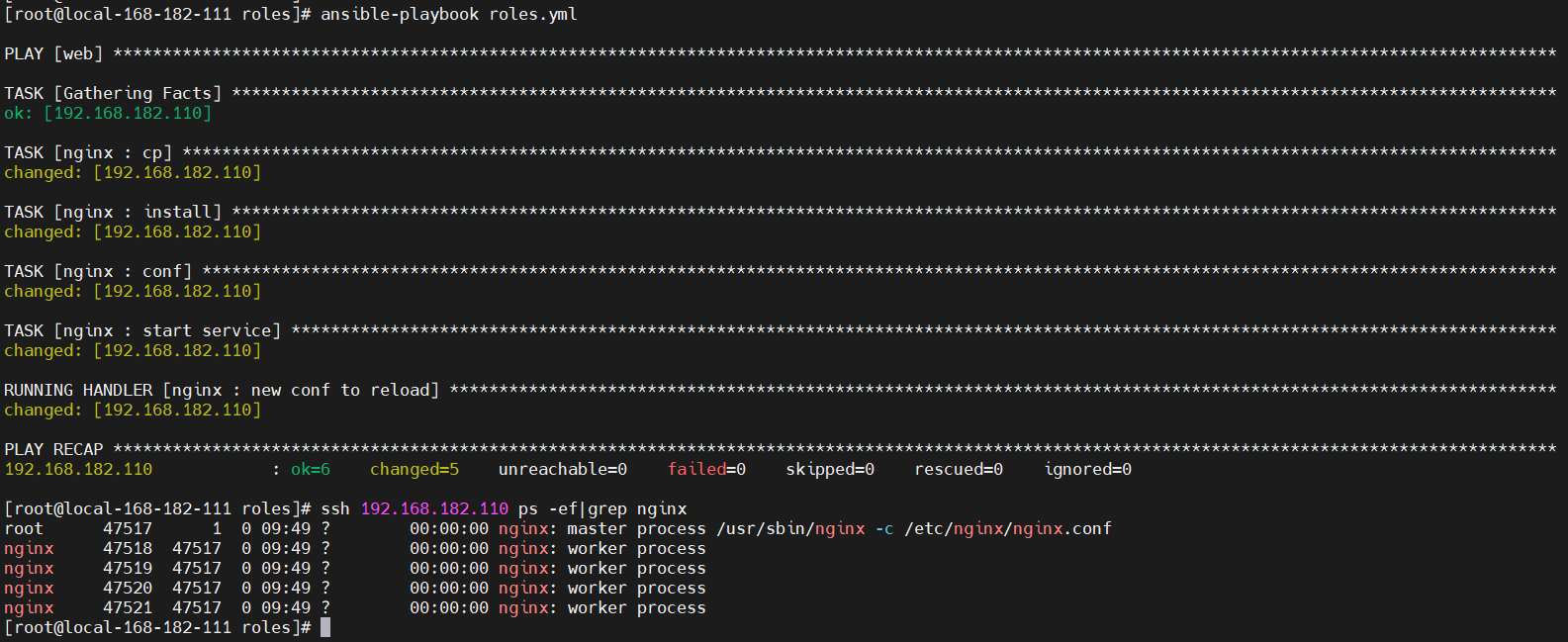
无论您是想搭建桌面端、WEB端或者移动端APP应用,HOOPSPlatform组件都可以为您提供弹性的3D集成架构,同时,由工业领域3D技术专家组成的HOOPS技术团队也能为您提供技术支持服务。如果您的客户期望有一种在多个平台(桌面/WEB/APP,而且某些客户端是“瘦”客户端)快速、方便地将数据接入到3D应用系统的解决方案,并且当访问数据时,在各个平台上的性能和用户体验保持一致,HOOPSPlatform将帮助您完成。利用HOOPSPlatform,您可以开发在任何环境下的3D基础应用架构。HOOPSPlatform可以帮您打造3D创新型产品,HOOPSSDK包含的技术有:快速且准确的CAD
@作者:SYFStrive @博客首页:HomePage📜:微信小程序📌:个人社区(欢迎大佬们加入)👉:社区链接🔗📌:觉得文章不错可以点点关注👉:专栏连接🔗💃:感谢支持,学累了可以先看小段由小胖给大家带来的街舞👉微信小程序(🔥)目录自定义组件-behaviors 1、什么是behaviors 2、behaviors的工作方式 3、创建behavior 4、导入并使用behavior 5、behavior中所有可用的节点 6、同名字段的覆盖和组合规则总结最后自定义组件-behaviors 1、什么是behaviorsbehaviors是小程序中,用于实现
我有一个使用SeleniumWebdriver和Nokogiri的Ruby应用程序。我想选择一个类,然后对于那个类对应的每个div,我想根据div的内容执行一个Action。例如,我正在解析以下页面:https://www.google.com/webhp?sourceid=chrome-instant&ion=1&espv=2&ie=UTF-8#q=puppies这是一个搜索结果页面,我正在寻找描述中包含“Adoption”一词的第一个结果。因此机器人应该寻找带有className:"result"的div,对于每个检查它的.descriptiondiv是否包含单词“adoption
我正在我的Rails项目中安装Grape以构建RESTfulAPI。现在一些端点的操作需要身份验证,而另一些则不需要身份验证。例如,我有users端点,看起来像这样:moduleBackendmoduleV1classUsers现在如您所见,除了password/forget之外的所有操作都需要用户登录/验证。创建一个新的端点也没有意义,比如passwords并且只是删除password/forget从逻辑上讲,这个端点应该与用户资源。问题是Grapebefore过滤器没有像except,only这样的选项,我可以在其中说对某些操作应用过滤器。您通常如何干净利落地处理这种情况?
在我做的一些网络开发中,我有多个操作开始,比如对外部API的GET请求,我希望它们同时开始,因为一个不依赖另一个的结果。我希望事情能够在后台运行。我找到了concurrent-rubylibrary这似乎运作良好。通过将其混合到您创建的类中,该类的方法具有在后台线程上运行的异步版本。这导致我编写如下代码,其中FirstAsyncWorker和SecondAsyncWorker是我编写的类,我在其中混合了Concurrent::Async模块,并编写了一个名为“work”的方法来发送HTTP请求:defindexop1_result=FirstAsyncWorker.new.async.
a=[3,4,7,8,3]b=[5,3,6,8,3]假设数组长度相同,是否有办法使用each或其他一些惯用方法从两个数组的每个元素中获取结果?不使用计数器?例如获取每个元素的乘积:[15,12,42,64,9](0..a.count-1).eachdo|i|太丑了...ruby1.9.3 最佳答案 使用Array.zip怎么样?:>>a=[3,4,7,8,3]=>[3,4,7,8,3]>>b=[5,3,6,8,3]=>[5,3,6,8,3]>>c=[]=>[]>>a.zip(b)do|i,j|c[[3,5],[4,3],[7,6],
我有一个非常简单的Controller来管理我的Rails应用程序中的静态页面:classPagesController我怎样才能让View模板返回它自己的名字,这样我就可以做这样的事情:#pricing.html.erb#-->"Pricing"感谢您的帮助。 最佳答案 4.3RoutingParametersTheparamshashwillalwayscontainthe:controllerand:actionkeys,butyoushouldusethemethodscontroller_nameandaction_nam
1.问题描述使用Python的turtle(海龟绘图)模块提供的函数绘制直线。2.问题分析一幅复杂的图形通常都可以由点、直线、三角形、矩形、平行四边形、圆、椭圆和圆弧等基本图形组成。其中的三角形、矩形、平行四边形又可以由直线组成,而直线又是由两个点确定的。我们使用Python的turtle模块所提供的函数来绘制直线。在使用之前我们先介绍一下turtle模块的相关知识点。turtle模块提供面向对象和面向过程两种形式的海龟绘图基本组件。面向对象的接口类如下:1)TurtleScreen类:定义图形窗口作为绘图海龟的运动场。它的构造器需要一个tkinter.Canvas或ScrolledCanva
1、接口请求基本操作1.1例子tips在view的选项可以zoomin调整窗口字帖大小。1、创建一个测试的workspace,并命名为test2、test后面新增一个addrequest3、选择发送GET,URL为一个开源的https://api.apiopen.top/api/sentences获取每日一句4、点击send查看内容Tips:如果提示出现Error:tunnelingsocketcouldnotbeestablished,statusCode=407错误,参照以下解决办法)关于tunnelingsocketcouldnotbeestablished,cause=getaddri
Linux操作系统——网络配置与SSH远程安装完VMware与系统后,需要进行网络配置。第一个目标为进行SSH连接,可以从本机到VMware进行文件传送,首先需要进行网络配置。1.下载远程软件首先需要先下载安装一款远程软件:FinalShell或者xhell7FinalShellxhell7FinalShell下载:Windows下载http://www.hostbuf.com/downloads/finalshell_install.exemacOS下载http://www.hostbuf.com/downloads/finalshell_install.pkg2.配置CentOS网络安装好
